

Page 1

+
USB 3.1 Gen 1 Type-C 4-Port Hub
User Manual
Ver. 1.00
All brand names and trademarks are properties of their
respective owners.
Page 2

Contents:
Chapter 1: Introduction .......................................................... 3
1.1 Product Introduction .................................................... 3
1.2 Features ........................................................................ 3
1.3 System Requirements .................................................. 4
1.4 Package Contents ......................................................... 4
1.5 Hardware Description .................................................. 5
Chapter 2: Getting Started ..................................................... 6
2.1 Hardware Installation .................................................. 6
Page 2
Page 3

Chapter 1: Introduction
1.1 Product Introduction
The USB 3.1 Gen 1 Type-C 4-Port Hub features four USB 3.0 ports for
use with a MacBook or Pixel, extending functionality for connecting
other devices.
1.2 Features
Expand the connectivity of your USB-C enabled computer using
the latest USB 3.1 Gen 1 technology
Add both USB-C and USB-
A ports to your MacBook,
Chromebook, or computer that features a USB Type-C port
Supports BC1.2 and Apple charging on the A ports nearest the
captive cable
Supports 3A on downstream C ports
Compliant with USB 3.1 Gen and data rate up to 5 Gbps
Backward compatible with USB 2.0 and 1.1 devices
Hot-swapping feature allows you to connect/disconnect devices
without powering down the system
Page 3
Page 4

No devices drivers required for Hub installation
LED to indicate Hub power
1.3 System Requirements
Windows® 7/8/8.1/10 (32/64 bit); Mac OS X v10.8 or later
Available USB Type-A port
1.4 Package Contents
1 x USB 3.1 Gen 1 Type-C 4-Port Hub
1 x User Manual
1 x Power Adapter (Optional)
Note: Contents may vary depending on country/market.
Page 4
Page 5
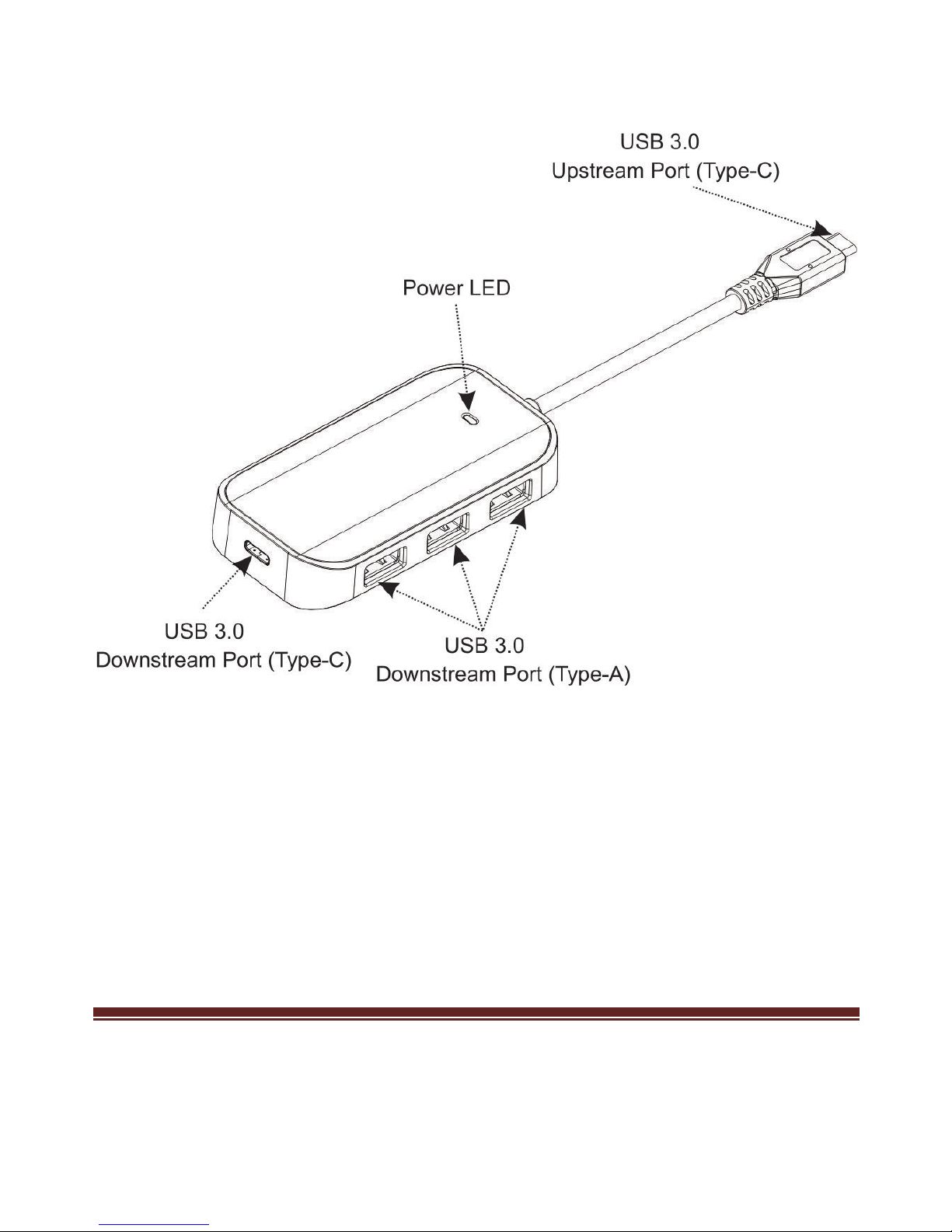
1.5 Hardware Description
Figure 1. Front
• Power LED: The light will be on when the USB 3.1 Gen 1
Type-C 4-Port Hub is powered up.
Page 5
Page 6

Chapter 2: Getting Started
2.1 Hardware Installation
1. Plug the power adapter into the power jack of the USB 3.1 Gen 1
Type-C 4-Port Hub. (If power adapter is available)
2. Plug the USB 3.1 Gen 1 Type-C 4-Port Hub into an available USB
Type-A port on your computer.
3. Upon powering up your computer, the USB 3.1 Gen 1 Type-C
4-Port Hub will be recognized by the computer’s operating system.
4. Once complete, you are ready to plug all peripheral devices into
your new USB 3.1 Gen 1 Type-C 4-Port Hub.
Page 6
 Loading...