

Page 1
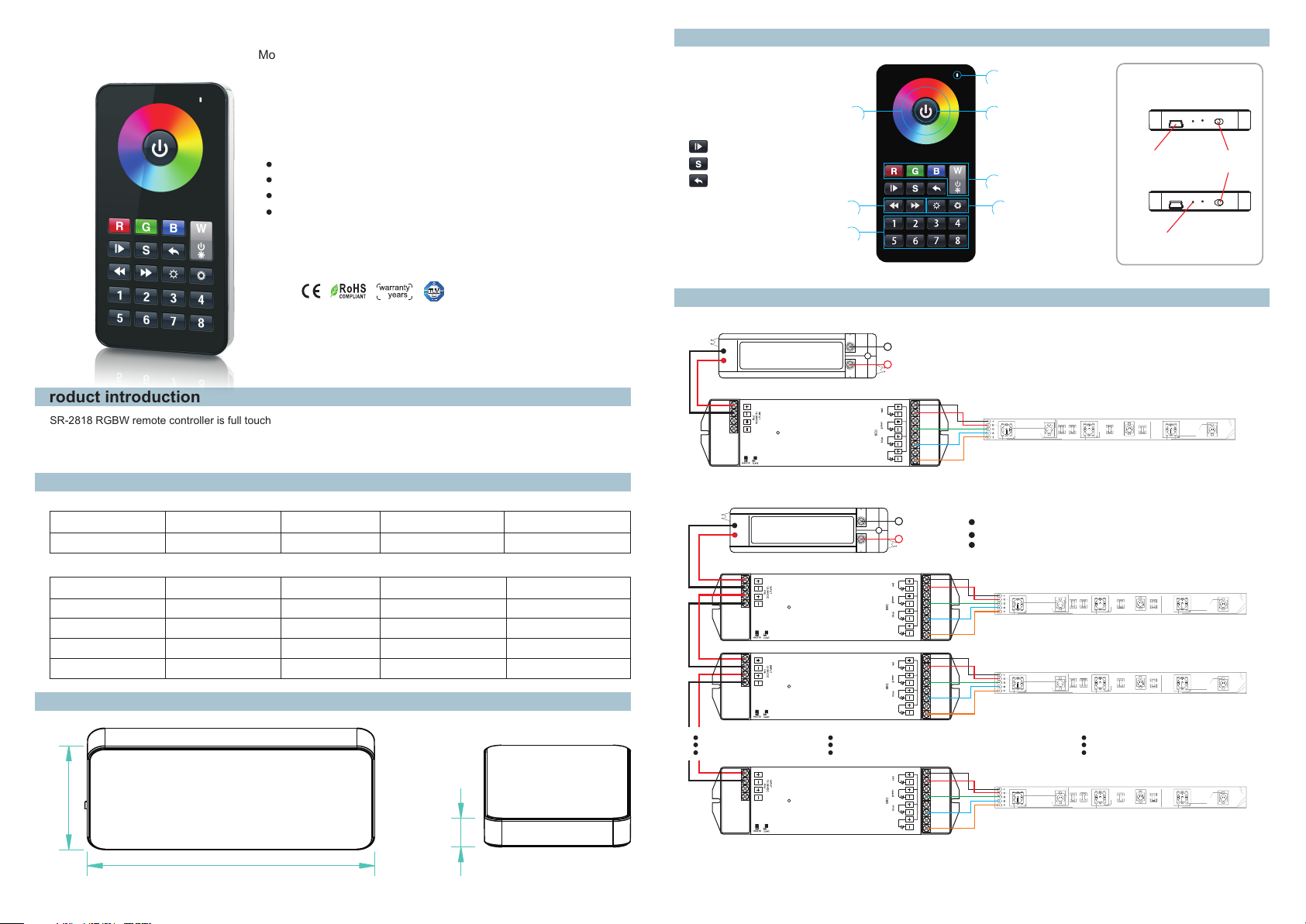
RF wireless LED remote controller
Model:SR-2818 with SR-1009Fxx
Brief introduction of buttons
Indic ato r
Botto m
Eight zones/areas
Touch button RGB+W controller
Chargeable by USB
Receivers work with WIFI-RF converter to be controlled by smart phone
5
Product introduction
SR-2818 RGBW remote controller is full touch remote controller which has 8 different zones. It can get Red/ Green/ Blue/
White color directly. The remote controller can save up to 8 colors or 8 modes into corresponding buttons (1-8 buttons)
for each zone. You can choose any color through color wheel. There is a USB port to charge internal battery.
Parameter
Remote
Part No .
Opera tio n Volt age
SR-28 18 3.7VD C
Receiver
Part No .
Input Vo lta ge
SR-10 09FA 12-36 VDC
SR-10 09E A 12-36 VDC
SR-10 09FA 3 12-36 VDC
SR-10 09FA 7 12- 36V DC
Ope rat ion
Fre que ncy
916.67MHz
Outpu t Cur ren t
4x5A
4x350mA
DIMENS ION S
ø/h ( mm)
59x115x12
Outpu t Pow er
4x(60-180)W
4x(96-288)W4x8A
4x(4.2-12.6)W
4x(8.4-25.2)W4x700mA
Remark s
Lithiu m bat tery,
USB char gin g capa bil ity
Remar ks
Consta nt voltage
Consta nt voltage
Consta nt current
Consta nt current
Product Size
Color w hee l
Play & Pa use b utt on
Save co lor b utt on
Retur n pre vio us st atu s button
Speed d own & s pee d up bu tto n
Zone bu tto n
11 22
55 66
Wiring diagram
1)Receiver Connection Diagram for Single Unit
2) Connection Diagram for Multiple UnitsReceiver
Power Supply
12-36VDC
Learning K ey
Power Supply
12-36VDC
Learning K ey
Learning K ey
SR-1009FA
LED CO NTROL LER
SR-1009FA
LED CO NTROL LER
SR-1009FA
LED CO NTROL LER
110V-230VAC
LN
1234
white
110V-230VAC
LN
1234
white
1234
white
33 44
77 88
ON/OF F but ton
USB p ort
OFF
ON
R/G/B /W bu tto n
Brigh tne ss bu tto n
Ind icato r will be o n while r emote i s charg ing.
Ind icato r will be o ff whil e it’s f ull po wer.
Note:
One rec eiv er ca n wor k wit h 1-8pcs SR-281 8
One SR- 281 8 con tro l mul tiple receive rs
The pow er su ppl y cho sen m ust be 20% higher t han t he
actua l loa d
58.8
115.4
12.0
Learning K ey
SR-1009FA
LED CO NTROL LER
1234
white
Page 2
Operation
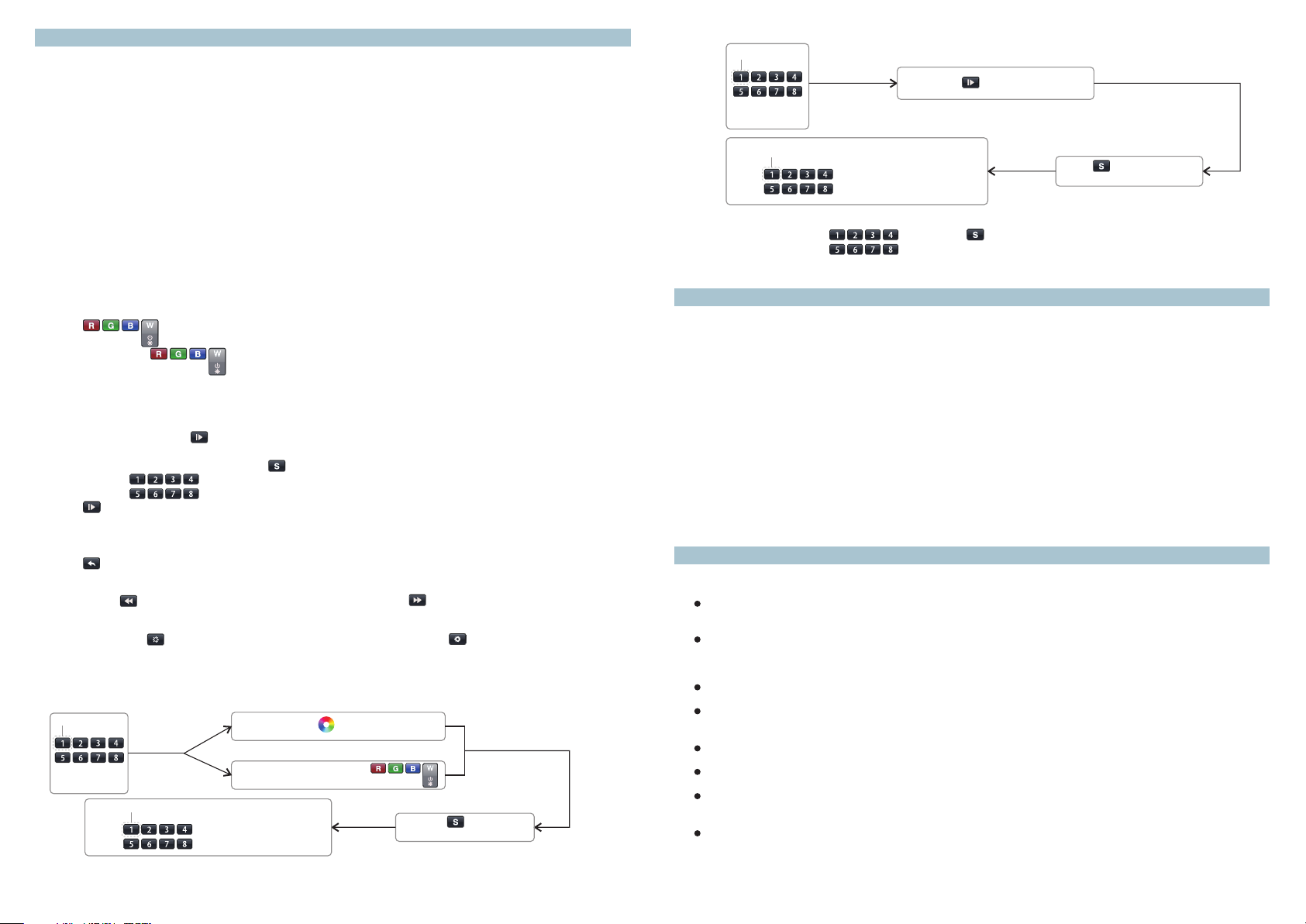
Learn ing ( mat chi ng)
a. Do wir ing a cco rdi ng to c onnection dia gra m
b. Wa ke up t he re mote control by t ouc hin g ON/ OFF b utton.
c. Pres s lea rni ng bu tto n on receiver.
d. Touc h any zone button o n rem ote c ont rol.
e. Th en touch color wh eel .
f. Conn ect ed LE D lig ht wi ll blink to confi rm zo ne de sig nation.
g. Pres s at le arn ing b utt on on receiver ov er 5 se con ds un til LED light fla sh, t hen d ele te th e learned ID .
Note 1: To c hoo se a master from sl ave s by ju mpe r for e ach zone.
Short c irc uit f or ma ste r.
Open ci rcu it fo r sla ve.
Each zo ne on ly ca n set o ne ma ster controll er. Aft er a period of time , the m ast er wi ll do s ynchronizat ion
opera tio n to ke ep th e sam e color or mode of al l sla ves i n one z one .
Note 2: E ach r emo te co ntr ol 8 zones (areas ) rec eiv ers , each area can be le arn ed as m any r ece ivers as
we can.
Each re cei ver m axi mal ly can be control led b y 8 dif fer ent r emo te co ntrollers.
RGBW Bu tto n
Touch button i s to sw itc h on/ off o f eac h cor responding co lor.
Hold yo ur fi nge r on bu tto n to dim brightne ss of e ach c orr esp onding color. There are to tal 8 l eve ls
of brig htn ess .
Note: I f you p res s R, th en pr ess G, then it is mix c olo r of R an d G. If y ou wa nt to get G color dir ect ly, pl eas e
press R t o swi tch o ff of R f irs t. Th en pr ess G .
Runni ng& Pau se Bu tto n
a.Pre ss pa use &ru n but ton ,mode will ru n. Pr ess i t onc e , it runs one mode. P res s but ton a gai n, it stops,
then pr ess o ne mo re ti me, i t will enter next m ode . The re ar e tot al 10 b uil d-in modes .
b.Pau se& run b utt on ca n work with butto n , it ca n sav e mod es into diffe rent zone.
c.Tou ch bu tto n one b y one , such as press but ton 1 ,2, 3,4 ,5, 6, then
Press b utt on. 1,2 ,3, 4,5,6 will run sy nch ron ize d mode, after lon g pre ss, L ED li ght ing will fla sh tw ice , the y wil l
switc h to ch asi ng ru nni ng mode, long pre ss ag ain t o swi tch back.
Retur n but ton
Touch but ton t o ret urn p rev ious color or run nin g mod e.
Speed u p and S pee d dow n But ton
Touch but ton t o spe ed do wn wh en mode is runnin g, to uch b utt on to speed up when m ode i s run nin g.
Brigh tne ss do wn or u p but ton
Long to uch b utt on to d im do wn brightness o f RGB c han nel s, Long touch but ton t o dim u p RGB
chann els .
“W” cha nne l is se par ate d from RGB channe ls, s o we ca n onl y long touch butt on to d imm ing “W” c hannel.
Save Bu tto n
a. Ho w to save color into different posit ion pe r zone ?
ZON E
33 44
11 22
77 88
55 66
Pre ss any zo ne
but ton you w ant
POS ITION
Cho ose pos ition ( ) to sa ve colo rany b utton
For exa mpl e, pr ess z one b utton 1, then tou ch co lor w hee l for orange colo r, the n pre ss S bu tto n (the blue
indic ato r wil l be on ),t hen choose posi tio n but ton 3 . Tha t’s t o say, we sav e ora nge c olo r from zone 1 into po sit ion 3 .
So each z one c an sa ve 8 co lor s. 8 zones can save 6 4 col ors .
11 22
55 66
11 22
55 66
33 44
77 88
33 44
77 88
Touch c olor wh eel for s elect a n ideal c olor
or
Sel ect R/G /B/W co lor by pr ess
Lon g press b utton (the bl ue
ind icato r will be o n) for sa ving
b. How to s ave mod e into di ffere nt posi tion pe r zone?
ZON E
33 44
11 22
77 88
55 66
Pre ss an y zon e
button y ou wa nt
ZON E
33 44
11 22
Choose p osi tion ( ) to sa ve mo deany butt on
55 66
77 88
Pre ss bu tto n for se lec t an id eal mo de
Press bu tto n(th e blu e
indica tor w ill be o n) fo r sav ing
c. Reca ll
33 44
Choos e zon e num ber f orm , t hen press butto n, an d pre ss th e pos ition button wh ich c olo r or
mode sa ved i nto .
11 22
55 66
77 88
Note: if th e rem ote c ont rol is not used for a l ong t ime , nee d to ch arge it every two m ont hs.
Safety & Warnings
1) Th e product shall b e ins tal led a nd serviced by a qu ali fie d per son.
2) IP20 .Pl eas e avo id th e sun and rain. Whe n ins tal led o utdoors, plea se en sur e it is m ounted in a water p roo f
enclo sur e.
3) Alway s be su re to m oun t thi s unit in an area wit h pro per v ent ilation to avoi d ove rhe ati ng.
4) Plea se ch eck i f the o utp ut voltage of any L ED po wer s upp lies used compl y wit h the w ork ing voltage of th e
produ ct.
5) Neve r con nec t any c abl es while power is o n and a lwa ys as sure correct co nne cti ons t o avoid short cir cui ts
befor e swi tch ing o n.
Pleas e ens ure t hat t he ca ble is secured ti ght ly in t he co nnector
6)
7) For up dat e inf orm ati on please consu lt yo ur su ppl ier.
8)The w arr ant y of ba tte ry is 1 year.
Warranty Agreement
1) We p rovide lifelo ng te chn ica l assistance wi th th is pr odu ct:
5-yea r war ran ty. We print dat e on ev ery p rod uct s, for example :1125 means y ear 2 011,wee k 25. The
warra nty i s for f ree r epa ir or replaceme nt an d cov ers m anufacturin g fau lts o nly.
For fau lts b eyo nd th e 5-y ear warranty we r ese rve t he ri ght to charge for t ime a nd pa rts .
2) Limi ted Wa rrenty
Any defe cts c aus ed by w ron g operation.
Any dama ges c aus ed by u nau thorized remo val , mai nte nance, modify ing , inc orr ect connectio n and
repla cem ent o f chi ps.
Any dama ges d ue to t ran spo rtation, vibr ati on et c. af ter purchase.
Any dama ges c aus ed by e art hquake, fire, l igh tni ng, p ollution and ab nor mal v olt age.
Any dama ges c aus ed by n egl igence, inapp rop ria te st oring at high tem per atu res a nd humidity or ne ar
harmf ul ch emi cal s.
Produ ct ha s bee n upd ate d
3) Repa ir or r epl ace men t as provided und er th is wa rra nty is the exclus ive r eme dy to t he cu stomer.
Page 3

This equipment has been tested and found to comply with the limits for a Class B
digital device, pursuant to part 15 of the FCC Rules. These limits are designed to
provide reasonable protection against harmful interference in a residential installation.
This equipment generates, uses and can radiate radio frequency energy and, if not
installed and used in accordance with the instructions, may cause harmful interference
to radio communications. However, there is no guarantee that interference will not
occur in a particular installation. If this equipment does cause harmful interference to
radio or television reception, which can be determined by turning the equipment off
and on, the user is encouraged to try to correct the interference by one or more of the
following measures:
• Reorient or relocate the receiving antenna.
• Increase the separation between the equipment and receiver.
• Connect the equipment into an outlet on a circuit different from that to which the
receiver is connected.
• Consult the dealer or an experienced radio/TV technician for help.
Caution: Any changes or modifications to this device not explicitly approved by
manufacturer could void your authority to operate this equipment.
This device complies with part 15 of the FCC Rules. Operation is subject to the
following two conditions: (1) This device may not cause harmful interference, and (2)
this device must accept any interference received, including interference that may
cause undesired operation.
 Loading...