

Page 1
DMX512 Decoder(with Stand-Alone)
Feature
Standard DMX512 compliant control interface, enable to set the DMX address freely.
And show address Via digital numueric display.
Stand-alone mode and DMX512 decoder mode can be freely switched by buttons.
Under situation of Stand-alone mode, it can be controlled by manual buttons with its built-in programs,
instead of DMX signal.
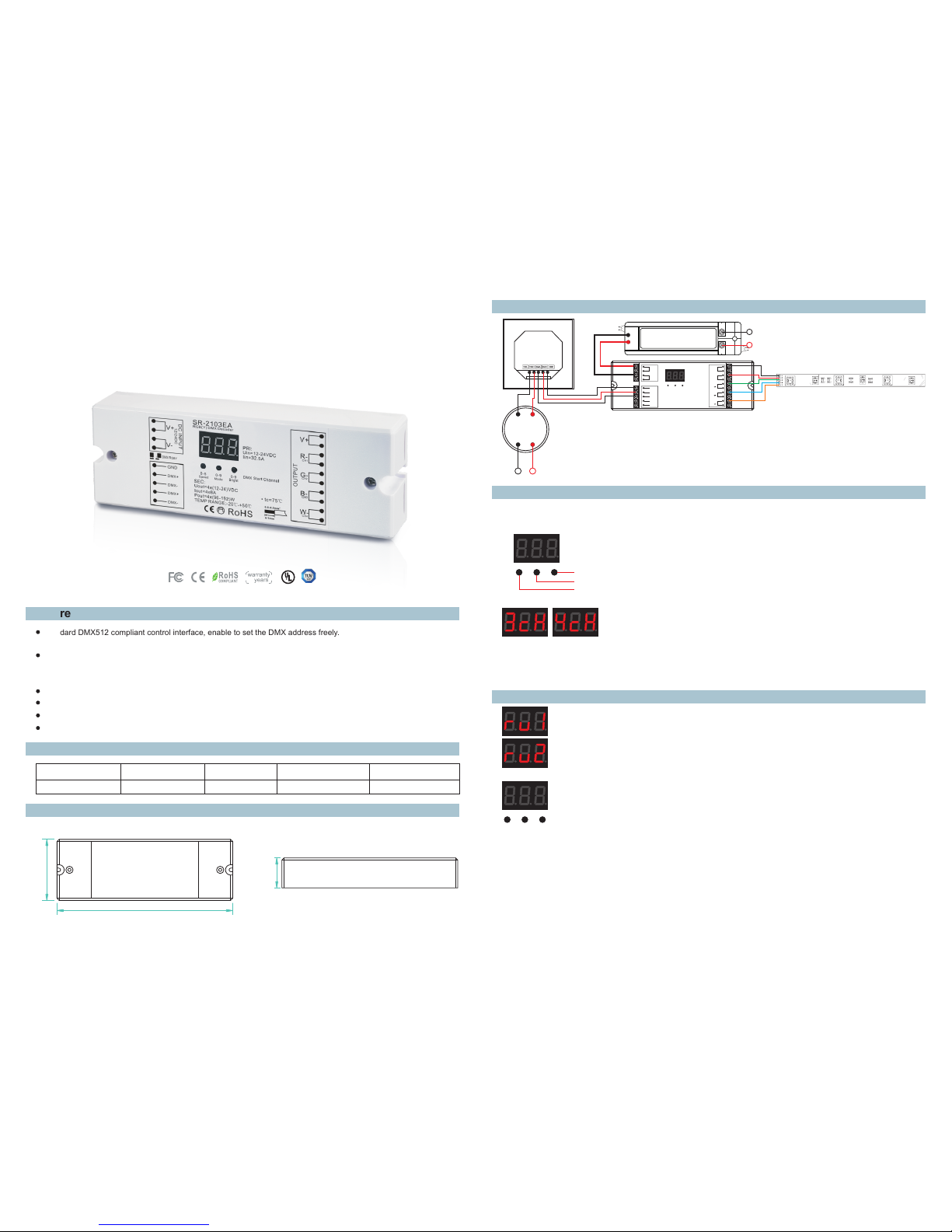
SR-2103EA
Three-channel/ four-channel output selectable.
Parameter
SR- 2103E A
12- 36VDC
4x8A
4x(96-288)W
Wiring diagram
Product Size
Two types available(Constant Voltage, Constant Current),suitable for different LED lamps.
To work with power repeater to expand output power unlimitedly.
Ope ratio n
Thr ough bu ttons t o set des ired DM X512 ad dress , 1 key is to s et “hun dreds ” posit ion, 2 is t o set “te n” posi tion, 3
is to s et “a” bi t.
“1" b utton
“2" b utton
“3" b utton
To open t he conn ectio n of DMX5 12 cont rolle r, then it c an work c orrec tly.
Using instruction
Choose Channel
Press button" 2 "and button" 3" at the same time for 2 seconds, cH digital display flashes, press button”1" to choose
3 means total 3 channels, 4 means total 4 channels. Press any button for 2 seconds to confirm 3 or 4 channels outputs.
The factory preset default is 4 channels outputs.
3/4,
Compatible with SR-2811DMX,SR-2201DMX,SR-2812,SR-2816 and any good quality DMX Master
const an t vol ta ge
Par t No.
Inp ut Volta ge
Out put Pow erOut put Cur rent
Rem arks
170
59
29
Power Supply
12-24VDC
LN
AC110-230V
DC INPUT
12/24VDC
V+
V-
V+
G-
R-
OUTPUT
CH1
2
B-3B-
3
W-
4
GND
DMX+
DMX-
DMX+
DMX-
0-90-5 0-9
DMX MA STER
Powe r Suppl y
12-2 4VDC
LN
110V-2 30VAC
SR-21 03EA
Operation
Cho ose mo de
Pre ss" 1 "a nd" 2 "key f or 2 secon ds, r , u digi tal di splay fl ashes , pres s "3 "key ch oose 1 or 2 mo de .
If th e boar d displa y ru1: sta nd-al one mo de; ru2: s laver mo de. pres s any butt on for 2 sec onds to
con fir m the mo de you nee d.
Ope rat ion un der DMX5 12 SLAVE mo de
Und er thi s mode ru2 , it is just a s tandar d of DMX51 2 decode r slave, i t can conn ect DMX5 12
MAS TER si gnal wi th DMX 512 sign al input p ort, to be c ontrol led by DMX 512 mast er.
Thr oug h butt ons to set d esired D MX512 ad dress, t he digit al nume ric di splay th e starti ng addr ess.
For e xamp le: the di gital n umer ic displ ay 001, it m eans thi s DMX slav e includ e 001,0 02,0 03,00 4
add res ses (u nder sit uatio n of 4 CH) .
Ope rat ion un der stan d-alon e mode
Und er sta nd-al one mo de ru1, it c an be oper ated as a in depend ent led co ntroll er, then ca n not
acc ept DM X input .
At st and- alone m ode, i t is just an i ndi vidu al led con troll er, no DM X in or ou t. The fun ctio n as
fol low s:I f yo u ch oos e ru1, a fter you p ress any b utton> 2seco nds to c onfirm , the thre e button s on
boa rd wil l work lik e below fu nctio ns
1 2 3
ISO9001:200 8
5
Page 2
Safety & Warnings
Warranty Agreement
1) Th e produ ct shal l be inst alled a nd serv iced by a q ualif ied per son.
2) IP 20.Pl ease av oid the s un and ra in. Whe n insta lled ou tdoor s, plea se ensu re it is mo unted i n a water p roof
enc losur e.
3) Alw ays be su re to mou nt this u nit in an a rea wit h prope r venti latio n to avoi d overh eatin g.
4) Pl ease ch eck if th e outpu t volta ge of any L ED powe r suppl ies use d compl y with th e worki ng volt age of th e
pro duct.
5) Ne ver con nect an y cable s while p ower is o n and alw ays ass ure cor rect co nnect ions to a void sh ort cir cuits
bef ore swi tchin g on.
6)
7) Fo r updat e infor matio n pleas e consu lt your s uppli er.
Ple ase ens ure tha t the cab le is sec ured ti ghtly i n the con necto r
1) We p rovid e lifel ong tec hnica l assis tance w ith thi s produ ct:
5-y ear war ranty. We p rint da te on eve ry prod ucts, f or exam ple :112 5 means y ear 2011 ,week 2 5.The
war ranty i s for fre e repai r or repl aceme nt and co vers ma nufac turin g fault s only.
For f aults b eyond t he 3-ye ar warr anty we r eserv e the rig ht to cha rge for t ime and p arts.
2) Li mited Wa rrent y
Any de fects c aused b y wrong o perat ion.
Any da mages c aused b y unaut horiz ed remo val, ma inten ance, m odify ing, in corre ct conn ectio n and
rep lacem ent of ch ips.
Any da mages d ue to tra nspor tatio n, vibr ation e tc. aft er purc hase.
Any da mages c aused b y earth quake , fire, l ightn ing, po lluti on and ab norma l volta ge.
Any da mages c aused b y negli gence , inapp ropri ate sto ring at h igh tem perat ures an d humid ity or ne ar
har mful ch emica ls.
Pro duct ha s been up dated
3) Re pair or r eplac ement a s provi ded und er this w arran ty is the e xclus ive rem edy to th e custo mer.
Cho ose cha nnel
Hol d the “Mo de” and ”Brig ht”bu tton fo r two sec onds, c H digit al disp lay fla shes, then pr ess “Sp eed”
but ton to ch oose” 3”or “4 ”,the n press a ny butt on for 2 se conds t o confi rm 3 or 4 cha nnels y ou
nee d.
Spe ed butt on
To spee d up/do wn colo r chang ing,0 -9 spee d level c yclin g chang ing,” 0”is th e maxim um spee d,
“9” is the mi nimum s peed. T he “Spe ed” but ton is on ly used u nder dy namic e ffects w hich yo u can
get f rom “Mo de” but ton.
Mod e butto n
Pre ss “Mod e” butt on to see t otal 9 dy namic e ffect s in this w ay: e ffect s1- pau se-ef fec ts2 -paus e-
eff ects3 -paus e...
Bri ght but ton
To adju st the br ightn ess,1 -8 leve l brigh tness , cycli ng,”1 ”is the l owest b right ness, ”8”is t he high est
bri ghtne ss.
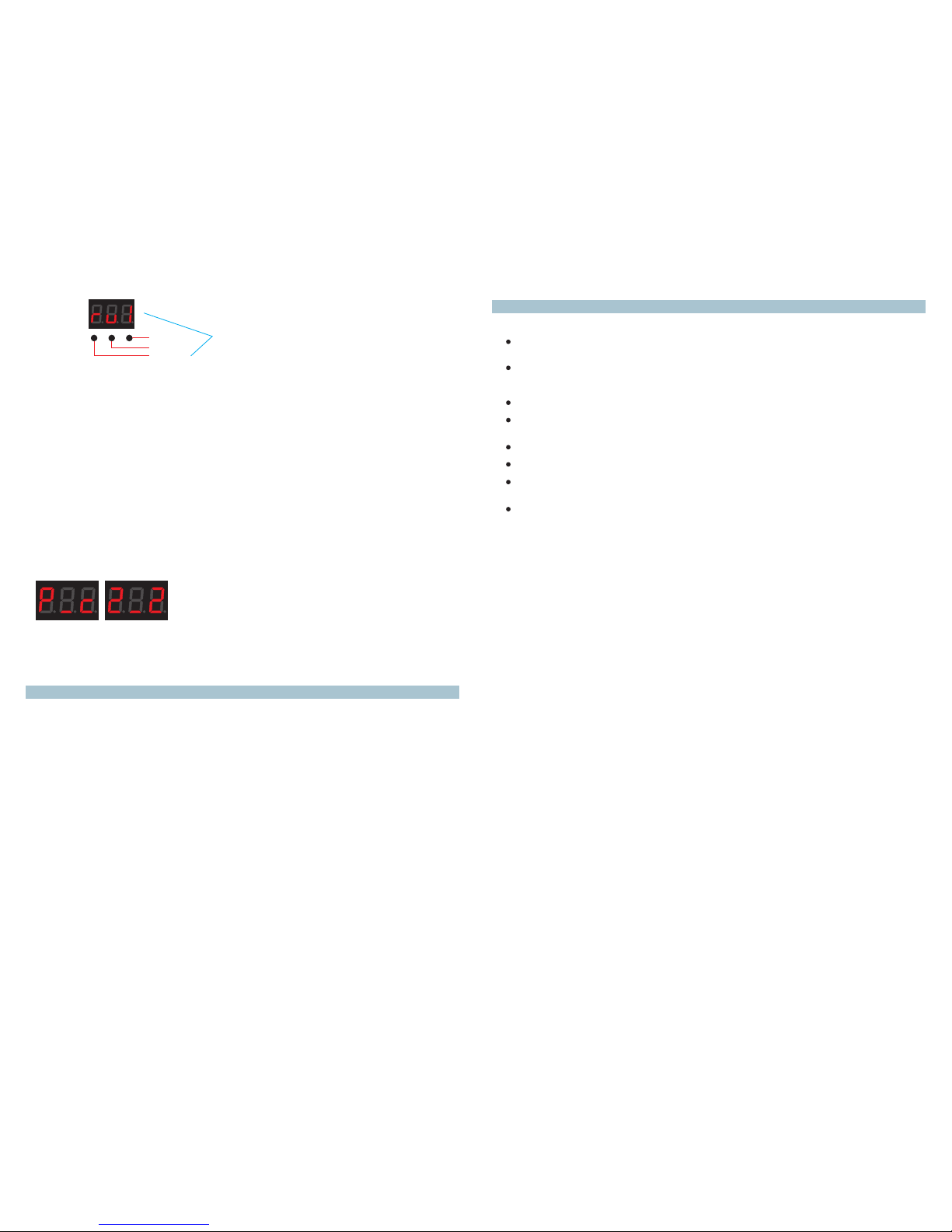
Set D MX addr ess
Pre ss 1st bu tton fo r 2 secon ds, dig ital di splay f lashe s to set th e requi red DMX a ddres s, then p ress an y butto n
for > 2 secon ds to con firm.
Cho ose PWM f reque ncy
Pre ss 1st bu tton an d 3rd but ton for 2 s econd s, digi tal dis play fl ashes t o show P- c.
P mea ns PWM fr equen cy, press 1 st to sho w "1", me ans 150 0Hz, "2 " means 2 00Hz.
c mea ns dimm ing opt ions, p ress 3r d to show " 1", mea ns loga rithm ic dimm ing, "2 " means l inear d immin g.
The f actor y prese t defau lt is PWM f reque ncy 200 Hz with l inear d immin g. 2-2
“1" b utton
“2" b utton
“3" b utton
Onl y under “ ru1” st and-a lone mo de
 Loading...