

Page 1
Quick start
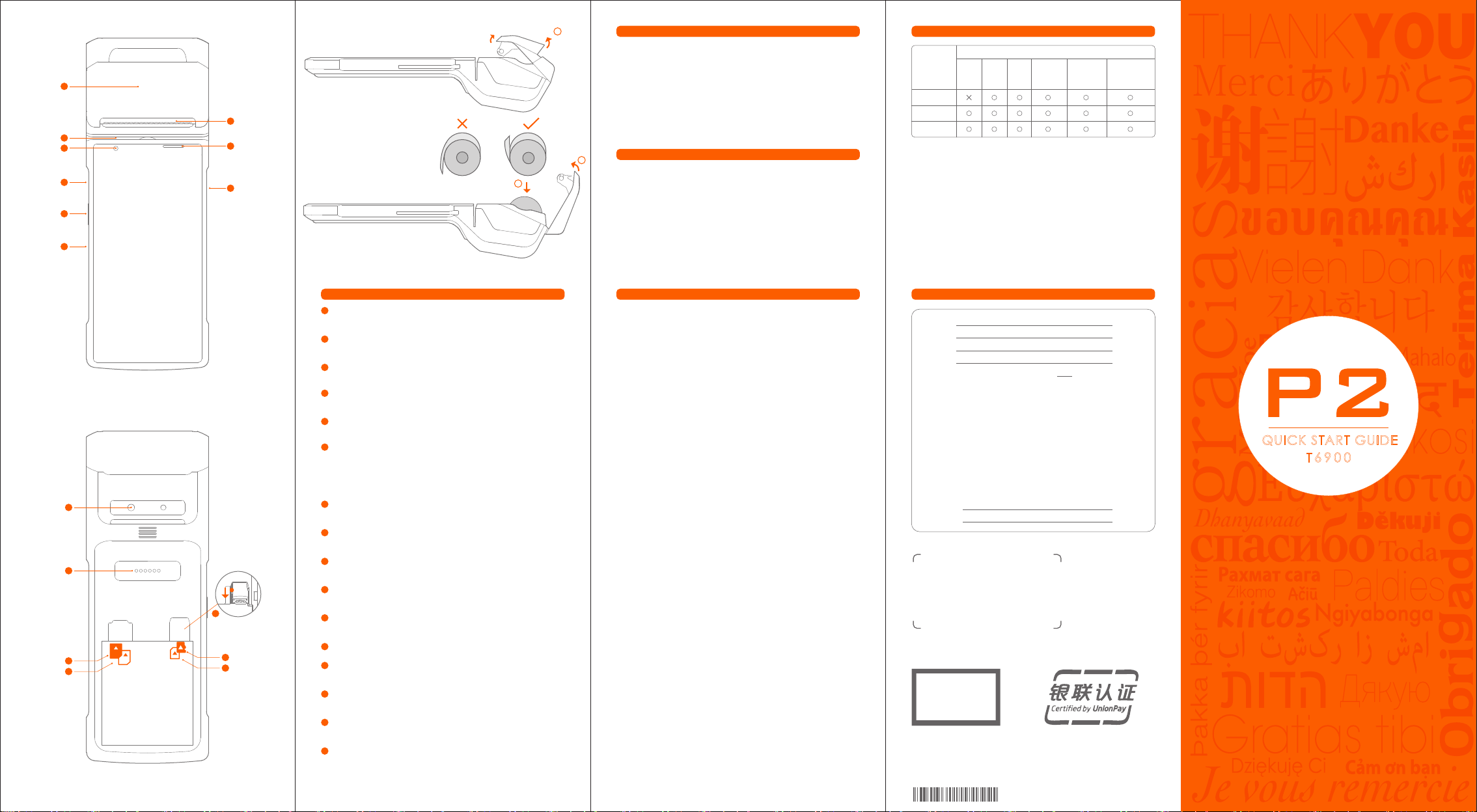
1
NFC reader
Used for sensing Quick Pass Card.
2
Magnetic card reader
Used for reading the information stored in the magnetic
stripe of bank card.
3
Front-facing camera (optional)
Supports photographing and 1D/2D code quick scanning.
Type-C USB
4
Used for charging equipment and debugging by developers.
Function Key
5
Used for customized function.
Power button
6
Short press: wake up the screen, lock the screen.
Long press: long press for 2-3 seconds in power off mode to
switch on the device.
Long press for 2-3 seconds in normal operation
mode to select power off or reboot.
Long press for 11 seconds when system is frozenfor
automatic reboot.
7
Printer
For printing sales slips in power on mode.
8
Indicator lamp
Used for indicating the steps for swiping card.
IC Card socket
9
Used for inserting the bank chip card.
10
Rear camera
Supports photographing and 1D/2D code quick scanning.
11
Extend pins
To connect to dock.(Need to buy dock separately)
12
Slide down the metal buckle and take out the Nano SIM
13
SIM card slot (PSAM optional)
Used for inserting the SIM Card(PSAM optional)
14
P-SAM card slot
Used for inserting the P-SAM Card.
15
Micro SD card slot
Used for inserting extend SD card.
16
Nano SIM card slot
Used for inserting Nano SIM card.
Printing instructions
This device supports 58mm thermal paper with the specifications
of 57±0.5mm*Ø40mm.
① Please open the paper container with the uncovering handl ,
Please do not force open the paper container to avoid print
head gear wear;
② Feed the paper correctly into the paper container in the
direction as shown, and pull some paper outside the cutter;
③ Close the cover of the paper container to finish printing paper
feeding .
Note: If the printed paper is blank, please check whether the
paper roll has been installed in the correct direction.
Notices
Safety Warning
Connect the AC plug to the AC socket corresponding to the
marked input of the power adapter;
To avoid injury, unauthorized persons shall not open the power
adapter;
This is a Class A product. This product may cause radio
interference in living environments.
In that case, the user may be required to take adequate
measures against interference.
Battery replacement:
1.Explosion danger may arise if replacing with the wrong
battery!
2.The replaced battery shall be disposed of by maintenance
personnel, and please do not throw it into fire!
Significant Safety Instructions
Do not install or use the device during lightning storms to avoid
the potential risks of lightning shock;
Please turn off the power immediately if you notice abnormal
odor, heat or smoke;
The paper cutter is sharp, please do not touch!
Suggestions
· Do not use the terminal near water or moisture to prevent
liquid from falling into the terminal;
Do not use the terminal in extremely cold or hot environments,
such as near flames or lit cigarettes;
Do not drop, throw or bend the device;
Use the terminal in a clean and dust-free environment if possible
to prevent small items from falling into the terminal;
Please do not use the terminal near medical equipment without
permission.
Statements
The Company does not assume responsibilities for the following
actions:
Damages caused by use and maintenance without complying
with the conditions specified in this guide;
The Company will not assume any responsibilities for the
damages or problemscaused by optional items or consumables
(rather than the initial products or approvedproducts of the
Company). The customer is not entitled to change or modify the
product without our consent.
The product’s operating system supports official systemupdates,
but if you change the operating system into a third party ROM
system or alter the system files by system cracking, it may cause
system instability and security risks and threats.
Disclaimer
As a result of product upgrading, some details in this document
may not match the product, and the actual product shall
govern. The Company reserves the right of interpretation of this
document. The Company also reserves the right toalter this
specification without prior notice.
Table for Names and Content Identification of Toxic and
Hazardous Substances in this Product
Part Name
Circuit Board Component
Structural Component
Packaging Component
indicates that the content of the toxic and hazardous substance in all
:
homogeneous materials of the component is below the limit specified in
SJ/T 11363-2006.
indicates that the content of the toxic and hazardous substance in at least
:
one homogeneous material of the component exceeds the limit stipulated
in SJ/T 11363-2006. However, as for the reason, because there is no mature
and replaceable technology in the industry at present.
The products that have reached or exceeded environmental protection
service life should be recycled and reused according to the Regulations on
Control and Management of Electronic Information Products, and should not
be discarded randomly.
Toxic or Hazardous Substances and Elements
Pb Hg Cd
Cr(VII)
PBB PBDE
This device complies with Part 15 of the FCC Rules. Operation is subject to the
following two conditions:
(1) This device may not cause harmful interference.
(2) This device must accept any interference received, including
interference that may cause undesired operation.
FCC ID: 2AH25T6900
NOTE: Changes or modifications not expressly approved by the party
responsible for compliance could void the user's authority to operate the
equipment.
NOTE: This equipment has been tested and found to comply with the limits for
a Class B digital device, pursuant to Part 15 of the FCC Rules.
These limits are designed to provide reasonable protection against harmful
interference in a residential installation. This equipment generates uses and
can radiate radio frequency energy and, if not installed and used in
accordance with the instructions, may cause harmful interference to radio
communications. However, there is no guarantee that interference will not
occur in a particular installation.
If this equipment does cause harmful interference to radio or television
reception, which can be determined by turning the equipment off and on,
the user is encouraged to try to correct the interference by one or more of
the following measures:
---Reorient or relocate the receiving antenna.
---Increase the separation between the equipment and receiver.
---Connect the equipment into an outlet on a circuit different from that to
which the receiver is connected.
---Consult the dealer or an experienced radio/TV technician for help.
Body-worn Operation
This device was tested for typical body-worn operations. To comply
With RF exposure requirements, a minimum separation distance of 5mm
must be maintained between the user’s body and the handset, including the
antenna.
Third-party belt-clips, holsters, and similar including the antenna.
Third-party belt-clips, holsters, and similar accessories used by this device
should not contain any metallic components. Body-worn accessories that do
not meet these requirements may not comply with RF exposure.
This smart POS system meets the government's requirements for exposure to
radio waves.
The guidelines are based on standards that were developed by
independent scientific organizations through periodic and thorough
evaluation of scientific studies. The standards include a substantial safety
margin designed to assure the safety of all persons regardless of age or
health.
FCC RF Exposure Information and Statement. The SAR limit of USA (FCC) is
1.6W/kg averaged over one gram of tissue.
Device types: T6900 has also been tested against this SAR limit.
The highest SAR value reported under this standard during product
certification when properly worn on the body is 2.586W/kg(10gSAR, test
distance:0mm,limit 4W/kg)and 1.262W/kg (1gSAR, test distance:5mm
,limit 1.6W/kg). This device was tested for body-worn operations with the
back of the handset kept 0mm and 5mm from the body. To maintain
compliance with FCC RF exposure requirements, use accessories that
maintain a 0mm and 5mm separation distance between the user's body and
the back of the handset. The use of belt clips, holsters and similar accessories
should not contain metallic components in its assembly. The use of
accessories that do not satisfy these requirements may not comply with FCC
RF exposure requirements, and
should be avoided.
Technical features and characteristic
Transmitted
32.5 dBm
29.5 dBm
23 dBm
23 dBm
23 dBm
22.5 dBm
22 dBm
23 dBm
23 dBm
23 dBm
23 dBm
13 dBm
5.5 dBm
4 dBm
19 dBm
GSM 850
GSM 1900
WCDMA BAND II
WCDMA BAND IV
WCDMA BAND V
LTE BAND 2
LTE BAND 4
LTE BAND 5
LTE BAND 7
LTE BAND 17
LTE BAND 41
WIFI
BT
BLE
5G WIFI
NFC
Operation Frequency
824-849 MHz
1850-1910 MHz
1850-1910 MHz
1710-1755 MHz
824-849 MHz
1850-1910 MHz
1710-1755 MHz
824-849 MHz
2500-2570 MHz
704-716 MHz
2496-2690 MHz
2412-2462 MHz
2402-2480 MHz
2402-2480 MHz
5150MHz-5825MHz
13.56 MHz
Manufacture
Shanghai Sunmi Technology Co., Ltd.
Room 505 No.388 Song Hu Road Shanghai, China
Page 2

PANTONE 165C
制作工艺说明
成品尺寸:80mm × 220mm
展开尺寸:400mm × 220mm
工艺:黑色印刷+2专,五折页
材质:108g 雅粉纸
PANTONE Orange 021C
Page 3
1
T6900_CN_EU_US_02
打印说明
本机支持 58mm 热敏打印纸,规格为 57±0.5mm×Ø40mm
·请通过开盖提手开启打印纸仓(图示①),勿强行打开纸仓,防止打印头齿
1
轮磨损;
·按照图示方向,将打印纸正确放入纸仓,并拉出部分纸至切刀外(图示 ②);
·盖好纸仓盖,打印纸安装完成(图示③)。
7
2
3
4
8
9
2
注意:如果打印内容空白,请检查纸卷方向是否放反。
3
系统预置软件列表
· 应用市场 · 推送服务 · 用户反馈 · 数据服务 · 启动器 · 硬件管家
· 功能键自定义 · BaseService · 定制服务(壁纸、开机动画)
· 开发者指南(调试小助手) · 使用指南 · 开机指导 · 远程协助 · OTA
5
以上软件详细信息查询方法:选择“设置->应用”,选择相应软件名称进
行查看信息;
6
软件卸载方法:选择“设置->应用->管理应用->卸载”卸载应用;
或长按图标,拖曳到垃圾桶卸载。
本产品有毒有害物质名称及含量标识表
有毒有害物质或元素
部件名称
电路板组件
结构件
包装件
铅
(Pb)汞(Hg)镉(Cd)
六价铬
(Cr(VII)
多溴联苯
(PBB)
多溴二苯醚
(PBDE)
○:表示该有毒有害物质在该部件所有均质材料中的含量均在
SJ/T11363-2006规定的限量要求以下。
X:表示该有毒有害物质至少在该部件的某一均质材料中的含量超出
SJ/T11363-2006规定的限量要求;但是上表中打“×”的部件,其含
量超出是因为目前业界还没有成熟的可替代的技术。
对达到或超出环保使用年限的产品,应依据《电子信息产品控制管理办
法》规定进行回收再利用,不应随意丢弃。
快速入门指南
1
NFC 读卡器
用于感应闪付卡。
2
磁卡读卡器
用于刷银行卡磁条信息。
3
前置摄像头(可选)
支持拍照及1D/2D快速扫码。
4
Type-C 接口
可用于给设备充电和开发者调试使用。
5
功能定义键
快捷进入相应功能。
6
电源键
短按:点亮屏幕,锁定屏幕。
长按:关机状态下,长按 2-3 秒开机;
使用状态下,长按 2-3 秒,可选择关机或重启;
死机状态下,长按 11 秒,自动重启。
7
10
11
12
2
13
14
1
15
16
打印机
用于开机状态下打印单据。
8
指示灯
用于提示刷卡业务步骤。
IC卡读卡器
9
用于插入银行芯片卡。
10
后置摄像头
支持拍照及1D/2D快速扫码。
11
扩展接口
用于链接底座。(此配件需要额外购买)
12
向下滑动金属扣,取出Nano SIM
13
P-SAM卡槽(SIM卡可选)
用于插入PSAM卡(SIM卡可选)。
14
P-SAM卡槽
用于插入PSAM卡。
15
Micro SD卡槽
扩展SD卡接口。
16
Nano SIM卡槽
打开电池盖,取出电池,按图示方向插入SIM卡。
(SIM卡支持移动:2G/3G/4G、联通:2G/3G/4G、电信:3G/4G)
注意事项
安全警告
· 请将交流电插头插入与配件电源适配器上标识输入相对应的交流电插
座中;
· 此为A级产品。在生活环境中,该产品可能会造成无线电干扰。
在这种情况下,可能需要用户对于干扰采取切实可行的措施。
· 关于电池的更换:
① 用错误型号电池更换会有爆炸危险!
② 更换后的旧电池应交维修人员处置,切勿把它投入火中!
重要安全说明
· 避免在雷电期间安装或使用,否则有被雷电电击的危险;
· 当您发现有异常气味,过热或烟雾情形下,请立刻切断电源;
· 撕纸刀较锋利,请勿触碰!
建议
· 不要在极端冷、热环境中使用,例如靠近火源或点燃的香烟;
· 不要摔、投掷或弯折;
· 尽量在清洁无尘环境中使用,避免细小物品落入终端中;
· 在未获允许的情况下,不要在医疗设备附近使用。
声明
本公司不对以下行为负责
· 不在本指南说明的条件下使用和维护所造成的损坏;
· 对于因选件或耗材(非本公司提供之最初产品或认可产品)造成的损坏
或问题;(未经本公司同意,无权进行产品修改或变动)
· 本产品的操作系统支持官方的系统更新,如果用户刷了第三方的ROM
系统或者采用破解方式修改了系统文件,可能会导致系统不稳定,以
及带来安全风险和安全威胁。
免责申明
由于产品的更新,此文档的某些细节可能与产品不符,请以实物为准,
此文档的解释权归本公司。保留不预先通知的情况下,修改本说明书的
权利。
产品保修卡
产品名称:
产品型号:
产品编号:
购买日期:
保修期限:自购买之日起,我公司提供 天保修服务。
以下情况恕不提供免费保修:
· 未经允许擅自拆卸修理的产品。
· 产品条码、易碎贴破损及保修卡涂改、残缺的。
· 未按照说明书的要求操作设备所引起的故障。
· 因进水或跌落而造成的故障、划伤或破损的人为损坏。
· 因不可抗拒因素造成的故障或损坏。
· 保修期限外。
联系方式:
· 公司地址:
· 联系电话:
产品合格证
产品合格证
检验合格
制造商:上海商米科技集团股份有限公司
地 址:上海市杨浦区淞沪路388号创智天地7号楼605室
QUICK START GUIDE
T6900
K7612000124L
T6900_CN_EU_01
 Loading...