

Page 1

Sun Stor Edge
™
Network Data Replicator 3.0
Config urat ion Gui de
Sun Microsystem s, Inc.
901 San Antonio Road
Palo Alto, CA 94303-4900 U.S.A.
650-960-1300
Part No. 806-7550-10
June 2001, Revision A
Send comments about this document to: [email protected]
Page 2

Copyright 2001SunMicrosystems,Inc.,901SanAntonioRoad•PaloAlto,CA 94303USA. Allrights reserved.
Thisproductor document is protectedb y copyright and distributedun der licensesrestrictingits use, copying,distribution, and
decompilation. No part ofthis productor document may be reproducedin any form by any means withoutprior written authorization
of Sunand itslicensors,ifany.Third-partysoftware, includingfont technology,is copyrightedand licensedfromSun suppliers.
Partsof the productm ay be derived fromBerkeley BSD systems, licensed from the University of California. UNIX isa registeredtrademark in
the U.S. and othercountries, exclusively licensed through X/Open Company, Ltd.
Sun, Sun Microsystems, the Sun logo, Sun StorEdge, Sun Enterprise, Solstice Disksuite, Sun Trunking,SunScreen, AnswerBook, and Solaris are
trademarks, registeredtrademarks, or service marks of Sun Microsystems, Inc. in the U.S. and other countries.
The OPEN LOOK and Sun™ Graphical User Interface wasdeveloped bySunM icrosystems, Inc. for its users andlicensees. Sunacknowledges
the pioneering efforts of Xerox in researching and developing the concept of visual or graphicaluser interfaces for the computer industry.Sun
holds a non-exclusive license from Xerox to the Xerox Graphical User Interface, which license alsocovers Sun’s licensees who implement OPEN
LOOK GUIs and otherwise comply with Sun’s written licenseagreements.
RESTRICTEDRIGHTS: Use,duplication,or disclosureby the U.S. Government is subject to restrictions of FAR52.227-14(g)(2)(6/87)and
FAR52.227-19(6/87),o r DFAR 252.227-7015(b)(6/95)and DFAR227.7202-3(a).
DOCUMENTATION IS PROVIDED “AS IS” AND ALL E XPRESS OR IMPLIED CONDITIONS,REPRESENTATIONSA ND WARRANTIES,
INCLUDING ANY IMPLIED WARRANTY OF MERCHANTABILITY, FITNESS FOR A PARTICULAR PURPOSE OR NONINFRINGEMENT, ARE DISCLAIMED, EXCEPT TO THE EXTENT THAT SUCH DISCLAIMERS ARE HELD TO BE LEGALLY INVALID.
Copyright 2001SunMicrosystems,Inc.,901SanAntonioRoad•PaloAlto,CA 94303Etats-Unis.Tousdroitsréservés.
Ce produit ou document est protégé par un copyright etdistribué avec des licences qui en restreignent l’utilisation, la copie, la distribution, et la
décompilation.Aucune partiede ce produit ou documentne peut être reproduite sousaucune forme, par quelquemoyen que ce soit, sans
l’autorisation préalable et écrite de Sun et de ses bailleurs de licence, s’il y en a. Lelogiciel détenu par des tiers, et qui comprend la technologie
relativeaux polices de caractères, est protégéparun copyr ight et licencié par des fournisseursde Sun.
Des parties de ce produit pourront être dérivées des systèmes Berkeley BSD licenciés par l’Université de Californie. UNIX est une marque
déposée auxEtats-Unis et dans d’autresp ays et licenciée exclusivement par X/Open Company, Ltd.
Sun, Sun Microsystems, le logo Sun, Sun StorEdge, Sun Enterprise, Solstice Disksuite, Sun Trunking,SunScreen, AnswerBook, et Solaris sont
des marques de fabriqueou des marquesdéposées, ou marques de service, de Sun Microsystems, Inc.aux Etats-Unisetdansd’autrespays.
Toutes les marques SPARC sont utilisées souslicence et sont des marques defabrique ou des marques déposées de SPARC International,Inc.
auxEtats-Uniset dansd’autrespays. Lesproduitsportantles marquesSPARCsont baséssur unearchitecturedéveloppéepar Sun
Microsystems,Inc.
L’interfaced’utilisation graphique OPEN LOOK et Sun™ a été développée par Sun Microsystems, Inc. pour ses utilisateurs et licenciés. Sun
reconnaît les efforts de pionniersde Xerox pour la recherche et le développement du concept des interfaces d’utilisation visuelleou graphique
pour l’industriede l’informatique. Sun détient une licence non exclusive de Xeroxsur l’interface d’utilisationgraphique Xerox, cette licence
couvrant également les licenciés de Sun qui mettent en place l’interfaced’utilisation graphique OPEN LOOK et qui en outre se conforment aux
licencesécr ites de Sun.
CETTE PUBLICATION EST FOURNIE "EN L’ETAT" ET AUCUNE GARANTIE, EXPRESSE OU IMPLICITE, N’EST AC CORDEE, Y
COMPRIS DES GARANTIES CONCERNANT LA VALEUR MARCHANDE, L’APTITUDE DE LA PUBLICATION A REPONDRE A UNE
UTILISATION PARTICULIERE, OU LE FAIT QU’ELLE NE SOIT PAS CONTREFAISANTE DE PRODUIT DE TIERS. CE DENI DE
GARANTIE NE S’APP LIQ UERAIT PAS, DANS LA MESURE OU IL SERAIT TENU JURIDIQUEMEN T NUL ET NON AVENU.
Please
Recycle
Page 3

Contents
Preface v
1. Overview 1
Sun SNDR So ftware Description 1
Supported Hardware and Software 3
TCP/IP Connection Hardware Components 3
Network Multipathing 4
Applications 5
Architecture 5
2. Configuration Considerations 7
Volumes Eligible for Replication 7
Choosing Volume Level Protection 8
Bitmap Volumes for Scoreboard Logs 8
Choosing a Connection M edium to Link My Sites 9
ATM Link Advantages 9
Configuring Redundant Links Between Sites 10
Link Security 10
Choosing Between Synchronous and A synch ronou s Replication 11
When To Suspend Replication to the Second ary Site 12
iii
Page 4

Configuring The Sun SNDR Software f or Mutual Replication 12
Order-Dependent Writes and Volume Set Grouping 13
Recovery Considerations 14
Failing Over to the Secondary Site 14
Recovering th e Primary or Secondary Site 14
Using The Sun SNDR and Sun StorEdge Instant Image Software 16
Sun SNDR So ftware and Sun StorEdge Fa st Write Cache So ftware 17
One-to-Many and Multihop Volume Sets 18
Using The Sun SNDR Software in a Firewall Environment 19
iv Sun StorEdge Network Data Replicator 3.0 Configuration Guide • June 2001
Page 5

Preface
The Sun StorEdge Network Data Replicator 3.0 Configuration Guide describes the Sun
StorEdge™ Network Data Replicator (Sun SNDR) software and general informat ion
about its use. T his guide is intended for system administrators who have experience
with the Solaris™ op erating environment and related disk storage systems.
Before You Rea d T his Book
To fully use the information in th is documen t, you must have thorough knowledge
of the topics discussed in these books:
■ Sun StorEdge Network D ata Replicator 3.0 System Admi nistrator’s Guide
■ Sun StorEdge Network Data Replicator 3.0 Installation Guide
■ Sun StorEdge Network Data Replicator 3.0 Release Notes
The Sun SNDR software must be inst alled as describ ed in the installation and release
documentation.
v
Page 6

Using UNIX Commands
This document may not contain information on basic UN IX®commands and
procedures such as shutting down the system, booting the system, and configuring
devices.
Refer to the software documentation that you received with your system.
Documentation Conventions
Typeface or
Symbol Meaning Examples
AaBbCc123 The nam es of commands,
files, and directories;
on-screen compu ter output.
AaBbCc123
AaBbCc123 Book titles, new words or
[ ] In syntax, brackets indicate
{ arg | arg} In syntax, braces and pipes
What you type, when
contrasted with on-screen
computer output.
terms, words to be
emphasized.
Command-line variable;
replace with a real nam e or
value.
that an argument is o ptional.
indicate that one of the
arguments mu st be specified.
Edit your .login file.
Use ls -a to list all files.
% You have mail.
% su
Password:
Read C hapte r 6 in the User’s Guide.
These are called class options.
You must be root to do this.
To delete a file, type rm filename.
scmadm [–d sec ][–r n[:n][,n]...] [–z]
sndradm -b
{phost | shost}
vi Sun StorEdge Network Data Replicator 3.0 Configur ation Gu ide • June 2001
Page 7

Shell Prompts
Shell Prompt
Cshell machine_name%
Cshellsuperuser machine_name#
Bourne shell an d Korn shell $
Bourne shell and Korn shell superuser #
Related Documentation
Application Title Part Number
man pages sndradm
scmadm
svadm
iiadm
Latest information SunStorEdgeNetworkDataReplicator3.0Software
Notes
Sun StorEdge Instant Image 3.0 Release Notes 806-7678
Install a tion and User SunStorEdgeNetworkDataReplicator3.0
Installat io n Guide
Sun StorEdge Instant Image 3 .0 Installation Guide 806-7675
SunATM 3.0 Installation and User’s Guide
Sun ATM 4.0 Installation and User’s Guide
Sun Gigabit Ethernet FC-AL/P Combination Adapter
Installat io n Guide
Sun Gigabit Ethernet/S 2.0 Adapter Installation and
User’s Guide
Sun Gigabit Ethernet/P 2.0 Adapter Installation and
User’s Guide
Sun Trunking 1. 2.1 Installation and User's Guide 806-4207
N/A
806-7513
806-7514
805-0331
805-6552
806-2385
805-2784
805-2785
Preface vii
Page 8

Application Title Part Number
Platform Notes: The Sun Qu ad FastEthernet Devic e
Driver
Sun Enterprise 10000 InterDomain Networks User
Guide
System adm in istratio n Sun StorEdge Instant Image 3 .0
System Adm inistrator’s G uide
SunStorEdgeNetworkDataReplicator3.0
System Adm inistrator’s G uide
TCP/IP and Data Com m unications Administrat ion
Guide
SunScreen 3.1 Administration Guide 806-4127
Solaris Bandwidth Manager 1.6 System
Administrati on Guide
Configuration Sun Enterprise 10000 InterDomain Network
Configuration Guide
Sun StorEdge Instant Im age 3.0 Configuration Guide 806-7676
806-3989
806-4131
806-7677
806-7512
805-4003
806-4704
806-5230
viii Sun StorEdge Network Data Replicator 3.0 Configuration Guide • June 2001
Page 9

Accessing S un Doc ume ntation Online
A broad selection of S un system documentation is located at:
http://www.sun.com/products-n-solutions/hardware/docs
A compl ete set of Solari s documentati o n and many other titles are located at:
http://docs.sun.com
For the late st v ersion of released storage software docu mentation, go to:
http://www.sun.com/products-n-solutions/hardware/docs/Software/
Ordering Sun Do cumentation
For the latest version of st orage sof tware documentation, go to:
http://www.sun.com/products-n-solutions/hardware/docs/Software/
Fatbrain.com, an Internet professional bookstore, s tocks select product
documentation from Sun Microsystems, Inc.
For a list of docum ents and how to order them, visit the Sun Documentation Center
on Fatbrain.com at:
http://www.fatbrain.com/documentation/sun
Sun Welcomes Your C omm en ts
Sun is interested in improving its documentation and welcomes your comments and
suggestions. You can email your comments to Sun at:
Please include Part No. 806-7550-10 in the subject line of your email.
Preface ix
Page 10

x Sun StorEdge Network Data Replicator 3.0 Configuration Guide • June 2001
Page 11

CHAPTER
1
Over v iew
Caution – Do not install or use the Sun StorEdge Ve rsion 3.0 C ore and d ata services
software on server s in a Sun Cluster 3.0 e nv ironm ent . The Version 3.0 software i s
not co-existe nt with the Su n Cluster 3.0 environment. The Version 3.0 software is
co-existent in the Sun Cluster 2.2 environment, where it will not interfere with
failover. The Version 3.0 core and data s er vices softw are i s c l uster aware in the Sun
Cluster 3.0 Update 1 environment and provides high availability for the Sun
StorEdge software.
Sun SNDR Software Description
The Sun SDNR software is a remote replication facility for the Solaris™ operat ing
environment. It is intended for use as part of a disaster recovery and business
continuance plan to provide redundant storage of critical information across
physically separate sites. It is design ed to be activ e during normal application access
to the data volumes, and it will continually replicate the data to the remote site.
The Sun SDNR softw are enables you to replicate d isk volumes between physically
separate primary and secondary hosts in real time. To tr a nsport da ta, the Su n SDNR
software uses any Sun ne twork adapter that supports TCP /I P.
The Sun SNDR software volume set con sists of a primary volume residing on a local
host and a sec ondary volume residing on a remote ho st. The volume set also
includes a bitmap volume on ea ch h ost to tra ck w rite operat ions and differences
between t he volumes.
Youcanupdatethedataonthesecondaryvolumebyissuingacommandto
resynchronize the volumes. You can also restore data from the secondary volume to
the primary volume b y issuing a command to reverse resynchronize the volumes.
1
Page 12

The replication mod e can be synchronous or asynchronous based as a user-selectable
parameter for each Sun SNDR v olume set. ( Use the sndradm enable command an d
select the sync or async parameter Use the sndradm -R m comm and to change
the replicati o n m o de thereafter.) The volu m es can be updated synchronously i n rea l
time or asynchronously using a store-and-forward technique.
Typically, a primary volume is first explicitly copied to a designated secondary
volume to establish matching cont ents. As applications write to t he primary volume,
the Sun SDNR software replicates changes to the secondary volume, ke eping the two
volumes consist ent .
■ In synchronous mode, a write operation is not confirmed as complete until the
remote volume has been updat ed. Sy nchronous mirroring forces the Sun SNDR
software to wait un til an acknowledgement of the receipt of the data is receive d
from the secondary by the primary before returning t o the a pplication.
■ In asynchronous mode, a write operation is confirmed as complete before the
remote volume has been up dated. Asynchronous m i r roring al l o ws the Sun SN D R
software to return to the host as soon as the write has been completed on the
primary volume and been placed on a per volume queue for the secondary site.
Subsequ ently, the secon dar y site receives the queued requests i n the order that
they were queued. Once the I / O has been c o m p l eted at the secondary site,
notificati o n is sent to the primary.
In the event of planned or unplanned outages, the Sun SNDR software maintains
per-device scoreboard bitmap volumes that are marked to indicate chang ed blocks
with a granularity of 32 K bytes pe r se gment. T his techn ique allow s f or optim ized
resynchroniza tio n by allowing the Sun SNDR software to resyn c hro ni ze only the
blocks that have ch anged.
OtherfeaturesincludedaspartoftheSunSNDRsoftwareare:
■ Grouping volume sets —TheSunSNDRsoftwareenablesyoutogroupvolume
sets. Grouping volume sets guarantees write ordering. F or e xample, in a
synchronization from the primary host to the secondary host, write operations to
the secondary volumes in the group occur in the same order as the write
operations to the primary v olumes in the group.
You can also assign s p ecif ic volume sets to a group t o perform sndradm
commands on these volume sets and n ot on others you have configured. See
“Order-Dependent Writes and Volume Set G roupin g” on page 13.
Note – You can also group volum e sets according to their cluster or resource tag to
perform replication in a Sun Clust er 2.2 or 3.0 Update 1 clustered environ m ent only.
2 Sun StorEdge N etwork Data Replicator 3.0 Configuration Guide • June 2001
Page 13

■ One-to-many and multihop volume sets — The Sun SNDR software enables you
to create one-to-many and multihop volume sets. In a one-to-many volume set,
you can replicate data from on e p rimary volume to many secon dary v olumes
residing on one or more hosts. In a multihop set, the secondary host volume of
one volume set can be the primary h ost volume of an oth er volume se t. See
“One-to-Many and Multihop Volume Sets” on page 1 8.
Supported Hardware and Software
Operating Environment
Supporting Software
Optional
Software
Supported Volume Manager
Software
Host Types
Supported Attached Storage
TCP/IP Connection Hardware Components
The Sun SNDR software requires a TCP/IP connection between the primary and
secondary server. Each server must have the proper ATM or Ethernet hardware
installed to support the TCP/ IP link.
Solaris™ 7 or 8 operating environment or s ubsequent compatible version
Network transport software such as SunATM™ or Gigabit E thernet tra nsports
Sun StorEdge Instant Image software Version 3.0; install this package for
additional po int-in-time capability
Sun Logical Volume Manager
Sun Solstice DiskSuite™
Veritas Volume Manager
Server hosts using the Solaris operating e nvironment and any Sun-supported
network interface card. Hosts include:
• Sun Enterprise™ Server models 2x0 through 4x0
• Sun Enterprise Server models 3x 00 through 10000
The Su n SNDR software is storage-hardware independent
The Sun SNDR software operates over any TCP/IP networking technology but has
been qualified only on 10, 100, and 10 00 M bit Ethernet and ATM 166 and 622
technolo gi es.
A dedicated TCP/IP link is not required.
Chapter 1 Overview 3
Page 14

Network Multipathing
Network multipathing with failover is su pporte d on h osts running t he Solaris 8,
Update 3 operatin g env ironment . This feature is provided as part of the standard
Solaris operating environment and is transparent to the Sun SNDR software.
The Sun SNDR software does not natively support th e functionality listed in
TABLE 1.
However, other Sun products can be used with the Sun S NDR softwa re to provide
these facilities.
TABLE 1 Su n SNDR Software Related Functionali ty
Functionality Sun Product
Network interface aggregation and
network alternate pathing
Network encryption
Networ k bandwid th allocatio n
Sun Trunking™ software and the native
facilities provided in a Solaris operating
environment update.
SunScreen™ Software
Solaris Bandwidth Manager
4 Sun StorEdge N etwork Data Replicator 3.0 Configuration Guide • June 2001
Page 15

Applications
The Sun SNDR software provides protection of critical enterprise information. The
following information types are candidates for remote replication:
■ Database partitions an d logs
■ Data that is important for busine ss co ntinuance in a disaster situation
The Sun SNDR softw are can be leveraged for additional applications, such as:
■ Data migration
■ Remote backup
■ Remote data analysis
■ Test and devel o p ment
Architecture
The Sun SNDR software operates on logical volumes that can be linear, striped, or
RAID devices. You can create the logical vol umes by using the Su n Solstice
DiskSuite™ or Veritas Volume Manage r software.
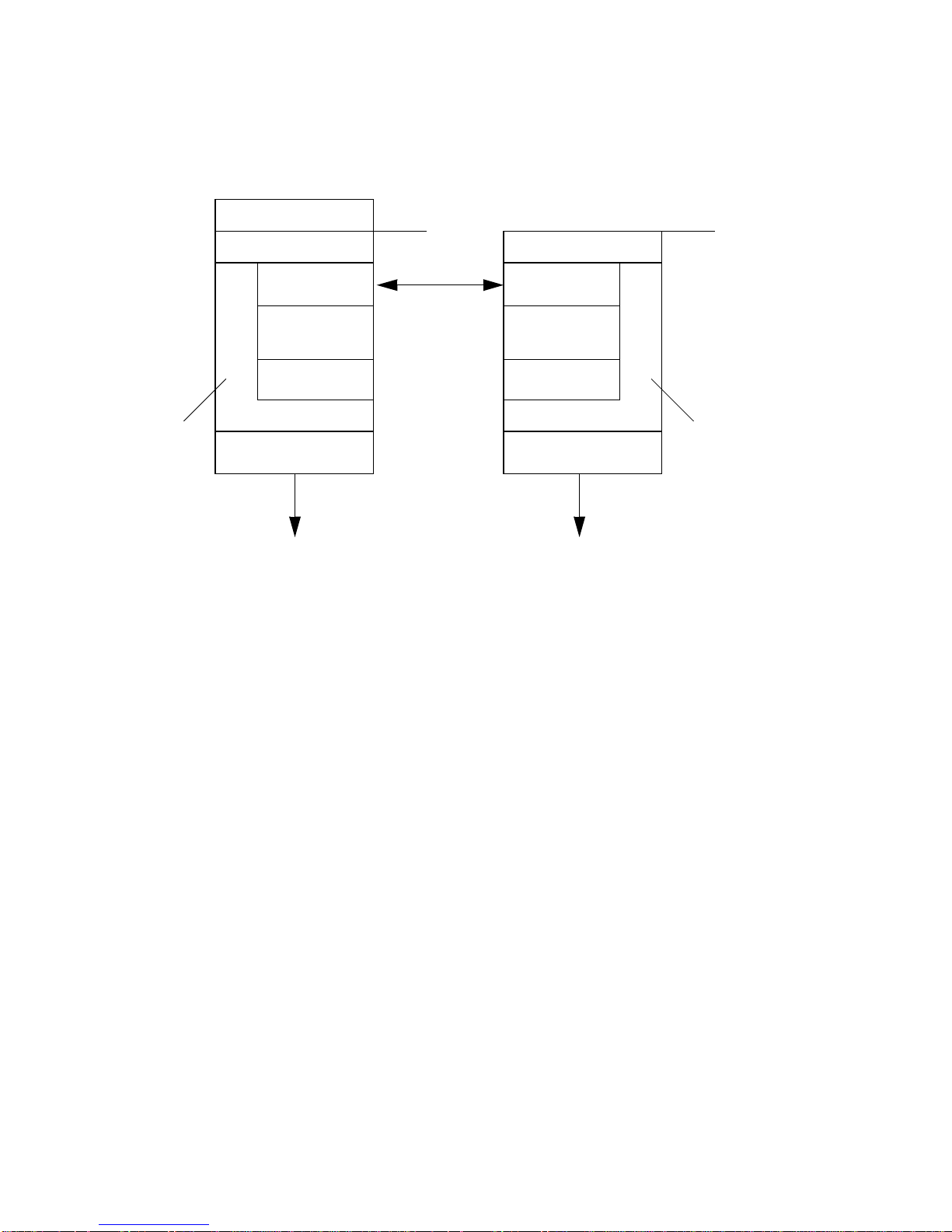
The core Sun SN D R software code is a kernel module that inter f a c es to the networ k
storage cont rol module (N SCTL) data service framework. The Su n SNDR software is
configurable on any device that is a ccessible through t he NSCTL data service
framework. The sndradm CLI is the external user interface used to man age the Sun
SNDR software.
FIGURE 1 shows th e relationship between SNDR and t he rest of the NSCTL data
service framework.
Chapter 1 Overview 5
Page 16
Primary host
Secondary host
NSCTL -
Network storage
control module
Application
Sun STE or SV
Sun SNDR
Sun Stor Edge
Instant Image
SDBC
User
Kernel
IP
Sun STE or SV
Sun SNDR
Sun Stor Edge
Instant Image
SDBC
Device driver
FIGURE 1 The Sun SNDR Software Architecture
Device driver
HardwareHardware
User
Kernel
NSCTL Network storage
control module
6 Sun StorEdge N etwork Data Replicator 3.0 Configuration Guide • June 2001
Page 17

CHAPTER
2
Configuration Conside ra tions
Volumes Eligible for R eplication
Generally, includ e the f ollowing critical volume s in th e Sun S NDR configu ration:
■ Database and database management system (DBMS) logs (the total database or
online DBMS log)
■ Access control files
You can exclude volumes from the Sun SNDR software configuration if they can be
reconstructed at t he recovery site or if they seldom change:
■ Temporary volumes (such as those used in sort operations)
■ Spool files
■ Paging volumes
When selecting a volume to be used in the Sun SNDR software volume set, ensure
that volume does not contain d isk lab el privat e areas (for exa mple, slice 2 on a
Solaris operati ng environment-formatted volume). The disk label region is contained
in the first sectors of cy linder 0 of a d isk. The safest method is to ensure that cylinder
0 is not part of any logical volume that is replicated (except for volumes un der
Ve ritas Volume Manager control, where cylinder 0 can be part o f a logical volume
that is replicated).
7
Page 18

Choosing Volume L evel Protection
In general, customers should protect their data with some level of RAID. With t he
Sun SNDR software, the primary volumes can be protected by a ny software or
hardware RAID level desired. T he protection lev el of the secondary volumes does
not have to mat ch that of t he primary volumes. For example, if the primary volumes
are RAID1, the secondary vo lume s could be RAID5.
Bitmap Volumes for Scoreboard Logs
Note – After ed iting the /usr/kernel/drv/rdc.conf file, reboot your se rver.
The Sun SNDR Version 3.0 software does not support bitmap files.TheSunSNDR
software uses regular raw devices to store bitmaps, used to maintain the Sun SNDR
scoreboard logs . For example, you can s pecify a bitmap volume as
/dev/rdsk/c6t0d0s4.
Theserawdevicesshouldbestoredonadiskseparatefromthediskthatcontains
the data. Configure RAI D (such as mirrored partitions) for the se bitmap devices and
ensurethatthemirroredmembersarenotstoredonthesamediskasthedata.
In a clustered environm ent, a bitm ap must reside onl y on a volume. The bitmap
volume in this case must be part of the same disk group or cluster resource group a s
the corresponding primary or secondary data volume.
A bitmap maintaine d on d isk can persist across a system crash, depending on the
setting of rdc_bitmap_mode in /usr/kernel/drv/rdc.conf. For example:
# rdc_bitmap_mode
# - Sets the mode of the RDC bitmap operation, acceptable values are:
# 0 - autodetect bitmap mode depending on the state of SDBC (default).
# 1 - force bitmap writes for every write operation, so an update resync
# can be performed after a crash or reboot.
# 2-onlywritethebitmaponshutdown,soafullresyncis
# required after a crash, but an update resync is required after
# a reboot.
#
rdc_bitmap_mode=0;
8 Sun StorEdge N etwork Data Replicator 3.0 Configuration Guide • June 2001
Page 19

If your server is configured in a clustered environment , set the bit map mode to 1. If
your server is not configured in a clustered environment, you can also choose the
bitmap mode setting of 1 to improve error or disaster recovery.
Choosing a Conn ection Medium to Link
My Sit es
The primary and second ary sites must be connected by a standard me dium th at
supports TCP/IP. For example, you can use any medium such as ATM, ISDN,
Ethernet, Gigabit-Ethernet, or T1 and T 3 lin es to replicate da ta. Con sider cost,
bandwidth, and latency when choosing a connection medium.
The Sun SNDR so ftware uses the ma ximum network bandwidth available to it. If the
Sun SNDR software must share the network connection with other applications, you
can use a bandwidth allocator t o restrict the ban dwidth av ailable to an application.
ATM Link Advantages
ATM is a standards-based high-performance WAN protocol that establishes routes at
circuit initialization. Its performance, combined with SONE T/SDH’ s ring-healing
resiliency, have made it the choice o f carriers in their core backbone netwo r ks.
ATM Quality of Service parameters allow customers to choose the circuit
characteristi c s that best suit their needs and budget. They define how different WAN
ports competing for ban dwidth should be prioritized relative to each ot her, each
having “virt u al paths” through the network fabric. Voice, video, and LAN traffic can
move over the same connection as c r i ti c a l remote mirroring con nec tions between
primary and recovery sites. ATM switches make these varied protocol adaptat ions
possible.
The Sun SNDR software will operate over any TCP/IP networking technology but
has only been qualified on 10, 100, and 1000 Mbit Ethe rnet and ATM technologies .
Chapter 2 Configuration Considerations 9
Page 20

Config u r i ng Redundan t Links Between Site s
The Solar i s 8 operating environment offers IP multipa thing. This feature permi ts a
Solaris host to group multiple physical netw ork interfaces into a single logical
interface. Redundan c y between pa ths permits transparen t operati o n in the event of a
failure anywhere on the path including failures of network interface cards, links,
switches and rou ters.
This feature also provides the Sun S NDR sof twa re with the transparent means for
surviving link failures. It provides the ability to aggregate bandw idth across the
physical interfaces permitting a pair of ATM 622 Mbit links to operate as one logical
1244 Mbit link with resiliency.
Link S ec uri ty
Solaris 8 operating environment offers IPsec, the industry standard form of
integrating encryption and au thentication m echa nisms into standard IP
internet wo r king. A Solaris 8 host can authenticate and encrypt traffic on a
conversation- by-conversatio n basis.
TM
Additionally, Su n offers SunScreen
encryption and authentication o f IP traffic. Coupled w ith the Sun SNDR software,
SunScreen software can provide an additional level of security to the data being
transmitted between sites. SunScreen software uses public key encryption
technology to guarantee that traffic is strongly encrypted. T he public key mechanism
is also used to authenticate that the sender of the traffic is the correct entity.
SunScreen software is normally configured at the edge of the data center netw ork.
Of cours e, co o perating SunScreen software is required at each data center.
software tec hnology that permits both
10 Sun StorEdge Network Data Replicator 3.0 Configuration Guide • June 2001
Page 21

Choosing Be twe e n Synchronous and
Asynchronous Replication
In synchronous mode, a write operation is not confirmed as complete until the
remote volume has been updated . Gen erally, synchronous m irroring is limited to
relatively short distances (that is, tens of kilom eters) because of the detrimental
effect of round-trip propagation delay on I/O response times. However, t here are
applications such as web s erver replication that can t olerate relatively slow remote
updates and operate in a synchronous mode over long stretches.
With synchronous mirroring, the remote copy always mat ches the local h ost’s view
of committed writes. Should the local primary site be rendered inoperative, the
remote secondary copy can be used to continue oper ati o ns after the user com munity
and the applications are switched to the alternate site.
What if the link goes down wh ile run ning in syn chronous mode ? Sh ould the local
I/O remain incomplet e until the link come s back up? Some applications require that
the primary and secondary sites b e ex actly in sy nc and therefore would desire that
the I/O not c omplete. However, many mission-critical custo mers decide not to block
local access to the data upon encounteri ng intersite transmission er r o rs . Instead,
software keeps track of these writ es at the prim ar y site and then updates the
recovery site when the remote service is reliably restored. If configured this way,
disaster recovery procedures must take into account loss of in-flight and logged data.
That is, data might have b een committed to the local application but n ever h ad a
chance to arrive at the backup site.
Asynchronous mirroring affirms primary I/O completion to the orig inating host
before updati ng the rem o te image. This type of mirro r i ng is often used when the
distance and relatively low bandwidth telecommunications lines of 45 Mbps or less
between primary and second ary sites would introduce prohibitive latencies if
performed synchronously. Here, the long-distance pipe becomes the bottleneck,
forcing local write s t o be queued for lat er transmission. Consequently, there is a
higher possibility of losing buffered and in-flight data if t he primary system fails.
Chapter 2 Configuration Considerations 11
Page 22

When To Suspend Replication to the Secondary
Site
For many custo mers, the Sun SNDR sof tw are is us ed to mirror the primary site’s
information onto the alternate l ocation as quickly as possible under the constraints
of distance and t echn o logy. Operator errors, software bugs, and hardware data
corruption are solid arguments for taking more deliberate, albeit less real-time,
approaches to remote copies.
A deferred-write policy und er such conditions delays remote upd ates until the local
data has been confirmed to be good. The d ata integrity che cks are performed
periodically, followed by the remote copy. Som e IT organizations reason t hat it is
better to have slightly stale, good data at the remote sit e t han to risk corrupt ing the
remote copy wi th the lock-step updates. Consc i o usly scrutinized database redo logs
facilitate the recovery and update process, while minimizing the consequences of the
errors.
Another method is to ship the data remotely in real time, take a snapshot of the data
attheremotesitewithSunStorEdgeInstantImagesoftwareataknownpointin
time, an d verify its integrity in the background before setting it aside for recovery.
Telco costs might similarly dictate a deferred copy policy. Some customers mus t
timeshare n a r row pipes between sites during the peak processi ng hours, lea ving
only off-hours for bulk intersite copies. Such prospects look for incremental update
capabilities to reduce the transmission loa d and copy time. In other words, they
prefer to send only what has changed si nc e the previous r em o te image was
generated.
Configuring The S un SNDR Software for Mu t ual
Replication
Sometimes the distinction between primary (A) and secondary (B) sites is blurred.
As applications are geographically distributed, a secondary storage system at Site B
might function as a remote volum e replication to Site A and as a direct storage
resource fo r applications on Host B. Under these circumstances, you might also ele c t
to have critical applications running on Host B to have their volumes replicated to
Site A. This reciprocal replication arrangement supported b y the Sun SNDR software
is known as mutual replication.
Each server can concurrently transmit and receive writes to and from its remote
counterpart. Eac h system contains primary disks in a Sun SNDR software set that
are accessible by local hosts, as well as remote mirrors secondary to remote hosts.
Mutual replication might be used where critical applications and storage are split
across sites, and bo th sites require remote replicated vo lumes.
12 Sun StorEdge Network Data Replicator 3.0 Configuration Guide • June 2001
Page 23

Order-DependentWritesand Volume Set
Grouping
For the Sun SNDR Ve rsion 2. 0 sof tware, write ordering is only maintained by the
Sun SNDR software within a logical volume. In Version 3.0, write ordering is also
maintained for groups of as ynchronously replicating volume s ets. ( The g eneral
definition of write ordering here is that w rite operations directed to the target
volume occur in the same order as write operations to the source.) The group of
target volumes is a point-in-time copy of the g roup of source volumes .
This feature is especially valuable in those cases where you can avoid application
requirements that limit operations. For example, a database application might limit
partition sizes to no greater than 2 Gbyte s . In this case, yo u might group vol ume sets
to create a virtual large “volume” that p reserves write operations. Otherwise, you
might risk having inconsisten t data by trying to update volume sets in dividua lly
instead of as a group.
When an application has multiple logical volumes assigned, application data
integrity can be maintained by one of the following:
■ Specifying all Sun SNDR software volumes associat ed with that application as
SYNC
■ Using Su n StorEdge Instant Image software to ta ke periodic recoverable
point-in-time copies
If you use Instant Imag e software, the remote point-in-time is taken while the
application is in the recoverable state. For example, most database applications allow
for a hot backup. If a remote point-in-time copy were made of the entire replicated
databas e while the primary was in hot backup mo de, then a consistent remote
database is available by using th e p oint-in-time copy and the log files taken while
the database was in hot backup mod e.
Chapter 2 Configuration Considerations 13
Page 24

Recove ry Considerations
The S un StorEdge Network Data Replicator 3.0 System A dmi nistrator ’s Guide contains
information about various recovery scenarios. This section describes the following
topics:
■ Failing Over to the Secondary Site
■ Recovering the Primary or Secondary S ite
■ Using The Sun SNDR and Sun St orEdge Instant Image Software
Failing Over t o the Secondary Site
Should the primary site fail, the secondary copy can be us ed to con tinue operations
after the user com munity and the applications are switche d to the alternate site. You
should implement application level recovery procedures at the s ec o ndary site to help
ensure applicat i o n reco v er y to a well-known state.
Recovering the Primary or Secon dary Site
Occasionally, remote m irroring operations are interrupted either intentionally or by
unplanne d outages. Normally, these inter ru pti o ns are handled by the Sun SNDR
software because whenever a mem ber of a Sun SNDR s oftware volume pair becomes
unavailab l e, the write activity is sc o reb o arded in the vol ume’s bitmap. When the
service is restored, a fast upd ate or resynchronization is performed .
14 Sun StorEdge Network Data Replicator 3.0 Configuration Guide • June 2001
Page 25

Choosing the Resynchronization Type: Update or Full
Tip – If a synchronization in itiated by the sndradm -m or
sndradm -m -r commands is interrupted, use the sndradm -m -u update
command to complete the synch ronization. U se
/usr/opt/SUNWscm/sbin/scmadm -S to v i ew the synch roniz ation progress.
An upd a te resynchroniz a ti on applies changes that occurred at th e p rimary data to
thesecondarysiteduringthetimereplicationwassuspended.Theprimarysitecan
also be updated from the secondary, if de sired.
A full synchronization is a complete disk-to-disk copy. Th is opera tion is the most
time consuming of the synchronization operat ions. A f ull synchronization is o nly
done when the Sun SNDR software volume set is:
■ Initially established
■ Damaged due to a disaster
■ Data integrity is questions
If the integrity of the Sun SNDR softwa re vol u me data i s questioned, then the only
way to get the volume back into a synchronized set is to perform a full volume copy.
The Sun SNDR software volume set dat a mig ht be in qu estion if, for example , there
was a double disk failure on a RAID 5 set or if the Sun SNDR software is shutdow n
manually and writes o ccurred to either the primary or secondary volumes without
scoreboarding being active. Th e full copy can either be performed from the primary
to the secondary or if appropriate, from the secondary to the primary.
Choosing Automati c or Manual Resyn chronization
The S un SNDR software p rovides a ch o ice of automatic or manual resynchronization
after a disaster. Automatic resynchronization is discouraged if the inter ruption is the
warning of a larger rolling disaster. It is best to main tain the se condary s ite in a
dated but consi s tent state, rather than risk a disastrous interruption that leaves the
secondary inconsistent and difficult to recover from. The autosynchronization option
is disabled by default for this reason.
See also “Using The Sun SNDR and Sun StorEdge Instant Image Software” on
page 16. Before you start a resyn chronization operation, ensure that you have an
appropriate Instant Image software point-in-time copy of the Sun SNDR software
target volume.
Chapter 2 Configuration Considerations 15
Page 26

Using The Sun SNDR an d Sun Sto r Edg e Ins ta n t
Image Software
To help ensure the highest level of data integrity on both sites during normal
operations or during data recovery, use the Sun SN D R software w ith the Sun
StorEdge Instant Image software.
The Instant Image software is best used just before you perform a resynchronization,
to help ensure that a consist ent copy of data e xists. In this case , if the
resynchronization is interrupted, you at least have a copy of known good data that is
usable.
During the resynchroniz ation process of updating the local and remote sites, the
data on a secondary Sun SND R volume is temporarily inconsistent with the primary
volume. The secondary volume cannot be relied on for da ta recovery. Cons istency is
restored when the resynchronization is c om pl ete. To h el p ensure data i ntegrity, use
Instant Image software regularly to create a point-in-time copy of data at both sites.
See the Insta nt I m age documentation l is ted in “Related Doc u m entation” o n page vii.
When to Use The Sun StorEdge I ns tant Image Software at the
Remote Site
In most cases, customers sh o uld also install Instant Image softw are at the second ary
site to protect against a d ual f ailure. Before you resynchronize the primary site with
the sec o ndary, take a point-in- ti m e snapshot copy of the data. If fai l u re the occurs
during the resynchronization, you have the point-in-time data copy to roll back to
andyoucanstartagainwhenitssafetodoso.
Whenever a fast resynchronization is being perfo r m ed, the I/O transfer is in block
order, no t in I/O order. Therefore the volume be in g resynchronized will not be
consistent until the fast resynchronization has been co m pl eted and t he volume is
back in replicating mode. If a point-in-time copy is not availab le at th e remote site,
then the remote site recovery plan should cover the exposure that will exist d uring
the time required to perfo r m the fast resynchro ni zation.
Additionally, a point-in-time snapshot at the secondary site can be used for
applications such as remote backup, remote data an alysis, or ot her function s.
16 Sun StorEdge Network Data Replicator 3.0 Configuration Guide • June 2001
Page 27

Sun SN D R Softw are and Sun StorEd ge
Fast Write C ache Software
Note – You cannot u se the Sun StorEdge Fast Write Cac he (FWC ) product, including
the SUNWnvm Ver sio n 3. 0 so f tware, in a Sun C luster environment because cache d
data is inaccessible from other machines in a cluster. To compensate, you can use a
caching array, such as the Sun StorEdg e A3 500 d isk array.
The Ve rsion 2.0 and Version 3.0 Sun StorEdge data services are binary incompatible.
If your system include s Version 2.0 of the Sun StorEdge Instant Image (including
Instant Image 2.0.1 with STE 1.2), Sun SNDR software, or Sun StorEdge Fast Write
Cache, you must remove them before install a tion. For example, you c annot use Sun
StorEdge Instant Image software Version 2.0 with Sun SNDR software Version 3.0.
When you plan to install or upgrade to a Ve rsion 3. 0 data service, you must remove
all Version 2.0 and 2.01 data services.
However, the Sun StorEdge C ore Services Version 3.0 Software CD contains the Sun
StorEdge SUNWnvm Version 3.0 software package for those u sers whose sy stems
include Version 2.0 of the Sun FW C hardware and software product and who wish to
continue using the Sun FWC product.
For optimum performance in a noncluster environment, you can use the Sun SNDR
software w i th the Sun St o r Edge Fast Write Cac he SUNWnvm Version 3.0 product on
the primary and secondary sites for t he volu mes conta ining bitm aps and any other
volumes for which wr ite performance is c rit ical (for e xample, d ataba se log f iles).
Using the F W C product allows the scoreboard to be preserved across a system crash
without adversely affecting performance durin g replication.
Chapter 2 Configuration Considerations 17
Page 28
One-to-Many and Multihop Volume S e ts
The Sun SNDR software enables you to create one-to-ma ny and m ultihop v olume
sets.
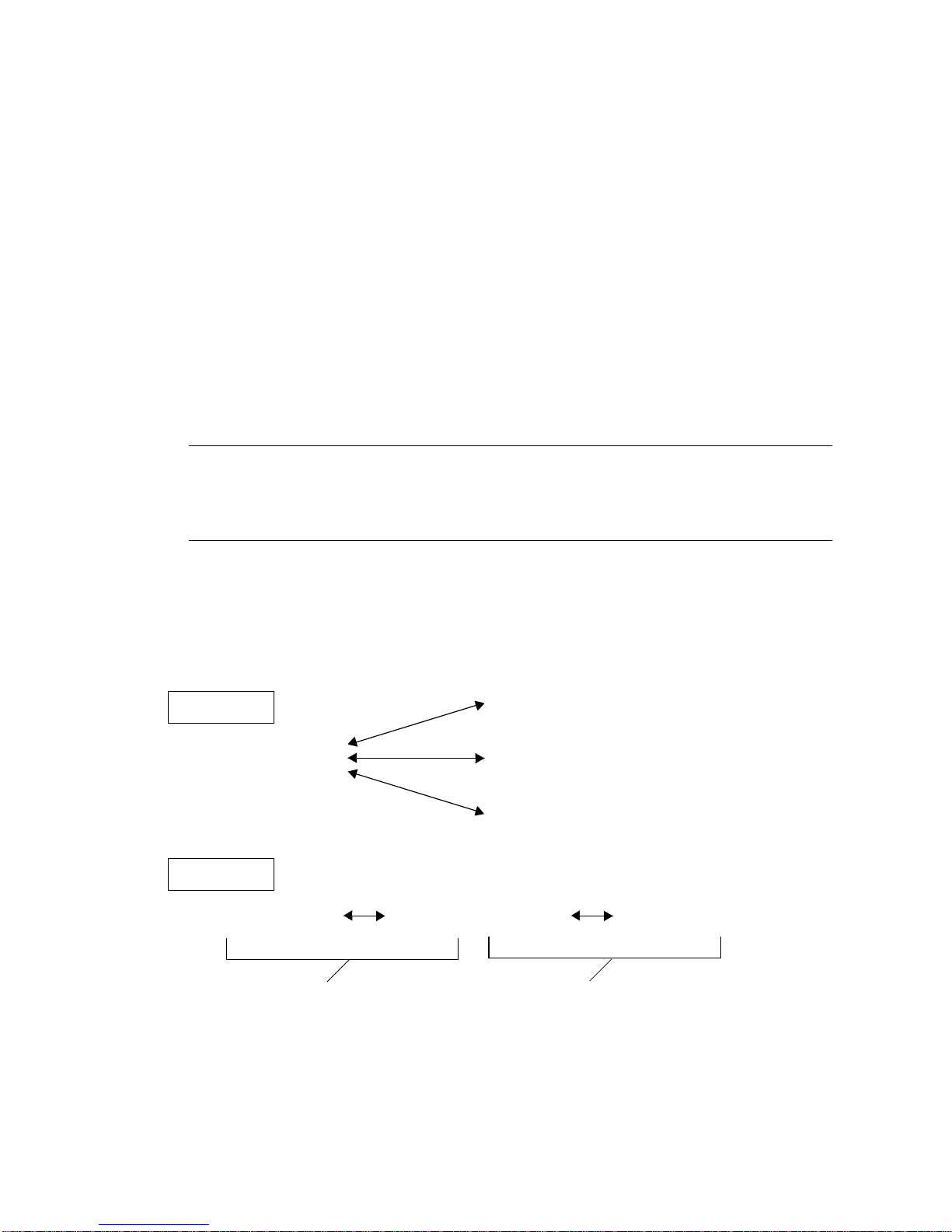
In a one-to-many volume set, you can replicate data from one primary volume to
many secondary volumes residing on one or more hosts. One primary and each
secondary h ost v olume is a single volum e s et (each secondary volume requires its
own unique secondary bitmap volume). When you perform a forward
resynchronization, you can synchronize one volume s et or all v olume sets; in this
case, issue a sepa rate command for each set. You can also update the primary
volume by using a specific secondary volume.
three secondary host volumes and therefore three volu me sets: A a nd B1, A and B2,
and A and B3.
Note – Yo u can group on e-to-many sets that share a comm on primary volu me in a
single I/O group to operate on all sets simultaneously instead of issuing a separate
command for each set. S ee also “Order-Depend ent Writes and Volume Set
Grouping ” on page 13.
In a multih op s et, the seco ndary host volume of one v ol ume set can be the primary
host volume of an other volume set.
FIGURE 1 shows one primary a nd one secondary
host volume; the secondary host volume B becomes the primary host volume A1 to
the secondary ho st volume B1.
FIGURE 1 shows one primary and
One-To-Many
Primary host volum e
A
/dev/rdsk/c0t0d0s5
Multihop
Primary host volume Secondary host vol ume Secondary host volu me
/dev/rdsk/c0t0d0s5 /dev/rdsk/c0t0d0s5/dev/rdsk/c0t0d0s5
A
One volume set Another volume set
FIGURE 1 One-to-Many and Multihop Volume Sets
18 Sun StorEdge Network Data Replicator 3.0 Configuration Guide • June 2001
B
Secondary host volum e
/dev/rdsk/c0t0d0s5
Secondary host volume
/dev/rdsk/c0t0d0s7
Secondary host volum e
/dev/rdsk/c0t0d0s9
A1
B1
B2
B3
B1
A = Primary host volume
B = Secondary ho st volume
Page 29

Using The Su n S N D R Software in a
Firewall Environment
You can u se the Sun SNDR soft w are with any enhanced network prod uc t that Sun
offers. Port 121 must be available for use by the Sun SNDR sndrd daemon.
You can u se IP masquerading. SNDR uses connectio n-oriented servi c e (COTS ) based
remote proced ur e ca l l s (RPC; that i s, TCP). The R P C part of the packet does not
contain any address information.
Chapter 2 Configuration Considerations 19
Page 30

20 Sun StorEdge Network Data Replicator 3.0 Configuration Guide • June 2001
 Loading...