

Page 1

English
User’s Manual
SUN-LS100 Series
Fiber Optic Light Source
Table:SUN-UM-TE-LS005 Version:A/0
Page 2

Fi b e r Op t i c S o l u t i o n s P r o v i d e r ii
Content
1. Overview ............................................................................................................. 1
2. Specifications ..................................................................................................... 1
3. Standard Accessories ....................................................................................... 2
4. Function .............................................................................................................. 2
5. Operation ............................................................................................................ 3
6. Maintenance ....................................................................................................... 3
7. Troubleshooting ................................................................................................. 4
8. Notice .................................................................................................................. 4
9. Warranty and service ........................................................................................ 5
Page 3

F i b e r O p t i c S o l u t i o n s P r o v i d e r 1/5
Parameters
Specification
Wavelengths (nm)
850/1300/1310/1490/1550/1625, up
to 4 selectable wavelengths
Fiber Type
SM/MM
Emitter Type
FP-LD
Output Power (dBm)
-7~-6
Modulation Frequency CW (Hz)
270/330/1K/2K
Optical Port
FC port (default) or FC/SC/ST
interchangeable port (customized)
Power Supply
3*AA 1.5V batteries
Battery Life (Hours)
45
Operating Temperature (°C)
-10~60
Storage Temperature (°C)
-25~70
1. Overview
Sun Telecom’s SUN-LS100 series of handheld light source provides 1~4
output wavelengths to meet specific requirements and other wavelengths
according to customer’s needs. It provides highly stable output power and
wavelengths and has a function of power saving. It is a cost-effective testing
solution for the fiber optic network together with an optical power meter.
Features
Laser output with high-stability, multi-wavelength and single/multi mode
Large LCD display
Switch button for changing operating wavelength and easy to operate
Long working hours
Standard FC port or customizable FC/SC/ST interchangeable port
Auto power off after 10 minutes without operation
Low battery voltage detection
2. Specifications
Page 4
F i b e r O p t i c S o l u t i o n s P r o v i d e r 2/5
Dimensions (mm)
192(L) x 102(W) x 50(H)
Weight (g)
310 (without battery)
No.
Product
Unit
Quantity
1
Light Source
set
1
2
AA 1.5V Battery
pieces
3
3
Soft Bag
piece
1
4
Power Adapter
piece
1
5
User’s Manual
piece
1
3. Standard Accessories
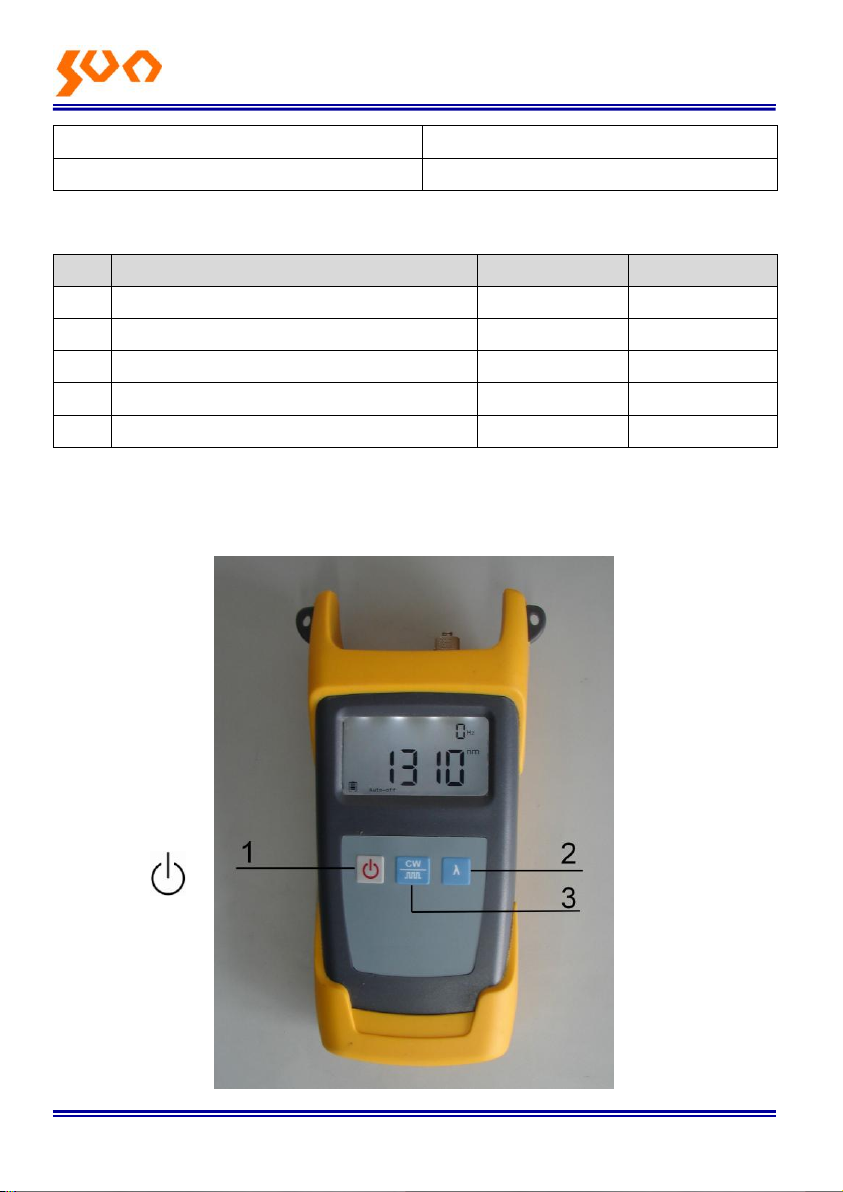
4. Function
Function Instructions
Page 5

F i b e r O p t i c S o l u t i o n s P r o v i d e r 3/5
(1) “ ” Power Supply Switch: Press it to turn on or off the unit. Auto
Shut Off Selection: Press this key shortly to turn on or off the auto shut off
function. Under this situation, the unit will automatically shut off after ten
minutes idle time.
(2) “λ” Wavelength Selection: Press this key to switch the wavelength and
display it in the middle of the LCD screen.
CW
(3) “
”Switch the modulation: Press this key to switch modulation
between the continuous light and modulated light. The frequency of
modulated light is 650nm (CW, 2HZ), 13/15(270Hz, 1KHz, 2KHz) and it
will displayed on the top right corner of the LCD screen where will show
0Hz under the continuous light mode.
5. Operation
1.1. Turn on/off the unit
Press “ ” key to turn it on, then the LCD screen display the following
information:
(1) When using the AC adapter, the AC adapter’s mark will be showed on the
central left screen and lighted.
(2) The battery mark is showed on the left bottom screen and will be lighted
when using the battery. The capacity in the mark will decrease with
battery power. Please replace the battery when the mark is empty.
(3) The “auto-off” mark is showed on the bottom screen. The auto off function
is lighted and valid after the unit turned on. The unit will automatically
shut off after ten minutes idle time.
(4) The wavelength is showed in the middle of the screen, the unit is nm.
(5) The frequency is showed on the top left screen, the unit is Hz.
Press “ ” again to turn off the light source.
6. Maintenance
(1) Clean the optical connector and adapter regularly.
(2) Use the regulated optical connector for the test.
Page 6

F i b e r O p t i c S o l u t i o n s P r o v i d e r 4/5
Problems
Possible reasons
Solution
Faint display on
the LCD screen
The battery power is low
Charge or replace the
battery.
Fail to turn the
unit on
Low battery power or the
battery is put wrongly
Replace the battery.
Re-put the battery
Optical power is
not stable after
the unit turned
off.
Use it after 15 minutes
warm-up.
(3) Shut off the power and cover the dust-proof cap after your test.
(4) Select the power supply within the required voltage range when using AC
adapter.
(5) Please take out the battery when it is not in operation for a period of time.
7. Troubleshooting
8. Notice
Ensure the connector is clean when tested.
Do not plug in the power supply when install the battery.
Do not look into the laser beam when test.
Please charge the battery before using and do not charge it in the unit.
Please cover the dust-proof cap when it is not in operation.
Page 7

F i b e r O p t i c S o l u t i o n s P r o v i d e r 5/5
9. Warranty and service
Caution: Repair it in the field is Forbidden.
18 months warranty for Our Light Source
9.1 We warrant that the Light Source will be free from defects in material and
workmanship for 18 months. Should the device fail at any time during this
warranty period, we will, at its sole discretion, replace, and repair or refund the
purchase price of the product. The worth of the repair or replace will not be
higher than purchasing price of this unit.
9.2 If the problems occurred can not be solved by the trouble shooting
methods, please contact us or the local distributor directly.
9.3 This warranty is limited to defects in our production, workmanship or
material; we will repair or replace the unit free of charge. This warranty only
applies to the unit under normal operation without any damage or wrong
operation.
The warranty does not include the following problems:
(1)Repair the unit by yourself without our official authorization.
(2)Wrong operation or accident,
9.4 As to the freight cost caused by repair or replaces the unit under warranty;
it will be shared by the customer and us.
www.suntelecom.cn • 021-60138638 • [email protected]
Page 8

SHANGHAI Sun TELECOMMUNICATION CO., LTD.
Building No.145 Lane 666, Xianing Rd.
Jinshan Industrial Zone, Jinshan District
ShangHai, China 201506
Tel: +86 21 60138638 Fax: +86 21 60138635-401
E-mail: [email protected]
http://www.suntelecom.cn/
 Loading...