

Page 1

SPARCengine Ultra AXi
READ ME
FIRST!
Ultra AXi
❐ Check the contents of your UltraAX
Item # Description Part # Qty
1 Ultra AXi Motherboard Assembly 595-4704-xx 1 ea.
1.1 Ultra AXi Motherboard 501-4559-xx 1 ea.
1.2 Ultra AXi Rear I/O Panel 340-4919-xx 1 ea.
1.3 Ultra AXi CPU Module Hold Down Kit 250-1404-xx 1 ea.
1.4 PS/2 Keyboard and Mouse Adapter Cable 180-1848-xx 1 ea.
2 ReadMeFirstDocument 850-6617-xx 1 ea.
3 UltraSPARC-IIi CPU Module (360 MHz) or
UltraSPARC-IIi CPU Module (440 MHz)
i
shipment:
501-5148-xx
501-5149-xx
1 ea.
1.ea
4 CPU Upgrade Fan Install Kit 560-2540-xx 1 ea.
p/n
850-6617-02 Rev. 50
Page 2

SPARCengine Ultra AXi
If any of the items in your shipment are missing or damaged, contact your local Sun
Microelectronics sales representative or field application engineer (FAE).
❐ The UltraSPARC-II
❐ The
SPARCengine Ultra AXi OEM Manual
used to ensure proper utilization of the Ultra AX
downloaded from:
http://www.sun.com/microelectronics/SPARCengineUltraAXi/
i
module is packaged separately.
contains information that must be
i
motherboard. A copy may be
❐ The OpenBoot PROM (OBP) version on the board MUST be up-to-date.
The motherboard was shipped with the version of the OBP available at the time
of manufacture. Please check the Web site to ensure that you have the latest
OBP version. If the board does not have the latest version, you may experience
boot and other problems. The OBP can be downloaded from the Web site at:
http://www.sun.com/microelectronics/SPARCengineUltraAXi/
❐ System software is NOT shipped with this package. You will need to order
the Solaris™ operating system software separately. After obtaining the
software, refer to the installation instructions provided with the software
package for installation.
Product Notes
The following is a summary of product information current at the time the
latest Ultra AXi boards were shipped.
Hardware Related Information
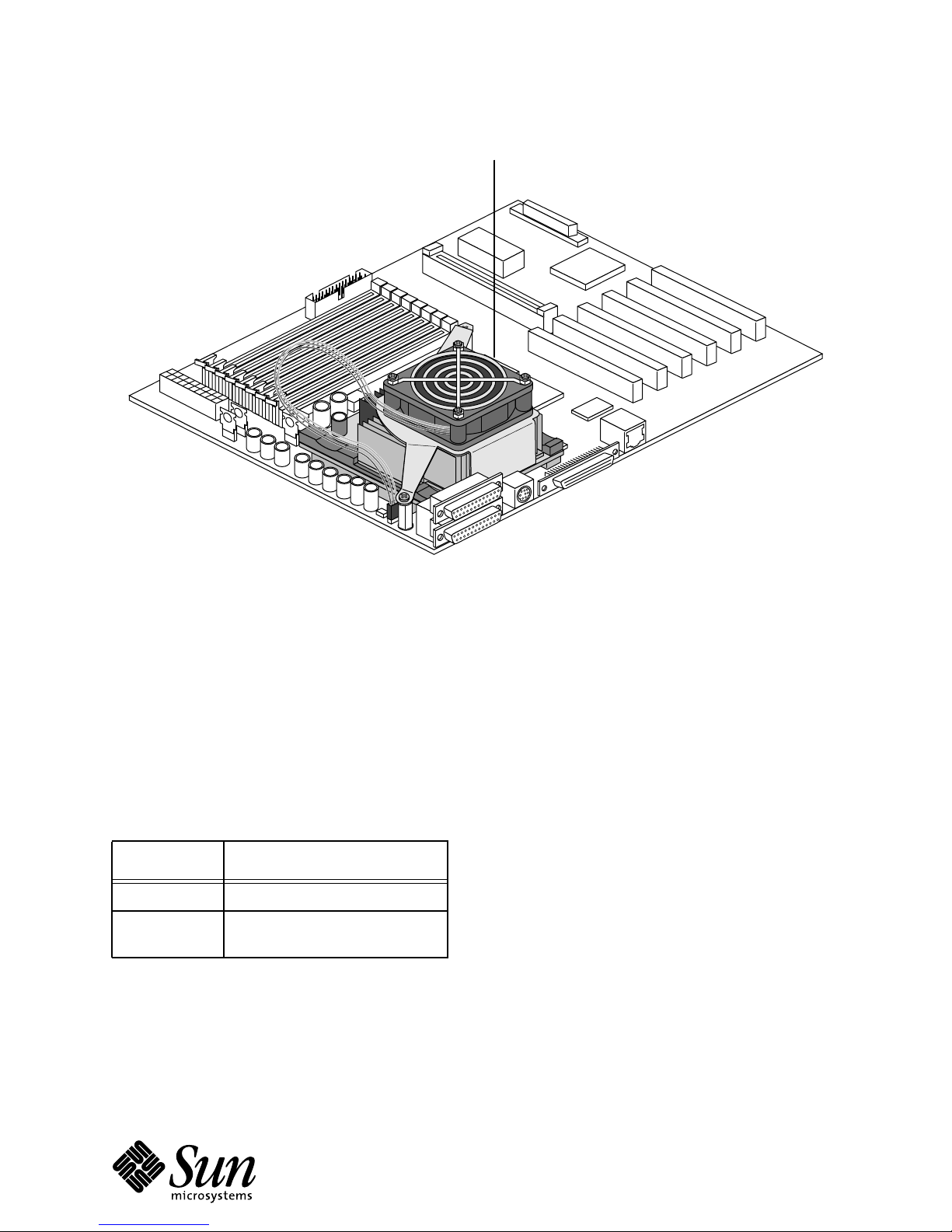
The Ultra AXi board with CPU module P/N 501-5148-xx or 501-5149-xx
requires the CPU upgrade fan to help maintain proper board operating
temperature (see Figure 1).
2
p/n
850-6617-02 Rev. 50
Page 3
Fan assembly and bracket
SPARCengine Ultra AXi
Figure 1. SPARCengine Ultra AXi Board with CPU Upgrade Fan
CAUTION: The Ultra AXi board with CPU module 501-5148-xx or 501-5149-xx
requires a CPU upgrade fan for proper operation!
Automatic Power-Up Option
AXi boards with P/N 501-4559-08 or later will power up automatically when system power is
applied without having to power the board up manually. This feature is set through jumper
block J3303. For further information, see the SPARCengine AXi OEM Technical Manual
(P/N 805-3158-03 or higher)
and Table 1.
Table 1 J3303 Selections
Setting Comment
2-4 Manual power-up
4-6 Automatic power-up (factory
default)
p/n
850-6617-02Rev. 50
3
Page 4
SPARCengine Ultra AXi
Software Related Information
This section provides information that may affect software operation.
■ The advanced system monitoring (ASM) driver may not be bundled with
your version of the Solaris software. The ASM driver can be downloaded
from the Web site at URL: http://www.sun.com/microelectronics/
SPARCengineUltraAXi/
■ A software patch (#105654-03) is needed for diskless client support on
Solaris 2.6. A patch is needed for each client. Patches are in the
/cdrom/sol_2_6_hw2_sparc/s0/Solaris_2.6/Patches
directory of the Solaris CD.
■ The Ultra AXi board requires OpenBoot PROM (OBP) version 3.10.8 or
higher to support the 360 or 440 MHz CPU module.
Installing the 440 MHz CPU Module on Systems with Solaris 2.6
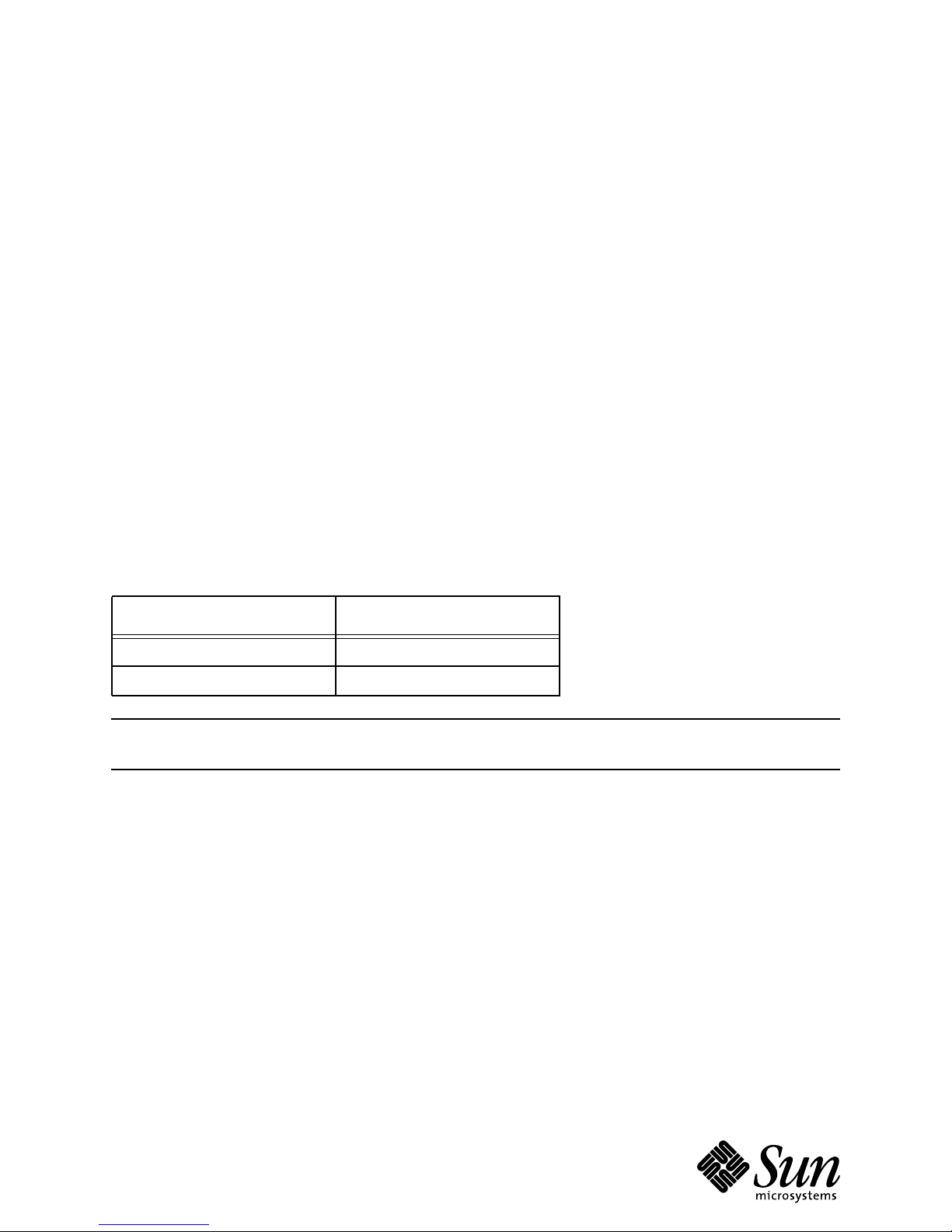
Ultra AXi systems running Solaris 2.6 requires one or more patches (see Table 2) to support 440
MHz operation. Without the patch(es), Ultra AXi systems with Solaris 2.6 and the 440 MHz CPU
cannot properly boot. Note, systems with Solaris 7 or later versions do not require any patches.
Table 2 Required Patches for Solaris 2.6
Solaris 2.6 Version Required Patch(es)
Solaris 2.6 Hardware 3/98 106125, 105181, 105604
Solaris 2.6 Hardware 5/98 105181
Note – The patches can be downloaded through the Ultra AXi Web site at:
http://www.sun.com/microelectronics/SPARCengineUltraAXi/
440 MHz Upgrade
For the upgrade procedure on downloading OBP and OS patches, please go to "440 MHz
Upgrade" link on the aforementioned Web page and follow the instructions.
Customers can retrieve patches from the Web server in two ways: by getting a patch README
file as the result of a search in the document search and retrieval page or by getting a README
from one of the lists of contract customer patches on the patch page. At the top of the README
is a Retrieve link which, when selected, downloads the patch to your machine and prompts you
for a name under which to save it.
You should save the patch as <patch number>.tar.Z. The patch will be stored as a compressed tar
file. You can uncompress and untar the file as follows:
uncompress <patch number>.tar.Z
tar xf <patch number>.tar
4
p/n
850-6617-02 Rev. 50
Page 5

SPARCengine Ultra AXi
This creates a directory with the patch in it. Read the README file there for instructions on
installing the patch.
Installation Procedures
There are two types of Solaris 2.6 and 440 MHz installation procedures:
● installing the 440 MHz module on systems that are currently
running Solaris 2.6
● installing Solaris 2.6 on a new system that contains the 440 MHz
module
Installing the 440 MHz Module on Systems Already Running Solaris 2.6
Prior to module installation, customers must install the required patch(es) on their systems (see
Table 2). After the patch(es) is successfully installed, bring the system down and install the 440
MHz CPU module.
Note – See the AXi CPU Upgrade Fan Install Guide (P/N 806-0941-xx) or the SPARCengine Ultra AXi
OEM Technical Reference Manual (805-3158-03 or higher) for installation instructions.
Installation of Solaris 2.6 on a New System with the 440 MHz Module
Follow these instructions accordingly.
1. Bring the system to the ok prompt level.
The following key strokes or combinations can be used to bring the system to an OK
prompt.
● Stop/A on a Sun keyboard
● Control/Break on a PS/2 keyboard
● ~# on a tip connection
● Break key on a dumb terminal
2. Type in the following commands:
ok also hidden
ok d# 404 at-speed
ok
3. Boot from the installation device (net, CDROM...) and install Solaris 2.6 on the system as
described in the Solaris documentation.
CAUTION: If a power failure occurs, or if you must power off the system at any
time before the complete patch installation, step 2 must be repeated.
4. Install the related patch(es), listed in Table 2, once your newly installed OS is running.
5. Halt your system, and power cycle it to operate in 440 MHz mode.
p/n
850-6617-02Rev. 50
5
Page 6

SPARCengine Ultra AXi
Technical Support and Warranty
If you have any technical questions or issues that are not addressed in the SPARCengine Ultra AXi
OEM Manual or on the Web site, contact one of the following:
In US or Canada
Contact your local Sun Enterprise Services Solution Center at:
1-800-USA-4SUN (800-872-4786)
Rest of the World
To locate the Sun Enterprise Services Worldwide Solution Center nearest you, access this URL:
http://www.sun.com/service/contacting/solution.html
When you call Sun Enterprise Services, be sure to indicate that the motherboard and CPU
module were purchased separately and are not associated with a system. Identify the product by
its part number.
● SPARCengine Ultra AXi Motherboard — 501-4559-xx
● UltraSPARC-IIi 360 MHz Module — 501-5148-xx
● UltraSPARC-IIi 440 MHz Module — 501-5149-xx
The SPARCengine Ultra AXi includes a 1-year return-to-depot warranty. Should your board fail
during this period, contact your Sun Enterprise Services representative for instructions. Before
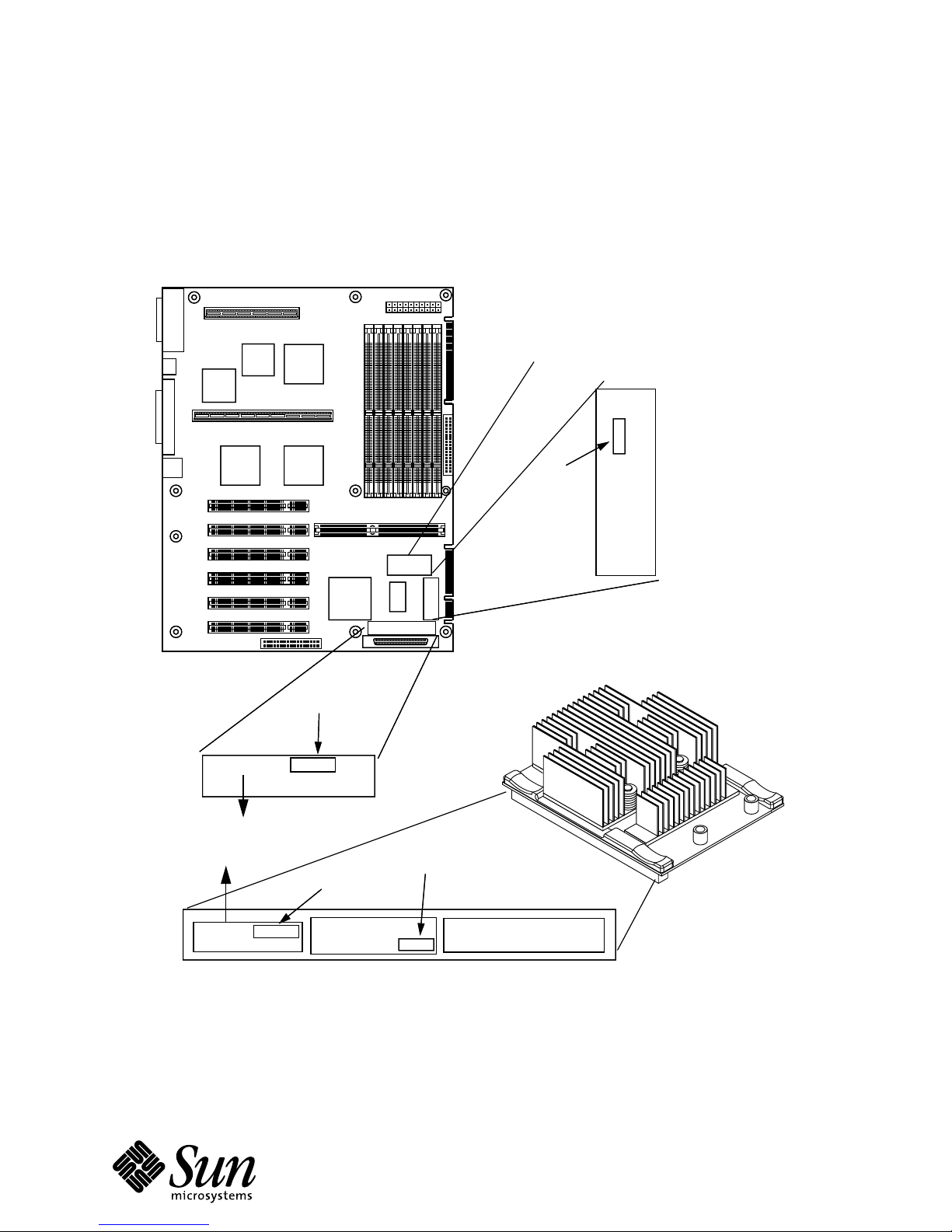
you call, get the motherboard date code (for example, 0798 for the seventh week of 1998) and
serial number from the stickers located next to the internal SCSI connector (J1001). The module
date code and serial number are on stickers on the 180 pin connector of the module. See the
figure on the next page for detailed illustrations.
p/n
850-6617-02Rev. 50
6
Page 7
SPARCengine Ultra AXi
How to Identify Date Codes and Serial Numbers on the
Motherboard and CPU Module.
Ultra AXi Board
TOD/NVRAM
Date Code
Date Code
5014559000054
BAR CODE
BAR CODE
Part Number
Part Number
5015148 000145
BAR CODE
BAR CODE
Serial Number
Serial Number
Serial Number
Serial Number
5148 -xx
REV 50
REV
Date Code
Date Code
0998
0998
ASSEMBLED IN CANADA
ASSEMBLED IN CANADA
-05 Rev 02 CEL 0798
-05 Rev 02 CEL 0798
ASSEMBLED IN CANADA
ASSEMBLED IN CANADA
CPU Module
p/n
850-6617-02Rev. 50
7
Page 8

SPARCengine Ultra AXi
Before Returning the Ultra AXi Motherboard to Sun Enterprise
Services
❐ You MUST get Return Material Authorization (RMA) numbers from Sun
Enterprise Services for each part you intend to return. Identify each product by the
following part numbers:
● SPARCengine Ultra AXi Motherboard — 501-4559-xx
● UltraSPARC-IIi 360 MHz Module — 501-5148-xx
● UltraSPARC-IIi 440 MHz Module — 501-5149-xx
❐ If Sun Enterprise Services asks for a system serial number, BE SURE TO INDI-
CATE THAT THE MOTHERBOARD AND CPU MODULE WERE PURCHASED
SEPARATELY AND ARE NOT ASSOCIATED WITH A SYSTEM.
❐ Sun Enterprise Services will give you specific details on the return procedure
for your geographic area. In addition, follow these guidelines in packaging the
hardware and addressing the packaging.
● Please use the original packaging to return the failed part.
● Make sure the RMA number and the part number for each part is on the
box containing that part.
● You may place one box within the other. The outermost box needs to have
the RMA number and the part number of its primary contents and the
following:
● Destination address
● Source address
● For international shipments, Sun Enterprise Services shipping number to
expedite handling in customs.
❐ Take ESD precautions while performing the following;
● Remove and retain the CPU module.
● To remove the CPU module from the Ultra AX
ends of the CPU module board. Be careful to hold the CPU module only by the
CPU heatsink once the module is disconnected from the CPU module
i
connectors on the Ultra AX
● Remove and retain the memory modules (DIMMs).
● Remove and retain the TOD/NVRAM module (see previous figure for
board.
location).
i
board, gently pull up on both
● The TOD/NVRAM module holds specific network address data. You
MUST remove this module before you return the board to Sun Enterprise
Services. The replacement motherboard will not have a TOD/NVRAM module,
you must reinstall your retained module.
p/n
850-6617-02Rev. 50
8
Page 9

SPARCengine Ultra AXi
● The TOD/NVRAM module may also hold configuration data specific to
your installation. Be sure to keep a copy of this information.
p/n
850-6617-02Rev. 50
9
 Loading...