

Page 1
User Manual English
BTH-07A2 www.sunitec.com.tw Page 1 of 6
®
SUNITEC ENTERPRISE CO., LTD.
Tong-Fu-Yu Ind, Ku-Keng, Guan-Lan, Bao-An District, Shenzhen 518110, China.
TEL:86-755-28088244/28089953 FAX:86-755-28088153
Email: [email protected] http://www.sunitec.com.tw
Bluetooth Headset #BTH-07A2 User Manual
Button Function & Pairing Code:
Function
Power Switch
Pairing
AG Accessing
Call Answering
Call Ending
Voice Activ ation Dialing
Call Rejecting
MFB
Last Number Redialing
Volume Tuning (Press repeatedly)
Mute
V+ & V-
Call Interchanging
Pairing Code
0000
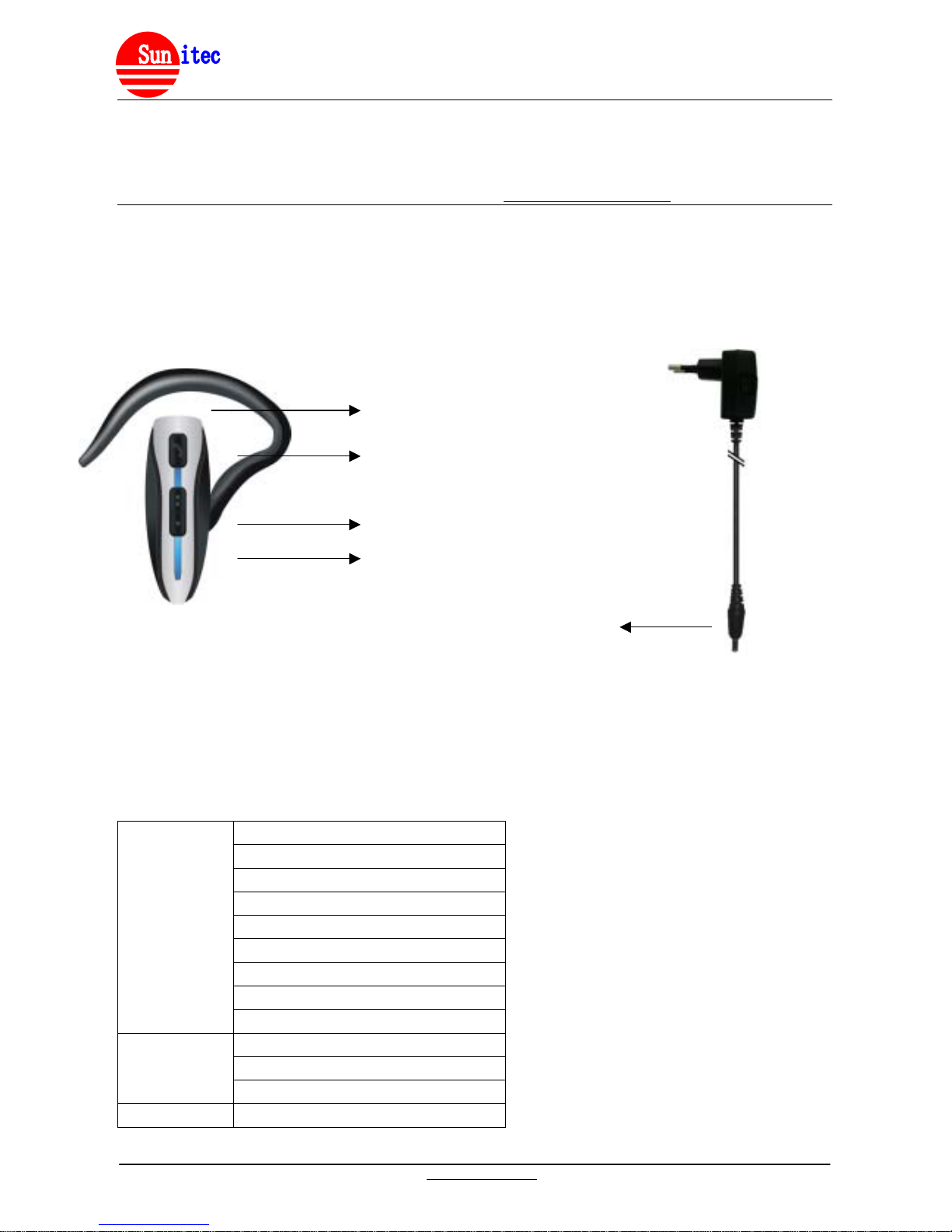
Charger Jack for Travel Charger
Multi-Function Button (MFB)
Volume Increase (V+)
Volume Decrease (V-)
Charge
r
Page 2

User Manual English
BTH-07A2 www.sunitec.com.tw Page 2 of 6
®
About Bluetooth Headset #BTH- 07A2
This versatile & super slim/light weighted Bluetooth Headset is specially designed for user to enjoy
convenience of
wireless communication. It also support Skype compatible VoIP calls. With the latest Bluetooth
technology Version 2.0
with EDR, it gives you imp eccable sound quality you've never experienced.
About Bluetooth Technology?
Bluetooth wireless technology is set to revolut ioniz e t he personal connect ivity by providing freedom from
wired connections-enabling links and connectivity between mobile computers, mobile phones, portable
handheld devices and ot her Bluetooth enables devices within 10 meters. Utilizing global sound & digital
data 2.4G ISM transmission, it makes global communication in the way you've never dreamed of!
Getting to Know Your Bluetooth Headset
Getting Started
The Bluetooth headset comes with a built-in rechargeable battery. Prior to using the headset, it is
recommendable to charge the battery fully for the first time. Please follow these simple steps:
(a) Charge your headset. Prior to using the headset, it i s recomm endable to charge the batter y fully for the
first time.
(b) Connect th e charger to an AC wall outlet and the charge plug to the h eadset’s charging socket. After
completion of charge, please remove the chargers from headset and outlet.
(c) Place your headset and a Bluetooth-enabled mobile handset no more than 1 meter apart for pairing.
(d) Ensure your headset and handset is within 10 meters(max.) - Bluetooth sensing distance.
IMPORTANT:
(a) Charge time: Normal full charge time is 2 hrs. (Approx.).
(b) Charge indication: When charge is in pr ocess, the LED will flash r ed. W hen charge is completed, the
LED will flash off.
(c) Low voltage indication: You may hear 2 beeps from headset ever y 30 seconds with LED flashes red.
It’s recommended to char ge the headset immediately to prolong durability of batter y and standby time.
Under low voltage, if battery is not charged within certain t ime – 30 s econds(appr ox.), the he adset will be
powered off.
(d) Charging indication will be del ayed for a fe w minutes if the headset has not been used f or a long tim e or
the battery is drained.
Turning On/Off the Headset
Turning On - Headset under off mode:
(a) Press and hold the MFB for 3 seconds until you hear a short beep. The LED will flash blue for 1 second.
(b) Headset will be under standby mode. The LED will flash blue.
Turning Off - headset under any modes:
(a) Press and hold the MFB for 5 seconds until you hear a long beep. The LED will flash red for 1 second.
(b) Headset will be off. The LED will flash stop.
IMPORTANT: Press the MFB again each time you turn on the headset to reactive the paring so that the
connection in between the headset and paired mobile handset is resumed. For pairing, please refer to
procedures under “Pairing”.
Pairing with a Mobile phone
Page 3

User Manual English
BTH-07A2 www.sunitec.com.tw Page 3 of 6
®
(a) Place the headset and mobile phone no more than 1 meter apart.
(b) Ensure the headset is under off mode.
(c) Press and hold the MFB for 5 sec onds until the head set LED flashes red and blue alternately. It’s now
ready for pairing.
(d) Activate your mobile handset’s Bluetooth accessing function by referring to your mobile handset user
guide for details. Mean while, the handset will search for accessible Bluetooth devices.
(e) Select “BTH-07A2” from the list.
(f) Enter the pre-programm ed passkey “0000” and pr ess “OK” to pair the heads et and the handset. When
pairing is completed, you m ay hear two beeps and LED will flash blue and red alter natively every 2.5
seconds. Now the headset is under standby mode.
(g) Press “Return” t o go back to your handset’s main menu. (For most of the mobile handset m odels, a
headset icon will be sho wn on the screen.) You should now be able to make and receive ca lls through
the headset. Please place th e mobile handset to the heads et no more than 10 meter s. (Obs truction
could cause shorter sensing distance.)
IMPORTANT: Under pairing mode, if pairing procedures are not completed within 2 minutes, the headset will
be under standby mode and emit a beep. Please repeat step (b) to (g) to pair the headset and mobile
handset again.
Connection/Link to a Mobile Handset
After pairing is completed, the headset is always under standby mode. Before you place or answer a call, if
the headset ICON is not shown on phone screen, please follow the simple steps to activate the Bluetooth
connection/link through your handset or headset until the headset ICON is on the screen.
(a) On Handset: Select “BTH-07A2” from the paired list on your handset screen.
(b) On Headset: Short press the headset MFB and select “Accept” on handset screen to accept connection.
IMPORTANT: Whenever Bluetooth connection/link is removed and you cannot see the headset ICON on
phone screen, for example: power off on headset /mobile handset or out of 10 meter sensing distance, please
activate connection/link as suggested.
Disconnection to the Mobile Handset
You may connect your headset with another Bluetooth handset. Please follow the simple steps to disconnect
the speakerphone with the pre-paired handset.
(a) Power off the headset
(b) Select “disconnecting” to remove previous connection from your handset list.
Using the Headset
Once pairing is completed and battery is fully charged, you may access the following functions. Some of the
below-mentioned function is only accessible for handsets supported with Hands-Free Profile.
(a) Answering a Call:
To answer a call, wait f or the ringing tone from heads et, then short press the MFB to accept the c all or
answer the call via your mobile handset in the normal way.
(b) Ending a Call:
Short press the MFB, to e nd your call or end the call via your mobile hands et in the norm al way. Mean
while you can hear a beep from the headset.
Reject a Call:
Page 4
User Manual English
BTH-07A2 www.sunitec.com.tw Page 4 of 6
®
(c) When you hear the ringing tone, press and hold the MFB for 3 seconds until you hear a beep.
(d) Voice Dialing:
If your mobile handset is voice dialing enabled, under standby mode, press the MFB and when you hear a
beep, say the voice tag.
IMPORTANT: Please make sure to record voice tag into the mobile handset before using voice dialing
function. This function is only applicable to mobile handset with Bluetooth Hands-Free Profile. Because
of variation of different phone, some of the phones, you may not hear the beep. Please refer to your
mobile handset user guide for additional information.
(e) Last Number Re-Dialing:
Under standby mode, short press MFB button twice for last number redial.
(f) Adjusting the Volume:
During conversation is in progress, press the volume buttons repeatedly until you reach the desired
volume level.
(g) Mute & Un-mute:
(1)Mute the headset: Press the V+ button for 3 seconds. Mean while, the LED flashes blue.
(2)Un-mute the headset: Press and hold V+ and V- buttons simultaneously.
(h) Call Inter-Changing:
(1)Headset to Handset::During conversation is in progress, press V- button for 3 seconds.
(2)Handset to Headset:Press the V- button for 3 seconds or MFB, subject to different features of
phones.
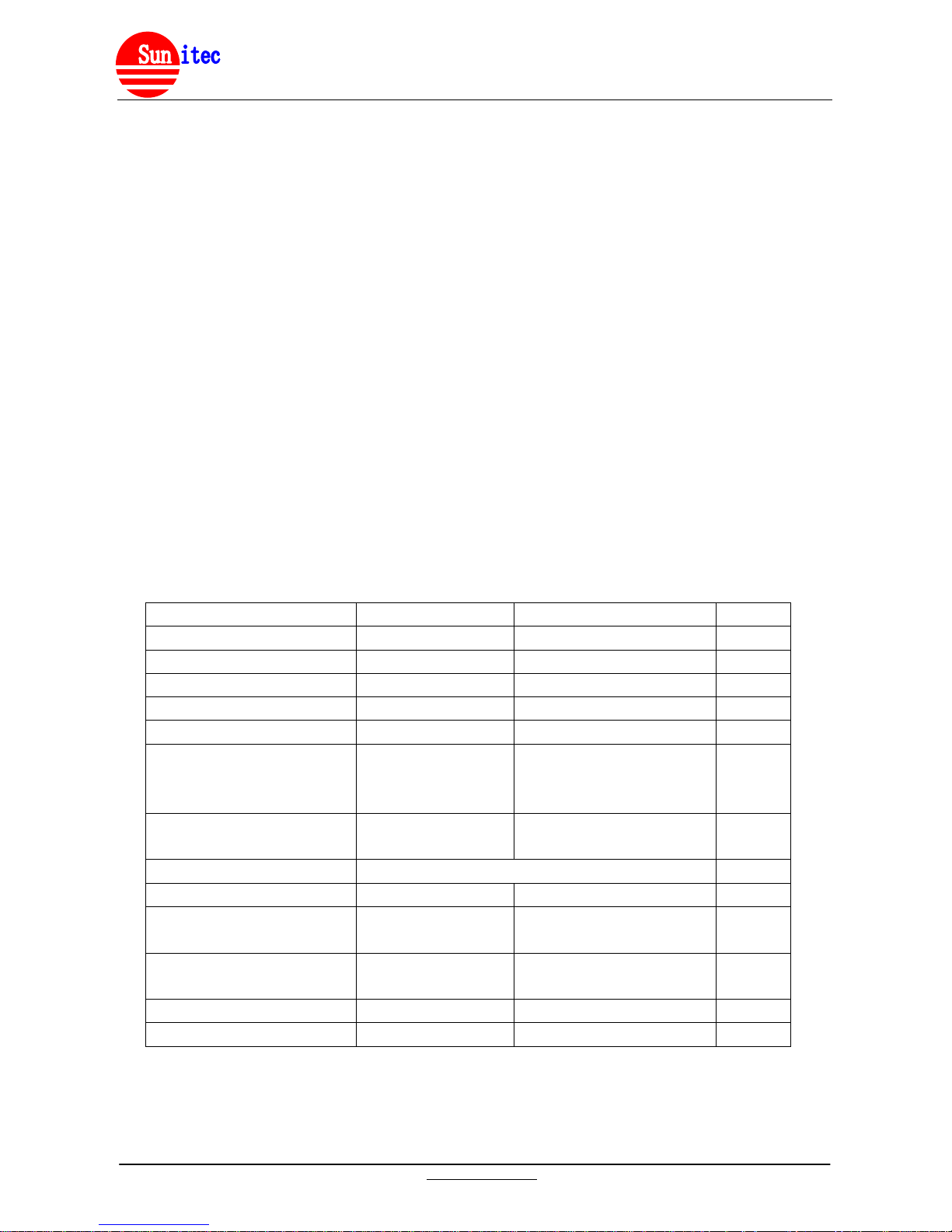
LED Indication
Headset Mode Red LED Blue LED Sound
Off Mode
Off Off
Power On
On for 1 sec. 2 beeps
Power Off
On for 1 sec. 2 beeps
Standby - before Pair i ng
Flashes twice every 2.5 sec.
Standby - after Pairing
Flashes once every 2.5 sec.
Standby - Low Voltage
flashes 2 beeps
every 30
sec.
Talking in Progress
Flashes 3 times every 2.5
sec.
Pairing in Progress
Flashes alternatively
Pairing Completed
Flashes once every 2.5 sec. 2 beeps
Mute
Flashes 3 times every 2.5
sec.
1 beep
Un-Mute
Flashes 3 times every 2.5
sec.
1 beep
Charging in Progress
Steady on
Charging Completed
Off Off
Care and Maintenance
(a) Consider turning your headset off before placing it in your pocket or bag. If the MFB is accidentally
depressed, your mobile handset may place an unintended call.
Page 5

User Manual English
BTH-07A2 www.sunitec.com.tw Page 5 of 6
®
(b) Do not expose the headset to liquid, moisture or humidity, as it is not waterproof.
(c) Do not use abrasive cleaning solvents to clean the headset.
(d) Do not place the headset in high temperature, as it will result in an explosion.
(e) Do not expose the headset to contact with sharp objects as this will cause scratching and damage.
(f) Do not stick anything inside the headset as this may damage internal components.
(g) Do not attempt to disassemble the headset or charger, as it does not contain serviceable components.
(h) If you do not use the headset for long periods, be sure to store it in a dry place, free from extreme
temperature, humidity and dust.
(i) Only use the manufacturer supplied charger when charging the headset.
(j) Do not disassemble the charger as it may expose you to dangerous voltages or other risks. Incorrect
reassembly can cause electric shock when the headset is subsequently used.
(k) Do not use the charger outdoor or in damp areas.
(l) Only charge the headset’s built-in battery in accordance with the instructions of this user guide.
(m) Avoid charging the headset in extremely high or low temperatures.
Safety Information:
(a) Chec k local laws regarding use of a mobile handset a nd headset while driving. If you use the heads et
while diving, ensure your attention and focus remains on your responsibility of driving safety.
(b) Never allow children to play with the headset. Small parts may be a choking hazard.
(c) Observe all signs that re qui r e an e lectr ical device or RF radio pr od uc t to b e switched off in the designated
areas. These could include hospitals, blasting areas, and potentially explosive atmospheres.
(d) Turn off your headset prior to boarding an aircraft. Do not use your headset in an aircraft.
(e) Never mount or store your headset over any air bag deployment area serious injury may result when an air
bag deploys.
(f) Do not open or mutilate the built-in battery.
Trouble Shooting:
If you are unable to connect your headset and mobile handset, please try the following:
(a) Ensure your headset is turned on and is properly charged.
(b) Ensure the headset is paired with your mobile handset.
(c) Ensure your mobile handset’s Blu etooth feat ure is act ivated. Please refer to you r mobile han dset user’s
guide for specific instruction.
(d) Ensure the headset is within a maximum of 10 meters of your mobile handset(s) and there are no
obstructions, such as wall or oth er electronic d evices in bet ween as it m ay cause shorter or interf erence
transmission.
(e) If all the above steps do no t resolve your pr oblem, ple ase recharge th e headset and rem ove your m obile
handset battery for a while.
The Bluetooth headset is compliant with and adopts the Bluetooth Specification V2.0. However,
interoperability between the device and other Bluetooth-enable products is not guaranteed because it depends
on compatibility. For more information on the compatibility between the device with other Bluetooth-enabled
products, please check with the manufacturer/importer.
Product Specifications
Bluetooth Specifications : Version 2.0+ EDR, Class 2, 10 Meters
Bluetooth Profile Supported: Headset & Hands-Free Profiles
Operating Frequency Band : 2.402 to 2.480GHz unlicensed ISM band
Page 6

User Manual English
BTH-07A2 www.sunitec.com.tw Page 6 of 6
®
Rechargeable Li-ion Battery: 3.7V DC, 120mAH
Multi-Pairing : Up to 7 bluetooth devices
AC/DC Charger : DC 5 to 6 V, 400 mA, DC jack.
Normal Charge Time : 2 hrs.(approx.)
Talk Time : 8 to 10 hrs.(approx.)
Standby Time : 150 hrs.(approx.)
Dimension(L/M/S) : 5.6x1.95x1.2 cm.
Weight : 10.85 g.
'Hereby, Celltrend International Co., Ltd, declares that this BTH-07A2 is in compliance with the essential
requirements and other relevant provisions of Directive 1999/5/EC.'
Notice : The changes or modifications not expressly approved by the p arty responsible
for compliance could void the user’s authority to operate the equipment.
IMPORTANT NOTE: To comply with the FCC RF exposure compliance requirements, no change to the
antenna or the device is permitted. Any change to the antenna or the device could result in the device
exceeding the RF exposure requirements and void user’s authority to operate the device.
This device complies with Part 15 of the FCC Rules. Operation is subject to the following two conditions:
(1) this device may not cause harmful interference, and (2) this device must accept any interference
received, including interference that may cause undesired operation.
 Loading...