

Page 1
Air Mouse & Keyboard
MODEL: KB002
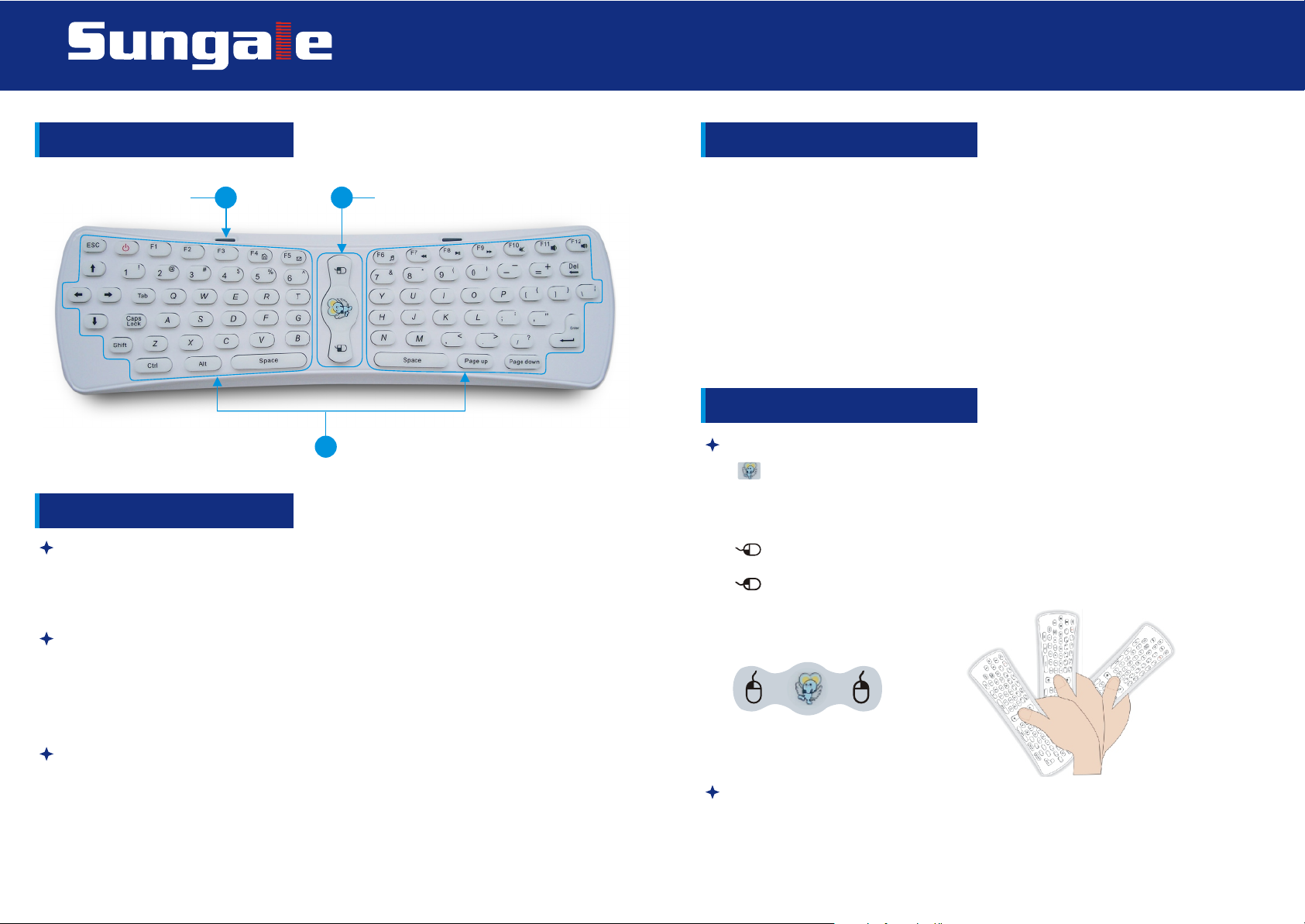
Sketch Map of the buttons
Working pilot lamp Mouse region
1 2
3
Keyboard region
Operating instruction
Preparing
1. Open the rear cover of the fly mouse, and install 3 completely new AAA
batteries into the mouse, then close the rear cover.
2. Inserting the dongle to the USB pork of computer, keyboard or monitor.
LED status display
1. If LED of the Dongle flickers, it means that the connection is unsuccessful;
If the LED keeps shining, it means that the connection is successful and
mouse & keyboard is ready to work.
2. Press any of the buttons in the keyboard, if the working pilot lamp( 4Hz)
slowly flicker, it means the connection is unsuccessful; if the LED keep
shining, it means that the connection is successful and mouse&keyboard is
ready to work.
3. If none of the buttons in the keyboard has been pressed, and the working
pilot lamp (16Hz) quickly flicker, it means that the power of the batteries is
in sufficent and you need to replace the batteries.
Functions of the buttons
Mouse function buttons
[ ] Mouse navigation key: press and hold this button or double click this
button, the cursor will appear exactly where you point, wave your wrist around
Single click this button (in this mode, only mouse right and left buttons are
workable, the other buttons are useless)
[ ] Mouse left button: work the same as the common mouse left button
[ ] Mouse right button: work the same as the common mouse right button
Sketch map:
Checking Codes
Press <Y> key and < "> key in the keyboard together,LED keep shining, after 5
seconds, LED go out and enter into code checking state. Please wait for a short
moment in the code checking state, when the LED of the Dongle keep shining,
it represent Dongle and keyboard successfully finish checking the codes and
both Dongle and keyboard are ready to work at the moment.
Usage
The fly mouse can be held at any angle and made to point to any direction, no
need to keep it in horizon position or pointed to the screen. In order to make its
sensitiveness to most, holding the fly mouse like holding a remote. Making the
head part of the mouse to upside, downside, left or right to certain the pointing
direction. When want to move the fly mouse, just moving the mouse by swinging
your wrist, never put it in horizon position, Or the mouse will not respond.
Keyboard region
It is the main component of the product, the arrangement of the keyboard is
the same as the common keyboard, it include digits keys, alphabetic keys,
usual operational symbols keys and punctuators keys, and also some
necessary control keys.
Page 1
Page 2
Air Mouse & Keyboard
MODEL: KB002
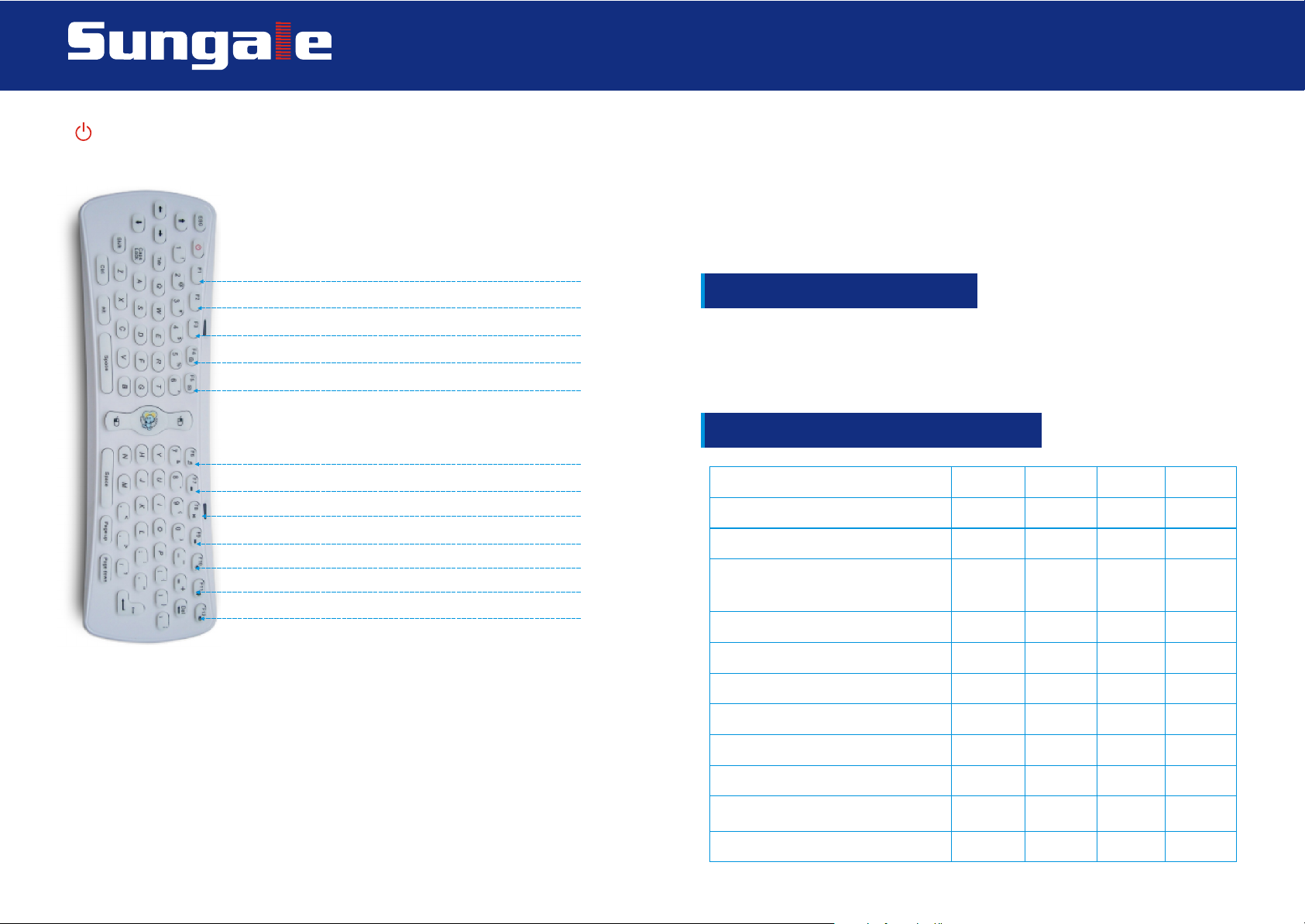
[ ] POWER Key: PC sleep button, PC will enter into sleeping mode when you
press this button; the functions of the other buttons are the same as the common
keyboard.
F1: Menu
F2: Start
F3: Notification Bar
F4: Search - Open the homepage of the website
F5: Mail (Email) - Open Outlook Express
F6: Music - Open MediaPlayer
F7: Zoom in or delay - MediaPlayer play the last song
F8: Play or Pause - MediaPlayer play and pause
F9: Zoom out or continue - MediaPlayer play the next song
F10: Mute
F11: Volume+
F12: Volume-
ESG+G: initialization
Remarks: when drifting of the cursor appears , please lie it on the surface of
a desk and keep it still, pressing the key ESC and the key G at the same time
for 5 seconds, then the LED keeps shining. After 5 seconds, the LED will turn
off which means the initialization is going on, move your hand to release the
key until the LED keeps shining again, the initialization of the fly mouse is
successful.
RF receiver connection
1. Open the Multimedia PC and make sure it works as normal
2. Plug the RF Dongle into the USB slot of the PC
3. Multimedia PC will automatically search and install the driver; the receiver
will work once the driver is OK
Electrical parameter table as below
Parameter min typical max Units
Voltage 3.5 4.5 5.5 V
Working current 8 10 12 mA
Quiescent current consumption
in sleeping mode 10 uA
Special compound key:
[Shift]+[F4]: Open the homepage of the website
[Shift]+[F5]: Open Outlook Express
[Shift]+[F6]: Open MediaPlayer
[Shift]+[F7]: MediaPlayer play the last song
[Shift]+[F8]: MediaPlayer play and pause
[Shift]+[F9]: MediaPlayer play the next song
[Shift]+[F10]: Mute
[Shift]+[F11]: Volume[Shift]+[F12]: Volume+
[shift]+ESC: Sensitiveness adjusting
Wireless transmit power -35 0 5 dBm
Wireless data transmission rate 1000 kbps
Wireless working frequency 2400 2483 MHz
Frequency hopping channel 84 channels
Wireless communication distance 10 m
Infrared emission current 20 25 mA
Infrared communication distance 8 m
Sensitiveness of gyroscope 300 dps
Page 2
 Loading...