

Page 1

Sun Enterprise™450 Server
Upgrade Guide
Sun Microsystems, Inc.
901 San Antonio Road
Palo Alto, CA 94303
U.S.A. 650-960-1300
Part No. 806-4993-10
August 2000, Revision A
Send comments about this document to: [email protected]
Page 2

Copyright 2000Sun Microsystems,Inc., 901San AntonioRoad •Palo Alto, CA94303-4900 USA.All rightsreserved.
This product ordocument isprotected bycopyright anddistributed underlicenses restricting its use, copying,distribution, anddecompilation.
No partof thisproduct ordocument maybe reproducedin anyform byany means withoutprior writtenauthorization ofSun and itslicensors,
if any.Third-partysoftware, includingfont technology,is copyrighted andlicensed fromSun suppliers.
Parts ofthe productmay bederived fromBerkeley BSDsystems, licensedfrom theUniversity of California.UNIX isa registeredtrademark in
the U.S.and othercountries, exclusivelylicensed throughX/Open Company,Ltd. ForNetscape Communicator™, thefollowing noticeapplies:
Copyright 1995Netscape CommunicationsCorporation. Allrights reserved.
Sun, SunMicrosystems, theSun logo,AnswerBook2, docs.sun.com,ShowMe How,Solstice AdminSuite, SolsticeBackup, SolsticeDiskSuite,
SunSwift, SunVTS,Sun Enterprise,and Solarisare trademarks,registered trademarks,or servicemarks ofSun Microsystems,Inc. in theU.S.
and othercountries. AllSPARCtrademarks areused underlicense andare trademarksor registeredtrademarks of SPARCInternational, Inc. in
the U.S.and othercountries. Productsbearing SPARCtrademarks arebased upon an architecturedeveloped by SunMicrosystems, Inc.
The OPENLOOK andSun™ GraphicalUser Interfacewas developed bySun Microsystems,Inc. forits usersand licensees. Sun acknowledges
the pioneeringefforts ofXerox inresearchingand developing theconcept ofvisual orgraphical user interfaces for thecomputer industry.Sun
holds anon-exclusive licensefrom Xeroxto theXerox GraphicalUser Interface,which licensealso covers Sun’slicensees whoimplement OPEN
LOOK GUIsand otherwisecomply withSun’s writtenlicense agreements.
RESTRICTEDRIGHTS:Use, duplication,or disclosureby theU.S. Government issubject torestrictions ofFAR 52.227-14(g)(2)(6/87)and
FAR52.227-19(6/87), orDFAR252.227-7015(b)(6/95) andDFAR 227.7202-3(a).
DOCUMENTATIONIS PROVIDED “AS IS”AND ALL EXPRESS ORIMPLIED CONDITIONS, REPRESENTATIONS ANDWARRANTIES,
INCLUDING ANY IMPLIED WARRANTY OF MERCHANTABILITY, FITNESS FOR A PARTICULAR PURPOSE OR NONINFRINGEMENT, ARE DISCLAIMED, EXCEPT TO THE EXTENT THAT SUCH DISCLAIMERS ARE HELD TO BE LEGALLY INVALID.
Copyright 2000Sun Microsystems,Inc., 901San AntonioRoad •Palo Alto, CA94303-4900 Etats-Unis.Tousdroits réservés.
Ce produitou documentest protégépar uncopyright etdistribué avecdes licences quien restreignentl’utilisation, lacopie, ladistribution, etla
décompilation. Aucunepartie dece produitou documentne peutêtre reproduitesous aucuneforme, parquelque moyen quece soit,sans
l’autorisation préalableet écritede Sunet deses bailleurs delicence, s’ily ena. Lelogiciel détenu pardes tiers,et quicomprend latechnologie
relativeaux polices decaractères, estprotégé parun copyrightet licenciépar desfournisseurs de Sun.
Des partiesde ceproduit pourrontêtre dérivéesdes systèmesBerkeley BSDlicenciés parl’Université de Californie.UNIX estune marque
déposée auxEtats-Unis etdans d’autrespays etlicenciée exclusivementpar X/Open Company,Ltd. Lanotice suivanteest applicableà
Netscape Communicator™:Copyright 1995Netscape CommunicationsCorporation. Tousdroits réservés.
Sun, SunMicrosystems, theSun logo,AnswerBook2, docs.sun.com,ShowMe How,Solstice AdminSuite, SolsticeBackup, SolsticeDiskSuite,
SunSwift, SunVTS,Sun Enterprise,et Solarissont desmarques defabrique ou desmarques déposées,ou marquesde service,de Sun
Microsystems,Inc. aux Etats-Uniset dansd’autres pays.Toutesles marquesSPARCsont utiliséessous licenceet sont desmarques defabrique
ou desmarques déposéesde SPARCInternational, Inc.aux Etats-Uniset dans d’autrespays. Lesproduits portantles marquesSPARCsont
basés surune architecturedéveloppée parSun Microsystems,Inc.
L’interfaced’utilisation graphiqueOPEN LOOKet Sun™a été développéepar SunMicrosystems, Inc.pour sesutilisateurs et licenciés. Sun
reconnaîtles effortsde pionniers deXerox pourla rechercheet ledéveloppement duconcept desinterfaces d’utilisation visuelle ou graphique
pour l’industriede l’informatique.Sun détientune licencenon exclusive deXerox surl’interface d’utilisationgraphique Xerox,cette licence
couvrant égalementles licenciésde Sunqui mettenten place l’interfaced’utilisation graphiqueOPEN LOOKet qui en outre seconforment aux
licences écritesde Sun.
CETTE PUBLICATION ESTFOURNIE "EN L’ETAT"ET AUCUNE GARANTIE, EXPRESSEOU IMPLICITE, N’EST ACCORDEE, Y COMPRIS
DES GARANTIESCONCERNANT LA VALEURMARCHANDE, L’APTITUDEDE LA PUBLICATION AREPONDRE A UNEUTILISATION
PARTICULIERE, OU LE FAIT QU’ELLE NE SOIT PAS CONTREFAISANTE DE PRODUIT DE TIERS. CE DENI DE GARANTIE NE
S’APPLIQUERAIT PAS, DANS LA MESURE OU IL SERAIT TENU JURIDIQUEMENT NUL ET NON AVENU.
Please
Recycle
Page 3

Preface
The Sun Enterprise 450 Server Upgrade Guide , used with the Ultra Enterprise 450 Server
Owner’s Guide and the Sun Enterprise 450 Server Product Notes, gives you the
information you need to upgrade your Sun™ server to a Sun Enterprise™ 450
server. These three documents accompany this upgrade package.
Features and options, installation, troubleshooting, parts replacement, network
administration information, and other topics about the Sun Enterprise 450 server are
all covered in the Ultra Enterprise 450 Server Owner’s Guide. To install the parts you
will be transferring from other systems into your new Sun Enterprise 450 server,
refer to the Ultra Enterprise 450 Server Owner’s Guide, or to your third-party
documentation. To install any options that you purchased with this upgrade, use the
accompanying documentation.
In addition, you can view many of the component installation and replacement
procedures in the multimedia CD-ROM application ShowMe How™, which also
accompanies this upgrade.
Using UNIX Commands
This document may not contain information on basic UNIX®commands and
procedures such as shutting down the system, booting the system, and
configuring devices.
See one or more of the following for such information:
■ Solaris 2.x Handbook for SMCC Peripherals
■ AnswerBook2™ online documentation for the Solaris™ software environment
■ Other software documentation that you received with your system
iii
Page 4

Typographic Conventions
TABLEP-1 Typographic Conventions
Typeface Meaning Examples
AaBbCc123 The names of commands, files,
and directories; on-screen
computer output
AaBbCc123
AaBbCc123 Book titles, new words or terms,
What you type, when
contrasted with on-screen
computer output
words to be emphasized
Edit your .login file.
Use ls -a to list all files.
% You have mail.
% su
Password:
Read Chapter 6 in the User’s Guide.
These are called class options.
You must be superuser to do this.
Command-line variable; replace
with a real name or value
To delete a file, type rm filename.
Shell Prompts
TABLEP-2 Shell Prompts
Shell Prompt
C shell machine_name%
C shell superuser machine_name#
Bourne shell and Korn shell $
Bourne shell and Korn shell superuser #
iv Sun Enterprise 450 Server Upgrade Guide • August 2000
Page 5

Related Documentation
TABLEP-3 Related Documentation
Application Title
Performing diagnostic tests
System and network administration
Using operating system software
Miscellaneous
SunVTS User’s Guide
SunVTS Quick Reference Card
SunVTS Test Reference Manual
Solstice SyMON User’s Guide
Solaris SystemAdministratorAnswerBook
SPARC: Installing Solaris Software
Solaris User’s Guide
Solaris on Sun Hardware AnswerBook
Solaris Handbook for Sun Peripherals
Sun Documentation on the Web
The docs.sun.comsmweb site enables you to access Sun technical documentation
on the Web. You can browse the docs.sun.com archive or search for a specific book
title or subject at:
http://docs.sun.com
Sun Welcomes Your Comments
We are interested in improving our documentation and welcome your comments
and suggestions. You can email your comments to us at:
Please include the part number of your document in the subject line of your email.
Preface v
Page 6

vi Sun Enterprise 450 Server Upgrade Guide • August 2000
Page 7

Sun Enterprise 450 Server
Upgrade Guide
This document contains information for upgrading from any Sun Ultra
Enterprise 1 server, Sun Ultra Enterprise 2 server, or SPARCstation™ server to a Sun
Enterprise 450 server. For important safety and electromagnetic compatibility
information, read the Ultra Enterprise 450 Server Owner’s Guide and the Sun Enterprise
450 Server Product Notes that come with this upgrade.
Overview
The following sections of this document cover the main steps involved in the
upgrade procedure:
■ Upgrade contents
■ Cautions
■ Unpacking the shipping cartons
■ Backing up data disk drives
■ Halting your system
■ Removing SBus cards and extra memory
■ Installing your upgrade
■ Installing new disk drive brackets
■ Transferring disk drives into the Sun Enterprise 450 server
■ Powering up your upgraded system
■ Return material procedure
Be sure to read each section in its entirety, and any necessary information in the
Ultra Enterprise 450 Server Owner’s Guide and the Sun Enterprise 450 Server Product
Notes before attempting to perform the upgrade. You should also have on hand the
documentation that came with your original system. You will need to refer to it to
perform some of the procedures on the original system.
1
Page 8

Upgrade Contents
Your upgrade includes the Sun Enterprise 450 server chassis. The upgrade may also
include one or more of the following hardware components:
■ Memory modules (32-megabyte or larger capacity SIMMs)
■ CPU module with DC-to-DC converter
■ New disk drive bracket(s)
If any item in the list above is not included in either the upgrade or your new
system, you are expected to transfer the item(s) from your old system to your
new system.
For instructions about configuring your new system, or for instructions about
installing new parts or the parts you are transferring from your old system into your
new system, consult the Ultra Enterprise 450 Server Owner’s Guide, the Ultra Enterprise
450 Server Hardware Setup Instructions, or view the ShowMe How
multimedia documentation supplied with your new system.
When you upgrade to a Sun Enterprise 450 server, you must return your old system
unit to Sun Microsystems. See “Return Material Procedure” on page 9 for additional
details.
Note – Since you are upgrading to a new CPU architecture, your system’s Ethernet
address and host identification (hostid) will change, and applications that are
licensed to your system may change as well. Be sure to inform your system
administrator of this fact before you begin the upgrade. He or she will need to
update certain network configuration files before your system can rejoin the
network.
TM
CD-ROM
2 Sun Enterprise 450 Server Upgrade Guide • August 2000
Page 9

Cautions
Caution – This equipment contains lethal voltage. Accidental contact can result in
serious injury or death.
Caution – Improper handling by unqualified personnel can cause serious damage
to this equipment. Unqualified personnel who tamper with this equipment may be
held liable for any resultant damage to the equipment.
Caution – Use proper electrostatic discharge (ESD) grounding techniques when
handling components. Wear an antistatic wrist strap and use an ESD-protected mat.
Store ESD-sensitive components in antistatic bags before placing them on any
surface.
Individuals servicing this equipment must observe all safety precautions and ensure
compliance with skill-level requirements, certification, and all applicable local and
national laws.
Some procedures in this document must be performed by trained maintenance
providers. Only people who have been trained at the Sun Microsystems training
facilities (or at Sun Microsystems affiliates) and have been certified as required by
local and national laws are considered qualified.
Unpacking the Shipping Cartons
Illustrations depicting how to unpack your new Sun Enterprise 450 server are
printed on the shipping cartons—these pictures are self-explanatory. However, there
are a few additional steps you should take.
1. Inspect the shipping cartons before opening them.
If there is evidence of damage to a carton, contact your sales representative and
arrange for an agent of the carrier to be present when you remove the equipment.
Sun Enterprise 450 Server Upgrade Guide 3
Page 10

2. Remove and save the Customer Information Sheet.
This sheet is in the plastic envelope on the side of the system unit carton. Retain this
sheet for your records. If you are connecting your system to a network, your system
administrator will need this sheet during the installation procedure.
3. Save the cartons and the packing material.
You will need them if you ever want to ship your system anywhere. In addition, you
may need them to return your old system unit if its original shipping materials are
missing.
Backing Up Data Disk Drives
Sun Enterprise 450 servers support 1-inch high and 3.5-inch wide UltraSCSI
disk drives. If you are transferring data disk drives to the new system, back up the
data on the drives before halting the system.
Note – You cannot transfer a boot disk from your old system and use it as a boot disk
in your Sun Enterprise 450 server. You must reformat the drive and install the new
version of the operating system software.
1. Back up each data disk drive onto media that will be accessible to your
new server.
Use a level 0 dump backup.
2. Record each disk’s device name.
Use the df command to read the disk device name before removing any
disk drive from your old system.
Halting Your System
Caution – You must halt the system in an orderly manner. When the operating
!
4 Sun Enterprise 450 Server Upgrade Guide • August 2000
system or any other standalone program is up and running, do not press Stop(L1)-a
to halt the system. Abruptly aborting program execution may cause damage to data
files.
Halt your system using the following procedure:
Page 11

1. Save all your work.
Consult your software documentation for instructions on ending a work session and
saving your files. If you do not save your work, you could lose it when you switch
off the power.
2. Perform a complete system dump before starting the upgrade process.
See your operating system documentation if you need instructions on how
to do this.
3. Return to the operating system environment.
If you are in a windowing environment, exit from it and wait for the system prompt
to appear. See the documentation supplied with your windowing system.
4. Halt the operating system.
See the documentation supplied with your operating system for instructions on how
to halt it.
● For Solaris 2.5.1 Hardware: 11/97, Solaris 2.6, Solaris 7, or later compatible
systems, type:
% su
Password:
# /usr/sbin/shutdown -y -g60 -i0
superuser password
● For Solaris 2.5.1 Hardware: 4/97 compatible systems, type:
% su
Password: superuser password
# /usr/etc/shutdown -h +1
The operating system warns other users of your system of the impending shutdown,
and then halts itself after a one-minute delay. If you wish to provide a longer delay,
see the man page for shutdown(1).
The system responds with system halt messages, followed by either the > prompt or
the ok prompt. When either prompt appears, you can safely turn off the power in
the proper sequence.
5. Turn off the power in sequence to:
a. External drive units (if any)
b. Sun system unit
c. Monitor (if applicable)
Sun Enterprise 450 Server Upgrade Guide 5
Page 12

Removing SBus Cards and Extra
Memory
If your system unit contains SBus cards, memory, or other modules, you
should remove them before returning the system unit to Sun Microsystems.
You may transfer memory modules that were factory-installed inside your old
system unit, as well as any memory module that you purchased as a separate option.
Consult the installation guide that came with your system for detailed instructions
about removing SBus cards and extra memory.
Installing Your Upgrade System
Your upgrade includes the Sun Enterprise 450 server chassis. The upgrade may also
include one or more of the following hardware components:
■ Memory modules (32-megabyte or larger capacity SIMMs)
■ CPU module with DC-to-DC converter
■ New disk drive bracket(s)
To install memory modules and CPU modules in your Sun Enterprise 450 server, see
the installation sections in the Ultra Enterprise 450 Server Owner’s Guide.
Installing New Disk Drive Brackets
The Sun Enterprise 450 server supports 1-inch high and 3.5-inch wide UltraSCSI disk
drives with a new bracket for securing each drive in the disk drive array. If your
1-inch high disk drives have the old brackets on them, you must install the new
brackets that came with your upgrade before you can transfer the drives into the
new system.
Examine the following drawing to see if your drives have the old bracket. To install
new brackets on your disk drives follow this procedure.
6 Sun Enterprise 450 Server Upgrade Guide • August 2000
Page 13
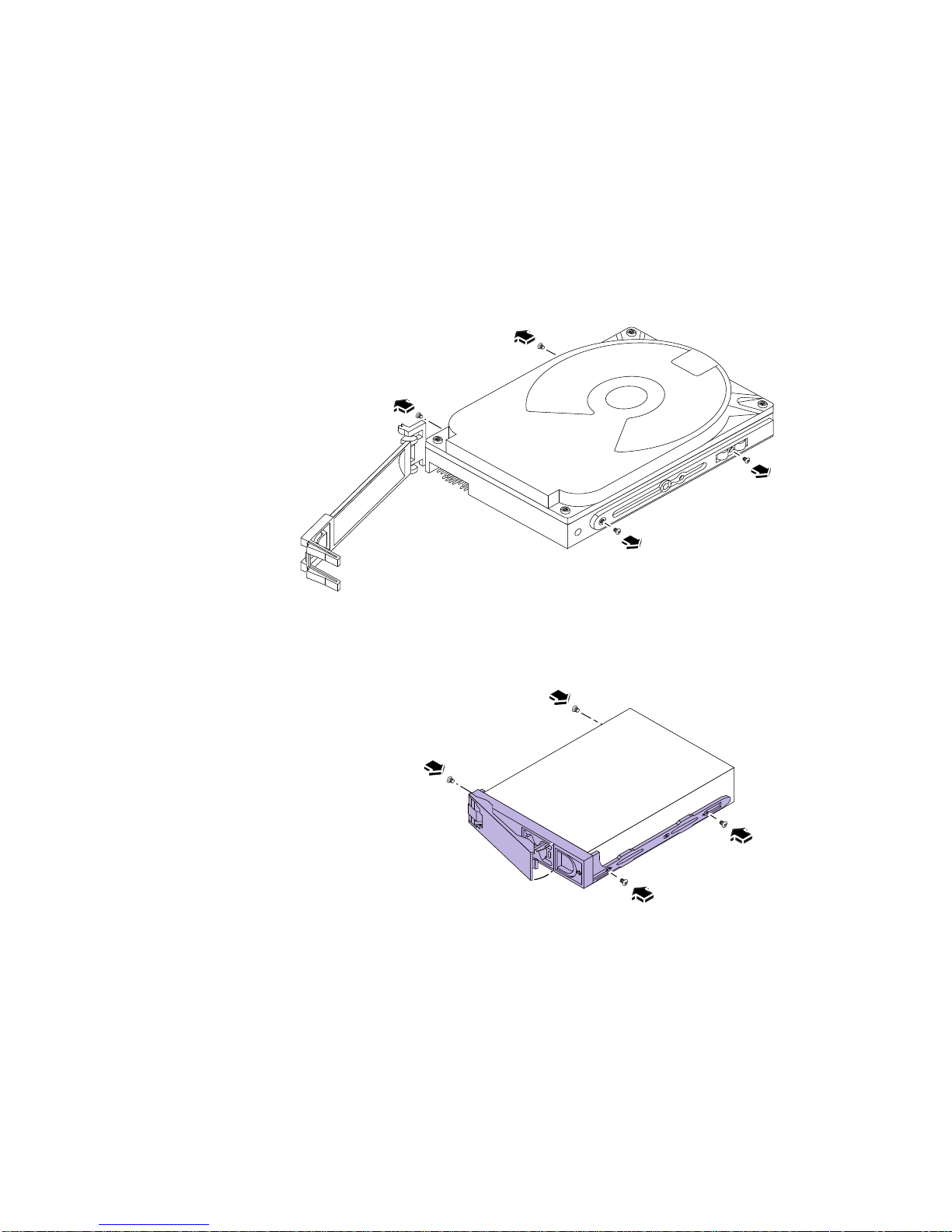
1. Remove the disk drive from your old system.
See the documentation supplied with your system for disk drive removal. If you
have not backed up your data disks, see “Backing Up Data Disk Drives” on page 4.
2. Remove the four Phillips screws securing the old bracket to the disk drive.
Remove the old disk
drive bracket.
3. Attach the new bracket to the disk drive using the four Phillips screws.
Install the new disk
drive bracket.
4. Repeat steps 1 to 3 as many times as is necessary to install the new disk
drive brackets onto your 1-inch high disk drives.
Sun Enterprise 450 Server Upgrade Guide 7
Page 14

Transferring Disk Drives Into the Sun
Enterprise 450 Server
For information about mounting a data disk as a Sun Enterprise 450 server data
disk, consult the System Administration Guide accompanying your software
documentation. Use the device name you recorded in the section “Backing Up Data
Disk Drives” on page 4.
To configure and use any transferred data disk as part of a disk array, consult the
Solstice DiskSuite™ documentation.
● Install each disk drive into the Sun Enterprise 450 server.
See the Ultra Enterprise 450 Server Owner’s Guide and the Sun Enterprise 450 Server
Product Notes for information about installing and configuring disk drives in your
server.
Powering Up Your Upgraded System
The procedure for powering up your system for the first time depends on the
operating system you are using. Refer to the Ultra Enterprise 450 Server Owner’s Guide
for instructions about configuring your server. Your system is connected to a
network, and the network environment will require some advance preparation
before you turn on your server.
Do not power up your system until you have notified your system administrator
and have received permission to proceed. If you must act as your own system
administrator, see the documentation that accompanies your operating system
software.
8 Sun Enterprise 450 Server Upgrade Guide • August 2000
Page 15

Return Material Procedure
Accompanying your upgrade is a Return Material Authorization (RMA)
documentation set that includes a letter and instructions for returning your old
equipment to Sun Microsystems.
Once you have completed the upgrade process, you must return your old system
unit to Sun Microsystems. Be sure to remove and keep any SBus cards or memory
modules before returning the system.
To return your old equipment to Sun Microsystems:
1. Disconnect any cables that may still be attached to the system unit.
2. Pack the system unit in appropriate packing materials.
Use the system’s original packing materials or the Sun Enterprise 450 server
materials, if possible. Be sure that the unit is secure and well padded inside its
shipping carton.
3. Follow the instructions in the Sun Upgrades RMA Letter to return the equipment
to Sun Microsystems.
You have completed the upgrade process. If you encounter any difficulties with your
new server, call the Sun Response Center or your authorized service provider.
Sun Enterprise 450 Server Upgrade Guide 9
Page 16

10 Sun Enterprise 450 Server Upgrade Guide • August 2000
 Loading...