

Page 1

CycloneMicro2MultimediaPlayer
P
age1.
Version0.7
Cyclone
Cyclone
Cyclone
Cyclone
Micro
Micro
Micro
Micro2
2
2
2
Full
Full
Full
FullHD
HD
HD
HD1080p
1080p
1080p
1080p
HDMI
HDMI
HDMI
HDMIMedia
Media
Media
MediaPlayer
Player
Player
Player
UsermanualCycloneMicro2
Page 2

CycloneMicro2MultimediaPlayer
Page2.
Version0.7
Contents:
Contents:
Contents:
Contents:
SafetyInstructions:.....................................................................................................4
ProductDetails:...........................................................................................................6
PackagingList:........................................................................................................6
FrontView:...............................................................................................................6
BackView:................................................................................................................7
RemoteControl:......................................................................................................8
UserInterface:.............................................................................................................9
MainMenu:............................................................................................................10
BasicSetup:...............................................................................................................11
ConnectingPower:...............................................................................................11
AVCable:...............................................................................................................11
HDMICable:..........................................................................................................12
USBHostInterface:..............................................................................................12
MemoryCardInterface:.......................................................................................13
ViewingMultimedia:..................................................................................................14
MoviePlayback:....................................................................................................14
MoviePlaybackOptions:.................................................................................15
AdvancedVideoSettings:...............................................................................16
AudioPlayback:.....................................................................................................19
AudioPlaybackOptions:..................................................................................20
AdvancedAudioSettings:...............................................................................21
ImagePlayback:
....................................................................................................
23
ImagePlaybackOptions:
.................................................................................
24
AdvancedImageSettings:
...............................................................................
25
Page 3

CycloneMicro2MultimediaPlayer
Page3.
Version0.7
SlideshowViewingwithBackgroundMusic:................................................26
File:
..............................................................................................................................
28
Settings:......................................................................................................................29
FirmwareUpgrade:...................................................................................................31
Troubleshooting:
.......................................................................................................
33
ProductSpecifications:
.............................................................................................
35
MediaCodecInformation:.......................................................................................36
MaintenanceNotice:.................................................................................................37
Page 4

CycloneMicro2MultimediaPlayer
Page4.
Version0.7
Safety
Safety
Safety
SafetyInstructions:
I nstructions:
Instructions:
Instructions:
READTHESEINSTRUCTIONS:
Allsafetyandoperatinginstructionsshouldbereadbeforethisproductis
used.
KEEPTHESEINSTRUCTIONS:
Thesesafetyandoperatinginstructionsshouldberetainedforfuture
reference.
FOLLOWALLINSTRUCTIONS:
Alloperatinginstructionsshouldbefollowed.
AVOIDUSINGPRODUCTNEARWATER:
Donotusethisproductnearawatersource.
ALWAYSCLEANWITHADRYCLOTH:
Cleanusingasoft,dryclothonly.
HEAT:
Donotinstallnearaheatsource,suchasradiatorsorotherapparatusthat
producehighlevelsofheat.
POWEROUTAGE:
Avoiduseoftheproductduringelectricalstorms.Disconnectdevicewhen
notinuseforlongperiods.
SERVICING:
Ifproductisorbecomesdefectivepleaserefertoaqualifiedservice
technician.
Page 5

CycloneMicro2MultimediaPlayer
Page5.
Version0.7
AVOIDBLOCKINGAIRVENTS:
Donotblocktheairventsinordertoavoidheatbuildup.Aminimumof5cm
isrecommendedtomaintainfreeairflow.
PROTECTTHEPOWERCORD:
Preventthepowercordfrombeingwalkedonandbeingpulledwithsudden
force.Protectthecordfrombeingpinched,particularlyatplugsandthepoint
wheretheyexitthedevice.
DONOTDROP:
Donotdroptheplayerasthiswillcauseirreversibledamage.
ONLYUSERECOMMENDEDACCESSORIES:
Itisrecommendedtouseonlymanufacturerapprovedaccessoriestoavoid
anycompatibilityissuesordamagetotheproduct.
HARDDRIVEANDOTHERMEDIASTORAGEDEVICE:
Wewillnotbeliableinanywayfordamageasaconsequenceoflossor
recoveryofdataontheharddriveandotherattachedmediastorage.
Customersareadvisedtobackupdatabeforeusingthisdevice.
Wearenotliableforcompatibilityissueswiththemediastorageunit.Itis
recommendedthatcustomersbuyacompatiblestoragemediaunitforthis
player.
Page 6

CycloneMicro2MultimediaPlayer
Page6.
Version0.7
Product
Product
Product
ProductDetails:
D etails:
Details:
Details:
Packaging
Packaging
Packaging
PackagingList:
List:
List:
List:
Pleaseensurethatthefollowingitemsareincludedintheboxwhenopened.
Ifanyitemsaremissing,pleasecontactyoursupplierimmediately.
MediaPlayer1x
PowerAdapter1x
RemoteControl1x
AVCable1x
SupportCD1x
Front
Front
Front
FrontView:
View:
View:
View:
1USBHostUSBHostporttoconnecttomultipleexternal
storagedevices.
2LEDLightLEDlightdisplay.
TheLEDwilllightupbluewhenswitchedon.It
willlightupredwhenswitchedtostandbymode.
3IRInfraredsensor.
4CardReader2-in-1cardreader.SupportsSDandMMC
memorycards.
Page 7

CycloneMicro2MultimediaPlayer
Page7.
Version0.7
Back
Back
Back
BackView:
View:
View:
View:
1AVOutCompositevideooutput.
2HDMIHighdefinitionvideooutputport.Usedtodisplay
highqualityvideoandaudio.
3DCIN5VPowerport
Page 8

Cyclone Micro 2 M
ultimedia Player
Page 8.
Version 0.7
Remote
Remote
Remote
Remote C
ontrol:
Control:
Control:
Control:
1.Standby:Switches the Cyclone Micro 2 on and of
f from standby mode.
2.AV/HDMI:Toggles the Cyclone Micro 2 between AV and HDMI.
3.HOME:Returns user to main menu.
4.Zoom:Press to zoom image files on display.
5.Setup:Shortcut access to setup menu.
6.Audio:Press to Switch the audio track .
7.Subtitle:Switch subtitle ON or OFF.
Page 9

Cyclone Micro 2 M
ultimedia Player
Page 9.
Version 0.7
User
User
User
User In
terface:
Interface:
Interface:
Interface:
8.UP:Navigation button. Moves cursor up.
9.Prev :Press to return to previous file.
10.Enter:Pressing this button confirms or selects an action.
1
1.Left:Navigation button. Moves cursor left.
12.FR:Press to fast rewind.Pressing it again to play.
13.Down:Navigation button. Moves cursor down.
14.Stop:Stops media playback.
15.Play/Pause:Press to pause media playback. Press again to resume media playback.
16.Mute:Switches on and off audio output.
17.16:9/4:3:Press to adjust the display aspect ratio.
18.Repeat:Press the Repeat button will change the repeat mode.
19.Rotate:Press to rotate image files.
20.OSD:Press to appear a number of available options.
21.GOTO:Press to select movie chapter.
22.Return:Returns user to the previous menu.
23.Next:Press to go to next file.
24.Right:Navigation button. Moves cursor right.
25.FF:Press to fast forward.Pressing it again to play.
26.V-:Press to decrease audio volume.
27.V+:Press to increase audio volume.
Pressing it again to play.
Page 10

CycloneMicro2MultimediaPlayer
Page10.
Version0.7
TheCycloneMicro2userinterfacehasbeendesignedtoalloweasyaccess
tothemediaplayer’smanyfeatures.
Main
Main
Main
MainMenu:
Menu:
Menu:
Menu:
UponstartingtheCycloneMicro2thismenuwillbedisplayedfirst.
Movie:
Movie:
Movie:
Movie:
Providesaccesstomoviemediafiles.
Music:
Music:
Music:
Music:
Providesaccesstoaudiomediafiles.
Picture:
Picture:
Picture:
Picture:
Providesaccessimagemediafiles.
File:
File:
File:
File:
Providesaccesstoallavailablemediafiles.
Settings:
Settings:
Settings:
Settings:
ProvidesaccesstotheSetupMenu.
Page 11
CycloneMicro2MultimediaPlayer
Page11.
Version0.7
Basic
Basic
Basic
BasicSetup:
S etup:
Setup:
Setup:
TosetupupyourmediaplayeryouwillneedtoconnectittoyourTVsetand
supplypowertotheCycloneMicro2.Youmayalsowishtoconnectthe
CycloneMicro2toanexternalharddriveorpluginapendrive.
FirstofallexaminethebackofyourTVsetandlocateitsAVports.Please
makesureyouhavethecorrectcablesforyourchosensetup.
Connecting
Connecting
Connecting
ConnectingPower:
Power:
Power:
Power:
Pleaseensurethepowersocketswitchisintheoffpositionbeforepluggingin
thepoweradaptertothewall.
Connectthepoweradapter(supplied)tothebackofyourCycloneMicro2
andplugthepowerintothepowersocket.YouwillnoticethestandbyLEDis
nowlit.
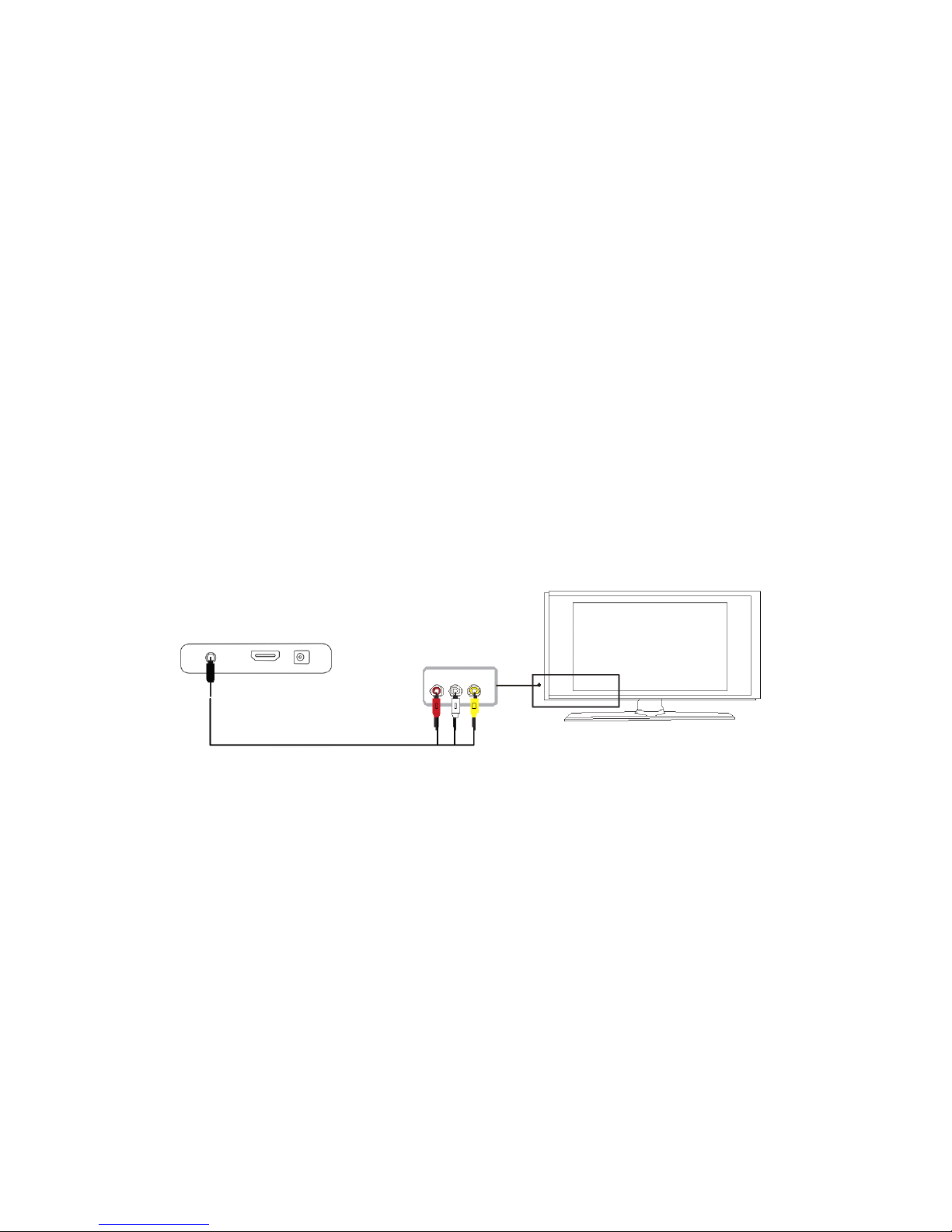
AV
AV
AV
AVCable:
Cable:
Cable:
Cable:
ConnectingtheCycloneMicro2toyourTVwillallowyoutoviewmultimedia
instandarddefinition.
UsingtheAVlead(supplied),connectthe3.5mmjackintothe3.5mm
compositeportonthebackoftheCycloneMicro2.Ontheotherendofthe
cableplugthered,yellowandwhiteconnectorsintothecorrespondinginput
portsofyourTV.
SwitchonyourTVandselectAVmode,ifrequired.
PresstheSTANDBYbuttonontheremotecontroltoswitchontheCyclone
Micro2.
Page 12
CycloneMicro2MultimediaPlayer
Page12.
Version0.7
HDMI
HDMI
HDMI
HDMICable:
Cable:
Cable:
Cable:
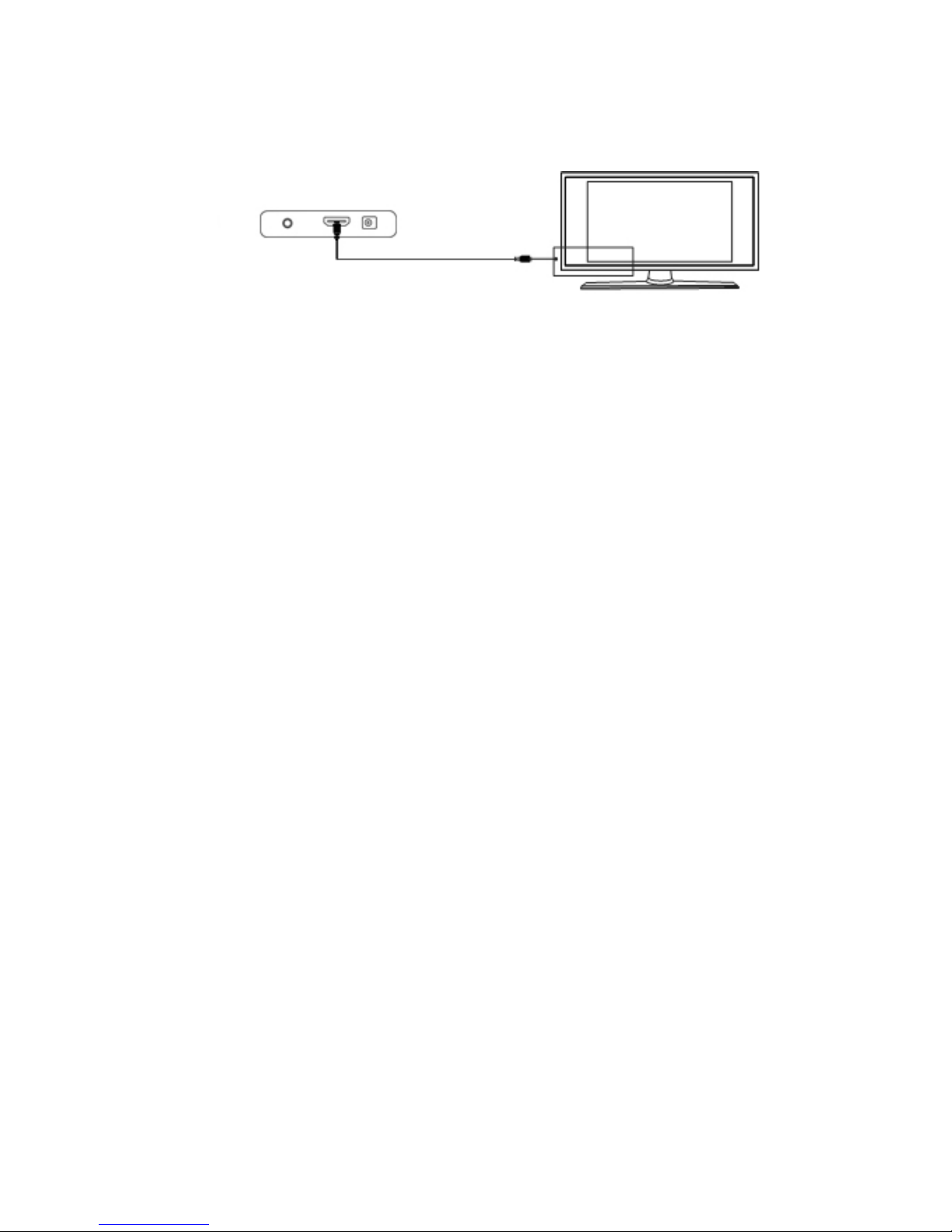
ConnectingyourCycloneMicro2toyourTVviaHDMIprovidesthehighest
qualityofvisualoutputandhighqualityaudioinasinglecable.HDMIoutput
canprovidevideoresolutionsofupto1080p**.
ConnecttheHDMIcable*totheHDMIoutputinterfaceonthebackofthe
CycloneMicro2.ConnecttheotherendofthecabletoyourTVHDMIinput
port.
SwitchonyourTVandselectHDMImode,ifrequired.
PresstheSTANDBYbuttonontheremotecontroltoswitchontheCyclone
Micro2.
*PleasenoteHDMIcableisnotincludedwiththisproduct.
**Pleasenotethatthedevicecandisplay720p/1080iand1080presolutions,
howevernotallHDTVsareabletodisplayhigherresolutions.Pleaseconsult
TVusermanual.
USB
USB
USB
USBHost
Host
Host
HostInterface:
Interface:
Interface:
Interface:
TheCycloneMicro2comeswithasingleUSBHostport,allowingforquick
andeasyexternalmediastorageexpansion.Itiscompatiblewithstandard
externalharddiskdrives,flashdrives,cardreadersandotherdatastorage
devices.
ToconnectyourexternalharddiskdrivetoyourCycloneMicro2,pleaseturn
offthemediaplayer.ConnecttheUSBcable*totheUSBportontheexternal
harddiskdriveandthemediaplayer.
*PleasenoteUSBcableisnotsuppliedwiththisproduct.
Pleasenotethatsomeexternalharddiskdrivesmayrequiremorepowerthan
astandaloneUSBportcanprovide.InsuchcasespleaseusetheACadapter
includedwithyourexternalharddiskdrive.
Page 13

CycloneMicro2MultimediaPlayer
Page13.
Version0.7
Memory
Memory
Memory
MemoryCard
Card
Card
CardInterface:
Interface:
Interface:
Interface:
TheCycloneMicro2isalsocapableofreadingmemorycards***withitsbuilt-
incardslot.
Thebuilt-incardslotiscapableofsupportingSDandMMCcards.
Toviewmediastoredinthememorycard,switchthemediaplayeron.
Insertthememorycardgentlyintothecardslot,andselectthemediatype
youwishtoview.
Itmaytakeamomentforthemediaplayertodetectthememorycard.
Oncethemediahasbeendetected,selectthepartitionwherethemediais
locatedin.Dependingonwhichmediafilteryouhaveselectedonlyonetype
ofmediafilewillappear.
Forexample,ifyouselectedtheaudiomediatypethenonlymusicorsound
fileswilldisplay.
*Pleasenotethatthemediaplayerwillonlyrecognisememorycardswith
FATorFAT32filesystems.
**Pleasenotememorycardnotsuppliedwiththisproduct.
Page 14

CycloneMicro2MultimediaPlayer
Page14.
Version0.7
Viewing
Viewing
Viewing
ViewingMultimedia:
M ultimedia:
Multimedia:
Multimedia:
TheCycloneMicro2isafullfeaturedmultimediaplayer,providingawide
rangeoffunctionality.
Byusingitsmainmenuyoucaneasilyplaymovies,musicandimagefiles
thatarestoredonanexternalstoragedevice.
Movie
Movie
Movie
MoviePlayback:
Playback:
Playback:
Playback:
PlayingmoviesusingtheCycloneMicro2isverysimpleandsupportsawide
varietyofmovieformats.Theseinclude,butarenotlimitedto,MKV,FLV,AVI
andWMV.
Whenyouhaveattachedanexternalstoragedevicethatcontainsmoviefiles,
i.e.externalharddrive,USBpendriveetc,theMicro2mayrequireafew
momentstodetectallthefiles.
UsingtheCycloneMicro2remotecontrol,navigateto“Movie”andpress
ENTERtoselectit.Thiswillactivatethemoviefilterandtakeyoutothe
devicelist.
Onceinthedevicelist,usethenavigation
buttonstoselectthedevicetypethemedia
islocatedin.Dependingonthesizeofthe
harddriveandthenumberoffilesit
contains,itmaytakeafewmomentsto
detect.
E.g.,ifyouwanttoviewmoviesthatarestoredonanattachedUSBhard
drive,selectUSBDisk.
Page 15

playback.
CycloneMicro2MultimediaPlayer
P
age15.
Version0.7
Whenthedevicetypehasbeenselected,usethenavigationbuttonsonthe
remotecontroltoselectthepartitionforthemediaplayertoaccess.The
defaultletterusuallygiventotheprimarypartitionis“f:”
Afteryouhaveselectedthepartition,usethenavigationbuttonsonthe
remotecontroltonavigatetothefolderorpartitionfilethemovieislocatedin.
Whenyouhavefoundthemovieyouwishtoview,navigatetoit.
ToplaythehighlightedmoviepressENTERontheremotecontrol.
PLEASENOTE:ToplaybackMTS(AVCHD)files,pleaserenametheMTS
extensionfiletypetoM2TS.
Movie
Movie
Movie
MoviePlayback
Playback
Playback
PlaybackOptions:
Options:
Options:
Options:
Duringmovieplayback,thereareanumberoffunctionstochoosefrom.
PressingwillPAUSEthemovie.
PressingPLAYwillresumemovie
playback.
PressingFFwillfastforwardmovieplayback.
PressingFRwillrewindmovie
PressingMUTEwillswitchoffsoundfrommovieplayback.Pressingitagain
willswitchonsoundagain.
PressingtheNEXTbuttontwicewillplaythenextfileonthelist.
PressingthePREVbuttontwicewillplaythepreviousfileonthelist.
Pressing it again to play.
Pressing it again to play.
Play/pause
Page 16

CycloneMicro2MultimediaPlayer
P
age16.
Version0.7
Advanced
Advanced
Advanced
AdvancedVideo
Video
Video
VideoSettings:
Settings:
Settings:
Settings:
TogettotheadvancedvideosettingspresstheOSDbuttonontheremote
controlwhilstplayingamovie.Thiswillbringupawindowinthecentreofthe
screen.Fromthisscreenareanumberofavailableoptions.
Track
Track
Track
TrackSelect
Select
Select
Select:
:
:
:
Ifthemoviecurrentlyplayinghasmorethanoneaudiotrack,thisoptionwill
allowyoutoselecttheoneyouwishtohear.
Toselectanalternativeaudiotrack,usetheleftandrightnavigationbuttons
ontheremotecontrol.PressENTERontheremotecontroltoconfirmthe
selection.
Sub
Sub
Sub
SubSelect
Select
Select
Select:
:
:
:
Thisoptionallowsyoutoswitchbetweendifferentlanguagesubtitles,if
available.
Toselectadifferentlanguagesubtitle,usetheleftandrightnavigation
buttonsontheremotecontrol.PressENTERontheremotecontroltoconfirm
theselection.
SubtitlescanbeactivatedordeactivatedbypressingtheAllbuttononthe
remotecontrol.
Size
Size
Size
Size:
:
:
:
Thisoptionallowsyoutoselecttheaspectratioofthemovie.
Page 17

CycloneMicro2MultimediaPlayer
P
age17.
Version0.7
Toadjustthedisplayaspectratio,usetheleftandrightnavigationbuttonsto
selectoneofthefollowing.PressENTERontheremotecontroltoconfirm
theselection.
VideoFullScreenThisoption,whenselected,stretchesthe
imagetofillthewholescreen,whilst
maintainingthemoviesoriginalresolution.
ScreenFullScreenThisoption,whenselected,stretchesthe
imagetofillthewholescreen.
DefaultSelectingthisoptionwilldisplaythemoviein
itsoriginalsize.
4:3Selectthisoptionwhenconnectedtoa
standardTV.Cropsawidescreenimageto
4:3(mayresultintheedgesofanimagebeing
cutoff).
16:9Selectthisoptionwhenconnectedtoa16:9
TV.
FitViewSelectingthisoptionwilldisplaythemovie
resolutionmostsuitableforyourTVset.
Loop
Loop
Loop
Loop:
:
:
:
Playmodeallowsyoutoselectdifferentmovieplaybackoptions,suchas
randomiseorplayonce.
Toselectaplaymodeusetheleftandrightnavigationbuttonsontheremote
control.PressENTERontheremotecontroltoconfirmtheselection.
RepeatOne:Thefilecurrentlyplayingwillreplaycontinuously.
RepeatAll:Allfilesinthecurrentfolder/directorywillreplay
continuously.
OnlyOnce:Themediaplayerwillstopplaybackoncethecurrentfile
hasfinishedplaying.
Sequence:Allmoviefileswillbeplayedinorder.
Random:Selectingthisoptionwillrandomisetheorderthemovie
filesareplayedin.
Sub
Sub
Sub
Subencode:
encode:
encode:
encode:
Thisfunctionallowsyoutochoosethesubtitlecodecforsubtitles
Sub
Sub
Sub
Subcolor:
color:
color:
color:
Thisoptionallowsyoutochangethecolourofthesubtitlesdisplayedon
screen.
Page 18

CycloneMicro2MultimediaPlayer
P
age18.
Version0.7
Channel:
Channel:
Channel:
Channel:
Thisoptionallowsyoutoselectdifferentaudiooutput.
Tochangeaudiooutput,usetheleftandrightnavigationbuttonsonthe
remotecontrol.PressENTERontheremotecontroltoconfirmtheselection.
Stereo:
Stereo:
Stereo:
Stereo:Thisoptionwillselect2channelstereoaudiooutput
duringmovieplayback.
Left:Selectingthisoptionwilloutputaudiofromtheleftspeaker
only.
Right:Selectingthisoptionwilloutputaudiofromtheright
speakeronly.
Goto
Goto
Goto
GotoFunction:
Function:
Function:
Function:
AfterpressingtheGOTObuttonyouwillbeabletojumptoanypartofthe
moviebytypingthedesiredtimeintothegivenfields.
Toselectthedesiredtimeselectthefieldandusingthenavigationbuttons,
scrollUPorDOWNuntilthecorrectdigitbecomesavailable.PresstheLEFT
andRIGHTNAVIGATIONbuttonstoselectthehour,minuteorseconds
fields.ThetimeformatisHH:MM:SS.
Page 19

CycloneMicro2MultimediaPlayer
P
age19.
Version0.7
Audio
Audio
Audio
AudioPlayback:
Playback:
Playback:
Playback:
PlayingaudiomediausingtheMicro2isverysimple.Itsupportsavarietyof
audioformatsincludingMP3,WMA,AACandOGG.
UsingtheCycloneMicro2remotecontrol,navigateto“Music”andpress
ENTERtoselectit.Thiswillactivethemusicfilterandtakeyoutothedevice
list.
Onceinthedevicelist,usethenavigation
buttonstoselectthedevicetypethemedia
islocatedin.Dependingonthesizeofthe
harddriveandthenumberoffilesit
contains,itmaytakeafewmomentsto
detect.
E.g.,ifyouwanttoviewmusicthatisstoredonanattachedUSBharddrive,
selectUSBDisk.
Whenthedevicetypehasbeenselected,usethenavigationbuttonsonthe
remotecontroltoselectthepartitionforthemediaplayertoaccess.
Afterthepartitionhasbeenselected,usethenavigationbuttonsonthe
remotecontroltonavigatetothefolderordirectorytheaudiofilesarelocated
in.
Whenyouhavelocatedtheaudiofileyouwishtoplay,highlightitandpress
ENTERontheremotecontroltoplaythefile
Page 20

Cyclone Micro 2 M
ultimedia Player
Page 20.
Version 0.7
Au
dio
Audio
Audio
Audio Playback
Playback
Playback
Playback Options:
Options:
Options:
Options:
During playb
ack, there are a number of options to choose from.
Pressing
PLAY/PAUSE
will pause the audio file. Pressing PLAY will resume
audio playback.
Pressing the MUTE button will switch off sound from audio playback. Pressing
it again will switch on sound again.
Pressing NEXT will jump to the next page on the list
Pressing the PREV button will jump to the previous page on the list.
Pressing the FF button will speed up audio playback. Pressing it again to play.
Pressing the FR button will rewind audio playback. Pressing it again to play.
Page 21

CycloneMicro2MultimediaPlayer
Page21.
Version0.7
Advanced
Advanced
Advanced
AdvancedAudio
A udio
Audio
AudioSettings:
S ettings:
Settings:
Settings:
TogettotheadvancedaudiosettingspresstheOSDbuttonontheremote
controlwhilstplayingmusic.Thiswillbringupawindowinthecentreofthe
screen.Fromthisscreenareanumberofavailableoptions.
Loop
Loop
Loop
LoopMode:
M ode:
Mode:
Mode:
Playmodeallowsyoutoselectdifferentaudioplaybackmodessuchas
randomiseorplayonce.
Random:Selectingthisoptionwillrandomisetheorderaudiofiles
areplayed.
OnlyOnce:Selectingthisoptionwillplaythecurrentaudiofileonce
only.
RotateOne:Theaudiofilecurrentlyplayingwillreplaycontinuously.
RotateAll:Allfilesinthecurrentfolder/directorywillreplay
continuously.
Sequence:Allaudiofileswillbeplayedinorder.
Toselectaplaymode,usetheLEFTandRIGHTNAVIGATIONbuttonson
theremotecontrol.PressENTERontheremotecontroltoconfirmthe
selection.
E
E
E
EQ
Q
Q
Q:
:
:
:
Theequalizerallowsyoutochoosedifferentpresetsoundsettingstomatch
yourpreferences.Presetoptionsavailableinclude,Pop,Rock,Classic,Jazz,
Vocal,Dance,Soft,NatureandDBB.
Page 22

CycloneMicro2MultimediaPlayer
Page22.
Version0.7
Toselectasoundsetting,usetheLEFTandRIGHTNAVIGATIONbuttonson
theremotecontrol.PressENTERontheremotecontroltoconfirmthe
selection.
Display
Display
Display
Display:
:
:
:
Thisoptionallowsyoutoselectthevisualisationduringaudioplayback.
Toselectavisualisationmode,usetheleftandrightnavigationbuttonsonthe
remotecontrol.PressENTERontheremotecontroltoconfirmtheselection.
Spectrum:Default.DisplaystheSpectrumvisualisation.
Lyric:Displaysthelyricsoftheaudiofile.
Notice:Pleasenotethatinordertodisplaylyrics,youwillneeda
LRCfilewiththesamefilenameastheaudiofile.The
LRCfilealsoneedstobeplacedinthesamedirectoryas
therelativeaudiofile.
Lyric
Lyric
Lyric
LyricColo
C olo
Colo
Color
r
r
r:
:
:
:
Thisoptionallowsyoutochangethecolourofthelyricsdisplayedonscreen.
AvailablecoloursincludeRed,Yellow,Green,OrangeandBlue.
Toselectalyriccolour,usetheleftandrightnavigationbuttonsontheremote
control.PressENTERontheremotecontroltoconfirmtheselection.
Page 23

CycloneMicro2MultimediaPlayer
Page23.
Version0.7
Image
Image
Image
ImagePlayback:
Playback:
Playback:
Playback:
PlayingimagefilesusingtheCycloneMicro2isverysimpleandsupportsa
varietyofimageformats.
UsingtheCycloneMicro2remotecontrol,navigateto“Picture”andpress
ENTERtoselectit.Thiswillactivatethepicturefilterandtakeyoutothe
devicelist.
Onceinthedevicelist,usethenavigation
buttonstoselectthedevicetypethemediais
locatedin.Dependingonthesizeofthehard
driveandthenumberoffilesitcontains,it
maytakeafewmomentstodetect.
E.g.,ifyouwanttoviewpicturesthatarestoredonanattachedUSBhard
drive,selectUSBDisk.
Whenthedevicetypehasbeenselected,usethenavigationbuttonsonthe
remotecontroltoselectthepartitionforthemediaplayertoaccess.
Afteryouhavelocatedtheimagefileyouwishtoview,highlightit.Youwill
noticethatasmallpreviewoftheimagefileinplaceofthepictureicon.
Page 24

CycloneMicro2MultimediaPlayer
Page24.
Version0.7
Toviewthehighlightedimageinfullscreen,pressENTERontheremote
control.
Pleasenotethatitmaytakeamomenttodisplayanimagedependingonits
size.
Image
Image
Image
ImagePlayback
P layback
Playback
PlaybackOptions:
O ptions:
Options:
Options:
Duringimageplayback,thereareanumberofoptionstochoosefrom.
PressingtheUPbuttonwillplaythepreviousfileonthelist.
PressingtheDOWNbuttonwillplaythenextfileonthelist.
PressingtheROTATEbuttonontheremotecontrolallowsyoutorotateimage
files.EachpressoftheROTATEbuttonwillrotatetheimage90degrees
clockwise.
PressingtheZOOMbuttonwillactivatezoommode.Pressingthezoom
buttonrepeatedlywillchangeimagezoomlevels.
Page 25

CycloneMicro2MultimediaPlayer
Page25.
Version0.7
Advanced
Advanced
Advanced
AdvancedImage
I mage
Image
ImageSettings:
S ettings:
Settings:
Settings:
TogettotheadvancedimagesettingspresstheOSDbuttonontheremote
controlwhilstviewinganimagefile.Thiswillbringupawindowinthecentre
ofthescreen.Fromthisscreenareanumberofavailableoptions.
View
View
View
Viewmode:
m ode:
mode:
mode:
Thisoptionallowsyoutochangetheplaymode.
Interval:
Interval:
Interval:
Interval:
Thetimeslotsettingallowsyoutoselectthetimedurationbeforetheplayer
displaysthenextimageinaslideshow.
Availabletimings:1second
3seconds
5seconds
10seconds
Toadjustthetiming,usetheNAVIGATIONbuttonstoselecttherequiredtime
duration.PressENTERontheremotecontroltoconfirmtheselection.
Effect
Effect
Effect
Effectswitch
s witch
switch
switch:
:
:
:
Thissettingallowsyoutochangetheimagetransitioneffects.
NoneDefaultsettingforslideshow.
PersianBlindsHImageissplitintohorizontallinesthatget
biggertorevealcompleteimage.
Page 26

CycloneMicro2MultimediaPlayer
Page26.
Version0.7
PersianBlindsVImageissplitintoverticallinesthatgetbigger
torevealcompleteimage.
RandomThissettingrandomisesthetransitioneffects.
Slideshow
Slideshow
Slideshow
SlideshowViewing
V iewing
Viewing
Viewingwith
w ith
with
withBackground
B ackground
Background
BackgroundMusic:
M usic:
Music:
Music:
TheCycloneMicro2hasthecapabilitytoplaymusicinthebackgroundwhilst
displayingapictureslideshow.
Toplayapictureslideshowwithbackgroundmusic,usetheNAVIGATION
buttonsontheremotecontroltoentertheFILEmenu.
Onthefilemenunavigatetothelocationwheretheaudiofilesyouwishtouse
asbackgroundmusicarestored.
Selecttheaudiofiletostartplayback.
Oncemusichasstartedtoplay,presstheRETURNbuttonontheremote
control.Thiswilltakeyoubacktothepreviousmenu.
Youwillnoticethattheaudiofilewillstillbeplayinginthebackground.
Usingtheremotecontrol,navigatetothelocationwheretheappropriate
imagefilesarestored.
SelectoneoftheimagefilesbypressingENTERontheremotecontrolto
displayitonfullscreen.
Whentheimagefilehasloaded,presstheENTERbuttonagain.
Youwillnoticeaplayiconappearbrieflyinthemiddleofthescreentosignify
thattheslideshowfunctionhasbeenactivated.
Page 27

CycloneMicro2MultimediaPlayer
Page27.
Version0.7
TheCycloneMicro2willnowcyclethroughallthepicturesinsidethedirectory.
NoticeItisrecommendedtosetalltheaudiorepeatandimage
transitioneffectsbeforeinitiatingaslideshowwith
backgroundmusic.
Page 28

CycloneMicro2MultimediaPlayer
Page28.
Version0.7
File
File
File
File:
ByselectingtheFileMenu,theCycloneMicro2isabletolistallthefiles
currentlystoredintheexternalstoragedevice.
UsingtheCycloneMicro2remotecontrol,navigateto“File”andpress
ENTERtoselectit.Thiswilltakeyoutothedevicelist.
Onceinthedevicelist,usethenavigation
buttonstoselecttheappropriatedevicetype.
Dependingonthesizeofthedeviceandthe
numberoffilesitcontains,itmaytakeafew
momentstodetect.
E.g.,iftheexternalstoragedeviceattachedisaUSBharddrive,selectUSB
Disk.
Whenthedevicetypehasbeenselected,usethenavigationbuttonsonthe
remotecontroltoselectthepartitionforthemediaplayertoaccess.
Afteryouhavelocatedthemediafileyouwanttodisplay,highlightitand
pressENTERontheremotecontroltoplayit.
Page 29

CycloneMicro2MultimediaPlayer
Page29.
Version0.7
Settings:
Settings:
Settings:
Settings:
Thismenuprovidesaccesstothemediaplayer’ssystemconfiguration
settings.
Output:
Output:
Output:
Output:
Thissettingallowsyoutochangethevideooutputofthemediaplayer.
Toselectavideooutput,usetheLEFTandRIGHTNAVIGATIONbuttonson
theremotecontroltoselecttheappropriatesetting.PresstheENTERbutton
toconfirm.
PALSelectthisoptionwhenconnectedtoastandardanalogue
TVsystem.
ForEuropeancountries.
NTSCSelectthisoptionwhenconnectedtoastandardanalogue
TVsystem.
ForAmericaandPacificcountries.
720p50HzSelectthisoptionforanoutputresolutionof1080x720
withaframerateof50hertz.
720p60HzSelectthisoptionforanoutputresolutionof1080x720
withaframerateof60Hertz.
1080i50HzSelectthisoptionforanoutputresolutionof1920x1080
withaframerateof50hertz.Thisoptionusesinterlaced
scanning.
Page 30

CycloneMicro2MultimediaPlayer
Page30.
Version0.7
1080i60HzSelectthisoptionforanoutputresolutionof1920x1080
withaframerateof60hertz.Thisoptionusesinterlaced
scanning.
1080p50HzSelectthisoptionforanoutputresolutionof1920x1080
withaframerateof50hertz.Thisoptionuses
progressivescanning.
1080p60HzSelectthisoptionforanoutputresolutionof1920x1080
withaframerateof60hertz.Thisoptionuses
progressivescanning.
Language:
Language:
Language:
Language:
Thisfunctionallowsyoutoselecttheonscreendisplaylanguage.
Tochangetheonscreendisplaylanguage,usetheLEFTandRIGHT
NAVIGATIONbuttonstoselecttherequiredlanguage.
Restore
Restore
Restore
RestoreDefault:
D efault:
Default:
Default:
ThisfunctionallowsyoutorestoretheCycloneMicro2toitsoriginaldefault
factorysettings.
ToreturntheCycloneMicro2toitsoriginaldefaultfactorysettings,pressthe
ENTERbuttonontheremotecontrol.
ImportantNotice:Pleasenotethatselectingtherestoredefaultfunctionwill
eraseanysavedsettings.
Version
Version
Version
Version:
:
:
:
Thisfunctionallowsyoutodisplayinformationregardingthefirmwareversion
oftheCycloneMicro2.
Page 31

CycloneMicro2MultimediaPlayer
Page31.
Version0.7
Firmware
Firmware
Firmware
FirmwareUpgrade:
U pgrade:
Upgrade:
Upgrade:
WemayperiodicallyreleasenewfirmwareupdatestoimprovetheCyclone
Micro2’sfunctionality,addnewfeaturesorfixanyreportedbugsthatmay
havebeenmissedduringtesting.
Caution:Pleasedonot turnoffthepowerwhenupgradingthefirmware.
Thelatestfirmwareupdatescanbefoundathttp://www.sumvision.com.cn
ToupdatetheCycloneMicro2’sfirmwaredownloadthefirmwareupdatefrom
theSumvisionwebsite.
PleasenotethatfirmwareupdatefilesfortheCycloneMicro2areusually
compressedintoaRARarchivefile.
Extractthefilesfromthearchive.
TransferalltheextractedfilestoanemptyUSBpendrive.Itisadvisedto
transferthefilesintotheUSBpendrive’srootdirectoryandnotinafolderas
thismaycausetheplayertonotdetecttheupdate.
InsertthependrivecontainingtheupdateintotheCycloneMicro2.
SwitchontheCycloneMicro2andfromthemainmenu,selectFileto
navigatetothedevicelist.
Fromthisdevicelistselectthedevicetype.
Oncethedevicetypehasbeenselected,navigatetothefirmwareupdateand
selectitbypressingENTERontheremotecontrol.
Page 32

CycloneMicro2MultimediaPlayer
Page32.
Version0.7
Aconfirmationboxwillappearaskingwhethertoupgradethesystem.
Select“YES”toinitialisethefirmwareupgrade.
TheCycloneMicro2willnowbeginupgradingthefirmware.Youwillnotice
theplayerrebootanddisplaythefirmwareupgradinganimation.Thescreen
maygoblankforafewmoments.Donotturnoffthepoweruntilthemain
menuappearagain.
ImportantNotice:Itisadvisedtobackupallimportantdatabefore
performingasystemupgrade.
Page 33

CycloneMicro2MultimediaPlayer
Page33.
Version0.7
Troubleshooting:
Troubleshooting:
Troubleshooting:
Troubleshooting:
No
No
No
Nodisplay
d isplay
display
displayor
o r
or
orsound
s ound
sound
soundoutput
o utput
output
outputto
t o
to
toTV:
T V:
TV:
TV:
Thisproblemmayhaveseveralcauses.
PleasecheckthatyouhaveselectedthecorrectAVchannelonyourTVthat
isassignedwiththeinputport.
Forexample,ifyouhaveconnectedthedevicetotheTVthroughtheports
labelledAV3,selectChannelAV3.
Ifyouhavedeterminedthatthedevicehasbeenconnectedcorrectly,itmay
besettotheincorrectvideooutputmode.Toselectadifferentvideooutput
mode,pressthe“AV/HDMI”buttonontheCycloneremotecontrol.Waitafew
momentsforyourTVandmediaplayertoimplementthechanges.
RepeatthisprocedureuntilvideooutputiscorrectlydisplayingontheTV.
The
The
The
Thedisplay
d isplay
display
displayoutput
o utput
output
outputis
i s
is
isin
i n
in
inblack
b lack
black
blackand
a nd
and
andwhite:
w hite:
white:
white:
ThisisacommonprobleminwhichyourTVmaybesettoadifferentencoding
systemtoyourmediaplayerandisnotaseriousissue.
Tosolvethisissuegotothesetupmenuandnavigateto“Output”.Selectthe
appropriateencodingsystem.
Forexample;ifyourTVrunsonPALthenselectthePALoption.Likewise,if
yourTVisrunningonNTSCthenselecttheNTSCoption
Media
Media
Media
Mediafiles
f iles
files
filesare
a re
are
areonly
o nly
only
onlypartially
p artially
partially
partiallylisted
l isted
listed
listedin
i n
in
inthe
t he
the
thebrowser:
b rowser:
browser:
browser:
Themediafilterfunctionmaybeactive.Whenthemediafilterisactiveonly
themediafilestypesthatcorrespondtotheactivemediafilteraredisplayed.
Forexample;ifyouselectthemediafilter“Music”,thenonlyaudiomediafiles
willbedisplayed.Noimageormoviesfileswillbedisplayed.
Ifyouwanttoviewallsupportedmediafiles,selectthe“File”mediafilter.
Screen
Screen
Screen
Screengoes
g oes
goes
goesblank
b lank
blank
blankduring
d uring
during
duringa
a
a
afirmware
f irmware
firmware
firmwareupdate:
u pdate:
update:
update:
Thisisnormalduringafirmwareupdate.Pleasewaitforapproximatelyone
minuteforthefirmwaretocomplete.
Onrareoccasions,thedisplayviaHDMIisincorrectduringafirmwareupdate.
Page 34

CycloneMicro2MultimediaPlayer
Page34.
Version0.7
PleaseensurethatthedeviceisalsoconnectedtoyourTVviathesupplied
compositecableduringthefirmwareupdate.Whenthescreengoesblank,
selectthecompositeconnectionastheactiveinputonyourTV.
The
The
The
Theplayer
p layer
player
playerno
n o
no
nolonger
l onger
longer
longerresponds:
r esponds:
responds:
responds:
IftheCycloneMicro2nolongerrespondstotheremotecontrol,thebatteries
maybedead.Pleasereplacethemwithnewones.
Obstructionoftheinfrared’sfieldofvisionmayalsocauseunresponsiveness
intheplayer.Pleaseremoveallpotentialobstructionsbetweentheplayer
andremotecontrol
Pleasecleantheinfraredreceiver.
No
No
No
Noaudio
a udio
audio
audiooutput:
o utput:
output:
output:
PleasecheckthatthevolumeforyourTV,homeentertainmentsystemand
CycloneMicro2hasnotbeensettoolow.Alsocheckthatthesoundhasnot
beenswitchoffviathemutebutton.
Theaudiodigitaloutputmayalsobeincorrectlyconfigured.
The
The
The
Theplayer
p layer
player
playerhas
h as
has
hasfailed
f ailed
failed
failedduring
d uring
during
duringFirmware
F irmware
Firmware
Firmwareupgrade:
u pgrade:
upgrade:
upgrade:
TorecovertheCycloneMicro2fromafirmwareupgradefailure,poweroffthe
playeranddisconnectthepowercable.
InsertaUSBpendrivecontainingthefirmware.Pleasenotethatonlythe
firmwareupdatefilesshouldbeonthependrive.
ConnectthepowercablebackintotheCycloneMicro2andswitchiton.This
shouldcausetheplayertoattempttoreinstallthesoftware.
Page 35

CycloneMicro2MultimediaPlayer
Page35.
Version0.7
Product
Product
Product
ProductSpecifications:
S pecifications:
Specifications:
Specifications:
TVSystemCompatibility:PAL,NTSC,Auto
VideoCodecSupport:H.264,H.263,MKV,RM/RMVB,WMV9,
MPEG1/2/4,Xvid,DivX,FLV
VideoContainerSupport:MKV,TS,M2TS,TP,WMV,VOB,AVI,MPG,
MP4,M4V,MOV,RM,RMVB,DIVX,XVID,
FLVandPMP
VideoResolution:H.264,MKV,RM/RMVB,WMV9,TSand
DivXsupportsupto1920x1080p@30fps
AudioSupport:MP3,WMA,OGG,FLAC,APE,AAC,AC3,
ATRAandDTS
VideoOutput:CompositeVideo,HDMI
AudioOutput:Stereo,DigitalHDMI
ImageSupport:JPEG,JPG,BMP,PNG,GIF
SubtitleSupport:SSA,ASS,SUB,ACSIIandUTF8
ExternalStorageSupport:externalHDD,USBpendrives,portable,
viaUSBHost
LanguageSupport:English,TraditionalChineseand
SimplifiedChinese
PowerInput:UniversalAC100~240V50/60Hz
Power:DC5V,2A
Page 36
CycloneMicro2MultimediaPlayer
Page36.
Version0.7
Media
Media
Media
MediaCodec
C odec
Codec
CodecInformation:
I nformation:
Information:
Information:
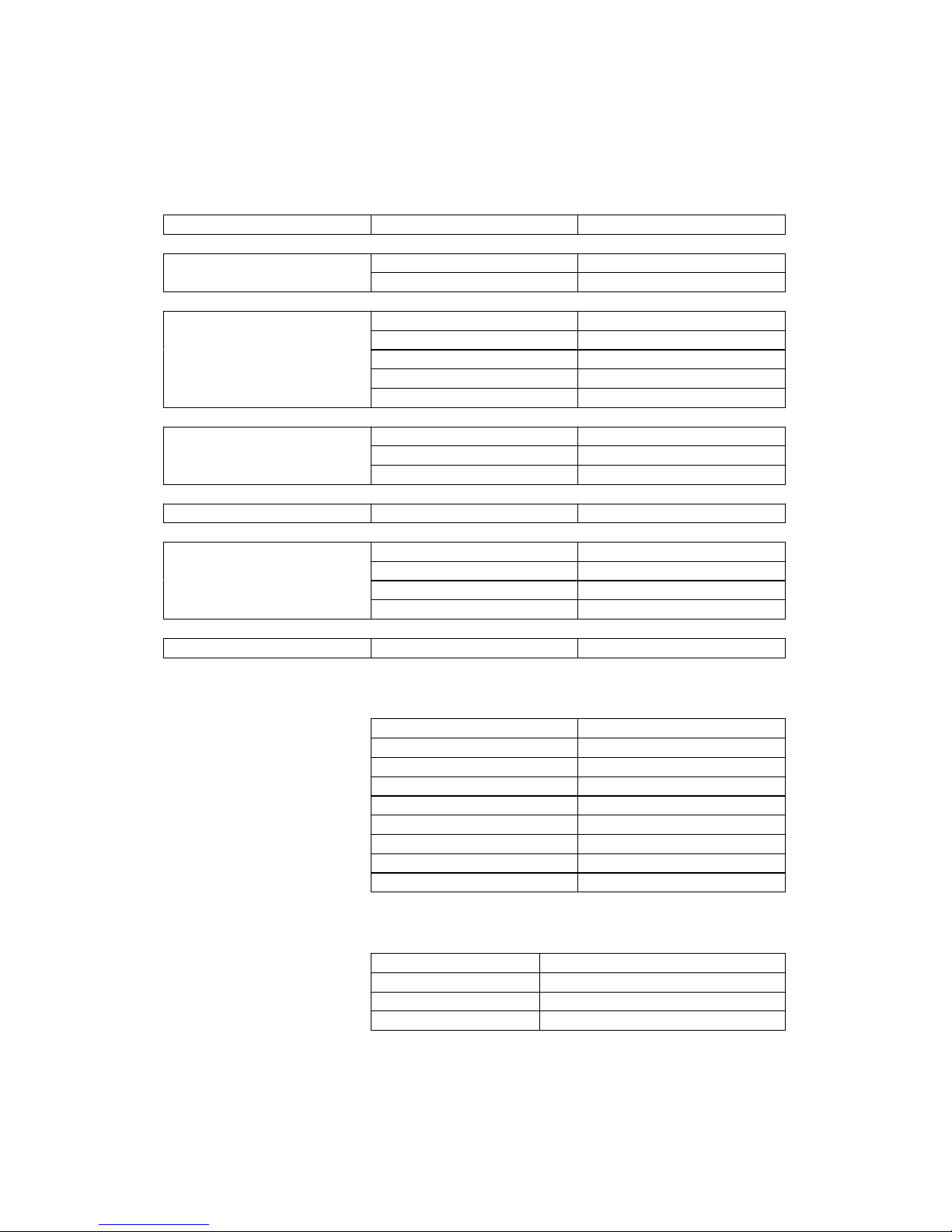
VideoSupport:
CodecFormatResolution
MPEG-1DAT320x240
MPG720x576
MPEG-2VOB720x576
MPG1920x1080p
TS1920x1080p
M2TS1920x1080p
TP1920x1080p
MPEG-4,DivX,XvidAVI1920x1080p
MP41920x1080p
MKV1920x1080p
WMV9/VC-1WMV1920x1080p
H.264AVI1920x1080p
MP41920x1080p
MOV1920x1080p
MKV1920x1080p
RM/RMVBRM/RMVB1920x1080p
AudioSupport:
MP3Supported
WMASupported
OGGSupported
FLACSupported
APESupported
AACSupported
AC3Supported
ATRASupported
DTSSupported
ImageSupport:
JPG/JPEGSupported
BMPSupported
PNGSupported
GIFSupportsstaticimagesonly
Pleasenotethatfeaturesandspecificationsaresubjecttochangewithoutnotice.
Page 37

CycloneMicro2MultimediaPlayer
Page37.
Version0.7
Maintenance
Maintenance
Maintenance
MaintenanceNotice:
N otice:
Notice:
Notice:
Toprotectthenormaluseofallaccessories,pleasemakesureyou
understandandpayattentiontothefollowingpoints.
�OnlyusepoweradapterswithpowerinputAC100~240V,outputDC
5V/2A.Usingpoweradaptersofanyotherspecificationmayresultin
thedevicebeingdamagedbeyondrepair.
�Undernormalworkingconditions,thepoweradapterwillbewarm.
PleasekeeptheCycloneMicro2anditspoweradapterinawell
ventilatedarea.
�Donotplacethedeviceonthebed,sofaorsimilarsurfaceasthismay
inhibitthedevice’sventilation.
�Donotattempttorepairthedeviceyourselfordisassembleit.Even
whenthedeviceisunpluggedfromthemainspower,itmaystillhold
enoughchargetocauseseriousharm.
�Ifthepowercordisbrokenorhasbecomestrippedofitsprotective
layer,itishighlyadvisedtoswitchoffthedeviceandremovethepower
cordimmediately.
�Ifthedevicehascomeintocontactwithanyliquid,itishighlyadvised
toswitchoffthedeviceimmediatelyandremovethepowercordfrom
themainspower.
�Donotplaceanyforeignobjectsontopofthedeviceasthismaycause
interferencewiththeCycloneMicro2.
Page 38
CycloneMicro2MultimediaPlayer
Page38.
Version0.7
FCC
CAUTION:Changesormodificationsnotexpresslyapprovedby
thepartresponsibleforthecompliancecouldvoidtheuser’s
authoritytooperatetheequipment.
ClassB
Note:Thisequipmenthasbeentestedandfoundtocomplywith
thelimitsforaClassBdigitaldevice,pursuanttopart15ofthe
FCCRules.Theselimitsaredesignedtoprovidereasonable
protectionagainstharmfulinterferenceinaresidentialinstallation.
Thisequipmentgeneratesusesandcanradiateradiofrequency
energyand,ifnotinstalledandusedinaccordancewiththe
instructions,maycauseharmfulinterferencetoradio
communications.However,thereisnoguaranteethatinterference
willnotoccurinaparticularinstallation.Ifthisequipmentdoes
causeharmfulinterferencetoradioortelevisionreception,which
canbedeterminedbyturningtheequipmentoffandon,theuseris
encouragedtotrytocorrecttheinterferencebyoneofthefollowing
measures:
-Reorientorrelocatethereceivingantenna.
-Increasetheseparationbetweentheequipmentandthe
receiver.
-Connecttheequipmentintoanoutletonacircuitdifferent
fromthattowhichthereceiverisconnected.
-Consultthedealeroranexperiencedradio/TVtechnicianfor
help.
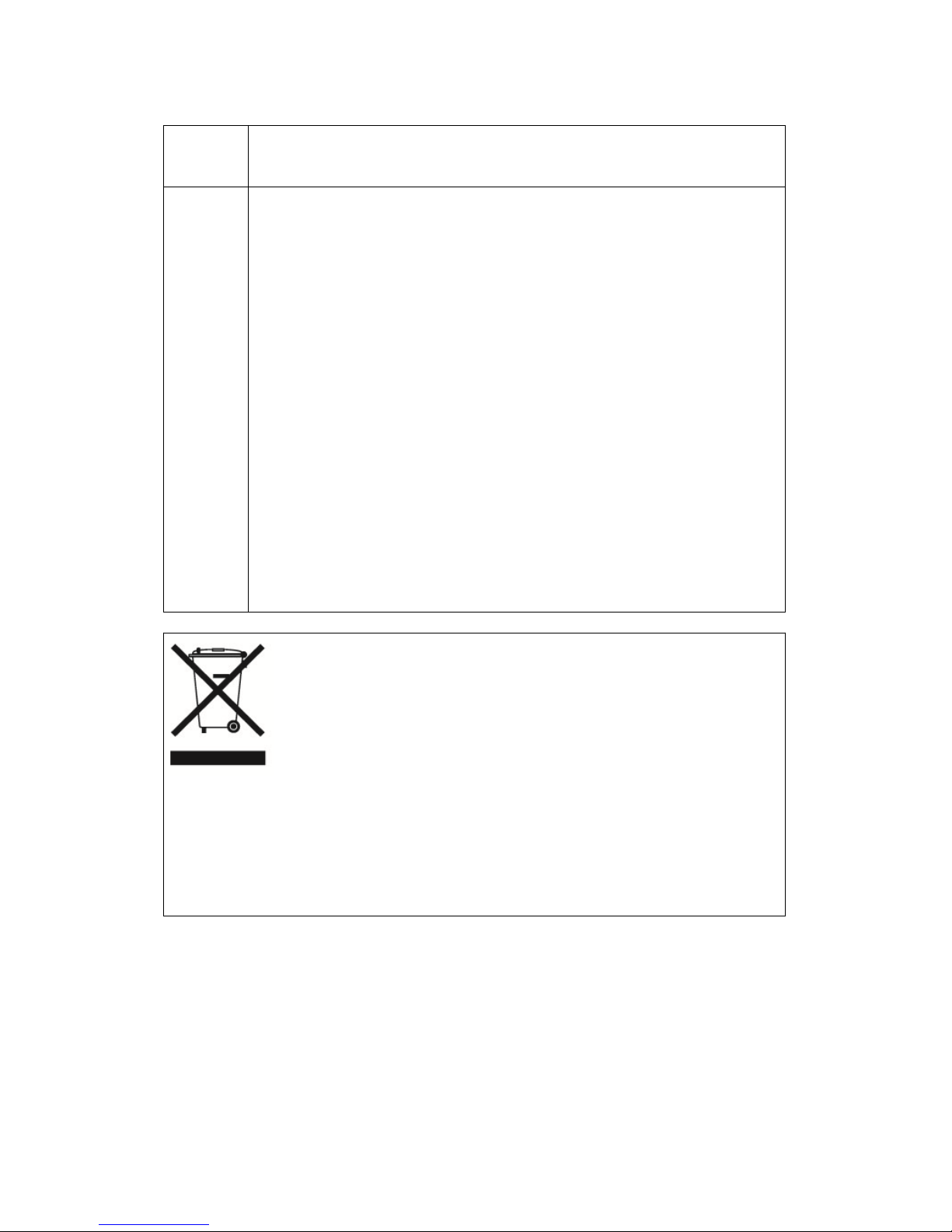
Thismarkingshownontheproduct,accessoriesorliterature,
indicatesthattheproductanditselectronicaccessories(e.g.
charger,headset,USBcable)shouldnotbedisposedofwith
otherhouseholdwasteattheendoftheirworkinglife.
Topreventpossibleharmtotheenvironmentorhumanhealth
fromuncontrolledwastedisposal,pleaseseparatetheseitems
fromothertypesofwastesandrecyclethemresponsiblyto
promotethesustainablereuseofmaterialresources.
Householdusersshouldcontacteithertheretailerwheretheypurchasedthis
product,ortheirlocalgovernmentoffice,fordetailsofwhereandhowthey
cantakethisitemforenvironmentallysaferecycling.
Businessusersshouldcontacttheirsupplierandcheckthetermsand
conditionsofthepurchasecontract.
Thisproductshouldnotbemixedwithothercommercialwastesfordisposal.
Allrightsreserved.
Allotherbrandnamesortrademarksarethepropertiesoftheirrespective
owners.
 Loading...