

Page 1
Cup Holder BT FM Transmitter &Charger
User Manual
CAD-4057
Page 2

1 Warnings
Please read this warning carefully before using this product. Improper
use of this product may result in damage to this or attached products.
To ensure the product works well, please never use it in the following
conditions:
• While wet or submerged in water
• Near a heater or in high temperature scenarios
• In direct/intense sunlight
Never dismantle the product, otherwise it may nullify the warranty
clause.
2 Introduction
Specifications
• Frequency: 2.402 ~ 2.480 GHz
• Working Current: 45mA (Max)
• Stand-by Current: 25mA (Max)
• Effective Range: 5m
• Frequency: 87.5MHz – 108.0MHZ
• Input: DC12-24V
• Output: DC 5V 2.1A max
• Power: 120w max
Features
• Stream music from your Bluetooth enabled device to a
car’s stereo via FM signal
• LED display that shows the car’s voltage when connected
to power
• Allows you to answer calls and speak hands-free
• Built-in microphone for phone calls
• Two USB charging ports
• Two cigarette lighter outlets
2
Page 3
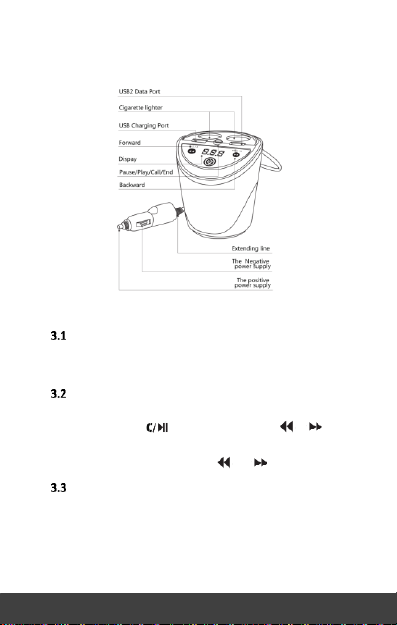
• Plug a thumb drive into one of the USB ports and play
music from your drive to a car stereo via FM signal
3 Getting Started
Power-on
The device turns on automatically when plugged into a car
cigarette lighter.
Frequency and Volume Adjustment
• This device supports frequencies of 87.5-108.5MHz. Press
and hold the button and then press or to adjust
the FM frequency.
• Adjust the volume with the and buttons.
Using Bluetooth
• Plug the device into a car cigarette socket (the device will
power on after you plug it in).
• Check your smartphone to make sure Bluetooth is turned
on, then search for/select your FM transmitter. It will show
3
Page 4
up as “CAD-4057.”
• Tune the car’s FM radio frequency to an unused FM
station.
• Tune the FM transmitter to the same frequency.
• You will now be able to stream content from your device
to your car speakers.
NOTES:
When powered on, the device will automatically connect
to the most recently used device. To avoid this, turn
Bluetooth off on the devices you aren’t streaming music
from.
The FM transmitter signal can be affected by other radio
stations or similar frequencies. This is normal, but if the
problem persists, try streaming through another FM
frequency.
Making & Answering Calls
The transmitter can make or answer a call after it is
successfully connected to your phone via Bluetooth.
• Redial the last number: double-click the button
• Reject a call: press and hold down for about 3
seconds
• Answer a call: press once
• Hang up a call: press once
Playing Music from a Thumb Drive
• Tune the car’s FM radio frequency to a blank station.
• Tune the FM transmitter to the same frequency as the
car’s FM radio.
• Insert a thumb drive into the device—it will automatically
detect and play any MP3/WMA/WAV music on the drive.
• Press and to select a song.
4
Page 5

FCC Statement
Changes or modifications not expressly approved by
the party responsible for compliance could void the user's
authority to operate the equipment.
This equipment has been tested and found to comply with
the limits for a Class B digital device, pursuant to Part 15
of the FCC Rules. These limits are designed to provide
reasonable protection against harmful interference in a
residential installation. This equipment generates uses
and can radiate radio frequency energy and, if not installed
and used in accordance with the instructions, may cause
harmful interference to radio communications. However,
there is no guarantee that interference will not occur in
a particular installation. If this equipment does cause harmful
interference to radio or television reception, which can be
determined by turning the equipment off and on, the user is
encouraged to try to correct the interference by one or more
of the following measures:
-- Reorient or relocate the receiving antenna.
-- Increase the separation between the equipment and receiver.
-- Connect the equipment into an outlet on a circuit different
from that to which the receiver is connected.
-- Consult the dealer or an experienced radio/TV technician for
help
This device complies with part 15 of the FCC rules. Operation is
subject to the following two conditions (1)this device may not cause
harmful interference, and (2) this device must accept any interference
received, including interference that may cause undesired operation.
The distance between the product and body is more than 20cm
 Loading...