

Page 1

INSIDE FRONT COVER
PLACEHOLDER
cvs ps2 final.qxd 2/5/07 8:56 AM Page i
Page 2
CONTENTS
WELCOME! . . . . . . . . . . . . . . . . . . . . . . . . . . . . . . . . .1
GETTING STARTED . . . . . . . . . . . . . . . . . . . . . . . . . . 2
CONTROLLER . . . . . . . . . . . . . . . . . . . . . . . . . . . . . . 3
MAIN MENU . . . . . . . . . . . . . . . . . . . . . . . . . . . . . . 4
GAME MODES . . . . . . . . . . . . . . . . . . . . . . . . . . . . . 4
PUZZLE SCREEN . . . . . . . . . . . . . . . . . . . . . . . . . . . 5
ASSISTS . . . . . . . . . . . . . . . . . . . . . . . . . . . . . . . . . 6
CREDITS . . . . . . . . . . . . . . . . . . . . . . . . . . . . . . . . . 7
WELCOME!
Congratulations on purchasing the ultimate Sudoku product! This package
includes over one million Sudoku puzzles, three distinct game modes,
and a host of other unique features.
Sudoku expert Carol Vorderman introduces you to the world of Sudoku;
follow her movie tutorials and you, too, can become a Sudoku Master!
This manual provides a selection of Assist hints to help in your puzzle
solving, and you can ask Carol for help at any time during the game.
Plus, if you’ve ever been stumped by a Sudoku puzzle, you can enter it
into the Sudoku Solver and Carol will reveal the solution for you!
WARNING: READ BEFORE USING YOUR PLAYSTATION®2
COMPUTER ENTERTAINMENT SYSTEM.
A very small percentage of individuals may experience epileptic seizures
when exposed to certain light patterns or flashing lights. Exposure to certain
patterns or backgrounds on a television screen or while playing video games,
including games played on the PlayStation 2 console, may induce an epileptic
seizure in these individuals. Certain conditions may induce previously
undetected epileptic symptoms even in persons who have no history of prior
seizures or epilepsy. If you, or anyone in your family, has an epileptic
condition, consult your physician prior to playing. If you experience any
of the following symptoms while playing a video game — dizziness, altered
vision, eye or muscle twitches, loss of awareness, disorientation, any
involuntary movement, or convulsions — IMMEDIATELY discontinue use
and consult your physician before resuming play.
WARNING TO OWNERS OF PROJECTION TELEVISIONS:
Do not connect your PlayStation 2 console to a projection TV without first
consulting the user manual for your projection TV, unless it is of the LCD type.
Otherwise, it may permanently damage your TV screen.
USE OF UNAUTHORIZED PRODUCT:
The use of software or peripherals not authorized by Sony Computer
Entertainment America may damage your console and/or invalidate your
warranty. Only official or licensed peripherals should be used in the controller
ports or memory card slots.
HANDLING YOUR PLAYSTATION 2 FORMAT DISC:
• This disc is intended for use only with PlayStation 2 consoles with the NTSC
U/C designation.
• Do not bend it, crush it or submerge it in liquids.
• Do not leave it in direct sunlight or near a radiator or other source of heat.
• Be sure to take an occasional rest break during extended play.
• Keep this disc clean. Always hold the disc by the edges and keep it in its
protective case when not in use. Clean the disc with a lint-free, soft, dry
cloth, wiping in straight lines from center to outer edge. Never use solvents
or abrasive cleaners.
cvs ps2 final.qxd 2/5/07 8:57 AM Page ii
Page 3
2 3
GETTING STARTED CONTROLLER
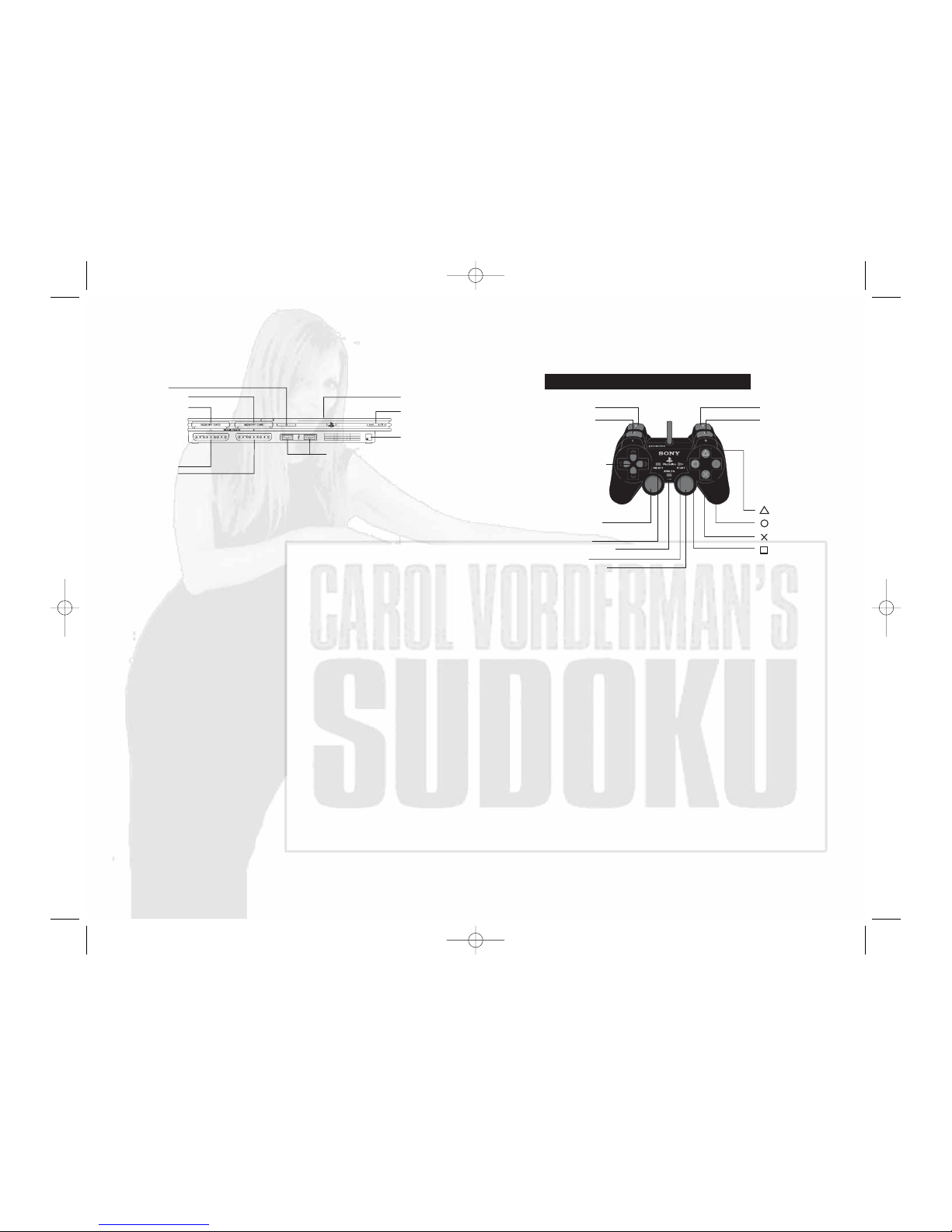
Set up your PlayStation®2 computer entertainment system according to
the instructions supplied with your system. Check that the system is
turned on (the on/standby indicator is green). Press the OPEN button to
open the disc cover. Place the
Carol Vorderman’s Sudoku disc with the
label side facing up in the disc holder, and then close the disc cover. Attach
game controllers and other peripherals as appropriate. Follow the on-screen
instructions and refer to this manual for information on using the software.
MEMORY CARD (8MB)(for PlayStation
®
2)
To save game settings and progress, insert a memory card (8MB)(for
PlayStation®2) into MEMORY CARD slot 1 before powering on the system.
At least 43KB of free space on the memory card is required to save
game data.
This game supports saving and loading of game data in MEMORY CARD
slot 1 only. You can load saved game data from the same memory card
or from any memory card containing previously saved
Carol Vorderman’s
Sudoku
games.
Before starting play, connect the DUALSHOCK
®
2 analog controller
to controller port 1. You can turn the controller’s vibration function on/off
from the Options Menu. When vibration is on, the controller vibrates
in response to game events.
open button
on/standby/
reset button
IR receiver
USB connectors
disc cover
controller port 1
controller port 2
memory card slot 1
memory card slot 2
button
button
button
button
directional
buttons
left analog stick
(L3 button
when pushed down)
SELECT button
ANALOG mode button
START button
right analog stick
(R3 button
when pushed down)
L2 button
L1 button
R2 button
R1 button
DUALSHOCK®2 ANALOG CONTROLLER CONFIGURATIONS
MENU CONTROLS
• Highlight option . . . . . . left analog stick/directional buttons */@
• Select . . . . . . . . . . . . . x button
• Go back . . . . . . . . . . . .
t button
cvs ps2 final.qxd 2/5/07 8:57 AM Page 2
Page 4
4 5
PUZZLE SCREEN
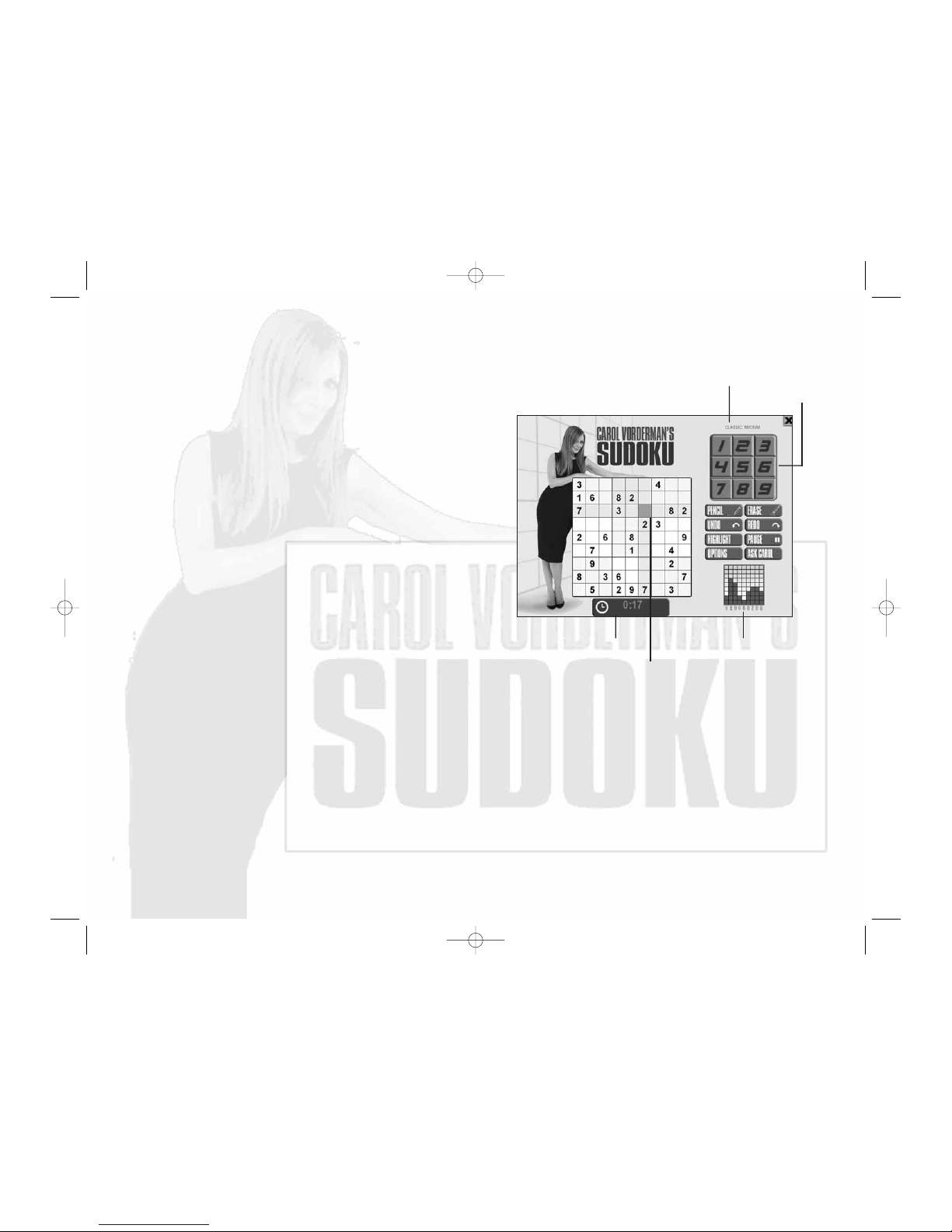
Clock
Number Indicator
• GAME MODE/DIFFICULTY LEVEL — Shows the game mode you’re
playing, and its difficulty level.
•
NUMBER SELECTOR — Use this to select a number to insert
into the highlighted square.
•
HIGHLIGHTED SQUARE — The next number you select will be inserted
in the highlighted square.
•
NUMBER INDICATOR — Shows how many occurrences of each number
(1-9) are on the grid. In a correct solution, each number occurs 9 times.
•
CLOCK — Shows the time elapsed or the time left to complete the puzzle
(depending on the game mode).
Highlighted
Square
Game Mode/Difficulty Level
Number Selector
When the game loads, the Main Menu will appear. Use the menu controls
to select options:
•
LET’S PLAY SUDOKU — Play the game. There are 3 game modes,
described below.
•
HOW TO PLAY SUDOKU — Learn the game’s interface and controls.
You will also find over 30 minutes of videos, featuring Carol Vorderman
explaining the intricacies of Sudoku. Carol will give you an introduction
and a master class on Sudoku, with tutorials and hints for all levels
of players!
•
PRINT & PLAY — Print puzzles to play them the old-fashioned way.
•
SUDOKU SOLVER — Get Carol’s help solving ANY Sudoku puzzle.
•
OPTIONS — Change the Assist settings.
•
QUIT — Quit the game and exit back to the Main Menu.
MAIN MENU
GAME MODES
You can choose from three game modes:
•
CLASSIC — Select the puzzle difficulty and see how you fare
against the clock.
•
CAREER — There are 7 belts to earn throughout your career, starting
with the White Belt Challenge. Each belt involves successfully completing
a series of puzzles in a specified time. As you move higher up the belts,
the puzzles increase in number and in difficulty, and the time allotted
for each puzzle decreases.
•
CHALLENGE CAROL — To beat Carol, you must overcome all of the Dan
Challenges. Each Dan Challenge consists of a number of puzzles that you
must successfully complete in a specified time. Start with the 1st Dan
Challenge and work your way up to 4th Dan. As you move up the Dans,
puzzle difficulty increases, while the times allotted decreases. To gain
the ultimate accolade of Sudoku Master, you must earn your Black Belt
AND beat the 4th Dan Challenge. Only then can you claim to have
out-Sudoku’d Carol!
cvs ps2 final.qxd 2/5/07 8:57 AM Page 4
Page 5
6 7
Managing Director
Darren Falcus
Operations Director
Jason Falcus
Finance Director
Mark Hargreaves
Producer
Phil Gilbert
Programming
Martin Pegg
Andrew Porritt
Andrew Brown
Additional Programming
Matt Knowles
Paul Margrave
Art Manager
Dave West
Art
Stu Flint
Additional Art
Dave West
Audio
Mark Pennock
QA
Matt Falcus
Jamie Pearson
Darren Porter
IT Co-ordinator
Tim Jennings
CREDITS
ATOMIC PLANET
Executive Producer
Steven Metcalf
Localisation Programming
David Hunt
Game Design & Production
Roger Cheung
Chris Matlub
Lead Artist/Original Artwork
Ben Willsher
QA Manager
Dave Cleaveley
QA
Paul Jackson
Oliver Pareja
Video Production
Maverick Media
Haydon Farrar
Packaging/Manual
Jayshree Mistry
Andrew Philp
Nicole Smith
EMPIRE INTERACTIVE
Product Manager
Joanne Fawell
Marketing
Paul Benjamin
Rob Lightbody
PR
Laura West
General Manager
James Spice
Special thanks to:
Carol Vorderman
Steve Hickman
Alan Strutt
XPLOSIV
ASSISTS
Carol Vorderman’s Sudoku provides numerous Assists to help you solve
puzzles. These Assists can be very useful, especially if you are new
to Sudoku. Think of Assists as the training wheels on your new bicycle.
Try them out!
•
AUTO-HIGHLIGHTS — This visual highlight helps you focus on the
appropriate mini-grid, row and column. You can turn this Assist on
permanently from the Options Menu.
•
NUMBER SELECTOR HELP — Number selection buttons are grayed out
if they cannot be legally placed in the currently highlighted box.
(This Assist is not available in Career or Challenge Carol mode.)
•
RULE-BREAK WARNING — Boxes are highlighted when any inserted
number breaks the rules of Sudoku. (This Assist is not available
in Career or Challenge Carol mode.)
•
ERRORS — Incorrect numbers are highlighted when entered.
(This Assist is not available in Career or Challenge Carol mode.)
cvs ps2 final.qxd 2/5/07 8:57 AM Page 6
Page 6
8
EIDOS, INC., LICENSE & LIMITED WARRANTY
Eidos, Inc., warrants to you, the original purchaser of this disc, that for a period of ninety (90) days from
the date of your purchase, this disc shall be free from defects in materials and workmanship. If, at any
time during the applicable ninety (90) day warranty period you determine that this limited warranty has
been breached, Eidos, Inc., agrees, in its sole option, to repair or replace, free of charge, any such disc,
provided the disc is returned postage-paid to the Eidos, Inc., Factory Service Center and a proof of date
of purchase is included. This limited warranty is not applicable to normal wear and tear and shall be
void with respect to any defects that arise from disc abuse, unreasonable use, mistreatment or neglect.
This disc is sold “as is” without any warranties of any kind, express or implied, including implied
warranties of merchantability or fitness for a particular purpose, other than the limited warranty
expressly stated above.
No other claims arising out of your purchase and use of this disc shall be binding on or obligate Eidos,
Inc., in any manner. Eidos, Inc., will not be liable to you for any losses or damages incurred for any
reason as a result of your use of this disc, including, but not limited to, any special, incidental, or
consequential damages resulting from your possession, use or malfunction of this disc.
This limited warranty states the entire obligation of Eidos, Inc., with respect to the purchase of your disc.
If any part of this limited warranty is determined to be void or illegal, the remainder shall remain in full
force and effect.
For warranty support please contact our Customer Support department at (415) 615-6220 or email us
at [email protected] or visit our website at: support.eidosinterative.com. Our staff
is available Monday through Friday, 9:00 a.m. to 12:00 noon and 1:00 p.m. to 5:00 p.m. Pacific Time.
You are responsible for all toll charges. Customer Support Representatives will not provide game hints,
strategies or codes.
PRODUCT RETURN PROCEDURE
In the event our support agents determine that your game disc is defective, you will need to forward
material directly to us. Please include a brief letter explaining what is enclosed and why you are sending
it to us. The agent you speak with will give you an authorization number that must be included and you
will need to include a daytime phone number so that we can contact you if necessary. Any materials not
containing this authorization number will be returned to you unprocessed and unopened.
Send your postage-paid package to the following address:
Eidos, Inc. Customer Services
RMA# (state your authorization number here)
651 Brannan Street, Suite 400
San Francisco, CA 94107
You are responsible for postage of your game to our service center.
Register online at
www.eidosregistration.com
Carol Vorderman’s Sudoku © 2007 Empire Interactive Europe Ltd. Empire is a trademark or registered trademark
of Empire Interactive All rights reserved Europe Ltd in the US and/or other countries. Developed by Atomic Planet.
© Atomic Planet Entertainment Limited 2000-2007. Secret Stash Games, the Secret Stash Games logo, Eidos & the
Eidos logo are trademarks of Eidos Interactive Ltd. The rating icon is a registered trademark of the Entertainment
Software Association.
CEO & President, Eidos North America
Bill Gardner
Executive Vice President of Sales & Marketing
Robert Lindsey
Vice President of Legal & Business Affairs
James O’Riordan
Vice President of Finance
Malcolm Dunne
Vice President of Human Resources
Edie Dykstra
Director of Marketing
Matt Gorman
Associate Marketing Manager
Diane Eng
Director of Public Relations
Michelle Seebach Curran
Public Relations Manager
Matt Dahlgren
Creative Director
Karl Stewart
National Sales Manager
Joe Morici
Sales & Marketing Analyst
Ilana Budanitsky
Channel Marketing Coordinator
Rafal Dudziec
Media Manager
Micheal Tran
Web Producer
Roderick van Gelder
Web Designers
John Lerma
Danny Jiang
Sr. Graphic Designer
James Song
Jr. Graphic Designer
Connie Cheung
Creative Services Project Administrator
Stephanie M. Komure
Events Manager
Annie Meltzer
Senior Business Development Manager
Tom Marx
Project Administrator, New Media
Francesca Zulueta
Community Specialist
Tony Perata
Operations Manager
Gregory Wu
Senior External Producer
Nick Goldsworthy
Associate Project Manager
Clayton Palma
Product Specialists
Jeff Lowe
Stephen Cavoretto
Katie Bieringer
Mastering/Hardware
Jordan Romaidis
Patrick Goodspeed
Customer Service Supervisor
Sean McCloskey
Customer Service Representative
Richard Campbell
Special Thanks
Todd Thorson
David Bushee
Hanshaw Ink & Image
EIDOS U.S. PUBLISHING
cvs ps2 final.qxd 2/5/07 8:57 AM Page 8
Page 7

OUTSIDE BACK COVER
PLACEHOLDER
cvs ps2 final.qxd 2/5/07 8:57 AM Page 10
 Loading...