

Page 1
Impreza 2.5i &
Outback Sport
2011
Quick Reference Guide.
782325_11a_Subaru_Impreza_QRG_061710.indd 2 6/17/10 2:59 PM
Page 2
Complete U.S. specications and illustrations may
not have been available at time of publication.
Specications are based on the latest product
information available at time of publication. Some
images shown are for illustration purposes only.
Some equipment shown may be optional at
extra cost. Specic options may be available
only in combination with other options. Specic
combinations of equipment or features may vary
from time to time and by geographic area. Certain
accessories and equipment may not be available at
the time of publication.
This Quick Reference Guide applies to all
Impreza 2.5i & Outback Sport models. Therefore,
some explanations may be for equipment not
installed on your vehicle. Subaru of America, Inc.,
reserves the right to change or discontinue at any
time, without notice, prices, colors, materials,
equipment, accessories, specications, models
and packages without incurring any obligation to
make the same or similar changes on vehicles
previously sold. Colors shown may vary due to
reproduction process.
For detailed operating and safety information,
please consult the Owner’s Manual.
Subaru, Outback, Legacy, Forester, Impreza,
WRX, WRX/STI, BOXER, SPORTSHIFT, SI-DRIVE,
Lineartronic, Alcantara, Circle Surround, Audyssey,
XM and Sirius are registered trademarks.
All rights reserved. Contents may not be reprinted or
electronically reproduced in whole or in part without
prior written approval of Subaru of America, Inc.
© 2010 Subaru of America, Inc.
782325_11a_Subaru_Impreza_QRG_061710.indd 3 6/17/10 2:59 PM
Page 3
Table of Contents
Getting Started
Instrument Panel
Gauges
Personalize
Controls
While Operating
Safety/In Case of Emergency
Additional Information
2 - 3
4 - 5
6 - 7
8 - 9
10 - 17
18 - 19
20 - 21
22 - 23
782325_11a_Subaru_Impreza_QRG_061710.indd 5 6/17/10 2:59 PM
Page 4
2
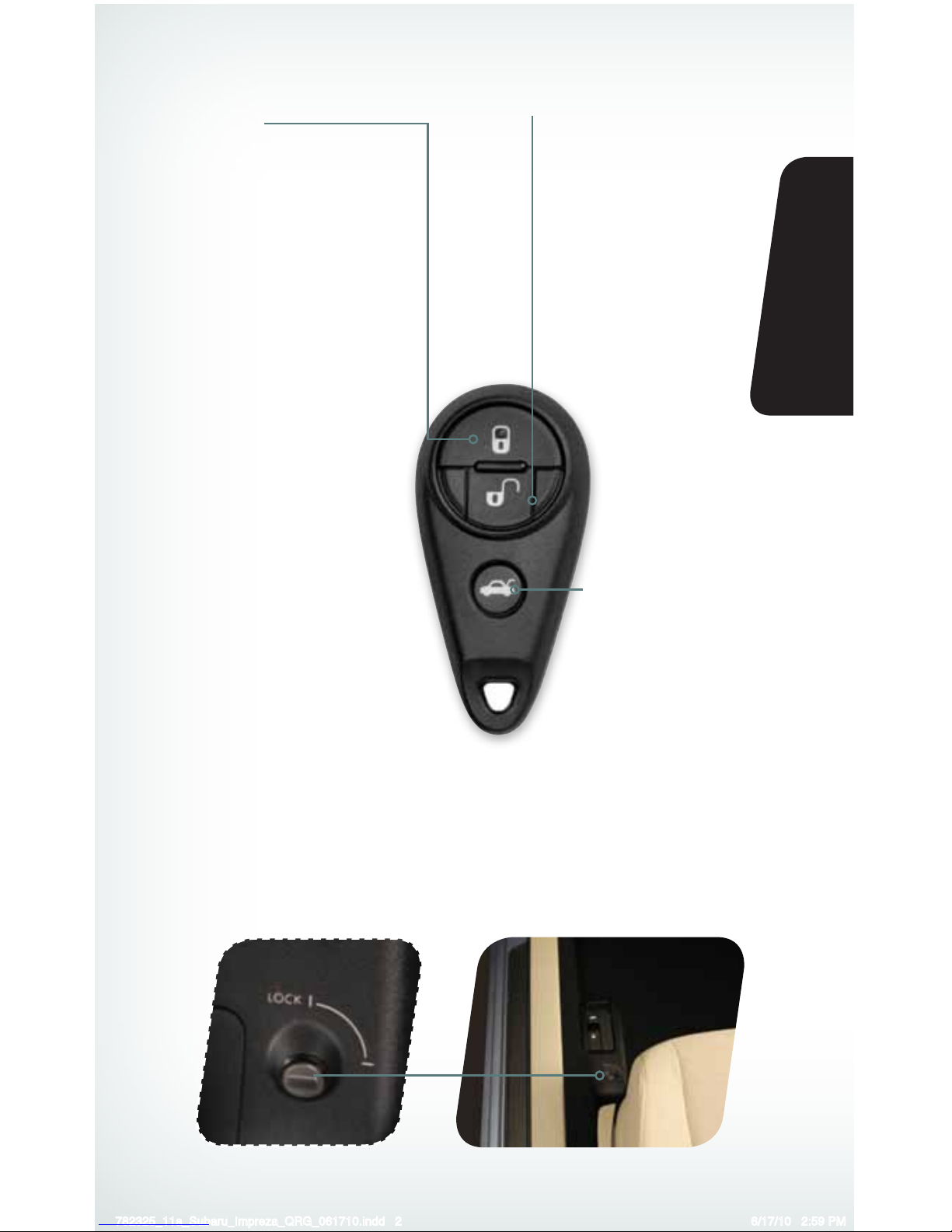
Remote Keyless Entry
Lock/Arm
• Press to lock all doors and
rear gate or trunk.
• If any of the doors or the rear
gate (or trunk) are not fully
closed, an electronic chirp
will sound ve times and the
hazard lights will ash ve
times to alert you that the
doors or the rear gate are not
properly closed.
• To activate the vehicle nder
function, press three times
(within ve seconds). If you are
within 30 feet of the vehicle,
the horn will sound one time
and the hazard lights will ash
three times.
Unlock/Disarm
• Press once to unlock the
driver’s door.
• Press twice (within ve
seconds) to unlock all doors.
• When the “Unlock/Disarm”
button is pressed, the dome
and map lights will illuminate
if the dome light switch is in
the middle position.
Unlocking the Rear
Gate/Opening the
Trunk Lid
Press the button to unlock
the rear gate (5-Door).
Press and hold to unlock
the trunk (4-Door).
Trunk Lid Release Lock (4-Door only)
Prevent unauthorized entry into the trunk by locking the trunk release lever. Insert the ignition
key into the key cylinder and turn the key counterclockwise to the “LOCK” position.
782325_11a_Subaru_Impreza_QRG_061710.indd 2 6/17/10 2:59 PM
Page 5
3
Getting
Started
Instrument
Panel
Gauges
Personalize Controls While
Operating
Safety / In Case
of Emergency
Additional
Information
3
Getting
Started
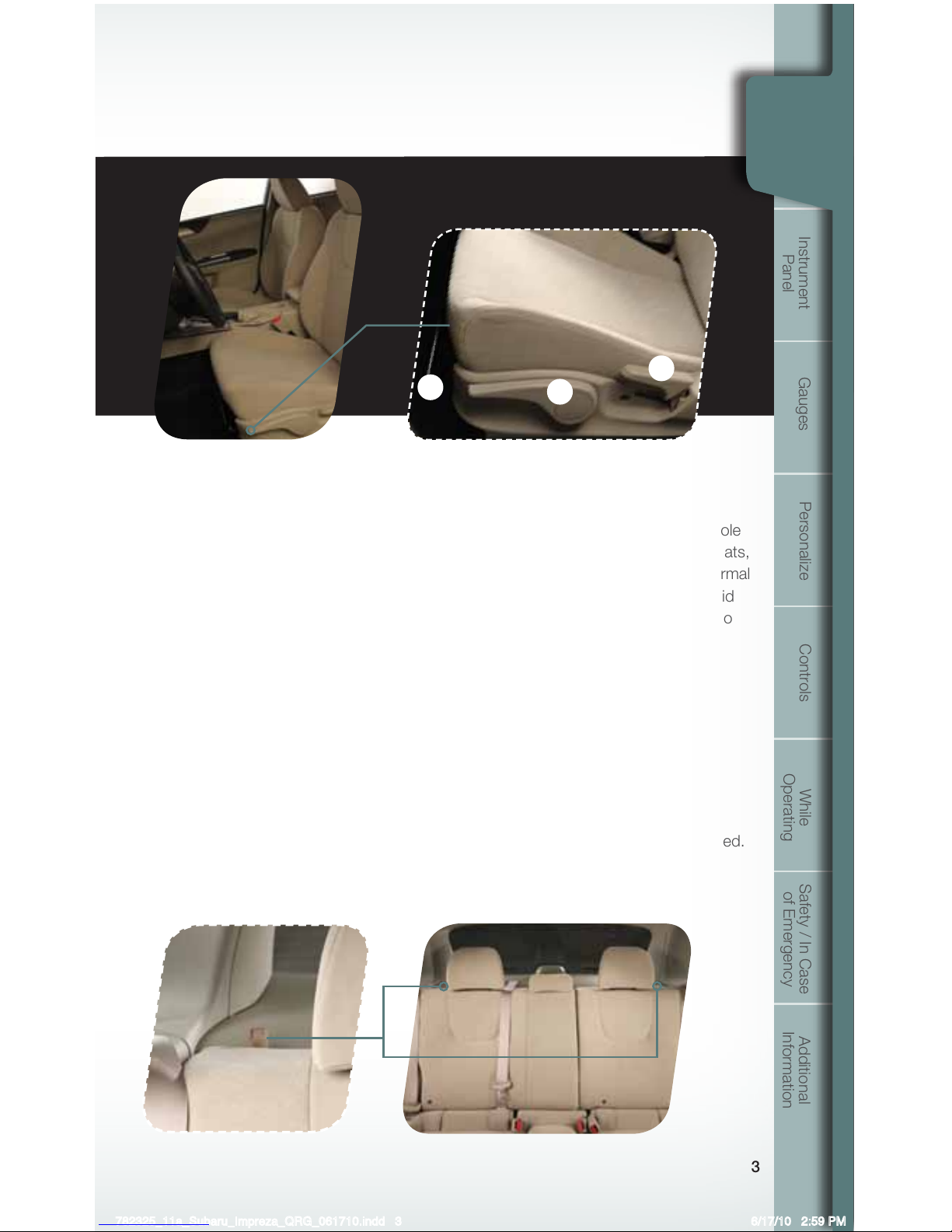
Seating
Seat Controls
1. Forward/Backward
Pull up on the lever below the front
of the driver’s seat to move the seat
forward or backward.
2. Raise/Lower Seat Cushion
To adjust the height of the driver’s
seat, push or pull the cushion
adjustment lever located on the
lower left front of the seat.
3. Recline Seatback
To adjust the seatback to the desired
position, pull up on the recline lever
located on the lower left rear of the
driver’s seat or lower right rear of the
passenger’s seat. Do not adjust seats
while driving.
Heated Seats
(if equipped)
Switches located on the center console
between the driver and passenger seats,
choose low (bottom of switch) for normal
heating or high (top of switch) for rapid
heating. Choose the center position to
turn off the seat heaters.
Folding Down the
Rear Seats
Lower the headrests. Pull up on the
release tab on the seat side that you
want to fold down. To return the
seatback to its original position, raise
the seatback until it locks into place
and make sure that it is securely locked.
1
2
3
Getting
Started
782325_11a_Subaru_Impreza_QRG_061710.indd 3 6/17/10 2:59 PM
Page 6
4
Instrument Panel
pg. 10 pg. 6-7 pg. 11
Bluetooth Switches
(if equipped)
pg. 10 pg. 17pg. 8 pg. 16
782325_11a_Subaru_Impreza_QRG_061710.indd 4 6/17/10 2:59 PM
Page 7
5
Getting
Started
Instrument
Panel
Gauges
Personalize Controls While
Operating
Safety / In Case
of Emergency
Additional
Information
5
pg. 12-13 pg. 14-15pg. 19
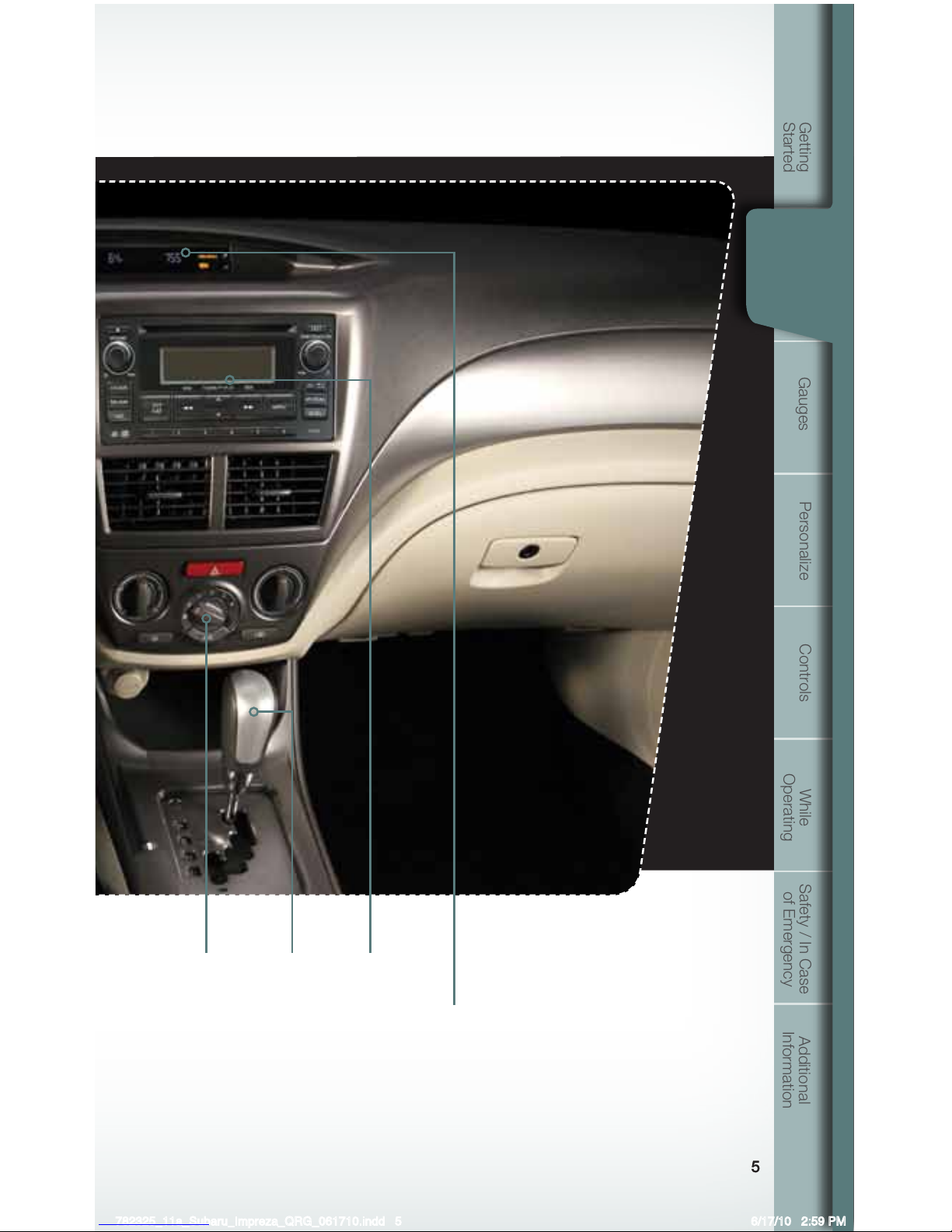
Clock
Press the “+” button to advance the time or the
“–” button to reverse the time. Vehicles with a
navigation system, please refer to the separate
“Operating Instructions for Navigation System.”
Instrument
Panel
782325_11a_Subaru_Impreza_QRG_061710.indd 5 6/17/10 2:59 PM
Page 8
6
Gauges
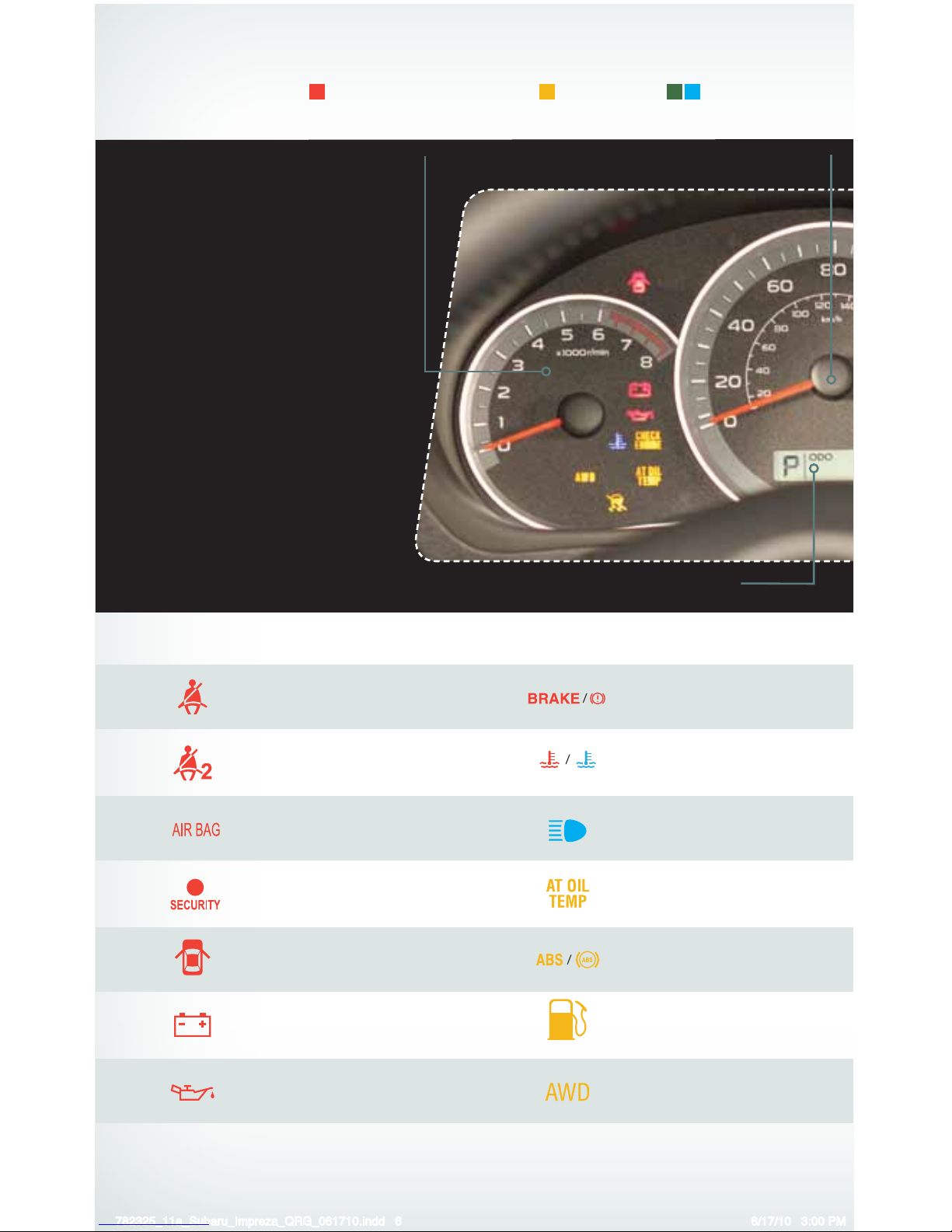
Immediate Attention
Tachometer
Trip meter and odometer
Speedometer
Caution Informational
Seatbelt warning
Front passenger seatbelt
warning
SRS airbag system
Security indicator light
Door open
Charge warning
Oil pressure warning
Brake system
Hot coolant temperature /
Cold coolant temperature
High beam indicator light
AT OIL TEMP (AT models)
ABS warning
Low fuel
All-Wheel Drive
(AT models)
782325_11a_Subaru_Impreza_QRG_061710.indd 6 6/17/10 3:00 PM
Page 9
7
Getting
Started
Instrument
Panel
Gauges
Personalize Controls While
Operating
Safety / In Case
of Emergency
Additional
Information
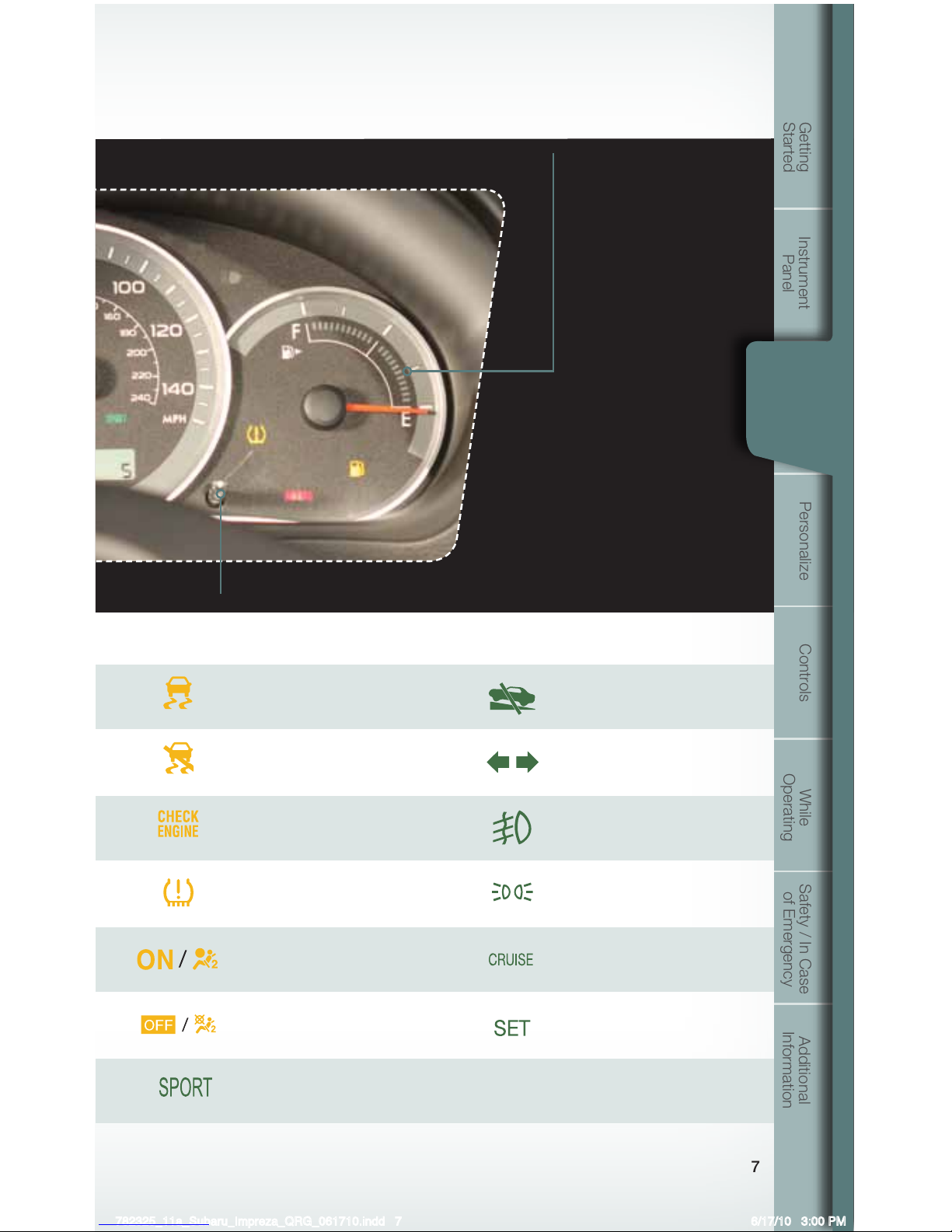
Gauges
Trip meter A/B selection and trip meter reset knob
Fuel Gauge
Vehicle Dynamics
Control/Vehicle Dynamics
Control operation
Vehicle Dynamics Control OFF
CHECK ENGINE /
Malfunction indicator
Tire pressure warning light
Front passenger frontal
airbag ON
Front passenger frontal
airbag OFF
SPORT Mode
(AT models)
Hill Start Assist
(if equipped)
Turn signals
Front fog light indicator
light (if equipped)
Headlight indicator light
Cruise control
indicator light
Cruise control set
indicator light
782325_11a_Subaru_Impreza_QRG_061710.indd 7 6/17/10 3:00 PM
Page 10
8
Personalize
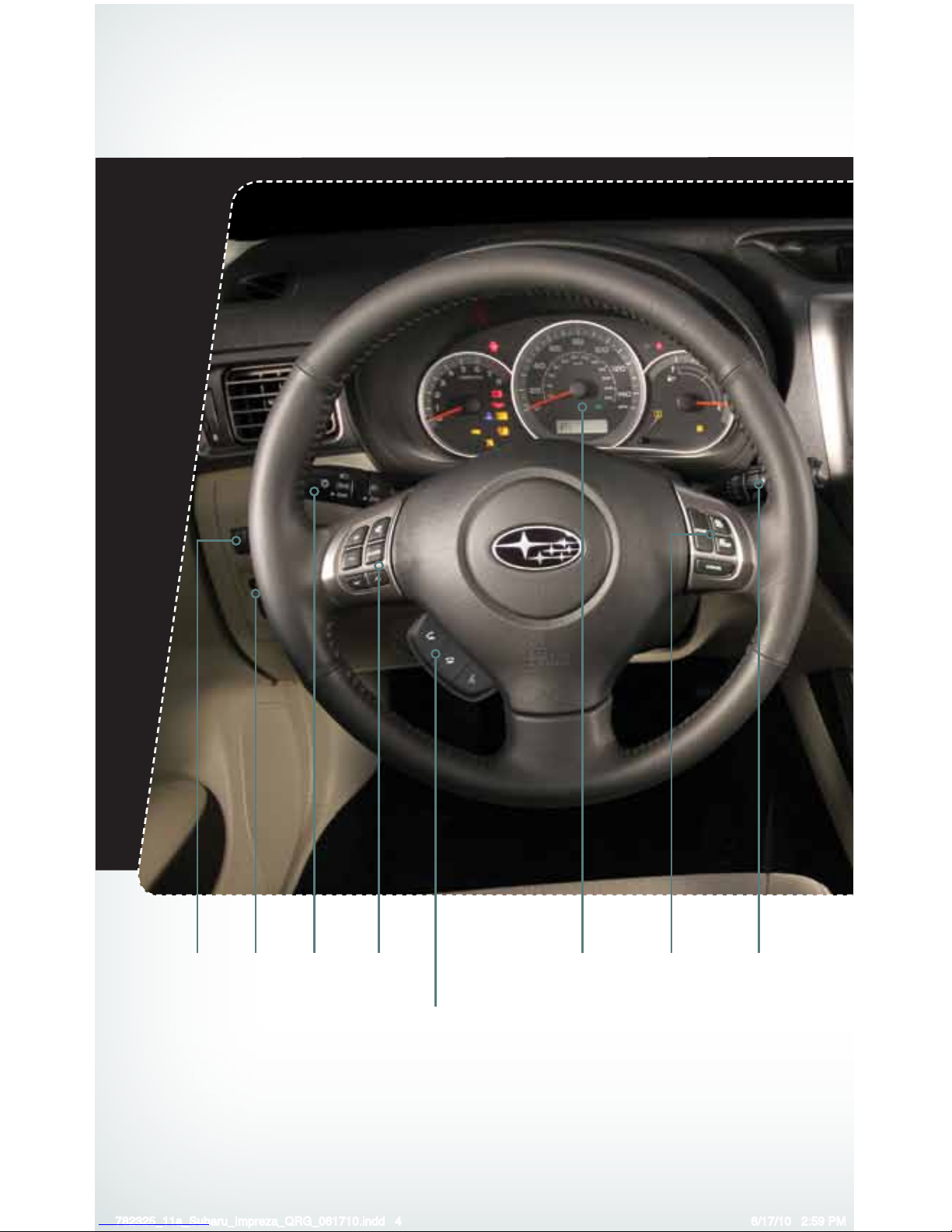
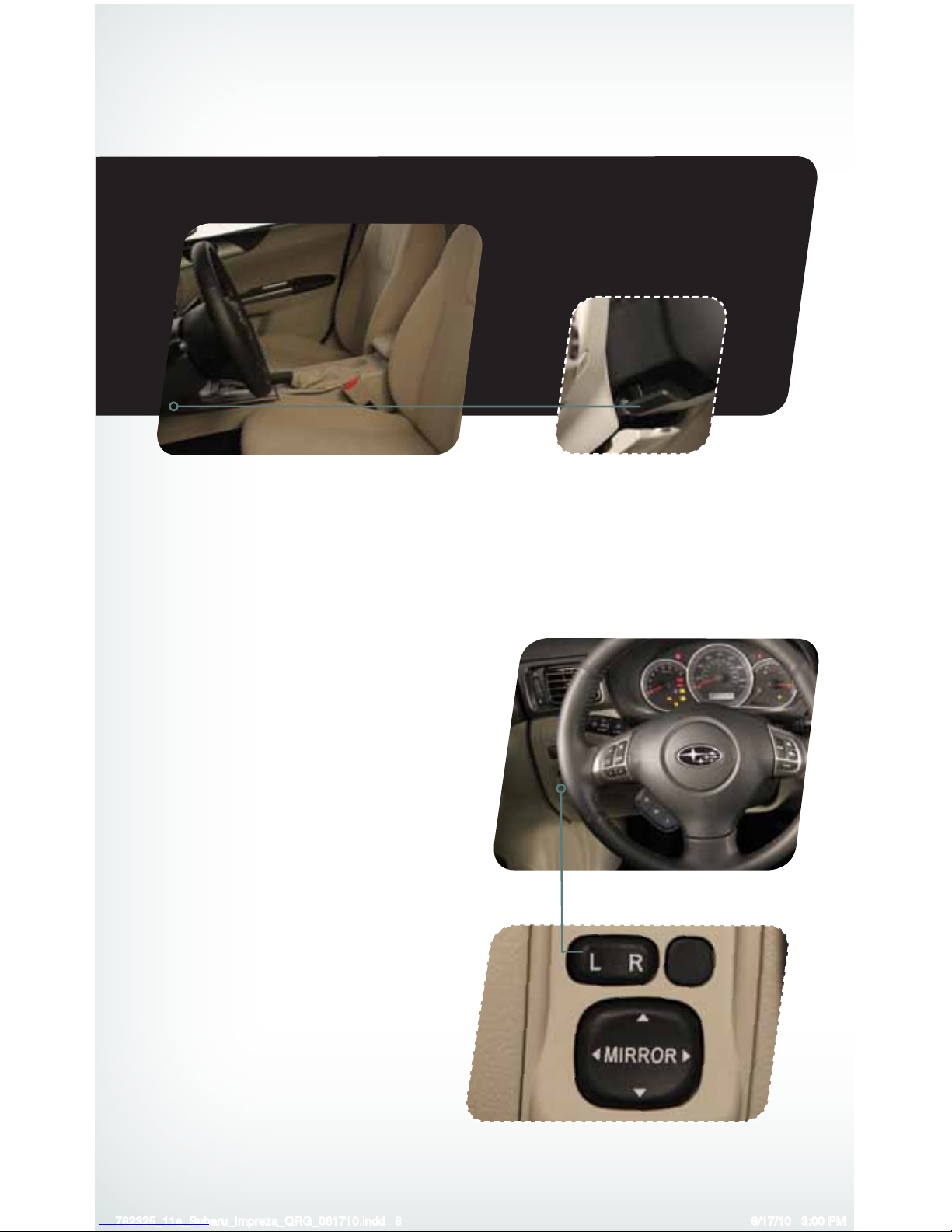
Tilt Steering Column
Push the lever down rmly to adjust the
vertical position of the column; rmly push the
lever back up to lock the column in place. Do
not adjust while driving.
Power Exterior Mirrors
Push the mirror selection switch to the “L”
side to adjust the left-hand mirror or to the “R”
side to adjust the right-hand mirror. Push and
hold the direction mirror control switch in the
direction you want to move the mirror. Push
the mirror selection switch back to the middle
to prevent unintended operation.
782325_11a_Subaru_Impreza_QRG_061710.indd 8 6/17/10 3:00 PM
Page 11
9
Getting
Started
Instrument
Panel
Gauges
Personalize Controls While
Operating
Safety / In Case
of Emergency
Additional
Information
Personalize
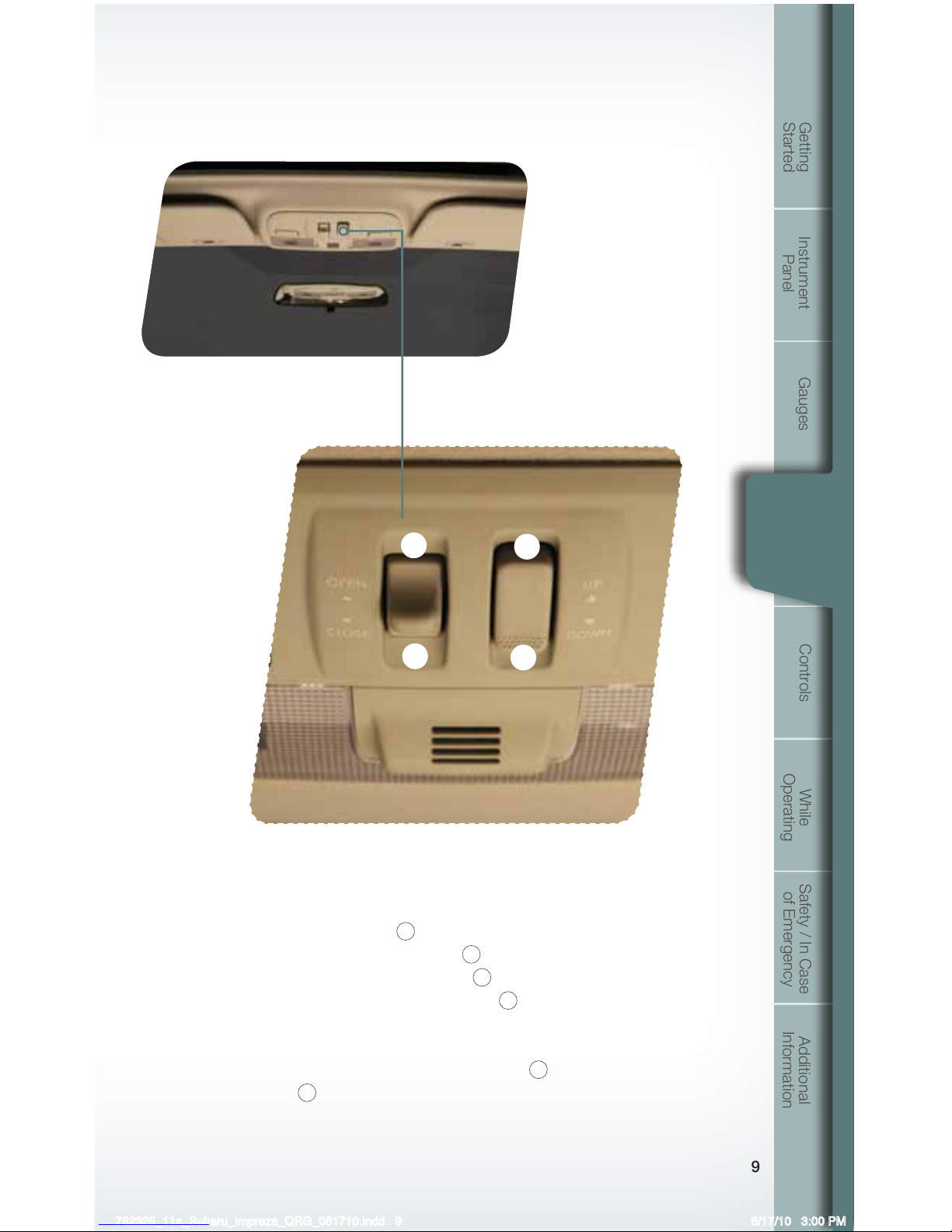
Power Moonroof (if equipped)
With the moonroof in the fully closed position,
press the switch
4
to tilt the moonroof up.
Press and hold the switch
3
to lower the
moonroof. Press the switch
2
to fully open
the moonroof. Press the switch
1
to close
the moonroof. To stop the moonroof in a
midway position while opening or closing,
momentarily press the switch to the
1
side
or
2
side.
1
2
3
4
782325_11a_Subaru_Impreza_QRG_061710.indd 9 6/17/10 3:00 PM
Page 12
10
Controls
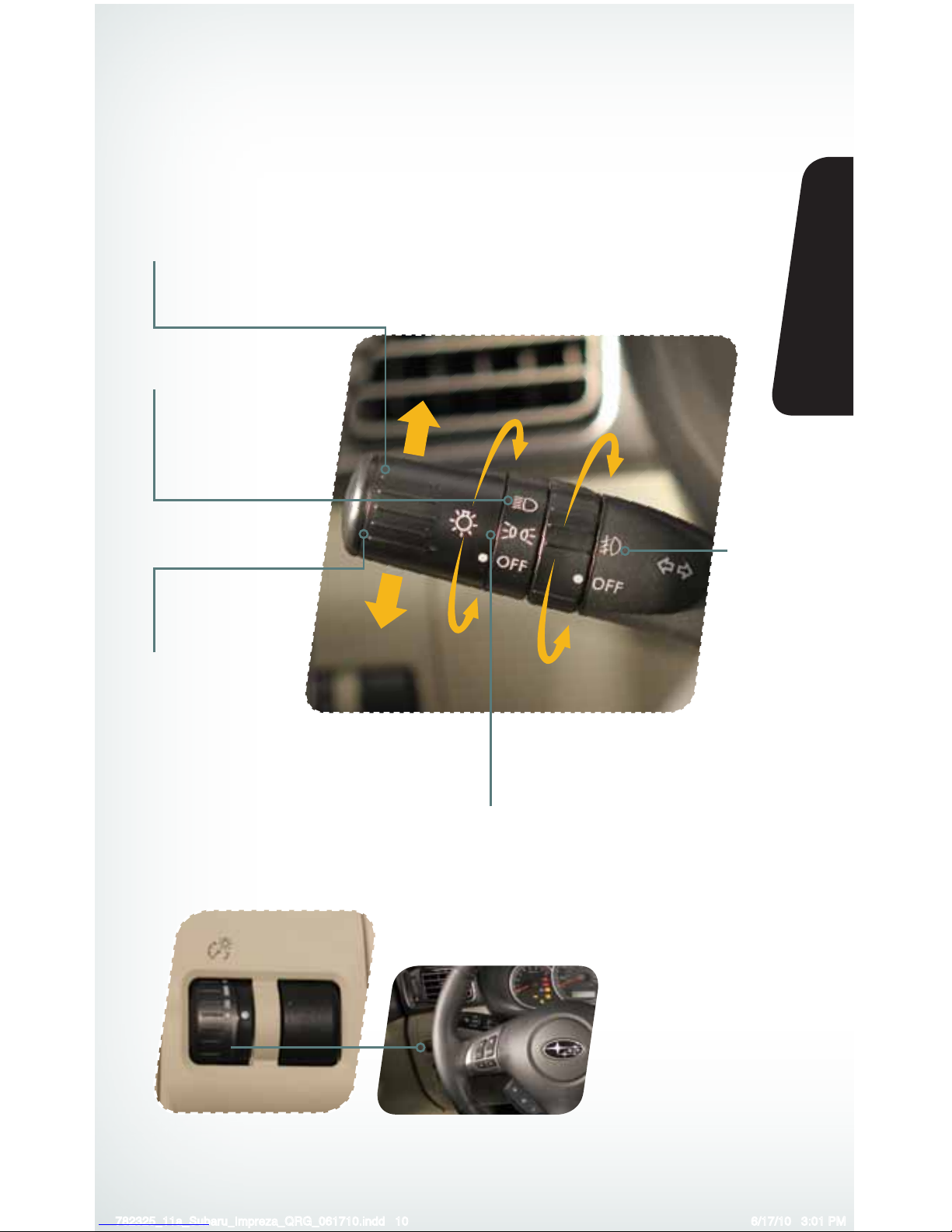
While the light switch
is on, rotate the dial
downward to dim
the instrument panel
illumination. Rotate the
dial upward to make the
illumination brighter. When
the dial is fully rotated
upward, the instrument
panel illumination
becomes full bright.
Light Controls
Turns on instrument panel lights, tail
lights, front side marker lights and
license plate lights.
Turns on headlights,
instrument panel
illumination, front side
marker lights, taillights
and license plate lights.
Turns on
fog lights
(if equipped).
Push up for right
turn signal.
Push down for
left turn signal.
782325_11a_Subaru_Impreza_QRG_061710.indd 10 6/17/10 3:01 PM
Page 13
11
Getting
Started
Instrument
Panel
Gauges
Personalize Controls While
Operating
Safety / In Case
of Emergency
Additional
Information
Controls
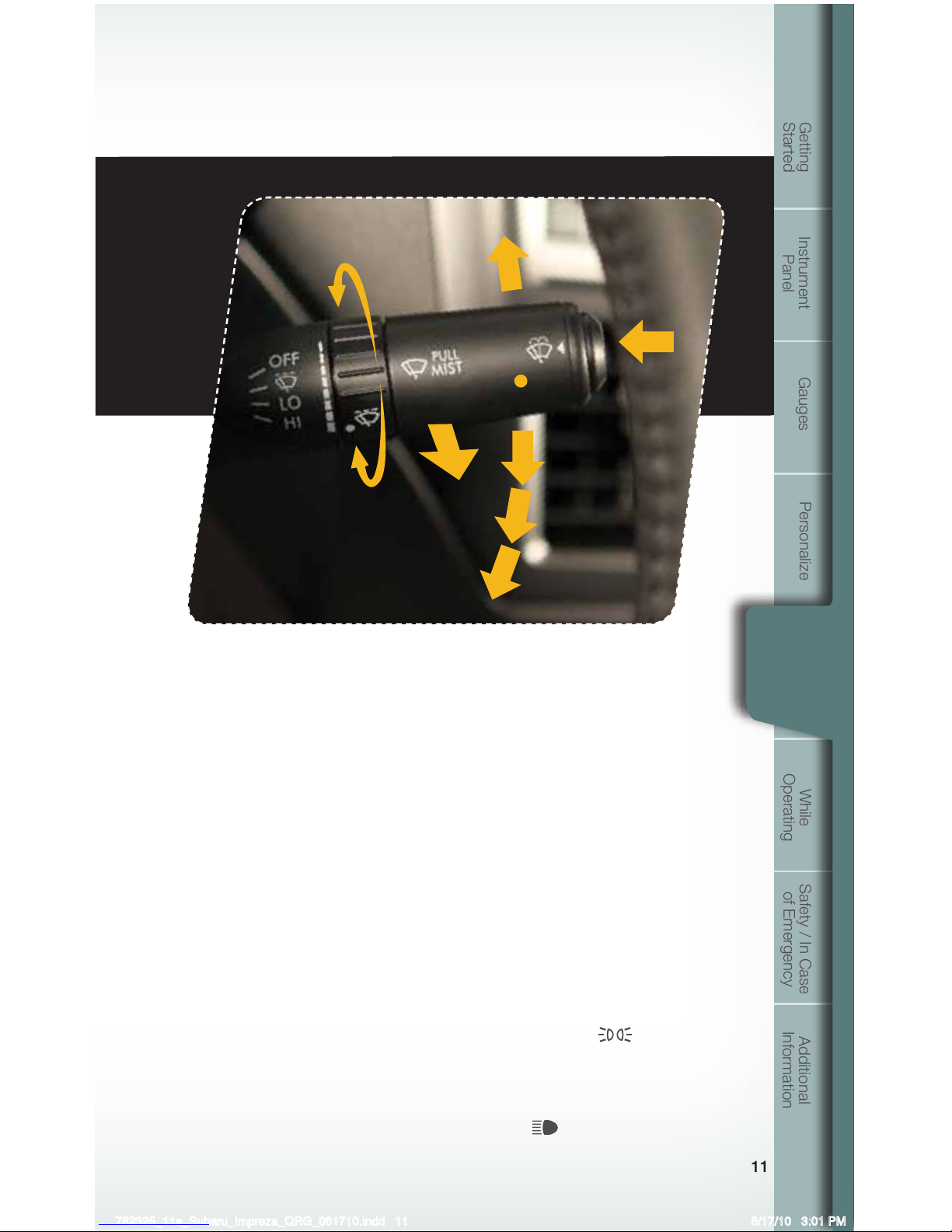
Windshield Wipers
To turn on the wipers, press the wiper control lever down
one level for intermittent, two levels for low, or three levels for
high speed. Return the lever to the “OFF” position to stop
the wipers. For a single wipe, pull the lever toward you. To
spray washer uid, press and hold the button at the end of
the lever.
With the wipers in the intermittent position, turn the dial
to adjust the operating interval of the wiper. The operating
interval can be adjusted in steps.
Daytime Running Lights
Daytime running lights are standard on your vehicle. Only a
reduced brightness high beam will be automatically turned
on when the engine has started and the parking brake is
fully released or the light switch is in the “OFF” or “
”
position. The brightness of the illumination of the high beam
headlights is reduced by the daytime running light system.
You must always switch on your headlights when it’s dark
outside by turning the light switch to the
position.
OFF
1
2
3
INT.
LOW
HIGH
782325_11a_Subaru_Impreza_QRG_061710.indd 11 6/17/10 3:01 PM
Page 14
12
Controls
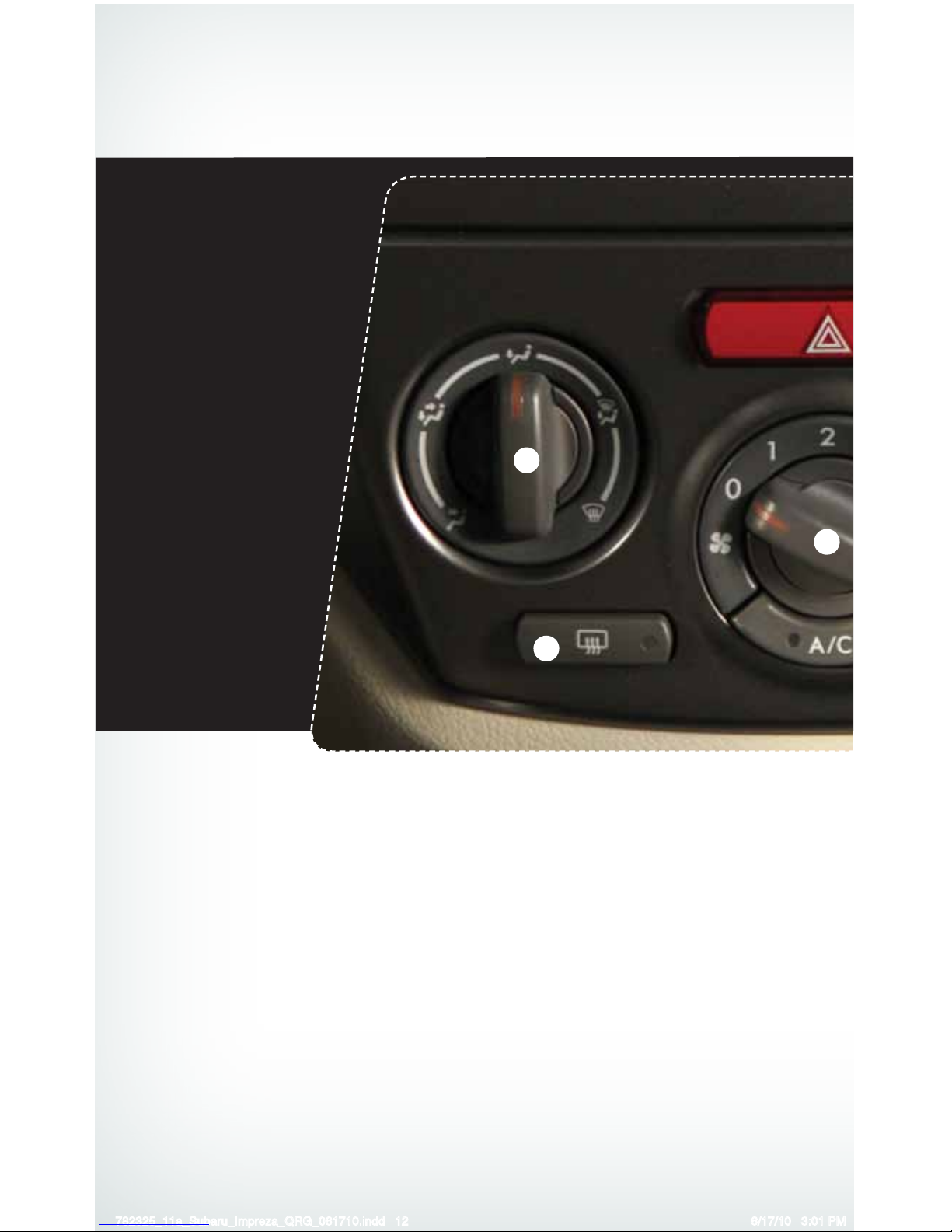
Climate Control
1. Air Flow Control Dial
The air ow control dial allows you to
choose the direction of air ow. Rotate the
dial for the desired air ow position.
Defrost / Defog
To clear the windshield and front door
windows of fog or frost, rotate the air ow
control dial to the defrost position, set the
temperature control to the red position,
and set the fan speed control to the
fastest speed.
2. Rear Window Defogger Button
Press the rear window defogger button
to turn on the defogger. The defogger
will automatically shut off after about 15
minutes. If the window clears before that
time, you can press the button again to
turn it off.
3. Fan Speed Control Dial
Rotate the fan speed control dial to select
one of four fan speeds.
4. Air Conditioning Button
Press the “A/C” button to activate the
air conditioning. Press it again to turn off
the air conditioning.
1
2
3
782325_11a_Subaru_Impreza_QRG_061710.indd 12 6/17/10 3:01 PM
Page 15
13
Getting
Started
Instrument
Panel
Gauges
Personalize Controls While
Operating
Safety / In Case
of Emergency
Additional
Information
Controls
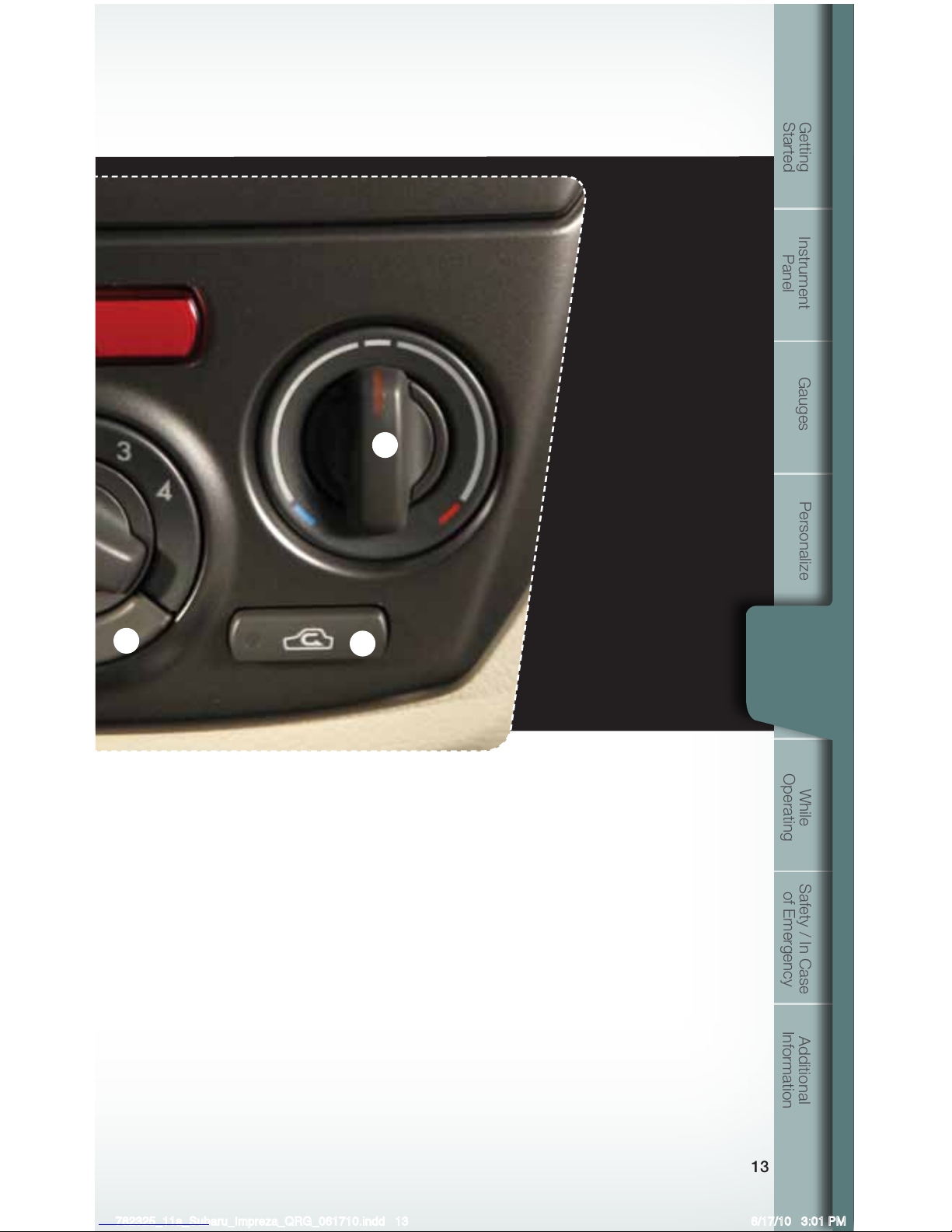
5. Recirculated / Outside Air Button
Press the air inlet selection button to
prevent outside air from being drawn
into the passenger compartment. If the
button is pushed in, press it again to
draw outside air into the compartment.
TO PREVENT WINDSHIELD
FOGGING, DO NOT REMAIN IN THE
RECIRCULATED MODE FOR AN
EXTENDED PERIOD OF TIME.
6. Temperature Control Dial
Rotate the temperature control dial
from blue for cool, to red for warm.
4
5
6
782325_11a_Subaru_Impreza_QRG_061710.indd 13 6/17/10 3:01 PM
Page 16
14
Controls
1
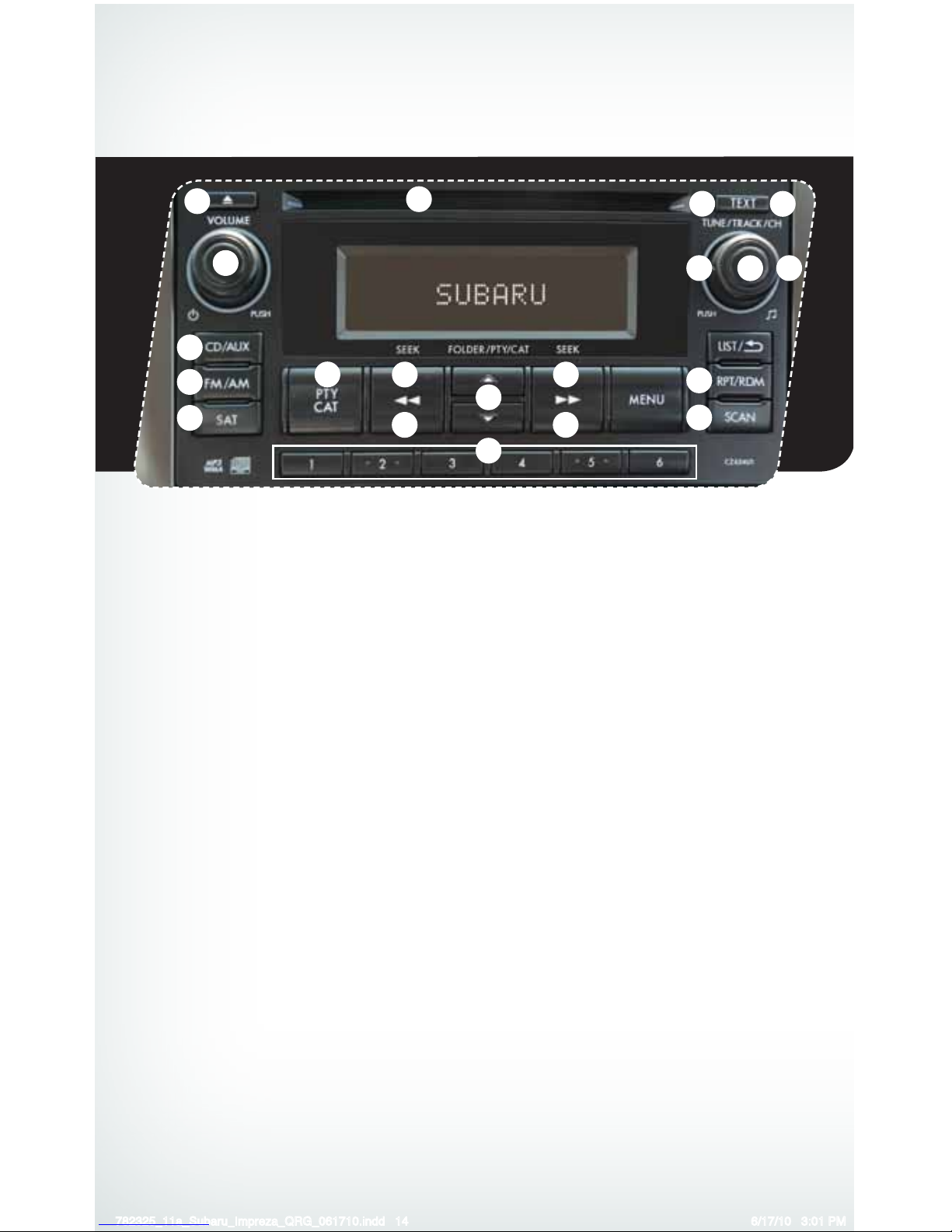
AM/FM Stereo with Single
Disc CD/MP3/WMA Player
Radio Functions
1. Power / Volume Control
Press the power / volume control knob
for on or off; rotate the knob to control
the volume.
2. Bass, Treble, Balance and Fader
Each press of the “TUNE/TRACK/CH”
button will cycle you through Bass,
Midrange, Treble, Fade or Balance. Rotate
the “TUNE/TRACK/CH” knob to adjust
the desired level.
3. FM / AM
Press the “FM/AM” button to choose
FM1, FM2, FM3 or AM reception.
4. Tune / Track
Rotate the “TUNE/TRACK/CH”
knob clockwise to increase the
tuning frequency; rotate the knob
counterclockwise to decrease it.
5. Seek
Press the right or left arrow of the “SEEK”
button to pick up the next highest or
lowest frequency.
6. Presets
You can save up to six favorite stations
for each band – FM1, FM2, FM3 and AM.
Select a frequency and press one of the
preset buttons for more than 1.5 seconds
to store it.
7. Satellite Radio
An optional satellite radio tuner and
antenna can be connected to this audio
unit. You can hear satellite radio programs
by pressing the “SAT” button after
connecting optional equipment. To receive
satellite radio service, it is necessary to
enter into a separate contract with a
satellite radio provider.
11
9
3
8
15
5 5
13
18
7
16
17
14 14
10
4
2
6
12
782325_11a_Subaru_Impreza_QRG_061710.indd 14 6/17/10 3:01 PM
Page 17
15
Getting
Started
Instrument
Panel
Gauges
Personalize Controls While
Operating
Safety / In Case
of Emergency
Additional
Information
Controls
8. PTY / CAT
Press the “PTY/CAT” button to
change to program type selection
mode. The PTY group that you are
currently listening to is displayed for
10 seconds.
CD Player functions
9. Load
Insert a disc into the slot. The CD
will automatically be drawn in and
will begin play at the rst track.
10. Play CD
Press the “CD/AUX” button and
playback will begin.
11. Repeat / Random
Press the “RPT/RDM” button once
to repeat the current track, two
presses to repeat the current folder
and a third press to turn off repeat.
Press and hold the “RPT/RDM”
button once to randomize folders
on a CD. Two presses to hear all
the tracks on the disc in random
order, and a third press to turn
off random.
12. Eject
Press the button to eject the disc.
13. Forward / Reverse
Rotate the “TUNE/TRACK/CH”
knob clockwise to skip to the
beginning of the next track; rotate
the knob counterclockwise to
skip to the beginning of the
current track. Rotate the knob
counterclockwise again to go to the
previous selection.
14. Fast Forward / Fast Reverse
Press the right arrow of the “SEEK”
button for more than one second
to fast forward. Release the button
to stop. To fast reverse, press the
left arrow for more than one second
and release the button to stop.
15. Scan
Press the “SCAN” button to begin
previewing the rst 10 seconds
of each track on the disc. Normal
playback will resume after all
tracks have been scanned. Press
the “SCAN” button again to stop
scanning and listen to the track
being previewed.
MP3/WMA Formatted CD
Player Functions
16. Folder Selection
Press the up arrow of the
“FOLDER” button to select the next
folder. Press the down arrow to go
back to the rst music le. Quickly
press the down arrow again to go
back to the previous folder.
17. Page Scroll
Press the “TEXT” button to select
title display. Press and hold again
to scroll through the title, 8
characters at a time up to a
maximum of 64 characters.
18. Display
Press and hold the “TEXT” button
during playback to change the
display to show the play time, disc
title, artist name and track title. If
the disc is formatted with MP3/
WMAs, press the “TEXT” button to
change the display to show play
time, folder name and le name.
782325_11a_Subaru_Impreza_QRG_061710.indd 15 6/17/10 3:01 PM
Page 18
16
Controls
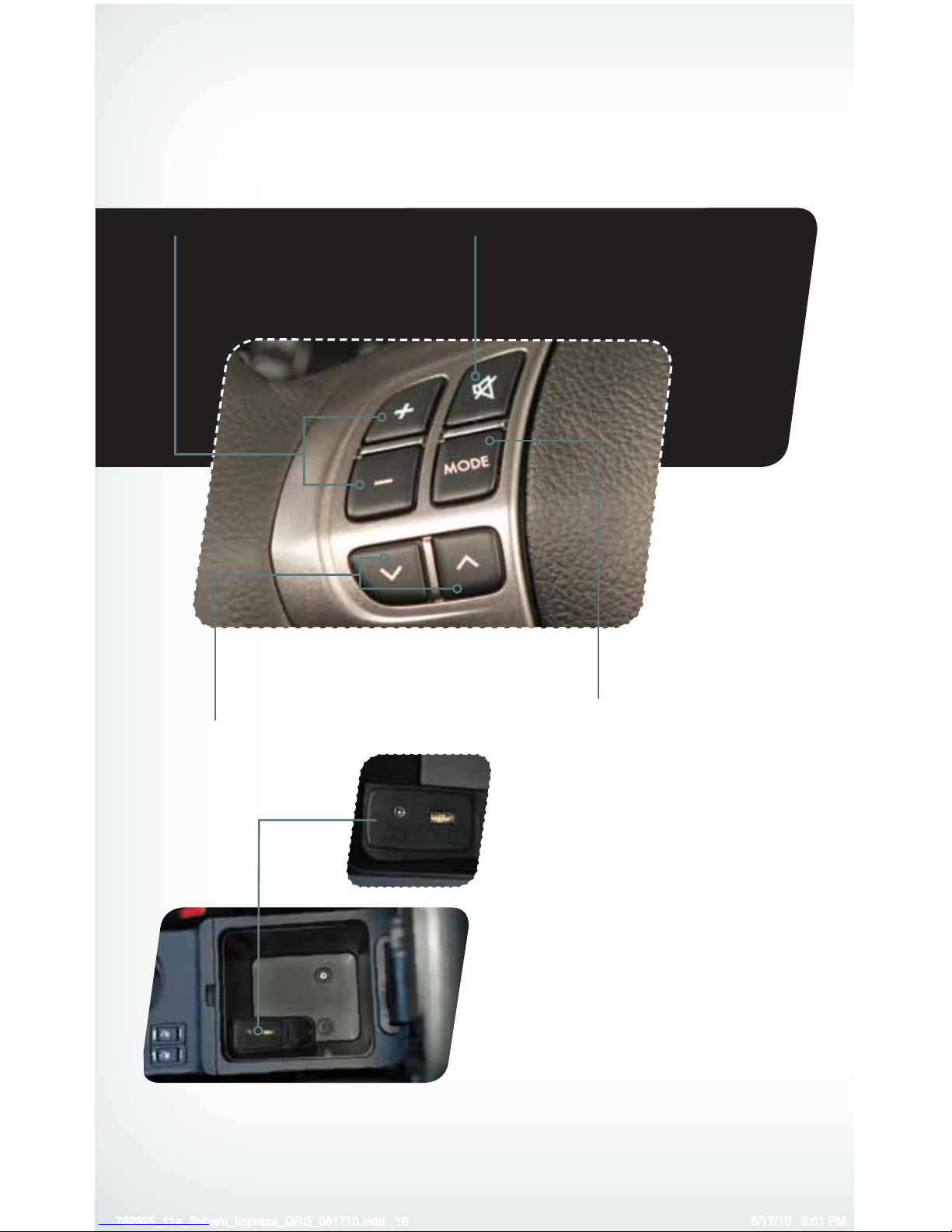
• Press the “+” button to
increase the volume. Press
the “-” button to reduce
the volume.
Aux Jack
The aux jack is located in the center
console. You can connect a portable
music player to the auxiliary jack and
hear the music stored on it through the
vehicle speakers. Press the “CD/AUX”
button located on the audio system to
select the auxiliary mode.
USB Storage Device /
iPod
®
(if equipped)
You can connect a USB equipped
portable music player to the USB
connector and hear the music stored
on it through the vehicle speakers.
Press the “CD/AUX” button located on
the audio system repeatedly until the
USB / iPod® mode is selected.
Steering Wheel Audio Controls (if equipped)
• Press the button to select
the desired audio mode –
FM, AM, SAT, CD, AUX.
• With any of the radio modes selected, push
the switch up or down to nd the desired
frequency. In CD mode, push the switch up
or down to skip forward or back a track.
• Press to shut off
the sound.
782325_11a_Subaru_Impreza_QRG_061710.indd 16 6/17/10 3:01 PM
Page 19
17
Getting
Started
Instrument
Panel
Gauges
Personalize Controls While
Operating
Safety / In Case
of Emergency
Additional
Information
Controls
Cruise Control
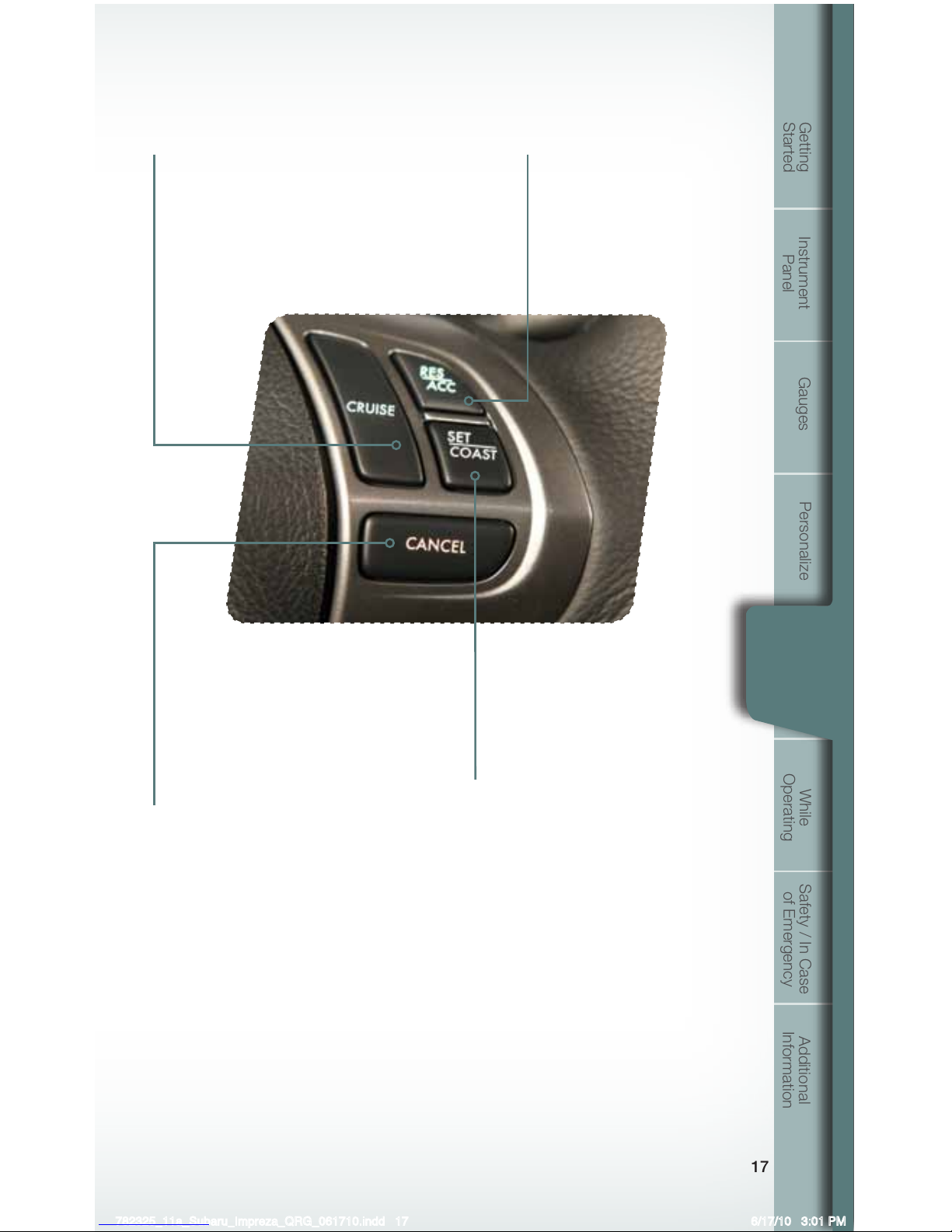
• To activate the cruise control, press the
“CRUISE” button. The “CRUISE” indicator
light on the instrument panel will turn on.
To quit cruise control, press the “CRUISE”
button again.
• Press the accelerator pedal until
your vehicle reaches the desired
speed. Press the “SET/COAST”
button. Ease off the accelerator
pedal. Your vehicle will maintain
the desired speed.
• To cancel the cruise control, push
the brake pedal or press the
“CANCEL” button. If you have
a manual transmission, you can
push in the clutch pedal or shift the
selector lever into the “N” (Neutral)
position (AT and MT models).
• To resume your speed after
canceling, press the “RES/
ACC” button.
Increase speed
Press the “RES/ACC” button,
hold until your vehicle reaches
the desired speed, and release.
To increase speed using the
accelerator pedal, press the pedal
until you reach the desired speed.
Press the “SET/COAST” button to
set the speed.
Decrease speed
Press the “SET/COAST” button,
hold until your vehicle slows to the
desired speed, and release. To
decrease the speed using the brake
pedal, press the pedal to release
cruise control temporarily. When
the speed decreases to the desired
speed, press the “SET/COAST”
button to set the speed.
782325_11a_Subaru_Impreza_QRG_061710.indd 17 6/17/10 3:01 PM
Page 20
1818
While Operating
Vehicle Dynamics Control OFF Switch
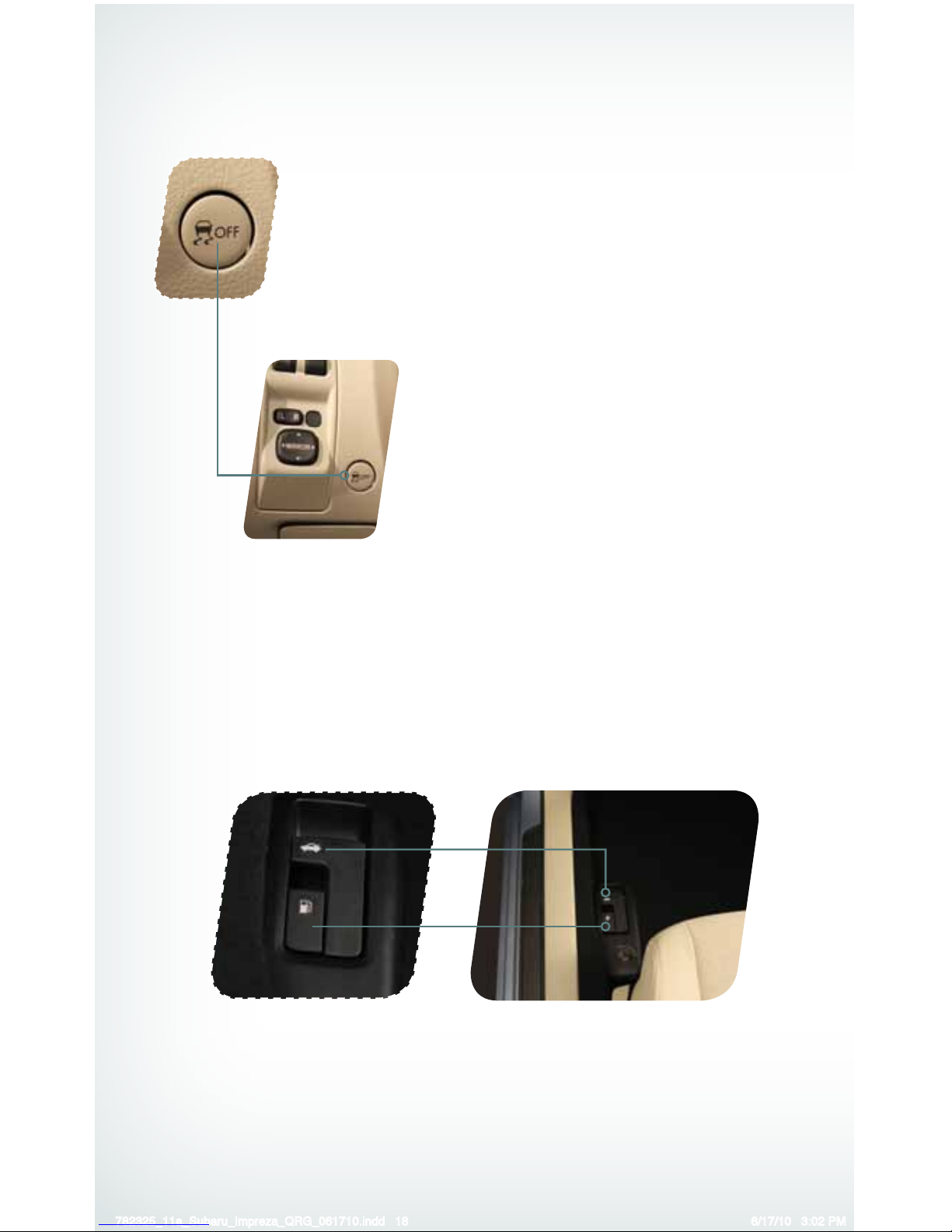
Pressing the switch to deactivate the Vehicle Dynamics Control
system can help in the following situations:
• A standing start on a steeply sloping road with a snowy,
gravel-covered, or otherwise slippery surface.
• When the vehicle’s wheels are stuck in mud or deep snow.
Trunk and Fuel Filler Lid Releases
The vehicle is equipped with trunk (4-Door) and fuel ller lid releases. To
open the trunk, pull the trunk lever up and release. To open the fuel ller
lid, pull the fuel ller lever up and release.
782325_11a_Subaru_Impreza_QRG_061710.indd 18 6/17/10 3:02 PM
Page 21
19
Getting
Started
Instrument
Panel
Gauges
Personalize Controls While
Operating
Safety / In Case
of Emergency
Additional
Information
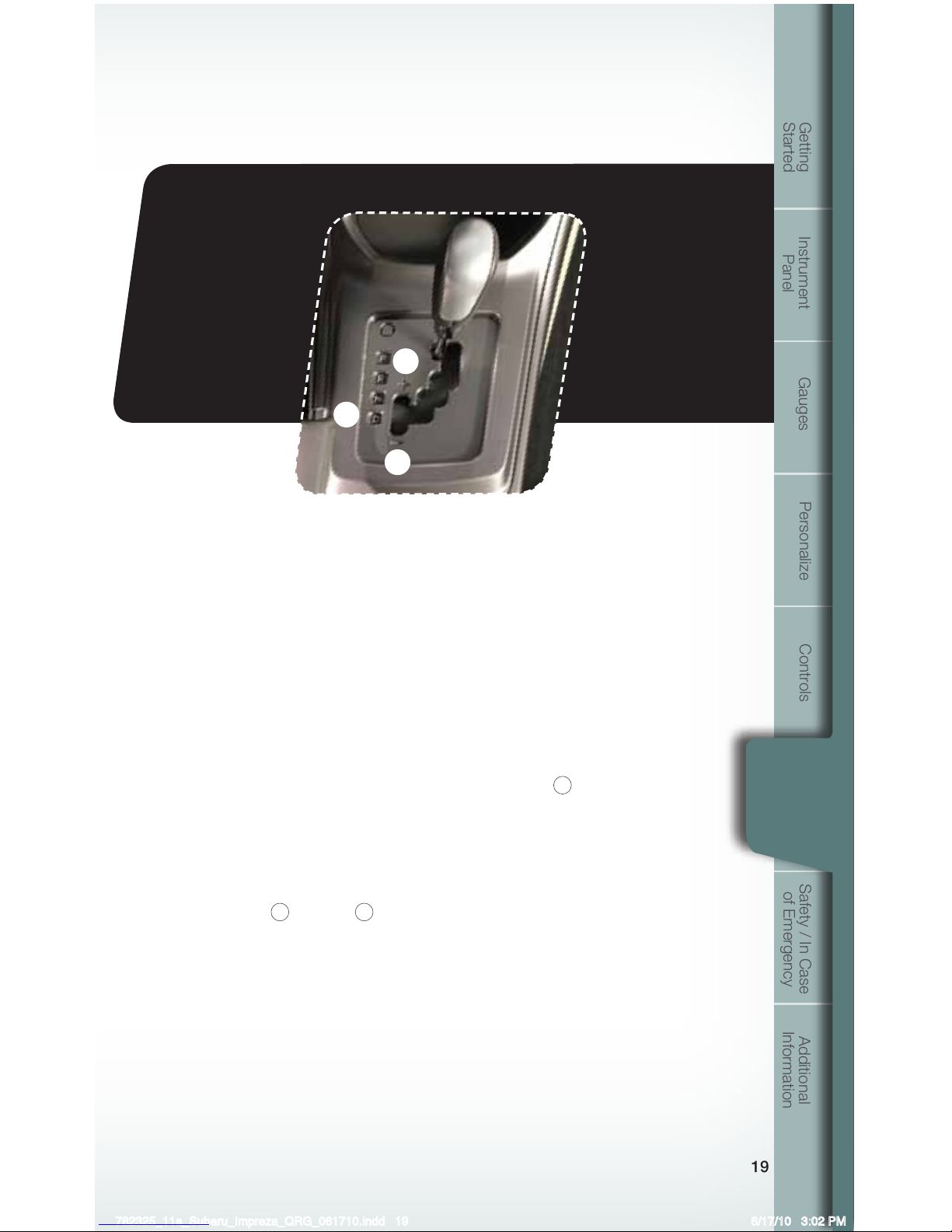
Automatic Transmission Shift Mode
4-Speed Automatic Transmission with SPORTSHIFT® Manual Control
The automatic transmission gives you ultimate control with three different driving
modes: Normal Mode, Sport Mode and Manual Mode.
Normal Mode
When the selector lever is in the “D” (Drive) position, the transmission is in
Normal shift mode. The shift position indicator on the instrument panel shows
“D” and the transmission automatically shifts into a suitable forward gear.
Sport Mode
SPORT mode is used when power is needed for rapid acceleration or for uphill
driving. Moving the selector lever left into the manual gate
1
from “D” (Drive)
position causes the transmission to change into Sport Mode.
SPORTSHIFT® Manual Mode
In SPORTSHIFT
®
Manual Mode, you select the desired gear position to obtain
necessary acceleration and engine braking. While in SPORT Mode, move the
selector lever up
2
or down 3 to select Manual Mode. The shift position
indicator shows the selected gear position.
When Manual Shifting Operation is Possible
• Arrow-shaped lights in the center of the instrument panel show whether an
upshift is possible and whether a downshift is possible.
• Both arrows are on: Upshifting and downshifting are both possible.
• Up arrow only is on: Only upshifting is possible.
• Down arrow only is on: Only downshifting is possible.
While
Operating
1
2
3
782325_11a_Subaru_Impreza_QRG_061710.indd 19 6/17/10 3:02 PM
Page 22
2020
Safety / In Case of Emergency
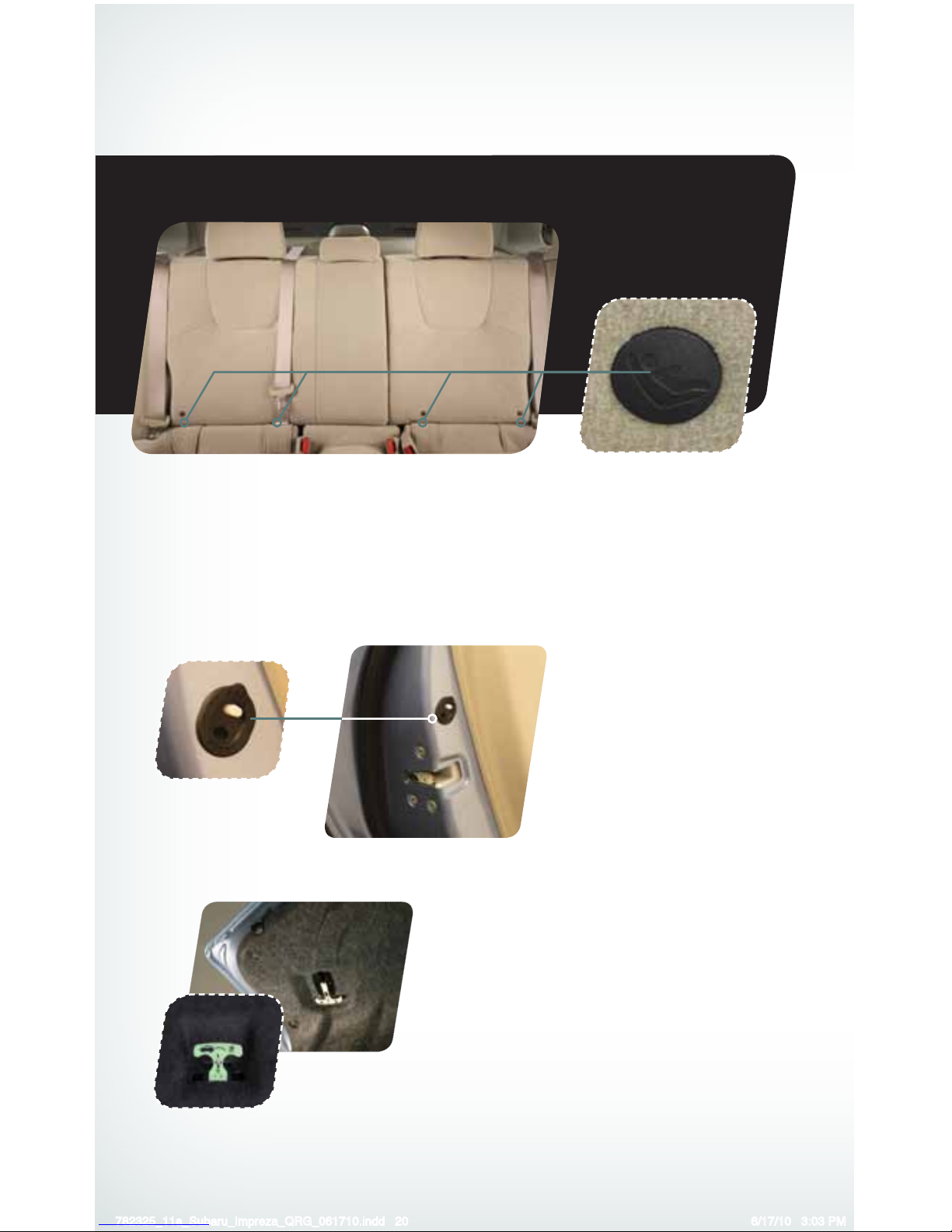
Child Restraint System
For maximum safety, rst carefully read the LATCH system instructions from the device
manufacturer, as well as the installation instructions in your Owner’s Manual, to properly install
the LATCH compatible restraint system. Use the appropriate seatbelts or anchorages provided
in your vehicle. Children age 12 and under must properly occupy the rear seat at all times.
Internal Child Safety
Trunk Release with
Self-Illuminating Handle
(4-Door only)
In the event that children or adults become
locked inside the trunk, this luminescent
handle allows them to open the lid from inside
the trunk. To open, simply pull the yellow
handle downward as indicated by the arrow
on the handle, and then push up on the lid.
Child Safety Locks
The child safety locks are
located on the inside edges of
the rear doors. In the locked
position, the rear doors can only
be opened from the outside.
782325_11a_Subaru_Impreza_QRG_061710.indd 20 6/17/10 3:03 PM
Page 23
21
Getting
Started
Instrument
Panel
Gauges
Personalize Controls While
Operating
Safety / In Case
of Emergency
Additional
Information
Safety /
In Case of
Emergency
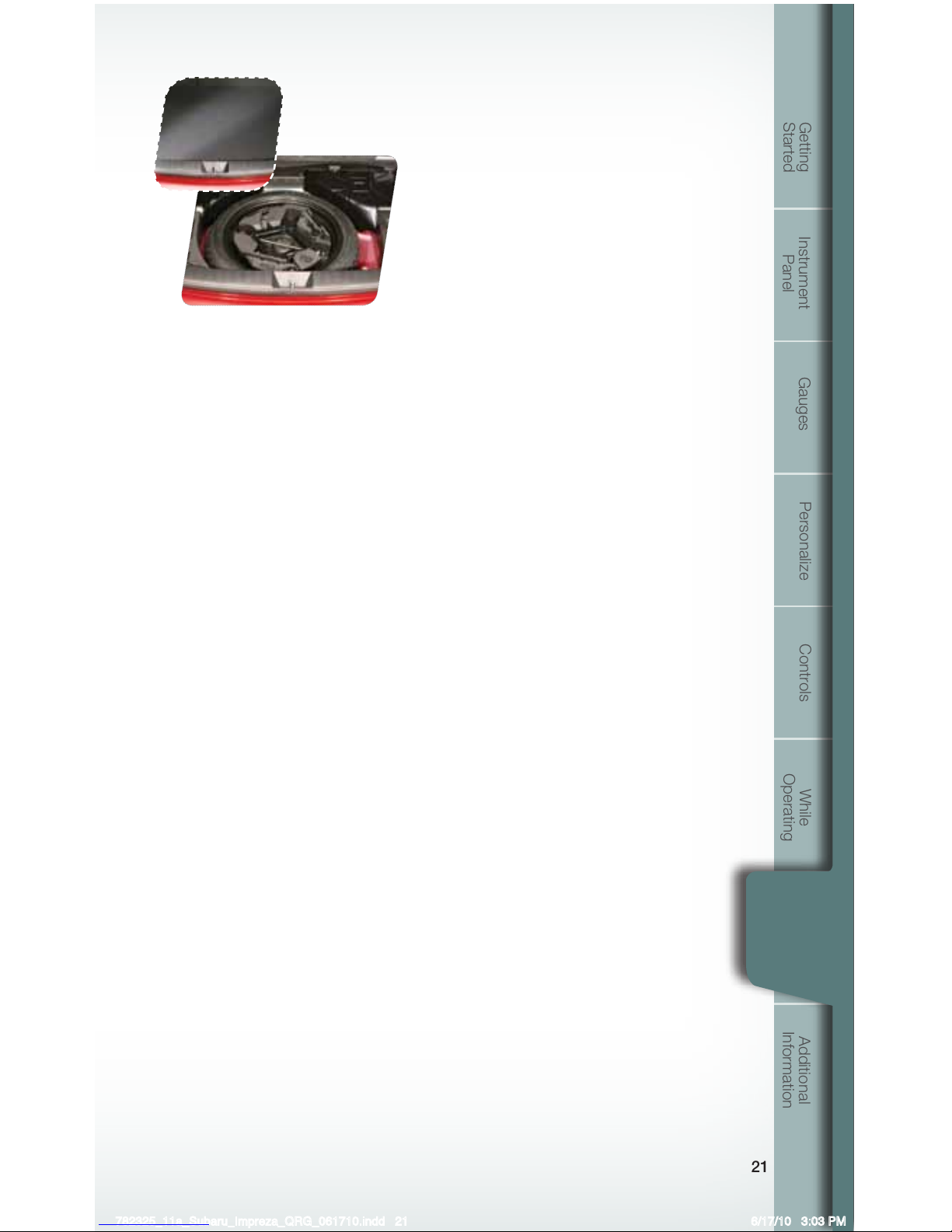
Location of Spare Tire and Jack
A jack and other maintenance tools are stored
in the tool bucket in the center of the spare
tire, located in the trunk or cargo area.
Towing Your All-Wheel Drive Vehicle
Since all-wheel drive distributes engine power to all four wheels, improper
towing will severely damage your AWD system. A atbed truck is the only
recommended way to properly transport your AWD vehicle. If towing is
necessary, it is best done by your Subaru dealer or a commercial towing service.
Subaru Roadside Assistance
Subaru Roadside Assistance is free and standard on every 2011 Subaru vehicle.
Coverage is automatic; there are no forms to complete. Subaru Roadside
Assistance is available anytime during the 3-year/36,000-mile Subaru Limited
Warranty, whichever comes rst.* A Subaru Roadside Assistance decal has
been afxed to the driver’s door window.
Subaru Roadside Assistance: 1-800-261-2155
Exclusions
Specically excluded from Subaru Roadside Assistance coverage are service
requests or claims resulting from: accidents, vandalism, acts of God, violation of
any laws, or vehicle modications not recommended by the manufacturer.
*See your dealer for details
782325_11a_Subaru_Impreza_QRG_061710.indd 21 6/17/10 3:03 PM
Page 24
22
Additional Information
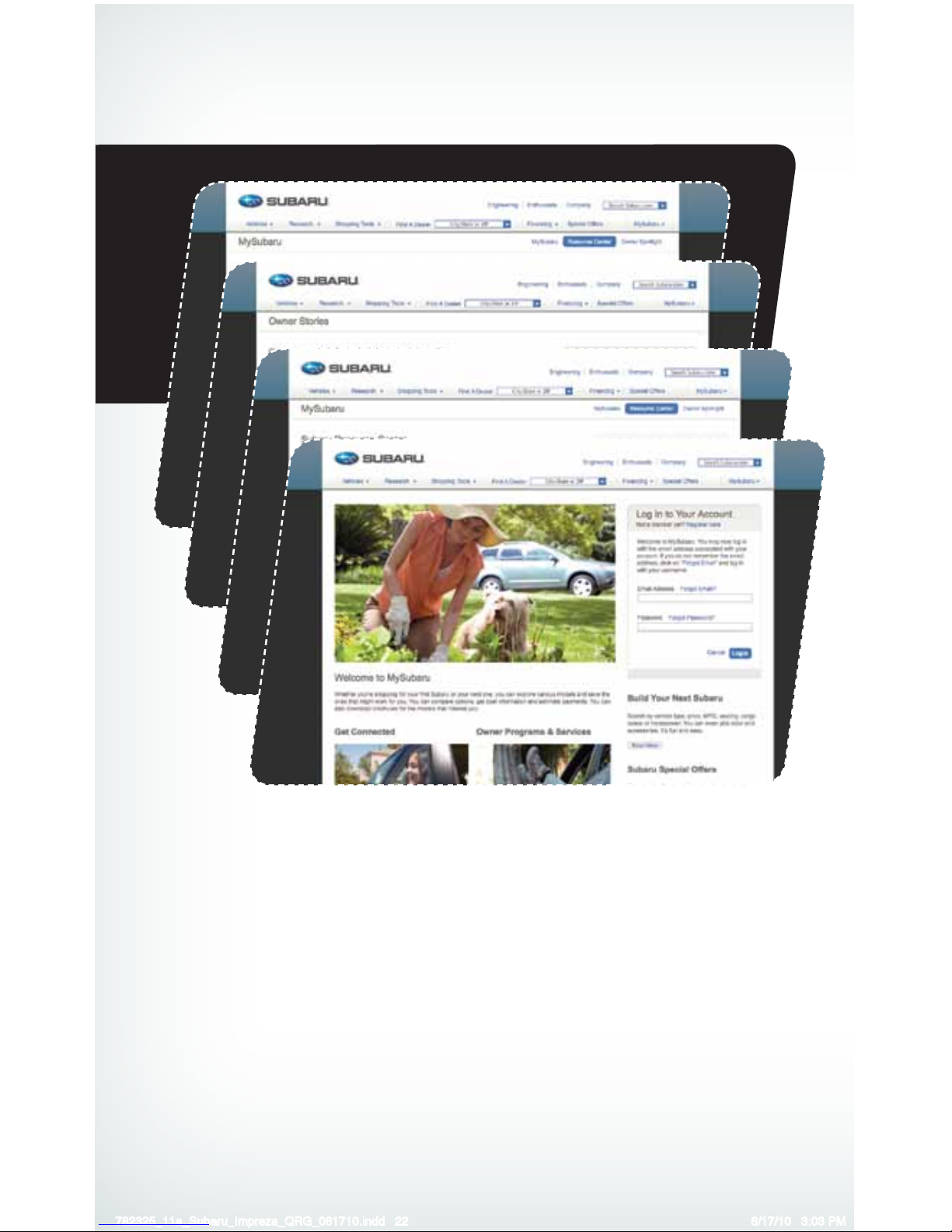
MY.SUBARU.COM
Your Subaru vehicle comes with a unique online resource that helps make your ownership
experience more convenient and enjoyable. My.Subaru.com is a website that you can
personalize and offers useful features and content that makes it easy for you to manage your
vehicle care and enjoy all the benets of Subaru ownership. Log on to My.Subaru.com to
access features such as: automated service history, e-mail maintenance reminders, online
Owner’s Manual, warranty information, maintenance schedules and much more...
Access your site today @ My.Subaru.com
782325_11a_Subaru_Impreza_QRG_061710.indd 22 6/17/10 3:03 PM
Page 25
23
Getting
Started
Instrument
Panel
Gauges
Personalize Controls While
Operating
Safety / In Case
of Emergency
Additional
Information
Additional
Information
Fuel
Use regular unleaded gasoline with an octane rating of 87 AKI or higher.
Fuel Capacity
• 16.9 US gal (64 liters, 14.1 Imp gal)
• When the low fuel indicator light is displayed on
the instrument panel, approximately 2.6 US gallons
(10.0 liters, or 2.2 Imp gal) of fuel remain.
• If you have recently fueled your vehicle, the check
engine light on the instrument panel may stay on due
to a missing or loose fuel ller cap (the cap should be
tightened until a click is heard).
Engine Oil
Use only the following oils:
• ILSAC GF-4 or GF-5, which can be identied with the
ILSAC certication mark (Starburst mark).
• Or API classication SN or SM with the words
“ENERGY CONSERVING”.
Engine Oil Capacity
4.2 US qt (4.0 liters, 3.5 Imp qt)
782325_11a_Subaru_Impreza_QRG_061710.indd 23 6/17/10 3:03 PM
Page 26
Notes
24
782325_11a_Subaru_Impreza_QRG_061710.indd 24 6/17/10 3:03 PM
Page 27
Su baru of Ame rica, Inc., Subar u Plaz a,
P.O. Bo x 6000 , Che rry Hi ll, NJ 0803 4-6000
MSA5B1101A
Printed in USA 05/10
Issued 05/10
782325_11a_Subaru_Impreza_QRG_061710.indd 1 6/17/10 2:58 PM
Page 28
Subaru Delivery Checklist
Owner Information
VEHICLE ID #
DELIVERY DATE
OWNER NAME
OWNER NAME
Owner Resources & Warranty
Present the Subaru Owner’s Manual & Quick Reference Guide (detailed review in
“Operation & Controls” section)
Review Subaru Roadside Assistance, Owner Cards & Provide
Toll-Free Number 1-800-261-2155
Explain 3/36 BASIC Warranty / 5/60 Powertrain Warranty / Explain Wear Items &
Adjustments / PZEV (if applicable) / Review Rust Perforation Warranty / Tire Warranty
Review Service & Maintenance Schedules & Terms
Explain Normal vs. Extreme Schedules (if applicable)
Review New Owner’s MY.SUBARU.com Website
Review The Subaru Mastercard Program from CHASE & Explain The Card Benefits
Explain Dealership’s New Owner Follow Up Procedure
Customer Signature
Review Dealership Service Department Location, Payment Options & Hours of Operation
Introduce The Subaru Service Advisor & Provide Their Business Card
Explain Dealership Service Appointment Scheduling & Early Morning Service
Drop Off Procedures
Review Dealership Parts Department Location & Hours
Vehicle Condition
Exterior Condition Approval (New Owner indicated exterior of vehicle is clean & undamaged)
Interior Condition Approval (New Owner indicates interior of vehicle is clean & undamaged)
Operational Condition Approval (New Owner has driven vehicle & approves it is
ready for delivery)
q
q
q
q
q
q
q
q
q
q
q
q
q
q
new owner signature
sales
consultant signature
sales
manager signature
Fold back and remove this
checklist from the QRG. Place
this completed checklist in the
deal jacket for future reference.
Additional copies of this checklist
can be made by photocopying.
782325_11a_Subaru_Impreza_QRG_061710.indd 25 6/17/10 3:03 PM
Page 29
Explain Operation of Manual Transmission
& Incline Start Assist (if equipped)
Explain Operation of Automatic
Transmission & Review Sportshift
Modes (if equipped)
Explain the Subaru Advanced Frontal
Airbag System, Side Airbags (SRS) &
Side-Curtain Airbags (SRS)
Show Seatbelt & Head Restraint Functions
Show Tilt Steering Column & Telescopic
Feature (if equipped)
Show All Weather Package - Heated Front
Seats, Windshield Wiper De-Icer & Heated
Side Mirrors (if equipped)
q
q
q
q
q
q
Review Master & Valet Keys
Show Keyless Entry, Alarm System
& Remote Start (if equipped)
Show Hood & Gas Door Releases
Show Yellow Caps & Explain Checking
& Filling of Vehicle Fluids
Show Fuel Filler Door & Gas
Cap Operation
Show Location of Both Fuse Boxes
q
q
q
q
q
q
Show Trunk Release & Valet Feature
(sedans only)
Show Spare Tire, Tools & Jack Location
Explain Temporary Spare Tire
Usage & Limitations
Explain AWD Towing
Requirements & Limitations
Show LATCH System & Tethers
Show Child Safety Lock Operation
q
q
q
q
q
q
q
q
q
q
q
q
q
Operation & Controls
Please use & reference the SUBARU OWNER’S MANUAL
& QUICK REFERENCE GUIDE
OPERATION & CONTROLS
REAR & SIDE
INTERIOR
DRIVER CONTROLS & OPERATION
q
q
q
q
q
Show Power Windows, Door Locks
& Side-View Mirror Operation
Explain Cruise Control & Power
Moonroof Operation (if equipped)
Show Headlights, Daytime Running
Lights, Parking Lights, Hazard Lights &
Fog Lights (if equipped)
Show Interior Lighting, Map Light
& Clock
Show Front & Rear Wiper
& Washer Controls
Show Climate Control System Including
Front & Rear Defrosters
Show & Explain Operation of VDC
Control Switch
Review Instrument Panel Gauges
& Warning Lights
Explain Tire Pressure Monitoring
System Light
Show Audio System, Station Presets,
Tone, Balance & Fade Controls
Activate Satellite Radio System
(if equipped)
Show GPS Navigation System
(if equipped)
Explain Operation of Other Vehicle
Options, Equipment, or Genuine
Subaru Accessories Not Referenced
Above Where Applicable
q
782325_11a_Subaru_Impreza_QRG_061710.indd 26 6/17/10 3:03 PM
 Loading...