

Page 1
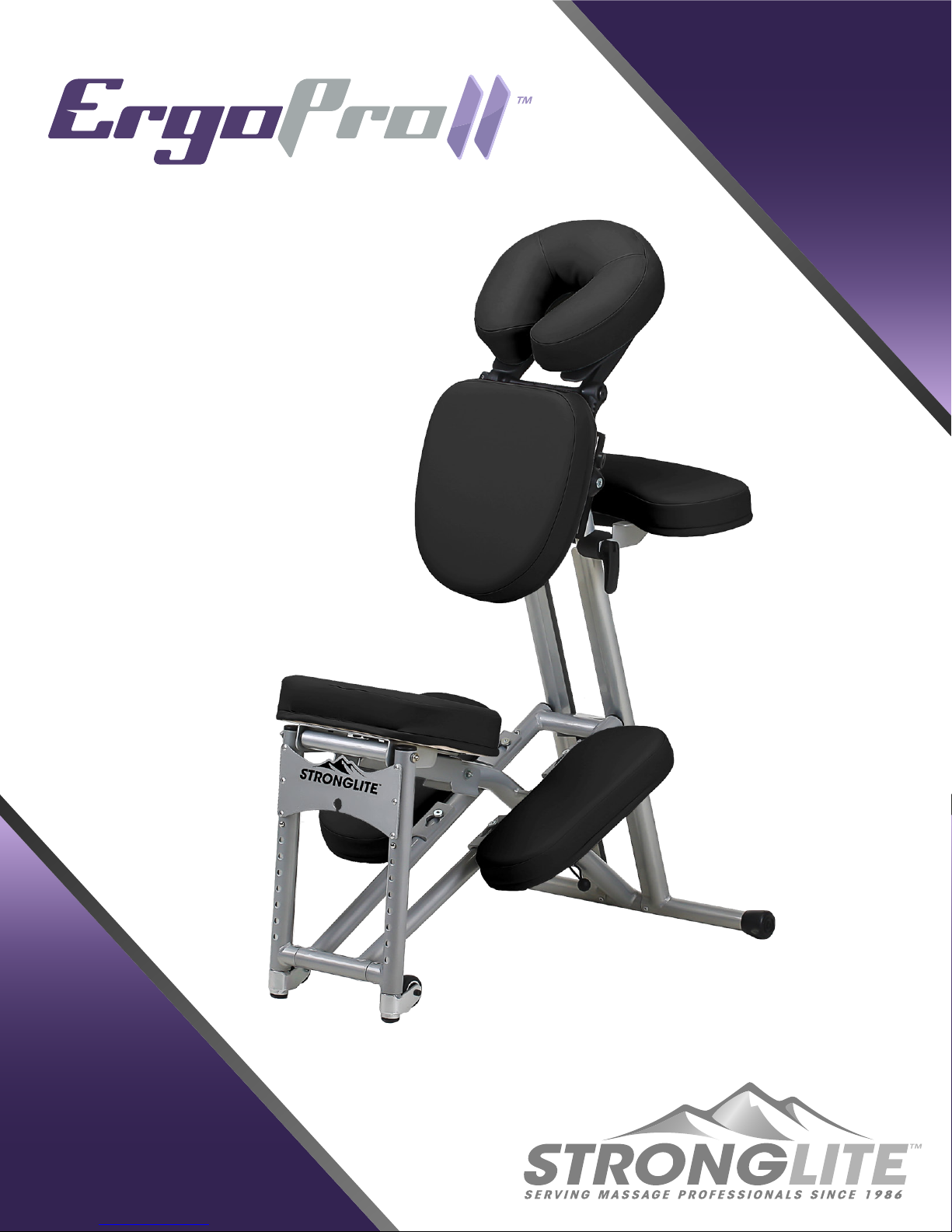
Setup Guide
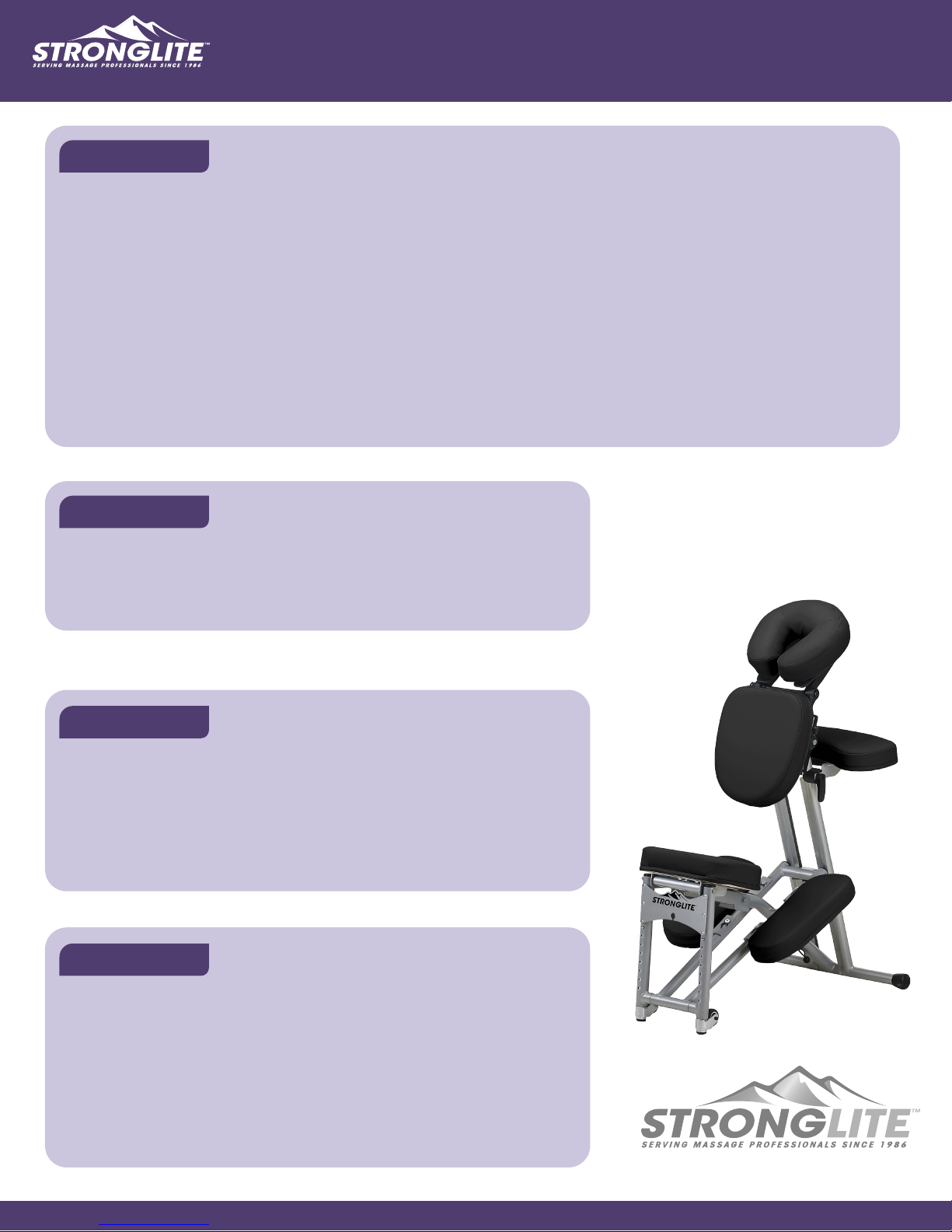
Congratulations on your purchase of the
Stronglite Ergo Pro II™ portable massage
chair. The following pages will guide you
through the process of your massage
chair setup and functionality.
112315
U.S. Patent 6,698,831
Page 2
SETUP PROCESS
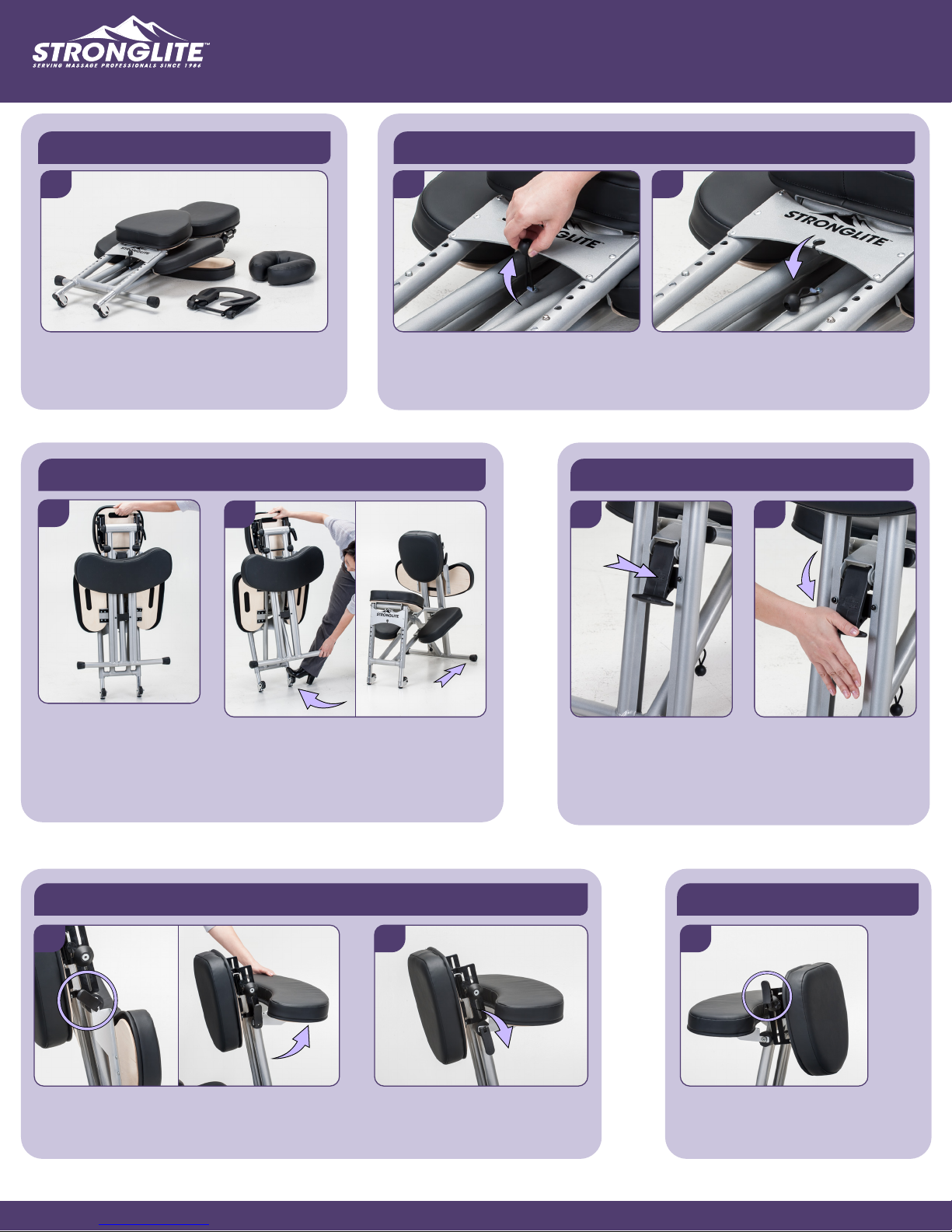
The follwing steps will assist you with the setup of your Ergo Pro II™ portable massage chair.
Unpacking the Chair
1
Remove all items from the box: Ergo Pro II,
FacePillow and Deluxe Adjustable
Platform. Lay the chair facing up.
Standing the Chair Up
4
5
Releasing the Frame
2 3
Locate the elastic ball-lock under
the Stronglite logo on the faceplate.
Pull the ball upward.
Locking the Frame
6 7
Release the ball-lock away from the
faceplate, allowing the chair to be
opened.
B
At the front of the chair, locate the frame lock lever
underneath the arm rest. Carefully press the lever
down completely till it locks in place.
IMPORTANT: This step prevents the metal
frame from collapsing while in use.
Pull the chair up, onto
the back legs.
A
Anchor your foot on a back leg (A),
near the wheel, & pull the front legs
all the way forward till the chair
stands upright (B).
Arm Rest Adjustment
8 9 10
A
B
Locate arm rest lock lever (A). Lift armrest
upward (B).
Fold lock lever over & down to
secure arm rest.
Chest Pad Adjustment
A
Locate chest pad lock lever (A).
Make sure the lever is loose.
Pg-2
Page 3
SETUP PROCESS CONTINUED
Chest Pad Adjustment (cont’d)
11 12
B
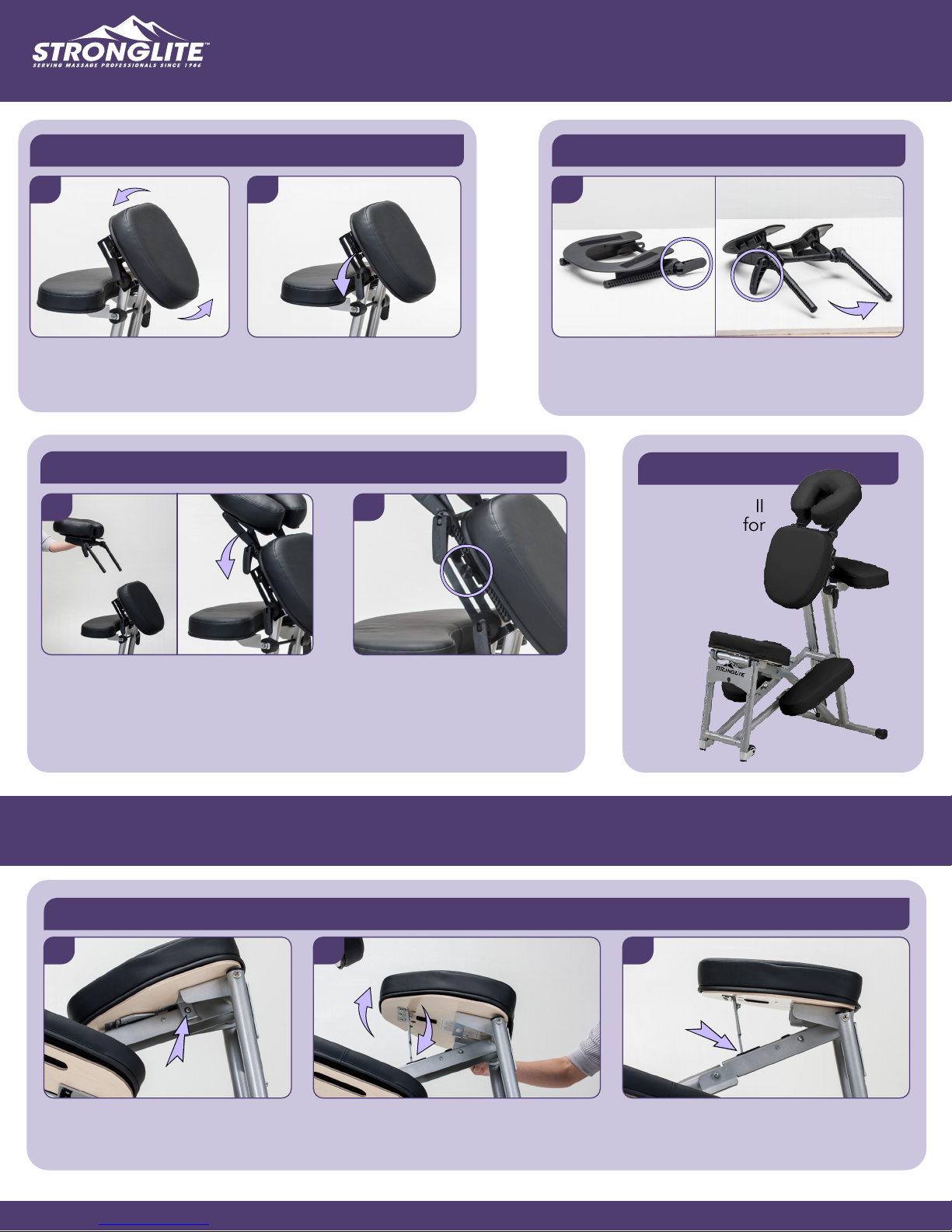
Adjust chest pad to desired
location (B).
Fold lock lever over & down to
secure chest pad.
FacePillow & Platform Adjustment
14 15
A
C
B
FacePillow & Platform Adjustment
13
A
Locate platform lock lever in ‘open’ position (A).
Fold down platform arms to desired location (B).
Fold lock lever down to secure arms in place (C).
C
B
Setup Complete
Your Ergo Pro II
is now ready for
work!
Place FacePillow onto platform (A). Insert
platform arms into inserts underneath the
chest pad (B). Fold lock lever over &
down to secure platform (C).
Use circular wheel tighteners
for adjusting height level of the
platform.
ADDITIONAL FUNCTIONALITY
The follwing steps will help you customize the Ergo Pro II to fit all your clients.
Seat Angle Adjustment
1 2 3
The seat pivots up from the back
legs. Locate and press the round
metal pin inward to release the seat.
A
Lift the seat up (A). Pull the seat height
lever down into the receiver slot (B).
B
The receiver location allows the seat to
be locked in two angles: high or low.
Pg-3
Page 4
ADDITIONAL FUNCTIONALITY
The follwing steps will help you customize the Ergo Pro II to fit all your clients.
Removable PadsChair Height Adjustment - Back Legs
1
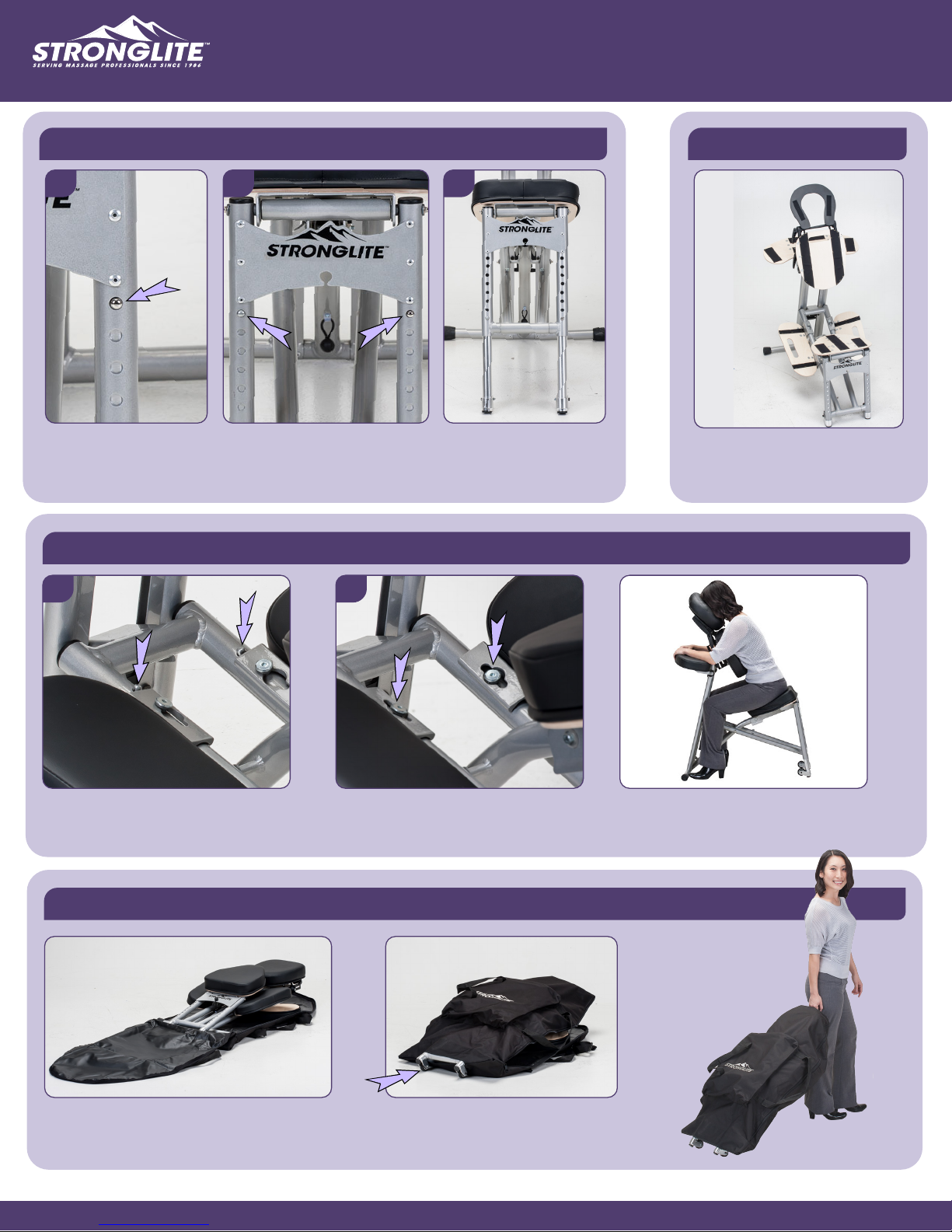
Locate the round metal
pins on each back leg
undern the faceplate.
2 3
Press the round metal pins
into the legs to allow for
height adjustment.
Adjust the legs to the
desired height
increment.
Removing the Knee Rests for Traditional Sitting Position
1 2
• FacePillow
• Arm Rest
• Chest Pad
• Seat Pad
• Knee Rests
All the pads and cushions for
your Ergo Pro II can be
removed and replaced!
Locate the round metal pins next to each
support guide on the knee rests. Press
each pin down to loosen the knee rest.
Re-Packing Carry Case
Lay carry case down flat and open. Fold chair
down into carry case. Wheels go through the
holes in bottom of carry case.
Slide the knee rest forward until
the support guide is centerd
within the circlular opening.
Zip up the carry case and ensure
the wheels are facing down
toward the floor.
Remove the knee rests. Your Ergo
Pro II can now be used with a
regular sitting position.
Your Ergo Pro II is
now ready for easy
transportation!
Pg-4
Page 5
MAINTENANCE & WARRANTY
Maintenance
We at Stronglite have designed and built the Ergo Pro II Chair to be long lasting and trouble free. All of the pivot joints are
close tolerance to eliminate movement and reduce wear. Even so, it is possible for fasteners to become loose, parts to wear,
and damage to occur.
It is up to you to maintain your chair in good condition. Tighten any loose fasteners and replace and/or repair any worn or
damaged/missing parts. If you need replacement parts, contact Stronglite at 1-800-289-5487. See our warranty page,
http://www.stronglite.com/lifetime-warranty.html for more information on repairs and replacement parts.
Do not allow clients to put all their weight on the knee rests, which are not designed to take the full brunt of the bodies
weight.
Warning: A chair with loose, damaged or missing parts can fail, possibly causing personal injury. Inspect your chair
before each use and keep it in good condition.
Inspection
Before each use: Inspect your chair to see that all joints are as tight as
possible without causing binding when the chair is folded up. Check to see
that there are no damaged or missing parts. If you have any questions or
need assistance please call 1-800-289-5487.
Cleaning
The upholstery on your chair can be cleaned with mild soap and water and
using a nonabrasive cloth. The powder coated aluminum and finished wood
components can also be cleaned in this manner.
Warning: prolonged exposure to temperature extremes will cause
damage to the upholstery. Do not store your massage chair in your car
or any other location exposed to hot temperatures.
Warranty
Stronglite warranties the Ergo Pro II massage chair, excluding foam and
upholstery, against defects in materials and craftsmanship for as long as you,
the original purchaser, own the product, or for five years after model is
discontinued. The foam and upholstery are warrantied for 3 years from the
original date of purchase. This warranty does not cover damage caused by
accident, misuse or neglect, which includes tears in upholstery and damage
caused by chemical based cleaners. This warranty is limited to
factory-provided replacement parts, factory repair or replacement at the
discretion of Stronglite.
Pg-5
Page 6
ADDITIONAL GREAT PRODUCTS BY STRONGLITE
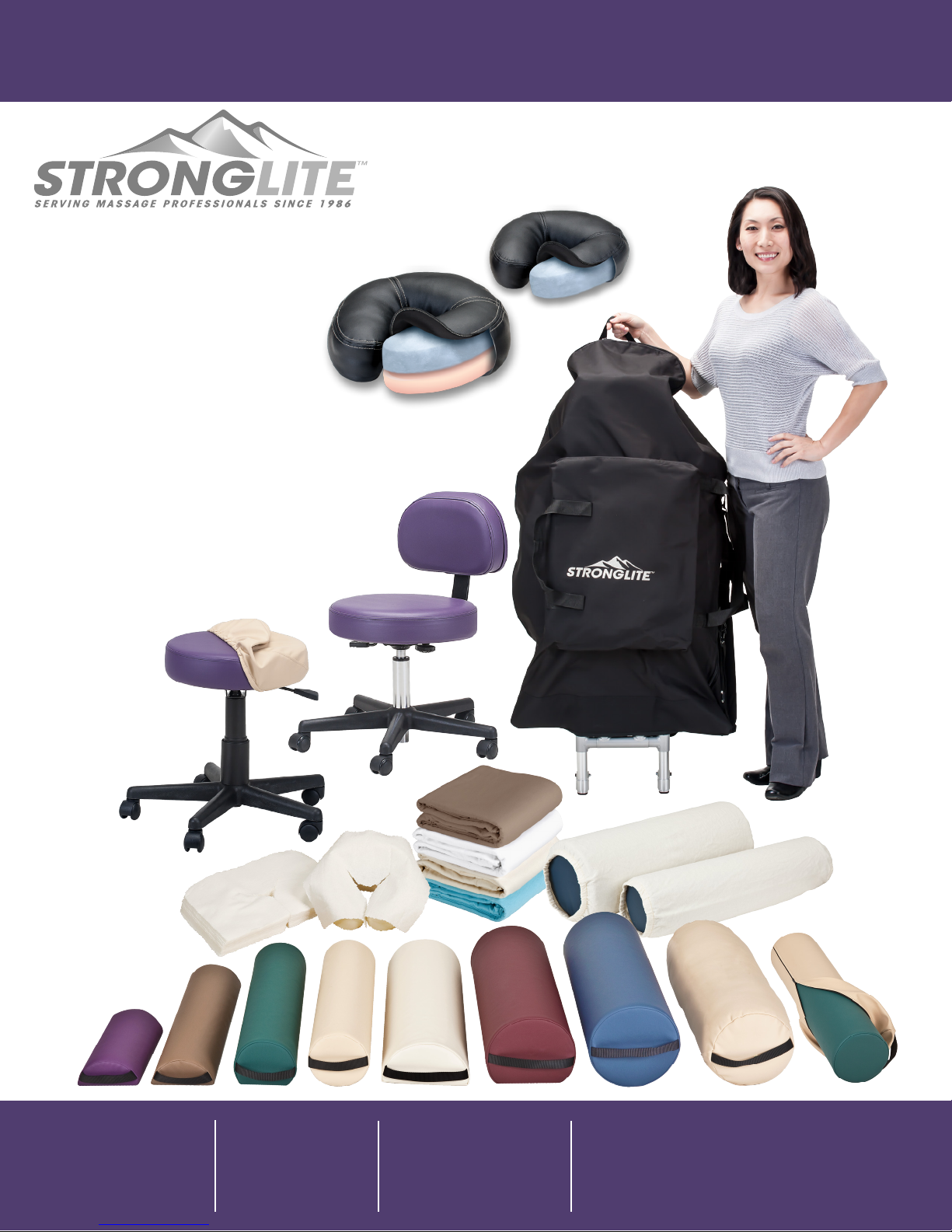
FacePillow™
• FacePillow™
• Strata™ FacePillow
• Carry Cases
• Stools
• Stool Covers
• Bolsters
• Bolster Covers
• Sheets & Linens
• Disposables
• Oils & Lotions
• Accessories
Strata™ FacePillow
Stronglite
3210 Executive Ridge
Vista, Ca 92081
(800) 289-5487
(760) 597-3698
(760) 599-7374 fax
Monday - Friday
8:00 a.m. to 5 p.m. PST
Saturday - Sunday
Closed
Customer Service
[email protected]
Stronglite.com
Like us on Facebook
Pg-6
 Loading...