

Page 1

RFID MODULE
NFC Reader/Writer Module
SL060
User Manual
Version 1.1
Aug 2015
StrongLink
Page 2

StrongLink SL060
http://www.stronglink-rfid.com
2
CONTENT
1. FEATURES ..................................................................................................................... 4
2. DESCRIPTION .............................................................................................................. 5
3. PINNING INFORMATION........................................................................................... 5
4. Communication Protocol ............................................................................................... 6
4.1 COMMUNICATION SETTING.............................................................................................. 6
4.2 COMMUNICATION FORMAT .............................................................................................. 6
4.3 COMMAND OVERVIEW ....................................................................................................... 7
4-4. COMMAND LIST ................................................................................................................... 8
4-4-1 System Function Command .................................................................................................. 8
4-4-1-1. Set baud rate ...................................................................................................................... 8
4-4-1-2. Initialize the Device ID ...................................................................................................... 8
4-4-1-3. Get device ID...................................................................................................................... 8
4-4-1-4. Get hardware vision .......................................................................................................... 9
4-4-1-5. Set the LED ........................................................................................................................ 9
4-4-1-6. Set the RF field .................................................................................................................. 9
4-4-2 ISO14443A - Mifare Function Command ........................................................................... 9
4-4-2-1. Request(Card A) ................................................................................................................ 9
4-4-2-2. Anticollision(Card A) ........................................................................................................ 9
4-4-2-3. Select card (Card A) ........................................................................................................ 10
4-4-2-4. Halt (Card A) ................................................................................................................... 10
4-4-2-5. Authenticate ..................................................................................................................... 10
4-4-2-6. Read block ........................................................................................................................ 10
4-4-2-7. Write block ....................................................................................................................... 10
4-4-2-8. Initialize electronic purse ................................................................................................ 10
4-4-2-9. Read purse value .............................................................................................................. 11
4-4-2-10. Decrease purse value (including Transfer) ................................................................... 11
4-4-2-11. Increase purse value (including Transfer) .................................................................... 11
4-4-2-12. Restore purse value ........................................................................................................ 11
4-4-2-13. Transfer ........................................................................................................................... 11
4-4-2-14. Get ATS of CPU A .......................................................................................................... 11
4-4-2-15. Exchange data between PICC and PCD according with T = CL protocol ............... 12
4-4-2-16. Ultralight card Anticoll and Select .............................................................................. 12
4-4-2-17. Write a page of data into ultralight card..................................................................... 12
4-4-2-18. Authenticate password of Ultralight_C ....................................................................... 12
4-4-2-19. Change password of Ultralight_C................................................................................ 12
4-4-2-20. SHC1102 card check password .................................................................................... 13
4-4-2-21. Read data block of SHC1102 card ............................................................................... 13
4-4-2-22. Write data block of SHC1102 card .............................................................................. 13
4-4-2-23. Request DESFire and reset ........................................................................................... 13
Page 3

StrongLink SL060
http://www.stronglink-rfid.com
3
4-4-3 NFC Function Command .................................................................................................... 13
4-4-3-1. Set the NFC field ............................................................................................................. 13
4-4-3-2. Send the NFC command ................................................................................................. 13
Page 4
StrongLink SL060
http://www.stronglink-rfid.com
4
1. FEATURES
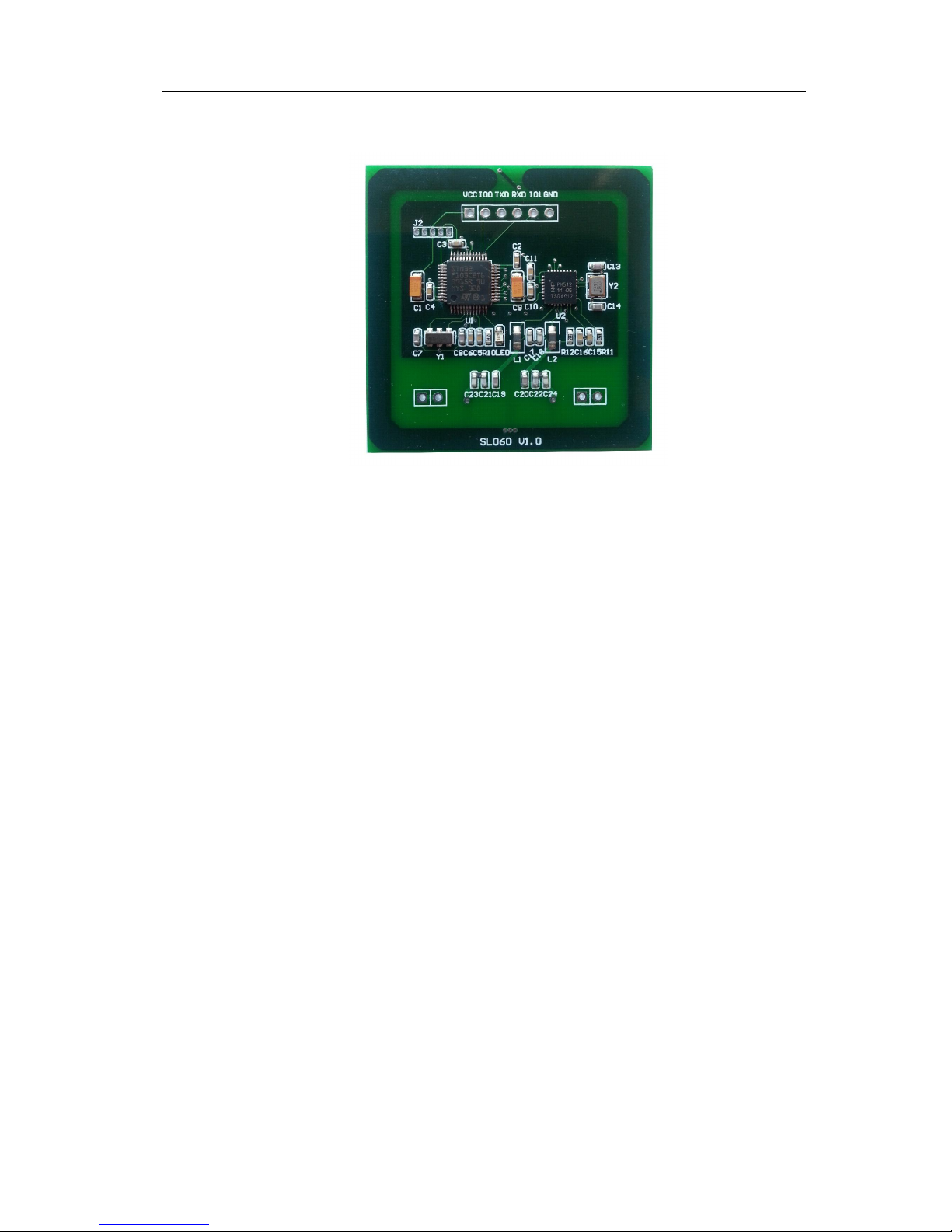
Tags supported: Mifare 1k, Mifare 4k, Mifare UltraLight, Mifare
UltraLight C and NTAG203
Built-in antenna
UART Interface, baud rate 9,600 ~ 115,200 bps(Default:9600bps)
13.56MHz RF Operating Frequency
Protocol supported: ISO14443, ISO18092 NFCIP-1
mode(text&url)
2.5 ~3.6 VDC Operating, I/O supports 5.0 VDC
Work current less than [email protected]
Operating distance: Up to 50mm, depending on tag
Storage Temperature Range: -40°C ~ +85°C
Operating Temperature Range: -25°C ~ +70°C
Dimension: 46 × 46 × 3 mm
Page 5
StrongLink SL060
http://www.stronglink-rfid.com
5
2. DESCRIPTION
Being developed based on NXP’s NFC transponder IC, NFC Module SL060 is a
mini NFC reader/writer. This RFID module supports MIFARETM Classic 1K,
MIFARETM Classic 4K, MIFARE Ultralight
TM,
MIFARE DESFireTM and NFC
NFCIP-1 mode. The maximum working current is less than 50mA. It integrates all
necessary components and antenna in the PCB.
SL060 can offer NFCIP-1 functions. Users can send NFC message to NFC device to
open a web URL or display text words in the window.
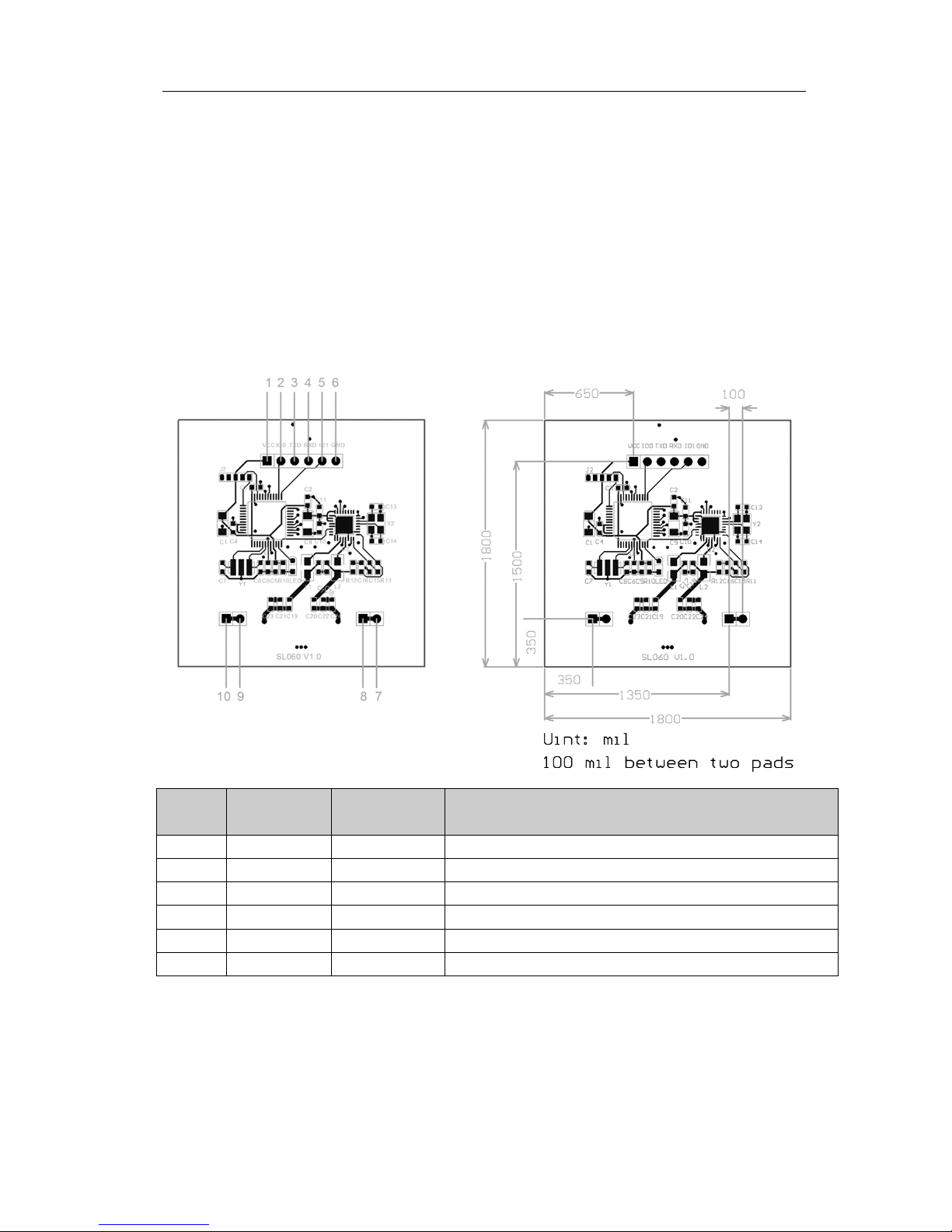
3. PINNING INFORMATION
PIN SYMBOL
TYPE DESCRIPTION
1 VCC PWR Power supply, 2.5 to 3.6VDC
2 IO0 NA Reserved for future use
3 TXD Output UART TX
4 RXD Input UART RX
5 IO1 NA Reserved for future use
6 GND PWR GND
Page 6

StrongLink SL060
http://www.stronglink-rfid.com
6
4. Communication Protocol
4.1 Communication Setting
The communication protocol is byte oriented. Both sending and receiving bytes are in
hexadecimal format. The communication parameters are as follows,
Baud rate: 9600bps(default)
Data: 8 bits
Stop: 1 bit
Parity: None
Flow control: None
4.2 Communication Format
Host to Reader:
Preamble Len DeviceID Command Data Checksum
Preamble: 2 bytes equal to 0xAABB
Len: 2 bytes, indicating the number of bytes from DeviceID to Checksum
In this reader, the first byte is effective, the second byte keep 0
DeviceID: 2 bytes
Command: 2 bytes, Command code, see Table 3
Data: Variable length depends on the command code
Checksum: 1 byte, XOR of all the bytes from DeviceID to Data
Attention
If there is any byte equaling to AA occurs between Len and Checksum, one byte 00 will
be added after this byte to differentiate preamble. However, the Len keeps unchanged.
Example, writing data (0x00112233445566778899AABBCCDDEEFF) to block 1
Host->SL060:AABB1600000009020100112233445566778899AA00BBCCDDEEFF0A
Reader to Host:
Preamble Len DeviceID Command Status Data Checksum
Preamble: 2 bytes equal to 0xAABB
Len: 2 bytes, indicating the number of bytes from DeviceID to Checksum
In this reader, the first byte is effective, the second byte keep 0
DeviceID: 2 bytes
Command: 2 bytes
Status: 1 byte, 00 = success, Not 0 = fail
Data Range: Response data, may blank
Checksum: 1 byte, XOR of all the bytes from DeviceID to the last of the Command
Sending data
Page 7

StrongLink SL060
http://www.stronglink-rfid.com
7
Attention
If there is any byte equaling to AA occurs between Len and Checksum, one byte 00 will
be added after this byte to differentiate preamble. However, the Len keeps unchanged.
Example, reading data (0x00112233445566778899AABBCCDDEEFF) from block 1
SL060 -> Host:ABB1600000009020000112233445566778899AA00BBCCDDEEFF0B
4.3 Command Overview
Table 1
Command Description
0x0101 Set baud rate
0x0201 Initialize the Device ID
0x0303 Get device ID
0x0401 Get hardware vision
0x0701 Set the LED
0x0C01 Set the RF field
0x0102 Request(Card A)
0x0202 Anticollision (Card A)
0x0302 Select card(Card A)
0x0402 Halt(Card A)
0x0702 Authenticate
0x0802 Read block
0x0902 Write block
0x0A02 Initialize electronic purse
0x0B02 Read purse value
0x0C02 Decrease purse value (including Transfer)
0x0D02 Increase purse value (including Transfer)
0x0E02 Restore purse value
0x0F02 Transfer
0x1002 Get ATS of CPU A
0x1102 Exchange data between PICC and PCD according with T = CL protocol
0x1202 Ultralight card Anticoll and Select
0x1302 Write a page of data into ultralight card
0x4002
Authenticate password of Ultralight_C
0x4102
0x4202 Change password of Ultralight_C
0x2002 SHC1102 card check password
0x2102 Read data block of SHC1102 card
0x2202 Write data block of SHC1102 card
0x3002 Request DESFire and reset
0x0D01 Set the NFC field
0x0E01 Send the NFC command
Status Overview
Page 8

StrongLink SL060
http://www.stronglink-rfid.com
8
Table 2
Status Description
0x00 Operation successes
0x01 NFC connect fails
0x0A Operation fails
0x0B Command is not supported
0x0C Parameter is error
0x0D No cards
0x0E RF base station is damaged
0x14 Searching card fails
0x15 Reset card fails
0x16 Verifying key fails
0x17 Reading fails
0x18 Writing fails
4-4. Command List
4-4-1 System Function Command
4-4-1-1. Set baud rate
0xAA 0xBB Len DeviceID 0x01 0x01 Data Checksum
Data: 0x00: BaudRate = 4800
0x01: BaudRate = 9600(default)
0x02: BaudRate = 14400
0x03: BaudRate = 19200
0x04: BaudRate = 28800
0x05: BaudRate = 38400
0x06: BaudRate = 57600
0x07: BaudRate = 115200
After changing the BaudRate, further communication must be set as the new BaudRate.
Response:
0xAA 0xBB Len DeviceID 0x01 0x01 Status Checksum
Status: 0x00: Operation succeed
0x0C: Parameter error
4-4-1-2. Initialize the Device ID
0xAA 0xBB Len DeviceID 0x02 0x01
Data Checksum
Data: 2 bytes device ID
Response:
0xAA 0xBB Len DeviceID 0x02 0x01
Status Checksum
Status: 0x00: Operation succeed
Remark: SL060 only response to the command that Device ID is in accord with itself,
and broadcast command that DeviceID equals to 0x0000
4-4-1-3. Get device ID
0xAA 0xBB Len DeviceID 0x03 0x01 Checksum
Response:
Page 9

StrongLink SL060
http://www.stronglink-rfid.com
9
0xAA 0xBB Len DeviceID 0x03 0x01 Status Data Checksum
Data: 2 bytes device ID
Status: 0x00: Operation succeed
4-4-1-4. Get hardware vision
0xAA 0xBB Len DeviceID 0x04 0x01 Checksum
Response:
0xAA 0xBB Len DeviceID 0x04 0x01 Status Data Checksum
Data: Hardware vision
Status: 0x00: Operation succeed
4-4-1-5. Set the LED
0xAA 0xBB Len DeviceID 0x07 0x01 Data Checksum
Data: 0: turn off the led
1-3: turn on the led
Response:
0xAA 0xBB Len DeviceID 0x07 0x01 Status Checksum
Status: 0x00: Operation succeed
0x0C: Parameter is error
4-4-1-6. Set the RF field
0xAA 0xBB Len DeviceID 0x0C 0x01 Data Checksum
Data: 0: turn off the RF field
1: turn on the RF field
Response:
0xAA 0xBB Len DeviceID 0x0C 0x01 Status Checksum
Status: 0x00: Operation succeed
0x0A: Operation fails
4-4-2 ISO14443A - Mifare Function Command
4-4-2-1. Request(Card A)
0xAA 0xBB Len DeviceID 0x01 0x02 Data Checksum
Data: 0x26 or 0x52
Response:
0xAA 0xBB Len DeviceID 0x01 0x02 Status Data Checksum
Data: ATQA(0x26 or 0x52)
Status: 0x00: Operation succeed
0x0A: Searching card fails
4-4-2-2. Anticollision(Card A)
0xAA 0xBB Len DeviceID 0x02 0x02 Checksum
Data: None
Response:
0xAA 0xBB Len DeviceID 0x02 0x02 Status Data Checksum
Data: UID
Status: 0x00: Operation succeed
0x0A: Operation fails
Page 10
StrongLink SL060
http://www.stronglink-rfid.com
10
4-4-2-3. Select card (Card A)
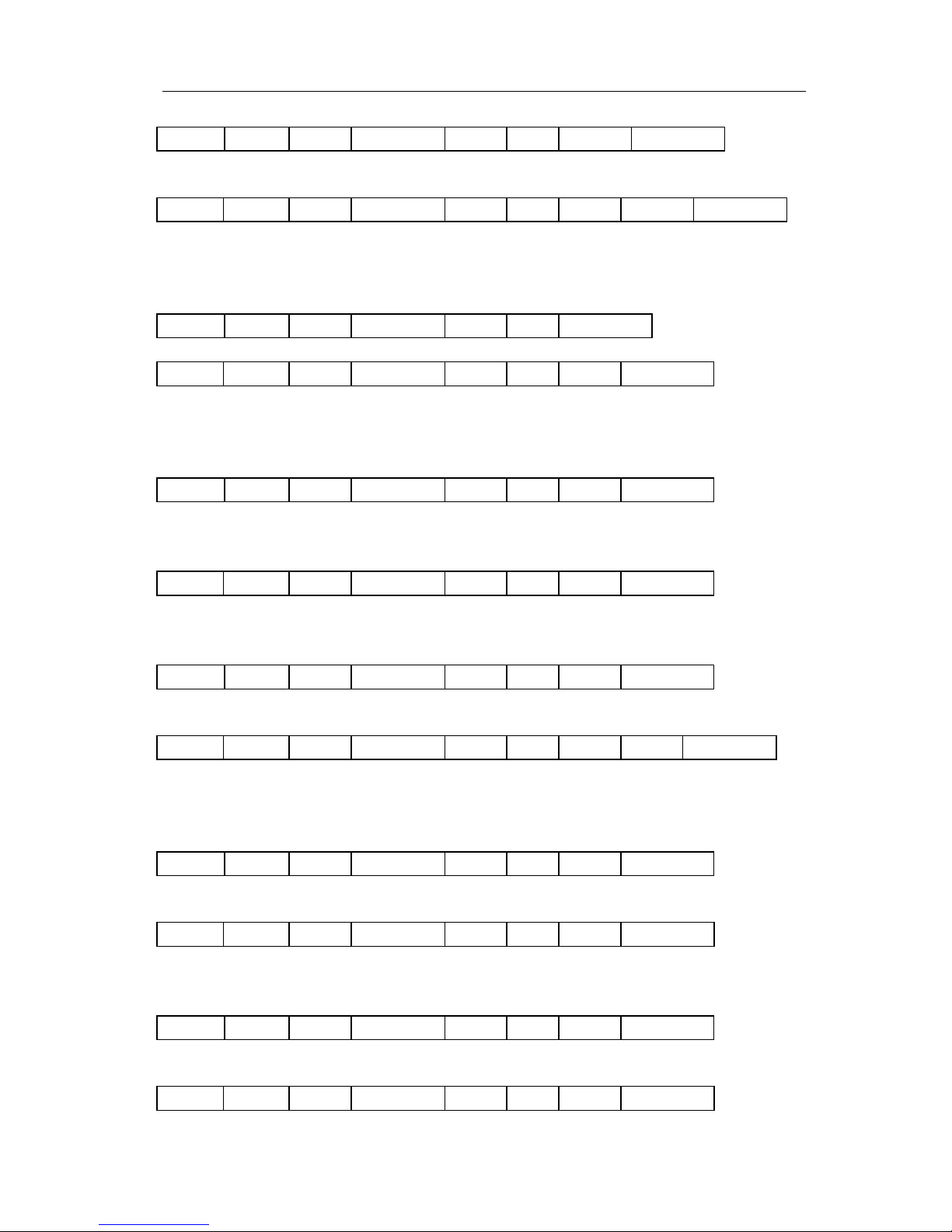
0xAA 0xBB Len DeviceID 0x03 0x02 Data Checksum
Data: UID
Response:
0xAA 0xBB Len DeviceID 0x03 0x02 Status Data Checksum
Data: SAK
Status: 0x00: Operation succeed
0x0A: Operation fails
4-4-2-4. Halt (Card A)
0xAA 0xBB Len DeviceID 0x04 0x02 Checksum
Response:
0xAA 0xBB Len DeviceID 0x04 0x02 Status Checksum
Data: None
Status: 0x00: Operation succeed
0x0A: Operation fails
4-4-2-5. Authenticate
0xAA 0xBB Len DeviceID 0x07 0x02 Data Checksum
Data: 1 byte authenticate mode + 1 byte absolute block number + 6bytes key
authenticate mode: 0x60—KeyA 0x61—KeyB
Response:
0xAA 0xBB Len DeviceID 0x07 0x02 Status Checksum
Status: 0x00: Operation succeed
0x16: Verifying key fails
4-4-2-6. Read block
0xAA 0xBB Len DeviceID 0x08 0x02 Data Checksum
Data: 1 byte absolute block number
Response:
0xAA 0xBB Len DeviceID 0x08 0x02 Status Data Checksum
Data: 16 bytes data
Status: 0x00: Operation succeed
0x17: Reading fails
4-4-2-7. Write block
0xAA 0xBB Len DeviceID 0x09 0x02 Data Checksum
Data: 1 byte absolute block number+16 bytes data
Response:
0xAA 0xBB Len DeviceID 0x09 0x02 Status Checksum
Status: 0x00: Operation succeed
0x18: Writing fails
4-4-2-8. Initialize electronic purse
0xAA 0xBB Len DeviceID 0x0A 0x02 Data Checksum
Data: 1 byte absolute block number+4 bytes data
Response:
0xAA 0xBB Len DeviceID 0x0A 0x02 Status Checksum
Page 11

StrongLink SL060
http://www.stronglink-rfid.com
11
Status: 0x00: Operation succeed
0x18: Writing fails
4-4-2-9. Read purse value
0xAA 0xBB Len DeviceID 0x0B 0x02 Data Checksum
Data: 1 byte absolute block numbe
Response:
0xAA 0xBB Len DeviceID 0x0B 0x02 Status Data Checksum
Data: 4 bytes data (low bytes in the former)
Status: 0x00: Operation succeed
0x17: Reading fails
4-4-2-10. Decrease purse value (including Transfer)
0xAA 0xBB Len DeviceID 0x0C 0x02 Data Checksum
Data: 1 byte absolute block number+ 4 bytes decrement value
Response:
0xAA 0xBB Len DeviceID 0x0C 0x02 Status Checksum
Status: 0x00: Operation succeed
0x18: Writing fails
4-4-2-11. Increase purse value (including Transfer)
0xAA 0xBB Len DeviceID 0x0D 0x02 Data Checksum
Data: 1 byte absolute block number+ 4 bytes decrement value
Response:
0xAA 0xBB Len DeviceID 0x0D 0x02 Status Checksum
Status: 0x00: Operation succeed
0x18: Writing fails
4-4-2-12. Restore purse value
0xAA 0xBB Len DeviceID 0x0E 0x02 Data Checksum
Data: 1 byte absolute block number
Response:
0xAA 0xBB Len DeviceID 0x0E 0x02 Status Checksum
Status: 0x00: Operation succeed
0x17: Reading fails
4-4-2-13. Transfer
0xAA 0xBB Len DeviceID 0x0F 0x02 Data Checksum
Data: 1 byte absolute block number
Response:
0xAA 0xBB Len DeviceID 0x0F 0x02 Status Checksum
Status: 0x00: Operation succeed
0x18: Writing fails
4-4-2-14. Get ATS of CPU A
0xAA 0xBB Len DeviceID 0x10 0x02 Checksum
Response:
0xAA 0xBB Len DeviceID 0x10 0x02 Status Data Checksum
Data: ATS
Page 12

StrongLink SL060
http://www.stronglink-rfid.com
12
Status: 0x00: Operation succeed
0x18: Writing fails
4-4-2-15. Exchange data between PICC and PCD according with T = CL protocol
0xAA 0xBB Len DeviceID 0x11 0x02 Data Checksum
Data: COS command
Response:
0xAA 0xBB Len DeviceID 0x11 0x02 Status Data Checksum
Data: COS response
Status: 0x00: Operation succeed
0x0A: Operation fails
4-4-2-16. Ultralight card Anticoll and Select
0xAA 0xBB Len DeviceID 0x12 0x02 Checksum
Response:
0xAA 0xBB Len DeviceID 0x12 0x02 Status Data Checksum
Data: 7 bytes ultralight UID
Status: 0x00: Operation succeed
0x0A: Operation fails
4-4-2-17. Write a page of data into ultralight card
0xAA 0xBB Len DeviceID 0x13 0x02 Data Checksum
Data: 1 byte page address + 4 bytes written date
Response:
0xAA 0xBB Len DeviceID 0x13 0x02 Status Checksum
Status: 0x00: Operation succeed
0x18: Writing fails
4-4-2-18. Authenticate password of Ultralight_C
0xAA 0xBB Len DeviceID 0x40 0x02 Checksum
Response:
0xAA 0xBB Len DeviceID 0x40 0x02 Status Data Checksum
Data:
ek(RndB)
Status: 0x00: Operation succeed
0x16: Verifying key fails
0xAA 0xBB Len DeviceID 0x41 0x02 Data Checksum
Data:
ek(RndB)
Response:
0xAA 0xBB Len DeviceID 0x41 0x02 Status Checksum
Status: 0x00: Operation succeed
0x16: Verifying key fails
4-4-2-19. Change password of Ultralight_C
0xAA 0xBB Len DeviceID 0x42 0x02 Data Checksum
Data: 16 byte new password
Response:
0xAA 0xBB Len DeviceID 0x42 0x02 Status Checksum
Status: 0x00: Operation succeed
Page 13
StrongLink SL060
http://www.stronglink-rfid.com
13
0x18: Writing fails
4-4-2-20. SHC1102 card check password
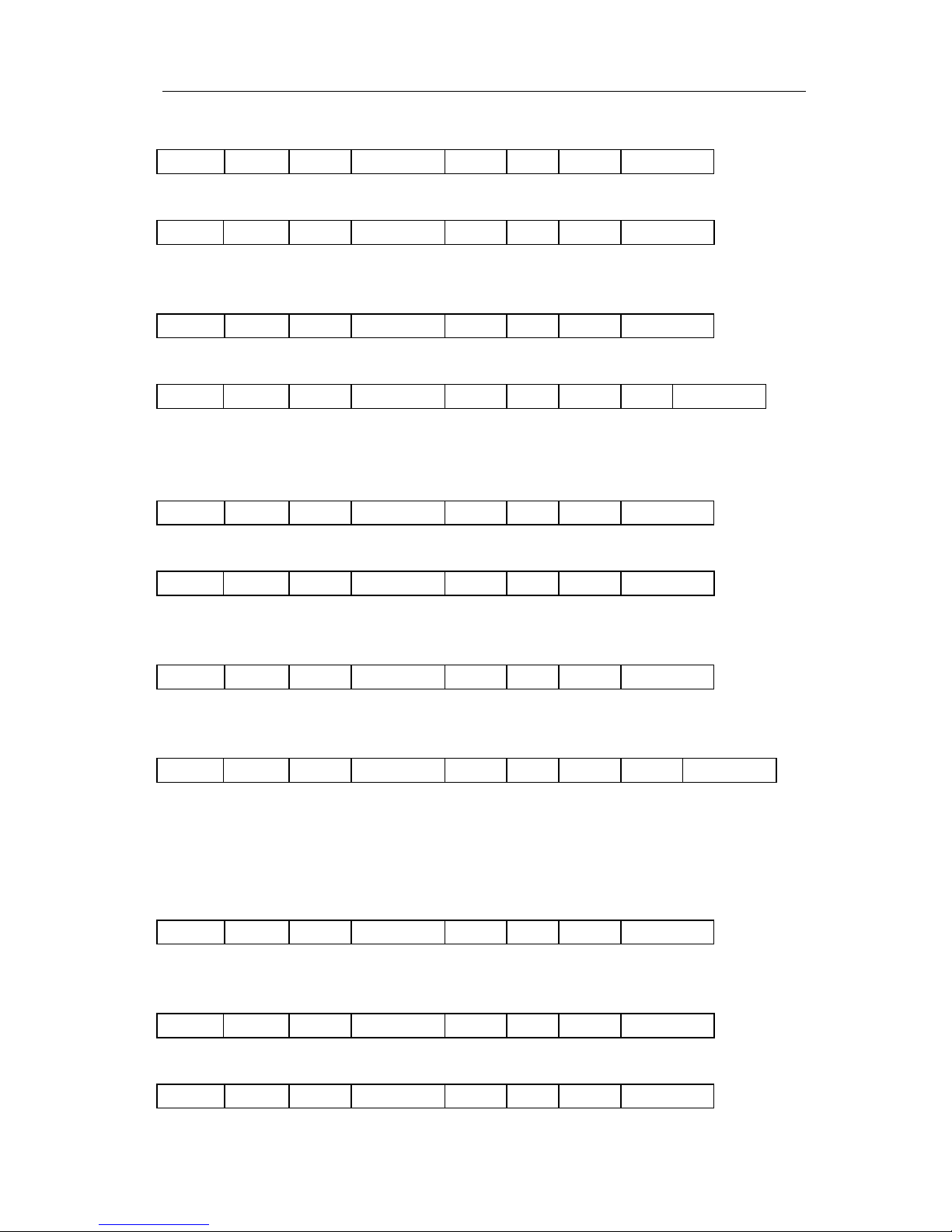
0xAA 0xBB Len DeviceID 0x20 0x02 Data Checksum
Data: 4 bytes password
Response:
0xAA 0xBB Len DeviceID 0x20 0x02 Status Checksum
Status: 0x00: Operation succeed
0x16: Verifying key fails
4-4-2-21. Read data block of SHC1102 card
0xAA 0xBB Len DeviceID 0x21 0x02 Data Checksum
Data: 1 bytes block address
Response:
0xAA 0xBB Len DeviceID 0x21 0x02 Status Data Checksum
Data: 4 bytes data
Status: 0x00: Operation succeed
0x17: Reading fails
4-4-2-22. Write data block of SHC1102 card
0xAA 0xBB Len DeviceID 0x22 0x02 Data Checksum
Data: 1 bytes block address +4 bytes written data
Response:
0xAA 0xBB Len DeviceID 0x22 0x02 Status Checksum
Status: 0x00: Operation succeed
0x18: Writing fails
4-4-2-23. Request DESFire and reset
0xAA 0xBB Len DeviceID 0x30 0x02 Data Checksum
Data: 0x26 = REQ_STD
0x52 = REQ_ALL
Response:
0xAA 0xBB Len DeviceID 0x30 0x02 Status Data Checksum
Data: 7 bytes CSN + ATS information
Status: 0x00: Operation succeed
0x18: Writing fails
4-4-3 NFC Function Command
4-4-3-1. Set the NFC field
0xAA 0xBB Len DeviceID 0x0D 0x01 Data Checksum
Data: 0: turn off the NFC field
1: turn on the NFC field
Response:
0xAA 0xBB Len DeviceID 0x0D 0x01 Status Checksum
Status: 0x00: Operation succeed
4-4-3-2. Send the NFC command
0xAA 0xBB Len DeviceID 0x0E 0x01 Data Checksum
Page 14

StrongLink SL060
http://www.stronglink-rfid.com
14
Data: NFC command, see Table 3
Table 3
Text : 0x54—‘T’
Language:
0: N/A
1:English
2:German
3:French
String
Uri: 0x55—‘U’
Protocol:
0:N/A
1:http://www.
2:https://www
3:http://
4:https://
5:tel:
6:mailto:
7:ftp:anonymous:anonymous@
8:ftp://ftp
9:ftps://
10:sftp://
11:smb://
12:nfs://
13:ftp://
14:dav://
15:news:
16:telnet://
17:imap:
18:rtsp://
19:urn:
20:pop:
21:sip:
22:sips:
23:tftp:
24:btspp://
25:btl2cap://
26:btgoep://
27:tcpobex://
28:irdaobex://
29:file://
30:urn:epc:id:
31:urn:epc:tag:
32:urn:epc:pat:
33:urn:epc:raw:
34:urn:epc:
35:urn:nfc:
String
Page 15

StrongLink SL060
http://www.stronglink-rfid.com
15
36-255:RFU
Example:
aabb1f0000000e015401534e4550207465737420737472696e6720504e2d3531320074
means sending the text’ SNEP test string PN-512’.
Response:
0xAA 0xBB Len DeviceID 0x0E 0x01 Status Checksum
Status: 0x00: Operation succeed
0x01: NFC connect fails
Remark: Uri must be lowercase letters.
 Loading...