

Page 1

RFID MODULE
Mifare Reader / Writer
SL032
User Manual
Version 3.0
Nov 30, 2016
StrongLink
Page 2

StrongLink SL032 V3.0
2
CONTENT
1. MAIN FEATURES ................................................................................. 3
2. PINNING INFORMATION .................................................................... 4
3. BAUD RATE SETTING .......................................................................... 5
4. COMMUNICATION PROTOCOL........................................................ 5
4-1. COMMUNICATION SETTING .................................................................... 5
4-2. COMMUNICATION FORMAT .................................................................... 5
4-3. COMMAND OVERVIEW ............................................................................ 6
4-4. COMMAND LIST ....................................................................................... 7
4-4-1. Select Mifare card .............................................................................. 7
4-4-2. Login to a sector ................................................................................. 7
4-4-3. Read a data block ............................................................................... 8
4-4-4. Write a data block .............................................................................. 8
4-4-5. Read a value block ............................................................................. 8
4-4-6. Initialize a value block ....................................................................... 8
4-4-7. Write master key (key A) .................................................................. 9
4-4-8. Increment value .................................................................................. 9
4-4-9. Decrement value ................................................................................. 9
4-4-10. Copy value ....................................................................................... 10
4-4-11. Read a data page (Ultralight & NTAG203) ................................. 10
4-4-12. Write a data Page (Ultralight & NTAG203) ............................... 10
4-4-13. Download Key ................................................................................. 11
4-4-14. Login sector via stored key ............................................................ 11
4-4-15. Request for Answer to Select (ISO14443-4) ................................ 11
4-4-16. Exchange Transparent Data (T = CL) ......................................... 11
4-4-17. LED Control ................................................................................... 12
4-4-18. Power Down .................................................................................... 13
4-4-19. Write Perso ..................................................................................... 13
4-4-20. Commit Perso ................................................................................. 13
4-4-21. Get firmware version ..................................................................... 13
4-4-22. Turn on/off Auto-detection ........................................................... 14
5. DIFFERENCES FROM PREVIOUS VERSION ................................ 14
http://www.stronglink-rfid.com
Page 3
StrongLink SL032 V3.0
3
1
1
1. MAIN FEATURES
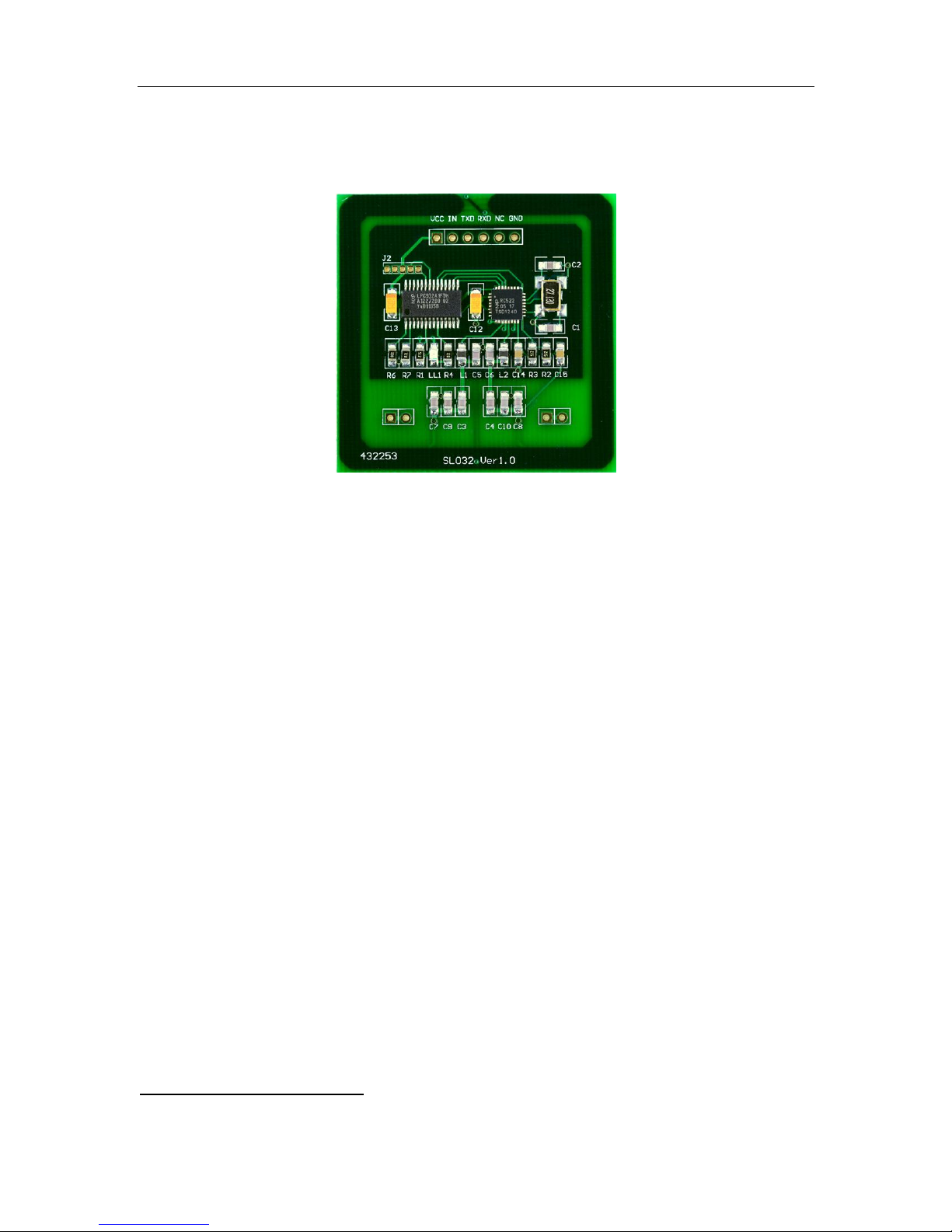
*This picture may not be exactly the same as real object.
Tags supported: Mifare 1k, Mifare 4k, Mifare UltraLight, Mifare
UltraLight C, NTAG203, DESFire, DESFire EV1 and Mifare Plus
2K/4K
Built-in antenna
UART interface, baud rate 9,600 ~ 115,200 bps
2.7 ~ 3.6V VDC operating, I/O pins are 5V tolerant
Work current less than 45mA @3.3V
Power down current less than 10uA
Operating distance: Up to 50mm, depending on tag
Storage temperature: -40 ºC ~ +85 ºC
Operating temperature: -25 ºC ~ +55 ºC
Dimension: 46 × 46 × 3 mm
The OUT pin at low level indicates tag in detective range, and high
level indicating tag out
Auto-detection: LED is on when card is in the detection range
Suppots all cards above except ISO14443-4 cards like DESFire/DESFire EV1 and MifarePlus L0/L2/L3. There is
http://www.stronglink-rfid.com
Page 4
StrongLink SL032 V3.0
4
PIN
SYMBOL
TYPE
DESCRIPTION
1
VDD
PWR
Power supply, 2.7 to 3.6VDC
2
IN
Input
Falling edge wake up SL032 from power down mode
3
TXD
Output
Serial output port
4
RXD
Input
Serial input port
5
OUT
Output
Tag auto-detection signal
low level indicating tag in
high level indicating tag out
6
GND
PWR
Ground
7
NC
8
NC 9 NC
10
NC
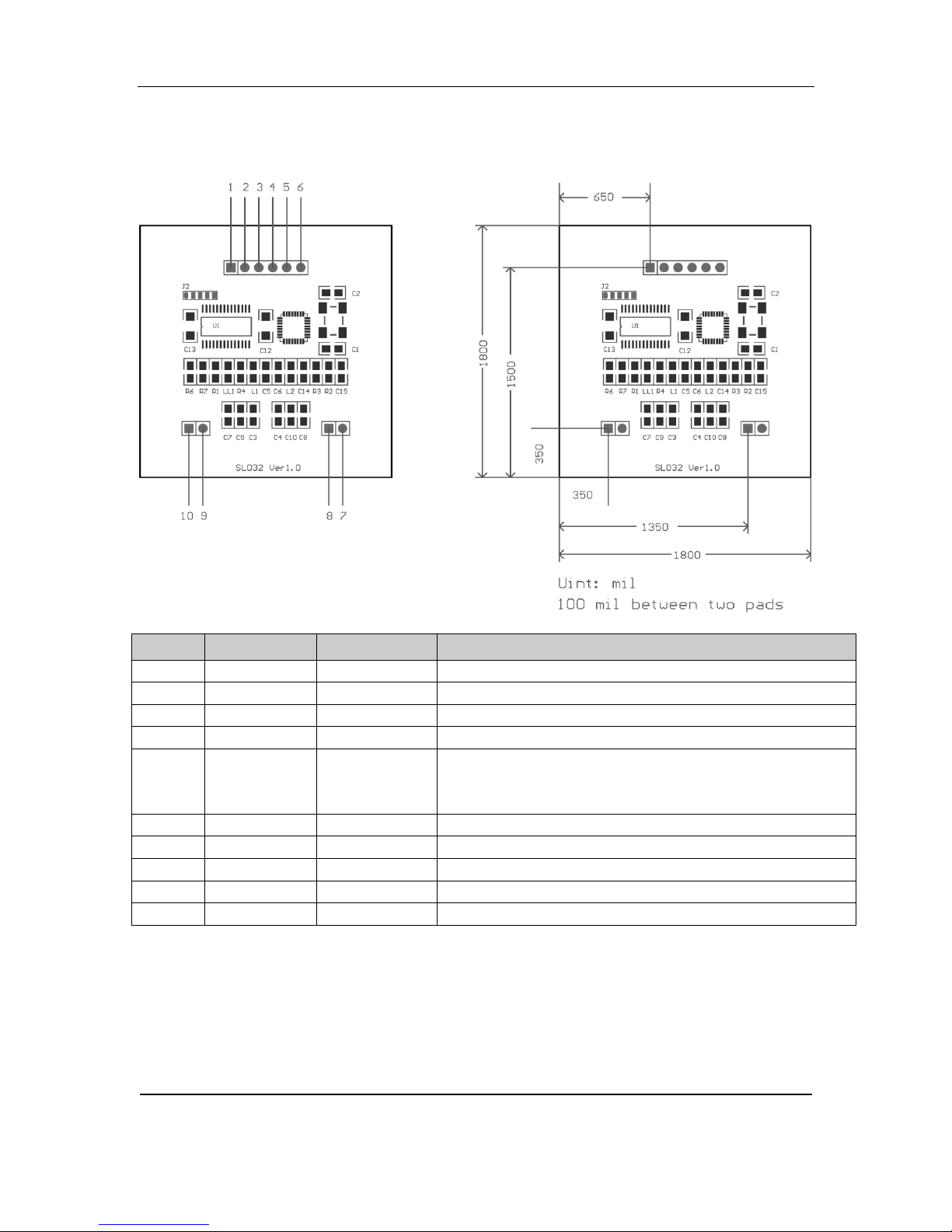
2. PINNING INFORMATION
Attention: Pin IN must be connected HIGH voltage when working, so SL032 can
enter power down mode properly.
Auto-detection command to control its on/off.
http://www.stronglink-rfid.com
Page 5
StrongLink SL032 V3.0
5
R6
R7
Baud rate bps
Assembled
no
no
9,600
yes
no
19,200
no
yes
57,600
yes
yes
115,200
( default )
Preamble
Len
Command
Data
Checksum
Preamble
Len
Command
Status
Data
Checksum
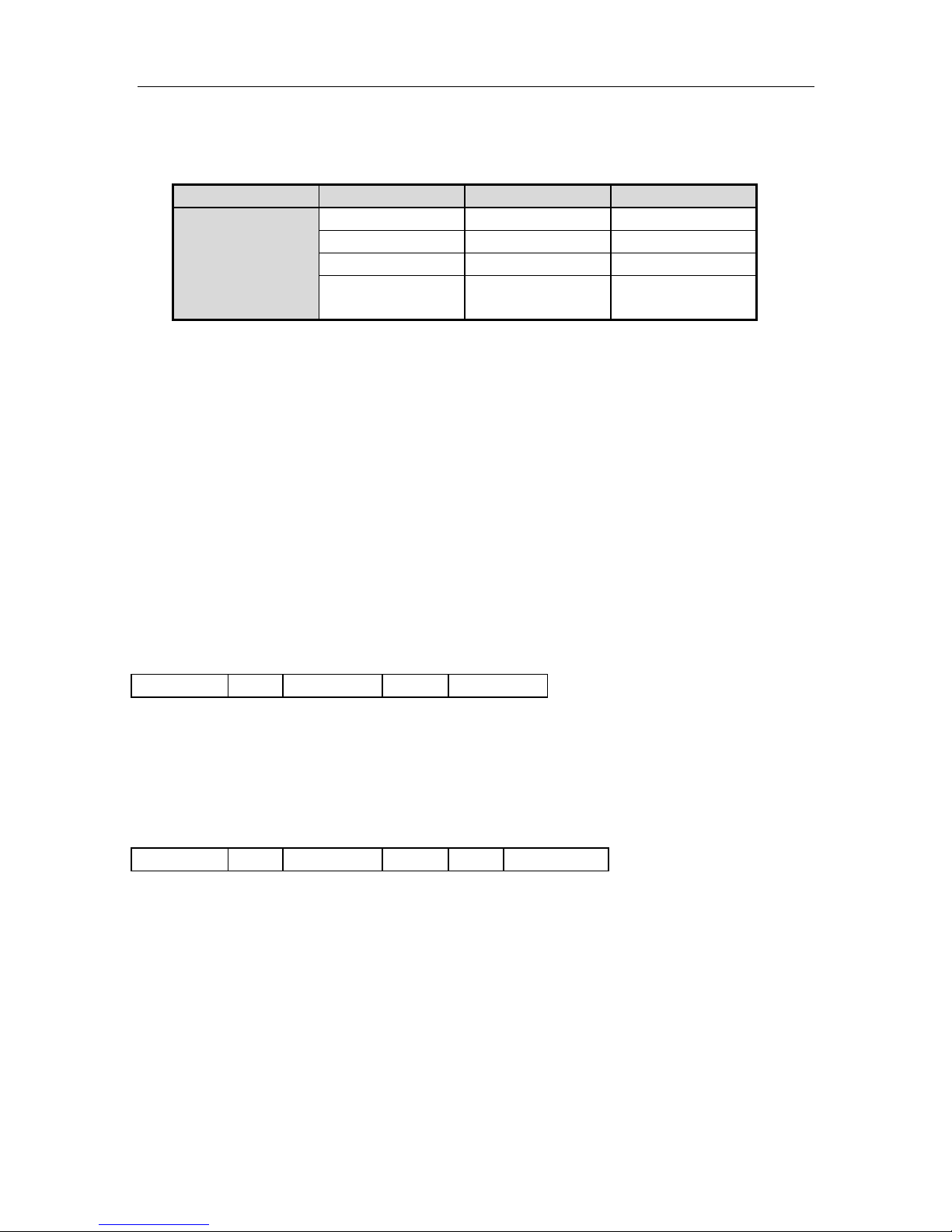
3. BAUD RATE SETTING
R6 & R7 are used for setting baud rate as follows sheet
4. COMMUNICATION PROTOCOL
4-1. Communication Setting
The communication protocol is byte oriented. Both sending and receiving bytes are in
hexadecimal format. The communication parameters are as follows,
Baud rate: 9,600 ~ 115,200 bps
Data: 8 bits
Stop: 1 bit
Parity: None
Flow control: None
4-2. Communication Format
Host to Reader:
Preamble: 1 byte equal to 0xBA
Len: 1 byte, indicating the number of bytes from Command to Checksum
Command: 1 byte Command code, see Table 3
Data: Variable length depends on the command type
Checksum: 1 byte XOR of all the bytes from Preamble to Data
Reader to Host:
Preamble: 1 byte equal to 0xBD
Len: 1 byte indicating the number of bytes from Command to Checksum
Command: 1 byte Command code, see Table 3
Status: 1 byte Command status, see Table 4
Data: Variable length depends on the command type.
Checksum: 1 byte XOR of all the bytes from Preamble to Data
http://www.stronglink-rfid.com
Page 6

StrongLink SL032 V3.0
6
Command
Description
0x01
Select Mifare card
0x02
Login to a sector
0x03
Read a data block
0x04
Write a data block
0x05
Read a value block
0x06
Initialize a value block
0x07
Write master key (key A)
0x08
Increment value
0x09
Decrement value
0x0A
Copy value
0x10
Read a data page (Ultralight & NTAG203)
0x11
Write a data page (Ultralight & NATG203)
0x12
Download Key
0x13
Login sector via stored Key
0x20
Request for Answer to Select (ISO14443-4)
0x21
Exchange Transparent Data according to T = CL
0x40
LED control
0x50
Go to Power Down mode
0x80
MFP WritePerso
0x81
MFP CommitPerso
0xF0
Get firmware version
0xFE
Turn on/off Auto-detection
Status
Description
0x00
Operation succeed
0x01
No tag
0x02
Login succeed
0x03
Login fail
0x04
Read fail
0x05
Write fail
0x06
Unable to read after write
0x08
Address overflow
0x09
Download Key fail
0x0A
Collision occur
0x0C
Load key fail
0x0D
Not authenticate
0x0E
Not a value block
0x0F
Input len invalid
0x12
MFP WritePerso fail
0x13
MFP CommitPerso fail
4-3. Command Overview
Table 3
Status Overview
Table 4
http://www.stronglink-rfid.com
Page 7

StrongLink SL032 V3.0
7
0xBA
Len
0x01
Checksum
0xBD
Len
0x01
Status
UID
Type
Checksum
0xBA
Len
0x02
Sector
Type
Key
Checksum
0xBD
Len
0x02
Status
Checksum
2
4-4. Command List
4-4-1. Select Mifare card
Response:
Status: 0x00: Operation succeed
0x01: No tag
0x0A: Collision occur
0xF0: Checksum error
UID: The uniquely serial number of Mifare carde
Type:
MFMini_4B 0x01
MFMini_7B 0x02
MF1K_4B UID/ MFPLUS2K SL1_4B UID 0x03
MF1K_7B UID/ MFPLUS2K SL1_7B UID 0x04
MF4K_4B UID/ MFPLUS4K SL1_4B UID 0x05
MF4K_7B UID/ MFPLUS4K SL1_7B UID 0x06
MF Ultralight/MF Ultralight C/Ntag 203 0x07
MF DESFire/MF DESFire EV1 0x09
MF PROX 0x0B
MFPLUS2K SL2_4B UID 0x21
MFPLUS4K SL2_4B UID 0x22
MFPLUS2K SL2_7B UID 0x23
MFPLUS4K SL2_7B UID 0x24
MFPLUS2K SL0/SL3_4B UID2 0x31
MFPLUS4K SL0/SL3_4B UID 0x32
MFPLUS2K SL0/SL3_7B UID 0x33
MFPLUS4K SL0/SL3_7B UID 0x34
Other 0x00
4-4-2. Login to a sector
Sector: Sector need to login
Type: Key type (0xAA: authenticate with KeyA, 0xBB: authenticate with KeyB)
Key: Authenticate key, 6 bytes
Response:
Status: 0x02: Login succeed
0x03: Login fail
0xF0: Checksum error
Mifare Plus SL0 and SL3 can tell differences via ATS(ISO14443-4). Before ATS, they have the same ATQA and
SAK(ISO14443-3). SL032 judges card type only via ISO14443-3 layer for the compatibility.
http://www.stronglink-rfid.com
Page 8
StrongLink SL032 V3.0
8
0xBA
Len
0x03
Block
Checksum
0xBD
Len
0x03
Status
Data
Checksum
0xBA
Len
0x04
Block
Data
Checksum
0xBD
Len
0x04
Status
Data
Checksum
0xBA
Len
0x05
Block
Checksum
0xBD
Len
0x05
Status
Value
Checksum
0xBA
Len
0x06
Block
Value
Checksum
0xBD
Len
0x06
Status
Value
Checksum
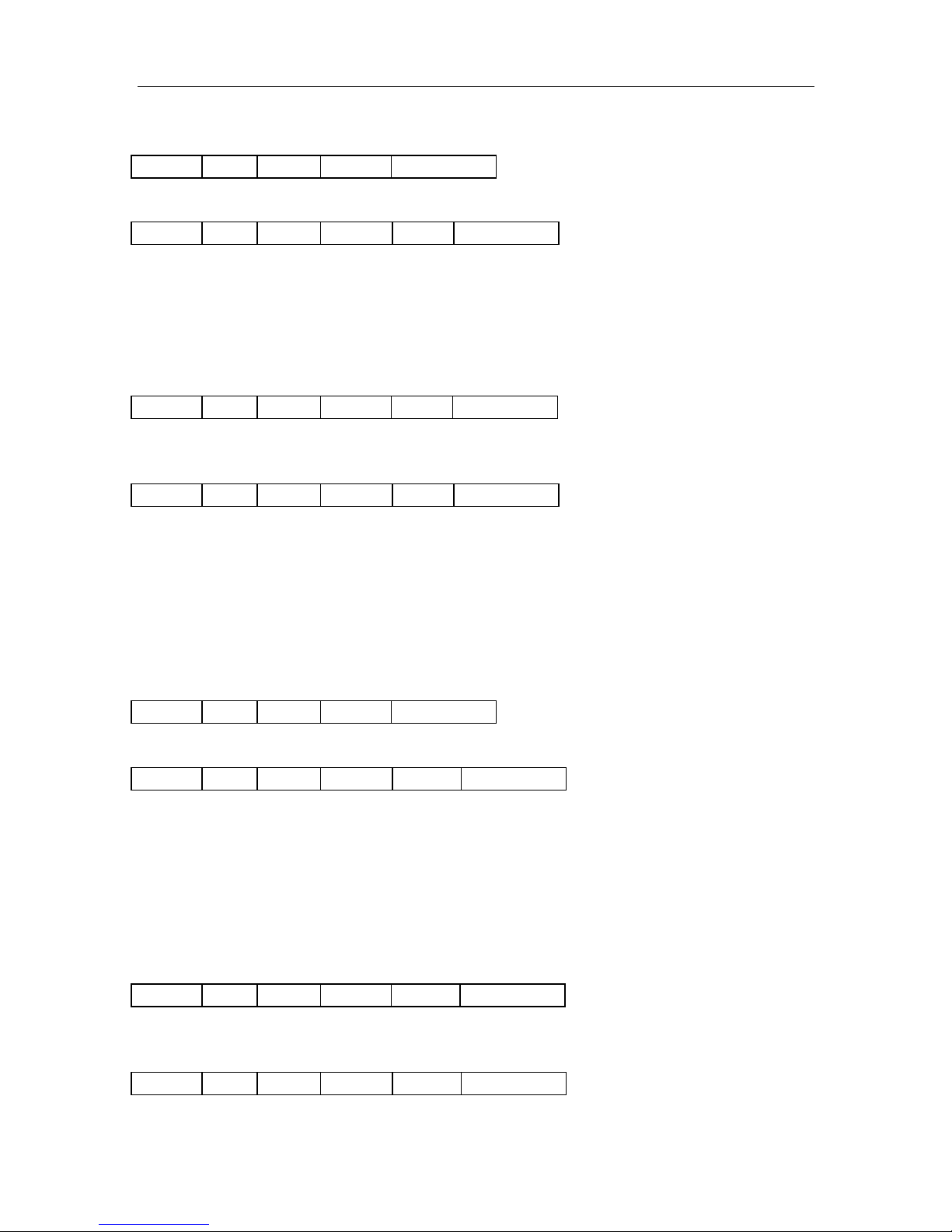
4-4-3. Read a data block
Block: The block number to be read, 1 byte
Response:
Status: 0x00: Operation succeed
0x04: Read fail
0x0D: Not authenticate
0xF0: Checksum error
Data: Block data returned if operation succeeds, 16 bytes.
4-4-4. Write a data block
Block: The block number to be written, 1 byte.
Data: The data to write, 16 bytes.
Response:
Status: 0x00: Operation succeed
0x05: Write fail
0x06: Unable to read after write
0x0D: Not authenticate
0xF0: Checksum error
Data: Block data written if operation succeeds, 16 bytes.
4-4-5. Read a value block
Block: The block number to be read, 1 byte.
Response:
Status: 0x00: Operation succeed
0x04: Read fail
0x0D: Not authenticate
0x0E: Not a value block
0xF0: Checksum error
Value: Value returned if the operation succeeds, 4 bytes.
4-4-6. Initialize a value block
Block: The block number to be initialized, 1 byte.
Value: The value to be written, 4 bytes.
Response:
Status: 0x00: Operation succeed
http://www.stronglink-rfid.com
Page 9
StrongLink SL032 V3.0
9
0xBA
Len
0x07
Sector
Key
Checksum
0xBD
Len
0x07
Status
Key
Checksum
0xBA
Len
0x08
Block
Value
Checksum
0xBD
Len
0x08
Status
Value
Checksum
0xBA
Len
0x09
Block
Value
Checksum
0xBD
Len
0x09
Status
Value
Checksum
0x05: Write fail
0x06: Unable to read after write
0x0D: Not authenticate
0xF0: Checksum error
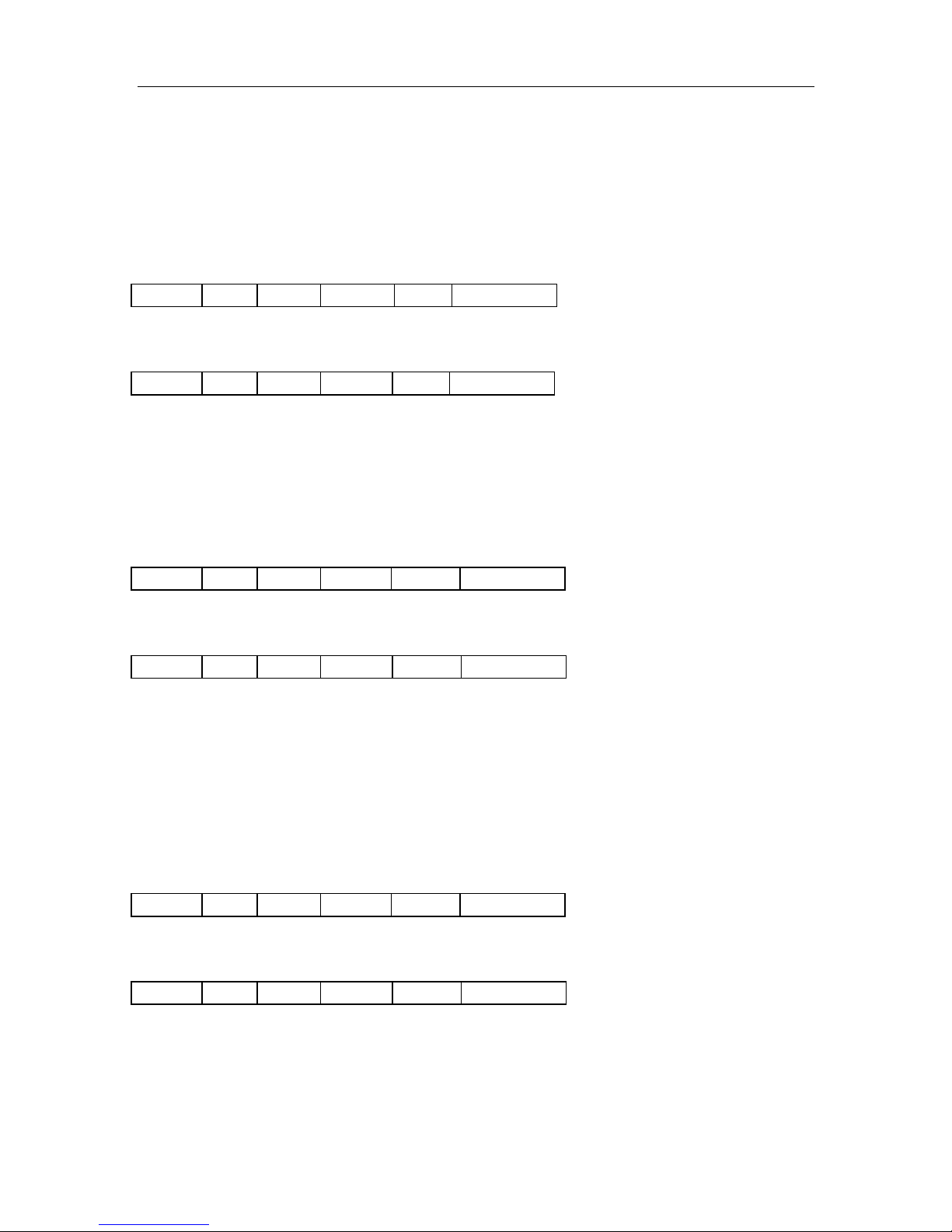
Value: Value written if the operation succeeds, 4 bytes.
4-4-7. Write master key (key A)
Sector: The sector number to be written, 1 byte.
Key: Authentication key, 6 bytes
Response:
Status: 0x00: Operation succeed
0x05: Write fail
0x0D: Not authenticate
0xF0: Checksum error
Key: Authentication key written if the operation succeeds, 6 bytes.
4-4-8. Increment value
Block: The block number to be increased, 1 byte.
Value: The value to be increased by, 4 bytes.
Response:
Status: 0x00: Operation succeed
0x05: Write fail
0x06: Unable to read after write
0x0D: Not authenticate
0x0E: Not a value block
0xF0: Checksum error
Value: The value after increment if the operation succeeds, 4 bytes
4-4-9. Decrement value
Block: The block number to be decreased, 1 byte
Value: The value to be decreased by, 4 bytes
Response:
Status: 0x00: Operation succeed
0x05: Write fail
0x06: Unable to read after write
0x0D: Not authenticate
0x0E: Not a value block
http://www.stronglink-rfid.com
Page 10
StrongLink SL032 V3.0
10
0xBA
Len
0x0A
Source
Destination
Checksum
0xBD
Len
0x0A
Status
Value
Checksum
0xBA
Len
0x10
Page
Checksum
0xBD
Len
0x10
Status
Data
Checksum
0xBA
Len
0x11
Page
Data
Checksum
0xBD
Len
0x11
Status
Data
Checksum
0xF0: Checksum error
Value: The value after decrement if the operation succeeds, 4 bytes
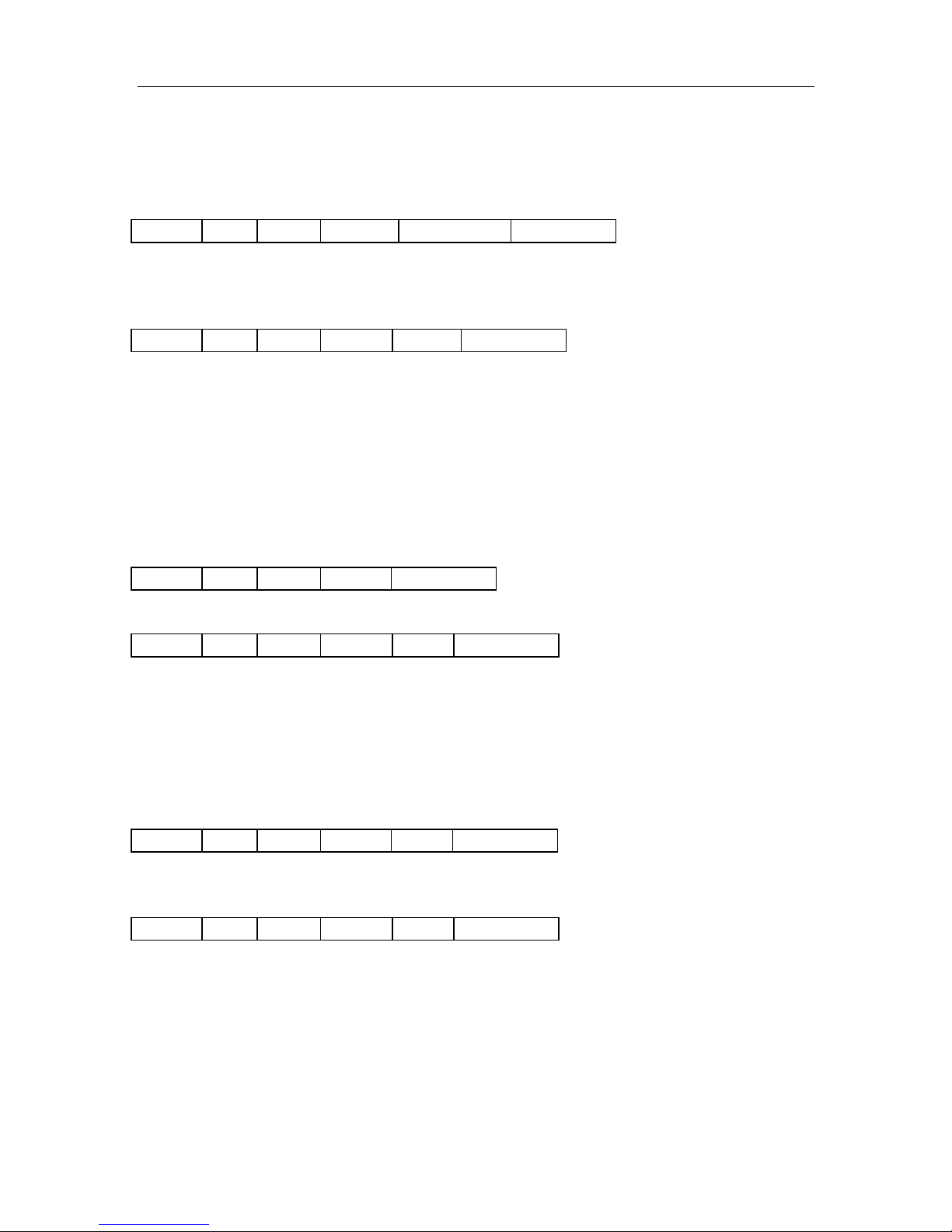
4-4-10. Copy value
Source: The source block copy from, 1 byte
Destination: The destination copy to, 1 byte
The source and destination must in the same sector
Response:
Status: 0x00: Operation succeed
0x05: Write fail
0x06: Unable to read after write
0x0D: Not authenticate
0x0E: Not a value block (Source)
0xF0: Checksum error
Value: The value after copy if the operation succeeds, 4 bytes
4-4-11. Read a data page (Ultralight & NTAG203)
Page: The page number to be read, 1 byte
Response:
Status: 0x00: Operation succeed
0x04: Read fail
0xF0: Checksum error
Data: Block data returned if operation succeeds, 4 bytes.
4-4-12. Write a data Page (Ultralight & NTAG203)
Page: The page number to be written, 1 byte.
Data: The data to write, 4 bytes.
Response:
Status: 0x00: Operation succeed
0x05: Write fail
0x06: Unable to read after write
0xF0: Checksum error
Data: page data written if operation succeeds, 4 bytes.
http://www.stronglink-rfid.com
Page 11
StrongLink SL032 V3.0
11
0xBA
Len
0x12
Sector
Type
Key
Checksum
0xBD
Len
0x12
Status
Checksum
0xBA
Len
0x13
Sector
Type
Checksum
0xBD
Len
0x13
Status
Checksum
0xBA
Len
0x20
Checksum
0xBD
Len
0x20
Status
ATS
Checksum
0xBA
Len
0x21
Data
Checksum
0xBD
Len
0x21
Status
Data
Checksum
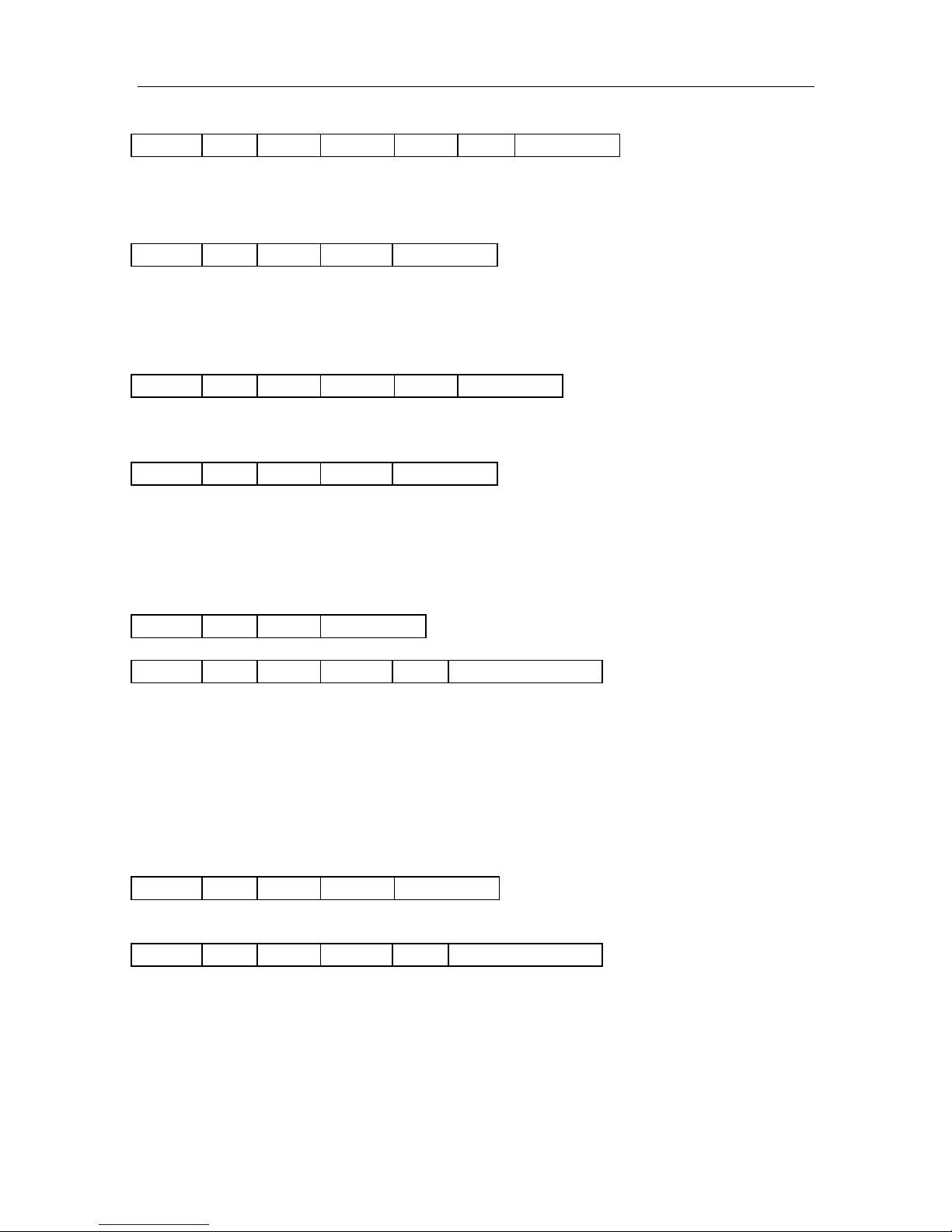
4-4-13. Download Key
Sector: 0 - 39
Type: Key type (0xAA: KeyA, 0xBB: KeyB)
Key: 6 bytes, stored in SL032
Response:
Status: 0x00: Operation succeed
0x08: Address overflow
0xF0: Checksum error
4-4-14. Login sector via stored key
Sector: 0 - 39
Type: Key type (0xAA: KeyA, 0xBB: KeyB)
Response:
Status: 0x02: Login succeed
0x03: Login fail
0x08: Address overflow
0xF0: Checksum error
4-4-15. Request for Answer to Select (ISO14443-4)
Response:
Status: 0x00: Operation succeed
0x10: Address overflow
0xF0: Checksum error
ATS: According to ISO14443-4 protocol
Len + T0 + TA1 + TB1 + TC1 + A1 + AK
4-4-16. Exchange Transparent Data (T = CL)
Data: COS command
Response:
Status: 0x00: Operation succeed
0x11: Communicate with card failed
0xF0: Checksum error
Data: Response data from card
http://www.stronglink-rfid.com
Page 12

StrongLink SL032 V3.0
12
0xBA
Len
0x40
Data
Checksum
0xBD
Len
0x40
Status
Checksum
4-4-17. LED Control
Data: 0x00: LED off
0x01: LED on
Return:
Status: 0x00: Operation succeed
0xF0: Checksum error
http://www.stronglink-rfid.com
Page 13
StrongLink SL032 V3.0
13
0xBA
Len
0x50
Checksum
0xBD
Len
0x50
Status
Checksum
0xBA
Len
0x80
Bnr
Data
Checksum
0xBD
Len
0x80
Status
Checksum
0xBA
Len
0x81
Checksum
0xBD
Len
0x81
Status
Checksum
0xBA
Len
0xF0
Checksum
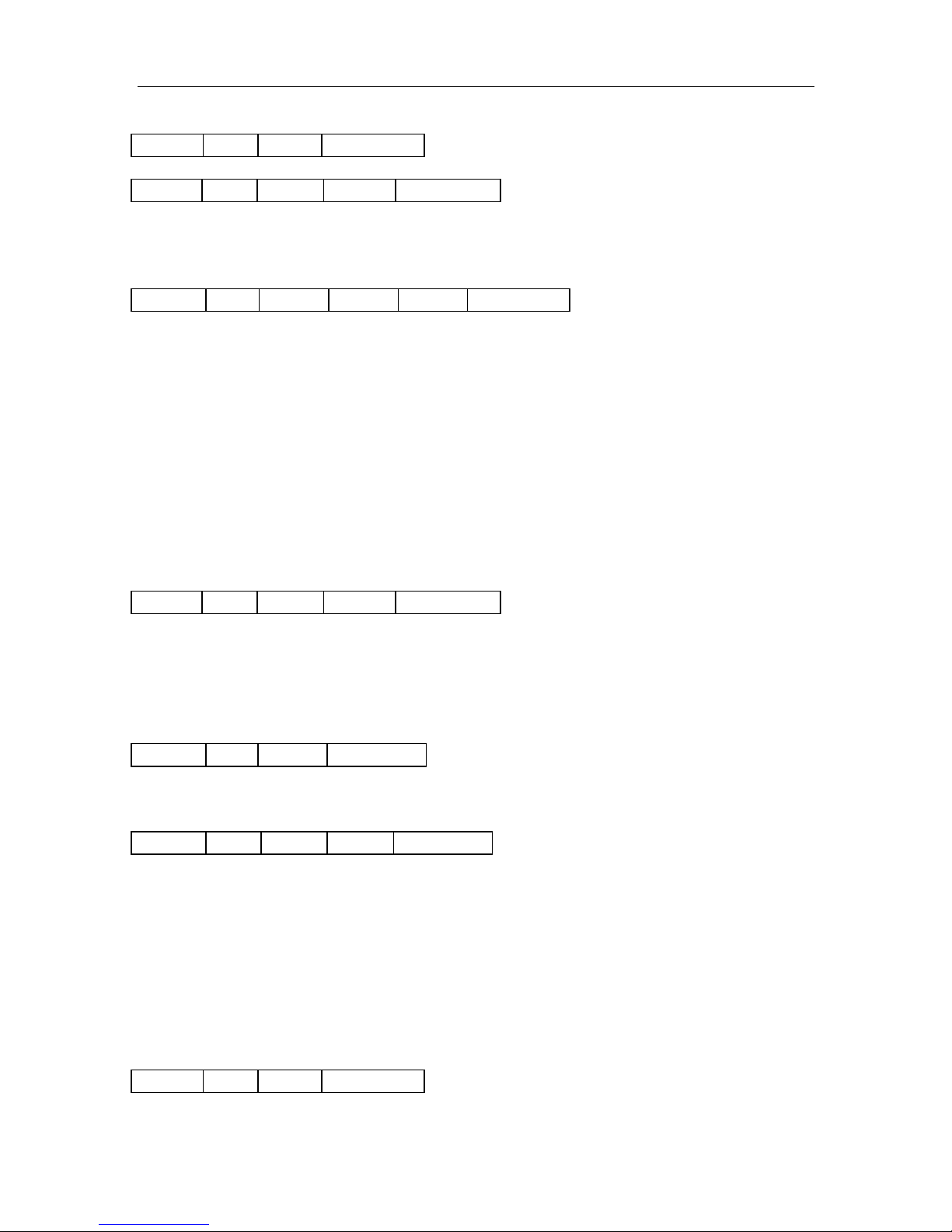
4-4-18. Power Down
Response:
Status: 0x00: Operation succeed
0xF0: Checksum error
4-4-19. Write Perso
Bnr: 2Byte Block or Key Address to be written, MSB first.
For example,
Master Key Address is 0x9000, and write it as 0xFFFF..FF(16Bytes)
BA14809000FFFFFFFFFFFFFFFFFFFFFFFFFFFFFFFFBEh
Configuration Key Address is 0x9001, and write it as 0xFFFF..FF(16Bytes)
BA14809001FFFFFFFFFFFFFFFFFFFFFFFFFFFFFFFFBFh
Switch to Level 2 Key Address is 0x9002, and write it as 0xFFFF..FF(16Bytes)
BA14809002FFFFFFFFFFFFFFFFFFFFFFFFFFFFFFFFBCh
Switch to Level 3 Key Address is 0x9003, and write it as 0xFFFF..FF(16Bytes)
BA14809003FFFFFFFFFFFFFFFFFFFFFFFFFFFFFFFFBDh
Data: Value of the key or data
Response:
Status: 0x00: Operation succeed
0x11: Communicate with card failed
0x12: Card Write Perso failed
0xF0: Checksum error
4-4-20. Commit Perso
This command commit the Write Perso and switch the card to security level 1(SL1 card) or
level 3(SL3 card).
Response:
Status: 0x00: Operation succeed
0x11: Communicate with card failed
0x13: Card Commit Perso failed
0xF0: Checksum error
Attention: According to NXP MifarePlus card document, Commit Perso will make effect
after you have “Write Perso” the Master KEY, Configuration KEY and SWL3 KEY.
If your card is L1 card, after Commit Perso, the card will switch L0 to L1;
If your card is L3 card, after Commit Perso, the card will switch L0 to L3.
4-4-21. Get firmware version
Response:
http://www.stronglink-rfid.com
Page 14

StrongLink SL032 V3.0
14
0xBD
Len
0xF0
Status
Data
Checksum
0xBA
Len
0xFE
Data
Checksum
0xBD
Len
0xFE
Status
Checksum
Status: 0x00: Operation success
0xF0: Checksum error
Data: firmware version.
4-4-22. Turn on/off Auto-detection
Data: 0x00: Turn off Auto-detection
0x01: Turn on Auto-detection
For example,
02FE00h // Turn off Auto-detection
02FE01h // Turn on Auto-detection
Response:
Status: 0x00: Operation succeed
5. DIFFERENCES FROM PREVIOUS VERSION
Although we make efforts on the compatibility between the new SL032 V3.0 and the
old SL032, there are still some differences you need to know.
1. New SL032 has the auto-detection function which can close automatically when
there is a DESFire or MifarePlus L0/L2/L3 card coming into the detection range.
By the way, we also offer you the Turn On/Off Auto-detection command.
2. New SL032 supports nearly all cards of NXP Mifare series now and we rebuilt the
card type characters.(Details see to Command Select Mifare Card Description)
3. New SL032 also has PIN OUT function indicating tag auto-detection status like
SL025 and SL031 now.
http://www.stronglink-rfid.com
 Loading...