

Page 1
RFID MODULE
Mifare Reader / Writer
SL025M
User Ma nual
Version 1.5
Sept. 2013
StrongLink
Page 2

StrongLink SL025M
2
CONTENT
1. MAIN FEATURES ................................................................................ 3
2. PINNING INFORMATION .................................................................. 4
3. BAUD RATE SETTING ........................................................................ 5
4. COMMUNICATION PROTOCOL ...................................................... 5
4-1. Communicat ion Setting ........................................................................ 5
4-2. Communicat ion Format ........................................................................ 5
4-3. Command Ove rview ............................................................................. 6
4-4. Comma nd Lis t ...................................................................................... 7
4-4-1. Select Mifare card .............................................................................. 7
4-4-2. Login to a sector ................................................................................ 7
4-4-3. Download Key into SL025 ................................................................ 7
4-4-4. Login sector via stored key ................................................................ 8
4-4-5. Read a data block .............................................................................. 8
4-4-6. Write a data block .............................................................................. 8
4-4-7. Read a value block ............................................................................. 8
4-4-8. Initialize a value block ....................................................................... 9
4-4-9. Write master key (key A) ................................................................... 9
4-4-10. Inc rement value ............................................................................... 9
4-4-11. Decrement value .............................................................................10
4-4-12. Copy value .....................................................................................10
4-4-13. Read a data page (UltraLight) .........................................................10
4-4-14. Write a data Page (UltraLight) ........................................................11
4-4-15. Manage Red Led .............................................................................11
4-4-16. Get firmware version
......................................................................11
http://www.stronglink-rfid.com
Page 3
StrongLink SL025M
3
1. MAIN F EATURES
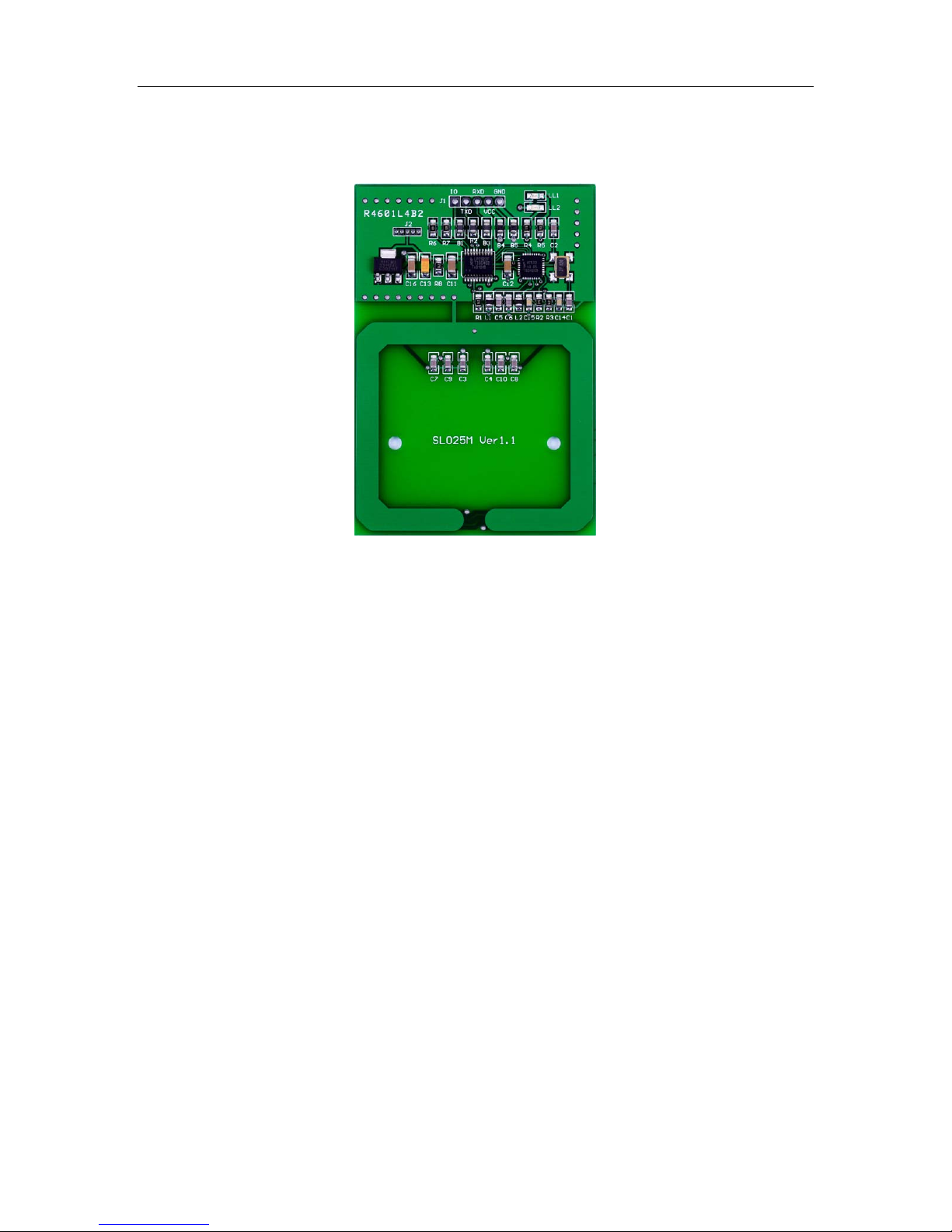
• Tags s upported: M i fa re 1k, Mifare 4k, Mifa re U ltraLight and NFC
NTAG203
• Auto-detecting ta g, Built-in a ntenna
• UART interface on COMS level, baud rate 9,600 ~ 115,200 bps
• 4.4 ~ 12.0VDC powe r supply
• Work current less than 80mA
• Operating distance: Up to 70mm, de pending o n tag
• Storage temperature: -40 ºC ~ +85 ºC
• Operat ing temperature: -25 ºC ~ +70 ºC
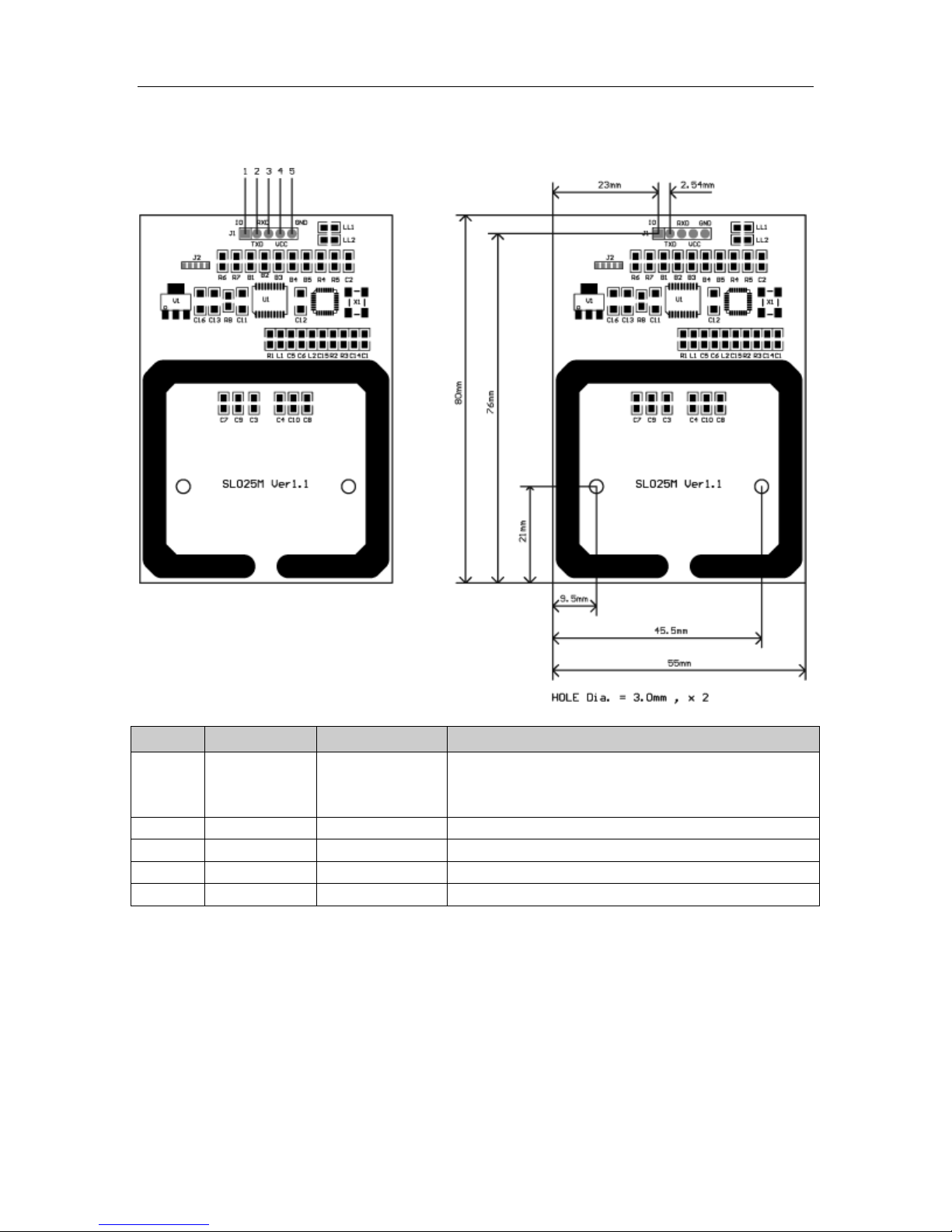
• Dimension: 80 × 55 mm
• Two LEDs, gr ee n led is auto light when tag in detection range, red led
is contr oll ed by host
• The OUT pin at low le vel indic at es tag in detective range, and high
level i ndicat ing tag out
http://www.stronglink-rfid.com
Page 4
StrongLink SL025M
4
PIN
SYMBOL
TYPE
DESCRIPTION
Tag detect signal
2
TXD
Output
Serial o utpu t por t
3
RXD
Input
Serial input port
4
VCC
PWR
Power Supply
5
GND
PWR
Ground
4-. PINNING INFORMATION
1 TagSta Output
low leve l indicating t a g in detection range
high level indicating tag out
http://www.stronglink-rfid.com
Page 5
StrongLink SL025M
5
R6
R7
Baud rate bps
no
no
9,600
yes
no
19,200
no
yes
57,600
115,200
Preamble
Len
Command
Data
Checksum
Preamble
Len
Command
Status
Data
Checksum
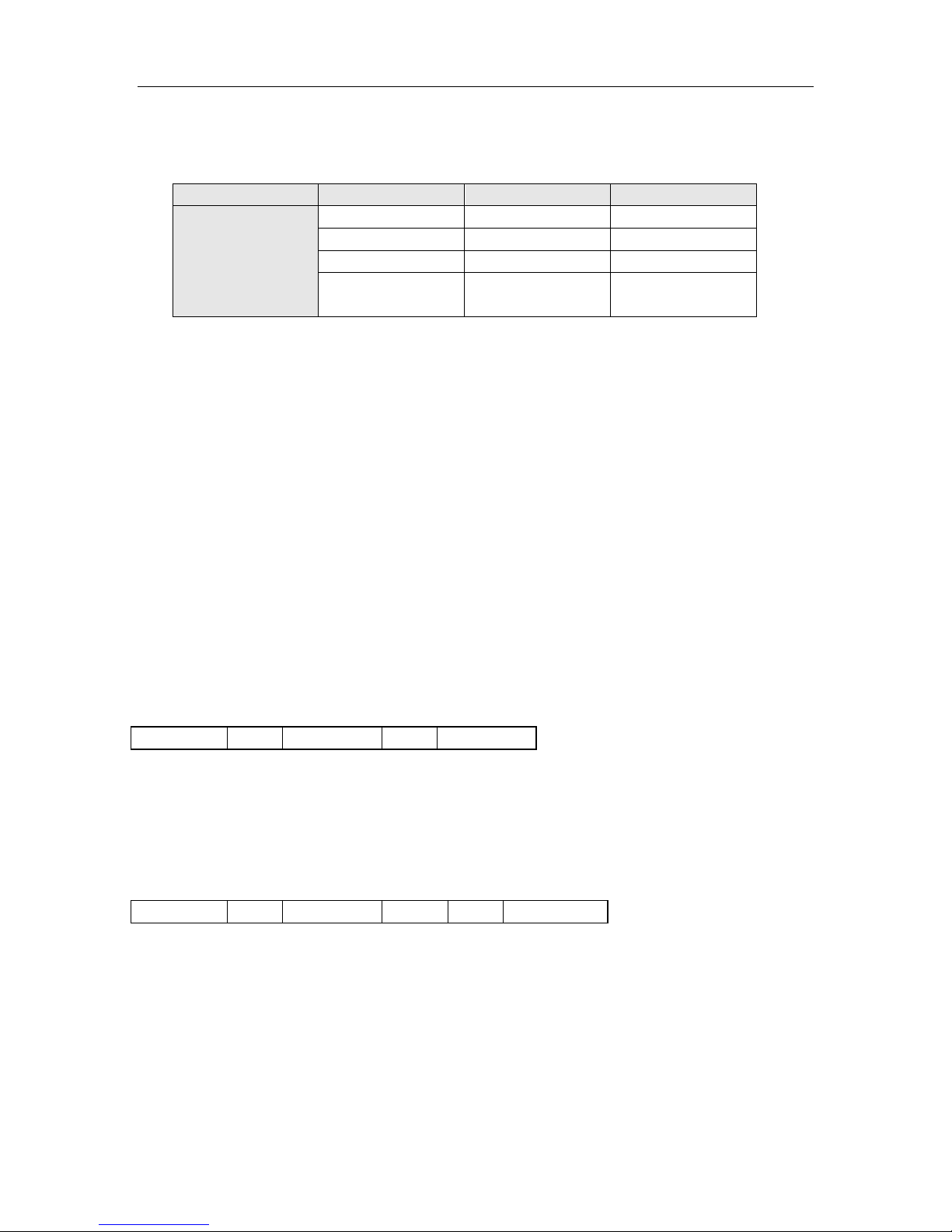
4-. BAUD RATE SETTING
Two 820 ohm resistances R6 & R7 ar e used for setting baud rate as follows sheet
Assembled
yes yes
( default )
4. COMMUNICATION PROTOCOL
4-1. Communication Setting
The communication protocol is byte oriented. Both sending and receiving bytes are in
hexadecimal format. The communicat ion para meters are as follows
Baud rate: 9,600 ~ 115,200 bps
Data: 8 bits
Stop: 1 bit
Parity: None
Flow control: None
4-2. Communication Format
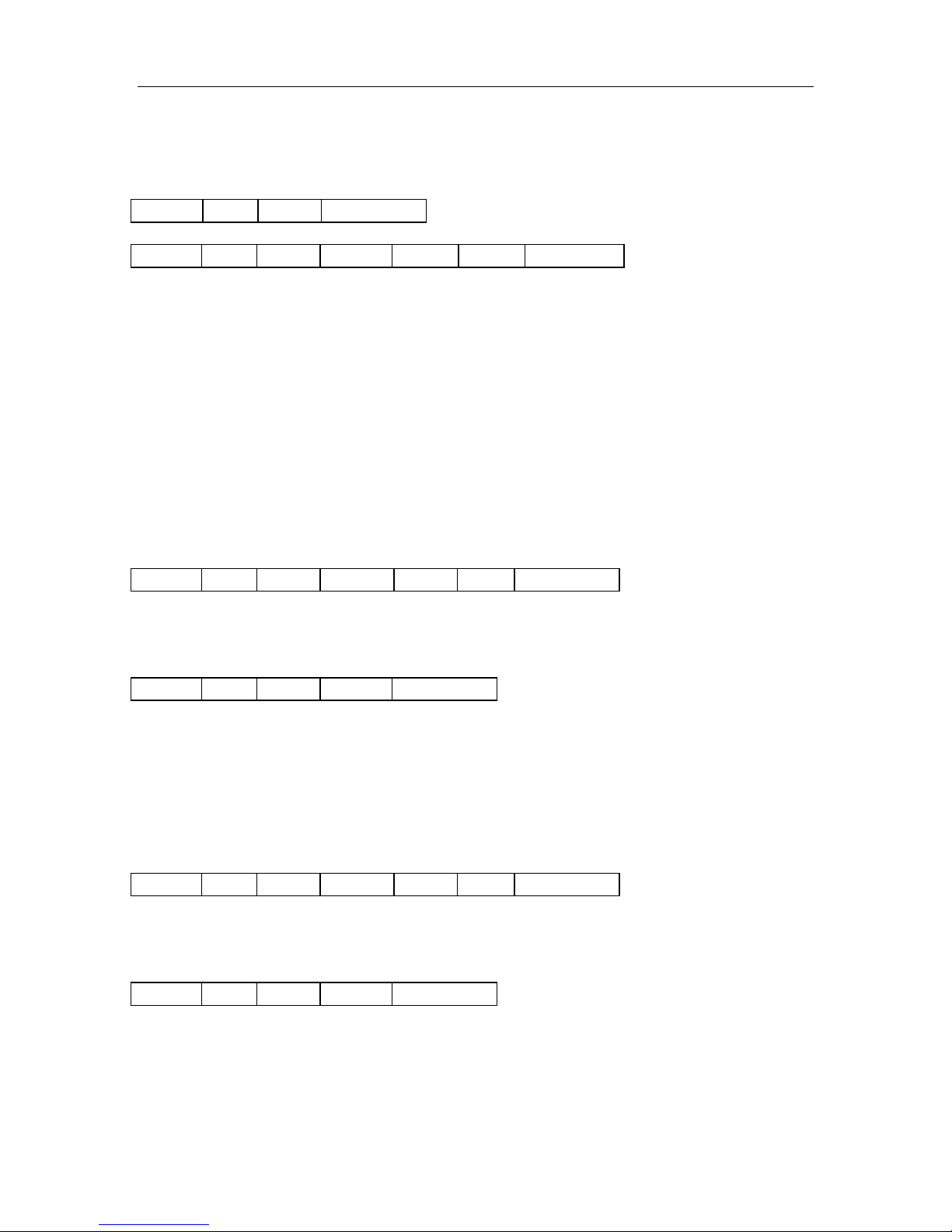
Host to SL025:
Preamble: 1 byte equal to 0xBA
Len: 1 byte indicating the number of bytes from Command to Checksum
Command: 1 byte Command code, see Table 3
Data: Variable le ngt h depends on the command type
Checksum: 1 byte XOR of all t he bytes from Preamble to Dat a
SL025 to Host:
Preamble: 1 byte equal to 0xBD
Len: 1 byte indicating the number of bytes from Command to Checksum
Command: 1 byte Command code, see Table 3
Status: 1 byte Command status, see Table 4
Data: Variable length depends on the command t ype.
Checksum: 1 byte XOR of all t he bytes from Preamble to Dat a
http://www.stronglink-rfid.com
Page 6
StrongLink SL025M
6
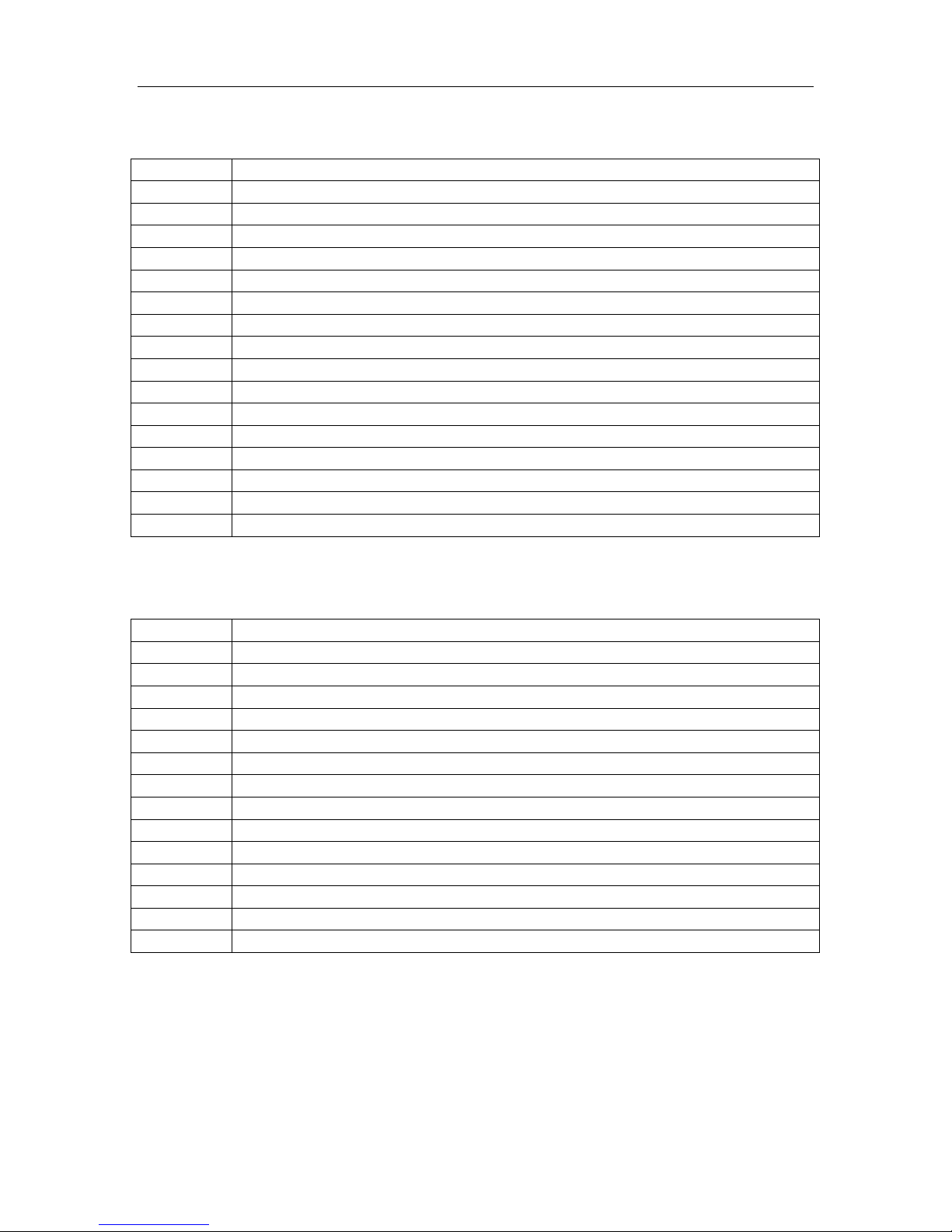
Command
Description
0x01
Select Mifare card
0x02
Login to a sector
0x03
Read a data block
0x04
Write a dat a block
0x05
Read a value block
0x06
Initialize a value block
0x07
Write mast er key (key A)
0x08
Increment value
0x09
Decrement value
0x0A
Copy value
0x10
Read a data page (UltraLight & NTAG203)
0x11
Write a dat a page (UltraLight & NTAG203)
0x12
Download Key
0x13
Login sector via stored Key
0x40
Manage Red Led
0xF0
Get firmware version
Status
Description
0x00
Operation succeed
0x01
No tag
0x02
Login succeed
0x03
Logi n fa i l
0x04
Read fail
0x05
Wr ite fail
0x06
Unable to read after wr ite
0x08
Address overflow
0x09
Download Key fail
0x0D
Not authent icate
0x0E
Not a value block
0x0F
Invalid len of comma nd format
0xF0
Checksum error
0xF1
Command code error
4-3. Comma nd Overv iew
Tab le 3
Status Overview
Tab le 4
http://www.stronglink-rfid.com
Page 7
StrongLink SL025M
7
0xBA
Len
0x01
Checksum
0xBD
Len
0x01
Status
UID
Type
Checksum
0xBA
Len
0x02
Sector
Type
Key
Checksum
0xBD
Len
0x02
Status
Checksum
0xBA
Len
0x12
Sector
Type
Key
Checksum
0xBD
Len
0x12
Status
Checksum
4-4. Comma nd Li st
4-4-1. Select Mifare card
Response:
Status: 0x00: Operation succeed
0x01: No tag
0xF0: Checksum error
UID: The u niquely serial number of Mifare card
Type: 0x01: Mifare 1k, 4 byte UID
0x02: Mifare 1k, 7 byte UID
0x03: Mifare UltraLight or NATG203
0x04: Mifare 4k, 4 byte UID
0x05: Mifare 4k, 7 byte UID
0x06: Mifare DesFire, 7 byte UID
0x0A: Other
4-4-2. Login to a sector
[1]
[1]
[2]
, 7 byte UID
Sector: Sector need to login, 0x00 – 0x27
Type: Key type (0xAA: authenticate with KeyA, 0xBB: authent icate with KeyB)
Key: Authent icate ke y, 6 bytes
Response:
Status: 0x02: Login succeed
0x01: No tag
0x03: Lo gi n fa i l
0x08: Address overflow
0xF0: Checksum error
4-4-3. Download Key into SL025
Sector: 0x00 – 0x27
Type: Key type (0xAA: KeyA, 0xBB: KeyB)
Key: 6 bytes, stored into SL025
Response:
Status: 0x00: Operation succeed
0x08: Address overflow
0x09: Download fail
0xF0: Checksum error
http://www.stronglink-rfid.com
Page 8
StrongLink SL025M
8
0xBA
Len
0x13
Sector
Type
Checksum
0xBD
Len
0x13
Status
Checksum
0xBA
Len
0x03
Block
Checksum
0xBD
Len
0x03
Status
Data
Checksum
0xBA
Len
0x04
Block
Data
Checksum
0xBD
Len
0x04
Status
Data
Checksum
0xBA
Len
0x05
Block
Checksum
0xBD
Len
0x05
Status
Value
Checksum
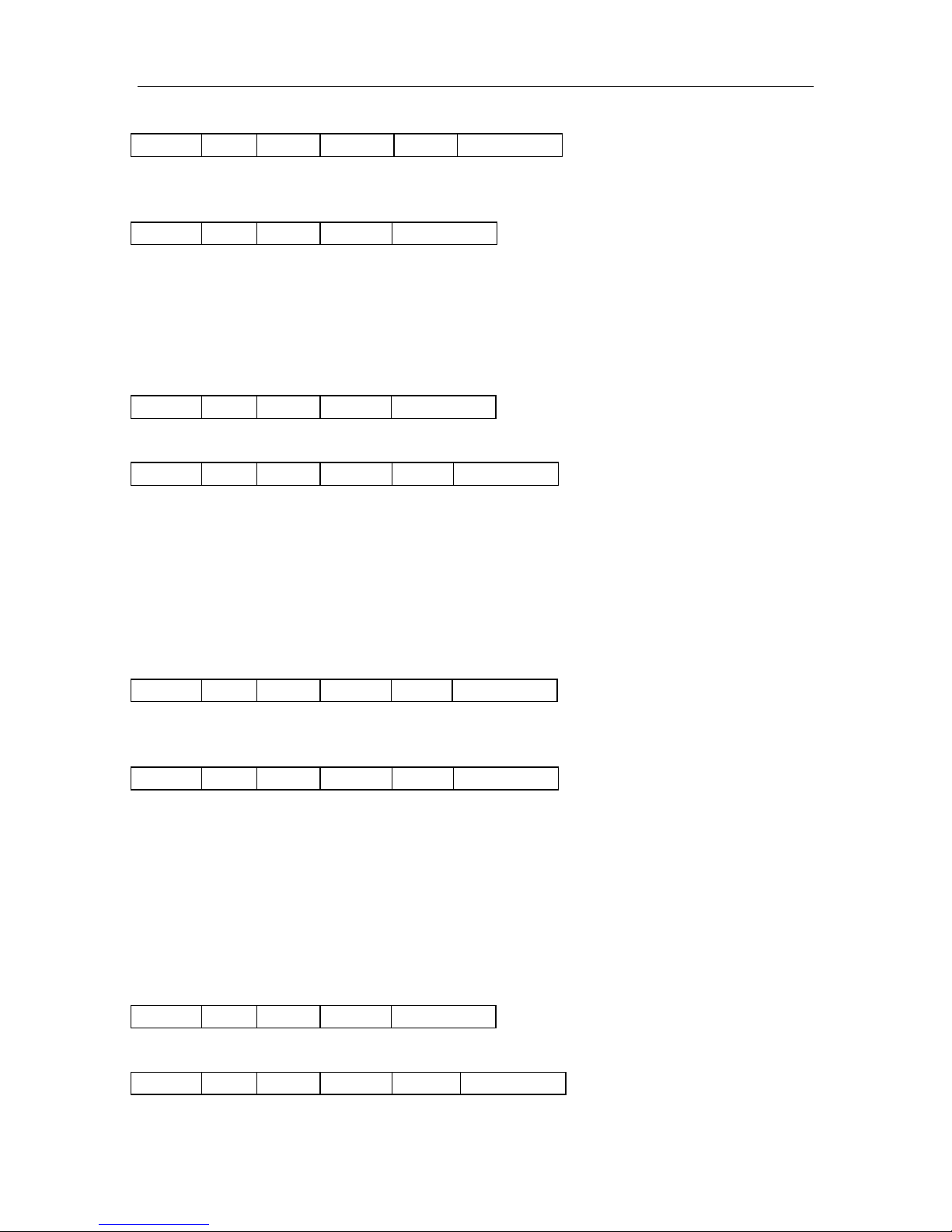
4-4-4. Login sector via stored key
Sector: Secto r need to login, 0x00 – 0x27
Type: Key type (0xAA: KeyA, 0xBB: KeyB)
Response:
Status: 0x02: Login succeed
0x03: Lo gi n fa i l
0x08: Address overflow
0xF0: Checksum error
4-4-5. Read a data block
Block: The absolute address of block to be read, 1 byte
Response:
Status: 0x00: Operation succeed
0x01: No tag
0x04: Read fail
0x0D: Not authenticate
0xF0: Checksum error
Data: Block data returned if operation succeeds, 16 bytes.
4-4-6. Write a data block
Block: The absolute address of block to be written, 1 byte.
Data: The data to write, 16 bytes.
Response:
Status: 0x00: Operation succeed
0x01: No tag
0x05: Wri te f ail
0x06: Unable to read after write
0x0D: Not authenticate
0xF0: Checksum error
Data: Block data written if operation succeeds, 16 bytes.
4-4-7. Read a value block
Block: The absolute address of block to be read, 1 byte.
Response:
Status: 0x00: Operation succeed
http://www.stronglink-rfid.com
Page 9
StrongLink SL025M
9
0xBA
Len
0x06
Block
Value
Checksum
0xBD
Len
0x06
Status
Value
Checksum
0xBA
Len
0x07
Sector
Key
Checksum
0xBD
Len
0x07
Status
Key
Checksum
0xBA
Len
0x08
Block
Value
Checksum
0xBD
Len
0x08
Status
Value
Checksum
0x01: No tag
0x04: Read fail
0x0D: Not authenticate
0x0E: Not a value block
0xF0: Checksum error
Value : Value returned if the oper at ion succeeds, 4 byt e s.
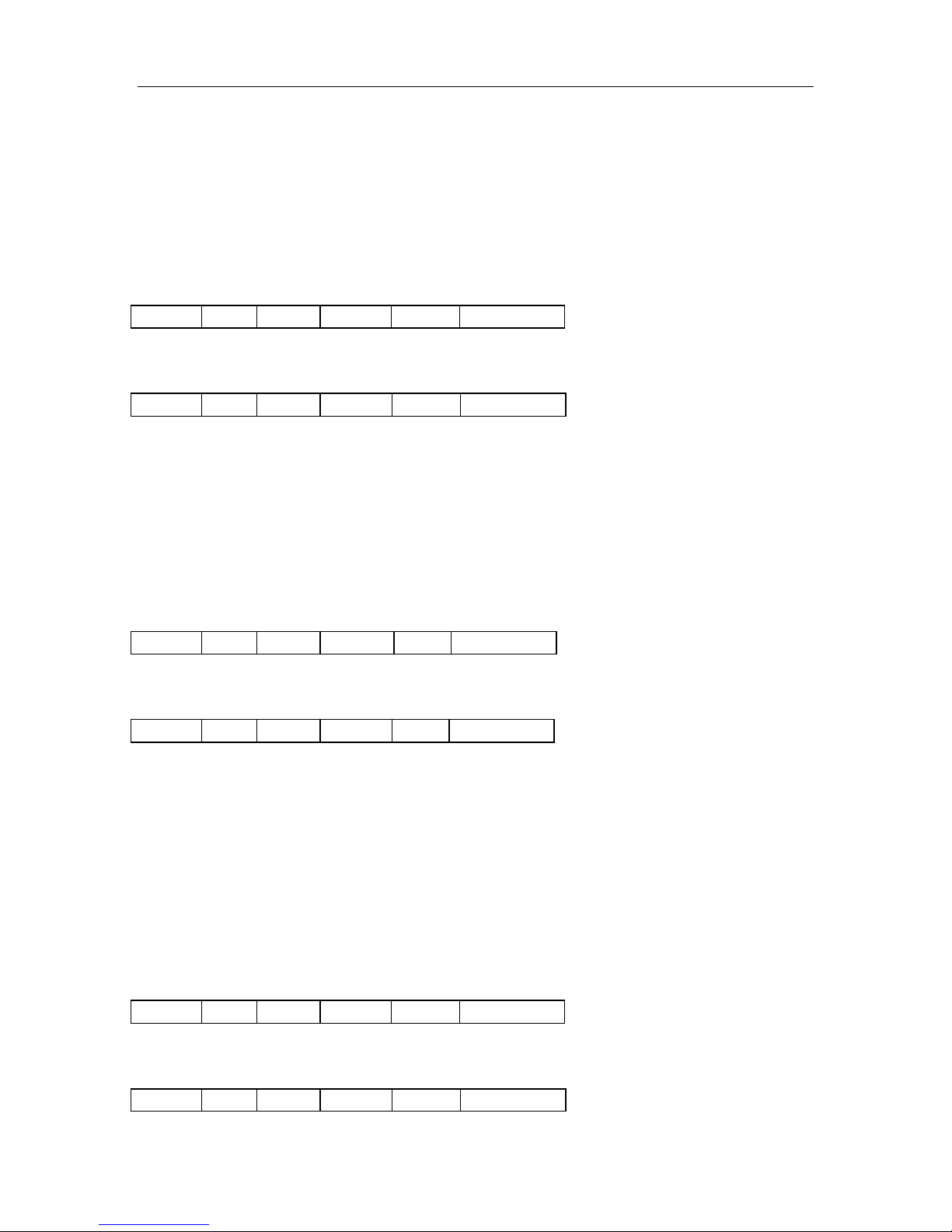
4-4-8. Initialize a value block
Block: The absolute address of block to be initialized, 1 byte.
Value: The valu e to be written, 4 byte s.
Response:
Status: 0x00: Operation succeed
0x01: No tag
0x05: Wri te f ail
0x06: Unable to read after w r ite
0x0D: Not authenticate
0xF0: Checksum error
Value : Value written if the operation succeeds, 4 bytes.
4-4-9. Write master key (key A)
Sector: The sector number to be written, 0x00 – 0x27
Key: Authentication key, 6 bytes
Response:
Status: 0x00: Operation succeed
0x01: No tag
0x05: Wri te f ail
0x08: Address overflow
0x0D: Not authenticate
0xF0: Checksum error
Key: Authentica tion ke y writ ten i f the operation succeeds, 6 byt es.
Attention: Be sure KeyB is readable, otherwise KeyB will be change to 000000000000
after this command.
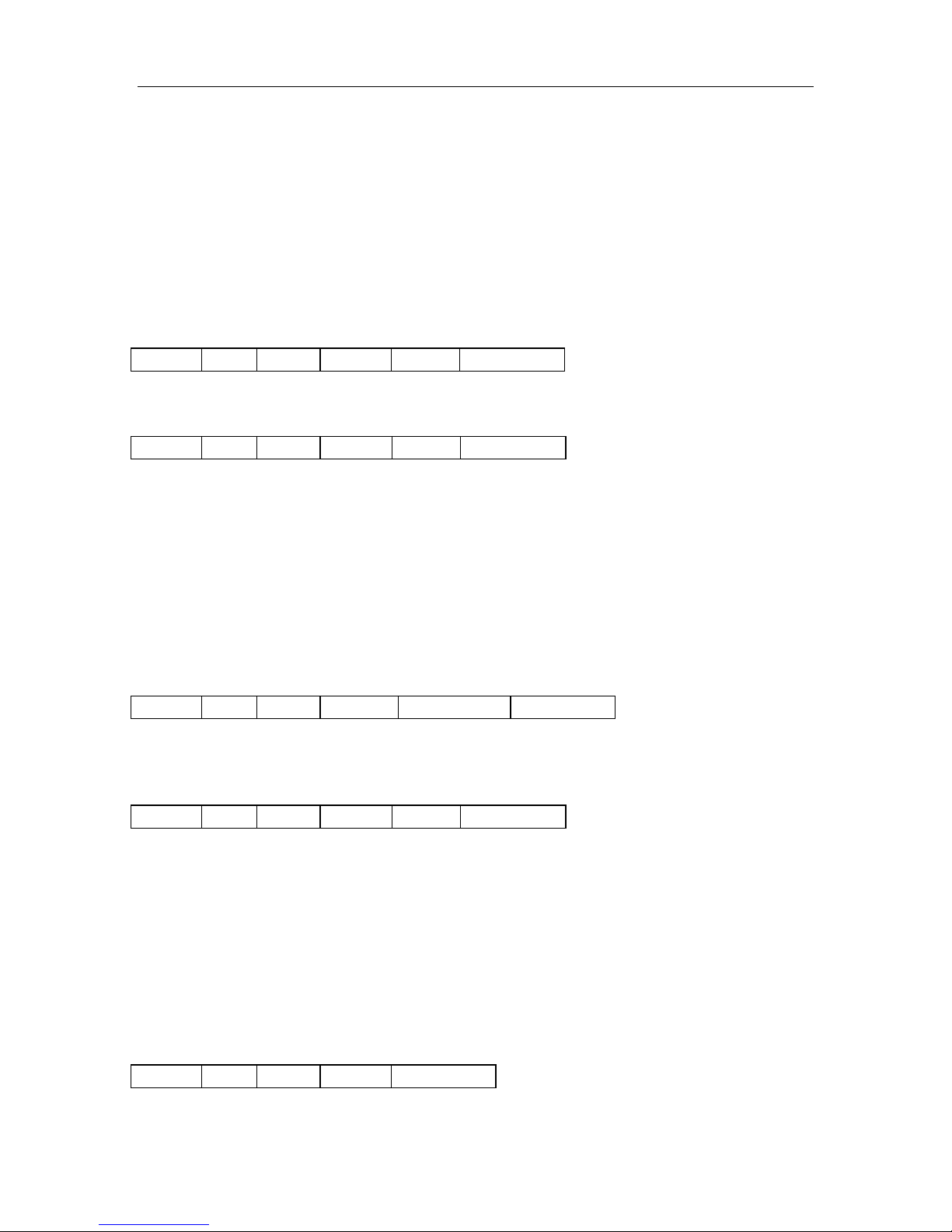
4-4-10. Increment value
Block: The absolute address of block to be increased, 1 byt e.
Value: The value to be increased by, 4 bytes.
Response:
http://www.stronglink-rfid.com
Page 10
StrongLink SL025M
10
0xBA
Len
0x09
Block
Value
Checksum
0xBD
Len
0x09
Status
Value
Checksum
0xBA
Len
0x0A
Source
Destination
Checksum
0xBD
Len
0x0A
Status
Value
Checksum
0xBA
Len
0x10
Page
Checksum
Status: 0x00: Operation succeed
0x01: No tag
0x05: Wri te f ail
0x06: Unable to read after w r ite
0x0D: Not authenticate
0x0E: Not a value block
0xF0: Checksum err or
Value: The valu e after increment if the operatio n succeeds , 4 byte s
4-4-11. Decrement value
Block: The absolute address of block to be decreased, 1 byte
Value: The value to be decreased by, 4 bytes
Response:
Status: 0x00: Operation succeed
0x01: No tag
0x05: Wri te f ail
0x06: Unable to read after w r ite
0x0D: Not authenticate
0x0E: Not a value block
0xF0: Checksum error
Value: The value after decrement if the operation succeeds, 4 bytes
4-4-12. Copy value
Source: The source block copy from, 1 byte
Destination: The destination copy to, 1 byte
Attention: The source and destinat ion must in the same sector
Response:
Status: 0x00: Operation succeed
0x01: No tag
0x05: Wri te f ail
0x06: Unable to read after w r ite
0x0D: Not authenticate
0x0E: Not a value block (Source)
0xF0: Checksum error
Value: The value after copy if the operation succeeds, 4 bytes
4-4-13. Re ad a data page (UltraLight & NTAG203)
Page: The page number to be read, 0x00 – 0x0F
http://www.stronglink-rfid.com
Page 11
StrongLink SL025M
11
0xBD
Len
0x10
Status
Data
Checksum
0xBA
Len
0x11
Page
Data
Checksum
0xBD
Len
0x11
Status
Data
Checksum
0xBA
Len
0x40
Code
Checksum
0xBD
Len
0x40
Status
Checksum
0xBA
Len
0xF0
Checksum
0xBD
Len
0xF0
Status
Data
Checksum
Response:
Status: 0x00: Operation succeed
0x01: No tag
0x04: Read fai l
0x08: Address overflow
0xF0: Checksum error
Data: Block data returned if operation succeeds, 4 bytes.
4-4-14. Write a dat a Page (UltraLight & NTAG203)
Page: The page number t o be w ritten, 0x00 – 0x0F
Data: The d ata to write, 4 bytes.
Response:
Status: 0x00: Operation succeed
0x01: No tag
0x05: Wri te f ail
0x06: Unable to read after w r ite
0x08: Address overflow
0xF0: Checksum error
Data: Page data writt en if operation succeeds, 4 bytes.
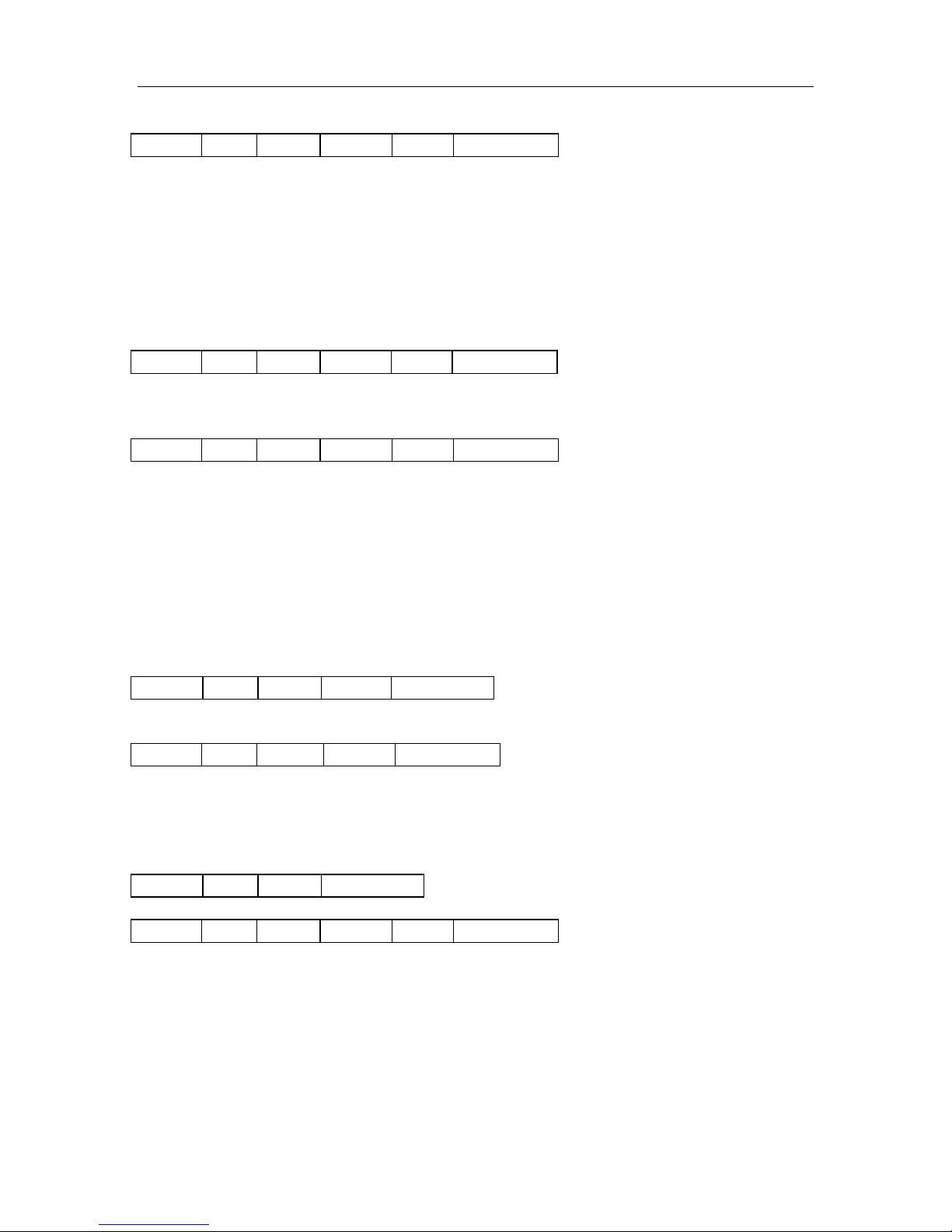
4-4-15. Manage Red Led
Code: 0 command red led turn off , other red led turn on, 1 byte
Return:
Status: 0x00: Operation succeed
0xF0: Checksum error
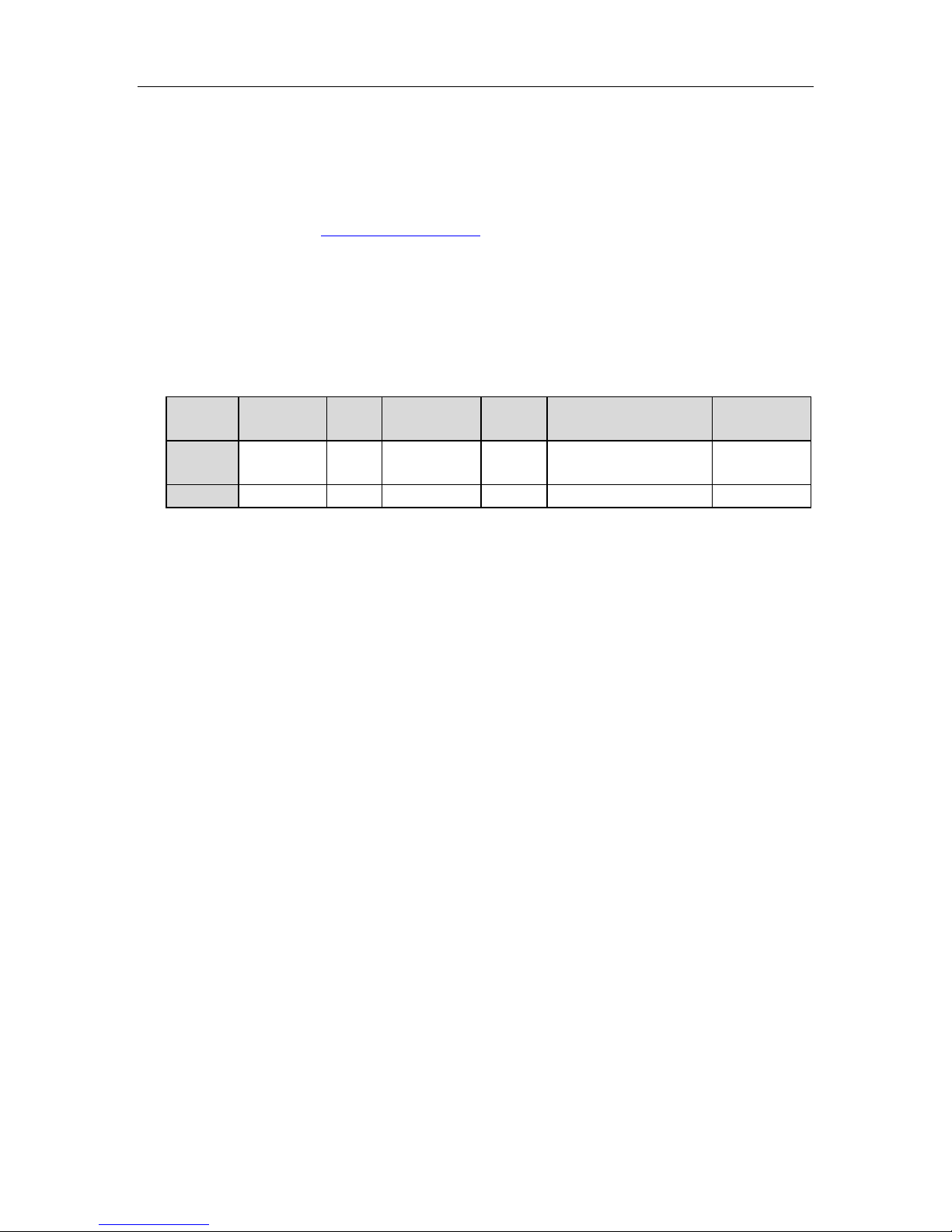
4-4-16. Get firmware version
Response:
[3]
Status: 0x00: O per ation success
0xF0: Checksu m err or
Data: firmware version.
http://www.stronglink-rfid.com
Page 12
StrongLink SL025M
12
Preamble
Len
Command
Status
Data
(Firmware version)
Checksum
HEX
BD
0C
F0
00
53 4C 30 32 35 2D
312E 32
69
ASCII
“SL025-1.2”
Remark
[1]
In order to support 7 byte UID Mifare class, the firmware of SL025 has been
updated to Ver1.2 in Mar 2011.
And older firmware version (such as Ver1.0, 1. 1) only supports 4 byte UID.
Please refer to NXP Customer Letter UID for detailed information of 4 byte & 7 byte
UID of Mifare products.
[2]
To support NATG203, the firmware of SL025 has been updated to Ver1.6 in May
2012. The older firmware version only supports reading/writing data page address less
tha n 16.
[3]
One sample of SL025 response
http://www.stronglink-rfid.com
 Loading...