

Page 1

Stream Labs, JSC.
Stream Logo SDI 2.0
User Manual
Nov. 2004
Page 2
STREAM Labs
USER’S MANUAL
LOGO GENERATOR
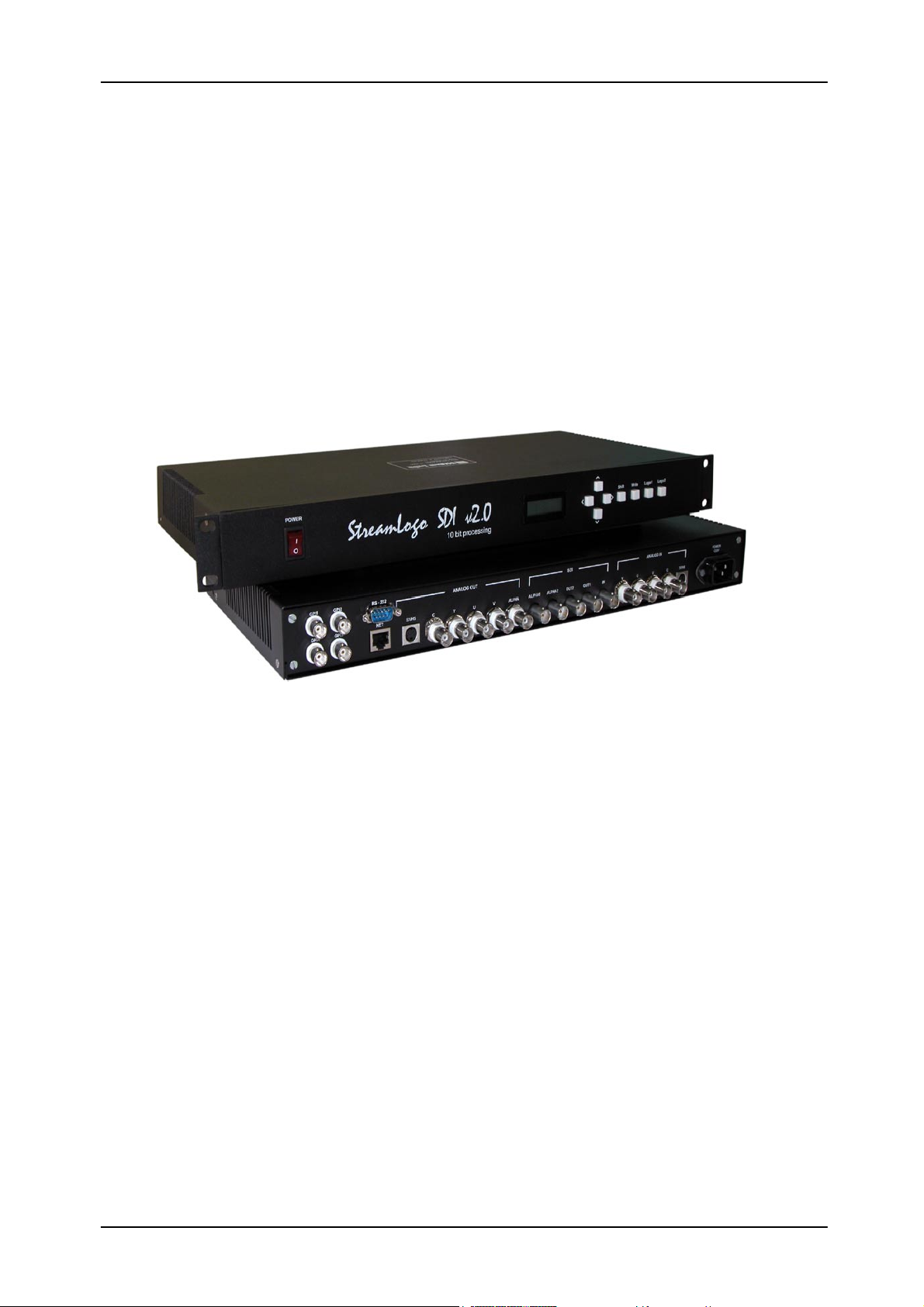
Stream Logo SDI v2.0
Stream Logo SDI v2.0 is designed to work with 8 and 10 bit serial component
SDI input signal and 10-bit output signal in full compliance with the CCIR656 and
SMPTE259m recommendations. All service information is kept as the signal passes
through the card; sound packets can be either kept or replaced, according to the
conditions required. The input signal is checked for errors with the EDH checksum
calculation. Output EDH packets are always formed anew in compliance with the
SMPTE165 recommendation.
1. Open architecture and powerful Phillips Trimedia video processor.
2. Analog YUV/RGB, S-Video, and Composite outputs.
3. 9-bit treatment and separation of brightness and color saturation in composite
PAL, SECAM, and NTSC signals based on the adaptive ‘color combine filter’.
4. Pass-through and mixer operation modes. Alpha-channel (DSK) output is
provided for mixer mode operation.
5. Control features using front panel buttons, LAN (TCP/IP protocol), or GPI.
6. In-built nonvolatile 32 MB hard disk with an option of inner memory extension.
7. Saving of static frames from a serial digital source to the in-built hard disk.
8. Replay of static and dynamic logos, analog and digital clocks.
9. Add-on modules for output of exact time and coordinates (satellite
synchronization), temperature, pressure, and humidity readings.
Stream Logo SDI is a comprehensive device, a Logo Generator and an
Inserter/Keyer combined. The system’s open architecture and the in-built powerful
Stream Logo SDI v2.0 1
Page 3

STREAM Labs
USER’S MANUAL
Phillips Trimedia video processor allow to extend the Stream Logo SDI functionality by
improving inner algorithms, without any hardware changes. Stream Logo SDI allows to
compress files inside the system, in order to provide a more economical storage.
Phillips Trimedia computing power can be used, for instance, to make the hands of a
clock inside the Stream Logo SDI move, by a simple specification of appearance of the
hands and the background (which can also be dynamic).
External files are uploaded to the in-built nonvolatile hard disk via the network.
Each point has a 32-bit representation: 24 bits are used to represent the dot’s color (16
million hues); the remaining 8 bits specify one of the 256 transparency degrees (alpha-
channel). Although the point color component has in the computer graphics a 24 bit
representation (8×8×8), a 30 bit representation (10×10×10) is used for mixing, i.e. if a
10 bit input signal was used, it remains this way after the mixing.
Stream Logo SDI can run in pass-through or mixing operation modes. For mixer
operation, and alpha-channel (DSK) is provided in digital and analog formats. Positive
or negative key signal delay can be set within a broad diapason with regard to the
produced graphics. The entire production of the superposed logo is carried out digitally.
Transformation of signal formats
In addition to the serial digital input, the Stream LOGO SDI card has analog
inputs: YUV/RGB, S-Video, and Composite. Independently of the input signal type, the
card allows to form analog output signals (YUV/RGB, or S-Video and Composite )
simultaneously with the SDI signal. PAL, SECAM, and NTSC, inputs are allowed; PAL
or NTSC only can be set as output standards. The frame frequency is constant, which
means that an NTSC signal can only be transformed to, or produced from, another
NTSC signal. The distinctive feature of the input decoder is the 9 bit treatment and the
separation of brightness and color saturation in composite PAL, SECAM, and NTSC
using the adaptive ‘color combine filter’. It does not reduce the brightness channel
bandwidth. The 9-bit treatment allows to keep at the digitization all 256 brightness
grades, as compared to the 160-170 possible to keep with the 8-bit treatment.
A 10-bit digital-to-analog converter with a four-fold oversampling is used to form
the analog output signals. It allows to ensure a full high-frequency noise filtration of
output signals without reducing the bandwidth of their brightness channel.
Stream Logo SDI Control
Stream Logo SDI can be controlled with the front panel buttons, which allow to
change the logo position and the logo itself. Other functions are controlled using a
dedicated program run on an external computer. It allows to specify the logos output
Stream Logo SDI v2.0 2
Page 4
STREAM Labs
USER’S MANUAL
sequence, to display the sequence and the commands evocating other logos, or to run
their own cycles to form continuous video sequences. The program can also be used to
create a replay sequence for compositions, which can contain an arbitrary number of
static or dynamic logos.
Logo Uploading and Storage
Stream Logo SDI has an in-built network, which allows to upload logos of any
size to the in-built nonvolatile hard disk, where they can be controlled using a dedicated
program.
Logos, including animation logos, designed for full-screen mode or to be
displayed using any portion of the screen, are stored at the Stream Logo SDI hard disk.
Logos are stored at the hard disk and can be almost instantly copied to the video
memory for further replay when it is required by the control program. The system also
allows to save static frames provided by a serial digital source at the in-built hard disk.
In addition to the default version with a 32 MB memory in the in-built nonvolatile
hard disk, Stream Logo SDI can be supplied with an extended memory option used to
perform specific non-standard tasks.
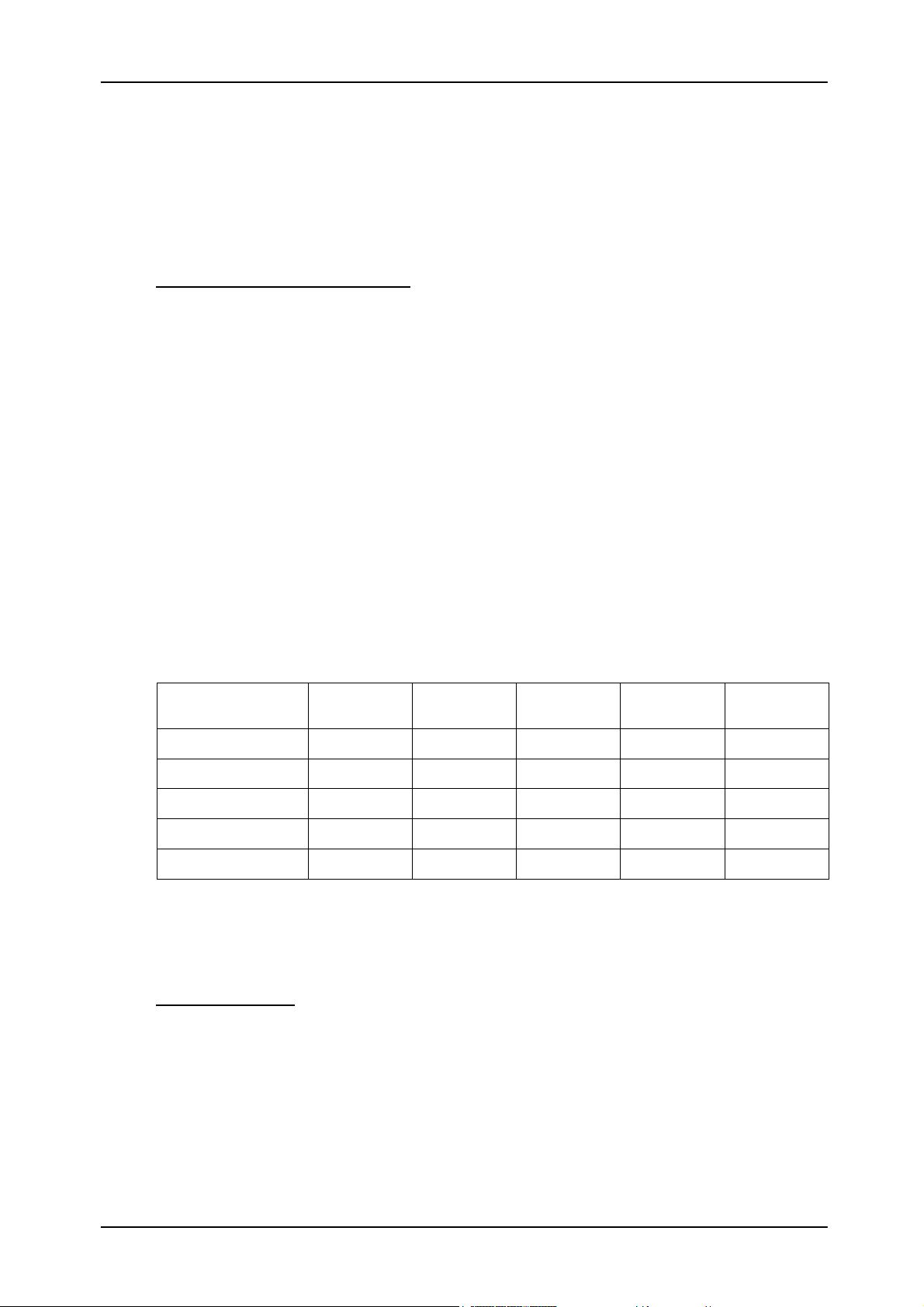
Number of static logos to be stored at the Stream Logo memory simultaneously:
In-built memory
Full-screen 1/2 1/3 1/4 1/9 (80x64)
size
32 MB (default) 26 52 78 105 234
128 MB 105 210 315 420 945
256 MB 210 420 630 840 1890
512 MB 420 840 1260 1680 3780
1 GB 840 1680 2520 3360 7560
512 MB or 1 GB memory cards can be installed. The data provided concern
uncompressed logos.
Dynamic Logos
Dynamic logo replay duration is 2.3 seconds for a full-screen animation, and 21
seconds for a 70×70 pixel animation. This time can, however, be extended if the task of
output of the animated logo from the video memory, and that of uploading of the
compressed animation from the in-built hard disk to the video memory, are separated.
However, this procedure is not yet implemented, and it is impossible to determine the
duration limit for a full-screen dynamic logo.
Stream Logo SDI v2.0 3
Page 5
STREAM Labs
USER’S MANUAL
Stream Logo SDI v2.0. Device Control Program Description
Software package: SL_SdiTM.exe + SlAlpha.dll + SL_sdi.ini
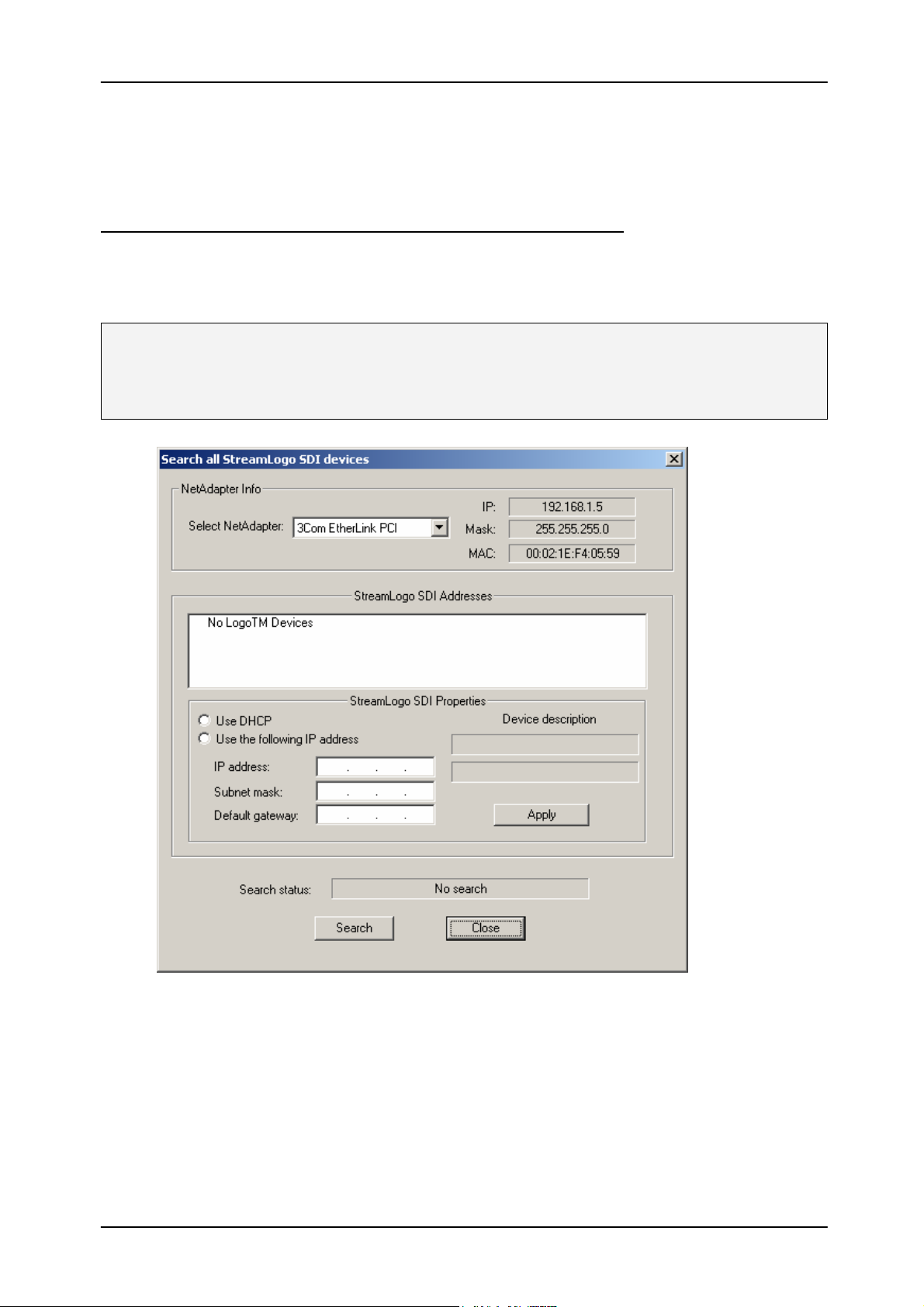
1. When the program (SL_SdiTM.exe) is launched, a dialog box appears with a list
of Stream Logo SDI v2.0 devices present inside your LAN.
Note: Each StreamLogo SDI device is assigned its current IP address by a DHCP server. If
no DHCP server is present in the network (i.e. the IP addresses are assigned manually), each
device may be assigned a fixed IP address.
At the first program launch, the list is empty. Press [Search] if you wish to
check the correctness of IP addresses or to find a new device. The program will
then start looking for Stream Logo SDI v2.0, after which it displays the
information on presence of these devices in the network, or their absence. The
program can simultaneously support several Stream Logo SDI v2.0 support. To
continue the work, press [Close] to close this dialog box.
Stream Logo SDI v2.0 4
Page 6
STREAM Labs
USER’S MANUAL
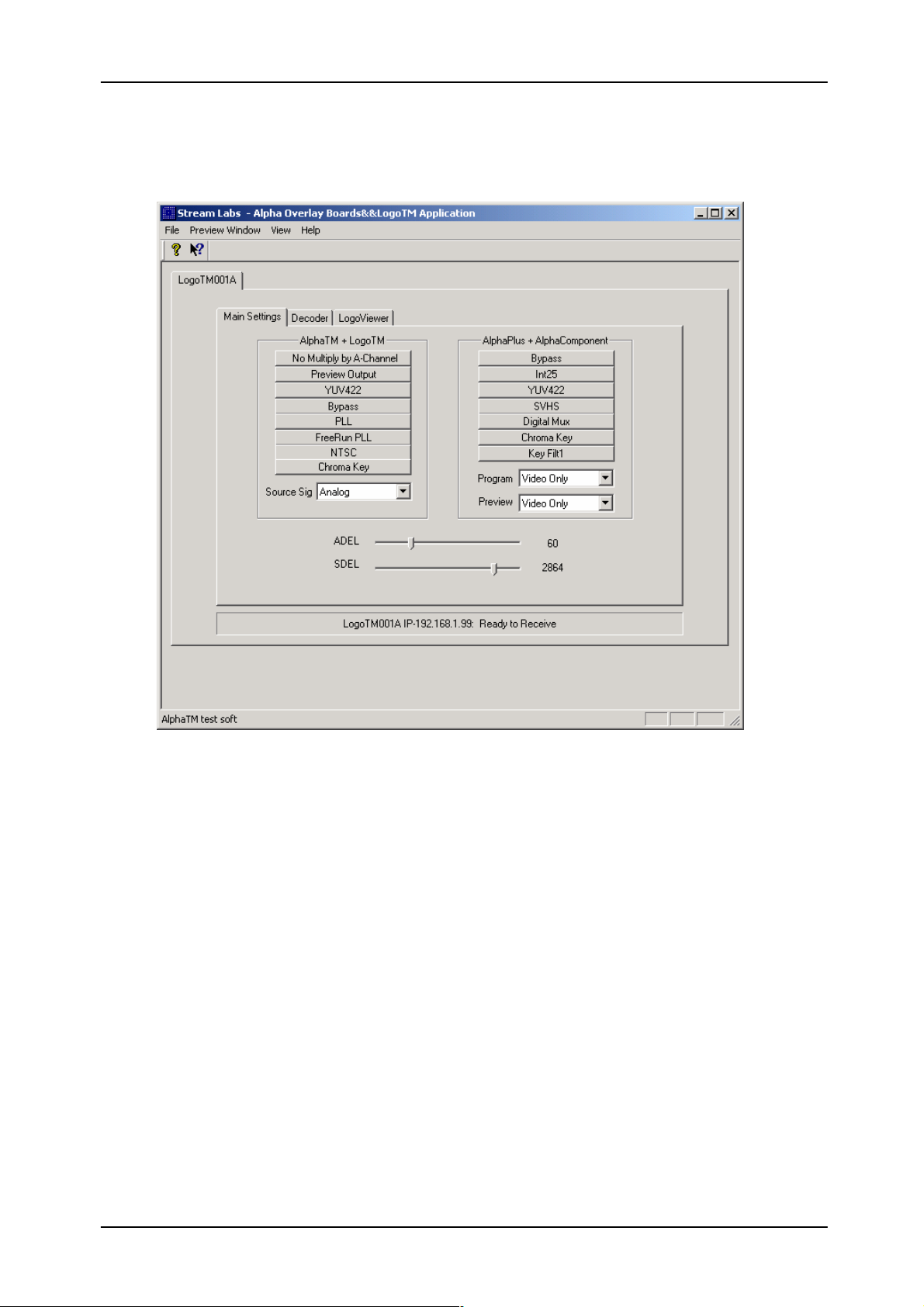
2. If Stream Logo SDI v2.0 devices are located inside the LAN, the program main
window is displayed, which contains tabs for all found devices.
The window, which contains the tabs of the devices, also contains another range
of tabs allowing to control the Stream Logo SDI v2.0 parameters.
3. Switching to the [Main Settings] tab allows to control the following device
parameters:
• Input commutation [Select Source]: Analog/SDI. An analog and digital
format alpha-channel (DSK) is provided for operations with a mixer,
activated with the selection of the Analog Synch/SDI Synch input.
• Switching on/off of Alpha-channel multiplication [No Multiply by A-
Channel]. When the alpha-channel multiplication mode is activated, logos
are superposed on the passing-through video signal.
Stream Logo SDI v2.0 5
Page 7
STREAM Labs
USER’S MANUAL
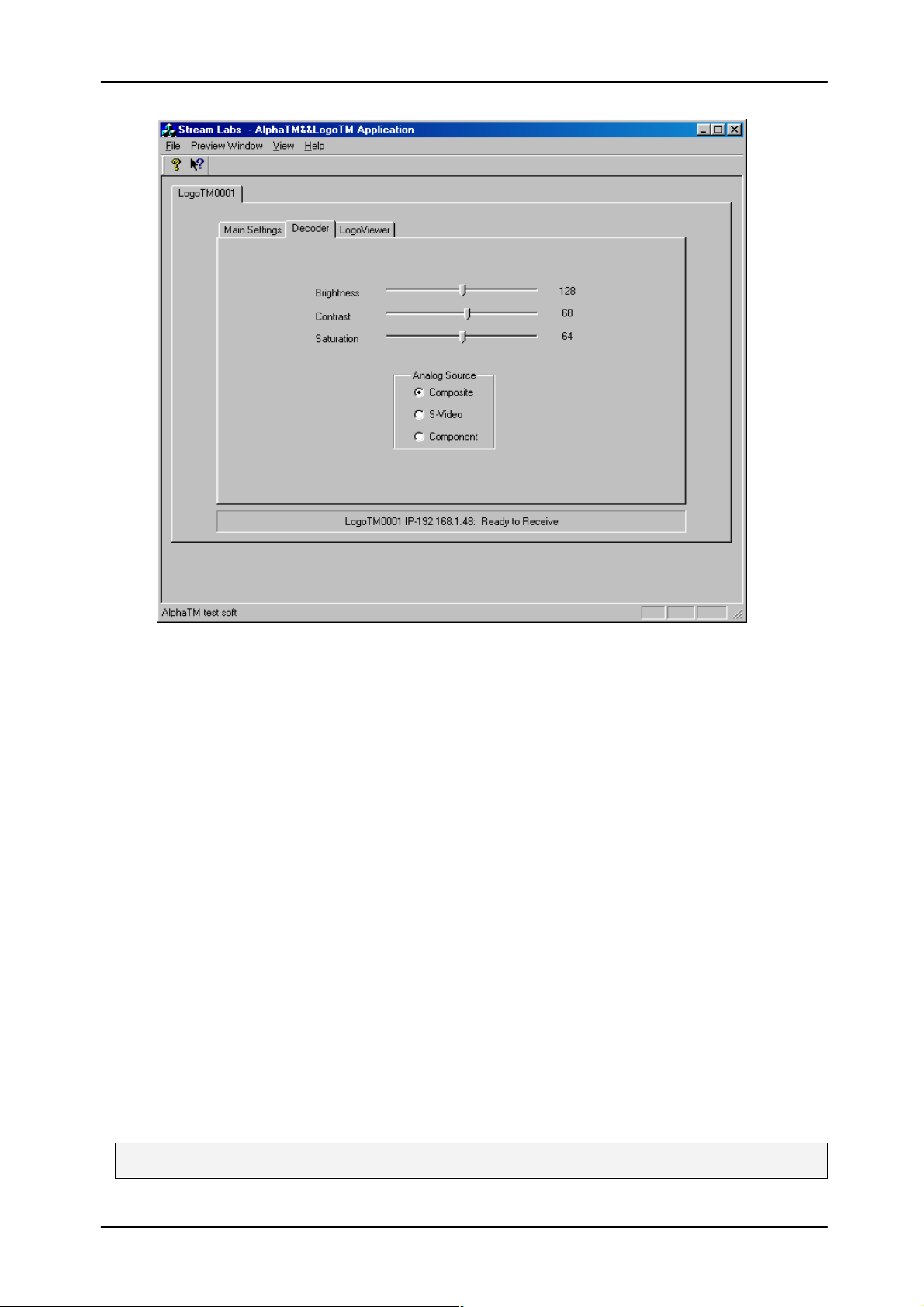
4. Switching to the [Decoder] tab allows to control the following device parameters
(for active analog input only):
• Brightness / contrast / color saturation adjustment [Brightness] /
[Contrast] / [ Saturation]
• Analog input commutation: [Composite] / [S-Video] / [Component].
Note that the default input signal is Composite, so if you connect an S-
Video or Component YUV signal to the Stream Logo SDI v2.0 input, the
output will only contain the signal formed by the device itself. The device’s
analog outputs are always active simultaneously.
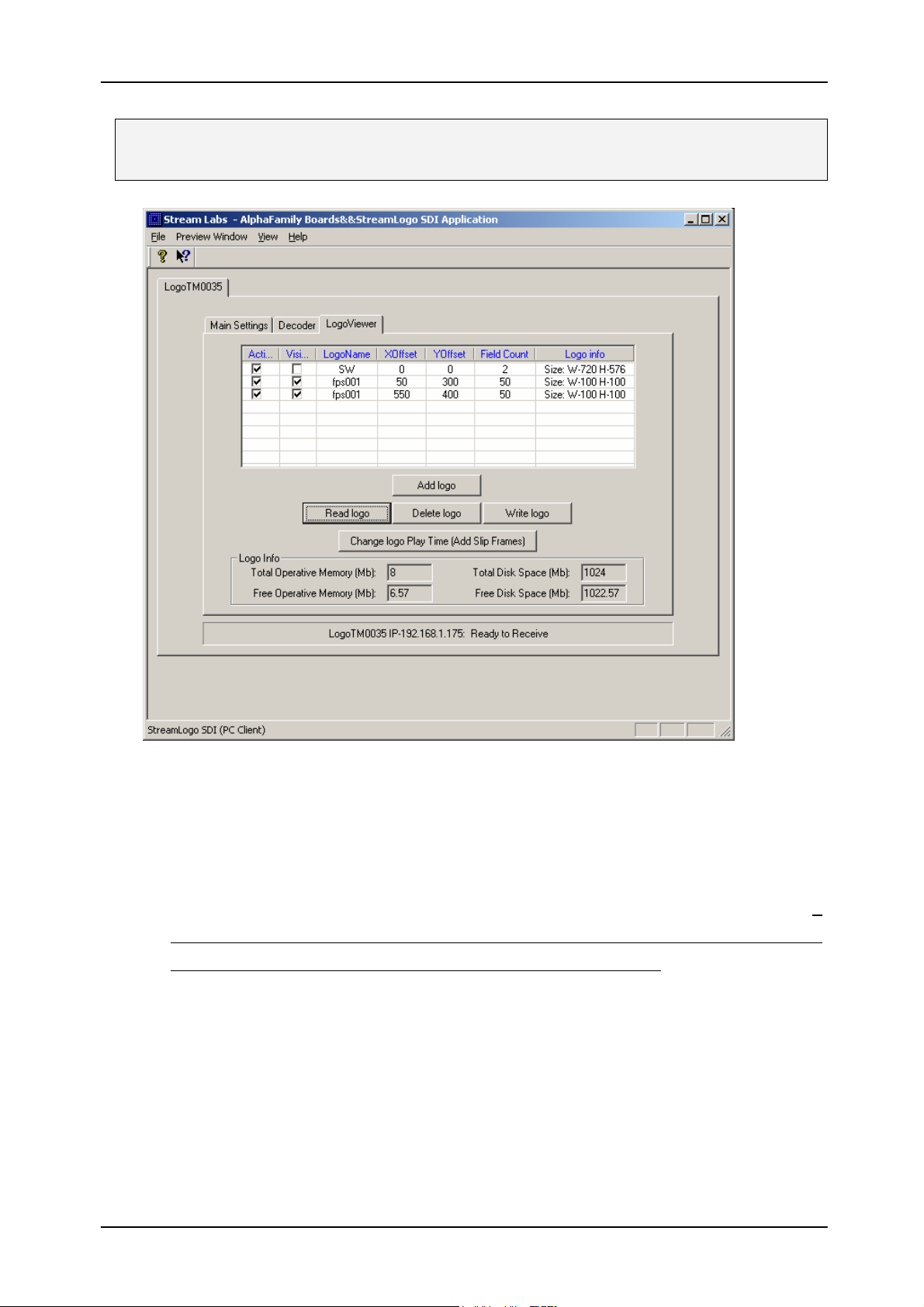
5. Switching to the [LogoViewer] tab allows to control the logos displayed by the
device.
5.1. Press [Read logo] to get the information on the logos stored at the device
hard disk. If the operation is completed successfully, a detailed list of logos and
their parameters (active / displayed / name / position X / position Y / number of
fields / size) is displayed at the table; otherwise, a message is displayed
stating the absence of logos.
Note: Active logo is a logo loaded to the device RAM;
Stream Logo SDI v2.0 6
Page 8
STREAM Labs
USER’S MANUAL
Displayed logo is an active logo displayed by the device. This attribute of a logo can be
used for its quick display/hiding.
5.2. To edit the parameters of a specific logo, click with the mouse at the
corresponding field of the table (logo sizes cannot be edited).
5.3. If some of the logo parameters are changed, the program re-calculates
the free space available in the device RAM and disk memory (Warning: the
maximum size of available RAM is 8 MB, that of disk memory, 32 MB). If
you see status fields display negative values of available memory size, saving
logos with the current parameters can cause a device error.
5.4. To add a new logo, press [Add logo]. The program can add the following
types of logos:
• *.TGA files (separate files or file sequences)
• *.d1 / *.422 files in YUV format.
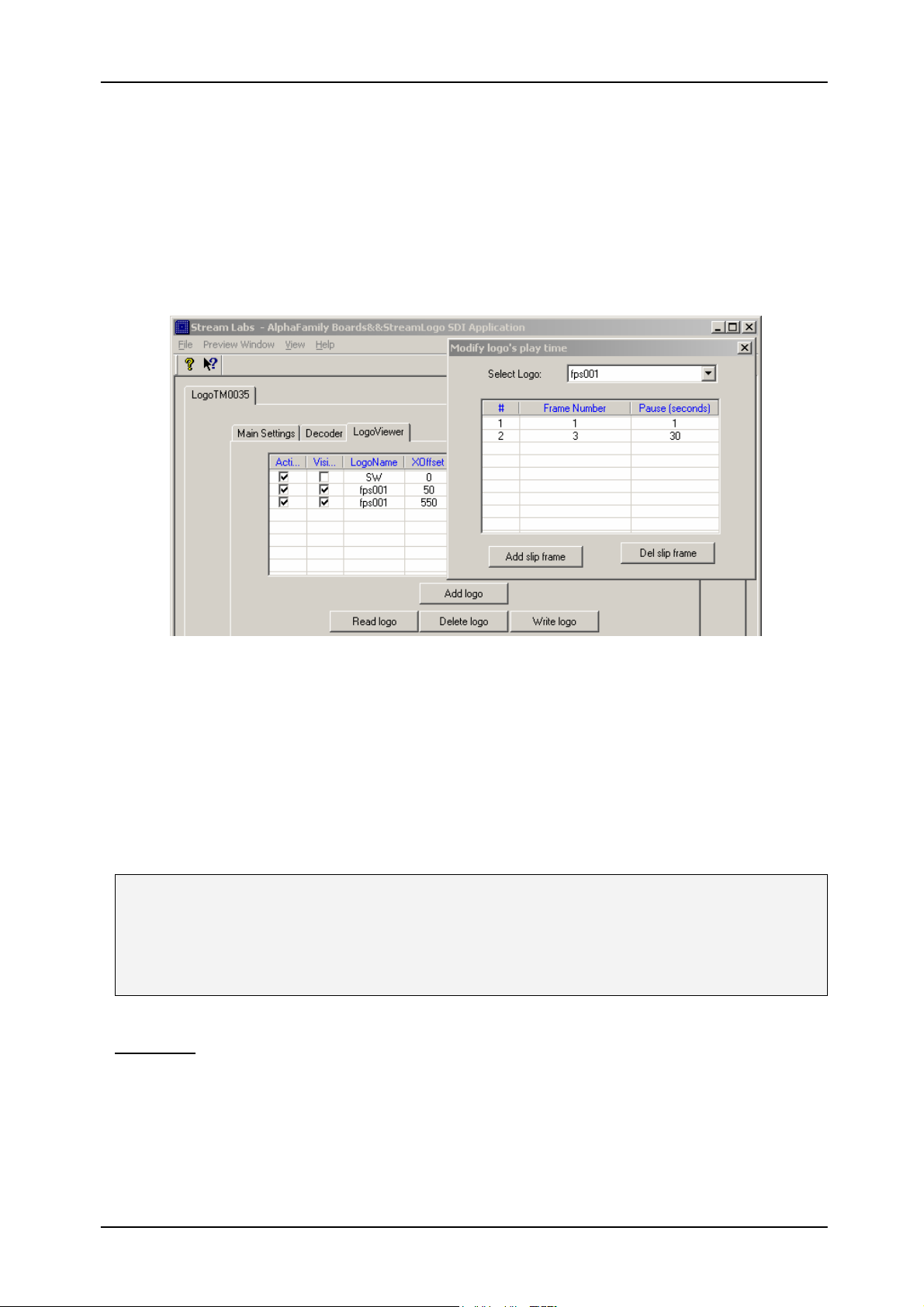
5.5. To change the replay duration for a dynamic logo (the number of frames
in the sequence > 2) press [Change logo Play Time (Add Sleep Frames)].
Stream Logo SDI v2.0 7
Page 9
STREAM Labs
The displayed dialog box allows to choose the dynamic logo, select the frames
(up to 8), and specify the duration of stoppage (Freeze) during the replay. Note
that to ensure the correct replay in (Freeze) mode, it is important that:
• Sleep-frames have odd numbers (1, 3, 5, …);
• A Sleep-frame and the frame which follows it in the sequence are
USER’S MANUAL
doubled.
To save the changes made to the duration of dynamic logos replay, press
[Write Logo].
5.6. To delete a logo (the last logo in the list) press [Delete logo]
5.7. To save the changes made to the logos in the device after any Add / Edit /
Delete operation, press [Write Logo]. The device then reinitializes the active
logos display taking into account the performed changes.
Note: If the [Write Logo] command is not used, changes made to parameters of an active
logo display are only kept until the device power is switched off. In order to keep the
changes made to the properties of active logos display after the device power is off, the
[Write Logo] command must be used.
Warning: closing of the program window or switching between the tabs
corresponding to different logos causes the appearance of a dialog box
prompting to save the current parameters. This applies to modified parameters
of the tabs [Main Settings] and [Decoder] and does not concern the changes
performed in the [LogoViewer] tab.
Stream Logo SDI v2.0 8
Page 10
STREAM Labs
USER’S MANUAL
Stream Logo SDI v2.0 9
Page 11
STREAM Labs
USER’S MANUAL
Stream Logo SDI v2.0 10
Page 12

STREAM Labs
USER’S MANUAL
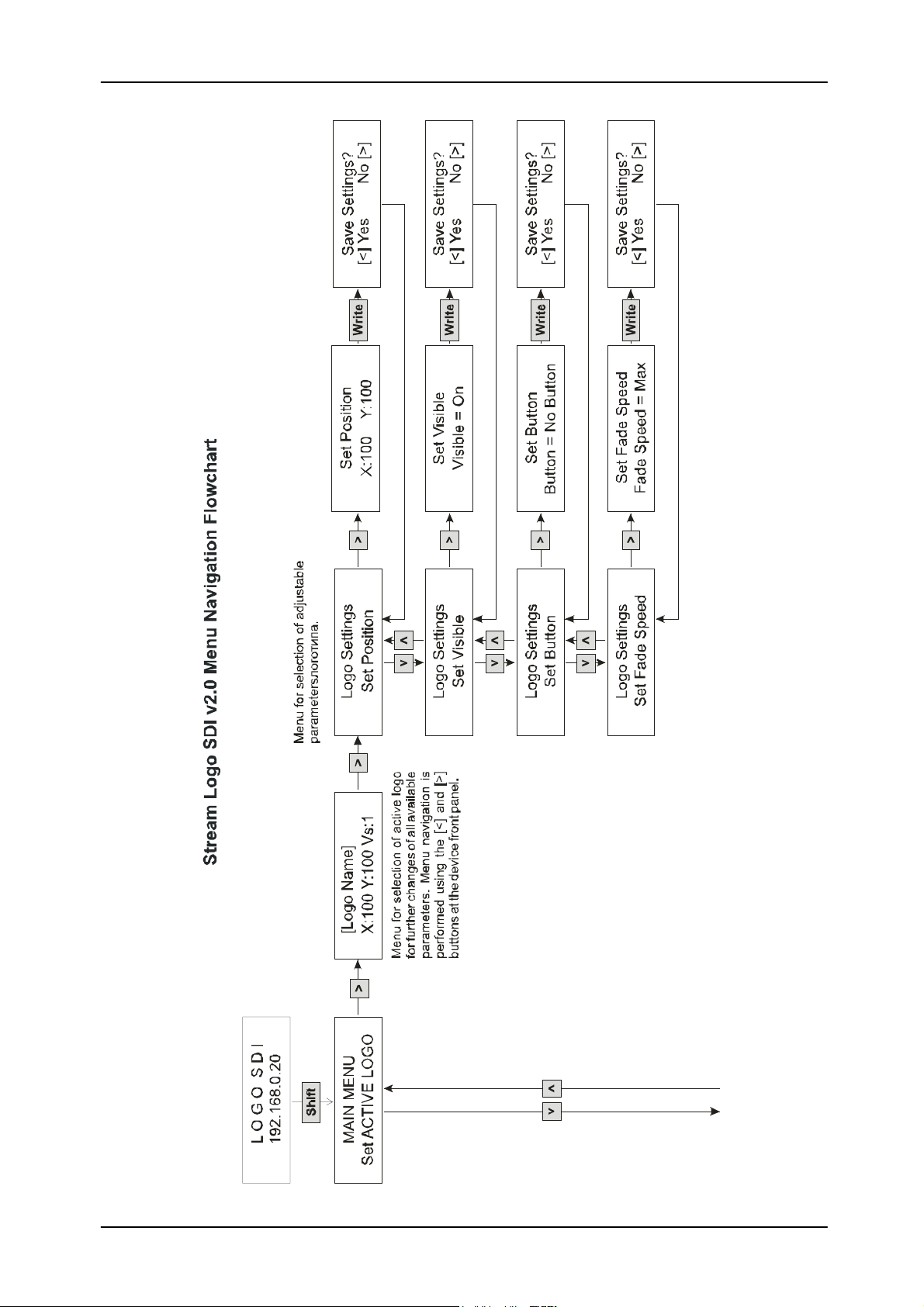
The Set Position menu:
The logo position Х coordinate is adjusted with the [<] and [>] buttons; the Y
coordinate, with the [∧] and [∨] buttons. The zero coordinate point is at the top left
corner.
The Set Visible menu:
Default value: Visible=On.
Possible values: On/Off. Value selection in this and following menus is performed with
the up/down arrows.
The Set Button menu:
Default value: No Button.
Possible values: Logo1, Logo2, GPI01, GPI02, GPI03, GPI04.
Note: Several logos can be assigned to one button. Pressing of this button then causes
all the logos to be broadcasted at once.
The Set Fade Speed menu:
Default value: Max, corresponds to the Cut effect (a logo is displayed within one field).
Min – about 5 seconds; Mid about ½ second.
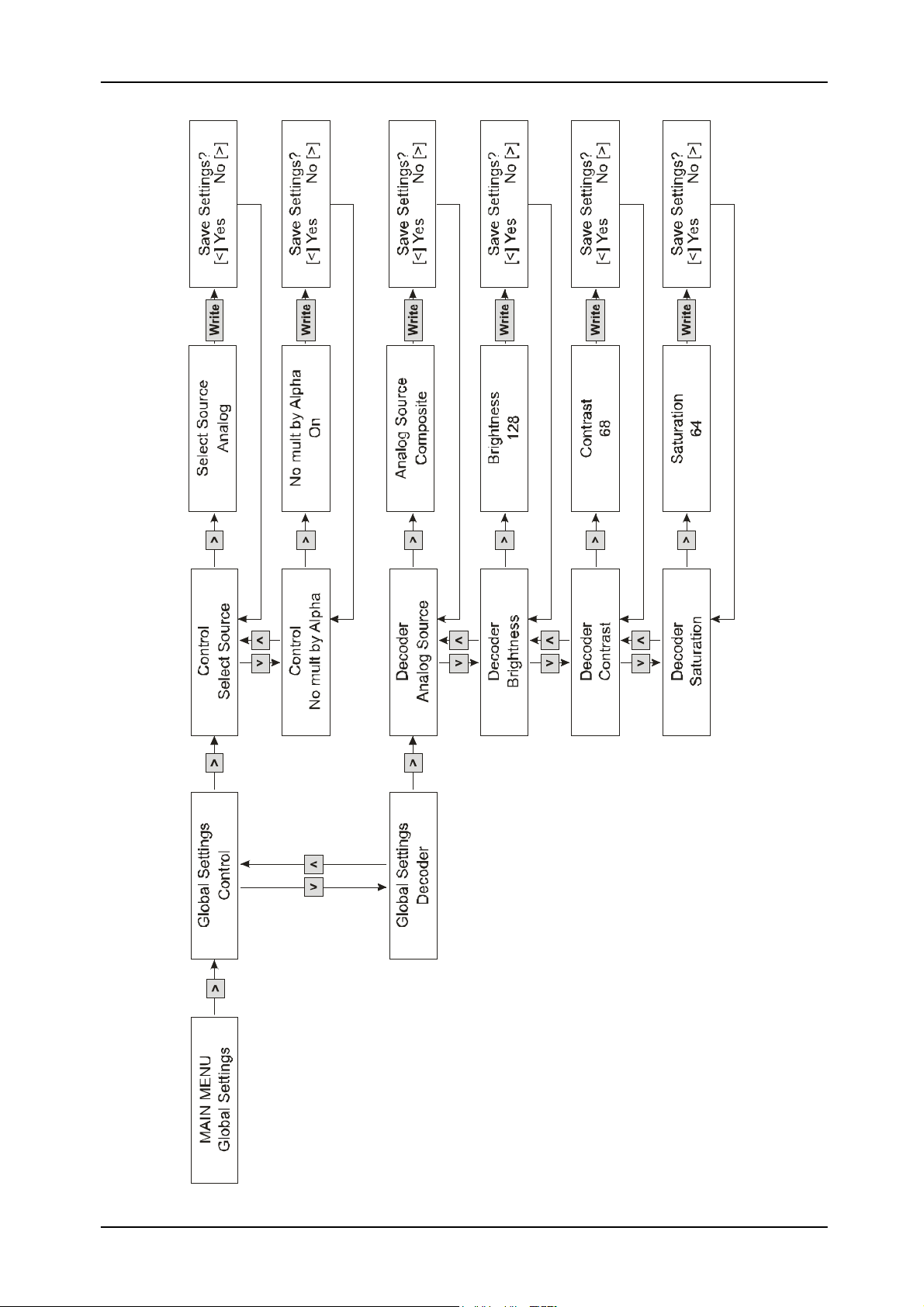
The Select Source menu (input signal selection):
Default value: Analog.
Possible values: Analog, SDI, Analog Sync, SDI Sync.
The No mult by Alpha menu (alpha-channel multiplication mode switching on/off):
Default value: alpha-channel multiplication mode is on.
The Analog Source menu (analog input signal selection):
Default value: Composite.
Possible values: Composite, S-Video, YUV.
Brigthness menu (brightness adjustment):
Default value: 128
Possible values: 0-255
The Contrast menu (contrast adjustment):
Default value: 68
Possible values: 0-127
The Saturation menu (color saturation adjustment):
Default value: 64
Possible values: 0-127
Stream Logo SDI v2.0 11
Page 13

STREAM Labs
USER’S MANUAL
Questions, remarks, and suggestions are to be submitted via e-mail to
[email protected], or via the web-site at http://www.stream-labs.com. The
Stream Labs Co. can also be consulted by phone at (095) 930-80-07/56 on
weekdays from 10 a.m. to 6 p.m., Moscow time.
Warranty
The Stream Labs Corporation provides a five-year warranty for all Stream Alpha
series cards and the Stream Logo SDI v2.0 logo superposition device. A free-ofcharge repair will be offered upon a malfunction due to our fault or that of the
components providers.
This warranty does not cover any malfunction caused by an irregular use, or
unauthorized opening of, or mechanical damage to the product.
This warranty does not cover defects caused by extensive deterioration of the
product.
Copyright Notice
Hardware and software making part delivery package of Stream Alpha cards and
the Stream Logo SDI v2.0 logo superposition device cannot be copied or
transferred in any form without a prior consent of the Stream Labs Corporation.
Contacts
http://www.stream-labs.com/
Stream Logo SDI v2.0 12
 Loading...