

Page 1
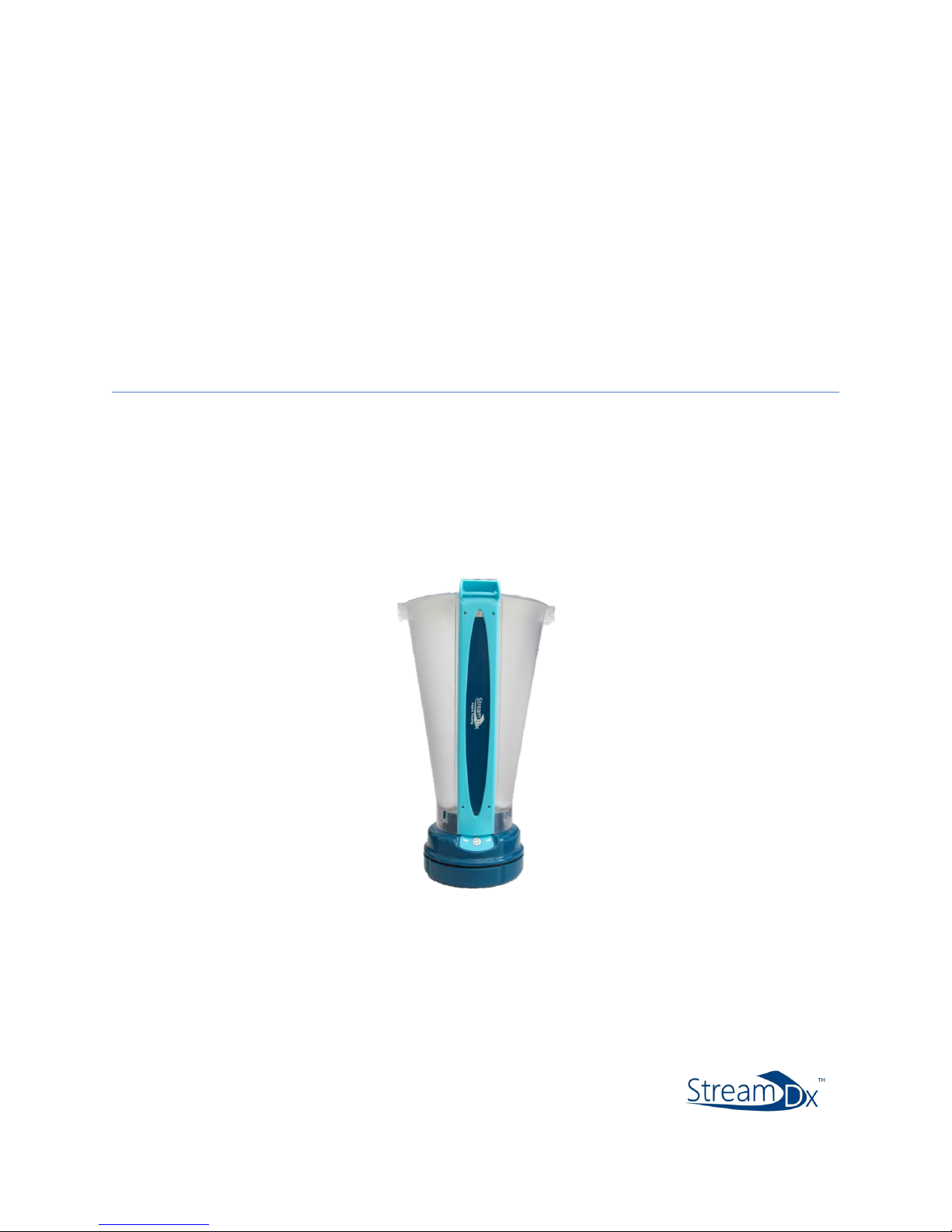
Stream Dx®
User Manual
January 2019
SDX1-5005-04 Rev A
Page 2

2
Stream Dx Inc.
2305 South 1070 West
Salt Lake City, UT 84119
USA
Tel.: 385-549-8060
Website: www.streamdx.com
FDA Listing #: D340522
Manufactured by:
ZIEN Medical Technologies, Inc.
2757 S 300 W Ste. F
Salt Lake City, UT 84115
USA
www.streamdx.com
Document code: SDX1-10003-01
Model: SDX01
Version: V001
Date of release: 01 March 2019
Page 3

3
Table of Contents
1. Introduction ................................................................................................... 5
1.1. Stream Dx .......................................................................................... 5
1.2. Intended Use ..................................................................................... 6
1.3. Safety Information ............................................................................. 7
1.4. User Requirements………………………………………………………………………….7
1.5. About this Manual ............................................................................. 7
2. Physician Registration .................................................................................... 9
3. Ordering a Stream Dx Device ....................................................................... 10
3.1. Patient Registration .......................................................................... 10
3.2. Ordering a Stream Dx Uroflowmeter ................................................ 12
3.3. Instruct the Patient ........................................................................... 12
4. Patient Explanation and Instruction ............................................................. 13
4.1. Explanation to the Patient ................................................................ 13
4.2. Patient Instructions for Use .............................................................. 14
4.3. IPSS Survey ....................................................................................... 15
4.4. Items provided to the Patient ........................................................... 16
5. Device Return and Disposal .......................................................................... 17
5.1. Return of Stream Dx Puck ................................................................ 17
5.2. Disposal of the Stream Dx Sleeve .................................................... 17
6. Maintenance and Troubleshooting .............................................................. 17
6.1. Introduction .................................................................................... 17
6.2. Maintenance: Home Cleaning and Sensor Care ............................... 17
6.3. Troubleshooting .............................................................................. 18
6.3.1. Stream Dx sensor does not function ................................... 18
6.3.2. Explanation of the status LEDs ............................................ 18
6.3.3. Damage to Device……………………………………………………………..18
7. Navigating the Stream Dx Data Portal .......................................................... 19
7.1. Introduction .................................................................................... 19
7.2. Accessing Patient Studies ................................................................ 19
7.3. Viewing Devices in Use .................................................................... 22
7.4. Other Website Features .................................................................. 22
Page 4

4
8. Technical Specifications and General System Information ............................ 23
8.1. Website ........................................................................................... 23
8.2. Stream Dx ........................................................................................ 23
8.3. Classification/approval .................................................................... 24
Appendix A Safety Information ..................................................................... 25
Appendix B Symbol Meanings ...................................................................... 26
Appendix C Accessories and Detachable parts .............................................. 27
Page 5

5
1 Introduction
1.1 Stream Dx Uroflow System
j
The Stream Dx Uroflow System includes both a device and a secure web portal which provides
urine voiding reports for physicians. The Stream Dx Uroflow system is designed to allow
physicians to order a device and have it sent to a patient for use in the comfort of the patient’s
home. The in-home device can collect a voiding diary which includes volume, flow rate, and time
of voiding events over a five-day period.
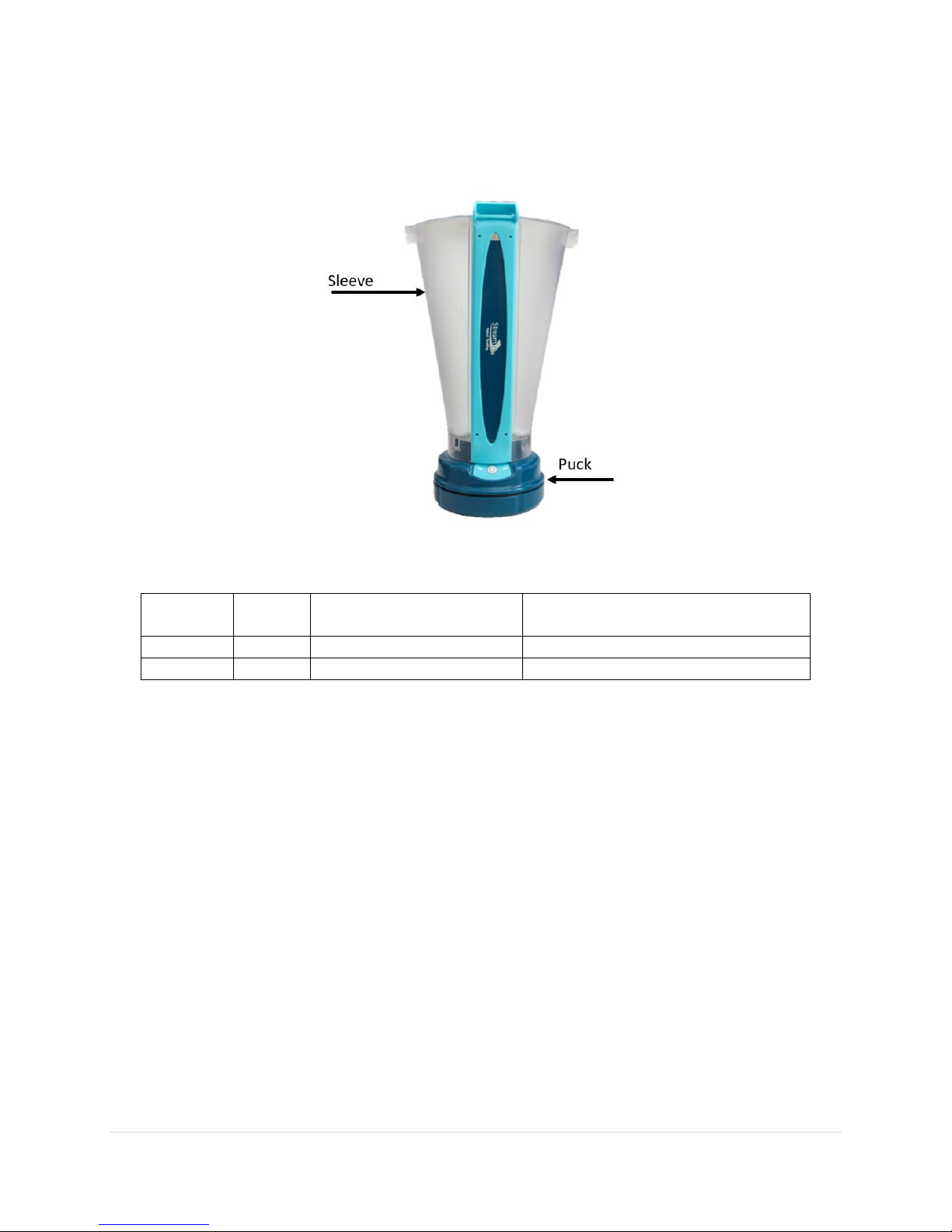
The device consists of two parts, the containment “Sleeve,” and the electronic “Puck.” The Sleeve
and Puck combine to create the urine collection vessel. When a patient is finished using the
device for the designated time, they will dispose of the Sleeve and return the Puck using a prepaid
envelope. The data will be uploaded to the Stream Dx Cloud once the device arrives at the Stream
Dx facility and the reports will be generated as soon as the data is uploaded. The uroflow reports
include a super trace of all flow traces, a Liverpool nomogram, an IPSS survey (if provided by the
patient), three super traces of flow rates broken down by time, daily volume voiding diaries, a
coding summary, and graphs representing each individual uroflow.
Stream Dx is primarily intended to capture data in the patient’s home and provide the data to
physicians as an aid in developing treatment plans. The ability to capture urine flow data outside
the clinic will lead to improved quality of data (due to collecting data in a more natural
environment), improved patient convenience, improved clinic workflow, and a larger amount of
data available to the physician leading to greater statistical significance in diagnosis.
There is one model of the Stream Dx System: Version 1.
Page 6

6
1.2 Intended Use
The Stream Dx Uroflowmeter is intended to electronically collect adult male patient voiding data
to assist in the diagnosis of lower urinary tract disorders. This device is intended for home use.
Stream Dx will calculate a patient's flow rate and their maximum voided volume based on
recorded data. This information will be provided to the caregiver by Stream Dx.
The data obtained from the Stream Dx Uroflowmeter is meant to be used exclusively as a tool
to aid in the diagnosis of a condition. It is not intended to be used alone as the sole method of
diagnosis.
1.3 Safety Information
The Stream Dx User's Manual is intended for physician instruction of the Stream Dx Uroflowmetry
System. Safety information can be found in Appendix A.
1.4 User Requirements
To use the Stream Dx Uroflowmeter, no special skills are required. A patient and/or caregiver
should be capable of filling the Pre-Fill Cup, pressing the start button to start and stop data
recording, emptying out the device, and rinsing the inner part of the cup when finished.
Physicians are recommended to verbally instruct patients on how to use the device. Instructions
will be included with every order (See Section 4). No environmental restrictions are currently in
place for use location.
1.5 About this Manual
The Stream Dx User's Manual is intended for all physicians performing investigations with the
Stream Dx Uroflow System.
This manual provides you with detailed information concerning:
• Physician Registration (Chapter 2)
• Ordering a Stream Dx Device for Patient Use (Chapter 3)
• Patient Use, Return, and Disposal of the Stream Dx Device (Chapter 4)
• Maintenance and Troubleshooting (Chapter 6)
• Technical Specifications (Chapter 8)
The Stream Dx Quick Start Guide is intended for the patient using Stream Dx Uroflowmetry
system in a home setting.
Page 7

7
Feedback on the manual
Stream Dx welcomes your feedback to improve our manuals. Please send your questions and
comments to Stream Dx at [email protected].
Stream Dx Inc.
2305 South 1070 West
Salt Lake City, UT 84119
USA
Tel.: 385-549-8060
Website: www.streamdx.com
Manufactured by:
ZIEN Medical Technologies, Inc.
2757 S 300 W Ste. F
Salt Lake City, UT 84115
USA
www.streamdx.com
Document code: SDX1-10003-01
Model: SDX01
Version: V001
Date of release: 12 January 2018
Page 8
8
2 Physician Registration
2.1 Creating an Account
A clinician must create an account with Stream Dx before receiving a Stream Dx Uroflowmeter.
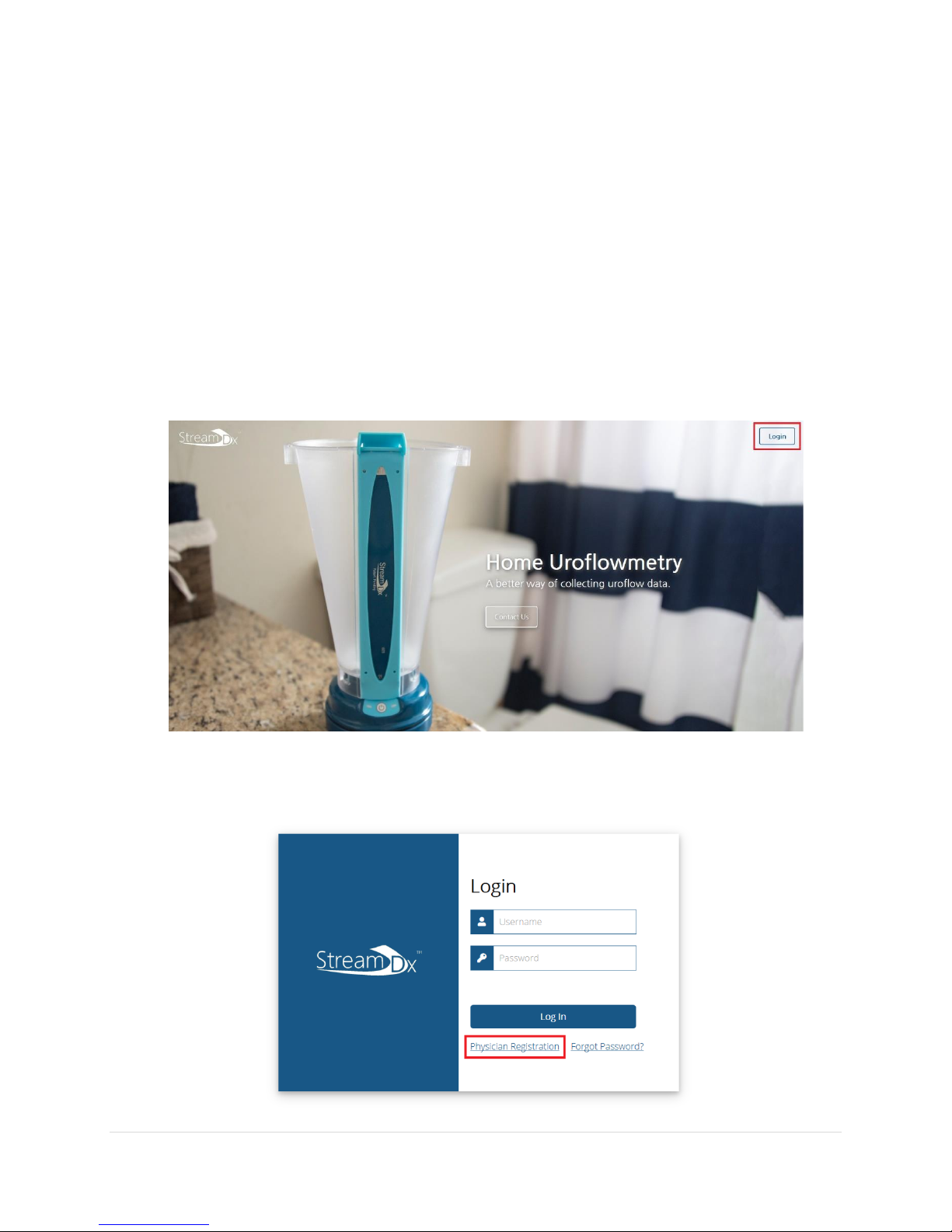
1. Use a web browser to visit https://streamdx.com. We recommend using Google Chrome
for accessing our data portal.
2. On the top right corner of the page, click the Login button.
3. This will bring you to the Login Page. Click the Physician Registration link to begin
creating an account.
Page 9

9
4. Follow the instructions on the page to create your physician account.
• Your username may be the same as your email.
• A Stream Dx sales rep code is required to finish the registration process.
Page 10
10
3 Ordering a Stream Dx Device for Patient Use
3.1 Patient Registration
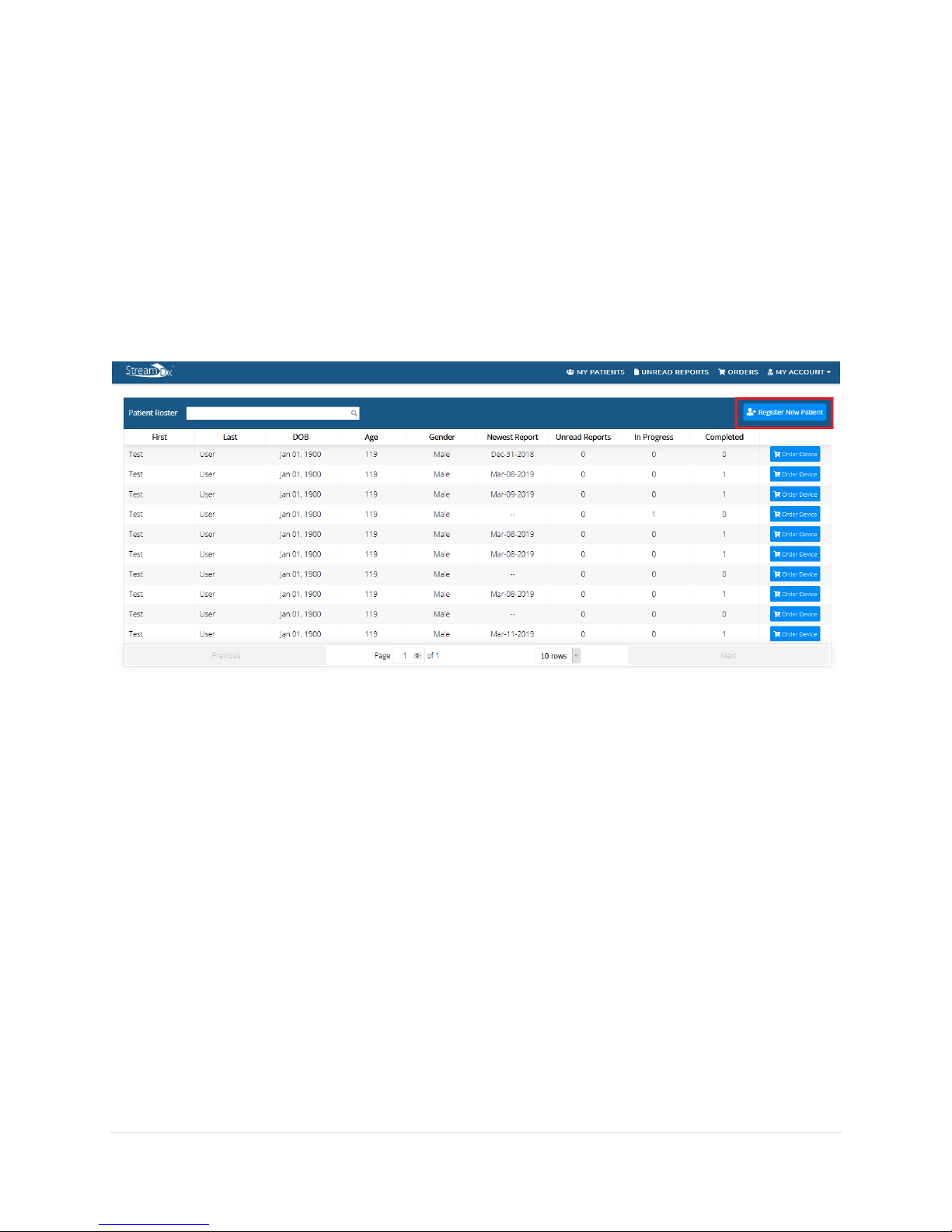
1. Log into your physician account.
2. On the patient roster, click on the Register New Patient Button.
3. Enter in the patient information on the Register New Patient page and click submit.
• The patient’s address must be an address which the United States Postal Service
(USPS) delivers to.
4. A successful registration of the patient will bring you back to the patient’s roster page
and the newly registered patient should show up in the roster.
Page 11
11
3.2 Ordering a Stream Dx Uroflowmeter
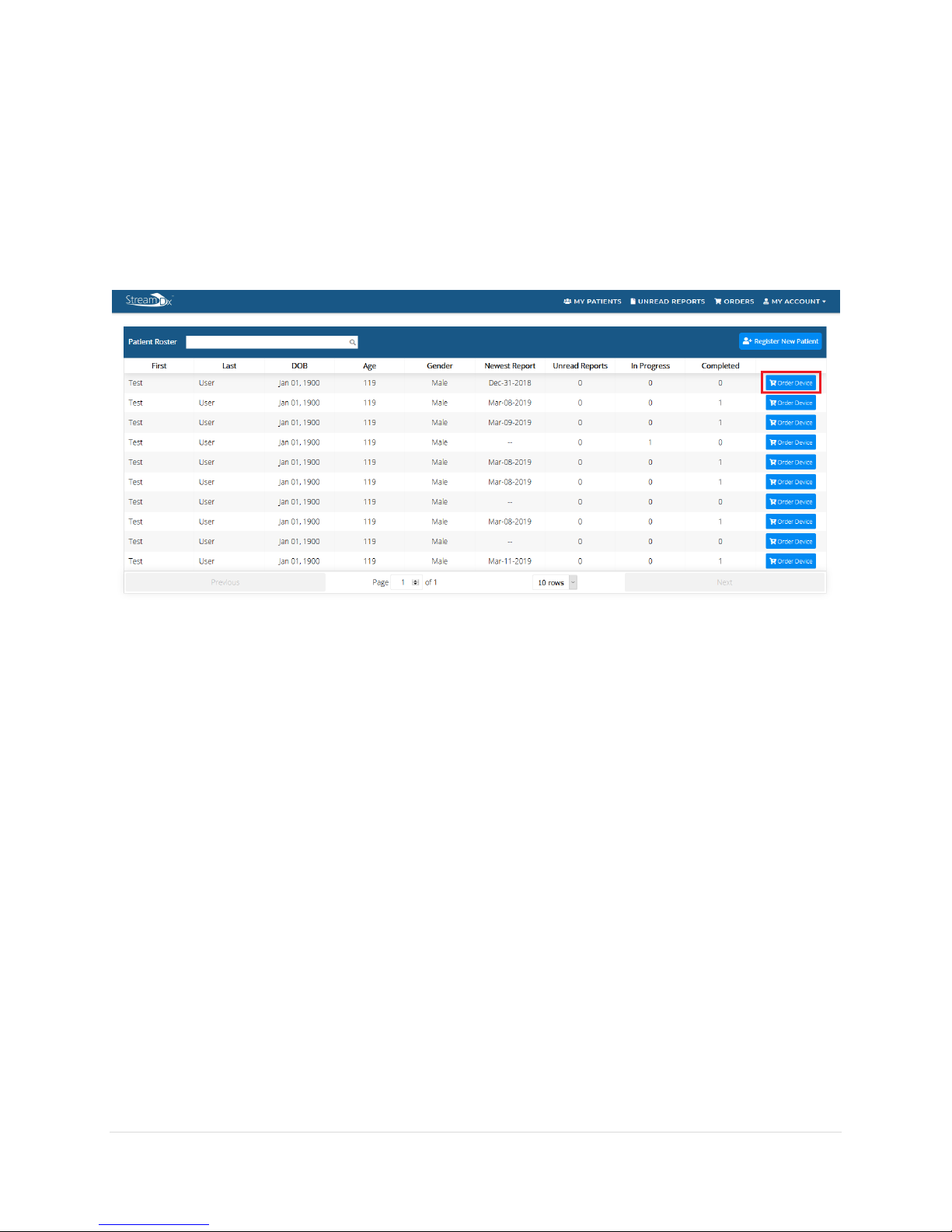
1. To order a device for a registered patient, click on the Order Device button on the same
row in which the patient appears on.
• An order device button can also be found in the Patient’s History page.
2. Review that the Patient’s shipping and contact information are current and submit the
order.
• A patient who currently has an In-Progress order cannot be ordered a new device
until the In-Progress order has been completed.
• The patient should receive a confirmation email once the order has been placed.
This email will include a link to an instructional video on how to use the Stream
Dx device.
Page 12

12
3.3 Instruct the Patient
Inform the patient that the device will arrive approximately 2-3 business days after a device has
been ordered. Go over the information covered in Section 4 Patient Explanation and Instruction
with the patient.
An IPSS survey will be provided to the patient when they receive the Stream Dx Uroflowmeter.
Ask the patient to complete the IPSS Survey and return it with the return package at the end of
their study. Refer to Section 4.3 for a sample of the IPSS Survey.
Page 13

13
4 Patient Explanation and Instruction
4.1 Explanation to the patient
When ordering a Stream Dx Uroflowmeter for a patient, the clinic must explain the use
and return instructions to the patient.
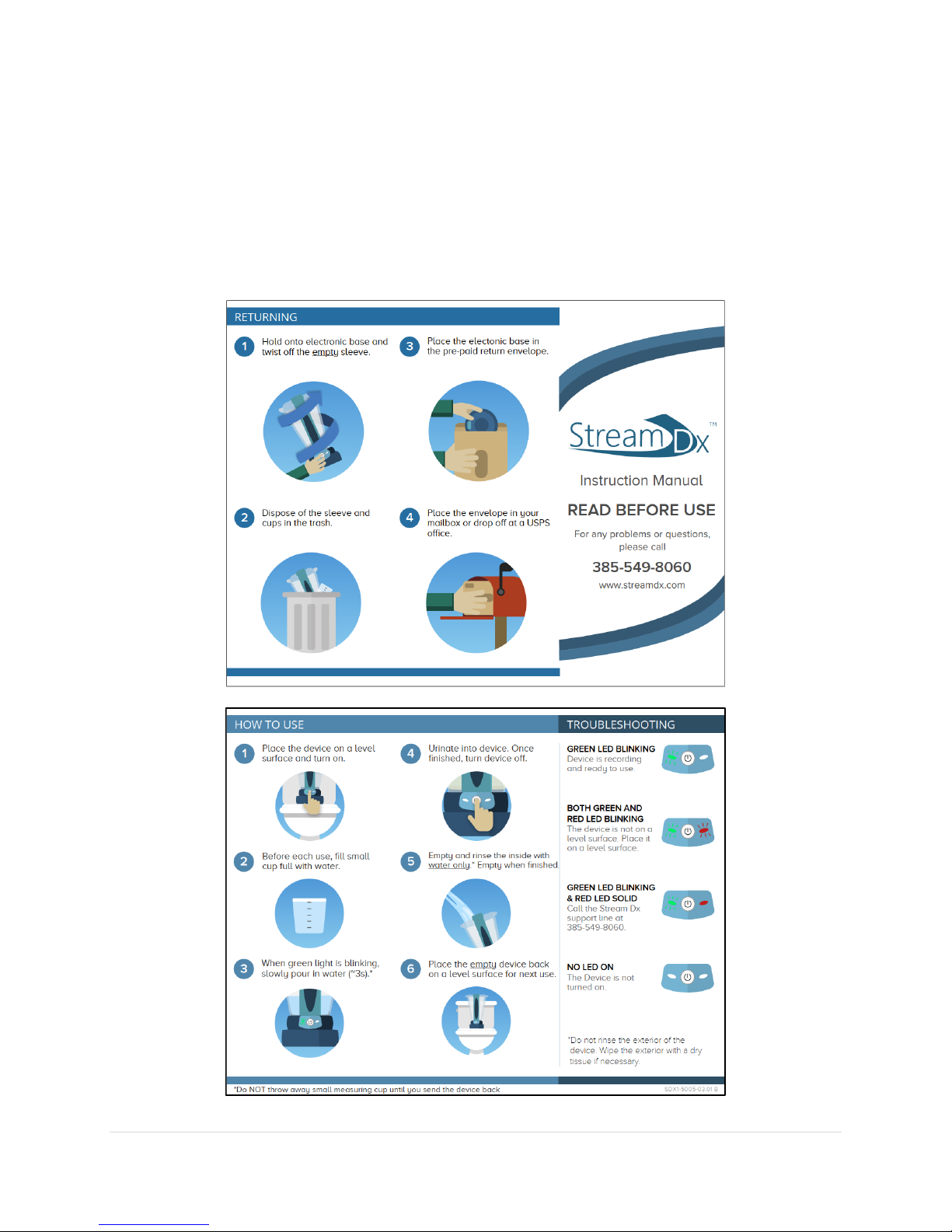
Please refer to Section 4.2 to view the Patient Instructions for use and review them with
the patient. Answer any questions regarding the use of the device with the patient.
Explain the procedure the patient is expected to follow for each void to record data.
1. Close the toilet seat and lid.
2. Place the Stream Dx Uroflowmeter on the toilet lid such that the power button is
facing towards you. If a closed toilet lid is not available, place the Stream Dx device
on a level surface nearby such that the top of the device is around the groin area.
3. Press the power button on the Stream Dx Uroflowmeter and ensure that the green
light is flashing, indicating that it is recording data.
4. Completely fill a Pre-Fill cup (included in the package) with water, and pour slowly
into the device. This step must be completed before every voiding event.
5. Urinate into the Stream Dx Uroflowmeter and aim towards the target on the inside
of the sleeve.
6. When finished, push the power button once more to stop recording and to turn off
the device.
7. Empty the urine into the toilet and rinse the Sleeve with tap water.
8. Store the empty device in the upright position next to the toilet for next use.
Emphasize to the patient the importance of using the Pre-Fill cup and keeping the device
undisturbed on the level surface when in use. The data collected may not be usable if the
device is not prefilled or if the device is not level during use.
Page 14

14
Review Section 6 with the patient for instructions on cleaning, return and disposal of the
device prior to sending the Stream Dx Uroflowmeter home with the patient.
Inform the patient that it is acceptable to start a recording and terminate if they are unable
to void. This will not affect their study.
Refer to Section 6.3.3 for an explanation of status LED lights and review these with the
patient.
Page 15
15
4.2 Patient Instructions for Use
The following pages will be sent to the patient as instructions on how to use the device. The
pages included here are for reference only, and should remain with the instruction manual.
Page 16
16
4.3 IPSS Survey
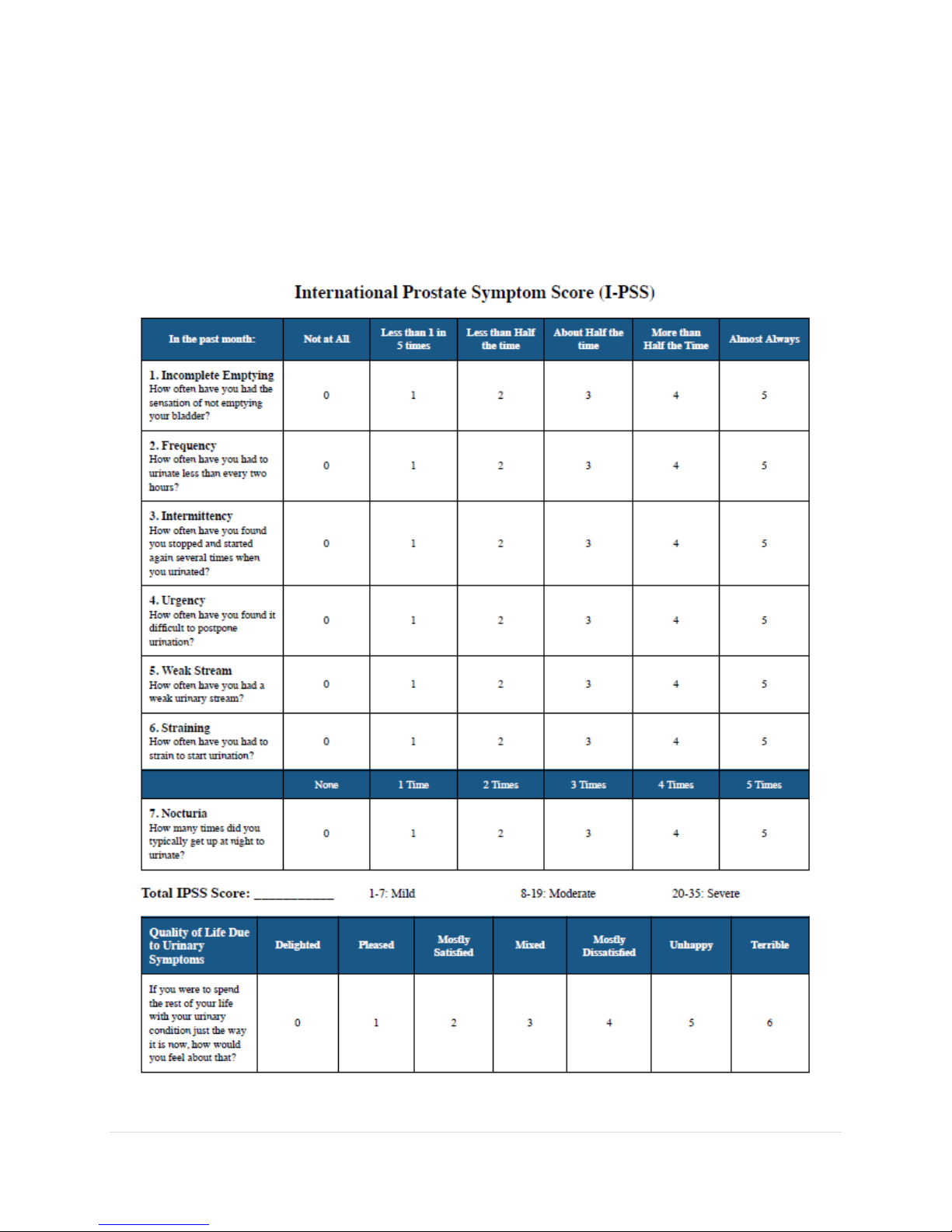
An IPSS survey will be provided to each patient which receives a Stream Dx Uroflowmeter.
Instruct patients to fill out the survey and return to Stream Dx. IPSS surveys returned by patients
will be included in the final reports for each order.
Page 17
17
4.4 Items provided to the Patient
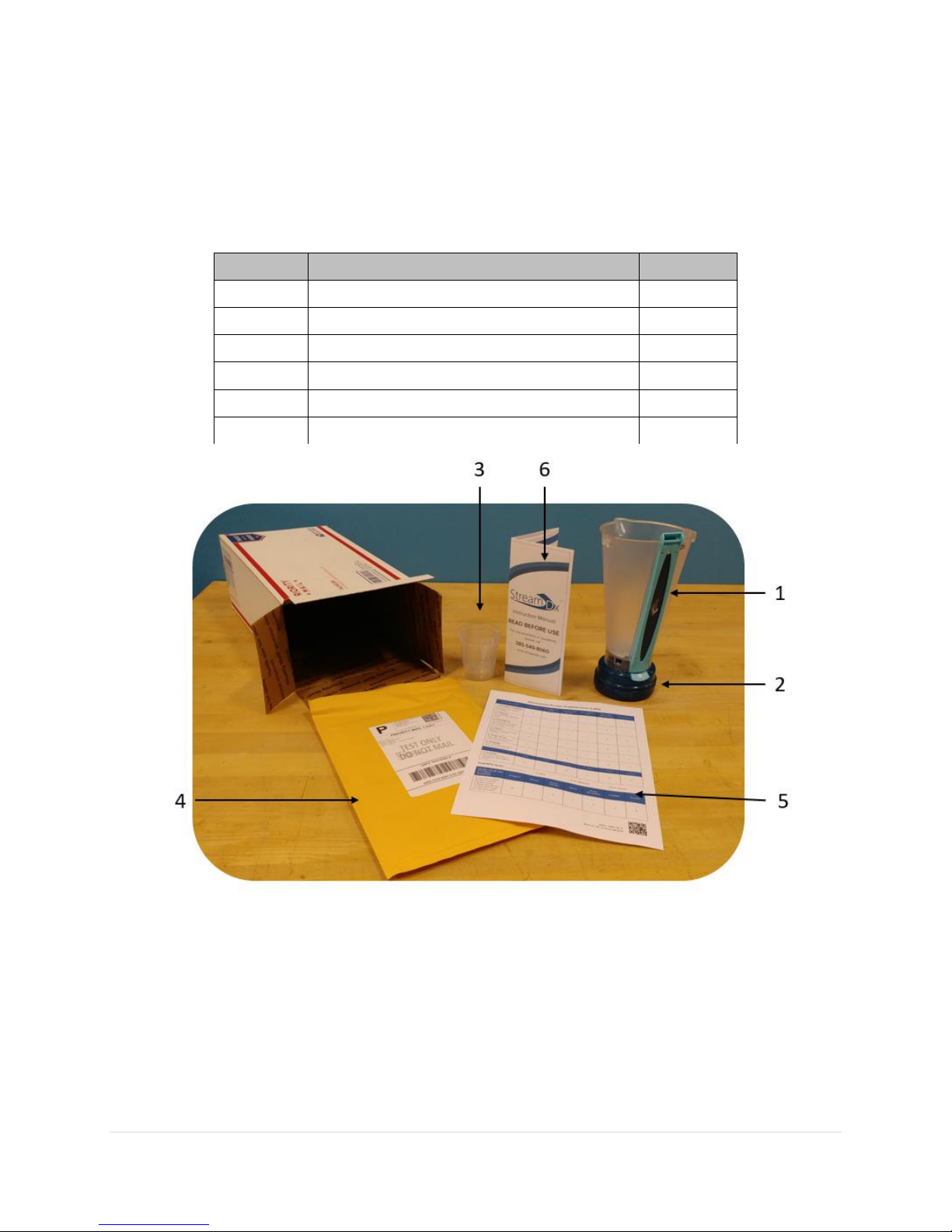
Each Stream Dx Uroflowmeter package will include the following items:
Quantity
Item
Identifier
1
Stream Dx Disposable Sleeve
1
1
Stream Dx Puck
2
2
Pre-Fill Cup
3
1
Return Envelope
4
1
IPSS Patient Survey
5
1
Instructions for Use
6
Page 18

18
5 Device Return and Disposal
5.1 Return of Stream Dx Puck
1. The patient should twist the top Sleeve portion off of the Puck.
2. The Stream Dx Puck should be placed in the pre-paid return envelope along with the
IPSS survey and sealed closed. The patient may drop off the pre-paid return envelope at
any USPS mailbox or USPS office.
5.2 Disposal of the Stream Dx Sleeve
1. The patient may dispose of the Sleeve in the trash once they are finished with it.
Page 19

19
6 Maintenance and Troubleshooting
6.1 Introduction
This chapter contains information regarding the cleaning, return and disposal of the Stream Dx
Uroflowmeter.
6.2 Maintenance: Home Cleaning and Sensor Care
The device is clean and ready to use when it is sent to the patient. The patient should follow the
instructions below to maintain the Stream Dx device during the testing period.
1. After disposal of urine, rinse the inside of the device with tap water.
• External parts of the device can be wiped clean with cloth and water.
2. Store in the upright position in preparation for the next use.
3. DO NOT remove the Sleeve from the Puck between uses. The separation of device
components should be completed only once, at the end of the use period.
4. If the Sleeve is accidentally removed from the Puck, attempt to reconnect the Sleeve to
the Puck. If you have difficulties or the device is not functioning as expected, call the
Stream Dx support line at 385-549-8060.
Page 20
20
6.3 Troubleshooting
6.3.1 Stream Dx Uroflowmeter Does Not Function
If the Stream Dx Uroflowmeter is not functioning as expected call the Stream Dx support line at
385-549-8060 and a customer support agent will assist in troubleshooting or replacing the device.
6.3.2 Explanation of the status LEDs
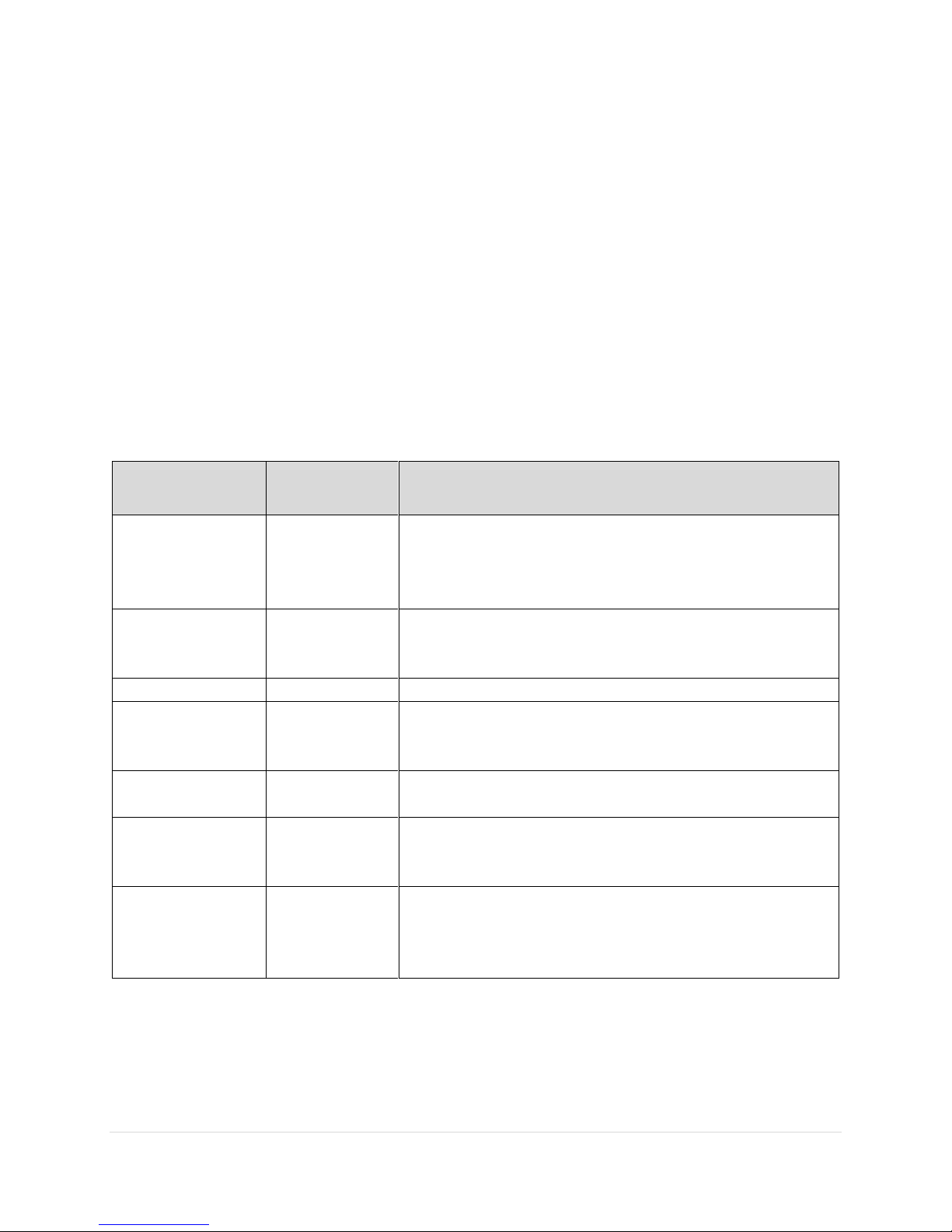
The Stream Dx Uroflowmeter contains two status LEDs for status indication. Please refer to the
table below for descriptions of each status indication.
Green (Left)
LED
Red (Right)
LED
Indication
Off
Off
Stream Dx Uroflowmeter is not functioning.
Possible reasons:
• Device is off
• Device has run out of battery (Highly unlikely).
Flashing Green 3
times after
Button is pushed
Off
The device has successfully saved the recorded data
and is entering low power mode.
Flashing Green
Off
The device has been activated and is ready to record.
Flashing Green
Flashing Red
Device is not on a level surface. Please place device on
a level surface. Red light will turn off when the device is
at a satisfactory tilt.
Off
Solid Red
Device is not functioning correctly. Please contact
Stream Dx.
Off
Flashing Red 3
times and
shutting off.
The sleeve has been disconnected from the puck.
Please contact Stream Dx.
Flashing Green 3
times and turns
off, independent
of button push.
Off
Device has timed out. The device will automatically
turn off 5 minutes after the Button has been pressed.
The device will still be ready to record data after the
Button is pressed again.
Page 21

21
6.3.3 Damage to Device
Prior to use, visually inspect the device for damage. If any damage is seen, such as cracked or
broken plastic components, do not use the device. Contact Stream Dx directly at 385-549-8060.
If you suspect the device has been damaged during use, do not use the device. Contact Stream
Dx directly at 385-549-8060 and notify us of the issue.
Page 22
22
7 Navigating the Stream Dx Data Portal
7.1 Introduction
This chapter describes how to access the recorded patient voids with the Stream Dx
Uroflowmeter and other features.
7.2 Accessing Patient Studies
1. Use a web browser to visit https://streamdx.com. We recommend using Google Chrome
for accessing our data portal.
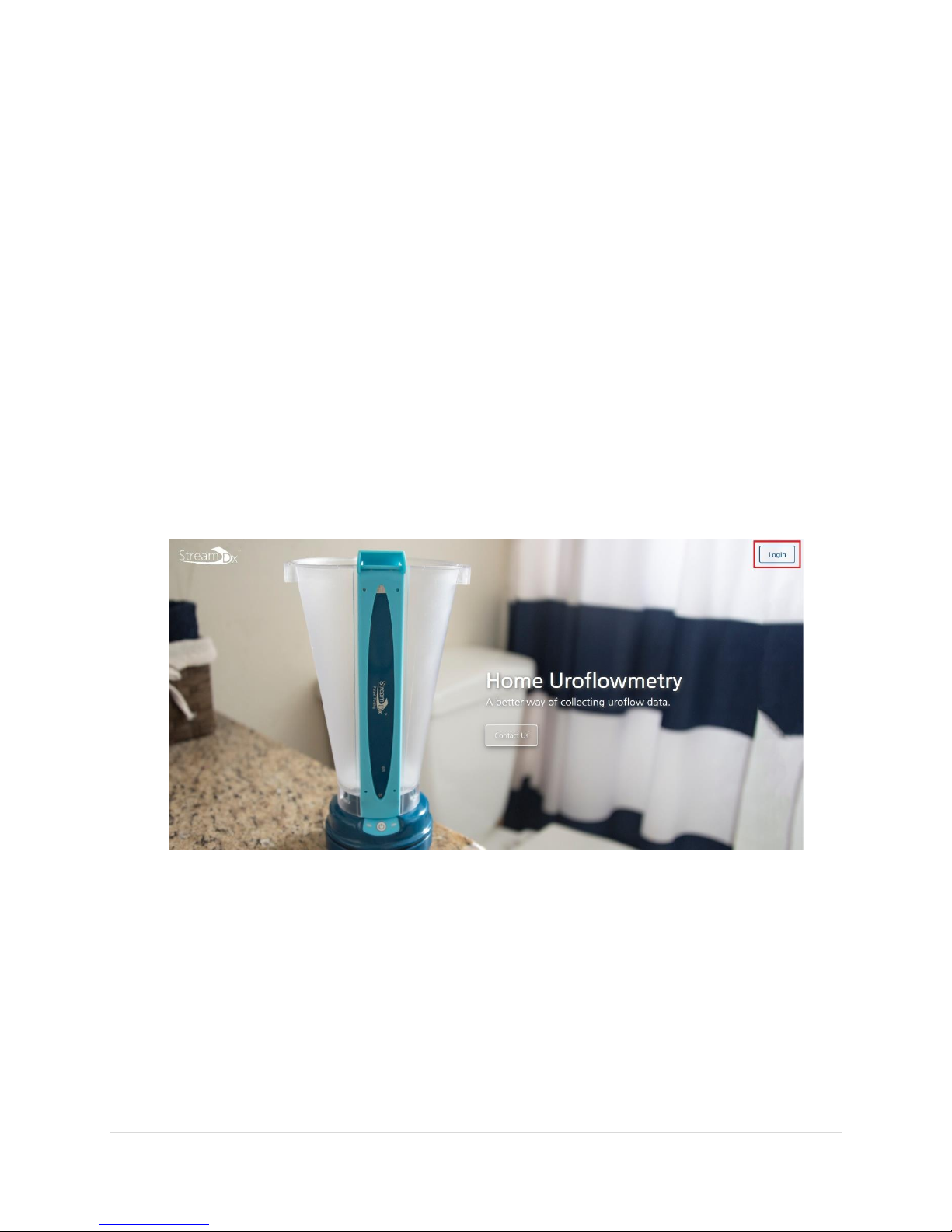
2. On the top right corner of the page, click the Login button.
3. Log in by entering in your username and password.
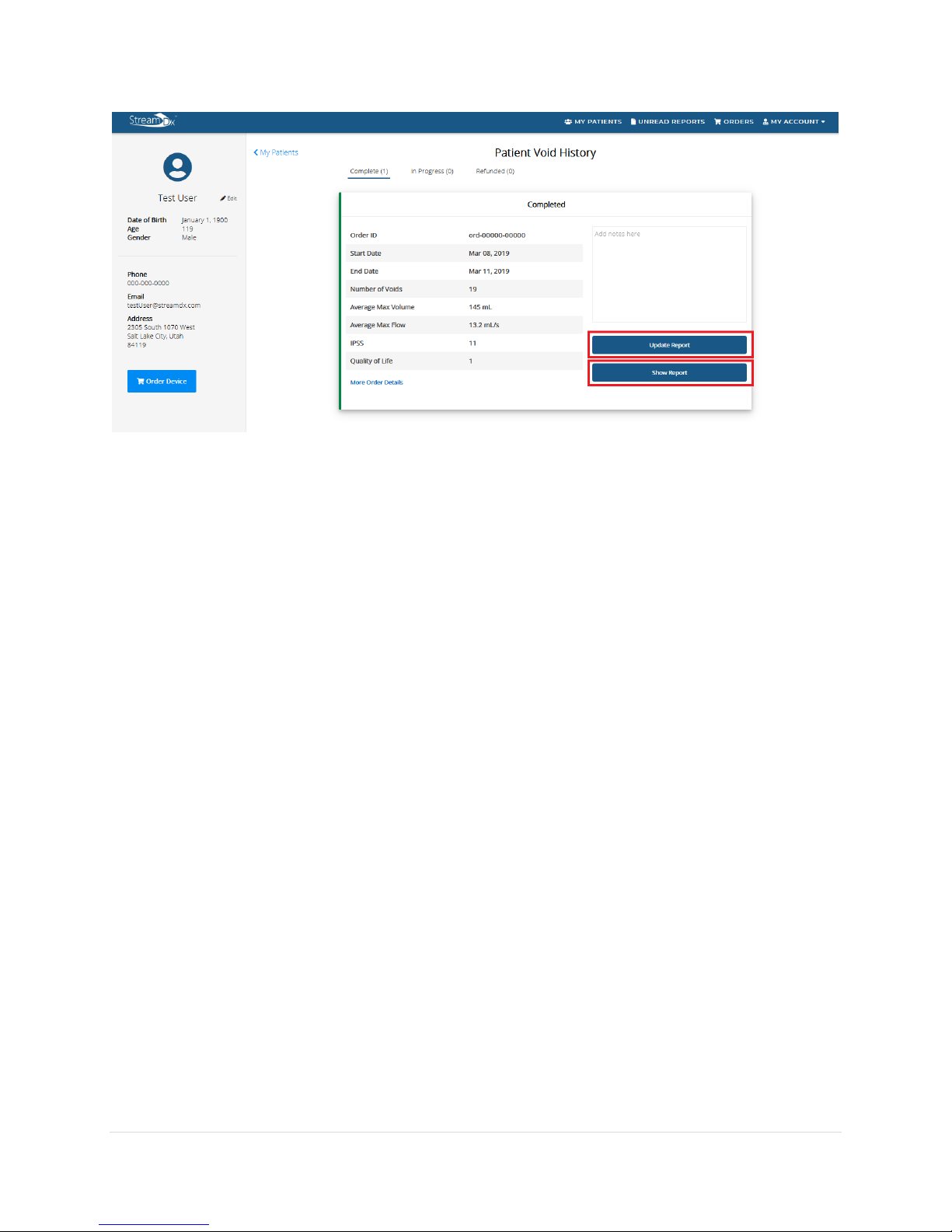
4. To go to a patient’s history page, click on the row the patient appears on in the patient
roster.
5. If the patient has completed a Stream Dx Uroflow study and a report is available, you can
click on show report to view the report or update the report to classify each individual
void.
Page 23
23
7.3 Viewing Devices in Use
1. On the Patient’s History page, click on the In-Progress tab to view any orders which are
currently in progress for the patient.
• You will not be able to order a second device for any patients who have an In-
Progress order.
7.4 Other Website Features
Physicians will be able to update account details such as payment and contact information
using the website. To update these settings, click on the My Account drop down and click
on the Settings button.
Page 24
24
8 Technical specifications
8.1 Website
Stream Dx recommends using Google Chrome as your browser for accessing the Stream Dx Web
Portal.
8.2 Stream Dx Uroflowmeter
The Stream Dx Uroflowmeter measures flow rate by using a capacitive fluid height sensor sensor
as opposed to the more commonly method of using weight-based sensors. The fluid height
sensor is durable and able to be shipped to patients. One limitation of this device is that excessive
movement of the device during a void can invalidate the test results. Also, a void event occurring
less than 15 minutes after a previous void can also create invalid test results. The Stream Dx
System will detect these issues and notify the physician. For best results, instruct the patient to
place the Stream Dx Uroflowmeter on a flat closed toilet lid such that the opening of the Stream
Dx Uroflowmeter is around groin height. Ensure that the Stream Dx Uroflowmeter is as level as
possible.
The Stream Dx Device is made up of two components, the Puck and Sleeve. When the patient
receives the device, the two are already assembled together. Following the study period, the
Sleeve will be removed from the Puck by the patient by twisting the Sleeve off of the puck (See
Patient Instruction for Use). If the Sleeve is removed prior to the end of the study, it is not
recommended that the patient attempt to replace the Sleeve. Contact Stream Dx for further
instruction.
The Stream Dx Device is battery powered and does not connect to an external power supply.
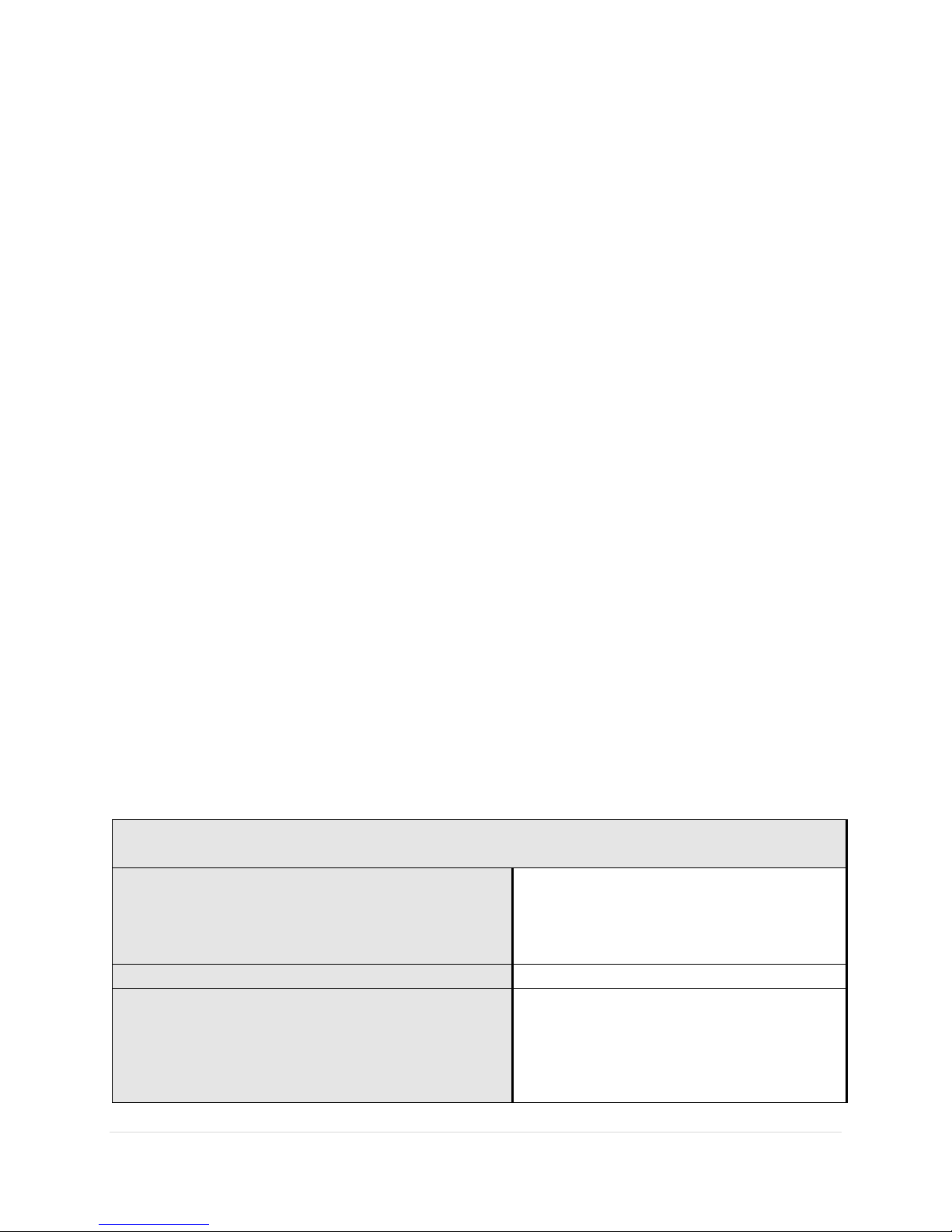
Technical Specifications
Dimensions:
Height: 9.62 inches
Puck Width: 3.53 inches
Sleeve Length (including spout): 5.38
inches
Mass:
356 grams
Transportation Temperature and Storage
Conditions
Temperature:
+10⁰C to +40 ⁰C
Humidity:
30% -75% non-condensing relative
humidity.
Page 25
25
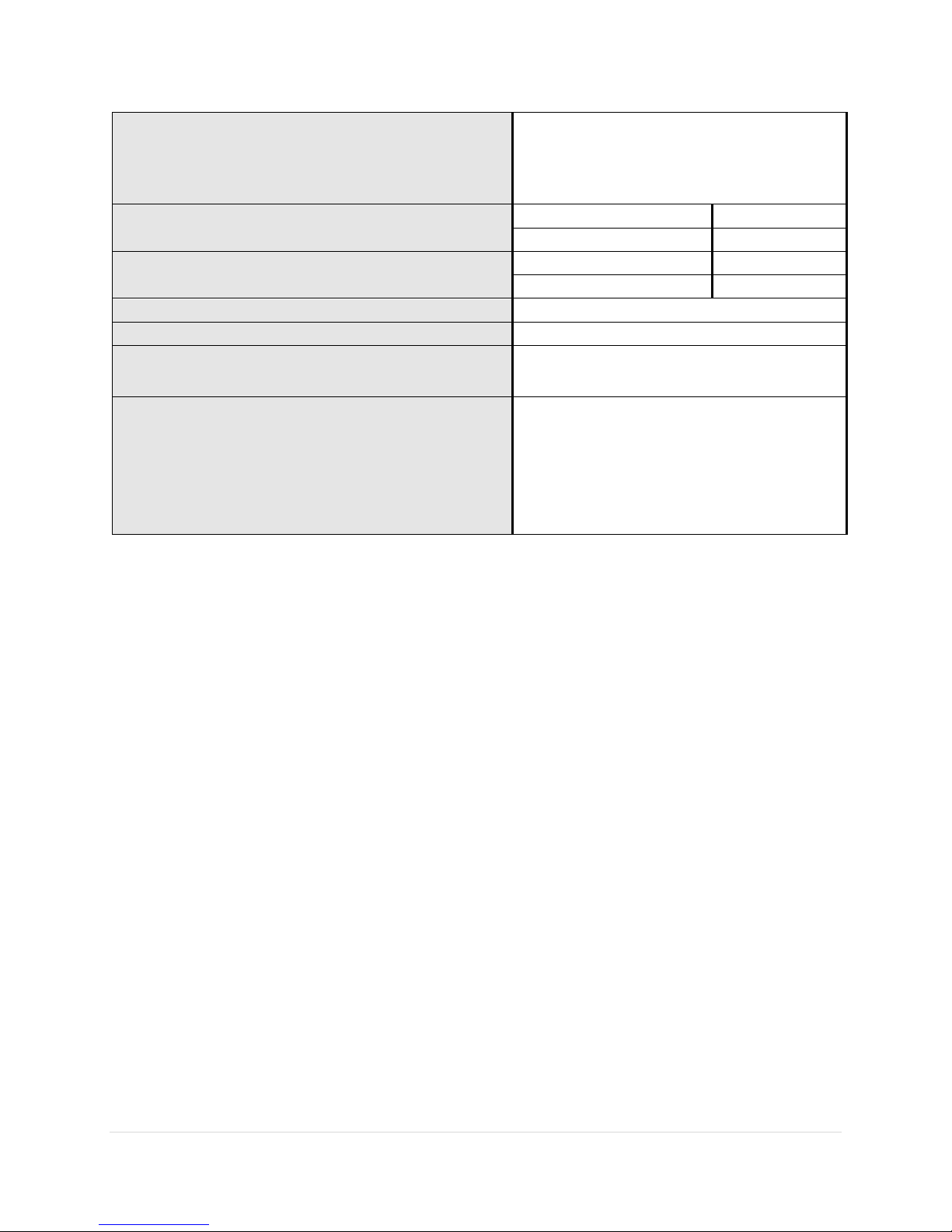
Operating Conditions
Temperature:
+10⁰C to +40 ⁰C
Humidity:
30% -75% non-condensing
Range
Flow
Volume
0-25 mL/s
25-700 mL
Accuracy
Flow
Volume
+/-2.5 mL/s
+/- 30 mL
Maximum volume
700 mL
Recording time
10 Hours
Battery life
A minimum of 10 hours in active mode,
and 160 hours in standby mode.
Frequency Band of Transmission
The Stream Dx Uroflowmeter has a
frequency band of reception of 2.4 GHz.
The preferred frequency band of 2.4 GHz
and has a bandwidth of the receiving
section of the Stream Dx Uroflowmeter in
those bands.
8.3 Classification/approval
Type BF Applied Part, approved for continuous operation in non-oxygen rich environments
ANSI/AAMI ES60601-1:2005+A2 (R2012) +A1
IEC 60601-1-11:2015
CAN/CSA-C22.2No. 60601-1:14
CAN/CSA-C22.2No. 60601-11:15
Page 26

26
Appendix A - Safety Information
• Do not submerge the Stream Dx Uroflowmeter
• The Stream Dx Uroflowmetry Device is not intended for use with flammable agents.
• The Stream Dx Uroflowmetry Device is not intended for use in oxygen rich environments
• Portable and mobile RF communications equipment can affect the Stream Dx
Uroflowmetry Device.
• The Stream Dx Uroflowmetry Device should not be used adjacent to or stacked with other
equipment and if adjacent or stacked use is necessary then the Stream Dx Uroflowmetry
Device should be observed to verify normal operation in the configuration in which it is
used.
• Use of this equipment adjacent to or stacked with other equipment should be avoided
because it could result in improper operation. If such use is necessary, this equipment and
the other equipment should be observed to verify that they are operating normally
• Intended for urine collection/measurement only and is intended for indoor use only with
the conditions specified in Section 8 of this document.
• Do not use the device if the packaging has been opened or damaged.
• Improper use of the device using accessories other than what is provided with the device
could result in increased electromagnetic emissions or decreased electromagnetic
immunity of this equipment and result in improper operation
• Portable RF communications equipment (including peripherals such as antenna cables
and external antennas) should be used no closer than 30 cm (12 inches) to any part of the
Stream Dx Uroflowmeter. Otherwise, degradation of the performance of this equipment
could result.
• The data obtained from the Stream Dx Uroflowmeter is meant to be used exclusively as
a tool to aid in the diagnosis of a condition. It is not intended to be used alone as the
sole method of diagnosis.
Page 27
27
Appendix B - Explanation of Symbols
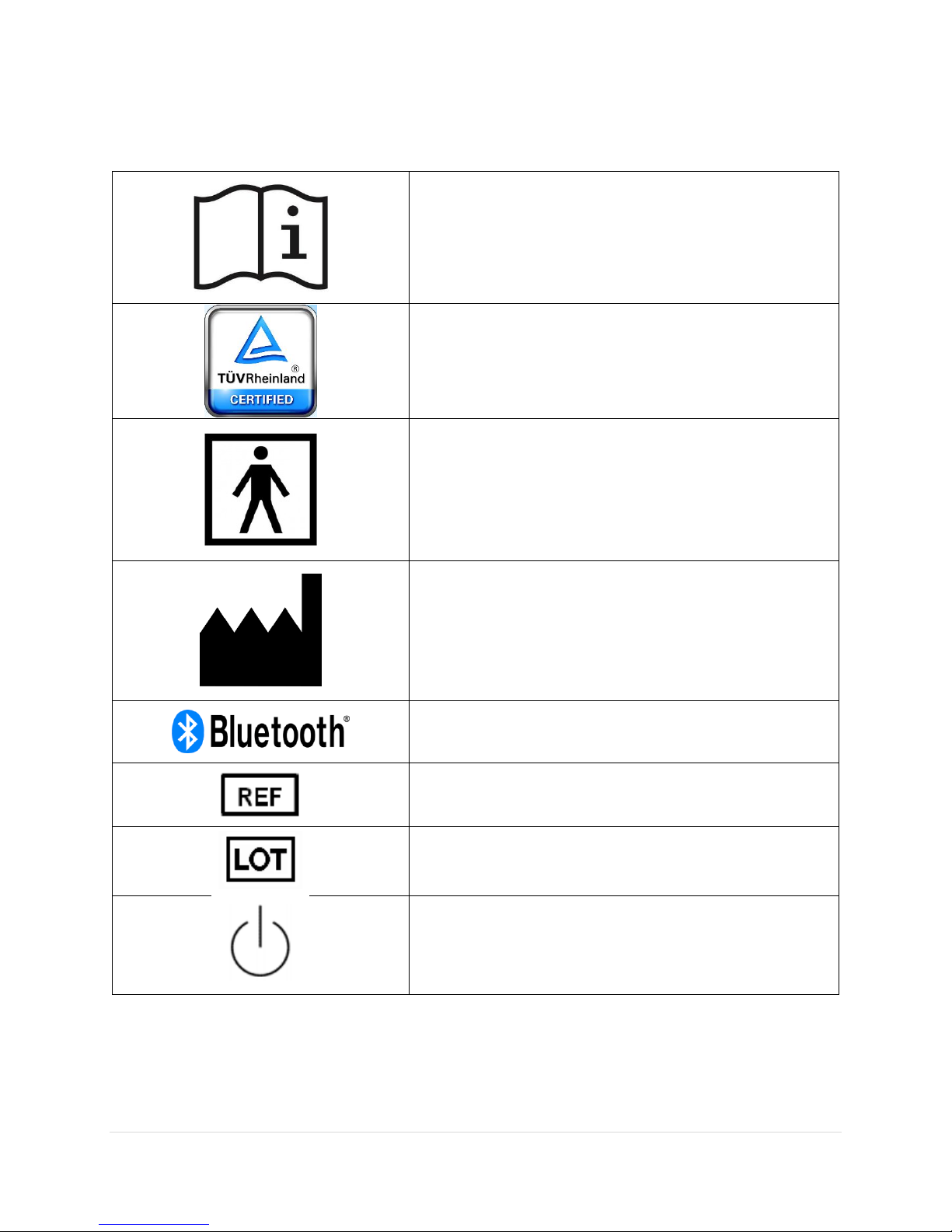
Consult Instructions for Use
TUV certification – TUV
Rheinland certified this product
to U.S. safety standards.
Type BF Applied Part
Manufacturer
Bluetooth logo
Catalogue Number
Lot Code
Button used to start and end
recording of voiding event.
Page 28
28
Appendix C – Applied Parts
Applied
Parts
Type
Probability of contact
Duration of contact
Sleeve
Type BF
100%
<1 minute per use x up to 50 uses
Puck
Type BF
100%
<1 minute per use x up to 50 uses
 Loading...