

Page 1
Phone: 508-580-2500
145 Bodwell Street
Fax 508-583-8412
Avon, MA 02322
Datel Communications 145 Bodwell Street Avon, MA 02322 Phone: 508-580-2500
Toshiba Digital Telephone Systems
Sales Service Installation
Page 2

Publication Information
For Sales and Service call 508-580-2500
Tel: 508-580-2500
Datel Communications
Fax: 508-583-8412
Toshiba America Information Systems, Inc.,
Telecommunication Systems Division, reserves the right,
without prior notice, to revise this information publication for
any reason, including, but not limited to, utilization of new
advances in the state of technical arts or to simply change the
design of this document.
Further, Toshiba America Information Systems, Inc.,
Telecommunication Systems Division, also reserves the right,
without prior notice, to make such changes in equipment
design or components as engineering or manufacturing
methods may warrant.
DKA-UG-DKTEL-VD
4016168
Version D.2, September 2000
Version D.1, June 2000
Version D, August 1999
Version C.1, May 1999
Version C, April 1998
Version B, October 1997
Version A, September 1996
© Copyright 2000
Toshiba America Information Systems, Inc.
Telecommunication Systems Division
All rights reserved. No part of this manual, covered by the
copyrights hereon, may be reproduced in any form or by any
means—graphic, electronic, or mechanical, including
recording, taping, photocopying, or information retrieval
systems—without express written permission of the publisher
of this material.
Strata is a registered trademark of Toshiba Corporation.
Stratagy is a registered trademark of Toshiba America
Information Systems, Inc.
Trademarks, registered trademarks, and service marks are the
property of their respective owners.
Page 3

Contents
For Sales and Service call 508-580-2500
Tel: 508-580-2500
Datel Communications
Fax: 508-583-8412
Introduction
Organization..................................................................................................................... viii
How to Use This Guide.................................................................................................... viii
Action/Response...............................................................................................................x
Related Documents/Media...................................................................................................x
Chapter 1 – The Grand Tour
Digital Telephone Models....................................................................................................2
Buttons .................................................................................................................................4
Fixed Buttons....................................................................................................................4
Flexible Buttons................................................................................................................6
LCD......................................................................................................................................9
LCD Buttons.....................................................................................................................9
LED Indicators...................................................................................................................10
On-hook/Off-hook .............................................................................................................11
Volume Controls................................................................................................................12
Chapter 2 – Features
Before You Begin ..............................................................................................................15
Automatic Line Selection ...............................................................................................16
Ringing Line Preference .................................................................................................16
Signaling.........................................................................................................................16
Strata DK Digital Telephone 9/00 i
Page 4

Contents
For Sales and Service call 508-580-2500
Tel: 508-580-2500
Datel Communications
Fax: 508-583-8412
Chapter 2 – Features
Quick Reference.................................................................................................................17
Making an Internal Call..................................................................................................17
Making an Outside Call..................................................................................................17
Making an Outside Call to an ISDN Trunk....................................................................18
On-Hook Dialing ............................................................................................................19
Answering Calls..............................................................................................................19
Incoming Call Notification.............................................................................................20
Account Code Calls ...........................................................................................................20
Forced Account Codes (Verified/Non-Verified)............................................................20
Voluntary Account Codes (Verified/Non-Verified).......................................................21
Alarm Reset .......................................................................................................................22
Alert Signaling...................................................................................................................22
Attendant Console Calling.................................................................................................23
Automatic Busy Redial (ABR) ..........................................................................................23
Automatic Callback (ACB)................................................................................................25
Automatic Hold..................................................................................................................26
BGM Over Telephone Speakers ........................................................................................27
Call Forward ......................................................................................................................27
Call Forward Modes .......................................................................................................28
Using Call Forward Buttons ...........................................................................................29
Using Access Codes .......................................................................................................29
LCD Telephones.............................................................................................................29
Call Forward–All Calls...................................................................................................30
Call Forward–Busy.........................................................................................................31
Call Forward–No Answer...............................................................................................31
Call Forward–Busy/No Answer .....................................................................................32
Call Forward–Fixed........................................................................................................33
Call Forward—External..................................................................................................34
Call Park Orbits..................................................................................................................36
Call Park and Page.............................................................................................................38
Call Pickup.........................................................................................................................40
[DN] Pickup....................................................................................................................40
Directed Call Pickup.......................................................................................................40
Group Pickup..................................................................................................................41
Page/Internal Call Pickup ...............................................................................................42
Call Transfer with Camp-on ..............................................................................................42
ii Strata DK Digital Telephone 9/00
Page 5

Contents
For Sales and Service call 508-580-2500
Tel: 508-580-2500
Datel Communications
Fax: 508-583-8412
Chapter 2 – Features
Call Waiting.......................................................................................................................44
Conference Calls................................................................................................................45
Date/Time/Day Adjustment...............................................................................................46
Direct Inward System Access (DISA) ...............................................................................46
DISA Calls - Internal.....................................................................................................46
DISA Calls - External....................................................................................................47
Direct Station Selection (DSS) Buttons (Hotline) .............................................................48
Do Not Disturb (DND) ......................................................................................................48
Door Lock(s)......................................................................................................................49
Door Phone(s) ....................................................................................................................50
DTMF Tone Dialing with * and # .....................................................................................52
Emergency Ringdown/Hotline Service..............................................................................53
Group Listening .................................................................................................................53
Handsfree Answerback ......................................................................................................54
Handsfree Monitoring........................................................................................................55
ISDN Outgoing Calling .....................................................................................................56
Subaddress ......................................................................................................................56
Message Waiting................................................................................................................57
Message Waiting Light on [PDN]..................................................................................57
Message Waiting Light on [PhDN/MW]........................................................................59
Message Waiting Light on Another Telephone..............................................................59
Microphone Cut-Off ..........................................................................................................60
Off-hook Call Announce (OCA) .......................................................................................60
HS-OCA .........................................................................................................................62
SP-OCA ..........................................................................................................................62
Override Calls ....................................................................................................................63
Busy Override.................................................................................................................64
Do Not Disturb Override ................................................................................................64
Executive Override.........................................................................................................64
Privacy Override.............................................................................................................65
Toll Restriction Override................................................................................................65
Page Announcements.........................................................................................................66
All Call Page...................................................................................................................66
Privacy On-Line.................................................................................................................67
Privacy Release..................................................................................................................67
Release and Answer...........................................................................................................68
Saved Number Redial ........................................................................................................68
Strata DK Digital Telephone 9/00 iii
Page 6

Contents
For Sales and Service call 508-580-2500
Tel: 508-580-2500
Datel Communications
Fax: 508-583-8412
Chapter 3 – LCD Operation
Speakerphone.....................................................................................................................69
Speed Dial..........................................................................................................................70
Speed Dial–Advanced Features .........................................................................................72
Feature Access Codes.....................................................................................................72
Speed Dial Pause and Flash Storage...............................................................................75
Speed Dial Number Linking...........................................................................................75
Chain Dialing Speed Dial Numbers ...............................................................................77
Timed Reminders...............................................................................................................78
Tone/Pulse Dialing.............................................................................................................80
Two (Tandem) CO Line Connection .................................................................................80
[DN] Button....................................................................................................................80
CO Buttons .....................................................................................................................81
Supervision .....................................................................................................................83
Voice Mail Integration.......................................................................................................84
Message Mailbox............................................................................................................84
Message Retrieval...........................................................................................................85
Call Forward to Voice Systems ......................................................................................87
Chapter 3 – LCD Operation
Control Buttons..................................................................................................................90
Soft Keys............................................................................................................................91
Soft Key Display.............................................................................................................92
How to Use Soft Keys ....................................................................................................92
Soft Key Prompts............................................................................................................95
Busy Lamp Field (BLF) Display .......................................................................................96
Caller ID/ANI/DNIS Information Mode ...........................................................................97
DNIS ...............................................................................................................................97
ANI/Caller ID .................................................................................................................97
Call Park Orbit List Display ..............................................................................................99
Retrieve and Auto Dial Lost Calls .....................................................................................99
Messages, Memos, and Name Display ............................................................................101
Messages ..........................................................................................................................103
System Messages 60~64...............................................................................................104
System Messages 65~99...............................................................................................104
Station Messages ..........................................................................................................104
Message Notifications ..................................................................................................107
iv Strata DK Digital Telephone 9/00
Page 7

Chapter 4 – Full-duplex Speakerphone
For Sales and Service call 508-580-2500
Tel: 508-580-2500
Datel Communications
Fax: 508-583-8412
Silent Messaging (Busy Station) ..................................................................................110
Memos..............................................................................................................................111
Speed Dial Memos........................................................................................................111
Timed Reminders..........................................................................................................113
Name/Number Display ....................................................................................................113
Chapter 4 – Full-duplex Speakerphone
Dip Switches ....................................................................................................................118
Speech Training Mode..................................................................................................122
Special Button Operation (Button 10)..........................................................................123
Chapter 5 – Add-on Module/DSS Console
DADM .............................................................................................................................125
DSS Console ....................................................................................................................127
[DSS] Button....................................................................................................................128
Features ............................................................................................................................128
Calling a Station ...........................................................................................................128
Transfer to an Idle Station ............................................................................................128
Call Transfer with Camp-on.........................................................................................129
Call Answering (CO Line)............................................................................................130
Speed Dial.....................................................................................................................130
Paging ...........................................................................................................................131
Call Forward Override ([DSS] Override) .....................................................................131
Night Transfer...............................................................................................................131
Contents
Appendix A – Access Codes
CO Line Access Codes ....................................................................................................133
Feature Access Codes ......................................................................................................134
Paging Access Codes .......................................................................................................134
Speed Dial Access Codes.................................................................................................136
Strata DK Digital Telephone 9/00 v
Page 8

Contents
For Sales and Service call 508-580-2500
Tel: 508-580-2500
Datel Communications
Fax: 508-583-8412
Chapter 5 – Add-on Module/DSS Console
Appendix B – Centrex Application
Flexible Directory Numbering.........................................................................................137
Centrex Feature Buttons ..................................................................................................137
Ringing Repeat.................................................................................................................138
Delayed Ringing ..............................................................................................................138
Appendix C – Button Labels......................................................................................139
Appendix D – International Settings ......................................................................145
Index ....................................................................................................................................147
vi Strata DK Digital Telephone 9/00
Page 9

Introduction
For Sales and Service call 508-580-2500
Tel: 508-580-2500
Datel Communications
Fax: 508-583-8412
This guide describes how to use the 2000-series digital telephones for Strata DK
systems. Models covered in this user guide include digital telephones equipped with a
Liquid Crystal Display (LCD) and/or speakerphone, as well as the full-duplex digital
speakerphone. Also discussed are Digital Add-on Modules (DADMs) and the Direct
Station Selection (DSS) Console. The Strata DK systems which support this
equipment are:
♦ DK14
♦ DK16e/16
♦ DK40i/40
♦ DK424i/DK424/DK280 (Release 3.0 or higher)
Note This user guide incorporates the information in the Strata DK’s Liquid Crystal
Display Digital Telephone User Guide and the Add-on Module and Direct
Station Selection Console User Guide. Those guides are discontinued.
Strata DK Digital Telephone 9/00 vii
Page 10

Introduction
For Sales and Service call 508-580-2500
Tel: 508-580-2500
Datel Communications
Fax: 508-583-8412
Organization
Organization
♦ Chapter 1 – The Grand Tour provides an overview of the equipment, buttons,
Light Emitting Diodes (LEDs), and LCDs.
♦ Chapter 2 – Features describes the available digital telephone features in
alphabetical order. Detailed instructions on using each feature are covered.
♦ Chapter 3 – LCD Operation includes an explanation of the Control button and
Soft Key operations. Features which are available only on the LCD digital
telephone are presented alphabetically and include detailed LCD displays.
♦ Chapter 4 – Full-duplex Speakerphone includes instructions for operating this
phone, as well as the external microphone attachment.
♦ Chapter 5 – Add-on Module/DSS Console describes the DADM and DSS
console features and buttons.
♦ Appendix A – Access Codes provides instructions for programming a sequence
of steps or access codes onto feature buttons. It includes CO Line Access Codes,
Paging Group Codes, Feature Access Codes (User Programmable Buttons), and
Speed Dial Access Codes.
♦ Appendix B – Centrex Application describes the Centrex features which may be
available with your Strata DK system.
♦ Appendix C – Button Labels lists the feature button designations of the 2000-
series digital telephone models.
♦ Appendix D – International Settings shows the proper DIP switch settings for
various countries.
How to Use This Guide
We suggest that you read this entire guide and get acquainted with the Strata DK
digital telephones and its features. Once you become acquainted with the basic
features, you can use this guide in conjunction with the Digital Telephone Quick
Reference Guide.
viii Strata DK Digital Telephone 9/00
Page 11
Conventions
For Sales and Service call 508-580-2500
Tel: 508-580-2500
Datel Communications
Fax: 508-583-8412
Letters in [brackets] represent buttons which have Directory Numbers on them. For
example:
Conventions Description
Elaborates specific items or references other information. Within
Note
some tables, general notes apply to the entire table and numbered
notes apply to specific items.
Introduction
How to Use This Guide
Important!
CAUTION!
WARNING!
[DN]
[PDN]
[SDN]
[PhDN]
$ULDO%ROG
Plus (+)
Calls attention to important instructions or information.
Advises you that hardware, software applications, or data could
be damaged if the instructions are not followed closely.
Alerts you when the given task could cause personal injury or
death.
Represents any Directory Number button, also known as an
extension or intercom number.
Represents any Primary Directory Number button (the extension
number for the telephone).
Represents any Secondary appearance of a PDN. A PDN which
appears on another telephone is considered an SDN.
Represents any Phantom Directory Number button (an additional
DN).
Represents telephone buttons.
Shows a multiple PC keyboard or phone button entry. Entries
without spaces between them show a simultaneous entry. Example:
Esc+Enter. Entries with spaces between them show a sequential
entry. Example:
# + 5.
Tilde (~) Means “through.” Example: 350~640 Hz frequency range.
➤ Denotes the step in a one-step procedure.
➤
Denotes a procedure.
Grey words within the printed text denote cross-references. In the
See Figure 10
electronic version of this document (Strata DK Library CD-ROM or
FYI Internet download), cross-references appear in blue hypertext.
Strata DK Digital Telephone 9/00 ix
Page 12

Introduction
For Sales and Service call 508-580-2500
Tel: 508-580-2500
Datel Communications
Fax: 508-583-8412
Related Documents/Media
Action/Response
The left column gives you
single or numbered steps
that you need to perform a
The right column gives the immediate response to your
action. This column also includes additional notes and
comments.
procedure.
Related Documents/Media
Note Some documents listed here may appear in different versions on the
CD-ROM, FYI, or in print. To find the most current version, check the
version/date in the Publication Information on the back of the document’s title
page.
Refer to the following documents for more information:
♦ Digital Telephone Quick Reference Guide provides a quick reference for
frequently-used digital telephone features.
♦ PC/Data Interface User Guide explains all the procedures necessary to operate
stand-alone data interface units in the data mode for printer sharing and modem
pooling. Also covers connection to a PC with a Telephone Application
Programming Interface (TAPI).
♦ System Administrator Guide gives instructions for the System Administrator to
manage the system. Contains instructions for Station Relocation, System Speed
Dial, and other features only activated by the System Administrator.
For authorized users, Internet site FYI (http://fyi.tsd.toshiba.com) contains all current
Strata DK documentation and enables you to view, print, and download current
publications.
x Strata DK Digital Telephone 9/00
Page 13

The Grand Tour 1
For Sales and Service call 508-580-2500
Tel: 508-580-2500
Datel Communications
Fax: 508-583-8412
This chapter familiarizes you with the controls and indicators located on your digital
telephone. Understanding the function of the feature buttons and their associated
LEDs will improve your efficiency in using the telephone and will help you take
advantage of all of the benefits your telephone offers.
Toshiba digital telephones incorporate state-of-the-art telecommunications technology
and provide a vast array of calling features. They are easy to operate, and all features
are accessed with a feature button or a brief access code.
If your telephone is equipped with an LCD, information and feature prompting makes
call handling more efficient and provides easy access to frequently-used features.
Abbreviated feature prompts guide you through specific tasks.
In addition to the standard features, the LCD telephones provide Alphanumeric
Messaging, Busy Lamp Field (BLF) Identification, Central Office (CO) Line
Identification, Timed Reminders with Messaging, Speed Dial Memo Directory
Dialing, User Name/Number, Call Duration, Date/Time of Day displays, and the
ability to display names and telephone numbers of outside, incoming callers.
Telephones equipped with a speakerphone, enable you to make and receive outside
and internal calls without lifting the handset.
Strata DK Digital Telephone 9/00 1
Page 14

The Grand Tour
For Sales and Service call 508-580-2500
Tel: 508-580-2500
Datel Communications
Fax: 508-583-8412
Digital Telephone Models
Digital Telephone Models
Feature operations in this guide use the button designations for the 2000-series
models.
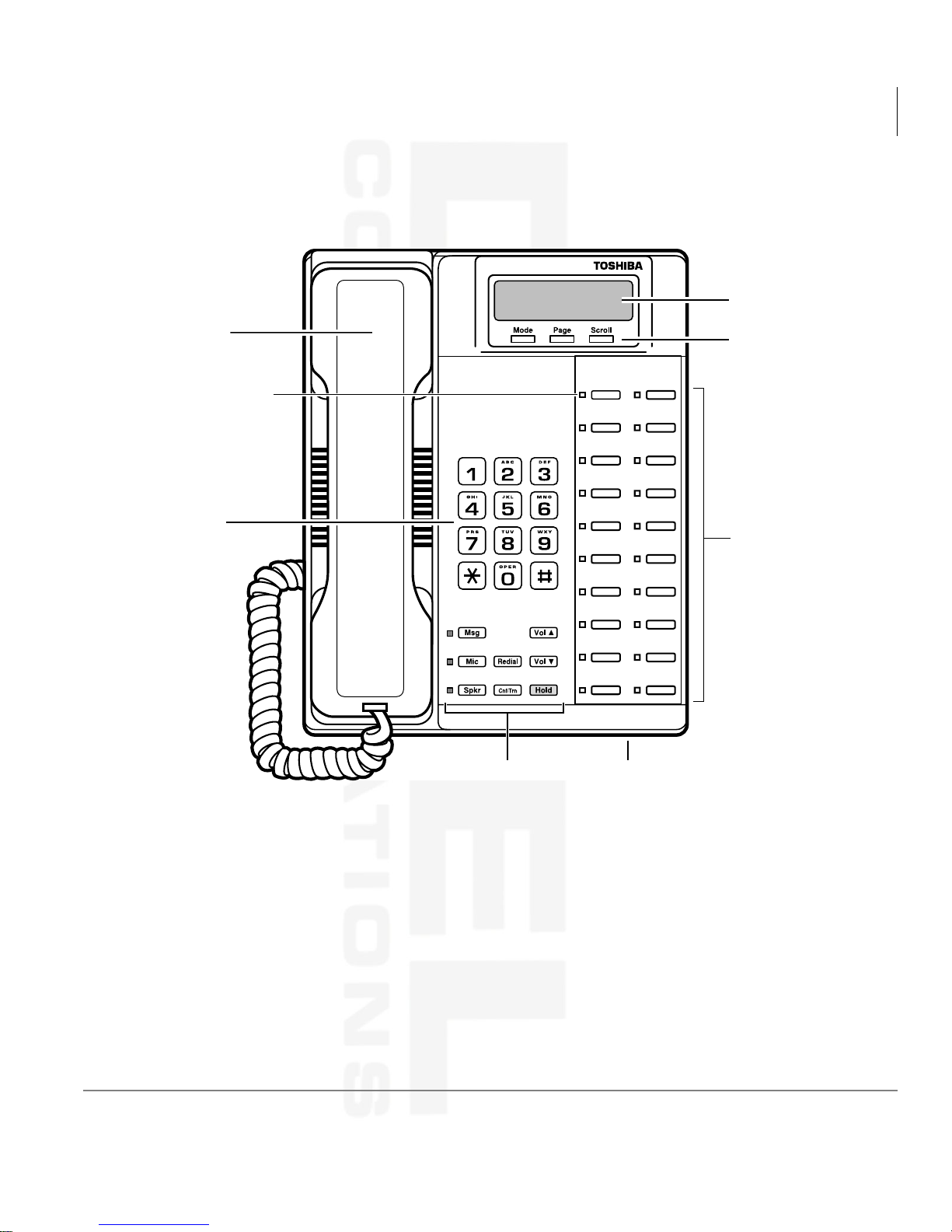
The following telephone models belong to the 2000-series (see Figure 1 on Page 3):
♦ DKT2010-S (10-button speakerphone model that enables users to answer internal
calls without lifting the handset)
♦ DKT2010-SD (10-button model equipped with a LCD and a speakerphone which
enables users to make and receive outside and internal calls without lifting the
handset)
♦ DKT2020-S (20-button speakerphone model which enables users to make and
receive outside and internal calls without lifting the handset)
♦ DKT2020-SD (20-button speakerphone model equipped with an LCD, and a
speakerphone which enables users to make and receive outside and internal calls
without lifting the handset)
♦ DKT2020-FDSP (20-button speakerphone model equipped with an LCD, a
speakerphone, and a jack for an External Microphone)
♦ DKT2001 (digital single line telphone). Refer to the Strata Digital Line Telephone
User Guide for operating instructions.
2 Strata DK Digital Telephone 9/00
Page 15
Buttons
For Sales and Service call 508-580-2500
Tel: 508-580-2500
Datel Communications
Fax: 508-583-8412
The Grand Tour
Buttons
LCD Display
Handset
Red/Green
LED Indicators
Dial Pad
LCD Control/Soft
Key Buttons
Flexible Buttons
0539
Fixed Buttons Microphone Location
Figure 1 20-button Digital Speakerphone with LCD
Strata DK Digital Telephone 9/00 3
Page 16
The Grand Tour
For Sales and Service call 508-580-2500
Tel: 508-580-2500
Datel Communications
Fax: 508-583-8412
Buttons
Buttons
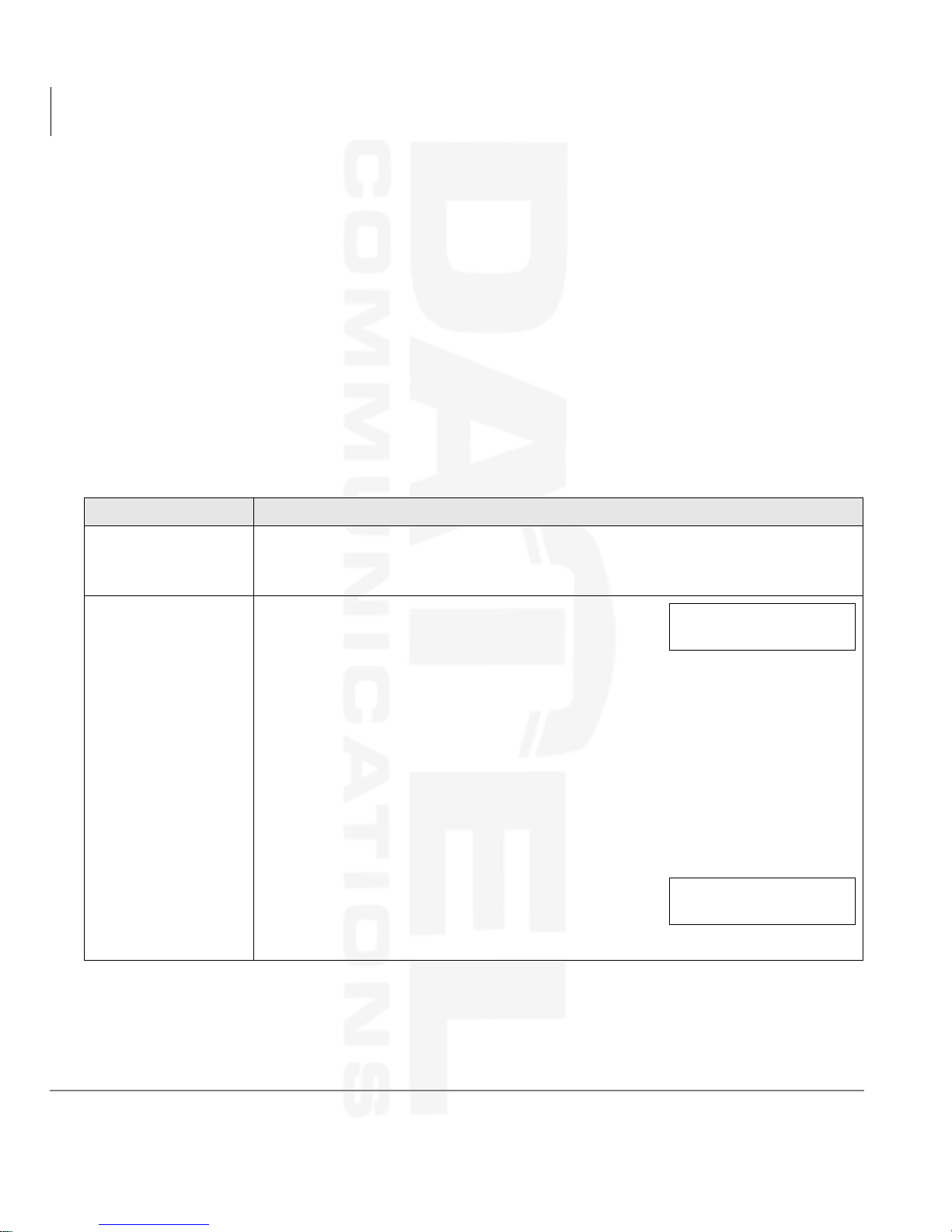
There are two sets of buttons, fixed and flexible. The fixed buttons (e.g., 0LF, 0VJ,
5HGLDO, +ROG, &RQI7UQ, 9RO▲, and9RO▼) are standard to every Strata DK 2000-
series telephone (see Table 1). The flexible buttons consist of Directory Number
(Primary, Secondary, Phantom) and feature buttons. The number of preprogrammed
flexible buttons varies by telephone.
Fixed Buttons
The fixed buttons are located on your dial pad and enable you to perform standard
functions quickly and easily.
Table 1 Fixed Button Definitions
Button Definitions
&QI7UQ
(Conference/
Transfer)
+ROG
Press to set up conference and transfer calls (see “Conference Calls” on Page
45).
Press once to hold internal or outside calls. The Line
LED flashes green at the internal hold rate.
...or press twice to enable Exclusive Hold. The Line
LED flashes green at the exclusive hold rate.
Exclusive Hold enables you to place a call on hold so that only you or somebody
using a Call Pickup code at another station can retrieve it.
To retrieve a call on hold:
Press /LQH or [DN] which is on hold
...or if the call is on Exclusive Hold, from another station dial plus your [DN],
or dial plus the CO line number (001~200) that the call is held on.
If a call is not retrieved by a certain time (set in
system programming), it recalls back to your phone.
You hear repeated recall tone (or if you are on the
phone, you hear recall tone twice).
HOLD LINE 10
JAN 01 SUN 12:19
HOLD LINE 201
LINE 10 RECALL
4 Strata DK Digital Telephone 9/00
Page 17
Table 1 Fixed Button Definitions (continued)
For Sales and Service call 508-580-2500
Tel: 508-580-2500
Datel Communications
Fax: 508-583-8412
Button Definitions
If the held party hangs up, the call is released and the CO provides a holdrelease signal.
+ROG(continued)
If your telephone is programmed for Automatic Hold, existing calls are
automatically placed on hold when you answer a call or make another call. (See
“Automatic Hold” on Page 26.)
The Grand Tour
Buttons
0LF
(Microphone)
A different call can be held on each [DN] or
/LQH button on your phone. Each time you
CO LINE 02
HOLD
press 6FUROO, a different [DN] or /LQH is
selected. The selected button’s LED flashes
rapidly and your LCD displays information for
the call holding on that button (samples shown
at right).
DN 202
HOLD
Press to toggle the microphone ON/OFF while the telephone is in use. The LED
indicates the status of the microphone.
The microphone and accompanying LED are always ON when receiving “voice
first” internal [DN] calls to enable Handsfree Answerback and OFF if you receive
a ring-first call. Mic may be ON/OFF when placing an on-hook CO line or
internal [DN] call.
Each station’s Mic can be set in system programming to switch ON/OFF with
one touch, to switch OFF only while pressed and held, or to be either ON/OFF
at the start of handsfree dialing.
To talkback to an HS-OCA call, press and hold Mic and talk over your telephone
handset/headset. The LED and microphone remain OFF during OCA talkback
operation (see “HS-OCA” on Page 62).
Mic functions on Handsfree Answerback and OCA calls for privacy.
0VJ
(Message)
When Msg LED flashes, press 0VJ to call back the station or voice mail device
that activated the LED (see “Message Waiting” on Page 57). This is the
telephone’s [PDN] message waiting button.
Press the same [DN] or /LQH that you used to dial the original number. Press
5HGLDO
5HGLDO. The last number called is redialed.
If you have Automatic Line Selection, you must first lift the handset.
Strata DK Digital Telephone 9/00 5
Page 18
The Grand Tour
For Sales and Service call 508-580-2500
Tel: 508-580-2500
Datel Communications
Fax: 508-583-8412
Buttons
Table 1 Fixed Button Definitions (continued)
Button Definitions
Press to toggle the speaker ON/OFF. The LED indicates the status of the
speaker.
6SNU
(Speaker)
▲
9RO
9RO▼
6SNU must be pressed and held down when switching from Handset to
Speakerphone mode.
Also selects a line or the internal [PDN] if programmed for auto preference in
system programming. Can be used to disconnect on-hook speakerphone calls.
Press to adjust volume levels (see “Volume Controls” on Page 12).
Flexible Buttons
All flexible buttons must be programmed for your telephone in system programming
and vary for individual telephones. If a button does not appear on your display or
telephone keystrip label, see your System Administrator for button assignments.
Line Buttons
You may have buttons designated as /LQH and/or 3RROHG/LQH*US which enable
you to directly access outside Central Office (CO) lines.
you to access available CO Lines from a group of lines appearing under one button.
If your telephone does not have a
access outside CO lines, you can use access codes. For a listing of these codes, see
“Access Codes” on Page 133.
3RROHG/LQH*US enables
/LQH or 3RROHG/LQH*US button and you want to
6 Strata DK Digital Telephone 9/00
Page 19
Directory Number [DN] Buttons
For Sales and Service call 508-580-2500
Tel: 508-580-2500
Datel Communications
Fax: 508-583-8412
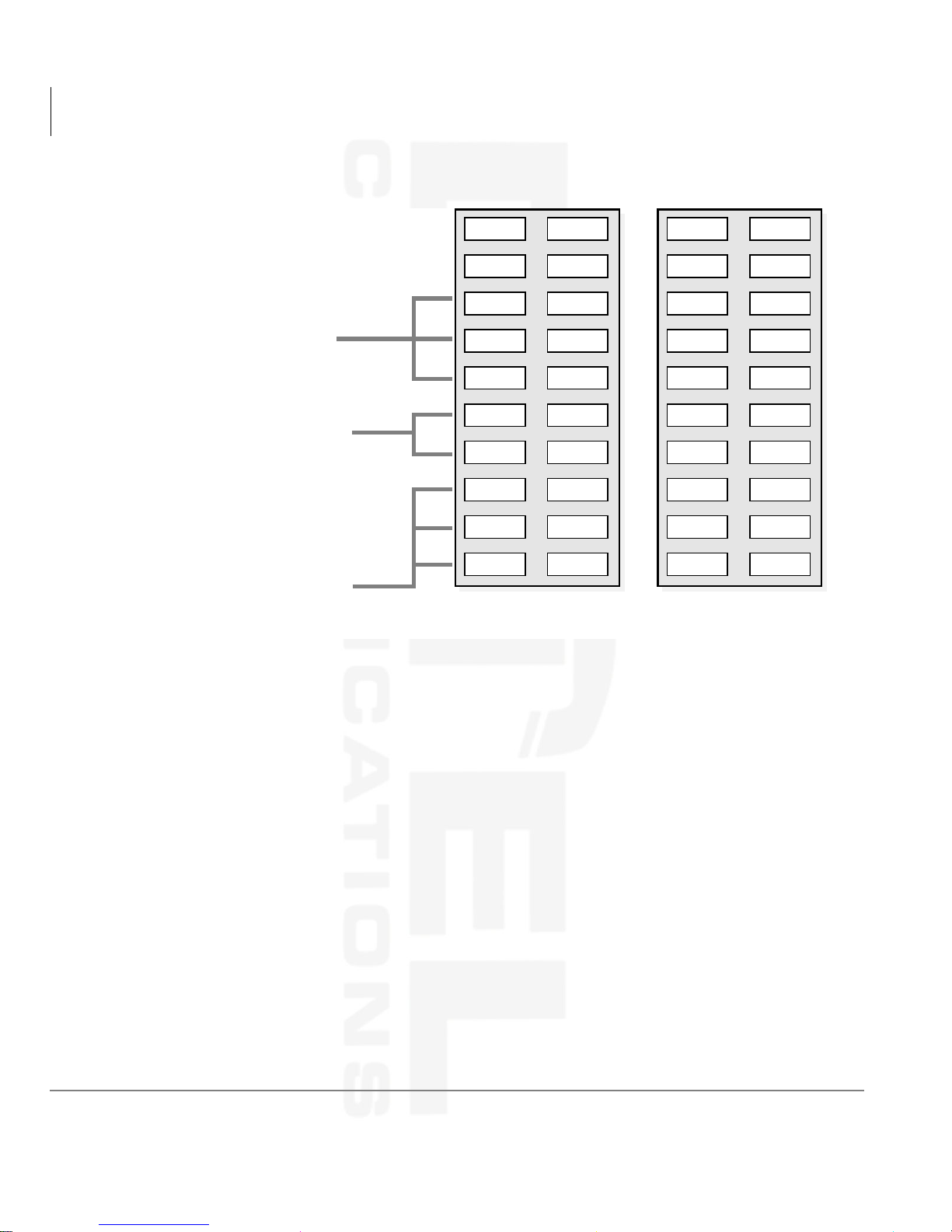
The [DN] buttons consist of: [PDNs], [SDNs], and [PhDNs]. They are used to initiate
or answer a call and are known as your extension or intercom number(s). You can
have multiple [DN] buttons on your telephone (see Figure 2), including [DNs]
belonging to another telephone, [SDNs].
Incoming calls ring your telephone’s [PDNs] from the top down. For example,
incoming calls to Station 10’s [PDNs] first ring the “10-1” button, then “10-2,” and
finally “10-3.” Your [PDN] is considered busy only when all of the [PDNs] are being
used by your telephone or other telephones, and/or when your telephone is on any type
of CO Line or [DN] call.
If you have an LCD telephone, you can find out the actual
Directory Number of a [DN] button by pressing the [DN] you
want to display and dialing
displays.
The Grand Tour
Buttons
DN = 210
. The number ()
Table 2 Directory Button Definitions
Button Definitions
[PDN]
Primary Directory
Number
[SDN]
Secondary Directory
Number
[PhDN]
Phantom Directory
Number
Press to answer a call to the Primary Directory Number or to initiate a
phone call. The [PDN] is specifically your Extension Number or Intercom
Number. Your telephone can have up to four [PDN] buttons with your
number. You can set Call Forward and Voice Mail ID code for your [PDN].
A [PDN] of another telephone which appears on your telephone is
considered a [SDN]. You cannot set Call Forward and Voice Mail ID code
for [SDNs] on your telephone.
Up to eight Phantom Directory Numbers can be dedicated to a station or
shared by a group of stations. One example of a Phantom Directory
Number application is when it is used as a common phone number for an
entire department. For instance, when the [PhDN] appears on a group of
telephones, such as the Sales Department, it will ring on all of the
telephones of the group when it is called. You can only set Call Forward
and Voice Mail ID code for [PhDNs] that are owned by your telephone. You
can have a separate message waiting button and mailbox for up to four
[PhDNs] on your telephone.
Strata DK Digital Telephone 9/00 7
Page 20
The Grand Tour
For Sales and Service call 508-580-2500
Tel: 508-580-2500
Datel Communications
Fax: 508-583-8412
Buttons
2516
Phantom Directory Numbers
[PhDNs]
Secondary Directory Numbers
[SDNs] of Station 11
Calls to Station 11 can be originated
or answered by Station 10 by
pressing the 11-1 or 11-2 button.
Station 10's Primary Directory
Numbers [PDNs]
Figure 2 Multiple Directory Numbers Example
Feature Buttons
54
51
50
11-1
11-2
10-1
10-2
10-3
Station 10
MW/50
58
51
50
10-1
10-2
10-3
11-1
11-2
Station 11
Preprogrammed feature buttons can be assigned to your telephone and vary for
individual telephones. See Table 18 on Page 139 for a list of all the possible feature
buttons.
If a button does not appear on your display or telephone keystrip label, see your
System Administrator for button assignments.
If your telephone has not been programmed for a
substitute the
key in any of the procedures that appear in this guide.
8 Strata DK Digital Telephone 9/00
6SHHG'LDO button, you can
Page 21
LCD
For Sales and Service call 508-580-2500
Tel: 508-580-2500
Datel Communications
Fax: 508-583-8412
The Grand Tour
LCD
In its idle state, the 32-character LCD feature on your digital telephone gives you an
accurate desk clock and calendar combination. When you have an outside call in
progress, an elapsed time display gives a constant reminder of the call duration.
Alphanumeric messaging capability is also provided (see “Messages, Memos, and
Name Display” on Page 101). All display functions occur automatically as call
processing proceeds.
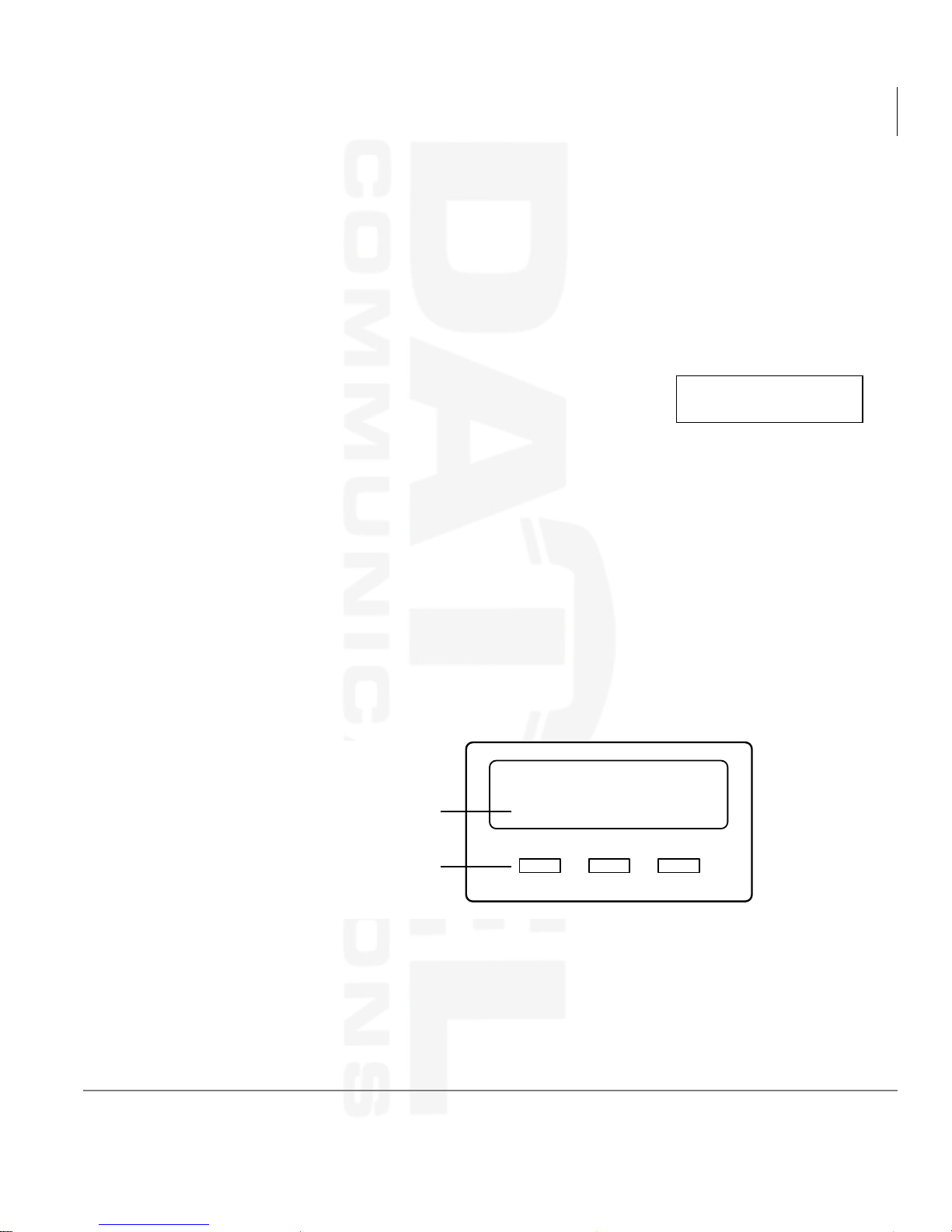
A “+” next to the LCD readout (sample shown at right) on
your telephone indicates there is more data in memory. Press
6FUROO to advance through the information. Press 3DJH to
switch from the CF display to the User Name display.
All LCD examples in this user guide are shown with Soft Keys turned OFF. If your
telephone has Soft Keys turned ON, the displays may be different (e.g., the
information on rows 1 and 2 is reversed), but they still enable you to follow the steps
in this guide.
LCD Buttons
There are two sets of buttons available with the LCD, Control and Soft Key (see
Figure 3). The Control buttons consist of the Mode, Page and Scroll functions, while
the Soft Keys offer access to frequently-used features that appear as abbreviated
prompts above the Control buttons.
Soft Key Prompts
CF-A 201-203+
JAN 01 TUE 12: 19
TRNS CONF PGE
Soft Key and Control Buttons
Figure 3 LCD Buttons (with sample Soft Keys)
Strata DK Digital Telephone 9/00 9
Mode Page Scroll
0622
Page 22
The Grand Tour
For Sales and Service call 508-580-2500
Tel: 508-580-2500
Datel Communications
Fax: 508-583-8412
LED Indicators
Both sets of buttons cannot be active at the same time.
♦ Soft Keys are active when the Soft Keys are turned on and the telephone is active
(on a call).
♦ Control buttons are active when the Soft Keys are turned off and/or the telephone
is idle.
(See Chapter 3 – LCD Operation for an explanation of how to use these buttons.)
LED Indicators
Each line and feature button has a LED next to it which indicates the status of the line
or feature associated with the button.
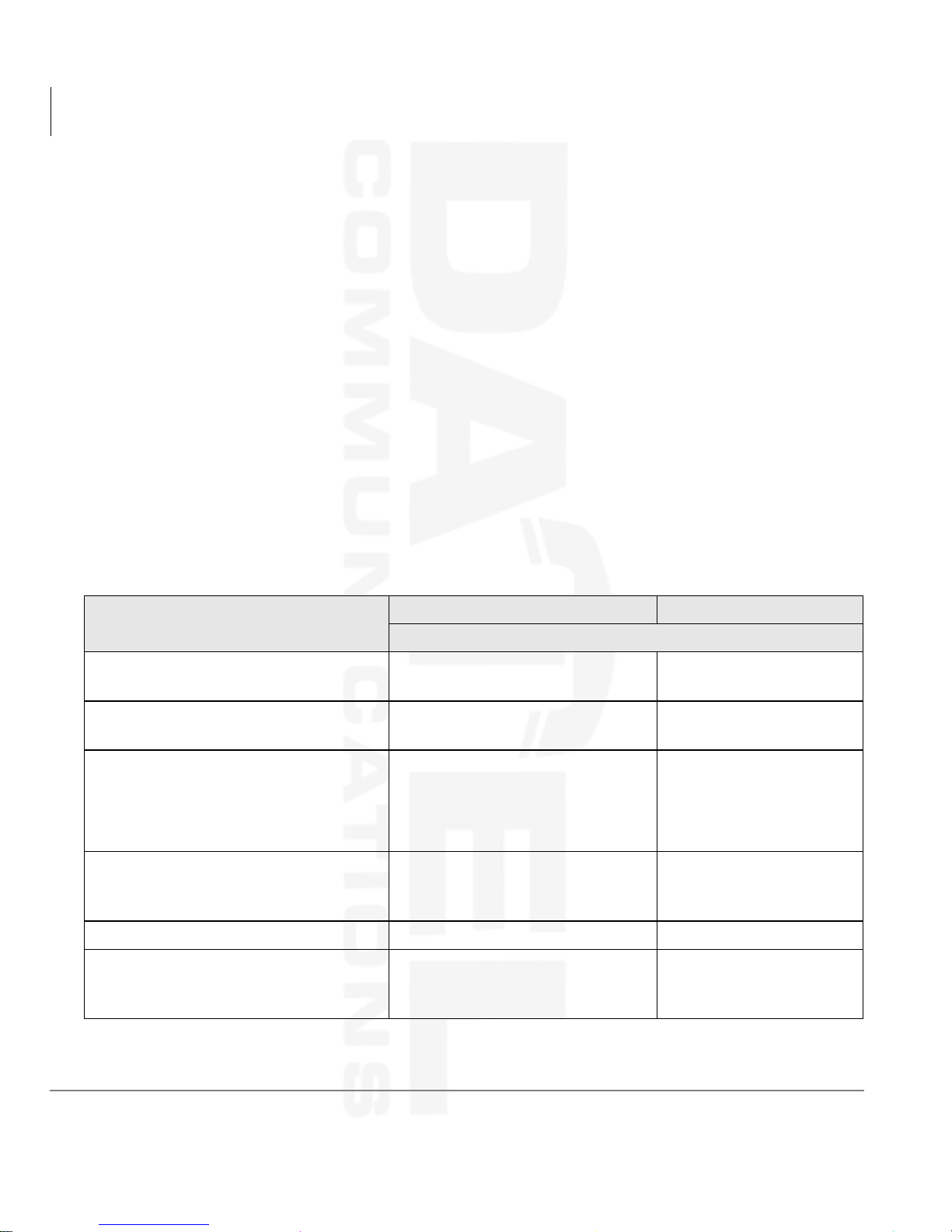
Line LEDs light red or green and flash at varying rates to indicate call status (see
Table 3).
Table 3 LED Indicators
Use
Line or [DN] In-Use
(access outside line)
Incoming Call
(while ringing)
Hold (outside line)
If using 3RROHG/LQH
indication is only at the station that
places the call on hold.
Hold – Consultation
(during consultation/transfer to another
station)
Hold – Exclusive (outside line) 10 pulses/second steady
Hold – Recall
(when held call recalls your idle
station)
*US, the hold
Your Station (Green) Other Station (Red)
Interval Rates
2 seconds on, 1/8 second off
— 1/8 second ON/OFF
1 second on at 10 pulses/second
—1 second OFF
4 pulses/second for 1/8 second
ON/OFF
10 pulses/second steady
1 second at 2 pulses/second,
1 second at 10 pulses/second
steady
one second ON/OFF
1/2 second ON/OFF
flashes
10 Strata DK Digital Telephone 9/00
Page 23
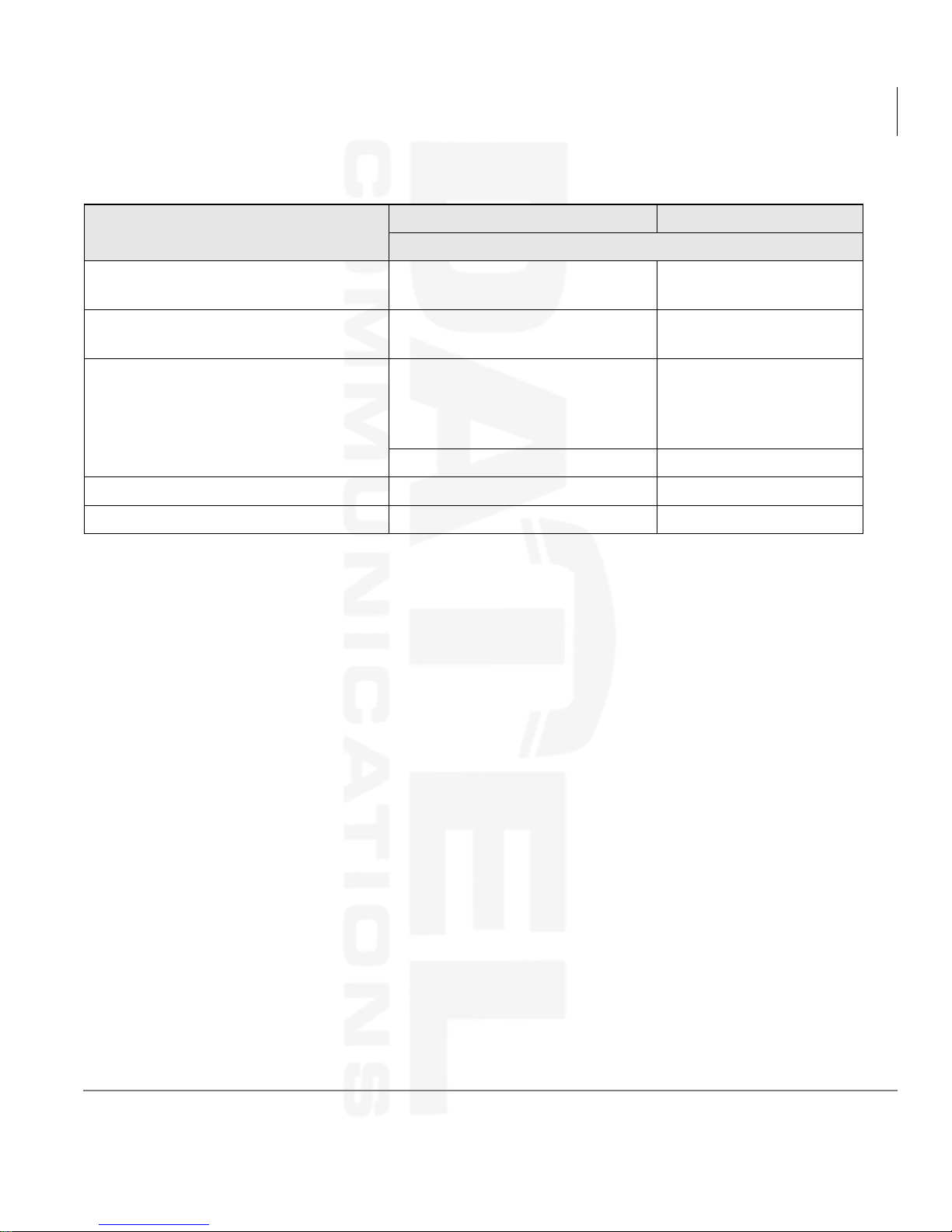
Table 3 LED Indicators (continued)
For Sales and Service call 508-580-2500
Tel: 508-580-2500
Datel Communications
Fax: 508-583-8412
The Grand Tour
On-hook/Off-hook
Use
Hold – Exclusive Recall
Internal Call
(while station ringing)
Busy Station Transfer
(outside call transferred to your busy
station from a designated station or
AA)
After disconnecting first call... 10 pulses/second 2 pulses/second
Alert Signal .5 seconds 4 seconds
Conference 10 pulses/second steady
Your Station (Green) Other Station (Red)
Interval Rates
1 second at 2 pulses/second, 1
second at 10 pulses/second
Your [PDN] flashes 10 pulses/
second—1 second off
4 pulses/second, 1/8 second ON/
OFF
steady
[SDN] red flashing or
green ringing
3/4 second on, 1/8
second OFF
On-hook/Off-hook
Some procedures in this user guide instruct you to perform a step while “on-hook” or
“off-hook.” These terms refer to the position of the handset. “Off-hook” indicates that
the handset should be lifted off of the telephone cradle. “On-hook” indicates that the
handset should remain in the cradle and should not be lifted.
Strata DK Digital Telephone 9/00 11
Page 24
The Grand Tour
For Sales and Service call 508-580-2500
Tel: 508-580-2500
Datel Communications
Fax: 508-583-8412
Volume Controls
Volume Controls
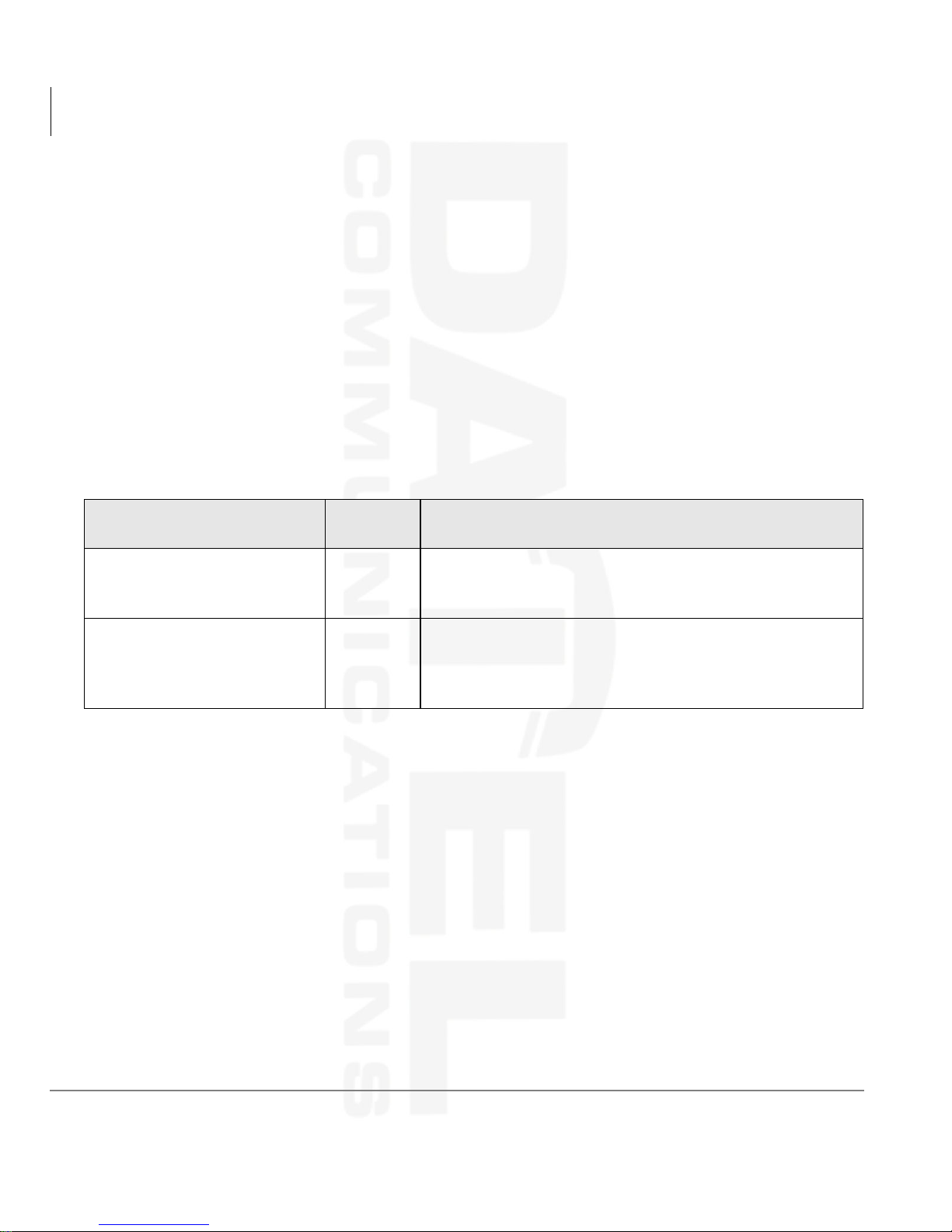
Your telephone has a volume increase and decrease button for controlling speaker and
handset volume levels.
You must hold down either button (
volume change to occur. If you continually hold down either button, the volume
continually changes about every half second until the level limit is reached.You hear
ring tone as long as you press a Volume button when your telephone is idle.
The method for changing feature volume varies. Some features can be adjusted using
only the
9RO ▲/9RO ▼ (see Table 4) and others require additional buttons (see Tab le 5
on Page 13).
Table 4 Using only Vol ▲/Vol ▼
Feature
Ring Tone Volume/Incoming
Handsfree Answerback and
Speaker OCA
Handset Receiver Off-hook
Phone
Status
On-hook,
Idle
9RO ▲/9RO ▼) for at least 1/8 second for any
Comments
Adjusting the ring tone volume also changes the volume
level of incoming Handsfree Answerback and Speaker
OCA calls before they are answered by pressing a [DN].
After a call is terminated and the handset is on-hook, the
volume level returns to the “original” level for the next call.
This “original” level can be adjusted to higher/lower in
system programming.
12 Strata DK Digital Telephone 9/00
Page 25
Table 5 Using Vol ▲/Vol ▼ with Other Buttons
For Sales and Service call 508-580-2500
Tel: 508-580-2500
Datel Communications
Fax: 508-583-8412
The Grand Tour
Volume Controls
Feature
Microphone Sensitivity
Handset/Headset Call
Waiting Tone
Muted Tone Burst
Tone sent for Busy or DND
Override, Call Transfer
with Camp-on, etc.
Ringing, Handsfree
Answerback, and Speaker
OCA.
Phone
Status
On-hook/
Off-hook
On-hook/
Off-hook
On-hook/
Off-hook
On-hook
On-hook
Press Comments
While pressing,
hold 0LF and 9RO
▲9RO▼ for three
seconds.
While pressing,
hold 5HGLDO and
9RO▲
While pressing,
hold 5HGLDO and
9RO▼
[DN] followed by
then
▲/9RO▼
9RO
followed
by 9RO
▲/9RO▼
The Mic LED flashes about six times
while setting the sensitivity. When the
microphone is set for the lowest or
normal sensitivity, the Mic LED lights
steady when the telephone is busy on a
speakerphone call.
The tones are received over the
handset/headset and speaker.
The tones are received over the
speaker.
You hear the muted tone for 15 seconds
or until disconnected by pressing 6SNU.
Your phone rings for 15 seconds or until
disconnected by pressing 6SNU.
Enables you to check if you can hear
ringing at a distance from your
telephone.
After you press a [DN], you hear dial
tone.
Adjusts Internal and CO Dial Tone,
Speaker
On-hook,
idle
[DN] followed by
▲/9RO▼
9RO
Background Music.
Strata DK Digital Telephone 9/00 13
Page 26

The Grand Tour
For Sales and Service call 508-580-2500
Tel: 508-580-2500
Datel Communications
Fax: 508-583-8412
Volume Controls
14 Strata DK Digital Telephone 9/00
Page 27

Features 2
For Sales and Service call 508-580-2500
Tel: 508-580-2500
Datel Communications
Fax: 508-583-8412
This chapter lists all the digital telephone features in alphabetical order beginning on
Page 20. These features can be performed on 2000-series digital telephones equipped
with or without LCDs. Features which require a telephone equipped with a
speakerphone are noted.
Before You Begin
If you are a new user of the Strata DK digital telephone, you need to find out if your
telephone has been set up for Automatic Line Selection and Ringing Line Preference.
You will also need to know if your telephone has tone or voice first signaling when
you receive an internal call:
♦ Tone Signaling rings.
♦ Voice First Signaling does not ring; instead you hear a long tone, then the caller’s
voice.
Each of these features are enabled in system programming and determine how you
will make and answer calls on your telephone.
Strata DK Digital Telephone 9/00 15
Page 28

Features
For Sales and Service call 508-580-2500
Tel: 508-580-2500
Datel Communications
Fax: 508-583-8412
Before You Begin
Automatic Line Selection
You have Automatic Line Selection, if you hear dial tone and
the [DN], Line, or Pooled Line Grp LED lights steady green.
The LCD displays the station number (
line (sample shown at right).
➤ Lift the handset or press 6SNU.
You do not have Automatic Line Selection, if you hear silence.
➤ Press an available [DN] or /LQH before dialing.
Ringing Line Preference
You have Ringing Line Preference, if you can answer a line ringing your station by
lifting the handset or pressing
have to press the button associated with the ringing call (flashing LED) to answer the
call.
If your telephone does not have Automatic Line Selection, press the flashing [DN] or
/LQH first, before using the handset or 6SNU.
Signaling
NO. 201
USING LINE 11
201) and the seized CO
6SNU. You do not have Ringing Line Preference, if you
If you hear a long tone, followed by a caller’s voice, you have Vo ic e First Signaling.
➤ Talk in the direction of your telephone
...or answer the call as you normally would using either the handset or
6SNU.
If you hear successive ring tones, you have Tone First Signaling.
➤ Lift the handset or press 6SNU.
Note You can change to the alternate signaling method when making a call on a
call-by-call basis by pressing
after dialing an internal telephone number.
16 Strata DK Digital Telephone 9/00
Page 29

Quick Reference
For Sales and Service call 508-580-2500
Tel: 508-580-2500
Datel Communications
Fax: 508-583-8412
The following is a quick reference chart for using your telephone’s standard features.
Making an Internal Call
1. Lift the handset or
press
...or if you do not
have Automatic Line
Selection, press a
[DN].
6SNU
Features
Quick Reference
2. Dial a directory
number (
201).
3. When finished with
the call, hang up or
press
6SNU.
Making an Outside Call
1. Lift the handset or
press
...or if you do not
have Automatic Line
Selection, you must
also:
6SNU
NO. 203
201
NO. 203
USING LINE 6
Strata DK Digital Telephone 9/00 17
Page 30

Features
For Sales and Service call 508-580-2500
Tel: 508-580-2500
Datel Communications
Fax: 508-583-8412
Quick Reference
press /LQH
...or
3RROHG/LQH
*US
...or [DN], then enter
a CO line or line
group access code
(see “CO Line Access
Codes” on Page 133).
2. Dial the telephone
number.
The LED flashes green and
the digits are displayed as you
dial.
The display automatically
changes from dialed number
to elapsed time after a
programmed period. After
you hang up, elapsed time is
displayed for 15 seconds and
then changes to date/time
display.
3. When finished with
the call, hang up or
press
6SNU.
Making an Outside Call to an ISDN Trunk
1. Access an outside CO
line
NO. 203
5551374
NO. 203
00: 13: 23
2. Dial the number.
3. Press 6WDUW. The dialed digits will not be sent until you press this
18 Strata DK Digital Telephone 9/00
button or until the timer expires. See “ISDN Outgoing
Calling” on Page 56 for more information on ISDN
calls.
Page 31

On-Hook Dialing
For Sales and Service call 508-580-2500
Tel: 508-580-2500
Datel Communications
Fax: 508-583-8412
Features
Quick Reference
1. Press
6SNU(if you
have Automatic line
selection).
2. Access an outside line
and dial a telephone
number.
3. Lift the handset when
the called party
answers.
4. When finished with
the call, hang up or
press
6SNU.
Answering Calls
When you receive an incoming call, the LCD displays either
the CO line (
... or the station’s [PDN] (
10)
Note If you have a full speakerphone, you do not
have to lift the handset.
LINE 10 RINGING
210).
210 CALLING
NO. 203
NO. 203
➤ Lift the handset or
press
6SNU
...or if you do not
have Ringing Line
The green LED changes from incoming call rate to the
in-use rate. Your LCD displays the answered line.
For information on Caller ID/ANI/DNIS LCD displays
for incoming calls, see Chapter 3 – LCD Operation.
Preference, press the
flashing [DN],
3RROHG/LQH*US
or
/LQH,
and lift the handset.
Strata DK Digital Telephone 9/00 19
Page 32

Features
For Sales and Service call 508-580-2500
Tel: 508-580-2500
Datel Communications
Fax: 508-583-8412
Account Code Calls
Incoming Call Notification
Muted ringing while you are on a call indicates an incoming call. If another call comes
in during the first call, release, transfer, or place the call on hold, then answer the
second call.
➤ Press 5HOHDVHDQG$QV
...or hold down the hookswitch for about one second.
Account Code Calls
Entered before or after a call, Account Codes (i.e., Forced, Voluntary) can be used for
a variety of reasons including billing, tracking, and line restriction applications.
Account Codes are recorded by the system and can, along with the details of the calls,
be printed on a Station Message Detail Recording (SMDR) report.
Forced Account Codes (Verified/Non-Verified)
Some applications require you enter an Account Code, called a Forced Account Code,
before dialing a telephone number.
If the system is set for Verified Account Codes, station users must enter specific codes
when entering the Forced Account Code(s) or the call does not execute. Verified
Account Codes are established in system programming or by designated stations.
➤ To dial using a Forced Account Code Emergency Override of Forced Account Codes
You can bypass Forced Account Code requirements with three emergency numbers,
including 911. See your System Administrator for these numbers:
1) 911 2) _______ 3) _______
20 Strata DK Digital Telephone 9/00
Page 33

Voluntary Account Codes (Verified/Non-Verified)
For Sales and Service call 508-580-2500
Tel: 508-580-2500
Datel Communications
Fax: 508-583-8412
Voluntary Account Codes are usually optional. They can be entered after accessing a
CO line or during a call, to keep track of the call for client billing purposes.
An exception is a Voluntary Account Code which is required to change the Toll
Restriction classification of your station. The code gives you access to telephone
numbers outside your usual dialing area and must be entered prior to dialing the
telephone number. As an example, if your station is restricted to local area calls, you
can make out-of-state calls by using a Voluntary Account Code set in system
programming.
If the system is set for Verified Account Codes, station users must enter specific codes
when entering the Voluntary Account Code(s) or the code is not validated for the
SMDR call report.
➤ To dial using a Voluntary Account Code
Features
Account Code Calls
1. After accessing a CO
line, press
&RGH
$FFRXQW
...or 6SHHG'LDO+
...or
if your
telephone does not
have a speed dial
button.
2. Enter the Account
Code.
Your conversation is not
interrupted.
Note If the Voluntary
ENTER ACCT CODE
NO. 204
Account Code is not
required to dial out,
the account code can
be entered during a
call.
When your station is set for
Verified Account Codes, you
CODE VERIFIED
NO. 204
hear a half second
confirmation tone if the code
is valid.
The outside party is not able to hear any tones (e.g.,
confirmation tones) when the Account Code digits are
being entered. If your station is programmed not to
verify Account Codes, you do not hear a confirmation
tone.
Strata DK Digital Telephone 9/00 21
Page 34

Features
For Sales and Service call 508-580-2500
Tel: 508-580-2500
Datel Communications
Fax: 508-583-8412
Alarm Reset
3. Dial another account
code by repeating
Steps 1 and 2.
4. Dial a telephone
number.
Alarm Reset
Your Strata DK system can be connected to a facility alarm system. All telephones
produce a startling tone whenever this alarm is activated.
➤ To reset the alarm
➤
Press $ODUP5HVHW.
If the code is invalid, you hear
two short tones.
CODE NOT VALID
NO. 204
The last code entered is recorded.
Any digits dialed after the code is entered in Step 2 is
treated as part of a telephone number.
Alert Signaling
Alert Signaling enables you to send an alert sound to a predesignated (partner) station
by pressing a single button. This feature is based on the “buzz” key, where, for
example, a manager might alert his/her administrative assistant to enter the office.
You can have as many as four
from other telephones. An Alert Signal is sent even if the alerted telephone is busy
(on/off-hook) or in the DND or Call Forward mode.
➤ To send an Alert Signal
➤
Press $OHUW6LJQDO. An alert tone sounds at the designated station.
22 Strata DK Digital Telephone 9/00
$OHUW6LJQDO(s) to send or receive an Alert Signal to/
Page 35

Attendant Console Calling
For Sales and Service call 508-580-2500
Tel: 508-580-2500
Datel Communications
Fax: 508-583-8412
Up to four Attendant Consoles can be installed per system. There can be up to three
ways to call the Attendant Console, depending upon system programming.
➤ To call any attendant console
➤ Press a [DN] + . The call rings the Attendant Console’s button. Dial
calls rotate between the consoles if more than one
console is installed.
➤ To call a specific console
Features
Attendant Console Calling
➤ Press a [DN] + the
console’s [DN].
The call rings the console’s
button). Your System Administrator can provide the
Attendant Console(s)
➤ To call all consoles for an emergency
➤ Press a [DN] + the
emergency access
.
code
The call rings the
consoles.
Automatic Busy Redial (ABR)
After reaching a busy outside number, you can activate ABR so that the Strata DK
system automatically redials the number at regular intervals. If the system redials an
outside number that is still busy, ABR resets and tries again. This feature may not be
allowed on some (or all) lines in your system—depending on the telephone line type
connected.
ABR is not attempted while your station is busy, but continues
to time-out. The system inserts a pause (
before redialing the number.
P) on your LCD
,Q'1 (incoming [DN]
,Q'1s.
(PJU button on all attendant
NO. 202
P555 3700
Strata DK Digital Telephone 9/00 23
Page 36

Features
For Sales and Service call 508-580-2500
Tel: 508-580-2500
Datel Communications
Fax: 508-583-8412
Automatic Busy Redial (ABR)
➤ To activate ABR
1. When you reach a
The LED flashes red.
busy number, press
$XWR%XV\5HGLDO
...or &QI7UQ + . You hear confirmation tone.
2. Hang up
...or press
6SNU.
3. The system redials,
up to 15 times, every
30 or 60 seconds
(depending on system
programming).
4. Your telephone
The [DN] or Line and Spkr LEDs flash green.
receives ring tone,
when ABR dials the
number and it is
available.
NO. 202
ABR SET
5. Lift the handset or
press
6SNU and wait
for the party to
answer.
If you do not pick up the handset or press 6SNU within
30 seconds after a connection is made, you hear a
muted ring for another 30 seconds, then the call
disconnects.
➤ To cancel ABR
➤
Press $XWR%XV\5HGLDO
...or [DN] + .
24 Strata DK Digital Telephone 9/00
Page 37

Automatic Callback (ACB)
For Sales and Service call 508-580-2500
Tel: 508-580-2500
Datel Communications
Fax: 508-583-8412
After reaching a busy/DND station, you can set ACB to have the system call you back
when the called station becomes available. You can also set ACB to place you in a
queue for an available CO line, if you reach a line group in which all lines are busy.
➤ To set ACB
Features
Automatic Callback (ACB)
1. After reaching either
a busy/DND station
or CO line, press
$XWR&DOOEDFN
...or
.
2. Hang up
...or press
6SNU.
3. Your telephone rings
at a fast rate when the
called station or CO
line becomes idle.
You hear busy tone, followed
by dial tone (two secs.), then
INT 210 ACB SET
NO. 204
busy tone.
When you set ACB at a busy
station, its number (
210)
displays.
When you set ACB at a busy
line group, its access code
number (
801) is displayed.
INT 801 ACB SET
NO. 204
You can make other calls while waiting for the called
station/line to become available.
For busy/DND station: the
[DN] LED flashes green
210 ACB
NO. 204
(incoming call). The station
number you called (
210)
displays.
For busy CO line: the [DN]
LED from which you
LINE 3 ACB
NO. 204
attempted to first access the
line flashes red (incoming call
rate). The seized line’s
number (
3) displays.
Strata DK Digital Telephone 9/00 25
Page 38

Features
For Sales and Service call 508-580-2500
Tel: 508-580-2500
Datel Communications
Fax: 508-583-8412
Automatic Hold
4. Answer within three
rings to prevent the
After you answer, you hear a single tone, and the LED
flashes green (in-use).
callback from being
cancelled.
If you hear a busy tone after answering a callback, the
called party is already on another call or the line has
already been seized or has received an incoming call.
Your request is not cancelled. You will be called again
the next time a line becomes idle.
5. If you were
attempting to make an
If the original call was made using LCR, the telephone
number is automatically dialed.
outside call and did
not use LCR, you
must now redial the
telephone number.
➤ To cancel ACB (to busy or DND station)
➤
Press $XWR&DOOEDFN or [DN] + .
Automatic Hold
Automatic Hold enables you to automatically place a call on hold by pressing another
outside
between calls without having to press
this feature, otherwise existing calls drop if you do not press
or making another call.
➤ To use Automatic Hold
➤
➤ To switch between calls
➤
/LQH or a [DN] button—there is no need to press +ROG. You can also switch
While on a call, press another /LQH or [DN] to receive/originate a new call. The
LED of the accessed line flashes (in-use). The first call is put on hold and the LED
flashes (on-hold).
Press /LQH or [DN] of the held call. The LED of the line just accessed flashes (inuse). The LED of the Line or [DN] placed on hold flashes (on-hold).
+ROG. Your telephone must be programmed for
+ROG before answering
26 Strata DK Digital Telephone 9/00
Page 39

BGM Over Telephone Speakers
For Sales and Service call 508-580-2500
Tel: 508-580-2500
Datel Communications
Fax: 508-583-8412
BGM over external speakers is controlled by the System Administrator. If BGM is
enabled, you can turn it ON/OFF for your individual station speaker.
➤ To enable/cancel BGM on your telephone speaker
➤
Press 7HO6H W0XVLFto toggle BGM ON/OFF.
Features
BGM Over Telephone Speakers
...or press a [DN] +
6SNU to turn it OFF (ignore busy tone after dialing and ).
Call Forward
If your telephone has more than one [DN], you can assign Call Forward destinations
for each [DN] on your telephone (up to one [PDN] and eight [PhDNs]. Each [DN] can
be independently set for a different Call Forward feature. Call Forward must be set
before the call is received and has priority over the Station Hunt feature.
To set call forward from a [PDN] or [PhDN]:
♦ You must set the call forward from your telephone.
♦ Your telephone must be programmed as the owner of the [PDN] or [PhDN].
Note If you hear a re-order tone when following any of the Call Forward steps, your
telephone is not the owner of the [PDN]/[PhDN].
If Call Forward is set, the following calls to your station forward (except in Call
Forward-External mode):
+ 6SNU to turn BGM ON and press a [DN] + +
♦ Internal calls (Handsfree and OCA calls optionally may or may not)
♦ Auto Attendant calls
♦ CO lines calls that ring only your station
♦ Transferred CO line or station calls
CO lines that ring more than one station do not forward.
Strata DK Digital Telephone 9/00 27
Page 40

Features
For Sales and Service call 508-580-2500
Tel: 508-580-2500
Datel Communications
Fax: 508-583-8412
Call Forward
Call Forward Modes
You can set your telephone [PDNs] or [PhDNs] for a variety of Call Forward modes:
♦ Call Forward—All Calls forwards all calls immediately; your telephone does not
ring when called.
♦ Call Forward—Busy forwards calls immediately when your station, [PDN], or
[PhDN] is busy or in the DND mode.
♦ On “tone-first” systems, if your [PDN] appears on more than one button on
your telephone, Call Forward Busy forwards calls only when all [PDN]
buttons are in use; if there is an idle [PDN], it flashes or rings when called.
♦ On “voice-first” systems, Call Forward Busy forwards all calls any time your
telephone is in use.
Note Call Forward-All Calls, Call Forward-Busy, Call Forward Busy-No Answer,
and Call Forward-No Answer can be set with the touch of one button. See
“Feature Access Codes” on Page 73.
♦ Call Forward—No Answer forwards all calls to your station if you fail to answer
within a designated time (set by you when you enable the feature). Your station
can be programmed to bypass Call Forward-No Answer when receiving Voice
First (handsfree) calls. Callers can activate voice first or OCA by dialing
during
their voice announcement.
♦ Call Forward—Busy/No Answer forwards all calls to your station immediately
whenever you are busy, in the DND mode, or after ringing and you do not answer
the call within a designated time (set by you when you enable the feature). Your
station can be programmed to bypass Call Forward/No Answer when receiving
Voice First (handsfree) calls. Callers can activate ringing and Call Forward by
dialing
♦ On “tone-first” systems, if your [PDN] appears on more than one button on
during their voice announcement.
your telephone, Call Forward Busy forwards calls only when all [PDN]
buttons are in use; if there is an idle [PDN], it flashes or rings when called.
♦ On “voice-first” systems, Call Forward Busy forwards all calls any time your
telephone is in use and/or any time all of your [PDNs] are in use by other
telephones.
28 Strata DK Digital Telephone 9/00
Page 41

♦ Call Forward—Fixed forwards immediately to a station or voice mail device set
For Sales and Service call 508-580-2500
Tel: 508-580-2500
Datel Communications
Fax: 508-583-8412
in system programming all internal, private or DID CO line calls to your station.
Your station does not ring when called. Your station must be assigned with the
&DOO)RUZDUGWR button in system programming to activate this feature.
♦ Call Forward—External forwards new incoming calls directed to your [PDN] to
a destination outside of the system. [PhDNs] assigned to your telephone do not
call forward to external destinations. Internal calls and transferred calls to your
[PDN] also do not forward to external destinations.
Only incoming calls over CO lines dedicated to immediately ring your [PDN], the
private CO
/LQH button, and/or DID line, call forward externally. Any of the other
Call Forward modes can be set for your [PDNs] or [PhDNs] simultaneously with
Call Forward-External.
Using Call Forward Buttons
If your telephone has been system programmed for a Call Forward button, you can use
one of the following Call Forward buttons to set the feature for a [PDN]:
$OO&DOOV
&DOO)RUZDUG([WHUQDO, and &DOO)RUZDUGWR(Call Forward–Fixed feature).
, &DOO)UZG%XV\, &DOO)UZG1R$QVZHU, &DOO)UZG%XV\1$QV,
Features
Call Forward
&DOO)UZG
Using Access Codes
If your telephone has not been programmed for Call Forward buttons or you are
forwarding a [PhDN], you must use access codes to set the Call Forward feature.
LCD Telephones
The LCD on your telephone provides you with call forwarding information.
Make CF Call
When you call a [DN] that is forwarded [203], the [DN] you
called is shown first.
The display changes to the [DN] where your call forwarded
(
210).
NO. 201
203
NO. 201
210
Strata DK Digital Telephone 9/00 29
Page 42

Features
For Sales and Service call 508-580-2500
Tel: 508-580-2500
Datel Communications
Fax: 508-583-8412
Call Forward
Receive CF Call
When a call is forwarded to your [DN] (210), the calling [DN]
205) is displayed on the left and the [DN] called is displayed
(
on the right [203].
Note The LCD examples shown in the following sections are identical to those on
your telephone’s LCD. At times, the entries on the display will scroll off the
LCD and only portions of the entries will remain.
Call Forward–All Calls
1. Press
&DOOV
...or [PDN]/[PhDN] +
.
2. Enter the destination
[DN].
3. Press
&DOOV
...or 6SNU (if access
code used).
&DOO)UZG$OO
&DOO)UZG$OO
The LED flashes red.
You hear confirmation tone
after
is dialed.
The LED lights steady red
and calls forward to the stored
directory number [203].
NO. 201
205 CALL 203
NO. 201
CALL FORWARD TO
NO. 201
ALL FORWARD TO 203
CF-A 201-203
JAN 01 TUE 12: 19
➤ To cancel a Call Forward–All Calls
➤
Press &DOO)UZG$OO&DOOV + 6SNU
...or [PDN] + + 6SNU.
30 Strata DK Digital Telephone 9/00
Page 43

Call Forward–Busy
For Sales and Service call 508-580-2500
Tel: 508-580-2500
Datel Communications
Fax: 508-583-8412
Features
Call Forward
1. Press &DOO)UZG
%XV\
...or [PDN]/[PhDN] +
.
2. Enter the destination
[DN].
3. Press
%XV\
&DOO)UZG
...or 6SNU (if access
code used).
➤ To cancel a Call Forward–Busy
➤
Press &DOO)UZG%XV\ + 6SNU
...or [PDN] + + 6SNU.
The LED flashes red.
You hear confirmation tone
after
is dialed.
The LED lights steady red
and calls forward to the stored
directory number [203].
NO. 201
CALL FORWARD TO
NO. 201
ALL FORWARD TO 203
CF-B 201-203
JAN 01 TUE 12: 19
Call Forward–No Answer
1. Press &DOO)UZG1R
$QVZHU
...or [PDN]/[PhDN] +
.
2. Enter the destination
[DN].
Strata DK Digital Telephone 9/00 31
The LED flashes red.
You hear confirmation tone
after
is dialed.
NO. 201
CALL FORWARD TO
NO. 201
ALL FORWARD TO 203
Page 44

Features
For Sales and Service call 508-580-2500
Tel: 508-580-2500
Datel Communications
Fax: 508-583-8412
Call Forward
3. Press 6SHHG'LDO.
Note Skip this step, if
you pressed
)UZG1R
$QVZHU
&DOO
in
Step 1.
4. Enter the time delay
a) seconds.
(
Note Skip this step if
you do not want
to change the
time.
5. Press &DOO)UZG1R
$QVZHU
...or 5HGLDO, then
6SNU (if access code
was used in Step 1).
The pre-set time delay for
calls forwarding is 12
seconds.
The LCD displays the amount
of time entered (
16).
The LED lights steady red
and calls forward to the stored
directory number [203].
NO. 201
LL FORWARD TO 203*
NO. 201
FORWARD TO 203*16
CF-NA 201-203
JAN 01 TUE 12: 19
➤ To cancel a Call Forward—No Answer
➤
Press &DOO)UZG1R$QVZHU + 6SNU
...or [PDN] + + 6SNU.
Call Forward–Busy/No Answer
1. Press &DOO)UZG
%XV\1$QV
...or [PDN]/[PhDN] +
.
2. Enter the destination
[DN].
32 Strata DK Digital Telephone 9/00
The LED flashes red.
You hear confirmation tone
after
is dialed.
NO. 201
CALL FORWARD TO
NO. 201
ALL FORWARD TO 203
Page 45

Features
For Sales and Service call 508-580-2500
Tel: 508-580-2500
Datel Communications
Fax: 508-583-8412
Call Forward
3. Press
Note Skip this step, if
6SHHG'LDO.
you pressed
)UZG%XV\
1$QV
in Step 1.
&DOO
4. Enter the time delay
a) seconds.
(
Note Skip this step, if
you do not want
to change the
time.
5. Press &DOO)UZG1R
$QVZHU
...or 5HGLDO, then
6SNU (if access code
used in Step 1).
The pre-set time delay for
calls to ring before
forwarding is 12 seconds.
The LCD displays the amount
of time entered (
16).
The LED lights steady red
and calls forward to the stored
directory number [203].
NO. 201
LL FORWARD TO 203*
NO. 201
FORWARD TO 203*16
CF-BN 201-203
JAN 01 TUE 12: 19
➤ To cancel a Call Forward–Busy/No Answer
➤
Press &DOO)UZG%XV\1$QV + 6SNU
...or [PDN] + + 6SNU.
Call Forward–Fixed
➤ Press &DOO)UZGWR. The LED lights steady red and all calls forward to a station
[PDN] or voice mail device set in system programming.
...or press
&DOO)UZGWR a second time to cancel the feature.
Strata DK Digital Telephone 9/00 33
Page 46

Features
For Sales and Service call 508-580-2500
Tel: 508-580-2500
Datel Communications
Fax: 508-583-8412
Call Forward
Call Forward—External
1. Store the destination
number at Station
Speed Dial location
Code 49 (RCTUA, B,
C/D processors) or
location 139
(RCTUE/F
processors).
Only perform Step 1
the first time Call
Forward-External is
set or when you
change the
destination. It is not
necessary to store the
destination each time;
it remains in system
memory.
This feature enables you to forward new incoming
calls directed to your [PDN] to a destination outside of
the system. [PhDNs] assigned to your telephone do not
Call Forward to an external destination. Internal calls
and transferred calls to your [PDN] do not forward to
external destinations.
Only incoming calls over CO lines dedicated to
immediately ring on your [PDN], private CO
/LQH
button, and/or Direct In Dial line calls forward. Any of
the other Call Forward modes can be set for your
[PDNs] or [PhDNs] simultaneously with Call
Forward-External.
Use the Speed Dial storage procedures detailed on
Page 70. When forwarding to an outside destination
include the CO Line (or CO Line group) access code
before the telephone number.
Example: 8015833700
801 = CO Line access code
5833700 = Telephone number
See Table 13 on Page 134 for CO Line/Line Group
access codes. The LCR access code “9” cannot be
used.
2. To set CF-External,
press
([WHUQDO
&DOO)UZG
Incoming calls forward to the destination stored at
Station Speed Dial Location 49.
...or the [PDN] +
.
➤ To cancel a Call Forward–External
➤
Press &DOO)UZG([WHUQDO
...or [PDN] + + 6SNU.
34 Strata DK Digital Telephone 9/00
Page 47

Remote Destination Change
For Sales and Service call 508-580-2500
Tel: 508-580-2500
Datel Communications
Fax: 508-583-8412
If Call Forward-External mode is set at your station, you can change the forwarding
destination from a telephone outside of the system.
➤ To change the destination number
Features
Call Forward
1. Call into the DK
system over a CO line
programmed for the
DISA feature.
2. After you receive dial
tone, press
then
dial your [PDN].
3. Enter the Remote Call
Forward-External
security code.
You hear ringback tone signal, then internal dial tone
for 10 seconds.
Try again if you hear busy tone.
Note See the System Administrator for DISA
telephone numbers.
You hear a confirmation tone.
If a number is not dialed, the system automatically
makes the DISA CO line ring as a normal incoming
call. Then, if the call is not answered within 15
seconds after the ringing starts, it disconnects.
You hear a confirmation tone. See the System
Administrator for the security code which is assigned
to your telephone in system programming.
Strata DK Digital Telephone 9/00 35
Page 48

Features
For Sales and Service call 508-580-2500
Tel: 508-580-2500
Datel Communications
Fax: 508-583-8412
Call Park Orbits
4. Enter the new
destination number.
You can enter an
internal number,
Voice Mail number
or, a CO line access
code plus an external
telephone number.
With some systems,
you can dial a line
group code instead of
a CO line number
access code. (Table 13
on Page 134 for
access code
information.)
5. Press
. You hear a confirmation tone.
Call Park Orbits
The Call Park feature enables you to hold a call temporarily in an orbit (the area where
the call is held). Anyone can retriev6e the call from the orbit using the same or a
different station. There are 20 General Park Orbits for the system and 1 Personal Park
Orbit for each station.
Once you have parked a call in an orbit, you can:
♦ Hang up and retrieve the parked call at a later time
♦ Originate another call
♦ Access a voice paging device to announce the parked call for pickup from another
station
If you park a call and it is not retrieved the following occurs:
♦ If your station is idle when the system Call Park recall timer expires, the parked
call automatically recalls to your station.
36 Strata DK Digital Telephone 9/00
Page 49

♦ If your station is busy, the parked call camps-on.
For Sales and Service call 508-580-2500
Tel: 508-580-2500
Datel Communications
Fax: 508-583-8412
If you have an LCD telephone, you can let the system automatically select an
available orbit number which displays on your LCD. To monitor the calls parked at
your station, see “Call Park Orbit List Display” on Page 99.
➤ To pa r k a cal l
Features
Call Park Orbits
1. While on a call, press
3DUNLQ2UELW
The LED flashes green
(consultation-hold).
...or &QI7UQ +
.
2. Enter a General Orbit
Number (
~)
or a valid [PDN]
...or if you have an
LCD, press
.
The call is parked and the CO
line flashes (Hold), or the
[DN] LED turns OFF.
The system parks the call on the lowest vacant Orbit
Number.
3. Hang up. The caller’s extension or Line
number and the orbit number
are shown.
If the parked call is not
retrieved within a specified
time, the call rings back to
your phone.
ENTER ORBIT NO
RTRN
6793 PK ORBIT 900
LN 2 ORBIT 900
Strata DK Digital Telephone 9/00 37
When a parked call recalls
your phone, the LCD shows
the line or [DN] that is
recalling and the orbit
number.
L 2 PK ORBIT 900
Page 50

Features
For Sales and Service call 508-580-2500
Tel: 508-580-2500
Datel Communications
Fax: 508-583-8412
Call Park and Page
➤ To retrieve a parked call
1. Press 3DUNLQ2UELW
...or [DN] + . [DN] can be [PDN], [SDN] or [PhDN].
2. Enter the Orbit
Number where the
call is parked.
Call Park and Page
You can use the Park feature in conjunction with the Page feature. This operation can
be programmed on a
Access Codes” on Page 73.)
➤ To park and page a call
1. While on a call, press
3DUNDQG3DJH
...or &QI7UQ +
.
2. Enter a General Orbit
Number (
or a valid [PDN]
~)
6SHHG'LDO button for one-touch activation (See “Feature
The [DN] LED flashes at the in-use rate when the call
is retrieved.
The LED flashes green
(consultation-hold).
HOLD LINE 2
ENTER ORBIT NO.
The call is parked and the CO
line flashes (Hold), or the
[DN] LED turns OFF.
...or if you have an
LCD, press
.
38 Strata DK Digital Telephone 9/00
The system parks the call on the lowest vacant Orbit
Number.
Page 51

Features
For Sales and Service call 508-580-2500
Tel: 508-580-2500
Datel Communications
Fax: 508-583-8412
Call Park and Page
3. Enter a [DN] or a
Page Group or Zone
access code (see
Tables 14 and 15 on
Page 135,
respectively).
4. Make your
announcement
(include the Orbit
Number).
5. Hang up to free the
paging device.
After you enter an Orbit Number, a short burst of dial
tone prompts you to enter the Page access code.
The LCD shows the
Auto Park entry.
The LCD shows the Line
being held and its orbit
number. Example: Line
held on orbit
900.
If the parked call is not
retrieved within a specified
2 is
HOLD LINE 2
999
HOLD LINE 2
L 2 ORBIT 900
PARK ORBIT 900
HOLD
time, the call rings back to
your phone.
When a parked call recalls
your phone, the LCD shows
the line or [DN] that is
recalling and the orbit
number.
L 2 PK ORBIT 900
Strata DK Digital Telephone 9/00 39
Page 52

Features
For Sales and Service call 508-580-2500
Tel: 508-580-2500
Datel Communications
Fax: 508-583-8412
Call Pickup
Call Pickup
You can pick up a call that is ringing another station’s [PDN] or [PhDN], a call placed
on hold at another station and other types of calls.
When you pick up an internal call, the calling station [
displays on the left and the called station [
right.
If your call is picked up by another station, the LCD shows
that your call to station [
[DN] Pickup
Picks up ringing or held Directory Numbers.
➤ Press [DN] + + [PDN] or [PhDN] that you want to pick up.
Directed Call Pickup
This feature enables you to pick up calls ringing in, or calls held at other stations.
➤ To use directed call pickup
1. Press 'LUHFWHG
3LFNXS
...or [DN] + .
200]
201] displays on the
200] was picked up by station [201].
The directed [PDN] is the Primary Directory Number
of the station that has the ringing or held call that is to
be picked up.
NO. 204
200 CALL 201
NO. 204
200 PICKUP 201
2. Dial directed [PDN]. If more than one call is on hold, the call on the
40 Strata DK Digital Telephone 9/00
telephone’s lowest button number is picked up.
Ringing calls are picked up over held calls as a
priority.
Page 53

➤ To pick up a ringing CO line in a tenant system
For Sales and Service call 508-580-2500
Tel: 508-580-2500
Datel Communications
Fax: 508-583-8412
Features
Call Pickup
➤ Press
3LFNXSa
'LUHFWHG
...or [DN] + .
Group Pickup
Stations can be assigned in system programming to Pickup Groups. As many as 20
groups can be created to enable you to easily pick up incoming (new or transferred) or
internal calls that are ringing stations that are in your group or in other groups. This
feature does not pickup held calls. You may belong to more than one group. See your
System Administrator for group assignments.
Calls Ringing Within Your Group
You are connected to a incoming CO line call for a
Tenant Group (1~4).
Notes
● In non-tenant systems, 'LUHFWHG3LFNXSpicks
up any ringing CO line.
● This feature does not pickup held lines or
transferred CO lines that are ringing; use Directed
Call Pickup.
➤
Press *URXS3LFNXSor a [DN] + . You are connected to the call.
Calls Ringing to Other Groups
1. Press [DN]. You hear dial tone.
2. Enter , then the
access code
~) of the
(
group to which the
You are connected to the call. If the called station
belongs to more than one group, any of the Group
Pickup codes associated with those groups pickup the
call.
station belongs.
Strata DK Digital Telephone 9/00 41
Page 54

Features
For Sales and Service call 508-580-2500
Tel: 508-580-2500
Datel Communications
Fax: 508-583-8412
Call Transfer with Camp-on
Page/Internal Call Pickup
This feature picks up Internal (station to station), Group Page, and All Call Page calls.
If these types of calls occur at the same time, the pickup priority is station-to-station
and then Page calls in the order of occurrence. In some systems this feature can be
applied to pickup All Call Page exclusively.
➤ To pickup a page or internal call
1. Press [DN]. You hear dial tone.
2. Enter . You are connected to the caller who originated the
internal or page call. The page circuit is released.
Call Transfer with Camp-on
You can transfer calls to idle or busy [DNs], Hunt Group Numbers, ACD Group
[DNs], etc. You cannot transfer (or camp-on) to a station’s [PDN] or [PhDn] if the
station is in the DND mode, unless the station’s [PDN] or [PhDN] appears on other
stations.
➤ To transfer a call
1. While on a call, press
&QI7UQ.
2. Dial the [DN] where
the call will be
transferred.
3. If the station is idle,
announce the call and
hang up
The Line or [DN] LED flashes green (conference rate).
You hear internal dial tone.
The CO line rings the called station. If you hear a
single tone, you can then announce the call over the
called telephone’s speaker. (If you hear ringing tone,
the call was made with Tone Signaling.)
42 Strata DK Digital Telephone 9/00
Page 55

Features
For Sales and Service call 508-580-2500
Tel: 508-580-2500
Datel Communications
Fax: 508-583-8412
Call Transfer with Camp-on
...or if the station is
busy or does not
answer, hang up
...or to reconnect to
the transferred line
before it is answered,
press the flashing
/LQH or [DN] + .
The Line LED flashes green (on-hold). If you
transferred the call from a [DN], the [DN]’s LED turns
off. The CO line or [DN] camps on to the called station
and the called station receives a warning tone. The
camped-on call rings when you hang up.
The Line LED is a steady red
when the called station
CAMP-ON 4
NO. 204
answers the transferred call.
If the call is not answered
after a specified Recall time
HOLD LINE 2
LN 2 RECALL 203
set in system programming,
camp-on is cancelled and the
transferred call rings back
(when your station or [DN] is
idle or sends two tone bursts
if your telephone is busy).
The LCD shows the CO line
number and the station
number [203] where it was
originally transferred.
Strata DK Digital Telephone 9/00 43
Page 56

Features
For Sales and Service call 508-580-2500
Tel: 508-580-2500
Datel Communications
Fax: 508-583-8412
Call Waiting
Call Waiting
You can answer a call that is transferred to your station, even when your station is
busy. When another call is camped onto your station, you hear two camp-on tone
beeps and the [DN] or Line LED flashes red (on-hold).
If a call is sent to your station when busy, and your station does not have a [DN] or
/LQH button available to receive the call, two camp-on tone beeps are sent to your
telephone. You must disconnect or transfer the existing call to answer the waiting call.
➤ To answer a waiting call by placing the current call on-hold
➤ Press
+ROG The existing call is placed on-hold. The camped-on
line rings your station (the Line LED flashes green incoming call).
...or if your telephone
has the Auto Hold
You are connected to the transferred call. The [DN] or
Line LED flashes green (in-use).
feature, just press the
flashing [DN] or
/LQH.
Note See your System Administrator to find out if
you have Auto Hold.
➤ To answer a waiting call by disconnecting or transferring the current call
➤ Hang up or transfer
the existing call; the
camped-on call rings
your station
...or press the flashing
[DN] or
/LQH.
The existing call disconnects or transfers. The campedon line rings your telephone and the Line LED flashes
green (incoming call).
This disconnects the current call and connects you to
the transferred call. The [DN] or Line LED flashes
green (in-use).
44 Strata DK Digital Telephone 9/00
Page 57

Conference Calls
For Sales and Service call 508-580-2500
Tel: 508-580-2500
Datel Communications
Fax: 508-583-8412
This feature enables you to add other parties to an existing call. (If you have an LCD
telephone, you can use Soft Keys to make a conference call.) The following
conferencing configurations are possible:
♦ up to two stations and two CO lines
♦ up to three stations and one CO line
♦ up to four stations
➤ To make a conference call
Features
Conference Calls
1. While on a call, press
&QI7UQ.
You hear dial tone and the [DN] or Line LED flashes
green (conference-rate).
2. Dial a [DN] or access
a CO line and dial the
telephone number.
3. When the called party
answers, press
&QI7UQ.
All parties are conferenced. If the second call was
placed on a [DN] or CO line that appears on your
telephone, the LED also flashes green at the in-use
rate.
4. Repeat the procedure
to add other CO lines
or [DNs],
remembering not to
try and exceed the
allowed number.
Notes
● If you receive a busy tone or no answer, press &QI7UQ to return to the original
connection.
● The new station is not conferenced unless its user lifts the handset or presses a
[DN] to answer.
Strata DK Digital Telephone 9/00 45
Page 58

Features
For Sales and Service call 508-580-2500
Tel: 508-580-2500
Datel Communications
Fax: 508-583-8412
Date/Time/Day Adjustment
Date/Time/Day Adjustment
This feature is performed from a designated station. See the System Administrator
Guide for instructions.
Direct Inward System Access (DISA)
Outside callers with telephones that send Dual-tone Multi-frequency (DTMF) tones
can call in on CO lines programmed for DISA and dial a [DN] or outgoing CO line
without going through an attendant or operator. See the System Administrator for this
number.
DISA Calls - Internal
1. From outside the
system, dial the DISA
CO line telephone
number.
2. When you hear dial
tone, dial a [DN].
3. If you receive busy
tone or want to dial
another number while
the station is still
ringing, press
Repeat Step 2.
.
You hear a ringback tone signal, then an internal dial
tone for 10 seconds.
If you do not dial within 10 seconds, the system
automatically causes the DISA CO line to ring a
telephone or group of telephones designated in system
programming. Then, if the call is not answered within
15 seconds after the ringing starts, it disconnects.
You hear ring tone. When the station answers, you are
connected.
If the call is not answered after 6 rings or 24 seconds,
(whichever comes first) you hear busy tone.
To call another station after completing a DISA station
call, the internal party must transfer you. Station and
System Page cannot be accessed on DISA calls.
46 Strata DK Digital Telephone 9/00
Page 59

DISA Calls - External
For Sales and Service call 508-580-2500
Tel: 508-580-2500
Datel Communications
Fax: 508-583-8412
Features
Direct Inward System Access (DISA)
1. From outside the
system, call the DISA
CO line telephone
number.
2. When you hear dial
tone, dial a CO line or
CO line access code
...or dial a CO line or
CO line access code
and then a DISA
security code. See
Table 13 on Page 134
access codes.
3. When you hear dial
tone, dial a telephone
number.
You hear a ringback tone signal, then an internal dial
tone for 10 seconds.
If you do not dial within 10 seconds, the system
automatically rings the DISA CO line as a normal
incoming call. Then, if the call is not answered within
15 seconds after the ringing starts, it disconnects.
You hear dial tone. If you do not hear dial tone, you
must also dial a DISA security code.
You hear dial tone.
Note See the System Administrator for the DISA
security code number. If the correct code is not
entered, the call disconnects.
If set in system programming, both parties hear a
warning tone approximately 4, 10, or 20 minutes after
the call was made. Press
to reset the timer each time
the tone sounds (for an additional 4, 10, or 20
minutes). If you do not press
, the call disconnects
approximately one minute after the tone.
Strata DK Digital Telephone 9/00 47
Page 60

Features
For Sales and Service call 508-580-2500
Tel: 508-580-2500
Datel Communications
Fax: 508-583-8412
Direct Station Selection (DSS) Buttons (Hotline)
Direct Station Selection (DSS) Buttons (Hotline)
This optional feature enables you to use a '66 button to connect directly to another
station’s [PDN]. The DSS LED shows the status (idle/busy) of the station and/or the
station’s [PDN]. For example, a station’s DSS button LED shows busy (light steady
red) when the station is:
♦ busy on a call on any button or is in the DND mode.
♦ idle but all appearances of the station’s [PDN] are in use by other stations.
➤ To connect directly to another station’s [PDN]
1. When connected to a
CO line or another
station, press
'66.
The original party is put on-hold. You can call a station
even if the DSS LED shows busy (steady red).
2. Announce the call
...or transfer the call
by hanging up or
pressing
DQG$QV
5HOHDVH
.
Note You can transfer the call to an idle or busy
Do Not Disturb (DND)
If your station is in the DND mode, internal, external and transferred calls do not ring
your station and OCA calls are denied. You can continue to make calls while in the
DND mode.
If your [PDN] or [PhDN] appears on other stations, calls to your [PDN] or [PhDN]
flash on your station and flash or ring the other stations. This enables your calls to be
answered at the other stations (or yours), even while your station is in the DND mode.
station.
You r “alert partner” telephone can override DND and signal your telephone by
pressing
$OHUW6LJQDO. Telephones with DND Override can also call and mute ring
your telephone.
48 Strata DK Digital Telephone 9/00
Page 61
➤ To activate/deactivate DND
For Sales and Service call 508-580-2500
Tel: 508-580-2500
Datel Communications
Fax: 508-583-8412
➤
Press 'R1RW'LVWXUE. The LED lights steady red and DND mode is activated.
...or press it again to toggle the feature off.
Notes
● Calls forward from your station immediately while in the DND mode, if it is set
for Call Forward-Busy or Call Forward-Busy/No Answer.
● If you press 'R1RW'LVWXUE while a call is ringing, the ringing stops. The LED
continues to flash.
Door Lock(s)
Your telephone may have up to five 8QORFN'RRU button(s), which enables you to
unlock a door.
Features
Door Lock(s)
Door Lock Button Location
Unlock Door 0
Unlock Door 1
Unlock Door 2
Unlock Door 3
Unlock Door 4
➤ To unlock a door
➤
Press 8QORFN'RRU. The door unlocks for three or six seconds (set in system
programming). The Unlock Door LED is lit while the door is unlocked.
Strata DK Digital Telephone 9/00 49
Page 62
Features
For Sales and Service call 508-580-2500
Tel: 508-580-2500
Datel Communications
Fax: 508-583-8412
Door Phone(s)
Door Phone(s)
Door phones can be used to call digital/electronic telephones selected in system
programming. When a door phone calls, you hear a distinctive ringing tone, one or
five times (set in system programming). You can also call a door phone and monitor
the surrounding area.
The number of possible door phones vary by Strata DK system, with up to 12 as the
maximum for larger systems.
LCD telephones display the door phone ID when calls are
made to/from door phones (e.g., door phone 1A). The ID
enables you to know the door phone [DN]. For example, door
phone 1A corresponds to Door Phone [DN]
, 1B to , etc. Door phone IDs
and the corresponding [DNs] are shown in Table 6.
Table 6 Door Phone Lock IDs/Locations
Door Phone
[DNs]
#151 1A #157 3A
#152 1B #158 3B
#153 1C #159 3C
#154 2A #161 4A
#155 2B #162 4B
Door Phone
ID
Location
Door Phone
[DNs]
Door Phone
ID
NO. 204
DOOR PHONE 1A
Location
#156 2C #163 4C
50 Strata DK Digital Telephone 9/00
Page 63

➤ To answer a door phone call
For Sales and Service call 508-580-2500
Tel: 508-580-2500
Datel Communications
Fax: 508-583-8412
1. Lift the handset. If you lift the handset while the door phone is still
Features
Door Phone(s)
ringing, the [DN] LED flashes green (in-use) and you
are connected to the door phone.
2. If not connected yet,
dial the door phone
[DN].
...or to pick up door
phone calls ringing
someone else’s
phone, press [DN] +
.
➤ To call/monitor a door phone
1. With the handset offhook, press a [DN].
2. Dial the [DN] for the
desired door location.
If you have an LCD telephone, see Table 6 for the
[DN].
Note access is a system option that may not
be turned on for your system.
You hear dial tone and the LED flashes green (in-use).
If you have an LCD telephone, see Table 6 for the
[DN].
A two-way talk-path exists between your telephone
and the called door phone. You can audibly monitor
the area around the door phone.
Strata DK Digital Telephone 9/00 51
Note Door phone [DNs] can be stored on 6'
buttons. See “Feature Access Codes” on Page
72.
Page 64

Features
For Sales and Service call 508-580-2500
Tel: 508-580-2500
Datel Communications
Fax: 508-583-8412
DTMF Tone Dialing with * and #
➤ To call from a door phone
1. Press the door phone
button and then
You hear a distinctive ringing tone–one or five times
(set in system programming).
release it.
2. When answered,
speak at a normal
voice level in the
direction of the door
phone.
DTMF Tone Dialing with * and #
You may have to send and DTMF tones to some devices or services, such as a
voice mail device or computer output service. DTMF tones are automatically enabled
on stations with
to enable these tones.
This feature disables the Speed Dial feature during the call. Speed Dial is restored
when you complete the call or place it on hold.
6SHHG'LDO. If you do not have 6SHHG'LDO, you must first dial
,
➤ To output
➤
and DTMF tones on a telephone without a 6SHHG'LDObutton
While on an outside call, press , then . You can now output and , DTMF
tones, and digits
~ for the duration of the call. This procedure must be repeated
on each call where you require such output.
52 Strata DK Digital Telephone 9/00
Page 65

Emergency Ringdown/Hotline Service
For Sales and Service call 508-580-2500
Tel: 508-580-2500
Datel Communications
Fax: 508-583-8412
Emergency Ringdown/Hotline Service
The Emergency Ringdown or Hotline Service feature enables standard telephones to
automatically ring a designated extension by going off-hook. Digital telephones
cannot perform this feature, but they can receive Emergency Ringdown or Hotline
Service from standard telephones.
Features
Emergency Ringdown is used in healthcare facilities, where it
is used to assist callers who may not be able to complete a call
by dialing. An example of an incoming Emergency Ringdown
call is shown on the right. The calling [DN] and “Ringdown” displays whether soft
keys are ON or OFF.
This same feature is also known as Hotline Service and is often used for telephones in
hotel/motel lobbies.
Group Listening
This feature enables you to set your telephone so that you and people near your
telephone can hear the called party over the speaker, but the called party can not hear
you. You can alternate between parties as long as the handset is off-hook.
➤ To activate group listening
➤
While off-hook on a call, hold down 6SNU. The Spkr LED lights red.
➤ To deactivate group listening
205 CALLING
RINGDOWN
➤
Release 6SNU. The Spkr LED turns OFF. You can talk to the party through the
handset.
Strata DK Digital Telephone 9/00 53
Page 66

Features
For Sales and Service call 508-580-2500
Tel: 508-580-2500
Datel Communications
Fax: 508-583-8412
Handsfree Answerback
Handsfree Answerback
You can talk back to internal or incoming Tie Line calls without lifting the handset.
➤ To receive a handsfree internal call
1. You hear a single long
tone, followed by the
caller’s voice.
2. Do not lift the
handset; speak toward
The LED flashes green (incoming call). The Mic LED
lights steady red, indicating your microphone is active.
The Spkr LED flashes red.
If you have a speakerphone, you will have better
performance if you press the called [DN] button first.
the telephone in a
normal voice level.
Notes
● A [DN] must be pressed (or the handset must be taken off-hook) to actually
answer the call. This is necessary before transferring or placing an internal call on
hold.
● You can press 9RO ▲ or 9RO ▼ to control the volume of the Handsfree
Answerback caller’s voice and ring tone. See Chapter 1–The Grand Tour for more
information on volume control.
54 Strata DK Digital Telephone 9/00
Page 67

Handsfree Monitoring
For Sales and Service call 508-580-2500
Tel: 508-580-2500
Datel Communications
Fax: 508-583-8412
Calls placed on hold by an outside party may be monitored handsfree. This feature
frees you from having to hold the handset to your ear until the outside party returns to
the call, enabling you to take care of other tasks in the meantime.
➤ To use handsfree monitoring
Features
Handsfree Monitoring
1. While on an off-hook
The Spkr LED lights red.
call, press and hold
6SNU.
2. Place the handset onhook.
The Spkr LED stays on and you can hear the distant
party through your telephone speaker.
3. Release 6SNU. For privacy, press 0LF to turn your telephone’s
microphone off. (Otherwise, your conversations may
be picked up.)
4. Lift the handset when
the party returns.
Note Each station’s 0LF can be set in system
programming to switch ON/OFF with one
touch, to switch OFF only while pressed and
held, or to be either ON/OFF at the start of
handsfree dialing. See your System
Administrator if you want the setting changed.
Strata DK Digital Telephone 9/00 55
Page 68

Features
For Sales and Service call 508-580-2500
Tel: 508-580-2500
Datel Communications
Fax: 508-583-8412
ISDN Outgoing Calling
ISDN Outgoing Calling
This feature enables you to make outgoing call using an Integrated Services Digital
Network (ISDN) trunk, provided that you are connected to a Strata DK424i, DK424
with software Release 4.0 or higher, or DK40i, and that you subscribe to ISDN lines.
ISDN trunks offer faster call connection setup, and they also provide more connection
circuits.
Making an ISDN outgoing call will either be handled automatically with a timer or by
you initiating the ISDN “Start” sequence. The method depends on your system’s
programming. See your System Administrator to determine the method.
➤ To make an outgoing call to an ISDN trunk
1. Access an outside CO
line
2. Dial the number.
3. Press 6WDUW. The dialed digits will not be sent until you press this
button or until the timer expires.
Subaddress
Subaddress digits may be required for dialing another department, or to send a call to
equipment, such as a printer. If you need to enter subaddress digits, follow these
instructions:
➤ To make an outgoing call with a subaddress to an ISDN trunk
1. Access an outside CO
line
2. Dial the number.
3. Press 6XE. The 6XE button informs the system that the following
4. Enter the subaddress.
digits are the subaddress.
56 Strata DK Digital Telephone 9/00
Page 69

5. Press 6WDUW. The dialed digits will not be sent until you press this
For Sales and Service call 508-580-2500
Tel: 508-580-2500
Datel Communications
Fax: 508-583-8412
Message Waiting
If you call a busy station [DN] or its user does not answer, you can leave a message
waiting indication at the station. The Msg LED at the called station flashes and the
user can call you back by pressing the
devices, as well as people, can leave message waiting indications.)
Features
Message Waiting
button or until the timer expires.
0VJ button with the flashing LED. (Voice mail
All telephones have a standard (fixed)
messages left by callers that called the station’s [PDN]. Telephones that own [PhDNs]
can also have up to four additional (flexible) message waiting [PhDN/MW] buttons/
LEDs for receiving/retrieving messages left by callers that called the respective
[PhDNs]. To use the [PhDN] message waiting feature, your telephone needs to have
[PhDN/MWs].
Up to four message waiting indications and LCD messages can be left at each [DN] or
[PhDN] at one time. The fourth message and one of the LEDs is reserved for the
Message Center.
Message Waiting Light on [PDN]
➤ To answer a Msg light
1. Press 0VJ, then lift
the handset.
If you reach a station
that is busy or does
not answer, go onhook and press
0VJ
again. The system
rotates to the next
message sender.
Your phone rings the station or voice mail device that
set the indication. The LED continues to flash red.
0VJ button/LED for receiving/retrieving
Strata DK Digital Telephone 9/00 57
Page 70

Features
For Sales and Service call 508-580-2500
Tel: 508-580-2500
Datel Communications
Fax: 508-583-8412
Message Waiting
The LCD can show
up to three stations
that have left
messages for the
[PDN] and three for
each of your
[PhDNs].
2. Press 6FUROO to
display them.
3. After receiving the
message(s), place the
handset on hook.
➤ To cancel the Msg light
➤ Press
handset.
0VJ and lift the
In the example (shown at
right), the display indicates
that station DN [
203] received
a message signal from DN [
201].
CALL 203-201+
The “+” indicates additional messages.
NO. 204
If the Msg LED continues to flash, you have more
messages–repeat the Steps to retrieve them. Voice mail
devices may cancel the indication after a short delay.
Your Msg LED turns OFF when the called party
answers.
...or [DN] + to
cancel the light. This
must be done for each
message recorded.
Note The called party must answer–by either going
off-hook or by pressing
6SNU–for the
indication to be cancelled automatically.
Your Msg LED turns OFF without calling the
telephone or VM device.
58 Strata DK Digital Telephone 9/00
Page 71

Message Waiting Light on [PhDN/MW]
For Sales and Service call 508-580-2500
Tel: 508-580-2500
Datel Communications
Fax: 508-583-8412
➤ To respond to [PhDN/MW]
Features
Message Waiting
1. Press the flashing red
[PhDN/MW] LED.
2. After receiving the
message, press
...or place the handset
on-hook.
➤ To cancel [PhDN/MW]
1. Press [PhDN]. You hear a steady dial tone.
2. Enter . The dial tone stops.
3. Press 6SNU. The [PhDN/MW] LED turns OFF, indicating that the
6SNU
Your phone rings the station or voice mail device that
left the message. If the called party or VM device
answers, the message waiting indication is cancelled
automatically. If there is no answer, hang up and try at
a later time. The red
[PhDN/MW] LED on your phone continues to flash.
If you have more messages, the red [PhDN/MW] LED
continues to flash. To answer the next message, repeat
this procedure.
message has been canceled.
Message Waiting Light on Another Telephone
➤ To set a message waiting light on another telephone
1. Press [DN] and dial
an internal number.
2. Press 0VJ or . The Msg or PhDN/MW] LED
Strata DK Digital Telephone 9/00 59
You hear ringback or busy tone.
flashes red at the called
telephone. The Msg LED
lights steady red at your
telephone. The LCD displays
the station [203] where you
set a message waiting light.
NO. 201
INT 203 MW SET
Page 72

Features
For Sales and Service call 508-580-2500
Tel: 508-580-2500
Datel Communications
Fax: 508-583-8412
Microphone Cut-Off
3. Press
6SNU. The Msg LED on your
telephone turns OFF. The
Msg or [PhDN/MW] LED on
the called telephone flashes
until the called party presses
the flashing
0VJ or [PhDN/
MW].
➤ To cancel a message light set on another station
➤
Press [DN] and dial plus the [PDN] or [PhDN] that has the message light set.
Microphone Cut-Off
This feature prevents callers from monitoring the sounds near your telephone when
your telephone receives a Handsfree Call or cuts-off the telephone microphone while
on a speakerphone call. When the feature is ON, the Microphn Cut-off LED lights
steady red and the Mic and Spkr LEDs do not light when your telephone is called.
When the feature is OFF, the Microphn Cut-off LED is not lit and your microphone
works. The
OCA calls for privacy.
0LFURSKQ&XWRII functions on Handsfree Answerback and speaker
SENT 203
JAN 01 SUN 12: 19
➤ To turn the microphone ON/OFF
➤
Press 0LFURSKQ&XWRII to toggle between ON/OFF.
Off-hook Call Announce (OCA)
This feature enables you to call and speak through either the handset or the speaker of
an off-hook, busy digital telephone. The called station must be set in system
programming for this feature to work.
The calling station can be set in system programming for OCA to occur automatically
when calling a busy-off-hook station or by dialing an access code after receiving busy
tone. Automatic OCA only functions on Voice First Signaling systems. The following
procedure covers both calling options.
60 Strata DK Digital Telephone 9/00
Page 73

Off-hook Call Announce (OCA)
For Sales and Service call 508-580-2500
Tel: 508-580-2500
Datel Communications
Fax: 508-583-8412
♦ Handset Off-hook Call Announce (HS-OCA) – lets callers make an
announcement through the handset (or headset). No special hardware is required.
♦ Speaker Off-hook Call Announce (SP-OCA) – lets callers make an
announcement through the speaker of an off-hook, busy digital phone. The called
telephone must be equipped with optional hardware.
Features
When you receive an HS-OCA call while you are on another
call, you hear a short warning tone (optional), followed by an
announcement. You are the only one who hears the tone/
announcement. The station [
210] sending the HS-OCA is displayed on your LCD.
Stations in the DND mode cannot receive OCA calls unless the calling station is
programmed for DND Override.
While on a speaker OCA call,
0LF and 0LFURSKQ&XWRII can be used to prevent an
OCA caller from listening to your conversation with the original party (see
“Microphone Cut-Off” on Page 60).
➤ To make an OCA call (Voice First Signaling)
➤
Lift the handset and dial the [DN]. You hear a single tone (optional) or nothing
and can talk to the station (Automatic OCA).
Note If you receive busy tone, press to OCA the station
and talk. An optional tone is heard at the busy station,
indicating that you are connected on an OCA call.
➤ To make an OCA call (Tone Signaling)
NO. 204
210 BUSY OVRD
NO. 203
205 BUSY OVR
1. Lift the handset and
dial the [DN].
2. If you hear busy tone,
press
and speak to
the called station
...or if you hear a ring
tone, press
and
speak to the called
station.
Strata DK Digital Telephone 9/00 61
You may hear busy or ring tone.
If you hear busy or ring tone after dialing the first digit
(2 or 1), disregard the tone and dial the second digit to
OCA the called telephone.
If you still hear a busy tone after dialing 21 or 12, the
called telephone is either busy on a speakerphone call
or does not have the OCA option set in system
programming. Either condition blocks OCA.
Page 74

Features
For Sales and Service call 508-580-2500
Tel: 508-580-2500
Datel Communications
Fax: 508-583-8412
Off-hook Call Announce (OCA)
HS-OCA
➤ To answer an HS-OCA talkback call
➤ Press and hold 0LF This puts the original party on hold and you are
connected to the HS-OCA call for as long as you press
0LF.
When you release
hear you, but you can still hear the original and HSOCA parties.
...or +62&$
7DONEDFN
Note Press the same
.
button to toggle
You are connected to the party that has sent the HSOCA call. The original party is on hold.
HS-OCA Talkback acts as an ON/OFF switch between
the two parties.
between parties.
➤ To disconnect an HS-OCA call to your station
➤
Press 6SNU. The HS-OCA call disconnects.
SP-OCA
➤ To answer an SP-OCA call
➤
Speak toward the microphone of your phone. You may want to hold your hand
over the handset mouth piece to prevent the other party from hearing you.
0LF, the HS-OCA party can not
➤ To disconnect an SP-OCA call to your station
➤
Press 6SNU. The SP-OCA call made to your station disconnects.
62 Strata DK Digital Telephone 9/00
Page 75

Override Calls
For Sales and Service call 508-580-2500
Tel: 508-580-2500
Datel Communications
Fax: 508-583-8412
The available override features are:
♦ Busy Override (BOV) – enables you to send a muted ring tone to a busy station
to indicate that a call is waiting. The BOV muted ring can be programmed for
each station to be two muted rings only or continued muted rings until the call is
answered. This option applies to the station receiving the muted ring. The muted
ring can be sent to the telephone speaker or to the telephone handset/headset and
speaker.
Features
Override Calls
♦ Do Not Disturb Override – lets you send a tone to an
idle or busy station in the DND mode to indicate that a
NO. 204
INT 210 DND
call is coming in. Your phone can also be programmed to
block Do Not Disturb Override from other phones. Your
station’s LCD shows the station you have called [
210] is in the DND mode.
OCA is possible to DND stations from stations that are programmed for Do Not
Disturb Override.
♦ Executive Override – enables you to enter an established conversation. Your
phone can also be programmed to block Executive Override from other phones.
3ULYDF\RQ/LQH does not block this feature.
The
♦ Privacy Override – enables you to enter an established call on a private common
/LQH button; it will not operate on common [DNs] which are always private.
CO
(See “Conference Calls” which allow up to four parties to talk on a [DN] button.)
Up to two station users can enter an existing CO line-to-station call (i.e., up to
three stations can be connected to a CO line). You can also use this feature if the
station that is already connected to the CO line is in the Privacy Release mode.
Station users with
3ULYDF\5HOHDVH can allow stations to enter their
conversations, even if the station entering the conversation is not programmed for
Privacy Override.
Privacy Override is blocked by DND.
♦ Toll Restriction Override – Stations can be individually restricted from making
toll calls. Each station can be allowed or denied specific area and office codes,
long distance information calls, international calls and/or operator-assisted calls.
You can completely override Toll Restriction at selected stations or you can
Strata DK Digital Telephone 9/00 63
Page 76
Features
For Sales and Service call 508-580-2500
Tel: 508-580-2500
Datel Communications
Fax: 508-583-8412
Override Calls
change the station’s Toll Restriction class. The station resumes its normal class at
the conclusion of the call.
Busy Override
➤ After reaching a busy
station, press
.
Do Not Disturb Override
➤ After reaching a
station in DND mode,
press
.
Executive Override
A muted tone is heard at the
busy station, indicating that a
call is waiting. The station
number [
210] displays.
A tone signal is heard at the
DND station, indicating a call
is coming in. On your station,
the LCD shows the station
number [
210] you have
overridden.
Your LCD displays
DENY,
if the station you
DND OVR
called denies Do Not Disturb
Override.
NO. 203
210 BUSY OVR
NO. 204
210 DND OVR
NO. 204
DND OVR DENY
➤ After reaching a busy
station, press
...or if you have an
LCD phone, use the
OVRD Soft Key. (See
“How to Use Soft
Keys” on Page 92.)
64 Strata DK Digital Telephone 9/00
.
You enter the conversation. The called parties may
hear an optional tone signal prior to your entering the
conversation.
The overridden station [210]
displays until the call is
ended.
210 EXEC OVRD
You r St a ti on
NO. 204
Page 77

Features
For Sales and Service call 508-580-2500
Tel: 508-580-2500
Datel Communications
Fax: 508-583-8412
Override Calls
Privacy Override
➤ After reaching a busy
station, press
/LQH.
Toll Restriction Override
The station initiating
executive override [
204]
displays until the override is
disconnected.
Connected parties may hear
an optional tone signal before
you are connected. Your
station’s LCD displays the
CO line identification,
.
03
Line
The overridden station’s LCD
displays the initiating
station’s number [
204].
NO. 210
204 EXEC OVRD
Called Station
NO. 204
LINE 03 PRV OVRD
NO. 205
204 PRV OVRD
1. Access a CO line. You hear dial tone and the LED flashes at the in-use
rate.
2. Press &QI7UQ +. You no longer hear dial tone
and your LCD prompts you to
OVERRIDE CODE
NO. 204
enter a code.
3. Enter the Toll
Restriction Override
Code (four digits).
You hear dial tone. For security reasons, the override
codes are only available on a selected basis. See your
System Administrator.
4. Dial a telephone
number.
Strata DK Digital Telephone 9/00 65
Page 78

Features
For Sales and Service call 508-580-2500
Tel: 508-580-2500
Datel Communications
Fax: 508-583-8412
Page Announcements
Page Announcements
Station users can make page announcements to telephones and external speakers.
➤ To make a page announcement
1. Press [DN], lift the
handset, and enter a
paging access code.
2. Use a normal voice
level to make your
announcement, then
repeat it.
3. Hang up.
All Call Page
You can make an All Call Page to digital/electronic telephones assigned to the “All
Call Page Group.” Stations are assigned to the “All Call Page Group” in system
programming.
➤ To make an All Call Page
1. With the handset offhook, press
3DJH
...or [DN] + .
$OO&DOO
Note Each of the page access codes (including the
[PDN] button) can be stored on an
6' button.
See “Speed Dial–Advanced Features” on Page
72
The $OO&DOO3DJH button pages “All Call Page”
telephones but does not access external page speakers.
Note may also Page external speakers as well
as “All Call Page” telephones, depending on
system programming.
2. Make your
announcement in a
normal voice level
and repeat it.
3. Hang up.
66 Strata DK Digital Telephone 9/00
Page 79

Privacy On-Line
For Sales and Service call 508-580-2500
Tel: 508-580-2500
Datel Communications
Fax: 508-583-8412
With this feature, you can block those with Privacy Override from entering your CO
line. The button does not block Busy or Executive Override.
➤ To set/cancel privacy
➤
Press 3ULYDF\RQ/LQH to set privacy. The LED lights steady red. Others are
blocked from entering your CO line calls when they press a common CO line
button.
Features
Privacy On-Line
...or press
3ULYDF\RQ/LQH again to cancel the feature. The LED turns OFF.
Privacy Release
This feature enables others to enter your call on a common CO line just by pressing
/LQH on their telephone. It only works on common CO lines (i.e., CO lines which
appear on more than one telephone). Privacy Release cannot be used on single
appearing CO lines or multiple [DN] buttons. Calls on common [DNs] are always
private and cannot be accessed by more than one telephone.
Similar to conference calls, up to three stations can be connected to a CO line.
➤ To use Privacy Release
➤ While on a CO line
call, press
5HOHDVH
3ULYDF\
.
The LED lights red. The CO line flashes at all
appearances. When another station user enters the CO
call by pressing a common CO
/LQH, the Privacy
Release LED turns OFF.
To add a third station, press
3ULYDF\5HOHDVH again
and the process is repeated.
Strata DK Digital Telephone 9/00 67
Page 80

Features
For Sales and Service call 508-580-2500
Tel: 508-580-2500
Datel Communications
Fax: 508-583-8412
Release and Answer
Release and Answer
This feature enables you to automatically disconnect or transfer an active call and
answer a new call using a button, instead of a hookswitch. When you receive the new
call, the LED flashes red and you hear a muted, Busy Override or Camp-on busy tone.
➤ To release an active call and answer an incoming call
➤ While on a call, you
receive an incoming
call. Press
DQG$QV
...or
&QI7UQ and dial
5HOHDVH
Releases the original call and answers the new
incoming call.
Note You can press +ROG before 5HOHDVHDQG
Transfers the original call and answers the new call.
a “transfer to”
destination. Then
press
$QV
...or '66 of a
5HOHDVHDQG
Transfers the original call and answers the new call.
“transfer to”
destination, then
press
$QV
5HOHDVHDQG
.
Saved Number Redial
if you do not wish to release the original
$QV
call.
This feature enables you to store a dialed telephone or station number, then redial that
number with the touch of a button.
➤ To save a telephone number
➤
While on a call that you dialed (busy, talking, or ringing), press 6DYH/DVW
1XPEHU
.
68 Strata DK Digital Telephone 9/00
Page 81

➤ To call a saved telephone number
For Sales and Service call 508-580-2500
Tel: 508-580-2500
Datel Communications
Fax: 508-583-8412
➤
Access a [DN] or CO line, then press 6DYH/DVW1XPEHU. The system
automatically dials the “saved” number.
Speakerphone
All digital telephone users can answer internal calls handsfree (on-hook), but only
users with a speakerphone can make and receive calls without lifting the handset. Any
digital telephone model with an “S” in the model name is equipped with a
speakerphone.
➤ To change from speakerphone to handset
➤
Lift the handset.
Features
Speakerphone
➤ To change from handset to speakerphone
1. While on a call, press
and hold
6SNU.
2. Return the handset
on-hook.
3. Release
6SNU.
➤ To make a call (on-hook dialing)
1. With the handset onhook, access a CO
line or press a [DN].
2. Dial a telephone
number.
You hear dial tone and the Line or [DN] LED flashes
green (in-use).
You hear ringback tone (or busy tone, if busy).
Strata DK Digital Telephone 9/00 69
Page 82

Features
For Sales and Service call 508-580-2500
Tel: 508-580-2500
Datel Communications
Fax: 508-583-8412
Speed Dial
3. Speak in a normal
voice level toward the
telephone.
4. Press
6SNU to
Note Yo ur 0LF button must be set to be ON at the
start of a call in system programming. If not,
you must press the
disconnect the call.
➤ To answer an incoming call using speakerphone
1. With the handset onhook, press the
/LQH
or [DN] with the
flashing LED.
2. Speak at a normal
voice level toward the
telephone.
3. Press
6SNU to
disconnect the call.
The Line or [DN] LED flashes green (in-use) and you
are connected to the call.
0LF button before talking.
Speed Dial
Speed Dial enables you to call a telephone number with a brief access code. There are
two types of Speed Dial numbers:
♦ Station – assigned by individual station users to their own station and can only be
dialed from the station that assigns it.
♦ System – only assigned from attendant consoles or a designated station (typically
the System Administrator’s station), and can be used by other stations. (See
System Administrator User Guide for storing instructions.)
Important! If you do not perform the following procedures within a specified time
(set in system programming for either one or three minutes) when
storing speed dial numbers, the operation times out and your telephone
returns to idle mode.
70 Strata DK Digital Telephone 9/00
Page 83

➤ To store/replace a telephone number on a Station Speed Dial button
For Sales and Service call 508-580-2500
Tel: 508-580-2500
Datel Communications
Fax: 508-583-8412
1. With the handset onhook, press
5HGLDO.
Features
Speed Dial
2. Press the
6' you
wish to store the
telephone number on.
...or 6SHHG'LDO and
enter the code that
you want to store the
telephone number in.
See Table 16 on Page
136 for codes.
3. Enter the telephone
number (max. 20
digits).
To store longer
dialing strings, see
“Speed Dial Number
Linking” on Page 75.
To insert a pause or
flash signal in the
number, see “Speed
Dial Pause and Flash
Storage” on Page 75.
6' buttons are assigned in system programming.
4. Press
5HGLDO. The number is stored.
➤ To clear a telephone number on a Station Speed Dial button
➤
Repeat the previous procedure on Page 71, skipping Step 3.
➤ To program one-touch telephone number dialing
➤
Repeat the previous procedure on Page 71, except for Step 3. For Step 3, press
[PDN] + CO line access code before the telephone number. See “CO Line Access
Codes” on Page 133.
Strata DK Digital Telephone 9/00 71
Page 84

Features
For Sales and Service call 508-580-2500
Tel: 508-580-2500
Datel Communications
Fax: 508-583-8412
Speed Dial–Advanced Features
➤ To make a call using a Speed Dial button or access code
1. Lift the handset.
2. Access a CO line (if
necessary).
If your
6' button has
been programmed to
automatically do this,
skip this step.
3. Press
6'
...or 6SHHG'LDO.
Then enter a Speed
The system dials the telephone number assigned to the
button/code. If your
6' button is “one-touch,” as
explained above, skip Step 1.
Dial access code (see
Table 16 on Page
136).
Speed Dial–Advanced Features
Feature Access Codes
You can program 6'(Speed Dial) buttons with feature access codes for a single
feature or a sequence of features as long as the keyed dial pad characters do not
exceed 20 digits. To determine how many digits you have, count 2 digits for
[PDN] and
+ROG feature buttons and 1 digit for all other dial pad characters.
&QI7UQ,
See Table 7 for a list of feature access codes.Your System Administrator can tell you
which features can be programmed on your telephone.
➤ To store a feature onto a 6' button
➤
5HGLDO+ 6' + Feature Access Code + 5HGLDO.
♦ See Table 7 for Feature Access code sequences.
♦ 6' = the speed dial button the feature is stored on.
72 Strata DK Digital Telephone 9/00
Page 85
➤ To store a feature onto a code
For Sales and Service call 508-580-2500
Tel: 508-580-2500
Datel Communications
Fax: 508-583-8412
➤
5HGLDO+ 6SHHG'LDO + Speed Dial Access Code + Feature Access Code +
5HGLDO.
Important!
● Do not lift the handset.
● If you do not enter the entire sequence within a specified time (set in system
programming for either one or three minutes), the operation times out and your
telephone returns to idle mode.
Features
Speed Dial–Advanced Features
● If your telephone does not have a 6SHHG'LDO, press “
and enter
● [PDNs] can be stored in speed dial sequences but [PhDNs] and [SDNs] cannot.
instead of in all feature sequences
” instead of Speed Dial,
Table 7 Feature Access Codes
Features Feature Access Code Sequence
1
Account Code
(Frequently used codes) &QI7UQ + + Account code digits
Automatic Callback
2
Background Music
Background Music
(Telephone Speaker ON) [PDN] +
2
(Telephone Speakers OFF) [PDN] +
Call Forward–All Calls (To Station or VM) [PDN] + + Directory Number
Call Forward–Busy (To Station or VM) [PDN] + + Directory Number
Call Forward Cancel [PDN] +
Call Forward–No Answer [PDN] +
Call Forward External [PDN] +
Call Forward External Cancel [PDN] +
Door Phone Calling [PDN] + door phone Directory Number
Hookflash Signal
1
&QI7UQ +
ISDN Sub 467
ISDN Start 469
ISDN Tone 490
Off-hook Call Announce (Manual Mode) Voice First: ; Tone First: ,
One-touch Voice Mail Access [PDN] + Voice Mail Directory Number
Strata DK Digital Telephone 9/00 73
, or
Page 86
Features
For Sales and Service call 508-580-2500
Tel: 508-580-2500
Datel Communications
Fax: 508-583-8412
Speed Dial–Advanced Features
Table 7 Feature Access Codes (continued)
Features Feature Access Code Sequence
Outgoing Calls
Overrides (Busy, DND)
Overrides (Executive)
[PDN] + CO line access code
(See Table 13 on Page 134.)
+ROG+ [PDN] + #XXX
Page Access
4
#XXX = Page Access code - “Paging Access
Codes” on Pages 135 and 135.
Park Call/Access Page
The existing call is parked and you are automatically
connected to the page.
4
Pickup
(Directed to station, new, or transferred call) +ROG + [PDN] + + station number [PDN]
Pickup a held or ringing [PDN] or [PhDN]
(not available for all systems)
&QI7UQ + + [X X X] + [Y Y Y]
3
[X X X]
= 9 0 0~9 1 9 or 999 park zone number;
[Y Y Y] = page group/zone (See Tables 14 and
15 on Page 135.)
[PDN] +
+ [X X X X]
[X X X X] = [PDN] or [PhDN] to be picked up
Pickup4 any ringing CO line (new call only) +ROG + [PDN] +
Pickup Station Page or Ringing Door Phone
4
Pickup
Pickup Line on Hold (lines 1~99)
Pickup Line on Hold (lines 100~200)
External Page +ROG + [PDN] +
5
6
4
+ROG + [PDN] +
[PDN] + +(a)
[PDN] + +(a)
1. These codes can be used during a CO line call.
2. Background music speakers can only be turned ON/OFF from Station 200.
3. XXX = Auto Park Orbit 9 9 9 (access the next available park orbit), or General Park Zones 900~919,
or [PDN] on which the call should be parked. Only use 999 with LCD telephones.
4. This feature will hold an existing call when the button is pressed. If the button is pressed when not
on a call, pickup or page will still be accessed. These codes can be used during a CO line call.
5. After pressing the feature button, the user dials the line number (01~99) to pickup the line.
6. After pressing the feature number, the user dials the line number (100~200) to pickup the line.
74 Strata DK Digital Telephone 9/00
Page 87

Speed Dial Pause and Flash Storage
For Sales and Service call 508-580-2500
Tel: 508-580-2500
Datel Communications
Fax: 508-583-8412
Some Speed Dial numbers may require a pause (long or regular) or hookflash be
included (e.g., tone delay requires a pause at the beginning of a Speed Dial number).
Hookflash Regular Pause Long Pause
Features
Speed Dial–Advanced Features
The )ODVK button stores a flash
signal only if 6SG'LDO3DXVH
is programmed as a flexible
button on the telephone. The
flash signal is 0.5 or 2 seconds
long (set in system
programming) and is displayed
on the LCD as “F-”.
Press )ODVK
...or enter the hookflash dial
code (&QI7UQ + ).
The pause is either 1.5 or 3
seconds (set in system
programming). The LCD
displays “P-”.
Press 6SG'LDO3DXVH
...or if 6SG'LDO3DXVH is not
on the telephone, press )ODVK
to store a pause.
Speed Dial Number Linking
You can link any of the Station Speed Dial numbers to System Speed Dial codes or to
any of the optional buttons associated with these codes. This enables up to 36 digits to
be stored under one Station Speed Dial button or code.
The number directly stored in the System Speed Dial number dials out first, then the
number linked to it. Typically, a company’s special carrier access telephone numbers
are stored as part of the digit string.
Ten-second pause, which can
be entered anywhere in the
Speed Dial number. The LCD
displays “L-”.
Press 6SG'LDO/QJ3DXVH.
Note A designated station can be used to link System Speed Dial codes. See the
System Administrator’s User Guide.
Important! Before linking Speed Dial Numbers, make sure the System
Administrator has stored the desired number in the System Speed Dial
you plan on using.
Strata DK Digital Telephone 9/00 75
Page 88

Features
For Sales and Service call 508-580-2500
Tel: 508-580-2500
Datel Communications
Fax: 508-583-8412
Speed Dial–Advanced Features
➤ To link station/system speed dial numbers
1. Press
2. Press
5HGLDO.
6'
...or 6SHHG'LDO + a
Station Speed Dial Access
Code. (See Table 17 on
Page 136.)
3. Press 6SHHG'LDO.
4. Enter the System
Speed Dial Access
Code to which the
number will be
linked. (See Table 17
on Page 136.)
5. Enter the telephone
number to be stored
(max. 16 digits).
6. Press
5HGLDO. The number is stored and is automatically dialed when
the optional linked station
6' button is pressed or the
linked Station Speed Dial access code is dialed.
Linked Speed Dial Example
The System Administrator can store a CO line access code plus international long
distance dialing codes in System Speed Dial locations (See Table 17 on Page 136).
You link the System Speed Dial code to a telephone number stored in any Station
Speed Dial location on your station.
System Administrator
Stores the CO line access code and the international dialing sequence (9011813) in the
System Speed Dial location *690 from the administrator station.
➤ Press 5HGLDO + 6SHHG'LDO + + [PDN] + + 5HGLDO.
76 Strata DK Digital Telephone 9/00
Page 89

Note When you press [PDN], the letter “I” (Intercom) is displayed on your LCD. It
For Sales and Service call 508-580-2500
Tel: 508-580-2500
Datel Communications
Fax: 508-583-8412
Station User
Stores the System Speed Dial information on Speed Dial Code 10.
Features
Speed Dial–Advanced Features
is the [PDN] that is used to automatically access internal dial tone before
dialing the remaining numbers in the Speed Dial sequence (in our example
that number is 9011813).
where:
– System Speed Dial Code that is linked.
– CO line access code.
– international area code.
– country code (example: Japan)
– city code (example: Tokyo)
➤ Press 5HGLDO + 6SHHG'LDO + + 6SHHG'LDO + + 5HGLDO.
where:
– Station Speed Dial Code.
– System Speed Dial Code being linked to Speed Dial Code 10.
– local Tokyo telephone number.
➤ To use the new link
➤
From your station, press the 6'() button or 6SHHG'LDO+ . Your
telephone automatically dials
to access a CO line, then the international dialing
sequence code plus the local telephone number.
Chain Dialing Speed Dial Numbers
You can call two or more Speed Dial numbers during one call. This enables you to add
additional parties (conference calls) to your conversation with Speed Dialing. It also
allows dialing of a stored code, such as a credit card number, to send to a far-end
computer.
Strata DK Digital Telephone 9/00 77
Page 90

Features
For Sales and Service call 508-580-2500
Tel: 508-580-2500
Datel Communications
Fax: 508-583-8412
Timed Reminders
➤ To chain dial Speed Dial numbers
1. Access a CO line. (See Table 13 on Page 134 for CO Line Access Codes.)
2. Press
6SHHG'LDOand dial the Speed Dial code for the telephone number to be
dialed. (See Table 16 on Page 136 for Speed Dial Codes.)
3. To dial another telephone number, press
Timed Reminders
You can set five separate reminders at your station. At the time (hour and minute) set
by you, your telephone beeps. If your phone has an LCD, the message is also
displayed. You can set the reminder to occur once or on a daily basis.
➤ To set a timed reminder
1. Press a [DN] and dial
a timed reminder
number
~).
(
2. Enter the time you
want to be reminded.
&QI and repeat Steps 1 and 2.
Use a 24-hour clock format
(HHMM).
#605 TIMER SET
#605 TIMER SET 0800
3. Press for the
reminder to be
repeated every day, or
for a one-time
reminder only.
78 Strata DK Digital Telephone 9/00
#605 TIMER SET 08001
Page 91

4. Enter desired LCD
For Sales and Service call 508-580-2500
Tel: 508-580-2500
Datel Communications
Fax: 508-583-8412
message station
number (
~) or
system number
~)
(
Features
Timed Reminders
605 TIMER SET 0800110
...or enter
if your
telephone does not
have an LCD or if you
do not want a
message to display
when the time
reminder tone sounds.
5. Press
5HGLDO. The time is recorded in
6. To cancel the
beeping/message
prior to 30 seconds,
press
0RGH + or
take the phone offhook.
memory and you should hear
a beeping tone (along with the
displayed message) for 30
seconds at the set time.
DATA PROGRAMED
➤ To cancel a Timed Reminder
1. Press [DN], then the
number of the timed
reminder
(
~) you
want to cancel.
2. Press 5HGLDO. The reminder is cancelled.
Strata DK Digital Telephone 9/00 79
You can only cancel one reminder at a time.
Page 92

Features
For Sales and Service call 508-580-2500
Tel: 508-580-2500
Datel Communications
Fax: 508-583-8412
Tone/Pulse Dialing
Tone/Pulse Dialing
With some older Central Offices, you may have to make calls on CO lines that are
programmed for rotary dial pulses. This feature enables you, while on these lines, to
switch to tone dial in order to access remote equipment (such as an answering
machine) requiring DTMF tones.
With ISDN calls, when
7RQH'LDO6HOHFW is pressed, all of the digits entered after
that point will be sent with DTMF tones.
➤ To ch a ng e To n e D ia l in g
1. Access a CO line. Although the CO line is programmed for rotary dial
pulses, access the CO line and dial the telephone
number like any other call described in this user guide.
2. Dial a telephone
number.
3. While on the call,
press
6HOHFW
7RQH'LDO
.
The Tone LED lights steady red and you are able to
send DTMF tones with your dial pad. The feature is
cancelled when the call is completed.
Two (Tandem) CO Line Connection
[DN] Button
This feature enables a station user to connect two CO lines, then drop out of the
conversation.
➤ To connect two outside lines (using a [DN] button)
1. While talking on an
outside call using a
[DN] button, press
&QI7UQ.
80 Strata DK Digital Telephone 9/00
You hear dial tone. The [DN]
LED flashes (conference
rate).
Page 93

2. Dial a CO line access
For Sales and Service call 508-580-2500
Tel: 508-580-2500
Datel Communications
Fax: 508-583-8412
code and then the
outside telephone
number.
See Table 13 on Page
134 or ask your
System
Administrator.
Features
Two (Tandem) CO Line Connection
3. After the party
answers, press
.
7UQ
&QI
4. Press &QI7UQ and
hang-up.
The [DN] LED flashes (in-use rate) and all parties are
conferenced.
If you receive a busy tone/no answer, press [DN] to
return to the original connection.
You hear dial tone before you
hang-up The [DN] LED
TRK-TRK N1 N2
JAN 10 THU 11: 57
flashes (exclusive-hold rate)
and the two lines are
connected.
N1 and N2 identify
the connected CO lines.
The LED turns OFF when the parties hang-up.
If the public telephone company provides auto
disconnect, the connection may release automatically
when the parties hang up. If not, the lines must be
supervised to be disconnected (see “Supervision” on
Page 83).
CO Buttons
This feature allows a station user to connect two CO lines, then drop out of the
conversation. On some systems, both CO
buttons) must appear on your telephone to allow Tandem connections to be
established from your telephone.
Strata DK Digital Telephone 9/00 81
/LQH buttons (or 3RROHG/LQH*US
Page 94

Features
For Sales and Service call 508-580-2500
Tel: 508-580-2500
Datel Communications
Fax: 508-583-8412
Two (Tandem) CO Line Connection
➤ To connect two outside lines (using a /LQH button)
1. Press CO /LQH
...or
3RROHG/LQH
and dial a
*US
telephone number.
2. After the party
answers, press
.
7UQ
&QI
3. Press another CO
/LQH
...or 3RROHG/LQH
and dial a
*US
telephone number.
...or on some systems,
you can press
7UQ
and dial a CO
&QI
line access code
followed by a
telephone number.
You hear dial tone.
You hear dial tone. The CO Line LED flashes
(conference rate). The new Line LED flashes (in-use
rate).
It is not necessary to have both CO
/LQH buttons on
your telephone.
4. After the party
answers, press
.
7UQ
&QI
The Line LEDs both flash (in-use rate) and all parties
are conferenced.
If you receive a busy
tone or no answer,
return to the original
connection by
pressing the original
/LQH button.
82 Strata DK Digital Telephone 9/00
Page 95

Features
For Sales and Service call 508-580-2500
Tel: 508-580-2500
Datel Communications
Fax: 508-583-8412
Two (Tandem) CO Line Connection
5. Press &QI7UQ and
hang up.
You hear dial tone. Both Line
LEDs continue to flash
(exclusive-hold rate) and the
two lines are connected.
N2 identify the connected
and
CO lines.
The LED turns OFF when the parties hang-up.
If the public telephone company provides auto
disconnect, the connection may release automatically
when the parties hang up. If not, the lines must be
supervised to be disconnected (see “Supervision” on
Page 83).
Supervision
➤ To supervise a tandem call and release it
1. Press [DN]
...or
/LQH
...or 3RROHG/LQH
.
*US
You are connected to both CO
lines. Both Line LEDs flash
(in-use rate).
identify the connected CO
lines.
TRK-TRK N1 N2
JAN 10 THU 11: 57
N1
TRK-TRK N1 N2
JAN 10 THU 11: 57
N1 and N2
2. If the parties have
hung up, go back on-
Both Line LEDs turn OFF and the connection is
released.
hook
...or if the parties are
still talking, press
&QI7UQ and hang-
up.
Strata DK Digital Telephone 9/00 83
Page 96

Features
For Sales and Service call 508-580-2500
Tel: 508-580-2500
Datel Communications
Fax: 508-583-8412
Voice Mail Integration
Voice Mail Integration
This section explains how to program your telephone for Call Forward and retrieve
messages when using a Toshiba Voice Mail System with your Strata DK system. Refer
to the appropriate Toshiba Voice Mail User Guide for more information:
♦ Stratagy Voice Processing User Guide
♦ Toshiba VP User Guide
Message Mailbox
To direct forwarded calls to your mailbox–your personal storage space for voice
messages–and to ensure that callers receive your personal greeting, you must store a
Voice Mail (VM) Identification (ID) code. You need to store the ID code only once.
Then whenever your station is call forwarded to voice mail, the VM ID code is
automatically sent to the voice mail unit to direct the call to your mailbox.
Your [PDN] and up to four [PhDNs] can be independently Call Forwarded from your
telephone to either a unique (or the same) mailbox number. Telephones must be
programmed as the owners of a [PhDN] to be able to call forward the [PhDN] to a
voice mailbox number.
➤ To assign a voice mail message mailbox number
Note This procedure is required for the initial storage of VM ID code to the Toshiba
Voice Mail system. Once programmed, these digits remain in memory
until changed. To change the code, repeat this procedure.
1. Press [DN] +
2. Enter the voice mail
ID code and the voice
mailbox [DN], plus
any required pauses
(up to 16 characters).
. You hear confirmation tone.
Example: for Toshiba voice
mail systems, enter
mailbox number.
203= mailbox number of the
[DN] you pressed in Step 1.
+ the
656 ID CODE SET
91203
84 Strata DK Digital Telephone 9/00
Page 97

Features
For Sales and Service call 508-580-2500
Tel: 508-580-2500
Datel Communications
Fax: 508-583-8412
Voice Mail Integration
3. Press 5HGLDO. You hear a confirmation tone.
The LCD confirms the data
storage.
➤ To cancel the mailbox number
➤
Press [DN] + + 5HGLDO.
Message Retrieval
You can program a flashing 06* or [PhDN/MW] to automatically retrieve your
voice mail messages when it is pressed. Storing the message retrieval sequence in
Steps 1~4 below is required only once. It remains in memory unless cancelled or
changed.
➤ To assign the message retrieval sequence
1. Press [DN] + . You hear a confirmation tone.
DATA PROGRAMED
657 ID CODE SET
2. Enter the voice mail
system code and the
voice mailbox [DN],
plus any required
pauses (up to 16
Example: for Toshiba voice
mail systems, enter
+ the
mailbox number.
[203] = mailbox number.
92203
characters).
3. Enter your security
code.
By storing your security code, you avoid having to
enter your code every time you access your mailbox;
however, this will also allow anyone to retrieve your
messages from your phone. If a security code is not
desired, do not include it.
4. Press 5HGLDO. You hear confirmation tone.
The LCD confirms the data
DATA PROGRAMMED
storage.
Strata DK Digital Telephone 9/00 85
Page 98

Features
For Sales and Service call 508-580-2500
Tel: 508-580-2500
Datel Communications
Fax: 508-583-8412
Voice Mail Integration
➤ To retrieve messages with 0VJ or [PhDN/MW] button
➤
Press 0VJ [PhDN/MW] button with flashing LED.
➤ To cancel automatic retrieval
➤
Press [DN] + + 5HGLDO.
Multiple Message Retrieval (LCD Telephones)
1. With the flashing
LED, press
0VJ or
[PhDN/MW].
The displayed station is
called.
When a message waiting
voice mail is displayed, a
V
follows the station number. If
a + sign is displayed, you
have message waiting
indications from more than
one source (voice mail or
stations). Press
6FUROO to
rotate through more message
waiting sources.
NO. 203
CALL 200 216V+
86 Strata DK Digital Telephone 9/00
Page 99

Call Forward to Voice Systems
For Sales and Service call 508-580-2500
Tel: 508-580-2500
Datel Communications
Fax: 508-583-8412
By setting Call Forward to the Toshiba Voice Mail System on your telephone, callers
are automatically connected to your voice mailbox.
Note &DOO)RUZDUG buttons can only be used to Call Forward [PDNs]; access
codes can be used to Call Forward [PDNs] or [PhDNs].
➤ To forward calls to voice mail
Features
Voice Mail Integration
1. Press the desired &DOO
)RUZDUG
button
...or a [PDN] or
[PhDN] + access
code.
2. Dial the Voice Mail
System Directory
number__________.
3. Press the same Call
Forward button used
in Step 1
...or if you used an
access code sequence,
press
5HGLDO + 6SNU.
6SHHG'LDO +
The LED flashes.
You hear a confirmation tone after entering the access
code.
Call Forward access codes:
Call Forward-All Calls:
Call Forward-Busy:
Call Forward-No Answer:
Call Forward-Busy-No Answer:
See your System Administrator for the correct voice
mail Directory Number. After dialing, you hear
confirmation tone.
If your phone has a Call Forward button assigned, its
LED lights steady red.
Strata DK Digital Telephone 9/00 87
Page 100

Features
For Sales and Service call 508-580-2500
Tel: 508-580-2500
Datel Communications
Fax: 508-583-8412
Voice Mail Integration
➤ To cancel Call Forward
➤ Press Call Forward
button
...or press a [PDN] or
[PhDN] +
, then
hang up.
The Call Forward LED turns off.
Note Call Forward buttons apply only to [PDNs]
and not to [PhDNs].
You hear a confirmation tone, and Call Forward is
cancelled.
88 Strata DK Digital Telephone 9/00
 Loading...