

Page 1
Issue 1, September 1992
STRATA DK
Release 1, 2, 3, and 4
© COPYRIGHT 1992 TOSHIBA AMERICA INFORMATION SYSTEMS, INC.
All rights reserved. No part of this manual may be reproduced in any form or by any means — graphic, electronic, or
mechanical, including recording, taping, photocopying, or the use of information retrieval systems — without express written
permission of the publisher of this material.
Check with your Telephone System Administrator to find out which software release is installed for your Strata DK 24/56/96
telephone system. Enter the release version number below.
Release _________
STANDARD TELEPHONE USER GUIDE
Page 2

STRATA DK STANDARD TELEPHONE
TRADEMARKS AND SERVICE MARKS
The following trademarks and service marks are used in this document:
■ STRATA®: registered trademark of Toshiba America Information Systems, Inc.
In accordance with U.S. Copyright Law, a license may be required from the American Society of Composers,
Authors, and Publishers, or other similar organization, if radio or television broadcasts are used for the Musicon-Hold feature of this telecommunications system. Toshiba America Information Systems, Inc. disclaims any
liability arising out of the failure to obtain such a license.
Toshiba America Information Systems, Inc. reserves the right to change any of this information including, but
not limited to, product characteristics and operating specifications, without prior notice.
Page 3

Table of Contents
SUBJECT PAGE
INTRODUCTION
General Description.......................................................................................................... iii
Purpose ............................................................................................................................ iii
Organization ..................................................................................................................... iii
How to Use This Guide..................................................................................................... iv
FEATURE OPERATION
Outside Calls .................................................................................................................... 1-1
Intercom Calls................................................................................................................... 1-2
Automatic Callback........................................................................................................... 1-3
Call Forward ..................................................................................................................... 1-4
Call Hold/Park................................................................................................................... 1-5
Call Transfer with Camp-on .............................................................................................. 1-6
Conference Calls.............................................................................................................. 1-7
Door Phone....................................................................................................................... 1-8
Flash CO Line................................................................................................................... 1-10
Account Code Calls.......................................................................................................... 1-10
Forced Account Codes................................................................................................. 1-10
Emergency Override of Forced Account Code Dialing
Requirements........................................................................................................... 1-11
Voluntary Account Codes............................................................................................. 1-11
Verified Account Codes................................................................................................ 1-12
Message Waiting Indication.............................................................................................. 1-12
Override Calls................................................................................................................... 1-13
Paging............................................................................................................................... 1-14
Repeat Last Number Dialed ............................................................................................. 1-15
Speed Dial........................................................................................................................ 1-15
Tone/Voice First Signaling ............................................................................................... 1-16
CO Line Queuing.............................................................................................................. 1-17
Call Pickup........................................................................................................................ 1-18
Direct Inward System Access........................................................................................... 1-18
Toll Restriction Override/Traveling Class.......................................................................... 1-20
STRATA DK TABLE OF CONTENTS
i
Page 4

Introduction
GENERAL DESCRIPTION
The STRATA DK system provides your standard telephone with a variety
of useful calling features, including Call Forward, Call Hold, Conference,
and more.
PURPOSE
This document is designed as a feature operating guide for the user of a
standard model 500/2500 telephone. An overview of this user guide will
acquaint you with the various features that are available to your
telephone and will provide you with the necessary instructions to perform
each feature.
ORGANIZATION
This user guide is divided into the following sections:
The Introduction provides an explanation of the purpose and organization
of this document. Suggestions on how to use this user guide also appear
in the Introduction.
Chapter 1, "Feature Operation," provides descriptions and operating
procedures for all of the features available with standard telephones.
The Appendix provides space to record customized feature access codes
and more.
The Index provides a way to quickly find all of the features addressed in
this guide.
STRATA DK INTRODUCTION
iii
Page 5

Chapter 1
OUTSIDE CALLS
You can make calls to or receive calls from telephones outside of the
STRATA DK system.
You will hear intercom dial tone.
CO line number access codes are 7 0 1 ~ 7 3 6. With some systems you
may have to dial either the general group code (9), Least Cost Routing
(LCR) code (9), or a Line Group code (8 1 ~ 8 9), instead of a CO line
number access code.
You will hear CO line dial tone.
The ringing pattern depends on parameters set in system programming.
A distinct outside call ring pattern—0.2 seconds on, 0.4 seconds off, 0.2
seconds on, 3.4 seconds off—is available with Release 2 and higher
systems. Some systems may use the intercom ring pattern—one second
on, 3 seconds off—for incoming outside calls.
To Make an Outside Call:
1. Lift the handset.
2. Dial a CO line number access
code.
3. Dial the desired telephone
number.
4. Hang up when the call is
completed.
To Receive an Incoming Call:
1. You will hear ringing.
2. Lift the handset and speak.
3. Hang up when the call is
completed.
STRATA DK FEATURE OPERATION
1-1
Page 6

STRATA DK CUSTOMIZED LISTINGS
A-1
SPEED DIAL NUMBER ASSIGNMENTS
Both System and Station Speed Dial Codes can be programmed for telephone numbers or
feature access codes.
System Speed Dial Number Assignments
60:
65:
70:
75:
80:
85:
90:
95:
61:
66:
71:
76:
81:
86:
91:
96
62:
67:
72:
77:
82:
87:
92:
97:
63:
68:
73:
78:
83:
88:
93:
98
64:
69:
74:
79:
84:
89:
94:
99:
Station Speed Dial Number Assignments
10:
15:
20:
25:
30:
35:
40:
45:
11:
16:
21:
26:
31:
36:
41:
46
12:
17:
22:
27:
32:
37:
42:
47:
13:
18:
23:
28:
33:
38:
43:
48
14:
19:
24:
29:
34:
39:
44:
49:
Appendix
Page 7

Index
A
Account Code Calls 1-10
Emergency Override of Forced
Account Codes 1-11
Forced Account Codes 1-10
Verified Account Codes 1-12
Voluntary Account Codes 1-11
Automatic Callback 1-3
C
Call Forward 1-4
Call Hold/Park 1-5
Call Pickup 1-18
Call Transfer with Camp-on 1-6
CO Line Queuing 1-17
Conference Calls 1-7
Customized Listings A-1
Account Codes A-2
Paging A-2
Speed Dial Number
Assignments A-1
D
Direct Inward System Access
(DISA) 1-18
Door Phone 1-8
F
Flash CO Line 1-10
I
Intercom Calls 1-2
M
Message Waiting Indication 1-12
O
Outside Calls 1-1
Override Calls 1-13
P
Paging 1-14
STRATA DK INDEX
R
Repeat Last Number Dialed 1-15
S
Speed Dial 1-15
T
Toll Restriction Override/ Traveling
Class 1-20
Tone/Voice First Signaling 1-16
Index-1
Page 8
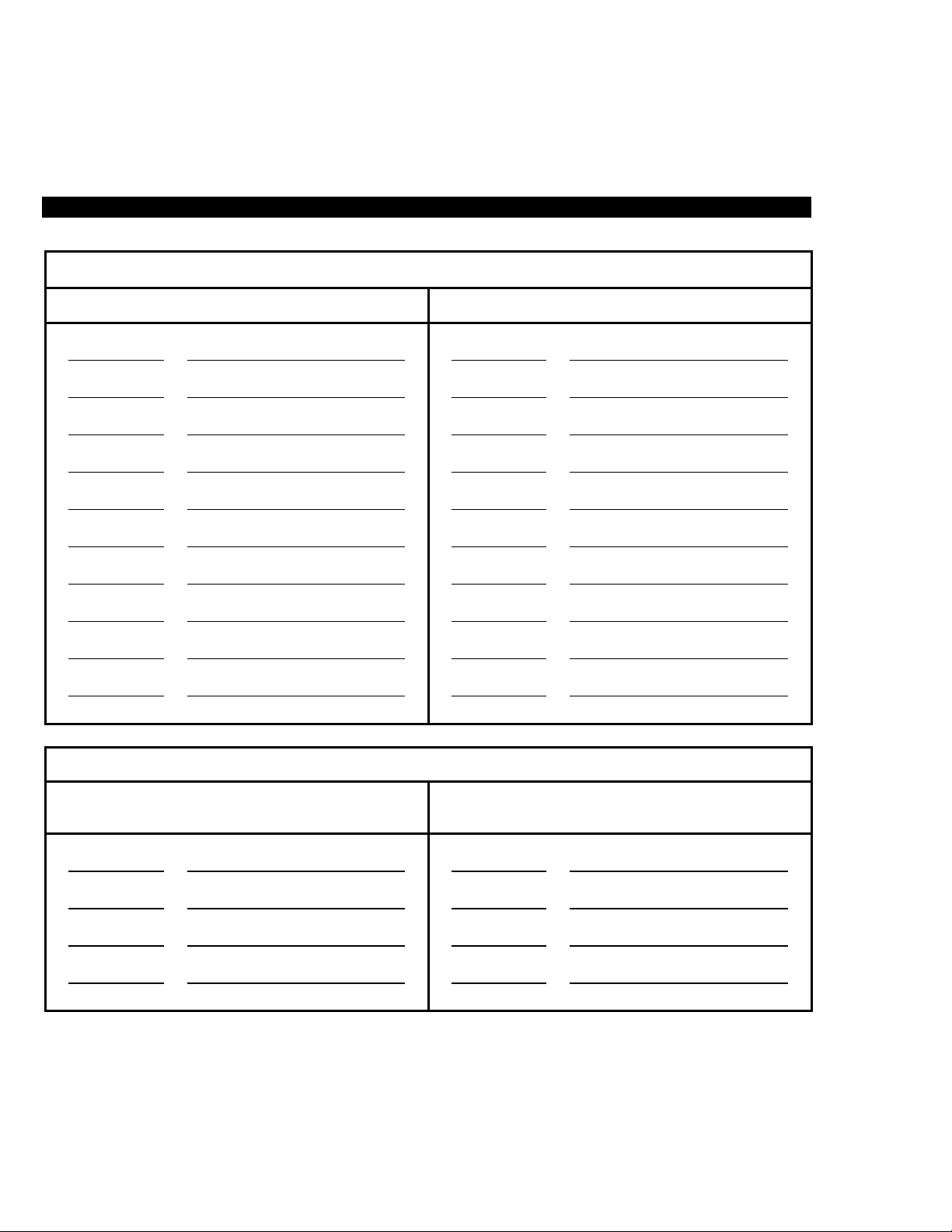
STRATA DK CUSTOMIZED LISTINGS
COMMENT COMMENT
ACCOUNT CODES
CODE CODE
AREA COMMENT
PAGING
STATION
GROUP
EXTENSION
ZONE
A-2
Page 9

To Make an Intercom Call (Voice
First Signaling):
1. Lift the handset.
2. Dial the desired station
number.
3. Hang up when the call is
completed.
To Receive an Intercom Call:
1. You will hear ringing.
2. Lift the handset and speak.
3. Hang up when the call is
completed.
INTERCOM CALLS
You can make calls to and receive calls from other stations in the
STRATA DK system.
You will hear intercom dial tone.
If the called station is idle:
■ You will hear a single tone if you are calling a digital or electronic
telephone station. Speak after you hear the tone.
■ If the system was set for Tone Signaling, instead of Voice First
Signaling, you would hear repetitive ringing for all calls. (You can
change the signaling mode by pressing 1 after dialing the digital or
electronic station number. See Voice First/Tone Signaling later in this
guide.)
■ If you are calling another standard telephone, you will hear repetitive
ringing. Wait for the called station user to answer.
■ To leave a Message Waiting Indication at the called station, dial 7.
If you receive busy tone:
■ To set Automatic Call Back (ACB), dial 4.
■ To activate Busy Override if the called digital or electronic telephone
station is not equipped for Off-hook Call Announce (OCA), dial 2.
(Standard telephones cannot be equipped to receive OCA.)
■ To activate OCA at digital or electronic telephones: With Voice First
Signaling and the called station is equipped for OCA, dial 2. With
Tone Signaling and the called station is equipped for OCA, dial 21.
■ To leave a Message Waiting Indication at the called station, dial 7.
■ Hang up and try again later.
The intercom ring pattern is one second ringing, three seconds silence.
You will be connected to the calling party.
STRATA DK FEATURE OPERATION
1-2
Page 10

AUTOMATIC CALLBACK
After reaching a busy or in the Do Not Disturb (DND) mode, you may set
Automatic Callback to have the system call you back when the called
station is no longer busy or in the DND mode. Automatic Callback does
not apply to outside calls.
The busy tone will stop. You will hear dial tone for two seconds, then the
busy tone will resume.
You may make other calls while waiting for the called station to become
available.
Answer within three rings to prevent the callback from being cancelled.
You will hear a single tone, as if making a regular intercom call. (If using
Tone Signaling instead of Voice First Signaling, you would hear repetitive
ringing.)
If you hear busy tone after answering, it means the called par ty has
already received or originated another call. Your request is not cancelled.
You will be called again when the station becomes idle.
NOTE: You may cancel the request anytime prior to the callback by lifting
the handset and dialing 4 3.
To Set Automatic Callback
(Voice First Signaling):
1. After reaching a busy station,
dial 4.
2. Hang up.
3. Your telephone will ring at a
fast rate when the called
station becomes idle.
4. Answer the call immediately.
5. Make voice announcement
and then converse.
STRATA DK FEATURE OPERATION
1-3
Page 11

To Set Call Forward:
1. Lift the handset.
2. For Call Forward-All Calls,
dial 6 0 1.
. . . or . . .
For Call Forward-Busy, dial
6 0 2.
. . . or . . .
For Call Forward-No Answer,
dial 6 0 3.
. . . or . . .
For Call Forward-Busy/No
Answer, dial 6 0 4.
3. Enter the station or voice mail
intercom number to which
calls will forward.
4. Hang up.
CALL FORWARD
You can set your station to call forward to another station or voice mail
under a variety of conditions.
■ Call Forward-All Calls—If your station is idle or busy and has this
feature activated, all calls to it will forward immediately to another
station that you preselect. Your station will not ring.
■ Call Forward-Busy (Release 2 and higher)—Calls to your telephone
while you are busy on another call will forward immediately to
another station that you preselect if this feature is set. Calls will ring
as normal if your telephone is idle.
■ Call Forward-No Answer (Release 2 and higher)—Calls to your
station when set with this feature will forward to another station that
you preselect if you fail to answer within 12 seconds or three rings.
■ Call Forward-Busy/No Answer (Release 2 and higher)—Calls to
your station when set with this feature will forward immediately to a
station that you preselect whenever you are busy on another call.
Calls will also forward if you do not answer within 12 seconds or
three rings.
You will hear intercom dial tone.
You will hear confirmation tone.
You will hear confirmation tone.
You will hear confirmation tone.
You will hear confirmation tone.
You will hear confirmation tone again and then busy tone.
Calls will forward as applicable.
STRATA DK FEATURE OPERATION
1-4
Page 12

NOTES:
1. You may continue using your phone in the usual manner while Call
Forward is in effect.
2. If Call Forward is set:
■ CO lines that ring your station only will forward—CO lines that
ring more than one station will not forward.
■ CO line calls transferred to your station will forward.
■ Intercom calls will forward.
■ Call Forward has priority over the hunt feature set in system
programming.
You will hear intercom dial tone.
This code will cancel any of the Call Forward modes.
You will hear confirmation tone again, then busy tone.
CALL HOLD/PARK
You can place a call on hold and then make another call.
"Flash the hookswitch" by depressing the hookswitch (plunger) located in
the handset cradle for about 1/2 second. (Some telephones may have a
special button which flashes the hookswitch when pressed.)
You must hang up for at least two seconds for the call to be placed on
hold.
You may now originate or receive other calls.
You will hear intercom dial tone.
You will be reconnected with the held/parked call.
To Cancel any Call Forward
Mode:
1. Lift the handset.
2. Dial 6 0 1.
3. Hang up.
To Place a Call On Hold/Park:
1. While on a call, flash the
hookswitch.
2. Dial 4 1 and hang up.
To Return to the Held/Parked
Call:
1. Lift the handset.
2. Dial 4 2.
STRATA DK FEATURE OPERATION
1-5
Page 13

To Transfer a Call (Voice First
Signaling):
1. While on an outside call, flash
the hookswitch.
2. Dial the station number to
which the call will be
transferred.
3. If the called station is idle,
announce the call after the
single ring tone and then
hang up.
. . . or . . .
If the called station is busy,
hang up.
NOTES:
1. If you do not return to the call within a designated time period, your
telephone will ring to recall you.
2. Any other station can pick up the held call by:
■ Obtaining intercom dial tone and dialing 5 + the intercom
number of the station that placed the call on hold.
■ Obtaining intercom dial tone and dialing 5 7 + the number, 01 ~
36, of the held CO line with systems using Release 2 and higher
software.
CALL TRANSFER WITH CAMP-ON
This feature allows you to transfer an outside call to a station that is
either idle or busy.
"Flash the hookswitch" by depressing the hookswitch (plunger) located in
the handset cradle for about 1/2 second. (Some telephones may have a
special button which flashes the hookswitch when pressed.)
You will hear intercom dial tone after flashing the hookswitch.
You can flash the hookswitch again to reconnect to the outside line
before it is transferred. If the called station lifts the handset (or presses
their intercom button on digital and electronic telephones) just before you
flash the hookswitch again, you will enter a conference call.
If the call was made with Tone Signaling instead of Voice First Signaling,
you would hear repetitive ringing after dialing the station number and
would have to wait for the called party to answer.
The call will camp-on to the busy station.
NOTE: The call will recall you by ringing your station (and camp-on will
be cancelled) if the station does not answer within a predetermined time.
Inform the caller of the situation, and repeat the procedure if necessary.
STRATA DK FEATURE OPERATION
1-6
Page 14

CONFERENCE CALLS
STRATA DK enables you to participate in a variety of Conference calls:
■ Up to four stations (including your own) may be conferenced on
intercom.
■ Up to three stations (including your own) may be conferenced with
one CO line.
■ Up to two stations (including your own) may be conferenced with two
CO lines with Release 2 and higher.
"Flash the hookswitch" by depressing the hookswitch (plunger) located in
the handset cradle for about 1/2 second. (Some telephones may have a
special button which flashes the hookswitch when pressed.)
You will hear intercom dial tone after flashing the hookswitch and the call
will be placed on hold. You will not hear the held party again until Step 4.
The new party must pick up the handset or press their intercom button to
participate in a Conference call.
All parties will be conferenced.
If the called station was busy, you could flash the hookswitch to return to
the existing call, or you could hang up and receive immediate recall
ringing to answer the existing call.
To Add a Station to an Existing
Call:
1. While on either an outside call
or intercom call, flash the
hookswitch.
2. Dial the number of the station
that you want to add to the
call.
3. If you hear a single tone,
voice announce the call and
ask the party to pick up.
4. Flash the hookswitch when
the party answers.
5. Repeat Steps 1 ~ 4 to add
another station to the
conference.
STRATA DK FEATURE OPERATION
1-7
Page 15

To Conference By Adding a CO
Line to a Call:
1. While on a CO line or
intercom call, flash the
hookswitch.
2. Dial a CO line number access
code.
3. Dial the desired telephone
number you wish to add to the
call.
4. Flash the hookswitch when
the party answers.
5. Repeat Steps 1 ~ 4 to add
another CO line to the
conference.
"Flash the hookswitch" by depressing the hookswitch (plunger) located in
the handset cradle for about 1/2 second. (Some telephones may have a
special button which flashes the hookswitch when pressed.)
You will hear intercom dial tone, and the existing call will be placed on
hold. You will not hear the held party again until Step 4.
CO line number access codes are 7 0 1 ~ 7 3 6. With some systems, you
may have to dial either the general group code (9), Least Cost Routing
(LCR) code (9), or a Line Group code (8 1 ~ 8 9), instead of a CO line
number access code.
If the party is busy or does not answer, hang up to receive an immediate
recall to return to the existing call.
All parties will be conferenced.
Two CO lines maximum can be conferenced.
NOTES:
1. While a conference is being set up, all outside parties are held
separately and cannot converse with each other.
2. If a four-party conference is set, either inside station will maintain the
conference if the other hangs up. But one station must remain in the
conference to maintain the outside connections.
DOOR PHONE
You can call a door phone and monitor the immediate area surrounding
the door phone. Only digital and electronic telephone stations can be
called by door phone users, but you can pick up these calls when they
are incoming by lifting your handset and dialing a pick up access code.
STRATA DK FEATURE OPERATION
1-8
Page 16

You will hear intercom dial tone.
151 Location ____________________
152 Location ____________________
153 Location ____________________
154 Location ____________________
155 Location ____________________
156 Location ____________________
157 Location ____________________
158 Location ____________________
159 Location ____________________
161 Location ____________________
162 Location ____________________
163 Location ____________________
The phone will ring a maximum of once or five times, depending on
system programming.
You will hear intercom dial tone.
You will be connected to the door phone.
To Call/Monitor a Door Phone:
1. Lift the handset.
2. Dial the intercom number for
the desired door location.
3. Hang up when the call is
completed or when you no
longer wish to monitor the
door phone.
To Pick Up a Door Phone Call
That Is Ringing Another Station:
1. You will hear a distinct ringing
tone at a digital or electronic
telephone, or on the paging
speaker.
2. Lift the handset.
3. Dial 5 3 0.
STRATA DK FEATURE OPERATION
1-9
Page 17

To Flash a CO Line:
1. Momentarily press (for about
1/2 second) the hookswitch.
2. Dial 4 5.
To Record a Forced Account
Code:
1. Lift the handset.
2. Dial a CO line number access
code.
3. Enter the Forced Account
Code.
4. Dial the telephone number.
FLASH CO LINE
Some CO line features like conferencing, Centrex features, or behind
PBX operation require “flashing” the CO (or like) line.
The hookswitch is located in the handset cradle of your telephone. After
you press the hookswitch, you will hear intercom dial tone.
You will hear Centrex or PBX dial tone.
ACCOUNT CODE CALLS
Account Codes can be used for a variety of reasons, including billing, call
tracking, and line restriction applications. The system records the
Account Codes and can print them out along with other call details on a
Station Message Detail Recording (SMDR) report.
FORCED ACCOUNT CODES
Some applications may require that you enter an Account Code, called a
Forced Account Code, before dialing a telephone number. Forced
Account Codes can be recorded for outgoing calls only.
You will hear intercom dial tone.
CO line number access codes are 7 0 1 ~ 7 3 6. With some systems, you
may have to dial either the general group code (9), Least Cost Routing
(LCR) code (9), or a Line Group code (8 1 ~ 8 9), instead of a CO line
number access code.
You will hear dial tone after you press the last digit of a valid account
code or busy tone after you press the last digit of an invalid code.
STRATA DK FEATURE OPERATION
1-10
Page 18

EMERGENCY OVERRIDE OF FORCED ACCOUNT CODE DIALING
REQUIREMENTS (Release 3 and higher)
With Release 3 Software and higher, Forced Account Code requirements
can be bypassed by three emergency numbers, including 911. See your
system administrator for these numbers:
1) 911 2) ________ 3) ________
VOLUNTARY ACCOUNT CODES
Voluntar y Account Codes are optional and can be entered anytime after
accessing a CO line or during a call.
"Flash the hookswitch" by depressing the hookswitch (plunger) located in
the handset cradle for about 1/2 second. (Some telephones may have a
special button which flashes the hookswitch when pressed.)
You will hear intercom dial tone; the CO line will be on Hold.
You will hear CP dial tone after dialing 46, or if you were talking, the
speech path to you is reconnected in one direction only so that the
outside caller cannot hear you or the account code entry but you can still
hear the outside caller.
If dialing a Verified Account Code with Release 3 software and higher,
you will hear one confirmation burst tone if you dial a valid number. If you
dial an invalid code, you will hear two burst tones. (Repeat Steps 1 ~ 3 to
try again.)
If you enter the code after accessing a CO line, you will hear CO dial line
dial tone after entering the code. If you enter the code while talking, the
speech path will be restored in both directions after you enter the code.
CO dial tone will stop after you dial the first digit of the telephone number.
Voluntary account codes must be entered before the call is disconnected.
To Record a Voluntary Account
Code:
1. After accessing a CO line or
while talking on a line, flash
the hookswitch.
2. Dial 4 6.
3. Enter the Voluntary Account
Code.
4. Dial a telephone number if
you entered the code after
accessing the CO line.
. . . or . . .
Resume talking or hang up if
you entered the code while
talking.
STRATA DK FEATURE OPERATION
1-11
Page 19

To Set a Message Waiting
Indication:
1. If a called digital or electronic
telephone station is busy or
unanswered, dial 7.
2. Hang up.
To Cancel the Message Waiting
Indication:
1. Lift the handset and dial the
station number on which you
left the indication.
2. Dial 7 7.
3. Hang up.
VERIFIED ACCOUNT CODES (Release 3 and higher)
Some STRATA DK systems require that specific codes (called Verified
Account Codes) set in system memory must be entered when inputting
Forced or Voluntary Account Codes. If the system does not require
Verified Account Codes, any sequence of numbers can be entered when
inputting Account Codes, as long as the number of digits matches a
length established in system programming.
MESSAGE WAITING INDICATION
After reaching a busy or unanswered digital or electronic telephone, you
can set a Message Waiting Indication on the called telephone. A flashing
LED at the called telephone will indicate that a call is waiting. The station
user can press the button associated with the flashing LED to call you
back.
The Message Waiting Indication will be set at the station.
You will hear busy tone if the called station is busy, or you will hear
repetitive ringing or a single tone if the called station is idle.
The Message Waiting Indication on the station will be turned off.
STRATA DK FEATURE OPERATION
1-12
Page 20

OVERRIDE CALLS
Busy Override allows you to send a tone to a busy station to indicate that
a call is waiting, and Do Not Disturb Override lets you send a tone to an
idle station in the Do Not Disturb mode to indicate that a call is coming in.
Executive Override enables you to enter an established conversation.
Executive Override and Do Not Disturb Override are optional features
enabled in system programming. Any station can initiate Busy Override.
After you dial 2, a tone signal will be heard at the busy station, indicating
that a call is waiting.
If the Off-hook Call Announce option is installed on the busy station, then
you may talk.
After you dial 2, a tone signal will be heard at the Do Not Disturb station,
indicating that a call is coming in.
Your station must be enabled in system programming to initiate a Do Not
Disturb Override signal.
After you dial 3, you will enter the conversation. An optional tone signal
may be heard by the called parties prior to your entrance.
Your station must be enabled in system programming to initiate Executive
Override.
To Initiate a Busy Override
Signal:
1. After reaching a busy station,
dial 2.
To Initiate a Do Not Disturb
Override Signal:
1. After reaching a Do Not
Disturb station, dial 2.
To Initiate Executive Override:
1. After reaching a busy station,
dial 3.
STRATA DK FEATURE OPERATION
1-13
Page 21

PAGING
You can make page announcements to digital and electronic telephone
speakers and external speakers.
You will hear intercom dial tone.
This code will allow a page to the speakers of telephones assigned to the
"All Call Group" in system programming.
This code will allow a page to telephones assigned to station page group
A in system programming.
This code will allow a page to telephones assigned to station page group
B in system programming.
This code will allow a page to telephones assigned to station page group
C in system programming.
This code will allow a page to telephones assigned to station page group
D in system programming.
This code will allow a page to the speakers of telephones assigned to the
"All Call Group" in system programming. The page may also be sent to
external speakers (all zones), if enabled in system programming.
Dial 3 5 for Zone A, 3 6 for Zone B, 3 7 for Zone C, and 3 8 for Zone D.
STRATA DK FEATURE OPERATION
1-14
To Page:
1. Lift the handset.
2. Dial one of the following page
access codes:
3 0 = All Call
. . . or . . .
3 1 = Station Group A
. . . or . . .
3 2 = Station Group B
. . . or . . .
3 3 = Station Group C
. . . or . . .
3 4 = Station Group D
. . . or . . .
3 9 = All Call
. . . or . . .
3 5 ~ 3 8 = External Page
Zones (A ~ D)
3. Make your announcement in
a normal voice level and then
repeat the announcement.
4. Hang up when you have
completed your
announcement.
Page 22

REPEAT LAST NUMBER DIALED
This feature enables you to automatically redial the last number called
with the touch of a button.
You will hear intercom dial tone.
The system will automatically dial the last telephone number you dialed.
SPEED DIAL
Speed Dial enables you to call telephone numbers by dialing a brief
access code, instead of having to dial the entire telephone number.
There are two types of Speed Dial numbers. Station Speed Dial numbers
are assigned by individual station users to their own station and can only
be dialed at their station. System Speed Dial numbers are assigned only
by Station 200 (typically the system administrator's or operator's station),
but can be used by other stations.
You will hear intercom dial tone after you lift the handset.
You will hear a short tone after you dial 6 6.
Station Speed Dial number access codes are 1 0 ~ 4 9.
CO line number access codes are 7 0 1 ~ 7 3 6. With some systems, you
may have to dial either the general group code (9), Least Cost Routing
(LCR) code (9), or a Line Group code (8 1 ~ 8 9), instead of a CO line
number access code.
To Redial the Last Number
Dialed:
1. Lift the handset.
2. Dial the # button.
To Store a Station Speed Dial
Number:
1. Lift the handset.
2. Dial 6 6.
3. Dial #
*
.
4. Enter the access code (1 0 ~
4 9) where you wish to store
the telephone number.
5. Dial the CO line number
access code to be stored.
STRATA DK FEATURE OPERATION
1-15
Page 23

6. Enter the telephone number.
7. Dial #.
To Make a Call with a Station or
System Speed Dial Code:
1. Lift the handset.
2. Dial*.
3. Dial the 2-digit Speed Dial
access code.
To Change the Signaling Mode:
1. Call a digital/electronic
telephone via intercom.
2. To change the mode, dial 1.
The number can be up to 20 digits, including the CO line access code.
The CO line access code and the telephone number will be stored and
will be dialed when you dial the Speed Dial access code. You will hear
confirmation tone.
Repeat this procedure to replace the stored telephone number with a
new one.
You will hear intercom dial tone after you lift the handset.
You will continue to hear intercom dial tone.
Station Speed Dial codes are 1 0 ~ 4 9, and System Speed Dial codes
are 6 0 ~ 9 9. (Dial tone continues as you dial the access code.)
The system will automatically dial the telephone number assigned to the
dialed code.
TONE/VOICE FIRST SIGNALING
Your STRATA DK system may be set for Tone Signaling or Voice First
Signaling as the standard intercom call signaling method for calls to
digital and electronic telephones. The Tone Signal consists of repetitive
ring tones, while the Voice First Signal consists of a tone burst followed
by the caller's voice. Standard telephones always ring with Tone
Signaling, no matter what the system signaling method. When you
initiate a call, you can change to the alternate signaling method.
If the signaling mode is set for Voice First Signaling, you will hear a single
tone burst. If the signaling mode is set for Tone Signaling, you will hear
repetitive ringback tone.
The call will begin to ring at the station, if you changed from Voice First
Signaling to Tone Signaling.
The call will stop ringing, and you will hear a tone burst, if you changed
from Tone Signaling to Voice First Signaling. You can converse after the
tone burst.
STRATA DK FEATURE OPERATION
1-16
Page 24

CO LINE QUEUING
CO Line Queuing enables you to be placed in a waiting queue for a CO
line after dialing a line group in which all lines are busy. You will be called
back when a line in the group becomes available.
The busy tone will stop when you dial 4. You will hear dial tone for two
seconds, then the busy tone will resume.
You may make other calls while waiting for a line to become available.
Answer within two rings to prevent the callback from being cancelled.
You will hear CO dial tone. (If you hear busy tone, it means the line has
already been seized or has received an incoming call. Your request is not
cancelled. You will be called again the next time a line becomes idle.)
If the original call was made using Least Cost Routing (LCR) by dialing 9,
the telephone number will have been automatically dialed in Step 4.
CO Line queuing will be cancelled.
To Set CO Line Queuing:
1. If all outgoing lines are busy,
you will hear busy tone after
dialing a CO line access
code.
2. Dial 4.
3. Hang up.
4. Your telephone will ring at a
fast rate when a CO line
becomes idle.
5. Lift the handset immediately.
6. Dial the desired telephone
number.
7. Hang up when the call is
completed.
To Cancel CO Line Queuing:
1. Lift the handset and dial 4 3.
STRATA DK FEATURE OPERATION
1-17
Page 25

To Use Call Pickup:
1. Lift the handset and dial 5.
2. Station—Dial a Station
number to pick up a call that
is ringing in at or on hold at
the station.
. . . or . . .
Intercom page or ringing door
phone—Dial 3 0.
. . . or . . .
External page—Dial 3 5.
. . . or . . .
CO line on hold (Release 2
and higher)—Dial the CO line
access code (7 0 1 ~ 7 3 6).
. . . or . . .
Any ringing CO line—Dial 9.
CALL PICKUP
You can pick up a call that is ringing another station, a call placed on hold
at another station, and other types of calls.
You will be connected to the call ringing in or the held call.
You will be connected to the station where the page is coming from, or
the door phone that is ringing.
You will be connected to the station where the page is coming from.
You will be connected to the CO line that is on hold.
You will be connected to the CO line that is ringing in.
DIRECT INWARD SYSTEM ACCESS (DISA)
Outside callers with telephones that send Dual-tone Multi-frequency
(DTMF) tones (push-button dialing) can call in on CO lines programmed
for DISA and dial stations or outgoing CO lines, without going through an
attendant or operator.
STRATA DK FEATURE OPERATION
1-18
Page 26

See the system administrator for this number.
Try again if you hear busy tone.
Dial tone will be present for 10 seconds to allow direct dialing of a station
intercom number or CO line access code. If a number is not dialed, the
system automatically causes the DISA CO line to ring at telephones as a
normal incoming call. Then, if the call is not answered within 15 seconds
after the ringing starts it will disconnect.
You will be connected when the station answers.
If you receive busy tone or wish to dial another number while ringing the
station, press the *button to receive dial tone.
If the call is not answered after six rings or 24 seconds, whichever occurs
first, busy tone will be sent. Dial *to access dial tone, then dial the same
or another number. To call another station after completing a DISA
station call, the internal party must transfer you. Station and System
Page cannot be accessed on DISA calls.
See the system administrator for this number.
Try again if you hear busy tone.
Dial tone will be present for 10 seconds to allow direct dialing of a station
intercom number or CO line access code. If a number is not dialed, the
system automatically causes the DISA CO line to ring at telephones as a
normal incoming call. Then, if the call is not answered within 15 seconds
after the ringing starts it will disconnect.
To Make a Direct Inward Station
Call with DISA:
1. From outside the system, call
the DISA CO line telephone
number:____-____________.
2. Listen for the repetitive
ringback tone signal, then
listen for the intercom dial
tone.
3. Dial the intercom number of
the desired station.
To Make an Outgoing Call with
DISA (Release 2 and higher):
1. From outside the system, call
the DISA CO line telephone
number:____-____________.
2. Listen for repetitive ringback
tone, then listen for intercom
dial tone.
STRATA DK FEATURE OPERATION
1-19
Page 27

3. Dial a CO line number or line
group access code.
4. If a DISA security code is
required, dial the code and
listen for CO dial tone.
. . . or . . .
If a DISA security code is not
required, you will hear CO dial
tone.
5. Dial a telephone number.
6. Hang up when the call is
completed.
To Override/Change Toll
Restriction:
1. Dial a CO line number access
code.
2. Flash the hookswitch and dial
4 7.
CO line number access codes are 7 0 1 ~ 7 3 6, and line group access
codes are 8 1 ~ 8 8. The Least Cost Routing code (9) is not allowed.
If required, see the system administrator for this number. If the correct
code is not entered, the call will be disconnected.
A timer tone that is audible to both parties will sound approximately four
minutes after the call was made. Dial 0 to reset the timer each time the
tone sounds for an additional four minutes. If you fail to dial 0, the call will
disconnect approximately one minute after the tone.
TOLL RESTRICTION OVERRIDE/TRAVELING
CLASS
You can completely override Toll Restriction at a station or, with Release
3 and higher software, change the station's Toll Restriction class to
another level. The station will resume its normal class at the conclusion
of the call. Use the following procedure to completely override or to
change a station's Toll Restriction class.
CO line number access codes are 7 0 1 ~ 7 3 6. Some systems may
require instead that you dial 8 1 ~ 8 9 to access a CO line group or 9 to
access a general CO line group or Least Cost Routing.
You will hear CO dial tone, unless you dial 9 with Least Cost Routing.
"Flash the hookswitch" by depressing the hookswitch (plunger) located in
the handset cradle for about 1/2 second. (Some telephones may have a
special button which flashes the hookswitch when pressed.)
You will no longer hear dial tone.
STRATA DK FEATURE OPERATION
1-20
Page 28

You will hear dial tone after you dial the last digit of a valid code.
For security reasons, the override codes are only available on a selected
basis. See your system administrator.
The call will be allowed if the code entered in step 3 changes your
telephone's Toll Restriction Class to allow the dialed number.
3. Enter the Toll Restriction
Override Code (four digits).
4. Dial a telephone number.
STRATA DK FEATURE OPERATION
1-21
Page 29

HOW TO USE THIS GUIDE
Your telephone’s specific calling allowances are deter mined by
assignments made in system programming. Your system administrator
can inform you which features are actually accessible from your specific
telephone. Once you are aware of the features that are available to your
telephone, review each feature’s description and operational procedure
contained in this guide.
To assist you in achieving greater performance efficiency, the infor mation
in this user guide is divided into distinct areas of content. Instructions for
various procedures are referred to as Action Text and appear in the lefthand column of the page. Instructions appear in numerical sequence,
enabling you to quickly perform a specific task. More detailed
descriptions of these procedures, or explanations of their effects, are
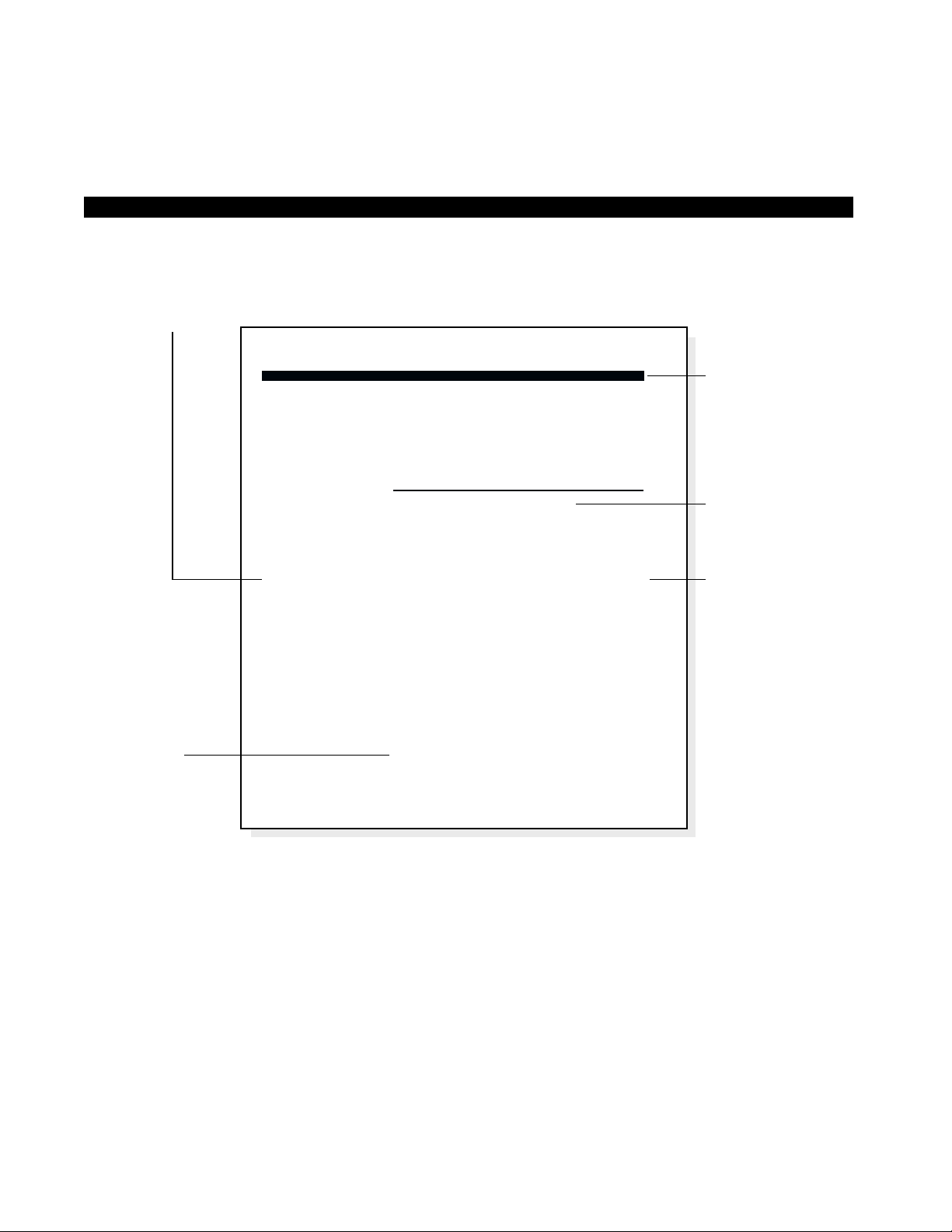
located in the right-hand column. The following illustration shows you the
structure followed for each feature.
STRATA DK INTRODUCTION
iv
Page 30
STRATA DK INTRODUCTION
v
Figure I-1
Sample Page
ACTION TEXT
SPECIFIC INSTRUCTIONS ON HOW TO PERFORM A
PROCEDURE ARE NUMBERED AND ENTERED IN
THE LEFT-HAND COLUMN.
RESULTS OR
DETAILS
EXPLANATIONS
OR DETAILS OF
THE ACTION TEXT.
CHAPTER TITLES
FIRST LEVEL
HEADINGS
NOTES AND
WARNING
MESSAGES
STRATA DK FEATURE OPERATION
To Transfer a Call (Voice First
Signaling):
1. While on an outside call, flash
the hookswitch.
2. Dial the station number to
which the call will be
transferred.
3. If the called station is idle,
announce the call after the
single ring tone and then
hang up.
. . . or . . .
If the called station is busy,
hang up.
NOTES:
1. If you do not return to the call within a designated time period, your
telephone will ring to recall you.
2. Any other station can pick up the held call by:
■ Obtaining intercom dial tone and dialing 5 + the intercom
number of the station that placed the call on hold.
■ Obtaining intercom dial tone and dialing 5 7 + the number, 01 ~
36, of the held CO line with systems using Release 2 and higher
software.
CALL TRANSFER WITH CAMP-ON
This feature allows you to transfer an outside call to a station that is
either idle or busy.
"Flash the hookswitch" by depressing the hookswitch (plunger) located in
the handset cradle for about 1/2 second. (Some telephones may have a
special button which flashes the hookswitch when pressed.)
You will hear intercom dial tone after flashing the hookswitch.
You can flash the hookswitch again to reconnect to the outside line
before it is transferred. If the called station lifts the handset (or presses
their intercom button on digital and electronic telephones) just before you
flash the hookswitch again, you will enter a conference call.
If the call was made with Tone Signaling instead of Voice First Signaling,
you would hear repetitive ringing after dialing the station number and
would have to wait for the called party to answer.
The call will camp-on to the busy station.
NOTE: The call will recall you by ringing your station (and camp-on will
be cancelled) if the station does not answer within a predetermined time.
Inform the caller of the situation, and repeat the procedure if necessary.
1-6
Page 31

SUBJECT PAGE
APPENDIX
Customized Listings.......................................................................................................... A-1
Speed Dial Code Assignments..................................................................................... A-1
System Speed Dial Code Assignments........................................................................ A-1
Station Speed Dial Code Assignments ........................................................................ A-1
Account Codes............................................................................................................. A-2
Paging.......................................................................................................................... A-2
INDEX ................................................................................................................................................... Index-1
FIGURE LIST
FIGURE TITLE PAGE
I-1 Sample Page......................................................................................................................... v
STRATA DK TABLE OF CONTENTS
ii
 Loading...