

Page 1
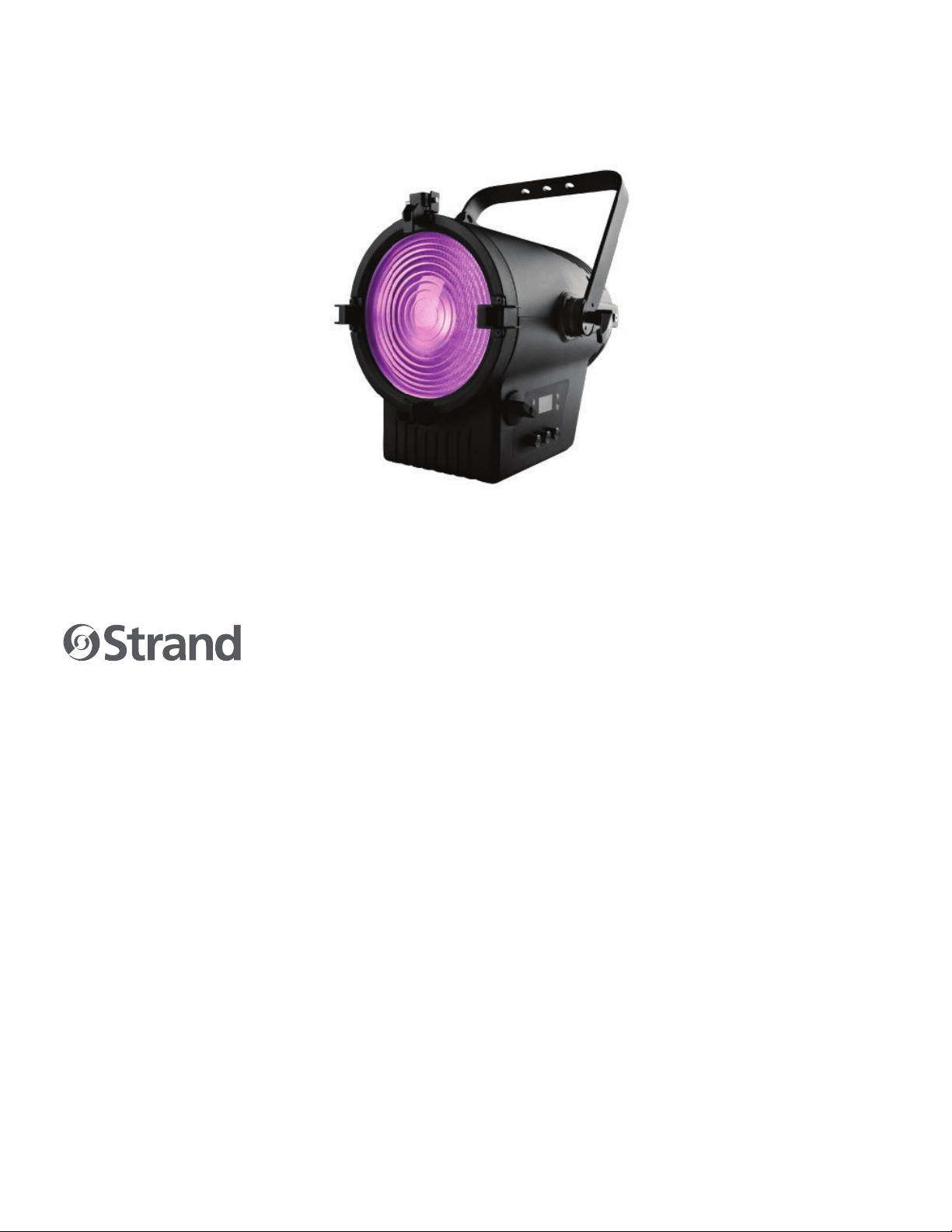
CANTATA LED FRESNEL
FULL COLOR
USER MANUAL
Page 2
CANTATA LED FRESNEL FULL COLOR
USER MANUAL
1
DESCRIPTION
FEATURES
• High output midsized LED Fresnel
• Full Color Version with Consistent High CRI
• High CRI RGBALC Color System with SmartColor Control
• Tunable white with >94 CRI - adjust color temperature of warm or cold
• white fi xtures without compromising output or quality of light
• Independent color mixing and temperature controls
• Standard-size accessory rails to support optional 8 leaf barn door or third-party accessories
• Quiet operation with variable fan control (Standard, Studio, and Whisper)
• Adjustable frequency to exceed camera frame rates
Download the product datasheet from the Strand website at www.strandlighting.com for the full technical
specifi cations.
COMPONENTS
The document provides installation and operation instructions for the following products:
• Strand Cantata LED Fresnel Full Color
Read all instructions before installing or using this product. Retain this manual for future reference. Additional
product information and descriptions may be found on the product specification sheet.
INCLUDED ITEMS
Each Strand Cantata LED Fresnel luminaire includes the following items:
• Strand Cantata LED Fresnel Full Color
• Quick Start Guide
2
WWW.STRANDLIGHTING.COM
Page 3
CANTATA LED FRESNEL FULL COLOR
USER MANUAL
2
INSTALLATION
MOUNTING
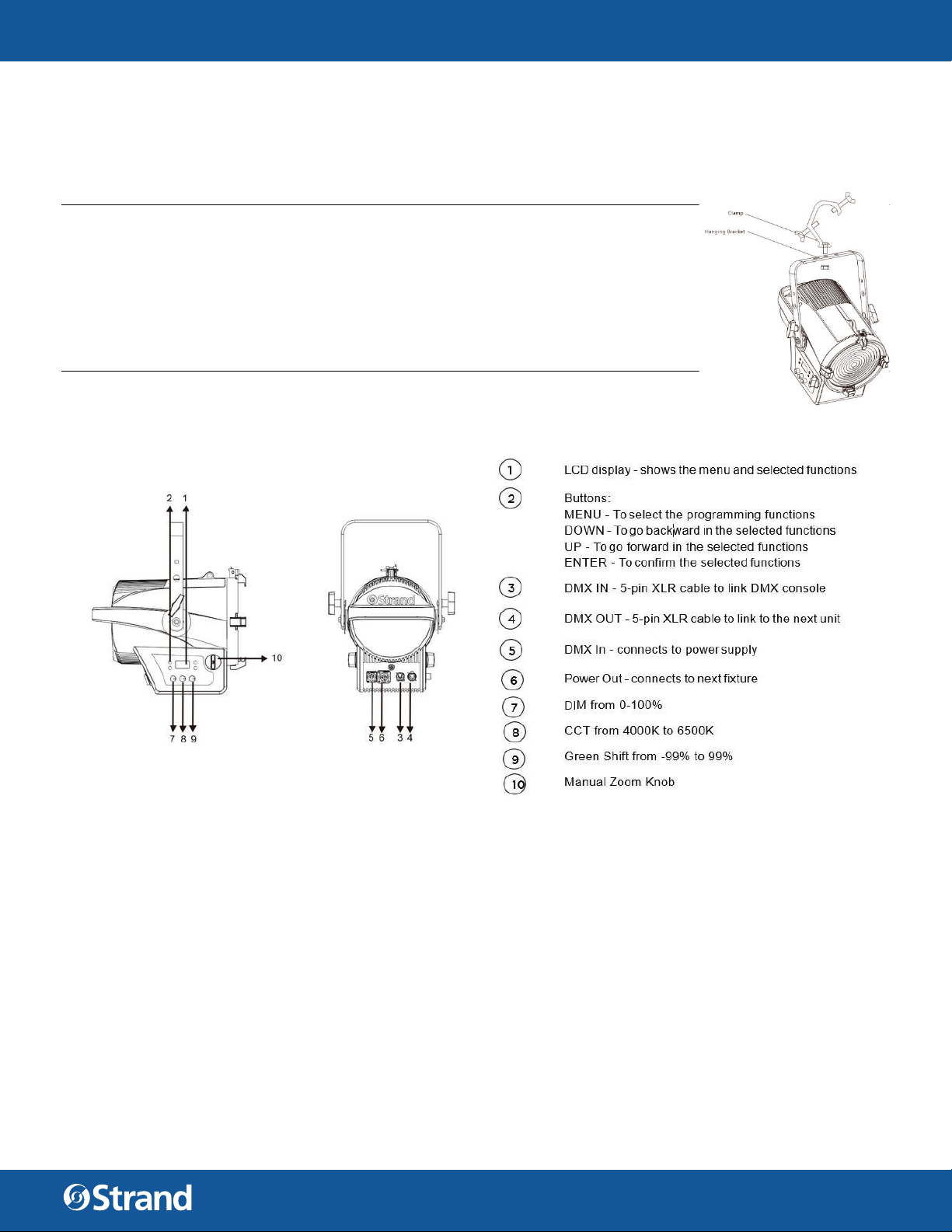
The unit should be mounted via its screw holes on the bracket. Always ensure
that the unit is firmly fixed to avoid vibration and slipping while operating. Always
ensure that the structure to which you are attaching the unit is secure and is able
to support a weight of 10 times of the unit’s weight. Always use a safety cable that
can hold up to 12 times the weight of the unit when installing the fixture.
The luminaire must be mounted by professionals.
SET UP
CONTROL PANEL
MAIN FUNCTIONS
To select any functions, press the MENU button until the required one is shown on the display. Select the function by the ENTER button and the display will blink. Use the DOWN and UP button to change the mode. Once
the required mode has been selected, press the ENTER button to setup or it will automatically return to the
main functions without any change after idling one minute. Back to the functions without any change press the
MENU button. The main functions are shown in TABLE 1.
3
WWW.STRANDLIGHTING.COM
Page 4

CANTATA LED FRESNEL FULL COLOR
TABLE 1. MENU FUNCTIONS
LEVEL 1 LEVEL 2 LEVEL 3 LEVEL 4 LEVEL 5 LEVEL 6 DEFAULT
Address 001~512 (Default 001)
LED Hours XXXXXX h
Reset LED Hour Are you sure?
Square Curve (Default)
Confi gure
LED
Color Cal
Disp Timeout
Select Signal
Set Artnet/
SACN
Dimming Curve
Tungsten Fade
Dim Snap
LED Frequency
White Balance
On
Off (Default)
30 Sec (Default)
5 Min
10 Min
On
DMX Only
Art-Net
SACN
Set Universe 000~255 (Default 000)
Ethernet IP XXX. XXX. XXX. XXX
Ether Mask IP XXX. XXX. XXX. XXX
S Curve
Linear Curve
On
Off (Default
On (Fast)
Off (Slow) (Default)
1200Hz (Default)
2500Hz
5000Hz
10000Hz
20000Hz
25000Hz
Red 125 - 255 Default 255
Green 125 - 255 Default 255
Blue 125 - 255 Default 255
Amber 125 - 255 Default 255
Lime 125 - 255 Default 255
Cyan 125 - 255 Default 255
Reset YES/NO
USER MANUAL
4
WWW.STRANDLIGHTING.COM
Page 5
CANTATA LED FRESNEL FULL COLOR
TABLE 1. MENU FUNCTIONS
LEVEL 1 LEVEL 2 LEVEL 3 LEVEL 4 LEVEL 5 LEVEL 6 DEFAULT
Address 001~512
SSCC (Default)
DMX
Fixture
Manual Control
Color Preset
DMX Mode
Pixel Group
Cell Direction
Data
Serial Number
Status
Reboot Fixture Are you sure?
Version VXXX MM/D/YY HH:MM
Fixture Hours XXXXXX h
Crossload
(Software)
Service Diagnostics
Red 0 - 255 (Default 0)
Green 0 - 255 (Default 0)
Blue 0 - 255 (Default 0)
Amber 0 - 255 (Default 0)
Lime 0 - 255 (Default 0)
Cyan 0 - 255 (Default 0)
Preset Run
Edit Programs
SQCC
SOCC
Group 1 (Default)
Group 3
Group 12
Normal (Default)
Flipped
Ch 1 - Intensity
XXX (Value)
Ch 2 - Intensity
Fine XXX (Value)
……All functions
Serial Number
electronic format
(No Errors... or
displays a list of
errors)
Send
Board Check
Sensor Check
Select preset 1 to 20
Intensity 0 - 255
Intensity* 0 - 255
Red 0 - 255
Green 0 - 255
Blue 0 - 255
Amber 0 - 255
Lime 0 - 255
Cyan 0 - 255
Store YES/NO
Clear YES/NO
USER MANUAL
5
WWW.STRANDLIGHTING.COM
Page 6

CANTATA LED FRESNEL FULL COLOR
ADDRESS MENU
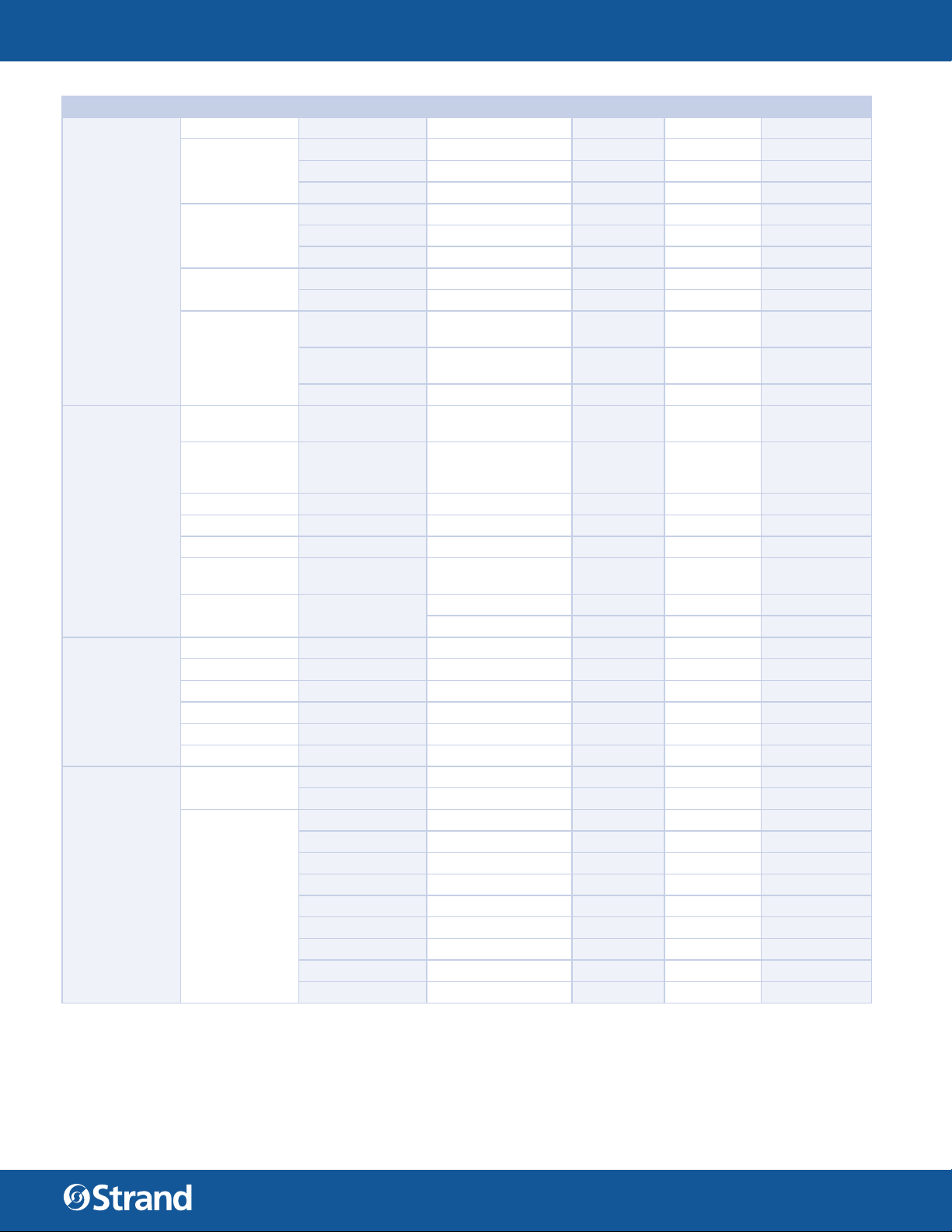
Address — DMX address setting. To select DMX Address, press the ENTER button to confirm. Use the UP/DOWN
button to adjust the address from 001 to 512, press the ENTER button to store. Press the MENU button back to
the last menu or let the unit idle one minute to exit menu mode.
CONFIGURE MENU
To select Configure, press the ENTER button to confirm, use the UP/DOWN button to select LED, Color Cal,
Disp Timeout, Select Signal and Set Artnet / SACN.
LED
To select LED, press the ENTER button to confirm. Use the UP/DOWN button to select LED
Hours, Reset LED Hour, Dimming Curve, Tungsten Fade, Dim Snap, LED Frequency and White Balance.
Press the ENTER button to store. Press the MENU button back to the last menu or let the unit idle one minute to
exit menu mode.
LED Hours — Select LED Hours, press the ENTER button to confirm, LED Hours will show on the display, press
the MENU button back to exit.
Reset LED Hours — Select Reset LED Hours, press the ENTER button to confirm, “Are you sure” will show on
the display, press the MENU button back to exit.
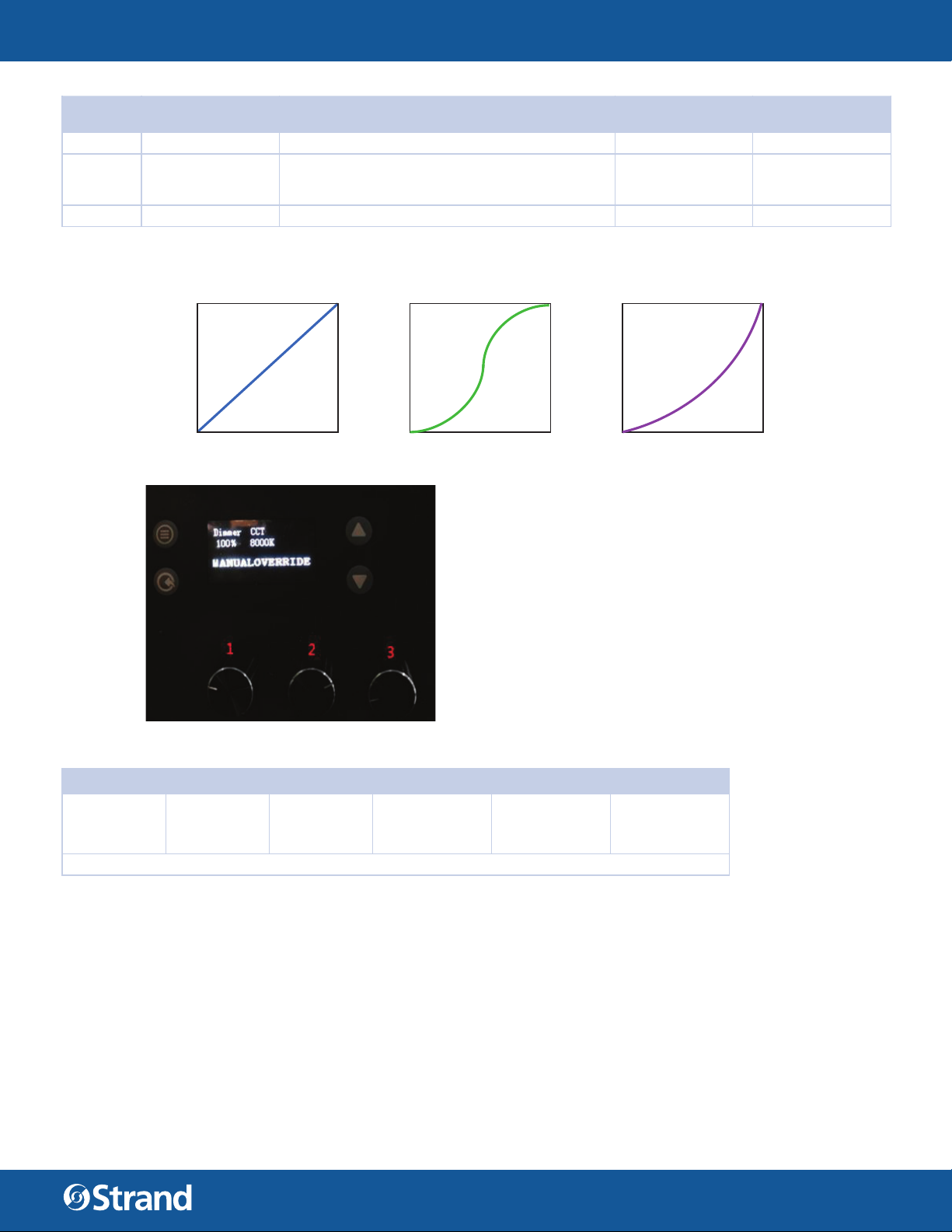
Dimming Curve — To select Dimming Curve, press the ENTER button to confirm. Use the UP/DOWN button to
select Square Law Curve, S Law Curve or Linear Law Curve, press the ENTER button to store. Press the MENU
button back to the last menu or let the unit idle one minute to exit menu mode.
Tungsten Fade — Select Tungsten Fade, press the ENTER button to confirm, Use the UP/DOWN button to select
ON or OFF, press the MENU button back to exit.
Dim Snap — Select Dim Snap, press the ENTER button to confirm, Use the UP/DOWN button to select ON or
OFF, press the MENU button back to exit.
LED Frequency — To select LED Frequency, press the ENTER button to confirm. Use the UP/DOWN button to
select 1200Hz, 2500Hz, 5000Hz, 10000Hz, 20000Hz , 25000Hz, press the ENTER button to store. Press the
MENU button back to the last menu or let the unit idle one minute to exit menu mode.
White Balance — To select White Balance, press the ENTER button to confirm. Use the UP/DOWN button to
select Red,Green, Blue, Amber, Lime, Cyan and RESET, press the ENTER button to store. Press the MENU button
back to the last menu or let the unit idle one minute to exit menu mode.
USER MANUAL
Color Cal
To select Color Cal, press the ENTER button to confirm. Use the UP/DOWN button to select ON or OFF, press
the MENU button back to exit.
Disp Timeout
To select Disp TImeout, press the ENTER button to confirm. Use the UP/DOWN button to select 30 Sec, 5min, 10
min or ON, press the MENU button back to exit.
Select Signal
To select Select Signal, press the ENTER button to confirm. Use the UP/DOWN button to select DMX Only, Artnet or SACN, press the MENU button back to exit.
DMX MENU
To select DMX, press the ENTER button to confirm, use the UP/DOWN button to select Address, DMX Mode,
Pixel Group, Cell Direction or Data.
Address — To select Address, press the ENTER button to confirm. Use the UP/DOWN button to select from 001
to 512. press the ENTER button to store. Press the MENU button back to the last menu or let the unit idle one
minute to exit menu mode.
DMX Mode — To select DMX Mode, press the ENTER button to confirm. Use the UP/DOWN button to select
SSCC, SQCC or SOCC, press the ENTER button to store. Press the MENU button back to the last menu or let the
unit idle one minute to exit menu mode.
Pixel Group — To select Pixel Group, press the ENTER button to confirm. Use the UP/DOWN button to select
Group 1 or Group 4, press the ENTER button to store. Press the MENU button back to the last menu or let the
unit idle one minute to exit menu mode.
Cell Direction — To select Cell Direction, press the ENTER button to confirm. Use the UP/DOWN button to select
Normal or Flipped, press the ENTER button to store. Press the MENU button back to the last menu or let the
6
WWW.STRANDLIGHTING.COM
Page 7

CANTATA LED FRESNEL FULL COLOR
unit idle one minute to exit menu mode.
Data — To select Data, press the ENTER button to confirm. Use the UP/DOWN button to select Ch1 – Intensity
xxx(value), Ch2 – Intensity Fine xxx(Value), …. All functions, press the ENTER button to store. Press the MENU
button back to the last menu or let the unit idle one minute to exit menu mode.
FIXTURE MENU
To select Fixture, press the ENTER button to confirm, use the UP/DOWN button to select Status, Reboot fi xture,
Version, Fixture Hours, Crossload (Software) , Service.
Status
Select Status, press the ENTER button to confirm, Status will show on the display, press the MENU button back
to exit.
Reboot Fixture
Select Reboot Fixture, press the ENTER button to confirm, Are you sure? will show on the display, press the ENTER button to store. Press the MENU button back to the last menu or let the unit idle one minute to exit menu
mode.
Version
Select Version, press the ENTER button to confirm, Version will show on the display, press the MENU button
back to exit.
Fixture Hours
Select Fixture Hours, press the ENTER button to confirm, Fixture Hours will show on the display, press the MENU
button back to exit.
USER MANUAL
Crossload (Software)
Select Crossload (Software), press the ENTER button to confirm, Send will show on the display, press the ENTER
button to store. Press the MENU button back to the last menu or let the unit idle one minute to exit menu mode.
NOTE: Incoming DMX must be removed from the fixture or software crossload will not be activated.
Service
To select Service, press the ENTER button to confirm. Diagnostics will show, press the ENTER button to store.
Press the MENU button back to the last menu or let the unit idle one minute to exit menu mode.
Diagnostics — To select Diagnostics, press the ENTER button to confirm. Use the UP/DOWN button to select
Fan Check, Board Check ,Sensor Check, press the ENTER button to store. Press the MENU button back to the
last menu or let the unit idle one minute to exit menu mode.
MANUAL CONTROL MENU
Enter menu mode, select Manual Control, press the ENTER button to confirm, use the UP/DOWN button to select Red, Green, Blue, Amber, Lime and Cyan. Use the UP/DOWN button to adjust the value from 0 to 255, press
the ENTER button to store. Press the MENU button back to the last menu or let the unit idle one minute to exit
menu mode.
COLOR PRESET MENU
Preset Run
Enter Color Preset mode, select Preset Run, press the ENTER button to confirm, use the UP/DOWN button to
select “Select Preset” or Intensity.
Edit Programs
Enter menu mode, select Edit Programs, press the ENTER button to confirm, MODE will show up, use the UP/
DOWN button to select Intensity, Red, Green, Blue, Amber, Lime, Cyan, Store or Clear. Use the UP/DOWN button
to adjust the value from 0 to 100%, press the ENTER button to store. Press the MENU button back to the last
menu or let the unit idle one minute to exit.
7
WWW.STRANDLIGHTING.COM
Page 8
CANTATA LED FRESNEL FULL COLOR
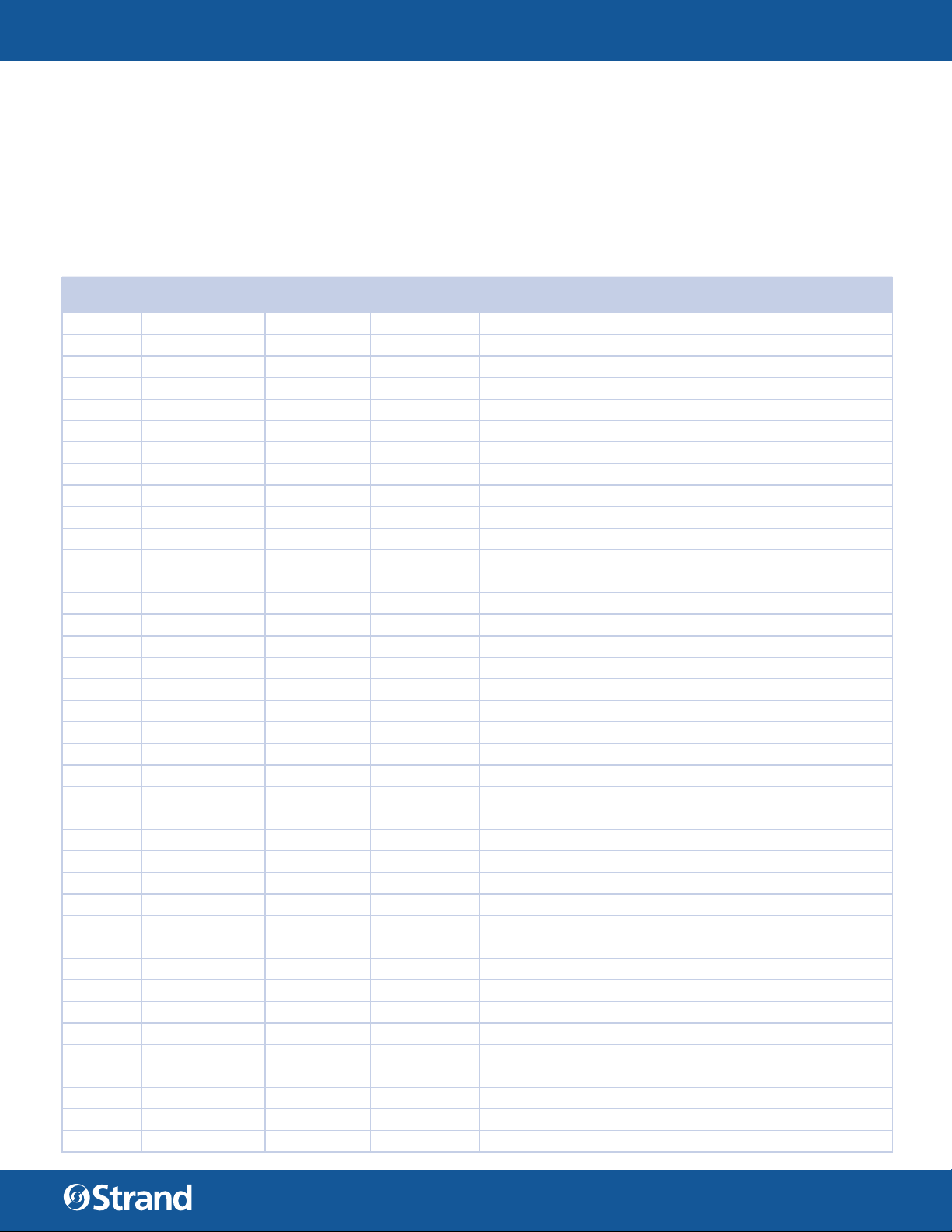
3 DMX MAPPING
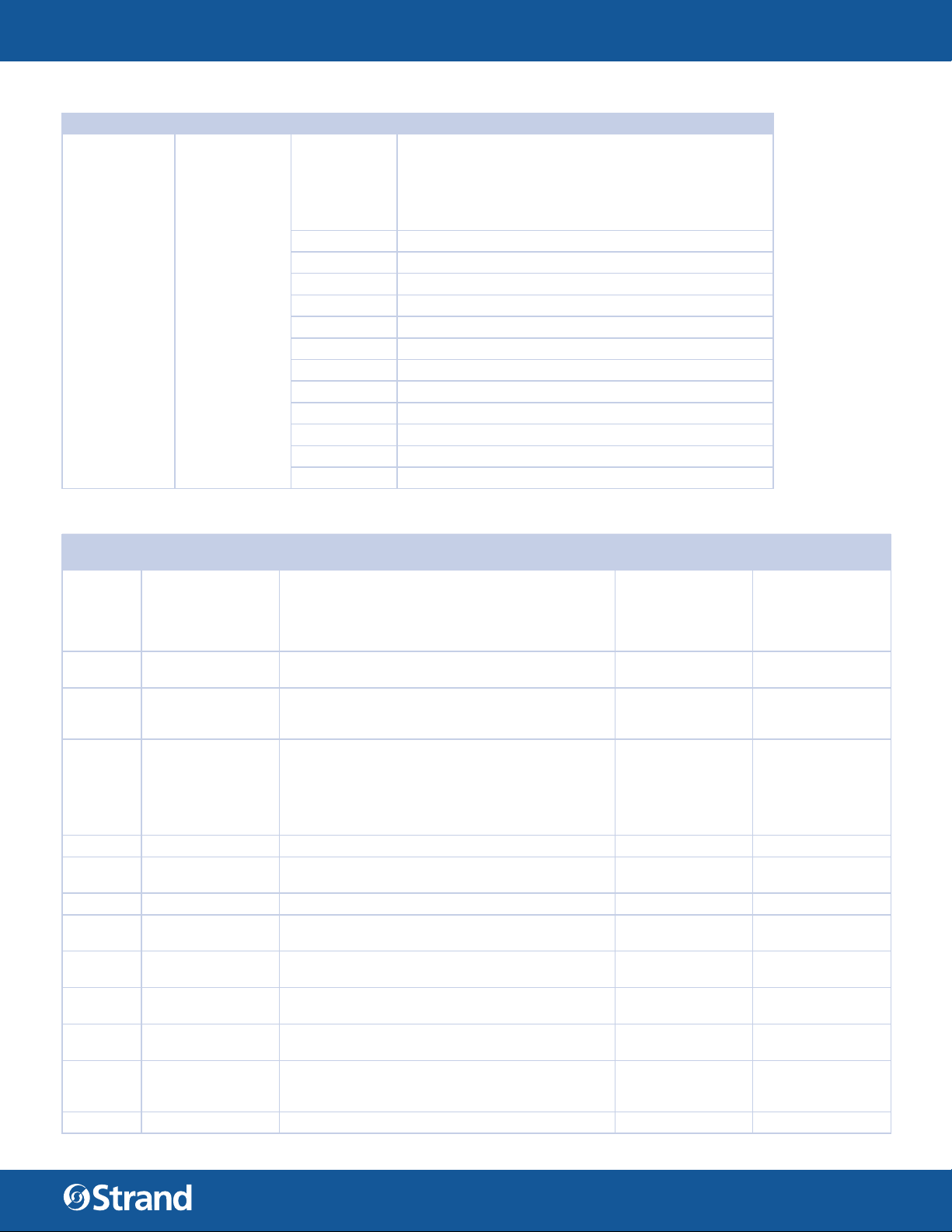
The fixture can be operated by DMX controller. The following tables assumes a DMX start address of 1. When
a di erent starting address is used, this address becomes channel 1 function and other functions follow in sequence.
TABLE 2. SSCC MODE
DMX
CHANNEL
1 Intensity (High) 0 0 - 65535 16bit Intensity (Dimmer) Control
2 Intensity (Low) 0 - 100% Output
3 Strobe 0 0 - 255 Strobe S>>>>>F
4 Color Preset 0 0 - 255 Calibrated color presets 01 to 33
PARAMETER DEFAULTS RANGE DMX DESCRIPTION
0 - 9 No Strobe Function - Shutter open
10 - 99 Strobe S>>>>>F
100 - 109 No Strobe Function - Shutter open
110 - 179 Lighting Strobe S>>>>>F
180 - 189 No Strobe Function - Shutter open
190 - 255 Random Strobe S>>>>>F
User defi nable color preset 01 to 20
0 - 10 Channel OFF Color Mixing take priority
11 - 14 Moroccan Pink
15 - 18 Pink
19 - 22 Flesh Pink
23 - 26 Bright Rose
27 - 30 Follies Pink
31 - 34 Fuchsia Pink
35 - 38 Surprise Pink
39 - 42 Congo Blue
43 - 46 Blue
47 - 50 Virgin Blue
51 - 54 Midnight Maya
55 - 58 Double C.T Blue
59 - 62 Slate Blue
63 - 66 Regal Blue
67 - 70 Full C.T Blue
71 - 74 Steel Blue
75 - 78 Lighter Blue
79 - 82 Cyan
83 - 86 Marine Blue
87 - 90 Soft Green
91 - 94 Moss Green
95 - 98 Green
99 - 102 Fem Green
103 - 106 JAS Green
107 - 110 Pale Green
111 - 114 Spring Yellow
115 - 118 Yellow
USER MANUAL
8
WWW.STRANDLIGHTING.COM
Page 9

CANTATA LED FRESNEL FULL COLOR
TABLE 2. SSCC MODE
DMX
CHANNEL
5 Fan Control 0 0 - 255
6 Control Chanel 0 0 - 255
PARAMETER DEFAULTS RANGE DMX DESCRIPTION
119 - 122 Deep Amber
123 - 126 Chrome Orange
127 - 130 Orange
131 - 134 Magenta
135 - 138 Flame Red
139 - 142 Purple
143 - 146 User Preset 1
147 - 150 User Preset 2
151 - 154 User Preset 3
155 - 158 User Preset 4
159 - 162 User Preset 5
163 - 166 User Preset 6
167 - 170 User Preset 7
171 - 174 User Preset 8
175 - 178 User Preset 9
179 - 182 User Preset 10
183 - 186 User Preset 11
187 - 190 User Preset 12
191 - 194 User Preset 13
195 - 198 User Preset 14
199 - 202 User Preset 15
203 - 206 User Preset 16
207 - 210 User Preset 17
211 - 214 User Preset 18
215 - 218 User Preset 19
219 - 222 User Preset 20
223 - 255 Channel OFF Color Mixing take priority
0-4 Automatic fan/output adjustment (Default)
05 - 255 Linear control of fan speed and LED max output*
USER MANUAL
Dynamically control fan speed vs LED Output operation.
Control values as follows . . .
DMX 5 =Highest Constant Fan Speed
DMX 255 = Lowest Constant Fan Speed
* Standard mode only
Control Channel used for full fi xture settings,
lamp controls, and miscellaneous modes.
Set discrete value of desired effect, wait >3 seconds,
then set value to 0 (Idle).
**Function does not require 3 Second rule to active, setting
output
to value will automatically activate function
0 - 5 Idle (Default)
6 - 10 Full Luminaire ReCal -
Also Used to Wake fi xture up from shutdown
11 - 15 Fixture Shutdown
16 - 20 Reserved Values
21 - 25 Display - Menu ON
26 - 30 Display - Menu OFF
9
WWW.STRANDLIGHTING.COM
Page 10
CANTATA LED FRESNEL FULL COLOR
TABLE 2. SSCC MODE
DMX
CHANNEL
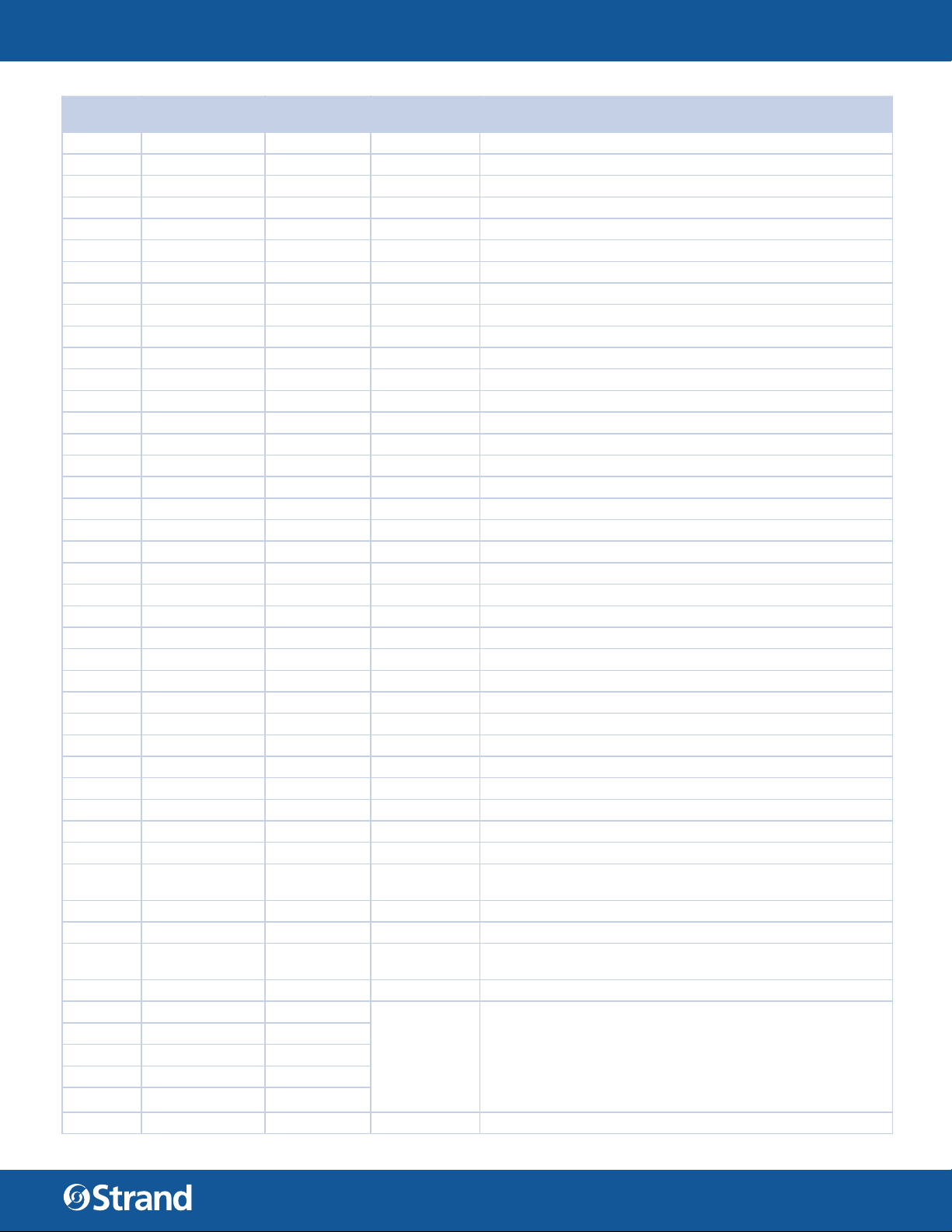
7 Cyan (High) 0 0 - 65535 Cyan Color Level Control 0 - 100% Saturation
8 Cyan (Low) 6 Color LED array auto adjust to meet Cyan / mixed color point
9 Yellow (High) 0 0 - 65535 Yellow Color Level Control 0 - 100% Saturation
10 Yellow (Low)
11 Magenta (High) 0 0 - 65535 Magenta Color Level Control 0 - 100% Saturation
12 Magenta (Low
13 CTO 75
PARAMETER DEFAULTS RANGE DMX DESCRIPTION
31 - 35 Tungsten Dimming On**
36 - 40 Tungsten Dimming Off (Default)**
41 - 45 Dimming Curve Linear**
46 - 50 Dimming Curve S-Curve**
51 - 55 Dimming Curve Square Law (Default)**
56 - 60 Reserved
61 - 65 Dimmer Snap On**
66 - 70 Dimmer Snap Off (Default)**
71 - 75 Reserved Values
76 - 80 Reserved Values
81 - 85 Reserved Values
86 - 90 Reserved Values
91 - 95 Color Calibration on
96 - 100 Color Calibration off (Default)
101 - 105 Reserved Values
106 - 110 Reserved Values
111 - 115 Standard Mode - (Default)
116 - 120 Studio Mode - Reduced output with lower fan settings
121 - 125 Whisper Mode - Reduced output with lower fan settings
126 - 130 Reserved Values
131 - 135 Reserved Values
136 - 140 Fan On (Default)
141 - 145 Fan Auto
146 - 150 Reserved Values
151 - 155 Record User Color Preset**
156 - 160 Reserved
161 - 165 Reserved
166 - 170 Reserved
171 - 175 Reset fi xture to default
176 - 255 Reserved
of full available color spectrum
6 Color LED array auto adjust to meet Yellow / mixed color
point
of full available color spectrum
6 Color LED array auto adjust to meet Magenta / mixed color
point
of full available color spectrum
Variable color temperature control channel
Channel works independent of color mixing channel and will
0 - 250
0 1800k
adjust all mixed
color from selected color temperature level.
Values stated below are a for guidance only channel should be
mapped in
such away that channel level runs variable from 0 - 250
USER MANUAL
10
WWW.STRANDLIGHTING.COM
Page 11

CANTATA LED FRESNEL FULL COLOR
TABLE 2. SSCC MODE
DMX
CHANNEL
14 Green Shift 100
PARAMETER DEFAULTS RANGE DMX DESCRIPTION
25 2700K
50 3000K
75 3200K (Default)
100 4000K
125 4500K
150 5000K
175 5600K
200 6500K
225 8000K
250 10000K
250 - 255 Reserved Hold 10000K
0 - 255
0-10 NO FUNCTION
11-29 FULL MINUS GREEN
30-69 —99% -1%
70-129 NO FUNCTION
130-189 1% 99%
190-255 FULL PLUS GREEN
USER MANUAL
TV Camera Green Shift adjustment
Channel works independent of color mixing channel and will
adjust all mixed color
from to reduce green color for camera use
0 to -100% Minus Green Levels 100% = to Lee Filter Full minus
Green 247
TABLE 3. SQCC MODE
DMX
CHANNEL
1 Intensity (High) 0 0 - 65535 16bit Intensity (Dimmer) Control
2 Intensity (Low) 0 - 100% Output
3 Strobe 0 0 - 255 Strobe S>>>>>F
4 Color Preset 0 0 - 255 Calibrated color presets 01 to 33
PARAMETER DEFAULTS RANGE DMX DESCRIPTION
0 - 9 No Strobe Function - Shutter open
10 - 99 Strobe S>>>>>F
100 - 109 No Strobe Function - Shutter open
110 - 179 Lighting Strobe S>>>>>F
180 - 189 No Strobe Function - Shutter open
190 - 255 Random Strobe S>>>>>F
User defi nable color preset 01 to 20
0 - 10 Channel OFF Color Mixing take priority
11 - 14 Moroccan Pink
15 - 18 Pink
19 - 22 Flesh Pink
23 - 26 Bright Rose
27 - 30 Follies Pink
31 - 34 Fuchsia Pink
35 - 38 Surprise Pink
39 - 42 Congo Blue
43 - 46 Blue
11
WWW.STRANDLIGHTING.COM
Page 12
CANTATA LED FRESNEL FULL COLOR
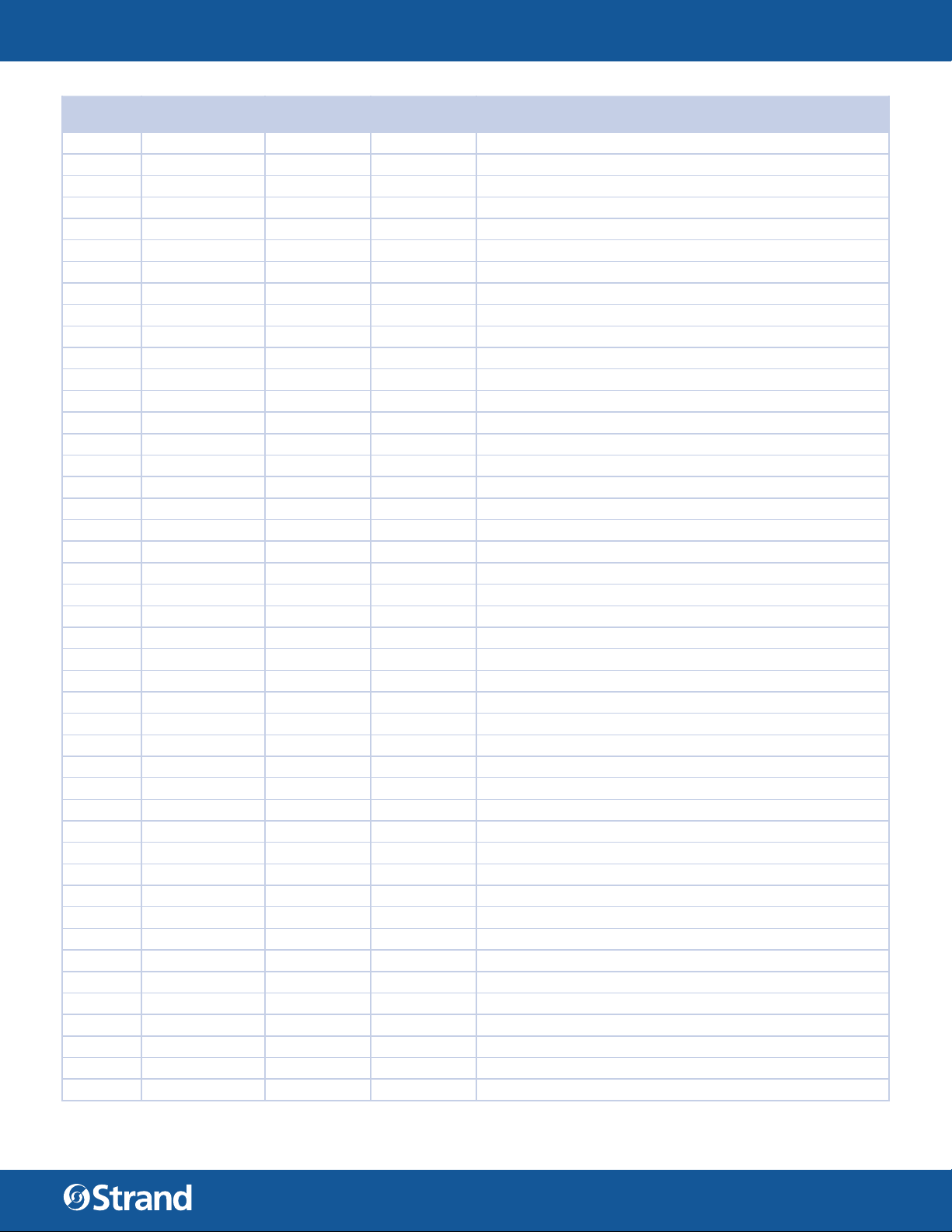
TABLE 3. SQCC MODE
DMX
CHANNEL
PARAMETER DEFAULTS RANGE DMX DESCRIPTION
47 - 50 Virgin Blue
51 - 54 Midnight Maya
55 - 58 Double C.T Blue
59 - 62 Slate Blue
63 - 66 Regal Blue
67 - 70 Full C.T Blue
71 - 74 Steel Blue
75 - 78 Lighter Blue
79 - 82 Cyan
83 - 86 Marine Blue
87 - 90 Soft Green
91 - 94 Moss Green
95 - 98 Green
99 - 102 Fem Green
103 - 106 JAS Green
107 - 110 Pale Green
111 - 114 Spring Yellow
115 - 118 Yellow
119 - 122 Deep Amber
123 - 126 Chrome Orange
127 - 130 Orange
131 - 134 Magenta
135 - 138 Flame Red
139 - 142 Purple
143 - 146 User Preset 1
147 - 150 User Preset 2
151 - 154 User Preset 3
155 - 158 User Preset 4
159 - 162 User Preset 5
163 - 166 User Preset 6
167 - 170 User Preset 7
171 - 174 User Preset 8
175 - 178 User Preset 9
179 - 182 User Preset 10
183 - 186 User Preset 11
187 - 190 User Preset 12
191 - 194 User Preset 13
195 - 198 User Preset 14
199 - 202 User Preset 15
203 - 206 User Preset 16
207 - 210 User Preset 17
211 - 214 User Preset 18
215 - 218 User Preset 19
219 - 222 User Preset 20
223 - 255 Channel OFF Color Mixing take priority
USER MANUAL
12
WWW.STRANDLIGHTING.COM
Page 13
CANTATA LED FRESNEL FULL COLOR
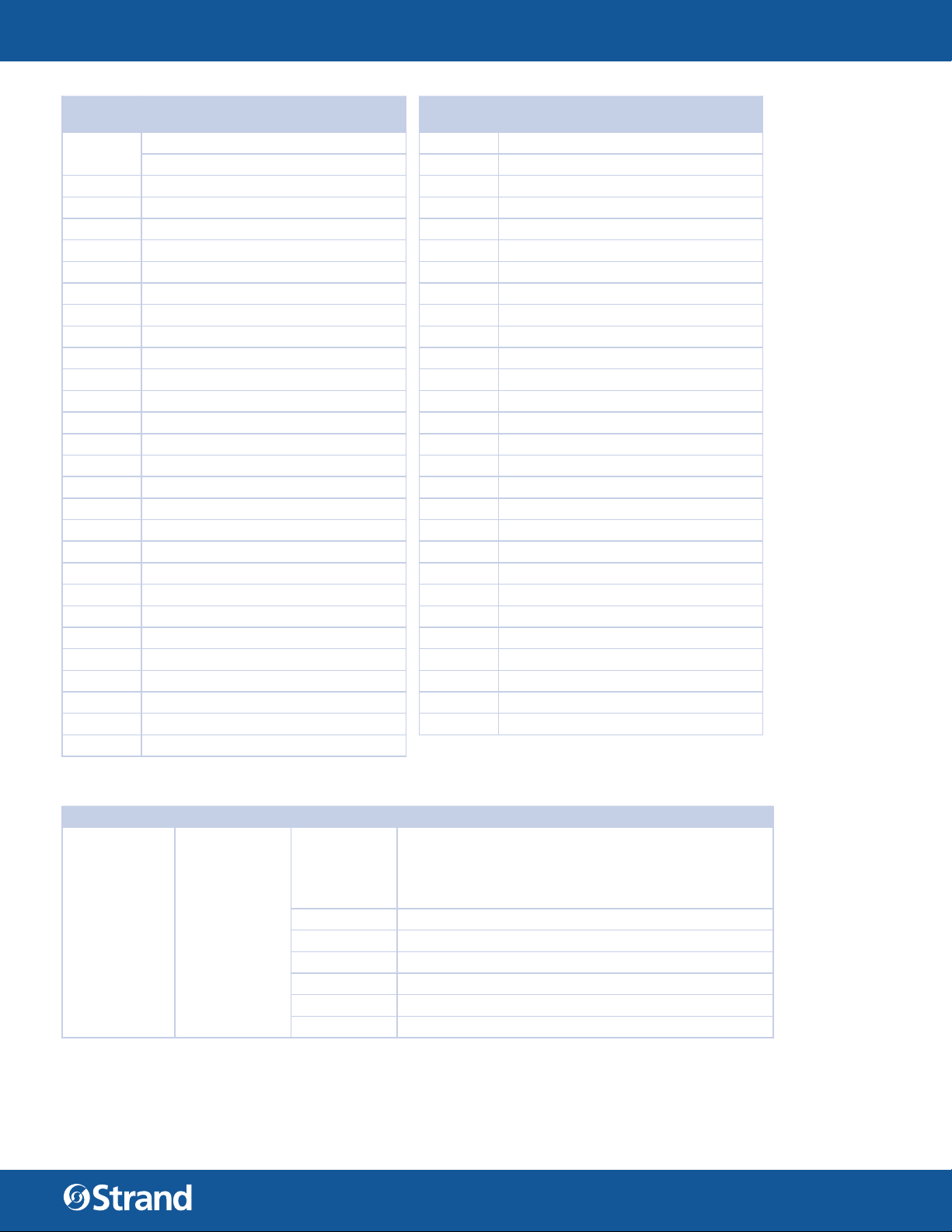
TABLE 4. COLOR PRESETS
RANGE
DMX
0 - 255
0 - 10 Channel OFF Color Mixing take priority 123 - 126 Chrome Orange
11 - 14 Moroccan Pink 127 - 130 Orange
15 - 18 Pink 131 - 134 Magenta
19 - 22 Flesh Pink 135 - 138 Flame Red
23 - 26 Bright Rose 139 - 142 Purple
27 - 30 Follies Pink 143 - 146 User Preset 1
31 - 34 Fuchsia Pink 147 - 150 User Preset 2
35 - 38 Surprise Pink 151 - 154 User Preset 3
39 - 42 Congo Blue 155 - 158 User Preset 4
43 - 46 Blue 159 - 162 User Preset 5
47 - 50 Virgin Blue 163 - 166 User Preset 6
51 - 54 Midnight Maya 167 - 170 User Preset 7
55 - 58 Double C.T Blue 171 - 174 User Preset 8
59 - 62 Slate Blue 175 - 178 User Preset 9
63 - 66 Regal Blue 179 - 182 User Preset 10
67 - 70 Full C.T Blue 183 - 186 User Preset 11
71 - 74 Steel Blue 187 - 190 User Preset 12
75 - 78 Lighter Blue 191 - 194 User Preset 13
79 - 82 Cyan 195 - 198 User Preset 14
83 - 86 Marine Blue 199 - 202 User Preset 15
87 - 90 Soft Green 203 - 206 User Preset 16
91 - 94 Moss Green 207 - 210 User Preset 17
95 - 98 Green 211 - 214 User Preset 18
99 - 102 Fem Green 215 - 218 User Preset 19
103 - 106 JAS Green 219 - 222 User Preset 20
107 - 110 Pale Green 223 - 255 Channel OFF Color Mixing take priority
111 - 114 Spring Yellow
Calibrated color presets 01 to 33 115 - 118 Yellow
User defi nable color preset 01 to 20 119 - 122 Deep Amber
COLOR
RANGE
DMX
COLOR
USER MANUAL
TABLE 5. GREEN SHIFT
DMX CHANNEL DEFAULT RANGE DMX FUNCTION
TV Camera Green Shift adjustment
Channel works independently of color mixing channel
and will adjust all mixed color from to reduce green color
for camera use 0 to -100% Minus Green Levels 100% = to
Lee Filter Full minus Green 247
13
Green Shift 100
0 - 255
0-10 NO FUNCTION
11-29 FULL MINUS GREEN
30-69 —99% -1%
70-129 NO FUNCTION
130-189 1% 99%
190-255 FULL PLUS GREEN
WWW.STRANDLIGHTING.COM
Page 14
CANTATA LED FRESNEL FULL COLOR
TABLE 6. CTO CHANNEL
DMX CHANNEL DEFAULT RANGE DMX FUNCTION
Variable color temperature control channel
Channel works independent of color mixing channel
and will adjust all mixed color from selected color
temperature level. Values stated below are a for guidance
only channel should be mapped in such away that
channel level runs variable from 0 - 250
CTO 75
0 - 250
0 1800k
25 2700K
50 3000K
75 3200K (Default)
100 4000K
125 4500K
150 5000K
175 5600K
200 6500K
225 8000K
250 10000K
250 - 255 Reserved Hold 10000K
USER MANUAL
TABLE 7. CONTROL CHANNEL
RANGE
DMX
0 - 255 Control Channel
0 - 5 Idle (Default)
6 - 10
11 - 15 Fixture Shutdown
16 - 20 Reserved Values N/A N/A
21 - 25 Display - Menu ON
26 - 30 Display - Menu OFF N/A N/A
31 - 35
36 - 40
41 - 45
46 - 50
51 - 55
56 - 60 Reserved Values
ITEMS DESCRIPTION
Control Channel used for full fi xture settings,
lamp controls, and miscellaneous modes. Set
discrete value of desired effect, wait >3 seconds,
then set value to 0 (Idle). **Function does not
require 3 Second rule to active, setting output
Default value used as return point to activate all
control functions
Full Luminaire
ReCal -
Tungsten Dimming
On**
Tungsten Dimming
Off (Default)**
Dimming Curve
Linear**
Dimming Curve
S-Curve**
Dimming Curve
Square Law
(Default)**
Recalibrates all mechanical functions and sensor
with in the fi xture. Also Used to Wake fi xture up
from shutdown
Shuts down all fi xture output and turns off all
fans - fi xture is activated by power cycle or ReCal
command
Switches UI display backlight on remotely - Display
will Time out from on after 5 mins
Remote switches Tungsten Dimming color shift on
Remote switches Tungsten Dimming color shift off
Selects Linear Dimming Curve, Also Used to Wake
fi xture up from shutdown
Selects S-Law Dimming Curve
Selects Square -Law Dimming Curve
POWER CYCLE
RULES
N/A N/A
N/A N/A
N/A
If fi xture is
powered down
then up fi xture
will auto wake
and not startup in
Shutdown Mode
N/A N/A
Holds setting on
power cycle
Holds setting on
power cycle
Holds setting on
power cycle
Holds setting on
power cycle
Holds setting on
power cycle
FUNCTION
SELECTION VIA UI
N/A
Yes
Yes
Yes
Yes
Yes
14
WWW.STRANDLIGHTING.COM
Page 15
CANTATA LED FRESNEL FULL COLOR
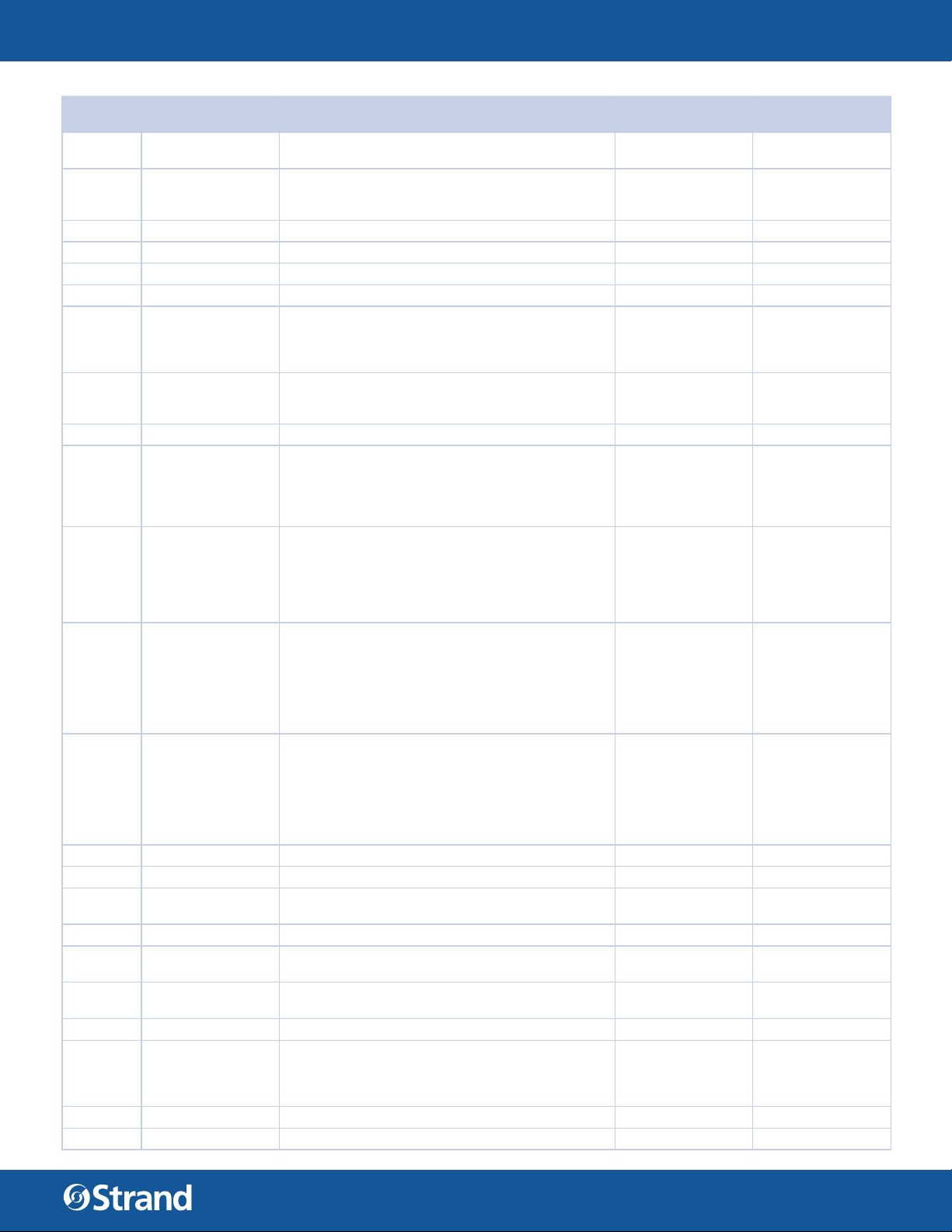
TABLE 7. CONTROL CHANNEL
RANGE
DMX
61 - 65 Dimmer Snap On**
66 - 70
71 - 75 Reserved Values N/A N/A
76 - 80 Reserved Values N/A N/A
81 - 85 Reserved Values N/A N/A
86 - 90 Reserved Values N/A N/A
91 - 95
96 - 100
101 - 105 Reserved Values N/A N/A
106 - 110 Reserved Values
111 - 115
116 - 120
121 - 125
126 - 130 Reserved Values N/A N/A
131 - 135 Reserved Values
136 - 140 Fan On (Default)
141 - 145 Fan Auto
146 - 150 Reserved Values N/A N/A
151 - 155
156 - 160 Reserved N/A N/A
161 - 165 Reserved N/A N/A
ITEMS DESCRIPTION
Allows for fastest output changes between levels
but reduces smoothness dimming LED
Dimmer Snap Off
(Default)**
Color Calibration
on
Color Calibration
off (Default)
Standard Mode Fixture operates at
maximum output
(Default)
Studio Mode Reduced output
with lower fan
settings
Whisper Mode Reduced output
with lower fan
settings
Record User Color
Preset**
Ensures all fades between output levels remain
smooth and fl icker free limits fast instant snaps
between levels
Turns Color calibration on for fi xture to fi xture
color matching on all mixed and preset colors
between fi xtures limits highest output and max
saturation on some colors
Turns Color calibration off fi xtures may not match
fi xture to fi xture limits fast instant snaps between
levels
Boost mode – LED output boosted to >120% of
standard output fan s
speeds increased manage heat level of LED
(may be limited to only run for XXhrs) NC45 –
NC55
Standard mode - Full LED Output + Full
Continuous Fan Spin at
top speed (loudest setting) (Fan remain at a
constant speed
and do not ramp up and down) NC40
*Fans can be switched between On & Auto levels
Studio Mode - Fan speed reduced to appropriate
amount to reduce dB levels >10% of full speed +
LED @ max output approximately 80%
of Standard output at appropriate level to ensure
LED work at optimum temperature and output
effi ciency (fan speed remains at a constant speed
and do not ramp up or down) NC35
Silent Mode – ideally Fans do not spin + output
capped at appropriate
level to ensure LED work at optimum temperature
and output
effi ciency (Fan should never switch on in this
mode or change speed
if they are on) NC15 target level
Fans run at continuous speed for either standard
or studio mode
in isolation to the LED operating temperature
Fans will reduce / increase speed on demand
based on LED
operating temperature for either standard or
studio mode
Takes Current Color mixing values and stores to
next available blank User color preset - if preset
listing are full preset will not record. User will need
to clear preset via fi xture UI
POWER CYCLE
RULES
Holds setting on
power cycle
Holds setting on
power cycle
Holds setting on
power cycle
Holds setting on
power cycle
N/A N/A
Holds setting on
power cycle
Holds setting on
power cycle
Holds setting on
power cycle
N/A N/A
Holds setting on
power cycle
Holds setting on
power cycle
N/A N/A
USER MANUAL
FUNCTION
SELECTION VIA UI
Yes
Yes
Yes
Yes
Yes
Yes
Yes
Yes
Yes
15
WWW.STRANDLIGHTING.COM
Page 16
CANTATA LED FRESNEL FULL COLOR
TABLE 7. CONTROL CHANNEL
RANGE
DMX
166 - 170 Reserved N/A N/A
171 - 175
176 - 255 Reserved N/A N/A
ITEMS DESCRIPTION
Reset fi xture to
default
Will reset all parameters to default with the
exception of the Mx address, fi xture mode and
Pixel / Zone selection
POWER CYCLE
RULES
N/A
USER MANUAL
FUNCTION
SELECTION VIA UI
Yes - Will reset
DMX address, Mode
LINEAR S-CURVE SQUARE LAW
100
100
100
LIGHT OUTPUT
0 255
DMX OUTPUT
Full Color KNOB MODE MODE
LIGHT OUTPUT
0 255
DMX OUTPUT
KNOB 1 KNOB 2 KNOB 3
1.DIM
0-100%
2.CCT
1800K-10000K
LIGHT OUTPUT
0 255
DMX OUTPUT
3.G Shift
-99% - 99%
Note: Double click Dial 1 to Dial MODE
16
WWW.STRANDLIGHTING.COM
Page 17
CANTATA LED FRESNEL FULL COLOR
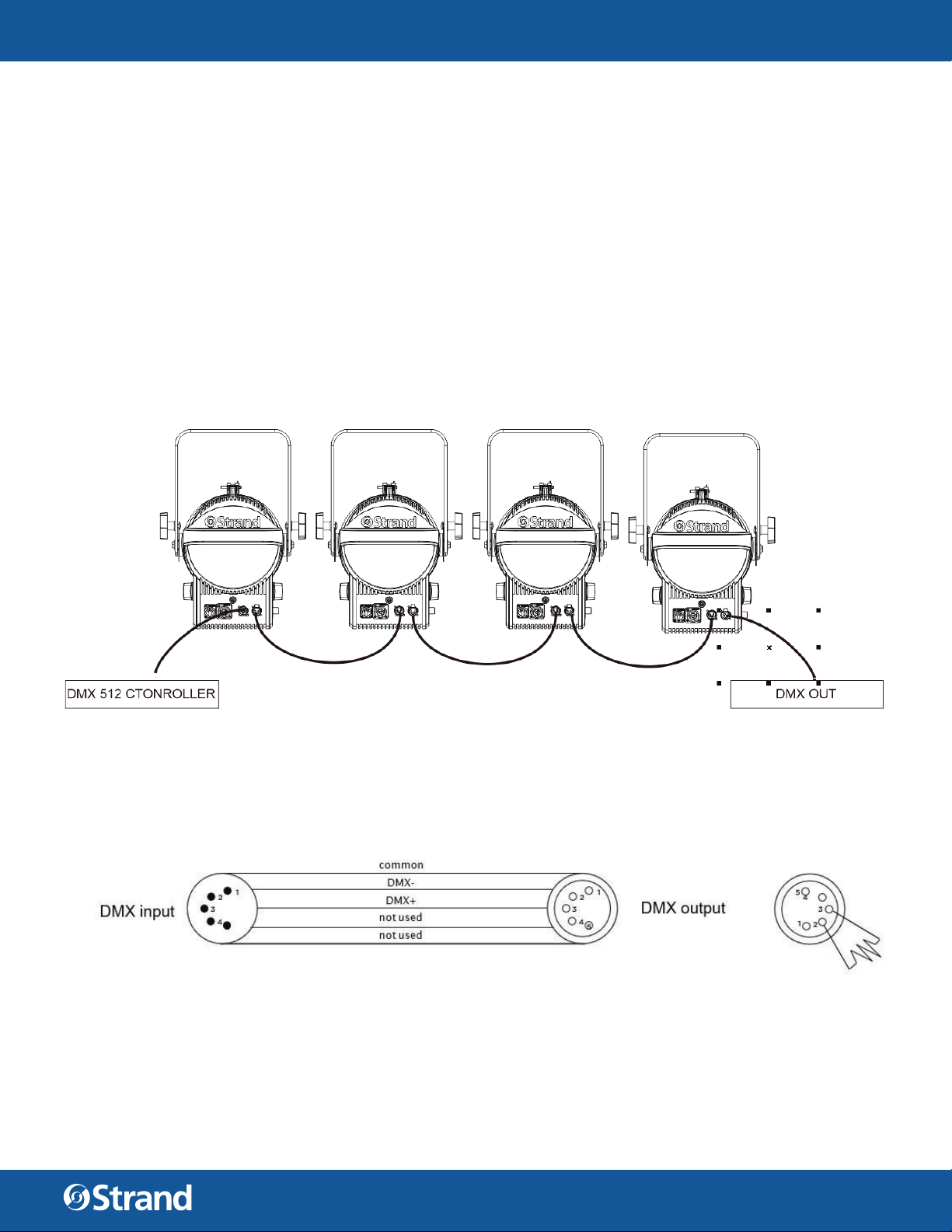
DMX512 CONNECTION
• At last unit, the DMX cable has to be terminated with a terminator. Solder a 120Ω 1/4W resistor between
pin 2(DMX-) and pin 3(DMX+) into a 5-pin XLR-plug and plug it in the DMX-output of the last unit.
• Connect the unit together in a `daisy chain` by XLR plug from the output of the unit to the input of the
next unit. The cable cannot branched or split to a `Y` cable. DMX 512 is a very high-speed signal. Inadequate or damaged cables, soldered joints or corroded connectors can easily distort the signal and shut
down the system.
• The DMX output and input connectors are pass-through to maintain the DMX circuit, when one of the
units’ power is disconnected.
• Each lighting unit needs to have an address set to receive the data sent by the controller. The address
number is between 0-511 (usually 0 & 1 are equal to 1).
• The end of the DMX 512 system should be terminated to reduce signal errors.
• 5 pin XLR: Pin 1: GND, Pin 2: Negative signal (-), Pin 3: Positive signal (+), Pin 4/Pin 5: Not used.
USER MANUAL
17
WWW.STRANDLIGHTING.COM
Page 18
CANTATA LED FRESNEL FULL COLOR
USER MANUAL
APPENDIX A
CARE AND MAINTENANCE
TROUBLESHOOTING
Following are a few common problems that may occur during operation.
The unit does not work - light and fan do not turn on
• Check the connection of power and main fuse.
• Measure the mains voltage on the main connector.
Not responding to DMX controller
• DMX LED should be on. If not, check DMX connectors, cables to see if link properly.
• If the DMX LED is on and no response to the channel, check the address settings and DMX polarity.
• If you have intermittent DMX signal problems, check the pins on connectors or on PCB of the unit or the
previous one.
• Try to use another DMX controller.
• Check if the DMX cables run near or run alongside to high voltage cables that may cause damage or
interference to DMX interface circuit.
CLEANING
The cleaning of internal must be carried out periodically to optimize light output. Cleaning frequency depends
on the environment in which the fixture operates damp, smoky or particularly dirty surrounding can cause
greater accumulation of dirt on the fixture’s optics.
• Clean with soft cloth using normal glass cleaning fluid.
• Always dry the parts carefully.
• Clean the external optics at least every 30 days.
18
WWW.STRANDLIGHTING.COM
Page 19

CANTATA LED FRESNEL FULL COLOR
ADDENDUM
USER MANUAL
Fan Speed and Control
All Vari-lite and Strand lighting luminaires will be governed by the same Fan
speed v Noise levels v Maximum power output rules as details below. These
noises related to these levels will confi rm to Noise Criteria levels details of
which are contained within the document.
There are 3 control parameters can be selected separately or in conjunction
when permitted to manage Fan speed v Noise levels v Maximum power output.
NOTE: Not all fi xture have all modes or functions refer to DMX map and User
interface menu tree to see if you product has one of more of these functions.
Item 1 - Fan ‘v’ Output Preset Modes
These modes are selectable at either / or the fi xtures DMX control channel or
via the fi xture user interface screen. The section of the modes works in conjunction with Items 3 and will also active or deactivate the Item 2.
Boost mode – LED output boosted to >120% of standard output fan speeds
increased manage heat level of LED (may be limited to only run for XXhrs).
Fixture will not exceed NC45 – NC55 sound levels in this mode
Standard mode - Full LED Output + Fan Spin at top speed (loudest setting).
Fixture will not exceed NC40 sound levels in this mode
Studio Mode - Fan speed reduced to appropriate amount to reduce dB levels
>10% of full speed + LED @ max output approximately 80% of Standard output
at appropriate level to ensure LED work at optimum temperature and output
e ciency (fan speed remains at a constant speed and do not ramp up or
down) NC35
Whisper mode - Fan speed reduced to appropriate amount to reduce dB levels
to >30% of the full speed + LED Max output approximately 60% of Standard
output at appropriate level to ensure LED work at optimum temperature and
output e ciency (Fan speed remains at a constant speed and do not ramp up
or down) NC25
Silent Mode – ideally Fans do not spin + output capped at appropriate level to
ensure LED work at optimum temperature and output e ciency (Fan should
never switch on in this mode or change speed if they on) NC15 target level.
90
80
70
60
50
40
30
SOUND PRESSURE LEVEL (dB)
20
10
0
63 125 250 500 1000 2000 4000 8000
FREQUENCY (HZ)
NC 55
NC 55
NC 55
NC 55
NC 50
NC 45
NC 40
NC 35
NC 30
NC 25
NC 20
NC 15
MODE LED OUTPUT FAN SPEED NOISE CRITERION
EQUIVALENT SOUND
LEVEL DBA (@3M)
Boost Mode >100% Boosted fan speed constant NC45 50
Standard Mode Full 100% Full 100% constant NC40 45
Studio Mode 80%
Whisper Mode 60%
Appropriate speed to reduce dB
levels >10% of full speed
Appropriate speed to reduce dB
levels >30% of full speed
NC35 40
NC25 35
Silent Mode TBC Fan off NC15 25
OCTAVE BAND CENTER FREQUENCY (HZ)
NOISE
CRITERION
63 125 250 500 1000 2000 4000 8000
SOUND PRESSURE LEVELS (DB)
NC-15 47 36 29 22 17 14 12 11
NC-20 51 40 33 26 22 19 17 16
NC-25 54 44 37 31 27 24 22 21
NC-30 57 48 41 35 31 29 28 27
NC-35 60 52 45 40 36 34 33 32
NC-40 64 56 50 45 41 39 38 37
NC-45 67 60 54 49 46 44 43 42
NC-50 71 64 58 54 51 49 48 47
NC-55 74 67 62 58 56 54 53 52
NC-60 77 71 67 63 61 59 58 57
NC-65 80 75 71 68 66 64 63 62
NC-70 83 79 75 72 71 70 69 68
19
WWW.STRANDLIGHTING.COM
Page 20
CANTATA LED FRESNEL FULL COLOR
HOW TO OBTAIN WARRANTY SERVICE
A copy of the Strand Limited Warranty was included in the shipping package for this Strand product.
To obtain warranty service, please contact customer service at 1-214-647-7880, or entertainment.service@
signify.com and request a Return Material Authorization (RMA) for warranty service. You will need to provide
the model and serial number of the item being returned, a description of the problem or failure and the name of
the registered user or organization. If available, you should have your sales invoice to establish the date of sale
as the beginning of the warranty period. Once you obtain the RMA, pack the unit in a secure shipping container
or in its original packing box. Be sure to clearly indicate the RMA number on all packing lists, correspondence,
and shipping labels. If available, please include a copy of your invoice (as proof of purchase) in the shipping
container.
With the RMA number written legibly on or near the shipping address label, return the unit, freight prepaid, to:
Strand
Attention: Warranty Service (RMA# ________)
10911 Petal Street
Dallas, Texas 75238
USA
As stated in the warranty, it is required that the shipment be insured and FOB our service center.
IMPORTANT! When returning products to Strand for repairs (warranty or out-of--warranty) from a country
other than the USA, “Strand Lighting LLC”, must appear in the address block as the Importer of Record (IOR) on
all shipping documentation, Commercial Invoices, etc. This must be done in order to clear customs in a timely
manner and prevent returns.
USER MANUAL
20
WWW.STRANDLIGHTING.COM
Page 21

AMERICAS
10911 Petal Street
Dallas, TX 75235
Tel: +1 214-647-7880
Fax: +1 214-647-8039
EUROPE
Rondweg Zuid 85
Winterswijk 7102 JD
Netherlands
Tel: +31 543-542516
Fax: +31 543-542513
ASIA
Unit C, 14/F, Roxy Industry Centre
41-49 Kwai Cheong Road
Kwai Chung, Kwai Tsing
Hong Kong
Tel: +852 2796 9786
Fax: +852 2798 6546
Room 1201, Freetown Tower D
E 3rd Ring Rd S, 58
Chaoyang Qu
Beijing Shi, China
Tel: +8610-58674776
Fax: +8610-58674775
B-1-27, Dataran Cascades, No. 13A
Jalan PJU 5/1
Kota Damansara PJU 5
47810 Petaling Jaya
Selangor, Malaysia
Tel: +60 3-7611 7302
Fax: +60 3-7629 4192
24 Sovereign Park
Coronation Road
Park Royal, London
NW10 7QP
United Kingdom
Tel: +44 020 8965 3209
OCEANIA
14H Vega Place
Rosedale
Auckland 0632
New Zealand
Tel: +64 9-481-0100
©2020 Signify Holding. All rights reserved.
All trademarks are owned by Signify Holding or their respective owners. The information pro-
vided herein is subject to change, without notice. Signify does not give any representation or
warranty as to the accuracy or completeness of the information included herein and shall not
be liable for any action in reliance thereon. The information presented in this document is not
intended as any commercial o er and does not form part of any quotation or contract, unless
otherwise agreed by Signify. Data subject to change.
CA NTATA LED FRESNEL FULL COLOR USER MANUAL
DOCUMENT NUMBER: 64507-003
VERSION DATE: APRIL 27 2020
 Loading...