

Page 1
6.5.4
PRODUCT DATA
A Guide to the Strand 430 Control Console
430
10
10
9
9
8
8
7
7
6
6
5
5
4
4
3
3
2
2
1
1
0
0
7 9 10 11 128
134562
17
14
134562
16
10
10
9
9
8
8
7
7
6
6
5
5
4
4
3
3
2
2
1
1
0
0
7 9 10 11 128
18
13
12 7 3
1115
10
10
9
8
7
6
5
4
3
2
1
0
134562
8 4
9 2 25
156
1220mm
(48")
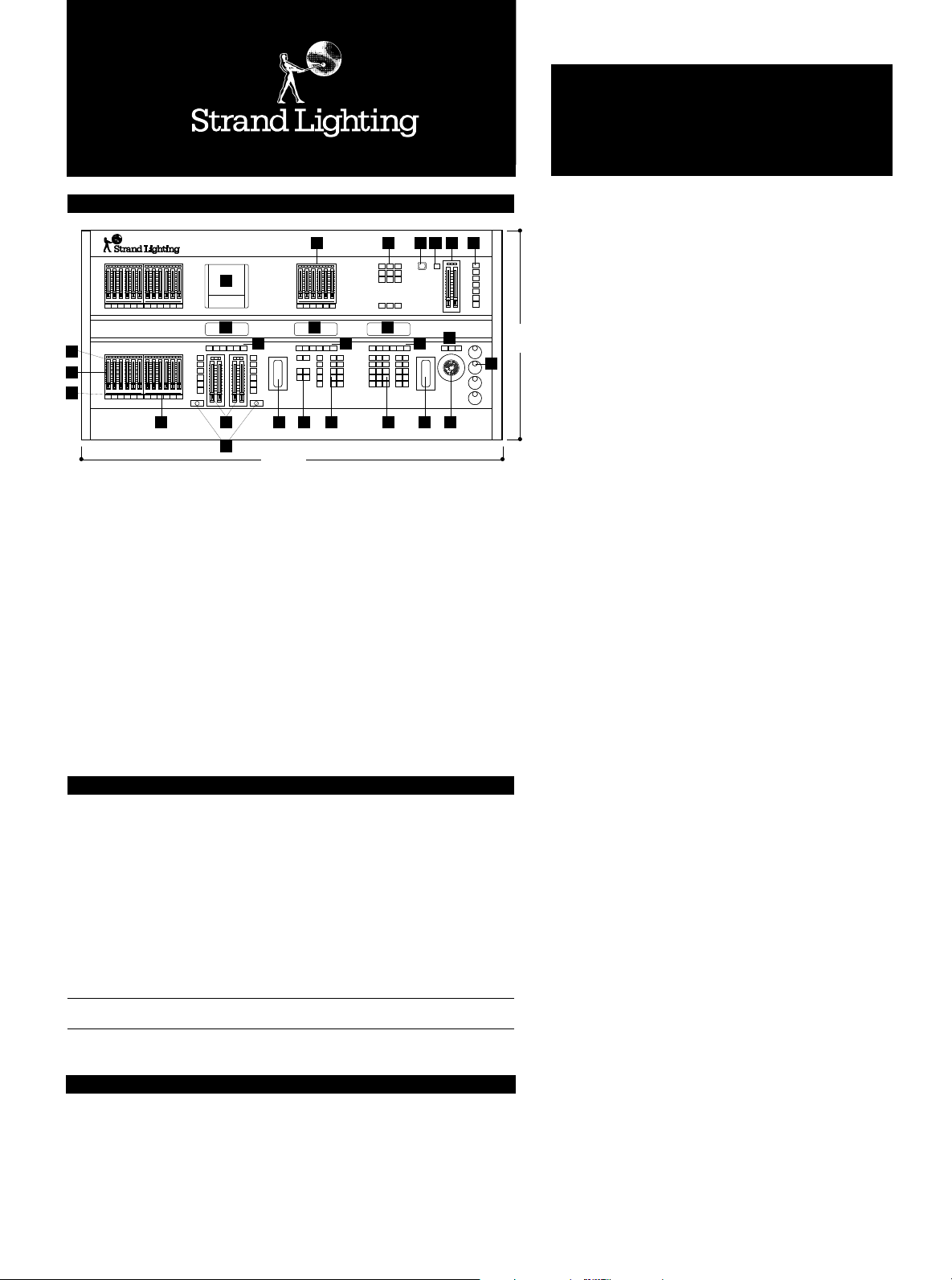
1. Command keypad
2. Channel level wheel
3. Context sensitive soft keys
4. Graphics LCD (for command keypad
and soft keys)
5. Function keypad
6. Effects keypad
7. Effects soft keys
8. Graphics LCD (for effects, soft keys
and Supermaster labels)
9. Rate wheel
10. Playback 'Go'
11. Playbacks
12. Context sensitive soft keys
13. Graphics LCD (for playbacks)
14. 24 Submasters
15. Bump buttons
16. Submaster active LEDs
17. Submaster loaded LEDs
18. Floppy Disk Drive
19. 6 Supermasters (Supermasters)
20. Display and Command routing
keypad
21. Power On/Off
22. Programmable Grandmaster/Stop
23. Grandmasters
24. User programmable keys
25. Tracker ball*
26. Tracker ball & Rotary control
option keys*
27. Rotary controls*
*
requires Tracker™ software for full attrtibutes
functionality
Strand 430
Transportable or installed memory lighting console with 30 submasters, for use with
GeniusPlus or Lightpalette operating software and additional optional Strand application
software packages (see separate data sheet for details). The operating software chosen sets
the capacity of the system in increments from 100 intensity channels plus 100 colour or
motion attributes to a maximum of 600 channels plus 400 attributes. Attribute capacity
may be increased by re-allocating unused intensity channels. Future expansion of capacity
or functions (through application software) is designed into the system through the
purchase of upgrade packs or additional application software.
| 120V-240V universal 50/60Hz ø 350 ch. + 250 att. ≠ 1536 (console) 2048 (network) † 30 ∑ 2000
≈ DMX512, D54 ∏ 1220 x 620 x 150mm (48" x 24" x 6") ◊ 45kg (99lb) ‰ 1220 x 670mm (48" x 26")
¶ 53kg (116lb) ı 0.304m
Cat. No. Description
64511 Strand 430 console, (requires GeniusPlus or Lightpalette Operating
software minimum)
A GUIDE TO SYMBOLS AND ABBREVIATIONS
VSupply voltage c Number of channels d Number of dimmers Z Number of sub-masters or faders
m Typical memory capacity Y Control protocol w Weight of product O Overall dimension of product
p Packed weight P Packed volume f Desk space required s Compliance with International Standards
HTP Highest level takes precedence LTP Latest action takes precedence
3
s UL, cUL, (pending), EML
242322212019
26
27
CONTROLS
STRAND 430
Mid Range
High-Capability
Console Platform
620mm
(24")
● Mid-range lighting control hardware platform to operate with
a selection of high capability Strand application software
● For professional theatre, concert halls, TV studios and touring
● 30 submasters - 24 plus 6 'Supermasters' with LCD labels
● Choice of either GeniusPlus™ or Lightpalette™ operating
software - a range of optional application software is also
available
● Equipped with Intel Pentium 75 processor
● Operating software controls a maximum of 600 intensity
channels, 400 scrollers and moving light attributes, 1536 DMX
Mux outputs
● Intensity channels may be converted into additional attribute
channels if required
● Three large backlit graphic LCD displays with context sensitive
soft keys
● Hard disk for show storage
● 6 pages of individually programmable submasters, plus any
submaster or supermaster can be configured as one of 6 userselectable function masters
● Dedicated tracker ball and rotary controls for automated light
attributes (requires optional Tracker™ software to function)
● Simultaneous digital and analogue multiplex protocols
● Two split crossfade playbacks for software-selectable single or
twin playback operation
● 128 simultaneous playback fades supported
● Twin programmable Grand Masters and user-selectable
blackout/stop control
● Ten effects playbacks
● Two proportional Electronic patches
● One or two VGA colour monitor outputs
● Integral 3.5" disk drive
● Internal 500Mb Hard Drive
™
Page 2
PAGE 2 © Strand Lighting STRAND 430 CONSOLE VERSION 1.0
Strand 430 Peripherals & Accessories
Cat. No. Description
66011 VGA 14" Monitor 110V*.
66012 VGA 14" Monitor 230/240V.
66041 Wired Handheld Designers Remote.
66210 Mini keyboard USA.
66211 Mini keyboard UK.
66034 Dust cover Strand 430.
* Larger displays available – consult factory
Strand 430 Software
(for further details, please refer to software datasheets)
Cat. No. Description
67311 GeniusPlus Operating Software (100 channels).
67331 Lightpalette Operating Software (100 channels).
67511 GeniusPlus/Lightpalette 50 channel expansion.
67513 GeniusPlus/Lightpalette 200 channel expansion.
67515 CommuniquéPlus (Comms. Application software).
67519 Networker (Ethernet Application software & Ethernet card).
67523 Tracker (Automated Luminaire Application software).
67411 GeniusPlus Offline Editor
67931 Lightpalette Offline Editor
66126 Radio Remote UK (418 MHz)
66124 Base Station UK (418 MHz)
66127 Radio Remote EU (433.92 MHz)
66123 Base Station EU (433.92 MHz)
66129 Wired Remote UK/EU
Supply voltage 100V - 240V 50/60Hz, autosensing
Processor Intel Pentium 75
Memory 4Mb RAM, Internal 500Mb Hard drive
Archive memory 3.5" floppy disk (DOS)
Connections Dimmers: DMX512 outputs (512 dimmers per port),
Standards UL, cUL (pending), EMC emissions to EN50081-1,
Compliance EN55014; EMC immunity to EN50082-1, IEC1000-2-2;
Software GeniusPlus™, Lightpalette™* operating software
Control capacity From 100 to 600 dimming channels, plus from 100 to
Control inputs One DMX input (512 dimmers), and 12 analogue
Printer Support for Epsom FX, IBM Proprinter, HP Deskjet,
Technical Specifications
5 pin female XLR (3 max - see DMX input below)
Dimmers: AMX192 output (192 dimmers),
4 pin male XLR (1)
Dimmers: D54 output (384 dimmers),
3 pin female XLR (1)
DMX Input, 5 pin male XLR (1 - shared
with DMX outputs)
Handheld remote (1)
Parallel printer, 25 pin female D-type (1)
MIDI (In/Thru/Out)
Dimmer Overtemp, 4 pin male XLR (1)
Auxiliary RS485 (3)
12 Analogue Inputs +10V, 15 pin D-type female (1)
Audio input, 10mV to 10V balanced, 3 pin
female XLR (1)
Keyboard (1)
VGA monitors, high density 15 pin female D-type (2)
Ethernet (1, optional - card supplied with
Networker™ software)
Power inlet: IEC320 (male)
Power outlet: IEC320 (female) 4A max
Safety: EN60950, EN60439 Part 1
(also part 12 BS5486);
design & build: ISO9000, UL1950
minimum.
Application software includes
CommuniquéPlus™ (comms),
Tracker™ (automated lighting),
Networker™ (Ethernet networking, includes interface
PCB for console, and requires Strand SN100 Ethernet
nodes for access to video signals and dimmer signals
remotely).
Off-line editor.
400 attributes for moving lights or colour scrollers,
patchable to a maximum of 1536 DMX outputs or
2048 if optional Networker Software and SN100
modes are used. Channel and attribute capacity is
defined by the version of GeniusPlus or Lightpalette
operating software purchased. Control capacity may be
upgraded at any time by additional software in 50 or
200 channel blocks. Intensity/attribute capacities are as
follows:
100 dimmers / 100 attributes
150 dimmers / 150 attributes
200 dimmers / 200 attributes
250 dimmers / 250 attributes
to 350 dimmers / 250 attributes
Dimming channels may be converted to provide more
attributes, but attributes cannot be converted into
more channels.
inputs (0 to +10V). DMX inputs may be patched to
DMX outputs with a scaling factor if required.
Analogue input signals are used for remote control
of selected submasters.
HP Laserjet and ASCII are included in the operating
software.
Page 3
VERSION 1.0 © Strand Lighting STRAND 430 CONSOLE PAGE 3
Environmental Data
Operating Temperature 0° to 40°C ambient (32° to 104°F)
Storage Temperature -40° to 70°C (-40° to 158°F)
Location Good office environment
Humidity 5% - 95% non-condensing
Mechanical Data
Construction Galvanised sheet steel and aluminium extrusion.
Weight and length depth height weight
dimensions 1220mm 620mm 150mm 45kg
Strand 430 48" 24" 6" 99lb
Flame retardant ABS controls.
Operational Data
The operation of the Strand 430 console depends on the software chosen for
the system, and the user's preference of operational functions which may be
custom configured. Further details of the operational features are given in the
software data sheets.
Channel control Main command keypad for setting channel levels, and recording
Playbacks Two playbacks are provided, which may be configured for independent
Macros 6 direct Macro keys are provided, with graphic LCD labels, with
Effects Up to 30 simultaneous effects from a total of 500 per show each
Submasters 30 submasters are provided; 24 plus 6 ‘supermasters’. Each
Attribute Controls A trackerball, three pushbuttons and four rotary controls provide
VDU switching The VDU keypad switches the VDU displays between channel,
On/Off Main switch is provided on the front panel of the console.
Grand Masters Two Grandmaster faders are provided, plus a programmable button
and Blackout for 'Blackout' or 'Stop'.
User 7 additional keys are available for user-programmable functions.
Programmable keys
lighting states. The associated LCD display provides local indication of
channel control status, including the functions of six context-sensitive
soft keys. Level wheel adjusts channel levels. If Tracker™ software is
included, the tracker ball and rotary wheels are activated to enable a
single channel number reference (entered on the command keypad)
to give immediate access to all attributes of an automated luminaire,
or a scroller.
or combined operation, or condensed to a single playback. A rate
wheel is provided to adjust the rate of progress of a lighting change.
Each playback may have a separate cue sheet, enabling lighting cues to
be run independently of motion cues, on separate playbacks, if
desired. A total of 128 simultaneous faders are supported.
access to the maximum 999 via the keypad.
containing up to 99 fully overlapping steps can be run from playbacks,
macros, submasters or manually from the effects playback panel.
Effects steps contain recorded intensity levels and attribute positions
for scroller or moving light effects. Levels used can be as recorded or
random between max and min levels, inserted or alternately inverted.
Each effect step can use individually programmable In, dwell and out
times or may use the effect defaults. Effects can stop when instructed,
after the last cycle or, after a defined number of cycles or time.
Effects can be chained. Step control can be manual, timed or with
CommuniquePlus MIDI or audio. Effects type, direction and speed can
be modified whilst running and updated back into the effects memory
if required.
submaster has a bump button, and two LED indicators to signal
the status and activity of each submaster. Submasters may be used to
mix memories, replay cues, including dimming and motion cues.
The six Supermasters have adjacent labelling provided by an LCD
display. Any submaster or supermaster can be configured to provide
the following special master control functions: master all Submasters,
Audio input, DMX input, Effects playbacks, Bump level, MIDI. If the
Supermasters are used for a special function, the LCD display will
show the function name selected.
direct access to colour, pan and tilt, and up to 32 functions of an
automated light by entering a single unit number. (Colour control is
available with the operating software. Automated light functions only
available with Tracker™ software).
dimmer and cue information. They also provide control path routing
to match the active VDU display.
Page 4
PAGE 4 © Strand Lighting STRAND 430 CONSOLE VERSION 1.0
London: Strand Lighting Ltd, Grant Way, Islewor th, Middlesex, TW7 5QD, United Kingdom.
Wolfenbüttel: Strand Lighting GmbH, Salzbergstraße 2, 38302 Wolfenbüttel, Germany.
Rome: Strand Lighting Srl, Via delle Gardenie 33, Pontina Vecchia Km 33,400,
Brussels: Strand Lighting Ltd, Chaussée de Haecht 1801, 1130 Bruxelles, Belgium
Stockholm: Strand Lighting Ltd, Box 20105, Tappvägen 24, 161 02 Bromma, Sweden
ALSO
FACILITIES IN: LOS ANGELES • NEW YORK • HONG KONG • MILANO • MUNICH • BERLIN
© Copyright Strand Lighting Limited October 1995
Tel: +44 (0)181 560 3171 Fax: +44 (0)181 568 2103
Tel: +49 (0) 5331 3008-8 Fax: +49 (0) 5331 78883
00040 Pomezia-Roma, Italy
Tel: +39 (0) 6 914 7123 Fax: +39 (0) 6 914 7136
Tel: +32 (0) 2 245 8686 Fax: +32 (0) 2 245 2235
Tel: +46 (0) 8 799 6950 Fax: +46 (0) 8 799 6954
The Company reserves the right to make any variation in design or construction to the
equipment described.© Strand Lighting Ltd 1995. Strand™, Strand Lighting™ and MX™ are
trade marks of Strand Lighting Limited. Strand Lighting is a company within the Film &
Television Division of The Rank Organisation Plc, United Kingdom.
Country of origin United Kingdom.
 Loading...