

Page 1

HDM500
High-Definition MPEG-2 Decoder
User Guide
Table of Contents
Patent Notice...............................................................................................................................................3
Features.......................................................................................................................................................4
HDM500 Block Diagram..............................................................................................................................6
Specifications ..............................................................................................................................................7
Accessories and Cables..............................................................................................................................8
Hardware Installation...................................................................................................................................9
Back Panel and Onboard Connectors.......................................................................................................10
RS422 Connector......................................................................................................................................12
Audio Connector (DB15-HD).....................................................................................................................13
Installing the Device Drivers and the Stradis MPEG-2 Decoder Application............................................14
Software License Agreement ....................................................................................................................15
Limited Warranty on Hardware Products ..................................................................................................16
Page 2

Warning: This is a Class A product. In a domestic
environment this product may cause radio
interference in which case the user may be
required to take adequate measures.
Copyright 2005 Stradis, Inc. Printed in U.S.A. Unless it was downloaded from the Stradis web site and printed
somewhere else, in which case we have no idea where it was printed. 6/22/2005 5:59 PM
Trademarks: Microsoft, Windows, and Windows NT are registered trademarks of Microsoft Corporation.
Pentium is a registered trademark of Intel. Stradis is a registered trademark of Stradis, Inc.
Because of technical progress, specifications are subject to change without notice
2
Page 3

Patent Notice
Notice: Use of this product is expressly prohibited without a license under the following applicable
patents.
For more information, contact: Baryn S. Futa Phone: 1-303-331-1880
Manager and C.E.O. Fax: 1-303-331-1879
MPEG LA, LCC e-mail: [email protected]
250 Steele Street, Suite 300 U.R.L.: www.mpegla.com
Denver, CO 80206
This is the list of patents covered by the MPEG-2 Patent Portfolio License as of September 30, 1998.
Columbia University
US Re 35,093
CA 2,096,431-C
DE 0630157
FR 0630157
GB 0630157
JP 2,746,749
France Telecom (CNET)
US 4,796,087
DE 3767919
FR 2599577
GB 0248711
IT 0248711
SE 0248711
FI 86241
Fujitsu
US 5,235,618
CA 2,029,320
DE 69030056.5
FR 431319
GB 431319
General Instrument
Corporation
US 4,394,774
US 4,698,672
DE P3789373.8
FR 0266049
GB 0266049
IT 0266049
US 5,068,724
AU 627421-B2
NO 179890-C
TW NI-52990
US 5,091,782
AT 139402-T1
AU 627684-B2
CA 2,038,043-C
DE 69120139-T2
DK 0451545 T3
ES 2088440-T3
FR 0451545
GB 0451545
GR 3020736
IT 0451545
NO 178419-C
NO 178420-C
TW NI-50643
US 5,093,720
Kokusai Denshin Denwa Co.,
Ltd.
JP 1,835,550
Matsushita
US 5,113,255
AU 612543-B2
CA 2,016,523-C
CH 397402
DE 69027710
ES 2091790
GB 397402
FR 397402
IT 397402
JP 1,949,701
JP 2,695,244
KR 63,477
NL 397402
SE 397402
US 5,223,949
US 5,412,430
JP 2,699,703
JP 2,684,941
Mitsubishi
US 4,954,892
CA 2,000,156-C
DE 68913508-T2
FR 382892
GB 382892
IT 382892
JP 2,100,607
KR 58,957
SE 382892
US 5,072,295
AU 625476-B2
CA 2,023,543-C
DE 69027820-T2
FI 98421-B
FR 414193
GB 414193
IT 414193
JP 2,128,624
NL 414193
KR 77,808
SE 414193
JP 1,869,940
JP 2,510,456
Philips
US 4,849,812
CN 1013425-B
DE 3871998-T2
FR 282135-B
GB 282135-B
IT 282135-B
JP 2,534,534-B2
KR 9700364-B1
TW 29492-B
US 4,901,075
AT 260748-B
CN 10619-B
DE 3750206-C0
FR 260748-B
GB 260748-B
IT 260748-B
NL 260748-B
SE 260748-B
TW 35350-B
US 5,021,879
DE 3855114-B
FR 290085-B
GB 290085-B
JP 2,630,809-B
US 5,027,206
AT E 1313335-B
AU 634173-B
BE 0359334-B
CH 0359334-B
CN 1018695-B
DE 68925011-B
ES 0359334-B
FR 92127-B
GB 0359334-B
GR 0359334-B
HK 96-1695-B
IT 0359334-B
US 5,128,758
MX 172405-B
US 5,179,442
US 5,333,135
US 5,606,539
AT E157830-B
BE 460751-B
DE 69127504-B
DK 460751-B
FR 460751-B
GB 460751-B
IT 460751-B
NL 460751-B
SE 460751-B
US 5,608,697
Samsung Electronics Co., Ltd.
US 5,654,706
KR 95,631
Scientific Atlanta
US 5,418,782
AU 683,134
US 5,420,866
AU 687844
US 5,457,701
AU 680,680
Sony
US 4,864,393
DE 3854171-T2
GB 2205710-B2
US 5,191,436
US 5,291,486
GB 2289194-B2
GB 2289195-B2
GB 2289196-B2
GB 2259229-B2
US 5,298,991
US 5,343,248
US 5,428,396
US 5,461,420
AU 672,812
US 5,481,553
AU 673244-B2
NZ 261907-B
TR 28436-B
TW 66605-B
US 5,510,840
US 5,539,466
AU 662548-B2
US 5,543,847
US 5,559,557
AU 669209-B2
US 5,666,461
AU 670,288
MY 109,945
TW 70,497
US 5,663,763
AU 667,970
JP 2,712,645
Toshiba Corporation
US 5,317,397
US 5,424,779
JP 2,755,851
US 5,467,136
JP 2,758,378
US 5,742,344
Victor Company Of Japan,
Limited (JVC)
US Re 34,965
JP 2,530,217
JP 2,072,546
DE 69024235
DE 69030819
FR 379217-B
FR 572046-B
GB 379217-B
GB 572046-B
US Re 35,158
JP 2,137,325
DE 69012405
DE 69031045
FR 395440-B
FR 584840-B
GB 395440-B
GB 584840-B
NL 395440-B
NL 584840-B
US 5,175,618
DE 69123705
FR 484140-B
GB 484140-B
KR 94554
3
Page 4

Features
With the HDM500 High-Definition MPEG-2 Decoder, your application can offer:
• Continuous, seamless back-to-back playback of multiple MPEG streams (which
may be in different formats: Transport, Program, System or Elementary streams) in
all popular ATSC-compliant formats including 1920x1080I, 1280x720P, 720x576P,
720x576I, 720x480P and 720x480I
• High-quality conversion of source video to selected display format. Lock the output
to one format and all outputs will be in that format, regardless of the source format.
• Frame-accurate, synchronized playback across multiple decoders
• High-speed, random access and display of any I-Frame in an MPEG file for
variable speed reverse and forward play, plus seamless switching to any I-frame of
another stream
• PCR-based clock recovery for 24/7/365 real-time stream reception for continuous
decoding of streams received from any common delivery mechanism, including
satellite, LAN, and ATM networks
• Complete control over all HDM500 functions via the API for Microsoft Windows NT,
Windows 2000, and Windows XP. Applications can access the API via a C
interface or by using the __stdcall calling convention
• API compatibility with all Stradis SDM series standard-definition MPEG Decoders
Additional features for professional MPEG decoding and output:
• Still picture display from bit-map files with transition effects and simultaneous audio
playback for “slide shows”
• True-color graphics over video or still pictures with keying or indexed color with
blending
• Digital control of video saturation, brightness, contrast, and gamma
• Genlock (external framelock synchronization) input
• Hardware Audio/Video synchronization
• High-Definition Serial Digital Interface (SMPTE 292M) video output with 12
channels of embedded audio
• 6 AES3 digital audio outputs, may be used as 12 discreet audio channels or 4 may
be used as IEC 61937/SMPTE 337M-2000 digital audio outputs to Dolby Digital
(AC-3) or MPEG Multichannel
®
audio decoders
• One pair of unbalanced analog audio outputs for monitoring
®
• Machine Control via remote connector (9-Pin, RS-422A) can be configured as
either “Controller” or “Device”
• Linear Time Code (LTC) output based on stream time codes or synthesized by the
API
4
Page 5

• Letterbox and pan-and-scan options for displaying 16:9 images on a 4:3 display
• Support for extraction of EIA 608 / EIA 708 closed captions with captions inserted
into HD-SDI in accordance with SMPTE 334M
• API provides three interface levels: RateBuffer, Demux, and File Interface
• DirectShow® filters for compressed data input to the Stradis decoder
• SMPTE 302M-2002 support for uncompressed digital audio in the Transport,
Program, and System streams
• Wave file playback and raw PCM audio playback
• Audio “voice-over” capability allows the application to replace the audio from the
main multiplexed stream with another audio stream
• Virtual streams based on a single, repeated I-Frame that can be seamlessly played
back-to-back with other MPEG streams
• Decryption function for file-based decryption using Stradis-supplied or userdefinable algorithms
• Video capture interface for capturing decoded video output and placing it into PC
memory
• Video image can be displayed on the computer’s VGA monitor in lower resolution
to conserve PCI bus bandwidth
Stradis HDM500 Decoder Operation Highlights
• All decoding takes place in hardware
• 12-bit Video D/A, 2x oversampled
• Decodes MPEG audio (up to eight output channels) in parallel with MPEG video
• Supports SMPTE 302M-2002 uncompressed audio (up to 12 channels)
• IEC 61937/SMPTE 337M-2000 compressed digital audio output of AC-3 – ATSC
A/52 on up to four AES3 outputs
• VCXO with clock recovery for streams received by satellite, LAN, ATM or any
transport delivery mechanism
• Serial Digital Interface (SMPTE 292M or SMPTE259M-C) video output with up to
12 channels of embedded audio, plus DVI and analog RGB (or YpbPr) outputs
5
Page 6
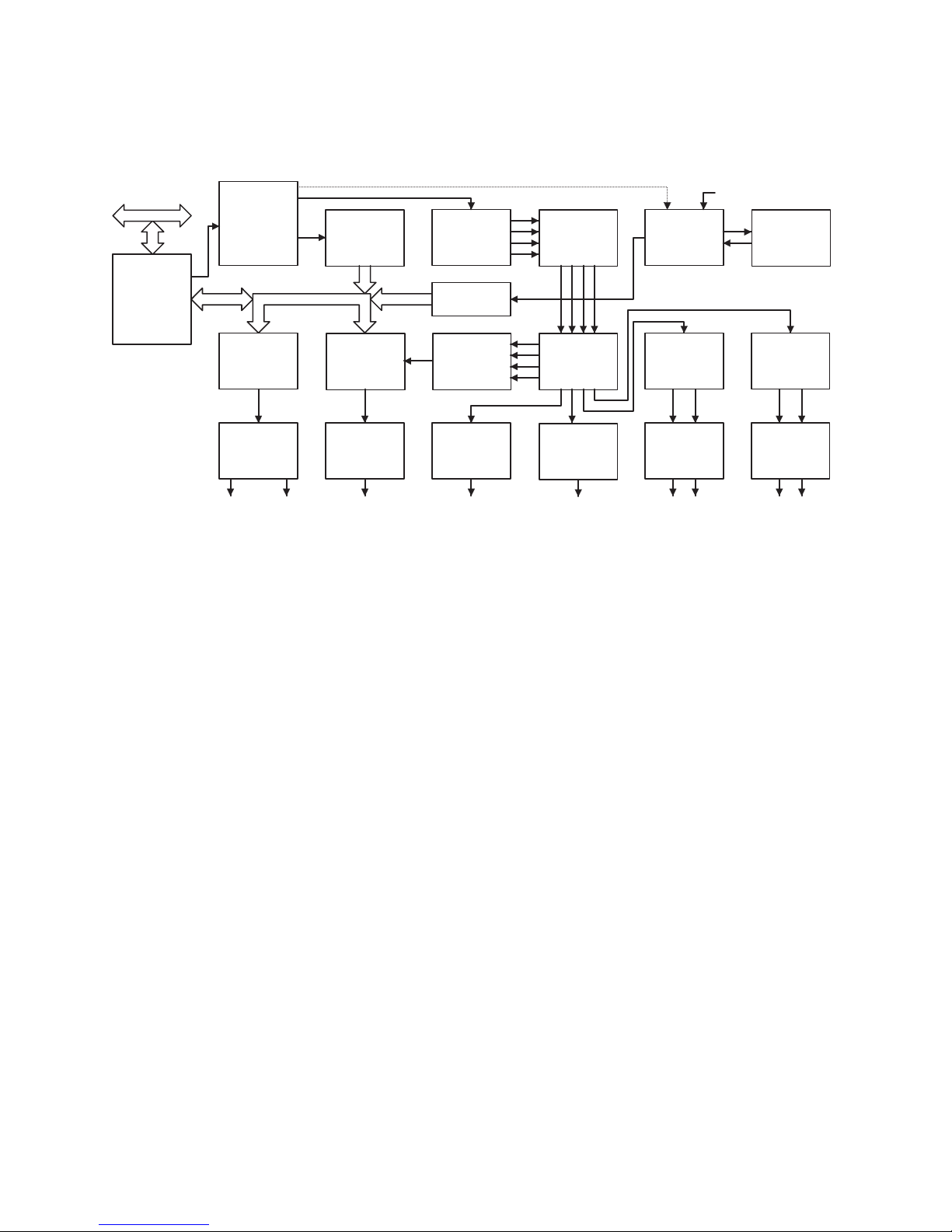
HDM500 Block Diagram
P C I B u s
P C I B r i d g e ,
V i d e o S c a l e r &
C o l o r S p a c e
C o n v e r t e r
M P E G S t r e a m
D e m u l t i p l e x e r
V i d e o
E n c o d e r
A n a l o g
V i d e o
F i l t e r
S - V i d e oC o m p o s i t e V i d e o
M P E G
V i d e o D e c o d e r
S M P T E 2 5 9 M
S c r a m b l e r &
C o n t r o l l e r
S M P T E 2 5 9 M
T r a n s m i t t e r
S e r i a l D i g i t a l V i d e o
w i t h E m b e d d e d A u d i o
M P E G
A u d i o D e c o d e r s
( 4 S t e r e o C h a n n e l s )
B l a c k B u r s t
G e n e r a t o r
S M P T E 2 7 2 M
E m b e d d e r
A E S 3
T r a n s m i t t e r
D i g i t a l A u d i o
( S t e r e o )
S a m p l e R a t e
C o n v e r t e r s
( 4 S t e r e o C h a n n e l s )
A u d i o C r o s s b a r
S w i t c h
( C h a n n e l M a p )
A E S 3
T r a n s m i t t e r
D i g i t a l A u d i o
( S t e r e o )
S y n c G e n e r a t o r
& G e n l o c k
S t e r e o A u d i o
D - A C o n v e r t e r
B a l a n c e d
L i n e D r i v e r s
B a l a n c e d A u d i o
( S t e r e o )
E x t e r n a l S y n c
2 7 M H z
V C X O
S t e r e o A u d i o
D - A C o n v e r t e r
B a l a n c e d
L i n e D r i v e r s
B a l a n c e d A u d i o
( S t e r e o )
6
Page 7

Specifications
MPEG Streams ISO/IEC 13818 and ISO/IEC 11172 compliant. Accepts MPEG-2
Elementary, Packetized Elementary (PES), Transport and Program
Streams and MPEG-1 System Streams.
MPEG Video Decodes MP@HL (4:2:0) up to 80 Mbps.
Digital Bitstream
Input
Digital Video
Outputs
Analog Video
Outputs
Digital Audio
Output
Analog Audio
Output
LTC 2V P-P, 1K ohm, BNC connector with optional SAC014
Machine Control 9-Pin, RS-422A can be configured as either “Controller” or “Device”
Genlock Locks to the H-sync and V-sync, allows variable delay about the H-
On-Screen
Display
Host System
Requirements
Power
Requirements
Size Standard PCI short card, 6.875 in. (174.63 mm) by 4.2 in. (106.68
Regulatory
Approvals
Through the PCI bus using bus mastering and burst transfer mode.
SMPTE 292M digital video output, with embedded audio.
DVI (Digital Visual Interface) output via DVI-I Digital/Analog
Connector
SMPTE 253M, 274M, 296M. RGB with sync-on-green, RGB with
sync-on-all, YPbPr with sync-on-Y, YPbPr with sync-on-all, via DVI-
I Digital/Analog Connector
6 AES-3 outputs, 75 ohms, unbalanced (SMPTE 276M-1995), via
DB15-HD connector, 4 may be configured as IEC 61937/SMPTE
337M-2000 Digital audio outputs
1 pair unbalanced audio, via DB15-HD connector or MPC (CD-
ROM style) header connector.
sync
Up to 24 bits per pixel or indexed color with blending.
Pentium-based PC with an available PCI short card slot conforming
to specification revision 2.1 running Windows NT 4.0, or greater,
with a VGA display adapter supporting Microsoft® Direct Draw
mode. Disk transfer rate may limit the maximum sustained MPEG
data rate achievable.
3.3v (5 W typical), 5v (1.6 W typical),
12v (1.6 W typical), -12v (0.2 W typical)
mm), less connectors.
FCC Part 15, Class A. CISPR 22/EN55022, Class A. CISPR
22/EN55024 (98)
7
Page 8

Accessories and Cables
SAC011 Unbalanced audio bracket
SAC012 Sync daisy chain cable
SAC014 Bracket with DB9 for RS422 Machine Control and BNC connector for LTC
SAC015 Audio Cable (DB15 to 6 BNCs for Digital Audio)
SAC017 PC bracket with 2 BNC connectors for sync input
SAC018 DVI-I to VGA Adapter
SAC019 Cable: DVI-A to 5 BNC 2 Meter
SAC020 DVI-I to DVI-D and VGA "Y" Adapter
SAC021 Audio Cable - for connecting a HDM500 HD Decoder to a sound card
(60 cm)
SAC024 HDMI male to DVI male cable, 2 meter
See http://www.stradis.com/hdaccessories.html for more information
8
Page 9

CAUTION
Observe all ESD precautions. Failure to do so could result
in damage to the equipment.
Hardware Installation
1. Do not remove card from anti-static bag until you are ready to install it.
2. Turn off the power to the computer and any device connected to it such as a
monitor, powered speakers, scanner, etc. Disconnect the power cord from the
wall or uninterruptible power supply.
3. Touch a metal surface on the computer to ground yourself and to discharge any
static electricity.
4. Remove the computer's cover.
5. Locate an unused PCI expansion slot.
6. Remove the metal cover from the back of the computer adjacent to the slot to be
used. Do not lose the screw.
7. Holding the Stradis HDM500 Card by the metal bracket, align it with the PCI slot
and press it down into the connector. Avoid touching the board’s edge connector.
The card must be completely seated into the connector.
10. Secure the Decoder Card into the expansion slot by replacing the screw removed
in step 6.
11. Replace the computer's cover and reconnect the power cables.
12. Proceed to “Installing the Device Drivers.”
9
Page 10
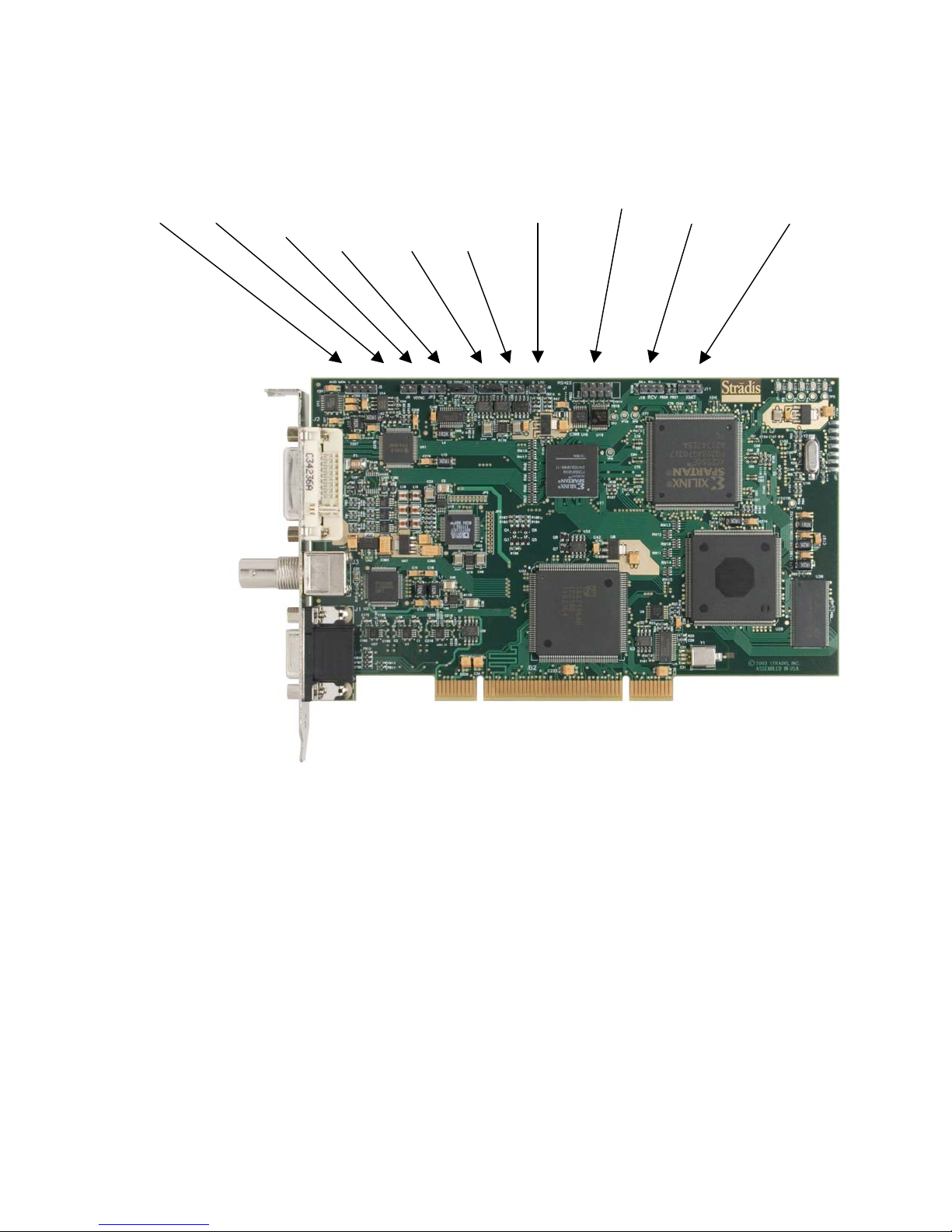
Back Panel and Onboard Connectors
JP5 J9 JP3 JP2 JP1 J6 J8 J7 J10 J11
Audio VSync VSync Sync Sync Sync Linear Time RS-422 SIDI SIDI
Out In Out Select Out In CodeOutput Receiver Transmitter
(C,H) (C,H) (C,H)
DVI-I
Output
SDI
Output
Audio
Connector
(see page 13 for
pin outs)
JP2 is used to select composite vs. H sync. If JP2 is selected to composite then JP1
and JP6 are used for composite sync out and composite sync in, respectively.
Otherwise, JP1 and JP6 are used for H sync out and H sync in, respectively. All the
sync pairs work the same with the terminators. For example, in composite mode, JP1
and J6 are used for sync-in or sync pass-through. JP1 can switch a 75-ohm terminator
in or out. If you have multiple boards in one PC chassis that you wish to genlock to an
outside sync source, set JP1 to Hi-Z by removing the jumper factory installed between
“C” and “T” on the first board. (You may wish to leave the jumper plugged into “T” only
so that it will be available for future use.) Using a SAC012 "Sync daisy chain cable"
plugged into JP1 (“G” is Ground & “C” is Sync), you can then feed sync to the
subsequent boards, J6. Leave JP1 set to 75 Ohms on the last board.
J5 can be used to feed audio into a PC sound card. It is an unbalanced output.
J7 is for RS-422 machine control. Connect it to the Stradis SAC014 or your own
connector. To use the HDM500 as a “Device” install the cable with the red (pin 1) line to
Page 11

the right side of the board. To use the HDM500 as a “Controller” install the cable with
the red (pin 1) line to the left.
J8 is the Linear Time Code output. Use a Stradis SAC014 or your own connector.
Important: ground is to the left.
J10 and J11 are the transmitter and receiver components of the Stradis InterDevice
Interface (SIDI) and can be used to sync boards together using a proprietary standard.
Future support will be added to cards to communicate with each other for
synchronization class to run between cards, and over several chassis.
11
Page 12
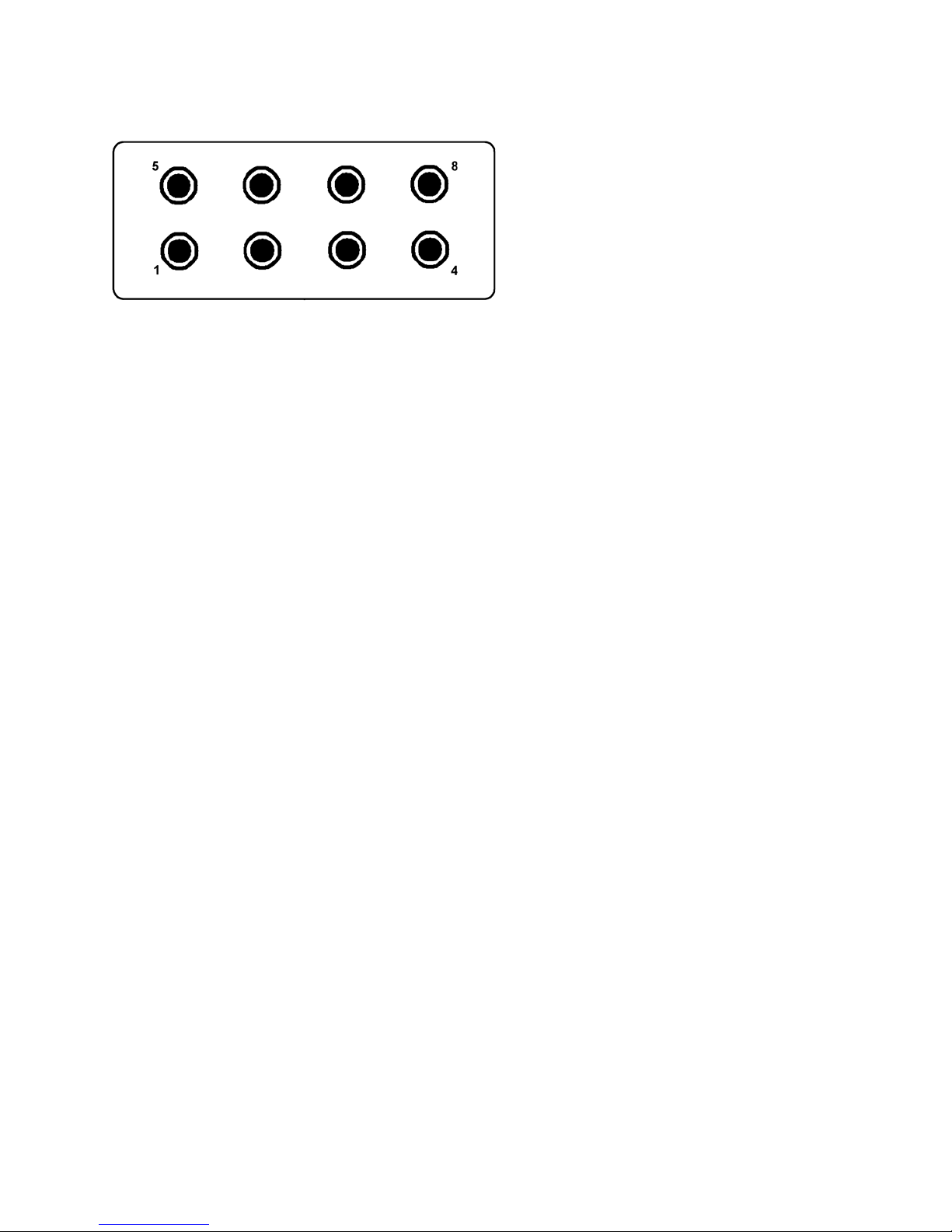
RS422 Connector
PIN 1 Ground
PIN 2 RCV PIN 3 XMT +
PIN 4 Ground
PIN 5 Ground
PIN 6 RCV +
PIN 7 XMT PIN 8 Ground
12
Page 13
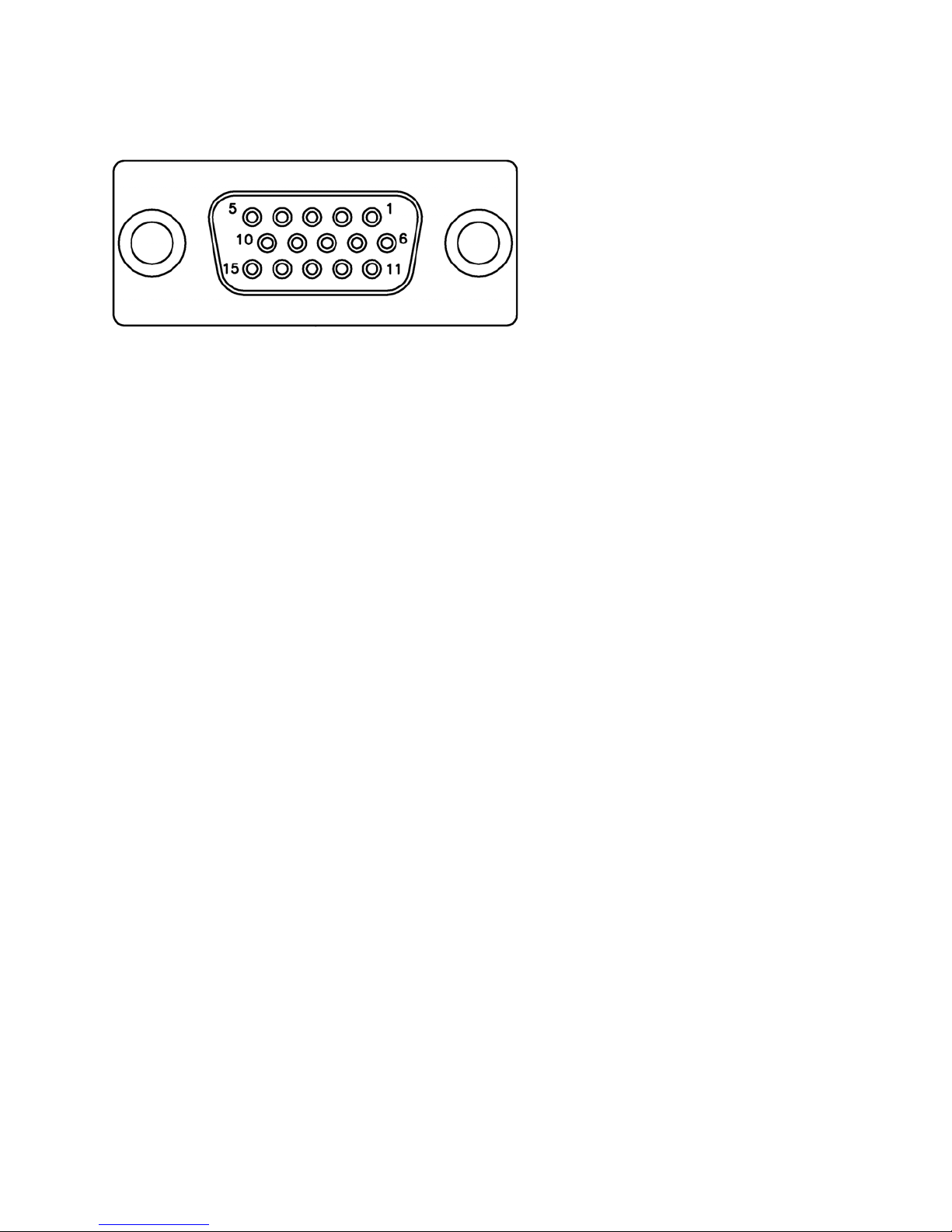
Audio Connector (DB15-HD)
PIN 1 Digital Audio Output 1
PIN 2 Digital Audio Output 3
PIN 3 Digital Audio Output 5
PIN 4 No connection
PIN 5 Analog Audio Output Right
PIN 6 Digital Ground
PIN 7 Digital Ground
PIN 8 Digital Ground
PIN 9 No connection
PIN 10 Analog Ground
PIN 11 Digital Audio Output 2
PIN 12 Digital Audio Output 4
PIN 13 Digital Audio Output 6
PIN 14 No connection
PIN 15 Analog Audio Output Left
13
Page 14

Installing the Device Drivers and the Stradis MPEG-2 Decoder
Application
The Stradis MPEG-2 File Player Application (SMPEGDEC.EXE) is
provided for testing and evaluation purposes only. If your Stradis
decoder is part of a third-party system, follow the installation
instructions provided by your system provider. DO NOT FOLLOW
THESE INSTRUCTIONS. Doing so may render the third-party
software inoperative.
1. Stradis Decoder Drivers are available at our website: http://www.stradis.com
2. Download the appropriate driver installers.
3. It is strongly recommended for correct installation of the hardware and associated
driver, that you reboot the computer and run no other program before using the
setup program.
4. Access Device Manager by right clicking on My Computer, go down the context
menu to Properties, and then select the Hardware tab. Click the “Driver Signature”
button. You must set “File Signature Verification” to either “Warn” or “Ignore.”
5. Run the installer program.
6. Enter the following install password if prompted. The password is case-sensitive:
mpeg4u
7. Follow the instructions on the screen to complete the installation.
8. If you are installing this software release on a system that had a Stradis device
driver version 0.95 or earlier installed, the installation program will ask you to
manually remove it using Device Manager. Expand the “Sound and Video
Controller” section, select “Stradis Professional MPEG-2 Decoder,” and right click
and select “Uninstall.”
Note: If you are asked by the installation software to remove an old driver, it
is very important that you do so before rebooting. Not doing so could cause
the installation to become confused and will require manually removing a
number of files.
9. Reboot the computer. Windows “Plug and Play” will now load the drivers
automatically. If you set “Driver Signature” to “Warn” you will be warned that
Microsoft has not digitally signed the Stradis Driver. Click “OK” to complete the
installation.
10. Proceed to SMpegDec User Guide.
14
Page 15

Software License Agreement
1. Software. Stradis, Inc. (“Stradis”) provides to you
(“the Licensee”) the Stradis software programs in
object code form (“Software”) and associated user
manual (“Manual”), subject to the terms and
conditions of this agreement.
2. License. Stradis grants you a limited,
nonexclusive, nontransferrable and nonassignable
license (i) to load and use one (1) copy of the
software into the memory of a single computer
(CPU) at any one time, and (ii) to make one (1)
archival copy of the software (“archival copy”). You
agree to affix to the archival copy the copyright
notice and any other legends or notices contained on
the original material from which the archival copy is
made.
3. Ownership. You acknowledge that Stradis owns
all right, title, and interest, including all worldwide
copyrights, trade secrets, patent rights, and
confidential and proprietary information rights in the
software and manual, including all modifications,
revisions, and derivative works thereof. Stradis
acknowledges that Stradis has no right, title, or
interest to any software products or data generated by
your use of the software.
4. Term and Termination. This agreement is effective
from the time this package is opened until
terminated. This license will terminate automatically
without notice if you fail to comply with any
provisions of this agreement. The original copy of the
software, the archival copy, and the manual are
subject to the restrictions in this agreement, and they
must be destroyed or returned to Stradis if your
continued possession or use of the original copy
ceases or this agreement is terminated. You must
certify in writing to Stradis within ten (10) days of
termination of this agreement that the software,
archival copy, and manual have been destroyed.
5. Restrictions. You may not sublicense, rent, lease,
sell, pledge or otherwise transfer or distribute the
software, archival copy, or manual. You agree not to
translate, modify, disassemble, decompile, reverse
engineer, or create derivative works based on the
software or any portion thereof without the prior
written consent of Stradis. The restrictions set forth
herein apply specifically to the software and manual
provided by Stradis and shall not apply to any
software products or data generated by your use of
the software. The software and manual are provided
to the government with restricted rights.
Restricted rights legend
Use, duplication or disclosure is subject to
restrictions stated in paragraph (b)(3)(b) of the rights
in technical data and computer software clause at
52.227-7013. Contractor/manufacturer is Stradis,
Inc., 1800 Century Blvd NE Suite 1225, Atlanta, GA
30345-3218 U.S.A.
6. Indemnification. You agree to indemnify and hold
harmless Stradis against all liability to third parties
(including reasonable attorney's fees) arising from or
in connection with any third party's use of your
software products or data generated by your use of
the software provided hereunder. Your obligation to
indemnify Stradis shall survive the termination of
this agreement for any reason.
7. Limited Warranty. Stradis warrants that for a
period of ninety (90) days from the date you receive
the software that (i) the disk contains an accurate
reproduction of the software, and (ii) the copy of the
manual is accurately reproduced. Your exclusive
remedy is, at Stradis's options, to either (i) return and
have replaced the inaccurate disk containing the
software programs or copy of the manual within the
warranty period or (ii) receive a refund of the price
paid.
8. Disclaimer. The software is licensed “as is”
without warranty of any kind, either express or
implied, including but not limited to the implied
warranties of merchantability and fitness for a
particular purpose. Stradis does not warrant that any
functions contained in the software described in the
manual will meet your requirements, or that your use
of the software will be uninterrupted or error-free.
Stradis shall have no liability to you or any third
party regarding the software manual, contract, tort,
strict liability, or otherwise. In no event shall Stradis
be liable for any direct, indirect, incidental, special,
general or consequential damages or loss of any
nature which may arise in connection with the use of
or inability to use the software and/or manual, even if
Stradis has been advised of the possibility of such
damages or costs.
9. General. The construction, performance, and
interpretation of this agreement shall be governed by
the laws of the state of Georgia. If any provision of
this agreement is held invalid by a court of competent
jurisdiction, such invalidity shall not affect the
enforceability of any other provisions contained in
this agreement and the remaining portions of this
agreement shall continue in full force and effect. This
agreement represents the complete and exclusive
statement of the mutual understandings of the parties
which supersedes and cancels all previous and
contemporaneous written and oral agreements.
Stradis grants and LICENSEE accepts, under the
terms and conditions of this Agreement, a
nonexclusive, worldwide license to distribute in
conjunction with and as part of your software product
when running on Stradis hardware, these files:
SmpegDec.EXE, StradisDecoder.DLL, Stradwd,sys,
and Stradnt.sys. Your distribution disk containing
these files must be labeled: Portions Copyright 2000
Stradis, Inc.
15
Page 16

Limited Warranty on Hardware Products
What is covered:
Any defect in materials or workmanship.
For how long:
Two years.
What we will do:
If your Stradis product is defective and
returned within two years of the date of
purchase, we will repair it or, at our option,
replace it at no charge to you.
If we repair your Stradis product, we may
use new or reconditioned replacement
parts. If we choose to replace your Stradis
product, we may replace it with a new or
reconditioned one of the same or similar
design. The repair or replacement will be
warranted for either (a) 90 days or (b) the
remainder of the original two-year warranty
period, whichever is longer.
Limitations:
Stradis shall not be responsible for
special, incidental, indirect or
consequential damages resulting from
any breach of warranty, or under any
other legal theory, including but not
limited to, loss of profits, downtime,
goodwill, damage to or replacement of
equipment and property, and any cost of
recovering, reprogramming or
reproducing any program or data stored
in or used with Stradis products.
Some states do not allow limitations on how
long an implied warranty lasts or the
exclusion of incidental or consequential
damages, so the above exclusions or
limitations may not apply to you.
What we ask you to do:
To obtain warranty service for your Stradis
product, call our technical support
department at +1-404-320-0110, fax us at
+1-404-320-3132, or send E-mail to
[email protected] and we will issue a
Return Material Authorization number
(RMA#). Use the original packaging
materials, or similar, to return the product.
Ship the product, prepaid to:
Stradis, Inc.
Attention: Warranty Repair
RMA# (Must be on package)
1800 Century Blvd NE Suite 1225
Atlanta, GA 30345-3218 U.S.A.
Please be sure to include your name,
company, shipping address, phone number,
and a description of the problem. After
repairing or replacing your Stradis product,
we will ship it to you via a surface carrier of
our choice at no cost to you. If you wish it
shipped via a specific carrier at your cost,
you must arrange it when you obtain the
RMA#.
Repair or replacement of your Stradis
product is your exclusive remedy.
What this warranty does not cover:
This warranty does not cover defects
resulting from accidents, damage while in
transit to our service location, alterations,
unauthorized repair, failure to follow
instructions, misuse, fire, flood, acts of God,
or use in those countries where such use
violates Part 779 of the Export
Administration Regulations of the United
States Department of Commerce.
If your Stradis product is not covered by our
warranty, call us at +1-404-320-0110 or fax
us at +1-404-320-3132 for advice about
whether we will repair your Stradis product
and for other repair information, including
charges. Stradis, in its sole discretion, may
replace rather than repair your Stradis
product with a new or reconditioned one of
the same or similar design. The repair or
replacement will be warranted for 90 days.
The limited warranties and remedies set
forth above are exclusive and in lieu of
all other warranties, whether oral or
written, expressed or implied. Stradis
specifically disclaims any and all implied
warranties, including, without limitation,
the warranties of merchantability and
fitness for a particular purpose.
State Law Rights:
This limited warranty gives you specific
legal rights, and you may have other rights
that may vary from state to state.
 Loading...