

Page 1
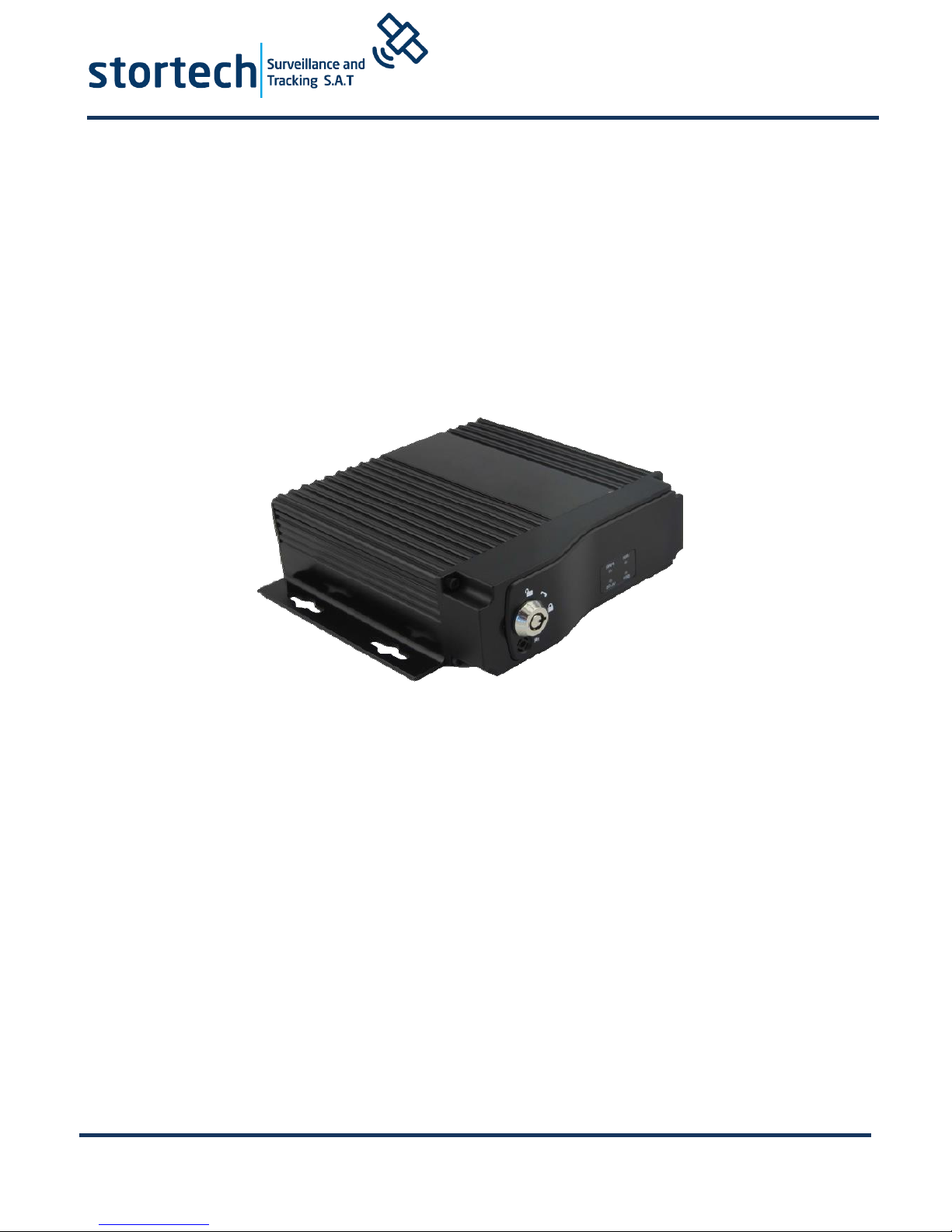
MDVR404 Series
Whilst every effort has been made to ensure the
accuracy of the information provided, no liability can
be undertaken for an y errors or omissions. All
dimensions stated in this document are approximate.
Stortech Electronics Ltd reserves the right to alter the
specifications and introduce changes without prior
notice. © Stortech Electronics 2018
Tel: +44 (0) 1279 419913
www.stortech.co.uk
MDVR404_Quick Guide 21052018
MDVR 404
QUICK START GUIDE
Page 2

MDVR404 Series
Whilst every effort has been made to ensure the
accuracy of the information provided, no liability can
be undertaken for an y errors or omissions. All
dimensions stated in this document are approximate.
Stortech Electronics Ltd reserves the right to alter the
specifications and introduce changes without prior
notice. © Stortech Electronics 2018
Tel: +44 (0) 1279 419913
www.stortech.co.uk
MDVR404_Quick Guide 21052018
Introduction & Warnings
Before installing please read the following warnings carefully. Stortech CCTV
strongly recommends that all connections and installations are carried out by
qualified personnel.
PLEASE READ THIS BEFORE ATTEMPTING INSTALLATION AND USE
The recorder uses a DC power supply. Input DC range is 8V-36V. Please pay attention
to VDD and GND when connecting the power. DO NOT make the DVR short-circuit.
Initial power must be over 30W (Specific power consumption will vary depending
on the external equipment).
Power supply must be over 30W.
From the vehicle supply to the MDVR all power cables must be able to withstand
5 Amps or more.
Install the equipment in the dry and avoid damp, drips, water spray etc.
To extend the life of the equipment, please install within the part of the vehicle
that has the lowest vibration. We recommend a horizontal installation position.
The equipment should be installed inside the vehicle where there is good
ventilation. Do not install in a closet type environment.
Ensure that equipment is away from any heat source in the vehicle and is not
covered. Also location must be as far as possible away from an electromagnetic
environment, which may cause strong interference.
Ensure that passengers and drivers cannot interfere or damage any components
of the equipment.
The installation and all materials must bear the correct fuse rating.
It is recommended that the power cords are kept away from any heat source and
are sealed to prevent water and oil ingress and short circuiting.
Please do not open or attempt to install the equipment without professional
guidance.
Attention: The device will automatically format the hard disk/SD card to pre-allocate the
storage space before starting to record video.
Page 3
MDVR404 Series
Whilst every effort has been made to ensure the
accuracy of the information provided, no liability can
be undertaken for an y errors or omissions. All
dimensions stated in this document are approximate.
Stortech Electronics Ltd reserves the right to alter the
specifications and introduce changes without prior
notice. © Stortech Electronics 2018
Tel: +44 (0) 1279 419913
www.stortech.co.uk
MDVR404_Quick Guide 21052018
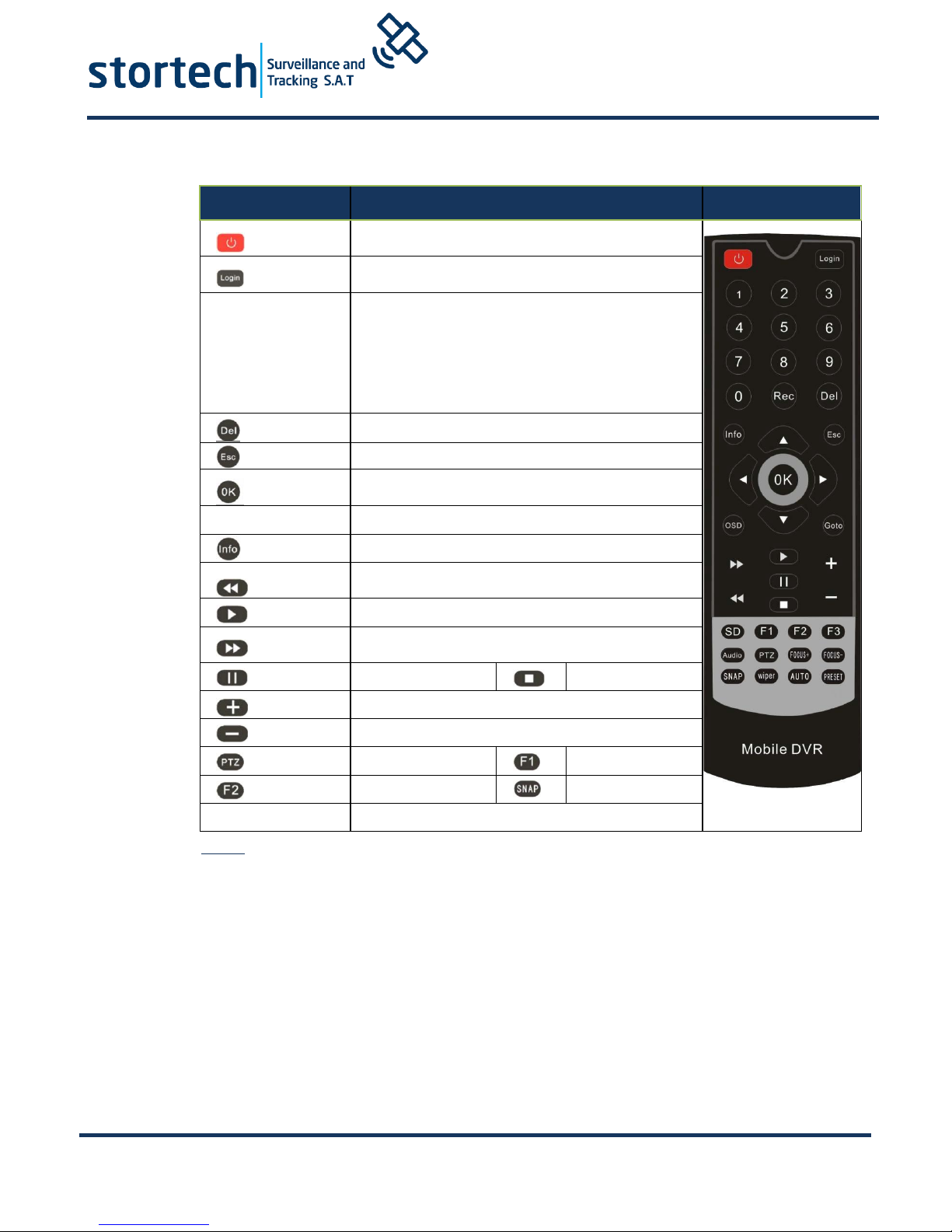
1. Remote Controller
Power and Standby Button
To enter system settings.
[0-9] key: In the setting mode, 0-9 is used to
Select a number of menu items. In playback
mode, the keys 1,2,3,4 will select a single
channel to playback. ESC Button is for 4
channel playback.
Delete Button
Return to the preview picture or previous screen
Enter button: button for setting systems
Parameters.
Direction Key: up, down, left, right.
Display system info under monitoring mode
Rewind button.
Play Button
Forward button.
Pause button
Stop button
Playback Page\Forward to del PARAM\Aperture
Playback Page\Back del PARAM\Aperture
PTZ Function key
Calling Shortcut
Quickly setup
Snap pictures
Tips:
In the video preview interface, you can undertake the following actions:
Press F2 to enter Quick Setting. You can change the device number, server
IP and port information. Press LOGIN to enter the menu, direct input
password: Administrator: 666666, User: 000000.
Press INFO to display the signal strength, dial–up connection status,
hardware and software versions, storage capacity etc.
Press the play button to start playing back the video
Press 1.2.3.4 to enlarge to corresponding video channel.
Page 4
MDVR404 Series
Whilst every effort has been made to ensure the
accuracy of the information provided, no liability can
be undertaken for an y errors or omissions. All
dimensions stated in this document are approximate.
Stortech Electronics Ltd reserves the right to alter the
specifications and introduce changes without prior
notice. © Stortech Electronics 2018
Tel: +44 (0) 1279 419913
www.stortech.co.uk
MDVR404_Quick Guide 21052018
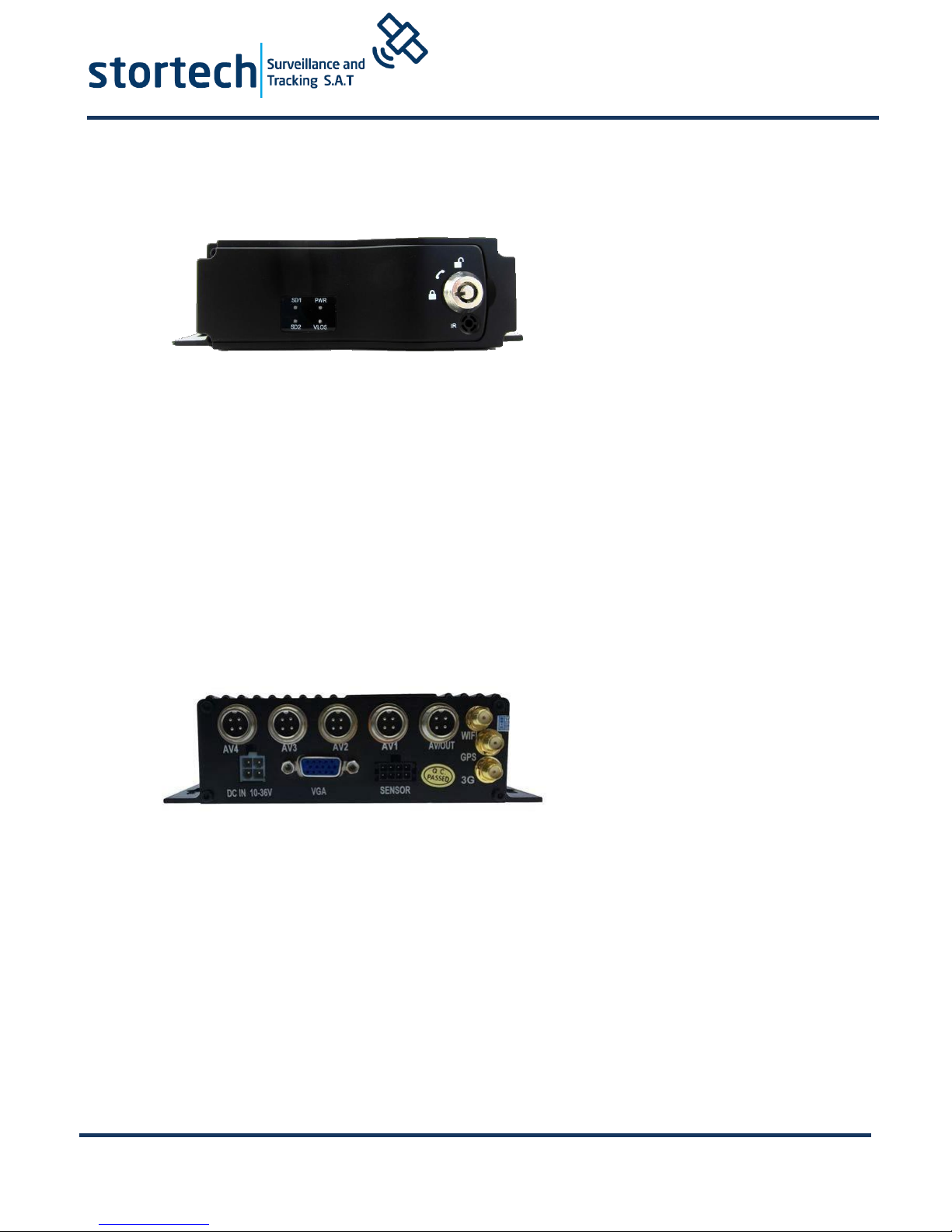
2. Device Front and Rear Panel
LED Indicators
[PWR] Power LED
LED light means the system has powered on
[VLOS] Video Indicator
LED On – Video loss. LED Off – Video normal
[SD1] SD indicator
LED Off – Card does not exit. LED On-Card recording. LED Flash slow - card exists but not
recording
[SD2] SD Indicator
The same as with SD1 indicator
[IR] Infrared remote control receiving interface
****Status LED Flashing in circulation means that the device is booting up****
Rear Panel
[DC-IN] Power port
Red cable connects positive power. Black cable connects negative power. Yellow line ACC
signal cable
[AV1-AV4] 1-4 CH Video and Audio input interface include DC 12V output
[AVOUT] Video and Audio output interface, include DC 12V output
[GPS] Built-in GPS module antenna interface
[3G] Built-in wireless communication module antenna interface
[SENSOR] Extension Function interface
[VGA] Video output interface
If you need timed or ignition recording, please connect the ACC cable to the vehicle ACC supply.
Page 5
MDVR404 Series
Whilst every effort has been made to ensure the
accuracy of the information provided, no liability can
be undertaken for an y errors or omissions. All
dimensions stated in this document are approximate.
Stortech Electronics Ltd reserves the right to alter the
specifications and introduce changes without prior
notice. © Stortech Electronics 2018
Tel: +44 (0) 1279 419913
www.stortech.co.uk
MDVR404_Quick Guide 21052018
3. DVR Wiring Installation Introduction
Please ensure to read this fully before installation and first usage.
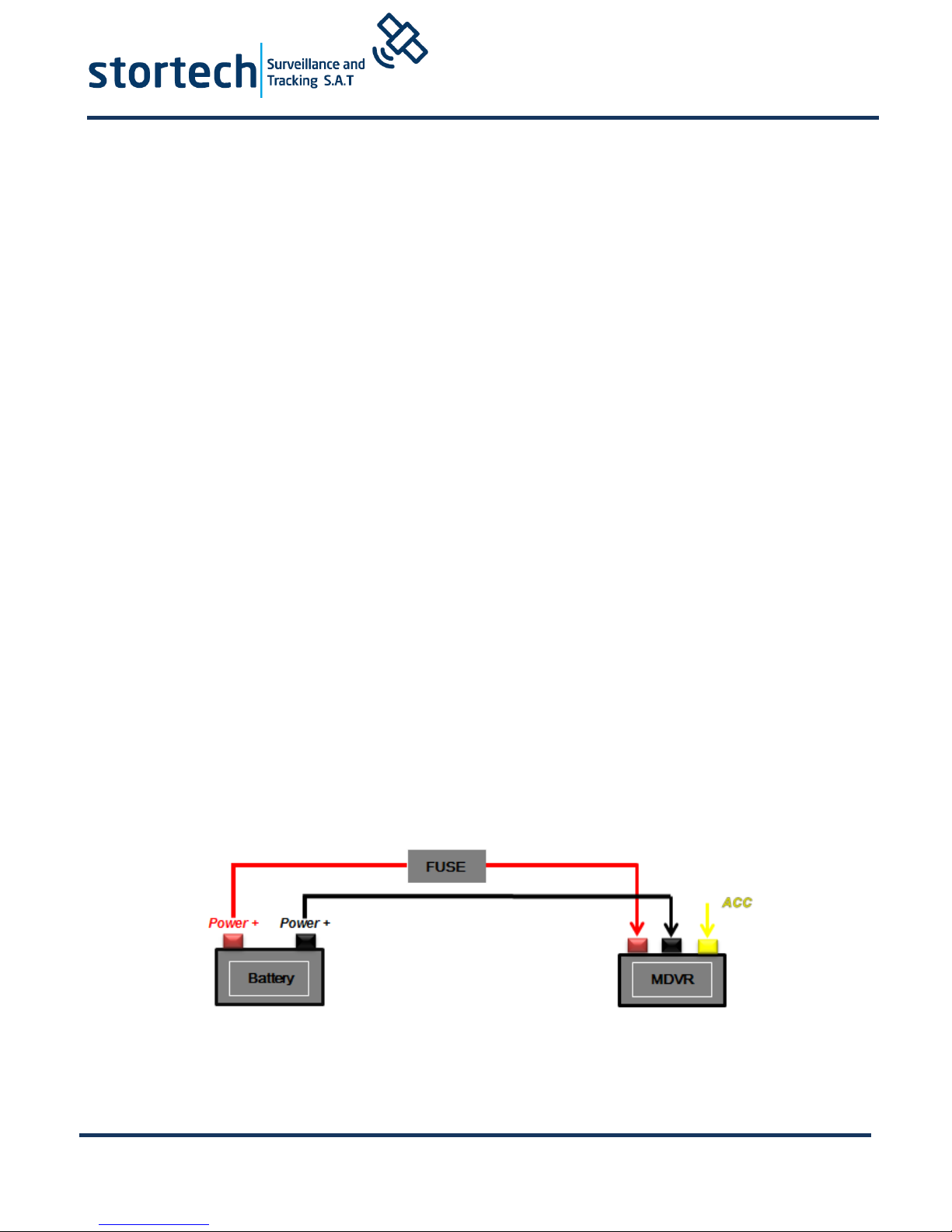
Device Power Connection:
Only connect the MDVR to the vehicle power supply. The power for cameras and
monitors are all supplied by MDVR via aviation connectors and its built-in DC 12V
output.
Use the ignition switch to control the video recorder delay timer operation.
Red cable must connect to the positive of the vehicle storage battery. Black cable
connects to the negative. Yellow cable must connect to an independent ignition
switch (ACC).
Switch Connection (Indoor test).
Red cable and Yellow cable together connect to the positive power of the car
storage battery, whilst the Black cable connects to the negative.
The Camera connects via AV IN.
The Monitor connects via BNC connector of AV out of PANEL.
If it is not a standard aviation connector, please use the aviation conversion line.
Black side is DC 12V output. White side is Audio output. Yellow side is Video
output.
★ Use the ignition switch or (ACC) to control the MDVR record delay time operation.
Page 6
MDVR404 Series
Whilst every effort has been made to ensure the
accuracy of the information provided, no liability can
be undertaken for an y errors or omissions. All
dimensions stated in this document are approximate.
Stortech Electronics Ltd reserves the right to alter the
specifications and introduce changes without prior
notice. © Stortech Electronics 2018
Tel: +44 (0) 1279 419913
www.stortech.co.uk
MDVR404_Quick Guide 21052018
4. Main Configuration Instructions
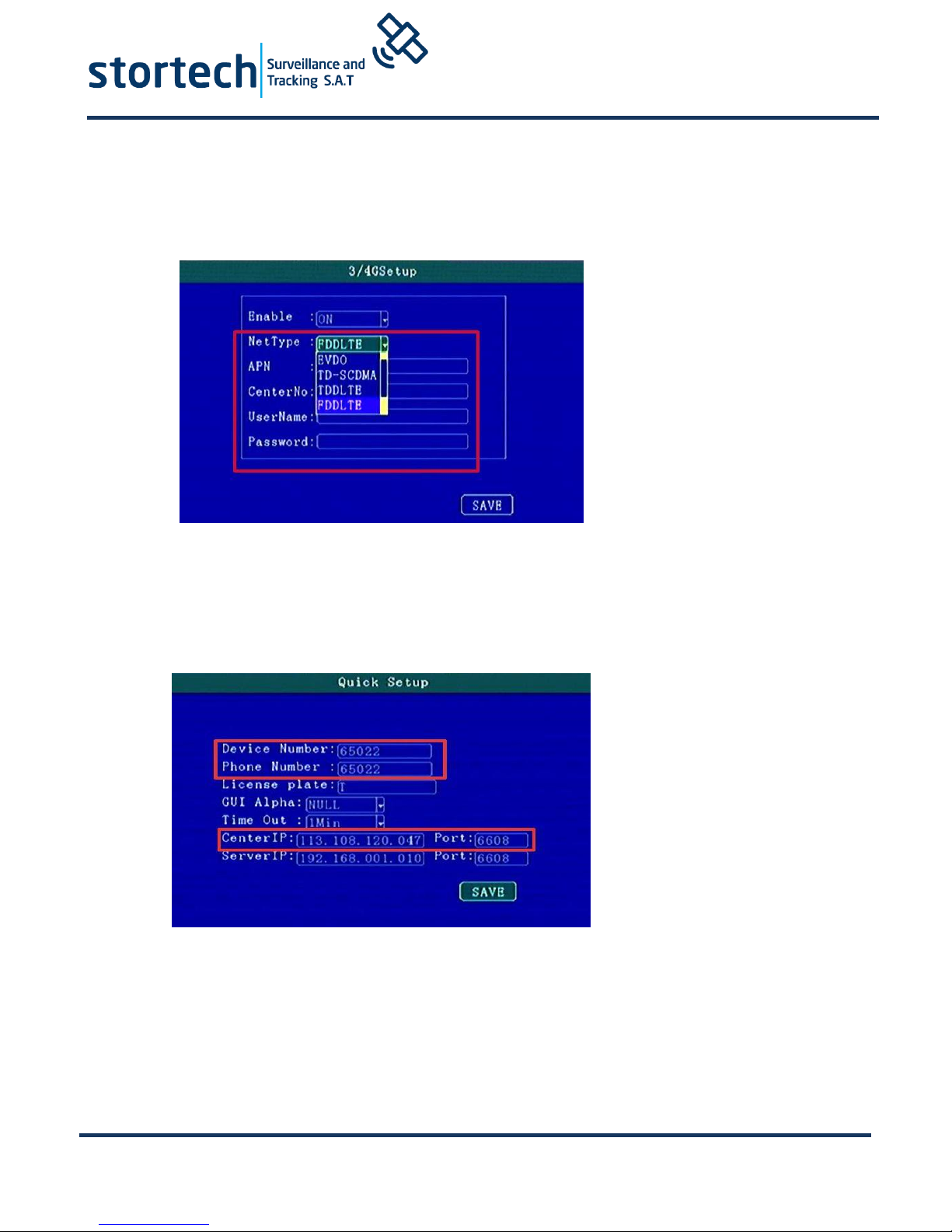
SIM card dial-up parameters should be set in 3/4G Setup. Customers can consult
APN and other related parameters from their SIM card operators.
If you need to change the server, press F2 to enter quick settings page.
Device number and mobile phone number must be the same to set as the device
ID.
The monitoring centre is the IP address of the server.
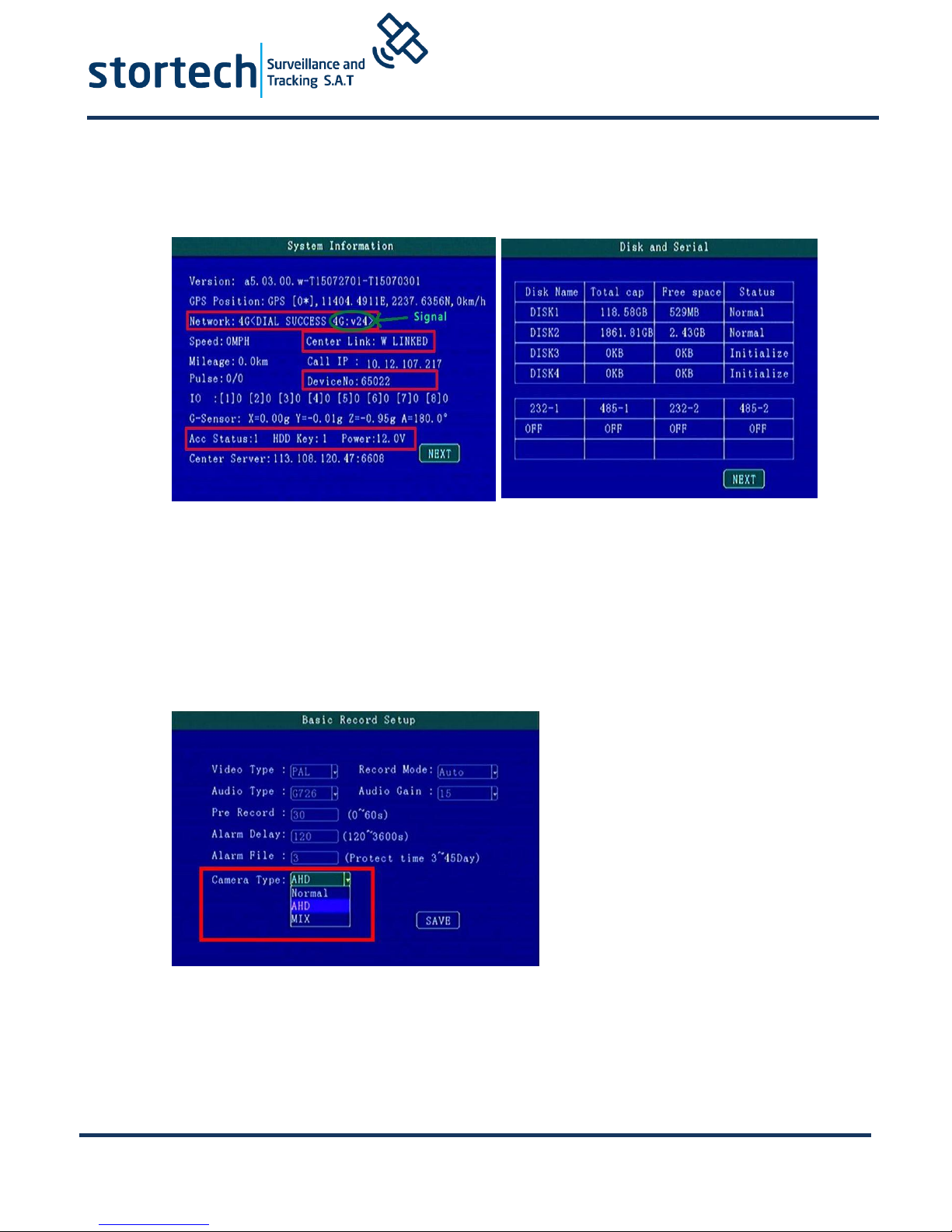
After mounting SD card, SIM card and antenna, press “info” button to check the
signal strength, dial-up state and the server connection state.
The next page shows the disk and RS232 status.
Page 7
MDVR404 Series
Whilst every effort has been made to ensure the
accuracy of the information provided, no liability can
be undertaken for an y errors or omissions. All
dimensions stated in this document are approximate.
Stortech Electronics Ltd reserves the right to alter the
specifications and introduce changes without prior
notice. © Stortech Electronics 2018
Tel: +44 (0) 1279 419913
www.stortech.co.uk
MDVR404_Quick Guide 21052018
The following shows the positioning and the server connection is successful.
The 4CH MDVR can switch camera input types and quality. In the Video Recording
menu you can set—Basic Record Reset and choose AHD or Normal camera. After
saving, the MDVR will reboot automatically.
In Mixture mode, 1.2 CHANNEL is AHD high definition input. 3.4 CHANNEL is only
analogue standard definition input.
Page 8
MDVR404 Series
Whilst every effort has been made to ensure the
accuracy of the information provided, no liability can
be undertaken for an y errors or omissions. All
dimensions stated in this document are approximate.
Stortech Electronics Ltd reserves the right to alter the
specifications and introduce changes without prior
notice. © Stortech Electronics 2018
Tel: +44 (0) 1279 419913
www.stortech.co.uk
MDVR404_Quick Guide 21052018
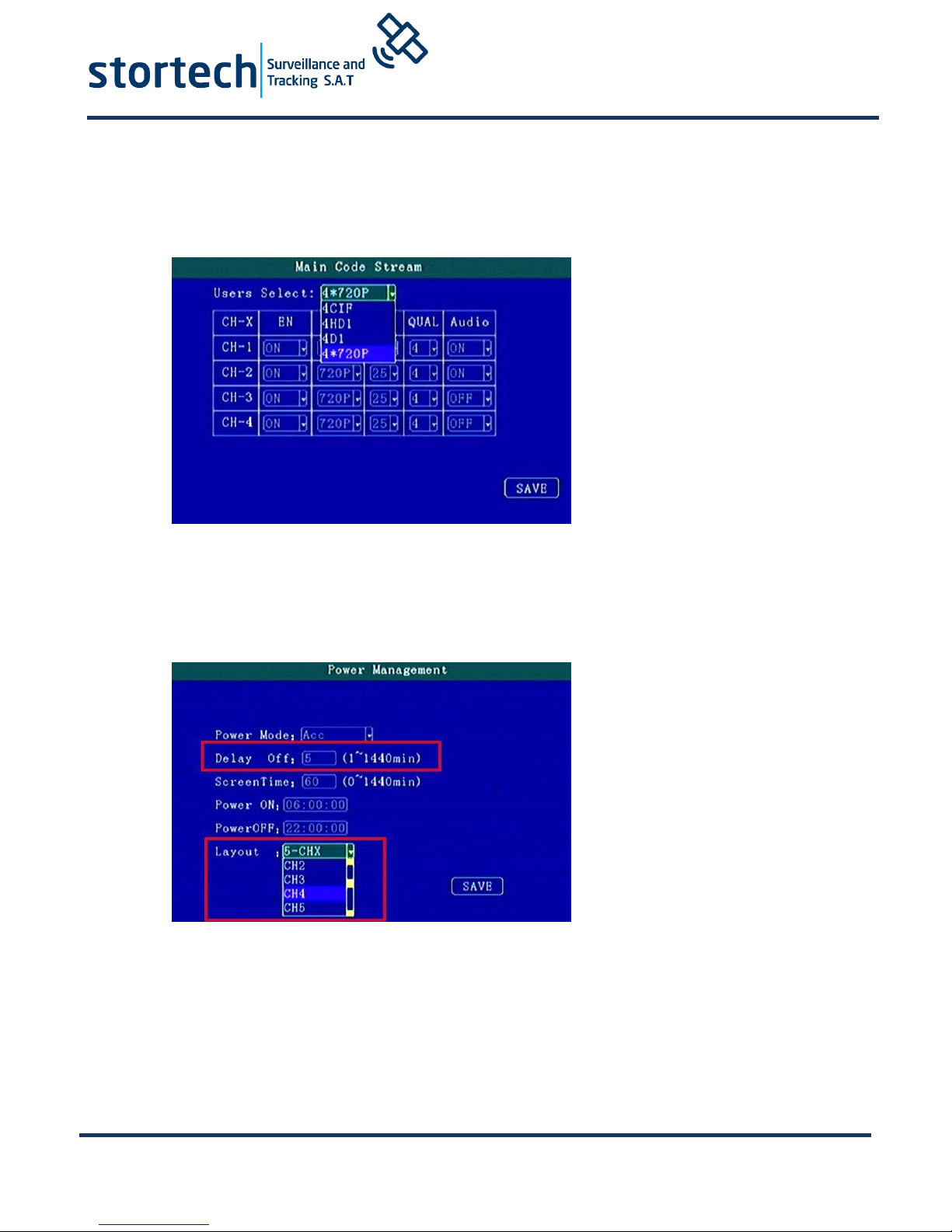
Video Recording Quality Setting - Main Code Stream.
Video QUAL mode: 0 is the highest quality and this is for the Video recording going
on to HDD
In System setting - Power on/off can be changed to delay shutdown time, and the
default layout for full screen (PTZ) 5CH screen (IPC), 9CH (8CH DVR).
Page 9
MDVR404 Series
Whilst every effort has been made to ensure the
accuracy of the information provided, no liability can
be undertaken for an y errors or omissions. All
dimensions stated in this document are approximate.
Stortech Electronics Ltd reserves the right to alter the
specifications and introduce changes without prior
notice. © Stortech Electronics 2018
Tel: +44 (0) 1279 419913
www.stortech.co.uk
MDVR404_Quick Guide 21052018
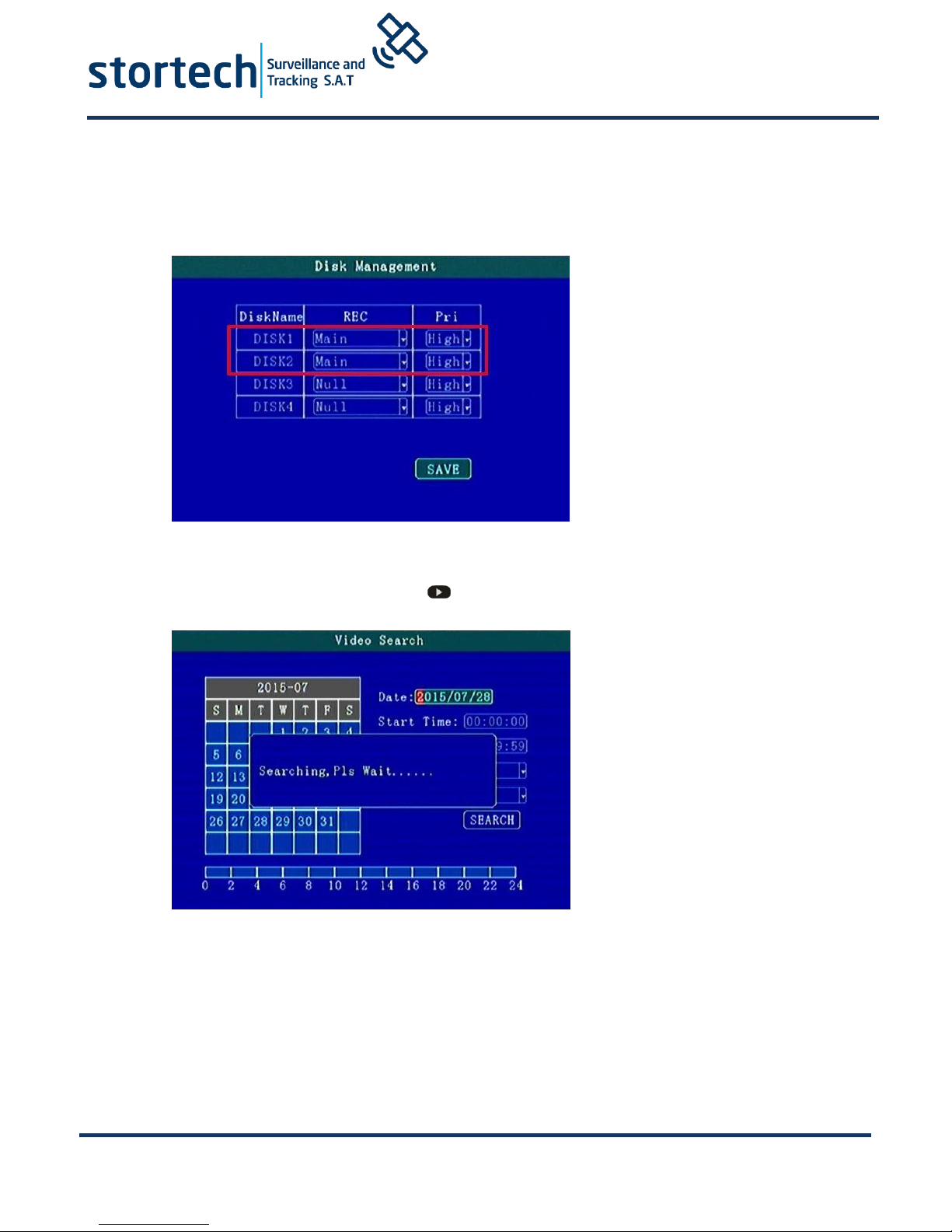
When Double SD cards or HDD + SD card is recording, if needed, the second card or HDD can be
changed to support different recording modes and priority levels such as Loop video recording
without overwriting.
In video preview interface, directly pressing can make video search replay.
Page 10
MDVR404 Series
Whilst every effort has been made to ensure the
accuracy of the information provided, no liability can
be undertaken for an y errors or omissions. All
dimensions stated in this document are approximate.
Stortech Electronics Ltd reserves the right to alter the
specifications and introduce changes without prior
notice. © Stortech Electronics 2018
Tel: +44 (0) 1279 419913
www.stortech.co.uk
MDVR404_Quick Guide 21052018
5. Audio/Video Interface Definition
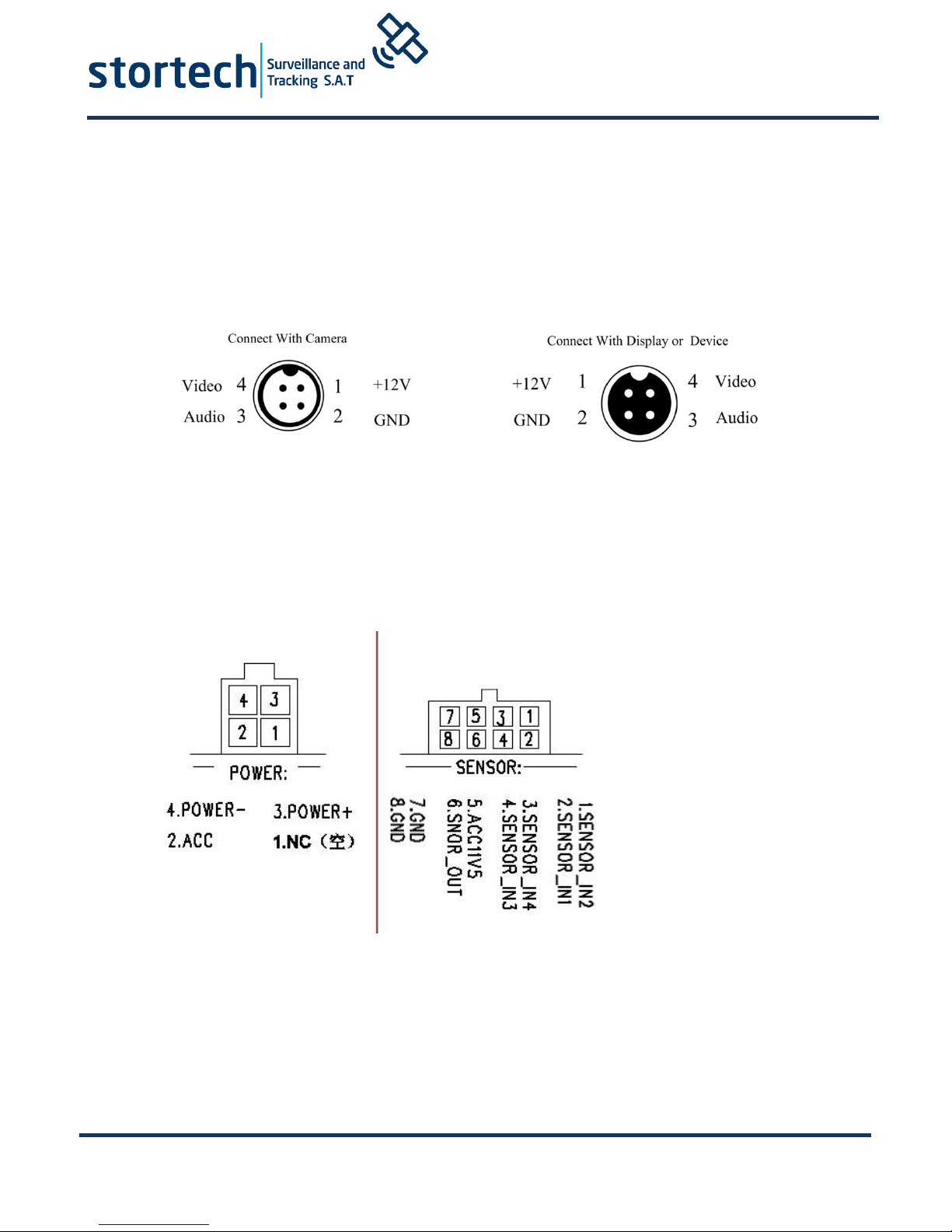
The device supports 4 camera channels AV1-AV4. The aviation joint provides a secure connection
for vehicle environments.
Other Interface Connection Details
The DVR Power Interface Sensor Interface ports as follows:
Page 11
MDVR404 Series
Whilst every effort has been made to ensure the
accuracy of the information provided, no liability can
be undertaken for an y errors or omissions. All
dimensions stated in this document are approximate.
Stortech Electronics Ltd reserves the right to alter the
specifications and introduce changes without prior
notice. © Stortech Electronics 2018
Tel: +44 (0) 1279 419913
www.stortech.co.uk
MDVR404_Quick Guide 21052018
Alarm in / Output Connection Mode
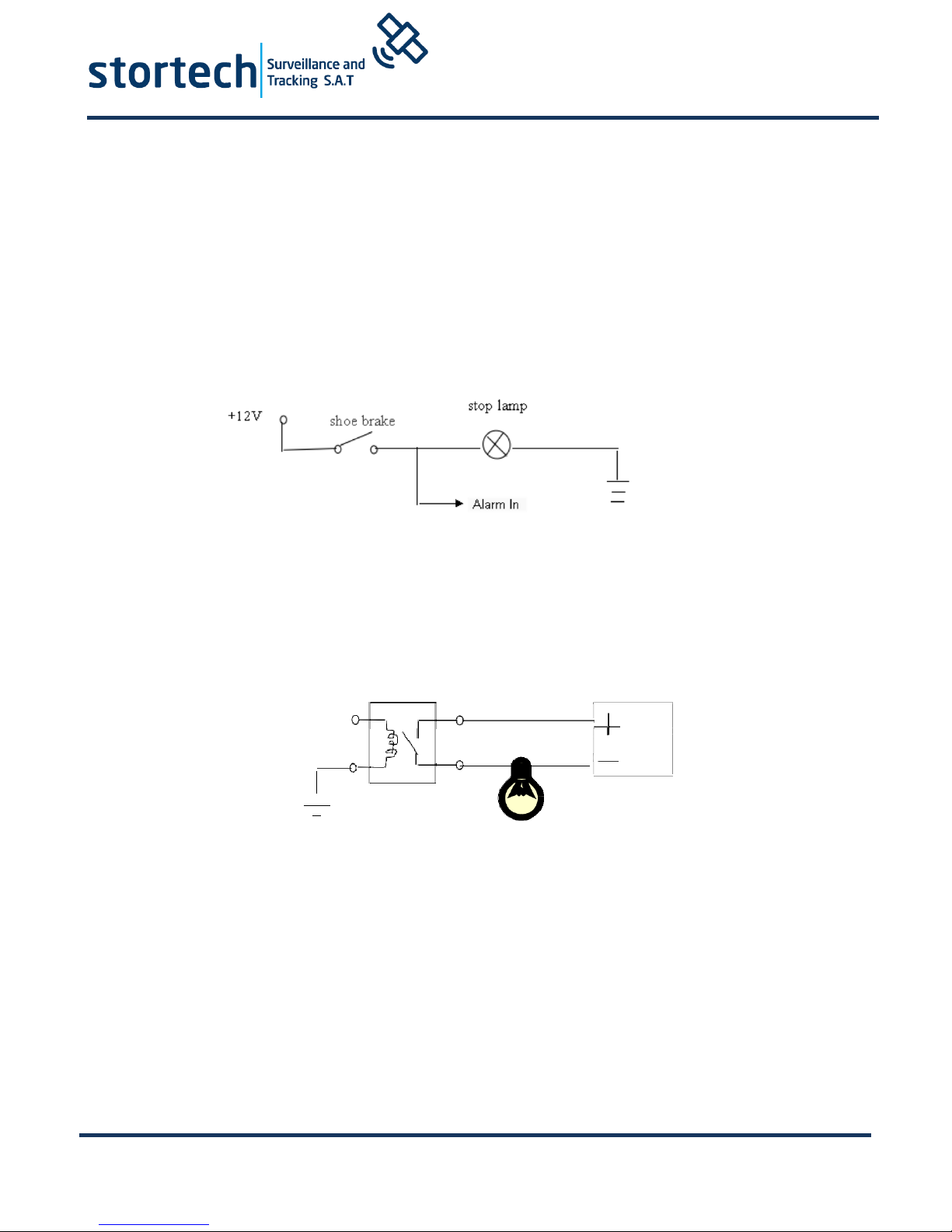
Among them, SENSOR-IN* is an Alarm Input Port. SENSOR-OUT is an Output Control
Port.
Alarm inputs usually use a High Level (12V) input to trigger. They can be used to
connect an SOS button and driving status connections such as: braking, turning,
opening door etc.
The following is the brake light (STOP) detection diagram. When braking, the device
can detect the high level or the low-level change of state.
The Alarm Output is a Relay Switched Output. It can connect to an Acoustic-Optic
alarm. Remote Oil/Power cut off etc. If you are switching high power then we
strongly recommend you connect an external relay.
The alarm output diagram as below:
Alarm Out
Page 12

MDVR404 Series
Whilst every effort has been made to ensure the
accuracy of the information provided, no liability can
be undertaken for an y errors or omissions. All
dimensions stated in this document are approximate.
Stortech Electronics Ltd reserves the right to alter the
specifications and introduce changes without prior
notice. © Stortech Electronics 2018
Tel: +44 (0) 1279 419913
www.stortech.co.uk
MDVR404_Quick Guide 21052018
Hard Disk pre-allocated technology means that multiple channel videos will only
write in a single video file.
Features:
1. This avoids corrupted files being created by repeatedly reading and wiping
file fragmentation.
2. Avoids long distance HDD head movement caused by repeatedly reading and
writing to the hard drive.
3. Protects FAT table and catalogue area, reducing the likelihood of disk failure.
Through the technology above we can ensure the reliability and stability of
the disk, prolong the life of the SD card / hard disk, video data security.
The hard disk drive will automatically create two partitions respectively, which
are used to store system logs and video files.
After a new hard disk is inserted into the MDVR and starts for the first time, the
MDVR will automatically format the storage device to pre-allocate the storage
space.
In the first instance, the loading time of storage device takes 2-3 minutes to create
the single volume and start recording.
Subsequent vehicle start-ups will record much faster.
Page 13

MDVR404 Series
Whilst every effort has been made to ensure the
accuracy of the information provided, no liability can
be undertaken for an y errors or omissions. All
dimensions stated in this document are approximate.
Stortech Electronics Ltd reserves the right to alter the
specifications and introduce changes without prior
notice. © Stortech Electronics 2018
Tel: +44 (0) 1279 419913
www.stortech.co.uk
MDVR404_Quick Guide 21052018
FAQ (Troubleshooting)
Q: When a device issue appears please help us by providing as much information as
possible.
Check Device Item No and Firmware Version and contact us with a full detailed
description of the issue.
Q: Video Output Lost
Check the MDVR Device Input Power, Power Cable Connections, GND fuse. Connect
Red and Yellow cables of power together to see if it is an ACC fault.
Check the Screen Power or check to see if the screen has changed to a different AV
channel. Check the connection of Video Output and Screen Cable.
Q: Device keeps rebooting.
Check working power. If there is low power the device will keep rebooting.
HDD/SD Card error: remove storage device and turn on device to check.
Q: Device on with HDD but not recording.
Check that SD/HDD is formatted. If it is not, enter Main GUI-System Set-Format,
format HDD/SD card.
If not recording check Timed Recording mode, if this is set to yes it will not record all
of the time. Also check HDD light is on.
GPS related FAQ
Q: I have GPS but GPS coordinate information is not displayed.
Check if GPS module exists.
Check GPS Antenna connection and suggest it is installed on the outside of the vehicle
3G/4G Wireless Module related FAQ
Q: If using 3G/4G what should we check?
Choose Settings wireless module WCDMA, EVDO, TD-SCDMA module settings should
not be the same as the SIM card and network provider settings.
Check the Server IP and Port are set correct. If 3G/4G signal is strong for transmission
of 3G/4G video. Check 3G/4G Antenna connection and position to make sure 3G/4G
signal is optimised.
Q: When device is offline or there is no video, what should be done first?
Press INFO key to enter the system info page. Check: SIM card exists, 3G/4G signal
and dialing status, Antenna connection. Check SIM card 3G/4G flow, change to a new
SIM card and check again. If 3G/4G signal is strong but dialing fails, check to ensure
the centre IP & Ports are set correctly. Check if Device ID is already occupied
Q: WIFI Signal 60/100 connection failure.
General condition connection is not a problem when the signal intensity is up to
60/100 if the WiFi is setup correctly. If the device cannot be found in the WLAN, you
should check settings for SSID and password, IP Address, Encryption Type and
Authentication Mode.
Page 14

MDVR404 Series
Whilst every effort has been made to ensure the
accuracy of the information provided, no liability can
be undertaken for an y errors or omissions. All
dimensions stated in this document are approximate.
Stortech Electronics Ltd reserves the right to alter the
specifications and introduce changes without prior
notice. © Stortech Electronics 2018
Tel: +44 (0) 1279 419913
www.stortech.co.uk
MDVR404_Quick Guide 21052018
Notes…
 Loading...