

Page 1
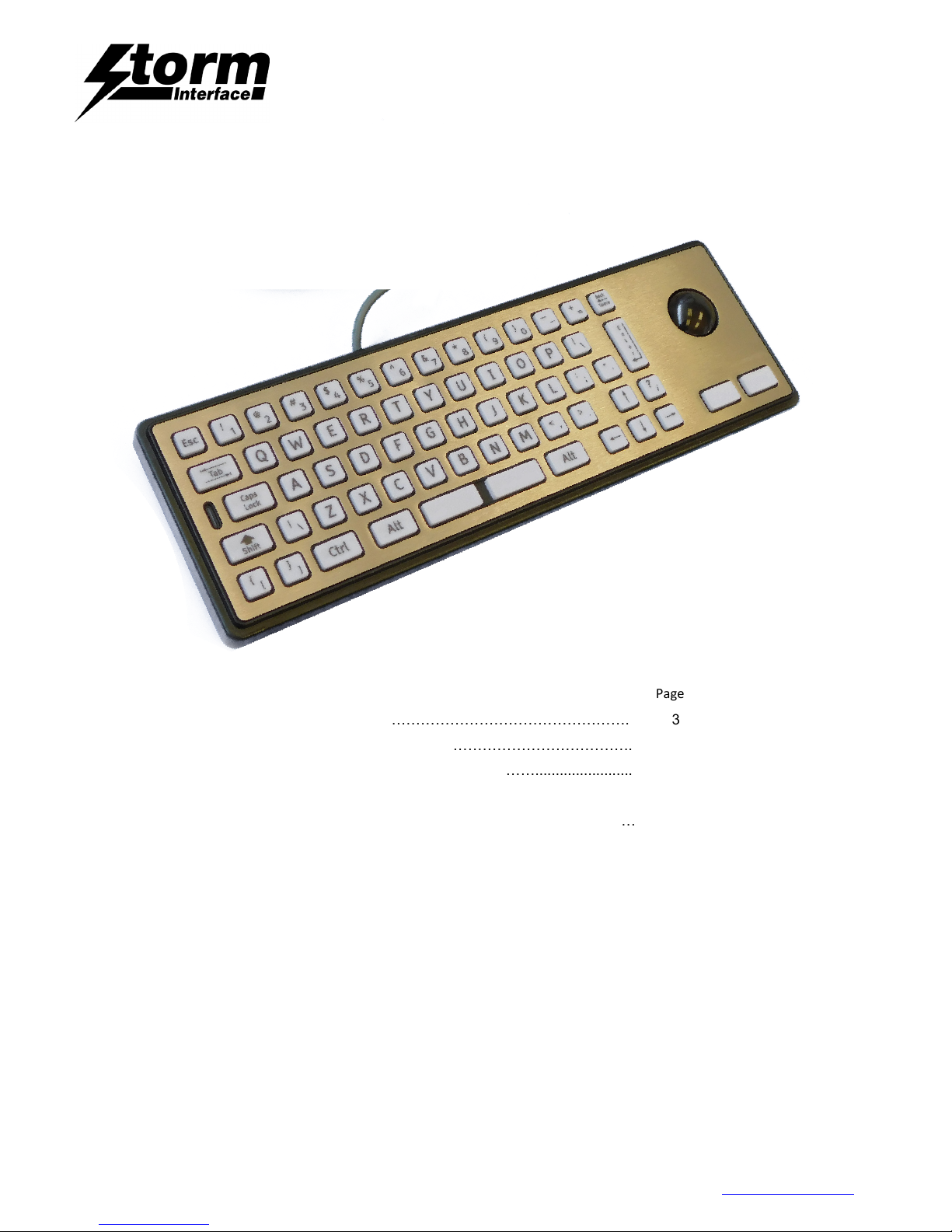
2200 Keyboard for Public Environments
Technical Manual
The content of this communication and/or document, including but not limited to images, specifications, designs, concepts and information is
confidential and is not to be used for any purpose or disclosed to a third party without the express and written consent of Keymat Technology Ltd.,
Copyright 2017. All rights reserved.
2200 Series Technical Manual Rev 2 May 2017.docx www.storm-interface.com
Page 1 of 23
Product Overview Page
Product Range / Options ………………………………………………. 3
Specifications ……………………………………………………………. 5
Connection Options ……………………………………........................ 6
Installation
Desktop / Underpanel …………………………………………………… 7
Inset into panel ………………………………………………………….. 8
Drawings for panel cut out ……………………………………………… 9
Language Layouts & Code Tables
2210 ………………………………………………………………………. 14
2220 ………………………………………………………………………. 16
2230 ………………………………………………………………………. 19
Change History ……………………………………………………………………. 22
Page 2

2200 Keyboard for Public Environments
Technical Manual
The content of this communication and/or document, including but not limited to images, specifications, designs, concepts and information is
confidential and is not to be used for any purpose or disclosed to a third party without the express and written consent of Keymat Technology Ltd.,
Copyright 2017. All rights reserved.
2200 Series Technical Manual Rev 2 May 2017.docx www.storm-interface.com
Page 2 of 23
Product Overview
Developed for use in kiosk applications the 2200 Series keyboard is suitable for use in exposed or hostile
environments. The robust construction is highly resistant to hard use, abuse and vandalism.
These keyboards are sealed against water and dust to ensure responsive and reliable data entry in the most
demanding situations.
Product options are available to suit different user preferences / kiosk environments.
Installation
Installation is usually underpanel, using the fixing kit 2210-MK000. CAD models for integration / installation are
downloadable from www.storm-interface.com
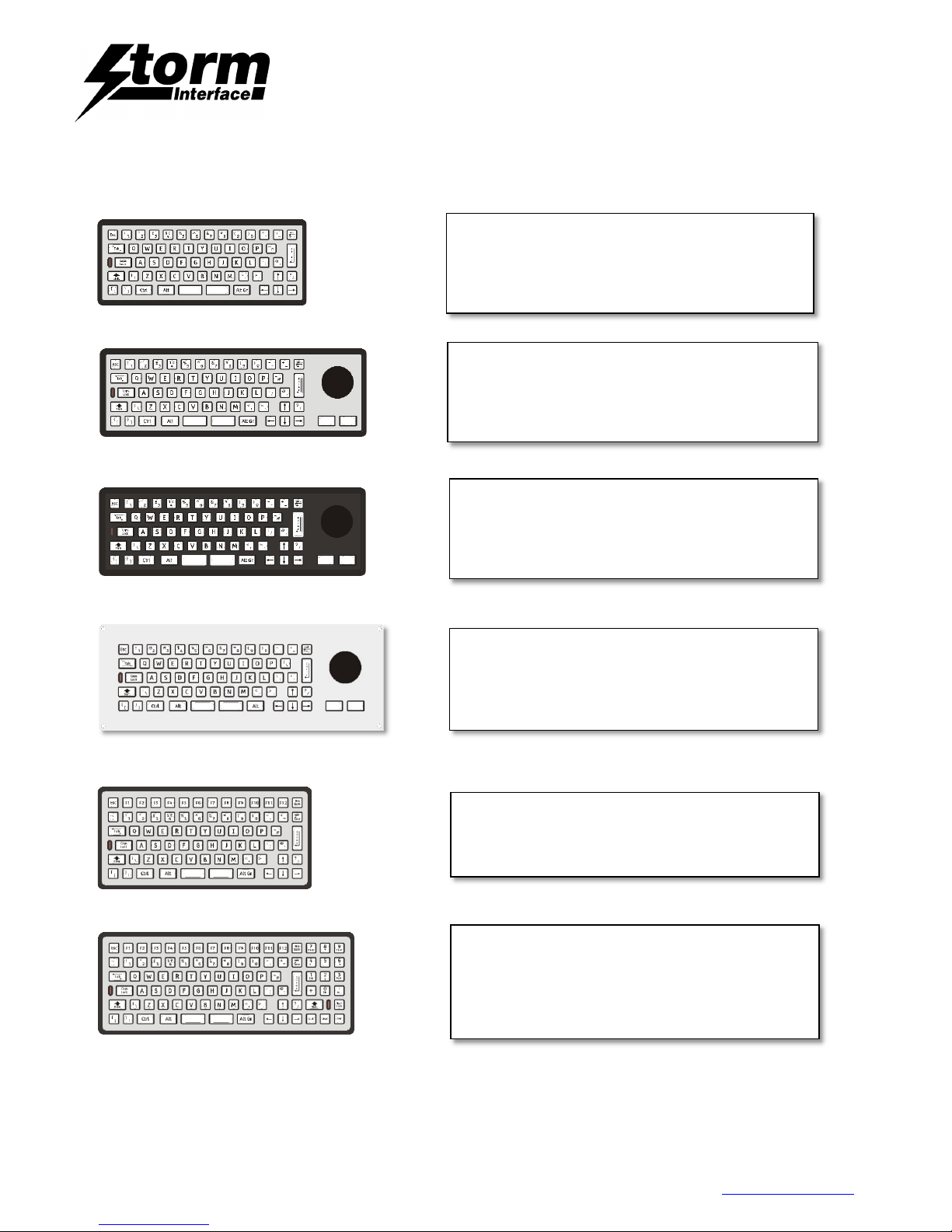
2210 is the standard compact footprint product
2210TB has an integral trackerball, with 2 click keys .
2220 has additional F1 – F12 keys
2230 has additional F1 – F12 keys + Number Pad
Alternative version to be inset into a countertop :
2212 is built into an extended stainless steel plate.
Build Variants
High contrast polymer keys or metal engraved/infilled keys are an option
Vandal Resistant versions have stainless steel front.
Robust versions have polymer front.
USB 2.0 connector is supplied fitted on 2.5m cable
PS/2 compatible versions are also available to suit legacy host systems.
Languages
All common language layouts are available (specials on request)
Custom firmware/layouts available to suit specific project requirements
Configuration options can be set for :-
Hidden CTRL + ALT + DEL function
Trackerball right-click function
Windows Explorer / Menu key
Page 3
2200 Keyboard for Public Environments
Technical Manual
The content of this communication and/or document, including but not limited to images, specifications, designs, concepts and information is
confidential and is not to be used for any purpose or disclosed to a third party without the express and written consent of Keymat Technology Ltd.,
Copyright 2017. All rights reserved.
2200 Series Technical Manual Rev 2 May 2017.docx www.storm-interface.com
Page 3 of 23
2210 Keyboard - Vandal Resistant, High Contrast
White Keys, 2.5m USB cable. Available in the
following standard languages:
UK, US, German, French & Spanish layouts.
290mm x 118mm overall size
2210 Keyboard – Polymer Trackball, Vandal
Resistant, High Contrast White Keys, 2.5m USB cable.
Available in the following standard languages:
UK, US, German, French & Spanish layouts.
360mm x 118mm overall size
2210 Keyboard – Polymer Trackball, Robust, High
Contrast White Keys, 2.5m USB cable.
Available in the following standard languages:
UK, US, German, French & Spanish layouts.
360mm x 118mm overall size
2212 Keyboard – Polymer Trackball, Vandal
Resistant, Top Install, Extended top plate, 2.5m USB
cable, Available in the following standard languages:
UK, US,German, French & Spanish layouts.
384mm x 142mm x 40mm overall size
2220 Keyboard - Vandal Resistant, Function Keys,
PS2/USB, No cable, Available in the following
standard languages – UK & US, layouts.
384mm x 142mm x 40mm
2230 Keyboard - Vandal Resistant, Function &
Numeric Keys, PS2/USB, No cable,
High Contrast White Keys.
Available in the following standard languages :
UK, US,German & French layouts.
346.5 mm x 137.5 mm x 32.8 mm
Product Range
2210 VR
2210 VR + T/Ball
2210 Robust + T/Ball
2212 VR + T/Ball + Top Install
2220 VR w/Function Keys
2230 VR w/Function Keys + Number Pad
Page 4

2200 Keyboard for Public Environments
Technical Manual
The content of this communication and/or document, including but not limited to images, specifications, designs, concepts and information is
confidential and is not to be used for any purpose or disclosed to a third party without the express and written consent of Keymat Technology Ltd.,
Copyright 2017. All rights reserved.
2200 Series Technical Manual Rev 2 May 2017.docx www.storm-interface.com
Page 4 of 23
Product Range: Part Numbers (standard product)
2210 Keyboard - Vandal Resistant, High Contrast White Keys, 2.5m USB cable.
2210-55201 2210 KBD, VR, White Keys, USB cable, UK Layout
2210-55202 2210 KBD, VR, White Keys, USB cable, US Layout
2210-55203 2210 KBD, VR, White Keys, USB cable, French Layout
2210 Keyboard – Polymer Trackball, Vandal Resistant, High Contrast White Keys, 2.5m USB cable.
2210-55221 2210 KBD, TB, VR, White Keys, USB cable, UK Layout
2210-55222 2210 KBD, TB, VR, White Keys, USB cable, US Layout
2210 Trackball Keyboard, Polymer Trackball, Robust, Black Overlay, High Contrast White keys, 2.5m USB cable
2210-45221 2210 KBD, TB, Robust, White Key, USB cable, UK Layout
2210-45222 2210 KBD, TB, Robust, White Key, USB cable, US Layout
2210-45223 2210 KBD, TB, Robust, White Key, USB cable, French Layout
2210-45224 2210 KBD, TB, Robust, White Key, USB cable, German Layout
2210-45227 2210 KBD, TB, Robust, White Key, USB cable, Spanish Layout
2212 Keyboard - Vandal Resistant, Polymer Trackball, Top Install, Extended top plate, 2.5m USB cable, Black keys
2212-25221 2212 KBD, VR, TB, Top Install, USB Cable, UK layout
2212-25222 2212 KBD, VR, TB, Top Install, USB Cable, US layout
2212-25223 2212 KBD, VR, TB, Top Install, USB Cable, French layout
2212-25224 2212 KBD, VR, TB, Top Install, USB Cable, German layout
2212-25227 2212 KBD, VR, TB, Top Install, USB Cable, Spanish layout
2220 Keyboard - Vandal Resistant, Function Keys, PS2/USB, No cable, Black Keys
2220-22001 2220 KBD, VR, PS2/USB, Black Key, No cable, UK Layout
2220-22002 2220 KBD, VR, PS2/USB, Black Key, No cable, US Layout
2230 Keyboard - Vandal Resistant, Function & Numeric Keys, PS2/USB, No cable, High Contrast White Keys
2230-52001 2230 KBD, VR, PS2/USB, White Key, No cable, UK Layout
2230-52002 2230 KBD, VR, PS2/USB, White Key, No cable, US Layout
Accessories / Cables
2210-MK000 2200 Under panel Fixing Kit – contains 12 clips
2200-FK000 2200 Foot Kit – required for benchtop use
1200-00100 Keyboard PS2 Cable – straight 2.5m long
1200-00200 Keyboard USB Cable – straight 2.5m long
Page 5

2200 Keyboard for Public Environments
Technical Manual
The content of this communication and/or document, including but not limited to images, specifications, designs, concepts and information is
confidential and is not to be used for any purpose or disclosed to a third party without the express and written consent of Keymat Technology Ltd.,
Copyright 2017. All rights reserved.
2200 Series Technical Manual Rev 2 May 2017.docx www.storm-interface.com
Page 5 of 23
Specifications
Electrical
Contact Bounce 5 ms (max)
Contact Resistance 100 ohms (max)
Insulation Resistance 50 Mohms (min)
Breakdown Voltage 500 V AC (max 60 secs.)
Rating 5V DC 50mA (max)
Dimensions (mm)
Packed
W x H x D W x H x D Weight (kg) Weight (kg)
2210 289.5 118.5 35.8 410 195 75 1.05 w/poly keys 1.71 w/metal keys
2210 T/B 360 118.5 50 410 195 75 1.8 w/poly keys 1.95 w/metal keys
2212 T/B 384.5 142.5 50 410 195 75 2.1 w/poly keys 2.5 w/metal keys
2220 289.5 137.5 35.8 410 195 75 1.7 w/poly keys 2230 346.5 137.5 35.8 410 195 75 1.8 w/poly keys -
Mechanical
Operational Life 4 million cycles (min) per key
Keytop Travel 1.5mm nominal
Actuation Force 100 grams nominal
Key Pitch 19mm
Performance/Regulatory
Operational Temp -20°C to +60°C
Impact Rating 5 J
Vibration/Shock ETSI 300 019 5M3
Water / Dust sealed IP65 (when fixed to suitable panel)
Certification CE / FCC / UL
EMC Emissions EN55032 : 2010 Class B Limit
EMC Immunity to ESD EN55024 : 2010 (15kV Air)
EMC Immunity to Radiated Fields EN55024 : 2010
Electrical Safety EN60950, UL60950
Page 6
2200 Keyboard for Public Environments
Technical Manual
The content of this communication and/or document, including but not limited to images, specifications, designs, concepts and information is
confidential and is not to be used for any purpose or disclosed to a third party without the express and written consent of Keymat Technology Ltd.,
Copyright 2017. All rights reserved.
2200 Series Technical Manual Rev 2 May 2017.docx www.storm-interface.com
Page 6 of 23
ON
OFF
1 2 3
4 5 6
7
8
Connection Options
USB
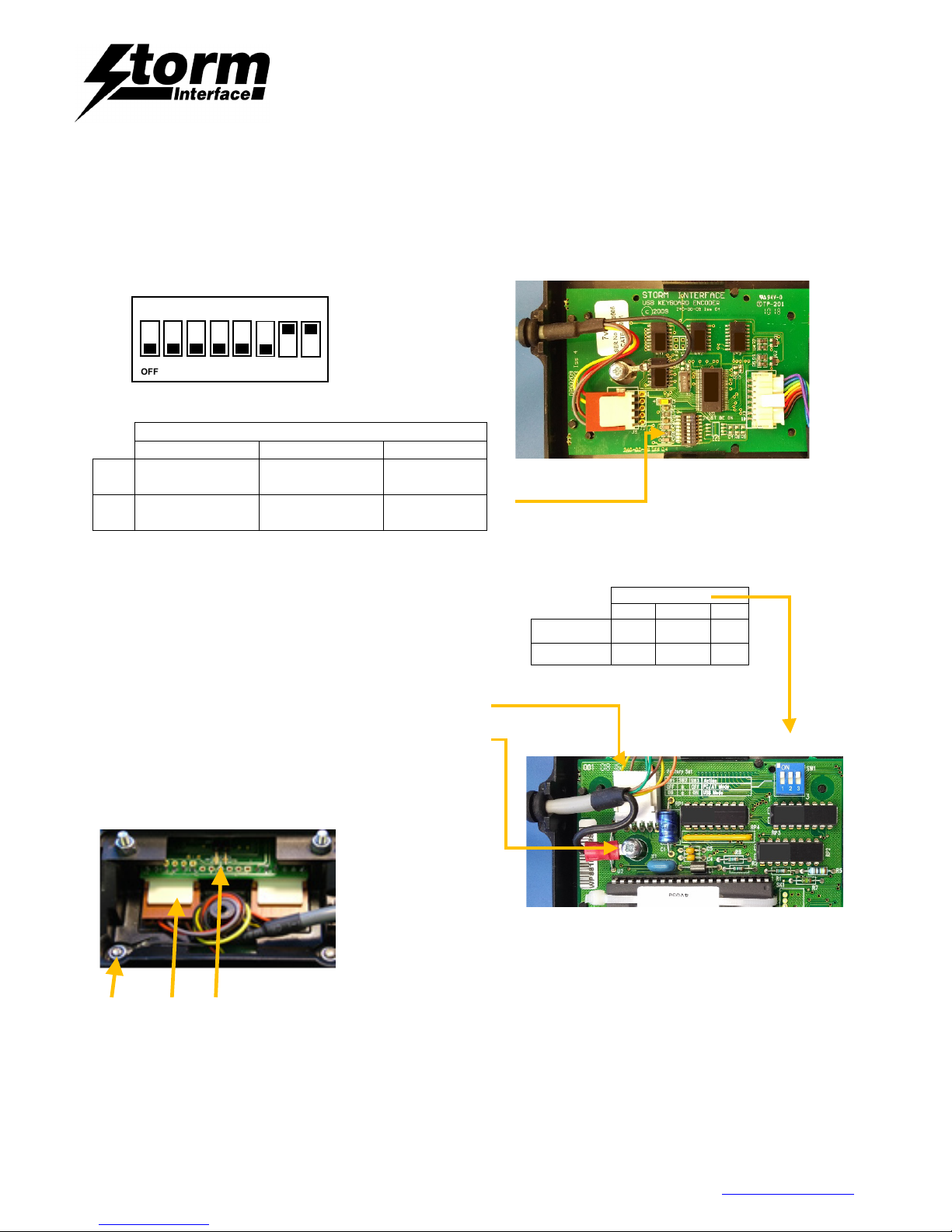
USB versions are fitted with a 2.5m USB 2.0 cable. Alternative functions are available for Windows Explorer & menus Keys,
Left/Left click and to disable/enable hidden function keys. To access these remove the pod lid from the back of the keyboard
The DIP switch (SW1), can be found on the PCB. Note: position of DIP #2 does not matter.
SW1
1 2 3
ON
Windows Explorer
and Menu Key
Left / Left Click
operation
Hidden keys
Disabled
OFF Factory Default
Left / Right Click
operation
Hidden Keys
Enabled
PS2/USB
PS2 / USB versions are not supplied with cables.
The DIP switch (SW1), is on the PCB on the rear of the keyboard.
Select the correct settings for your cable/host (PS/2 or USB).
Plug in the keyboard cable molex connector
Connect the earth tag to the securing nut and tighten
Plug in the trackerball cable to P3
Connect the earth tag to the securing nut and tighten
If left-left click switch operation is required then fit the
supplied jumper over the two central pins of the trackball
Earth P3 Jumper
Fit the supplied trackerball cover and keyboard pod lid (ensure the 4 clips are engaged)
SW1
1 2
3
PS/2 Mode OFF N/A OFF
USB Mode ON N/A ON
Default Switch Positions
SW1
Page 7
2200 Keyboard for Public Environments
Technical Manual
The content of this communication and/or document, including but not limited to images, specifications, designs, concepts and information is
confidential and is not to be used for any purpose or disclosed to a third party without the express and written consent of Keymat Technology Ltd.,
Copyright 2017. All rights reserved.
2200 Series Technical Manual Rev 2 May 2017.docx www.storm-interface.com
Page 7 of 23
Installation – Desktop
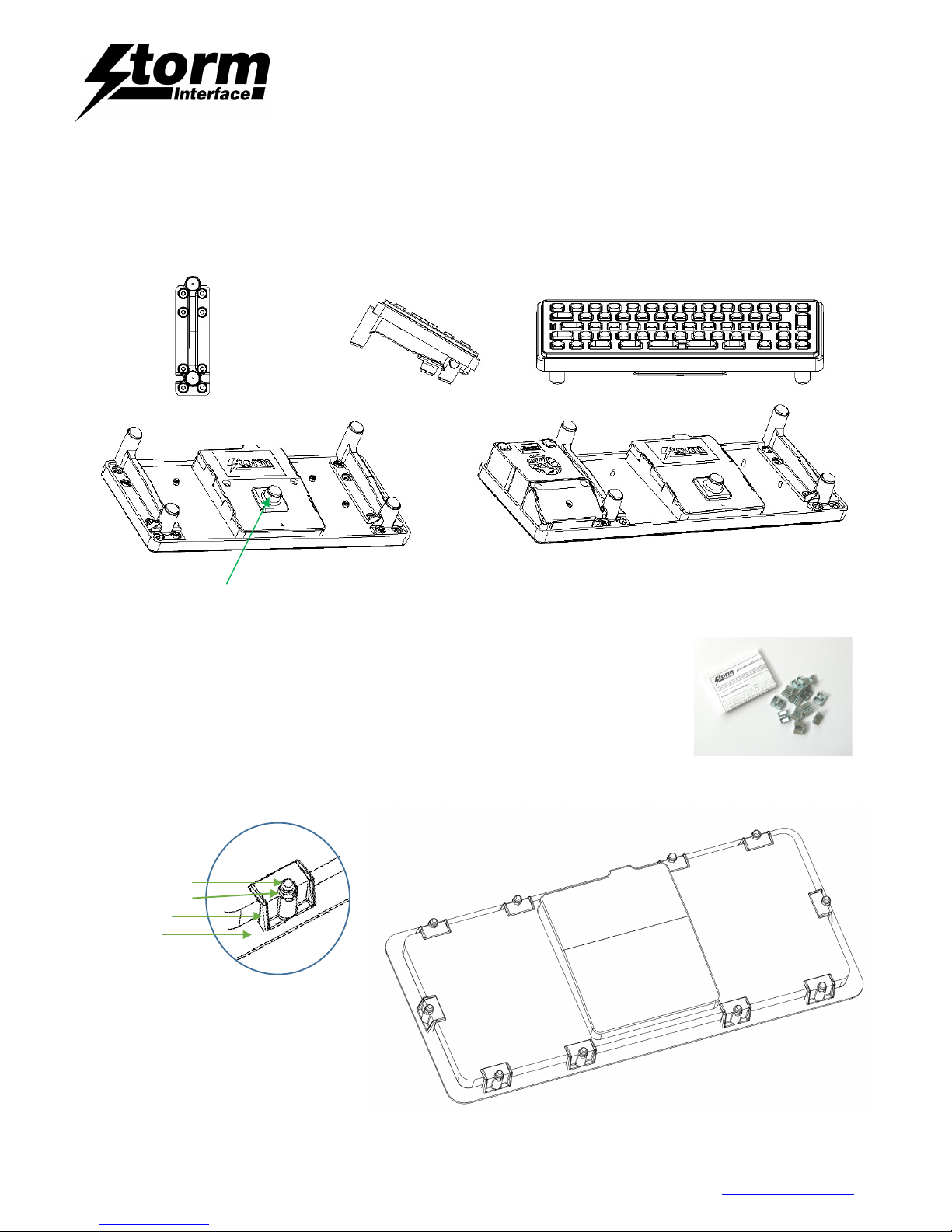
This Foot Kit enables a Storm 2200 Series Keyboard to be used as a Free-Standing Desktop Unit.
• Place the keyboard face down
• Attach the feet by removing the relevant nuts, place feet in position and refit the nuts.
• Place the bumpstop on pod lid in position shown.
Installation – Under panel
Use the 2200 Under panel Fixing Kit – contains 12 clips (Order PN 2210-MK000)
• Prepare a front panel with cut out and weld studs for the keyboard.
• Place the gasket over the weld studs.
• Place the keyboard into the panel cut out,
• Place one clip over each weld stud, and secure with M3 Nyloc nut
Weld Stud
M3 nyloc nut
Fixing Clip
Gasket
Page 8
2200 Keyboard for Public Environments
Technical Manual
The content of this communication and/or document, including but not limited to images, specifications, designs, concepts and information is
confidential and is not to be used for any purpose or disclosed to a third party without the express and written consent of Keymat Technology Ltd.,
Copyright 2017. All rights reserved.
2200 Series Technical Manual Rev 2 May 2017.docx www.storm-interface.com
Page 8 of 23
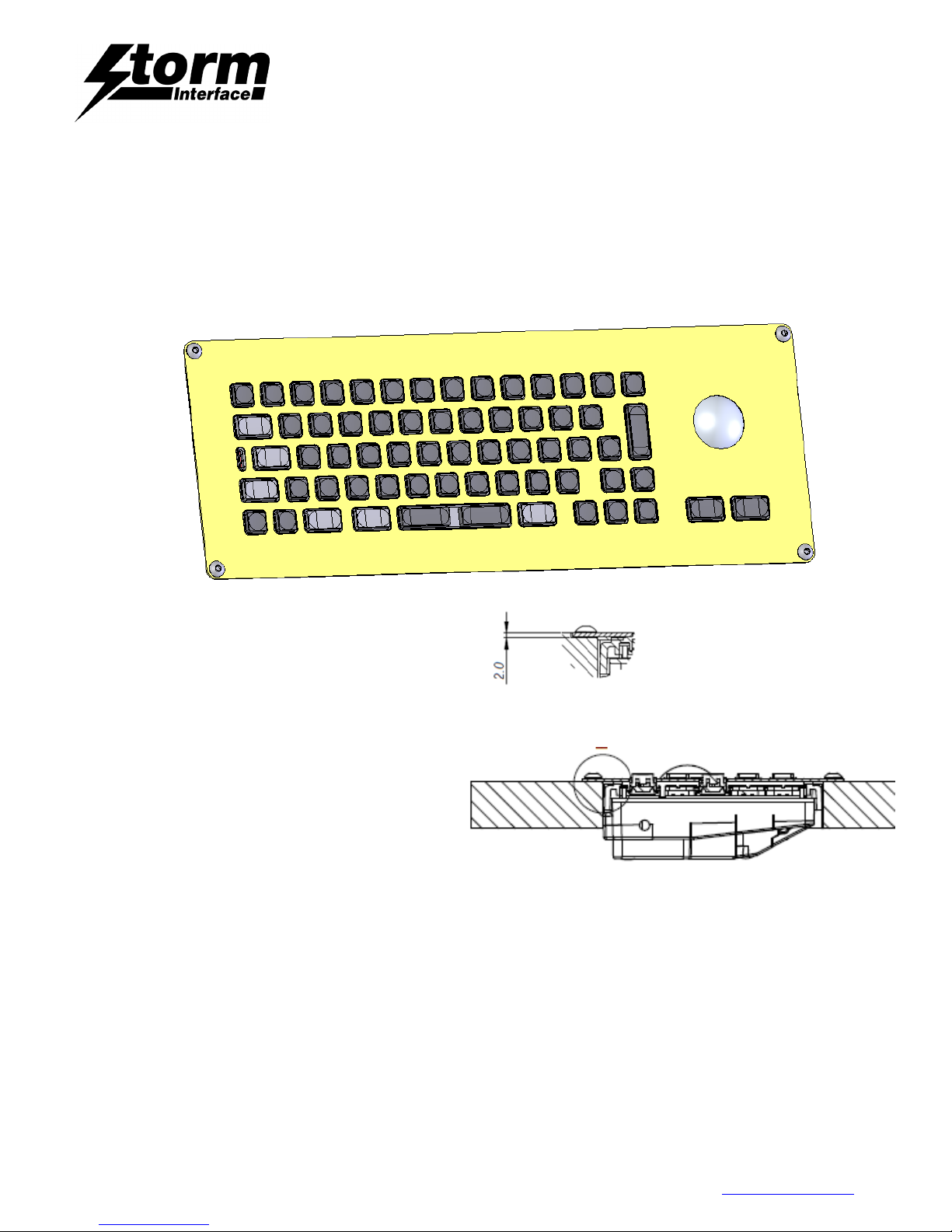
Installation – Inset into panel (2212 only)
• Machine panel with 4 holes and recess detail if required (see below)
• Fit the adhesive gasket
• Attach keyboard using the supplied 4x M5 x 30 A2 stainless steel socket button head screws, 4x M5 stainless
steel washers and 4x M5 stainless steel nyloc nuts.
Either recess the top plate into the panel (2mm deep rebate)
Or simply drill the 4 holes and the top plate then will be on top of your panel
Page 9
2200 Keyboard for Public Environments
Technical Manual
The content of this communication and/or document, including but not limited to images, specifications, designs, concepts and information is
confidential and is not to be used for any purpose or disclosed to a third party without the express and written consent of Keymat Technology Ltd.,
Copyright 2017. All rights reserved.
2200 Series Technical Manual Rev 2 May 2017.docx www.storm-interface.com
Page 9 of 23
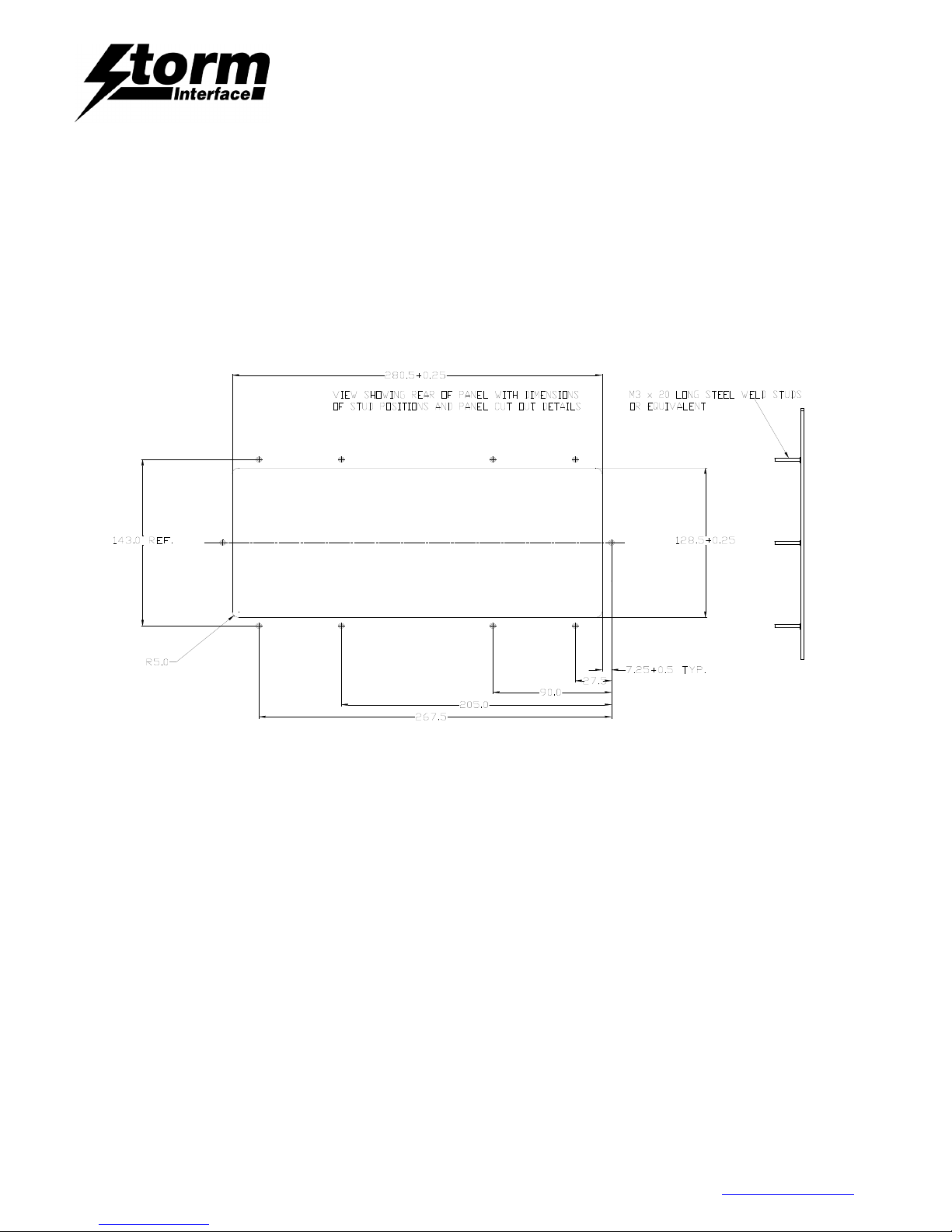
Panel Cut-out Drawings
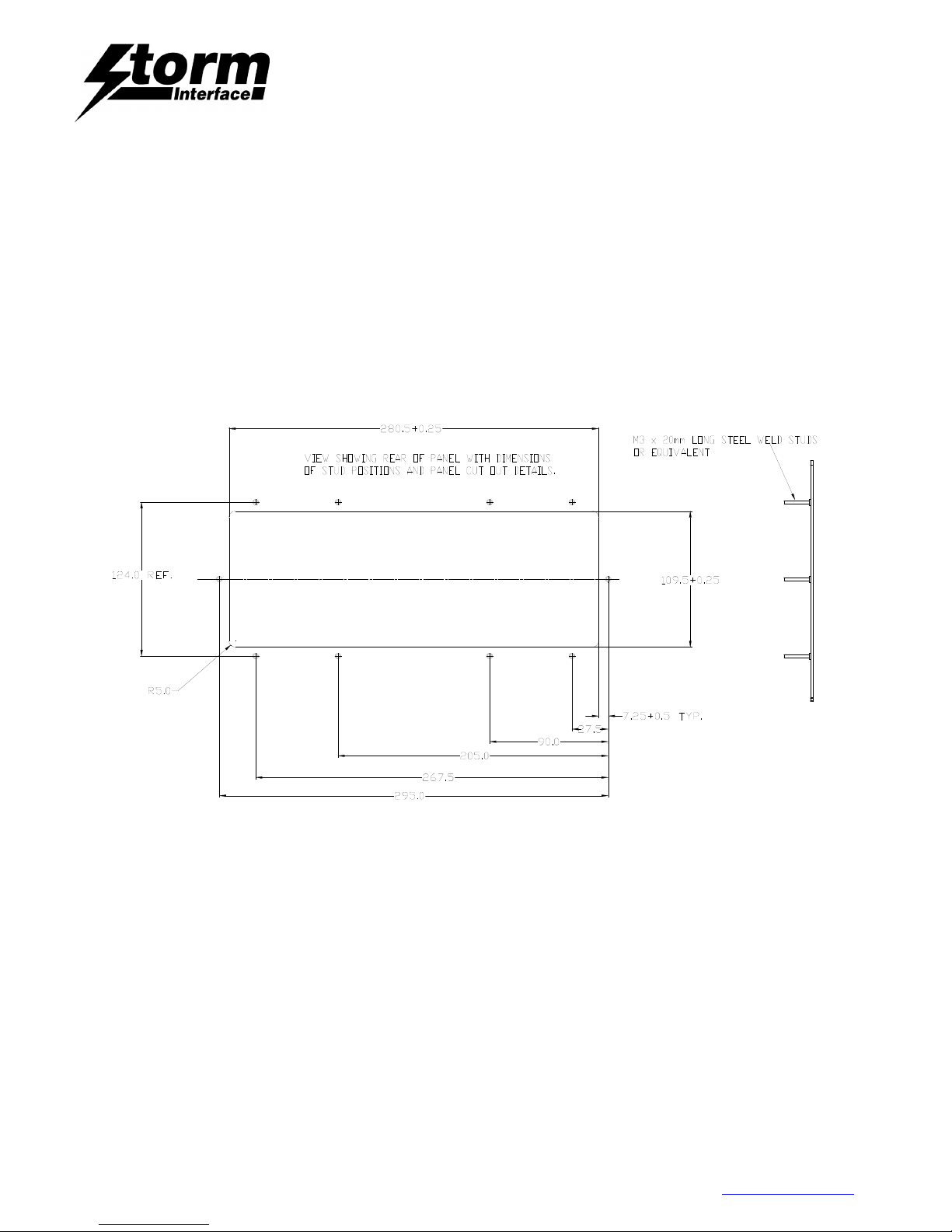
2210 Panel Cut-out
The 2210 Keyboard is designed to be secured under panel with brackets and lock nuts. Torque to 25N.cm.
Gasket to be positioned between keyboard and fixing panel prior to installation.
Please ensure a suitable panel material is used to support the keyboard. e.g. 1.6mm – 2.0mm steel.
This must provide sufficient rigidity for sealing keyboard to panel. The underside of the panel should be flat,
clean, and free of debris
Page 10
2200 Keyboard for Public Environments
Technical Manual
The content of this communication and/or document, including but not limited to images, specifications, designs, concepts and information is
confidential and is not to be used for any purpose or disclosed to a third party without the express and written consent of Keymat Technology Ltd.,
Copyright 2017. All rights reserved.
2200 Series Technical Manual Rev 2 May 2017.docx www.storm-interface.com
Page 10 of 23
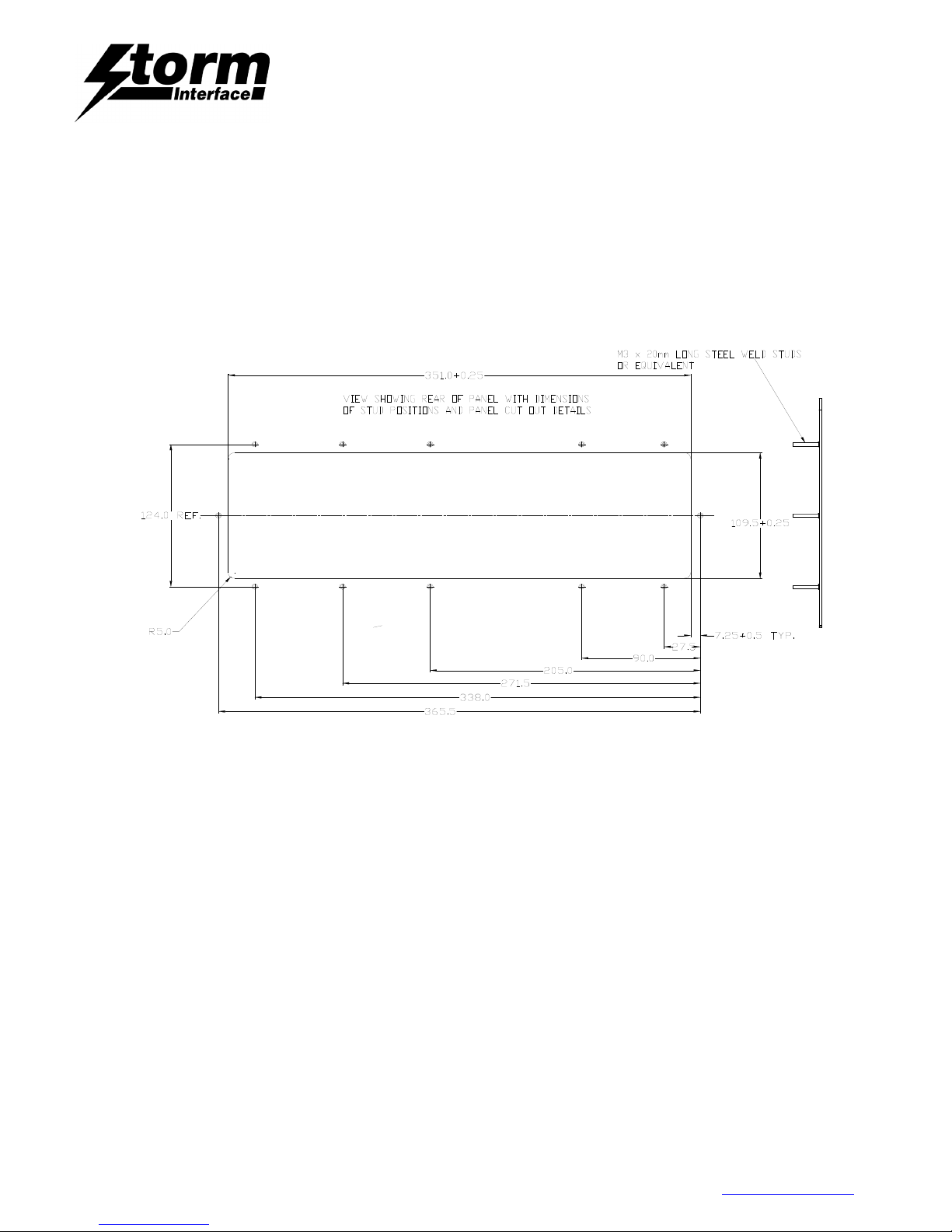
2210 Trackball Panel Cut-out
The 2210TB keyboard is designed to be secured with brackets and lock nuts. Torque to 25N.cm.
Gasket to be positioned between keyboard and fixing panel prior to installation.
Please ensure a suitable panel material is used to support the keyboard. e.g. 1.6mm – 2.0mm steel.
This must provide sufficient rigidity for sealing keyboard to panel. The underside of the panel should be flat,
clean, and free of debris.
Page 11
2200 Keyboard for Public Environments
Technical Manual
The content of this communication and/or document, including but not limited to images, specifications, designs, concepts and information is
confidential and is not to be used for any purpose or disclosed to a third party without the express and written consent of Keymat Technology Ltd.,
Copyright 2017. All rights reserved.
2200 Series Technical Manual Rev 2 May 2017.docx www.storm-interface.com
Page 11 of 23
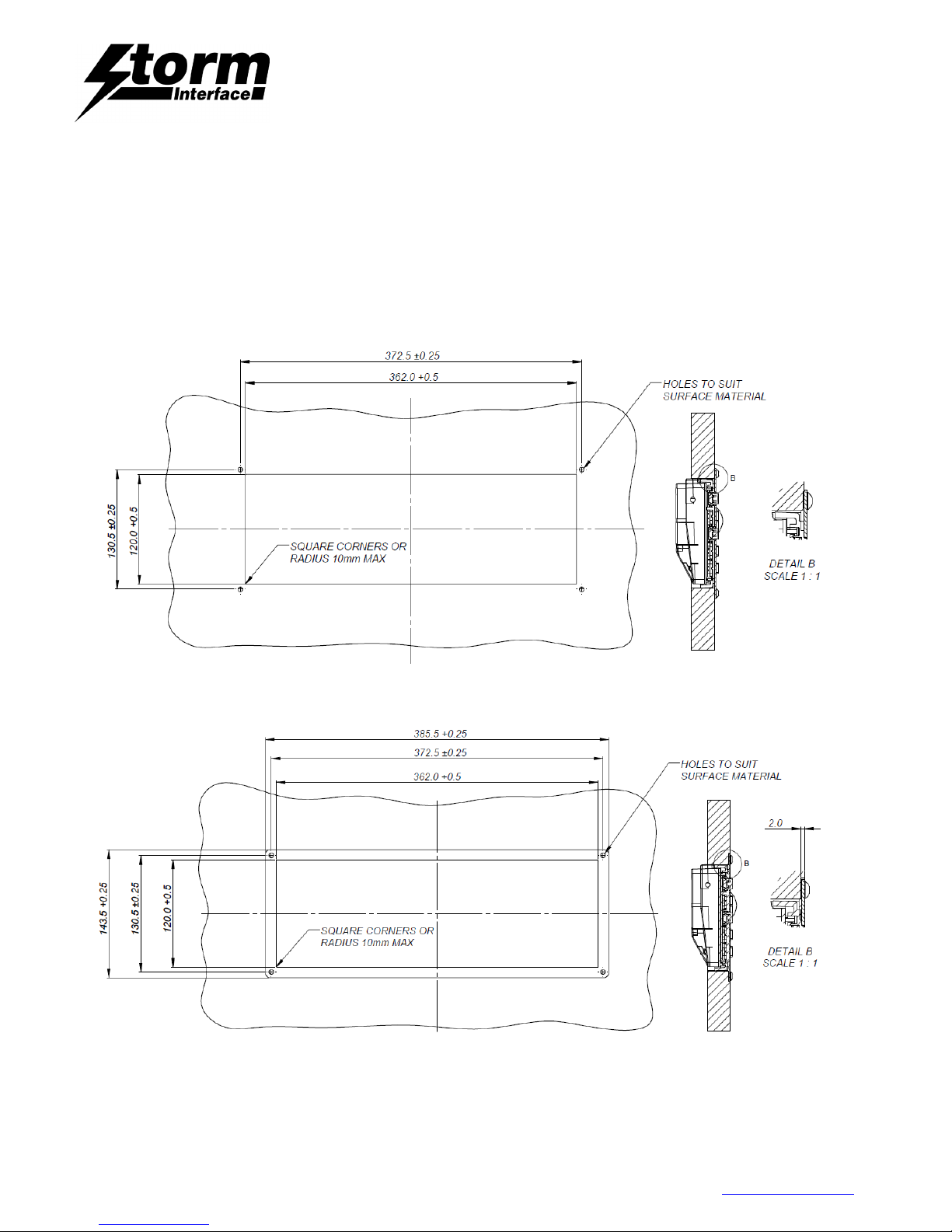
2212 Trackball Panel Cut-out
The Storm 2212-T/B Series keyboard is configured to allow a convenient installation onto a work surface or
desktop. Using simple hand tools (jig saw and hand drill) the work surface can be easily prepared to accept
this robust, responsive and reliable keyboard.
Top Installation
Flush Installation
Page 12
2200 Keyboard for Public Environments
Technical Manual
The content of this communication and/or document, including but not limited to images, specifications, designs, concepts and information is
confidential and is not to be used for any purpose or disclosed to a third party without the express and written consent of Keymat Technology Ltd.,
Copyright 2017. All rights reserved.
2200 Series Technical Manual Rev 2 May 2017.docx www.storm-interface.com
Page 12 of 23
2220 Panel Cut-out
The 2220 keyboard is designed to be secured with brackets and lock nuts. Torque to 25N.cm.
Gasket to be positioned between keyboard and fixing panel prior to installation.
Please ensure a suitable panel material is used to support the keyboard. e.g. 1.6mm – 2.0mm steel.
This must provide sufficient rigidity for sealing keyboard to panel. The underside of the panel should be flat,
clean, and free of debris.
Page 13
2200 Keyboard for Public Environments
Technical Manual
The content of this communication and/or document, including but not limited to images, specifications, designs, concepts and information is
confidential and is not to be used for any purpose or disclosed to a third party without the express and written consent of Keymat Technology Ltd.,
Copyright 2017. All rights reserved.
2200 Series Technical Manual Rev 2 May 2017.docx www.storm-interface.com
Page 13 of 23
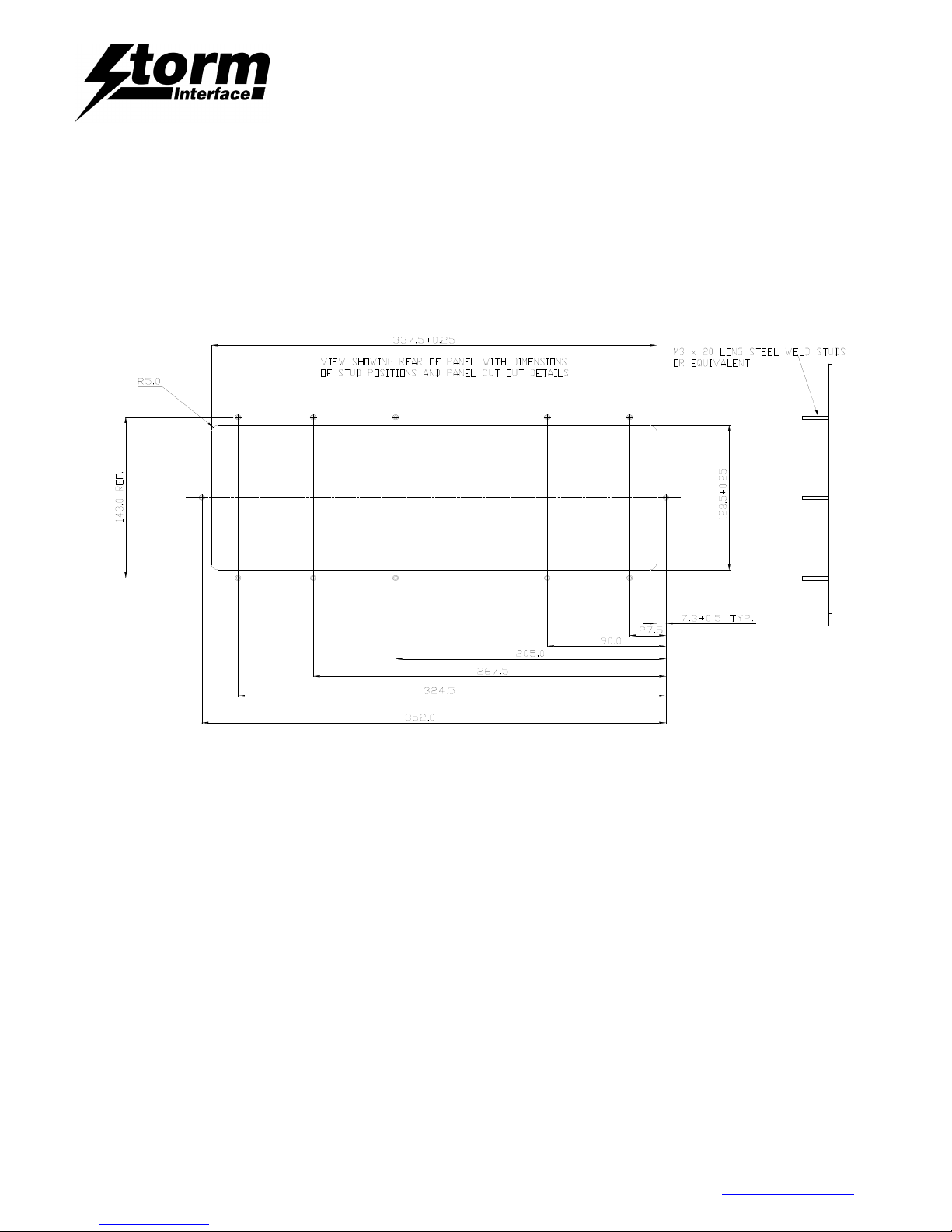
2230 Panel Cut-out
The 2230 keyboard is designed to be secured with brackets and lock nuts. Torque to 25N.cm.
Gasket to be positioned between keyboard and fixing panel prior to installation.
Please ensure a suitable panel material is used to support the keyboard. e.g. 1.6mm – 2.0mm steel.
This must provide sufficient rigidity for sealing keyboard to panel. The underside of the panel should be flat,
clean, and free of debris.
Page 14
2200 Keyboard for Public Environments
Technical Manual
The content of this communication and/or document, including but not limited to images, specifications, designs, concepts and information is
confidential and is not to be used for any purpose or disclosed to a third party without the express and written consent of Keymat Technology Ltd.,
Copyright 2017. All rights reserved.
2200 Series Technical Manual Rev 2 May 2017.docx www.storm-interface.com
Page 14 of 23
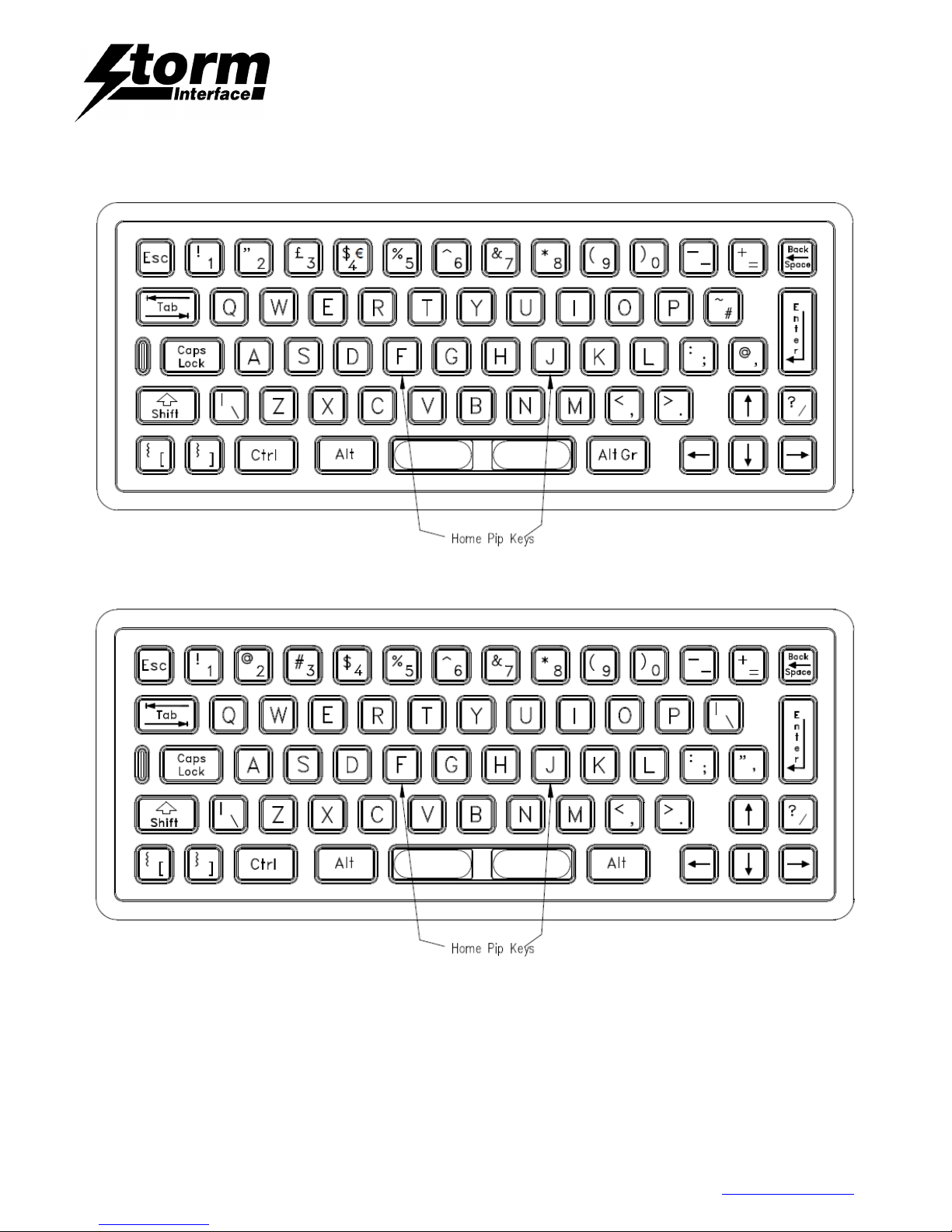
2210 UK Layout
2210 US Layout
Page 15
2200 Keyboard for Public Environments
Technical Manual
The content of this communication and/or document, including but not limited to images, specifications, designs, concepts and information is
confidential and is not to be used for any purpose or disclosed to a third party without the express and written consent of Keymat Technology Ltd.,
Copyright 2017. All rights reserved.
2200 Series Technical Manual Rev 2 May 2017.docx www.storm-interface.com
Page 15 of 23
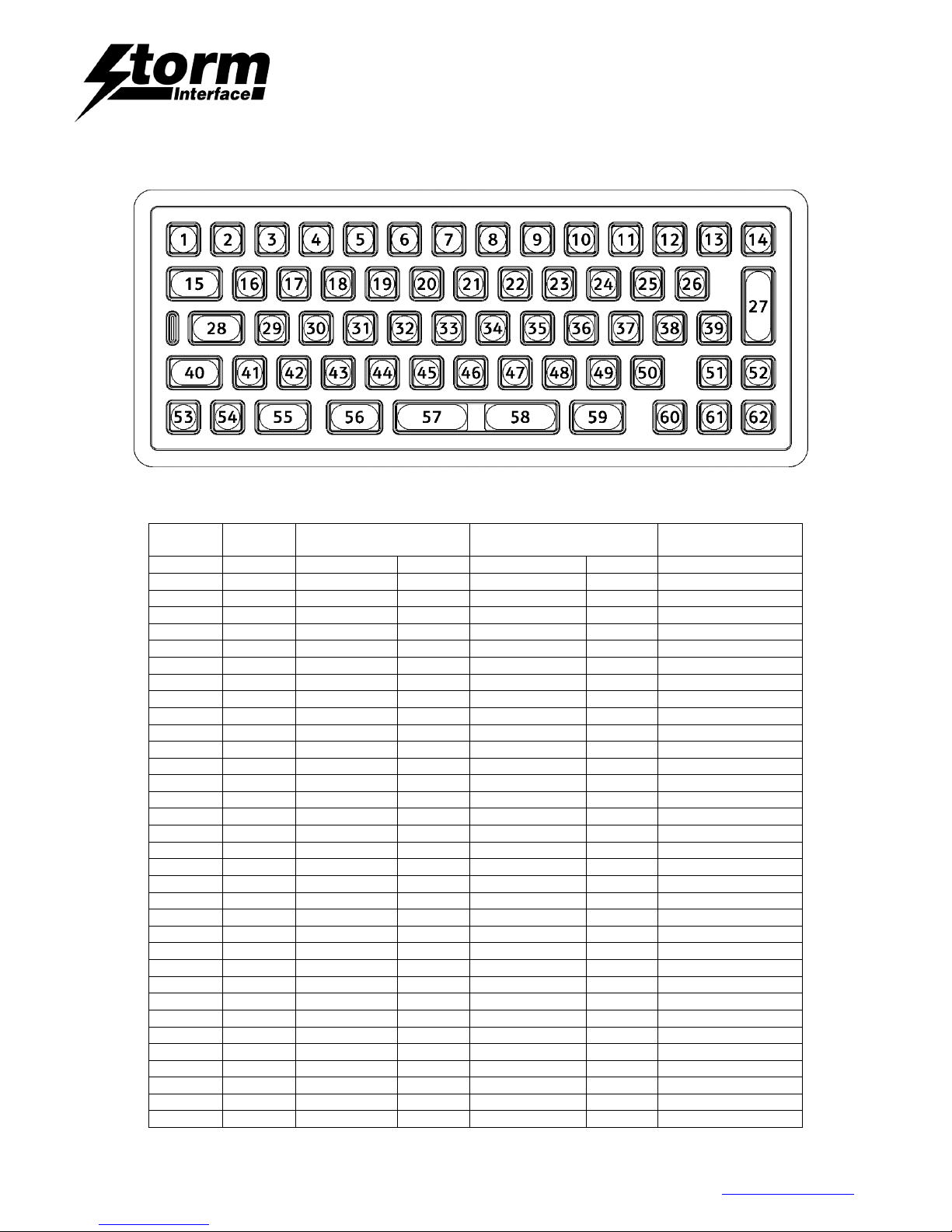
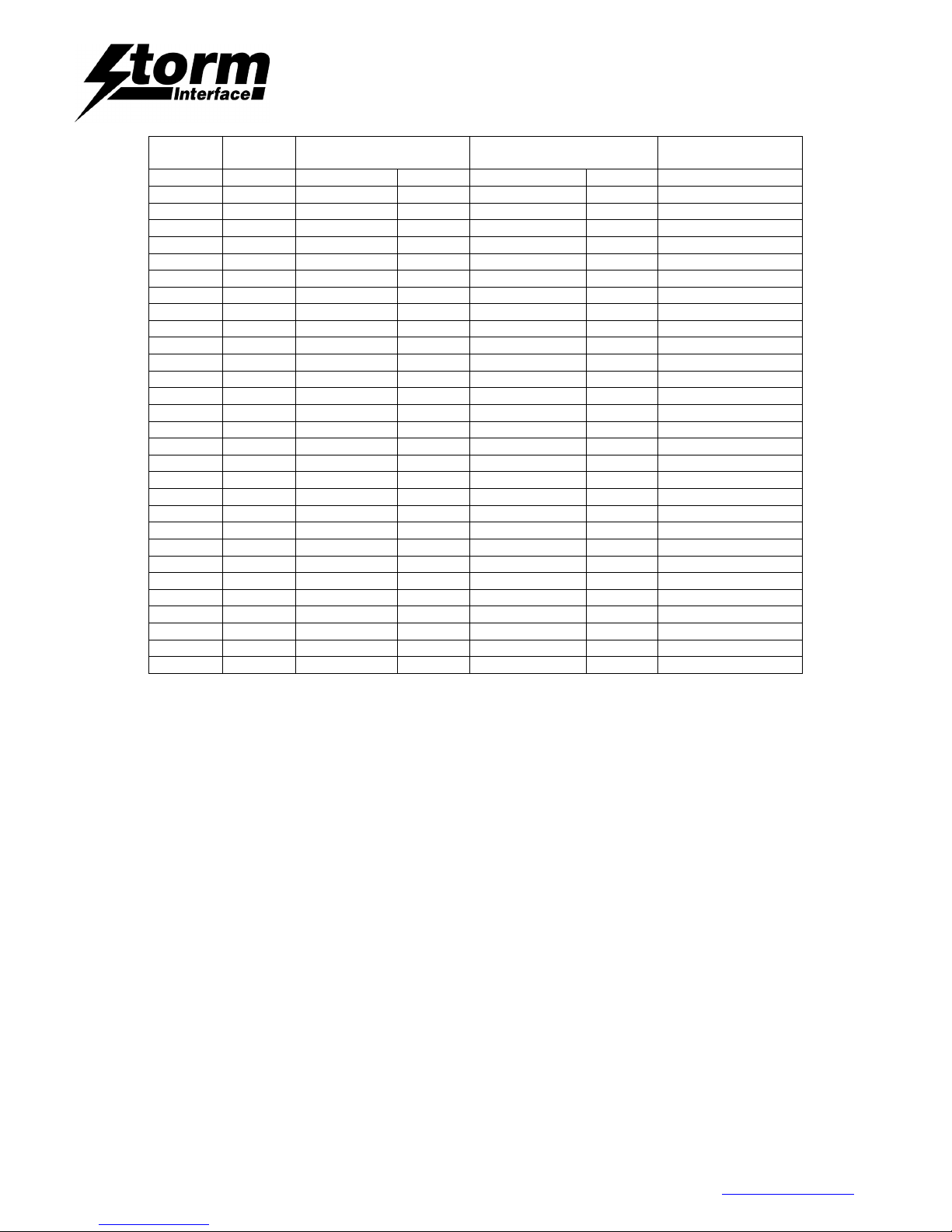
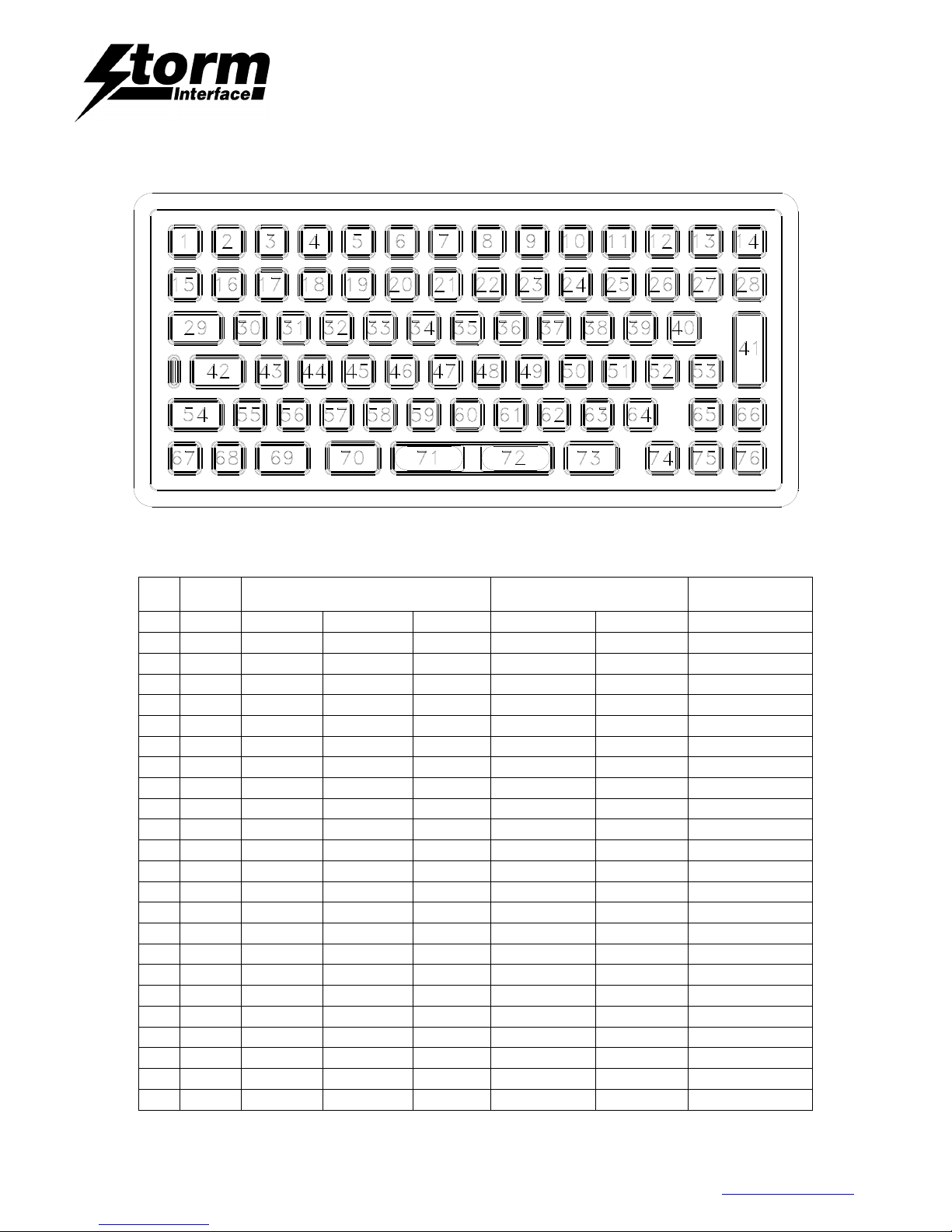
2210/12 Positions and Codes
Key
Position
Row /
Column
2210
UK Layout.
2210
US Layout.
PC/AT Code
(Code Set 2)
Base
Shifted
Base
Shifted 1
R0C0
Escape
Escape 76
2
R1C1 1 ! 1 !
16
3
R1C2 2 “ 2 @
1E
4
R1C3 3 £ 3 #
26
5
R1C4 4 $ 4 $
25
6
R1C5 5 % 5 %
2E
7
R1C6 6 ^ 6 ^
36
8
R1C7 7 & 7 &
3D
9
R1C8 8 * 8 *
3E
10
R1C9 9 ( 9 (
46
11
R1C10 0 ) 0 )
45
12
R1C11 - _ - _
4E
13
R1C55 = + = +
55
14
R3C12
Backspace
Backspace 66
15
R2C0
Tab Tab 0D
16
R2C1 Q Q q Q
15
17
R2C2 W W w W
1D
18
R2C3 E E e E
24
19
R2C4 R R r R
2D
20
R2C5 T T t T
2C
21
R2C6 Y Y y Y
35
22
R2C7 U U u U
3C
23
R2C8 I I i I
43
24
R2C9 O O o O
44
25
R2C10 P P p P
4D
26
R2C11 # ~ \ |
5D
27
R4C12
Enter Enter 5A
28
R4C0
Caps Caps 58
29
R3C1 A A a A
1C
30
R3C2 S S S S
1B
31
R3C3 D D d D
23
32
R3C4 F F f F
2B
33
R3C5 G G g G
34
Page 16
2200 Keyboard for Public Environments
Technical Manual
The content of this communication and/or document, including but not limited to images, specifications, designs, concepts and information is
confidential and is not to be used for any purpose or disclosed to a third party without the express and written consent of Keymat Technology Ltd.,
Copyright 2017. All rights reserved.
2200 Series Technical Manual Rev 2 May 2017.docx www.storm-interface.com
Page 16 of 23
Key
Position
Row /
Column
2210
UK Layout.
2210
US Layout.
PC/AT Code
(Code Set 2)
Base
Shifted
Base
Shifted 34
R3C6 H H h H
33
35
R3C7 J J j J
3B
36
R3C8 K K k K
42
37
R3C9 L L l L
4B
38
R3C10 ; : ; :
4C
39
R3C11 ‘ @ ‘ “
52
40
R4C14
Shift Shift 12
41
R4C1 \ | \ |
61
42
R4C2 Z Z z Z
1A
43
R4CE X X x X
22
44
R4C4 C C c C
21
45
R4C5 V V v V
2A
46
R4C6 B B b B
32
47
R4C7 N N n N
31
48
R4C8 M M m M
3A
49
R4C9 , < , <
41
50
R4C10 . > . >
49
51
R7C10 ↑ ↑
E0,75
52
R4C11 / ? / ?
4A
53
R5C0 [ { [ {
54
54
R5C1 ] } ] }
5B
55
R5C10
Control
Control E0,27
56
R6C13
Alt Alt 11
57
R5C5
Space Space 29
58
R5C6
Space Space 29
59
R7C13
Alt Gr Alt Gr E0,11
60
R7C9 ← ←
E0,6B
61
R7C11 ↓ ↓
E0,72
62
R7C12 → →
E0,74
Release Codes.
The PC/AT release code for each key is the Scan Code preceded by H’F0.
Example: Q – H’F0’, H’15.
Exception: Keys with Scan Codes starting with H’E0, the release code sequence
(for example LEFT ARROW) is as follows: H’E0’, H’F0’,H’6B.
Page 17
2200 Keyboard for Public Environments
Technical Manual
The content of this communication and/or document, including but not limited to images, specifications, designs, concepts and information is
confidential and is not to be used for any purpose or disclosed to a third party without the express and written consent of Keymat Technology Ltd.,
Copyright 2017. All rights reserved.
2200 Series Technical Manual Rev 2 May 2017.docx www.storm-interface.com
Page 17 of 23
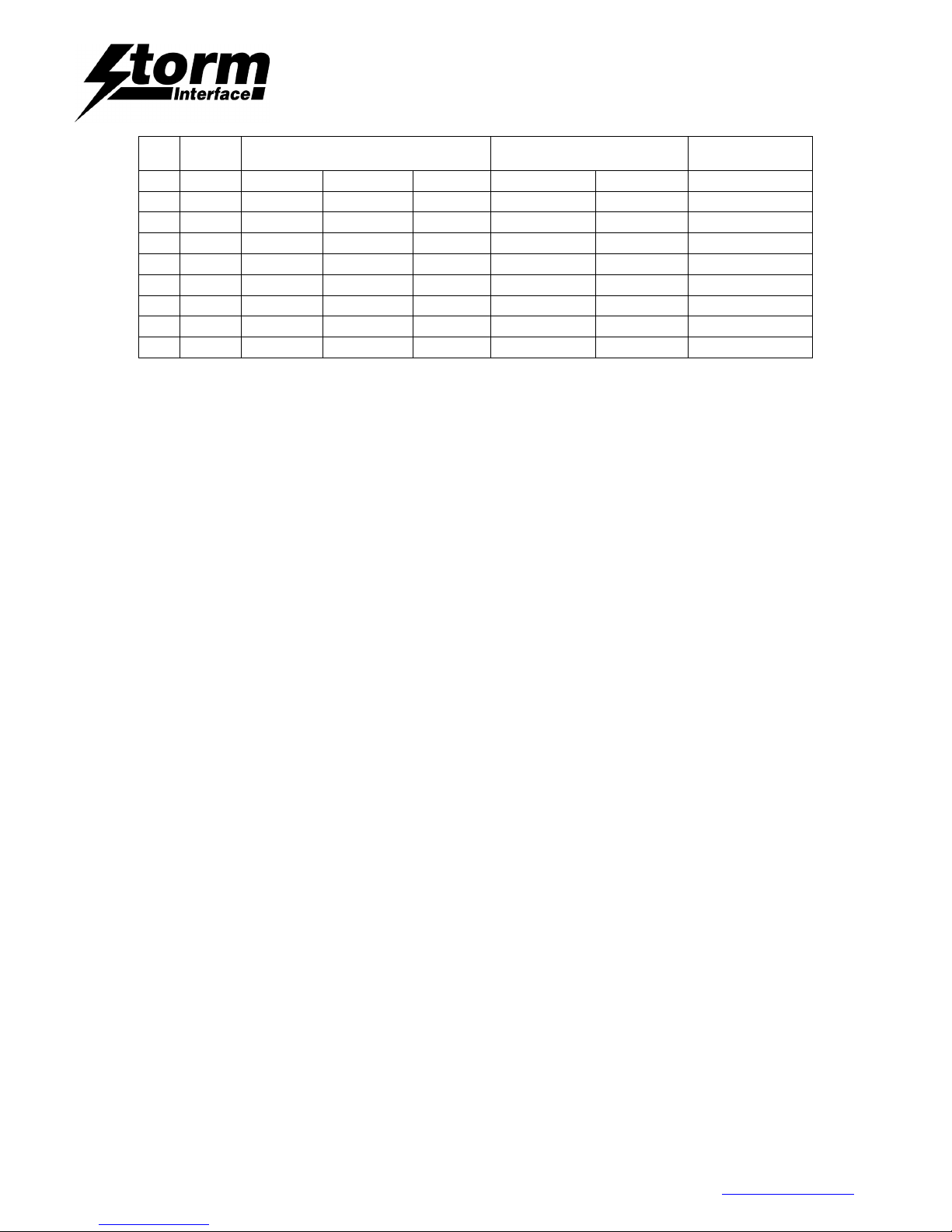
2220 Positions and Codes
Key
Posi
Row /
2220
2220
PC/AT Code
Base
Base
Shifted
1
R0C0
Escape
Escape 76
2
R0C1
F1
F1 05
3
R0C2
F2
F2 05
4
R0C3
F3
F3 04
5
R0C4
F4
F4 0C
6
R0C5
F5
F5 03
7
R0C6
F6
F6 0B
8
R0C7
F7
F7 83
9
R0C8
F8
F8 0A
10
R0C9
F9
F9 01
11
R0C10
F10
F10 09
12
R0C11
F11
F11 78
13
R0C12
F12
F12 07
14
R3C0
Print Scrn
Print Scrn
E0,2F
15
R1C0 ` ¬ ¦ ‘ ~ 0E
16
R1C1 1 ! 1 ! 16
17
R1C2 2 “ 2 @ 1E
18
R1C3 3 £ 3 # 26
19
R1C4 4 $ 4 $ 25
20
R1C5 5 % 5 % 2E
21
R1C6 6 ^ 6 ^ 36
22
R1C7 7 & 7 & 3D
23
R1C8 8 * 8 * 3E
Page 18

2200 Keyboard for Public Environments
Technical Manual
The content of this communication and/or document, including but not limited to images, specifications, designs, concepts and information is
confidential and is not to be used for any purpose or disclosed to a third party without the express and written consent of Keymat Technology Ltd.,
Copyright 2017. All rights reserved.
2200 Series Technical Manual Rev 2 May 2017.docx www.storm-interface.com
Page 18 of 23
Key
Posi
Row /
2220
2220
PC/AT Code
Base
Base
Shifted
24
R1C9 9 ( 9 ( 46
25
R1C10 0 ) 0 ) 45
26
R1C11 - _ - _ 4E
27
R1C55 = + = + 55
28
R3C12
Backspace
Backspace 66
29
R2C0
Tab
Tab 0D
30
R2C1 q Q q Q 15
31
R2C2 w W w W 1D
32
R2C3 e E e E 24
33
R2C4 r r R 2D
34
R2C5 t T t T 2C
35
R2C6 y Y y Y 35
36
R2C7 u U u U 3C
37
R2C8 i I i I 43
38
R2C9 o O o O 44
39
R2C10 p P p P 4D
40
R2C11 # ~ \ | 5D
41
R4C12
Enter
Enter 5A
42
R4C0
Caps
Caps 58
43
R3C1 a A a A 1C
44
R3C2 s S S S 1B
45
R3C3 d D d D 23
46
R3C4 f F f F 2B
47
R3C5 g G g G 34
48
R3C6 h H h H 33
49
R3C7 j J j J 3B
50
R3C8 k K k K 42
51
R3C9 l L l L 4B
52
R3C10 ; : ; : 4C
53
R3C11 ‘ @ ‘ “ 52
54
R4C14
Shift
Shift 12
55
R4C1 \ | \ | 61
56
R4C2 z Z z Z 1A
57
R4C3 x X x X 22
58
R4C4 c C c C 21
59
R4C5 v V v V 2A
60
R4C6 b B b B 32
61
R4C7 n N n N 31
62
R4C8 m M m M 3A
63
R4C9 , < , < 41
64
R4C10 . > . > 49
65
R7C10 ↑
↑
E0,75
66
R4C11 / ? / ? 4A
67
R5C0 [ { [ { 54
68
R5C1 ] } ] } 5B
Page 19
2200 Keyboard for Public Environments
Technical Manual
The content of this communication and/or document, including but not limited to images, specifications, designs, concepts and information is
confidential and is not to be used for any purpose or disclosed to a third party without the express and written consent of Keymat Technology Ltd.,
Copyright 2017. All rights reserved.
2200 Series Technical Manual Rev 2 May 2017.docx www.storm-interface.com
Page 19 of 23
Key
Posi
Row /
2220
2220
PC/AT Code
Base
Base
Shifted
69
R5C10
Control
Control E0,27
70
R6C13
Alt
Alt 11
71
R5C5
Space
Space 29
72
R5C6
Space
Space 29
73
R7C13
Alt Gr
Alt Gr E0,11
74
R7C9 ←
←
E0,6B
75
R7C11 ↓
↓
E0,72
76
R7C12 →
→
E0,74
Release Codes.
The PC/AT release code for each key is the Scan Code preceded by H’F0.
Example: Q – H’F0’, H’15.
Exception: Keys with Scan Codes starting with H’E0, the release code sequence
(for example LEFT ARROW) is as follows: H’E0’, H’F0’,H’6B.
Page 20
2200 Keyboard for Public Environments
Technical Manual
The content of this communication and/or document, including but not limited to images, specifications, designs, concepts and information is
confidential and is not to be used for any purpose or disclosed to a third party without the express and written consent of Keymat Technology Ltd.,
Copyright 2017. All rights reserved.
2200 Series Technical Manual Rev 2 May 2017.docx www.storm-interface.com
Page 20 of 23
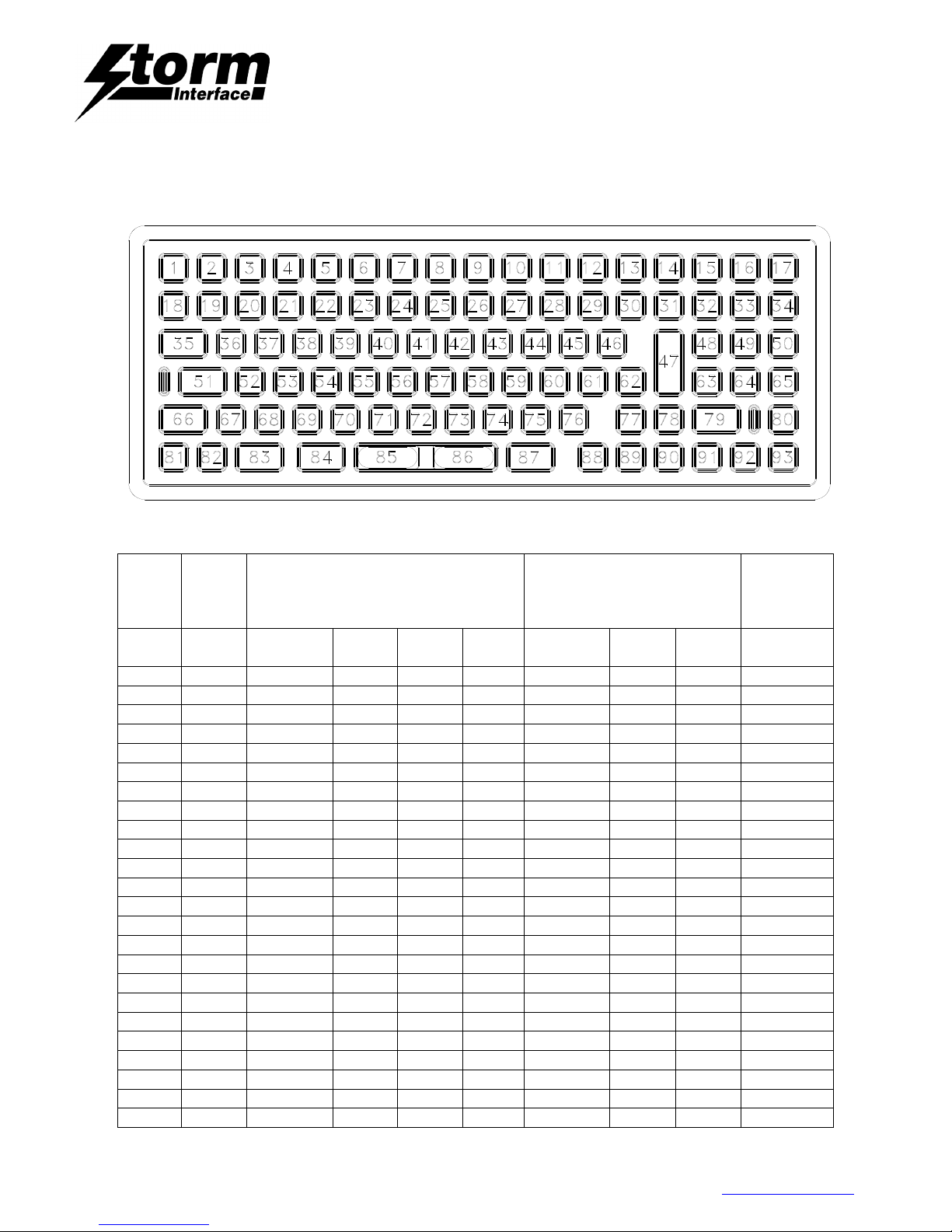
2230 Positions and Codes
Key
Position.
Row /
Column
2230
UK Layout.
2230
US Layout.
PC/AT
Code
(Code Set 2)
Base
Shifted
Ctrl+Alt
Num
Lock
Base
Shifted
Num
Lock
1
R0C0
Escape
Escape
76
2
R0C1
F1 F1
05
3
R0C2
F2 F2
06
4
R0C3
F3 F3
04
5
R0C4
F4 F4
0C
6
R0C5
F5 F5
03
7
R0C6
F6 F6
0B
8
R0C7
F7 F7
83
9
R0C8
F8 F8
0A
10
R0C9
F9 F9
01
11
R0C10
F10 F10
09
12
R0C11
F11 F11
78
13
R0C12
F12 F12
07
14
R3C0
Print Scrn
Print Scrn
E0,2F
15
R0C13
Home 7 Home
7 6C
16
R0C14 ↑ 8 ↑ 8 75
17
R0C15
Pg Up 9 Pg Up
9 7D
18
R1C0 ` ¬ ¦ ‘ ~ 0E
19
R1C1 1 ! 1 ! 16
20
R1C2 2 “ 2 @ 1E
21
R1C3 3 £ 3 # 26
22
R1C4 4 $ 4 $ 25
23
R1C5 5 % 5 % 2E
24
R1C6 6 ^ 6 ^ 36
Page 21
2200 Keyboard for Public Environments
Technical Manual
The content of this communication and/or document, including but not limited to images, specifications, designs, concepts and information is
confidential and is not to be used for any purpose or disclosed to a third party without the express and written consent of Keymat Technology Ltd.,
Copyright 2017. All rights reserved.
2200 Series Technical Manual Rev 2 May 2017.docx www.storm-interface.com
Page 21 of 23
Key
Position.
Row /
Column
2230
UK Layout.
2230
US Layout.
PC/AT
Code
(Code Set 2)
Base
Shifted
Ctrl+Alt
Num
Lock
Base
Shifted
Num
Lock
25
R1C7 7 & 7 & 3D
26
R1C8 8 * 8 * 3E
27
R1C9 9 ( 9 ( 46
28
R1C10 0 ) 0 ) 45
29
R1C11 - _ - _ 4E
30
R1C55 = + = + 55
31
R3C12
Backspace
Backspace
66
32
R1C13 ← 4 ← 4 6B
33
R1C14 5 5 73
34
R1C15 → 6 → 6 74
35
R2C0
Tab Tab
0D
36
R2C1 q Q q Q 15
37
R2C2 w W w W 1D
38
R2C3 e E e E 24
39
R2C4 r R r R 2D
40
R2C5 t T t T 2C
41
R2C6 y Y y Y 35
42
R2C7 u U u U 3C
43
R2C8 i I i I 43
44
R2C9 o O o O 44
45
R2C10 p P p P 4D
46
R2C11 # ~ \ | 5D
47
R4C12
Enter Enter
5A
48
R2C13
End 1 End 1
69
49
R2C14 ↓ 2 ↓ 2 72
50
R2C15
Pg Dn 3 Pg Dn
3 7A
51
R4C0
Caps Caps
58
52
R3C1 a A a A 1C
53
R3C2 s S s S 1B
54
R3C3 d D d D 23
55
R3C4 f F f F 2B
56
R3C5 g G g G 34
57
R3C6 h H h H 33
58
R3C7 j J j J 3B
59
R3C8 k K k K 42
60
R3C9 l L l L 4B
61
R3C10 ; : ; : 4C
62
R3C11 ‘ @ ‘ “ 52
63
R3C13 + + 79
64
R3C14
Ins 0 Ins 0
70
65
R2C12
Del . Del .
71
66
R4C14
Lt Shift
Lt Shift
12
67
R4C1 \ | \ | 61
68
R4C2 z Z z Z 1A
69
R4C3 x X x X 22
Page 22
2200 Keyboard for Public Environments
Technical Manual
The content of this communication and/or document, including but not limited to images, specifications, designs, concepts and information is
confidential and is not to be used for any purpose or disclosed to a third party without the express and written consent of Keymat Technology Ltd.,
Copyright 2017. All rights reserved.
2200 Series Technical Manual Rev 2 May 2017.docx www.storm-interface.com
Page 22 of 23
Key
Position.
Row /
Column
2230
UK Layout.
2230
US Layout.
PC/AT
Code
(Code Set 2)
Base
Shifted
Ctrl+Alt
Num
Lock
Base
Shifted
Num
Lock
70
R4C4 c C c C 21
71
R4C5 v V v V 2A
72
R4C6 b B b B 32
73
R4C7 n N n N 31
74
R4C8 m M m M 3A
75
R4C9 , < , < 41
76
R4C10 . > . > 49
77
R7C10 ↑ ↑ E0,75
78
R4C11 / ? / ? 4A
79
R5C14
Rt Shift
Rt Shift
59
80
R5C11
Num Lock
Num Lock
77
81
R5C0 [ { [ { 54
82
R5C1 ] } ] } 5B
83
R5C10
Lt Control
Lt Control
14
84
R6C13
Lt Alt Lt Alt
11
85
R5C5
Space Space
29
86
R5C6
Space Space
29
87
R7C13
Alt Gr Alt Gr
E0,11
88
R7C9 ← ← E0,6B
89
R7C11 ↓ ↓ E0,72
90
R7C12 → → E0,74
91
R5C10
Rt Control
Rt Control
E0,27
92
R6C15
www. www.
1D,1D,1D,49
93
R7C15
.com .com
49,21,44,3A
Release Codes.
The PC/AT release code for each key is the Scan Code preceded by H’F0. Example: Q – H’F0’, H’15.
Exception: Keys with Scan Codes starting with H’E0, the release code sequence (for example LEFT
ARROW) is as follows: H’E0’, H’F0’,H’6B.
Page 23

2200 Keyboard for Public Environments
Technical Manual
The content of this communication and/or document, including but not limited to images, specifications, designs, concepts and information is
confidential and is not to be used for any purpose or disclosed to a third party without the express and written consent of Keymat Technology Ltd.,
Copyright 2017. All rights reserved.
2200 Series Technical Manual Rev 2 May 2017.docx www.storm-interface.com
Page 23 of 23
Change History
Version
Date
Description of Change
Author
2
May 2017
Review and update to current range
RG
 Loading...