

Page 1
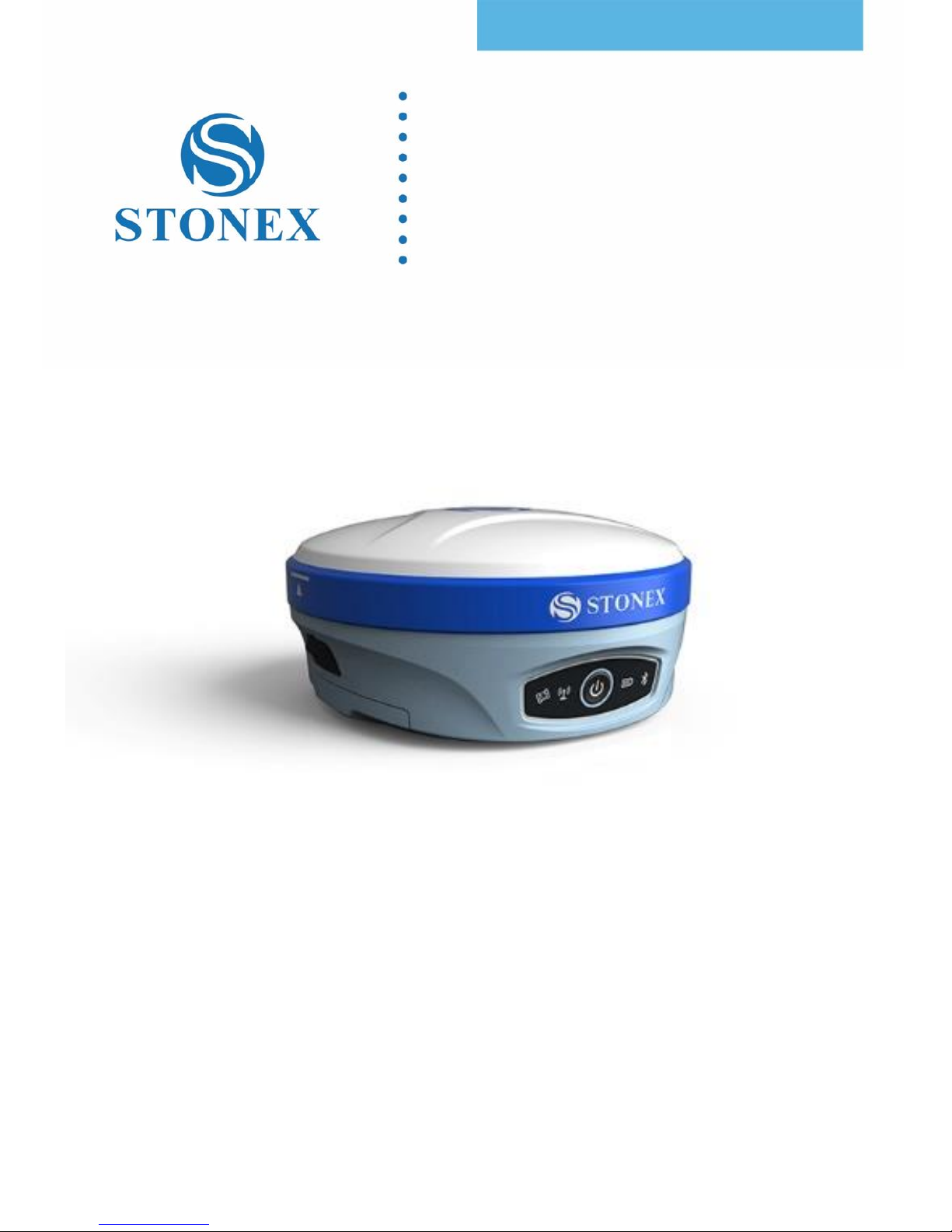
STONEX S900
GNSS Receiver
User Manual
(May 2018)-Ver.1-Rev.0
www.stonex.it
Page 2

Stonex S900 GNSS Receiver – User Manual 1
Contents
Introduction .................................................................................................................... 2
1.1 Receiver appearance .......................................................................................................................... 2
1.2 Interfaces ................................................................................................................................................ 3
1.3 Control panel ........................................................................................................................................ 3
2. Web User Interface.............................................................................................................. 5
2.1 Status ....................................................................................................................................................... 6
2.2 Settings ................................................................................................................................................... 7
2.3 Download ............................................................................................................................................... 8
2.4 Management ......................................................................................................................................... 9
2.4.1 Install new firmware ..................................................................................................................... 10
2.4.2 Device register ............................................................................................................................... 10
3. Basic operation .................................................................................................................. 11
3.1 Model view and switch ................................................................................................................... 11
3.2 Receiver self-check........................................................................................................................... 11
3.3 Install TF card and SIM card .......................................................................................................... 12
3.4 Power off the receiver ..................................................................................................................... 13
4. Accessories ......................................................................................................................... 14
4.1 Transport container ......................................................................................................................... 14
4.2 Battery and adapter ......................................................................................................................... 15
4.3 UHF antenna ...................................................................................................................................... 16
4.4 7-pin serial cable .............................................................................................................................. 16
5. Technical specification ...................................................................................................... 17
Appendix 1 ............................................................................................................................. 19
Default radio configuration ................................................................................................. 19
Appendix 2 ............................................................................................................................. 19
Copyrights, warranty and environmental recycling .......................................................... 19
Copyrights and trademarks .................................................................................................................. 20
Release Notice .......................................................................................................................................... 20
Standard Limited Warranty .................................................................................................................. 20
Shipping policy ......................................................................................................................................... 21
Return policy Dead On Arrival instruments. ................................................................................... 21
Firmware/Software warranty. ............................................................................................................... 22
Over Warranty repair(s) policy. ........................................................................................................... 22
Disclaimer and Limitation of Remedy. .............................................................................................. 23
Instruments ................................................................................................................................................ 24
Accessories ................................................................................................................................................ 24
Service Procedure .................................................................................................................................... 24
Environmental recycling ........................................................................................................................ 25
For countries in the European union (EU) ....................................................................................... 25
For countries outside European Union (EU) ................................................................................... 26
Appendix 4 ............................................................................................................................. 27
Safety Recommendations ..................................................................................................... 27
Page 3
Stonex S900 GNSS Receiver – User Manual 2
Introduction
This document is user guide for S900, S900A, and S900T GNSS receiver,
which are diverse in the internal configuration and appearance color. It is
intended to introduce how to use the receivers correctly.
1.1 Receiver appearance
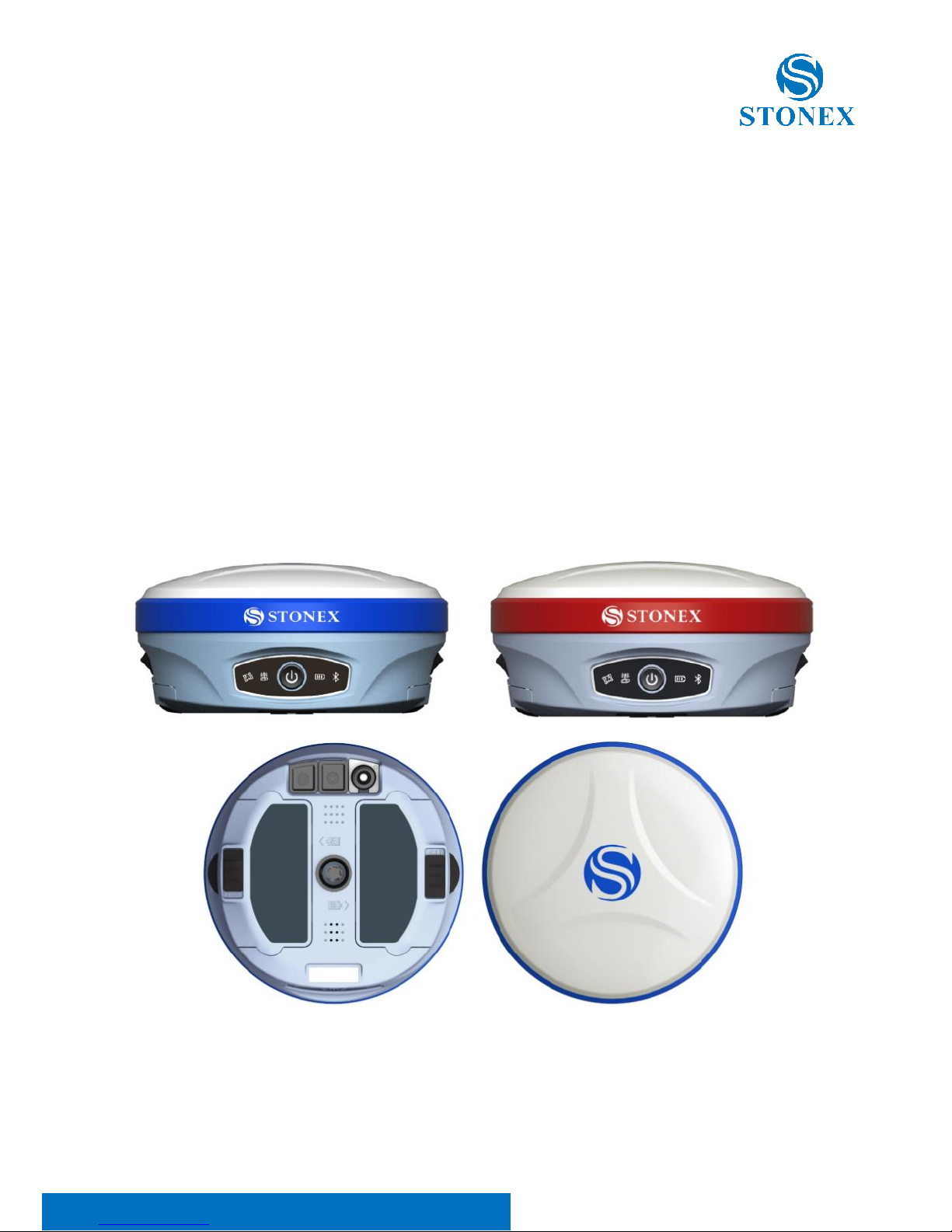
The S900 series receiver is cylindrical with a diameter of 156mm, a height of
76mm and a weight of 1.2kg. The front side of the receiver is control panel,
which consists of a power button and four indicators. The bottom are
interfaces of UHF antenna and cables. PUSH buttons on both sides of the
receiver are used to open the bottom battery cover.
Figure 1.1 S900 series receiver
Page 4
Stonex S900 GNSS Receiver – User Manual 3
1.2 Interfaces
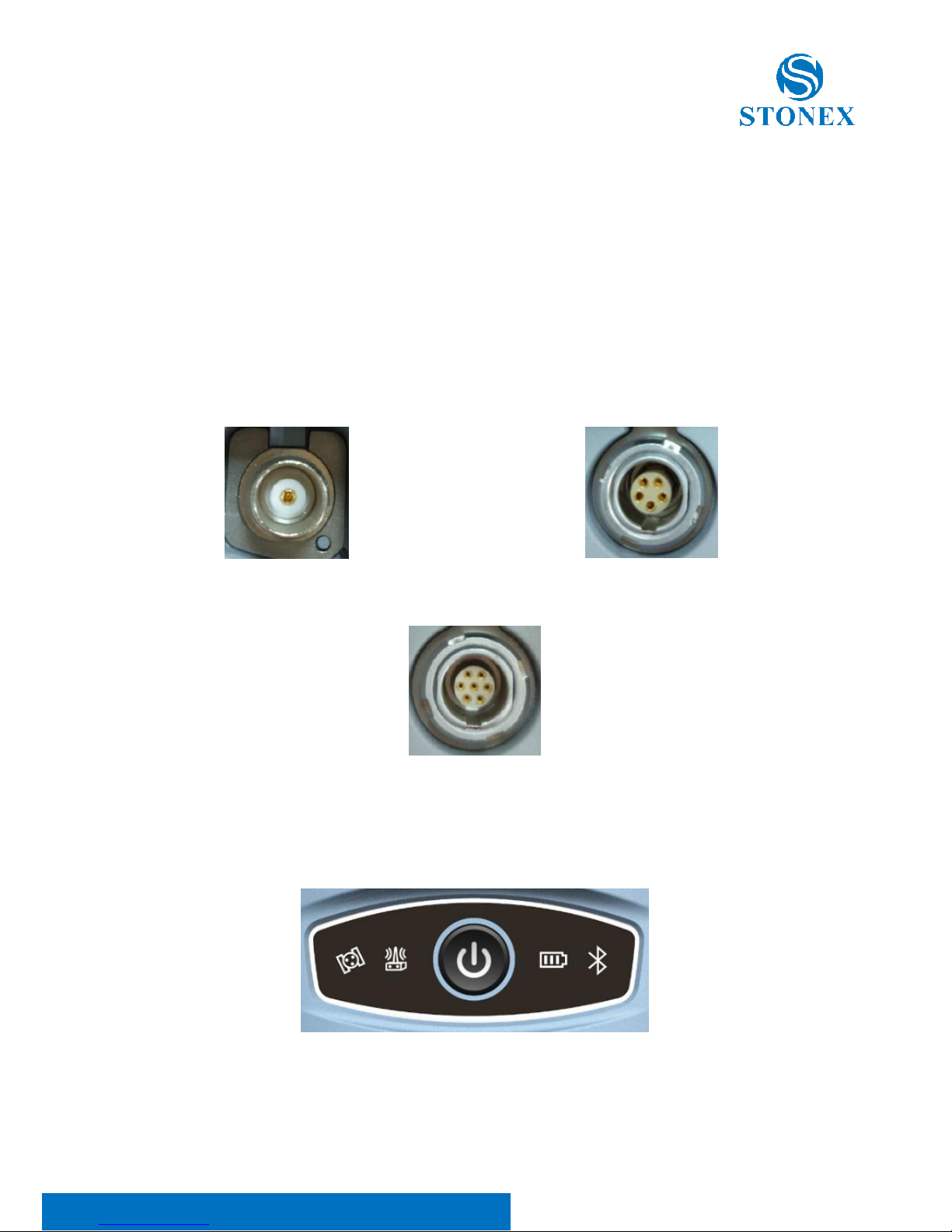
The bottom interface of the instrument is shown below, and the protective
plug covered on it is used for the dustproof and waterproof of the external
interface. The TNC connector is used to connect to the built-in radio
antenna. The five-pin LEMO connector is used to connect external power
supply or external radio. The seven-pin LEMO connector is used for data
communication (data communication between the receiver and the
computer and the handbook).
Figure 1.2.1 UHF interface Figure 1.2.2 5pin LEMO interface
Figure 1.2.3 7pin LEMO interface
1.3 Control panel
The control panel is showed in Figure 1.3.1.
Figure 1.3.1 control panel
Page 5
Stonex S900 GNSS Receiver – User Manual 4
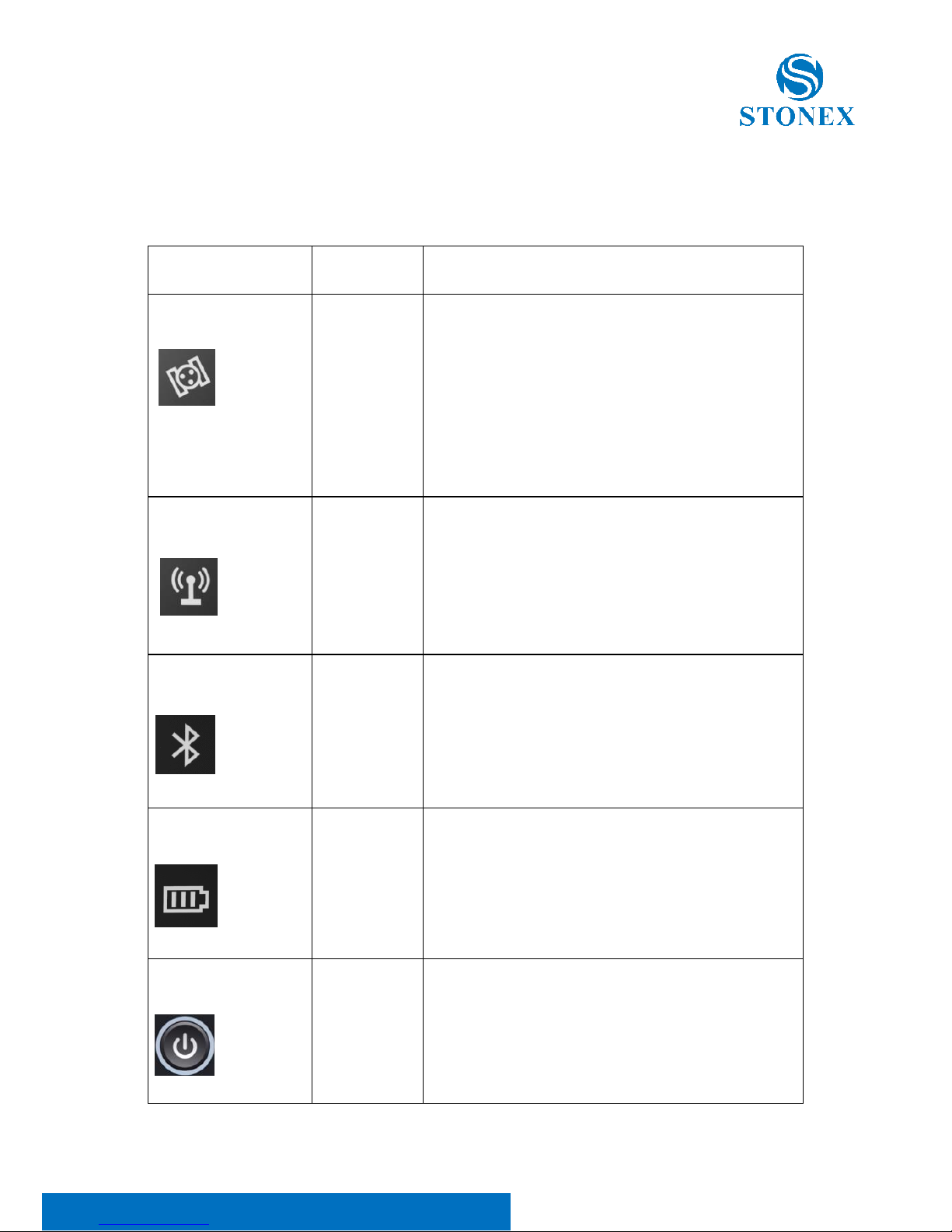
The function of power button and the LED indicators are shown in Table 1.
Table 1 Function description
Indicators/Button
Color
Description
Satellite led
Red and
green
Off:No receiving satellites;
red flash: receiving satellites but no
solution status.
Green flash: having a solution status
but no fix.
green: fix.
Red and green flashes alternately:
GNSS mainboard abnormal.
Data link led
Green and
blue
green: datalink set up completely.
green flash: data transmission
normally.
Blue flash: under the static mode, the
blue led flash according to the
sampling intervals.
Bluetooth led
Blue
Off: no Bluetooth connection to
device.
Blue: Bluetooth connection to device.
Power led
Red and
green
Green: power between 30% -100%;
Green flash: power between 10%-
%30%;
Red: power below 10%.
Power button
/
Used to turn on and off the receiver.
Short press to broadcast the current
working mode and status.
Page 6

Stonex S900 GNSS Receiver – User Manual 5
2. Web User Interface
S900 receiver has Web UI functionality. By getting access to its internal
hotspot, you can easily manage it on the Web UI. As long as you have a
smart phone, PC or handheld with WIFI functionality, you can easily connect
to the S900 receiver to view status, download data and configure the
receiver.
S900 receiver is default to open WIFI automatically when it’s powered on.
Use smart phone/PC/handheld to search the receiver hotspot, whose name is
its serial number, and connect it. (Receiver WIFI only supports getting access
to Web UI to check status and set up mode, not for Internet connection.)
After connecting to the S900 receiver WIFI, open the browser and enter
“192.168.10.1” in IP address. A window pops up and asks for user name and
password. The default user name and password are: admin; password.
And then you can login the Web UI of S900 receiver.
Page 7
Stonex S900 GNSS Receiver – User Manual 6
2.1 Status
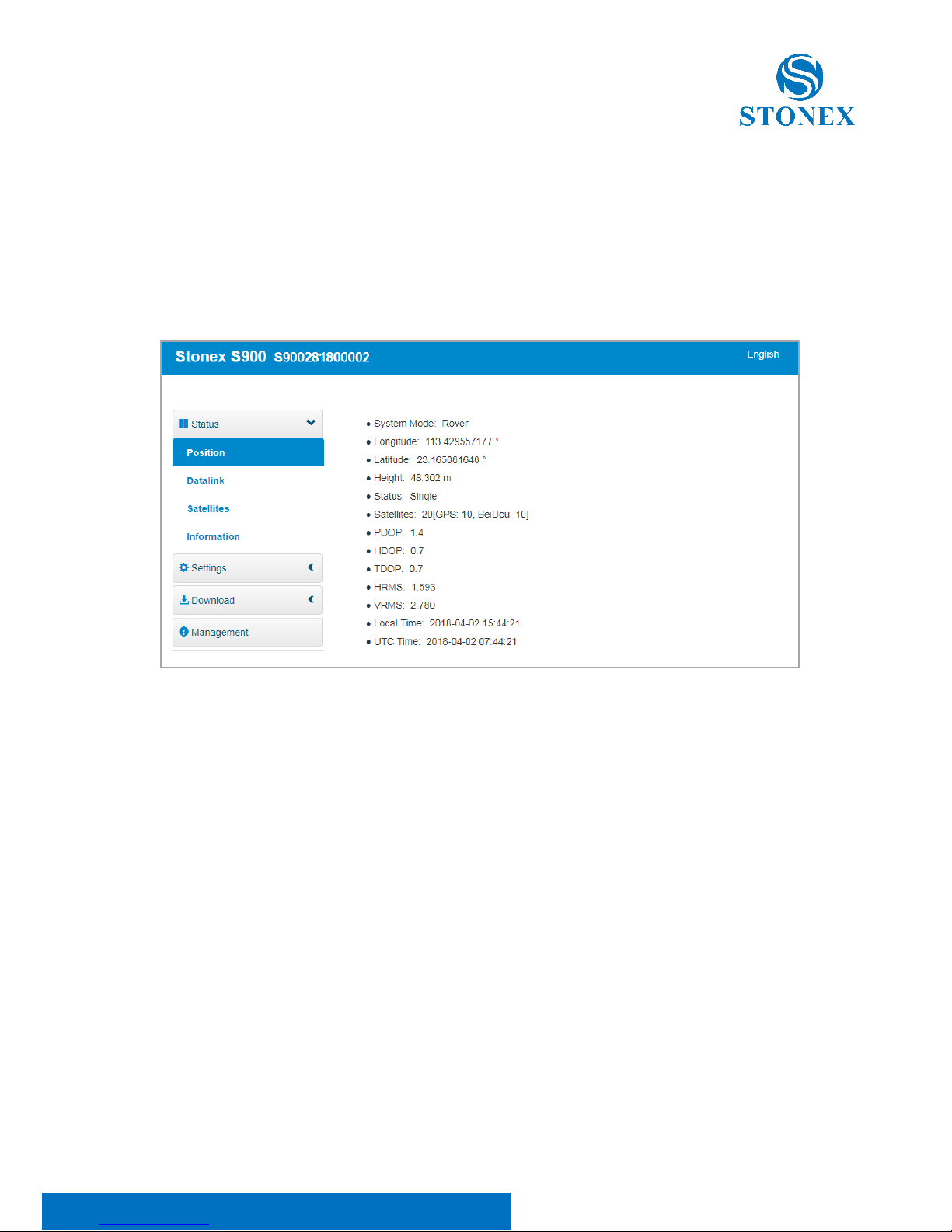
The status page displays the current state of S900 receiver, including position
information, data link status, satellite charts, and instrumentation
information. Click on a module to display its details, as shown in figure 2.1.1.
Figure 2.1.1 position status page
Page 8
Stonex S900 GNSS Receiver – User Manual 7
2.2 Settings
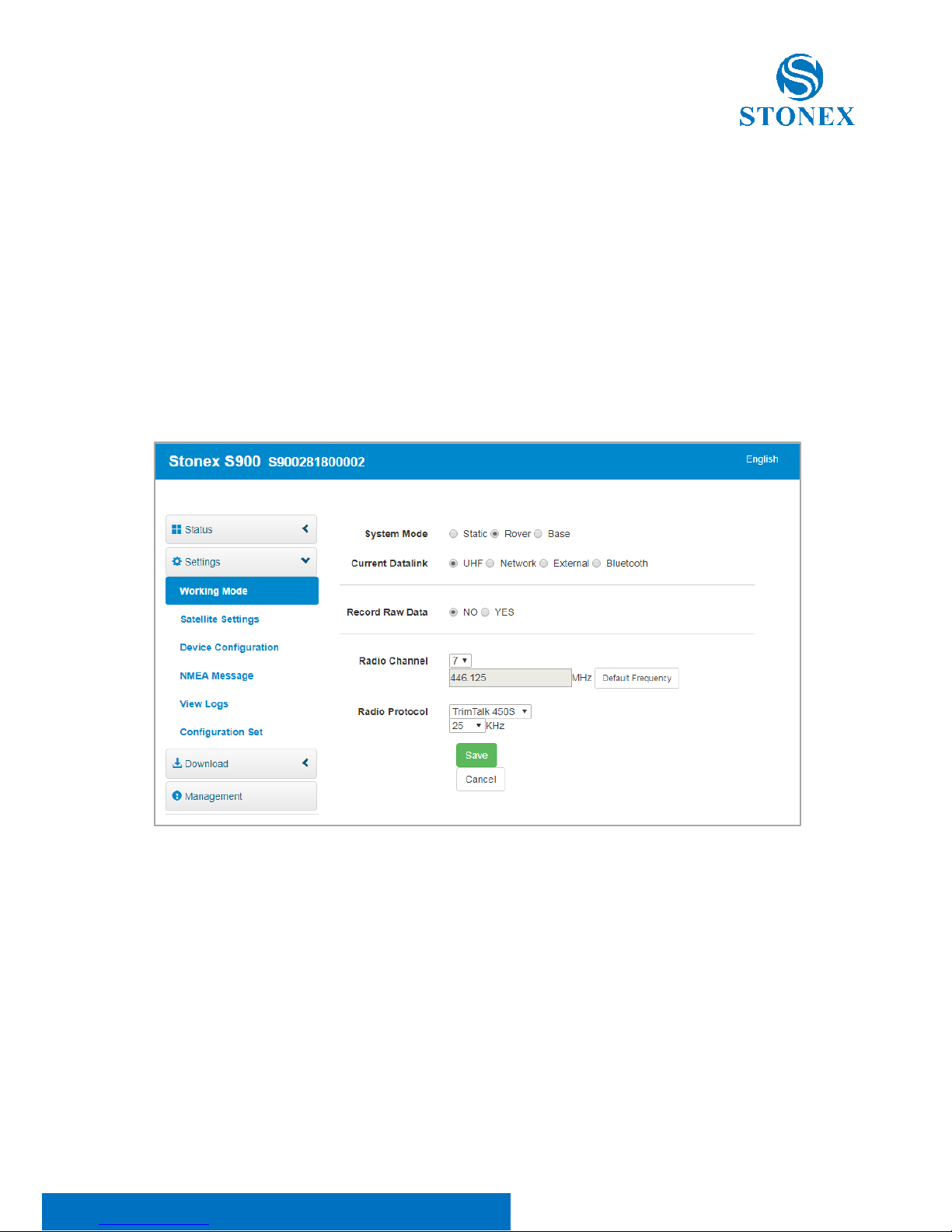
The Settings page includes working mode, satellite Settings, device
configuration, NMEA messages, view logs, and configuration sets. You can
set the host mode, satellite system, system parameters, and NMEA message.
And you can view and download the logs as well. Also you could upload,
download, delete and apply the related configuration. Click on a module to
display its details, as shown in figure 2.2.1.
Figure 2.2.1 setting page
Page 9
Stonex S900 GNSS Receiver – User Manual 8
2.3 Download
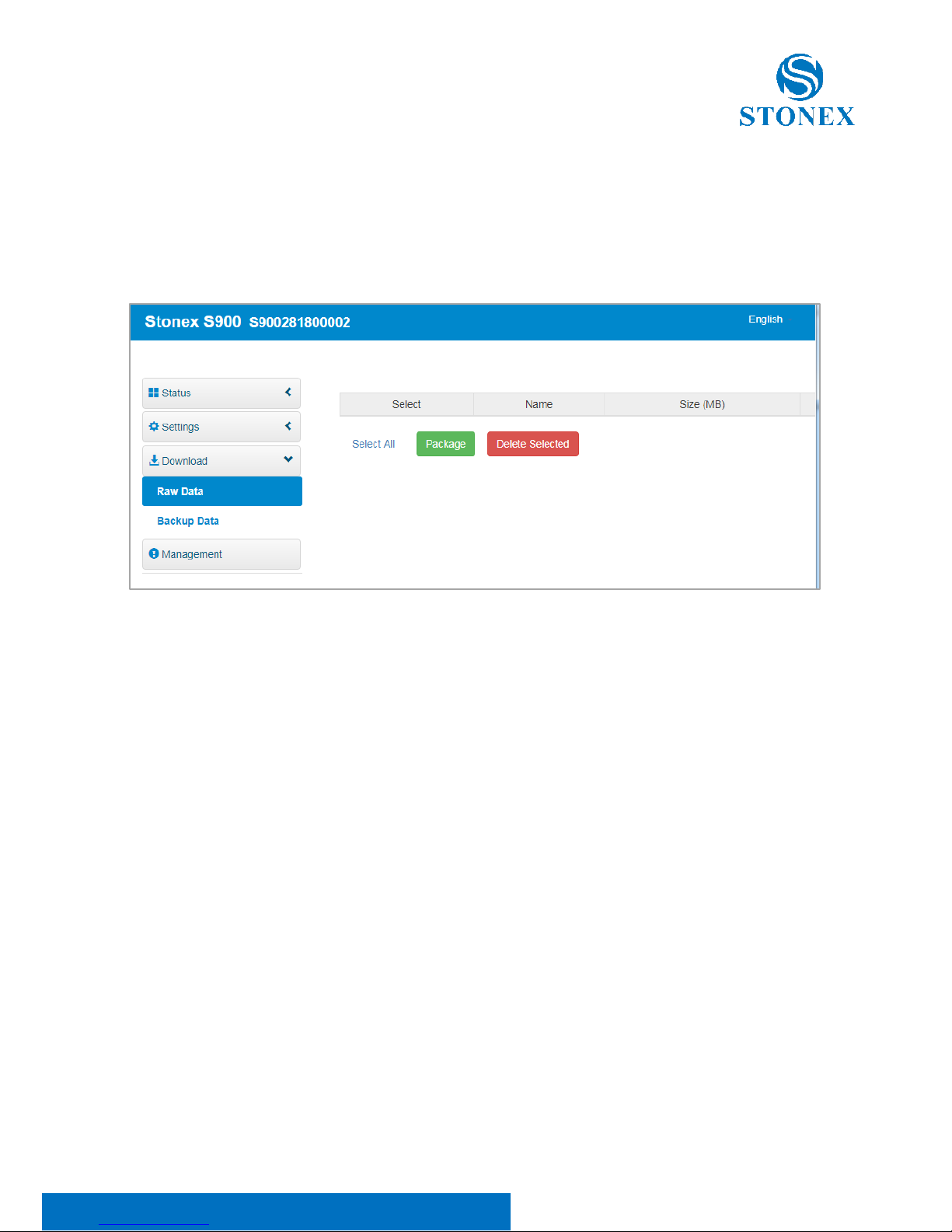
The download page provides downloads of raw data and backup data. Click
on a module to display its details, as shown in figure 2.3.1.
Figure 2.3.1 download page
Page 10
Stonex S900 GNSS Receiver – User Manual 9
2.4 Management
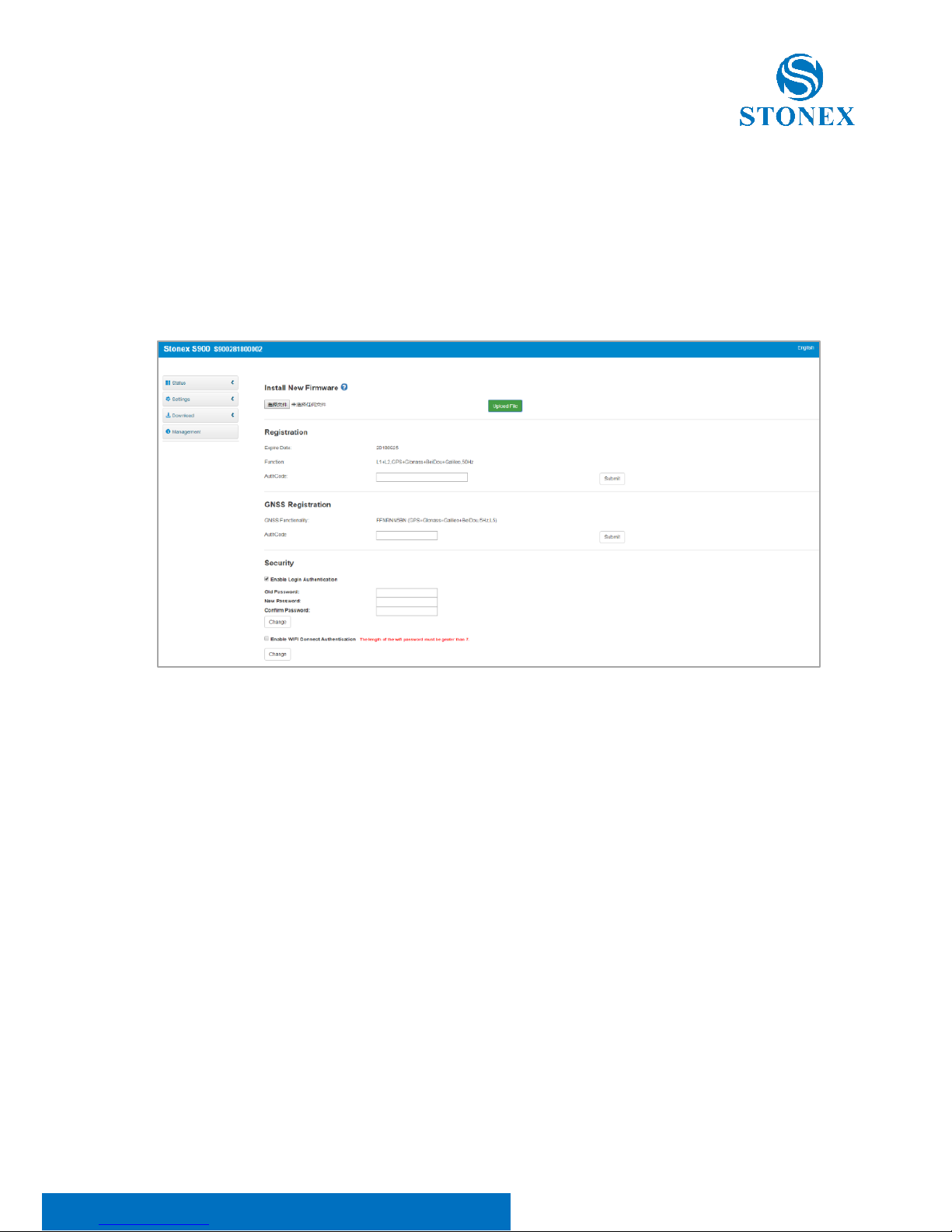
In this page, the user can upgrade the firmware, register the device, modify
the login password, format the instrument disk, self-check, restore the
factory Settings, restart equipment and other operations, as shown in figure
2.4.1.
Figure 2.4.1 management page
Page 11

Stonex S900 GNSS Receiver – User Manual 10
2.4.1 Install new firmware
In the management of the WEB UI page, you can see that “online update”,
click “browse”, select the required to upgrade the firmware, click the “upload
document”, system will restart to upgrade. After the upgrade, you can view
the current “firmware version” on the “instrument information” page.
2.4.2 Device register
The register code consists of 32 digits and letters. You can register the device
via WEB UI. The detailed steps are shown as followed:
In management page, you can see “registration”. Input register code and
click submit, and then registration is done. After registration, you can check
the expiration time of current registration in the page.
You can also register device via controller. Open Cube-a software on the
handheld and connect the receiver. Click “About” - “Register instrument”,
then input code and registration is done.
Page 12

Stonex S900 GNSS Receiver – User Manual 11
3. Basic operation
3.1 Model view and switch
a. Model view
When receiver is powered on, short press the power button and then it will
voice broadcast the current working mode and data link.
b. Model switch
When the receiver is powered on, connect it with handheld or other
instruments so as to set up and switch the working mode of receiver. See
detailed operation procedures in Cube-a Software(V3.0) User Manual.
3.2 Receiver self-check
Self-check functionality is to check whether every module works normally.
When S900 receiver has indicators off or module doesn’t work normally, you
can use self-check to inspect the receiver. S900 self-check consists of six
parts, namely GPS, radio, network, WIFI, Bluetooth, and sensor. The selfcheck results will be voice broadcasted in the process. Self-check operation
and result broadcast are as followed:
a) When receiver is powered on, press power button and hold it until the
receiver voice broadcasts “power off”. Press it again until the receiver
sounds a beep and voice broadcasts “self-check”, which means the
receiver starts to operate self-check. (New receiver is recommended to
operate self-check at least once.)
b) In the process of self-check, each module inspection is followed by its
inspection result. If the module inspection passes, it will voice broadcast
“OK” and module led keeps on until the whole self-check finishes. If the
module inspection fails, it will voice broadcast current module
inspection fail, keep module led flashing and buzzer sounding until you
Page 13
Stonex S900 GNSS Receiver – User Manual 12
restart the receiver. Self-check lasts for about 1 minute. If there is selfcheck failure, please contact local dealer.
c) If every module indicator is lit with no flashing, and voice broadcast
says every module work normally (such as “GPS self-check. OK.”), it
means all the modules work normally. Receiver starts to work after the
whole self-check finishes.
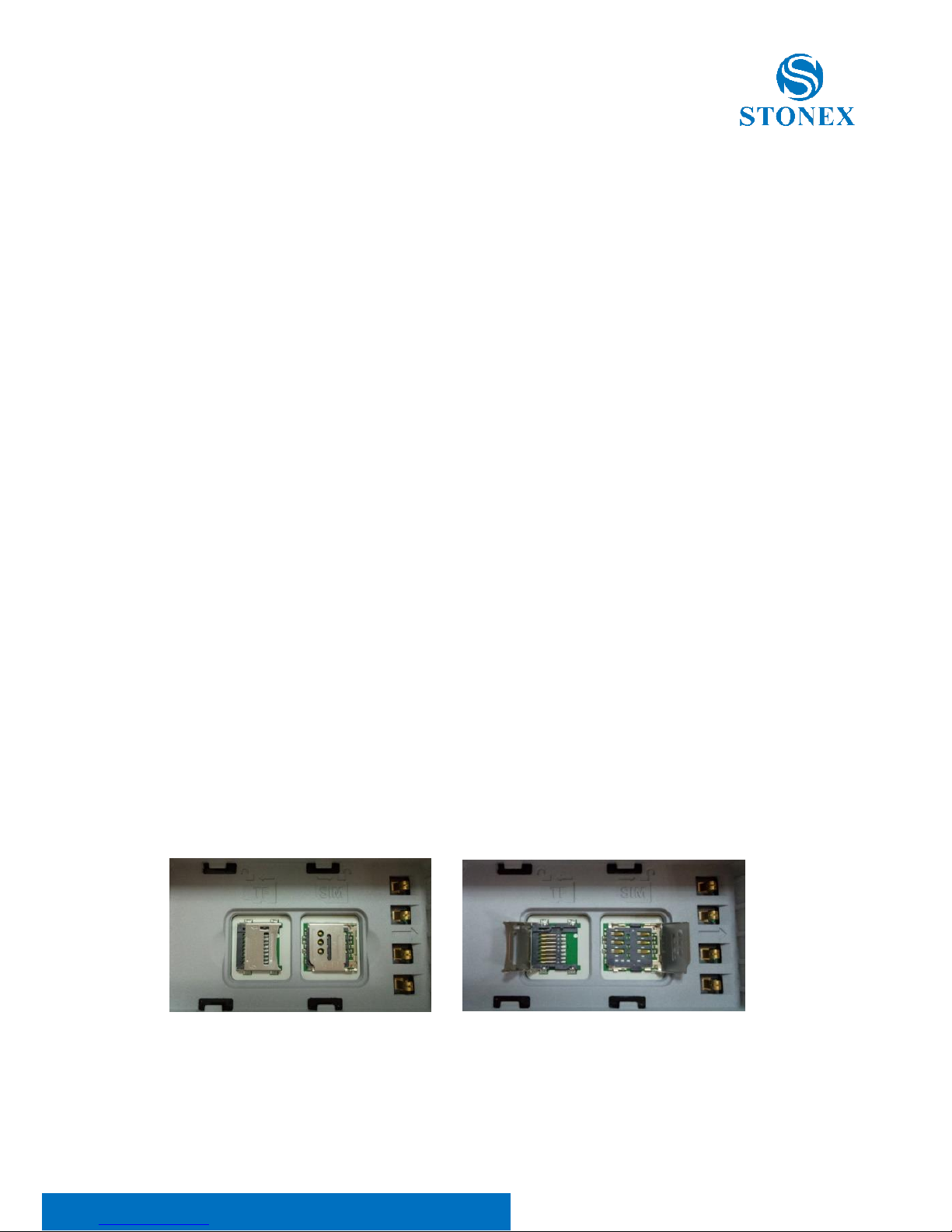
3.3 Install TF card and SIM card
The bottom of receiver is left and right battery slot, which are marked by
arrow A and arrow B respectively. Both the TF card and the SIM card slot are
inside the battery slot pointed by arrow A.
Replace procedure of TF card and SIM card:
(1) Push the bottom slide lock in the direction of arrow A. Press the
corresponding direction PUSH key on the side of the receiver, and open the
battery cover.
(2) Remove the battery and you will see the SIM card and TF card slot at the
bottom of the battery slot.
(3) Push the upper cover of the card slot outward in the direction of the
arrow above the card slot to open the card slot, put the SIM card or TF card
into the card slot (the same direction as the icon), cover the card slot cover.
Open the upper cover in the arrow direction , then install or uninstall the TF
or SIM card(card shape is same as the above mark).
Figure 3.3.1 TF/ SIM card slot
Page 14

Stonex S900 GNSS Receiver – User Manual 13
3.4 Power off the receiver
When the receiver is powered on, press power button and hold it until the
receiver voice broadcast “power off”, short press the power button again,
then the receiver is powered off.
Page 15
Stonex S900 GNSS Receiver – User Manual 14
4. Accessories
4.1 Transport container
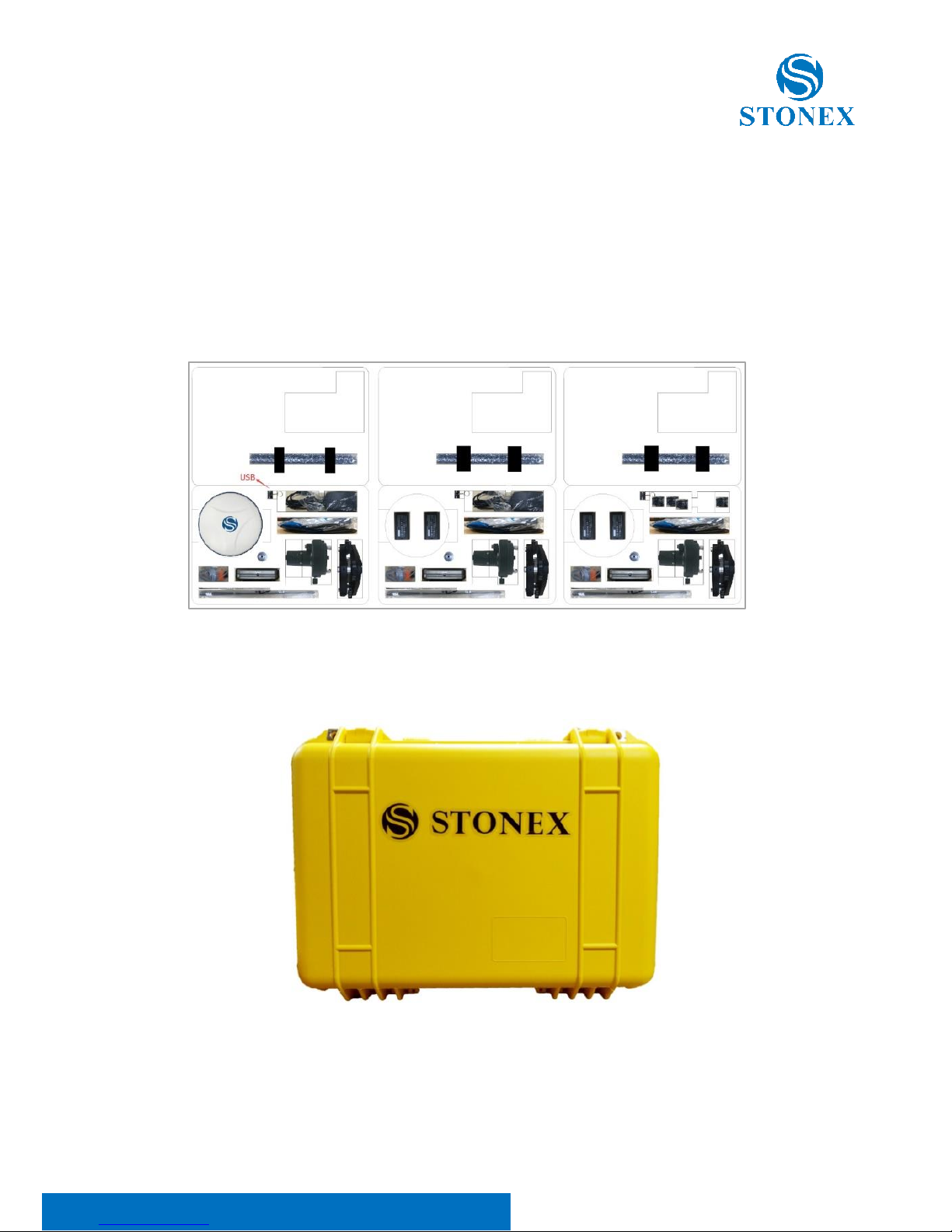
There is no difference between the base and the rover container. The internal
layout of the container is showed as figure 4.1.1.
Figure 4.1.1 internal layout of container
The external appearance of the container is shown as figure 4.1.2.
Figure 4.1.2 external appearance of container
Page 16
Stonex S900 GNSS Receiver – User Manual 15
4.2 Battery and adapter
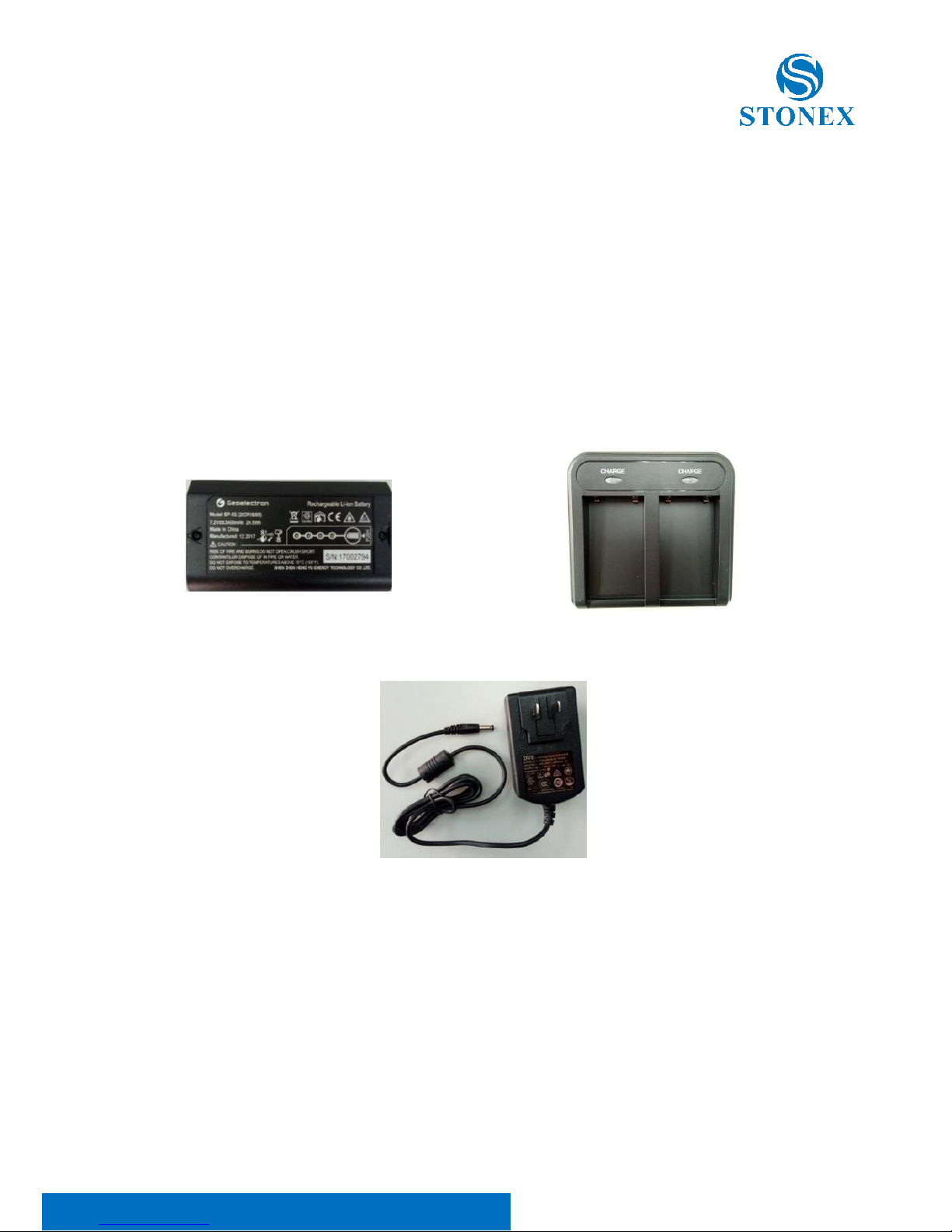
S900 series receiver use detachable dual battery to charge. You can gently
press the bottom button to know the current battery power according to the
four lights (power between 75%-100% with all four lights lit; power below
25% with only one light lit). Charging for lithium-ion battery lasts for 4 hours.
Using charger can simultaneously charge two batteries. The charger indicator
is lit red when charging, and turns green after charging completes.
Figure 4.2.1 BP-5S battery Figure 4.2.2 CH-04 charger
Figure 4.2.3 DSA-40CA-12 adapter
Page 17
Stonex S900 GNSS Receiver – User Manual 16
4.3 UHF antenna
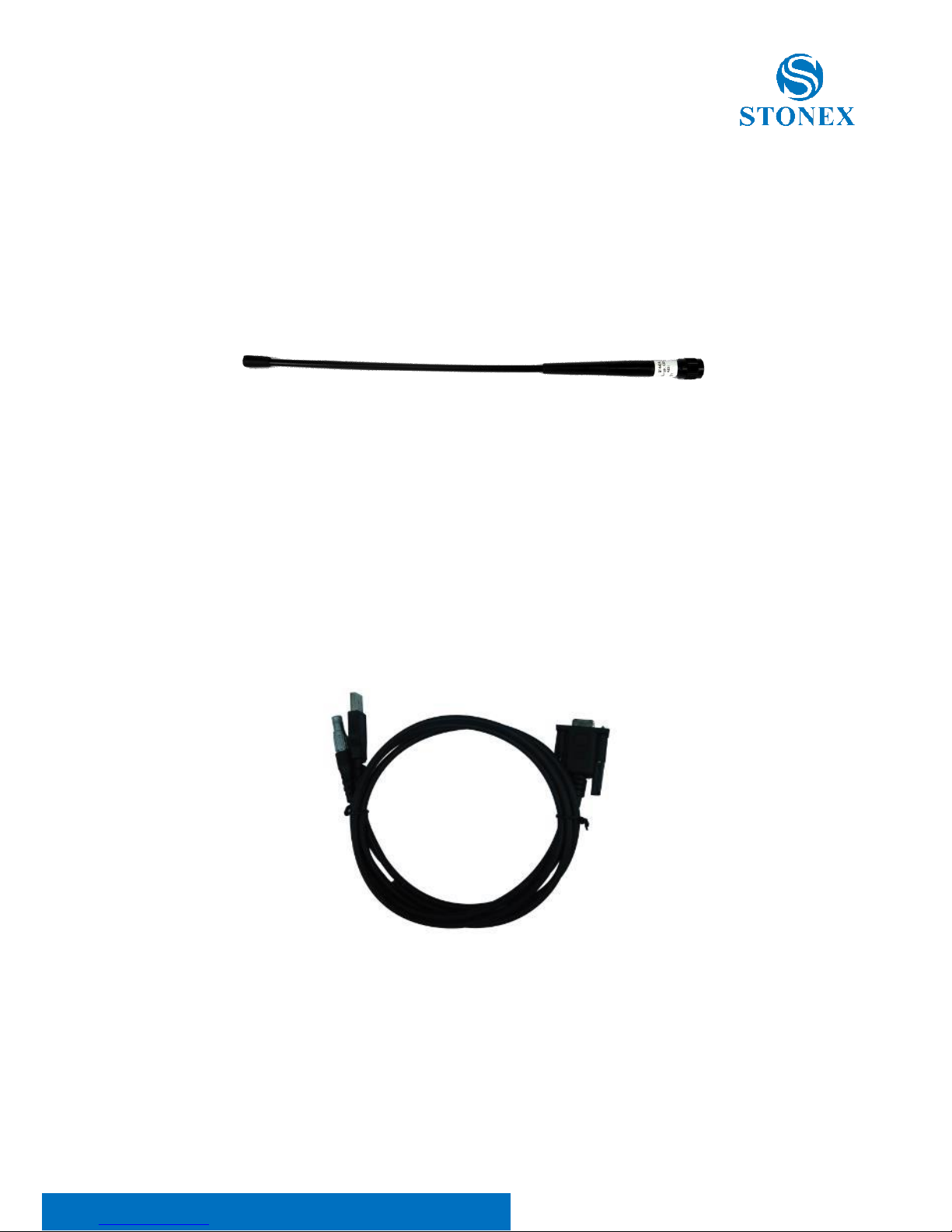
When receiver is in internal radio mode, UHF antenna (as illustrated in Figure
4.3.1) is in need.
Figure 4.3.1 QT440A UHF antenna
4.4 7-pin serial cable
One end of the 7-pin serial cable, the 7-pin serial port, is to connect the
receiver, and the other end of the cable, the USB and the DB9 interface are
for data communication respectively with PC and handheld as illustrated in
Figure 4.4.1.
Figure 4.4.1 7-pin serial cable
Page 18
Stonex S900 GNSS Receiver – User Manual 17
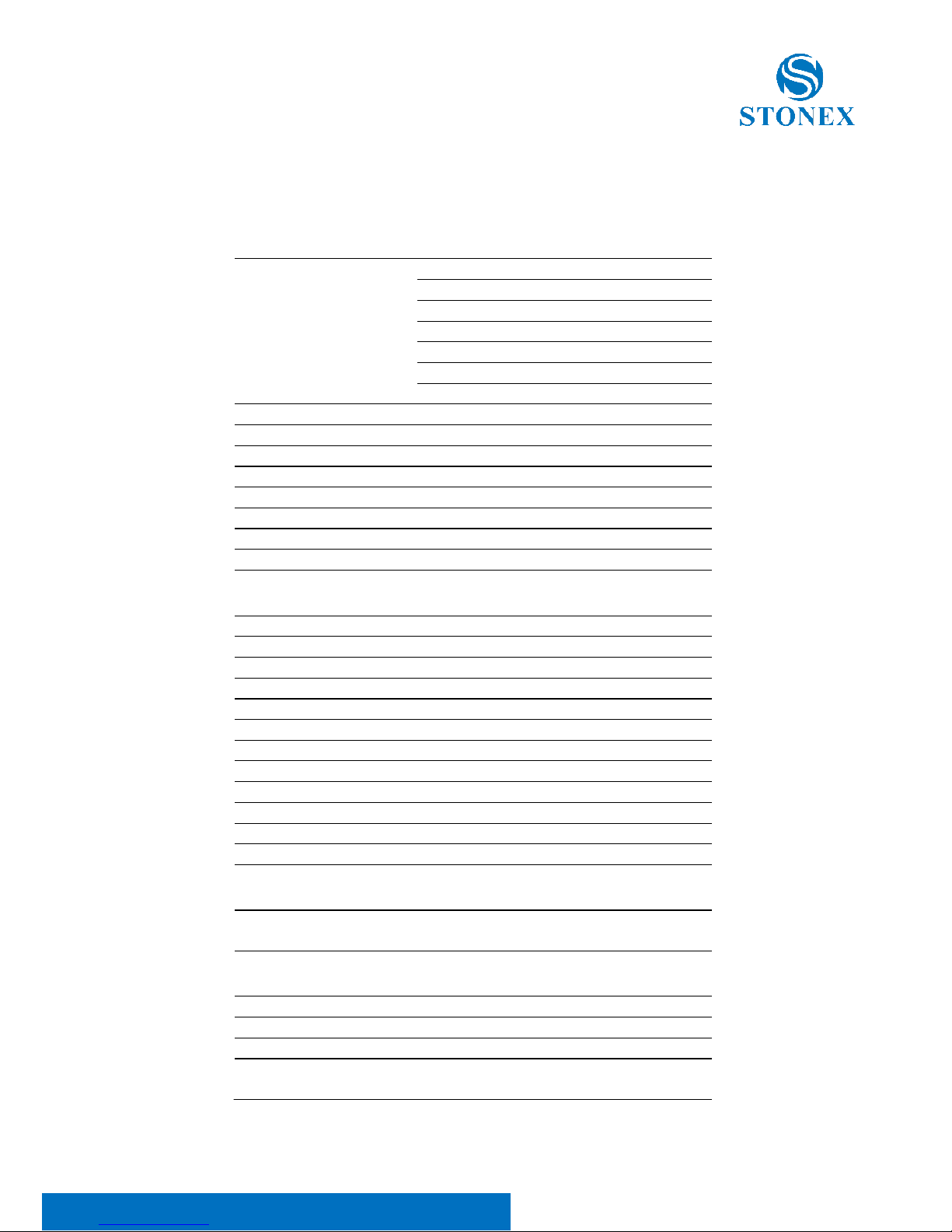
5. Technical specification
RECEIVER
Satellite Tracked
GPS: L1 C/A, L1C, L2C, L2P, L5
GLONASS: L1 C/A, L2C, L2P, L3, L5
BEIDOU: B1, B2, B3
GALILEO: E1, E5a, E5b, E5 AltBOC, E6
QZSS: L1 C/A, L1C, L2C, L5, L6
IRNSS: L5
SBAS: L1, L5
Channels
555
Position Rate
5 Hz
Signal Reacquisition
< 1 sec
RTK Signal Initialization
Typically < 10 sec
Hot Start
Typically < 15 sec
Initialization Reliability
> 99.9 %
Internal Memory
8 GB
Micro SD Card
Expansion slot up to 32 GB
POSITIONING
1
HIGH PRECISION STATIC SURVEYING
Horizontal
2.5 mm + 0.1 ppm RMS
Vertical
3.5 mm + 0.4 ppm RMS
CODE DIFFERENTIAL POSITIONING
Horizontal
0.25 m RMS
Vertical
0.45 m RMS
SBAS POSITIONING2
Horizontal
0.30 m RMS
Vertical
0.60 m RMS
REAL TIME KINEMATIC (< 30 Km) – NETWORK SURVEYING3
Fixed RTK Horizontal
8 mm + 1 ppm RMS
Fixed RTK Vertical
15 mm + 1 ppm RMS
INTEGRATED GNSS ANTENNA
High accuracy four constellation micro-strip antenna, zero phase
center, with internal multipath suppressive board
INTERNAL RADIO
Type
Tx - Rx
Frequency Range
410 - 470 MHz
Channel Spacing
12.5 KHz / 25 KHz
Maximum Range
3-4 Km in urban environment
Up to 10 Km with optimal conditions4
Page 19
Stonex S900 GNSS Receiver – User Manual 18
Specifications are subject to change without notice.
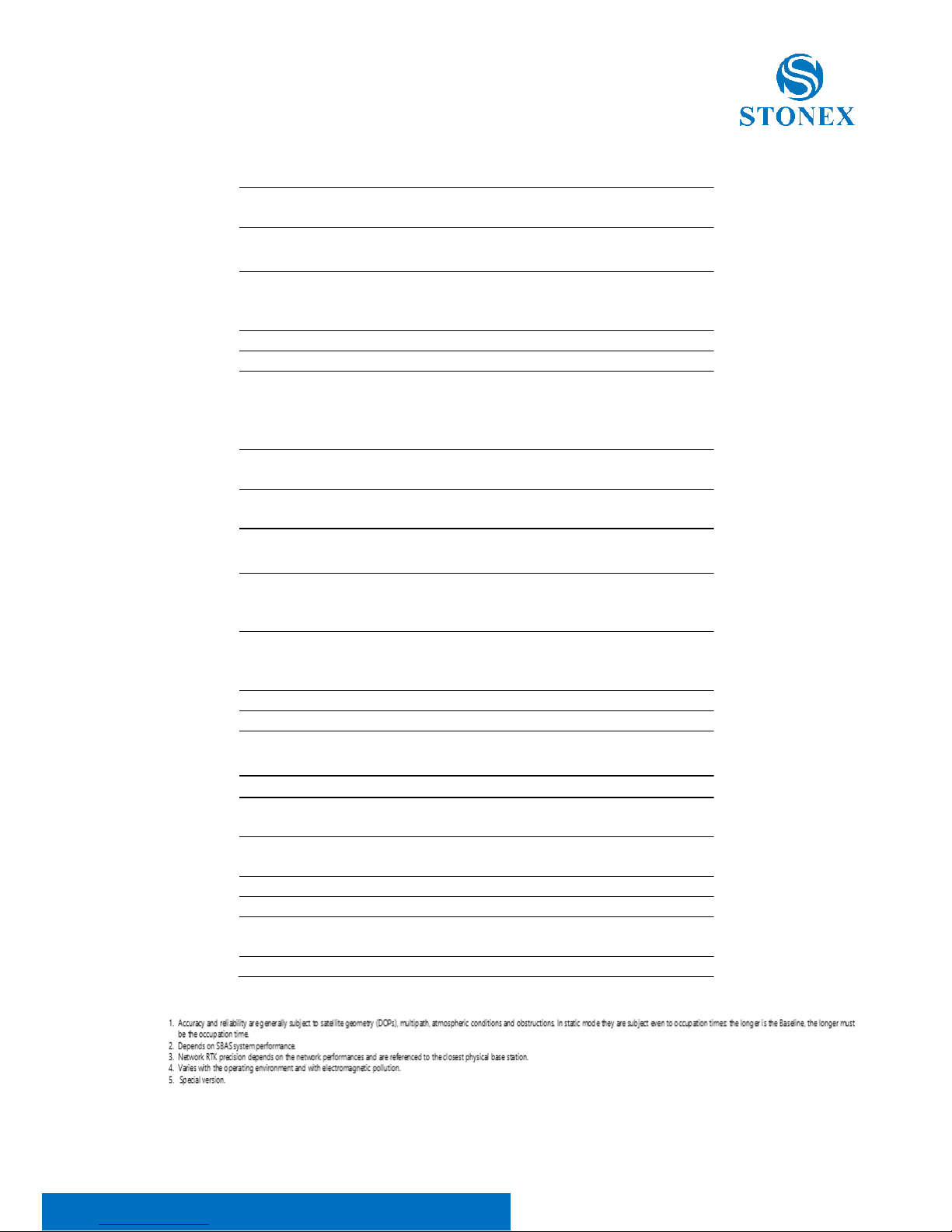
INTERNAL MODEM
Band
GSM/GPRS/EDGE
LTE/UMTS/WCDMA
COMMUNICATION
I/O Connectors
7-pins Lemo and 5-pins Lemo
interfaces. Multifunction cable with
USB interface for PC connection
Bluetooth
2.1 + EDR, V4.0
Wi-Fi
802.11 b/g/n
Web UI
To upgrade the software, manage the
status and settings, data download,
etc. via smart phone, tablet or other
internet enabled electronic device
Reference outputs
RTCM 2.1, 2.3, 3.0, 3.1, 3.2, 3.3
CMR, CMR+, RTCA
Navigation outputs
GGA, ZDA, GSA, GSV, GST, VTG, RMC,
GLL
POWER SUPPLY
Battery
2 rechargeable and replaceable
7.2 V – 3400 mAh
Intelligent lithium batteries
Voltage
9 to 22 V DC external power input with
over-voltage protection (5
pins Lemo)
Working Time
Up to 12 hours (2 batteries hot swap)
Charge Time
Typically 4 hours
PHYSICAL SPECIFICATION
Dimensions
ɸ 157 mm x 76 mm
Weight
1.19 Kg (with one battery)
1.30 Kg (with two batteries)
Operating Temperature
-30°C to 65°C (-22°F to 149°F)
-40°C to 65°C (-40°F to 149°F)5
Storage Temperature
-40°C to 80°C (-40°F to 176°F)
Waterproof/Dustproof
IP67
Shock Resistance
Designed to endure to a 2 m pole drop
on concrete floor with no damage
Vibration
Vibration resistant
Page 20
Stonex S900 GNSS Receiver – User Manual 19
Appendix 1: Default radio configuration
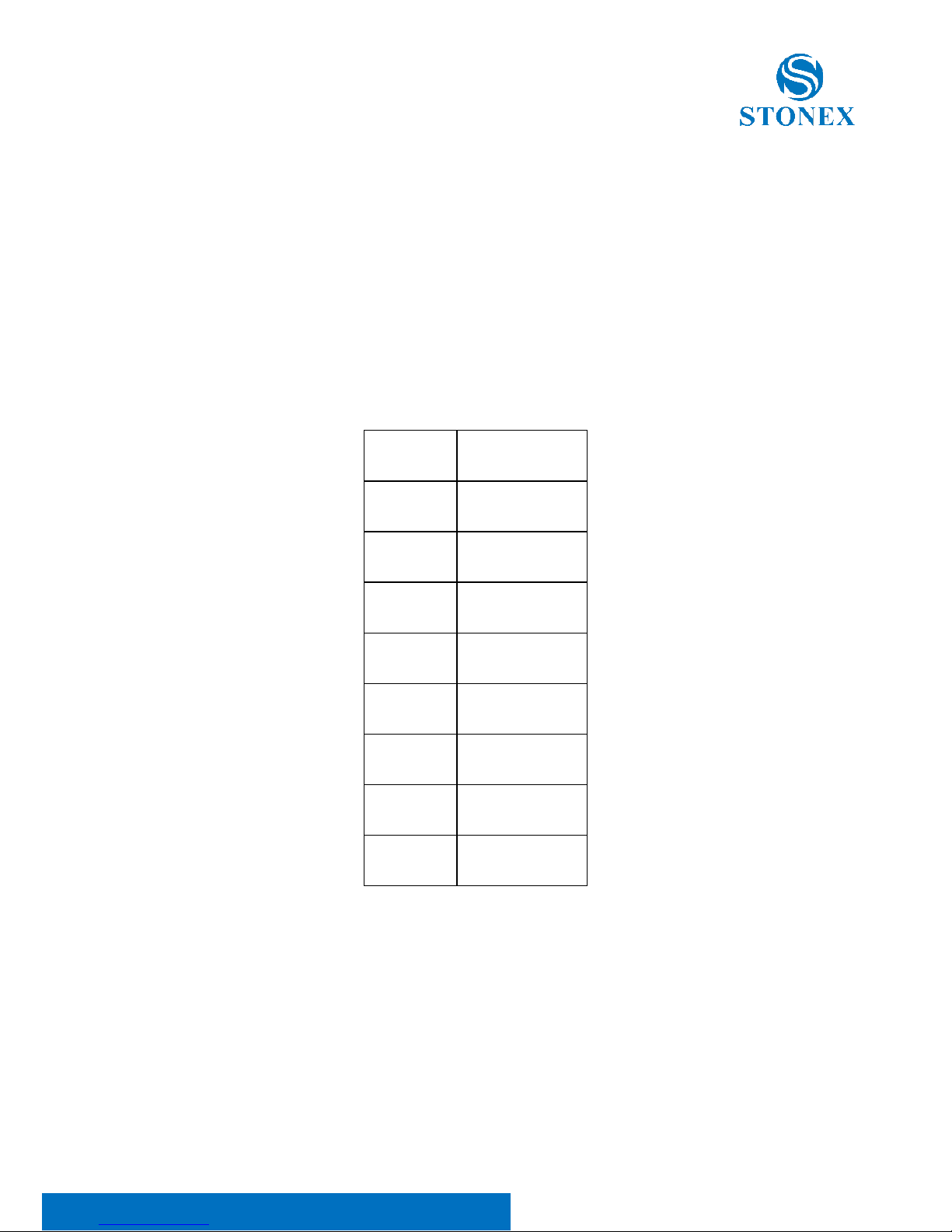
Internal radio frequency coverage range of 410MHz-470MHz, users can
choose radio channel and radio protocol through the handbook software or
WEB interface. The frequency of each channel is as follows.
Table 2 Default frequency of internal radio
Channel
Frequency
1
438.125 MHz
2
440.125 MHz
3
441.125 MHz
4
442.125 MHz
5
443.125 MHz
6
444.125 MHz
7
446.125 MHz
8
447.125 MHz
Appendix 2: Copyrights, warranty and environmental
Page 21

Stonex S900 GNSS Receiver – User Manual 20
recycling
Copyrights and trademarks
© 2018, STONEX® Limited. All rights reserved.
STONEX®, the STONEX® logo, and S900 GNSS receiver are trademarks of
STONEX® Limited.
STONEX® Cube-a, STONEX® GPS Processor are trademarks of STONEX
®
Limited.
Bluetooth is a trademark owned by Bluetooth SIG, Inc. and licensed to
Trimble Navigation Limited. All other trademarks are the property of their
respective owners.
Release Notice
This is the May 2017 release of the STONEX® S900 GNSS new model receiver
user guide.
The following limited warranties give you specific legal rights. You may have
others, which vary from state/jurisdiction to state/jurisdiction.
Standard Limited Warranty
The terms and conditions of this Limited Warranty constitute the complete
and exclusive warranty agreement between The Customer or Dealer and
STONEX® for the Product and supersedes any prior agreement or
representation made in any STONEX® sales document or advice that may be
provided to Customer by any STONEX® representative in connection with
Customer’s purchase of the Product. No change to the conditions of this
Limited Warranty is valid unless it is made in written form and signed by an
authorized STONEX® supervisor.
STONEX® warrants that its Products:
(1) are free from defects in materials or workmanship for generally 2 years.
Page 22

Stonex S900 GNSS Receiver – User Manual 21
a) accessories or specific parts for which different limited warranty
period shall apply.
(2) have been tested/calibrated in proper working status prior to shipment.
The warranty period starts from date of first sale of the instruments. At its
sole discretion, under the warranty period, STONEX® will repair the product
or send parts for replacement at its expense. STONEX® agrees to repair or
replace the defected instrument within thirty (30) days only if STONEX®
recognizes that the defects of the instrument are not caused by human
factors or no obvious damage to its surface is visible. STONEX® warrants any
new replaced parts or products are warranted to be free from defects in
materials and workmanship for thirty (30) days or for the remainder of the
Limited Warranty Period of the Product in which they are installed, whichever
is longer. Faulty Parts or Products replaced under this Limited Warranty shall
become property of STONEX®. All products that have to be repaired have to
be returned to our technical representative office location via any delivery
company the customer prefers, nevertheless STONEX® is not accountable for
the unlikely event that the Products gets lost in transit. Any damage inflicted
by the customer or by third party after the products has been delivered to
the customer is excluded from the limited warranty as well any damage
arising from an improper use, from any action or use not provided for in the
enclosed user guides and/or manuals.
Shipping policy
The Customer or the dealer is required to pay for the charges for shipping of
fault parts or instruments to STONEX® representative office and STONEX® is
providing the shipping for return. Dealers need to follow STONEX®
repair/service procedure to achieve a better and prompt service result.
Return policy Dead On Arrival instruments.
All returned products have to be shipped to STONEX® representative office.
Page 23

Stonex S900 GNSS Receiver – User Manual 22
The original Purchaser has a period of seven (7) days starting from date of
purchasing to signal the existence of a defect in the instrument for a full
refund (less shipping and handling), provided the merchandise is in new,
resalable condition and returned in the original, undamaged packaging.
Customer has to pay for both the return and the original freight fees,
regardless of the original freight paid by the Company. All warranty books,
instruction manuals, parts and accessories must be included as well as the
original box in which the item was shipped. We recommend placing the
original carton inside another box, to avoid any additional damage to the
carton itself. In some cases, returns of special items will require a re-stock
fee. Acceptance of returned merchandise is final only after inspection by
STONEX®.
Above terms and policies shall apply as for hardware. Dealers need to follow
STONEX®repair/service procedure to achieve a better and prompt service
result.
Firmware/Software warranty.
Stonex doesn’t warrant that operation of Firmware/Software on any
instruments will be uninterrupted or error-free, or that functions contained in
Firmware/Software will operate to meet your requirements.
Stonex will forward the Software/Firmware Fix to the dealer or customer.
Firmware/software Fix means an error correction or other update created to
fix a previous firmware version that substantially doesn’t conform to the
instruments specification.
Over Warranty repair(s) policy.
Customer shall pay the standard repair fees for any service (whether part
replacement or repairs) and performed by STONEX®under request and
explicit authorization of the customer itself. In this case the customer is
charged for return shipment’s fees as well.
Page 24

Stonex S900 GNSS Receiver – User Manual 23
Disclaimer and Limitation of Remedy
All other express and implied warranties for this product, including the
implied warranties of merchantability and fitness for a particular purpose
and/or non infringement of any third party’s rights, are hereby disclaimed.
Stonex® expressly disclaims all warranties not stated in this limited warranty.
Any implied warranties that may be imposed by law are limited in duration
to the term of this limited warranty. Some jurisdictions do not allow the
exclusion of implied warranties or limitations on how long an implied
warranty lasts, so the above exclusions or limitations may not apply to
customer. Customer must read and follow all set-up and usage instructions
in the applicable user guides and/or manuals enclosed. If customer fails to
do so, this product may not function properly and may be damaged.
Customer may lose data or sustain personal injuries. Stonex®, its affiliates
and suppliers do not warrant that operation of this product will be
uninterrupted or error free; as do all electronics at times. If this product fails
to work as warranted above, customer’s sole and exclusive remedy shall be
repair or replacement. In no event will Stonex®, its affiliates or suppliers be
liable to customer or any third party for any damage in excess of the
purchase price of the product. This limitation applies to damages of any kind
whatsoever including (1) damage to, or loss or corruption of, customer’s
records, programs, data or removable storage media, or (2) any direct or
indirect damages, lost profits, lost savings or other special, incidental,
exemplary or consequential damages, whether for breach of warranty,
contract, tort or otherwise, or whether arising out of the use of or inability to
use the product and/or the enclosed user guides and/or manuals, even if
Stonex®, or an authorized Stonex® representative, authorized service
provider or reseller has been advised of the possibility of such damages or of
any claim by any other party. Some jurisdictions do not allow the exclusion
or limitation of incidental or consequential damages for some products, so
the exclusions or limitations may not apply to customer. This limited
warranty gives customer specific legal rights, and customer may also have
other rights which vary from country/state/jurisdiction to country/state/.
Page 25

Stonex S900 GNSS Receiver – User Manual 24
Instruments
Two (2) years on STONEX® Products:
GPS Receiver: S900 GNSS Receiver
Accessories
Accessories & Specific Parts Warranty:
For Accessories provided by Stonex with the instruments S900 GNSS the
following general warranty time is for reference:
Batteries: 7 months.
Battery chargers: 7 months.
Adapters for battery chargers, Cables, Tribrach, Pole, Antennas: 2
years.
Service Procedure
Repair/Service procedure for dealers.
(1) S/N of the instrument and a detailed description of the defect (sometimes
pictures or video) will be required to indicate the cause and problem.
(2) If dealer wants to repair an instrument under warranty period on their
site:
1) If dealers don’t have the part in stock they have to send an official order
to STONEX® and pay for it and so STONEX® will send the new part to them
so they can repair the instrument.
2) When the repair is over, the dealer has to fill the “Spare Part Refund”
module and send it to the dedicated mail address.
3) Wait for STONEX®’s authorization SPR no;
Page 26

Stonex S900 GNSS Receiver – User Manual 25
4) When dealer receive the SPR authorization no they can send back to
STONEX® appointed office the broken part with attached the SPR module;
5) when STONEX® receives the broken part STONEX® shall verify it and if
everything is ok the cost of the part shall be refund (refund will be done
only after check of the failure part and final approval of STONEX®).
(3) If the instrument needs to be sent back to STONEX® for
repair/replacement, dealer/customer has to send to STONEX®a “Returned
Merchandise Authorization (RMA)” before they send back the fault
instrument. STONEX® shall, at its sole discretion, decide on the place of
performance for work under warranty.
Environmental recycling
The cardboard box, the plastic in the package and the various parts of this
product have to be recycled and disposed of in accordance with the current
legislation of your Country.
For countries in the European Union (EU)
The disposal of electric and electronic device as solid urban waste is strictly
prohibited: they must be collected separately.
Contact Local Authorities to obtain practical information about correct
handling of the waste, location and times of waste collection centre. When
you buy a new device of ours, you can give back to our dealer a used similar
device.
The dumping of these devices at unequipped or unauthorized places may
have hazardous effects on health and environment.
The crossed dustbin symbol means that the device must be taken to
authorize collection centres and must be handled separately from solid
urban waste.
Page 27

Stonex S900 GNSS Receiver – User Manual 26
·
For countries outside European Union (EU)
The treatment, recycling, collection and disposal of electric and electronic
devices may vary in accordance with the laws in force in the Country in
question.
Page 28

Stonex S900 GNSS Receiver – User Manual 27
Appendix 4: Safety Recommendations
Warnings and Cautions
An absence of specific alerts does not mean that there are no safety risks
involved in the use of this equipment.
Always follow the instructions that accompany a Warning or Caution,
reported in this.
This information is intended to minimize the risk of personal injury and/or
damage to propriety. In particular, observe safety instructions that are
presented in the following form:
WARNING - A Warning alerts about risk for health and/or damage to the
propriety. A warning identifies the nature of the risk and the extent the possible
injury and/or damage. It also describes how to protect yourself and/or the
equipment from this risk.
CAUTION - A Caution alerts about a possible risk of damage to the equipment
and/or loss of data, but no risk for human safety.
Wireless Module Approval
The receivers use internal wireless modules or can be connected to an
external data communications UHF radio. Regulations regarding the use of
the radio-modems vary greatly from country to country. In some countries,
the unit can be used without obtaining an approval license. Other countries
require specific approval or auto certification by the set maker.
Before using this instrument, check if authorization to operate the receiver is
required in your country. It is the responsibility of the importer to verify if it is
necessary a certification or license for the equipment in the country of use.
Instrument Approval
Page 29
Stonex S900 GNSS Receiver – User Manual 28
Covers technical features of the equipment relatives to electromagnetic
emissions that can cause interference and disturbances to other instruments
(note like emc compatibility) or generate not correct functionalities of the
instrument itself. Approval is granted by the manufacturer of the equipment.
Some countries have unique technical requirements for operation in
particular frequency bands. To comply with those requirements, Stonex srl
may modified the equipment to be subjected to grant.
Unauthorized modification of the units voids already got approvals, the
warranty time and the operational licenses of the instrument.
UHF 410-470 MHz Data transceiver
General Antenna Installation Warning
1. All antenna installation and servicing are to be performed by qualified
technical personnel only. When servicing the antenna, or working at
distances closer than those listed below, ensure the transmitter has been
disabled.
2. Typically, the antenna connected to the transmitter is a directional (high
gain) antenna, fixed-mounted on the side or top of a building, or on a tower.
Depending upon the application and the gain of the antenna, the total
composite power could exceed 90 watts ERP. The antenna location should be
such that only qualified technical personnel can access it, and that under
normal operating conditions no other person can touch the antenna or
approach within 0.6 meters of the antenna.
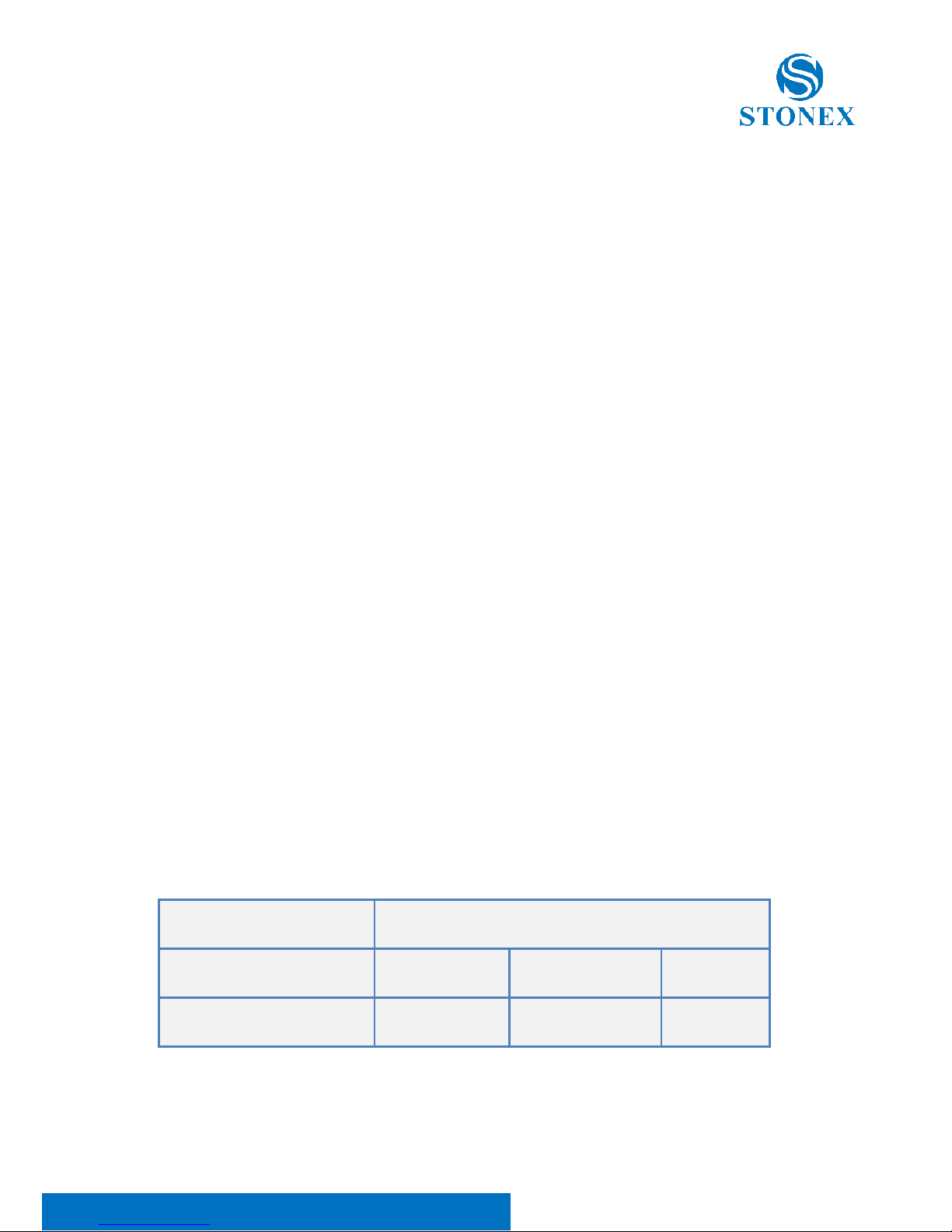
You can see below a table showing the Antenna Gain versus Recommended
Safety Distance:
Antenna Gain
0-5 dBi
5-10 dBi
10-16.5 dBi
Minimum RF safety distance
0.6 meters
1.06 meters
2.3 meters
Page 30

Stonex S900 GNSS Receiver – User Manual 29
For USA: The FCC has adopted a safety standard for human exposure to
radio frequency electromagnetic energy. Proper use of this radio modem
results in exposure below government limits. The following precautions are
recommended:
DO NOT operate the transmitter when someone is located less than 20 cm
(7.8 inches) of the antenna.
DO NOT collocate (place within 20 cm) the radio antenna with any other
transmitting instruments.
DO NOT operate the transmitter unless all RF connectors are secure, and any
open connectors are properly terminated.
DO NOT operate the equipment near electrical blasting caps or in an
explosive atmosphere.
All equipment must be properly used according to the installation
instructions for safe operation.
All equipment should be repaired and calibrated only by a qualified
technician
For Europe
The European Community provides some Directives for the electronic
equipments introduced on the market.
All the relevant information’s are available on the European Community
website:
http://ec.europa.eu/enterprise/sectors/rtte/documents/
The text of the Directive 99/05 regarding telecommunication equipments is
available, while the applicable Directives (Low Voltage and EMC) are available
at:
http://ec.europa.eu/enterprise/sectors/electrical
Page 31

Stonex S900 GNSS Receiver – User Manual 30
FOR USA
For your own safety, and in terms of the RF Exposure requirements of the
FCC always observe the precautions listed here.
• Maintain a minimum separation distance of 20 cm (7.8
inches) between yourself and the radiating antenna.
• Do not collocate (place within 20 cm) the radio antenna
with any other transmitting device.
Bluetooth/WiFi radio Module
The radiated output power of the internal Bluetooth module of this
equipment is far below the FCC and EU radio frequency exposure limits. In
any case, be sure to use the equipment with the radio far at least 20 cm from
the human body. The Bluetooth module match the guidelines found in radio
frequency “safety standards and recommendations “published by Scientific
organizations.
Stonex srl therefore believes the internal wireless radio is safe for use by end
users. The level of energy emitted is far less than the electromagnetic energy
emitted by wireless devices such as UMTS phones. However, the use of
Bluetooth/WiFi may be restricted in some special situations or place, like
aircraft , hospital ,etc. If you are unsure of existence of restrictions, you
should ask for authorization before switching on the Bluetooth radio.
Raccomandation for installing antennas for internal radios
An absence of specific alerts does not mean that there are no safety risks
involved in the use of this equipment.
Always follow the instructions that accompany a Warning or Caution,
reported in this. This information are intended to minimize the risk of
personal injury and/or damage to propriety. In particular, observe safety
instructions that are presented in the following form:
Page 32

Stonex S900 GNSS Receiver – User Manual 31
CAUTION
For your own safety, and to match the RF Exposure requirements of the FCC, always
observe these precautions:
- Always maintain a minimum separation distance of 20 cm (7.8 inches)
between yourself and the radiating antenna.
- Do not collocate (place within 20cm) the radio antenna with any other
transmitting device.
- Do not switch on the GSM or UHF module without the antenna mounted
to the external connector.
UHF Antennas having a gain greater than 5 dBi, are strictly prohibited for use
with this device. The required antenna impedance must be 50 ohms.
Rechargeable Lithium-ion batteries
These receivers use a rechargeable Lithium-ion battery.
WARNING
- Do not creates damage at the rechargeable Lithium-ion battery.
A damaged battery can cause an explosion, with risk or fire, and can result in
personal injury and/or property damage.
To prevent injury or damage:
– Do not use or charge the battery if it appears to be damaged. Signs of damage are
discoloration, warping, leaks of liquids.
– Do not expose the battery to fire, high temperature, or direct strong sunlight.
– Do not introduce the battery in water or liquid substance, in general.
– Do not use or store the battery in very hot ambient.
– Do not drop or puncture the battery.
– Do not open the battery and do not put in short-circuit its electrical contacts.
Page 33

Stonex S900 GNSS Receiver – User Manual 32
WARNING
- Avoid direct contact with the rechargeable Lithium-ion battery if it appears
damage. Battery liquids are corrosive and, and contact with it can result in personal
injury or damage to proprieties.
To prevent injury or damage:
– If the battery leaks, avoid contact with the battery fluid.
– If battery fluid gets into your eyes, immediately rinse your eyes with clean water
and seek medical attention. Do not rub your eyes!
– If battery fluid gets onto your skin or clothing, immediately use clean water to wash
off the battery fluid.
Page 34

Stonex S900 GNSS Receiver – User Manual 33
STONEX® SRL
Via Cimabue, 39 - 20851 Lissone (MB)
Tel: +390392783008 ; +390392785575 | Fax :+390392789576
www.stonex.it | [email protected]
 Loading...