

Page 1
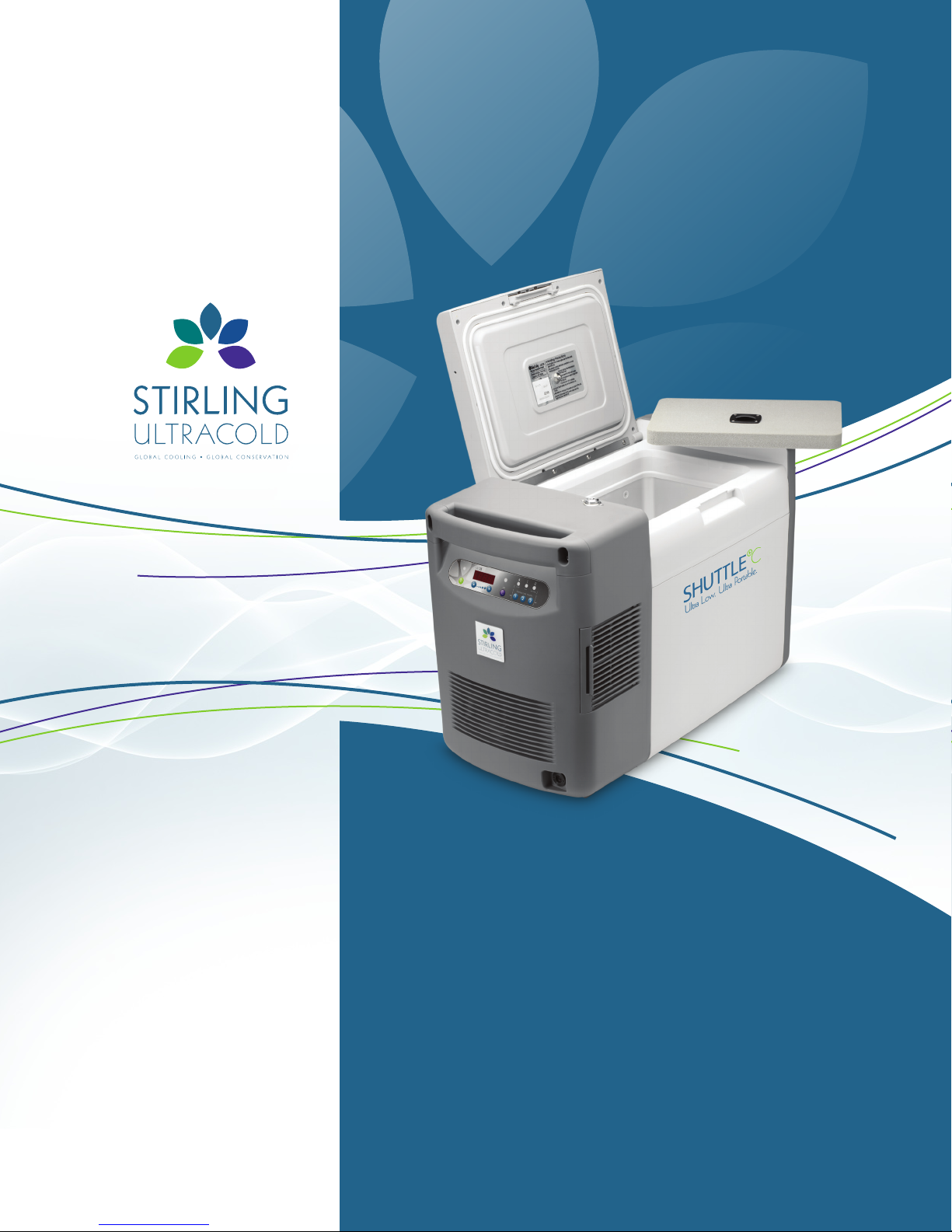
Shuttle
™
ULT:25 -86
º
C
Portable Ultra Low Temperature Freezer
Operating Manual
P.O. Box 428 Athens, Ohio 45701, USA t: 740.592.2655 f: 740.592.2695 www.stirlingshuttle.com
Page 2

Page 3

The ULT-25 (Ultra Low Temperature, 25 liter volume) incorporates next generation Free-Piston Stirling Cooler (FPSC) technology.
FPSCs differ from conventional compressor-based refrigeration in that they provide high efficiency,
deep-temperature cooling in a lightweight package allowing true portable operation.
Table of Contents:
INTRODUCTION ................................................................................................................2
TABLE OF CONTENTS ...........................................................................................................3
SAFETY PRECAUTIONS .........................................................................................................4
UNPACKING AND SET-UP .......................................................................................................5
FEATURES......................................................................................................................6
Freezer.........................................................................................................................6
Control Panel ..................................................................................................................7
OPERATION QUICK GUIDE . . . . . . . . . . . . . . . . . . . . . . . . . . . . . . . . . . . . . . . . . . . . . . . . . . . . . . . . . . . . . . . . . . . . . . . . . . . . . . . . . . . . . . . . . . . . . . . . . . . . . . 8
OPERATION ....................................................................................................................9
General Operating Principles ...................................................................................................9
How to Turn the Freezer On/Off ................................................................................................9
Changing the Set Temperature .................................................................................................9
To see the current set temperature..............................................................................................9
Change the Set Point to a new value ...........................................................................................9
Using Preset Temperatures ....................................................................................................10
Over-Temperature Alarm ......................................................................................................10
How to silence the audible temperature alarm.................................................................................10
To postpone an alarm........................................................................................................10
Error Conditions...............................................................................................................11
Locking the Panel .............................................................................................................11
To lock the freezer panel......................................................................................................11
To unlock the freezer panel ...................................................................................................11
How to switch between power supplies.......................................................................................11
ERROR CODES.................................................................................................................11
MAINTENANCE................................................................................................................12
Air Intake Filter ................................................................................................................12
Storage .......................................................................................................................12
Cleaning . . . . . . . . . . . . . . . . . . . . . . . . . . . . . . . . . . . . . . . . . . . . . . . . . . . . . . . . . . . . . . . . . . . . . . . . . . . . . . . . . . . . . . . . . . . . . . . . . . . . . . . . . . . . . . . . . . . . . .12
TROUBLESHOOTING...........................................................................................................13
SPECIFICATIONS...............................................................................................................14
WARRANTY ...................................................................................................................15
Operat ing Manual: U LT:25 -86
˚
C Ultra Low Temperature Portable Freezer
INTRODUCTION / CONTENTS
3
Page 4

Safety Precautions
To prevent personal injury, injury to others, or damage to property,
read these safety precautions carefully before use.
Do not• disassemble, modify or repair. There are no user serviceable parts inside the freezer unit.
Do not• immerse in water or pour water on the unit.
Do not• put ice or liquid water directly in the freezer box, always use suitable containers.
Do not• use glass containers when the contents might freeze and break.
Do not• store flammable items such as gasoline, thinner or solvents in the freezer.
The freezer is NOT rated as an explosion-proof freezer.
Do not• use hard and/or sharp objects, such as knives, screwdrivers, etc. to remove any frost or ice which
has accumulated on the inside of the freezer. The inside panels are heat exchangers and can be damaged.
Do not• cut, change or modify the power cable.
When removing the plug, hold onto the plug and not the cord.•
Do not• block the air intake or air discharge vents.
Do not• drop, throw or abuse the freezer.
Do not• operate under extreme environmental conditions, such as in a car trunk,
in very high humidity environments, in rain or other severe weather.
Do not• use solvents to clean the panel or the outside or inside of the freezer.
An ultra low temperature freezer is qualitatively different than a home freezer. •
At -80º C frostbite can occur in seconds.
The user should establish and follow a protocol for safe ULT operating procedures. •
This should include (but not limited to):
— Never handle samples or freezer accessories with bare hands.
— Do not use gloves which become brittle at ultra low temperatures.
— Nitrile and latex gloves are inadequate.
Liquid permeable gloves are dangerous because ULT liquids can contact skin and cause damage. •
— Be especially careful that liquids at ULT are not spilled onto skin or clothing.
— Use only sample containers that have been approved or tested for ULT use.
— Some plastics shatter at ultra low temperatures. Avoid splinter hazards.
— Biological and chemical hazards are still hazardous at ULT. Always wear
— proper protective equipment and follow appropriate isolation protocols.
— Many types of labels will fall off and/or break at ULT. Some types of ink which stick to glass
— and/or plastic at room temperature lose adhesion at ULT.
In addition to the ULT hazards above, there are also physical hazards to consider: •
— Be cautious when closing the lid to avoid a pinching hazard.
— Be careful when loading the box with heavy items.
— Always use the handles to carry the freezer.
4
Operat ing Manual: U LT:25 -86
˚
C Ultra Low Temperature Portable Freezer
0 2. 2 011
Page 5
Unpacking and Set-Up
Remove the freezer and all accessories from the box.
1.
Carefully inspect the freezer and all accessories for any shipping damage.
Check the packing list to verify that the shipment is complete.
2.
Place the freezer on a level surface.
3.
Make sure that the air inlets and outlets are not blocked.
4.
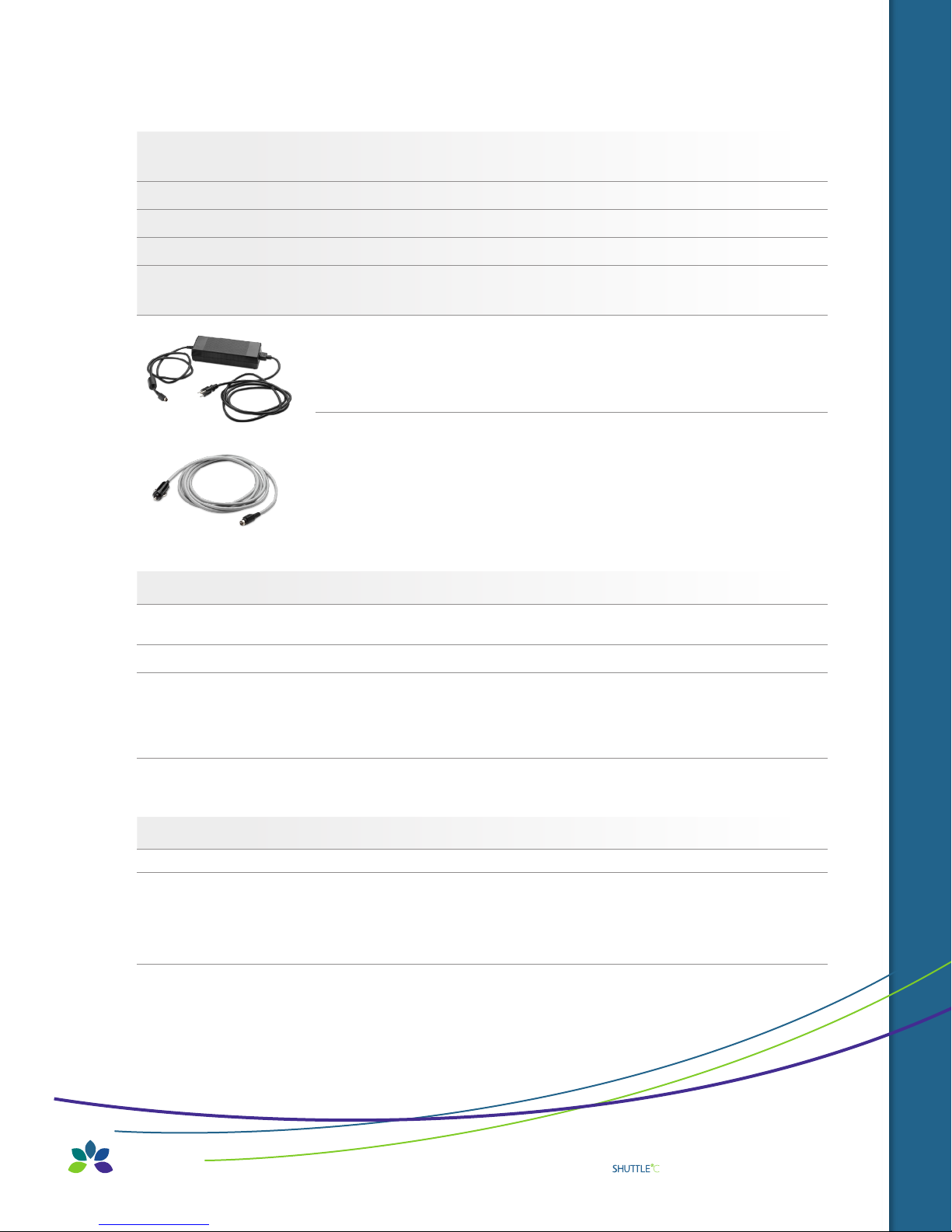
Connect to a power source. The freezer can be used with either the AC Power Supply for lab,
5.
home or office use, or the DC Power Cord for automotive use.
A. To use the AC Power Supply:
i. Plug the AC power supply into the freezer.
ii. Plug the power supply into the mains/wall socket.
iii. The freezer will return to whatever state it was in (on or off ) when it lost power.
B. To use the DC Power Cord in a motor vehicle:
i. Make sure the freezer remains level. Exceeding an angle of 12 degrees
may cause loss of cooling.
ii. Plug the DC Power Cord into a 12V outlet that is rated at 15 amps or greater.
(NOTE: Not for use with 24 volt automotive systems)
Consult your automotive specialist if your vehicle lacks 15 A rated 12V outlets.
iii. Plug the opposite end into the ULT-25.
6. Notes on operation in a vehicle.
A. The ULT-25 will operate on battery power for a limited time before the battery is drained and the
vehicle cannot be started. This time will vary from vehicle to vehicle but is generally only a few hours.
B. The engine should be running to prevent accidental total discharge of the battery.
C. The power to 12V outlets in some vehicles may be interrupted during engine starting.
This will cause a sudden stop of the cooling unit which may produce a sound that is different than
when turning off the ULT-25 by using the Off button. This is normal and will not damage the
cooling unit. The cooling unit will restart automatically once power resumes.
D. Do not operate the ULT-25 in an unattended vehicle. This may lead to overheating
if left in the sun and subsequent damage to stored contents.
7. Disconnecting from power.
A. Turn off the freezer (see page 9)
i. The seven-segment display will show the word “OFF” while the FPSC turns off.
ii. Unplug the freezer after the word “OFF” disappears and the display goes dark.
iii. If you unplug the freezer while it is on, you will hear a sudden noise when the FPSC shuts off.
Power outages will also cause the same noise. This noise (sort of a “bonk”) is not indicative of damage.
SAFETY PRECAUTIONS / UNPACKING AND SET-UP
Operat ing Manual: U LT:25 -86
˚
C Ultra Low Temperature Portable Freezer
5
Page 6
FEATURES
Freezer
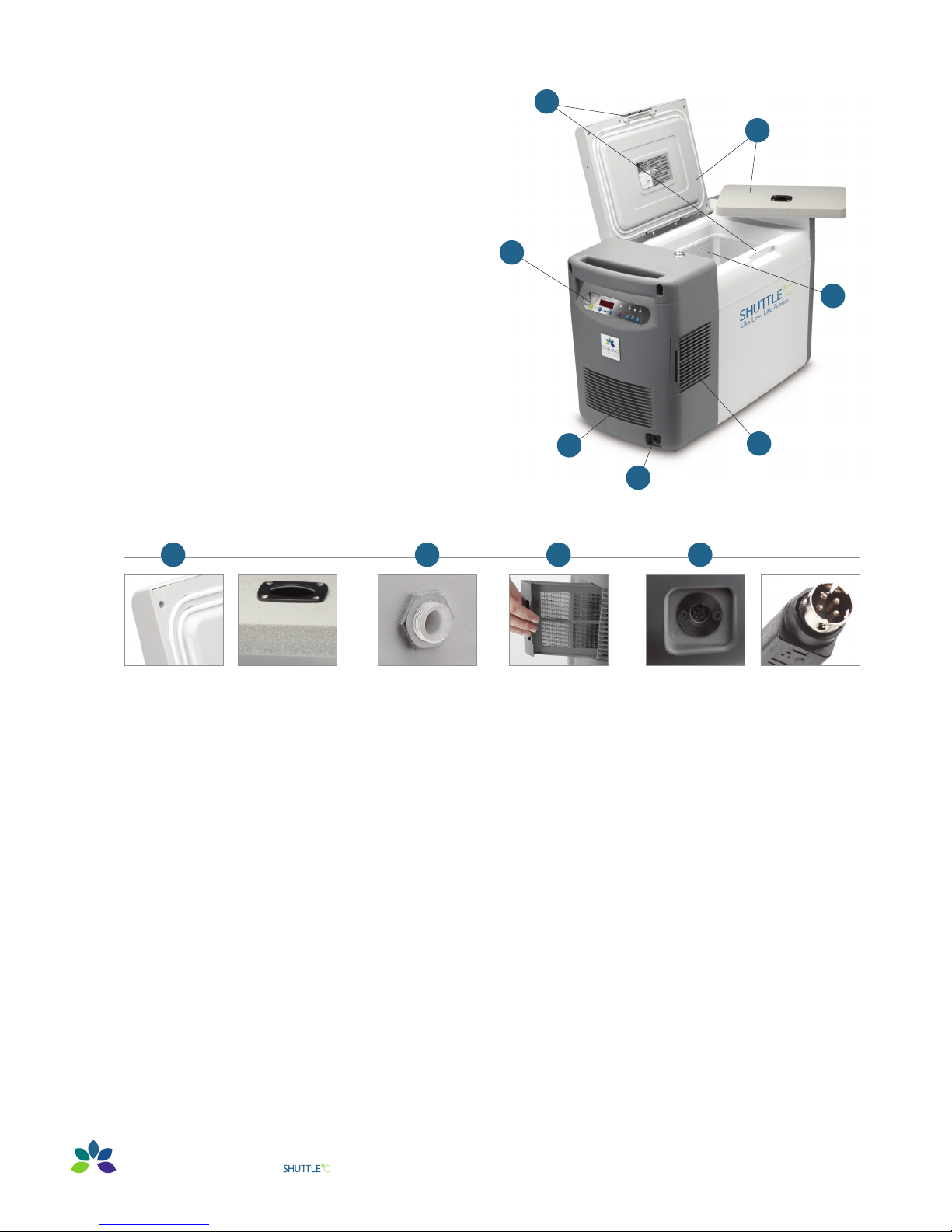
The Global Cooling ULT-25 FPSC freezer has the following features:
1. A freezer chamber which is protected by two lids
— Inner lid has a tight fitting foam lid
— Outer lid has a latching lid with a lock
3
1
2. Control Panel
2
— Described in more detail on page 7
3. Locking latch
— Can be locked to provide sample security
4. Access port
— For thermocouple wires, purge gas, etc.
5. Cleanable filter
— Helps protect the heat rejection fins from dust
6. Power Connector
— Polarized to avoid error
7
7. Vent
1 4 6
Outer Lid:
double gasket
moisture seal.
Inner Lid:
high-density, closed
cell, rigid foa m.
Access Port:
1/4” (6.3mm) standard–
may be enlarged up to
1” (25.4mm).
5
Slide- out Filter:
easy to clean, protects
heat rejec tion ns.
4
5
6
Power Connection:
polarized to avo id error.
6
Operat ing Manual: U LT:25 -86
˚
C Ultra Low Temperature Portable Freezer
0 2. 2 011
Page 7
Control Panel
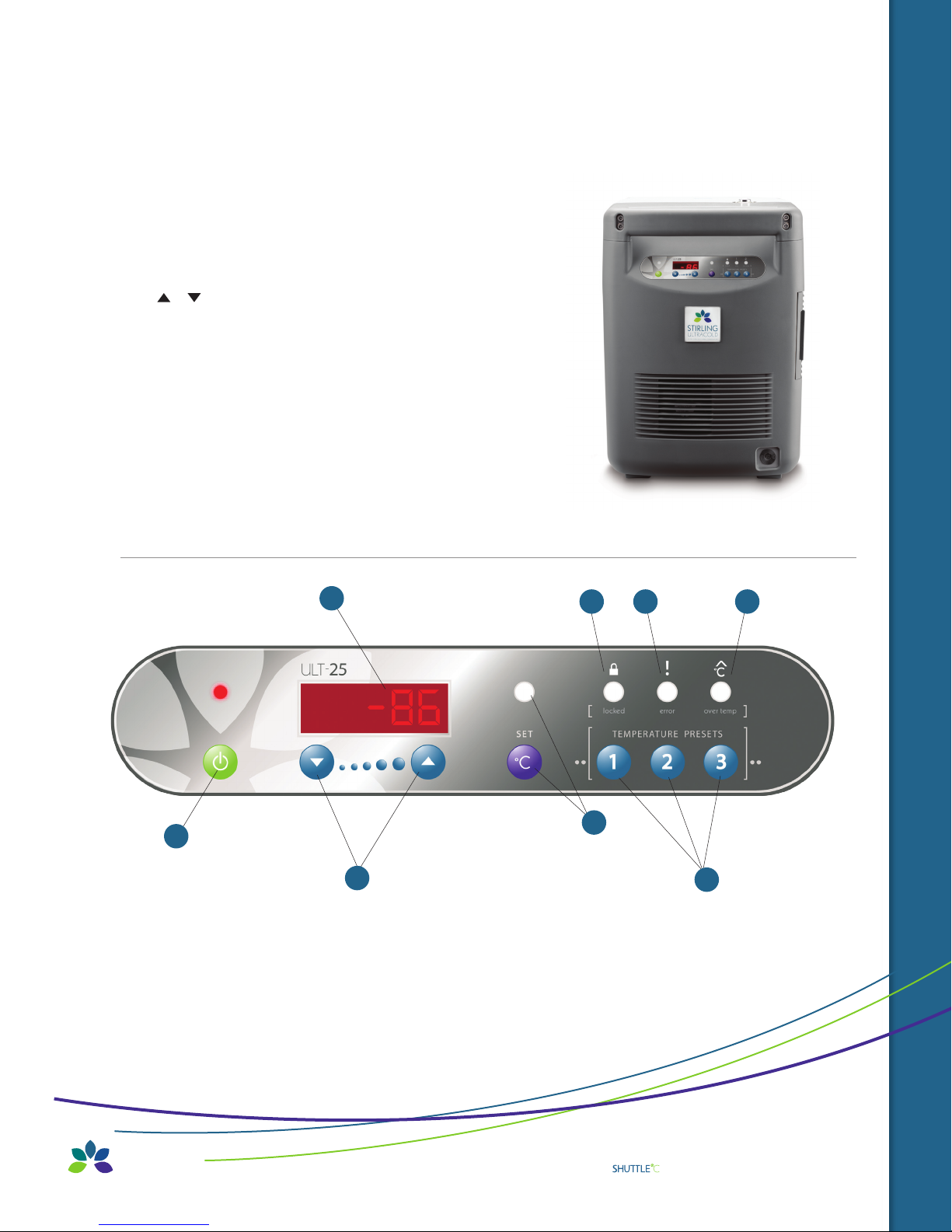
A. Seven-Segment display
— Shows all numerical displays; default display is chamber temperature.
B. On/Off button and LED
— Turns freezer on and off and shows state.
C. Set T button and Set T LED
— This must be pressed to adjust the Set Temperature.
D. / buttons
— Used to adjust Set Point Temperature (when the display shows S ##)
E. Error LED
— Indicates when there is an electrical, mechanical or
similar error condition.
F. Over T LED
— Indicates when the chamber is over/under the set point.
— The audible beeper can be set to delay warning.
G. Locked LED
— Indicates when the panel is locked.
H. Temperature Preset buttons
A
G
E
F
C
B
D
H
ULT:25 FEATURES
Operat ing Manual: U LT:25 -86
˚
C Ultra Low Temperature Portable Freezer
7
Page 8
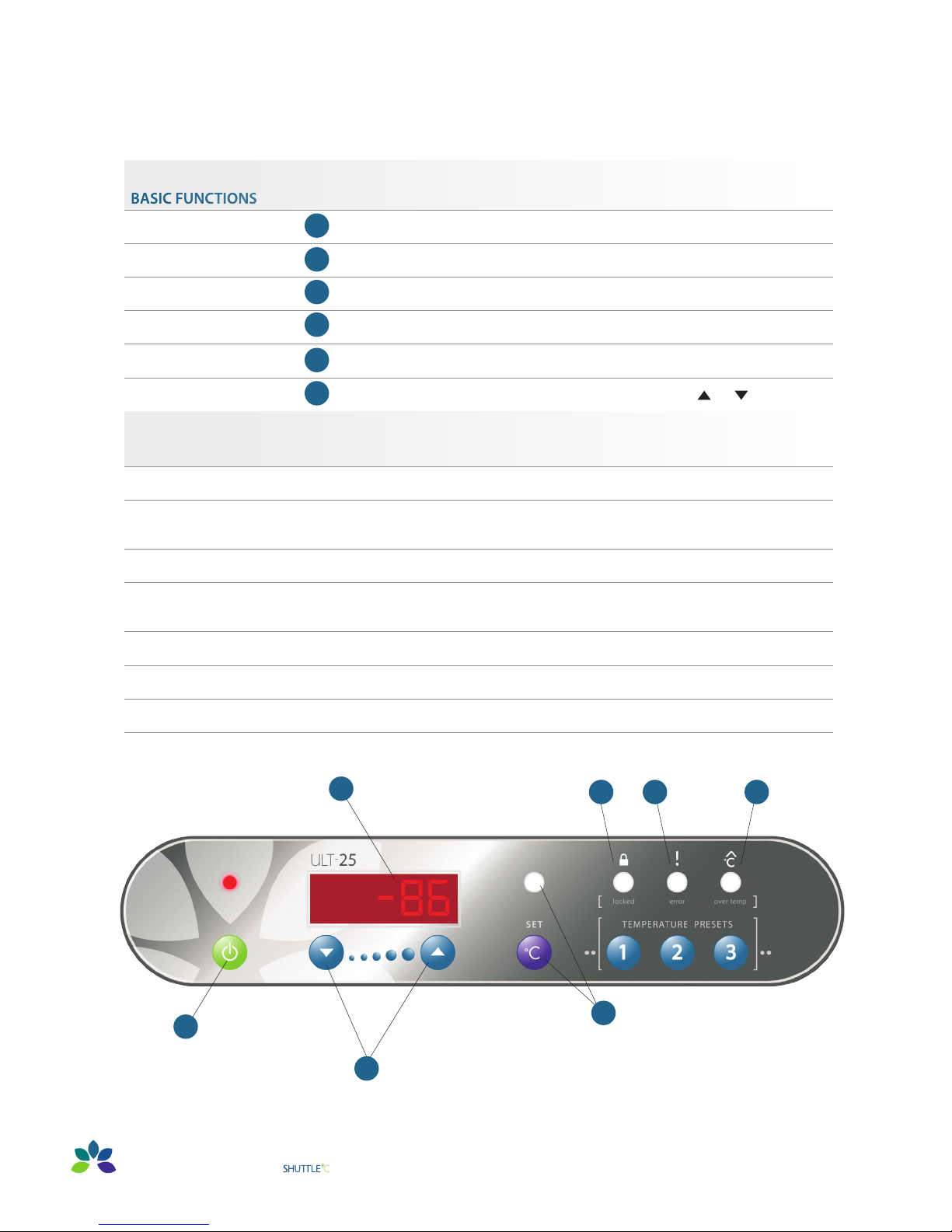
Quick Guide
- - - - - - - - - - - - - - - - - - - - - - - - - - - - - - - - - - - - - clip, laminate, keep with freezer - - - - - - - - - - - - - - - -- - - - - - - - - - - - - - - - - - - - -
BASIC FUNCTIONS
A
Seven-segment display
ON
OFF
See Set Point
Return to Temp Display
Change Set Point
ADVANCED FUNCTIONS
Numerical display – chamber temperature, S ## – set point
B
Press and hold I/O for two beeps
B
Press and hold I/O for three beeps
C
Press Set T briefly, S ## displayed
C
Press Set T briefly, or wait eight seconds
D
Press and hold Set T until Set T LED glows, S ## displayed, then or
Change to Preset
Postpone Over T Alarm
Return to Temp Display
See Error Code Again
Lock Panel
Unlock Panel
Seven-segment display
Press and hold Set until Set T LED glows, S ## displayed, then Preset 1, 2 or 3
When Over T light glows, press Preset 3 until time shows (1.0 h)
(If Over T LED is not glowing, then Preset 3 acts as a Temp Preset)
Wait eight seconds
If Error LED is glowing then Press Preset 2 briefly
(If Error LED is not glowing, then Preset 2 acts as a Temp Preset)
Press and hold Preset 1 AND 2 AND 3 until Locked LED turns on (five seconds)
Press and hold Preset 1 AND 2 AND 3 until Locked LED turns off (five seconds)
P ## – Preset Temp, ## h – alarm silence, E ## – Error code
A
G
E
F
B
8
Operat ing Manual: U LT:25 -86
D
˚
C Ultra Low Temperature Portable Freezer
C
0 2. 2 011
Page 9

General Operating Principles
Important changes to the freezer settings require sustained button pushes. This helps prevent accidental changes
to the settings during transportation. Some sequences require a three-second button press and hold while other sequences
require a five-second button press and hold.
For example,
Turning the freezer ON requires a three-second press and hold (two beeps).
Turning the freezer OFF requires a five-second press and hold (three beeps).
The default display is the chamber temperature. Other displays such as Set Point, Alarm Postpone, etc., are marked with a
letter such as S (Set Point), h (Alarm Postpone), etc. These secondary displays revert to the default display after approximately
eight seconds of button inactivity.
How to Turn the Freezer On/O
To turn the freezer on
Press and hold the I/O button for two beeps (~three seconds)•
The freezer will display a greeting message, and then display the chamber temperature•
To turn the freezer o
Press and hold the I/O button for three beeps (~five seconds)•
The freezer will display “OFF” for 10 seconds, and then go dark•
Changing the Set Temperature
To see the current set temperature
Press the Set T button briefly•
The current set temperature will be displayed with the letter S ## •
— After eight seconds of inactivity the display will revert to the current temperature
Change the Set Point to a new value
There two ways to change the Set Point •
— Manually adjusting the temperature using /
— Using one of three adjustable Preset Buttons
Adjusting the Set Point manually •
— Because of the importance of the Set Point Temperature,
changing the Set Point requires a “two-button procedure”. This means:
Method A - either holding the Set T button while simultaneously pressing / — OR
Method B - holding down Set T until the Set T LED glows and then pressing /
(Methods A and B achieve the same effect. The user can use whichever method they prefer.)
To change the set Set Point by • Method A
— Press and hold the Set T button and then push the / buttons (do not release the Set T button).
– The Set Point temperature will appear with the prefix S in the seven-segment display.
– When the / buttons are first pushed the Set Point will change by 1º C at first.
– If the / buttons are held for five seconds the step size will increase/decrease by 5º C.
– If the / buttons are briefly released (less than a half second) while continuing
– to hold down the Set T button the increment/decrement size will return to 1º C.
– Release all buttons once the desired Set Point is achieved. The display will return
– to chamber temperature after about eight seconds.
QUICK GUIDE / GENERAL OPERATION
Operat ing Manual: U LT:25 -86
˚
C Ultra Low Temperature Portable Freezer
9
Page 10

To change the Set Point by • Method B
— Press and hold the Set T button until the Set T LED glows.
– The Set Point temperature will appear with the letter S in the first seven-segment display.
— The / buttons can be used to change the Set Point.
– When the / buttons are first pushed the Set Point will change by 1º C. at first.
– If the / buttons are held for five seconds the step size will increase to 5º C.
– Briefly release (a half second) the / buttons while continuing to hold down
– the SET button the increment/decrement size will return to 1º C.
– Release the / buttons once the desired Set Point is achieved.
— Press the Set T button briefly (less than one second) to turn off the Set T LED.
— The display will return to chamber temperature.
Using Preset Temperatures
The three buttons labeled 1, 2 and 3 can be used to quickly change the Set Point to frequently used values. When shipped the Presets •
are set to -80º C, -40º C, and -20º C. They can be set to any preferred values.
To choose one of the preset temperatures: •
— Press and hold the Set T button until the Set T LED glows
— Push one of the Preset Temperature buttons briefly
— The new set temperature will be shown in the seven-segment display
— If this is the desired Set Temperature the user can either:
– Briefly press the Set T button to turn off the Set T LED — OR
– Wait for approximately eight seconds when the freezer panel will return to normal operation
Over-Temperature Alarm
If the freezer compartment temperature is 10º C warmer or colder (adjustable, see below) •
than the set point for five seconds then it will go into temperature alarm mode.
— The Over T light will go on (this is used for under temperature alarms as well).
— The freezer will make a double beep every 10 seconds.
— Situations which can affect the freezer’s ability to maintain a steady state or cooling rate include:
– The lid is ajar
– The air vents are blocked
– Addition of a large relatively warm mass
– Power supply problems
– Mechanical and/or electrical problems
How to silence the audible temperature alarm
The Over T light will always be lit when the cooler temperature is over or under the set temperature by more than 10º C.•
To postpone an alarm
When the audible alarm is sounding it can be postponed•
Press the button beneath the Over T LED and the audible alarm will be turned off for 1.0h•
Typical times for recovery to -80º C after adding RT samples to -80º C chamber •
— (16) 15-ml centrifuge tubes | w/ centrifugate | 0.8 h
— (96) 2-ml cryovials | w/1.8 ml cryopreservant | 1.5 h
— (8) 50-ml centrifuge tubes | filled w/water | 3.5 h
— (2) 500-ml bottles | filled w/water | 8.0 h
10
Operat ing Manual: U LT:25 -86
˚
C Ultra Low Temperature Portable Freezer
0 2. 2 011
Page 11

Error Conditions
Certain conditions will cause an Error Code to be displayed on the seven-segment display, and the Error LED will be lit. •
— The error code will be of the form E ##, where ## is the error code.
— The error code will be displayed for about five seconds and then the display will show the chamber temperature.
The Error LED will stay on.
— The error code can be recalled by briefly pressing the button under the Error LED. This will recall the error
code for approximately 10 seconds.
— If button 2 is pressed and held for five seconds (three beeps) this will clear both the seven-segment display and the
Error LED. However, if the error condition persists the error cycle will start over again.
Locking the Panel
To lock the freezer panel
Press and hold buttons 1, 2 and 3 until the freezer beeps three times •
— The Locked indicator LED will light up
— The user cannot lock the panel if there is an over temperature or error condition
To Unlock the freezer panel
Press and hold buttons 1, 2 and 3 until the freezer beeps three times •
— The Locked indicator LED will then turn off
— The freezer will still indicate over-temperature alarms or error conditions while it is locked.
The user has to unlock the panel to handle those alarms/conditions.
How to Switch Between Power Supplies
There are several possible power sources for the ULT-25. •
— GC provided Mean Well 15V power supply
— Automobile accessory plug (cigarette lighter)
When changing from one power supply to another the user should first stop the ULT-25. •
— Turn OFF the ULT-25 (Press and hold the I/O button).
— Wait for the FPSC to slow and stop (15 seconds).
— Unplug the ULT-25 from one power source and plug it into the next.
— The ULT-25 can be restarted immediately, no wait time necessary.
— Turn ON the ULT-25 by pressing and holding the I/O button.
Error Codes
These are displayed in the seven-segment display as E ##
The FPSC is not maintaining a working temperature on the heat rejection fins. This could arise from blocked
filters, blocked air passages, unusually hot ambient temperatures (for example >45º C), or a fan failure. Check air
10
passages and clear any blockages for good air circulation. Remove from hot environments (car interiors, etc.).
A component which monitors FPSC performance has failed.
40
The FPSC cannot regulate itself. Please return for repair.
Operat ing Manual: U LT:25 -86
˚
C Ultra Low Temperature Portable Freezer
ER ROR CODES
11
Page 12
Maintenance
With the exception of the filter, there are no user serviceable parts to maintain.
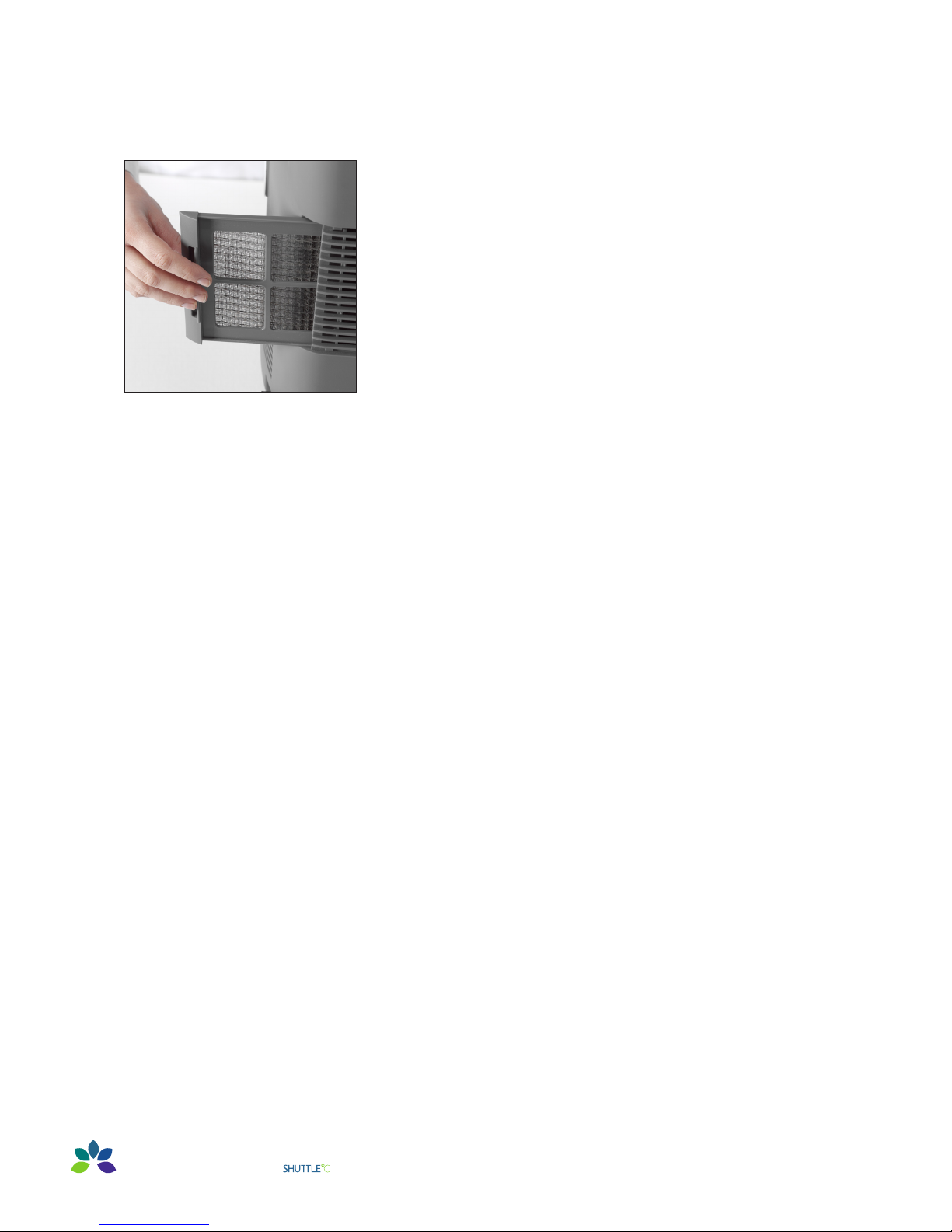
Air Intake Filter
Clean accumulated dust and dirt on the air intake filter every month.
Pull the filter cover to the left as shown. Please note that it cannot be
completely removed. Gently clean the filter with a vacuum cleaner.
If there are stubborn residues use a soft brush to work them loose.
Storage
1. Turn off the power and allow the freezer to come to room temperature.
2. Dry the inside of the freezer compartment and clean any spills.
3. Disinfect with suitable sterilizing agent if the freezer has been used
for biohazards.
Cleaning
The exterior surfaces of the ULT-25 can be cleaned as needed by using a soft
cloth and mild detergent. Do not use solvent or harsh abrasive cleansers or pads.
12
Operat ing Manual: U LT:25 -86
˚
C Ultra Low Temperature Portable Freezer
0 2. 2 011
Page 13

Troubleshooting
Problem Possible Cause Solution
Freezer does not
power on
Freezer does not
achieve desired
temperature
Power is not getting to the
freezer from the Power Supply
Power is not getting to the freezer
from the Auto Accessory Plug
Inadequate air circulation
Inadequate power
Improper environment
Overloading of freezer Remove some items from freezer
Check the connections to the power supply
Assure that the wall plug is firmly seated
Reseat the connections to the accessory plug
Remove any dirt or burnt material inside the
accessory socket or on the plug
Replace any blown automobile fuses
Clean air filter screen
Remove air flow obstructions
Assure that the wall plug is firmly seated
Remove any dirt or burnt material inside the
automotive accessory socket or on the plug
Operate freezer only when automobile is running
Remove freezer from direct sunlight, hot room, etc.
Check that freezer is level. Tilts of more than 12 degrees
in some directions will degrade performance.
Freezer cools slowly
12V plug becomes
unusually hot
Lid is not completely closed
Lid is open and closed too often Minimize opening and closing of lid
Inadequate air circulation Clean filter and unblock air vents
Dirt or corrosion in the
accessory socket
Check for ice buildup, remove if necessary,
and properly close lid
Clean the socket
MAINTENANCE / TROUBLESHOOTING
Operat ing Manual: U LT:25 -86
˚
C Ultra Low Temperature Portable Freezer
13
Page 14
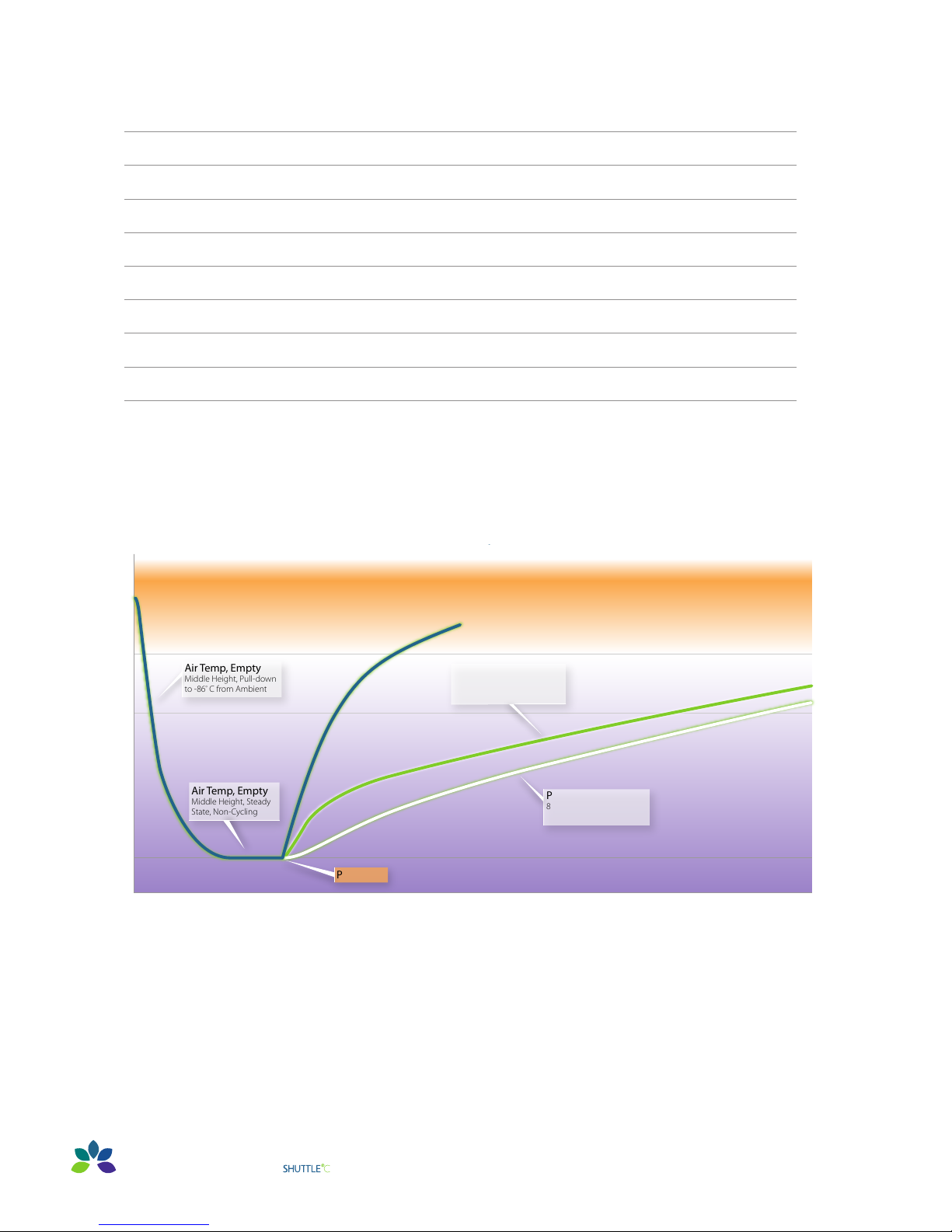
Specifications
Air Temp, Empty
Middle Height, Pull-down
to -86
º
C from Ambient
Air Temp, Empty
Middle Height, Steady
State, Non-Cycling
TIME (HOUR)
40
20
0
-20
-40
-60
-80
-100
0 9 123 6 15
18 21
24
PULL-DOWN AND WARM-UP
CHARACTERISTICS, 25
º
C AMBIENT
Power OFF, Ice Temp
8 Liters of -86º C Ice,
Middle Height
Power O
Power OFF, Air Temp
8 Liters of -86º C Ice,
Middle Height
Operating Voltage DC 15 V (11 – 16 V)
Power Consumption ~150 W
Set Temperature Range -86º C to -20º C
Ambient Operating Temperature 0º C to +35º C
Volume 9.0 cu.ft. | (25 liters)
Interior Dimensions 13.0" L x 8.7" W x 13.0" D | (330.2 x 222.2 x 330.2mm)
Exterior Dimensions 27.1" L x 13.6" W x 18.3" H | (688.1 x 346.5 x 464.3mm)
Net Weight, Empty 40 lbs. (19 kg)
Pull-Down and Warm-Up Characteristics, 25ºC Ambient
14
Operat ing Manual: U LT:25 -86
˚
C Ultra Low Temperature Portable Freezer
0 2. 2 011
Page 15

Warranty
GLOBAL COOLING INC., as the Manufacturer warrants the quality of all parts used in the construction
of the ULT-25 to be free from defects to the original purchaser.
1. This WARRANTY shall continue for one year from the original delivery date, i.e., one year from the time
of delivery to the shipper (e.g., UPS, FedEx, etc.).
2. This WARRANTY shall have force and effect only if all items are operated in accordance with instructions
provided by the Manufacturer.
3. This WARRANTY shall not extend to ordinary wear and tear.
4. This WARRANTY shall not extend in any way to liability (whether or not construed on tort
or contract or any other theory of law) to consequential damages resulting from:
Ordinary use of the product•
Abuse or misuse of the product•
Interruption or cessation of the operation of the product from any cause whatsoever, including but not •
limited to power failure, low voltage, acts of God, explosion, negligent operation and the like.
5. This WARRANTY shall extend only to furnishing for replacement a part found by the Manufacturer to be defective.
6. This WARRANTY shall not extend nor cover any part used as a replacement part beyond the original one year
product WARRANTY: nor does the Manufacturer undertake any obligation in connection with this WARRANTY
other than that specifically set forth above. No person is authorized to make any representation as to this
WARRANTY except duly authorized officers of Global Cooling Inc.
7. Global Cooling Inc. agrees if instructions as to operation and use are strictly followed, and power sources
(circuits, voltages, etc.) are properly applied, to provide within one year after original delivery to the shipper,
labor free of charge to maintain the product in good working condition.
8. The customer will pay for the cost of returning the freezer to Global Cooling Inc. (or to the distributor if
approved by Global Cooling Inc). Global Cooling Inc. will pay for the cost of returning the freezer to the
customer, unless examination of the freezer demonstrates that the freezer was damaged by operation
or handling outside the instructions provided by the Manufacturer.
9. This WARRANTY is limited to products purchased and used in the United States of America.
“Consequential damages” shall be defined to include, but not limited to spoilage of, or damage to contents placed in the
product, loss of profits, expenses of delay resulting from interruption or cessation of the operation of the product, loss of
customers or business good will, any time element loss, or any other special damages.
ALL WARRANTY returns MUST be decontaminated according to current laboratory protocols appropriate for any
biohazards which were contained in the freezer. A list of all biohazard agents which had been contained in the freezer
and a copy of the decontamination protocol used must accompany every freezer returned for repair.
Global Cooling Inc. reserves the right to change all specifications for the mechanical, physical or firmware portions
of this product without notice.
SPECIFICATIONS / WARRANTY
Operat ing Manual: U LT:25 -86
˚
C Ultra Low Temperature Portable Freezer
15
Page 16

P.O. Box 428 Athens, Ohio 45701, USA t: 740.592.2655 f: 740.592.2695 www.stirlingshuttle.com
©2011 Stirling Ultrac old, Global Coo ling, Inc. All R ights Reserved .
HUMM™ technol ogy is manufact ured under U.S. and Inter national patents. Sti rling Ultracold, Shu ttle™ and HUMM™ are trad emarks of Globa l Cooling, Inc.
Specific ations subject to chan ge without notice. Re fer to www.stirli ngshuttle.com for t he latest specificat ions.
©2010 Stirling Ultracold OW9570 02/11
 Loading...