

Page 1
Quick user guide
U804P, U840P & U860P
Page 2
LEDs
1. Power Indicator:
Steady green when power on
Blinking green when the call is ringing.
2. Line Keys:
Steady green: during the conversation, or plan to dial a call
Blinking red: the call is ringing
O: idle interface.
Placing a call
There are 3 ways to make a call:
1. Handset: Pick up the handset; enter the number, and then press the SEND soft
key or press .
2. Speaker: Press or the line keys; enter the number, and then press the SEND
soft key or press .
3. Headset: Press ; enter the number, and then press the SEND soft key or
press .
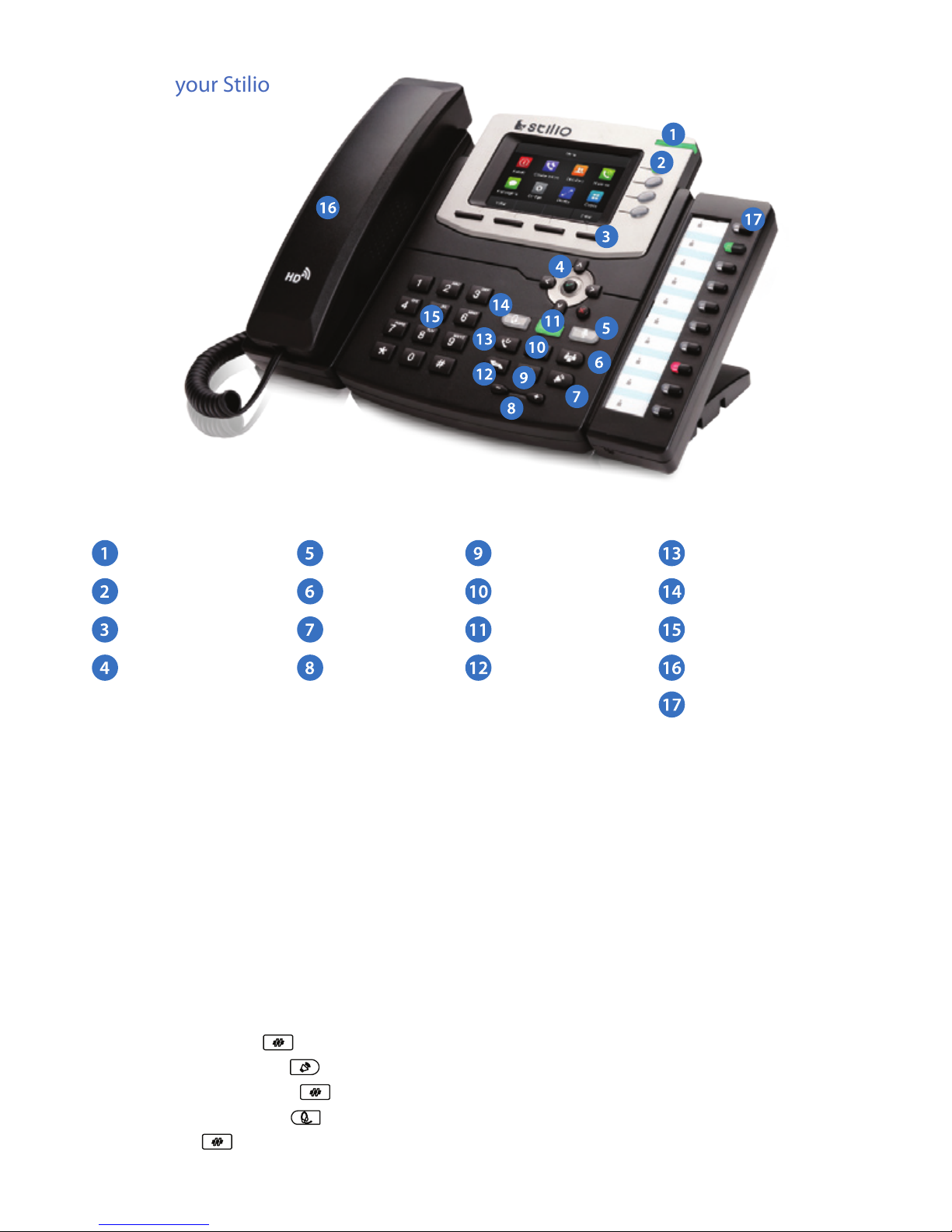
Know your Stilio
Power indicator
Line keys
Soft keys
Navigation
Mute
Conference
Speaker
Volume
Redial / Send
Information
Message
Hold
Transfer
Headset
Alphanumeric keypad
Handset & Speaker
DSS Keys
(U860P only)
Page 3

Ending a call
There are 3 ways to end a call:
1. Handset: hang up the handset or press the CANCEL soft key
2. Speaker: press , or press the CANCEL soft key
3. Headset: press the CANCEL soft key.
Answering a call
1. Handset: pick up the handset;
2. Speaker press ;
3. Headset: press .
Redialing a number
Press to redial the last number.
Hold
1. Press or press the HOLD soft key during a call to hold the call,
2. Press or RESUME soft key to resume the call.
Call transfer
Blind transfer
1. Press or TRANSFER soft key during the conversation, the call is now on hold
2. Enter the number to transfer to, and press or TRANSFER soft key to complete the blind transfer.
Attended Transfer (at least one line key set as Auto)
1. Press or TRANSFER soft key during the conversation, the call is now on hold.
2. Enter the number to transfer to and, and press the SEND soft key or .
3. Start the second conversation, press ou TRANSFER soft key to complete the
transfer.
Semi-Attended Transfer (at least one line key set as Auto)
1. Press or TRANSFER soft key during the conversation, the call is now on hold
2. Enter the number transfer to, and then press , you will hear the ring tone
3. Press or the TRANSFER soft key, to complete the Semi-attended transfer.
Page 4
Conguration
1. Conguration via phone
a. Press Menu > Setting > Advanced Settings (Default password: admin)
b. Select Network: To congure the Wan Port (DHCP/Static/PPPoE), PC Port
c. Select Accounts: To congure enable the account; ll the SIP SERVER, Outbound Proxy, ID…
d. Save the conguration
2. Conguration via web
a. Get the IP address: Press Menu > Status.
b. Login: input the IP address in the web browser. The PC and phone should be
in the same segment) / Login name: admin password: admin (default)
c. Congure: select network/Account… to ll the relevant content.
d. Save the conguration, or reboot by pressing the reboot button.
Instructions
Conference Call
Assuming that A and B are in a conversation, A wishes to add C to conference (or D
& E):
1. A presses the LINE2 key, and the call will be placed on hold.
2. A inserts the number belonging to C and presses the ENTER soft key, or . C
answers the call.
3. A presses or the CONFERENCE soft key, A, B and C are now in the same
conference call.
4. To add D and E, press LINE3 key, and the present conference call will be placed
on hold. Dial the number belonging to D, and press . Press LINE4 key, dial
the number belonging to E, press . A,B,C,D,E are now in the same conference call.
Call mute
1. Press to mute the microphone during the call
2. Press again to un-mute the conversation.
 Loading...