

Page 1
Page 2

___________________________________________________________________________________________________________2
Synth Programmer for MKS-80 – Operation manual V 1.16 – 03/2019
© Stereoping Germany, Meschede 2019
Page 3

___________________________________________________________________________________________________________3
General features of the Synth Programmer...............................................................................................................................4
Special features of the Edition 80...............................................................................................................................................4
Technical handling........................................................................................................................................................................4
1.Connections and integration into your setup................................................................................................ 5
Power supply..................................................................................................................................................................................5
Midi connections...........................................................................................................................................................................5
2.Settings and workflow...................................................................................................................................... 6
Settings on the MKS-80.................................................................................................................................................................6
Synchronisation.............................................................................................................................................................................6
Saving..............................................................................................................................................................................................6
3.Overview............................................................................................................................................................ 7
Function keys.................................................................................................................................................................................7
PLAY Mode......................................................................................................................................................................................7
Button 'PREFS'................................................................................................................................................................................7
Button 'COMP'................................................................................................................................................................................7
Button 'CHORD'.............................................................................................................................................................................7
Buttons 'UPPER' and 'LOWER'......................................................................................................................................................7
Button 'RANDOM'..........................................................................................................................................................................7
Button 'PEEK'..................................................................................................................................................................................8
4.Patches and Tones – Upper and Lower............................................................................................................ 9
What is a Tone?..............................................................................................................................................................................9
What is a Patch?............................................................................................................................................................................9
Upper and Lower?.........................................................................................................................................................................9
One Tone used in several Patches?.............................................................................................................................................9
5.PLAY Mode........................................................................................................................................................ 10
Parameter groups.......................................................................................................................................................................10
Setting Splitpoint with the keyboard.........................................................................................................................................11
LFO-1 Waveform in submenu?..................................................................................................................................................11
Changing values directly on the MKS-80..................................................................................................................................11
Side function for UPPER & LOWER Buttons.............................................................................................................................11
6.RANDOMIZER................................................................................................................................................... 12
7.PREFS and MIDI BYPASS MODE....................................................................................................................... 14
Midi Bypass Mode.......................................................................................................................................................................14
8.CHORD MEMORY.............................................................................................................................................. 15
Triggernotes.................................................................................................................................................................................15
Chord Setup.................................................................................................................................................................................15
Learning modes 'Toggle' and 'Hold'..........................................................................................................................................15
9.CC to SysEx translator..................................................................................................................................... 16
10.Updating Firmware....................................................................................................................................... 17
11.Imprint........................................................................................................................................................... 18
Synth Programmer for MKS-80 – Operation manual V 1.16 – 03/2019
© Stereoping Germany, Meschede 2019
Page 4

General features of the Synth Programmer______________________________________________________________4
General features of the Synth Programmer
The Stereoping Programmer offers 45 control dials, 4 endless encoders and a 16x2 characters OLED display to
for convenient and intuitive sound shaping of your Roland MKS-80. At the moment you turn a knob, the
programmer sends the suitable command into your synthesizer which immediately changes it's sound.
• Highly specialized hardware midicontroller for Roland MKS-80
• Convertable from 19“ rackmount to desktop usage – and back
• 45 dials, 4 encoders, 2x16 character oled display
• Firmwareupdate over SysEx-Dump
• Current draw 100 mA
• Weight 2.650g
• Size without rackmount brackets, incl. knobs and rubber feet ca. 430 x 130 x 85 mm
Special features of the Edition 80
• Visual design suitable to the MKS-80
• Coloured knob caps like on the MPG80 - e.g. blue ones for PATCH parameters
• Splitpoint can be set by incoming midinote
• 'Midi CC' to 'SysEx'-translator to automate your MKS-80 with ordinary CC-messages
• Patch-Randomizer
• 6 voice Chord Memory with 6 saveable Chord-Slots
Technical handling
The Synth Programmer was built to be used in a comfortable music studio environement. You can operate it
under free skies of course. But please keep in mind, it uses electricity for proper operation and therefore is quite
sensitive to water, drinks or other fluids. Excessive heat or exposition to sunlight is also not advised.
Your programmer has got a neat OLED display. The OLED technology is quite young. As none really can
guarantee how long it will keep it's perfect function after displaying the same content for hours or even days, we
integrated a screensaver to mutiply the lifetime of the display. If the programmer is not touched for longer than
23 minutes it will fall into screensaver mode and switch the OLED display off – the LEDs in the buttons above the
display will start to blink slowly. The programmer awakes immediately if a knob is moved or notes are being sent
through it.
Some 'No-need-to-worry' information: the datasheet of the display claims 50.000 hours until it has lost 50 % of it's
brightness. If you would use your programmer 5 hours on each day of the year this will take over 27 years – even with
deactivated screensaver.
Synth Programmer for MKS-80 – Operation manual V 1.16 – 03/2019
© Stereoping Germany, Meschede 2019
Page 5
Connections and integration into your setup ____________________________________________________________5
1. Connections and integration into your setup
Power supply
You can use any ordinary 9 Volt DC powersupply to operate your controller. The connector should have Plus on
it's center pin and Ground - sometime labeled as 'Minus' - on the outside. The Synth Programmer has a
protection diode for not doing any harm if the polarity of the power supply is wrong, it just won't work. The
current of the PSU should at least offer about 200 mA (=0.2 A). If it supplies more current (e.g. 500mA) this is fine
and won't cause problems.
Please do NEVER use a powersupply which has an 'AC'-Output. AC means alternate current. AC-PSUs have
the letter combination AC/AC or a sinewave symbol besides the word 'output'.
Midi connections
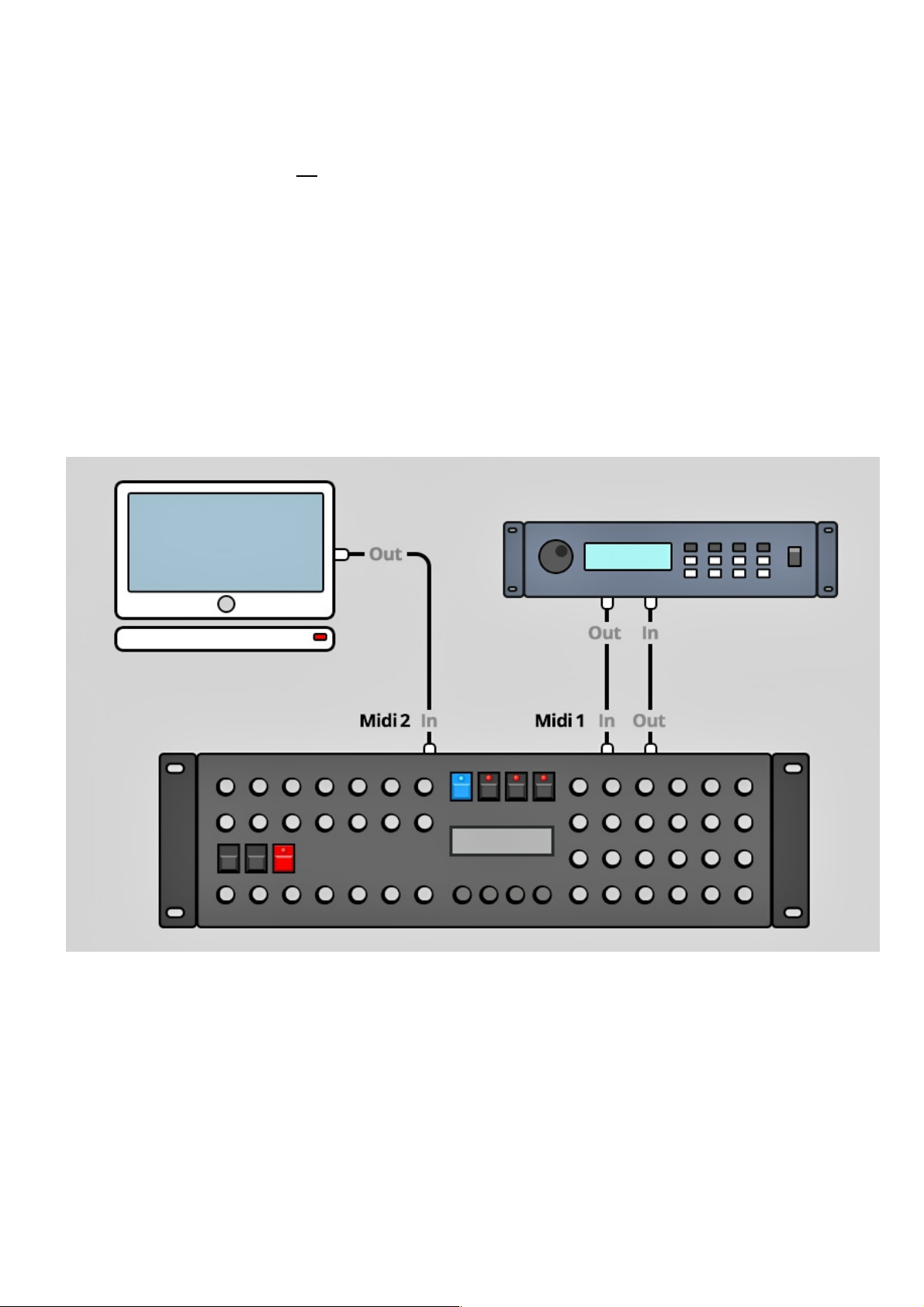
The Stereoping Programmer has 3 Midi jacks which should be cabled like that:
• MIDI 1 - OUT -> MIDI IN of your MKS-80
• MIDI 1 - IN -> MIDI OUT of the MKS-80
• MIDI 2 - IN -> MIDI OUT of your Midi interface/sequencers/keyboards
Both jacks of Midi 1 connect the Programmer with your synth in a loop. This seems unconventional but it is
necessary: the Synth Programmer must hold the same patch data in it's memory as your MKS-80. This data
exchange runs through MIDI 1 IN / OUT.
A Synthesizer would not make any sense if it could not receive midinotes, modulation wheel changes etc. These
are coming into the programmer over the MIDI 2 IN jack from your keyboard/DAW/sequencer. They will be
merged with your parameter changes and sent together to the synthesizer.
Synth Programmer for MKS-80 – Operation manual V 1.16 – 03/2019
© Stereoping Germany, Meschede 2019
Page 6
Settings and workflow____________________________________________________________________________________6
2. Settings and workflow
Settings on the MKS-80
For the MKS to work properly with the Programmer two things have to be set:
• The switch labeled 'MIDI FUNCTION' of the MKS-80 must be pushed into position III, otherwize it refuses
to listen to SysEx commands
• The MKS-80 and Synth Programmer have to be set on the same midichannel
Synchronisation
Directly after powerup the Programmer is 'empty', it should be feeded with the parameter data of the currently
selected MKS-80 patch. As long as Programmer and Synthesizer are not synced Compare and Randomizer
remain locked. In addition the Programmer's display shows questionmarks instead of the original values for
parameters.
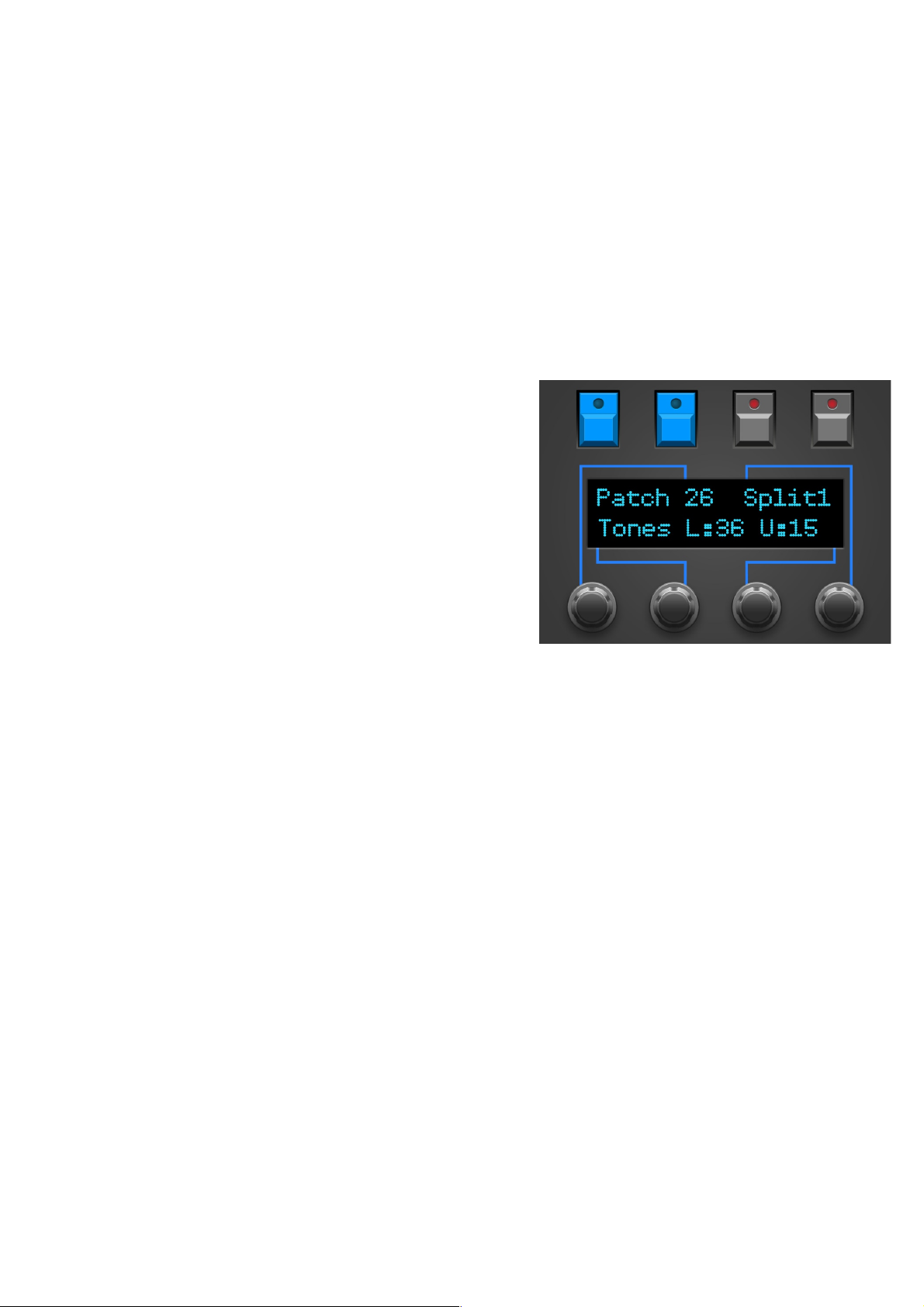
Syncing could not be easier: select any patch directly on the
MKS-80. The MKS-80 sends the complete Patch & Tone-Data
through it's MIDI OUT, the Programmer reads it and updates it
memory. You will see a response message on the
Programmer's display as shown to the right also supplying
information about the KEYMODE and which Tones are used
inside the Patch. Programmer and Synthesizer are in sync now
and we can start.
The same thing happens when selecting another Tone inside a
Patch. The MKS-80 automatically sends the data of the just
selected Tone to the Programmer which prompts the
recognized data with a positive response message on display.
Saving
Saving Patches and Tones must be accomplished on the
MKS-80 itself, the Programmer does not offer any possibility to save your sound creation.
Synth Programmer for MKS-80 – Operation manual V 1.16 – 03/2019
© Stereoping Germany, Meschede 2019
Page 7

Overview_________________________________________________________________________________________________7
3. Overview
Let's take a quick look on the user interface first. Details to the different modes and buttons are following behind
– if necessary at all.
The 45 turn dials are – you guess it already – for direct changing of the MKS-80 's parameters.
The 4 endless encoders are for finetuning values on features tweaked best in fine steps and with a display. There
are 4 lines, each starting on an encoder and ending in a corner of the display. This should help finding the right
encoder of the parameter you want to change.
The 7 buttons change main modes and select UPPER or LOWER parameters. The 4 buttons above the display
sometimes have a secondary function:
Function keys
In modes like COMPARE, CHORD SETUP & RANDOMIZER the 4 buttons above the display act as function keys to
execute different menu functions. A button acting as function key has it's LED shining and a command printed in
capitals in the 1st line of the display.
Example: press RANDOM to enter RANDOMIZER. The LEDs of the buttons PEEK and RANDOM will light up. In the 1st line
of the display you will read the commands DO and EXIT. Pressing RANDOM again will execute XIT, causing the
Programmer to exit Randomizer again. Pressing PEEK (=“DO“) would create a random Patch and let the Programmer
send it over to the MKS-80.
PLAY Mode
After powerup or if no other mode is selected you are directly in PLAY MODE. This is the main mode you will
spend most time in: here you change the parameters of the MKS-80 with the knobs. Details to PLAY Mode follow
in Chapter 5. Play Mode
Button 'PREFS'
Press PREFS to enter the Programmer's menu with the preferences. Any changes you make here will
automatically be saved on exiting. The settings are also preserved after powering the Programmer down of
course. Holding the PREFS button for longer than 2 secs. activates MIDI BYPASS MODE. Details on all PREFS
parameters and the MIDI BYPASS MODE will follow in Chapter 7. PREFS and MIDI BYPASS MODE
Button 'COMP'
Use COMPARE to switch between your original patch of the MKS-80 and your edited patch. As long as compare is
active and you hear the original patch, the turn dials are locked.
Line 2 of the display shows 'Original Patch' to make clear you actually are listening to the original patch as it was
coming out of the MKS-80's memory. Line 1 displays the command 'KEEP?' and button No. 4. above the display is
bright. If you desire to keep this original patch just press this function key. Your edited patch will be replaced by
the original patch and the Programmer jumps back into PLAY mode. Or you simply press COMPARE again to
revert to your edited patch.
Button 'CHORD'
This enables/disables CHORD MEMORY. Holding the button for 2 seconds jumps into the CHORD SETUP menu.
All infos and details about this in Chapter 9. Chord Memory.
Buttons 'UPPER' and 'LOWER'
Most KEY ASSIGN MODEs use two sets of parameters to build the Patch, UPPER and LOWER parameters. These
buttons select where your pot fiddling will be sent to. More on the Upper/Lower/Tone/Patch mess in Chapter 4.
Patches and Tones - Upper and Lower.
Button 'RANDOM'
Press RANDOM to enter the RANDOMIZER. If you are addicted to chaos the Programmer offers the right tool
here. Press RANDOM again to leave this mode and get back to PLAY mode. All about the Randomizer in Chapter
6. Randomizer.
Synth Programmer for MKS-80 – Operation manual V 1.16 – 03/2019
© Stereoping Germany, Meschede 2019
Page 8

Overview_________________________________________________________________________________________________8
Button 'PEEK'
Press PEEK to toggle PEEK mode on and off. While PEEK is active any knob fiddling brings the parameter to
display without changing the value or sending anything to the MKS-80. Quite helpful to examine parameters
without changing the Tone/Patch..
Hint: If you just need to PEEK one or two parameters and want to avoid clicking ON/OFF, ON/OFF, ON/OFF there is a
shortcut: keep PEEK pressed. If you hold the PEEK button longer than ½ a second on activating, it will be immediately
disabled again as soon as you lift it again. This saves half of the 'Klicks'. As long as PEEK is down you can peek as many
parameters as you like of course.
Synth Programmer for MKS-80 – Operation manual V 1.16 – 03/2019
© Stereoping Germany, Meschede 2019
Page 9

Patches and Tones – Upper and Lower___________________________________________________________________9
4. Patches and Tones – Upper and Lower
Before diving into PLAY mode let's first take a look on the MKS-80's architecture of Upper and Lower Patches and
Tones.
What is a Tone?
A Tone is the collection of 48 parameters for Oscillators, Filter, LFO and Envelopes – responsible for the timbre or
'sound'. You can not play a Tone separatly, there is no 'Tone Mode' on the MKS-80. A Tone is always part of a
Patch.
The MKS-80's 'Tone' button is just for reaching the parameters associated with the Tone (and not the Patch).
Which Tone(s) is (are) played is always determined by the Patch. The MKS-80 offers 8 banks each with 8 Tones.
What is a Patch?
A Patch is a collection of 30 parameters built up of 2 identical sets of 15 UPPER parameters and 15 for LOWER.
One of these 15 Parameters holds the Tone number. The remaining 14 parameters determine HOW this Tone
will be played: monophonic or polyphonic, Pitchbend depth, Split- or Layer, glidetime, balance between Upper
and Lower Tone etc.
UPPER und LOWER share the first 3 patch parameters KEY MODE SELECT, SPLITPOINT and BALANCE. If one of
these is changed in UPPER, LOWER will hold the same value and vice versa.
Patch parameters of the Programmer have blue knob caps (as on the original Roland MPG-80). The MKS-80 can
save 8x8 Patches.
Upper and Lower?
UPPER or LOWER is synonym for a sound component, holding 15 Patch-parameters and 48 Tone-parameters.
The Programmer's UPPER and LOWER buttons have the same function as the UPPER/LOWER buttons on the
MKS-80: they determine where your parameter changes will be sent to: UPPER or LOWER. The 'suitable' button
on the MKS-80 will automatically light up as you change parameters in combination with UPPER / LOWER as the
MKS-80 automatically recognizes if incoming commands are targeting UPPER or LOWER. If you tweak one of the
blue Patch knobs, the MKS-80's PATCH-button will light up. Tweaking Tone knobs lets the MKS-80's Tone button
light up.
There is one exception: Key Assign Mode WHOLE
If KEY ASSIGN MODE is set to WHOLE, the LOWER parameters will be ignored by the MKS-80, allowing to play the
UPPER tone with 8 voices. Playing a WHOLE patch automatically lights up the Programers and MKS-80's UPPER
and LOWER buttons all together. BALANCE has no effect at all in WHOLE mode.
One Tone used in several Patches?
Now there is one confusing issue: a patch can select any Tone from the pool of 64 Tones. A Tone logically can be
used by several different Patches. If you change such a Tone and save it, all the Patches making use of it will
sound different. This is a problem even the Programmer can not solve.
Synth Programmer for MKS-80 – Operation manual V 1.16 – 03/2019
© Stereoping Germany, Meschede 2019
Page 10
PLAY Mode_____________________________________________________________________________________________10
5. PLAY Mode
This is the active mode right after powerup. As long as the
Programmer is not in sync yet, it just displays questionmarks for
the original values of the program.
Remember: to get Programmer and MKS-80 in sync just select a
Patch on the MKS-80.
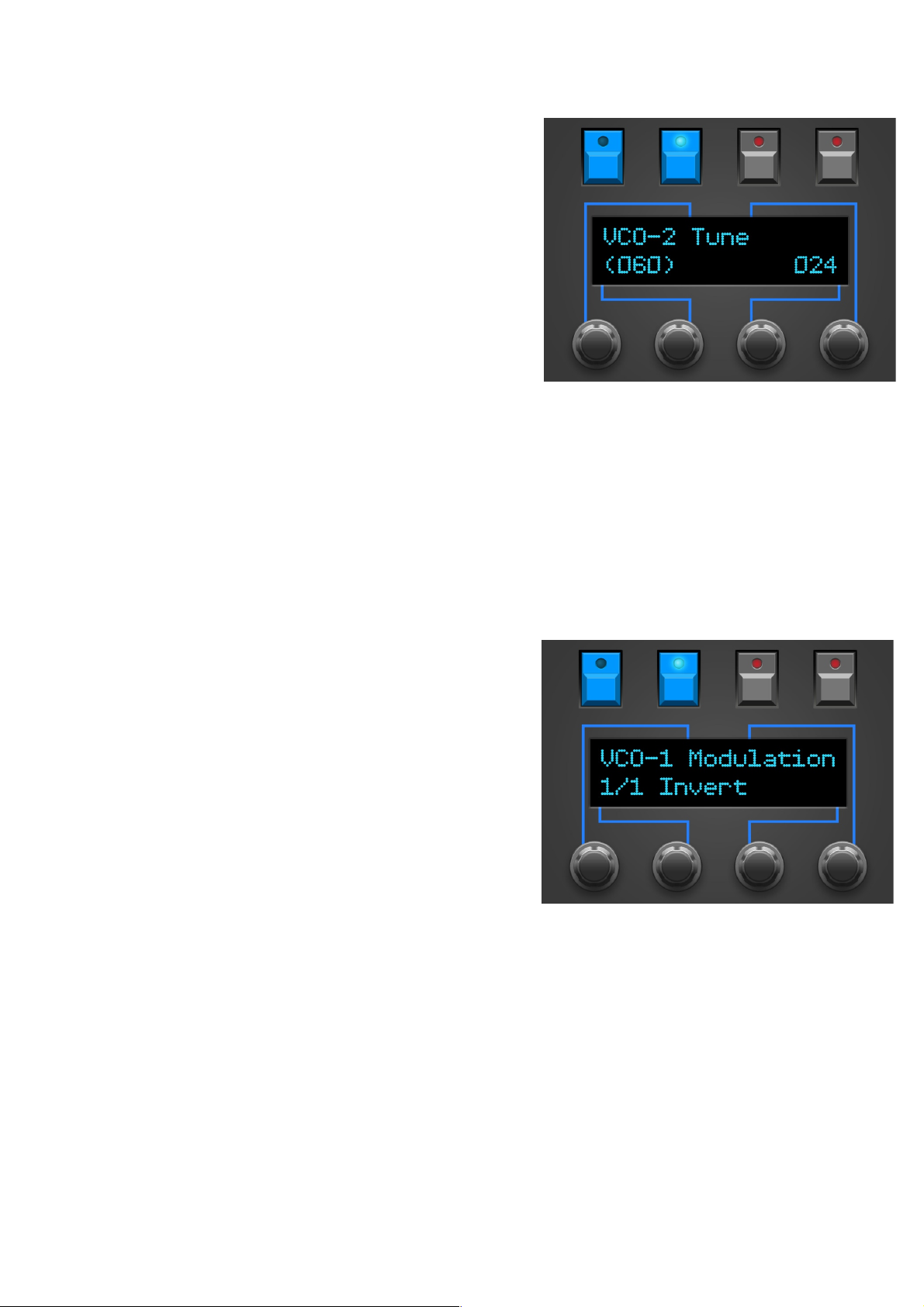
On turning a knob the display shows 4 informations:
• Upper left is the parameter group like 'LFO-1', 'VCF',
'VCO-1' ...
• Upper right the parameter name like e.g. 'Tune'
• Lower left you find the original value of the parameter
displayed in brackets
• Lower right you see the current value of the parameter
you are currently changing
You can finetune the value of the currently active parameter with encoder 3. (Why encoder 3? Because the line
printed on the faceplate leads from encoder 3 to the lower right corner of the display)
Parameter groups
A complete Patch (including the associated Tones) of the Roland MKS-80 has got 126 parameters. The
Programmer just offers 45 pots. Hmmm, where is the rest? First, the amount of paras can be halfed as they are
identical for Lower and Upper which can be switched by dedicated buttons. The remaining 13 are grouped and
accessible through subpages. They will be selected and changed with the encoders.
Following is a list of the parameter groups, in brackets you find
the parameters:
• LFO-1 (Waveform)
• PWM (PWM Mode Select)
• KEY FOLLOW (VCO Select)
• VCF (Env Select)
• KEY MODE (Splitpoint)
• ASSIGN (Hold)
• BENDER (VCO-1 Bend, VCO-2 Bend)
• VCO-1 (Modulation)
• VCO-2 (Modulation)
• ENV-1 (Reset)
• ENV-2 (Reset)
• AFTERTOUCH (Mode)
Each time you move a pot, the upper left display position shows the associated parameter group. For example
you turn the knob for 'VCO-2 Tune', the upper left of the display shows 'VCO2'. If the para group is printed in
CAPITALS, there is at least one sub parameter. The para group „Xmod“ therefore does not offer a sub parameter.
You reach sub parameters by moving encoder 1 or 4 one tick. Being in the sub group the enconders do the
following:
• encoder 1 allows changing the para group (e.g. from VCO-2 to ENV-1 to ENV-2 etc.)
• encoder 2 changes the parameter for BENDER. The formatting „1/2“ makes clear you are on parameter 1
of 2. All other groups just offer 1 para.
• Encoder 3 changes value as usual
• Encoder 4 has no function at all
As soon as you turn a pot the Programmer jumps out of the sub menu.
Synth Programmer for MKS-80 – Operation manual V 1.16 – 03/2019
© Stereoping Germany, Meschede 2019
Page 11

PLAY Mode_____________________________________________________________________________________________11
Setting Splitpoint with the keyboard
Both modes of KEY ASSIGN Split-1 and Split2 allow to play Upper and Lower in separate halfs of the keyboard.
The border-note between LOWER and UPPER Tone is set by the KEY ASSIGN sub-parameter SPLITPOINT. Get it on
display by moving KEY MODE and turning encoder 1 or 2 just one Tick. Encoder 3 now allows shifting the
Splitpoint.
Tip: There is an easier way for setting SPLITPOINT. As long as the display shows the SPLITPOINT page, you can hit a note
on your keyboard. The Programmer will immediately set the incoming note as the new Splitpoint. The note has to be
sent on the Programmer's midichannel set in the Prefs.
LFO-1 Waveform in submenu?
You migh ask why LFO-1 waveform was banned into a sub parameter whereas the (on the first sight)
'unimportant' LFO-1 delay got a dedicated button. Well, LFO-1 just got 4 waveforms which can be switched easy
by encoders whereas a span from 0-100 is much more fun being adjusted with a potentiometer.
Changing values directly on the MKS-80
You can change any parameter value for Patches or Tones on the MKS-80 itself as well. The Programmer will
recognize and display your changes – as long as PREFS parameter 3 'XtCC Display' is set to ON.
Side function for UPPER & LOWER Buttons
Additionally to switching between Upper and Lower these buttons got a secondary function: as long as you keep
them pressed the currently selected TONE number is shown on the display.
Synth Programmer for MKS-80 – Operation manual V 1.16 – 03/2019
© Stereoping Germany, Meschede 2019
Page 12
RANDOMIZER___________________________________________________________________________________________12
6. RANDOMIZER
The Randomizer creates random patches as well as some typical preset sounds, to have a clean starting point for
your own creations. It's aim is not to spill patch junk, needing 25 attempts until coming up with something
valuable. The Randomizer follows some special rules. VCA MOD ENV 2 e.g. will only be changed in mode 4 NOISE will not be selected as possible waveform below mode 2. On the other side you hardly can expect 50
attempts to create 50 breathtaking top patches.
The 4 Buttons above the Display execute the following commands:
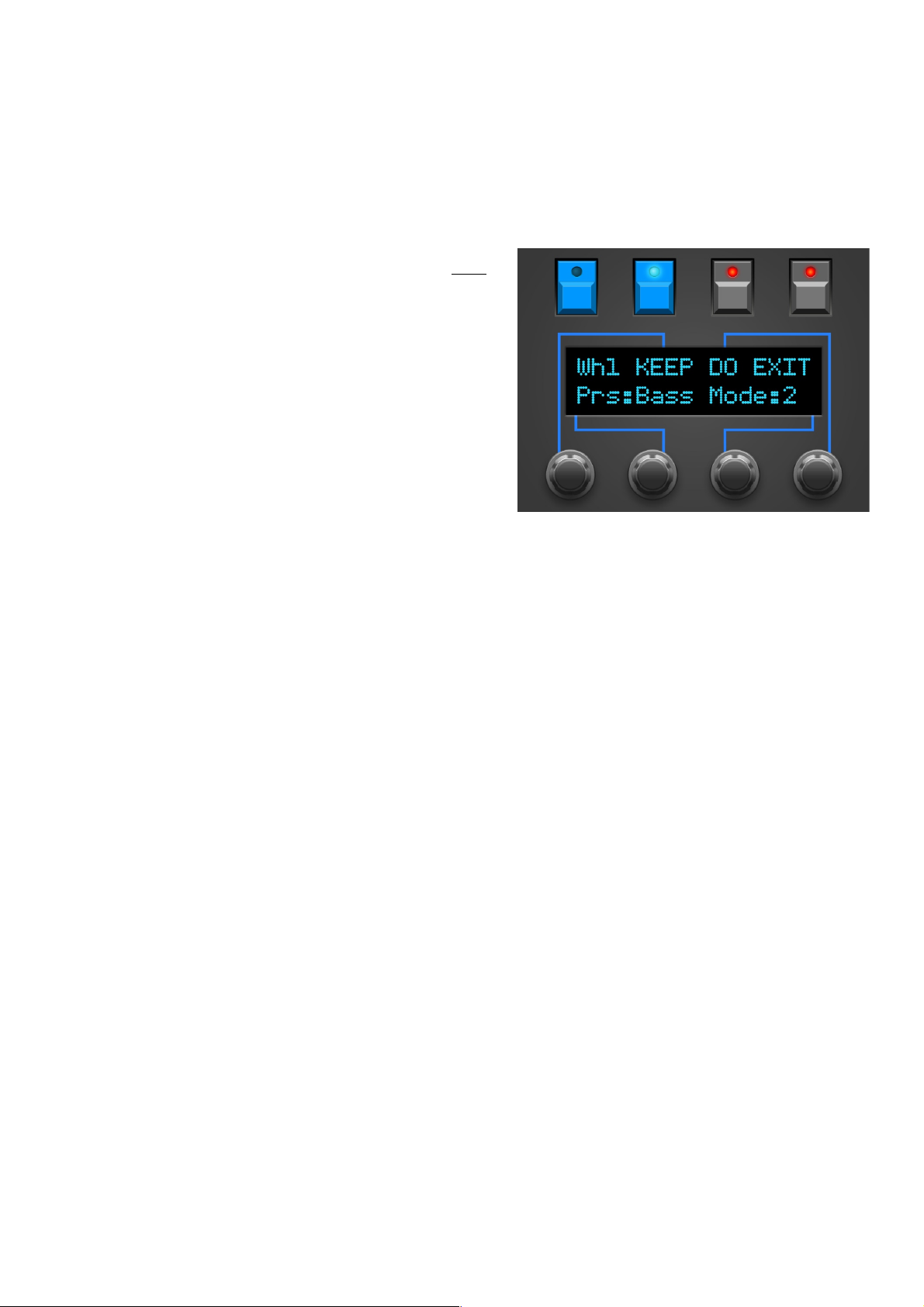
• 'KEEP' – will appear below the UPPER button after
having created a random sound. If you like to keep it,
press this button. A safety requester will appear. On
choosing YES, your old patch BEFORE entering
Randomizer will be rejected and your random sound
will become the current patch held in Programmer's
memory. Choosing NO jumps back into Randomizer.
• 'EXIT' – press this to exit Randomizer and return to
PLAY mode. If you created a random patch it will be
rejected and the Patch before entering Randomizer
will be restored.
• 'DO' – creates a random Patch based on the
parameters explained below.
At the beginning of display line 1 you spot an abbreviation:
the target where to send the random Patch to. If you are in
WHOLE mode it sais 'WHL'. Similar to the knob dialing itself, the random Patch will be sent to UPPER then. In all
other modes you can use encoder 1 to choose between 'UPR', 'U&L' and 'LWR'. You just want to randomize
UPPER? … set 'UPR' etc.
In the second display line you can take influence on fortune:
• encoder 2 selects the Preset: Init, Bass, Orgn, Perc or Pad.
• encoder 3 changes 'Mode' between 0 and 4 to increase the amount of randomization. Mode 0 sends the
preset without any randomization. If something different should happen on pressing 'DO' over and over
again, 'Mode' should at least be 1.
Mode 0: Just uses the Preset without any random influence
Mode 1: based on the Preset values, some parameters are slightly randomized using the following rules:
• LFO1 DELAY always 0 and WAVEFORM always TRIANGLE
• VCO ENV 1 DEPTH always 0
• VCO KEYOLLOW always 100
• VCO RANGE always in octaves
• VCO2 WAVEFORM never NOISE
• HIGHPASS always 0
• XMOD, SYNC, Envelope and Modulationsource selections and polarities unused
• No changes on PATCH parameters
Mode 2: based on the Preset values but with more randomization using the following rules:
• LFO 1 changes WAVEFORM
• VCO2 RANGE in octaves and famous intervals
• VCO2 WAVEFORM NOISE allowed with 20% probability
Mode 3: full random range on all parameters without consideration of the Preset and using the following rules:
• VCO1 RANGE in octaves and famous intervals
• VCO MOD ENV1 DEPTH set to OFF with 60% probability
• VCF CUTOFF not below 30
• VCA ENV2 DEPTH set to 100 with 60% probability
Synth Programmer for MKS-80 – Operation manual V 1.16 – 03/2019
© Stereoping Germany, Meschede 2019
Page 13

RANDOMIZER___________________________________________________________________________________________13
• ATTACK for ENV2 always below 80
Mode 4: full chaos. If you can not hear any sound, the cause is most likely VCA ENV2 DEPTH or CUTOFF
Patch Parameters will be changes from Mode 2 on. The following Patch Parameters remain untouched by the
Randomizer:
• KEY MODE
• SPLITPOINT
• TONE NUMBER
• HOLD
Hint: all dials are still fully functional in Randomizer. You can start twaeking your random Patch right away.
Synth Programmer for MKS-80 – Operation manual V 1.16 – 03/2019
© Stereoping Germany, Meschede 2019
Page 14

PREFS and MIDI BYPASS MODE_________________________________________________________________________14
7. PREFS and MIDI BYPASS MODE
PREFS menu offers 4 pages. The currently selected will be displayed in the upper right corner in format '2/4' e.g.
You can swap pages with encoder 1 and 4. Values can be changed with encoder 2 and 3.
• '1/4 Midichannel' – this is where to set the Programmer's Midichannel. It should fit the current
midichannel of your MKS-80.
• '2/4 Filter PgmChange' – enables or disabled filtering of program change messages sent from your
DAW/Sequencer. If set to ON, the filter is active and your MKS-80 does not see Program changes as the
Programmer filters them out.
Caution: unsaved edited patches can be lost by some unintendedly engaged program change from inside your
DAW or keyboard.
• '3/4 XtCC Display' – means 'External CC Display'. This let's you decide if the Programmer's display
should show incoming CC-messages. When using a lot of modulation curves in a DAW automating the
MKS, it might be disturbing having lot's of display messages. You can deactivate the display of incoming
CC messages then with this parameter.
• '4/4 Displaysaver' – YES means the display falls asleep after 23 Minuten inactivity. This can increase
lifetime of OLED displays. As sson as you move a knob or some mididata is detected on the
programmers Midi In the display wakes up.
You can leave this mode by pressing the PREFS button again. If you changed any of the values, your new settings
are saved automatically.
Midi Bypass Mode
The PREFS button got a secondary function. By holding it for 2 seconds the Programmer jumps into MIDI
BYPASS MODE. Being in MIDI BYPASS MODE most of the routines of the Programmer are skipped and any midi
data coming in on MIDI IN 2 will be forwarded unprocessed and unfiltered to your MKS-80 on MIDI OUT 1 - as if
your Programmer would not be in between at all. This mode is quite useful if you want to dump some
soundbanks into the MKS-80. You can leave MIDI BYPASS MODE at any time pressing PREFS again.
Synth Programmer for MKS-80 – Operation manual V 1.16 – 03/2019
© Stereoping Germany, Meschede 2019
Page 15
CHORD MEMORY_______________________________________________________________________________________15
8. CHORD MEMORY
The CHORD Button simply switches CHORD MEMORY on and off. A Chord Memory allows to play a previously
learnt chord chromatically by just pressing one key. The lowest note of the chord is the base note, all remaining
notes will be shifted in their learnt interval above the base note.
The Chord Memory of the Synth Programmers offers six 'Chord Slots' which can be quickly selected by pressing
notes on the keyboard! Your 6 chords keep saved in Programmer's memory even after switching it off.
Triggernotes
The 6 chord memos will be selected each by it's own keyboard note, the triggernote. It allows switching chords
over midi to be automated easily in a song. The triggernotes are also used in Chord Setup to learn the chord. You
can program and use the chord memory completely from the keyboard without switching between Programmer
and keyboard.
To avoid collision of triggernotes and normal play notes, setup also offers changing the position of the
triggernotes. But they always are placed on succeeding keys, e.g. C2, C#2, D2,D#2 etc.
On activating or changing chord slots, the display shortly shows the currently selected Chord Slot and the
triggernote, e.g. „Sl: 2 Nt:2 Tr:C “ (Slot 2, using 2 notes in total, triggernote C1)
Chord Setup
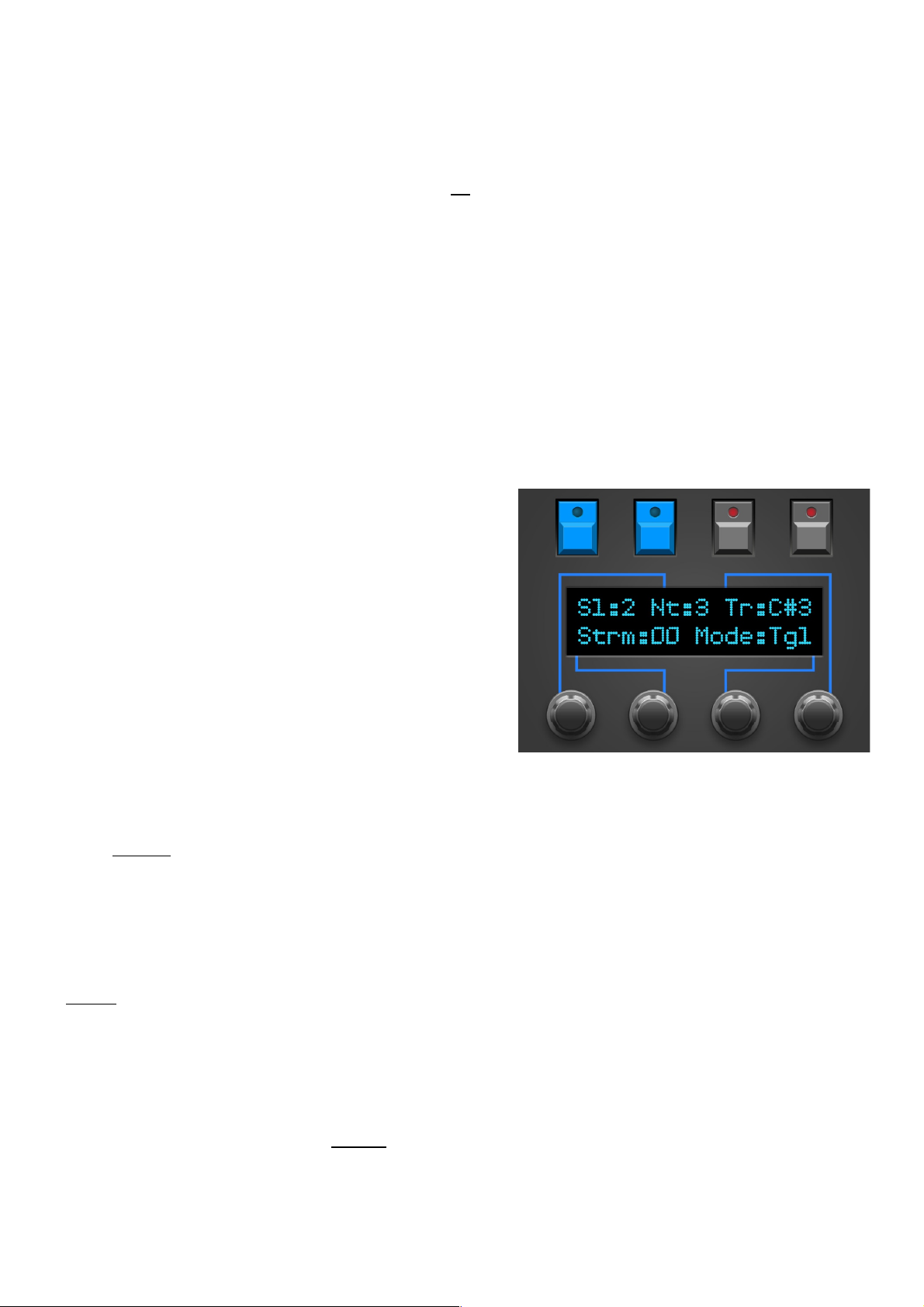
To enter CHORD SETUP keep the CHORD key pressed for
2 seconds. This is the mode to learn new chords, set Strum
or shift the triggernotes.
The display shows the following:
Sl:2 – You are currently working on slot 2. Change the slot
with enocder 1 or using the triggernotes
Nt:3 – The current chord slot uses 3 notes. This will be
updated automatically on learning a chord
Tr:C3# – The triggernote for this slot is C3#. Shift all
triggernotes using encoder 4. Remember: the triggernotes
for all 6 slots are succeeding. Changes on one slot alters all
others as well.
Strm:00 – the Strum-time is a short delay before triggering
the next note of the current chord. Possible values range
from 0 to 99. Change strum time using encoder 2.
Mode:Tgl/Hld – The Chord learn mode, use encoder 3 to toggle between 'Toggle' and 'Hold'.
Being in Chord-Setup you can play your chords and swap slots as outside the Setup. The big difference in Setup:
while holding a triggernote you learn the new chord. Display shows 'LEARN!' instead of the triggernote. The
first incoming note will erase the old chord in memory. As soon as you do not SAVE on exit, nothing is lost.
Learning modes 'Toggle' and 'Hold'
In learning mode 'Hold' you just hold your chord until you lift the triggernote. In 'Toggle' mode you do not need
to hold the desired keys, making things easier on chords with widely spread notes. Press a note to add it to the
chord. Press it again to remove it from the stack.
Lifting the triggernote saves your new chord in the current slot and you can start testing your chord on the
keyboard.
You can leave Chord-Setup by pressing CHORD again. On leaving you will be asked whether to save or reject
your changes. The buttons above the display offer 3 options:
• SAVE – all changes in the chord slots will be saved
• BACK – leads back into the Chord Setup
• XIT – Chord Setup will be left without making any changes
Synth Programmer for MKS-80 – Operation manual V 1.16 – 03/2019
© Stereoping Germany, Meschede 2019
Page 16

CC to SysEx translator__________________________________________________________________________________16
9. CC to SysEx translator
Maybe you like to automate cutoff, envelope times or other parameter in
your song? This is where the CC-translator comes into play, it converts
ordinary Midi Control Change messages into the complex SysEx-Strings your
MKS-80 needs to see for parameter changes.
Setup a 'mixermap' or 'Dashboard' (or whatever it is called) in your DAW
with sliders or turn dials sending Midi-Controller-Change messages (CC).
You just need to assign the CC number associated to your desired
parameter to such a control (according to the table). By moving or
automating this control inside your DAW or sequencer the Programmer
translates the DAW's CC-output into SysEx-commands and sends them to
the MKS-80 which immediately changes it's sound.
For avoiding intersecting with Standard-CCs like Volume (#7) or panning
(#10) some CC-numbers are left out. The CC data must be sent on the same
midichannel as your Programmer and MKS-80 is set to.
Synth Programmer for MKS-80 – Operation manual V 1.16 – 03/2019
© Stereoping Germany, Meschede 2019
CC# LOWER
33 LFO-1 Rate
34 LFO-1 Waveform
35 VCO Mod LFO-1
36 VCO Mod ENV-1
37 PW
38 PWM
39 XMOD Manual Depth
40 XMOD ENV-1 Depth
41 VCO-1 Range
42 VCO-1 Waveform
43 VCO-2 Range
44 VCO-2 Finetune
45 VCO-2 Waveform
46 Mixer
47 HP Cutoff
48 VCF Cutoff
49 VCF Reso
50 VCF Mod Env Depth
51 VCF Mod LFO-1 Depth
52 VCF Keyfollow
53 ENV-1 Attack
54 ENV-1 Decay
55 ENV-1 Sustain
56 ENV-1 Release
57 ENV-2 Attack
58 ENV-2 Decay
59 ENV-2 Sustain
60 ENV-2 Release
61 Unison Detune
62 Glide
CC# UPPER
73 LFO-1 Rate
74 LFO-1 Waveform
75 VCO Mod LFO-1
76 VCO Mod ENV-1
77 PW
78 PWM
79 XMOD Manual Depth
80 XMOD ENV-1 Depth
81 VCO-1 Range
82 VCO-1 Waveform
83 VCO-2 Range
84 VCO-2 Finetune
85 VCO-2 Waveform
86 Mixer
87 HP Cutoff
88 VCF Cutoff
89 VCF Reso
90 VCF Mod Env Depth
91 VCF Mod LFO-1 Depth
92 VCF Keyfollow
93 ENV-1 Attack
94 ENV-1 Decay
95 ENV-1 Sustain
96 ENV-1 Release
97 ENV-2 Attack
98 ENV-2 Decay
99 ENV-2 Sustain
100 ENV-2 Release
101 Unison Detune
102 Glide
Page 17

Updating Firmware_____________________________________________________________________________________17
10. Updating Firmware
The day may come you want to update your edition or try out another. Your Synth Programmer offers a
firmware update mode for this. After entering this mode you just send a firmware-file into the controllers Midi IN
2 jack. The firmwares in SysEx-format are all compatible with your Programmer and freely available on our
website. You can dump them with any standard SysEx dump tool of which several are available as freeware for
different operating systems. An exmaple for PC is 'MidiOX', for the Mac you could use 'SysEx Librarian'.
The technical part:
• Switch off the Stereoping Programmer
• Connect MIDI OUT of your Midi-Interface directly to the jack MIDI 2 IN of the Programmers using a short
cable of good quality
• There are some preferences in most SysEx-Dump Programs like 'Delay between Buffers' or 'Delay after
F7'. Please choose something around 100mS (Milliseconds) here.
• Hold LOWER and power up your Programmer. The Display should read 'BOOTLOADER'
• Load the new Firmware into your SysEx-Dump Program and send it out
• In rare cases there is a data-chunk stuck somewhere and you will see the message „Wrong file“ right at
the beginning. Stop the firmware transmission, simply press LOWER again and restart the firmware
transmissing. It should work now.
• The display shows OS-Version and progresst. After about 2 minutes the Programmer restarts
• If you will get an error on the screen please try another cable or increase the delay mentioned above.
The firmware update erases all PREFS settings.
All 6 Chord Memory slots will be reset to factory settings
Synth Programmer for MKS-80 – Operation manual V 1.16 – 03/2019
© Stereoping Germany, Meschede 2019
Page 18

Imprint_________________________________________________________________________________________________18
11. Imprint
Stereoping is a registered trademark of Gregor Zoll, Germany.
Adresse Gregor Zoll Musikelektronik
Hermann-Voss-Str. 21
59872 Meschede
Germany
E-Mail h e llo@stereoping. com
Homepage http://www.stereoping.com
Synth Programmer for MKS-80 – Operation manual V 1.16 – 03/2019
© Stereoping Germany, Meschede 2019
Page 19

Imprint_________________________________________________________________________________________________19
Synth Programmer for MKS-80 – Operation manual V 1.16 – 03/2019
© Stereoping Germany, Meschede 2019
Page 20
 Loading...