

Page 1

SDXI-U2
Serial ASCII Data Exchange Interface
General Description
Version 1.15
Date: 08.02.2010
copyright © Stemin GmbH, 2009 – 2010. All Rights Reserved.
Page 2
SDXI-U2 Serial ASCII Data Exchange Interface General Description V1.15
© Stemin GmbH • SDXI U2 Protocol Description V1.15.doc • page
2 of 15
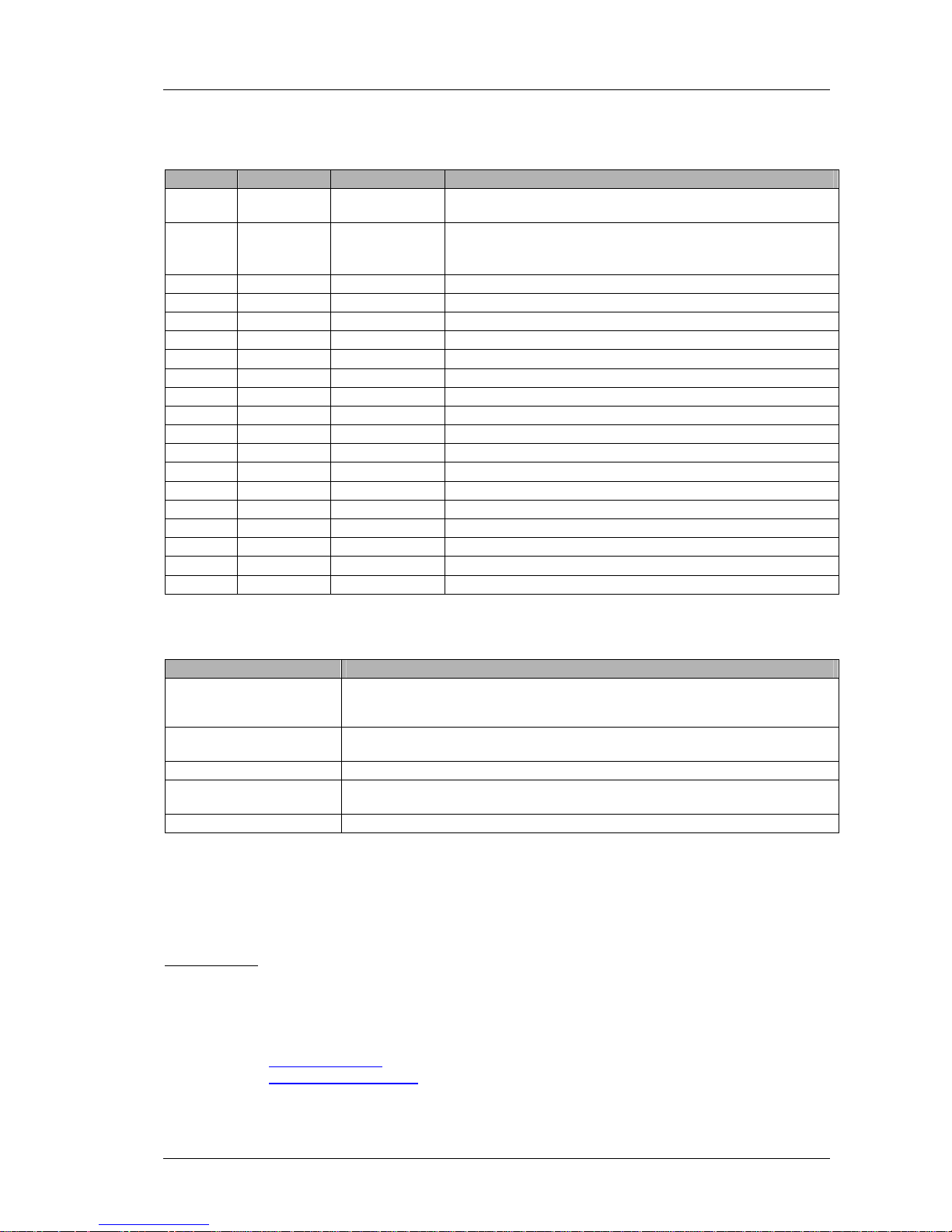
Document version
version date Name Remark
1.14 30.11.2009 -
23.12.2009
R. Wuppinger - initial version: after the SDXI-U2 documentation,
Command set requires Automixer (SW Version 1.24 or higher)
1.15 22.01.2010 R. Wuppinger - command “U2DMxDS=…” changed to “U2DMxDST=...”
- added command “U2DMxDRI=…” to enable and disable the
remote interface (SW Version 1.24 or higher)
Available Documents
Name Remark
SDXI General Description Describes the fundamental protocol parameters and the data elements of the SDXI
protocol. Also contains the description of these telegrams, which are supported by
all SDXI devices, e.g. software and hardware version.
SDXI AXENS + US1 Describes all telegrams used for the AXENS Central Unit (AXCU), the AXENS
talking station (AXTS) and the Salve Clock System US1.
SDXI ASx Describes all telegrams used to control the digital automatic mixer family ASx.
SDXI-U2 Describes all ASCII based telegrams provided by the digital automatic mixer family
ASx.
Distributed by:
© Stemin GmbH
Hauptstraße 25
D – 82549 Königsdorf
Phone: 0049 – (0)8179 – 931 10
FAX: 0049 – (0)8179 – 931 99
Email: [email protected]
Internet: http://www.Stemin.com
Page 3

SDXI-U2 Serial ASCII Data Exchange Interface General Description V1.15
© Stemin GmbH • SDXI U2 Protocol Description V1.15.doc • page
3 of 15
Contents
1 General description.............................................................................................5
1.1 Protocol SDXI.......................................................................................................... 5
1.2 Protocol Extension SDXI-U2 (ASCII Mode)............................................................5
1.3 Serial Parameters....................................................................................................5
1.4 Availability of Telegrams........................................................................................5
1.5 Note: Enabling Remote Control.............................................................................5
1.6 Telegram Specification...........................................................................................6
2 Commands...........................................................................................................7
2.1 Definition of General Command Parameter..........................................................7
2.2 Version Commands ................................................................................................8
2.2.1 Software Version („U2DM<d>SW?<CR>“).........................................................................8
2.2.2 Hardware Version („U2DM<d>HW?<CR>“).......................................................................8
2.3 Device Configuration..............................................................................................9
2.3.1 Set Baudrate („U2DM<d>COM<c>BD=<bd>“)...................................................................9
2.3.2 Set Remote Interface („U2DM<d>DRI=<s>“).....................................................................9
2.4 Encoder Commands............................................................................................. 10
2.4.1 Encoder Request Value („U2DM<d>EN<e>?<CR>“).......................................................10
2.4.2 Encoder Rotate Left („U2DM<d>EN<e>RL<CR>“)..........................................................10
2.4.3 Encoder Rotate Right („U2DM<d>EN<e>RR<CR>“).......................................................11
2.4.4 Encoder Set Value („U2DM<d>EN<e>=<ev><CR>“) ......................................................11
2.5 Status Commands ................................................................................................12
2.5.1 Request Channel Status („U2DM<d>CS<c>?<CR>“)......................................................12
2.5.2 Set Channel Status Remote Update Time („U2DM<d>CS<c>=<t><CR>“).....................12
2.5.3 Channel Status Set Mute („U2DM<d>EN<c>MU=<mut><CR>“).....................................13
2.5.4 Request Device Status („U2DM<d>DS?<CR>“) ..............................................................13
2.5.5 Set Device Status Remote Update Time („U2DM<d>DST=<t><CR>“) ...........................14
2.6 Virtual Talk Station Commands........................................................................... 15
2.6.1 Set Virtual Talk Station State („U2DM<d>VTS<vts>=<st><CR>“)...................................15
Page 4

SDXI-U2 Serial ASCII Data Exchange Interface General Description V1.15
© Stemin GmbH • SDXI U2 Protocol Description V1.15.doc • page
4 of 15
Page 5

SDXI-U2 Serial ASCII Data Exchange Interface General Description V1.15
© Stemin GmbH • SDXI U2 Protocol Description V1.15.doc • page
5 of 15
1 General description
1.1 Protocol SDXI
The SDXI-U2 (Serial Data Exchange Interface) should allow interacting, controlling and
maintaining a variety of different devices. The serial interface was designed without any
higher protocol function like a handshake or something equal. This interface allows the
communication of embedded devices with a PC and/or among each other. Every device, a
PC or the embedded device is responsible for the correct receiving and interpreting of the
telegrams. This refers also to the timing-behaviour, this means that the devices must be able
to react and process to the telegrams during runtime, without validating the timing conditions,
which could lead to the loss of telegrams. A loss of a telegram can also cause a loss of data
because for some telegram a repetition of the telegram is not possible. If the external device
is fast enough and is controlled by an interrupt driven interface there should be no problem to
handle the telegrams.
1.2 Protocol Extension SDXI-U2 (ASCII Mode)
The SDXI protocol includes a second, higher level protocol interface called SDXI-U2
protocol, which allows the user to communicate and control the device with a simple terminal
program using an ASCII-based interface language.
This SDXI-U2 protocol provides a subset of the regular SDXI telegrams respectively SDXI
commands, to make the basic functions available for an easy access via various media
control devices like AMX, Crestron or something similar.
1.3 Serial Parameters
To select a user specific baud rate, you can select a different baud rate using the according
SDXI-U2 telegram. For detailed description, please refer to the manual.
Default parameters:
BAUDRATE: 9600
PARITY: NONE (fixed)
STOPBIT: 1 (fixed)
DATABITS: 8 (fixed)
1.4 Availability of Telegrams
The availability of each telegram depends on optional and device specific software modules
as well.
1.5 Note: Enabling Remote Control
To enable the remote control functionality, it is first necessary to enable the remote
interface of the device by sending a “Set Remote Interface” command to the device!
Page 6
SDXI-U2 Serial ASCII Data Exchange Interface General Description V1.15
© Stemin GmbH • SDXI U2 Protocol Description V1.15.doc • page
6 of 15
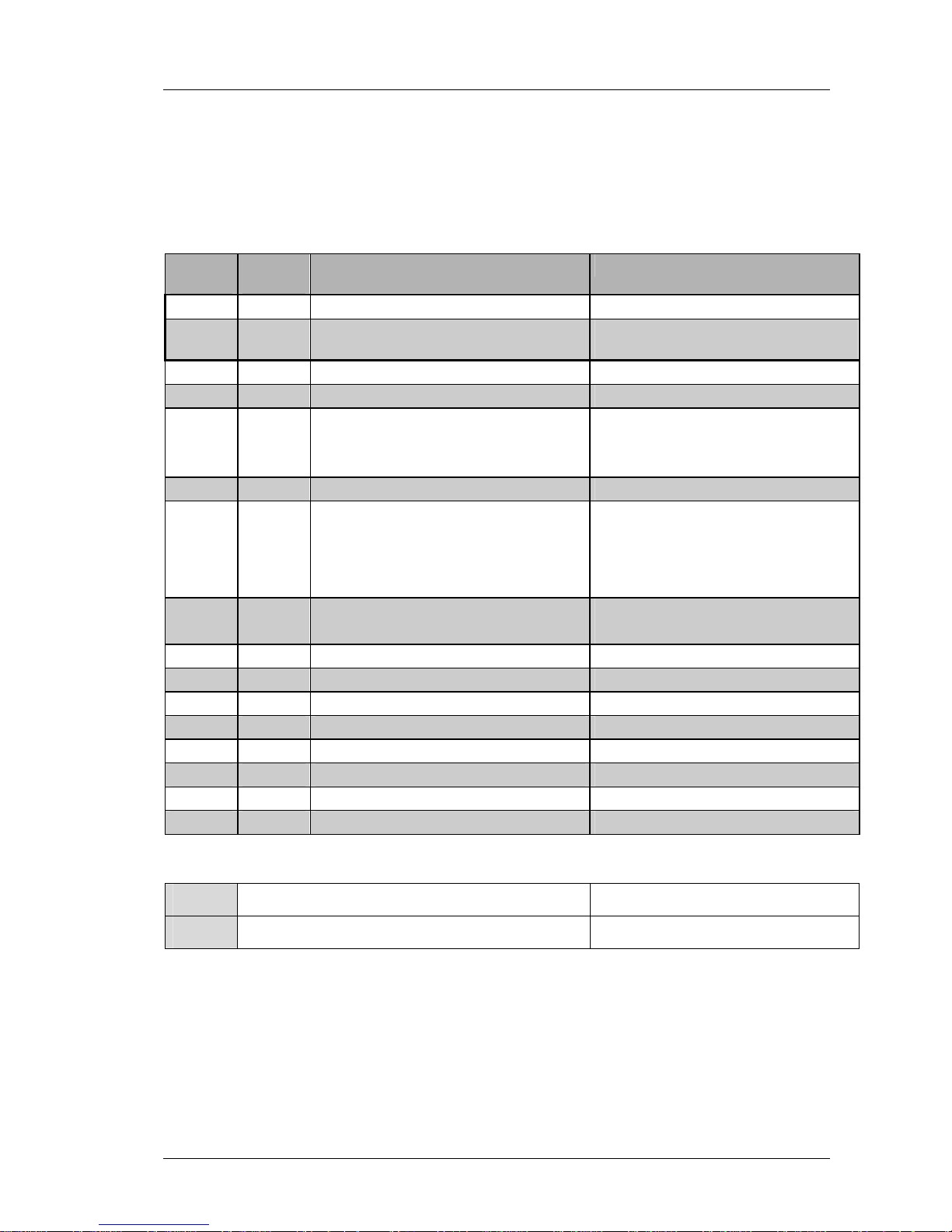
1.6 Telegram Specification
The following table shows the structure of the SDXI-U2 telegrams:
Byte
Index
Byte
Quantity
Meaning value / example
0 1 start byte ‘U’ (0x55H): Start of Telegram
1 1 telegram version ‘2’ (0x32H): signals that a SDXI-U2
telegram follows (ASCII mode)
2 2 … 3 Device Code “DM” (Digital Mixer)
variable 1 … 3 Device Address “1”, …,“999”
variable 2 … 3 Object Code “EN”: Encoder
“COM”: ComPort
variable 1 … 3 Object Address “0”, …,“255”
variable 2 … 3 Command Code / Object Property
Command Codes:
“RR”: encoder turn right
“RL”: encoder turn left
“MU”: mute channel
“BD”: Baudrate
variable 1 Operator
‘=’ set operator
‘?’ request operator
variable 1 … 6 Parameter 1 (optional) “-32767”…”32767”
variable 1 Seperator (optional) ‘,’
variable 1 … 6 Parameter 2 (optional) “-32767”…”32767”
variable 1 Seperator (optional) ‘,’
variable 1 … 6 Parameter 3 (optional) “-32767”…”32767”
variable 1 Seperator (optional) ‘,’
variable 1 … 6 Parameter 4 (optional) “-32767”…”32767”
variabel 1 end byte 0x0d (HEX) End of Telegram CR
Example:
ASCII “U2DM1EN2=35<CR>” sets encoder 2 to value 35 (level)
HEX 55 32 44 4d 31 45 4e 32 3d 33 35 0d
Page 7
SDXI-U2 Serial ASCII Data Exchange Interface General Description V1.15
© Stemin GmbH • SDXI U2 Protocol Description V1.15.doc • page
7 of 15
2 Commands
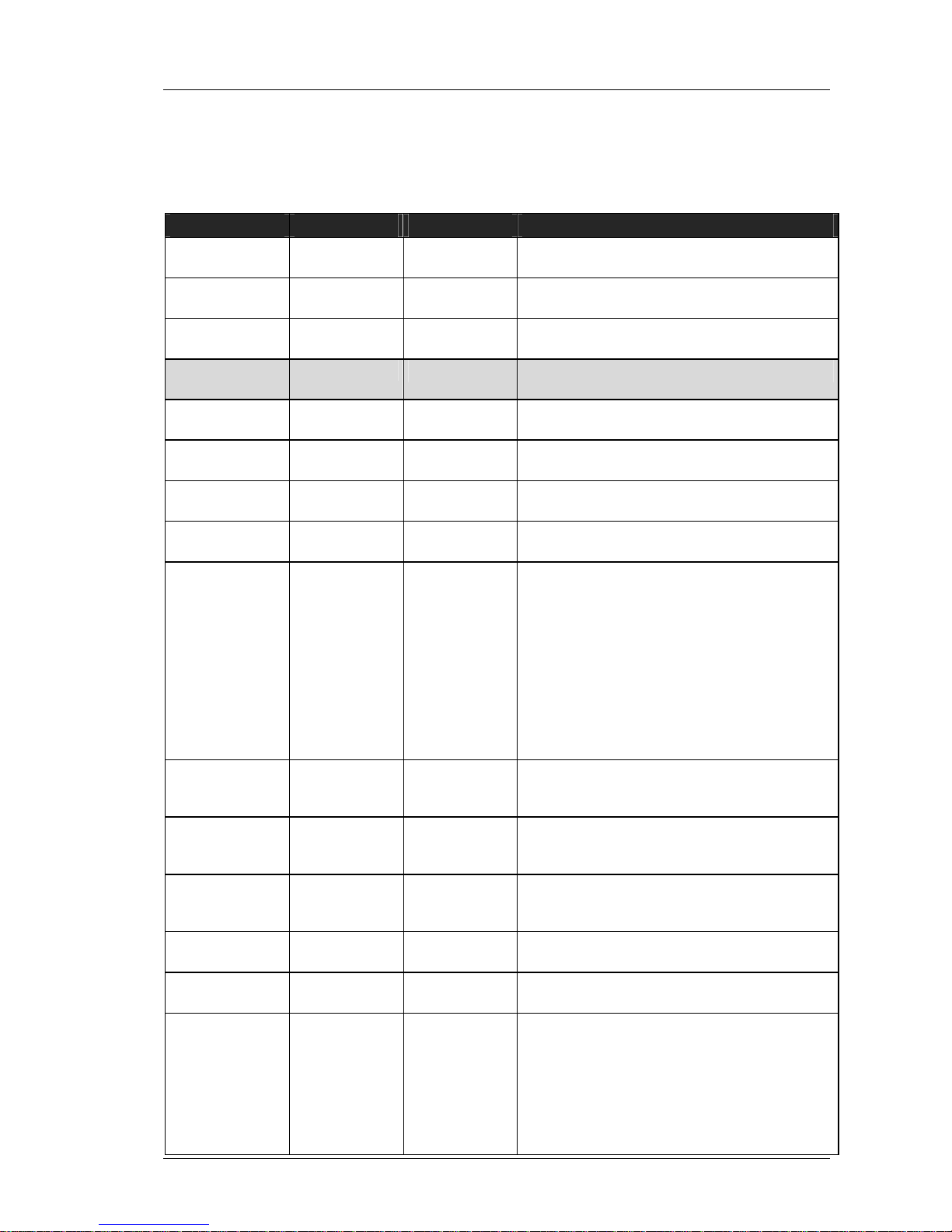
2.1 Definition of General Command Parameter
Parameter
Symbol Range Description
transmission to
the device
data will be send/transmitted to the device
(device receives data)
transmission
from the device
data will be send/transmitted from the device
(device transmits data)
Telegram
definition
Shows the telegram definition including abstract
parameters as variables.
Example of the
Telegram
Shows an example telegram with real values
optional
parameter
[<px>] Parameters placed in square brackets are
optional.
device address <d> 0 … 999 0 = reserved for broadcast address
1…999 = device addresses
encoder number <e> 0 … 16 1…10 = automixer 4 / 2 / 2
1…16 = automixer 10 / 2 / 2
encoder value <ev> 0 … 255 encoder value/setting according to the actual
system control selection
system control
selection
<scs> value (selection) of the system control encoder:
1: = LEVEL
2: = TREBLE
3: = BASS
4: = LOW CUT
5: = LIMITER
6: = AUTOMIXING
7: = DUCKING
8: = NOM. ATT.
9: = LAST MIC ON
10: = PAN BALANCE
Mute State <mut> 0, 1 Mute state of the according encoder/channel:
0: encoder/channel not muted
1: encoder/channel muted
“ON”-LED State <onl> 0, 1 “ON”-LED state of the according encoder:
0: LED is Off
1: LED is On
“PEAK”-LED
State
<pkl> 0, 1 “PEAK”-LED state of the according encoder:
0: LED is Off
1: LED is On
channel number <c> 0 … 16 1…10 = automixer 4 / 2 / 2
1…16 = automixer 10 / 2 / 2
channel level <cl> 0 … 45 Represents the input level at the according
channel
channel status <csx> 00000 …45111 Represents the input level, the ON and the
Peak LED state of channel x in the following
format:
<cl><mut><onl><pkl>
<cl>xxx : first two number represent <cl>
xx<mutl>xx : third number represents <mut>
xxx<onl>x : fourth number represents <onl>
xxxx<pkl>: fifth number represents <pkl>
Page 8
SDXI-U2 Serial ASCII Data Exchange Interface General Description V1.15
© Stemin GmbH • SDXI U2 Protocol Description V1.15.doc • page
8 of 15
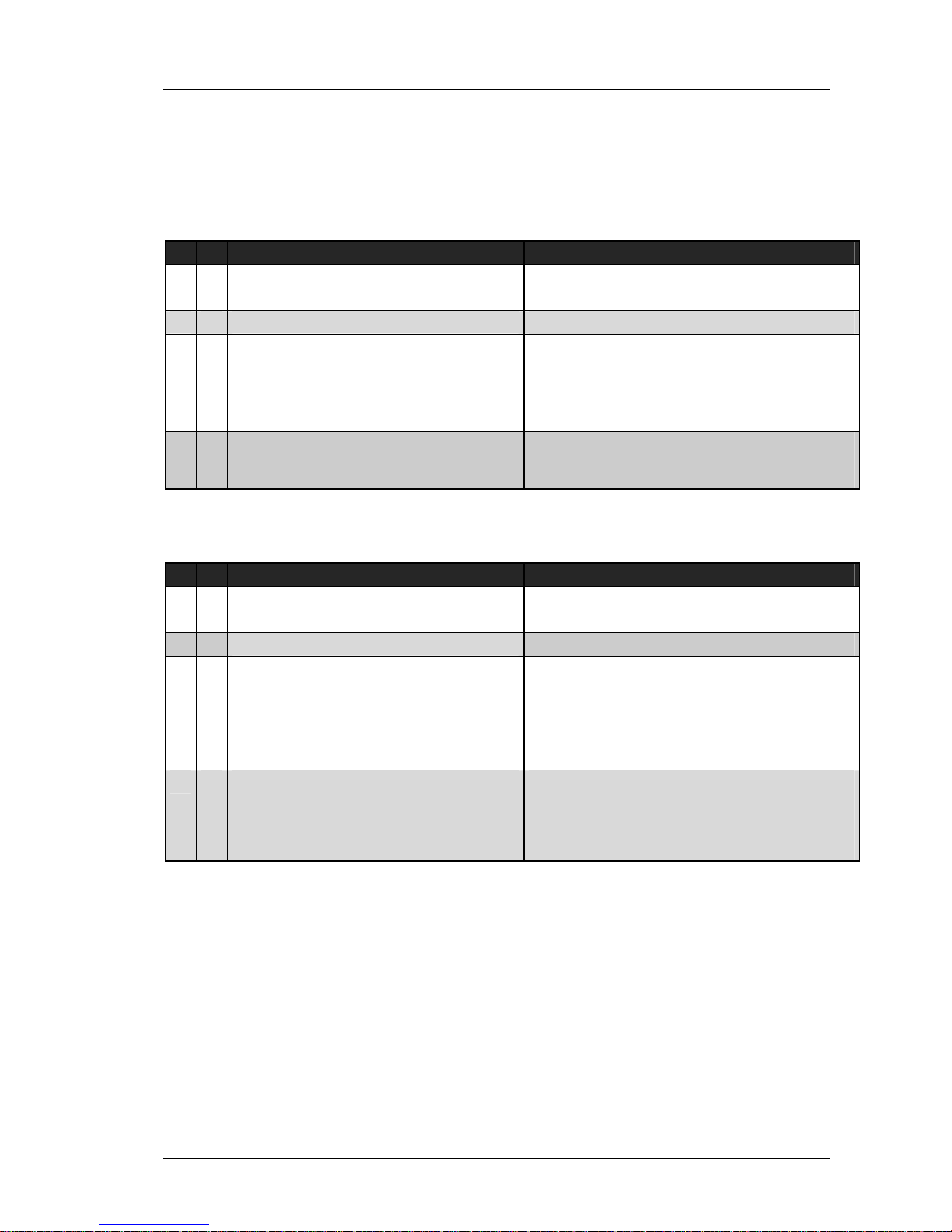
2.2 Version Commands
2.2.1 Software Version („U2DM<d>SW?<CR>“)
Dir Telegram Description
U2DM<d>SW?<CR>
This command requests the actual software
version/info of the device.
U2DM1SW?<CR>
U2DM<d>SW=<p1>,<p2>,<p3><CR>
Device returns the software version:
<p1>: SW-Version: (e.g.: 102 = 1.02)
<p2>: Application Type
5: Digital Automixer 4 / 2 / 2
<p3>: OEM Version (reserved)
U2DM1SW=121,5,0<CR
>
<p1>: SW-Version: 1.21
<p2>: Application: Digital Automixer 4 / 2 / 2
<p3>: OEM Version: 0 (reserved)
2.2.2 Hardware Version („U2DM<d>HW?<CR>“)
Dir Telegram Description
U2DM<d>HW?<CR>
This command requests the actual hardware
version/info of the device.
U2DM1HW?<CR>
U2DM<d>SW=<p1>,<p2>,<p3>,<p4>,
<p5><CR>
Device returns the hardware version/info:
<p1>: HW-Version
<p2>: FPGA Version VHDL
<p3>: FPGA Version MLAB
<p4>: S-<card nr> (e.g.: 810 = S810)
<p5>: Processor type (reserved)
U2DM1HW=1,1,2,830,0<CR>
<p1>: HW-Version = 1
<p2>: FPGA Version VHDL = 1
<p3>: FPGA Version MLAB = 2
<p4>: S<card nr> = S830
<p5>: Processor type = 0 (reserved)
Page 9
SDXI-U2 Serial ASCII Data Exchange Interface General Description V1.15
© Stemin GmbH • SDXI U2 Protocol Description V1.15.doc • page
9 of 15
2.3 Device Configuration
2.3.1 Set Baudrate („U2DM<d>COM<c>BD=<bd>“)
Dir Telegram Description
U2DM<d>COM<c>BD=<bd><CR>
This command sets the baudrate of the specified
COM port of the device:
<c> = COM port
0: COM port actually connected to the
device
1: COM 1 of the device
2: COM 2 of the device
<bd>= Baudrate
24 (=2400 Baud)
48 (=4800 Baud)
96 (=9600 Baud)
192 (=19200 Baud)
384 (=38400 Baud)
576 (=57600 Baud)
1152 (=115200 Baud)
Note:
these settings can not be changed, they are fix:
Parity: no
Databits: 8
Stopbit(s): 1
U2DM1COM0BD=1152<CR>
<p1>: Baudrate = 1152
(the new device baudrate is set to 115200
Baud)
--- no device response
--- no device response
2.3.2 Set Remote Interface („U2DM<d>DRI=<s>“)
Dir Telegram Description
U2DM<d>DRI=<s><CR>
This command enables or disables the remote
interface of the device. For a remote control of the
device, it is necessary to send this command first
to enable the complete remote control
functionality:
<s>: 1 = enable the remote interface
0 = disable the remote interface
U2DM1DRI?<CR>
Request the state of the remote interface
U2DM1DRI=0<CR>
returns the state of the remote interface:
<s>: 0 = remote interface disabled
U2DM1DRI=1<CR>
Enables the remote interface
<s>: 1 = enables the interface
U2DM1DRI=1<CR>
Returns the state of the remote interface:
<s>: 0 = remote interface is enabled
Page 10
SDXI-U2 Serial ASCII Data Exchange Interface General Description V1.15
© Stemin GmbH • SDXI U2 Protocol Description V1.15.doc • page
10 of 15
2.4 Encoder Commands
2.4.1 Encoder Request Value („U2DM<d>EN<e>?<CR>“)
Dir Telegram Description
U2DM<d>EN<e>?<CR>
This command requests the actual value of the
selected encoder.
<e>: selected encoder
U2DM1EN2?<CR>
Request the value of encoder 2
<e>: encoder nr = 2
U2DM<d>EN<e>=<scs>,<ev><CR>
returns the settings of the selected encoder:
<scs>: system control selection
<ev>: encoder setting according to the actual
system control selection
<mut>: Mute State
<onl>: “ON”-LED State
<pkl>: “PEAK”-LED State
U2DM1EN2=1,26<CR>
returns the settings of the encoder 2:
<scs>: System Control Setting Level (=1)
<ev>: encoder value = 26
<mut>: encoder/channel not muted
<onl>: “ON”-LED is Off
<pkl>: “Peak”-LED is Off
2.4.2 Encoder Rotate Left („U2DM<d>EN<e>RL<CR>“)
Dir Telegram Description
U2DM<d>EN<e>RL<CR>
This command executes a rotate left action at the
selected encoder.
<e>: selected encoder
U2DM1EN2RL<CR>
Executes a rotate left action at encoder 2
U2DM<d>EN<e>=<scs>,<ev>,<mut>,
<onl>,<pkl><CR>
returns the settings of the selected encoder:
(see. “Encoder Request Value” command)
U2DM1EN2=1,26,0,0,0<CR>
returns the settings of the encoder 2:
<ev> = 26
U2DM1EN2RL<CR>
Executes a rotate left action at encoder 2
U2DM1EN2=1,27,0,0,0<CR>
returns the settings of the encoder 2:
<ev> = 27
U2DM1EN2RL<CR>
Executes a rotate left action at encoder 2
U2DM1EN2=1,28,0,0,0<CR>
returns the settings of the encoder 2:
<ev> = 28
Page 11
SDXI-U2 Serial ASCII Data Exchange Interface General Description V1.15
© Stemin GmbH • SDXI U2 Protocol Description V1.15.doc • page
11 of 15
2.4.3 Encoder Rotate Right („U2DM<d>EN<e>RR<CR>“)
Dir Telegram Description
U2DM<d>EN<e>RR<CR>
This command executes a rotate right action at
the selected encoder.
<e>: selected encoder
U2DM1EN2RR<CR>
Executes a rotate right action at encoder 2
U2DM<d>EN<e>=<scs>,<ev>,<mut>,
<onl>,<pkl><CR>
returns the settings of the selected encoder:
(see. “Encoder Request Value” command)
U2DM1EN2=1,27,0,0,0<CR>
returns the settings of the encoder 2:
<ev> = 27
U2DM1EN2RL<CR>
Executes a rotate left action at encoder 2
U2DM1EN2=1,26,0,0,0<CR>
returns the settings of the encoder 2:
<ev> = 26
U2DM1EN2RL<CR>
Executes a rotate left action at encoder 2
U2DM1EN2=1,25,0,0,0<CR>
returns the settings of the encoder 2:
<ev> = 25
2.4.4 Encoder Set Value („U2DM<d>EN<e>=<ev><CR>“)
Dir Telegram Description
U2DM<d>EN<e>=<ev><CR>
This command sets directly a new value to the
encoder
<e>: selected encoder
<ev>: new encoder value
U2DM1EN2=32<CR>
sets encoder 2 to value of 32:
<ev> = 32
U2DM<d>EN<e>=<scs>,<ev>,<mut>,
<onl>,<pkl><CR>
returns the settings of the selected encoder:
(see. “Encoder Request Value” command)
U2DM1EN2=1,32,0,0,0<CR>
returns the settings of the encoder 2:
<ev> = 32
U2DM1EN7=2<CR>
sets encoder 7 (=system control) to value 2:
<ev> = 2 (Bass)
U2DM1EN1=2,-4,0,0,0<CR>
U2DM1EN2=2,0,0,0,0<CR>
U2DM1EN3=2,0,0,0,0<CR>
U2DM1EN4=2,0,0,0,0<CR>
U2DM1EN5=2,0,0,0,0<CR>
U2DM1EN6=2,0,0,0,0<CR>
U2DM1EN7=2,2,0,0,0<CR>
U2DM1EN8=2,0,0,0,0<CR>
returns the bass settings of all encoder/channels:
Page 12
SDXI-U2 Serial ASCII Data Exchange Interface General Description V1.15
© Stemin GmbH • SDXI U2 Protocol Description V1.15.doc • page
12 of 15
2.5 Status Commands
2.5.1 Request Channel Status („U2DM<d>CS<c>?<CR>“)
Dir Telegram Description
U2DM<d>CS<c>?<CR>
This command requests the status of the selected
channel from the device
<c>: selected channel
U2DM1CS2?<CR>
Requests the channel status of channel 2
U2DM<d>CS<c>=<cl>,<mut>,<onl>,
<pkl><CR>
returns the status data of the selected channel
<cl>: channel level
<mut>: Mute State
<onl>: “ON”-LED State
<pkl>: “PEAK”-LED State:
U2DM1CS2=6,0,1,0<CR>
Device returns the status of channel 2:
<cl>: = 6
<mut>: = 0
<onl>: = 1
<pkl>: = 0
2.5.2 Set Channel Status Remote Update Time („U2DM<d>CS<c>=<t><CR>“)
Dir Telegram Description
U2DM<d>CS<c>=<t><CR>
With this command you can set the time period
(= t*100 ms) the device automatically sends a
single channel status telegram for each channel:
<c>: channel (has no effect)
<t>: time period t*100 ms
0 = disables the automatic update
1 … 15
U2DM1CS1=5<CR>
Set the automatically update period for the
channel status us set to 5*100 ms (= 500 ms)
U2DM<d>CS<c>=<cl>,<mut>,<onl>,
<pkl><CR>
returns the status of the selected channel:
(see. “Request Channel Status” command)
U2DM1CS1=13,0,0,0<CR>
<Delay t*100ms>
U2DM1CS2=18,0,1,0<CR>
<Delay t*100ms>
U2DM1CS3=35,0,1,0<CR>
<Delay t*100ms>
U2DM1CS4=43,0,1,1<CR>
<Delay t*100ms>
U2DM1CS5=30,0,1,0<CR>
<Delay t*100ms>
U2DM1CS6=33,0,1,0<CR>
<Delay t*100ms>
U2DM1CS7=0,0,0,0<CR>
<Delay t*100ms>
U2DM1CS8=13,0,1,0<CR>
<Delay t*100ms>
U2DM1CS1=13,0,1,0<CR>
<Delay t*100ms>
...
The device sends automatically the actual status
of all channels. After telegram the device insertes
a delay of t*100ms, in that example the delay is
500 ms. After transmitting the last channel the
device starts again with channel number 1.
Note: channel number 7 represents the system
control, which status is always zero:
“U2DM1CS7=0,0,0,0<CR>”
Page 13
SDXI-U2 Serial ASCII Data Exchange Interface General Description V1.15
© Stemin GmbH • SDXI U2 Protocol Description V1.15.doc • page
13 of 15
2.5.3 Channel Status Set Mute („U2DM<d>EN<c>MU=<mut><CR>“)
Dir Telegram Description
U2DM<d>EN<e>MU=<mut><CR>
This command sets the mute state of the encoder
<e>: selected encoder
<mut>: Mute State
U2DM1EN2MU=1<CR>
Mutes encoder/channel 2
U2DM<d>EN<e>=<scs>,<ev>,<mut>,
<onl>,<pkl><CR>
returns the settings of the selected channel:
(see. “Encoder Request Value” command)
U2DM1EN2=1,32,1,1,0<CR>
Device returns the setting of encoder 2:
<mut>: encoder is muted
U2DM1EN2MU=0<CR>
Clears the mute state of encoder/channel 2
U2DM1EN2=1,32,0,1,0<CR>
Device returns the setting of encoder 2:
<mut>: encoder is not muted
2.5.4 Request Device Status („U2DM<d>DS?<CR>“)
Dir Telegram Description
U2DM<d>DS?<CR>
This command requests the status of all channels
from the device
U2DM1DS?<CR>
Requests the device status
U2DM<d>DS=<csx>,<csx>,...,
<csx>,<csx><CR>
returns the status of all channels is the csx format
(see. “Encoder Request Value” command)
U2DM1DS=00010,04010,00010,00010,
00010,00010,00000,02010,00000,
00000<CR>
Device returns the status of all channels.
Page 14
SDXI-U2 Serial ASCII Data Exchange Interface General Description V1.15
© Stemin GmbH • SDXI U2 Protocol Description V1.15.doc • page
14 of 15
2.5.5 Set Device Status Remote Update Time („U2DM<d>DST=<t><CR>“)
Dir Telegram Description
U2DM<d>DST=<t><CR>
With this command you can set the time period
(= t*100 ms) the device automatically sends a the
device status telegram containing the status of all
channels within one telegram:
<t>: time period t*100 ms
0 = disables the automatic update
1 … 15
U2DM1DST=10<CR>
Set the automatically update period for the device
status to 10*100 ms (= 1000 ms)
U2DM<d>DST=<csx>,<csx>,...,
<csx>,<csx><CR>
returns the device status of all channels:
(see. “Request Device Status” command)
U2DM1DST=00010,04010,00010,00010
,00010,00010,00000,02010,00000,
00000<CR>
<Delay t*100ms>
U2DM1DST=00010,04010,00010,00010
,00010,00010,00000,02010,00000,
00000<CR>
<Delay t*100ms>
...
U2DM1DST=00010,04010,00010,00010
,00010,00010,00000,02010,00000,
00000<CR>
The device periodically transmits the status of all
channels.
Page 15
SDXI-U2 Serial ASCII Data Exchange Interface General Description V1.15
© Stemin GmbH • SDXI U2 Protocol Description V1.15.doc • page
15 of 15
2.6 Virtual Talk Station Commands
2.6.1 Set Virtual Talk Station State („U2DM<d>VTS<vts>=<st><CR>“)
Dir Telegram Description
U2DM<d>VTS<vts>=<st>[,<p1>]<CR>
This command allows switching of the input
channels 1...6 of the digital automixer similar to a
talk station. The following states are available:
(VTS = virtual talk station)
1. ON: activates the input channel (Force On) and
sets the according logic output pin to high (e.g. for
an LED indicator).
2. OFF: deactivates the input channel (Force Off)
and sets the according logic output pin to low (e.g.
for an LED indicator).
3. REQUEST TO SPEAK: deactivates the input
channel (Force Off) and flashes the according
logic output pin with a frequency of 2 Hz (e.g. for
an LED indicator)
<ts> = channel number: 1…4
<st> = talks station state
0 = OFF
1 = ON
2 = REQUEST TO SPEAK (Logic Out
Pin toggles with 1 Hz)
optional:
<p1> = disables or enables the VTS function
0: Logic input pin is active
1: Logic input pin is not longer active
Note:
After sending this command, the input signals
“Force On” and “Force Off” for the according
channel are deactivated!
U2DM1VTS2=1<CR>
Activates channel 2 and sets the logic out pin of
channel 2 to high
U2DM<d>VTS<vts>=<st>
returns the status of the selected channel
<st>: VTS status of the channel
U2DM1VTS2=1<CR>
Device returns the status of channel 2:
<st>: = 1
U2DM1VTS2=0,0<CR>
Deactivates the VTS function at channel 2
U2DM1VTS2=0<CR>
Device returns the status of channel 2:
<st>: = 0 (after deactivating the VTS function the
returned status is not longer valid!)
 Loading...