

Page 1
®
STEINDORFF
Stereo
Microscope
NYMCS-310 & NYMCS-311
Operation
Manual
It is recommended strongly that you study this manual thoroughly before using the microscope. Retain this manual
in an easily accessible place near the work desk for future reference.
Page 2
1
®
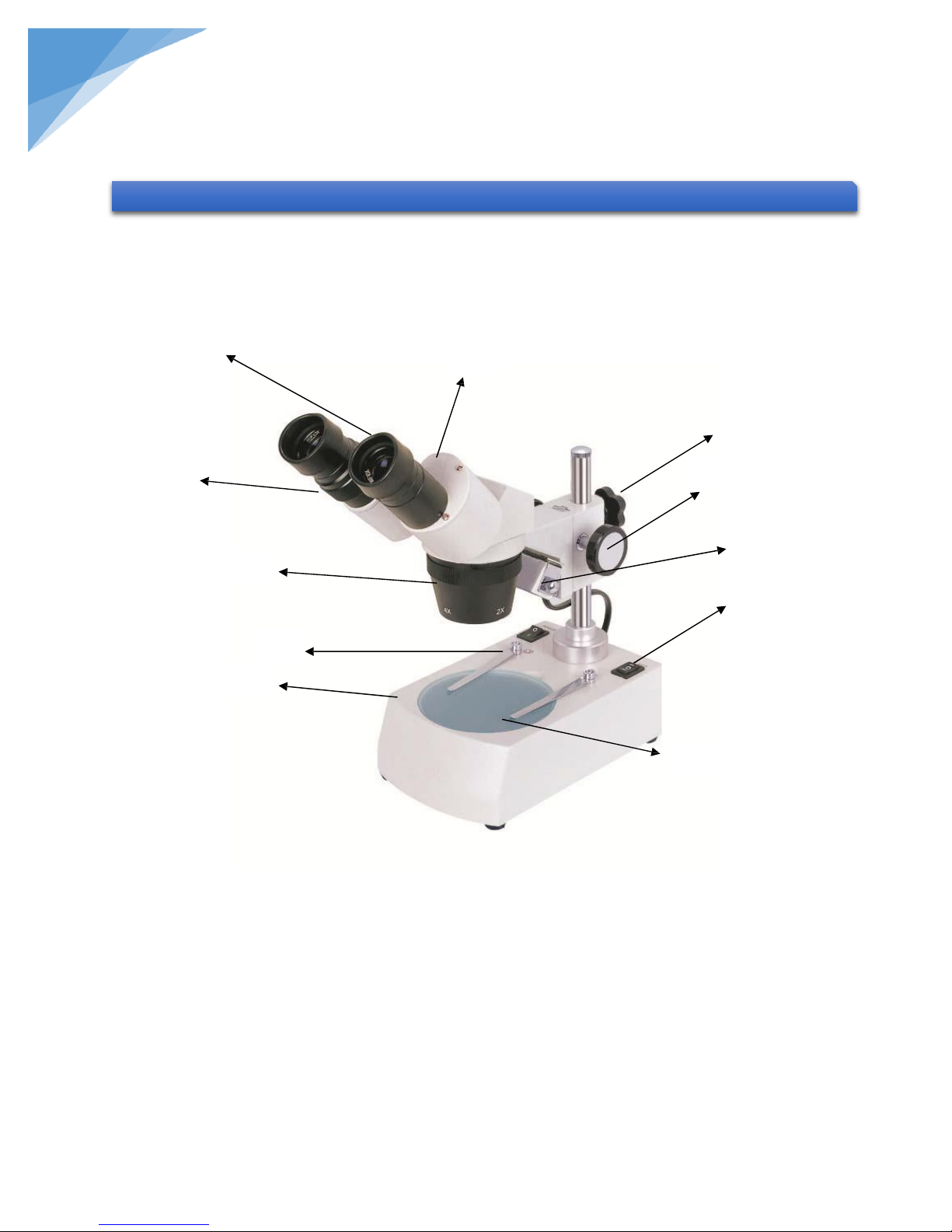
1. WF10X Eyepiece
2. Eyepiece Diopter Adjustment
3. Prism Housing
4. Objective Cover
5. Stage Clips
6. Stage
7. Focusing Knob
8. Fastening Knob
9. Transmitted Light
10. Power Switch
11. Incident Light
1. DESCRIPTION
1
3
8
2
7
4 5 6
9
10
11
STEINDORFF
NYMCS-310/311 Stereo microscopes are with fully coated with excellent optical system, high resolution and crisp
erect image. They are widely used in electric factories, schools laboratories, sculpture and families, etc.
Page 3

2
®
Power Supply
220V/50HZ (110V/50Hz or 110V/60Hz is optional)
Illuminator
12V 10W-tungsten lamp
Interpupillary Distance Adjustment
55mm-75mm
Diopter Adjustment
+5dp
Magnification
20X, 40X
2. TECHNOLOGY DATA
3. OPERATION DESCRIPTION
4. OPERATION DESCRIPTION
STEINDORFF
A. Set the microscope on a lever table.
B. Place the specimen on the center of the stage (6). If need, keep the specimen under the stage clips (5) to fix
the objective.
C. Loosen the fastening knob (8) and move the head up or down until the specimen within the working
distance, then tighten the fastening knob.
D. Observe through the right eyepiece (1) and slowly dual operates the focusing knob (7) to get a clear image.
Then observe the left eyepiece (1), if the image is not clear, you should adjust the diopter (2) to get a clear
one.
E. Rotating prism housing (3) to suit your interpupillary distance to obtain a crisp stereo image. Rotate the
objective cover (4) to choose the 20X or 40X magnification.
Notice: Shut off the power supply when replace the bulb.
Objective must be within the working distance when using.
Turn off power switch when not in use.
Put the microscope in cool and dry place.
Cover it with the plastic dust cover when not in use. Check up and regularly grease the movable parts.
All the optic are adjusted and could take apart by yourself. When the lens and other optical parts covered with dust,
you should wipe with volatile solvents or abrasive cleaners. Never wipe the surface of any optical with your hands.
Deliver to a professional shop for repair when not in use.
 Loading...