

Page 1
PRIME MINI
WIRELESS
PRODUCT
INFORMATION
GUIDE
Page 2

CONTENTS
Welcome 2
SteelSeries Engine 3
Product Overview 5–6
Setup 7
Connecting via 2.4 GHz Wireless
Connecting via Cable
CPI Button Functions 8
Battery Level Indicator 9
Translations
Español 10
简体中文 12
繁體中文 14
16
18
Deutsch 20
Русский 22
Français 24
Italiano 26
Português 28
Polskie 30
Regulatory 32
Page 3

PRIMED FOR VICTORY
Your new mouse is the result of our unyielding pursuit of
perfection for over 20 years. We poured our hearts into
creating the best possible gaming mouse by pushing the
boundaries of performance through precision, comfort,
and durability.
The Prime Mini Wireless is our glory; now go chase yours.
2
Page 4
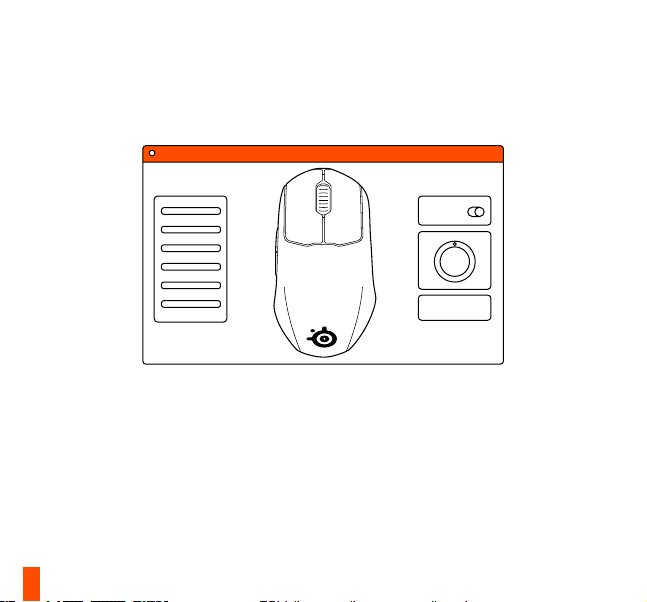
STEELSERIES ENGINE
To enjoy GameSense integration, program macros, and
customize lighting effects and other mouse settings on your
new Prime Mini Wireless mouse, download SteelSeries Engine
at steelseries.com/engine
3
STEELSERIES ENGINE
Page 5

find help at support.steelseries.com
PACKAGE CONTENTS
Prime Mini Wireless Mouse
USB Type-C to USB Type-A Cable
(6'10" / 2.08 m)
Extension Adapter
USB Type-C Dongle
Product Information Guide
SYSTEM REQUIREMENTS /
COMPATIBILITY
PC
Mac
Xbox
STEELSERIES ENGINE
SOFTWARE REQUIREMENTS
Platforms
Windows 7+
Mac OS X 10.13+
160 MB of free hard drive space for
installation
4
Page 6
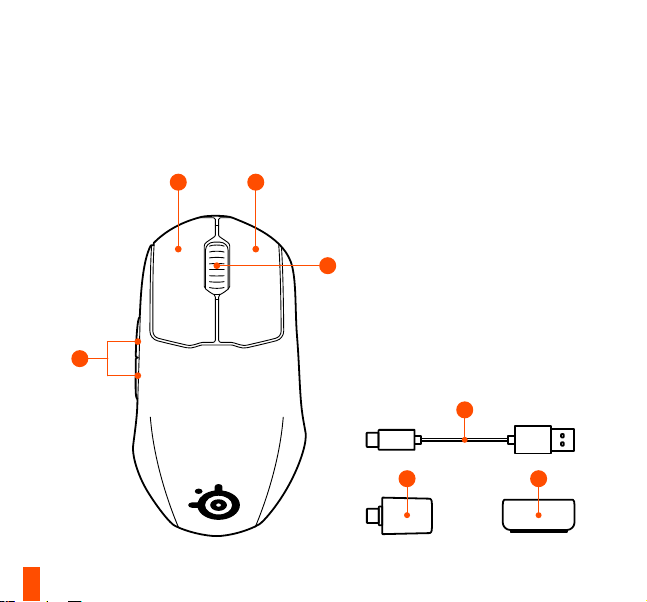
PRODUCT OVERVIEW
1 1
3
5
1 Split Trigger Design
Main Mouse Buttons
2 Scroll Wheel
3 Side Buttons
2
4 USB Type-C to USB Type-A Super
Mesh Data/Charging Cable
5 USB Type-C Wireless Dongle
6 Extension Adapter
4
5 6
Page 7
nd accessories and replacement parts at steelseries.com/gaming-accessories
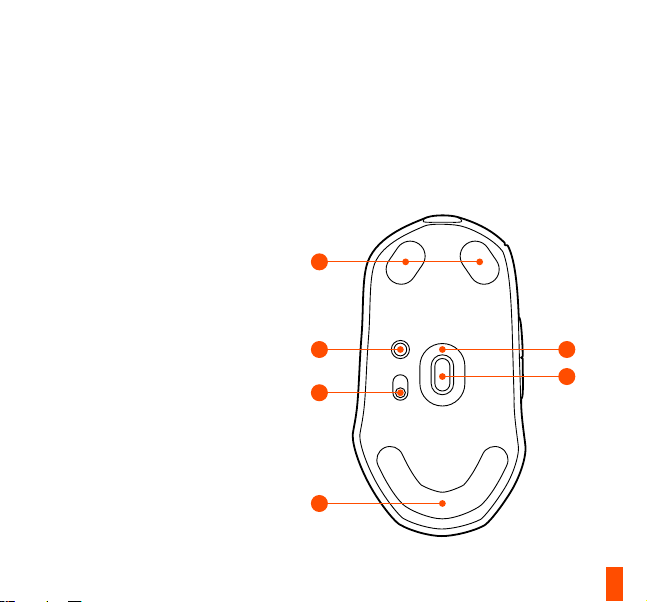
7 Virgin Grade PTFE Mouse Feet
8 CPI Button
9 Power Switch
10 TrueMove Air Sensor
7
8
7
10
9
7
6
Page 8
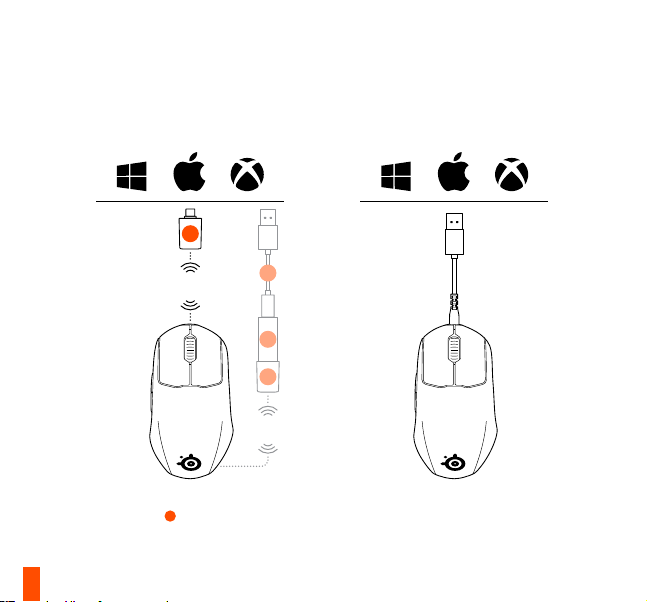
SETUP
find help at support.steelseries.com
CONNECTING VIA
2.4 GHZ WIRELESS
5
2.4
GHz
To further customize your mouse, or re-pair
a Wireless Dongle
Engine software from steelseries.com/engine
7
5
, download SteelSeries
2.4
GHz
CONNECTING
VIA CABLE
4
6
5
Page 9

CPI BUTTON FUNCTIONS
CPI VALUE
Quick press the CPI Button 8 to change
the CPI level. A solid color will appear on
the Scroll Wheel
signify the CPI level.
Level 1 400 CPI Purple
Level 2 800 CPI Blue
Level 3 1200 CPI Green
Level 4 2400 CPI Yellow
Level 5 3200 CPI Red
2
for three seconds to
POLLING RATE
Long press the CPI Button 8 to change
the polling rate once. A flashing color will
appear on the Scroll Wheel
seconds to signify the polling rate level.
Long press again to cycle through polling
rates.
Level 1 1000 Hz Red
Level 2 500 Hz Yellow
Level 3 250 Hz Green
Level 4 125 Hz Blue
2
for three
FACTORY RESET
Press and hold the CPI Button 8 and
both Mouse Buttons
seconds.
The Scroll Wheel
times before all settings will be reset to the
factory settings.
1
together for five
2
will flash pink three
8
Page 10

BATTERY LEVEL INDICATOR
During use, the mouse will ash red when
5 % or less battery remains.
When turning on or waking from sleep, the
mouse will ash a color to indicate remaining
battery level:
Red 0–5 % battery
Yellow 6–10 % battery
Green 11–100 % battery
9
When charging, the lighting will ash green
for 5 seconds before resuming default
lighting.
Page 11

ESPAÑOL
CONTENIDO DE LA CAJA
Ratón Prime Mini Wireless
Cable USB tipo C a USB tipo A
(6’10” / 2,08 m)
Adaptador de extensión
Llave USB tipo C
Guía informativa del producto
REQUISITOS DEL SISTEMA/
COMPATIBILIDAD
PC / Mac / Xbox
REQUISITOS DE
SOFTWARE DEL MOTOR STEELSERIES
Plataformas
Windows 7 o superior
Mac OS X 10.13 o superior
160 MB de espacio libre en disco duro para la
instalación
DESCRIPCIÓN GENERAL DEL
PRODUCTO
1 Botones principales del ratón con diseño
de gatillo dividido
2 Rueda de desplazamiento
3 Botones laterales
4 Cable de carga/datos Super Mesh USB
tipo C a USB tipo A
5 Adaptador inalámbrico USB tipo C
6 Adaptador de extensión
7 Pies de ratón de Virgin Grade PTFE
8 Botón CPI
9 Interruptor de alimentación
10 Sensor de aire TrueMove
* Podrás encontrar accesorios y piezas de
repuesto en
steelseries.com/gaming-accessories
CONFIGURACIÓN
CONEXIÓN VÍA INALÁMBRICA 2,4 GHZ
Para personalizar aún más tu ratón o volver
a emparejar el adaptador inalámbrico
, descarga el software SteelSeries Engine de
steelseries.com/engine
5
CONEXIÓN POR CABLE
información más detallada de los productos
en steelseries.com/prime-wireless
FUNCIONES DEL BOTÓN CPI
VALOR CPI
Pulsa rápidamente el botón CPI
cambiar el nivel CPI. Aparecerá un color jo
en la rueda de desplazamiento
segundos para indicar el nivel CPI.
8
para
2
durante tres
10
Page 12

Nivel 1 400 CPI Púrpura
Nivel 2 800 CPI Azul
Nivel 3 1200 CPI Verde
Nivel 4 2400 CPI Amarillo
Nivel 5 3200 CPI Rojo
TASA DE SONDEO
Mantén pulsado el botón CPI
la tasa de sondeo una vez. Aparecerá un color
parpadeante en la Rueda de desplazamiento
2
tres segundos para indicar el nivel
durante
de tasa de sondeo.
Vuelve a pulsarlo de nuevo para recorrer las
tasas de sondeo.
Nivel 1 1000 Hz Rojo
Nivel 2 500 Hz Amarillo
Nivel 3 250 Hz Verde
Nivel 4 125 Hz Azul
RESTABLECIMIENTO DE FÁBRICA
Mantén pulsados
8
el botón CPI 1 y los dos
11
8
para cambiar
botones del ratón al mismo tiempo durante
cinco segundos.
2
La Rueda
en rosa tres veces antes de que todos los
ajustes se restablezcan a los valores de
fábrica.
de desplazamiento parpadeará
INDICADOR DE NIVEL DE BATERÍA
El ratón parpadeará en rojo cuando se esté
utilizando y solo quede el 5% de la batería.
Al encenderse o salir del modo de reposo, el
ratón parpadeará en un color indicativo del
nivel de carga de la batería:
Rojo 0–5 % batería
Amarillo 6–10 % batería
Verde 11–100 % batería
Durante la carga, la iluminación parpadeará
5 segundos en verde antes de recuperar la
iluminación estándar.
Page 13

简体中文
包装内容
Prime Mini Wireless 鼠标
USB Type-C 到 USB Type-A 连接线
(6’10” / 2.08 m)
扩展适配器
USB Type-C 适配器
产品信息指南
系统要求/兼容性
PC/Mac/Xbox
STEELSERIES ENGINE 软件要求
平台
Windows 7+
Mac OS X 10.13+
160 MB 可用硬盘空间供安装使用
产品概览
1 分离式设计按键
2 滚轮
3 侧键
4 USB Type-C 到 USB Type-A
卓越编织数据/充电线
5 USB Type-C 无线适配器
6 扩展适配器
7 Virgin Grade PTFE 鼠脚
8 CPI 按键
9 电源开关
10 TrueMove Air 传感器
* 如需配件和更换部件,请访问
steelseries.com/gaming-accessories
设置
连接 VIA 2.4 GHZ 无线
要进一步定制鼠标或为无线适配器重新配
对 5,请从 steelseries.com/engine 下载
SteelSeries Engine 软件
通过连接线连接
更多详细的产品信息,请访问
steelseries.com/prime-wireless
CPI 按键功能
CPI 值
快按 CPI 按键
显示纯色三秒钟来表示 CPI 级别。
8
以更改 CPI 级别。 滚轮
2
上将
1 级 400 CPI 紫色
2 级 800 CPI 蓝色
3 级 1200 CPI 绿色
4 级 2400 CPI 黄色
5 级 3200 CPI 红色
轮询速率
长按 CPI 按键
8
可更改轮询速率一次。滚轮
12
Page 14

2
上将显示闪烁的颜色三秒钟来表示轮询速
率级别。
再次长按可循环轮询费率。
1 级 1000 Hz 红色
2 级 500 Hz 黄色
3 级 250 Hz 绿色
4 级 125 Hz 蓝色
恢复出厂设置
同时按住 CPI 按键
秒钟。
在将所有设置恢复为出厂设置之前,滚轮
闪烁三下粉红色。
8
和两个鼠标按钮
13
电池电量指示灯
在使用过程中,若电池电量不足5%,鼠标会闪
烁红色。
在开机或从休眠中醒来时,鼠标会闪烁不同的颜
色,指示剩余的电量:
红色 0–5 % 电量
黄色 6–10 % 电量
绿色 11–100 % 电量
1
在充电时,灯光将闪烁绿色5秒,然后,恢复默
五
认灯光。
2
将
Page 15

繁體中文
包裝內含
Prime Mini Wireless 滑鼠
USB Type-C 轉 USB Type-A 連接線
(6 呎 10 吋 / 2.08 米)
擴充轉接器
USB Type-C 無線接收器
產品資訊指南
系統要求 /相容性
個人電腦 / Mac / Xbox
STEELSERIES ENGINE 軟體要求
平台
Windows 7+
Mac OS X 10.13+
160 MB 可用於安裝的硬碟空間
產品概覽
1 分離式設計按鍵
2 滾輪
3 側鍵
4 USB Type-C 轉 USB Type-A
卓越編織數據線 / 充電線
5 USB Type-C 無線接收器
6 擴充轉接器
7 Virgin Grade PTFE 滑鼠腳墊
8 CPI 按鍵
9 電源開關
10 TrueMove Air 感應器
* 如需選購配件和替換零件,請瀏
覽:steelseries.com/gaming-accessories
設定
透過 2.4 GHZ 無線連接
如要進一步自訂滑鼠或重新配對無線接收器
,請從 steelseries.com/engine 下載 SteelSeries
Engine 軟體
5
透過連接線連接
如需更詳細的產品資訊,請瀏覽
steelseries.com/prime-wireless
CPI 按鍵功能
CPI 值
快速按下 CPI 按鍵
上會亮起一種顏色三秒鐘,以表示 CPI 級別。
8
以更改 CPI 級別。 滾輪
2
第 1 級 400 CPI 紫色
第 2 級 800 CPI 藍色
第 3 級 1200 CPI 綠色
第 4 級 2400 CPI 黃色
第 5 級 3200 CPI 紅色
回報率
長按 CPI 鍵
8
更改回報率。 滾輪
2
上會閃爍一
14
Page 16

種顏色三秒鐘,以表示回報率水平。
再次長按即可依照循環更改回報率。
第 1 級 1000 Hz 紅色
第 2 級 500 Hz 黃色
第 3 級 250 Hz 綠色
第 4 級 125 Hz 藍色
恢復原廠設定
同時按住 CPI 按鍵
2
滾輪
恢復為原厰設定。
8
和滑鼠按鍵
將閃爍粉紅色燈三次,然後所有設定將
15
1
五秒鐘。
電池電量指示燈
在使用過程中,若電池電量不足5%,滑鼠會閃
爍紅色。
在開機或從休眠中醒來時,滑鼠會閃爍不同的色
彩,指示剩餘之電量:
紅色 0–5 % 電量
黃色 6–10 % 電量
綠色 11–100 % 電量
在充電時,燈光將閃爍綠色5秒,然後,恢復預
設燈光。
Page 17

日本語
パッケージ の内容
Prime Mini Wireless マウス
USB Type-C~USB Type-A ケーブル
(6 ’10 “/ 2.08 m)
拡 張アダプ タ
USB Type-C ドングル
製品情報ガイド
システム要件 / 互換性
PC / Mac / Xbox
STEELSERIES ENGINE ソフトウェア要件
プ ラットフ ォー ム
Windows 7+
Mac OS X 10.13+
インストールには 160 MB の空きハード ドライブ
容量が必要です
製品概要
1 スプ リットトリガー デザ イン メインマウス
ボタン
2 スクロールホイール
3 サ イドボ タン
4 USB Type-C → USB Type-A スーパーメッ
シュデータ/充電ケーブル
5 USB Type - Cワイヤレスドングル
6 拡 張ア ダプタ
7 Virgin Grade PTFEマウスフィート
8 CPI ボタン
9 電 源 スイッチ
10 TrueMoveエアセンサー
* アクセサリおよび交換部品は、
steelseries.com/gaming-accessories をご覧
くだ さい
セット アップ
VIA 2.4 GHZワイヤレスの接続
さらにマウス をカスタマイズしたり、ワイヤレスド
5
を再ペアリングするには、 Steel Series
ングル
Engineソフトウェアをsteelseries.com/engineか
ら ダウン ロ ードし てくだ さい
VIAケーブルの接続
でのより詳細な製品情報。
steelseries.com/prime Wireless
CPIボタン機能
CPI値
CPIレベルを変更するには、CPIボタン
く押します。 スクロールホイール
を示す単色が3秒間表示されます。
8
2
にCPIレベル
を素早
レベル1 400 CPI パープル
レベル2 800 CPI ブルー
16
Page 18

レベル3 1200 CPI グリーン
レベル4 2400 CPI イエロー
レベル5 3200 CPI レッド
ポー リングレート
ポーリングレートを1回変更するには、CPIボタン
8
を長押します。 スクロールホイール
する色が3秒間表示され、ポーリングレートレベ
ル を 示 し ま す 。
もう一度長押しすると、ポーリングレートが一
巡 し ま す 。
レベル1 1000 Hz レッド
レベル2 500 Hz イエロー
レベル3 250 Hz グリーン
レベル4 125 Hz ブルー
出荷時設定に初期化
8
CPIボタン
と両 方の マウスボ タン
17
2
に点滅
1
を 同時に
5秒間押し続けます。
2
スクロールホイール
点滅した後、すべての設定が工場出荷時設定に
リセットさ れます。
がピンク色 のライト を3回
バッテリーレベルインジケータ
使用中、バッテリー残量が5%以下になるとマウ
ス が赤く点 滅 します。
電源 を入れたり、スリープから復帰したりすると、
マウスはバッテリー残量を示す色で点滅します。
赤 0–5 % バッテリー
黄色 6–10 % バッテリー
緑 11 –100 % バ ッテ リー
充電中、照明は5秒間緑色に点滅してから、デフォ
ルト の ライト に 戻り ます 。
Page 19

Prime Mini Wireless
5
2
8
18
Page 20
8
2
8
2
19
1
Page 21

DEUTSCH
PACKUNGSINHALT
Prime Mini Wireless Maus
USB Typ-C auf USB Typ-A-Kabel
(6’10”/2,08 m)
Verlängerungsadapter
USB Typ-C-Dongle
Produktinformationen
SYSTEMVORAUSSETZUNGEN/
KOMPATIBILITÄT
PC / Mac / Xbox
STEELSERIES ENGINE
SOFTWAREVORAUSSETZUNGEN
Plattformen
Windows 7+
Mac OS X 10.13+
160 MB freier Festplattenspeicher für die
Installation
PRODUKTÜBERSICHT
1 Split-Trigger-Design Maustasten
2 Scrollrad
3 Seitliche Taste
4 USB Typ-C zu USB Typ-A Super-Mesh-
Daten-/-Ladekabel
5 USB Typ-C Wireless Dongle
6 Verlängerungsadapter
7 Virgin Grade PTFE Mausfüße
8 CPI-Taste
9 Einschaltknopf
10 TrueMove-Luftsensor
* Zubehör und Ersatzteile nden Sie unter
steelseries.com/gaming-accessories
SETUP
ANSCHLUSS VIA 2,4 GHZ DRAHTLOS
Um Ihre Maus weiter anzupassen oder einen
Wireless Dongle
Sie die SteelSeries Engine-Software von
steelseries.com/engine herunter.
5
erneut zu koppeln, laden
ANSCHLUSS VIA KABEL
Ausführlichere Produktinformationen auf
steelseries.com/prime-wireless
CPI-TASTENFUNKTIONEN
CPIWERT
Drücken Sie kurz auf die CPI-Taste
die CPI-Stufe zu ändern. Auf dem Scrollrad
erscheint drei Sekunden lang eine
die den CPI-Wert anzeigt.
Stufe 1 400 CPI Violett
8
, um
2
Farbe,
20
Page 22
Stufe 2 800 CPI Blau
Stufe 3 1200 CPI Grün
Stufe 4 2400 CPI Gelb
Stufe 5 3200 CPI Rot
ABFRAGERATE
Drücken Sie einmal lang die
um die Abfragerate zu ändern. Auf dem
Scrollrad wird drei Sekunden
Farbe blinkend angezeigt, um die Stufe der
Abfragerate anzuzeigen.
Erneut lange drücken, um durch die
Abfrageraten zu blättern.
Stufe 1 1000 Hz Rot
Stufe 2 500 Hz Gelb
Stufe 3 250 Hz Grün
Stufe 4 125 Hz Blau
AUF WERKSEINSTELLUNGEN
ZURÜCKSETZEN
Halten Sie die CPI-Taste und beide
21
8
CPI-Taste,
2
lang eine
Maustasten fünf Sekunden
Das Scroll-Rad
alle Einstellungen auf die Werkseinstellungen
zurückgesetzt werden.
2
1
lang gedrückt.
blinkt dreimal rosa, bevor
BATTERIESTANDSANZEIGE
Während der Verwendung blinkt die Maus rot,
wenn der Ladestatus noch 5% oder weniger
beträgt.
Beim Einschalten oder Aktivieren aus
dem Ruhezustand blinkt die Maus in einer
bestimmten Farbe, um den verbleibenden
Akkustand anzuzeigen:
Rot Akkustand 0–5 %
Gelb Akkustand 6–10 %
Grün Akkustand 11–100 %
Während des Ladevorgangs blinkt die Maus
5Sekunden lang grün, bevor sie im Anschluss
normal weiterleuchtet.
8
Page 23

СОДЕРЖИМОЕ УПАКОВКИ
мышь Prime Mini Wireless
Кабель USB Type-C - USB Type-A (6 футов
10 дюймов / 2,08 м)
Переходник удлинителя
Ключ USB Type-C
Информация об изделии
СИСТЕМНЫЕ ТРЕБОВАНИЯ /
СОВМЕСТИМОСТЬ
ПК / Mac / Xbox
ТРЕБОВАНИЯ ПРОГРАММНОГО
ОБЕСПЕЧЕНИЯ
STEELSERIES ENGINE
Платформы
Windows 7+
Mac OS X 10.13+
160 Мб свободного места на жёстком
диске для установки
ОБЗОР ИЗДЕЛИЯ
1 Основные кнопки мыши с
конструкцией Split Trigger
2 Колесо прокрутки
3 Боковые кнопки
4 Кабель Super Mesh USB Type-C — USB
Type-A для зарядки/передачи данных
5 Беспроводной ключ USB Type-C
6 Переходник удлинителя
7 Фторопластовые опорные накладки
8 Кнопка CPI
9 Выключатель питания
10 Пневмодатчик TrueMove
* Принадлежности и запасные части
можно найти на веб-сайте
steelseries.com/gaming-accessories
НАСТРОЙКА
БЕСПРОВОДНОЕ ПОДКЛЮЧЕНИЕ 2,4 ГГЦ
Для дальнейшей настройки мыши или
повторного сопряжения беспроводного
5
адаптера
обеспечение SteelSeries Engine с веб-сайта:
steelseries.com/engine.
ПОДКЛЮЧЕНИЕ С ПОМОЩЬЮ КАБЕЛЯ
дополнительная информация о продукте
опубликована на веб-сайте
steelseries.com/prime-wireless
ФУНКЦИИ КНОПКИ CPI
КОЛИЧЕСТВО ЗНАКОВ НА ДЮЙМ
Быстро нажмите кнопку CPI
загрузите программное
8
, чтобы
22
Page 24

изменить количество знаков на дюйм. На
колесе прокрутки в течение трех секунд
будет отображаться сплошной цвет,
обозначающий количество знаков на
дюйм.
Уровень 1 400 знаков на дюйм Фиолетовый
Уровень 2 800 знаков на дюйм Синий
Уровень 3 1200 знаков на дюйм Зеленый
Уровень 4 2400 знаков на дюйм Желтый
Уровень 5 3200 знаков на дюйм Красный
ЧАСТОТА ОПРОСА
Для однократного изменения частоты
8
опроса
нажмите и удерживайте
кнопку CPI. На колесе прокрутки
течение трех секунд будет отображаться
мигающий цвет, обозначающий частоту
опроса.
Повторное нажатие и удержание
позволяет переключаться между
частотами опроса.
Уровень 1 1000 Гц Красный
Уровень 2 500 Гц Желтый
Уровень 3 250 Гц Зеленый
Уровень 4 125 Гц Синий
23
СБРОС ДО ЗАВОДСКИХ УСТАНОВОК
Одновременно нажмите и удерживайте
2
кнопку CPI
течение пяти секунд.
Колесо прокрутки
розовым цветом, после чего все
настройки будут сброшены до заводских.
8
и обе кнопки мыши
2
трижды мигнет
1
в
ИНДИКАТОР УРОВНЯ ЗАРЯДА
Во время использования при заряде
батареи 5% или менее индикатор мыши
мигает красным цветом.
При включении или выходе из спящего
режима для обозначения заряда
2
в
батареи индикатор мыши мигает
соответствующим цветом:
Красный 0–Заряд батареи 5 %
Желтый 6–Заряд батареи 10 %
Зеленый 11–Заряд батареи 100 %
В процессе зарядки индикатор мигает
зеленым светом в течение 5 секунд, а
затем продолжает гореть в режиме по
умолчанию.
Page 25

FRANÇAIS
CONTENU DE L’EMBALLAGE
Souris Prime Mini Wireless
Câble USB de type-C vers USB de type-A
(6’10” / 2,08 m)
Adaptateur d’extension
Dongle USB de type C
Guide d’informations produit
CONFIGURATION SYSTÈME REQUISE/
COMPATIBILITÉ
PC / Mac / Xbox
CONFIGURATION LOGICIELLE REQUISE
POUR LE MOTEUR STEELSERIES
Plates-formes
Windows 7+
Mac OS X 10.13+
160Mo d’espace disque disponible pour
l’installation
PRÉSENTATION DES PRODUITS
1 Boutons principaux de la souris à
gâchette divisée
2 Molette de délement
3 Boutons latéraux
4 Câble de chargement/données Super
Mesh USB Type-C vers USB Type-A
5 Dongle sans l USB de type C
6 Adaptateur d’extension
7 Pieds de souris en Virgin Grade PTFE
8 Bouton CPI
9 Interrupteur d’alimentation
10 Capteur d’air TrueMove
* Trouvez des accessoires et des pièces de
rechange sur
steelseries.com/gaming-accessories
CONFIGURATION
CONNEXION VIA 2,4 GHZ SANS FIL
Pour personnaliser davantage votre souris
ou appairer à nouveau un dongle sans l
téléchargez le logiciel SteelSeries Engine sur
steelseries.com/engine
5
BRANCHEMENT DU CÂBLE VIA
plus d’informations sur les produits sur
steelseries.com/prime-wiWireless
FONCTIONS DU BOUTON CPI
VALEUR CPI
Appuyez rapidement sur le bouton CPI
pour modier le niveau CPI. Une couleur
continue apparaîtra sur la molette
2
pendant
8
,
24
Page 26
trois secondes pour indiquer le niveau de CPI.
Niveau 1 400 CPI violet
Niveau 2 800 CPI bleu
Niveau 3 1200 CPI vert
Niveau 4 2400 CPI jaune
Niveau 5 3200 CPI rouge
TAUX D’INTERROGATION
Appuyez longuement sur le bouton CPI
pour modier le taux d’interrogation une
fois. Une couleur clignotante apparaîtra sur
la molette de délement
secondes pour indiquer le niveau du taux
d’interrogation.
Appuyez à nouveau longuement pour
parcourir les taux d’interrogation.
Niveau 1 1000 Hz rouge
Niveau 2 500 Hz jaune
Niveau 3 250 Hz vert
Niveau 4 125 Hz bleu
RÉTABLISSEMENT DES PARAMÈTRES
D’USINE
25
2
pendant trois
Appuyez simultanément sur le bouton
8
et les deux boutons de la souris
CPI
et maintenez-les enfoncés pendant cinq
secondes.
La molette de délement
en rose avant que tous les réglages ne soient
réinitialisés aux réglages d’usine.
INDICATEUR DE NIVEAU DE BATTERIE
Durant l’utilisation, la souris clignote en rouge
8
lorsque le niveau de batterie est à 5% ou
moins.
Lors de l’allumage ou de la sortie du réveil, la
souris fait clignoter une couleur pour indiquer
le niveau de batterie restant:
Rouge 0–5 % de batterie
Jaune 6–10 % de batterie
Vert 11–100 % de batterie
Lors de la mise en charge, le voyant clignote
en vert pendant 5 secondes avant de revenir
au voyant par défaut.
2
clignote trois fois
1
Page 27

ITALIANO
CONTENUTO DELLA CONFEZIONE
Prime Mini Wireless Mouse
Cavo da USB di tipo C a USB di tipo A
(2,08 m/6’10”)
Adattatore prolunga
Dongle USB di tipo C
Guida alle informazioni sul prodotto
REQUISITI DI SISTEMA/
COMPATIBILITÀ
PC/Mac/Xbox
REQUISITI
SOFTWARE DEL MOTORE STEELSERIES
Piattaforme
Windows 7+
Mac OS X 10.13+
160 MB di spazio libero su disco rigido per
l’installazione
PANORAMICA DEL PRODOTTO
1 Pulsanti principali del mouse con design
split trigger
2 Rotella di scorrimento
3 Pulsanti laterali
4 Cavo di ricarica/dati super mesh da USB
di tipo C a USB di tipo A
5 Dongle wireless USB di tipo C
6 Adattatore prolunga
7 Piedini per mouse in Virgin Grade PTFE
8 Pulsante CPI
9 Interruttore di alimentazione
10 Sensore TrueMove Air
* Accessori e ricambi sono disponibili
all’indirizzo
steelseries.com/gaming-accessories
CONFIGURAZIONE
COLLEGAMENTO WIRELESS A 2,4 GHZ
Per personalizzare ulteriormente il mouse, o
associare nuovamente un dongle wireless
, scaricare il software SteelSeries Engine da
steelseries.com/engine
CONNESSIONE VIA CAVO
Informazioni più dettagliate sul prodotto sono
disponibili su steelseries.com/prime-wireless
FUNZIONI DEL PULSANTE CPI
VALORE CPI
Premere rapidamente il pulsante CPI
per modicare il livello CPI. La rotella di
scorrimento si accende per tre secondi di un
5
8
26
Page 28

colore sso 2 per indicare il livello CPI.
Livello 1 400 CPI Viola
Livello 2 800 CPI Blu
Livello 3 1200 CPI Verde
Livello 4 2400 CPI Giallo
Livello 5 3200 CPI Rosso
VELOCITÀ DI POLLING
Tenere premuto il pulsante CPI
modicare una volta la velocità di polling.
La rotella di scorrimento si accende per tre
secondi di un colore intermittente
indicare il livello della velocità di polling.
Tenere di nuovo premuto per scorrere tra le
velocità di polling.
8
per
2
per
Livello 1 1000 Hz Rosso
Livello 2 500 Hz Giallo
Livello 3 250 Hz Verde
Livello 4 125 Hz Blu
RIPRISTINO DELLE IMPOSTAZIONI DI
FABBRICA
Tenere premuti contemporaneamente per
cinque secondi il pulsante CPI
i pulsanti del mouse
La rotella di scorrimento
volte in rosa prima che tutte le impostazioni
siano ripristinate alle impostazioni di fabbrica.
INDICATORE DI LIVELLO DELLA
BATTERIA
Durante l’uso, il mouse lampeggia in rosso
quando rimane il 5% o meno di batteria.
Quando viene acceso o riattivato dalla
sospensione, il mouse lampeggia con
un colore che indica il livello di batteria
rimanente:
1
.
2
8
ed entrambi
lampeggia tre
Rosso 0–5 % di batteria
Giallo 6–10 % di batteria
Verde 11–100 % di batteria
Durante la ricarica, la luce lampeggerà in
verde per 5 secondi prima di riprendere
l’illuminazione predenita.
Page 29

PORTUGUÊS
CONTEÚDO DA EMBALAGEM
Rato Prime Mini Wireless
Cabo USB tipo C para USB tipo A
(6’10”/2,08 m)
Adaptador de extensão
Dongle USB tipo C
Guia de informações do produto
REQUISITOS DO SISTEMA/
COMPATIBILIDADE
PC / Mac / Xbox
REQUISITOS
DO SOFTWARE DO MOTOR
STEELSERIES
Plataformas
Windows 7+
Mac OS X 10.13+
160 MB de espaço livre no disco rígido para
instalação
DESCRIÇÃO GERAL DO PRODUTO
1 Botões principais do rato com design de
gatilho dividido
2 Roda de deslocação
3 Botões laterais
4 Cabo de dados/carregamento Super
Mesh USB Tipo C para USB Tipo A
5 Dongle sem os USB Tipo C
6 Adaptador de extensão
7 Pés do rato em Virgin Grade PTFE
8 Botão CPI
9 Interruptor de alimentação
10 Sensor de ar TrueMove
* Encontre acessórios e peças de
substituição em
steelseries.com/gaming-accessories
CONFIGURAÇÃO
LIGAÇÃO SEM FIOS DE 2,4 GHZ
Para personalizar ainda mais o seu rato ou
voltar a emparelhar um dongle sem os
transra o software SteelSeries Engine a partir
de steelseries.com/engine
LIGAÇÃO POR CABO
Mais informações sobre o produto em
steelseries.com/prime-wireless
FUNÇÕES DO BOTÃO CPI
VALOR CPI
Prima rapidamente o botão CPI
alterar o nível de CPI. Aparecerá uma cor
8
para
5
,
28
Page 30

sólida na roda de deslocação
segundos para indicar o nível de CPI.
Nível 1 400 CPI Roxo
Nível 2 800 CPI Azul
Nível 3 1200 CPI Verde
Nível 4 2400 CPI Amarelo
Nível 5 3200 CPI Vermelho
TAXA DE AMOSTRAGEM
Prima continuamente o botão CPI
alterar a taxa de amostragem uma vez.
Aparecerá uma cor intermitente na roda de
deslocação
indicar o nível de amostragem.
Volte a premir durante algum tempo para
percorrer as taxas de amostragem.
2
durante três segundos para
Nível 1 1000 Hz Vermelho
Nível 2 500 Hz Amarelo
Nível 3 250 Hz Verde
Nível 4 125 Hz Azul
REPOSIÇÃO DE FÁBRICA
29
2
durante três
8
para
Prima simultaneamente e mantenha premidos
o botão CPI
durante cinco segundos.
A roda de deslocação
vezes antes de todas as denições serem
repostas para as denições de fábrica.
8
e os dois botões do rato 1
2
irá piscar a rosa três
INDICADOR DE NÍVEL DA BATERIA
Durante a utilização, o rato apresentará uma
luz vermelha intermitente quando tiver 5% ou
menos de bateria.
Ao ligar ou ao reativar, o rato apresentará
uma luz intermitente colorida para indicar o
nível restante de bateria:
Vermelho 0–5 % de bateria
Amarelo 6–10 % de bateria
Verde 11–100 % de bateria
Ao carregar, apresentará uma luz verde
intermitente por 5 segundos antes de retomar
a iluminação padrão.
Page 31

POLSKIE
ZAWARTOŚĆ OPAKOWANIA
Mysz Prime Mini Wireless
Kabel USB typu C do USB typu A
(2,08 m/6’10”)
Przedłużacz
Klucz sprzętowy USB typu C
Przewodnik po produktach
WYMAGANIA SYSTEMOWE /
KOMPATYBILNOŚĆ
PC / Mac / Xbox
WYMAGANIA OPROGRAMOWANIA
STEELSERIES ENGINE
Platformy
Windows 7+
Mac OS X 10.13+
160 MB wolnego miejsca na dysku do
instalacji
PRZEGLĄD PRODUKTU
1 Rozdzielone główne przyciski myszy
2 Kółko przewijania
3 Przyciski boczne
4 Kabel USB typu-C do USB typu-A super
Mesh do transmisji danych/ładowania
5 Bezprzewodowy klucz sprzętowy USB
typu C
6 Przedłużacz
7 Stopy myszy z Virgin Grade PTFE
8 Przycisk CPI
9 Przełącznik zasilania
10 Czujnik powietrza TrueMove
Akcesoria i części zamienne znajdziesz na
stronie
steelseries.com/gaming-accessories
KONFIGURACJA
ŁĄCZENIE ZA POMOCĄ POŁĄCZENIA
BEZPRZEWODOWEGO 2,4 GHZ
Aby jeszcze bardziej spersonalizować mysz lub
ponownie sparować klucz bezprzewodowy
pobierz oprogramowanie SteelSeries Engine ze
strony steelseries.com/engine
PODŁĄCZANIE KABLA VIA
więcej szczegółowych informacji o produkcie
można znaleźć na stronie
steelseries.com/prime-wireless
FUNKCJE PRZYCISKU CPI
WARTOŚĆ CPI
Wciśnij szybko przycisk CPI,
8
5
aby zmienić
,
30
Page 32
poziom CPI. Na kółku przewijania
przez trzy sekundy pojawi się stały kolor,
oznaczający poziom CPI.
Poziom 1 400 CPI oletowy
Poziom 2 800 CPI niebieski
Poziom 3 1200 CPI zielony
Poziom 4 2400 CPI żółty
Poziom 5 3200 CPI czerwony
SZYBKOŚĆ ODPYTYWANIA
Naciśnij i przytrzymaj przycisk CPI
zmienić częstotliwość raportowania. Na kółku
przewijania
się migający kolor, oznaczający szybkość
odpytywania.
Naciśnij i przytrzymaj przycisk ponownie, aby
kolejno przejść przez poziomy częstotliwości
raportowania.
2
przez trzy sekundy pojawi
Poziom 1 1000 Hz czerwony
Poziom 2 500 Hz żółty
Poziom 3 250 Hz zielony
Poziom 4 125 Hz niebieski
PRZYWRACANIE USTAWIEŃ
FABRYCZNYCH
Naciśnij i przytrzymaj przez pięć sekund
jednocześnie przycisk CPI
przyciski myszy
Kółko przewijania
różowo, zanim wszystkie ustawienia zostaną
1
.
2
zamiga trzy razy na
31
8
i obydwa
2
8
, aby raz
zresetowane do ustawień fabrycznych.
WSKAŹNIK POZIOMU NAŁADOWANIA
BATERII
Podczas użytkowania mysz będzie migać na
czerwono w przypadku, gdy poziom baterii
wynosi 5% lub mniej.
Po włączeniu lub wybudzeniu z uśpienia mysz
miga kolorem, wskazując pozostały poziom
naładowania baterii:
Czerwony 0–5 % baterii
Żół ty 6–10 % baterii
Zielony 11–100 % baterii
Podczas ładowania, światełko będzie
migać na zielono przez 5 sekund przed
wznowieniem oświetlenia domyślnego.
Page 33

REGULATORY
Europe – EU Declaration of Conformity
Hereby, SteelSeries ApS. declares that the equipment which is compliance with directive RoHS
2.0 (2015/863/EU), R.E.D (2014/53/EU), EMC Directive (2014/30/EU), and LVD (2014/35/
EU) which are issued by the Commission of the European Community.
The full text of the EU declaration of conformity is available at the following internet address:
https://steelseries.com/
Operating Temperature: 0 to + 40
SteelSeries ApS. hereby conrms, to date, based on the feedback from our suppliers indicates
that our products shipping to the EU territory comply with REACH (Registration, Evaluation,
Authorization, and Restriction of Chemicals - (EC) 1907/2006) compliance program. We are
fully committed to oering REACH compliance on the products and posting accurate REACH
compliance status for the all of products.
Frequency bands and Powers (Mouse and Transceiver)
a. Frequency band(s) in which the radio equipment operates: 2.400 - 2.4835 GHz
b. Maximum radio-frequency power transmitted in the frequency band(s) in which the radio
equipment operates:
• EIRP: л/4-DQPSK: 2.45 dBm (Mouse)
• EIRP: л/4-DQPSK: 2.27 dBm (Transceiver)
c. Firmware Version: V1.0.15
UK Declaration of Conformity
Hereby, SteelSeries ApS. declares that the following equipment which is compliance with
Electromagnetic Compatibility Regulations 2016, Electrical Equipment (Safety) Regulations 2016
and The Restriction of the Use of Certain Hazardous Substances in Electrical and Electronic
Equipment Regulations 2012 issued by the Department for Business, Energy& Industrial Strategy.
The full text of the UK declaration of conformity is available at the following internet address:
https://steelseries.com/
°
C.
32
Page 34
WEEE
This product must not be disposed of with your other household waste or treat them in
compliance with the local regulations or contact your local city oce, your household waste
disposal service or the shop where you purchased the product.
TURKEY ROHS COMPLIANCE
Republic of Turkey: In conformity with the EEE Regulation
Türkiye Cumhuriyeti: EEE Yönetmeliğine Uygundur
Safety Guideline for the Battery
This battery must not be disposed of with your other household waste or treat them in
compliance with the local regulations or contact your local city oce, your household waste
disposal service or the shop where you purchased the product.
Federal Communication Commission Interference Statement
This device complies with Part 15 of the FCC Rules. Operation is subject to the following two
conditions: (1) This device may not cause harmful interference, and (2) this device must accept
any interference received, including interference that may cause undesired operation.
This equipment has been tested and found to comply with the limits for a Class B digital device,
pursuant to Part 15 of the FCC Rules. These limits are designed to provide reasonable protection
against harmful interference in a residential installation. This equipment generates, uses and can
radiate radio frequency energy and, if not installed and used in accordance with the instructions,
may cause harmful interference to radio communications. However, there is no guarantee
that interference will not occur in a particular installation. If this equipment does cause harmful
interference to radio or television reception, which can be determined by turning the equipment
o and on, the user is encouraged to try to correct the interference by one of the following
measures:
• Reorient or relocate the receiving antenna.
• Increase the separation between the equipment and receiver.
• Connect the equipment into an outlet on a circuit dierent from that to which the receiver is
connected.
33
Page 35

• Consult the dealer or an experienced radio/TV technician for help.
FCC Caution:
Any changes or modications not expressly approved by the party responsible for compliance
could void the user’s authority to operate this equipment.
This transmitter must not be co-located or operating in conjunction with any other antenna or
transmitter.
Radiation Exposure Statement:
The device has been evaluated to meet general RF exposure requirement, the device can be
used in portable exposure condition without restriction.
FCC ID: ZHK-M00027 (Mouse)
FCC ID: ZHK-M00030TX(Transceiver)
Frequency bands and Powers (Mouse and Transceiver)
a. Frequency band(s) in which the radio equipment operates: 2.400 – 2.4835 GHz
b. Maximum radio-frequency power transmitted in the frequency band(s) in which the radio
equipment operates:
• Conducted Peak Power/л/4-DQPSK: -0.67 dBm(Mouse)
• Conducted Peak Power/л/4-DQPSK: -0.54 dBm (Transceiver)
c. Firmware Version: V1.0.15
Industry Canada Statement
This device complies with Industry Canada license-exempt RSS standard(s). Operation is subject
to the following two conditions:
1. this device may not cause interference, and
2. this device must accept any interference, including interference that may cause undesired
operation of the device.
Le présent appareil est conforme aux CNR d’Industrie Canada applicables aux appareils radio
exempts de licence. L’exploitation est autorisée aux deux conditions suivantes:
1. l’appareil ne doit pas produire de brouillage, et
2. l’utilisateur de l’appareil doit accepter tout brouillage radioélectrique subi, même si le brouillage
est susceptible d’en compromettre le fonctionnement.
34
Page 36

This Class B digital apparatus complies with Canadian ICES-003.
Cet appareil numérique de la classe B est conforme à la norme NMB-003 du Canada.
This device and its antenna(s) must not be co-located or operating in conjunction with any other
antenna or transmitter, except tested built-in radios.
Cet appareil et son antenne ne doivent pas être situés ou fonctionner en conjonction avec une
autre antenne ou un autre émetteur, exception faites des radios intégrées qui ont été testées.
The County Code Selection feature is disabled for products marketed in the US/ Canada.
La fonction de sélection de l’indicatif du pays est désactivée pour les produits commercialisés aux
États-Unis et au Canada.
The appliance must not be exposed to splashes or drops of water and it should not be used as a
support for any object lled with liquid, such as a vase.
L’appareil ne doit pas être exposé à des éclaboussures ou à des gouttes d’eau et il ne doit pas
servir de support à un quelconque objet rempli de liquide, tel qu’un vase.
Radiation Exposure Statement
The device has been evaluated to meet general RF exposure requirement, The device can be
used in portable exposure condition without restriction.
Déclaration d’exposition aux radiations:
L’appareil a ete evalue pour repondre aux exigencies generals d’ exposition aux radio frequencies.
L’appareil peut etre utilise en condition d’ exposition portable sans restriction
“CAUTION!”
RISK OF EXPLOSION IF BATTERY PACK IS NOT REPLACE BY SAME TYPE AS
SPECIFIED BY THE MANUFACTURER.
Please keep follow all listed important warnings and cautions below while using this battery pack
to avoid any damage or hazard.
1. The battery polarity (+) and (-) shall not be connected and charged reversely. Risk of
explosion if the battery polarity (+) and (-) is reversed.
35
Page 37

2. Please keep this battery pack away from re and high heat sources due to the explosion that
might happen. Do not place your battery pack close to any heater or hot location.
3. This battery pack shall not be hit or impacted. This battery pack shall not be dealt with any
sharp or keen objects either.
4. This battery pack shall not be exposed to moisture, dripping or splashing.
5. If any electrolyte ows out of this battery pack when touching the user’s eyes and skin,
please seek medical advice immediately.
“MISE EN GARDE!”
RISQUE D’EXPLOSION SI LE BLOC-PILES N’EST PAS REMPLACÉ PAR LE MÊME TYPE
QUE SPÉCIFIÉ PAR LE FABRICANT.
Veuillez suivre tous les avertissements et mises en garde ci-dessous lors de l’utilisation de cette
batterie pour éviter tout dommage ou danger.
1. La polarité (+) et (-) de la batterie ne doit pas être connectée et chargée à l’envers. Risque
d’explosion si la polarité (+) et (-) de la batterie est inversée.
2. Gardez cette batterie à l’écart du feu et des sources de chaleur élevées en raison de l’explosion
qui pourrait se produire. Ne placez pas votre batterie près d’un radiateur ou d’un endroit chaud.
3. Cette batterie ne doit pas être heurtée ni impactée. Ce bloc-batterie ne doit pas non plus être
traité avec des objets tranchants ou vifs.
4. Cette batterie ne doit pas être exposée à l’humidité, aux gouttes ou aux éclaboussures.
5. Si un électrolyte s’écoule de cette batterie lorsque vous touchez les yeux et la peau de
l’utilisateur, consultez immédiatement un médecin.
IC: 9638A-M00027 (Mouse)
IC: 9638A-M00030TX (Transceiver)
36
Page 38
SteelSeries ApS.
Mouse / Transceiver
M-00027 / M-00030TX
R-R-SS4-M-00027
R-R-SS4-M-00030TX
SteelSeries ApS./China
この装置は、クラスB機器です。この装置は、住宅環境で使用することを目的とし ていますが、こ
の装置がラジオやテレビジョン受信機に近接して使用されると、受 信障害を引き起こすことがあ
ります。 取扱説明書に従って正しい取り扱いをして下さい。 VCCI-B
この機器の使用周波数帯では、電子レンジ等の産業・科学・医療用機器のほか工場の製造ラ
イン等で使用されている移動体識別用の構内無線局(免許を要する無線局)及び特定小電力
無線局(免許を要しない無線局)並びにアマチュア無線局(免許を要する無線局)が運用され
てい ます。
1. この機器を使用する前に、近くで移動体識別用の構内無線局及び特定小電力無線局並びに
アマチュア無線局が運用されていないことを確認して下さい。
2. 万一、この機器から移動体識別用の構内無線局に対して有害な電波干渉の事例が発生し
た場合には、速やかに使用周波数を変更するか又は電波の発射を停止した上、下記連絡先
にご連絡頂き、混信回避のための処置等(例えば、パーティションの設置など)についてご相
談して 下さ い。
3. その他、この機器から移動体識別用の特定小電力無線局あるいはアマチュア無線局に対し
て有害な電波干渉の事例が発生した場合など何かお困りのことが起きたときは、次の連絡
先へ お問い 合わせ 下さい。
37
Page 39
低功率電波輻射性電機管理辦法
取得審驗證明之低功率射頻器材,非經核准,公司、商號或使用者均不得擅自變更頻率、加大功
率或變更原設計之特性及功能。低功率射頻器材之使用不得影響飛航安全及干擾合法通信;經
發現有干擾現象時,應立即停用,並改善至無干擾時方得繼續使用。前述合法通信,指依電信管
理法規定作業之無線電通信。低功率射頻器材須忍受合法通信或工業、科學及醫療用電波輻
射性電機設備之干擾。
鋰電池安全使用指南
注意: 電池若未正確更換,可能會爆炸,請用原廠建議之同款的電池來更換。
電池不可當作一般的家庭廢棄物棄置,請依據當地法規使用公共回收系統退回、回收或處理
電池。
1. 電池極性(+)和( - )不得相反連接,充電電池極性如果電池極性反轉,則有爆炸危險。
2. 請勿將此電池放在靠近火源或任何高溫的地方,否則可能會因高熱源而發生爆炸。
3. 電池組不得受撞擊,也不能用任何尖銳的物體去穿刺。
4. 該電池組無防水功能,不得暴露於潮濕場所避免受潮導致兩電池極性短路導致爆炸危險。
*報廢電池請按照廢棄物管理辦法回收處理
《废弃电器电子产品回收处理管理条例》提示性说明
为了更好地关爱及保护地球,当用户不再需要此产品或产品寿命终止时,请遵守国家废弃电
器电子产品回收处理相关法律法规,将其交给当地具有国家认可的回收处理资质的厂商进行
回收处理。
该电子电气产品含有某些有害物质,在环保使用期限内可以放心使用,超过环保使用期限之后
则应该进入回收循环系统。
锂电池安全使用指南
注意: 电池若未正确更换,可能会爆炸,请用原厂建议之同款的电池来更换。
电池不可当作一般的家庭废弃物弃置,请依据当地法规使用公共回收系统退回、回收或处理
电池。
1. 电池极性(+)和( - )不得相反连接,充电电池极性如果电池极性反转,则有爆炸危险。
38
Page 40

2. 请勿将此电池放在靠近火源或任何高温的地方,否则可能会因高热源而发生爆炸。
3. 电池组不得受撞击,也不能用任何尖锐的物体去穿刺。
4. 该电池组无防水功能,不得暴露于潮湿场所避免受潮导致两电池极性短路导致爆炸危险。
Restriction on Hazardous Substances statement (India)
This product complies with the “India E-waste Rule 2011” and prohibits use of lead, mercury,
hexavalent chromium, polybrominated biphenyls or polybrominated diphenyl ethers in
concentrations exceeding 0.1 weight % and 0.01 weight % for cadmium, except for the
exemptions set in Schedule 2 of the Rule.
Ukraine RoHS:
Обладнання відповідає вимогам Технічного регламенту щодо обмеження використання
деяких небезпечних речовин в електричному та електронному обладнанні,
затвердженого постановою Кабінету Міністрів України від 3 грудня 2008 № 1057
微功率设备产品使用说明:
(一)符合“微功率短距离无线电发射设备目录和技术要求”的具体条款和使用场景,采用的天
线类型和性能,控制、调整及开关等使用方法;
(二)不得擅自改变使用场景或使用条件、扩大发射频率范围、加大发射功率(包括额外加装射
频功率放大器),不得擅自更改发射天线;
(三)不得对其他合法的无线电台(站)产生有害干扰,也不得提出免受有害干扰保护;
(四)应当承受辐射射频能量的工业、科学及医疗(ISM)应用设备的干扰或其他合法的无线电
台(站)干扰;
(五)如对其他合法的无线电台(站)产生有害干扰时,应立即停止使用,并采取措施消除干扰
后方可继续使用;
(六)在航空器内和依据法律法规、国家有关规定、标准划设的射电天文台、气象雷达站、卫星
地球站(含测控、测距、接收、导航站)等军民用无线电台(站)、机场等的电磁环境保护区域
内使用微功率设备,应当遵守电磁环境保护及相关行业主管部门的规定;
(七)禁止在以机场跑道中心点为圆心、半径5000米的区域内使用各类模型遥控器;
(八)微功率设备使用时温度和电压的环境条件。
39
Page 41
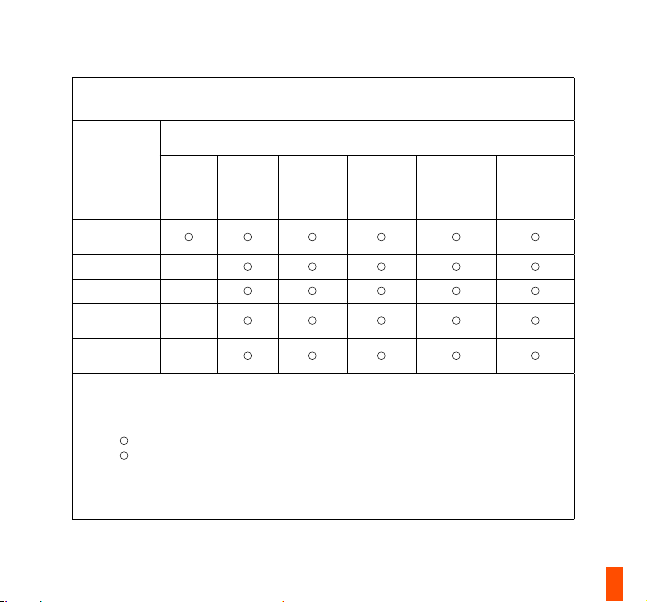
The RoHS test method is based on the standards JIS C 0950 and CNS 15663.
設備名稱: 無線滑鼠 型號(型式): M-00027
Equipment name: Wireless Mouse Type designation: M-00027
限用物質及其化學符號
Restricted substances and its chemical symbols
六價鉻
汞
單元 / Unit
塑膠外殼 /
Plastic
電路板 / PCBA
滾輪 / Wheel
內部線材 /
Internal Cable
外部線材 /
External Cable
備考1. “超出0.1 wt %”及 “超出0.01 wt %”係指限用物質之百分比含量超出百分比含量基準值。
Note 1: “Exceeding 0.1 wt %” and “exceeding 0.01 wt %” indicate that the percentage content of the
restricted substance exceeds the reference percentage value of presence condition.
備考2.
Note 2:
percentage of reference value of presence.
備考3.
- 係指該項限用物質為排除項目。
Note 3:
- indicates that the restricted substance corresponds to the exemption
鉛
Mercury
Lead
(Hg)
(Pb)
-
-
-
-
係指該項限用物質之百分比含量未超出百分比含量基準值。
indicates that the percentage content of the restricted substance does not exceed the
鎘
Cadmium
(Cd)
Hexavalent
chromium
(Cr+6)
多溴聯苯
Polybrominated
biphenyls
(PBB)
多溴二苯醚
Polybrominated
diphenyl ethers
(PBDE)
40
Page 42
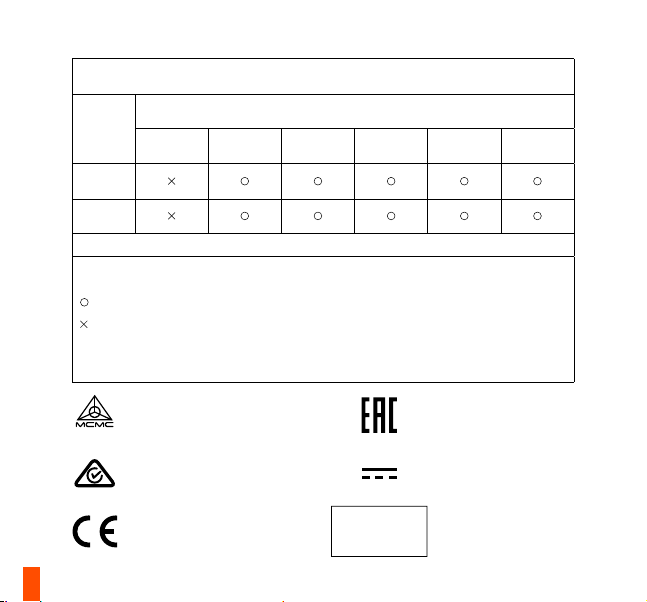
根据中国大陆《电子电气产品有害物质限制使用标识要求》,
以下部分列出了产品中可能包含的有害物质的名称和含量:
(Cd)
镉
有害物质
六价铬
(Cr(VI))
多溴联苯
(PBB)
多溴二苯醚
(PBDE)
零部件
名称
电路板
组件
其他线材
*: 电路板组件包括印刷电路板及其构成的零部件,如电阻、电容、集成电路、连接器等。
本表格依据SJ/T 11364的规定编制。
:表示该有害物质在该部件所有均质材料中的含量均在 GB/T 26572规定的限量要求以下。
:表示该有害物质至少在该部件的某一均质材料中的含量超出GB/T 26572规定的限量要求;
上表中打“X”的部件,应功能需要,部分有害物质含量超出GB/T 26572规定的限量要求,但是符合欧盟RoHS法规要
求(属于豁免部分)。
(Pb)
铅
汞
(Hg)
Custom Union Compliance.
(Russia / Belarus / Kazakhstan /
Armenia / Kyrgyzstan)
Direct current
Singapore approval (IMDA)
HIDF16000265
Malaysia approval (SIRIM)
ACMA Compliance (Australia /
New Zealand)
RED (2014/53/EU),
EMCD(2014/30/EU) and LVD
(2014/35/EU) Compliances
(The Commission of the
European Community.)
Complies with
IMDA Standards
DA 106032
41
Page 43
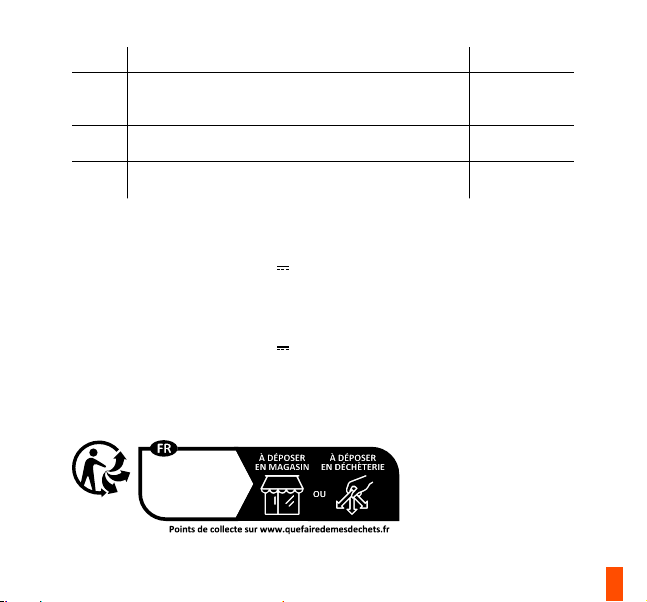
Region Address Telephone
Asia
4F.-4, No. 186, Jian 1st Rd., Zhonghe Dist.,
New Taipei City 235603, Taiwan
亞洲
新北市中和區建一路186號4樓及4樓之4
Europe Havneholmen 8, 1
2450 Copenhagen SV, Denmark
USA 656 W Randolph St., Suite 3E,
Chicago, IL 60661, USA
st
Floor,
+886 2 8227 1999
+45 702 500 75
+1 312 258 9467
More information and support at steelseries.com
Product Name (產品名稱/产品名称): Wireless Mouse (無線滑鼠/无缐鼠标)
Model No. (型號/型号): M-00027
Rated (規格/规格): 5 V
500 mA
Accessories information (配件資訊/配件信息)
Product Name: (產品名稱/产品名称): Transceiver (收發器/收发器)
Model No. (型號/型号): M-00030TX
Rated (規格/规格): 5 V
100 mA
Made in China 中國製造/中国制造
Operating Temperature: 0 to + 40 °C
產品使用環境溫度: 0 - 40度
Cet appareil
et sa baerie
se recyclent
42
Page 44

learn more at steelseries.com
 Loading...