

Page 1
6 ft. Cisco Console Rollover Cable | USB to RJ45 | M/M
Quick-Start Guide
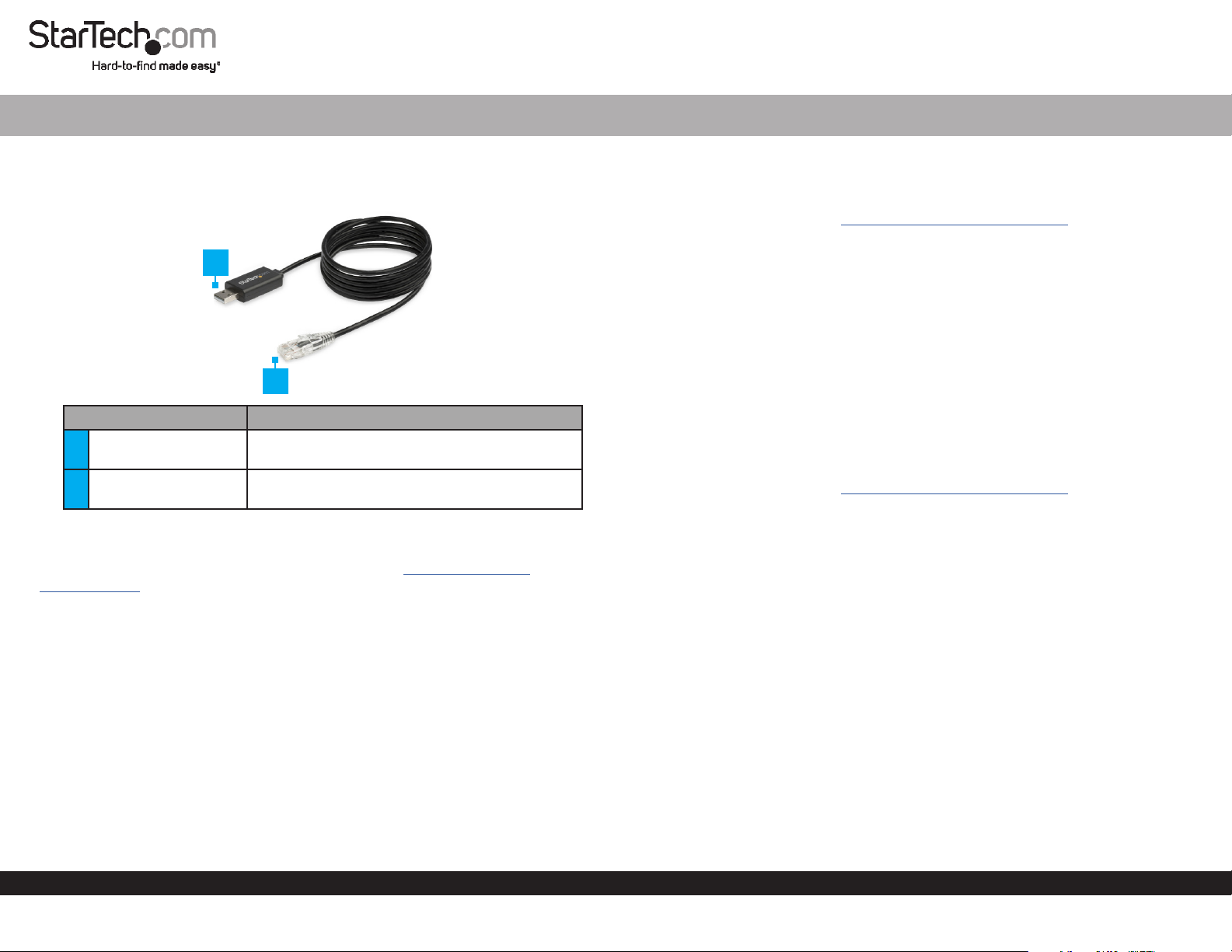
Product Diagram (ICUSBROLLOVR)
1
2
Port Function
1 USB-A Connector
2 RJ45 Connector
• Used to connect the Rollover Cable to a Host
Computer.
• Used to connect the Rollover Cable to a
Console Port on a Network Device.
Requirements
For the latest requirements and full manual, please visit www.startech.com/
ICUSBROLLOVR
• Host Computer with USB-A port
• Operating System:
• Windows® 10, 8.1, 8, 7
• Windows Server® 2003, 2008 R2, 2012, 2012 R2, 2016
• Mac OS® 9.x, 8.x, 10.6 to 10.12
• Linux 2.4.31 to 4.4.x LTS versions only
Installation
Windows
1. In a web browser, navigate to www.startech.com/ICUSBROLLOVR.
2. Click the Support tab.
3. Under Driver(s), download the .zip le.
4. When the le is downloaded, right-click the le and extract the contents.
5. Browse to the Windows folder and run the .zip le.
6. Follow the on-screen instructions to complete the installation.
7. Connect the Rollover Cable’s USB-A Connector to a USB-A port on the Host
Computer.
8. Connect the Rollover Cable’s RJ45 Connector to the Console Port on a Network
Device.
macOS
1. In a web browser, navigate to www.startech.com/ICUSBROLLOVR.
2. Click the Support tab.
3. Under Driver(s), download the .zip le.
4. When the le is downloaded, right-click the le and extract the contents.
5. Browse to the Mac folder, and select the appropriate folder for the version of OS that
you are running.
6. Run the .zip le application, and follow the on-screen instructions to complete the
installation.
7. Connect the Rollover Cable’s USB-A Connector to a USB-A port on the Host
Computer.
8. Connect the Rollover Cable’s RJ45 Connector to the Console Port on a Network
Device.
Verify the Installation
Windows
1. Navigate to the Device Manager.
2. Expand the Ports (COM & LPT) section.
To view manuals, FAQs, videos, drivers, downloads, technical drawings, and more, visit www.startech.com/support.
Manual Revision: January 8, 2019 1:52 PM
Page 2
3. Conrm that Prolic USB-to-Serial Comm Port (COMx) appears in the list with no
exclamation points or question marks next to it.
macOS
1. Navigate to the System Proler.
2. Expand the Hardware section, and click USB.
3. Conrm that USB-Serial Controller D appears in the list.
FCC Compliance Statement
This equipment has been tested and found to comply with the limits for a Class B digital device, pursuant to part 15 of the FCC
Rules. These limits are designed to provide reasonable protection against harmful interference in a residential installation.
This equipment generates, uses and can radiate radio frequency energy and, if not installed and used in accordance with the
instructions, may cause harmful interference to radio communications. However, there is no guarantee that interference will not
occur in a particular installation. If this equipment does cause harmful interference to radio or television reception, which can be
determined by turning the equipment o and on, the user is encouraged to try to correct the interference by one or more of the
following measures:
• Reorient or relocate the receiving antenna.
• Increase the separation between the equipment and receiver.
• Connect the equipment into an outlet on a circuit dierent from that to which the receiver is connected.
• Consult the dealer or an experienced radio/TV technician for help
This device complies with part 15 of the FCC Rules. Operation is subject to the following two conditions:
(1) This device may not cause harmful interference, and (2) this device must accept any interference received, including
interference that may cause undesired operation. Changes or modications not expressly approved by StarTech.com could void
the user’s authority to operate the equipment.
Industry Canada Statement
This Class B digital apparatus complies with Canadian ICES-003.
Cet appareil numérique de la classe [B] est conforme à la norme NMB-003 du Canada.
CAN ICES-3 (B)/NMB-3(B)
Use of Trademarks, Registered Trademarks, and other Protected Names and Symbols
This manual may make reference to trademarks, registered trademarks, and other protected names and/or symbols of thirdparty companies not related in any way to StarTech.com. Where they occur these references are for illustrative purposes only
and do not represent an endorsement of a product or service by StarTech.com, or an endorsement of the product(s) to which
this manual applies by the third-party company in question. StarTech.com hereby acknowledges that all trademarks, registered
trademarks, service marks, and other protected names and/or symbols contained in this manual and related documents are the
property of their respective holders.
Warranty Information
This product is backed by a two-year warranty.
For further information on product warranty terms and conditions, please refer to www.startech.com/warranty.
Limitation of Liability
In no event shall the liability of StarTech.com Ltd. and StarTech.com USA LLP (or their ocers, directors, employees or agents)
for any damages (whether direct or indirect, special, punitive, incidental, consequential, or otherwise), loss of prots, loss of
business, or any pecuniary loss, arising out of or related to the use of the product exceed the actual price paid for the product.
Some states do not allow the exclusion or limitation of incidental or consequential damages. If such laws apply, the limitations
or exclusions contained in this statement may not apply to you.
Safety Measures
• If product has an exposed circuit board, do not touch the product under power.
Mesures de sécurité
• Si l’un des circuits imprimés du produit est visible, ne pas touchez le produit lorsqu’il est sous tension.
安全対策
• 製品に露出した状態の回路基盤が含まれる場合、電源が入っている状態で製品に触らないでください。
Misure di sicurezza
• Se il prodotto ha un circuito stampato visibile, non toccare il prodotto quando è acceso.
Säkerhetsåtgärder
• Rör aldrig vid enheter med oskyddade kretskort när strömmen är påslagen.
StarTech.com Ltd.
45 Artisans Cres
London, Ontario
N5V 5E9
Canada
StarTech.com LLP
2500 Creekside
Parkwy
Lockbourne, Ohio
43137
U.S.A.
StarTech.com Ltd.
Unit B, Pinnacle 15
Gowerton Rd,
Brackmills
Northampton
NN4 7BW
United Kingdom
FR: fr.startech.com
DE: de.startech.com
ES: es.startech.com
NL: nl.startech.com
IT: it.startech.com
JP: jp.startech.com
 Loading...