

Page 1

Line Thermal Printer
StarPRNT
Command Specifications
Rev. 2.13
Star Micronics Co., Ltd.
Special Products Division
Page 2

Table of Contents
1. COMMAND FUNCTION LIST .................................................................................................................... 1-1
2. COMMAND DETAILS ................................................................................................................................ 2-1
2.1. Explanation of Terms ................................................................................................................................. 2-1
2.2. Exception Processing ................................................................................................................................ 2-2
2.3. Standard Command Details ....................................................................................................................... 2-3
2.3.1. Font style and Character Set ............................................................................................................. 2-3
ESC RS F n ..................................................................................................................................................... 2-3
ESC GS t n ...................................................................................................................................................... 2-4
ESC GS = n1 n2 da1 da2...dak db1 db2...dbk dc1 dc2...dck........................................................................... 2-7
ESC R n .......................................................................................................................................................... 2-9
ESC / n .......................................................................................................................................................... 2-10
ESC SP n ...................................................................................................................................................... 2-10
ESC & c1 c2 n d1…d48 .................................................................................................................................. 2-11
ESC & c1 c2 n ............................................................................................................................................... 2-12
ESC % n ........................................................................................................................................................ 2-12
2.3.2. Kanji characters .............................................................................................................................. 2-13
ESC p ............................................................................................................................................................ 2-13
ESC q ............................................................................................................................................................ 2-13
ESC $ n ......................................................................................................................................................... 2-13
ESC s n1 n2 .................................................................................................................................................. 2-14
ESC t n1 n2 ................................................................................................................................................... 2-14
ESC r c1 c2 d1...dk ........................................................................................................................................ 2-15
2.3.3. Print Mode ....................................................................................................................................... 2-16
ESC i n1 n2 ................................................................................................................................................... 2-16
ESC W n ........................................................................................................................................................ 2-17
ESC h n ......................................................................................................................................................... 2-17
ESC E ............................................................................................................................................................ 2-18
ESC F ............................................................................................................................................................ 2-18
ESC – n ......................................................................................................................................................... 2-19
ESC _ n ......................................................................................................................................................... 2-19
ESC 4 ............................................................................................................................................................ 2-20
ESC 5 ............................................................................................................................................................ 2-20
SI ................................................................................................................................................................... 2-21
DC2 ............................................................................................................................................................... 2-21
2.3.4. Horizontal Direction Printing Position .............................................................................................. 2-22
ESC l n .......................................................................................................................................................... 2-22
ESC Q n ........................................................................................................................................................ 2-22
HT .................................................................................................................................................................. 2-23
ESC D n1 n2…nk NUL .................................................................................................................................. 2-23
ESC D NUL ................................................................................................................................................... 2-23
ESC GS A n1 n2 ............................................................................................................................................ 2-24
ESC GS R n1 n2 ........................................................................................................................................... 2-24
Star PRNT Command Specifications
Page 3

ESC GS a n ................................................................................................................................................... 2-24
2.3.5. Line Spacing .................................................................................................................................... 2-25
LF .................................................................................................................................................................. 2-25
ESC a n ......................................................................................................................................................... 2-25
ESC z n ......................................................................................................................................................... 2-26
ESC 0 ............................................................................................................................................................ 2-26
ESC J n ......................................................................................................................................................... 2-27
ESC I n .......................................................................................................................................................... 2-27
2.3.6. Page Control Commands ................................................................................................................ 2-28
FF .................................................................................................................................................................. 2-28
ESC C n ........................................................................................................................................................ 2-28
ESC C 0 n ..................................................................................................................................................... 2-28
2.3.7. Top margin ...................................................................................................................................... 2-29
ESC RS T n ................................................................................................................................................... 2-29
2.3.8. Page Function ................................................................................................................................. 2-30
ESC GS h 0 k m n ......................................................................................................................................... 2-30
2.3.9. Cutter Control .................................................................................................................................. 2-31
ESC d n ......................................................................................................................................................... 2-31
2.3.10. Reduced Printing Function Command Details ................................................................................. 2-32
ESC GS c h v ................................................................................................................................................ 2-32
2.3.11. Page Mode Command Details ........................................................................................................ 2-33
ESC GS P 0................................................................................................................................................... 2-33
ESC GS P 1................................................................................................................................................... 2-34
ESC GS P 2 n ................................................................................................................................................ 2-34
ESC GS P 3 xL xH yL yH dxL dxH dyL dyH ................................................................................................... 2-35
ESC GS P 4 nL nH ........................................................................................................................................ 2-36
ESC GS P 5 nL nH ........................................................................................................................................ 2-36
ESC GS P 6................................................................................................................................................... 2-37
ESC GS P 7................................................................................................................................................... 2-37
ESC GS P 8................................................................................................................................................... 2-37
2.3.12. Bit Image Graphics .......................................................................................................................... 2-38
ESC K n1 n2 d1...dk ...................................................................................................................................... 2-38
ESC L n1 n2 d1...dk ...................................................................................................................................... 2-39
ESC k n1 n2 d1...dk ....................................................................................................................................... 2-40
ESC X n1 n2 d1...dk ...................................................................................................................................... 2-41
ESC GS S m xL xH yL yH n [d11 d12...d1k] .................................................................................................. 2-42
ESC GS X m xL xH yL yH p1 p2 p3 p4 n [d1 d2...dk] .................................................................................... 2-44
2.3.13. Logo ................................................................................................................................................ 2-45
ESC GS ( L pL pH m fn [parameter] ............................................................................................................. 2-45
ESC GS 8 L p1 p2 p3 p4 m fn [parameter] .................................................................................................... 2-45
<Function 48> ESC GS ( L pL pH m fn (fn=48) ............................................................................................. 2-46
<Function 48> ESC GS 8 L p1 p2 p3 p4 m fn (fn=48) ................................................................................... 2-46
<Function 51> ESC GS ( L pL pH m fn (fn=51) ............................................................................................. 2-47
<Function 51> ESC GS 8 L p1 p2 p3 p4 m fn (fn=51) ................................................................................... 2-47
Star PRNT Command Specifications
Page 4

<Function 64> ESC GS ( L pL pH m fn d1 d2 (fn=64) ................................................................................... 2-48
<Function 64> ESC GS 8 L p1 p2 p3 p4 m fn d1 d2 (fn=64) ......................................................................... 2-48
<Function 65> ESC GS ( L pL pH m fn d1 d2 d3 (fn=65) .............................................................................. 2-49
<Function 65> ESC GS 8 L p1 p2 p3 p4 m fn d1 d2 d3 (fn=65) .................................................................... 2-49
<Function 66> GS ( L pL pH m fn kc1 kc2 (fn=66) ........................................................................................ 2-50
<Function 66> GS 8 L p1 p2 p3 p4 m fn kc1 kc2 (fn=66) .............................................................................. 2-50
<Function 67> ESC GS ( L pL pH m fn a kc1 kc2 b xL xH y L yH [c d1 ... dk] 1 ... [c d1 ... dk] b (fn=67) ..... 2-51
<Function 67> ESC GS 8 L p1 p2 p3 p4 m fn a kc1 kc2 b xL xH y L yH [c d1 ... dk] 1 ... [c d1 ... dk] b (fn=67)2-51
<Function 69> ESC GS 8 L p1 p2 p3 p4 m fn kc1 kc2 x y (fn=69) ................................................................ 2-53
ESC GS ) L pL pH fn [parameter] .................................................................................................................. 2-54
<Function 48> ESC GS ) L pL pH fn kc1 kc2................................................................................................. 2-55
<Function 49> ESC GS ) L pL pH fn kc1 kc2................................................................................................. 2-57
<Function 50> ESC GS ) L p L p H f n d 1 d 2 ............................................................................................... 2-57
<Function 51> ESC GS ) L pL pH fn kc1 kc2................................................................................................. 2-58
2.3.14. Bar Code ......................................................................................................................................... 2-59
ESC b n1 n2 n3 n4 d1...dk RS ...................................................................................................................... 2-59
2.3.15. Two-Dimensional Bar Code QR Code Command Details ............................................................... 2-62
ESC GS y S 0 n ............................................................................................................................................. 2-64
ESC GS y S 1 n ............................................................................................................................................. 2-64
ESC GS y S 2 n ............................................................................................................................................. 2-64
ESC GS y D 1 m nL nH d1 d2 … dk .............................................................................................................. 2-65
ESC GS y D 2 a m1 n1L n1H d11 d12 ••• d1k m2 n2L n2H d21 d22 ••• d2k ml ••• dlk.................................. 2-66
ESC GS y P ................................................................................................................................................... 2-67
2.3.16. Two-Dimensional Bar Code PDF417 Command Details ................................................................. 2-68
ESC GS x S 0 n p1 p2 ................................................................................................................................... 2-70
ESC GS x S 1 n ............................................................................................................................................. 2-70
ESC GS x S 2 n ............................................................................................................................................. 2-70
ESC GS x S 3 n ............................................................................................................................................. 2-71
ESC GS x D nL nH d1 d2 … dk ..................................................................................................................... 2-71
ESC GS x P ................................................................................................................................................... 2-71
2.3.17. GS1 2D Code, Compound symbol Command Details ..................................................................... 2-72
ESC GS ( k pL pH cn fn [parameter].............................................................................................................. 2-72
<Function 367> ESC GS ( k pL pH cn fn n (cn=51, fn=67) ........................................................................... 2-73
<Function 371> ESC GS ( k pL pH cn fn nL nH (cn=51, fn=71) ................................................................... 2-73
<Function 380> ESC GS ( k pL pH cn fn m n d1...dk (cn=51, fn=80) ........................................................... 2-74
<Function 381> ESC GS ( k pL pH cn fn m (cn=51, fn=81) .......................................................................... 2-75
<Function 467> ESC GS ( k pL pH cn fn n (cn=52, fn=67) ........................................................................... 2-76
<Function 471> ESC GS ( k pL pH cn fn nL nH (cn=52, fn=71) ................................................................... 2-76
<Function 472> ESC GS ( k pL pH cn fn n (cn=52, fn=72) ........................................................................... 2-77
<Function 480> ESC GS ( k pL pH cn fn m a b d1...dk (cn=52, fn=80) ........................................................ 2-78
<Function 481> ESC GS ( k pL pH cn fn m (cn=52, fn=81) .......................................................................... 2-79
2.3.18. Initialization Command .................................................................................................................... 2-80
ESC @ .......................................................................................................................................................... 2-80
ESC ACK CAN .............................................................................................................................................. 2-80
Star PRNT Command Specifications
Page 5

ESC ? LF NUL ............................................................................................................................................... 2-81
2.3.19. Memory Switch Setting Command .................................................................................................. 2-82
ESC GS # m N n1 n2 n3 n4 LF NUL ............................................................................................................. 2-82
2.3.20. Status .............................................................................................................................................. 2-83
ESC RS a n ................................................................................................................................................... 2-83
ESC ACK SOH .............................................................................................................................................. 2-83
ETB ............................................................................................................................................................... 2-84
ESC RS E n ................................................................................................................................................... 2-84
ESC GS ETX s n1 n2 .................................................................................................................................... 2-85
ESC GS ) I pL pH fn [parameter] ................................................................................................................... 2-88
<Function 48> ESC GS ) I pL pH fn d1 d2..................................................................................................... 2-89
<Function 49> ESC GS ) I pL pH fn .............................................................................................................. 2-90
<Function 50> ESC GS ) I pL pH fn .............................................................................................................. 2-92
<Function 51> ESC GS ) I pL pH fn d1 d2 ................................................................................................. 2-93
<Function 52> ESC GS ) I pL pH fn d1 d2 ................................................................................................. 2-94
2.3.21. Print Settings ................................................................................................................................... 2-95
ESC RS d n ................................................................................................................................................... 2-95
ESC RS r n .................................................................................................................................................... 2-96
2.3.22. Special Command ........................................................................................................................... 2-97
ESC RS R n .................................................................................................................................................. 2-97
2.3.23. UTF Command ................................................................................................................................ 2-98
ESC GS ) U pL pH fn [parameter] ................................................................................................................. 2-98
<Function 48> ESC GS ) U pL pH fn m (fn=48) .......................................................................................... 2-98
<Function 64> ESC GS ) U pL pH fn m (fn=64) .......................................................................................... 2-99
<Function 65> ESC GS ) U pL pH fn n1 n2 n3 n4 (fn=65) ........................................................................ 2-100
2.3.24. Black Mark Related Command Details .......................................................................................... 2-102
ESC d n ....................................................................................................................................................... 2-102
FF ................................................................................................................................................................ 2-103
ESC C n ...................................................................................................................................................... 2-103
ESC C 0 n ................................................................................................................................................... 2-103
2.3.25. 2 Color Printing Command Details ................................................................................................ 2-104
ESC RS c n ................................................................................................................................................. 2-104
ESC RS C n ................................................................................................................................................ 2-105
ESC 4 .......................................................................................................................................................... 2-106
ESC 5 .......................................................................................................................................................... 2-106
2.3.26. External Device Drive .................................................................................................................... 2-107
ESC BEL n1 n2 ........................................................................................................................................... 2-107
BEL .............................................................................................................................................................. 2-108
FS ................................................................................................................................................................ 2-108
SUB ............................................................................................................................................................. 2-109
EM ............................................................................................................................................................... 2-109
ESC GS BEL m t1 t2 .................................................................................................................................... 2-110
ESC GS EM DC1 m n1 n2 ........................................................................................................................... 2-111
Star PRNT Command Specifications
Page 6

ESC GS EM DC2 m n1 n2 ........................................................................................................................... 2-112
2.3.27. Melody Speaker Commands .......................................................................................................... 2-113
ESC GS s R z n k1 k2 k3 d1... dk .............................................................................................................. 2-11 3
2.3.28. Barcode Reader Command ............................................................................................................ 2-114
ESC GS B 0 ................................................................................................................................................. 2-114
ESC GS B 1 ................................................................................................................................................. 2-114
ESC GS B 2 ................................................................................................................................................. 2-115
ESC GS B 3 ................................................................................................................................................. 2-115
2.3.29. Magnetic Card Reader Commands ................................................................................................ 2-116
ESC M C ...................................................................................................................................................... 2-116
ESC M D ...................................................................................................................................................... 2-116
ESC M E ....................................................................................................................................................... 2-116
ESC M F ....................................................................................................................................................... 2-11 7
ESC M G ...................................................................................................................................................... 2-117
ESC M J ....................................................................................................................................................... 2-11 7
EOT .............................................................................................................................................................. 2-117
2.3.30. Customer display Commands ........................................................................................................ 2-118
ESC GS B @ ................................................................................................................................................ 2-11 8
ESC RS B A ................................................................................................................................................. 2-118
ESC GS B B ................................................................................................................................................. 2-119
ESC GS B C ................................................................................................................................................. 2-11 9
3. CHARACTER CODE TABLES .................................................................................................................. 3-1
4. APPENDIX ................................................................................................................................................ 4-1
4.1. Appendix 1: Bar Code Specification Details .............................................................................................. 4-1
4.1.1. Code 39............................................................................................................................................. 4-1
4.1.2. Interleaved 2 of 5 .............................................................................................................................. 4-1
4.1.3. JAN/EAN/UPC .................................................................................................................................. 4-2
4.1.4. Code 128 ........................................................................................................................................... 4-3
4.1.5. Code 93............................................................................................................................................. 4-5
4.1.6. NW7 (CODERBAR) .......................................................................................................................... 4-5
4.1.7. GS1-128 ............................................................................................................................................ 4-6
4.1.8. GS1 Databar Omnidirectional ........................................................................................................... 4-9
4.1.9. GS1 Databar Truncated .................................................................................................................... 4-9
4.1.10. GS1 Databar Limited ......................................................................................................................... 4-9
4.1.11. GS1 Databar Expanded .................................................................................................................... 4-9
4.2. Appendix 2: Status Specifications ............................................................................................................ 4-10
4.2.1. Automatic Status ............................................................................................................................. 4-10
4.2.2. Printer Status Transmission Specification for Ethernet I/F ............................................................... 4-16
4.3. Appendix 3: Blank Code Page Configuration........................................................................................... 4-18
4.4. Appendix 4 Maximum Number of Input Characters for Each Version of QR Code .................................. 4-20
4.5. Appendix 5 Explanation of Page Mode .................................................................................................... 4-24
Star PRNT Command Specifications
Page 7

4.5.1. Overview ......................................................................................................................................... 4-24
4.5.2. Setting Values Using Each Command in Standard Mode and Page Mode ..................................... 4-24
4.5.3. Print Data Expansion to the Print Region ........................................................................................ 4-24
4.5.4. Page Mode Print Maximum Region ................................................................................................ 4-26
4.6. Appendix 6 Explanation of Print Startup Control Starting Printing When Set to Page Units..................... 4-27
4.7. Appendix 7 Specifications of Magnetic Cards .......................................................................................... 4-28
4.7.1. Card Specifications ......................................................................................................................... 4-28
4.7.2. Magnetic Card Data Transmission Format ...................................................................................... 4-29
4.8. Appendix 10 Specifications when a melody speaker is connected .......................................................... 4-30
5. SPECIAL APPENDIX ................................................................................................................................. 5-1
5.1. COMMAND LIST FOR EACH MODEL ...................................................................................................... 5-1
Star PRNT Command Specifications
Page 8

This specification is a command specification for StarPRNT of line thermal printer.
Information contained herein applies to the following models.
< Applicable Models:>
・mPOP
・SM-L Series
SM-L200
SM-L300
・SM-S Series
SM-S210i (For Japanese market only)
SM-S220i (Other than Japanese market)
SM-S230i (Other than Japanese market)
・SM-L Series
SM-T300i
SM-T400i
・mC-Print3
MCP31
・mC-Print2
MCP20
MCP21
Star PRNT Command Specifications
Page 9
Commands
Name
ESC RS F
Select font
ESC GS t
Specify code page
ESC GS =
Write blank code page data
ESC R
Specify international character set
ESC /
Specify/cancel slash zero
ESC SP
Set ANK right space
ESC &
Register/delete 12 x 24 dot font download characters
ESC %
Set/cancel download characters
Commands
Name
ESC p
Set to JIS Kanji character mode
ESC q
Cancel JIS Kanji character mode
ESC $
Set/cancel JIS Kanji character modes
ESC s
Set two byte Kanji characters left/right spaces
ESC r
Register Chinese download characters
Commands
Name
ESC i
Set/cancel the double wide/high printing
ESC W
Set/cancel the double wide printing
ESC h
Set/cancel the double high printing
ESC E
Select emphasized printing
ESC F
Cancel emphasized printing
ESC -
Select/cancels underling mode
ESC 4
Select white/black inverted printing
ESC 5
Cancel white/black inverted printing
SI
Select upside-down printing
DC2
Cancel upside-down printing
1. COMMAND FUNCTION LIST
• Font style and character set
• Chinese characters
ESC t Set 1 byte Kanji characters left/right spaces
• Kanji character control commands are ignored on printers not installed with Kanji character fonts (those intended for
overseas).
• All Kanji character control commands are ignored if the specification for the location of use is specified as SBCS (single
byte countries) by the memory switch.
• Print modes
ESC _ Select/cancels upperline mode
Star PRNT Command Specifications 1-1
Page 10
Commands
Name
ESC l
Set left margin
ESC Q
Set right margin
ESC D
Set/cancel horizontal tab position
ESC GS A
Move absolute position
ESC GS R
Move relative position
ESC GS a
Specify position alignment
Commands
Name
LF
Line feed
ESC a
Feed paper n lines
ESC z
Select line feed amount
ESC 0
Specify line spacing to 3 mm
ESC J
n/4 mm line feed
ESC I
n/8 mm line feed
Commands
Name
FF
Form feed
ESC C
Set page length to n lines
ESC C 0
Set page length in 24 mm units
Commands
Name
ESC RS T
Set top margin
Commands
Name
ESC GS h 0
Invert 180˚
Commands
Name
ESC d
Paper cutter instruction
Commands
Name
ESC GS c h v
Set reduced printing
• Horizontal direction position
HT Move print position to horizontal tab position
• Line spacing
• Page control commands
• Top margin
• Page Function
• Cutter control
• Reduced Printing Function Command
Star PRNT Command Specifications 1-2
Page 11
Commands
Name
ESC GS P 0
Selects page mode
ESC GS P 1
Cancels page mode
ESC GS P 3
Set print region in page mode
ESC GS P 4
Specify character vertical direction absolute position
ESC GS P 5
Specify character vertical direction relative position
ESC GS P 6
Prints
ESC GS P 7
Cancel printing and page mode
ESC GS P 8
Cancel print data
Commands
Name
ESC K
Standard density bit image
ESC L
High density bit image
ESC k
Fine bit image
ESC X
Fine bit image
ESC GS S m
Graphics Raster data printing
ESC GS X m
Commands
Name
ESC GS ( L (fn=0, 48)
Register logo data
ESC GS ( L (fn=3, 51)
Send key code of the registered NV graphics
ESC GS ( L (fn=64)
Send all key code of the NV graphics
ESC GS ( L (fn=65)
Erase entire NV graphics data
ESC GS ( L (fn=66)
Erase the specified NV graphics data
ESC GS ( L (fn=67)
Set the specified NV graphics data
ESC GS ( L (fn=69)
ESC GS 8 L (fn=0, 48)
Register logo data
ESC GS 8 L (fn=3, 51)
Send key code of the registered NV graphics
ESC GS 8 L (fn=64)
Send all key code of the NV graphics
ESC GS 8 L (fn=65)
Erase entire NV graphics data
ESC GS 8 L (fn=66)
Erase the specified NV graphics data
ESC GS 8 L (fn=67)
Set the specified NV graphics data
ESC GS 8 L (fn=69)
Print the specified NV graphics data
ESC GS ) L (fn=48)
Send the registered individual logo CRC
ESC GS ) L (fn=49)
Send the registered individual NV graphics memory capacity
ESC GS ) L (fn=50)
all key code of the registered NV graphics
ESC GS ) L (fn=51)
Send the registered NV graphics data
Commands
Name
ESC b
Print bar code
• Page Mode Commands
ESC GS P 2 Select printing direction
• Bit image Graphics
• Logos
Graphics Raster data printing (Compress data)
Print the specified NV graphics data
• Bar code
Star PRNT Command Specifications 1-3
Page 12
Commands
Name
ESC GS y S0
Set QR code model
ESC GS y S1
Set QR code mistake correction level
ESC GS y D1
Set QR code data
ESC GS y D2
Set QR code data (Manual)
ESC GS y P
Print QR code
Commands
Name
ESC GS x S0
Set PDF417 bar code size
ESC GS x S1
Set PDF417 ECC (security level)
ESC GS x S2
Set PDF417 module X direction size
ESC GS x S3
Set PDF417 module aspect ratio
ESC GS x D
Set PDF417 bar code data
ESC GS x P
Print PDF417 bar code
Commands
Name
ESC GS ( k(cn=51,fn=67)
Set 2D module siz
ESC GS ( k(cn=51,fn=71)
Set The maximum width of the 2D GS1DataBar Expanded Stacked
ESC GS ( k(cn=51,fn=80)
Store data in 2D symbol saving region
ESC GS ( k(cn=51,fn=81)
Print 2D symbol data of symbol saving region
ESC GS ( k(cn=52,fn=67)
Compound symbol: Set module size
Compound symbol: Set The maximum width of the 2D GS1DataBar
Expanded Stacked
ESC GS ( k(cn=52,fn=72)
Compound symbol: Set HRI Font
ESC GS ( k(cn=52,fn=80)
Compound symbol: Store data in symbol saving region
ESC GS ( k(cn=52,fn=81)
Compound symbol: Print symbol data of symbol saving region
Commands
Name
ESC @
Command initialization
ESC ACK CAN
Real-time printer reset
ESC ?
Reset printer
Commands
Name
ESC GS #
Set memory switch
• QR Code commands
ESC GS y S2 Set QR code cell size
• PDF417 commands
• 2D GS1 code, Compound symbol Commands
ESC GS ( k(cn=52,fn=71)
• Initialization Command
• Memory Switch Command
Star PRNT Command Specifications 1-4
Page 13
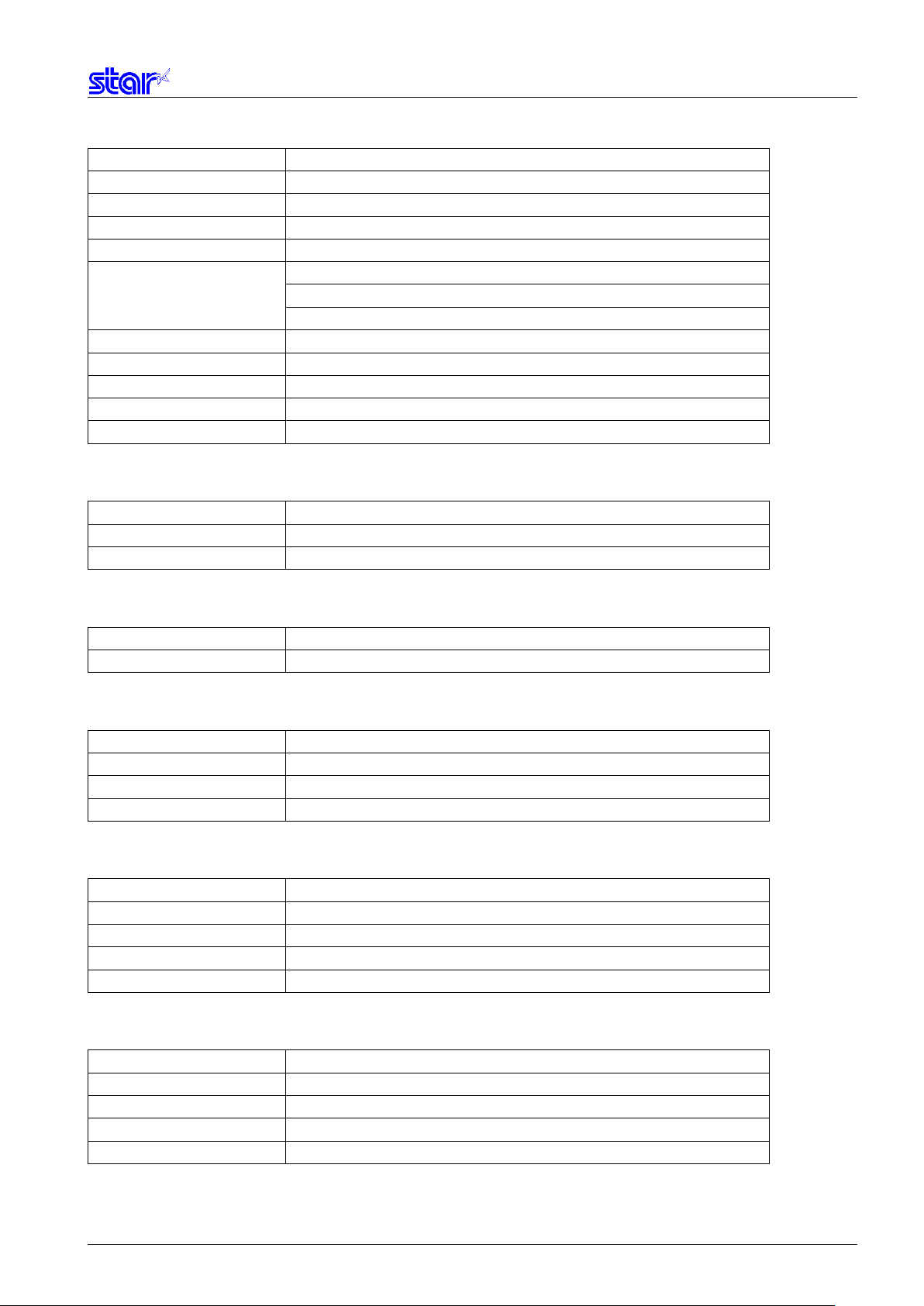
Commands
Name
ESC RS a
Set status transmission conditions
ESC ACK SOH
Real-time printer status (ASB Status)
ESC RS E
Clear ETB counter, ETB status
ESC GS ETX
Send print end counter and initialize
Print data cancel function
Data time out setting
ESC GS ) I (fn = 48)
Transmit multibyte font kind
ESC GS ) I (fn = 49)
Transmit Printer information
ESC GS ) I (fn = 50)
ESC GS ) I (fn = 51)
ESC GS ) I (fn = 52)
Transmit external device information
Commands
Name
ESC RS d
Set print density
ESC RS r
Set printing speed
Commands
Name
ESC RS R
Specify the special location of use
Commands
Name
ESC GS ) U (fn = 48)
Selects UTF code
ESC GS ) U (fn = 64)
Setting of the Unicode ambiguous character
ESC GS ) U (fn = 65)
Commands
Name
ESC d
Paper cut instruction
FF
Form feed
ESC C
Set page length to n lines
Commands
Name
ESC RS c
Specify printing color in 2 color printing mode
ESC RS C
Select/cancel 2 color printing mode
ESC 4
Specify white/black inversion and printing color red
ESC 5
Cancel white/black inversion and specify printing color black
• Status
ETB Update ETB status
Transmit Remaining battery power
Transmit installed I/F kind
• Print settings
• Special Commands
• UTF Commands
Set the UTF-8 CJK Unified Ideograph font
• Black mark Commands
ESC C 0 Set page length in 24 mm units
• 2 color printing related commands
Star PRNT Command Specifications 1-5
Page 14
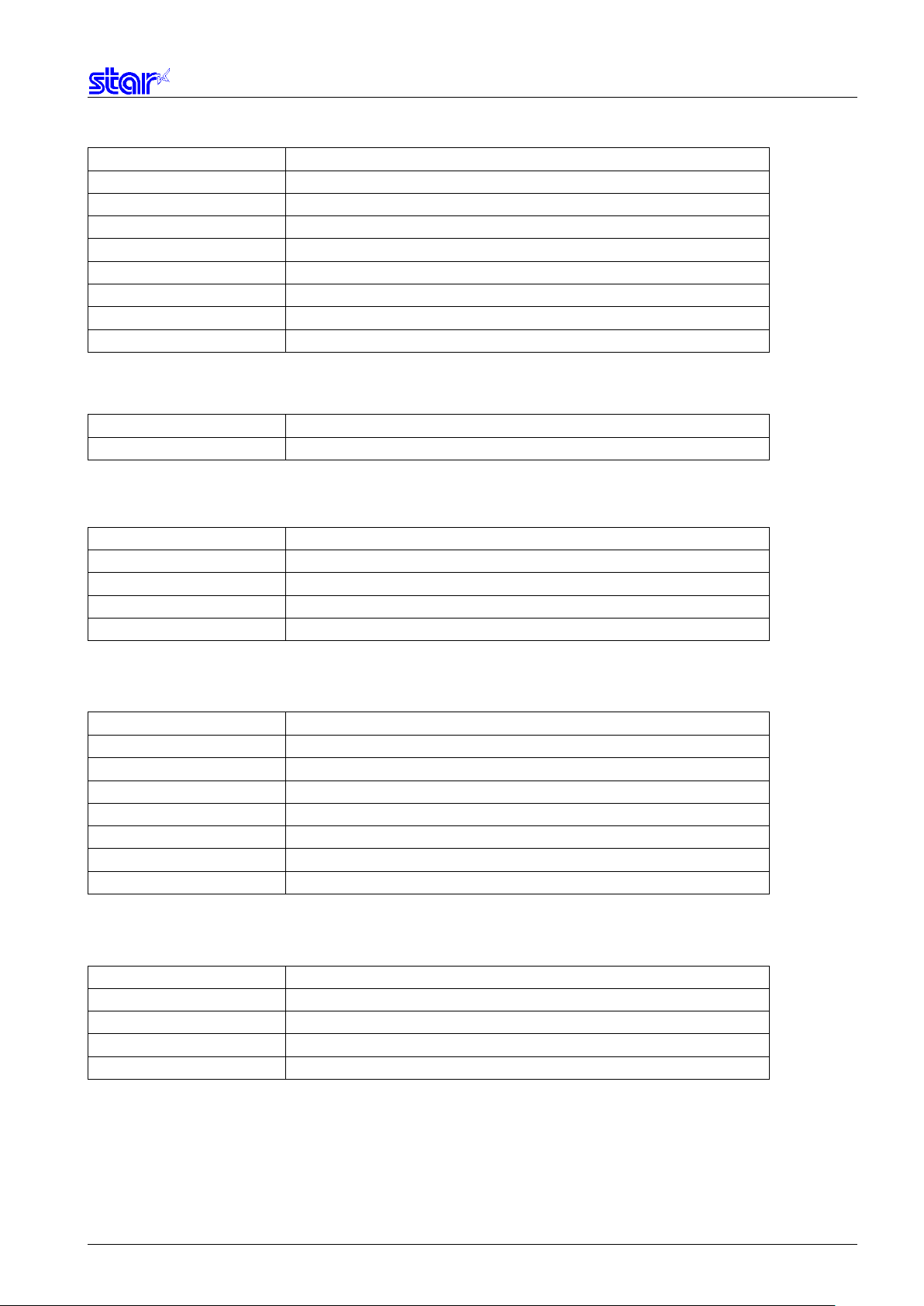
Commands
Name
ESC BEL
Set pulse width for external device drive
BEL
External device 1 drive instruction
FS
External device 1 drive instruction
SUB
External device 2 drive instruction
EM
External device 2 drive instruction
ESC GS BEL
Ring buzzer
ESC GS EM DC1
External buzzer drive pulse condition settings
ESC GS EM DC2
External buzzer drive execution
Commands
Name
ESC GS s R
Commands
Name
ESC GS B 0
ESC GS B 1
Status Request
ESC GS B 2
Barcode data request
ESC GS B 3
Commands
Name
ESC M E
Read ISO 2 tracks
ESC M J
Read JIS II track
Commands
Name
ESC GS B @
ESC RS B A
Status request
ESC GS B B
Customer display data request
ESC GS B C
• External device drive
• Melody Speaker Command
• Barcode Reader Command
Playback of received data
Send data to a barcode reader
Buffer clear
• Magnetic Card Reader Commands
ESC M C Read ISO track
ESC M D Read ISO track
ESC M F Read ISO 3 tracks
ESC M G Read ISO track (Track 3)
EOT Cancel MSR mode
• Customer Display Command
Send data to a customer display
Star PRNT Command Specifications 1-6
Buffer clear
Page 15
2. COMMAND DETAILS
2.1. Explanation of Terms
• Reception buffer
The buffer for storing data (reception data) received from the host, as it is called the reception buffer.
Reception data is temporarily stored in the reception buffer, then processed sequentially.
• Line buffer
The buffer for storing image data for printing is called the line buffer.
• Line buffer full
The state in which the buffer has no more space available is called line buffer full. When the buffer is full in standard mode,
data in the line buffer is printed and a line feed is performed when new print data is processed. This is the same as a Line
Feed. When the line buffer is full in the page mode, the printer move the print position to the head of the next line then starts
with the new print data.
• Top of line
The top of line is a state that satisfies the following conditions.
- There is currently no print data in the line buffer.
- The position is not specified with the horizontal direction position command.
• Printable region
This is the maximum printable area with the printer’s specifications.
• Print region
This is the printing area specified by a command. (Print region ≤ printable region)
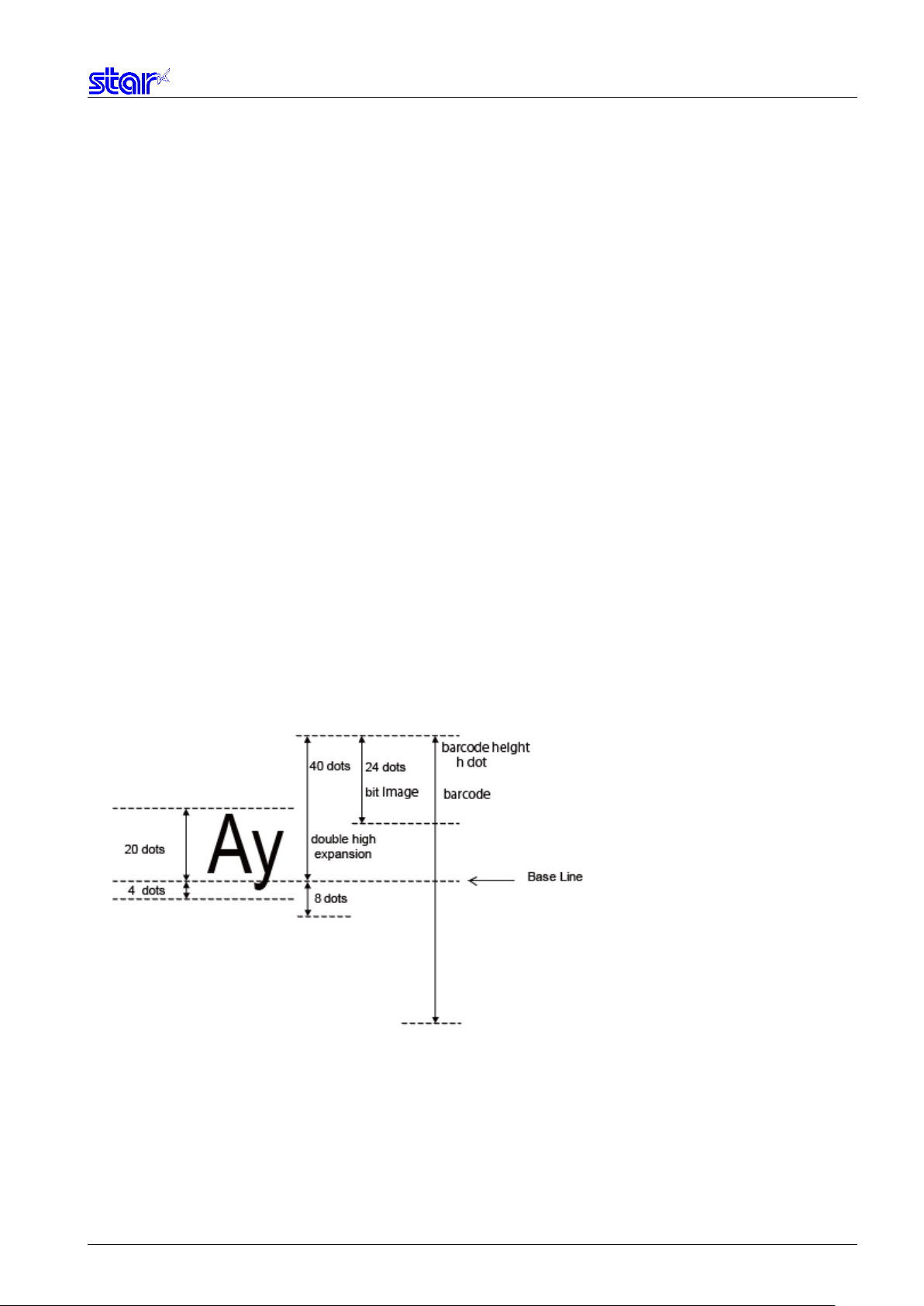
• ANK character base line
* For SM-S and T series, the base line is the upper end of each data.
• ASB Function
Sends the automatic status to the host each time the printer’s status changed.
• NSB Function
When the printer uses a parallel I/F or USB I/F, sends the automatic status each time the reverse transfer mode is entered.
When the printer uses Ethernet I/F or wireless I/F, sends the automatic status when the printer is connected to the print port
(TCP#9100). The ASB and NSB status formats are the same.
Star PRNT Command Specifications 2-1
Page 16

2.2. Exception Processing
1) Undefined codes
Codes from <00>H to <1F>H are targeted. When codes not defined as commands in this region are received, they are
discarded.
(Ex.) If processing the data string of <30>H<31>H<03>H<32>H<0A>H<33>H, the printer will discard <03>H as an
undefined code.
2) Undefined commands
When data continuing the codes of ESC, FS, GS, DLE are codes not defined as commands, ESC, FS,GS and subsequent
codes are discarded.
(Ex.) If processing the data string of <30>H<1B>H<22>H<31>H<32>H, the printer will read and discard <1B>H<22>H as
an undefined command.
3) Settings outside of the defined area
Processing values outside of the defined area in commands accompanying arguments, those commands are ignored and
the preset values are unchanged.
(Ex.) If processing the data string of <1B>H<52>H<15>H, the printer will discard the data string of <1B>H<52>H<15>H
because although <1B>H<52>H is defined as a commands (ESC R), the argument <15>H is outside of the
definition. Therefore, the international character set that is already set experiences no change.
Star PRNT Command Specifications 2-2
Page 17
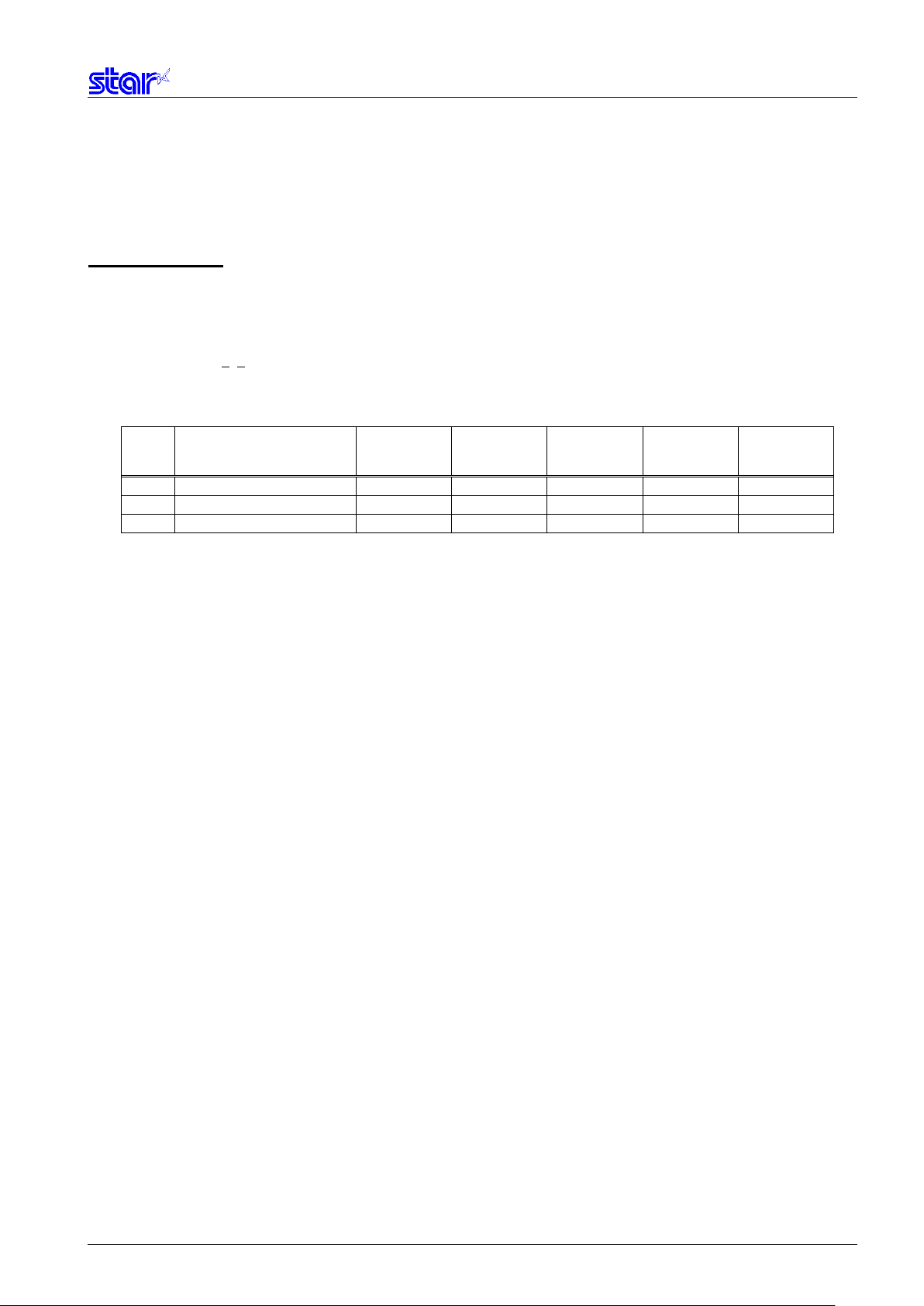
ESC RS F n
[Name]
Select font
[Code]
ASCII
ESC
RS F n
Hex.
1B
1E
46 n Decimal
27
30
70 n
mPOP
mC-Print3
S, T Series
0
Font-A (12 x 24 dots)
O O O
1
Font-B (9 x 24 dots)
O O O
2
Font-C ( 9 x 17 dots)
X O O
2.3. Standard Command Details
2.3.1. Font style and Character Set
[Defined Region] 0≤n≤2
[Initial Value] n = 0
[Function] Selects a font
n Font
mC-Print2
SM-L Series SM-
Star PRNT Command Specifications 2-3
Page 18

ESC GS t n
[Name]
Select code page
[Code]
ASCII
ESC
GS t n
Hex.
1B
1D
74 n Decimal
27
29
116 n
n
Code Page
mPOP
mC-Print3
0
Normal*
O
1
CodePage437 (USA,Std. Europe)
O
2
Katakana
O
3
CodePage437 (USA,Std. Europe)
O
4
Codepage 858 (Multilingual)
O
5
Codepage 852 (Latin-2)
O
6
Codepage 860 (Portuguese)
O
7
Codepage 861 (Icelandic)
O
8
Codepage 863 (Canadian French)
O
9
Codepage 865 (Nordic)
O
10
Codepage 866 (Cyrillic Russian)
O
11
Codepage 855 (Cyrillic Bulgarian)
O
12
Codepage 857 (Turkey)
O
13
Codepage 862 (Israel (Hebrew) )
O
14
Codepage 864 (Arabic)
O
15
Codepage 737 (Greek)
O
16
Codepage 851 (Greek)
O
17
Codepage 869 (Greek)
O
18
Codepage 928 (Greek)
O
19
Codepage 772 (Lithuanian)
O
20
Codepage 774 (Lithuanian)
O
21
Codepage 874 (Thai)
O
32
Codepage 1252 (Windows Latin-1)
O
33
Codepage 1250 (Windows Latin-2)
O
34
Codepage 1251 (Windows Cyrillic)
O
64
Codepage 3840 (IBM-Russian)
O
65
Codepage 3841 (Gost)
O
66
Codepage 3843 (Polish)
O
67
Codepage 3844 (CS2)
O
68
Codepage 3845 (Hungarian)
O
69
Codepage 3846 (Turkish)
O
70
Codepage 3847 (Brazil-ABNT)
O
71
Codepage 3848 (Brazil-ABICOMP)
O
72
Codepage 1001 (Arabic)
O
73
Codepage 2001 (Lithuanian-KBL)
O
[Defined Region] Spec. A
For SBCS
0≤ n ≤ 21,32 ≤ n ≤ 34,64 ≤ n ≤ 79, 96 ≤ n ≤ 98, n=102, n=255
For DBCS
n=0,128
0≤ n ≤ 255
Spec. B
For SBCS
0≤ n ≤ 21,32 ≤ n ≤ 34,64 ≤ n ≤ 79, 96 ≤ n ≤ 98, n=102, n=255
For DBCS
n=0,255
[Initial Value] Memory switch setting
[Function] Specifies code page
Spec. A
mC-Print2
Star PRNT Command Specifications 2-4
Page 19

n
Code Page
mPOP
mC-Print3
74
Codepage 3001 (Estonian-1)
O
75
Codepage 3002 (Estonian-2)
O
76
Codepage 3011 (Latvian-1)
O
77
Codepage 3012 (Latvian-2)
O
78
Codepage 3021 (Bulgarian)
O
79
Codepage 3041 (Maltese)
O
96
Thai Character Code 42 (Thai)
O
97
Thai Character Code 11 (Thai)
O
98
Thai Character Code 13 (Thai)
O
102
Thai Character Code 18 (Thai)
O
255
User Setting (Blank Code Page)
O
mC-Print2
When UTF-8 code is valid with SBCS setting, the UTF-8 becomes invalid by this command.
Star PRNT Command Specifications 2-5
Page 20
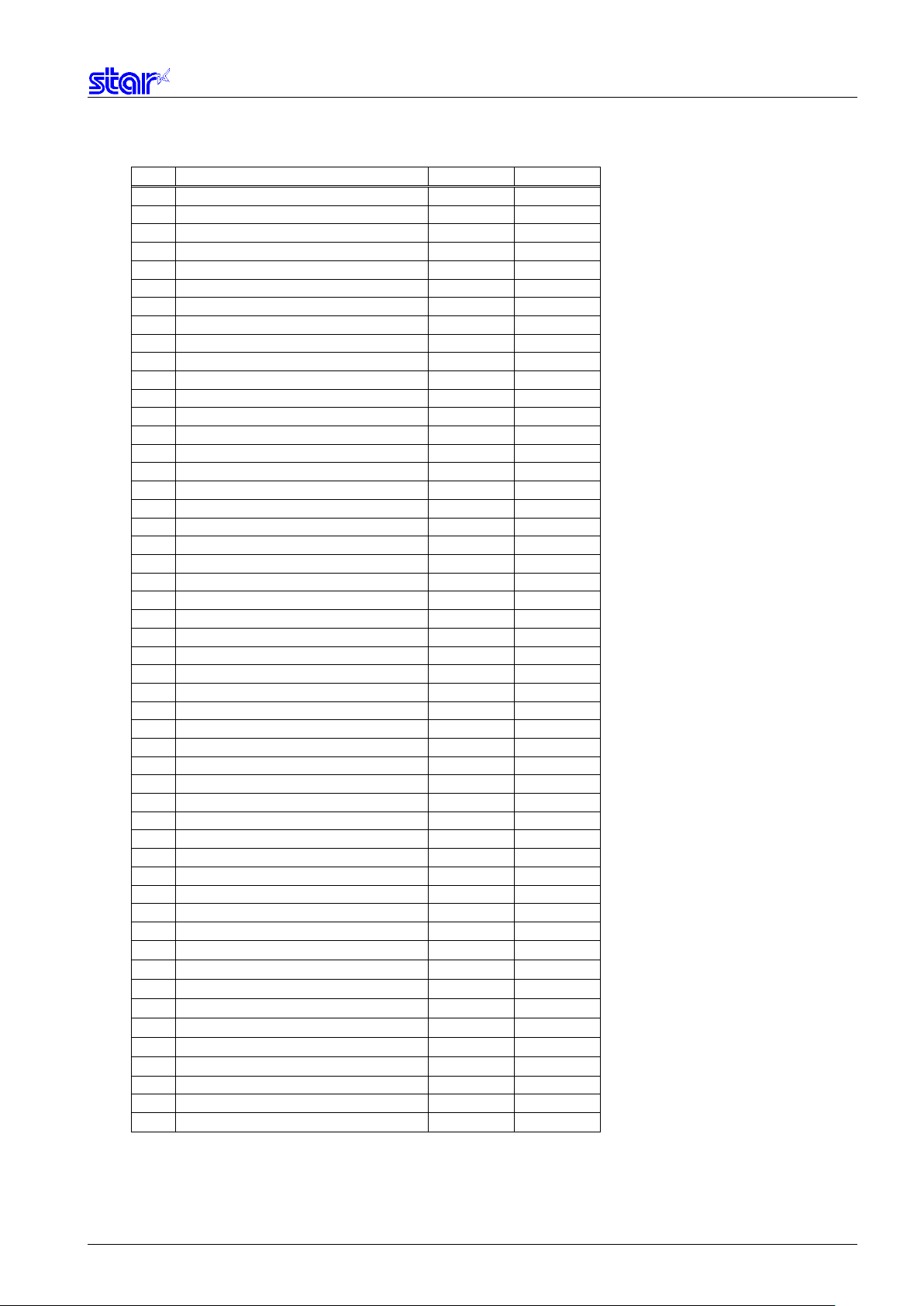
n
Code Page
SM-L Series
SM-S, T Series
0
Normal* O O
1
CodePage437 (USA, Std. Europe)
O
O
2
Katakana
O
O
3
CodePage437 (USA, Std. Europe)
O
O
4
Codepage 858 (Multilingual)
O
O
5
Codepage 852 (Latin-2)
O
O
6
Codepage 860 (Portuguese)
O
O
7
Codepage 861 (Icelandic)
O
O
8
Codepage 863 (Canadian French)
O
O
9
Codepage 865 (Nordic)
O
O
10
Codepage 866 (Cyrillic Russian)
O
O
11
Codepage 855 (Cyrillic Bulgarian)
O
O
12
Codepage 857 (Turkey)
O
O
13
Codepage 862 (Israel (Hebrew) )
O
O
14
Codepage 864 (Arabic)
O
O
15
Codepage 737 (Greek)
O
O
16
Codepage 851 (Greek)
O
X
17
Codepage 869 (Greek)
O
X
18
Codepage 928 (Greek)
O
X
19
Codepage 772 (Lithuanian)
O
O
20
Codepage 774 (Lithuanian)
O
O
21
Codepage 874 (Thai)
O
O
32
Codepage 1252 (Windows Latin-1)
O
O
33
Codepage 1250 (Windows Latin-2)
O
X
34
Codepage 1251 (Windows Cyrillic)
O
X
64
Codepage 3840 (IBM-Russian)
O
X
65
Codepage 3841 (Gost)
O
X
66
Codepage 3843 (Polish)
O
X
67
Codepage 3844 (CS2)
O
X
68
Codepage 3845 (Hungarian)
O
X
69
Codepage 3846 (Turkish)
O
X
70
Codepage 3847 (Brazil-ABNT)
O
X
71
Codepage 3848 (Brazil-ABICOMP)
O
X
72
Codepage 1001 (Arabic)
O
X
73
Codepage 2001 (Lithuanian-KBL)
O
X
74
Codepage 3001 (Estonian-1)
O
X
75
Codepage 3002 (Estonian-2)
O
X
76
Codepage 3011 (Latvian-1)
O
X
77
Codepage 3012 (Latvian-2)
O
X
78
Codepage 3021 (Bulgarian)
O
X
79
Codepage 3041 (Maltese)
O
X
96
Thai Character Code 42 (Thai)
O
X
97
Thai Character Code 11 (Thai)
O
X
98
Thai Character Code 13 (Thai)
O
X
99
Thai Character Code 14 (Thai)
O
X
100
Thai Character Code 16 (Thai)
O
X
101
Thai Character Code 17 (Thai)
O
X
102
Thai Character Code 18 (Thai)
O
X
110
(Reserved)
X
X
111
(Reserved)
X
X
255
User Setting (Blank Code Page)
O
O
Spec. B
<SBCS>
Star PRNT Command Specifications 2-6
Page 21
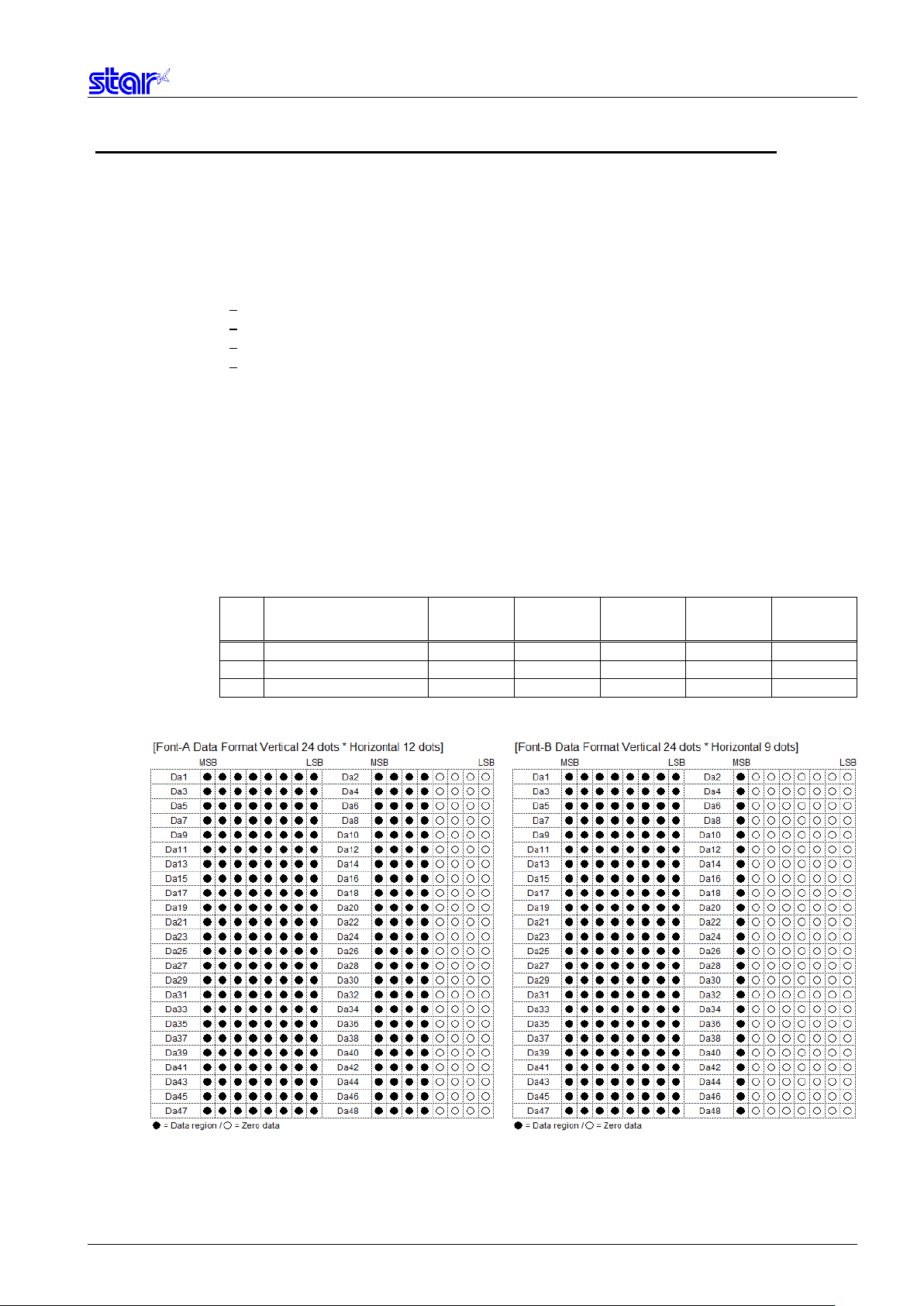
ESC GS = n1 n2 da1 da2...dak db1 db2...dbk dc1 dc2...dck
[Name]
Write blank code page data
[Code]
ASCII
ESC
GS = n1
n2
da1
da2
...
dak
db1
db2 … Dbk
dc1
dc2 … dck
Hex.
1B
1D
3D
n1
n2
da1
da2
...
dak
db1
db2 … Dbk
dc1
dc2 … dck Decimal
27
29
61
n1
n2
da1
da2
...
dak
db1
db2 … Dbk
dc1
dc2 … dck
mPOP
mC-Print3
S, T Series
0
Font-A (12 x 24 dots)
O O O
1
Font-B (9 x 24 dots)
O O O
2
Font-C ( 9 x 17 dot)
X O O
[Defined Area] n1 = 0
n2 = 48
1 ≤ (n1 + n2 x 256)
0 ≤ da ≤ 255 (Font-A data)
0 ≤ db ≤ 255 (Font-B data)
0 ≤ dc ≤ 255 (Font-C data)
k = (n1 + n2 x 256) / 2
[Initial Value] - - [Function] A blank code page indicates a character code table where character codes from 80h to FFh are all blank.
A blank code page can be selected using the ESC GS t n command n = 255.
The following is the data written to the blank code page.
Font-A: 1 character = 48 bytes 6144 bytes = 48 bytes x 128 characters
Font-B: 1 character = 48 bytes 6144 bytes = 48 bytes x 128 characters
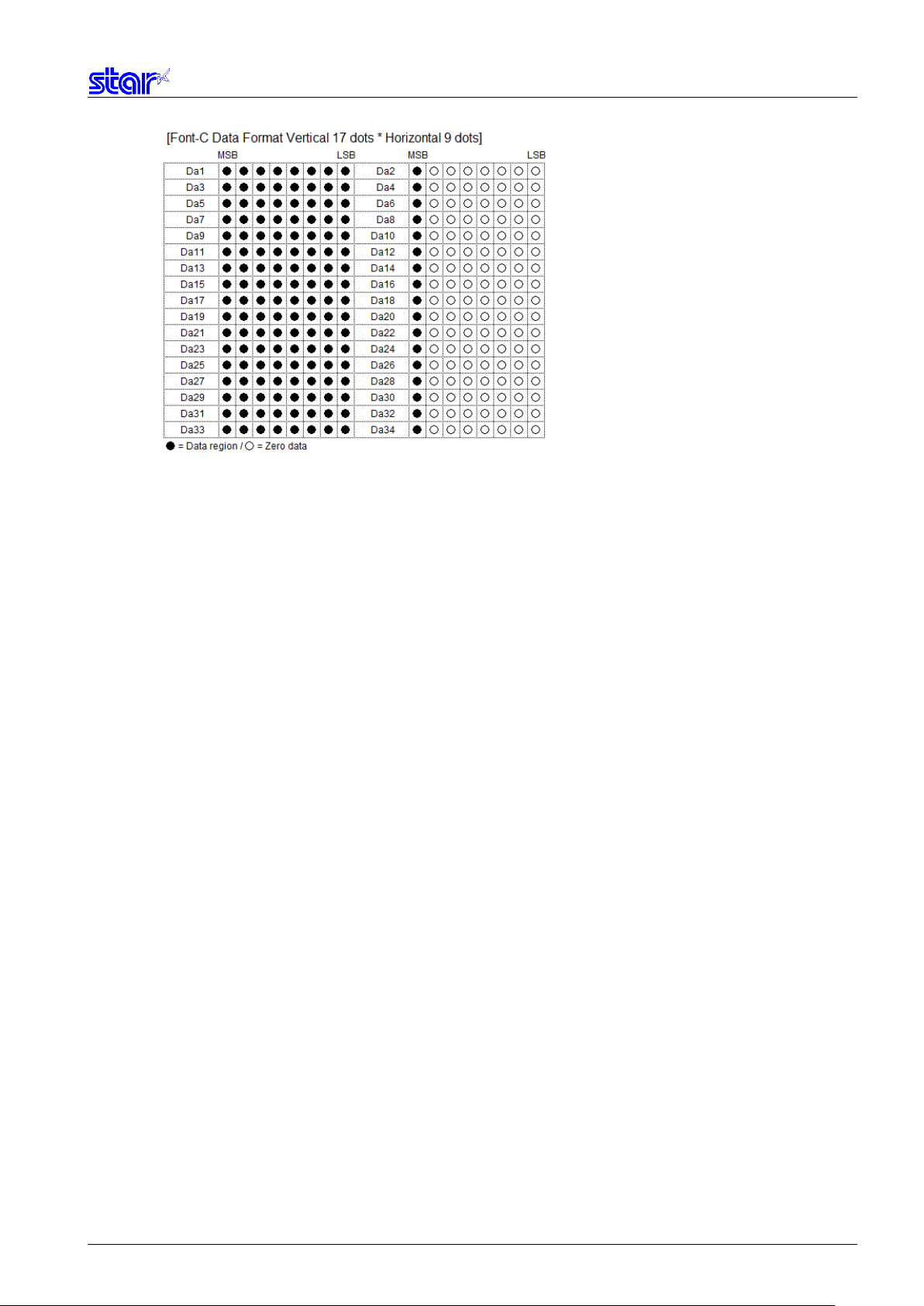
Font-C: 1 character = 34 bytes 4352 bytes = 34 bytes x 128 characters
Send Font-A, Font-B and Font-C data continuously.
For mPOP, mC-Print2 and mC-Print3 which does not support Font-C, send Font A and Font-B data only.
The printer is reset when writing with this command is completed.
n Font
mC-Print2
SM-L Series SM-
Star PRNT Command Specifications 2-7
Page 22
Star PRNT Command Specifications 2-8
Page 23

ESC R n
[Name]
Specify international character set
[Code]
ASCII
ESC
R n
Hex.
1B
52 n
Decimal
27
82 n
n
International Characters
0, 48
USA
1, 49
France
2, 50
Germany
3, 51
UK
4, 52
Denmark
5, 53
Sweden
6, 54
Italy
7, 55
Spain
8, 56
Japan
9, 57
Norway
10, 65
Denmark II
11, 66
Spain II
12, 67
Latin America
13, 68
Korea
14, 69
Ireland
64
Legal
[Defined Area] 0≤n≤14
n = 64
48≤n≤57 (”0”≤n≤”9”)
65≤n≤69 (”A”≤n≤”E”)
[Initial Value] Memory switch setting
When installed with Japanese language characters and DBCS setting: Fixed at n=8
When installed with Hangeul language characters and DBCS setting: Fixed at n=13
[Function] Specifies international characters
When installed with Japanese language characters and DBCS setting, this command is ignored.
When installed with Hangeul language characters and DBCS setting, this command is ignored.
Star PRNT Command Specifications 2-9
Page 24

ESC / n
[Name]
Specify/cancel slash zero
[Code]
ASCII
ESC / n
Hex.
1B
2F n
Decimal
27
47 n
n
International Characters
0, 48
Cancels slash zero
1, 49
Specifies slash zero
ESC SP n
[Name]
Set ANK right space
[Code]
ASCII
ESC
SP n
Hex.
1B
20 n
Decimal
27
32 n
[Defined Area] n = 0, 1, 48, 49
[Initial Value] Memory switch setting
[Function] Specifies and cancels slash zeros.
[Defined Area] 0≤n≤15
48≤n≤57 (”0”≤n≤”9”)
65≤n≤70 (”A”≤n≤”F”)
[Initial Value] Memory switch setting
[Function] Specify the right space amount of ANK characters in n dots.
The ANK character width is "left space amount” + "ANK font dot count” + right space amount.”
(See the information on character specifications in the appropriate printer specifications manual for
details on the ANK font dot count.)
Standard mode and page mode can be set independently of each other.
Star PRNT Command Specifications 2-10
Page 25
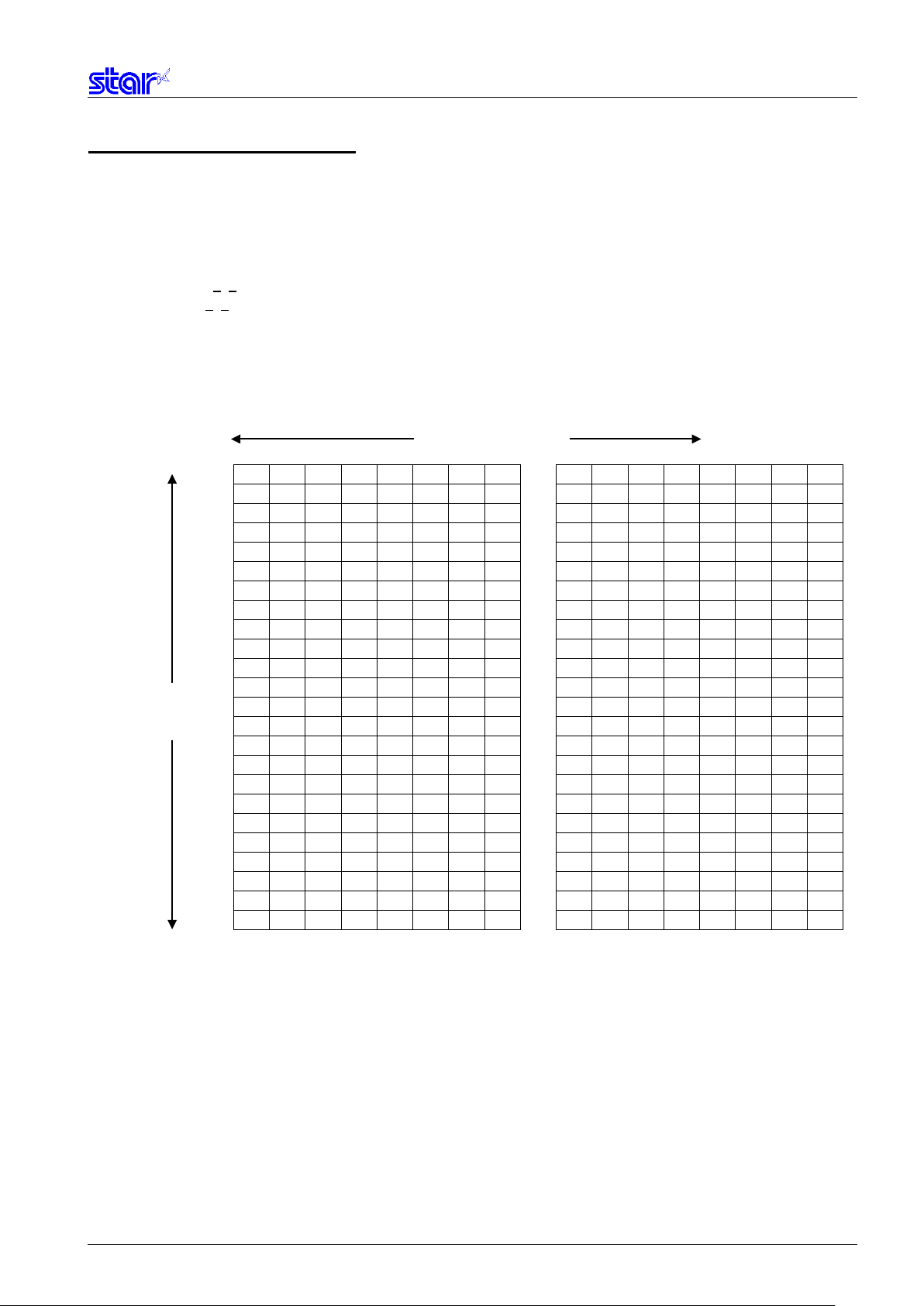
ESC & c1 c2 n d1…d48
[Name]
Register 12 x 24 dot font download characters
[Code]
ASCII
ESC
&
c1
c2 n d1
...
d48
Hex.
1B
26
c1
c2 n d1
...
d48
Decimal
27
38
c1
c2 n d1
...
d48
d1 ● ● ● ● ● ● ● ●
d2 ● ● ● ● ○ ○ ○ ○
d3 ● ● ● ● ● ● ● ●
d4 ● ● ● ● ○ ○ ○ ○
d5 ● ● ● ● ● ● ● ●
d6 ● ● ● ● ○ ○ ○ ○
d7 ● ● ● ● ● ● ● ●
d8 ● ● ● ● ○ ○ ○ ○
d9 ● ● ● ● ● ● ● ●
d10 ● ● ● ● ○ ○ ○ ○
d11 ● ● ● ● ● ● ● ●
d12 ● ● ● ● ○ ○ ○ ○
d13 ● ● ● ● ● ● ● ●
d14 ● ● ● ● ○ ○ ○ ○
d15 ● ● ● ● ● ● ● ●
d16 ● ● ● ● ○ ○ ○ ○
d17 ● ● ● ● ● ● ● ●
d18 ● ● ● ● ○ ○ ○ ○
d19 ● ● ● ● ● ● ● ●
d20 ● ● ● ● ○ ○ ○ ○
d21 ● ● ● ● ● ● ● ●
d22 ● ● ● ● ○ ○ ○ ○
d23 ● ● ● ● ● ● ● ●
d24 ● ● ● ● ○ ○ ○ ○
d25 ● ● ● ● ● ● ● ●
d26 ● ● ● ● ○ ○ ○ ○
d27 ● ● ● ● ● ● ● ●
d28 ● ● ● ● ○ ○ ○ ○
d29 ● ● ● ● ● ● ● ●
d30 ● ● ● ● ○ ○ ○ ○
d31 ● ● ● ● ● ● ● ●
d32 ● ● ● ● ○ ○ ○ ○
d33 ● ● ● ● ● ● ● ●
d34 ● ● ● ● ○ ○ ○ ○
d35 ● ● ● ● ● ● ● ●
d36 ● ● ● ● ○ ○ ○ ○
d37 ● ● ● ● ● ● ● ●
d38 ● ● ● ● ○ ○ ○ ○
d39 ● ● ● ● ● ● ● ●
d40 ● ● ● ● ○ ○ ○ ○
d41 ● ● ● ● ● ● ● ●
d42 ● ● ● ● ○ ○ ○ ○
d43 ● ● ● ● ● ● ● ●
d44 ● ● ● ● ○ ○ ○ ○
d45 ● ● ● ● ● ● ● ●
d46 ● ● ● ● ○ ○ ○ ○
d47 ● ● ● ● ● ● ● ●
d48 ● ● ● ● ○ ○ ○ ○ bit7
bit6
bit5
bit4
bit3
bit2
bit1
Bit0 bit7
bit6
bit5
bit4
bit3
bit2
bit1
bit0
Horizontal 12 Dots
Vertical
[Defined Area] c1 = 1, 49
c2 = 1, 49
32≤n≤127
0≤d≤255
[Initial Value] - - [Function] Registers 12 x 24 dot font download characters to the nth address.
Download characters can be registered to <20>H to <7F>H.
If one has been already registered to an address, it is overwritten.
When parameters c1 and c2 and n are outside of the defined area, subsequent data is handled as normal
data.
24 Dots
●: Font data ○: Invalid data
Star PRNT Command Specifications 2-11
Page 26

ESC & c1 c2 n
[Name]
Delete 12 x 24 dot font download characters
[Code]
ASCII
ESC
&
c1
c2 n
Hex.
1B
26
c1
c2 n
Decimal
27
38
c1
c2 n
ESC % n
[Name]
Specifies/cancels ANK download characters
[Code]
ASCII
ESC % n Hex.
1B
25 n
Decimal
27
37 n
n
Download characters
0, 48
Cancels ANK download characters
1, 49
Specifies ANK download characters
[Defined Area] c1 = 1, 49
c2 = 0, 48
32≤n≤127
[Initial Value] - - [Function] Deletes 12 x 24 dot font download characters registered to the nth address.
[Defined Area] n=0, 1, 48, 49
[Initial Value] ANK download characters cancelled
[Function] Specifies/cancels ANK download characters
<Print example of ANK download characters>
1. ANK download character register (ESC & c1 c2 n d1…d48)
2. Specify ANK download characters (ESC % n (n = 1))
3. Prints ANK download characters
Star PRNT Command Specifications 2-12
Page 27

ESC p
[Name]
Specify JIS Kanji character mode
[Code]
ASCII
ESC p Hex.
1B
70
Decimal
27
112
ESC q
[Name]
Cancel JIS Kanji character mode
[Code]
ASCII
ESC q Hex.
1B
71
Decimal
27
113
ESC $ n
[Name]
Specify/cancel Shift JIS Kanji character mode
[Code]
ASCII
ESC $ n Hex.
1B
24 n
Decimal
27
36 n
n
Shift JIS Kanji character mode
0, 48
Cancels shift JIS Kanji character mode
1, 49
Specifies shift JIS Kanji character mode
2.3.2. Kanji characters
[Defined Area] - - [Initial Value] JIS Kanji character mode cancelled
[Function] Specifies JIS Kanji character mode
When in JIS Kanji character mode, character codes are all handled as 2 byte Kanji characters (First byte:
upper code; second byte: lower code).
This command is ignored for models not equipped with Japanese and Kanji characters and when the
specification for the location of use is specified as SBCS (single byte countries) by the memory switch.
This command is ignored when UTF-8 is specified (command: ESC GS t 128) for DBCS.
[Defined Area] - - [Initial Value] JIS Kanji character mode cancelled
[Function] Cancel JIS Kanji character mode
This command is ignored when UTF-8 is specified (command: ESC GS t 128) for DBCS.
[Defined Area] - - [Initial Value] Memory switch setting
[Function] Specifies and cancels the shift JIS Kanji character mode.
When in shift JIS Kanji character mode, character codes are all handled as 2 byte Kanji characters (First
byte: upper code; second byte: lower code).
This command is ignored for models not equipped with Japanese and Kanji characters and when the
specification for the location of use is specified as SBCS (single byte countries) by the memory switch.
This command is ignored when UTF-8 is specified (command: ESC GS t 128) for DBCS.
Star PRNT Command Specifications 2-13
Page 28

ESC s n1 n2
[Name]
Set 2 byte Kanji character left/right spaces
[Code]
ASCII
ESC
s
n1
n2
Hex.
1B
73
n1
n2
Decimal
27
115
n1
n2
ESC t n1 n2
[Name]
Set 1 byte Kanji character left/right spaces
[Code]
ASCII
ESC
t
n1
n2
Hex.
1B
74
n1
n2
Decimal
27
116
n1
n2
[Defined Area] 0≤n1≤7
48≤n1≤55 (”0”≤n1≤”7”)
0≤n2≤15
48≤n2≤57 (”0”≤n2≤”9”)
65≤n2≤70 (”A”≤n2≤”F”)
[Initial Value] Memory switch setting
[Function] Adds n1 dots left space amount and n2 dots right space amount to Kanji characters.
The Kanji character width is "left space amount” + "Kanji font dot count” + "right space amount.”
(See the information on character specifications in the appropriate printer specifications manual for
details on the Kanji font dot count.)
This command is ignored for models not equipped with Chinese fonts (for overseas) and when the
specification for the location of use is specified as SBCS (single byte countries) by the memory switch.
Standard mode and page mode can be set independently of each other.
[Defined Area] 0≤n1≤7
48≤n1≤55 (”0”≤n1≤”7”)
0≤n2≤15
48≤n2≤57 (”0”≤n2≤”9”)
65≤n2≤70 (”A”≤n2≤”F”)
[Initial Value] Memory switch setting
[Function] Adds n1 dots left space amount and n2 dots right space amount to single-byte Kanji characters.
The single-byte Kanji character width is "left space amount” + "single-byte Kanji font dot count” + "right
Space amount.”
(See the information on character specifications in the appropriate printer specifications manual for
details on the single-byte Kanji font dot count.)
This command is ignored for models not equipped with Chinese fonts (for overseas) and when the
specification for the location of use is specified as SBCS (single byte countries) by the memory switch.
Standard mode and page mode can be set independently of each other.
Star PRNT Command Specifications 2-14
Page 29

ESC r c1 c2 d1...dk
[Name]
Register Chinese download characters
[Code]
ASCII
ESC
r
c1
c2
d1
...
dk Hex.
1B
72
c1
c2
d1
...
dk
Decimal
27
114
c1
c2
d1
...
dk
Specification
c1
c2
Registration count
Japanese char./JIS type
c1=77h
21h≤c2≤7Eh
94 characters
Japanese char./Shift JIS type
c1=ECh
40h≤c2≤7Eh
80h≤c2≤9Eh
94 characters
Kanji characters
c1=FEh
A1h≤c2≤FEh
94 characters
Taiwan char./JIS type
c1=FEh
A1h≦c2≦FEh
94 characters
Hangeul char./JIS type
c1=FEh
A1h≦c2≦FEh
94 characters
d1 ● ● ● ● ● ● ● ●
d2 ● ● ● ● ● ● ● ●
d3 ● ● ● ● ● ● ● ●
d4 ● ● ● ● ● ● ● ●
d5 ● ● ● ● ● ● ● ●
d6 ● ● ● ● ● ● ● ●
d7 ● ● ● ● ● ● ● ●
d8 ● ● ● ● ● ● ● ●
d9 ● ● ● ● ● ● ● ●
d10 ● ● ● ● ● ● ● ●
d11 ● ● ● ● ● ● ● ●
d12 ● ● ● ● ● ● ● ●
d13 ● ● ● ● ● ● ● ●
d14 ● ● ● ● ● ● ● ●
d15 ● ● ● ● ● ● ● ●
d16 ● ● ● ● ● ● ● ●
d17 ● ● ● ● ● ● ● ●
d18 ● ● ● ● ● ● ● ●
d19 ● ● ● ● ● ● ● ●
d20 ● ● ● ● ● ● ● ●
d21 ● ● ● ● ● ● ● ●
d22 ● ● ● ● ● ● ● ●
d23 ● ● ● ● ● ● ● ●
d24 ● ● ● ● ● ● ● ●
d25 ● ● ● ● ● ● ● ●
d26 ● ● ● ● ● ● ● ●
d27 ● ● ● ● ● ● ● ●
d28 ● ● ● ● ● ● ● ●
d29 ● ● ● ● ● ● ● ●
d30 ● ● ● ● ● ● ● ●
d31 ● ● ● ● ● ● ● ●
d32 ● ● ● ● ● ● ● ●
d33 ● ● ● ● ● ● ● ●
d34 ● ● ● ● ● ● ● ●
d35 ● ● ● ● ● ● ● ●
d36 ● ● ● ● ● ● ● ●
d37 ● ● ● ● ● ● ● ●
d38 ● ● ● ● ● ● ● ●
d39 ● ● ● ● ● ● ● ●
d40 ● ● ● ● ● ● ● ●
d41 ● ● ● ● ● ● ● ●
d42 ● ● ● ● ● ● ● ●
d43 ● ● ● ● ● ● ● ●
d44 ● ● ● ● ● ● ● ●
d45 ● ● ● ● ● ● ● ●
d46 ● ● ● ● ● ● ● ●
d47 ● ● ● ● ● ● ● ●
d48 ● ● ● ● ● ● ● ●
d49 ● ● ● ● ● ● ● ●
d50 ● ● ● ● ● ● ● ●
d51 ● ● ● ● ● ● ● ●
d52 ● ● ● ● ● ● ● ●
d53 ● ● ● ● ● ● ● ●
d54 ● ● ● ● ● ● ● ●
d55 ● ● ● ● ● ● ● ●
d56 ● ● ● ● ● ● ● ●
d57 ● ● ● ● ● ● ● ●
d58 ● ● ● ● ● ● ● ●
d59 ● ● ● ● ● ● ● ●
d60 ● ● ● ● ● ● ● ●
d61 ● ● ● ● ● ● ● ●
d62 ● ● ● ● ● ● ● ●
d63 ● ● ● ● ● ● ● ●
d64 ● ● ● ● ● ● ● ●
d65 ● ● ● ● ● ● ● ●
d66 ● ● ● ● ● ● ● ●
d67 ● ● ● ● ● ● ● ●
d68 ● ● ● ● ● ● ● ●
d69 ● ● ● ● ● ● ● ●
d70 ● ● ● ● ● ● ● ●
d71 ● ● ● ● ● ● ● ●
d72 ● ● ● ● ● ● ● ●
bit7
bit6
bit5
Bit4
bit3
bit2
bit1
bit0 bit7
bit6
bit5
bit4
bit3
bit2
bit1
bit0 bit7
bit6
bit5
bit4
bit3
bit2
bit1
bit0
Horizontal
Vertical
24 Dots
[Defined Area] 0≤d≤255
k=72
c1 and c2 differ according to specifications and code type (see table below).
[Initial Value] All spaces
[Function] Registers Chinese download characters to c1 and c2 addresses.
Those already registered to these addresses are overwritten. If c1 and c2 are outside of the defined are or
the printer is model not equipped with Chinese fonts (for overseas) and when the specification for the
location of use is specified as SBCS (single byte countries) by the memory switch, the printer discards up
to d1 and dk.
(*) The registration region is the same for Japanese characters in JIS or shift JIS.
24 Dots
●: Font data/○: Invalid data
Star PRNT Command Specifications 2-15
Page 30
ESC i n1 n2
[Name]
Set/cancel the double wide/high
[Code]
ASCII
ESC
i
n1
n2
Hex.
1B
69
n1
n2
Decimal
27
105
n1
n2
mPOP
mC-Print3
0, 48
Cancels expanded high
O O O O
1, 49
Specifies 2x high expansion
O O O O
2, 50
Specifies 3x high expansion
O O O O
3, 51
Specifies 4x high expansion
O X O O
4, 52
Specifies 5x high expansion
O X O O
5, 53
Specifies 6x high expansion
O X O O n2
Expanded wide
0, 48
Cancels expanded wide
1, 49
Specifies 2x wide expansion
2, 50
Specifies 3x wide expansion
3, 51
Specifies 4x wide expansion
4, 52
Specifies 5x wide expansion
5, 53
Specifies 6x wide expansion
2.3.3. Print Mode
[Defined Area] 0≤n1≤5
48≤n1≤53 (”0”≤n1≤”5”)
0≤n2≤5
48≤n2≤53 (”0”≤n2≤”5”)
[Initial Value] n1 = 0 (Double high cancelled)
n2 = 0 (Double wide cancelled)
[Function] Specifies/cancels double high/wide for ANK characters and Kanji characters.
This command is ignored if either n1 or n2 is outside of the defined area.
n1 Expanded high
mC-Print2
SM-L200 SM-L300 SM-S, T Series
Star PRNT Command Specifications 2-16
Page 31

ESC W n
[Name]
Specify/cancel expanded wide
[Code]
ASCII
ESC W n Hex.
1B
57 n
Decimal
27
87 n
n
Expanded wide
0, 48
Cancels expanded wide
1, 49
Specifies 2x wide expansion
2, 50
Specifies 3x wide expansion
3, 51
Specifies 4x wide expansion
4, 52
Specifies 5x wide expansion
5, 53
Specifies 6x wide expansion
ESC h n
[Name]
Specify/cancel expanded high
[Code]
ASCII
ESC h n
Hex.
1B
68 n
Decimal
27
104 n
mPOP
mC-Print3
0, 48
Cancels expanded high
O O O O
1, 49
Specifies 2x expansion
O O O O
2, 50
Specifies 3x expansion
O O O O
3, 51
Specifies 4x expansion
O X O O
4, 52
Specifies 5x expansion
O X O O
5, 53
Specifies 6x expansion
O X O O
[Defined Area] 0≤n≤5
48≤n≤53 (”0”≤n≤”5”)
[Initial Value] n = 0 (Double wide cancelled)
[Function] Specifies/cancels double wide for ANK characters and Kanji characters.
[Defined Area] 0≤n≤5
48≤n≤53 (”0”≤n≤”5”)
[Initial Value] n = 0 (Double high cancelled)
[Function] Specifies/cancels double high for ANK characters and Kanji characters.
n Expanded high
mC-Print2
SM-L200 SM-L300 SM-S, T Series
Star PRNT Command Specifications 2-17
Page 32

ESC E
[Name]
Select emphasized printing
[Code]
ASCII
ESC E
Hex.
1B
45
Decimal
27
69
ESC F
[Name]
Cancel emphasized printing
[Code]
ASCII
ESC F Hex.
1B
46
Decimal
27
70
[Defined Area] - - [Initial Value] Emphasized printing selected
[Function] Specifies emphasized printing for ANK characters and Kanji characters.
IBM block ignores emphasized printing.
[Defined Area] - - [Initial Value] Emphasized printing cancelled.
[Function] Cancels emphasized printing for ANK and Kanji characters.
Star PRNT Command Specifications 2-18
Page 33

ESC – n
[Name]
Select/cancels underling mode
[Code]
ASCII
ESC - n Hex.
1B
2D n
Decimal
27
45 n
n
Underline
0, 48
Cancels underline
1, 49
Specifies underline
ESC _ n
[Name]
Specify/cancel upperline
[Code]
ASCII
ESC _ n
Hex.
1B
5F n
Decimal
27
95 n
n
Upperline
0, 48
Cancels upperline
1, 49
Specifies upperline
[Defined Area] n = 0, 1, 48, 49
[Initial Value] n = 0 (Underline cancelled)
[Function] Specifies underlining (2 dots).
Underlines are composed of 2 dot lines.
Underlines are not applied to horizontal tabs and to specified horizontal direction positions.
Underlines are expanded if the character expansion is specified. (When double high expansion is used,
underlines are composed of 4 dots.)
Underlines are enabled for white/black inversion.
This command is enabled for ANK characters and Kanji characters.
IBM block ignores underlines.
[Defined Area] n = 0, 1, 48, 49
[Initial Value] n = 0 (Upperline cancelled)
[Function] Specifies upperlining (2 dots).
Upperlines are composed of 2 dot lines.
Upperlines are not applied to horizontal tabs and to specified horizontal direction positions.
Upperlines are expanded if the character expansion is specified. (When double high expansion is used,
upperlines are composed of 4 dots.)
Upperlines are enabled for white/black inversion.
This command is enabled for ANK characters and Kanji characters.
IBM block ignores upperlines.
Star PRNT Command Specifications 2-19
Page 34

ESC 4
[Name]
Select white/black inverted printing
[Code]
ASCII
ESC 4
Hex.
1B
34
Decimal
27
52
ESC 5
[Name]
Cancel white/black inversion
[Code]
ASCII
ESC 5
Hex.
1B
35
Decimal
27
53
[Defined Area] - - [Initial Value] White/black inversion cancelled
[Function] Specifies white/black inversion for ANK characters and Kanji characters.
IBM block ignores white/black inversion.
[Defined Area] - - [Initial Value] White/black inversion cancelled
[Function] Cancels white/black inversion for ANK characters and Kanji characters.
Star PRNT Command Specifications 2-20
Page 35

SI
[Name]
Select upside-down printing
[Code]
ASCII
SI
Hex.
0F Decimal
15
DC2
[Name]
Cancel upside-down printing
[Code]
ASCII
DC2
Hex.
12
Decimal
18
[Defined Area] - - [Initial Value] Upside-down cancelled
[Function] Specifies upside-down printing
This command is enabled only when at the top of the line.
Upside down and right-side up characters cannot both exist in the same line.
This command is enabled for following.
• ANK characters
• Kanji characters
• Bit images
• Logos
• Bar codes
[Defined Area] - - [Initial Value] Upside-down printing cancelled
[Function] Cancels upside-down printing
This command is enabled only when at the top of the line.
Star PRNT Command Specifications 2-21
Page 36

ESC l n
[Name]
Set left margin
[Code]
ASCII
ESC l n Hex.
1B
6C n
Decimal
27
108 n
ESC Q n
[Name]
Set right margin
[Code]
ASCII
ESC Q n Hex.
1B
51 n
Decimal
27
81 n
2.3.4. Horizontal Direction Printing Position
[Defined Area] 0≤n≤255
[Initial Value] n = 0
[Function] Uses the left edge as a standard to set the left margin as (current ANK character pitch x n).
Character pitch includes the space between characters and expansion settings are enabled.
The left margin set using this command is unaffected by changing the character pitch.
This command is ignored if settings are for a printing region less than 36 mm.
Setting this command partway will take affect from the next line.
[Defined Area] 0≤n≤255
[Initial Value] - - [Function] Uses the left edge as a standard to set the print region as (current ANK character pitch x n).
Character pitch includes the space between characters and expansion settings are enabled.
The right margin set using this command is unaffected by changing the character pitch.
This command is ignored if settings are for a printing region less than 36 mm.
Setting this command partway will take affect from the next line.
Printable Region
Left Margin Print Region
Right Margin
Star PRNT Command Specifications 2-22
Page 37

HT
[Name]
Move horizontal tab
[Code]
ASCII
HT
Hex.
09 Decimal
9
ESC D n1 n2…nk NUL
[Name]
Set horizontal tab
[Code]
ASCII
ESC
D
n1
n2
...
nk
Hex.
1B
44
n1
n2
...
nk
00
Decimal
27
68
n1
n2
...
nk 0
ESC D NUL
[Name]
Clear horizontal tab
[Code]
ASCII
ESC D
Hex.
1B
44
00
Decimal
27
68 0
[Defined Area] - - [Initial Value] No setting
[Function] Move print position to next horizontal tab position.
This command is ignored with under the following conditions.
• When there is no horizontal tab set.
• When the current position is the same as the furthest right horizontal tab position or to the right of it.
[Defined Area] 1≤n≤255
0≤k≤16
[Initial Value] - - [Function] Uses the left edge as a standard to set the horizontal tab to the position of (current ANK character pitch x n).
The horizontal tab reference point is the right edge of the paper, regardless of the left margin.
ANK character pitch includes the right space and expansion settings are enabled.
All other horizontal tabs set before setting the horizontal tab using this command are cancelled
A maximum of 16 horizontal tabs can be set.
However, the tab position must satisfy the following conditions.
If the following conditions are not met, data up to the NUL code is discarded.
Normal tabs that meet the conditions below are set and tabs after errors occur are not set.
• 1<n1 < n2... < nk
• nk ≤ Printable region
The horizontal tab set using this command is unaffected by changing the character pitch.
Horizontal tabs set using the ESC D NUL command are cleared.
There is no initial value for the horizontal tab.
Standard mode and page mode can be set independently of each other.
[Defined Area] - - [Initial Value] - - [Function] Clears the currently set horizontal tab.
Standard mode and page mode can be set independently of each other.
Star PRNT Command Specifications 2-23
Page 38

ESC GS A n1 n2
[Name]
Move absolute position
[Code]
ASCII
ESC
GS A n1
n2
Hex.
1B
1D
41
n1
n2 Decimal
27
29
65
n1
n2
ESC GS R n1 n2
[Name]
Move relative position
[Code]
ASCII
ESC
GS R n1
n2 Hex.
1B
1D
52
n1
n2 Decimal
27
29
82
n1
n2
ESC GS a n
[Name]
Specify position alignment
[Code]
ASCII
ESC
GS
a n
Hex.
1B
1D
61 n
Decimal
27
29
97 n
n
Position alignment
0, 48
Left alignment
1, 49
Center alignment
2, 50
Right alignment
[Defined Area] 0≤n1≤255
0≤n2≤255
[Initial Value] - - [Function] Moves the printing position from the left margin to the (n1 + n2 x 256) position.
This command is ignored if the print region is exceeded.
If print data is overlapped when moved to the left, the old print data is overwritten by new data
(that is, only the portion overlapped by the new data is lost).
[Defined Area] 0≤n1≤255
0≤n2≤255
[Initial Value] - - [Function] Moves the printing position from the current position to the (n1 + n2 x 256) position.
This command is ignored if the print region is exceeded.
When (n1 + n2 x 256) ≥ 32768, it moves {65536 – (n1 + n2 x 256)} dots in the left direction.
When (n1 + n2 x 256) < 32768, it moves (n1 + n2 x 256)} dots in the right direction.
If print data is overlapped when moved to the left, the old print data is overwritten by new data
(that is, only the portion overlapped by the new data is lost).
[Defined Area] 0≤n≤2
48≤n≤50 (”0”≤n≤”2”)
[Initial Value] n = 0
[Function] Specifies the alignment position in the printing region that has been set.
Star PRNT Command Specifications 2-24
Page 39

LF
[Name]
Line feed
[Code]
ASCII
LF Hex.
0A Decimal
10
ESC a n
[Name]
Feed paper n lines
[Code]
ASCII
ESC a n Hex.
1B
61 n
Decimal
27
97 n
2.3.5. Line Spacing
[Defined Area] - - [Initial Value] - - [Function] Feeds the currently specified amount of paper.
If print data exists in the line buffer, it prints that data.
The initial value for the amount of paper is set according to the memory switch settings.
[Defined Area] 1≤n≤127
[Initial Value] - - [Function] Executes a paper feed for (the currently specified line feed amount x n).
If print data exists in the line buffer, it prints that data.
The initial value for the amount of paper is set according to the memory switch settings.
Star PRNT Command Specifications 2-25
Page 40

ESC z n
[Name]
Select line feed amount
[Code]
ASCII
ESC z n
Hex.
1B
7A n
Decimal
27
122 n
n
Line feed amount
0, 48
Specifies 3 mm line feed amount
1, 49
Specifies 4 mm line feed amount
ESC 0
[Name]
Specify line spacing to 3 mm
[Code]
ASCII
ESC 0
Hex.
1B
30
Decimal
27
48
[Defined Area] n = 0, 48
n = 1, 49
[Initial Value] Memory switch setting
[Function] Specifies the line feed amount.
Standard mode and page mode can be set independently of each other.
[Defined Area] - - [Initial Value] Memory switch setting
[Function] Specifies the line feed amount to 3 mm.
Standard mode and page mode can be set independently of each other.
Star PRNT Command Specifications 2-26
Page 41

ESC J n
[Name]
n/4 mm line feed
[Code]
ASCII
ESC J n
Hex.
1B
4A n
Decimal
27
74 n
ESC I n
[Name]
n/8mm line feed
[Code]
ASCII
ESC I n
Hex.
1B
49 n
Decimal
27
73 n
[Defined Area] 1≤n≤255
[Initial Value] - - [Function] Executes a n/4mm paper feed.
If print data exists in the line buffer, it prints that data.
Using this command will intermittently feed paper, therefore, it is normally recommended that this
command not be used.
[Defined Area] 1≤n≤255
[Initial Value] - - [Function] Executes a n/8mm paper feed.
If print data exists in the line buffer, it prints that data.
Using this command will intermittently feed paper, therefore, it is normally recommended that this
command not be used.
Star PRNT Command Specifications 2-27
Page 42

FF
[Name]
Form feed
[Code]
ASCII
FF Hex.
0C Decimal
12
ESC C n
[Name]
Set page length to n lines
[Code]
ASCII
ESC C n
Hex.
1B
43 n
Decimal
27
67 n
ESC C 0 n
[Name]
Set page length to n x 24 mm units
[Code]
ASCII
ESC C 0 n Hex.
1B
43
00 n Decimal
27
67 0 n
2.3.6. Page Control Commands
[Defined Area] - - [Initial Value] - - [Function] Executes a form feed.
If the current position is at the top of the page, it form feeds to the top of the next page.
If there is data existing in the line buffer when executing a form feed, it prints that data, then executes the
form feed.
However, by printing data remaining in the buffer, and moving to the top of the next page, a form feed is
considered to have been executed, so form feed is not performed.
Invalid in page mode.
[Defined Area] 1≤n≤127
[Initial Value] (Form feed amount initial value x 42)
[Function] The position whereat this command is processed is considered the top of the page and sets the page
length to (current form feed amount x n).
The page length set using this command is unaffected by changing the form feed amount later.
Moving to the top of the page is performed using the following commands.
• Form feed command (FF): Executes a form feed.
• Cutter command (ESC d n): Sets cutter position at top of page.
• Error cancel operations: Sets position when quitting error cancellation operations at top of page.
[Defined Area] 1≤n≤22
[Initial Value] (Form feed amount initial value x 42)
[Function] The position whereat this command is processed is considered the top of the page and sets the page
length to (n x 24 mm).
The page length set using this command is unaffected by changing the form feed amount later.
Moving to the top of the page is performed using the following commands.
• Form feed command (FF): Executes a form feed.
• Cutter command (ESC d n): Sets cutter position at top of page.
• Error cancel operations: Sets position when quitting error cancellation operations at top of page.
Star PRNT Command Specifications 2-28
Page 43

ESC RS T n
[Name]
Set top margin
[Code]
ASCII
ESC
RS T n
Hex.
1B
1E
54 n Decimal
27
30
84 n
2.3.7. Top margin
[Defined Area] 2≤ n ≤11
[Initial Value] Memory switch setting
[Function] Sets the top margin at n mm from the top edge of the paper.
When the top margin is set to 10 mm or less, the paper length (cut length) should not exceed 50mm.
(If the cut paper remains at the paper-exit, a paper jam may occur. There is no limitation when the cut
paper is removed.)
Star PRNT Command Specifications 2-29
Page 44

ESC GS h 0 k m n
[Name]
180˚ Inversion Function
[Code]
ASCII
ESC
GS h 0 k m n
Hex.
1B
1D
68
30 k m n
Decimal
27
29
104
48 k m n
k
180˚ Inversion Function
0
Enable
1
Disable
2.3.8. Page Function
[Defined Area] 0≤ k ≤1, m = 0, n = 0
[Initial Value] Memory switch setting
[Function] Enables/disables the 180° inversion function.
<180˚ Inversion Function>
Enables/disables the 180° inversion function.
When the 180° inversion function is enabled, a 180° inversion is executed by the 180° inversion trigger.
However, this function is executed for the print data that fits in the image buffer length.
In case with print data longer than the image buffer length, the 180° inversion function is ignored.
Also, when printing is started by other than the 180° inversion trigger described below, when the print startup
control setting is set for each line, during the page mode, or while a macro is being executed, the 180° inversion
function is ignored.
This setting will not be cleared by <ESC> @ command.
180° inversion trigger
・ Cutter command: <ESC> d n
・ FF command: <FF>
・ BM detection command: <ESC> d n, <FF>
Example of usage
1) 180° inversion function enabled: <ESC> <GS> h 0 k m n (k=0x01, m=0x00, n=0x00)
2) Print data transmission: Print data (Print length must be within the image buffer length.)
3) Trigger command transmission: <ESC> d n (Cutter command is the 180° inversion trigger.)
Star PRNT Command Specifications 2-30
Page 45

ESC d n
[Name]
Auto-cutter
[Code]
ASCII
ESC d n Hex.
1B
64 n
Decimal
27
100 n
n
Auto cutter
0, 48
Full cut at the current position.
This command is ignored if the printer is not equipped with an auto-cutter.
1, 49
Partial cut at the current position.
This command is ignored if the printer is not equipped with an auto-cutter.
2, 50
Paper is fed to cutting position, then a full cut.
This command is ignored if the printer is not equipped with an auto-cutter.
3, 51
Paper is fed to cutting position, then a partial cut.
This command is ignored if the printer is not equipped with an auto-cutter.
2.3.9. Cutter Control
[Defined Area] 0≤ n ≤3
48≤ n ≤51 (”0”≤ n ≤”3”)
[Initial Value] - - [Function] Executes the auto-cutter.
After auto-cutter is executed, the printer considers that to be the top of the page.
Print data in line buffer is printed before a full cut.
Print data in line buffer is printed before a partial cut.
Print data in line buffer is printed before the operation described above.
Print data in line buffer is printed before the operation described above.
(*) The auto-cutter function operates in the following ways on models that only have a full cut or a partial cut.
• Models that perform only a full cut. Executes a full cut when there are instructions calling for a partial cut.
• Models that perform only a partial cut. Executes a partial cut when there are for instructions calling for a full cut.
(*) The printer which is not equipped with an auto-cutter works in the following ways.
• Command for full cut at the current position Executes printing
• Command for feeding paper to cutting position Executes printing and feeds paper to the tear bar position.
Star PRNT Command Specifications 2-31
Page 46

ESC GS c h v
[Name]
Set reduced printing
[Code]
ASCII
ESC
GS c h v
Hexadecimal
1B
1D
63 h v Decimal
27
29
99 h v
h
Set horizontal direction reduced printing
0
Invalid
1
Valid (67%)
2 to 255
Command ignored
v
Set vertical direction reduced printing
0
Invalid
1
(Reserved)
2 to 255
Command ignored
2.3.10. Reduced Printing Function Command Details
[Defined Area] 0 ≤ h ≤ 255
0 ≤ v ≤ 255
[Initial Value] h = 0 (Horizontal direction reduced printing setting invalid)
v = 0 (Vertical direction reduced printing setting invalid)
[Function] Set reduced printing
• Reduced printing in the horizontal direction compresses the entire horizontal direction.
• Disabled in Page Mode.
Star PRNT Command Specifications 2-32
Page 47

ESC GS P 0
[Name]
Selects page mode
[Code]
ASCII
ESC
GS P 0
Hexadecimal
1B
1D
50
30
Decimal
27
29
80
48
2.3.11. Page Mode Command Details
[Function] Switches from standard mode to page mode.
• Valid only when input at the top of the line.
• Invalid when input in page mode.
• Returns to standard mode after running this command.
• ESC GS P 1 (selects standard mode)
• ESC GS P 7 (prints in page mode and recovers)
• The character expansion position uses the starting point specified by ESC GS P2 (selection of character
print direction in page mode) in the print region specified by ESC GS P 3 (set print region in page mode).
• Switches the following command setting values that have independent values for both page and
standard modes to the setting values of page mode.
• Set space amount: ESC SP, ESC s, ESC t
• Set the line feed amount: ESC z, ESC 0
• Set horizontal tab: ESC D
•The following commands are valid in page mode.
• ESC GS a : Move absolute position
• SI : Select upside-down printing
• ESC l : Set left margin
• ESC Q : Set right margin
• The following commands are invalid in page mode.
• FF: Form feed
• ESC GS c: Reduced Printing
• ESC RS m: BM setting
• ESC RS A: Printing Region Setting
• ESC GS M: Maintenance counter control
• ESC GS r: Get CRC
• ESC RS C: Set printing mode
• ESC RS r: Set print speed
• ESC GS S: Print raster graphics data
・Recover to standard mode using ESC @ (initialize printer).
Star PRNT Command Specifications 2-33
Page 48

ESC GS P 1
[Name]
Cancel page mode
[Code]
ASCII
ESC
GS P 1
Hexadecimal
1B
1D
50
31
Decimal
27
29
80
49
ESC GS P 2 n
[Name]
Select character print direction in page mode
[Code]
ASCII
ESC
GS P 2
Hexadecimal
1B
1D
50
32
Decimal
27
29
80
50
Printing
Direction
(Drawing at Right A)
Bottom Left
(Drawing at Right B)
Bottom Right
(Drawing at Right C)
Top Right
(Drawing at Right D)
[Function] Cancels page mode.
• Valid only when input in page mode.
• Data expanded in page mode is erased.
• After execution, the top of the line is positioned at the next print starting position.
• Print region set by ESC GS P 3 (Set print region in page mode) is initialized.
• Switches the following command setting values that have independent values for both standard and
page modes to the setting values of standard mode.
• Set space amount: ESC SP, ESC s, ESC t
• Set the line feed amount: ESC z, ESC 0
• Set horizontal tab: ESC D
• The following commands are valid only when set in standard mode.
• ESC GS P 3: Set print region in page mode
• ESC GS P 2: Select character print direction in page mode
• The following commands are ignored in standard mode.
• ESC GS P 4: Specify character vertical direction absolute position in page mode
• ESC GS P 5: Specify character vertical direction relative position in page mode
• ESC GS P 6: Print data in page mode
• ESC GS P 7: Print in page mode and recover
• ESC GS P 8: Cancel print data in page mode
• When power is turned on and when a reset is implemented, standard mode is selected when executing
initialization (ESC @) of the printer.
[Defined Area] 0 ≤ n ≤ 3, 48 ≤ n ≤ 51
[Initial Value] n = 0
[Function] Select character print direction and starting point in page mode.
N
0, 48 Left to Right
1, 49 Bottom to Top
2, 50 Right to Left
3, 51 Top to Bottom
• When standard mode is selected, only internal printer flag operations are executed when this command is entered.
In that case, printing in standard mode is unaffected.
• The starting point in the print region specified by ESC GS P 3 (Set print region in page mode) is used for the start
of character expansion.
Star PRNT Command Specifications 2-34
Starting Point
Upper Left
Page 49

ESC GS P 3 xL xH yL yH dxL dxH dyL dyH
[Name]
Set print region in page mode
[Code]
ASCII
ESC
GS P 3
Hexadecimal
1B
1D
50
33
Decimal
27
29
80
51
[Defined Area] 0 ≤ xL, xH, yL, yH, dxL, dxH, dyL, dyH ≤ 255
However, this excludes dxL = dxH = 0 or dyL = dyH = 0.
[Initial Value] xL = xH = yL = yH = 0
See the table below for dxL, dxH, dyL, and dyH.
[Function] Set print region in page mode
Sets the position and size of the print region.
• Horizontal starting point = [(xL + xH x 256) x 1/8] mm
• Vertical starting point = [(yL + yH x 256) x 1/8] mm
• Horizontal direction length = [(dxL + dxH x 256) x 1/8] mm
• Vertical direction length = [(dyL + dyH x 256) x 1/8] mm
• When standard mode is selected, only internal printer flag operations are executed when this command
is entered. Has no affect on printing.
• If the horizontal or vertical starting point is outside of the print region, invalidate all settings.
• If the horizontal or vertical length direction is 0, invalidate all settings.
• The character expansion stating point is the one specified by the selection of the character printing
direction (ESC GS P 2) in page mode in the print region.
• If the (horizontal direction starting point + horizontal direction length) exceeds the horizontal direction
printable region, the (horizontal direction printable region – horizontal direction starting point) becomes
the horizontal direction length.
• If the (vertical direction starting point + vertical direction length) exceeds the vertical direction printable
region, the (vertical direction printable region – vertical direction starting point) becomes the vertical
direction length.
• If the calculated results is a fraction that is corrected to the minimum mechanical pitch and excess is
discarded.
See Appendix 5 for details on the maximum and minimum of the specified print region.
Star PRNT Command Specifications 2-35
Page 50

ESC GS P 4 nL nH
[Name]
Specify character vertical direction absolute position in page mode
[Code]
ASCII
ESC
GS P 4
Hexadecimal
1B
1D
50
34
Decimal
27
29
80
52
ESC GS P 5 nL nH
[Name]
Specify character vertical direction relative position in page mode
[Code]
ASCII
ESC
GS P 5
Hexadecimal
1B
1D
50
35
Decimal
27
29
80
53
[Defined Area] 0 ≤ nL ≤ 255, 0 ≤ nH ≤ 255
[Initial Value] - - [Function] Specify the position for character vertical direction of the data expansion starting position in page
mode with the absolute position that uses the starting point as a reference.
The position of the character vertical direction of the starting position for subsequent data expansion uses
the position from the starting point [(nL + nH x 256) x 1/8]mm.
• This command is ignored when page mode is not selected.
• Absolute position specifications that exceed the specified print region are ignored.
• The position of the character horizontal direction of the data expansion starting position does not move.
• Specify the reference starting point using ESC GS P 2.
• The following operations will occur depending on the starting point of ESC GS P 2 (select character
print direction in page mode).
a. When the starting point is “upper left” or “bottom right,” specify the absolute position of the paper feed
direction.
b. When the starting point is “upper right” or “bottom left,” specify the absolute position of the
perpendicular direction to the paper feed.
• If the calculated results is a fraction that is corrected to the minimum mechanical pitch and excess is
discarded.
[Defined Area] 0 ≤ nL ≤ 255, 0 ≤ nH ≤ 255
[Initial Value] - - [Function] Specify the position for character vertical direction of the data expansion starting position in page
mode with the relative position that uses the current position as a reference.
The subsequent data expansion starting position uses the position moved [(nL + nH x 256) x 1/8]
mm from the current position.
• This command is ignored when page mode is not selected.
• When specifying the characters downward from the current position the value is positive (plus);
when specifying upward, the value is negative (minus).
• Negative numbers are represented by a complement of 65536. For example, use the following to move
upward N pitches.
nL + nH x 256 = 65536-N
• Relative position specifications that exceed the specified print region are ignored.
• The following operations will occur depending on the ESC GS P 2 (select character print direction in
page mode).
a. When the starting point is “upper left” or “bottom right,” specify the absolute position of the paper feed
direction.
b. When the starting point is “upper right” or “bottom left,” specify the relative position of the perpendicular
direction to the paper feed.
• If the calculated results is a fraction that is corrected to the minimum mechanical pitch and excess is
discarded.
Star PRNT Command Specifications 2-36
Page 51

ESC GS P 6
[Name]
Print data in page mode
[Code]
ASCII
ESC
GS P 6
Hexadecimal
1B
1D
50
36
Decimal
27
29
80
54
ESC GS P 7
[Name]
Print in page mode and recover
[Code]
ASCII
ESC
GS P 7
Hexadecimal
1B
1D
50
37
Decimal
27
29
80
55
ESC GS P 8
[Name]
Cancel print data in page mode
[Code]
ASCII
ESC
GS P 8
Hexadecimal
1B
1D
50
38
Decimal
27
29
80
56
[Function] Lump-prints data expanded to the entire print region in page mode.
• Valid only when page mode is selected.
• After printing, the following information is maintained.
a. Expanded data
b. Selection of character print direction in page mode (ESC GS P 2)
c. Setting of print region in page mode (ESC GS P 3)
d. Character expansion position
[Model Limitations] SM-L, S and T Series : After printing, the information of “a. Expanded data” and “d. Character
expansion position is cleared.
[Function] Lump-prints data expanded to the entire print region and recovers to standard mode.
• All expanded data is erased after printing.
• Print region set by ESC GS P 3 (Set print region in page mode) is initialized.
• No paper cut is executed.
• After execution, the top of the line is positioned at the next print starting position.
• Valid only when page mode is selected.
[Function] Erases all data in presently set print region, in page mode.
• Valid only when page mode is selected.
• Portion included in the currently set print region is deleted even if data of the print region set previously.
Star PRNT Command Specifications 2-37
Page 52

ESC K n1 n2 d1...dk
[Name]
Standard density bit image
[Code]
ASCII
ESC
K
n1
n2
d1
...
dk Hex.
1B
4B
n1
n2
d1
...
dk Decimal
27
75
n1
n2
d1
...
dk
b1
2.3.12. Bit Image Graphics
[Defined Area] 1 ≤ {(n1 + n2 x 256) x 3} ≤ printable region
k = (n1 + n2 x 256)
0≤d≤255
[Initial Value] - - [Function] Prints bit images using 3 dots wide and 3 dots high per 1 dot of input data.
The following shows the data processing in this command.
• When {(n1 + n2 x 256) x 3} exceeds the printable region that is currently set, only the data in the printing
region is printed.
At this time, all data for the print region is discarded.
• If the current position already exceeds the print region, this command discards all data.
b7 b6 b5 b4 b3
b2
b0
• • •
• • •
• • •
• • •
• • •
• • •
• • •
• • •
• • •
• • •
• • •
• • •
• • •
• • •
• • •
• • •
• • •
• • •
• • •
• • •
• • •
• • •
• • •
• • •
Star PRNT Command Specifications 2-38
Page 53

ESC L n1 n2 d1...dk
[Name]
Standard density bit image
[Code]
ASCII
ESC
L
n1
n2
d1
...
dk
Hex.
1B
4C
n1
n2
d1
...
dk Decimal
27
76
n1
n2
d1
...
dk
b7
b6
b5
b4
b3
b0
•
•
•
•
•
•
•
•
[Defined Area] 1 ≤ (n1 + n2 x 256) ≤ printable region
k = (n1 + n2 x 256)
0≤d≤255
[Initial Value] - - [Function] Prints bit images using 1 dot wide and 3 dots high per 1 dot of input data.
The following shows the data processing in this command.
• When (n1 + n2 x 256) exceeds the printable region that is currently set, only the data in the printing
region is printed.
At this time, all data for the print region is discarded.
• If the current position already exceeds the print region, this command discards all data.
•
•
•
•
•
•
•
•
•
•
•
•
•
•
•
•
b2 b1
Star PRNT Command Specifications 2-39
Page 54

ESC k n1 n2 d1...dk
[Name]
Fine density bit image
[Code]
ASCII
ESC
k
n1
n2
d1
...
dk
Hex.
1B
6B
n1
n2
d1
...
dk Decimal
27
107
n1
n2
d1
...
dk
X Bytes = (n1 + n2 x 256)
d1
d2
• • • • • • •
dX
dX x 1 + 1
dX x 1 + 2
• • • • • • •
dX x 2
dX x 2 + 1
dX x 2 + 2
• • • • • • •
dX x 3 • • • •
• • • • •
•
dX x 23 + 1
dX x 23 + 2
• • • • • • •
dX x 24
bit7
bit6
bit5
bit4
bit3
bit2
bit1
bit0
[Defined Area] n2 = 0
1 ≤ {(n1 + n2 x 256) x 8} ≤ printable region
k = {(n1 + n2 x 256) x 24}
0≤d≤255
[Initial Value] - - [Function] Prints bit images using 1 dot wide and 1 dots high per 1 dot of input data.
The following shows the data processing in this command.
• When {(n1 + n2 x 256) x 8} exceeds the printable region that is currently set, only the data in the printing
region is printed.
At this time, all data for the print region is discarded.
• If the current position already exceeds the print region, this command discards all data.
24 Dots
•
•
Star PRNT Command Specifications 2-40
Page 55

ESC X n1 n2 d1...dk
[Name]
Fine density bit image (Compatible with 24 bit wire dots)
[Code]
ASCII
ESC
X
n1
n2
d1
...
dk
Hex.
1B
58
n1
n2
d1
...
dk Decimal
27
88
n1
n2
d1
...
dk
[Defined Area] 1 ≤ (n1 + n2 x 256) ≤ printable region
k = {(n1 + n2 x 256) x 3}
0≤d≤255
[Initial Value] - - [Function] Prints input bit images with 8 dots/mm resolution for both horizontal and vertical.
The following shows the data processing in this command.
• When {(n1 + n2 x 256) x 3} exceeds the printable region that is currently set, only the data in the printing
region is printed.
At this time, all data for the print region is discarded.
• If the current position already exceeds the print region, this command discards all data.
Star PRNT Command Specifications 2-41
Page 56

ESC GS S m xL xH yL yH n [d11 d12...d1k]
[Name]
Print raster graphics data
[Code]
ASCII
ESC
GS S m
xL
xH
yL
yH n d11
d12
...
d1k
Hex.
1B
1D
53 m xL
xH
yL
yH n d11
d12
...
d1k
Decimal
27
29
83 m xL
xH
yL
yH n d11
d12
...
d1k
mPOP
mC-Print3
1
1Block (1collar)
Monochrome printing(2tones)
O O O
4
1Block (1collar)
Grayscale printing(8tones)
X X X
5
1Block (1collar)
Grayscale printing(16tones)
X X X
n
Print collar
0
Black
[Defined Area] m=1, 4, 5, n=0
0 ≤ xL ≤ 255, 0 ≤ xH ≤ 1, 0 ≤ yL ≤ 255, 0 ≤ yH ≤ 255
m=1:1 ≤ (xL + xH x 256) ≤ 128, m=4:1 ≤ (xL + xH x 256) ≤ 512, m=5:1 ≤ (xL + xH x 256) ≤ 512
1 ≤ (yL + yH x 256) ≤ 65535
0 ≤ d ≤ 255
k=(xL + xH x 256) x (yL + yH x 256)
[Initial Value] - - [Function] Print raster graphics data
“m” specifies the number of transfer blocks and the tone.
Disabled in Page Mode.
m Block
Tones
Grayscale printing (2tones) : 1bit/1dot
Grayscale printing (8tones) : 1 bit /4dot
Grayscale printing (16tones) : 1 bit /4dot
n: Print collar
(xL + xH x 256) specifies the number of horizontal data bytes ((a number of dots x a number of bits per dot*/8, +1 if
not divisible).
(yL + yH x 256) specifies the number of dots in the vertical direction.
k indicates the number of data.
(d1 d2…..dk) specifies the image data to define.
•
2 tones: 0 /1 (OFF/ON)
•8 tones: 0 to 7 (light to dark)
•16 tones: 0 to 15 (light to dark)
When the tone is changed, this command executes after stopping the printing operation.
When parameter is disabled:
•parameter m: Command processing end (ESC GS S m).
•parameter n: n=0
•parameter xL,xH,yL,yH:Command processing end(ESC GS S m xL xH yL yH)
[Restrictions by model]
SM-L Series: The vertical direction is less than 3200 dots (1≤ (yL + yH x 256) ≤3200).
mC-Print2
SM-L Series SM-S, T Series
Star PRNT Command Specifications 2-42
Page 57

d1
d2
d3
d4
d5
d6
d7
d8
d9
d10
d11
d12
d13
d14
d15
d16 : : : : :
d73
d74
d75
d76
d77
d78
d79
d80
d1
d2
d3
d4
d5
d6
d7
d8
d32
d33
d34
d35
d36
d37
d38
d39
d40
d64 : : : : :
d289
d290
d291
d292
d293
d294
d295
d296
d320
8 bytes (xL + xH x 256)
Bit7
Bit6
Bit5
Bit4
Bit3
Bit2
Bit1
Bit0
Horizontal data byte count :64dotx4/8=32 (xL + xH x 256)
10 dots
Bit7
Bit6
Bit5
Bit4
Bit3
Bit2
Bit1
Bit0
10 dots
Dot data
Dot data
<Example of Command Transmission>
1.Grayscale printing
ESC GS S m xL xH yL yH n [d1 d2.....dk] (m=1,n1=0)
2 tones,black data
Grayscale printing (16 tones,8 tones), data (horizontal:64dot,vertical:10dot)
2.
ESC GS S m xL xH yL yH n [d1 d2.....dk] (m=5,n1=0)
16 tones /8 tones,black data
(2 tones),data(horizontal:64dot,vertical:10dot)
(yL + yH x 256)
・・
・・
(yL + yH x 256)
・・
Star PRNT Command Specifications 2-43
Page 58

ESC GS X m xL xH yL yH p1 p2 p3 p4 n [d1 d2...dk]
[Name]
Graphics Raster data printing (Compress data)
[Code]
ASCII
ESC
GS X m
xL
xH
yL
yH
p1
p2
p3
p4 n d1
d2
dk
Hexadecimal
1B
1D
58 m xL
xH
yL
yH
p1
p2
p3
p4 n d1
d2
dk
Decimal
27
29
88 m xL
xH
yL
yH
p1
p2
p3
p4 n d1
d2
dk
d1
d2
d3
d4
d5
d6
d7
d8
d9
d10
d11
d12
d13
d14
d15
d16
d17
d18
d19
d20 : : : : :
d91
d92
d93
d94
d95
d96
d97
d98
d99
d100
Header Byte (h)
Data following the header byte
0 ~ 127
(1+h) pieces of discontinuous byte data
-1 ~ -127
A byte data repeated (1-h) times in the data before compression
-128
None (Treat the next byte as a header byte)
Horizontal data byte count :8 (xL + xH x 256)
Bit7
Bit6
Bit5
Bit4
Bit3
Bit2
Bit1
Bit0
vertical direction
[Defined Region] m = 1, n = 0
0≦xL≦255, xH = 0, 0≦yL≦255, 0≦yH≦9
1≦(xL + xH x 256)≦128
1≦(yL + yH x 256)≦800
0≦d≦255
k = (p1 + p2 x 256 + p3 x 65536 + p4 x 16777216)
[Function] Graphics Raster data printing (Compress data)
“m” specifies the number of transfer blocks.
“n” specifies the Print collar
(xL + xH x 256) specifies the number of horizontal data bytes before compression ((a number of dots x a number of
bits per dot*/8, +1 if not divisible).
(yL + yH x 256) specifies the number of dots in the vertical direction before compression.
K: Compressed data count
d1 d2 ... dk specifies the compressed data.
<Data>
・・・
・・・
・・・
data dot count:
(yL + yH x 256)
<Algorithm of compression>
Data after compression is composed of a packet containing a byte header and subsequent data.
Data (before compression):
00 00 00 00 08 00 00 80 00 08 00 00 80 00 08 00 00 80 FF FF FF FF FF FF FF FF FF FF FF FF FF FF
Compressed data:
FD 00 00 08 FF 00 02 80 00 08 FF 00 02 80 00 08 FF 00 00 80 F3 FF
Star PRNT Command Specifications 2-44
Page 59

ESC GS ( L pL pH m fn [parameter]
ESC GS 8 L p1 p2 p3 p4 m fn [parameter]
[Name]
Specify graphics data
[Code]
ASCII
ESC
GS ( L
pL
pH m fn
[parameter]
Hexadecimal
1B
1D
28
4C
pL
pH m fn
[parameter]
Decimal
27
29
40
76
pL
pH m fn
[parameter]
[Name]
Specify graphics data
[Code]
ASCII
ESC
GS 8 L
p1
p2
p3
p4 m fn
[parameter]
Hexadecimal
1B
1D
38
4C
p1
p2
p3
p4 m fn
[parameter]
Decimal
27
29
56
76
p1
p2
p3
p4 m fn
[parameter]
Fn
Code
Function No.
Function
0,48
ESC GS ( L pL pH m fn
48
Send NV graphics
memory capacity
3,51
51
Send remaining NV
Graphics memory capacity
64
ESC GS ( L pL pH m fn d1 d2
64
Send NV graphics key code
65
ESC GS ( L pL pH m fn d1 d2 d3
65
Batch all delete NV graphics data
66
ESC GS ( L pL pH m fn kc1 kc2
66
Delete the specified NV graphics data
67
67
69
ESC GS ( L pL pH m fn kc1 kc2 x y
69
Print the specified NV graphics data
2.3.13. Logo
(*) Use the GS ( L code to explain each function.
• GS ( L and GS 8 L are the same function.
• If [parameter] in each function exceeds 65533 bytes, use GS 8 L.
[Function] Runs the process related to the graphics data specified by the function code (fn).
ESC GS ( L pL pH m fn
ESC GS ( L pL pH m fn a kc1 kc2 b xL xH yL yH
[c d1...dk]1 [c d1...dk]b
Define NV graphics data
Star PRNT Command Specifications 2-45
Page 60

<Function 48> ESC GS ( L pL pH m fn (fn=48)
<Function 48> ESC GS 8 L p1 p2 p3 p4 m fn (fn=48)
[Name]
Send NV graphics memory capacity
[Code]
ASCII
ESC
GS ( L
pL
pH m fn
Hexadecimal
1B
1D
28
4C
pL
pH m fn
Decimal
27
29
40
76
pL
pH m fn
[Code]
ASCII
ESC
GS 8 L
p1
p2
p3
p4 m fn
Hexadecimal
1B
1D
38
4C
p1
p2
p3
p4 m fn
Decimal
27
29
56
76
p1
p2
p3
p4 m fn
Transmission data
Hex
Decimal
Data length
Header
37H
55
1 Byte
Identifier
30H
48
1 Byte
Total capacity *1
30H to 39H
48 to 57
1 to 8 Byte
NUL
00H 0 1 Byte
[Defined Region] • Parameter for GS ( L
(pL+pH×256)=2 (pL=2, pH=0)
• Parameter for GS 8 L
(p1+p2×256+p3x65536+p4x16777216)=2 (p1=2, p2=0, p3=0, p4=0)
• Parameter are shared by for ESC GS ( L and ESC GS 8 L.
m = 48,
fn = 0, 48
[Function] Sends the entire capacity of NV graphics area in bytes.
[Details] • The byte count is sent in the following format:
*1 The total capacity is the total number of bytes in this region.
The decimal value indicating the total capacity is converted to text data and sent in order from the MSB.
Ex.: When the total capacity is 1200 bytes:
“1200” (Hex:31H, 32H, 30H, 30H, Decimal:49, 50, 48, 48) is converted to 4-bytes of data.
• This command is used when sending total capacity, and the total byte capacity of the region is sent regardless
of the current setting for the NV graphics data. This total capacity includes the information region.
• When the value that indicates the entire capacity is “0” (Hex:30H, Decimal:48), it is not possible to use the
NV graphics function.
[Note] • Data transmission process: Function 48, 51, 64
Observe the following rules when using these functions.
• When the host PC sends this command, the printer sends response data or the status to the PC.
The PC does not send any more data until it receives response data or status from the printer.
• When the amount of data exceeds the capacity of the transmission buffer, data is erased.
• Transmission information of each function can be identified as other transmission data by specific data
(identifier) of the transmission data string.
When the header sent by the printer is [Hex = 37H/Decimal = 55], data up to NUL
[Hex = 00H/Decimal = 0] is handled as one group, and identified by corresponding to the combination of
the header and identifier.
Star PRNT Command Specifications 2-46
Page 61

<Function 51> ESC GS ( L pL pH m fn (fn=51)
<Function 51> ESC GS 8 L p1 p2 p3 p4 m fn (fn=51)
[Name]
Send NV graphics memory capacity
[Code]
ASCII
ESC
GS ( L
pL
pH m fn
Hexadecimal
1B
1D
28
4C
pL
pH m fn
Decimal
27
29
40
76
pL
pH m fn
[Code]
ASCII
ESC
GS 8 L
p1
p2
p3
p4
m
fn
Hexadecimal
1B
1D
38
4C
p1
p2
p3
p4
m
fn
Decimal
27
29
56
76
p1
p2
p3
p4
m
fn
Transmission data
Hex
Decimal
Data length
Header
37H
55
1 Byte
Identifier
31H
49
1 Byte
Total capacity *1
30H to 39H
48 to 57
1 to 8 Byte
NUL
00H 0 1 Byte
[Defined Region] • Parameter for ESC GS ( L
(pL+pH×256)=2 (pL=2, pH=0)
• Parameter for ESC GS 8 L
(p1+p2×256+p3x65536+p4x16777216)=2 (p1=2, p2=0, p3=0, p4=0)
• Parameter are shared by for ESC GS ( L and ESC GS 8 L.
m = 48,
fn = 3, 51
[Function] Sends the remaining capacity (or unused area) of NV graphics area in bytes.
[Details] • Sends the number of bytes in the following format.:
*1 The unused capacity is the total number of bytes of the unused region.
The decimal value indicating the unused capacity is converted to text data and sent in order from the MSB.
Ex.: When the unused capacity is 120 bytes:
“120” (Hex:31H, 32H, 30H, Decimal:49, 50, 48) is converted to 3-bytes of data.
• Information region is also included in the use capacity.
• See the Note for <Function 48> for a detailed explanation of the sending process.
[Reference] ESC GS ( L / ESC GS 8 L <Function 48>
Star PRNT Command Specifications 2-47
Page 62

<Function 64> ESC GS ( L pL pH m fn d1 d2 (fn=64)
<Function 64> ESC GS 8 L p1 p2 p3 p4 m fn d1 d2 (fn=64)
[Name]
Send a key code list of predefined NV graphics
[Code]
ASCII
ESC
GS ( L
pL
pH m fn
d1
d2 Hexadecimal
1B
1D
28
4C
pL
pH m fn
d1
d2 Decimal
27
29
40
76
pL
pH m fn
d1
d2 [Code]
ASCII
ESC
GS 8 L
p1
p2
p3
p4 m fn
d1
d2 Hexadecimal
1B
1D
38
4C
p1
p2
p3
p4 m fn
d1
d2 Decimal
27
29
56
76
p1
p2
p3
p4 m fn
d1
d2
Transmission data
Hex
Decimal
Data length
Header
37H
55
1 Byte
Identifier
72H
114
1 Byte
Identifier information*1, 2
40H/41H
64/65
1 Byte
Data
20H to 7EH
32 to 126
2 to 80 Byte
NUL
00H 0 1 Byte
Transmission data
Hex
Decimal
Data length
Header
37H
55
1 Byte
Identifier
72H
114
1 Byte
Identifier information
40H
64
1 Byte
NUL
00H 0 1 Byte
[Defined Region] • Parameter for ESC GS ( L
(pL+pH×256)=4 (pL=4, pH=0)
• Parameter for ESC GS 8 L
(p1+p2×256+p3x65536+p4x16777216)=4 (p1=4, p2=0, p3=0, p4=0)
• Parameter are shared by for ESC GS ( L and ESC GS 8 L.
m = 48,
fn = 64
d1 = 75, d2 = 67
[Function] Sends the defined NV graphics key code list.
[Details] • Sends the key code in the following format:
*1 Send one block with identification information (3rd byte) as 40Hex, when the defined NV graphcis data
count is less than 40.
*2 Send one block with identification information (3rd byte) as 41Hex, when the defined NV graphcis data
count is over 40.
• If there is no defined NV graphics key code list, it sends the following format.
• See the Note for <Function 48> for a detailed explanation of the sending process.
[Reference] ESC GS ( L / ESC GS 8 L <Function 48>
Star PRNT Command Specifications 2-48
Page 63

<Function 65> ESC GS ( L pL pH m fn d1 d2 d3 (fn=65)
<Function 65> ESC GS 8 L p1 p2 p3 p4 m fn d1 d2 d3 (fn=65)
[Name]
Erase entire NV graphics data
[Code]
ASCII
ESC
GS ( L
pL
pH m fn
d1
d2
d3
Hexadecimal
1B
1D
28
4C
pL
pH m fn
d1
d2
d3
Decimal
27
29
40
76
pL
pH m fn
d1
d2
d3
[Code]
ASCII
ESC
GS 8 L
p1
p2
p3
p4 m fn
d1
d2
d3
Hexadecimal
1B
1D
38
4C
p1
p2
p3
p4 m fn
d1
d2
d3
Decimal
27
29
56
76
p1
p2
p3
p4 m fn
d1
d2
d3
[Defined Region] • Parameter for ESC GS ( L
(pL+pH×256)=5 (pL=5, pH=0)
• Parameter for ESC GS 8 L
(p1+p2×256+p3x65536+p4x16777216)=5 (p1=5, p2=0, p3=0, p4=0)
• Parameter are shared by for ESC GS ( L and GS 8 L.
m = 48,
fn = 65
d1 = 67, d2 = 76, d3 = 82
[Function] Erases all NV graphics data defined by Function 67.
• The erased area is set to be an “unused area.”
• All key codes become undefined.
[Details] • Effective only at the top of the line in standard mode.
• Data for this parameter is discarded in page mode.
• Do not use this function for macro definition because this function is not compatible with the macros.
• If you use this function, all NV graphics data is erased.
Take special care if NV graphics data is used in multiple applications.
[Reference] ESC GS ( L / ESC GS 8 L <Function 67>
Star PRNT Command Specifications 2-49
Page 64

<Function 66> GS ( L pL pH m fn kc1 kc2 (fn=66)
<Function 66> GS 8 L p1 p2 p3 p4 m fn kc1 kc2 (fn=66)
[Name]
Erase the specified NV graphics data
[Code]
ASCII
ESC
GS ( L
pL
pH m fn
kc1
kc2 Hexadecimal
1B
1D
28
4C
pL
pH m fn
kc1
kc2 Decimal
27
29
40
76
pL
pH m fn
kc1
kc2 [Code]
ASCII
ESC
GS 8 L
p1
p2
p3
p4 m fn
kc1
kc2 Hexadecimal
1B
1D
38
4C
p1
p2
p3
p4 m fn
kc1
kc2 Decimal
27
29
56
76
p1
p2
p3
p4 m fn
kc1
kc2
[Defined Region] • Parameter for ESC GS ( L
(pL+pH×256)=4 (pL=4, pH=0)
• Parameter for ESC GS 8 L
(p1+p2×256+p3x65536+p4x16777216)=4 (p1=4, p2=0, p3=0, p4=0)
• Parameter are shared by for ESC GS ( L and ESC GS 8 L.
m = 48,
fn = 66
32 ≤ kc1 ≤ 126
32 ≤ kc2 ≤ 126
[Function] Erases the NV graphics data defined by key codes kc1 and kc2.
• The erased area is set to be an “unused area.”
• The erased key code becomes undefined.
[Details] • Effective only at the top of the line in standard mode.
• Data for this counter is discarded in page mode.
• Do not use this function for macro definition because this function is not compatible with the macros
[Reference] ESC GS ( L / ESC GS 8 L <Function 67>
Star PRNT Command Specifications 2-50
Page 65

<Function 67> ESC GS ( L pL pH m fn a kc1 kc2 b xL
xL xH y L yH [c d1 ... dk] 1 ... [c d1 ... dk] b (fn=67)
[Name]
set the specified NV graphics data
[Code]
ASCII
ESC
GS ( L
pL
pH m fn a kc1
kc2 b
xL
xH
yL
yH
[c
d1 … dk]1 … [c
d1 … dk]b
Hexadecimal
1B
1D
28
4C
pL
pH m fn a kc1
kc2 b
xL
xH
yL
yH
[c
d1 … dk]1 … [c
d1 … dk]b
Decimal
27
29
40
76
pL
pH m fn a kc1
kc2 b
xL
xH
yL
yH
[c
d1 … dk]1 … [c
d1 … dk]b
[Code]
ASCII
ESC
GS 8 L
p1
p2
p3
p4 m fn a kc1
kc2
xL
xH
yL
yH
[c
d1 … dk]1 … [c
d1 … dk]b
Hexadecimal
1B
1D
38
4C
p1
p2
p3
p4 m fn a kc1
kc2
xL
xH
yL
yH
[c
d1 … dk]1 … [c
d1 … dk]b
Decimal
27
29
56
76
p1
p2
p3
p4 m fn a kc1
kc2
xL
xH
yL
yH
[c
d1 … dk]1 … [c
d1 … dk]b
mPOP
mC-Print3
512 KByte
9025 pcs
512 KByte
64 pcs
512 KByte
512 pcs
512 KByte
512 pcs
xH y L yH [c d1 ... dk] 1 ... [c d1 ... dk] b (fn=67)
<Function 67> ESC GS 8 L p1 p2 p3 p4 m fn a kc1 kc2 b
[Defined Region] • Parameter for ESC GS ( L
12 ≤ (pL+pH×256) ≤ 65535 (0 ≤ pL ≤ 255, 0 ≤ pH ≤ 255)
• Parameter for ESC GS 8 L
12 ≤ (p1+p2×256+p3x65536+p4x16777216) ≤ 4294967295
(0 ≤ p1 ≤ 255, 0 ≤ p2 ≤ 255, 0 ≤ p3 ≤ 255, 0 ≤ p4 ≤ 255)
• Parameter are shared by for ESC GS ( L and ESC GS 8 L.
m = 48, fn = 67, a = 48
32 ≤ kc1 ≤ 126
32 ≤ kc2 ≤ 126
b = 1, 2
1 ≤ (xL+xH×256) ≤ 8192, (0 ≤ xL ≤ 255, 0 ≤ xH ≤ 32)
1 ≤ (yL+yH×256) ≤ 2304, (0 ≤ yL ≤ 255, 0 ≤ yH ≤ 9)
c = 49 (Single-color), c = 49,50 (2-color)
0 ≤ d ≤ 255
k = int (((xL + xH×256) + 7)÷8)×(yL + yH×256)
• Registration capacity and maximum number for each model
mC-Print2
[Function] Defines the NV graphics data (in raster format) as the record specified by key codes kc1 and kc2.
• “b” specifies a number of colors of the definition data.
• “xL” and “xH” specify the horizontal size of definition data to “xL + xH x 256” dots.
• “yL” and “yH” specify the vertical size of definition data to “yL + yH x 256” dots.
• “c” specifies the definition data color as follows.
c=49: Black
c=50: Red
• “d” specifies the definition data (in raster format).
• If the specified key code already exists in memory, it is overwritten by the specified one.
SM-L200 SM-L300 SM-S, T Series
Star PRNT Command Specifications 2-51
Page 66

[Details] • NV graphics are image data defined in the non-volatile memory of the printer.
Data definitions for NV graphics data generated by using this command are valid until redefined by this command.
• This command is used to define NV graphics data.
• This function is defined by the raster format.
• Valid only at the top of the line in standard mode.
• When page mode is selected, counter data is received and discarded.
• Do not use this function when defining a macro because it is not compatible with macros.
• If there is not an adequate amount of space to store the NV graphics data, this function cannot be use.
Use Function 51 to check the available space that can be used.
• k byte data d1 … dk are processed as one item of the defined NV graphics data.
Bits that correspond to the dots to print are “1,” and the bits that correspond to the dots that are not printed are “0.”
• When single-color (b=1) is selected, this is defined as one data group [c d1 … dk].
• When 2-color (b=2) is selected, this is defined as two data groups [c d1 … dk].
When a color (c) is specified, it is important to specify a color different from the data group.
At that time, the vertical and horizontal sizes of the data are the same.
• NV graphics data is printed using Function 69.
• The relationship of NV graphics data (raster format) and printing results are shown below.
[Notes] • When the specification of (xL + xH×256), and (yL + yH×256) exceed the remaining
capacity of the NV graphics region, this function does not operate.
• This function uses the NV graphics area of “Number of data sets (k) + Management data (14 bytes)”.
[Reference] ESC GS ( L / ESC GS 8 L <Function 51>, <Function 69>
Star PRNT Command Specifications 2-52
Page 67

<Function 69> ESC GS ( L pL pH m fn kc1 kc2 x y (fn=69)
<Function 69> ESC GS 8 L p1 p2 p3 p4 m fn kc1 kc2 x y (fn=69)
[Name]
Print the specified NV graphics data
[Code]
ASCII
ESC
GS ( L
pL
pH m fn
kc1
kc2
x y
Hexadecimal
1B
1D
28
4C
pL
pH m fn
kc1
kc2
x y
Decimal
27
29
40
76
pL
pH m fn
kc1
kc2
x y
[Code]
ASCII
ESC
GS 8 L
p1
p2
p3
p4 m fn
kc1
kc2
x y
Hexadecimal
1B
1D
38
4C
p1
p2
p3
p4 m fn
kc1
kc2
x y
Decimal
27
29
56
76
p1
p2
p3
p4 m fn
kc1
kc2
x y
[Defined Region] • Parameter for ESC GS ( L
(pL+pH×256)=6 (pL=6, pH=0)
• Parameter for ESC GS 8 L
(p1+p2×256+p3x65536+p4x16777216)=6 (p1=6, p2=0, p3=0, p4=0)
• Parameter are shared by for ESC GS ( L and ESC GS 8 L.
m = 48
fn = 69
32 ≤ kc1 ≤ 126
32 ≤ kc2 ≤ 126
x = 1, 2
y = 1, 2
[Function] Prints the NV graphics data defined by key codes kc1 and kc2.
• Selected data can be printed in the “horizontal x-times” by “vertical y-times” scale.
[Details] • This function is used to print the NV graphics data defined by Function 67.
• The printer prints data only when the NV graphics data that matches the specified key code is defined.
If data with the specified key code is not found, the data of this counter is discarded.
• This command is effective only when no data exists in the print buffer in standard mode.
If any data exists in the print buffer, the data for this counter is discarded.
• Data for this counter is discarded in page mode.
• If graphics that exceeds the print area size is specified, the data within the print area is printed out but
the excess data is not printed out.
• The horizontal and vertical size of NV graphics can be specified by “x” and “y”.
• Excluding upside-down printing, print modes (emphasized printing, overlap printing, underlines,
character sizes, black/white inverted printing, and 90 degree rotation) are unaffected.
• When normal mode or double-width mode is specified, the paper is fed for the number of dots (the
height of NV graphics) and when double-height mode or 4x mode is specified, the paper is fed for the
number of dots (NV graphics height multiplied by 2) regardless of the settings of default line spacing
(ESC 2) and line feed amount (ESC 3).
• After these graphics are printed, the next printing starts at the beginning of a line (the printer is at the
“beginning of the line” and has “no print data”), and subsequent data is processed as normal data.
• This command is affected by the following command settings:
Move to absolute position (ESC GS A n1 n2)
Move to relative position (ESC GS R n1 n2)
Set print area (ESC RS A n)
Horizontal tab (HT)
Upside-down printing (SI)
[Model Limitation] SM-S and T Series : Prints up to 30 cm when the expanded high mode is specified.
[Reference] ESC GS ( L/ESC GS 8 L , ESC GS A , ESC GS R , ESC RS A , HT , SI
Star PRNT Command Specifications 2-53
Page 68

ESC GS ) L pL pH fn [parameter]
[Name]
Set graphics data
[Code]
ASCII
ESC
GS ) L
pL
pH
fn
[parameter]
Hexadecimal
1B
1D
29
4C
pL
pH
fn
[parameter]
Decimal
27
29
41
76
pL
pH
fn
[parameter]
Fn
Function No
Function Name
48
Function 48
Send the registered individual logo CRC
49
Function 49
Send the registered individual NV graphics memory capacity
50
Function 50
Send all key code of the registered NV graphics
51
Function 51
Transmit the registered NV graphics data
[Function] Executes graphics data processing.
• pL and pH specify the parameter count (pL + pH x 256) in bytes after fn.
• See the function specifications for details on [parameter].
Star PRNT Command Specifications 2-54
Page 69

<Function 48> ESC GS ) L pL pH fn kc1 kc2
[Name]
Send the registered individual logo CRC
[Code]
ASCII
ESC
GS ) L
pL
pH
fn
kc1
kc2 Hexadecimal
1B
1D
29
4C
pL
pH
fn
kc1
kc2 Decimal
27
29
41
76
pL
pH
fn
kc1
kc2
[Defined Region] pL = 3, pH = 0
fn = 48
32 ≤ kc1 ≤ 126, 32 ≤ kc2 ≤ 126
[Function] Sends a CRC of the logo already stored in the printer.
[Details] • The CRC operation is used only for the logo graphics data currently stored in the printer.
• The key codes, size and color information are excluded from the CRC operation.
• When the printer receives the command, it calculates the CRC and sends it.
• If a logo containing multiple colors is stored, the logo data of the “n+1” color is added after the logo data
of the “n-th” color and calculated.
• The CRC operation is as follows.
CRC16: P olynomial = x
16+x15+x2+x0
Initial value: FFFF (Hex)
Shift direction: Right
Output XOR: FFFF (Hex)
* See the sample codes for concrete implementation examples.
• The CRC of only the stored logo can be sent by the “ESC GS ( L” or “ESC GS 8 L” command.
• When logo data is stored, the CRC of the received data is operated.
• If the logo data exceeds the horizontal print area, the CRC is operated based on the data that is received
when logo data is stored.
The CRC is sent in the following format:
ESC GS ) L pL pH fn kc1 kc2 CRC-data LF NUL
* The CRC data is converted into a character string and sent.
If a unregistered key code is specified, the following data is sent instead:
ESC GS ) L pL pH fn kc1 kc2 LF NUL
Star PRNT Command Specifications 2-55
Page 70

<CRC calculation procedure, sample codes, C language>
#define CRC16 0xA001
unsigned int CalcCrc16( int size, unsigned char data[] )
{
unsigned int result;
int i,j;
result = 0xFFFF;
for( i=0 ; i<size; i++)
{
result ^= data[i];
for(j = 0x0001; j < 0x0100; j = j << 1)
{
if( result & 0x0001 )
{
result >>= 1;
result ^= CRC16;
}
else
{
result >>= 1;
}
}
}
result = (~result) & 0xFFFF;
return result;
}
[Reference] ESC GS ( L, ESC GS 8 L
Star PRNT Command Specifications 2-56
Page 71

<Function 49> ESC GS ) L pL pH fn kc1 kc2
[Name]
Transmit capacity used by registered individual NV graphics
[Code]
ASCII
ESC
GS ) L
pL
pH
fn
kc1
kc2 Hexadecimal
1B
1D
29
4C
pL
pH
fn
kc1
kc2 Decimal
27
29
41
76
pL
pH
fn
kc1
kc2
<Function 50> ESC GS ) L p L p H f n d 1 d 2
[Name]
Send all key code of the registered NV graphics
[Code]
ASCII
ESC
GS ) L
pL
pH
fn
d1
d2 Hexadecimal
1B
1D
29
4C
pL
pH
fn
d1
d2 Decimal
27
29
41
76
pL
pH
fn
d1
d1
[Defined range] pL = 3, pH = 0
fn = 49
32 ≤ kc1 ≤ 126, 32 ≤ kc2 ≤ 126
[Function] Transmits the capacity used by the individual NV graphics data registered in the printer.
[Detail] • The used capacity is the total number of bytes of the used area.
• The used capacity includes the management data (14 bytes).
• Only the capacity used by NV graphics data registered with the "ESC GS ( L" or "ESC GS 8 L" command
can be transmitted.
The used capacity is transmitted in the following format:
ESC GS ) L pL pH fn kc1 kc2 [used capacity] LF NUL
Example: When the used capacity is 1200 bytes, [used capacity] will be
"1200" converted into four-byte data (Hex 31h, 32h, 30h, 30h; Decimal: 49, 50, 48, 48).
If an unregistered key code is specified, the following data is transmitted instead:
ESC GS ) L pL pH fn kc1 kc2 LF NUL
[Reference] ESC GS ( L , ESC GS 8 L
[Defined Region] pL = 3, pH = 0
fn = 50
d1 = 0, d2 = 0
[Function] Send all key code of NV graphics already stored in the printer.
[Details] - If NV graphics are registered with "ESC GS ( L" or "ESC GS 8 L" command, all of their key codes can be
sent.
All key codes are sent in the following format.
ESC GS) L pL pH fn k1 k2 [key-code key-code ...] LF NUL
Up to 512 key codes can be sent, but logo key codes exceeding this limit are not sent.
k1 and k2 represent the number of transmission data bytes (k1+k2*256) after the key codes.
Example: If NV graphics of key codes 01 and 02 are registered, k1=6 and k2=0. [key-code key-code...] is
"0102" (30h, 31h, 30h, 32h in Hex; and 48, 49, 48, 50 in Decimal).
If NV graphics are not registered, the following data is sent.
ESC GS ) L pL pH fn k1 k2 LF NUL (where, k1=2 and k2=0)
If the USB interface is used, the NSB must be made invalid.
[Reference] ESC GS ( L , ESC GS 8 L
Star PRNT Command Specifications 2-57
Page 72

<Function 51> ESC GS ) L pL pH fn kc1 kc2
[Name]
Transmit the registered individual NV graphics data
[Code]
ASCII
ESC
GS ) L
pL
pH
fn
kc1
kc2
Hexadecimal
1B
1D
29
4C
pL
pH
fn
kc1
kc2
Decimal
27
29
41
76
pL
pH
fn
kc1
kc2
[Defined Region] pL = 3, pH = 0
fn = 51
32≦kc1≦126, 32≦kc2≦126
[Function] Transmit the individual NV graphics data registered in the printer.
[Details] ・ NV graphics data registered by ESC GS ( L or ESC GS 8 L <Function 67> is transmitted.
・ Specified key codes kc1 and kc2 are acquired by the following transmit command: all key code of the
registered NV graphics.
The registered data is transmitted in the format below.
ESC GS ) L pL pH fn kc1 kc2 b xL xH yL yH [c d1 ... dk]1 ... [c d1 ... dk]b LF NUL
Data below shall become as the parameter defined by the NV graphics data definition command
corresponding to the specified key codes kc1 and kc2.
・ "b" specifies the number of colors in definition data. b = 1, 2
・ "xL" and "xH" specifies the horizontal direction size (xL + xH × 256) dot counts in definition data.
・ "yL" and "yH" specifies the vertical direction size (yL + yH × 256) dot counts in definition data.
・ "c" specifies the color information in definition data. c = 49: Black; c = 50: Red
・ “d" specifies the definition data (in raster format).
If a unregistered key code is specified, the following data is transmitted instead:
ESC GS ) L pL pH fn kc1 kc2 LF NUL
[Reference] ESC GS ( L/ESC GS 8 L <Function 67>
Star PRNT Command Specifications 2-58
Page 73

ESC b n1 n2 n3 n4 d1...dk RS
[Name]
Barcode Printing
[Code]
ASCII
ESC
b
n1
n2
n3
n4
d1
...
dk
RS
Hex.
1B
62
n1
n2
n3
n4
d1
...
dk
1E
Decimal
27
98
n1
n2
n3
n4
d1
...
dk
30
mPOP
mC-Print3
0, 48
UPC-E O O O O
1, 49
UPC-A O O O O
2, 50
JAN/EAN8
O O O O
3, 51
JAN/EAN13
O O O O
4, 52
Code39 O O O O
5, 53
ITF O O O O
6, 54
Code128 O O O O
7, 55
Code93 O O O O
8, 56
NW-7 O O O O
9, 57
GS1-128 O X O O
10, 65
GS1 DataBar Omnidirectional
O X O O
11, 66
GS1 DataBar Truncated
O X O O
12, 67
GS1 DataBar Limited
O X O O
13, 68
GS1 DataBar Expanded
O X O O
Under-bar character type
UPC-E, UPC-A, JAN/EAN8, JAN/EAN13,
Code128, Code93, Code39, NW-7, ITF
Position of
character
Position of
character
1, 49
- - -
None
Execute
- - -
None
Execute
2, 50
Font A
Under position
Execute
Font A
Under position
Execute
3, 51
- - -
-
not execute
- - -
None
not execute
4, 52
Font A
Under position
not execute
Font A
Under position
not execute
5, 53
- - -
- - -
- - -
Font A
Upper
Execute
6, 54
- - -
- - -
- - -
Font A
Upper
not execute
7, 55
- - -
- - -
- - -
Font A
Upper,Under
Execute
8, 56
- - -
- - -
- - -
Font A
Upper,Under
not execute
9, 57
- - -
- - -
- - -
Font B
Under
Execute
10, 65
- - -
- - -
- - -
Font B
Under
not execute
11, 66
- - -
- - -
- - -
Font B
Upper
Execute
12, 67
- - -
- - -
- - -
Font B
Upper
not execute
13, 68
- - -
- - -
- - -
Font B
Upper,Under
Execute
14, 69
- - -
- - -
- - -
Font B
Upper,Under
not execute
2.3.14. Bar Code
[Defined Area] 0≤n1≤13, 48≤n1≤57 (”0” ≤n≤”9”), 65≤n1≤68 (”A” ≤n≤”D”)
1≤n2≤14, 48≤n2≤57 (”0” ≤n≤”9”), 65≤n2≤69 (”A” ≤n≤”E”)
1≤n4≤255
n2 (Under-bar character selection), d (bar code data), k (bar code data count) definitions differ
according to the type of bar code.
[Initial Value] - - [Function] Bar code printing is executed according to the following parameters.
If n1, n2, n3 and n4 are acquired and detected to be out of the defined area, data up to RS is discarded.
• n1 bar code type selection
n1 Bar code type
mC-Prin2
SM-L200 SM-L300 SM-S, T Series
• n2 Under-bar character selection and added line feed selection
n2
Font
under-bar
line feed after
printing
Font
GS1-128, GS1 DataBar
under-bar
line feed after
printing
Star PRNT Command Specifications 2-59
Page 74

Bar code type
UPC-E, UPC-A,
JAN/EAN8
Code39, NW-7
ITF
GS1-128,
GS1 DataBar
JAN/EAN13, Code128,
Code93
Minimum module
Narrow: Wide
Narrow: Wide
Minimum module
1, 49
2 dots
2:6 dots
2:5 dots
1 dots
2, 50
3 dots
3:9 dots
4:10 dots
2 dots
3, 51
4 dots
4:12 dots
6:15 dots
3 dots
4, 52
- - -
2:5 dots
2:4 dots
4 dots
5, 53
- - -
3:8 dots
4:8 dots
5 dots
6, 54
- - -
4:10 dots
6:12 dots
6 dots
7, 55
- - -
2:4 dots
2:6 dots
- - -
8, 56
- - -
3:6 dots
3:9 dots
- - -
9, 57
- - -
4:8 dots
4:12 dots
- - -
Bar code type
Defined area of k
Defined area of d
UPC-E
11≤k≤12
48≤d≤57 (”0”≤d≤”9”)
UPC-A
11≤k≤12
48≤d≤57 (”0”≤d≤”9”)
JAN/EAN8
7≤k≤8
48≤d≤57 (”0”≤d≤”9”)
JAN/EAN13
12≤k≤13
48≤d≤57 (”0”≤d≤”9”)
Code39
1≤k
48≤d≤57 (”0”≤d≤”9”)
32, 36, 37, 43, 45, 46, 47 (SP, ”$”, ”%”, ”+”, ”-“, ”.”, ”/”)
ITF
1≤k
applied to the top.
48≤d≤57 (“0” ≤d≤”9”)
Code128
1≤k
0≤d≤127
Code93
1≤k
0≤d≤127
NW-7
1≤k
48≤d≤57 (”0”≤d≤”9”)
97, 98, 99, 100 (”a”, ”b”, ”c”, ”d”)
GS1-128
2 ≤ k ≤ 255
0 ≤ d ≤ 127
GS1 DataBar Omnidirectional
k = 13
48 ≤ d ≤ 57
GS1 DataBar Truncated
k = 13
48 ≤ d ≤ 57
GS1 DataBar Limited
k = 13
48 ≤ d ≤ 57 [However, 48 ≤ d1 ≤ 49]
GS1 DataBar Expanded
2 ≤ k ≤ 255
32 ≤ d ≤ 34, 37 ≤ d ≤ 63, 65 ≤ d ≤ 90, d = 95,
48 ≤ d1 ≤ 57, 48 ≤ d2 ≤ 57]
• n3 bar code mode selection
n3
[Note] • The bar codes that are printed do not conform to each standard, so you should confirm before actual use.
Particularly, if 1dot is specified, the bar code is not guaranteed.
• n4 bar code height (dot count)
Form feed at (Bar code height + underbar characters)
• k (Bar code data count), d (Bar code data)
When an odd number:
0 is automatically
65≤d≤90 (”A”≤d≤”Z”)
65≤d≤68 (”A”≤d≤”D”)
36, 43, 45, 46, 47, 58 (”$”, ”+”, ”-“, ”.”, ”/”, ”:”)
97 ≤ d ≤ 122, d = 123
[However, d1 = 40, 48 ≤ d2 ≤ 57, 48 ≤ d3 ≤ 57, or
Star PRNT Command Specifications 2-60
Page 75

• UPC – E: k = 11 (or 12)
The 12
th
check digit is automatically applied, so it is specified and ignored.
The command is ignored for data that cannot be shortened.
Automatically converts data to shortened form.
• UPC – A: k = 11 (or 12)
The 12th check digit is automatically applied, so it is specified and ignored.
• JAN/EAN – 8: k = 7 (or 8)
The 8th check digit is automatically applied, so it is specified and ignored.
• JAN/EAN -13: k = 12 (or 13)
The 13th check digit cannot be automatically applied, so it is specified and ignored.
• CODE 39: k is freely set, and maximum value differs according to the mode.
Start/stop code (“*”) is automatically applied.
• ITF: k is freely set, and maximum value differs according to the mode.
If data is oddly numbered, a 0 is applied to the top.
• CODE 128: k is freely set, and maximum value differs according to the mode and the print character type.
The check character is automatically applied.
• CODE 93: k is freely set, and maximum value differs according to the mode and the print character type.
The check character (“□”) is automatically applied.
• NW7: k is freely set, and maximum value differs according to the mode and the print character type.
Start/stop codes included in the data (not automatically applied).
• GS1DataBar Omnidirectional,Truncated,Limited : k = 13
The 14th check digit is automatically applied
• GS1DataBar Expanded :k is freely set, and maximum value differs according to the mode and the print character type.
• GS1-128: k is freely set, and maximum value differs according to the mode and the print character type.
Star PRNT Command Specifications 2-61
Page 76

Cell
Alignment Pattern
2.3.15. Two-Dimensional Bar Code QR Code Command Details
* Note that QR code is a registered trademark of DENSO WEB.
This command is for printing 2-dimensional bar code QR codes. There are four functions of the commands relating to the
2-dimensional bar code QR codes, shown below.
(1) Set bar code type (<ESC> <GS> “y” “S”)
(2) Set bar code data (<ESC> <GS> “y” “D”)
(3) Set page mode (Reserved)
(4) Print Bar code (<ESC> <GS> “y” “P”)
The details of each function are described below.
(1) Set bar code type
These commands set the bar code type. Because all initial values are set, use these only to make changes. (See the details
for each setting below.)
<ESC> <GS> “y” “S” “0” Sets the model
Currently supported models are model 1 and model 2. Model 2 has a configuration including an alignment bar to improve its
support of weight to handle skewing when codes are large.
<ESC> <GS> “y” “S” “1” Sets the error correction level
QR codes can be read even if a part of the data is corrupted, by using error correction. Raising this level increases the size of
the bar code because there is an increase in preparatory information.
<ESC> <GS> “y” “S” “2” Specifies the size of the cell (One four squared region configuring the QR code)
The QR code is formed into a square of an equivalent size in the vertical and horizontal directions, but the size of the bar code
image that is generated depends on the cell size setting. See Appendix 4 for details on the actual printed size of the QR code.
These settings are individual settings. Therefore, even though there may not be any particular problem in each of them, there
is the potential for an error to be generated. (See the descriptions below.) In such cases, the bar code will not be generated
and the (4) Print command (<ESC> <GS> “y” “P”) is ignored.
• Error is generated when generating a bar code by the combination of each setting command.
• Print data exceeds the currently set print region
Star PRNT Command Specifications 2-62
Page 77

(2) Set bar code data
This command sets the bar code print data. There are four types of data that can be set using QR codes. They are: numbers;
English characters; binary; and Kanji. Furthermore, there are two types of data setting methods. One is to specify these along
with the bar code data (data manual analysis), and the other is to specify only the bar code data (data automatic analysis).
(3) Set page mode
This command is not used.
(4) Print Bar code
This command prints bar codes based on the settings of (1) to (3).
= Precautions on using these commands =
• The setting values for (1) to (3) are held unless any of the following operations are performed.
• Sending a new setting command
• Sending an initialize command (<ESC> @)
• Turning the power OFF
• When there is an error in sending a command with (2), the set data is cleared and the command itself is disabled.
• (4) is sent when necessary.
• Printing:
• When printing, position movement using specify absolute position, specify relative position, and align position are
enabled.
• Upside down printing and 2-color printing are possible.
• Printed bar codes should always be checked in an actual use.
The following is an example showing the sending of the commands.
(1) Set bar code type
<ESC> <GS> “y” “S” “0” 1 Sets to model 1.
<ESC> <GS> “y” “S” “1” 0 Sets mistake correction level to L.
<ESC> <GS> “y” “S” “2” 3 Sets cell size to 3 dots.
(2) Set bar code data
• <ESC> <GS> “y” “D” “1” 0 20 0 “2005, January, 1 (SAT)” <LF>
Sets bar code data (Data automatic analysis)
Sets bar code data (Data manual analysis)
• <ESC> <GS> “y” “D” “2” 9 1 4 0 “2005” “,”
4 2 0 “Year” “,”
1 1 0 “1” “,”
4 2 0 “Month” “,”
1 1 0 “1” “,”
4 2 0 “Day” “,”
4 2 0 “(” “,”
2 3 0 “SAT” “,”
4 2 0 “)” “,”
3 1 0 <LF>
(3) Print bar code
<ESC> <GS> “y” “p” Print
Star PRNT Command Specifications 2-63
Page 78

ESC GS y S 0 n
[Name]
Set QR code model
[Code]
ASCII
ESC
GS y S 0 n
Hex.
1B
1D
79
53
30 n
Decimal
27
29
121
83
48 n
mPOP
mC-Print3
1
Model 1 O X X
2
Model 2 O O O
ESC GS y S 1 n
[Name]
Set QR code mistake correction level
[Code]
ASCII
ESC
GS y S 1 n
Hex.
1B
1D
79
53
31 n
Decimal
27
29
121
83
49 n
n
Mistake Correction Level
Mistake Correction Rate (%)
0
L
7
1
M
15 2 Q
25 3 H
30
ESC GS y S 2 n
[Name]
Set QR code cell size
[Code]
ASCII
ESC
GS y S 2 n
Hex.
1B
1D
79
53
32 n Decimal
27
29
121
83
50 n
[Defined Area] 1 ≤ n ≤ 2
[Initial Value] n = 2
[Function] Sets the model.
• Parameter details
n Set Model
mC-Print2
SM-L Series
SM-S, T
Series
[Defined Area] 0 ≤ n ≤ 3
[Initial Value] n = 0
[Function] Sets the mistake correction level.
• Parameter details
[Defined Area] 1 ≤ n ≤ 8
[Initial Value] n = 3
[Function] Sets the cell size.
• Parameter details
• n: Cell size (Units: Dots)
• It is recommended that the specification using this command be 3 ≤ n.
If n = 1 or 2, check by actually using.
Star PRNT Command Specifications 2-64
Page 79

ESC GS y D 1 m nL nH d1 d2 … dk
[Name]
Set QR code cell size (Auto Setting)
[Code]
ASCII
ESC
GS y D 1 m
nL
nH
d1
d2 … dk
Hex.
1B
1D
79
44
31 m nL
nH
d1
d2 … dk
Decimal
27
29
121
68
49 m nL
nH
d1
d2 … dk
[Defined Area] m = 0
0 ≤ nL ≤ 255, 0 ≤ nH ≤ 255
1 ≤ nL + nH x 256 ≤ 7089 (k = nL + nH x 256)
0 ≤ d ≤ 255
[Initial Value] --[Function] Automatically expands the data type of the bar code and sets the data.
• Parameter details
• nL + nH x 256: Byte count of bar code data
• dk: Bar code data (Max. 7089 bytes)
• When using this command, the printer receives data for the number of bytes (k) specified by nL and nH.
The data automatically expands to be set as the bar code data.
• Indicates the number bytes of data specified by the nL and nH.
Bar code data is cleared at this time.
• The data storage region of this command is shared with the manual setting command so data is update
d each time either command is executed.
[Model Limitations] SM-L Series : Refer to Appendix 4.
Star PRNT Command Specifications 2-65
Page 80

ESC GS y D 2 a m1 n1L n1H d11 d12 ••• d1k m2 n2L n2H d21 d22 ••• d2k ml ••• dlk
[Name]
Set QR code cell size (Manual setting)
[Code]
ASCII
ESC
GS
y D 2 a m1
n1L
d11
d12 … d1K
Hex.
1B
1D
79
44
32 a m1
n1L
d11
d12 … d1K
Decimal
27
29
121
68
50 a m1
n1L
d11
d12 … d1K
ASCII
m2
n2L
d21
d22 … d2K
ml … dkl
Hex.
m2
n2L
d21
d22 … d2K
ml … dkl
Decimal
m2
n2L
d2 1
d22 … d2K
ml … dkl
m
Data Type
Data Definition Region (d)
1
Numbers
“0” to “9”
2
English Characters
“”, “$”, “%” “*”, “+”, “-“ “.” “/”, “:”
“0” to “9”, “A” to “Z”, “a” to “z”
3
Binary
0x00 to 0xFF
4
Kanji (Shift JIS)
0x8140 to 0x9FFC, 0xE040 to 0xEBBF
However, the lower 8 bits are 0x40 to 0x7E, and 0x80 to 0xFC
[Defined Area] 1 ≤ a ≤ 255
1 ≤ m ≤ 4
0 ≤ nL ≤ 255, 0 ≤ nH ≤ 255
1 ≤ nL + nH x 256 ≤ 7089 (k = nL + nH x 256)
0 ≤ d ≤ 255
1 ≤ I ≤ 255
[Initial Value] --[Function] Specifies the bar code data type and sets the data.
• Parameter details
• a: Block count
• m: Input data type
• nL + nH x 256: Bar code data byte count
• dk: Bar code data (Max. 7089 bytes)
• The printer receives the data type specified by m, and the data of the number of bytes (k) specified
by nL and nH, based on the block count specified by a.
• 1 block specified by a indicates m1, n1L, n1H, d11 • • • d1k (data type + data count + bar code data),
and by continuously sending these a multiple of times, one bar code data can mix data types.
• It is possible to set a maximum of 255 blocks with one command transmission.
• nL and nH specify the number of bytes of the data, so when using Kanji, calculate that 1 character has
2 bytes.
• If this command is outside of the definition region, immediately stop the command analysis process.
When doing so, the bar code data is cleared.
• This command data storage region is shared with the automatic setting command, so data is updated
each time either command is executed.
• When data type is set to alphanumeric (m=2) and data of alphabet characters "a" to "z" is sent, they are
converted into uppercase alphabet characters "A" to "Z" and their barcode data is generated.
[Model Limitations] SM-L Series: Refer to Appendix 4.
Star PRNT Command Specifications 2-66
Page 81

ESC GS y P
[Name]
Print QR code
[Code]
ASCII
ESC
GS y P
Hex.
1B
1D
79
50
Decimal
27
29
121
80
[Defined Area] --[Initial Value] --[Function] Prints bar code data.
When receiving this command, if there is unprinted data in the image buffer, the printer will print the bar
code after printing the unprinted print data.
A margin of more than 4 cells is required around the QR code. The user should ensure that space.
Always check printed bar codes in actual use.
Star PRNT Command Specifications 2-67
Page 82

4 1 1 1 1 1 3
5
p1
p2
START
STOP
2.3.16. Two-Dimensional Bar Code PDF417 Command Details
This command prints two-dimensional bar code PDF417.
There are four types of commands, according to functions, for two-dimensional bar code PDF417.
(1) Bar code type setting (<ESC> <GS> “x” “S”)
(2) Bar code data setting (<ESC> <GS> “x” “D”)
(3) Bar code printing (<ESC> <GS> “x” “P”)
The following describes the functions in detail.
(1) Bar code type setting
These commands set the bar code type. Because these are all set with default values, they should be used only when it is
necessary to change. (Refer to section below for details on each setting.)
PDF417 is configured by a fixed bar pattern for starting and stopping, and a bar pattern called a code word.
Code words are configured by 17 modules.
Code Word
<ESC> <GS> “x” “S” “0” specifies values of p1 and p2.
USE_LIMITS mode specify the ratio of p1 and p2. USE_FIXED mode specifies p1 (line count) and p2 (code word count per line).
<ESC> <GS> “x” “S” “1” specifies values of error correction levels.
PDF417 can read information even if a portion of the data is corrupted by using the error correction.
By increasing this level, the bar code size increases because there is more preparatory information.
<ESC> <GS> “x” “S” “2” and <ESC> <GS> “x” “S” “3” specify the size of the module that configures the code word.
The X direction size (in dot increments) is determined by <ESC> <GS> “x” “S” “2” for the module, and <ESC> <GS> “x”
specifies the Y direction size from the aspect.
Module size setting is the basis for the bar code image that is generated, so the resulting print will vary according to that setting.
The settings above are set individually, so the errors described below may be generated even if there is no particular problem
in those settings. In such case, if the bar code is generated the (3) print command (<ESC> <GS> “x” “P”) is ignored.
• Error is generated when generating a bar code, due to the combination of the bar code setting commands.
• The bar code data that is generated exceeds the printable size of PDF417.
• Print data exceeds the currently set print region.
“S” “3”
Star PRNT Command Specifications 2-68
Page 83

(2) Bar code data setting command
This command sets the print data of the bar code.
(3) Bar code print command
This command prints the bar code according to the settings of (1) and (2).
- Precautions for use of commands -
• Unless the following operations are performed, the setting values are maintained for (1) and (2).
• Sending of new setting commands
• Sending an initializing command (<ESC> @)
• The power is turned off
• Sending (3) when needed
• Printing
• When printing, position shifting according to the horizontal tab, absolute position specification, relative position
specification, and position alignment is valid.
• Upside-down printing and two-color printing are possible.
• When a bar code is printed, always verify it by actual use.
Send the command transmission example last.
1. Bar code type setting
<ESC> <GS> “x” “S” “0” 0 2 3: Sets the bar code size to USE_LIMITS = 2:3
<ESC> <GS> “x” “S” “1” 3: Sets ECC level to 3
<ESC> <GS> “x” “S” “2” 3: Sets the module X direction size to 3 dots
<ESC> <GS> “x” “S” “3” 3: Sets module aspect ratio to 3
2. Bar code data setting
<ESC> <GS> “x” “D” 10 0 “0123456789”: Sets the bar code data
3. Printing bar code
<ESC> <GS> “x” “P”: Print
Star PRNT Command Specifications 2-69
Page 84

ESC GS x S 0 n p1 p2
[Name]
Set PDF417 bar code size
[Code]
ASCII
ESC
GS x S 0 n
p1
p2
Hex.
1B
1D
78
53
30 n p1
p2
Decimal
27
29
120
83
48 n p1
p2
Code Size)
0
USE_LIMITS
horizontally and vertically)
p1: p2: Proportions of Vertical (p1) and Horizontal (p2)
bar code.)
variable.
ESC GS x S 1 n
[Name]
Set PDF417 ECC (security level)
[Code]
ASCII
ESC
GS x S 1 n
Hex.
1B
1D
78
53
31 n Decimal
27
29
120
83
49 n
ESC GS x S 2 n
[Name]
Set PDF417 module X direction size
[Code]
ASCII
ESC
GS x S 2 n
Hex.
1B
1D
78
53
32 n
Decimal
27
29
120
83
50 n
[Defined Area] n = 0, 1
When n = 0: 1 ≤ p1 ≤ 99, 1 ≤ p2 ≤ 99
When n = 1: p1 = 0 or 3 ≤ p1 ≤ 90, p2 = 0 or 1 ≤ p2 ≤ 30 (However, this excludes p1 = p2 = 0)
[Initial Value] n = 0, p1 = 1, p2 = 2
[Function] Parameter details
n
(Specify Method to Specify Bar
p1, p2
(Size Specification)
(Specify ratio of bar code
1 USE_FIXED
(Specifies number of lines
and number of columns of
Setting the bar code size using this command specifies the general size of the bar code.
The size will automatically be corrected according to the other settings.
[Defined Area] 0 ≤ n ≤ 8
[Initial Value] n = 1
[Function] Parameter details
• n: ECC level (0 to 8)
However, p1: p2 = 1: 99 to 10 : 1 (p1/p2 = 0.01 to 10)
p1: Number of lines (0, 3 to 90), p2: Number of columns (0, 1 to 30)
However, p1 * p2 ≤ 928
When either p1 or p2 specifies 0, it indicates that that setting value is
[Defined Area] 1 ≤ n ≤ 10
[Initial Value] n = 2
[Function] Parameter details
• n: Sets the module X direction size (x-dim). Units: Dots
It is recommended that 2 ≤ n when specifying using this command.
When using with n = 1, check by actual use.
Star PRNT Command Specifications 2-70
Page 85

ESC GS x S 3 n
[Name]
Set PDF417 module aspect ratio
[Code]
ASCII
ESC
GS x S 3 n
Hex.
1B
1D
78
53
33 n
Decimal
27
29
120
83
51 n
ESC GS x D nL nH d1 d2 … dk
[Name]
Set PDF417 bar code data
[Code]
ASCII
ESC
GS x D
nL
nH
d1
d2 … dk
Hex.
1B
1D
78
44
nL
nH
d1
d2 … dk
Decimal
27
29
120
68
nL
nH
d1
d2 … dk
ESC GS x P
[Name]
Print PDF417 bar code
[Code]
ASCII
ESC
GS x P
Hex.
1B
1D
78
50
Decimal
27
29
120
80
[Defined Area] 1 ≤ n ≤ 10
[Initial Value] n = 3
[Function] Parameter details
• n: Sets the module aspect ratio (asp).
The module Y direction size (x-dim x asp) is set using this command.
It is recommended that 2 ≤ n when specifying using this command.
When using with n = 1, check by actual use.
[Defined Area] 0 ≤ nL ≤ 255, 0 ≤ nH ≤ 255
1 ≤ (nL + nH x 256) ≤ 1024
0 ≤ d ≤ 255
1 ≤ k ≤ 1024
[Initial Value] --[Function] Parameter details
• nL + nH x 256 : Bar code data count
• dk : Bar code data (Maximum 1024 data)
When [nL + nH x 256] is outside of the definition, data of [nL + nH x 256] bytes is discarded.
[Model Limitations] SM-L200 : Maximum data size 128 Bytes
[Defined Area] --[Initial Value] --[Function] Prints the bar code data.
If there is unprinted data in the line buffer, this command is executed after printing that data in the line
buffer. Therefore, it is not possible to print with other data in the same line (characters, bit images, bar
codes).
Also, this command is ignored if the following errors occur.
• When an error is generated when generating a bar code, due to the combination of the bar code setting
commands
• When the bar code data that is generated exceeds the printable size of PDF417
• When the print data exceeds the currently set print region
When a bar code is printed, always verify it by actual use.
Star PRNT Command Specifications 2-71
Page 86

ESC GS ( k pL pH cn fn [parameter]
[Name]
Set and print symbol
[Code]
ASCII
ESC
GS ( k
pL
pH
cn
fn
n
Hex.
1B
1D
28
6B
pL
pH
cn
fn
n
Decimal
27
29
40
107
pL
pH
cn
fn
n
cn
Type of Symbol
2D GS1 DataBar
(GS1 DataBar Stacked, GS1 DataBar Stacked Omnidirectional, GS1 DataBar Expanded Stacked)
52
GS1 compound symbol (2-dimensional code)
cn
fn
Function No.
Function Name
51
67
Function 367
2D GS1 DataBar: Set module size
2D GS1 DataBar: Set The maximum width of the 2D
GS1DataBar Expanded Stacked
80
Function 380
2D GS1 DataBar: Store data in symbol saving region
81
Function 381
2D GS1 DataBar: Print symbol data of symbol saving region
52
67
Function 467
Compound symbol: Set module size
Compound symbol:Set The maximum width of the 2D
GS1DataBar Expanded Stacked
72
Function 472
Compound symbol: Set HRI Font
80
Function 480
Compound symbol: Store data in symbol saving region
81
Function 481
Compound symbol: Print symbol data of symbol saving region
2.3.17. GS1 2D Code, Compound symbol Command Details
[Function] Runs processes related to symbol.
• pL and pH specify the parameter count (pL + pH x 256) in bytes after cn.
• Specifies the type of symbol with cn.
• Specifies the function with fn.
• See the function specifications for details on [parameter].
51
71
71
Function 371
Function 471
Star PRNT Command Specifications 2-72
Page 87

<Function 367> ESC GS ( k pL pH cn fn n (cn=51, fn=67)
[Name]
2D GS1 DataBar: Set module siz
[Code]
ASCII
ESC
GS ( k
pL
pH
cn
fn n
Hex.
1B
1D
28
6B
pL
pH
cn
fn n
Decimal
27
29
40
107
pL
pH
cn
fn n
<Function 371> ESC GS ( k pL pH cn fn nL nH (cn=51, fn=71)
[Name]
2D GS1 DataBar: Set The maximum width of the 2D GS1DataBar Expanded Stacked
[Code]
ASCII
ESC
GS ( k
pL
pH
cn
fn
nL
nH
Hex.
1B
1D
28
6B
pL
pH
cn
fn
nL
nH
Decimal
27
29
40
107
pL
pH
cn
fn
nL
nH
[Defined Area] pL = 3, pH = 0
cn = 51
fn = 67
2 ≤ n ≤ 8
[Initial Value] n = 2
[Function] Sets 2D GS1 DataBar module width to n dots.
[Details] The setting of this function affects processes of Functions 081 and 082.
This setting is valid until ESC @ is executed, the printer is reset or the power is turned off.
Set in units of 1 dot.
The width is set in 0.125 mm (1/203 inches) units.
[Reference] ESC GS ( k Function 381, ESC @
[Defined Area] pL = 4, pH = 0
cn = 51
fn = 71
106 ≤ n ≤ 3952
[Initial Value] (nL + nH x 256) = 141 (nL = 141, nH = 0)
[Function] The maximum width of the 2D GS1DataBar Expanded Stacked is set to n dots.
[Details] The setting for this function affects the processing of function 381.
This setting is enabled until ESC@ is executed, the printer is reset, or the power is turned off.
The set unit is 1 dot.
The width is set as 0.125 mm (1/203 inches).
[Reference] ESC GS ( k Function 381 , ESC @
Star PRNT Command Specifications 2-73
Page 88

<Function 380> ESC GS ( k pL pH cn fn m n d1...dk (cn=51, fn=80)
[Name]
2D GS1 DataBar: Store data in symbol saving region
[Code]
ASCII
ESC
GS ( k
pL
pH
cn
fn m n
d1
...
dk
Hex.
1B
1D
28
6B
pL
pH
cn
fn m n
d1
...
dk
Decimal
27
29
40
107
pL
pH
cn
fn m n
d1
...
dk
n
Type of Symbol
Data (k)
ASCII
Data (d)
72
GS1 Databar Stacked
k = 13
“0” to ”9”
48 ≤ d ≤ 57
73 GS1 Databar Stacked
Omnidirectional
k = 13
“0” to”9”
48 ≤ d ≤ 57
76
GS1 Databar Expanded
2 ≤ k ≤ 255
0~9, A~Z, a~z
48 ≤ d ≤ 57,65 ≤ d ≤ 90,97 ≤ d ≤ 122,
48 ≤ d1 ≤ 57,48 ≤ d2 ≤ 57]
[Defined Area] 4≤ (pL+pH×256) ≤259 (0≤pL≤255, pH = 0, 1)
cn = 51
fn = 80
m = 48
n = 72, 73, 76
0 ≤ d ≤ 255
k = (pL + pH x 256) - 4
[Function] Symbol data (d1...dk) for the 2D GS1 DataBar is stored in the symbol saving region.
Stacked
[Details] Data stored in the symbol saving region by this function is processed using function 381.
After processing functions 381 and 382, data in the saving region is maintained.
k bytes for d1...dk are processed as symbol data.
This setting is valid until this function is reset, ESC@ is executed, the printer is reset, or the power is off.
[Reference] ESC GS ( k Function 381 , ESC @
SP, !, ", %, $, ',
(, ), *, +, ,, -, .,
/, :, ;, <, =, >, ?,
_, {
32 ≤ d ≤ 34, 37 ≤ d ≤ 47, 58 ≤ d ≤ 63,
d = 95,123
[However
d1 = 40, 48≦d2≦57,48 ≤ d3 ≤ 57,
Star PRNT Command Specifications 2-74
Page 89

<Function 381> ESC GS ( k pL pH cn fn m (cn=51, fn=81)
[Name]
2D GS1 DataBar: Print symbol data of symbol saving region
[Code]
ASCII
ESC
GS ( k
pL
pH
cn
fn m
Hex.
1B
1D
28
6B
pL
pH
cn
fn m
Decimal
27
29
40
107
pL
pH
cn
fn m
[Defined Area] pL = 3, pH = 0
cn = 51
fn = 81
m = 48
[Initial Value] (nL + nH x 256) = 141 (nL = 141, nH = 0)
[Function] Executes encoding and printing of the symbol data stored in the symbol saving region by ESC GS ( k
function 380.
[Note] The user must secure the quiet zone.
[Reference] ESC GS ( k Function 380
[Details] This command prints bar code data or deploys it to the image buffer.
This command is ignored when one of the following errors occurs:
- Error that occurs when the bar code is generated due to the combination of each barcode setting
command.
- When the generated bar code data exceeds the printable size for the GS1 DataBar.
- When the print data exceeds the current set print area.
Make sure you check the printed bar code before actual use.
For standby mode:
- If unprinted data still exists in the line buffer, the buffered data is printed out, the command is executed,
and then the bar code is printed. Therefore, you cannot print mixed data (characters, bit images, bar
codes) on the same line.
For page mode:
- This command only deploys bar code data to the image buffer.
Star PRNT Command Specifications 2-75
Page 90

<Function 467> ESC GS ( k pL pH cn fn n (cn=52, fn=67)
[Name]
Compound symbol: Set module width
[Code]
ASCII
ESC
GS ( k
pL
pH
cn
fn n
Hex.
1B
1D
28
6B
pL
pH
cn
fn n
Decimal
27
29
40
107
pL
pH
cn
fn n
<Function 471> ESC GS ( k pL pH cn fn nL nH (cn=52, fn=71)
[Name]
Compound symbol: Set The maximum width of the 2D GS1DataBar Expanded Stacked
[Code]
ASCII
ESC
GS ( k
pL
pH
cn
fn
nL
nH
Hex.
1B
1D
28
6B
pL
pH
cn
fn
nL
nH
Decimal
27
29
40
107
pL
pH
cn
fn
nL
nH
[Defined Area] pL = 3, pH = 0
cn = 52
fn = 67
2 ≤ n ≤ 8
[Initial Value] n = 2
[Function] The width of one module for compound symbols is set to n dots.
[Details] The setting for this function affects the processing of function 481.
This setting is enabled until ESC@ is executed, the printer is reset, or the power is turned off.
The set unit is 1 dot.
The width is set as 0.125 mm (1/203 inches).
[Reference] ESC GS ( k Function 481, ESC @
[Defined Area] pL = 4, pH = 0
cn = 52
fn = 71
106 ≤ n ≤ 3952
[Initial Value] (nL + nH x 256) = 141 (nL = 141, nH = 0)
[Function] The maximum width of the GS1DataBar Expanded Stacked in compound symbols is set to n dots.
[Details] The setting for this function affects the processing of function 481.
This setting is enabled until ESC@ is executed, the printer is reset, or the power is turned off.
The set unit is 1 dot.
The width is set as 0.125 mm (1/203 inches).
[Reference] ESC GS ( k Function 481, ESC @
Star PRNT Command Specifications 2-76
Page 91

<Function 472> ESC GS ( k pL pH cn fn n (cn=52, fn=72)
[Name]
Compound symbol: Set the HRI font
[Code]
ASCII
ESC
GS ( k
pL
pH
cn
fn
n
Hex.
1B
1D
28
6B
pL
pH
cn
fn
n
Decimal
27
29
40
107
pL
pH
cn
fn
n
n
HRI font
0, 48
not printed
1, 49
printed (Select font A(12x24))
2, 50
printed (Select font B(9x24))
[Defined Area] pL = 3, pH = 0
cn = 52
fn = 72
0 ≤ n ≤ 2, 48 ≤ n ≤ 50
[Initial Value] n = 0
[Function] Select the font for HRI characters when printing combined symbols.
[Details] Data stored in the symbol saving region by this function is processed using function 481.
When “Print” HRI is selected, HRI is printed under 1D bar codes.
When the combined symbol uses a 2D code (GS1 DataBar Stacked, GS1 DataBar Stacked
Omnidirectional,GS1 DataBar Expanded Stacked), this setting is not affected and HRI is not printed.
This setting is valid until this function is reset, ESC@ is executed, the printer is reset, or the power is off.
[Reference] ESC GS ( k Function 481, ESC @
Star PRNT Command Specifications 2-77
Page 92

<Function 480> ESC GS ( k pL pH cn fn m a b d1...dk (cn=52, fn=80)
[Name]
Compound symbol: Store data in symbol saving region
[Code]
ASCII
ESC
GS ( k
pL
pH
cn
fn m a b d1
...
dk
Hex.
1B
1D
28
6B
pL
pH
cn
fn m a b d1
...
dk
Decimal
27
29
40
107
pL
pH
cn
fn m a b d1
...
dk
b
Bar Code Type
Data (k)
ASCII
Data (d)
65
EAN8
k = 7,8
“0”to”9”
48 ≤ d ≤ 57
66
EAN13
k = 12,13
“0”to”9”
48 ≤ d ≤ 57
67
UPC-A
k = 11,12
“0”to”9”
48 ≤ d ≤ 57
69 UPC-E (11-digit version
(0 included))
k = 11,12
“0”to”9”
48 ≤ d ≤ 57
Omnidirectional
“0”to”9”
71
GS1 DataBar Truncated
k = 13
“0”to”9”
48 ≤ d ≤ 57
72
GS1 DataBar Stacked
k = 13
“0”to”9”
48 ≤ d ≤ 57
73 GS1 DataBar Stacked
Omnidirectional
k = 13
“0”to”9”
48 ≤ d ≤ 57
74
GS1 DataBar Limited
k = 13
“0”to”9”
48 ≤ d ≤ 57 [However d1 = 48,49]
75
GS1 DataBar Expanded
2 ≤ k ≤ 255
0~9, A~Z, a~z
_, {
48 ≤ d ≤ 57, 65 ≤ d ≤ 90, 97 ≤ d ≤ 122,
48 ≤ d3 ≤ 57 , 48 ≤ d1 ≤ 57, 48 ≤ d2 ≤ 57]
GS1 DataBar Expanded
_, {
48 ≤d1 ≤57, 48 ≤d2 ≤57]
77
GS1-128
2 ≤ k ≤ 255
0 ≤d ≤127
b
Type of Symbol
Data (k)
Data (d)
65
CC-A, CC-B, CC-C
3 ≤ k ≤ 2361
32 ≤d ≤127
66
fixing to CC-C
3 ≤ k ≤ 2361
32 ≤ d ≤ 127
[Defined Area] 7 ≤ (pL+ pH × 256) ≤ 2366 (0 ≤ pL ≤ 255, 0 ≤ pH ≤ 9)
cn = 52
fn = 80
m = 48
a = 48,49
65 ≤ b ≤ 77(a=48)
b = 65,66 (a=49)
0 ≤ d ≤ 255
k = (pL+ pH × 256) - 5
[Initial Value] n = 0
[Function] Symbol data (d1...dk) for the Compound symbol:is stored in the symbol saving region.
a = 48
70 GS1 DataBar
76
a = 49
Stacked
Automatic distinction
by a digit number.
k = 13
2 ≤ k ≤ 255
SP, !, ", %, $, ',
(, ), *, +, ,, -, .,
/, :, ;, <, =, >, ?,
0~9, A~Z, a~z
SP, !, ", %, $, ',
(, ), *, +, ,, -, .,
/, :, ;, <, =, >, ?,
48 ≤ d ≤ 57
32 ≤ d ≤ 34, 37 ≤ d ≤ 47, 58 ≤ d ≤ 63,
d = 95,123
[However d1 = 40, 48 ≤ d2 ≤ 57,
48 ≤ d ≤ 57, 65 ≤d ≤90, 97 ≤d ≤122,
32 ≤d ≤34, 37 ≤d ≤47, 58 ≤d ≤63,
d = 95,123
[However d1 = 40, 48 ≤d2 ≤57, 48 ≤d3 ≤57,
[Details] Data stored in the symbol saving region by this function is processed using function 481.
After processing functions 481, data in the saving region is maintained.
k bytes for d1...dk are processed as symbol data.
This setting is valid until this function is reset, ESC@ is executed, the printer is reset, or the power is off.
[Reference] ESC GS ( k Function 481, ESC @
Star PRNT Command Specifications 2-78
Page 93

<Function 481> ESC GS ( k pL pH cn fn m (cn=52, fn=81)
[Name]
Compound symbol: Printe data in symbol saving region
[Code]
ASCII
ESC
GS ( k
pL
pH
cn
fn
m
Hex.
1B
1D
28
6B
pL
pH
cn
fn
m
Decimal
27
29
40
107
pL
pH
cn
fn
m
[Defined Area] pL = 3, pH = 0
cn = 52
fn = 81
m = 48
[Function] Executes encoding and printing of the symbol data stored in the symbol saving region by GS ( k
function 480.
[Note] The user must secure the quiet zone.
[Reference] GS ( k Function 480
[Details] This command prints bar code data or deploys it to the image buffer.
This command is ignored when one of the following errors occurs:
- Error that occurs when the bar code is generated due to the combination of each barcode setting
command.
- When the generated bar code data exceeds the printable size for the GS1 DataBar.
- When the print data exceeds the current set print area.
Make sure you check the printed bar code before actual use.
For standby mode:
- If unprinted data still exists in the line buffer, the buffered data is printed out, the command is executed,
and then the bar code is printed. Therefore, you cannot print mixed data (characters, bit images, bar
codes) on the same line.
For page mode:
Star PRNT Command Specifications 2-79
Page 94

ESC @
[Name]
Command initialization
[Code]
ASCII
ESC @
Hex.
1B
40
Decimal
27
64
ESC ACK CAN
[Name]
Execute real-time printer reset
[Code]
ASCII
ESC
ACK
CAN
Hexadecimal
1B
06
18
Decimal
27 6 24
2.3.18. Initialization Command
[Defined Area] - - [Initial Value] - - [Function] Initializes each command after printing data in the line buffer.
However, printers with memory switch settings are initialized to the memory switch settings.
In case of the model with DIPSW, DIPSW re-reading is not performed.
• ANK characters, Kanji character adornment, expansion
• Kanji character mode
• ANK right space
• Kanji character left/right spaces
• Character pitch
• International characters
• Code page
• Set slash zero
• Set specify/cancel external character (external register character data is retained)
• Page length
• Current position (move to top of page, top of line)
• Horizontal tab
• Line feed amount
• Set upside-down, position alignment
• Left/right margins
The following shows the specifications that are not initialized by this command.
• Set print density
• Set print speed
• Set 2 color print mode
• Print color in 2 color print mode
• External device drive condition
[Defined Area] --[Initial Value] --[Function] Execute real-time printer reset.
[Limitations by model]
mPOP, mC-Print2, mC-Print3:
Execution of this command during printing may be delayed.
Star PRNT Command Specifications 2-80
Reconnection is required, because the connection between printer and host is disconnected by the
execution of this command.
Page 95

ESC ? LF NUL
[Name]
Reset printer (execute self print)
[Code]
ASCII
ESC
?
LF
NUL
Hex.
1B
3F
0A
00
Decimal
27
63
10 0
I/F
Mode
Process
Parallel
- - -
BUSY output
RS-232C
DTR mode
DTR mark output
Xon/Xoff mode
Xoff output
[Defined Area] - - [Initial Value] - - [Function] Hardware resets the printer and executes on self print.
After sending this command, the next data is not sent until the printer is online (in a state wherein it can
receive data).
When resetting the printer, the following processes are performed.
Star PRNT Command Specifications 2-81
Page 96

ESC GS # m N n1 n2 n3 n4 LF NUL
[Name]
Set memory switch
[Code]
ASCII
ESC
GS # m N n1
n2
n3
n4
LF
NUL
Hex.
1B
1D
23 m N
n1
n2
n3
n4
0A
00 Decimal
27
29
35 m N
n1
n2
n3
n4
10 0
Functions
Class m N
n1 n2 n3 n4
Definition data write and reset
Write
“W”
Fixed at “0”
Fixed at “0000”
Definition data write and reset and self print
Write
“T”
Fixed at “0”
Fixed at “0000”
Data definition (data specification)
Definition
“, ” N n1 n2 n3 n4
Data definition (specify bit and set)
Definition
“+” N n1 n2 n3 n4
Data definition (specify bit and clear)
Definition
“-” N n1 n2 n3 n4
Definition data (all data initialized)
Definition
“@”
Fixed at “0”
Fixed at “0000”
Definition data (load default settings)
Definition
“*”
Fixed at “0”
Fixed at “0000”
2.3.19. Memory Switch Setting Command
[Defined Area] 48 ≤ n1 ≤ 57 (”0” ≤ n1 ≤ “9”), 65 ≤ n1 ≤ 70 (”A” ≤ n1 ≤ “F”), 97 ≤ n1 ≤ 102 (“a” ≤ n1 ≤ “f”)
48 ≤ n2 ≤ 57 (”0” ≤ n2 ≤ “9”), 65 ≤ n2 ≤ 70 (”A” ≤ n2 ≤ “F”), 97 ≤ n2 ≤ 102 (“a” ≤ n2 ≤ “f”)
48 ≤ n3 ≤ 57 (”0” ≤ n3 ≤ “9”), 65 ≤ n3 ≤ 70 (”A” ≤ n3 ≤ “F”), 97 ≤ n3 ≤ 102 (“a” ≤ n3 ≤ “f”)
48 ≤ n4 ≤ 57 (”0” ≤ n4 ≤ “9”), 65 ≤ n4 ≤ 70 (”A” ≤ n4 ≤ “F”), 97 ≤ n4 ≤ 102 (“a” ≤ n4 ≤ “f”)
m = 87, 84, 44, 43, 45, 64, 42 (m = “W”, “T”, “,”, “+”, “-”, “@”, “*”)
48 ≤ N ≤ 57 (”0” ≤ N ≤ “9”), 65 ≤ N ≤ (*)70 (”A” ≤ N ≤ (*)“F”), 97 ≤ N ≤ (*) 102, (“a” ≤ N ≤ (*) (*) “f”)
N = 85 (N = “U”) User defined area
(*) The memory switch defined area differs according to the model.
[Initial Value] - - [Function] Sends command to write after defining memory switch using the definition command specified by the
following classes.
Memory switch information defined by the command to write is written to the volatile memory.
When writing to the volatile memory by the command to write, the printer executes a reset.
You can load the default settings by specifying m = 42 (*).
You can register any 16 bit data by specifying N = 85 (”U”).
(See the “Special Appendix, Command Table per Model” for details per model.)
Consider the life of the non-volatile memory and avoid excessive use of this command.
• m: Mode selection
• N: Memory switch number to specify
• n1 n2 n3 n4: Specify data m = (“,”) Specify data
m = (“+”) Bit number to set
m = (“-“) Bit number to clear
[Model Limitations] SM-L200, SM-S, T Series : The function “load default settings” is not supported.
Star PRNT Command Specifications 2-82
Page 97

ESC RS a n
[Name]
Set status transmission conditions
[Code]
ASCII
ESC
RS a n
Hex.
1B
1E
61 n Decimal
27
30
97 n
Command function selection by memory switches
Status transmission conditions
Status transmission
0, 48
ASB Invalid • NSB Invalid
1, 49
ASB Valid • NSB Invalid
2, 50
ASB Invalid • NSB Valid
3, 51
ASB Valid • NSB Valid
16
Returns the ASB and NSB settings to the initial state
previously set by the DIP SW or MSW.
255
Sends the ASB status information.
ESC ACK SOH
[Name]
Real-time printer status (ASB status)
[Code]
ASCII
ESC
ACK
SOH Hex.
1B
06
01
Decimal
27 6 1
2.3.20. Status
[Defined Area] 0≤n≤3, 48≤n≤51(”0”≤n≤”3”)
n=16,n=255
[Initial Value] Set by DIP switches and memory switches.
[Function] Sets the status transmission conditions.
See Appendix 2 for details regarding ASB status.
Settings of this command are unaffected by the ESC @ command.
See each printer's product specifications manual for details on the DIP SW and memory switch settings.
The command functions can be selected using the memory switch.
Therefore, the command specifications vary depending on the memory switch setting as follows.
n
[Defined Area] - - [Initial Value] - - [Function] Sends ASB status information to the host.
This command is not used when ASB is valid.
See Appendix 2, Automatic Status for details regarding ASB status.
Status transmission
Star PRNT Command Specifications 2-83
Page 98

ETB
[Name]
Update ASB ETB status
[Code]
ASCII
ETB
Hex.
17 Decimal
23
ESC RS E n
[Name]
Initialize ASB ETB counter and ETB status
[Code]
ASCII
ESC
RS E n
Hex.
1B
1E
45 n Decimal
27
30
69 n
[Defined Area] - - [Initial Value] - - [Function] Sets the ASB ETB status when reading this command from the reception buffer.
Then, after updating the ASB ETB counter, sends the ASB status.
See Appendix 2, ASB Status for details.
The following outlines the details of processes in this command.
(1) Reads ETB command from reception buffer.
(2) Waits for printing of the print data before the ETB command to end.
(3) Increments the ASB ETB counter by 1 after checking that printing has ended, then sets the ASB ETB
status.
(4) Sends ASB (only when ASB is enabled).
• Precautions when using Ethernet
When multi-session is valid the ASB (ETB counter) sent by <ETB> is sent to all hosts that are connected.
For that reason, sending ETB from multiple sessions, can cause mis-recognition of the ETB counter.
Therefore, we recommend the <ESC><GS><ETX> commands to confirm the print end counter.
See the Command List by Model.
[Defined Area] n = 0
n = 48 (“0”)
[Initial Value] ASB ETB counter = 0
[Function] Clears the ASB ETB counter to zero, then clears the ETB status.
However, ASB status is not send when clearing the ETB counter to zero using this command.
Star PRNT Command Specifications 2-84
Page 99

ESC GS ETX s n1 n2
[Name]
Send print-end counter, initialize
[Code]
ASCII
ESC
GS
ETX s n1
n2
Hex.
1B
1D
03 s n1
n2
Decimal
27
30 3 s
n1
n2
s
Name
Function
(Does not wait for print end. Does not count up.)
(4) Sends print end counter to host.
(Does not wait for print end. Does not send the print end counter to the host.
n1, n2 = 0
(2) Initialize
(3) Cancels data intake mode
n1=0: Initializes to the content of MSW. (n2=0)
n1=2: Sends the current timeout setting to the host. (n2=0)
[Code]
ASCII
ESC
GS
ETX s n1
n2
[Print end counter]
NUL
Hexadecimal
1B
1D
03 s n1
n2
[Print end counter]
00
Decimal
27
30 3 s
n1
n2
[Print end counter]
0
Item
ESC GS ETX s n1 n2
ETB
Affect on ASB (ETB Status)
None
Yes
ASB occurrence
None
Yes
Affect of ASB valid/invalid setting
None
Yes
Affect of the ESC RS E n command
None
Yes
Status transmission destination in Ethernet
(When multi-sessions is valid)
Send only when in the print
session (host) that is connected
Send ASB to all sessions
(hosts) that are connected
[Defined Area] Spec. A: 0 ≤ s ≤ 4
Spec. B: 0 ≤ s ≤ 5
0 ≤ n1 ≤ 255, 0 ≤ n2 ≤ 255
[Function] This command is run when reading from the reception buffer. Processes the print end counter
according to the s parameter.
0 Print end counter reference
1 Print end counter update
2 Print end counter clear
Start document
3
End document
4
n1, n2 = 0
5 Data timeout setting
The data formats sent to the host when s = 0 or s =1 are shown below.
<Returned Data Formats>
Sends the current print end counter to the host.
Runs the following operations.
(1) Prints data in line buffer, if data exists.
(2) Waits until printing ends (motor stops).
(3) Updates the print end counter (increments by 1).
Returns the print end counter to its default value (zero clear).
(1) Sets data intake mode
(1) Prints data in line buffer, if data exists.
(2) Waits until printing ends (motor stops).
n1=1: Data timeout setting
n2=0: Timeout disabled
Others: n2 = Data timeout time (units: seconds 1 to 255 seconds)
* Echoes back the specified contents from the host as is until ESC GS ETX s n1 n2, and then sends the print end
counter value and NUL.
When [Print end counter] is 1 byte in length, the initial value is 0x00.
When s = 1, increments by 1 each time the command is processed. After 0xFF, returns to 0x00.
There is one [Print end counter] in the printer that is unrelated to the n1, n2 values.
(There is no counter for the n1, n2 values.)
(Reference Information) Differences between the ETB command and this command
* This print end counter and the ETB counter sent by the ETB command are separate.
They have no affect on each other.
Star PRNT Command Specifications 2-85
Page 100

Host Transmission Data
Printer return data
ESC GS ETX 0x00 0x00 0x00 0x00 0x00
ESC GS ETX 0x01 0x00 0x00 0x01 0x00
ESC GS ETX 0x01 0x00 0x00 0x02 0x00
Host Transmission Data
Printer return data
←
ESC GS ETX 0x00 0x02 0x00 0x00 0x00
ESC GS ETX 0x01 0x02 0x11 0x01 0x00
ESC GS ETX 0x01 0x02 0x12 0x02 0x00
ESC GS ETX 0x01 0x02 0x13 0x03 0x00
ESC GS ETX 0x01 0x02 0x14 0x04 0x00
The following shows a communication example of this command.
Communication Example 1
ESC GS ETX 0x00 0x00 0x00 → ←
Print Data + ESC GS ETX 0x01 0x00 0x00 → ←
Print Data + ESC GS ETX 0x01 0x00 0x00 → ←
(Reference Counter)
(Reference Update)
(Reference Update)
Communication Example 2
ESC GS ETX 0x02 0x02 0x00
ESC GS ETX 0x00 0x02 0x00
Print Data + ESC GS ETX 0x01 0x02 0x11 → ←
Print Data + ESC GS ETX 0x01 0x02 0x12 → ←
Print Data + ESC GS ETX 0x01 0x02 0x13 → ←
Print Data + ESC GS ETX 0x01 0x02 0x14 → ←
→
(Clear Counter)
(Reference Counter)
(Reference Update)
(Reference Update)
(Reference Update)
(Reference Update)
<Example using n1, n2>
• Specify n1+n2 x 256 as the document ID and check the compatibility with the document ID in the same way.
• When it is not possible to check compatibility of the source and returned data, fix at n1 = 0, n2 = 0.
Star PRNT Command Specifications 2-86
 Loading...