

Page 1
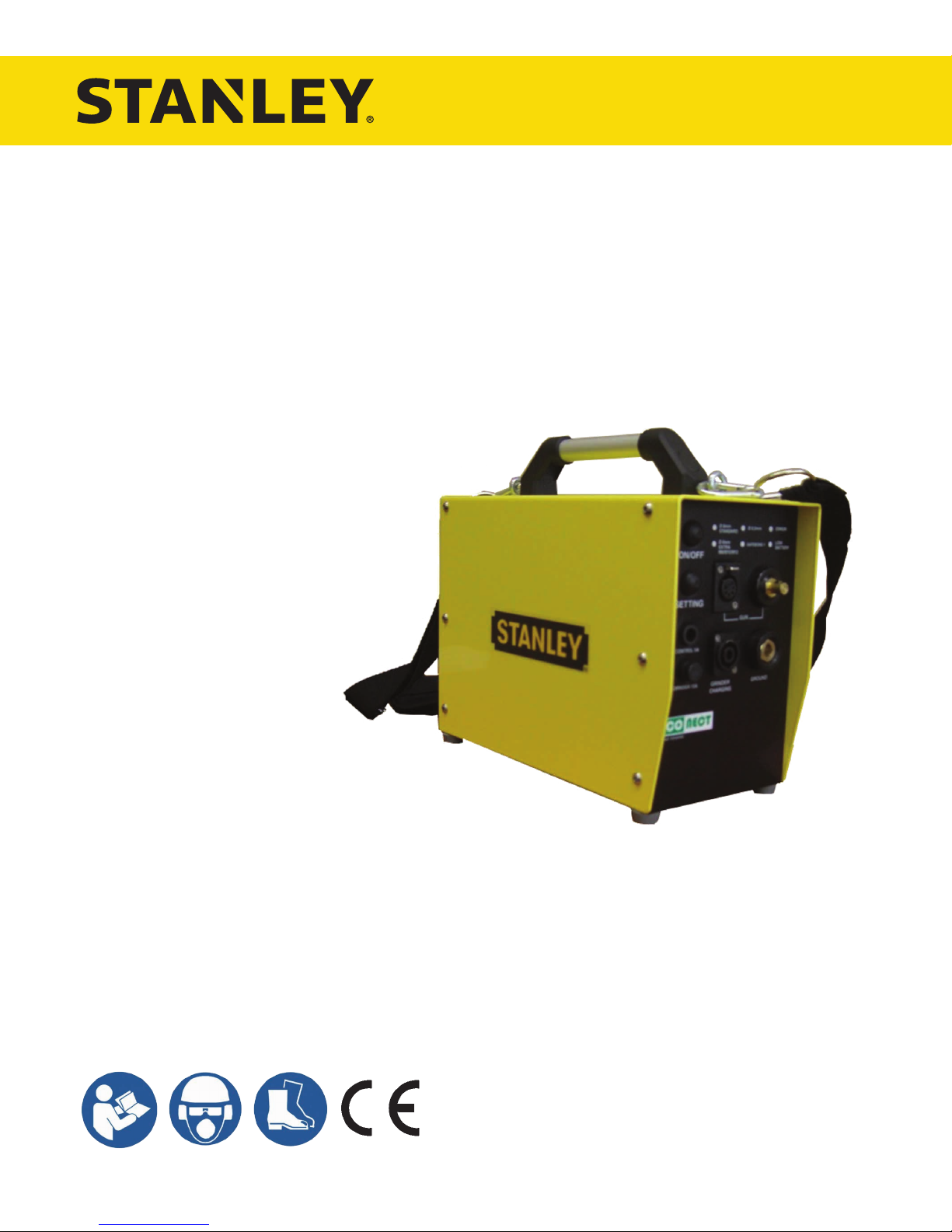
EPX10
PIN BRAZING UNIT
USER MANUAL
Safety, Operation and Maintenance
© 2013 STANLEY Black & Decker, Inc.
New Britain, CT 06053
U.S.A.
73157 1/2018 Ver.13
Page 2
DECLARATION OF CONFORMITY
Weisbeck, Andy
Directive/Standards
No.
Approved body
IEC
EMC Directive
950: 1991
89/336/EEC, 89/392/EEG, 91/368/EEG
Safetrack Baavhammar AB
DECLARATION OF CONFORMITY
ÜBEREINSTIMMUNGS-ERKLARUNG
DECLARATION DE CONFORMITE CEE
DECLARACION DE CONFORMIDAD
DICHIARAZIONE DI CONFORMITA
______________________________________________________________________
I, the undersigned:
Ich, der Unterzeichnende:
Je soussigné:
El abajo firmante:
lo sottoscritto:
hereby declare that the equipment specified hereunder:
bestätige hiermit, daß erklaren Produkt genannten Werk oder Gerät:
déclare que l’équipement visé ci-dessous:
Por la presente declaro que el equipo se especifica a continuación:
Dichiaro che le apparecchiature specificate di seguito:
Surname and First names/Familiennname und Vornamen/Nom et prénom /Nombre y apellido/Cognome e nome
Hydraulic Tools
1. Category:
Kategorie:
Catégorie:
Categoria:
Categoria:
2. Make/Marke/Marque/Marca/Marca
3. Type/Typ/Type/Tipo/Tipo: EPX10 ECONECT (Digital Pin Braze unit)
4. Serial number of equipment:
Seriennummer des Geräts:
Numéro de série de l’équipement:
Numero de serie del equipo:
Matricola dell´attrezzatura:
Has been manufactured in conformity with
Wurde hergestellt in Übereinstimmung mit
Est fabriqué conformément
Ha sido fabricado de acuerdo con
E’ stata costruita in conformitá con
Richtlinie/Standards
Directives/Normes
Directriz/Los Normas
Direttiva/Norme
EN
EMC : EN
EN
IEC
EN
Low Voltage Directive
Nr
Numéro
No
n.
60950: 1988, 60204-1
50082-2: 1995
55022: 1988 Class B/CISPR 22: 1985 class B
801-2: 1991
55101-2: 1990, 8kV CD, 15kVAD
73/23/EEC
Digital Pin Braze / ECONECT Unit (Product Group-Railroad)
Stanley Hydraulic Tools
All
Prüfung durch
Organisme agréé
Aprobado
Collaudato
L. Mölleberga
245 93 Staffanstorp
Sweden
5. Special Provisions: None
Spezielle Bestimmungen:
Dispositions particulières:
Provisiones especiales:
Disposizioni speciali:
6. Representative in the Union: Patrick Vervier, Stanley Dubuis 17-19, rue Jules Berthonneau-BP 3406 41034 Blois Cedex, France.
Vertreter in der Union/Représentant dans l’union/Representante en la Union/Rappresentante presso l’Unione
Done at/Ort/Fait à/Dado en/Fatto a Stanley Hydraulic Tools, Milwaukie, Oregon USA
Signature/Unterschrift/Signature/Firma/Firma
Position/Position/Fonction/Cargo/Posizione Director of Product Development
2 ► EPX10 User Manual
Date/Datum/le/Fecha/Data 2-12-2013
Page 3
TABLE OF CONTENTS
SAFETY SYMBOLS ............................................................................................................................................... 4
SAFETY PRECAUTIONS ......................................................................................................................................5
CHARGING THE BATTERY ................................................................................................................................... 6
OPERATION ..........................................................................................................................................................7
SPECIFICATIONS ................................................................................................................................................10
MAINTENANCE ................................................................................................................................................... 11
TROUBLESHOOTING .........................................................................................................................................15
ACCESSORIES ...................................................................................................................................................16
EPX10 PARTS ILLUSTRATION ........................................................................................................................... 20
EPX10 PARTS LIST .............................................................................................................................................21
EPX10 ELECTRICAL DIAGRAM .........................................................................................................................22
REPLACING THE BATTERY ...............................................................................................................................23
To ll out a product warranty validation form, and for information on your warranty,
visit www.stanleyinfrastructure.com and select the Company tab > Warranty.
Note: The warranty validation record must be submitted to validate the warranty.
SERVICING: This manual contains safety, operation and routine maintenance instructions. STANLEY Infrastructure
recommends that servicing of hydraulic tools, other than routine maintenance, must be performed by an authorized
and certied dealer. Please read the following warning.
SERIOUS INJURY OR DEATH COULD RESULT FROM THE IMPROPER REPAIR OR
SERVICE OF THIS TOOL.
REPAIRS AND / OR SERVICE TO THIS TOOL MUST ONLY BE DONE BY AN
AUTHORIZED AND CERTIFIED DEALER.
For the nearest certied dealer, call STANLEY Infrastructure at (503) 659-5660 and ask for a Customer Service Representative.
EPX10 User Manual ◄ 3
Page 4
SAFETY SYMBOLS
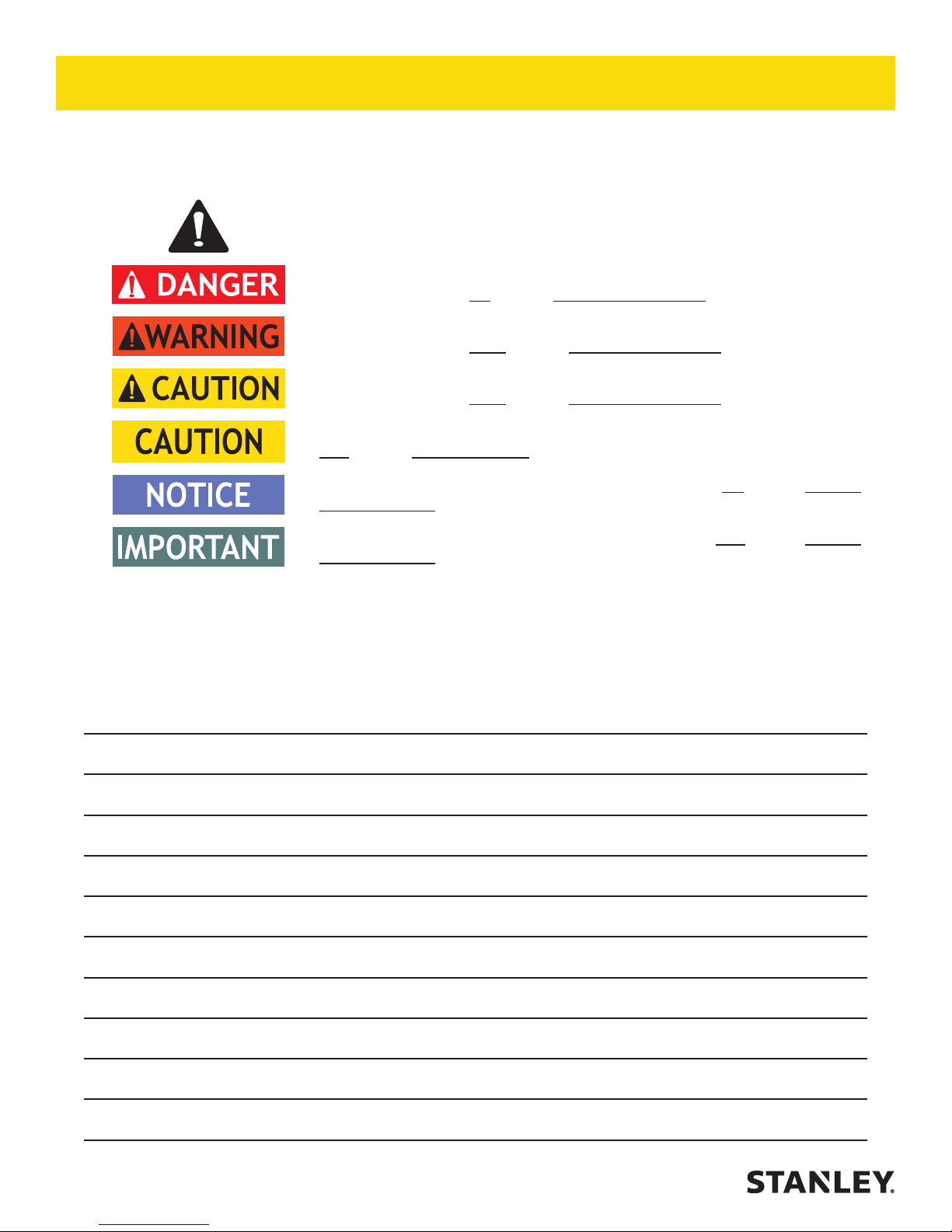
Safety symbols and signal words, as shown below, are used to emphasize all operator, maintenance and repair
actions which, if not strictly followed, could result in a life-threatening situation, bodily injury or damage to equipment.
This is the safety alert symbol. It is used to alert you to potential personal injury
hazards. Obey all safety messages that follow this symbol to avoid possible
injury or death.
This safety alert and signal word indicates an imminently hazardous situation
which, if not avoided, will result in death or serious injury.
This safety alert and signal word indicates a potentially hazardous situation
which, if not avoided, could result in death or serious injury.
This safety alert and signal word indicates a potentially hazardous situation
which, if not avoided, could result in death or serious injury.
This signal word indicates a potentially hazardous situation which, if not avoided,
may result in property damage.
This signal word indicates a situation which, if not avoided, will result in damage
to the equipment.
This signal word indicates a situation which, if not avoided, may result in damage
to the equipment.
Always observe safety symbols. They are included for your safety and for the protection of the tool.
LOCAL SAFETY REGULATIONS
Enter any local safety regulations here. Keep these instructions in an area accessible to the operator and
maintenance personnel.
4 ► EPX10 User Manual
Page 5

SAFETY PRECAUTIONS
Tool operators and maintenance personnel must always
comply with the safety precautions given in this manual
and on the stickers and tags attached to the tool and
hose.
These precautions are given for your safety. Review
them carefully before operating the tool and before
performing general maintenance or repairs.
Supervising personnel should develop additional
precautions relating to the specic work area and local
safety regulations. Place the added precautions in the
space provided in this manual.
This tool will provide safe and dependable service if
operated in accordance with the instructions given in
this manual. Read and understand this manual and any
stickers and tags attached to the tool before operation.
Failure to do so could result in personal injury or
equipment damage.
• Do not operate a damaged, improperly adjusted or
incompletely assembled tools.
• To avoid personal injury or equipment damage,
all tool repair, maintenance and service must only
be performed by authorized and properly trained
personnel.
• Do not exceed the rated limits of the tool or use the
tool for applications beyond its design capacity.
• Always keep critical tool markings, such as labels
and warning stickers, legible.
• Always replace parts with replacement parts
recommended by STANLEY.
• Charging the battery can only be carried out between
0°C to +45°C (32°F to 113°F).
• Operator must start in a work area without
bystanders. The operator must be familiar with all
prohibited work areas such as excessive slopes,
dangerous terrain conditions, and rail trafc.
• Establish a training program for all operators to
ensure safe operation.
• Do not operate the tool unless thoroughly trained or
under the supervision of an instructor.
• Always wear safety equipment such as goggles,
ear, head protection and respiratory protection at all
times when operating the tool.
• Do not inspect or clean the tool while the battery
power source is connected. Accidental arcing can
cause serious injury.
• Do not load brazing pins or ceramic rings while
the battery power source is connected. Accidental
arcing can cause serious injury.
• Do not use the tool while it is connected to a battery
charger.
• Ensure battery charging is only done in a dry
environment. Charging batteries in the rain or near
standing water presents an electrocution hazard.
Read the safety and operation instructions provided
with the battery charger before using the battery
charger.
EPX10 User Manual ◄ 5
Page 6
Blinking signal
*
Error description
Troubleshooting
1xBlinking, 2 sec pause
No battery or defect battery
Please che
ck
charger
cable and
connecter
for
2xBlinking, 2 sec pause
Battery voltage is
too
high.3xBlinking, 2 sec pause
Battery
temperature
isunder0
°C
Please let the unit co
ol
or heat to
the
right
5xBlinking, 2 sec pause
Device temperature
is to high
Please turn off the charger and give it some
CHARGING THE BATTERY
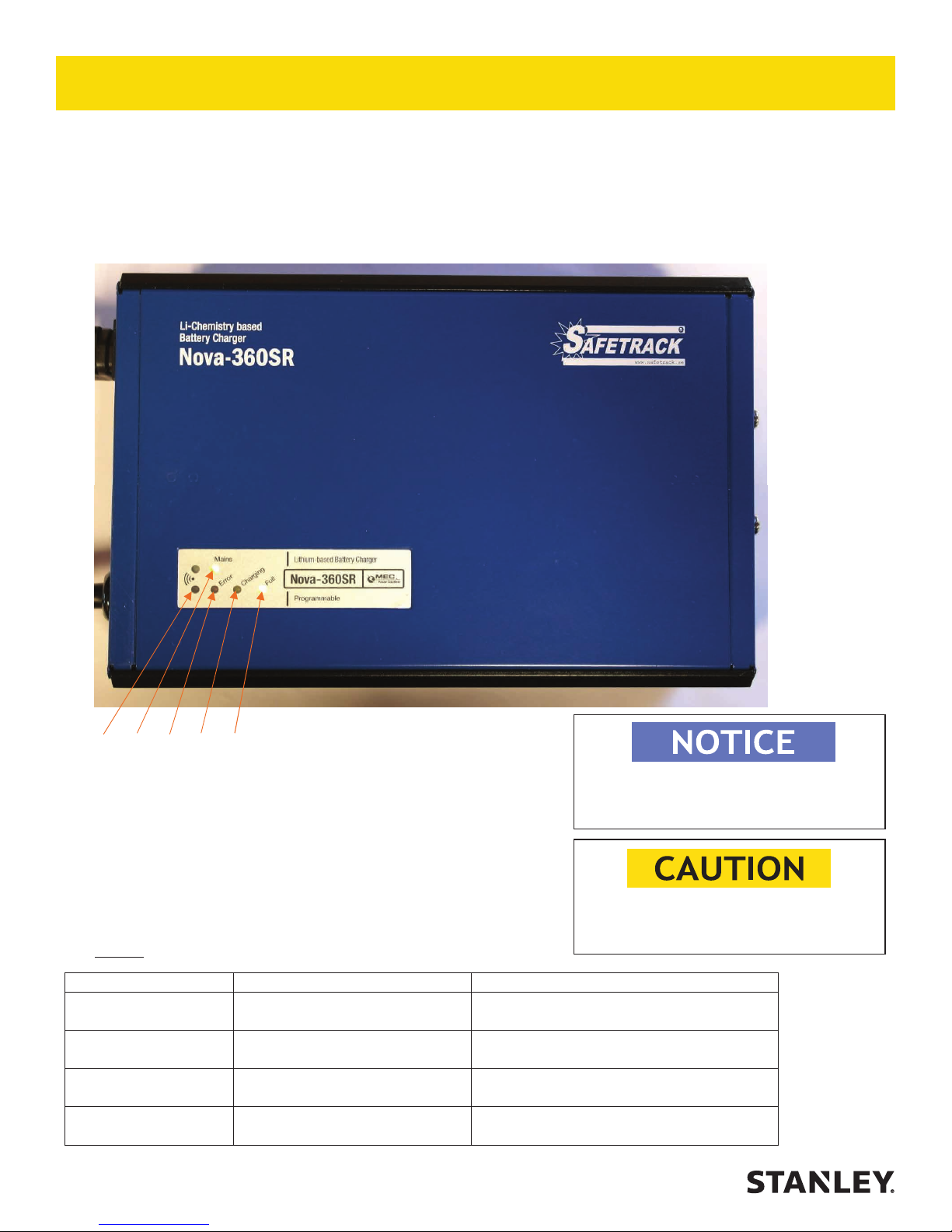
Connect the charger to the “grinder / charging” outlet on the unit then plug in the power cord.
The battery is fully charged after about 1 - 1.5 hours and it is ok to leave the charger connected.
See battery charger operating instructions that comes with the battery charger for more information.
Econect battery charger.
1. 2. 3. 4. 5.
1. Infrared-LED, For factory programing only.
2. Mains, indicating that mains are connected and the charger is on.
3. Red Error-LED, indicating different errors by flashing, see chart 1.
4. Yellow Charging-LED, indicating when the charger is charging the battery.
5. Green Full-LED, indicating when battery is fully charged.
Chart 1.
or over 45°C.
* Blinking signals in continuous loop.
6 ► EPX10 User Manual
CHARGING THE BATTERY CAN ONLY BE
CARRIED OUT BETWEEN 0°C to +45°C
If the batteries are left uncharged, they
may be damaged.
damage and the 15A fuse on Econect.
temperature, charging will start automatically.
time to cool down.
Page 7
OPERATION
GENERAL PROTECTION
Store the Electronic Pin Brazing Unit in a place where it is
protected from the elements, abrasive dust, and damage.
Use only recommended repair and replacement parts and
materials specied in this manual.
Use only recommended accessories also specied in the
this manual.
Do not use the Electronic Pin Brazer for applications it was
not designed for.
Use the carrying handle to transport the unit from location
to location.
CLEANING
Establish a routine to keep the unit as free from dirt as possible – daily, or at each shift change, for example.
Pin Brazers exposed to rain, sand, or grit-laden air should be
cleaned prior to each use.
Keep tool labels and stickers legible.
PREPARATION PROCEDURES
Before putting a new ECONECT Pin Brazing unit into initial
service, or after an extended period of being unused, perform
a visual inspection for bent, broken, cracked, missing or worn
components.
INITIAL SETUP AND BATTERY CHARGING
Failure to follow the instructions in the battery charger
operation manual can result in battery explosion and
serious bodily injury. To reduce the risk of battery explosion, read and understand the safety and operation
instructions in the battery charger operation manual,
the instructions published by the battery manufacturer,
and the instructions in this manual before attempting to
charge the batteries.
EPX10 User Manual ◄ 7
Page 8
OPERATION
PREPARE THE RAIL SURFACE
Select the type and length of bonding cable to use for the
bond and use it as a guide to determine where brazing points
on the rail will be required.
Before brazing, the rail must be cleaned of rust, corrosion,
paint, pits, or other contamination at the points where the brazing is going to be done and on an area close to the brazing for
placement of the grounding cable. Cleaning is accomplished
with a grinder to ensure clean, bare metal.
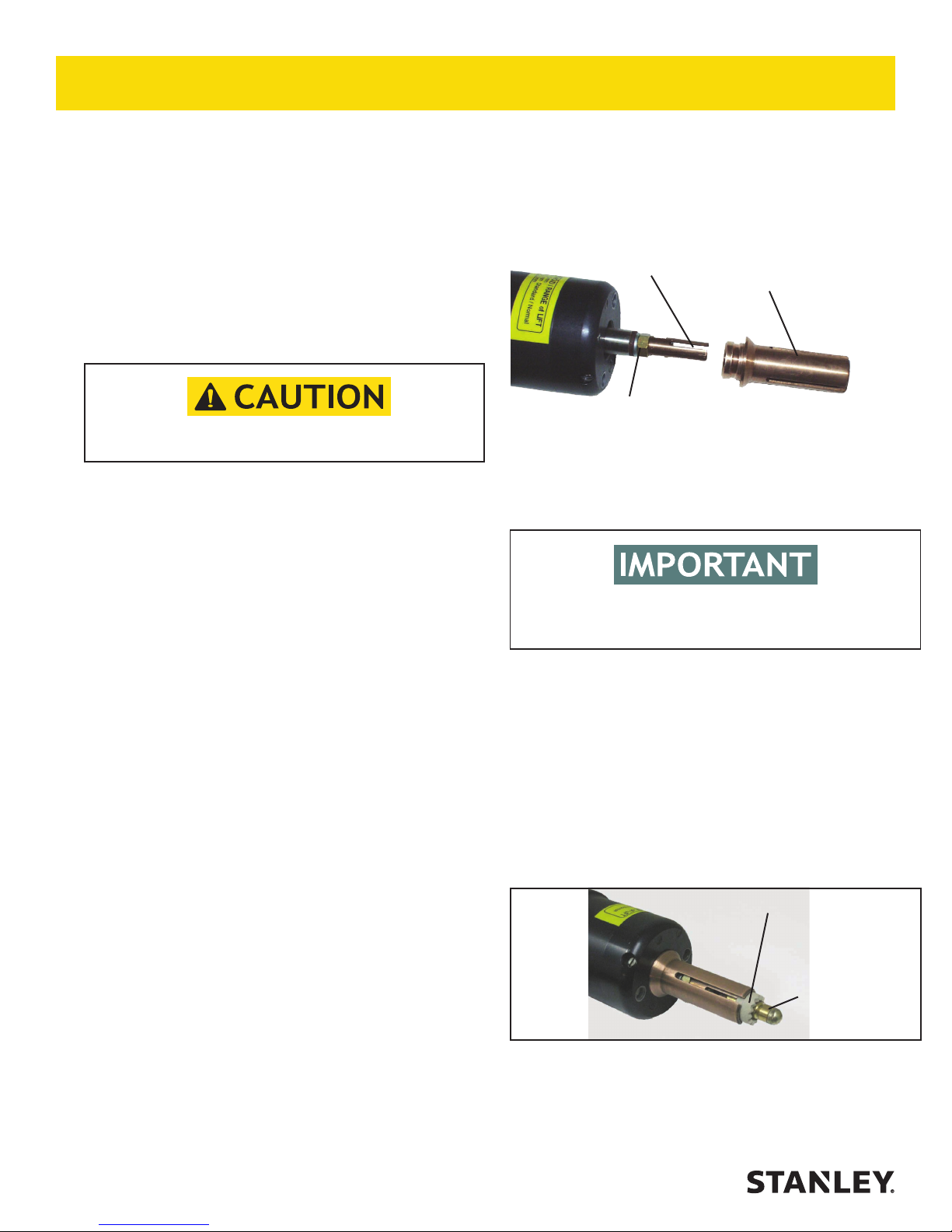
b. The pin holder is threaded onto a threaded shaft in the gun
and locked in place with a nut. Place an open end wrench
over the nut and an open end wrench over the ats on the
pin holder. While holding the nut in place, unscrew the pin
holder counter clockwise.
Pin Holder
Nut
Ring Holder
Always use eye protection when grinding and brazing.
1. Grind the surface of the rail where brazing is going to be
done, until the surface shows shiny metal, free of rust, corrosion, pits, or other contamination. When grinding, use the
carbide burr and try to maintain a at as possible surface.
2. Grind the surface of the rail where the grounding cable
will be placed to ensure a good ground. The grounding cable
should be placed in close proximity to the brazing area. A
(vise grip) style clamp for grounding is provided, a magnet
grounding style clamp is also available, if using the magnet
style try to attach the magnet within 0.5m/20 in. of brazing
area. Ground should be on same work piece where pin brazing is taking place.
PLACING THE GROUNDING CABLE
3. When nished grinding the rail for placement of the ground-
ing cable, place the grounding cable on the cleaned surface
and then insert the other end into the twist lock receptacle
in the ECONECT unit marked "GROUND" and twist to lock.
SELECT PINS AND RINGS
4. Select brazing pins and ceramic rings to match the speci-
cations of the bonding cable you selected.
Figure 3. Pin and Ring Holder
c. Install the correct pin holder and tighten it securely against
the nut.
Warning! Never rotate the shaft when mounting the pin
holder, it can damage the gun.
d. Install the correct ring holder by placing it over the pin holder
and into the circular groove in the gun, and nally, pushing
on it to seat it in place.
LOADING PIN AND RING
6. Insert the brazing pin into the pin holder. The rounded tip
should be facing away from the gun.
7. Insert the ceramic ring into the ring holder. The serrated
edge should be facing away from the gun. See gure 4.
Ceramic Ring
CHANGING PIN AND RING HOLDER
5. Check that the pin holder and ring holder on the gun are
the correct sizes for the brazing pins and ceramic rings you
selected. If the sizes are incorrect, the pin holder and ring
holder can be changed as follows:
a. The ring holder is a "push t" to the gun. To remove it from
the gun, simply pull it away from the gun.
8 ► EPX10 User Manual
Brazing Pin
Figure 4. Loading pin and ring
Page 9
OPERATION
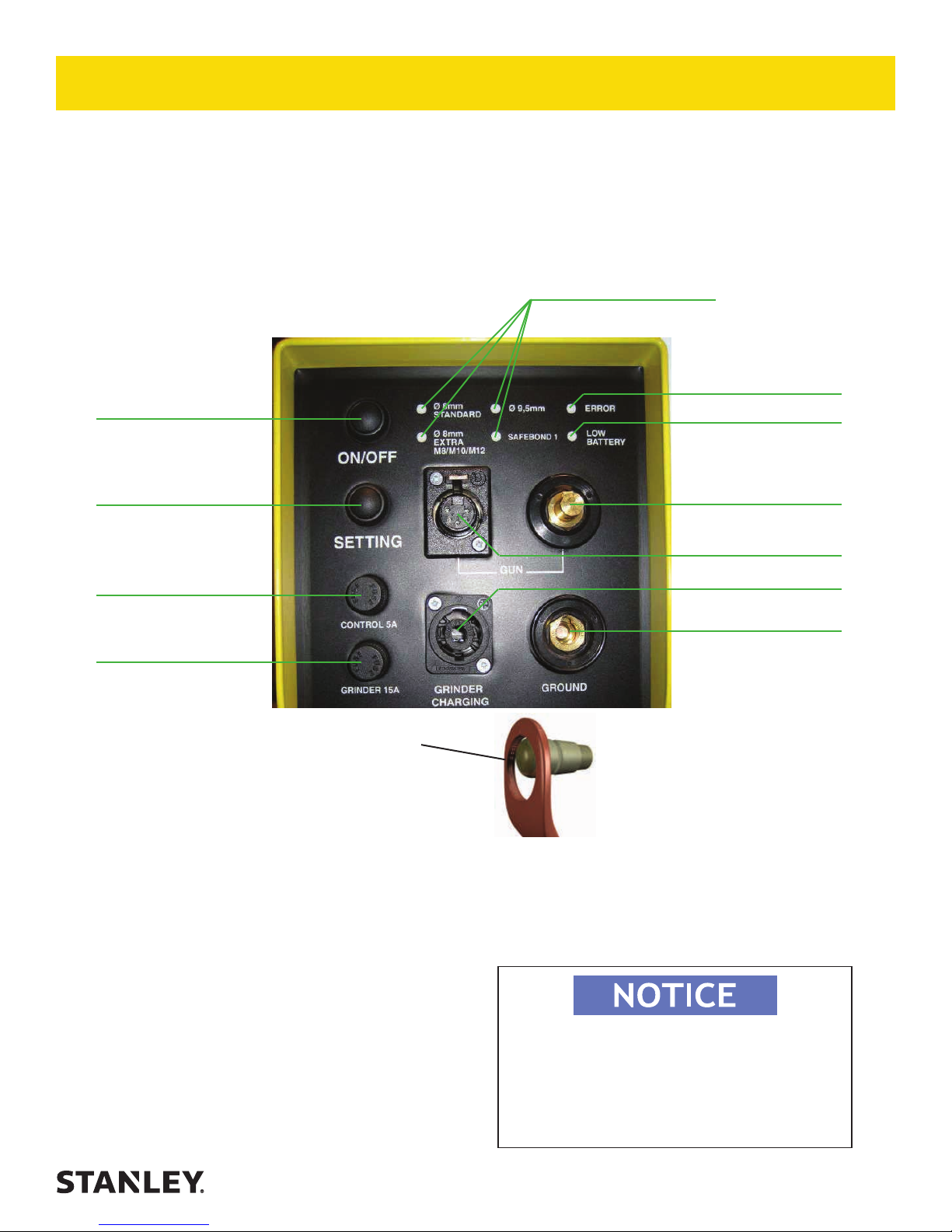
• Connect the brazing gun, power and trigger cable to the unit.
• Connect the ground device to the unit, if not already connected.
• Press on/off button and select the right pin type by pressing the ”setting” button.
The unit will remember what setting was used last.
• Load the gun with brazing pin and ferrule, if not already loaded.
Selected setting
ON / OFF
Error Indication
Battery Indicator
Pin setting
Fuse for electronics
Fuse for grinding
/ charge
Make sure to braze in the top of the hole when
brazing to a vertical surface.
PIN BRAZE
• Hold the gun rmly with both hands against the work
piece and pull the trigger just once.
• The electronic unit will by itself nish the brazing process.
Gun power
Gun control
Grinding / charging
Ground
NOTE:
If the brazing is aborted to early “ERROR” will turn on.
The brazing should be redone for a good result.
The error lamp will turn off after 8 seconds
Use a new ceramic ring for each new pin braze.
• Hold the gun in place for 3-4 seconds after the brazing is complete to allow for cooling.
• Remove the gun straight backwards without pulling
the trigger!
• Knock off the shank of the brazing pin with a hammer.
• The brazing is completed.
The battery indicator “LOW BATT” ashes when
the batteries are almost discharged,
when the “LOW BATT” is constantly lit the batter-
ies are discharged and you can’t do
any more pin brazing. Charge the battery.
EPX10 User Manual ◄ 9
Page 10

SPECIFICATIONS
SPECIFICATIONS
Voltage............................................................................................................................................................................... 36 V DC
Number of Brazes (Per Charge) .................................................................................................................................................. 50
Weight (incl. Battery) ............................................................................................................................................... 9.8 kg / 21.6 lb
Width .................................................................................................................................................................. 5.9 inch / 150 mm
Height ................................................................................................................................................................11.0 inch / 280 mm
Length............................................................................................................................................................... 12.5 inch / 320 mm
Temperature Range ........................................................................................................................ -4° F - 130° F / -20° C - 55° C
EPX10 Econect Battery Kit (For Units S/N 1215091 and Higher) .......................................................................................73720
EPX10 Econect Battery Kit (For Units S/N 1215090 and Below) ......................................................................................73077
MAINTENANCE
EQUIPMENT
- Always make sure the batteries are fully charged.
- Check the cables from time to time for damage.
- Check the contact surface on the ground magnet from time to time to ensure a good connection.
- Make sure that the brazing pin with the ferule passes easily in the gun, centered.
BRAZING PINS AND FERRULES
-Keep them dry.
RAILBONDS AND CABLE LUGS
-Keep them free from oxidation.
-Keep them free from contamination like: Grease, oil.
-Make sure they are not damaged.
SETTING RIGHT LIFT HEIGHT
The S15 brazing gun self adjust to the same lift height every time.
See separate instructions in the maintenance section if adjustment for the gun is necessary.
PIN HOLDERS
Squeeze the ngers on the pin holder together each time you feel that the brazing pin goes in too easy when
mounting them into the pin holder. This is important since all the current goes thru the pin holder to the
brazing pin. If the ngers are too loose the pin holder will be damaged and must be replaced.
10 ► EPX10 User Manual
Page 11

MAINTENANCE
Replace the fuses:
Push and unscrew counter-clockwise to remove fuse holder.
Replace fuse and re-install the fuse holder.
Special functions:
NOTE!
Control: 5A fuse. P/N-74643
Grinder: 15A fuse. P/N-56558
1. BATTERY INDICATOR:
Press and hold the “SETTING” button, while you push the “ON / OFF” button.
“LOW BATTERY” LED will light. Release the buttons.
The LEDs on the front panel show the charge status of battery.
2. LIFTING HEIGHT CONTROL:
First follow step 1 above.
Press “Settings” and the lights start ashing, at this point, you can check the
lifting height of the gun.
3. Pressing “Settings” one more time and you go back to battery indicator.
EPX10 User Manual ◄ 11
Page 12

MAINTENANCE
Periodic maintenance of S15 automatic gun
1. Check that all cables and lugs are not damaged and properly tighten in gun and unit.
2. Check that the right pin holder is installed in the gun.
See selection of pin holders in the
accessories section of this manual.
Make sure the pin holder is tight on the gun, otherwise a spark can destroy the axle.
Use a wrench to hold the nut from turning and tighten the pin holder as shown in the
picture. Do not allow the main shaft to turn, only turn the pin holder to tighten. Use one
8mm and one 10mm wrench for 8-9,5 mm and M8 pin holders.
Two 10mm wrenches for M10 and M12 pin holders.
Make sure, never twist the main shaft when mounting the pin holder!
When loading the brazing pin, it should not go in loose into the pin holder, if it does
push the pin holder together with your ngers to gain a tighter t. Otherwise you can
have a contact fault or a spark can arise if their is not a tight contact.
3. Check that the ring holder is the right type. You can remove it by hand and its ease
of removing can be adjusted with the small screw on the side of the gun (see photo).
Ring holder Adjustment
Screw
4. Load the gun with the appropriate pin & ferrule. Check that the axle moves easily
with the pin and ferrule installed by pushing back and forward on the pin with your
nger (see photo).
If the pin does not move easily, change either pin holder or ring holder.
If it still does not move easily the axle is damaged and must be sent for repair.
12 ► EPX10 User Manual
Page 13

MAINTENANCE
Lift level tool
P/N-62394
IMPORTANT! The normal lift height is 2mm / 0.078 in.
This is very important for the arc and energy amount.
Too high lift height increase the risk of a “coldbrazing”,
too low lift height reduce the time and increase misres.
1. Insert this end in to the gun.
2. Press and hold “SETTING” and press =”ON/OFF”.
When “LOW BATTERY” is lit, release buttons.
Press “SETTING” and the LEDs will start to blink.
In this mode the unit is able to check the lift height.
Important! Press the tool completely against the gun then pull the trigger.
Otherwise the gun may be damaged!
Important! Hold the gun so the tool is horizontal.
3. The lift level is calibrated when the inner rod, made of brass, on the tool is in same level as the outer plastic
sleeve. Tolerance ±0,2 mm / 0.007 in. If the gun is not calibrated see separate instruction for adjusting of the gun.
EPX10 User Manual ◄ 13
Page 14

MAINTENANCE
Advanced maintenance work
Adjusting the lift level.
1. Resetting correct lift height of a S15 gun.
Only reset a maladjusted gun.
Install the lift level tool (shown below) onto the gun.
2. Connect the cables to the pin brazing unit and
switch on the power.
3. Take off the plastic plug with a pin in the upper
small hole in the front of the gun (see photo).
IMPORTANT, never adjust in the hole where the
big plug is!
4. When lift height is too low. Use the 3mm hexagon
allen wrench and adjust the screw in the small hole
counter-clockwise about 1/4 of a turn then check with
the lift level tool.
Remove plastic plug with
a pin or sharp object.
5. When lift height is too high. Use the 3mm hexagon
allen wrench and adjust the screw in the small hole
clockwise about 1/4 of a turn then check with the
lift level tool.
If height is ok, replace the plug in the hole.
If height is not ok, send for repair.
P/N-62394
Lift Level Tool
14 ► EPX10 User Manual
Page 15

TROUBLESHOOTING
Error indications on the unit:
“ERROR” led is lit.
- The temperature of the battery is over +55 °C/131°F
Action: Wait until the light goes out, when the temperature drops you will be able to braze again.
“ERROR” led ashes.
- The temperature of the battery is below +10 °C/50°F
Action: Leave the unit on, the built-in heating element will heat up the battery. Wait until light goes out
and the temperature has risen, and you will be able to
braze again.
“ERROR” and ”LOW BATTERY” led ashes.
- The temperature of the battery is below +10 °C/50°F
and the battery is almost discharged.
Action: Charge the batteries.
“ERROR” Led is lit after a braze.
- The pin brazing was not complete.
Action: The braze should be remade to achieve good
results. The Led turns off after 8 seconds.
“ERROR” Led glows.
- Failure of a sensor in the unit.
Action: The unit should be sent for repair.
”LOW BATTERY” Led ashes.
- Battery is almost discharged
”LOW BATTERY” led is lit.
- Battery is discharged. Charge the batteries.
“NOTHING HAPPENS WHEN YOU PRESS THE
BUTTONS”
- The electronics may have gotten stuck.
Action: Remove control 5A fuse for a short time, put
it back again.
“THE BRAZING NEVER STOPS”
- The electronics may have gotten stuck.
Action: Remove the gun and the ground magnet from
the rails and disconnect them from the unit as soon as
possible. Remove the control 5A fuse, check that nothing has been damaged before the fuse is put back.
EPX10 User Manual ◄ 15
Page 16

ACCESSORIES
STANDARD BRAZING PINS
Item
No. Part No. Qty Description
1 35835 1 8mm 35832
2 35836 1 8mm with extra silver 35832
3 35837 1 9.5mm 35833
4 35840 1 M8/12 threaded 35834
5 35841 1 M10 threaded 35834
6 35839 1 M12 threaded 35834
CERAMIC RINGS
Item
No. Part No. Qty Description
7 35832 1 8mm
8 35833 1 9.5mm
9 35834 1 12mm
PIN & RING HOLDERS
Item
No. Part No. Qty Description
10 35826 1 Pin Holder for Pin brazing, 8-9,5 mm brazing pins.
11 35827 1 Pin Holder for Pin brazing, M8 Threaded pins.
12 35828 1 Pin Holder for Pin brazing, M10 Threaded pins.
13 35829 1 Pin Holder for Pin brazing, M12 Threaded pins.
14 35825 1 Extended pin and ring holder set for 8-9,5 mm brazing pins.
15 35830 1 Ring Holder, 8-9,5 mm ceramic rings.
16 35831 1 Ring Holder, M8/M10/M12 mm ceramic rings.
Ceramic Ring
Required
For use on rail only!
CABLE LUGS
Item
No Part No. Qty Description
17 47523 1
18 47524 1
19 47525 1
20 39241 1
21 35847 1
22 35855 1
23 47526 1
24 47527 1
25 47528 1
26 47529 1
27 47522 1
28 47521 1
29 41625 1
30 67122 1
16 ► EPX10 User Manual
Braze Lug for 25 mm Cable
Braze Lug for 35 mm Cable
Braze Lug for 50 mm Cable
Cable Shoe #6
Cable Shoe 10 mm
Cable Shoe D=8 mm
Cable Lug for 16 mm Cable
Cable Lug for 25 mm Cable
Cable Lug for 35 mm Cable
Cable Lug for 50 mm Cable
Cable Lug 5/8” ground rod to #2 cable
Braze Sleeve #6 to #6
Multi-Wire Track Connection
Brazing Clip (Secures Wire to Rail)
Brazing Pin
Required
35836
35836
35836
35836 x2
35835
35836
35835
35836
35836
35836
35836 x2
35836
35836 x2
35835
Page 17

ACCESSORIES
BONDING CABLE WITH LUGS (for pin brazing)
Item
No. Part No. Qty Description
31 35845 1
32 35844 1
33 39243 1
34 39244 1
35 37944 1
36 39705 1
37 39706 1
38 39707 1
39 39242 1
40 40366 1
41 40091 1
42 40090 1
43 41635 1
44 41815 1
45 43686 1
46 43519 1
47 41225 1
48 41226 1
49 66579 1
50 66580 1
51 66269 1
52 67634 1
53 73652 1
54 73016 1
55 72988 1
56 72989 1
57 67635 1
58 47530 1
59 80784 1
60 81167 1
61 80785 1
62 81168 1
63 80786 1
64 81169 1
Contact Bond / 50 mm², 185 mm long, copper
Contact Bond / 25 mm², 145 mm long, copper
3/16 Bond, 300 mm long
Bond 25 mm², 200 mm long
Rail Bond 50 mm², 185 mm long
Bond Wire 16” OAL x 25 mm
Bond Wire 24” OAL x 25 mm
Bond Wire 36” OAL x 25 mm
3/16 Bond Crimp-able Sleeve
Signal Extension Bond 3/16” (170 mm)
Signal Extension Bond 150 mm L=430
Signal Extension Bond 2 x 35 mm - 2 x L=170
3/16 Signal Bond Wire W/Eye & Crimp-able sleeve, 24”
long.
3/16 Bond 12’ Long Eyelet one end, AL block for T.I.G. Weld
Other End
Extension Bond CU, 25 mm², x 330 mm Long
3/16 Extension Bond 12”
Bond Wire 34” Long C/L-C/L W/9 mm eyelets on both ends
Bond Wire 46” Long C/L-C/L W/9 mm eyelets on both ends
25mm2 x 500mm Extension Bond
25mm2 x 900mm Extension Bond
Signal Bond 3/16” x 6’ Braze Lug Both Ends
Railbond 300 mcm L=330 mm Uninsulated (4) 9.5 Pins
Required
Railbond 300 mcm L=430 mm Use with 4X Pins
Railbond 300 MCM
Railbond 3/16, 4 in. Reversed (50 pack)
Railbond 3/16, 6 in. Reversed (50 pack)
Extension Bond 300 mcm x 200 mm crimp, 2) 9.5 Pins
Required
Bungalow Grounding Bond 3/16”
Railbond 95mm², L=155mm, bare copper
Railbond 95mm², L=155mm 60°, bare copper
Railbond 95mm², L=255mm, bare copper
Railbond 95mm², L=255mm 60°, bare copper
Railbond 95mm², L=355mm, bare copper
Railbond 95mm², L=355mm 60°, bare copper
Brazing Pin
Required
35837
35835
35835
35835
35836
35835
35835
35835
35835
35835
35837
35836
35835
35835
35835
35835
35835
35835
35835
35835
35835
35837
35837
35836
35837
35837
35837
35837
35837
35837
35844 Pictured
39242 Pictured
40366 Pictured
41635 Pictured
67634 Pictured
67635 Pictured
EPX10 User Manual ◄ 17
Page 18

“T” CONNECTIONS (for pin brazing)
Item
No. Part No. Qty Description
65 35857 1
Type C
Copper Plate with M8 x 18 Brass Threaded Stud T-Bolt
ACCESSORIES
Brazing Pin
Required
35835 x2
66 35861 1
Type D
Stud T-Bolt
Copper Plate with M16 x 32 Stainless Steel Threaded
GRINDER ABRASIVES
Item
No. Part No. Qty Description
67 73358 1 Carbide Burr (1/4” Shank)
68 35810 1 Grinding Wheel - NOT for SafeBonding!
69 73052 1 Bull Nose Stone, 2” (1/4” Shank)
GRINDER
Item
No. Part No. Qty Description
70 HGE12141 1 Grinder Only with out battery or charger
71 HGE12151 1 Grinder, Battery and Charger.
72 HGE12161 1 Grinder, Battery, Charger and Bull Nose Stone
73 73399 1 Battery (18v) and Charger (120v)
74 73400 1 Lithium Ion Battery (18v)
35837 x4
FUSES, CHARGERS & BATTERIES
Item
No. Part No. Qty Description
75 74643 1 Control Fuse, 5A
76 56558 1 Grinder Fuse, 15A
77 66847 1 Fuse Holder
78 72972 1 Charger - 36V / 110V ECONECT
79 73077 1 ECONECT Battery Kit (For Units S/N 1215090 & Below)
80 73720 1 EPX10 Battery Kit (For S/N 1215091 and Higher)
18 ► EPX10 User Manual
Page 19

ACCESSORIES
CABLES
Item
No. Part No. Qty Description
81 72999 1 ECONECT Ground Magnet
82 72973 1 Carrying Strap
83 66266 1 Ground Clamp Assembly (Vise Grip Style)
84 72974 1 Carrying Case
85 72970 1 ECONECT Unit
SafeBond Kit Econect (Includes: BG20600 Brazing Gun Econect
86 EPX10340 1
87 72975 1
88 72971 1 S15 Automatic Brazing Gun
89 73078 1 ECONECT S15 Gun Cable
90 BG20600 1 Brazing Gun ECONECT Safebond
91 62394 1 Lift Level Tool
92 73653 1 Brazing Gun Cable for S15 / SB15
Safebond, 72970 Econect Unit, HGE12151 Grinder Elec
Cordless Kit, 72972. Charger 36V/110V Econect, 72973 Carrying
Strap, and 72974 Carrying Case, 73358 Carbide Burr).
Econect Kit - (Includes: 72971 S15 Automatic Brazing Gun,
72970 Econect Unit, HGE12151 Grinder Elec Cordless Kit,
72972. Charger 36V/110V Econect, 72973 Carrying Strap, and
72974 Carrying Case, 73358 Carbide Burr)
EPX10 User Manual ◄ 19
Page 20

ECONECT – Part Sheet
EPX10 PARTS ILLUSTRATION
M1
C1,C2
F1
L1
Q1-6
D1-6
R5 K1
20 ► EPX10 User Manual
BT1 AND R4+F4+R3
S1,S2
J4
J5
F3
F2
FRONT PANEL
1A
J3
J2
Page 21

EPX10 PARTS LIST
Qty References Description Part number
1 K1 Econect circuit board 74590
1 BT1 Battery Kit
1 R4 Heat pad complete. 74592
1 R5 Shunt 150A 74593
6 Q1 Mosfet 74594
6 D1 Diode 74595
1 L1 Triode 74596
2 C1 Capacitor 74597
1 M1 Fan 74598
1 1A Front panel 74599
1 J3 Wall socket 4-pin 74611
1 J4 Wall socket 5-pin 74612
1 J2 Wall socket for ground, female 74613
1 J1 Wall socket for gun, male 74614
2 S1 Pushbutton 74640
1 F1 Fuse 300A 58V 74641
1 F2 Fuse 15AF 5x20mm 56558
1 F3 Fuse 5AT 5x20mm 74643
73720 FOR UNITS SERIAL # 1215091
& HIGHER ONLY
NOTE: Reference BT1 Battery Kit shown above is for units with serial number 1215091 and higher, Units
with serial number 1215090 and below must be returned to the factory for battery replacement.
Econect battery kit P/N-73720 for serial number
1215091 and Higher only.
Including:
Econect battery.
2 x 13mm spanner.
3mm hexagon key.
Side cutters.
Resistor 22Ohm/4W.
2 x Plastic washer.
3 x Cable ties.
EPX10 User Manual ◄ 21
Page 22

12345678
A
B
C
D
E
F
G
EPX10 ELECTRICAL DIAGRAM
R4
BATTERY BOX
R3
F4
R1
BATTERY
BT1
R2
F1 C1C2 D1 D2 D3 D4 D5D6
FAN 24V
M1
Q1 Q2 Q3 Q4 Q5 Q6
R5
SHUNT +
SHUNT -
HEAT
FAN
Gate 1
Gate 2
Gate 3
Gate 4
Econect styrkort
FrontLED
TEMP 2
TEMP 3
Gate 5
Gate 6
TEMP 1
Löd volt IN
GUN
GND
VCC
TRIG
SETTING
S
ON/OFF
K1
L1
FRONTPANEL
D9
D10
D11
D12
J2
22 ► EPX10 User Manual
D7
D8
+1-1+2
-2
12345
S2
SETTING
S1
ON/OFF
J4
GUN
J3
GRINDER CHARGING
J1
GUN
F2
F3
CONTROL 5A
GRINDER 15A
FUSE 15AF
FUSE 5AT
Page 23

REPLACING THE BATTERY
The Battery kit (P/N-73720) and steps 1 thru 19 listed below applies only
to units with S/N 1215091 and Higher. For Units with serial number 1215090 & below,
these units must be returned to the factory for battery replacement.
Econect battery kit P/N-73720 for serial number
1215091 and Higher.
Including:
Econect battery.
2 x 13mm spanner.
3mm hexagon key.
Side cutters.
Resistor 22Ohm/4W.
2 x Plastic washer.
3 x Cable ties.
1. Remove all screws on the sides of the unit
with a 3mm hexagon key.
2. Cut the cable ties for the positive and fan cable.
3. Pull out the connector for the fan.
EPX10 User Manual ◄ 23
Page 24

REPLACING THE BATTERY
4. Remove all screws on the backside of the unit with
a 3mm hexagon key and remove the back.
5. WARNING: RISK FOR SHORT CIRCUIT.
With two 13mm spanners remove the batteries
positive cable, also remove the bolt and fuse. Be
careful so the cables don’t come in contact with any
other parts in the unit.
6. Directly after disconnecting the positive cable, it
must be insulated.
7. Hold the cable for the electronics on to the copper
rail and press ON and hold it for at least 30 seconds,
to discharged the capacitors.
8. Cut the cable tie, pull out the cable.
24 ► EPX10 User Manual
Page 25

REPLACING THE BATTERY
9. Remove the batteries negative cable from the
current shunt.
10. Pull out the cable.
11. Pull out the black cables connector form the top
socket (TEMP1) and the blue cables connector form
the bottom socket (TEMP3).
12. Remove the two connectors on the charger
outlet, that aren’t soldered.
EPX10 User Manual ◄ 25
Page 26

REPLACING THE BATTERY
13. Make sure that all cables are free then pull out the
battery box.
14. Replace the battery, make sure that the battery is
placed in the same way as the old.
WARNING: Connecting the battery in the wrong
way will cause damage to the electronics.
15. Slide in the new battery and start connecting the
cables in the reversed order, start from step 12 up to
step 8.
16. WARNING: RISK FOR SHORT CIRCUIT.
Mount the M8 bolt with a plastic washer on the
copper rail.
Before the battery is connected, the capacitors must
be charged. Hold the resistors that came in the kit in
contact with the positive lead of the battery and connect the other lead to the copper rail, hold for 15 to 20
seconds.
Continue with the next step immediately, if not
charging must be redone.
After charging set the resistor aside for future use if
needed.
26 ► EPX10 User Manual
Page 27

REPLACING THE BATTERY
17. Mount the fuse and batteries positive cable on the
bolt.
18. Mount the positive cable for the electronics and a
plastic washer.
19. Mount the washer and lock nut and tighten.
Don’t tighten too hard, the plastic washers may
get damaged.
Continue with step 4 to1, to complete.
EPX10 User Manual ◄ 27
Page 28

STANLEY Infrastructure
6430 SE Lake Road
Portland, Oregon 97222 USA
(503) 659-5660 / Fax (503) 652-1780
www.stanleyinfrastructure.com
 Loading...