

Page 1
PDF created with FinePrint pdfFactory trial version http://www.pdffactory.com
Page 2
!
CAUTION
RISKOFELECTRICSHOCK
DONOTOPEN
!
CAUTION:TOREDUCETHERISKOFELECTRICSHOCK,DONOTREMOVE
COVER(ORBACK).NOUSERSERVICEABLEPARTSINSIDE.REFER
SERVICINGTOQUALIFIEDSERVICEPERSONNEL.
Thelightningflashwitharrowheadsymbol,withinanequilateraltriangle,is
intendedtoalerttheusertothepresenceofuninsulateddangerousvoltage
withintheproductsenclosurethatmaybeofsufficientmagnitudetoconstitute
ariskofelectricshocktopersons.
Theexclamationpointwithinanequilateraltriangleisintendedtoalertuserto
thepresenceofimportantoperatingandmaintenance(servicing)instructions
intheliteratureaccompanyingtheappliance.
CLASS1LASERPRODUCT
Laserproductsymbol:locatedontherearpaneloftheunit,indicatethisplayerisaclass
laserproduct,onlyuseweaklaserandnohazardousradiationoutsideoftheunit.
1.Readthroughthisinstructionmanualbeforeinstallationanduse.
2.Beforeremovingtheunit,removethediscfromtheunitfirst.
3.Donotopenthecoverortouchanyofthecomponentsexposedoutoftheunit,onlyfor
qualifiedtechnicians.
4.Donotexposetheunittodirectsunlightornearbyobjectsthatradiateheattoavoid
damagetheunit.
5.Donotplacetheunitinmoistandhumidconditions.
6.Pleaseensuretheventilationholesarenotcoveredtoavoidoverheatingandmalfunction.
7.Clearthepanelandcasewithsoftdryclothonly,donotapplyanykindofthinner,
alcoholorsprays.
WARNING:TOREDUCETHE
RISKOFFIREORELECTRIC
SHOCK,DONOTEXPOSE
THISAPPLIANCETORAINOR
MOISTURE.
PRECAUTION
PDF created with FinePrint pdfFactory trial version http://www.pdffactory.com
Page 3

1.BeforeOperation...........................................................................................3
1.1Glossary................................................................................................3
1.2Precautions............................................................................................3
1.3MaintenanceandCleaningofDiscs..........................................................4
1.4BatteryInformationoftheRemoteControl.................................................4
1.5TheRemoteControlDescription...............................................................5
1.6TheLocationsandNamesofControlsonorintheUnit................................6
1.7WiresConnectionDescription..................................................................7
1.8UnitInstallation.......................................................................................8
2.CommonOperation........................................................................................9
3.RadioOperation...........................................................................................10
4.Disc,USBandMMC/SDCardOperation........................................................12
4.1Load/unloadDisc,USBorCard...............................................................12
4.2PausePlayback.....................................................................................14
4.3StopPlayback.......................................................................................14
4.4SelectChapter/TrackwiththeUP/DNorthe>>|/|<<Buttons......................14
4.5SelectChapter/TrackwiththeNumberButtons.........................................14
4.6SelectChapter/TrackwiththeRoot/PBCMenu.........................................14
4.7PlaybackwithSpeed..............................................................................15
4.8PlaybackwithSlowSpeed......................................................................15
4.9DisplayStillFrameStepbyStep.............................................................16
4.10PlaybackRepeatedly...........................................................................16
4.10.1One/AllRepeat.................................................................................16
4.10.2A-BRepeat.......................................................................................16
4.11PlaybackinScanMode.........................................................................17
4.12PlaybackfromaspecifiedChapter/TrackoraSpecifiedTime...................17
4.13PlaybackinRandom.............................................................................17
4.14PlaybackinDifferentView-Angle...........................................................17
4.15PlaybackinZoomMode........................................................................17
4.16ChangetheCaptionLanguage..............................................................18
4.17ChangetheAudioLanguage.................................................................18
4.18ChangetheVideoSignalSystem..........................................................18
4.19LookoverthePlaybackStatus..............................................................18
4.20ProgramPlayback...............................................................................19
4.21PlaybackIMAGEfiles..........................................................................19
4.22PlaybackMP4files..............................................................................20
4.23ESPandFunction..........................................................................20
4.24DVDSystemMenuSetupOperation......................................................20
*ParentalControl..................................................................................24
*RegionCode.......................................................................................25
5TroubleShooting.........................................................................................26
6.Specification...............................................................................................27
Contents
ID3
.
PDF created with FinePrint pdfFactory trial version http://www.pdffactory.com
Page 4

1.BeforeOperation
1.1Glossary
PBC(playbackcontrol)
Itisakindofsignal(menu)recordedinthediscwithSVCDorVCD2.0
formatusedfortheplaybackcontrol.ForthediscscontainingPBC,Itcan
playbackinteractivesoftwarewiththemenudisplayedonmonitorscreen.
Ifthedisccontainstillimages,itcanplaybackhighdefinitionofstillimages.
Title
Generally,thetitleistheimportantpartofDVDdisc.forexample,the
themepartofmovieistitle1,thepartdescribedhowtomakemovieistitle
2,thecastistitle3,etc.Everytitlecontainaserialnumberthatiseasyto
lookup.
Chapter
Atitlecanbedividedintoseveralblocks,sothateveryblockcanbeoperated
asaunit,theunitiscalledchapter.Thechaptercontainaunitatleast.
Track
ItisthebiggestcomponentofVCD.Generally,everysongofkaraokedisc
isatrack.
1.2Precautions
Safety
1.PowerSource:Theunitshouldbeconnectedtopowersupplyonlyof
thetypedescribedintheoperatinginstructionsorasmarkedontheunit.
2.Theunitisdesignedfornegativeterminalofthebatterywhichis
connectedtothevehiclemetal.Pleaseconfirmitbeforeinstallation.
3.Donotallowthespeakerwirestobeshortedtogetherwhentheunitis
switchedon.Otherwiseitmayoverloadorburnoutthepoweramplifier.
4.Donotinstallthedetachablepanelbeforeconnectingthewire.
1.Donotusethisunitnearwaterandmoisture.
2.IfmoistureformsinsidetheLens,itmaynotoperateproperly.Tocorrect
thisproblem,waituntilthemoistureisevaporated.
3.Ifthecarinteriorisextremelyhot,donotusetheplayeruntilthecarhas
beencooloff.
Environment
PDF created with FinePrint pdfFactory trial version http://www.pdffactory.com
Page 5
1.3MaintenanceandCleaningofDiscs
DiscMaintenance
1.Toh
1.
Donotusepetrol,thinner.Commercialcleaneroranti-staticspraytowipe
disc.
keepthediscclean,andlethediscbyitsedge,donottouchthedisc
surfaceoftheplayside.
2.Donotstickpaperortapeonthedisc.Ifthereisanythingonthediscsurface,
wipeitupwithasoftclothbeforeusing.
3.Donotexposethedisctodirectsunlight,ornearbyheatsourcessuchas
caliduct,orleaveitinacarparkedindirectsunlightwheretherecanbea
considerableriseintemperature.
4.Putthediscinsidedisccasetokeeptemperatureafterfinishingplayback.
Beforeplaying,wipethediscwithacleancloth.wipethediscoutwardsfrom
thedisccenter.
2.
DiscCleaning
1.4BatteryInformationoftheRemoteControl
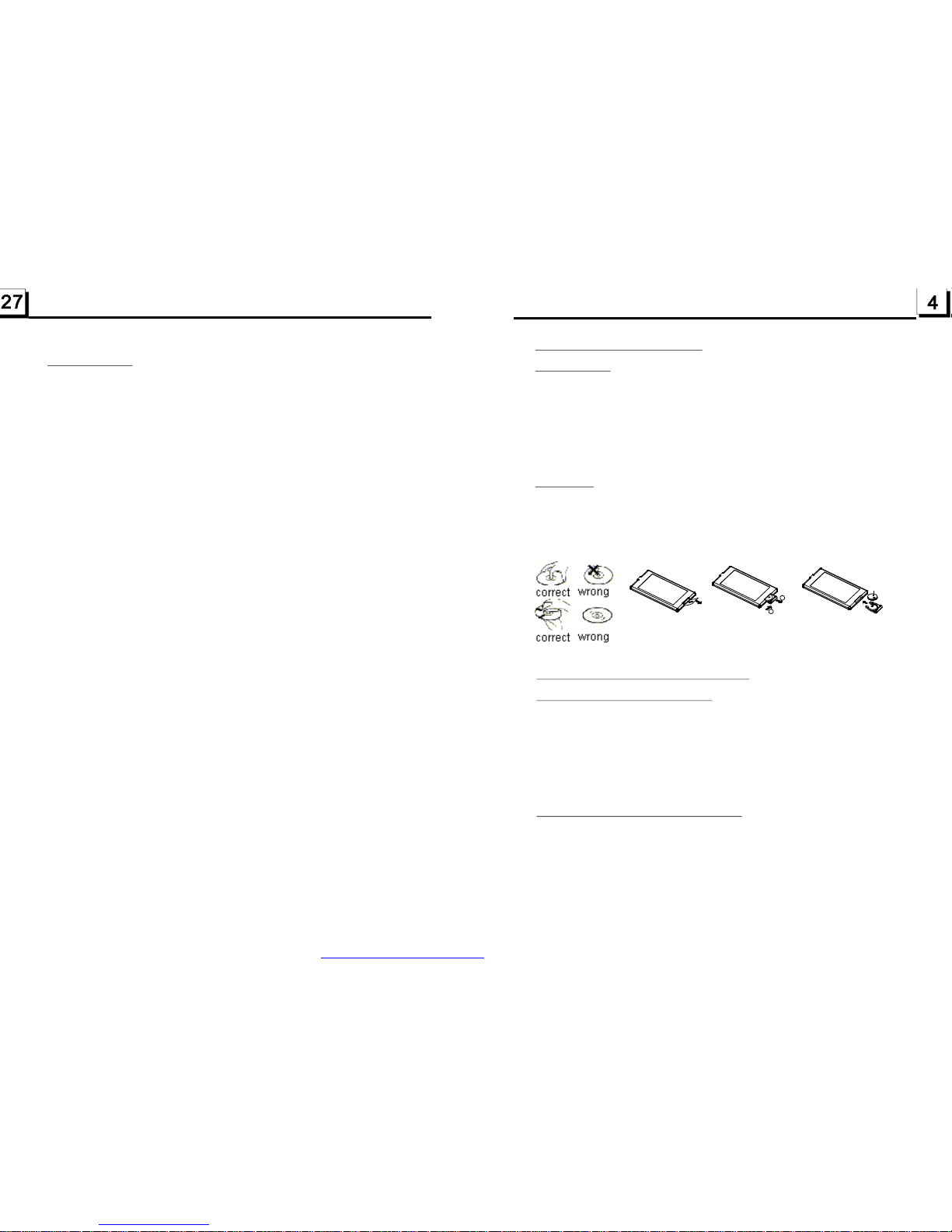
ReplaceBatteryintheRemoteControl
NoteabouttheBatteryoftheRemoteControl::
1.
3.Donotshortthebattery.
4.Donotthrowthebatteryintofire.
5.Toavoidtheriskofaccident,keepthebatteryoutofreachofchildren.
1.Beforeusingtheremotecontrolforthefirsttime,pulltheinsulating
sheetoutoftheremotecontrolasthedirectionindicatedbythe
arrow.(seefig.1)
2.PressthemovableblockholdasthedirectionindicatedbytheAarrow
(Seefig.2),thenpullthebatteryholderoutoftheremotecontrolas
thedirectionindicatedbytheBarrow(seefig.2).
3.Replacetheoldbatterybyanewbatterywith(+)polaritysideupward.
(Seefig.3).
4.Insertthebatteryholdertotheoriginalpositioninremotecontrol.
(Seefig.3).
Improperuseofbatterymaycauseoverheatingorexplosion,andcould
resultininjuryorfire.
2.Batteryleakagemaycausedamagetotheremotecontrol(Battery
Life:6monthswithnormaluseinnormalroomtemperature).
Fig.1
Fig.2
Fig.3
A
B
+sideup
6.Specification
GeneralSpecification
PowerSupplyRequirement..................................................DC12V
DVDDeckSpecification
Format.....................................DVD/VCD/JPEG/MP4/MP3/WMA/CD
VideoSystem....................NTSC/PAL/PAL-M/PAL-N/AUTO(optional)
AudioSystem..............................................................24bit/96KHz
LoadingSystem..........................................................AutoLoading
MountingAngle.................................................................0to +/-30
Video
VideoType...................................................................16:9and4:3
VideoOutputlevel......................................Composite:1.00.2Vp-p
Loadimpedance:75ohms
HorizontalResolution................................................................500
Audio
AudioOutput(Analogaudio)..........................................2.0Vrms
FrequencyResponse.............................20Hz~20KHz(at1KHz0dB)
S/NRatio(Audio).............................................90dB
Separation..............................................................................50dB
Radio
FMSection
Frequencyrange.......................................87.5MHz-107.9MHz(US)
87.5MHz-108.0MHz(EU)
Usablesensitivity......................................................................3uV
I.FFrequency....................................................................10.7MHz
AMSection
Frequency....................................................530KHz-1710KHz(US)
522KHz-1620KHz(EU)
MaximumPowerOutput............4x85W(measuredatDC14.4V)
Dimensions(wxhxd).....................................7”Wx2”Hx6.3”D
Specification
Specification
(at1KHz0dB)
Specification
±
≥
+0
-1.0
PDF created with FinePrint pdfFactory trial version http://www.pdffactory.com
Page 6
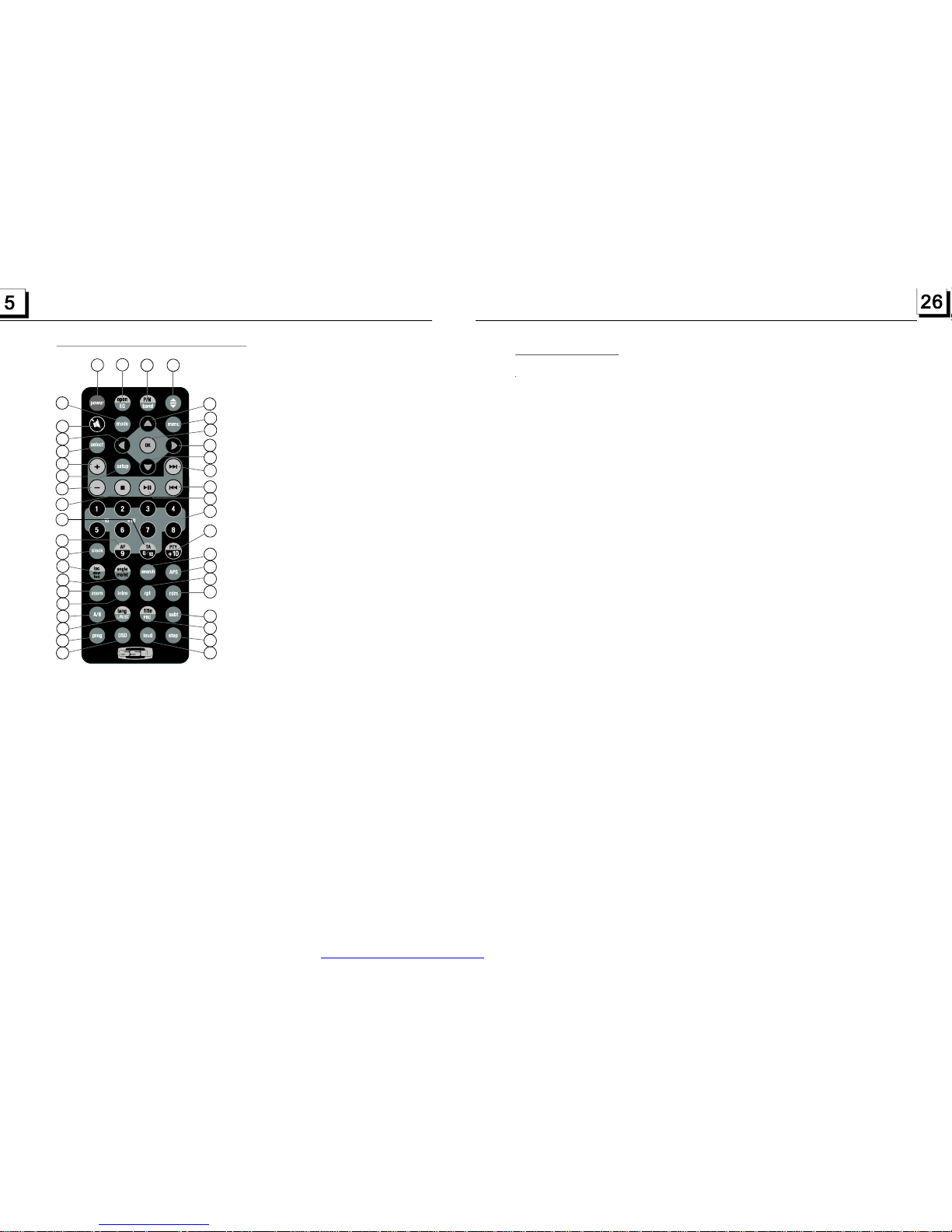
1.5TheRemoteControlDescription
16.SEARCHBUTTON
17.RDMBUTTON
18.RPTBUTTON
19.SUBTITLEBUTTON
20.TITLE/PBCBUTTON
21.ANGLE/STBUTTON
22.ZOOMBUTTON
23.AUDIOBUTTON
24.CLKBUTTON
25.A-BBUTTON
26.INTBUTTON
27.EQ/OPENBUTTON
28.LOC/SLOW-FWDBUTTON
29.MUTEBUTTON
30.STOPBUTTON
31.VOLUME-BUTTON
32.<BUTTON
33.OKBUTTON
34.VOLUME+BUTTON
35.BANDandP/NBUTTON
36.PROGBUTTON
37.OSDBUTTON
38.LOUDBUTTON
39.STEPBUTTON
40.TABUTTON
41.AFBUTTON
1.TILTBUTTON
2.MENUBUTTON
3.POWERBUTTON
4.^BUTTON
5.>>|BUTTON
6.>BUTTON
7.|<<BUTTON
8.vBUTTON
9.SELBUTTON
12.10+/PTYBUTTON
13.SETUPBUTTON
14.MODEBUTTON
15.APSBUTTON
10.PLAY/PAUSEBUTTON
11.NUMBER(0~10,+10
-10)BUTTONS
1
2
3
4
5
6
7
9
8
10
11
12
13
14
15
16
17
18
19
20
21
22
23
24
25
26
27
28
29
30
31
32
33
34
35
40
41
39
36
37
38
5.TroubleShooting
Pleasereadtheuser’smanualcarefullybeforeusingtheDVDplayer.Ifyouhaveanytroubles
inusingthisplayer,trytosolvetheproblemsbythesuggestionsmentionedbelow.Ifyoucan
notremovethetroubleafterusingallthesuggestions,pleasecontactthecompanyorthe
technicalservicecenterauthorizedbyus.Forthesakeofyoursafety,pleasedonotopenthe
coverandrepairtheplayerbyyourself,ifthat,itmaycauseelectricshock.
NOPICTURE,SOUNDANDINDICATION
*Ensurethatthepowerswitchison.
*Ensurethatthepowercordisnotdamagedorthefuseisnotblown.
*Ensurethatthepowerplugisconnectedtotheinlettightly.
NOSOUNDBUTHAVEPICTURE
*Ensurethattheplayer’saudiooutputhasagoodconnectionwithamplifier’saudioinput.
*Checkwhethertheaudioconnectorisdamaged.
*Checkwhetheryouhaveturneddownthevolume.
*EnsurethatyouhavesettherightAUDIOsetupoftheplayer.
*Ensurethattheaudioisnotundermuted.
NOPICTUREBUTHAVESOUND
*Ensurethattheplayer’svideooutputhasagoodconnectionwithmonitor’svideoinput.
*EnsurethatyouhaveturnedyourmonitortotheAVinputchannelconnectingtoyourplayer.
*Checkwhetherthevideoconnectorisdamaged.
*EnsurethatyouhavesettherightVIDEOsettingsoftheplayer.
BLACKANDWHITEPICTUREORSCREENROLLING
*EnsurethatyouhavesettherightTVSYSTEM(e.g.PAL,NTSC)setting.
FLAWSOFPICTUREORSOUND
*CheckwhetherthesettingofAUDIOisright.
*Checkwhetherthediscisscratchedorstained.
*CheckwhethertheAVconnectorandtheoutputterminalisstained.
*CheckwhetherthereiscondensationinsidetheLens.Ifso,leavetheplayeroffforanhour
orso,thentryagain.
*Checkwhethertheinstallationangleislessthan30.
DISPLAYNODISCORBADDISC
*Ensurethatyouhaveputthediscintheunit.
*Checkwhetherthediscisputinthereverseside.
*Checkwhetherthediscisdistorted.
*Checkwhetherthediscisstainedorscratchedbadly.
*Ensurethatthediscformatiscompatibletotheplayer.
*Ensurethatthetemperatureinsidethecarisnottoohigh.Ifso,coolofftilltheambient
temperaturereturnstonormal.
*Replaceanotherdisctoinsertitintothedisccompartment.
REMOTECONTROLISINSENSITIVEORDOESNOTWORK
*Checkthebatteriesofremotecontrolandmakesurethattheyarepowerfulandhave
goodconductivity.
*DirecttheremotecontroltotheIRsensoroftheplayer.
*CheckwhethertherearesomeobstaclesbetweentheremotecontrolandIRsensor.
SOMEFUNCTIONBUTTONSDONOTWORK
*Turnoffthepower,thenturnonagain.
*Resettheunittozero,thenturnonagain.
*Removethefrontpanelfromtheunit,theninstallitagainandthenturnonagain.
THERADIODOESNOTWORK
*Checkwhethertheantennacableisconnectedfirmly.Ormanuallytuneforastation.
°
PDF created with FinePrint pdfFactory trial version http://www.pdffactory.com
Page 7
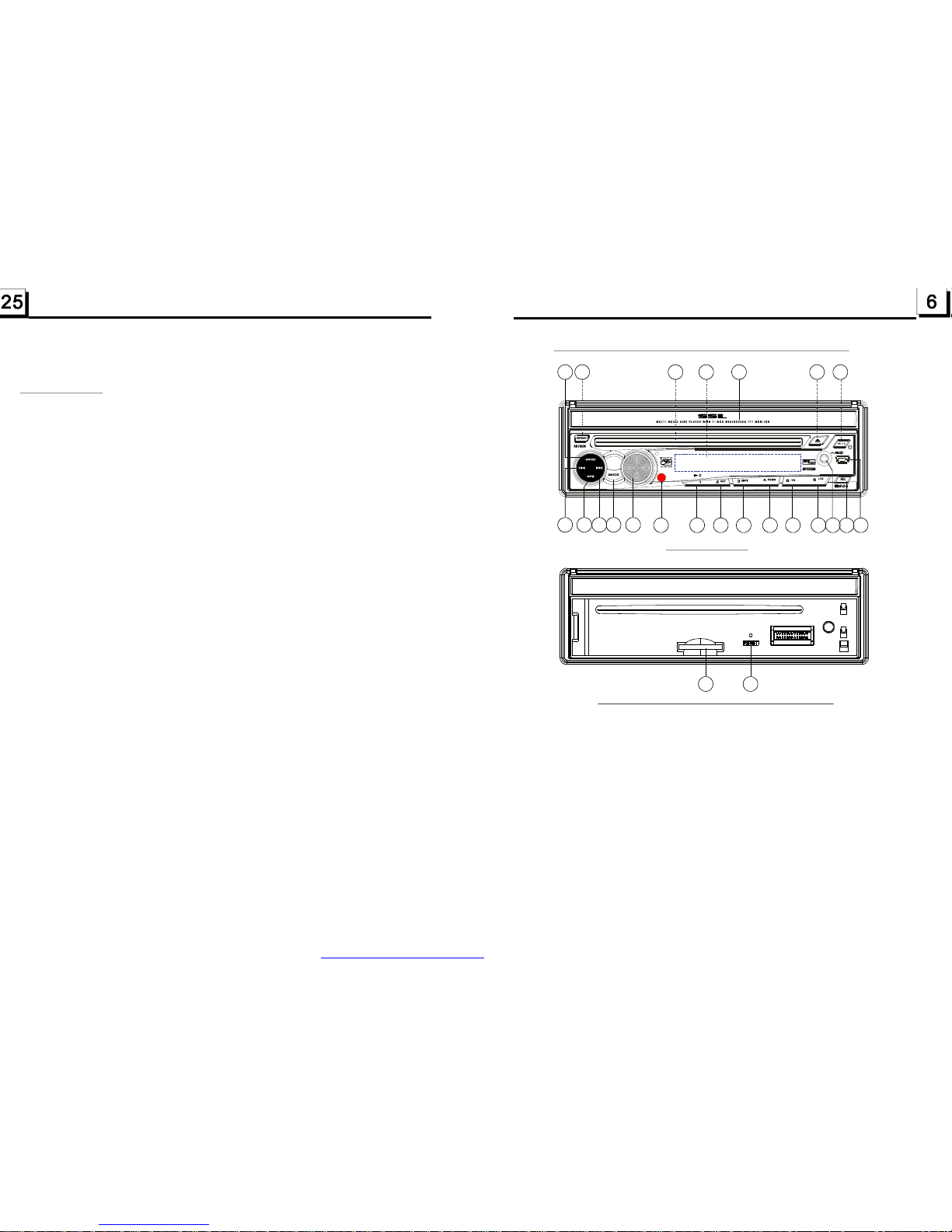
1.6TheLocationsandNamesofControlsonorintheunit
1.OPENbutton
2.POWER/MUTEbutton
3.Monitor
4.AUXsocket
5.DiscSlot
6.USBJack
7.SD/MMCCardSlot
8.MODEbutton
9.VOLknob
10.>>|button
11.|<<button
12.PLAY/PAUSE/1button
13.INT/2button
14.RPT/3button
15.RDM/4button
16.-10/5button
17.+10/6button
18.BANDbutton
19.APSbutton
20.EJECTbutton
21.RESETbutton
22.SmallLCDScreen
23.IRRemoteSensor
24.RELbutton
1
2
3
4
6
10
9
8
11
12
14
16
17
5
13
18
15
19
20
22
23
TheFrontPanel
TheFrontFacetafterremovingthefrontpanel
7 21
24
*RegionCode
Q:WhydoestheunitdisplayREGIONERRORafterinsertingdiscintodisc
compartment?
A:BecausetheDVDplayeranddischasrespectiveregioncode.Iftheregion
codesofthemdonotmatchwitheachother,theDVDplayercannotplay
thedisc.
Appendix:TheregioncodeofDVD:
TheMotionPictureAssociationofAmerica(MPAA)dividedtheworldinto
6regions,andgaveeveryregionacode,namelyregioncode.Theregion
codesandthecountriesorareasrepresentedbytheregioncodesas
follows:
Region1:America,Canada,East-PacificInlands;
Region2:Japan,WestEurope,NorthEurope,Egypt,SouthAfrica,Middle
East;
Region3:Taiwan,HongKong,South
Korea,Thailand,indonesia,etc.;
Region4:Australia,NewZealand,CentralSouthAmerica,SouthPacific
Inlands;
Region5:Russia,Mongolia,IndianPeninsula,MiddleAsia,EastEurope,
NorthKorea,NorthAfrica,North-westAsiaetc.;
Region6:Chinamainland.
South-eastAsiancountriesinclude
PDF created with FinePrint pdfFactory trial version http://www.pdffactory.com
Page 8
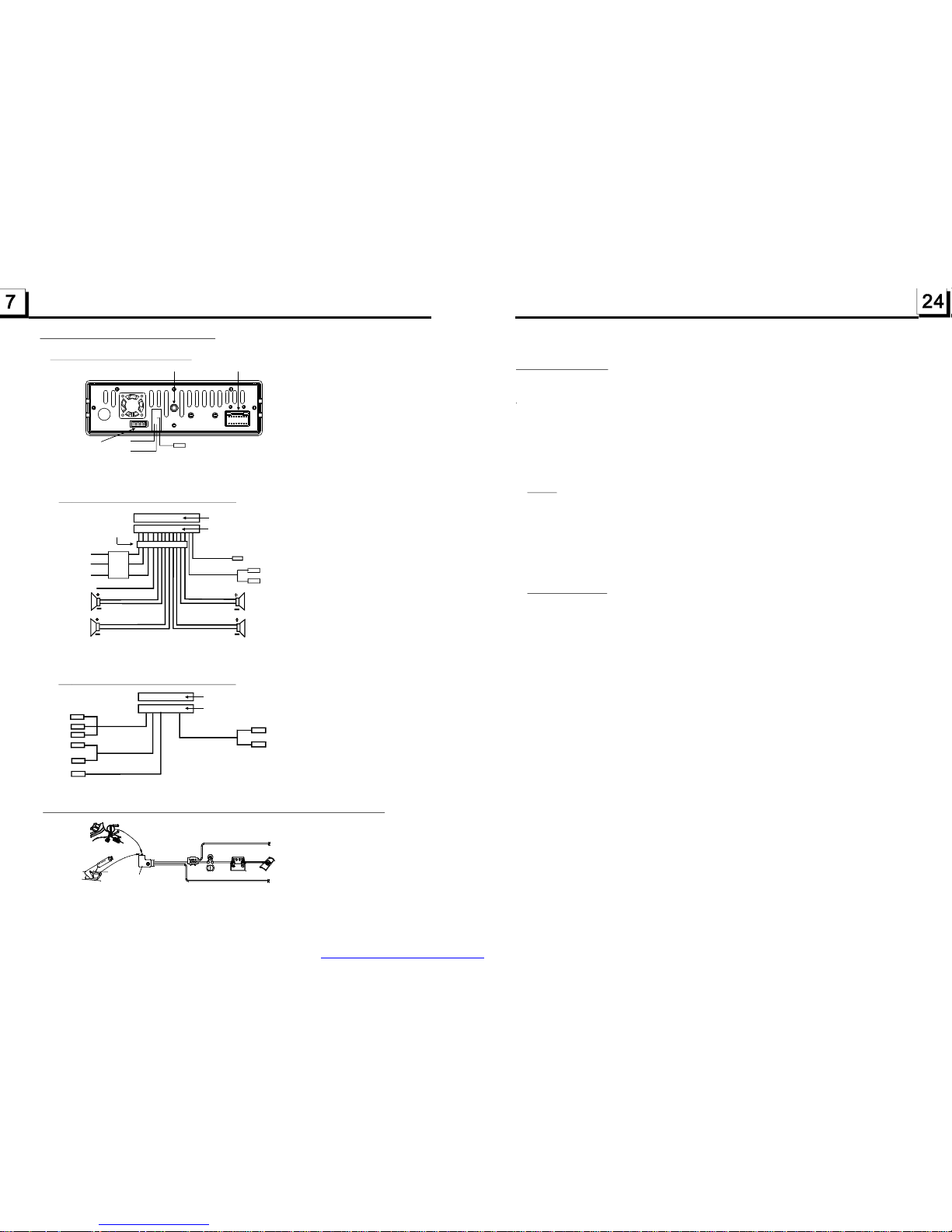
1.7WiresConnectionDescription
The DescriptionoftheWiringDiagramforSocket1
1.Parkingwiremustbeconnected.Andtheparkingbrakemustbeengagedinorderforthemonitortowork.
2.UsetheclipendoftheGroundWireprovidedbymanufacturertoconnectMountingScrew,usingtheother
endoftheGroundWiretoconnectthenegativepoleofthepowersource.Otherwise,thevideoonscreen
maybeflashes.
The DescriptionoftheWiresConnection
DescriptionofConnectingtheParkingBrakeLinetotheParkingBrakeSystemBuiltintheCar
Parkingbrake
Parkingbrakeswitch
(insidethecar)
Parkingbrakewire(Green)
Tometallicbodyorchassisofthecar
NOTE:afterconnectingtheParkingLine,thevideoonthesmallmonitorofthefrontpanelwillbedisplayonlyafterbr akingthecar.
The DescriptionoftheWiringDiagramforSocket2
YELLOW
MEMORYB+
BLACK(GND)
IGNITIONSWITCH
BLUEAUTOANT
GREEN
WOOFERLINEOUT
RED
FRONT
REAR
RIGHT
SP
FRONT
WHITE
WHITE/BLACK
GREEN/BLACK
VIOLET/BLACK
GRAY/BLACK
GRAY
VIOLETGREEN
REAR
LEFT
SP
REDR
WHITEL
FRONTAUDIORCAOUT
FUSED
FILTER
BOX1A
&10A
FUSES
WIRINGCONNECTINGSOCKET1
WIRINGCONNECTINGPLUG1
NOTES:
1.Onlyspeakerswith4ohmsimpedancemaybeused.
2.Ensurethattheblueautoantennacabledoesnotmakecontact
withanygroundconnection.
BLACK
ISOCONNECTOR
GREY
YELLOW
YELLOW
VIDEORCAOUT
PARKINGLINE
GREEN
REARVIEWCAMERA
BLACK
YELLOW
REARAUDIORCAOUT
GREY
REVERSALLINE
WHITE
WHITEL
REDR
FixingScrewBolt
WiringConnectingSocket1
WiringConnectingSocket2
RadioAntennajack
Black
Black
WIRINGCONNECTINGSOCKET2
WIRINGCONNECTINGPLUG2
BROWN
AVRCAAUXIN
REDR
WHITEL
YELLOWVIDEO
*ParentalControl
Q:WhyafterinsertingDVDdiscinthediscslot,adialoguewindowappearsthatasks
toinputa4digitspassword?
A:ThisisbecausethemovieyouareplayingisratedwiththeParentalControl,and
thecurrentratinglevelofDVDplayerislowerthanthecurrentdisc.Youmustchange
theParentControlsettingtohigherratinglevel.
!
*ForthefactorypresetpasswordoftheDVDplayer,
TheParentalControlfunctionofaDVDplayercancontroltheplaybackofmovie
ratedlevelinadisc.YoucansettheDVDplayertobeacertainratinglevelwith
SETUPMENUonscreen.Iftheratinglevelinthediscishigherthanonesetinthe
DVDplayer,theDVDplayercannotplaybackthedisc.Theratinglevelsetupcan
beprotectedbythepassword.Therein,ifyouselectUnlockitem,theParental
Controlfunctionwillbeinvalid,andalllevelDVDratingwillbeplayed.
ThediscmoviecanbedesignedasthattheDVDplayerwillplaybackthedifferent
versionofcontentofasamemovieaccordingtothedifferentratinglevelsetby
ParentalControl.DependingontheDVDfeatureofseamlessswitchingdescribed
above,thescenesthatarenotfittingforchildrenwillbeclearedorreplacedbythe
otherfittingsceneautomatically.
AllratinglevelsofParentalControlareasfollows:
Unlock
1KidSafe
2G
3PG
4PG13
5PGR
6R
7NC17
8Adult
NOTE
ParentalControl
pleaserefertotherelative
contentofPASSWORDsetupmenufordetails.
PDF created with FinePrint pdfFactory trial version http://www.pdffactory.com
Page 9
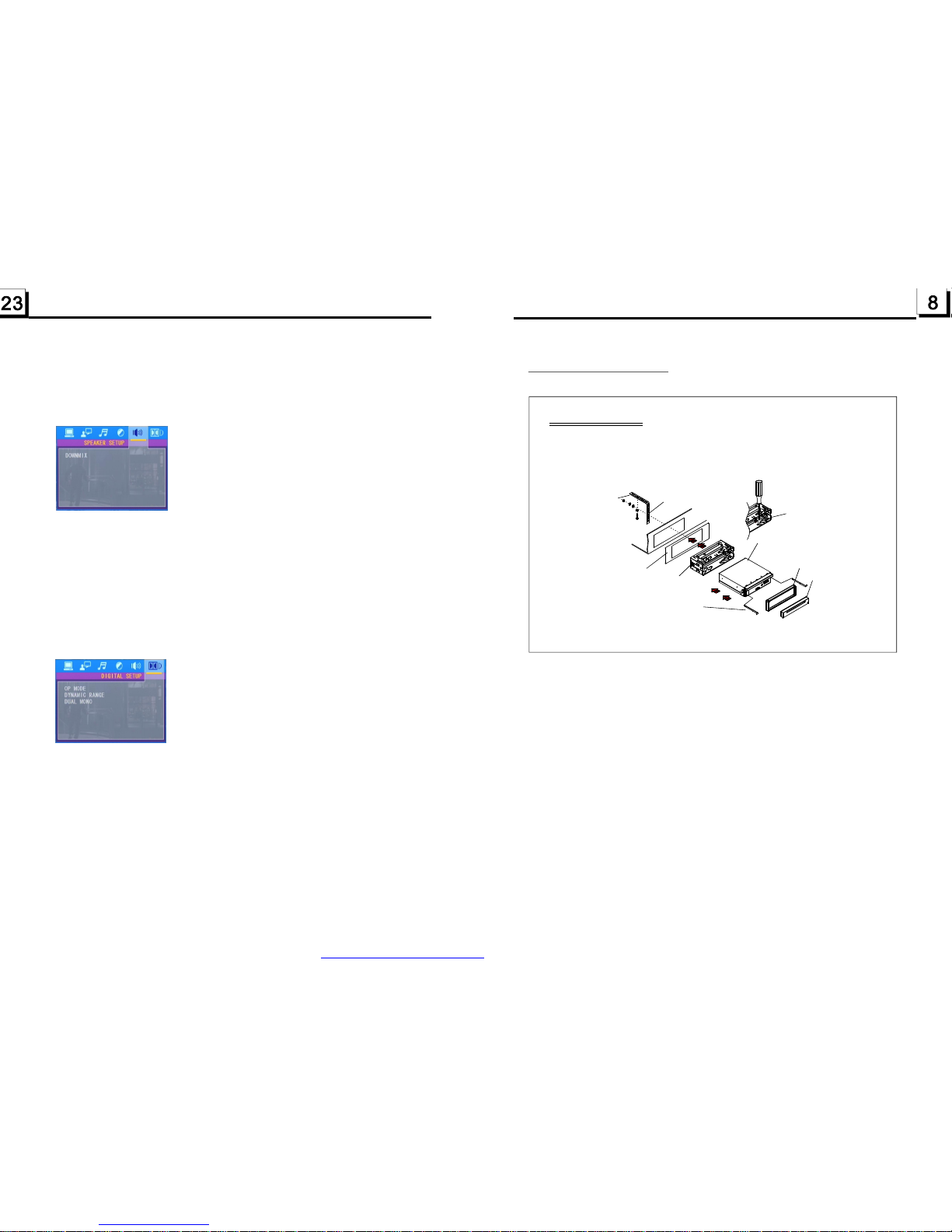
1.8UNITINSTALLATION
INSTALLATIONINSTRUCTIONS
TOBOOSTUPTHECAPABILITYOF
ANTI-JAMMING,PLEASEFIXTHE
METALSTRAPONTHEMETAL
CONNECTEDTOTHEBOTTOM
BRACKETOFTHECAR.
METALSTRAP
DASHBOARD
SLIDINGMETALHOUSING
TODRAWTHECHASSISOUTOF
THESLIDINGMETALHOUSING,
INSERTTHELEFTANDRIGHTKEY
PLATESINTOTHERIGHTPOSITION
OFTHE2SIDESOFCHASSIS.
PLASTICTRIMOUT
UNITCHASSIS
SELECTTHEPROPERTAB
FORFIXINGTHESLIDING
METALHOUSING.
THEUNITISINSTALLEDTOBEANANTI-THEFTONE.THECHASSIS
OFTHEUNITWEARSASLIDINGMETALHOUSING.PLEASEDOTHE
CONNECTIONOFTHEPOWER,SPEAKERSANDANTENNAACCORDING
TOTHEREQUIREMENTOFTHEINSTRUCTIONBOOK,THENINSTALL
THESLIDINGMETALHOUSINGINTHECARASFOLLOWS.
FRONTPANEL
Itisforadjustingthehueofthevideooutput.
Itisforadjustingthesaturationofthevideooutput.
Itisforadjustingthesharpnessofthevideooutput.
Itisforselectingyourdesiredsoundeffectwhenthereisnotcentralspeaker
andsub-woofer.Thereare3mode:LT/RT,STEREO,VSS.
LT/RT:WhenplayingadiscwithPROLOGICDolbystereoeffect,choosethe
item,soitwilloutputaudiosignalwithvividtheatreeffect.
STEREO:Ifyouchoosethisitem,whenoutputtingaudiosignalwith5.1channels,
itwilloutputtheleftandrightchannelsofsignal;whenoutputtingaudiosignal
with2channels,itwilloutputthecommon2channelsofstereosignal.
VSS:Ifyouchoosethisitem,whenplayingadiscrecordedwith5.1channels,
themainchannelspeakerscanoutputaudiosignalwithVSSeffect.
Itisforselectingaudiooutputmode
LINEOUT:Itcancompresstheaudiosignal.Sothevolumelevelislower.
RFREMOD:Itcanmakethevolumelevelhigher.
AfterselectingthecompressionmodeofLINEOUT,settheitem,soyoucan
adjustthelinearcompressionratio.IfyousetittobeFULL,thePeak-to-Peak
valueoftheaudiosignalistheminimum;ifyousetittobeOFF,thePeak-toPeakvalueisthemaximum.
Itisforselectingadesiredaudiooutputmodefortheleftandrightwaysofsignal.
ItismainlyforKaraokeofAc3.Thereare4modesinallasfollows:
STEREO,MONOL,MONOR,MIXMONO.
HUE
SATURATION
SHARPNESS
4.24.5SPEAKERSETUP
4.24.6DIGITALSETUP
OPMODE
DYNAMICRANGE
DUALMONO
DOWNMIX
PDF created with FinePrint pdfFactory trial version http://www.pdffactory.com
Page 10
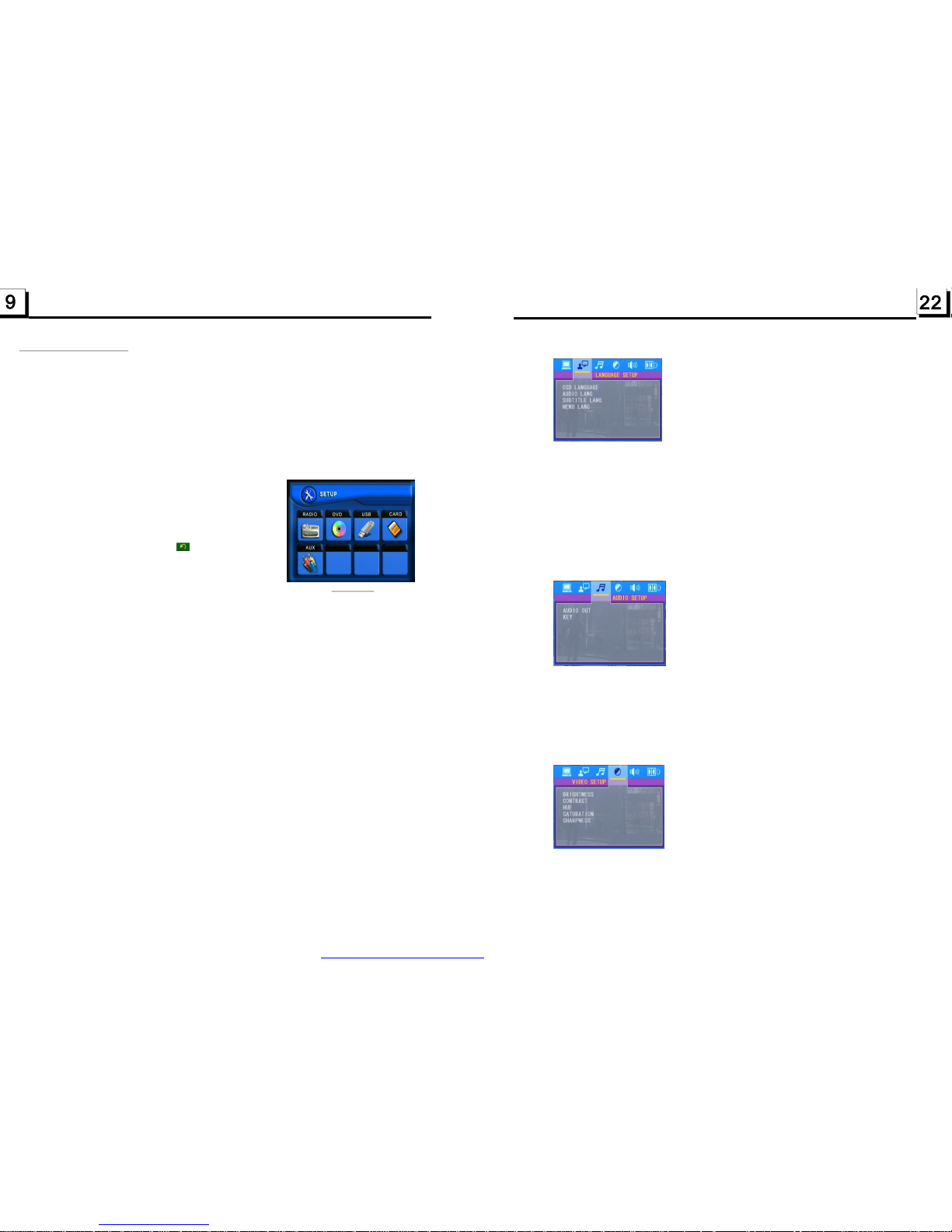
2.CommonOperation
1.Toturnon/offtheunit
Inpoweroffmode,shortpressthePOWERbuttontoturnontheunit.
Inpoweronmode,longpressthePOWERbuttononthefrontpanelorshort
pressthePOWERbuttonontheremotecontroltoturnofftheunit.
2.ToslidethemonitoroftheCarAudioSystemoutofthechassis
ShortlypresstheOPENbuttononthefrontpanelorlongpresstheOPEN
buttonontheremotecontrolcanslidethemonitoroftheCarAudioSystem
outofthechassisorslideitintothechassis.
3.Toselectfunctionmode
.
5.Tomutesound
PresstheMUTEbuttonontheremotecontroltoturnon/offMUTEmode.
PressingthePOWERbuttononthefrontpanelshortlyalsocanturnon/offMUTE
mode.
6.
Afterslidingthemonitorintothechassis,pressingtheCLKbuttoncandisplay
clocktimeonthesmallLCD.
7.Toselectadesired
.Toturnon/offLOUDmode
PresstheLOUDbuttonontheremotetoturnon/offLOUDmode.
WhenturningonLOUDmode,itwillenhancebasslevelimmediatelywhenbass
isnotenough.
9.Toresettheplayer
Whenthemonitor,thesmallLCDdisplayorsomebuttonsarenotworkingor
soundisdistorted,presstheRELbuttonanddetachthefrontpanelfromthe
mainunit,thenpresstheRESETbuttontoresettheprogramtofactorydefault.
PresstheMODEbuttontoselectRADIO,DISC
(Afterinsertingadisc),USB(AfterinsertingaUSB
storage),SD/MMCCARD(AfterinsertingaSD/
MMCcard)orAUXmode.
Duringplayback,tappingtheiconafterpopping
upKeyboardinterfacecanpopupModeMenuas
rightimage.thentaponeiconinittoselectyour
desiredmode.
4Toadjustsoundlevel
RotatetheVOLknobonthefrontpanelorpressandholdthe+or-buttononthe
remotecontrolwilladjustthevolumelevel.
Todisplayclocktime
PresstheCLKbuttontodisplayclocktimeonthesmallmonitorofthefrontpanel.
EQmode
PresstheEQbuttononthe remotecontroltoselectoneofthepresetmusic
equalizercurves:POP,ROCK,CLAS,FLAT.Thesoundeffectwillbechanged.
8
ModeMenu
ThisitemisforselectingthelanguageoftheSYSTEMMENUandalloperating
promptinterfacedisplayedduringplayback.
Thisitemisforselectingaaudiolanguage.
Thisitemisforselectingasubtitlelanguage.
Thisitemisforselectingadiscmenulanguage.
ThereisonlyANALOGmode,i.e.SPDIF/OFF,notoptional.
Itisforselectingyourdesiredbasicmusictone(fromlowtohigh).
4.24.2LANGUAGESETUP
OSDLANGUAGE
AUDIOLANG
SUBTITLELANG
MENULANG
4.24.3AUDIOSETUP
AUDIOOUT
KEY
4.24.4VIDEOSETUP
BRIGHTNESS
CONTRAST
Itisforadjustingthebrightnessofthevideooutput.
Itisforadjustingthecontrastofthevideooutput.
PDF created with FinePrint pdfFactory trial version http://www.pdffactory.com
Page 11
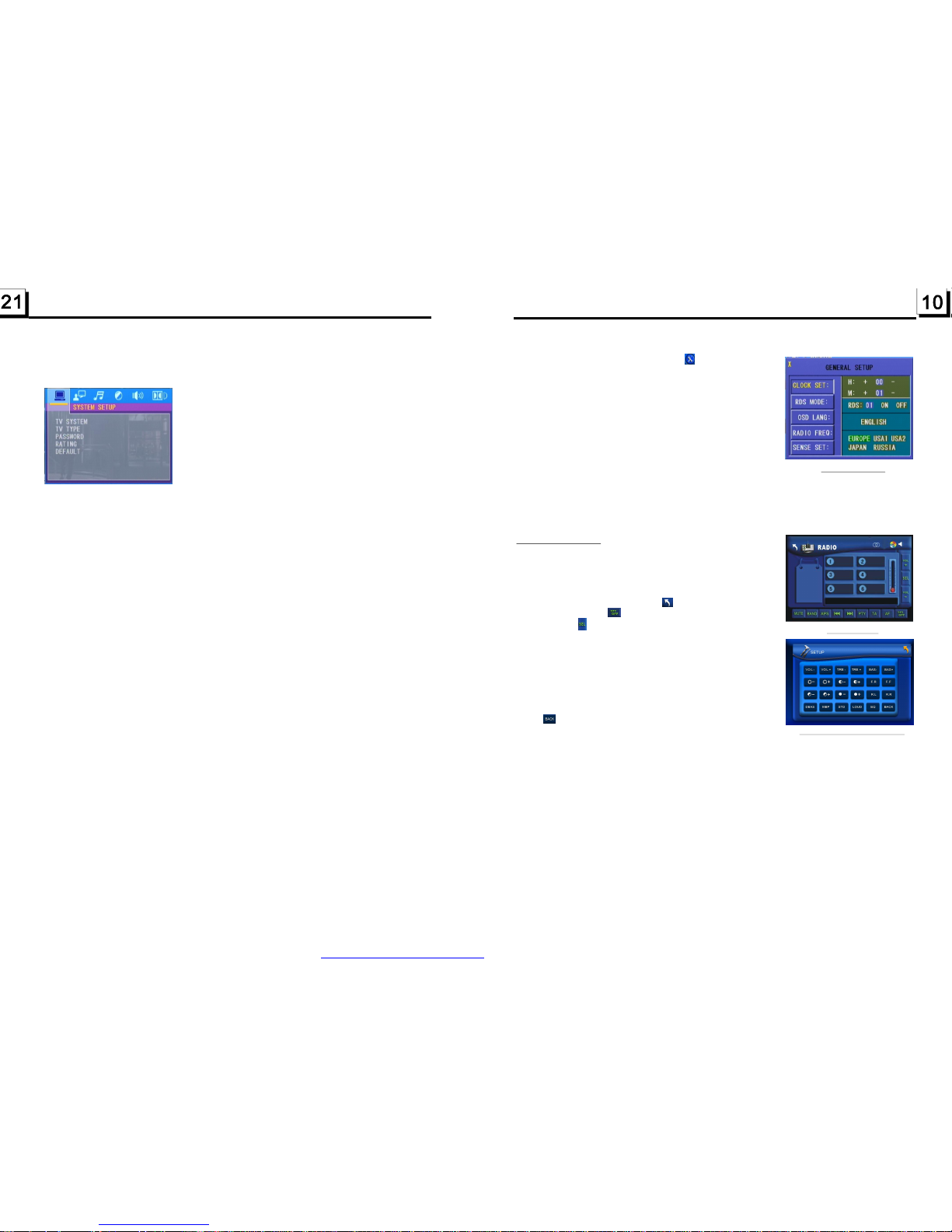
10.Generalsetup
PresstheMODEbutton,thentaptheiconsetuptopop
upGENERALSETUPinterfaceasrightimage.
Intheinterface,selectoneofCLOCKSET,RDSMODE,
OSDLANG,RADIOFREQorSENSESETontheleftside
bytappingthem,thenchangethesettingbytappingicons
ontherightsideaccordingly.
*SENSESETisusedtosetthesensitivityofstoppingauto
searchingforanavailableradiostation.Whenyoutapit,
itwillaskyoutoinputapassword.Thepasswordis19,
afterinputtingit,youcansetthesensitivity.
11.Tocalibratethescreen
TopopupCalibrationinterfaceduringmediaplayback,first
presstheSTOPbutton,thenpresstheZOOMbutton,finallypressthe^andvbuttonsinturn.
Intheinterface,youcanhavecalibrationbyaccuratelytappingthecrosscursor.
1.EnterRADIOmode
PresstheMODEbuttonatbriefintervalsuntilyougetto
RADIOmodeastheright.
InRADIOinterface,tappingtheiconwillreturntoMode
Menu;tappingtheiconwillturnonoroffTFTdisplay;
tappingtheiconwillpopupAUDIO&VIDEOSETUP
interfaceasright;theothericonsaresameasonesinthe
unitpanelorintheRemoteControl.
IntheAUDIO&VIDEOSETUPinterface,youcanadjust
VOLUME,TREBLE,BASS,BALANCE,FADER,BRIGHTNESS,CONTRAST,COLOR,HUE;youcanalsoturnon
oroffDBAS,MBP,LOUD;youcanstillselectyourdesired
transparencymode(bySTD)andEQmode(byEQ);tapping
theiconcanreturnbacktothepreviousmenu.
2.BANDBUTTON
InRADIOmode,presstheBANDbuttonontheremotecontrolleroronthefrontpanelto
selectyourdesiredradiobandofandAM2,andtheselectedband
willbedisplayedonthesmallmonitoronthefrontpanel.
3.TUNE/SEEKUP/DOWNBUTTONS
InRADIOmode:
1)Longpressthe>>|or|<<buttontoautomaticallysearchupordownforaavailablestation
fromthecurrentfrequency.
2)Brieflypressthe>>|or|<<buttontomanuallysearchupordownwithstepbystepforyour
desiredstationfromthecurrentfrequency.
4.APSBUTTON
InRADIOmode:
1)WhenlongpressingtheAPSbutton,theradiosearchesfromthelowestfrequencyandchecks
thesignalstrengthleveluntil1cyclesearchisfinished.Andthenthe6strongeststationsare
presettothecorrespondingpresetnumbermemorybank.TheASoperationisimplemented
ineachbankoftheselectedband.WhentheASoperationisfinished,itwillscaneachpreset
stationfor5secondsinFMorAMbandfromM1whenAPSbuttonispressedbriefly.
3.RadioOperation
FM1,FM2,FM3,AM1
RADIOinterface
AUDIO&VIDEOSETUPinterface
GENERALSETUP
FortheDVDSystemMenu,thereare6setuptitles.Theydisplayasfollows:
4.24.1SYSTEMSETUP
TVSYSTEM
TVTYPE
PASSWORD
RATING
DEFAULT
ThisproductsupportsoutputofvariousTVsystem.
IfyourTVsethasonlyNTSCorPALsystem,thescreenwillblinkandbecome
colorlesswhenawrongTVsystemisselected.Inthiscase,presstheN/Pbutton
toswitchtotherightTVsystem.
Thesetupitemisformatchingmonitorscreensize.
4:3PS:Choosethisitemwhenconnectingamonitorwith4:3screen.Whenplaying
thepictureswith16:9size,theleftandrightpartsoftheimagewillbecutout,
anddisplayinfullscreen.
4:3LB:Choosethisitemwhenconnectingamonitorwith4:3screen.Whenplaying
thepictureswith16:9size,thetopandbottompartsofthemonitorwillbe
turnedintoablackstrip.
16:9:Choosethisitemwhenconnectingamonitorwith16:9widescreen.
ThissetupitemisforlockingorunlockingtheratingleveloftheParentalControl.
Thedefaultedstateislocked.Thedefaultedpasswordis0000.
Youcansetanewpasswordthatyoulike:SelectthePASSWORDitemandthen
pressthe>buttontoenterit,theninputtheoriginalpassword0000,andthen
presstheOKbuttontounlockit.Pressthe>buttontoenteritagain,theninput
anewpasswordthatyoulikeandthenpresstheOKbuttontomakeiteffective.
BeforetheotherpersonsseetheManual,youshouldgetthepasswordinmind
andcutoutthepartofPASSWORDintheManual.
ThisitemisforsettinganewratingleveloftheParentalControl.
1.SelectthePASSWORDitemandpressthe>buttontoenterit,inputthe
passwordmentionedabove,andpresstheOKbuttontounlockthesettingof
theratingleveloftheParentalControl.
2.SelecttheRATINGitemandpressthe>buttontoenterit,usethedirection
buttonstoselectyourdesiredratinglevel,presstheOKbuttontoconfirm.
3.SelectthePASSWORDitemagainandpressthe>buttontoenterit,inputthe
password,andpresstheOKbuttontolockthenewsettingoftheratinglevel
oftheParentalControl.
SelectingDEFAULTwillchangeallthesettingstooriginalfactorysetup.
PDF created with FinePrint pdfFactory trial version http://www.pdffactory.com
Page 12

Afterthescanningisfinished,broadcastingwillresumeontheM1.(Itcanstore3x6
stationsforFMand2x6stationsforAM)
2)WhenpressingtheAPSbuttonbriefly,theradiowillscaneachpresetstationfor5
secondsinFMorAMbandfromM1.
Afterfinishingacircleofscanning,itwillresumebroadcastingontheM1.
NOTE:InFMband,FM1,FM2,FM3ischeckedoneatatime;InAMband,is
checkedoneatatime.
5.PRESETSTATION[1-6]BUTTONS
InRADIOmode:
1)Tomemorizethecurrentfrequencyonthecurrentband,longpressanyofthenumber
buttons(1-6)onremotecontroloronthefrontpanel.
2)Torecallthepresetmemoryonthecurrentband,brieflypressoneofthepresetbuttons
[1-6]onremotecontroloronthefrontpanel.
6.STEREO/MONOBUTTON
PresstheSTbuttonontheremotecontroltoselecttheSTEREOorMONOsound
modeforFMband.
7.LOCBUTTON
1)InRADIOmode,whenthesignalofthedistanceradiostationareveryweakandthe
receivingeffectisbadduringtuning.IfthereisthewordLOConthemonitor,pressthis
buttontoturnofftheLOCfunction,thentuneagainforthedistanceradiostation;
2)InRADIOmode,whenthesignalofthelocalradiostationsaretoostrongandtheinterferencedoesntallowthetunertolockonstations,pressthisbuttontoturnontheLOC
functiontodisplaythewordLOConthemonitor,thentuneagainforthelocalradiostations.
toselectoneofthefollowingmode:
PTYMUSICgroup--PTYSPEECHgroup--OFF
PTYgroupison,
PTYgroupison,pressingthe6numberbuttonsalsocanselectoneofPTY
programsasabove.
AM1,AM2
8.PTY(PROGRAMTYPE)BUTTON
PressthePTYbuttonshortly
WhenpresstheVOL+orVOL-buttonontheremotecontrolorrotate
theVOLknobonthefrontpaneltoselectoneofPTYprogramsasfollows:
<-->NEWS<-->AFFAIRS<-->INFO<-->SPORT<-->EDUCATE<-->DRAMA<-->CULTURE
<-->SCIENCE<-->VARIED<-->WEATHER<-->FINANCE<-->CHILDREN<-->SOCIAL
<-->RELIGION<-->PHONEIN<-->TRAVEL<-->LEISURE<-->DOCUMENT<-->PTY
NONE<-->POPM<-->ROCKM<-->EASYM<-->LIGHTM<-->CLASSICS<-->OTHERM
<-->JAZZ<-->COUNTRY<-->NATIONM<-->OLDIES<-->FOLKM<-->
When
AfterselectingoneofthePTYprograms,itwilldisplaySEEKPTYandautomatically
searchforthestationofthePTYprogram.IfthestationofthePTYprogramdoesnotexist,
itwilldisplayPTYNONEandthenreturnbacktothenormalstation.
9.AF[ALTERNATIVEFREQUENCIES]BUTTON
WhenAFbuttonispressedbriefly,theAFswitchingmodeisselectedandthestatusofthe
AFswitchingmodeisdisplayedbyAFsegmentonthedisplay.
Segmentoff:AFswitchingmodeoff.
Segmenton:AFswitchingmodeon,andhasRDSinformation.
Segmentflashing:AFswitchingmodeon,butRDSinformationisnotreceivedyet.
3.DuringJPEGplayback,pressoneofthe>/</^/vbuttonstochangetheangleof
viewingpicturethatisdisplayingasfollows:
>:90degcw;<:90degccw;^:UP<-->DOWN;v:LEFT<-->RIGHT
DuringJPEGplayback,pressthePROGbuttontochangethemodeofrefreshpicture.
DuringJPEGplayback,presstheSTOPbuttontostopplayingandreturntotheroot
menu.
*DuringJPEGplayback,thefollowingbuttonsarenotavailable:SLOW-FWD,
SUBTITLE,TITLE,ANGLE,AUDIO,RDM,INTandA-B.
*InJPEGmode,theotheroperationsaresameasonesinMP3/WMAmode.
1.Therootmenuisdisplayedonthemonitorwhenbeginstoswitchonmode,then
itwillautomaticallyplaythefirstfile.
Duringplayback,presstheSTOPbuttontostopplayingandreturntotherootmenu.
2.Whendisplayingtherootmenu,pressthedirectionbuttonstoselectyourdesired
FOLDER,fileoricon,thenpresstheOKorPLAYbuttontoopenorplaytheselected
file.
Whendisplayingtherootmenu,youcanalsousethenumberbuttonstoselectthe
serialnumberofthefiletoplaythefile.
*TheANGLE,PROG,RDM,INTandTITLE/PBCbuttonarenotvalid.
*TheotherfunctionsaresameasonesinDVDmode;buttheRPTfunctionissameas
oneinMP3/WMAmode.
ThereisESPfunctionforallformatsofdiscs.
InMP3/WMAmode,duringplayback,theinformationofthefilename,foldername,
willbescrollingontheLCDdisplay.Aslongasthe
currentplayingmusiccontainsrelevanttaginformationinversion1.0/2.0
format,the3itemsunderlinedabovewillbescrollingontheLCDdisplay.
1.PresstheSETUPbuttonontheremotecontroltoaccesstheDVDSystemMenuon
themonitor.
2.Thereare6setuppagesfortheSystemMenu.Pressthe>or<buttontoselect
desiredsetuppage.
3.Pressthe^orvbuttontoselectansetupitemintheselectedsetuppage.
4.Pressthe>buttontoenterthesetupitem.Thenpressthevor^buttontoselecta
desiredmodeofthesetupitem,finallypresstheOKbuttontoconfirmit.
*Pressthe<buttontoreturntothepreviouslevel.
*PresstheSETUPbuttonagainorusethedirectionbuttonstohighlightEXITSETUP
andthenpresstheOKbuttontoexittheSetupMenu.
4.22PlaybackMP4files
4.23ESPandFunction
songtitle,artistandalbum
4.24DVDSystemMenuSetupOperation
MP4
MP3ID3
ID3
PDF created with FinePrint pdfFactory trial version http://www.pdffactory.com
Page 13
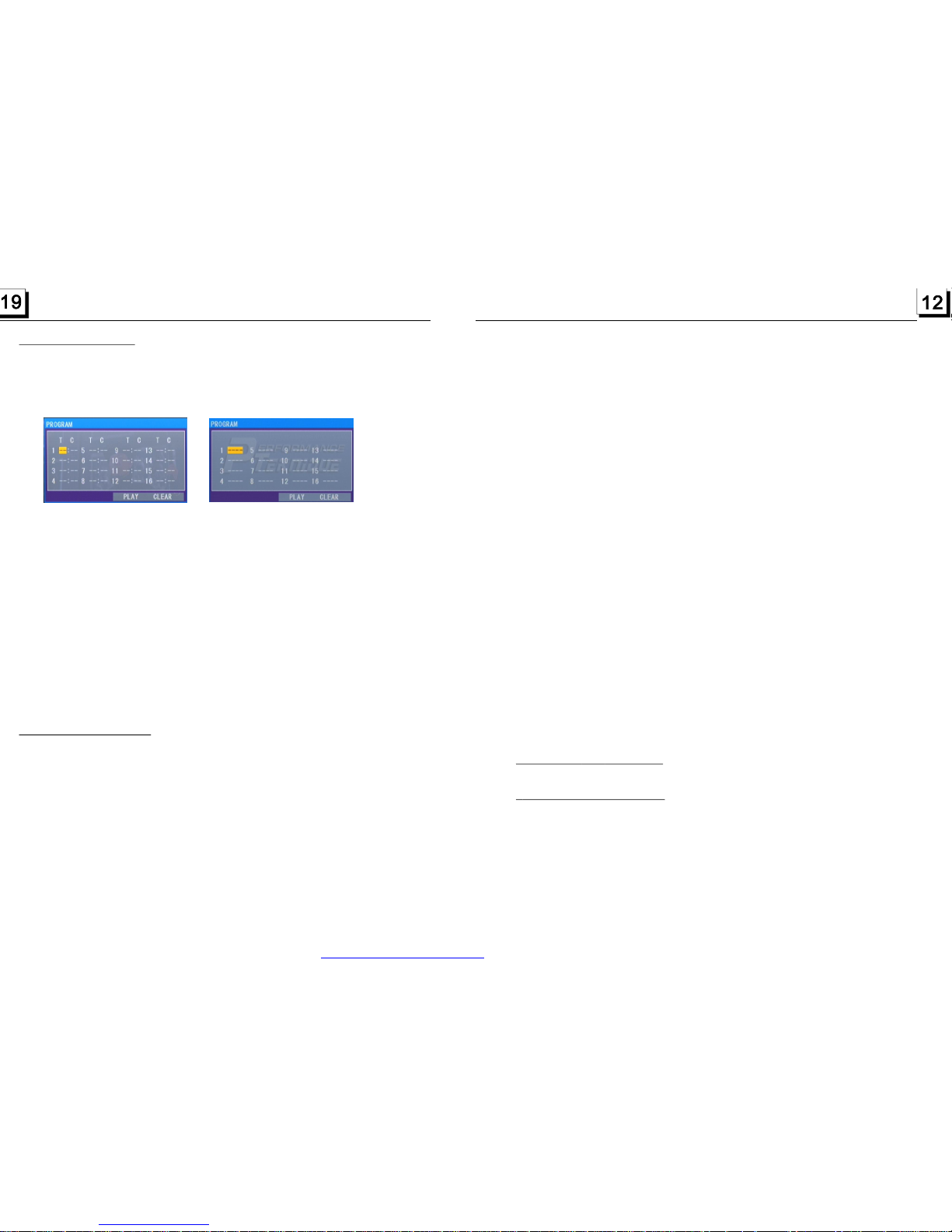
ToplayfilesinadiscorUSB,insertthediscorUSBintothediscslot,then
theywillautomaticallyplay.
Toejectthediscfromtheunit,presstheEJECTbuttontoejectdiscinthe
discslotandthenyoucanremovethedisc,youcanremovetheUSBto
stopplaying.
WhentheAFswitchingmodeisselected,theradiochecksthesignalstrength
oftheAFallthetime.TheintervalofcheckingtimeofeachAFsdependson
thesignalstrengthofthecurrentstation,fromafewminuteforthestrong
stationtoafewsecondsfortheweakstation.EverytimewhenanewAFis
strongerthanthecurrentstation,itswitchesovertothatfrequencyforvery
shorttime,andtheNEWFREQUENCYisdisplayedfor1-2second.Because
themutetimeoftheAFswitchingorthecheckingtimeisveryshort,itisalmost
inaudibleincaseofnormalprogram.(WhenAFflashesonthemonitor,itwill
searchforthestrongerRDSstation.IfAFandTPflashonthemonitor,itcan
onlysearchforthetrafficannouncementstation).
InFMmode,whenAFison,SEEK,(SCAN),AUTO-MEMORYfunctionscan
onlyreceiveandsavetheRDSprogram.
10.TA[TRAFFICANNOUNCEMENT]BUTTON
PresstheTAbuttonbrieflytoturnonTAsearchmode.
Whentrafficannouncementistransmitted:
1).IftheunitisinDiscPlaymode,itwillswitchtoradiomodetemporarily.
2).Temporarilyswitchesovertoanstationwithtrafficannouncement,andTA,
TPwillbedisplayedonthemonitor.
*TAinterruptionfunction:
ThecurrenttrafficannouncementiscancelledbypressingTAbuttonbriefly.
*WhenTAison,SEEK,(SCAN),AUTOMEMORYfunctionscanbereceived
orsavedonlywhentrafficprogramidentificationcodehasbeenreceived.
USB
.1Load/unloaddiscorUSB
ToplayfilesfromUSBorSD/MMCcardsautomatically,inserttheUSBorSD/
4.DiscandOperation
4
Itallowsyoutoentertheorderinwhichyouwantsomechapters/tracksin
DVD/VCD/MP3/WMA/CDtoplay.
1Duringplayback,pressthePROGbuttontoenteraprograminterfaceas
follows:
forDVDforVCD/MP3/WMA/CD
2Usethedirectionbuttonstomovecursorontothedesiredplaceforinputting
thesequencenumber.
3Usethenumberbuttontoinputdesiredsequencenumberoftitle/chapter/
trackwithdesiredsequence.
4UsethedirectionbuttontomovecursorontoPlayitem,thenpresstheOK
buttontoplaytheprogrammedtitles/chapters/tracksinprogrammedorder;
onlypressingthePLAYbutton alsocanplaytheprogrammedtitles/chapters
/tracksinprogrammedorder.
*Toexitprogramplayback,firstpresstheSTOPbutton,thenpressthePLAY
buttontoentersequenceplayback;orpressthePROGbuttontwiceagain.
*Toremovealltheprogrammedsequencenumbers,movethecursoronto
emptyitem,thenpresstheOKbutton.
*Tochangetheprogrammedsequence,movethecursorontotheitemyou
wanttochange,inputthedesiredsequencenumber.
*DuringVCDplayback,ifitisinPBCONmode,atthesametimeofentering
thestateofprogramplayback,itturnsoffPBCmode.
1.TherootmenuisdisplayedonthemonitorwhenbeginningtoswitchonIMAGE
mode..
Intherootmenu,theleftfilesorticonisforMP3/WMAfile;themiddlefilesort
iconisforJPEGfile;therightfilesorticonisforVIDEOfile.Ifoneofthese3
filesortdoesnotexist,youcannotmovecursorontothefilesorticon.
2.Whendisplayingtherootmenu,pressthedirectionbuttonstoselectyour
desiredFOLDER,fileorfilesorticon,thenpresstheOKorPLAYbuttonto
opentheFOLDER,orplaytheselectedfile,orplayonlythissortoffile.
Whendisplayingtherootmenu,youcanalsousethenumberbuttonsto
selecttheserialnumberofthefileandplaythefile.
WhenyouselecttheJPEGfilesorticon,pressthe^or>buttontoselectthe
firstJPEGfile,thenpressthevbuttontoselectthedesiredJPEGfile,finally
presstheOKorPLAY/PAUSEbuttontodisplaytheJPEGpictureinfullscreen
fromtheselectedJPEGpicture.
4.20ProgramPlayback
4.21PlaybackIMAGEfiles
PDF created with FinePrint pdfFactory trial version http://www.pdffactory.com
Page 14
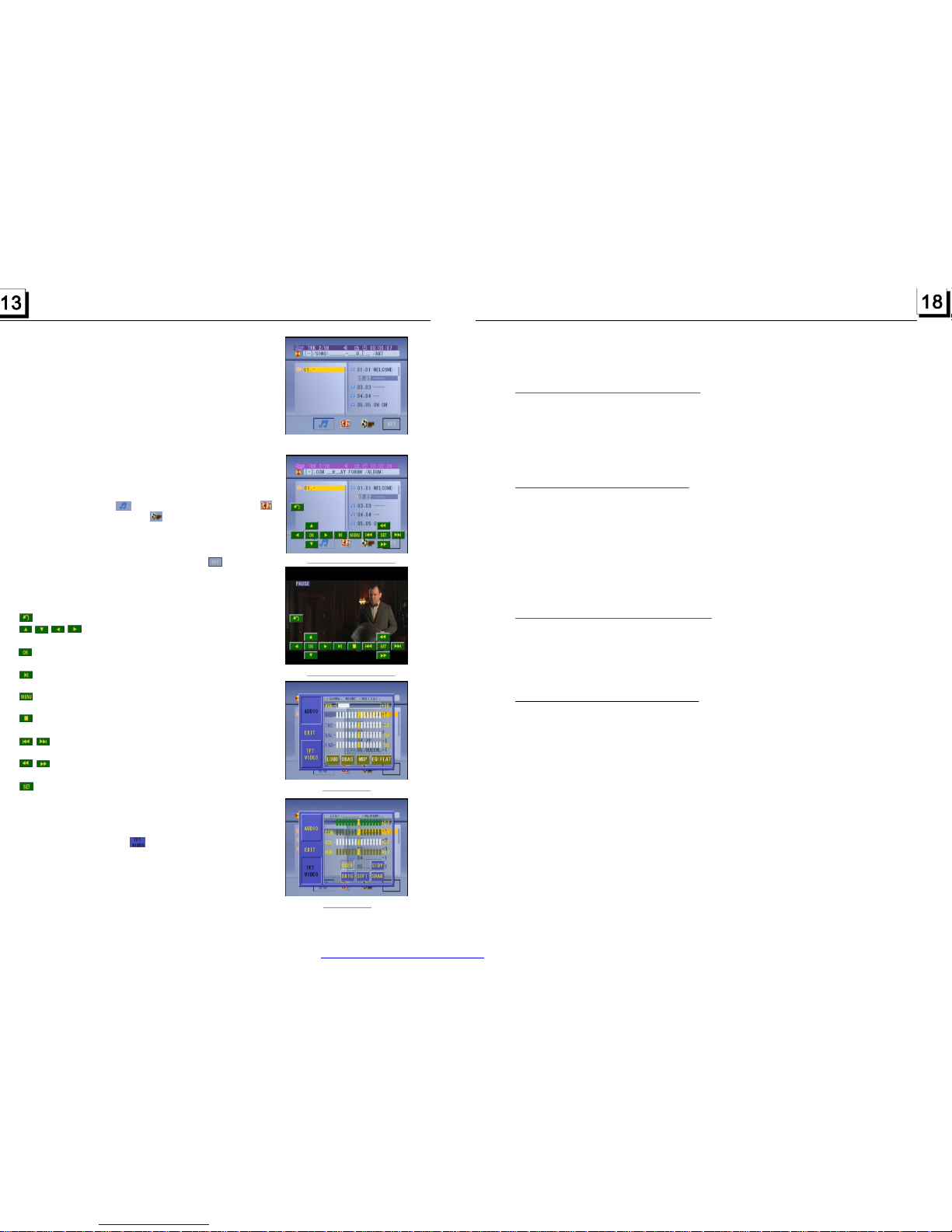
MMCcardintotheUSBjackorSD/MMCcardslot
(removethefrontpaneltoinsertSD/MMCcard).
ToremovetheUSBintheUSBjack,presstheSTOP
buttontwiceandthenremovetheUSB.
ToremovetheSD/MMCcardfromtheSD/MMCcard
slot,presstheSTOPbuttontwiceandthenpushinthe
cardandthenpullitoutoftheCardSlot.
:Ifthedisc,USBorSD/MMCcardincludes
folder(forMP3/WMA/MP4/JPEGfiles),afterloading,
itwilldisplayarootastherightimage.Onthebottom
sideoftheroot,theiconisforaudiofiles;the
iconisforimagefiles;theiconisforVideofiles.
Thecursorwillnotmovetotherightiftherearenot
filesofthatformattobeselected.
:Duringplayback,tappingtheiconin
theroot(forMP3/WMA/MP4/JPEG)oranyplaceon
thescreen(forCD/VCD/DVD/MP4/JPEG)canpop
upthekeyboardinterfaceastherightimage.
:TappingitcanpopupModeMenu.
:DirectionbuttonssameasthecorrespondingbuttonsontheRemoteControl.
:Sameasthecorrespondingbuttononthe
RemoteControl.
:Sameasthecorrespondingbuttononthe
RemoteControloronthefrontpanel.
:SameastheTITLEbuttonontheRemote
Control(availableonlyforDVD).
:Tappingitcanstopplaybackandpopupthe
root.(existonlyforMP4/JPEG)
:Tappingoneofthemcanselectnextor
previouschapter/track.
:Tappingoneofthemcanswitchesbetween
thespeedlevelsoffastforwardorrewind.
:TappingitcanpopuptheAUDIOinterfaceof
theSETMenuastherightimage.Intheinterface,
youcanadjustthelevelsofVOLUME,BASS,
TREBLE,BALANCEandFADER;canturnonoroff
LOUD,DBASandMBP;canselectyourdesired
EQmode.TappingiconcanpopuptheTFT
VIDEOinterfaceoftheSETMenuastheright
image.Inthisinterface,youcanadjustthelevels
ofBRIGHTNESS,CONTRAST,COLORandHUE;
youcanalsoadjustTransparencybytapping
USER,STDY,BRIG,SOFTandSHAR.
TappingEXITiconcanexittheSETMenu.
*Itsupportsversion1.1/2.0USBand8GBSDCARD.
Remark
Remark
RootinterfaceforMP3/WMA/MP4/JPEG
Keyboardinterface-1
Keyboardinterface-2
SETMenu-1
SETMenu-2
ZOOMx2,ZOOMx3,ZOOMx4,ZOOMx1/2,ZOOMx1/3,ZOOMx1/4,ZOOMOFF.
Pressoneofthe^/v/>/<buttonstoselecttheareayouwanttoenlarge.
WhenplayingDVD,presstheSUBTITLEbuttonrepeatedlytoselectthe
languageofthecaptionorturnoffthecaption.(dependonthemediaused.)
WhenplayingVCD/MP3/WMA/CD,thebuttonisnotavailable.
1.WhenplayingDVD,presstheAUDIObuttonrepeatedlyontheIRremote
controltoselectthedesiredlanguagetype.(dependonthemediaused)
2.WhenplayingVCD,presstheAUDIObuttonrepeatedlytoselectthesound
modeoftheMONOL,MONOR,MIXMONOandStereo,nolanguagefunction.
3.WhenplayingCD/WMA/MP3,theAUDIObuttonisdisabled.
DuringplaybackofDVD/VCD,presstheBAND(P/N)buttononthefront
panelorontheremotecontrolrepeatedlytochangetheVIDEOSIGNAL
SYSTEMmode.
timeoftheplayingchapter,theremainedtimeofthe
playingchapter,theelapsedtheremainedtimeofthe
playingtitle,
2.WhenplayingVCD/CD,presstheOSDbuttonrepeatedlyontheremote
controltoturnon/offtheplaybackstatus.Whenitison,itwilldisplaythe
informationsuchas:theserialnumberoftheplayingtrack,theelapsedtime
oftheplayingtrack,theremainedtimeoftheplayingtrack,theelapsedtime
ofthedisc,theremainedtimeofthedisc.
3.WhenplayingMP3/WMA,presstheOSDbuttonrepeatedlyontheremote
controltoturnon/offtheplaybackstatus.Whenitison,itwilldisplaythe
informationsuchas:theserialnumberoftheplayingtrack,theelapsedtime
oftheplayingtrack,theremainedtimeoftheplayingtrack.
4.16ChangetheCaptionLanguage
4.17ChangetheAudioLanguage
4.18ChangetheVideoSignalSystem
4.19LookoverthePlaybackStatus
1.WhenplayingDVD,presstheOSDbuttonrepeatedlyontheremotecontrol
toturnon/offtheplaybackstatus.Whenitison,itwilldisplaytheinformation
suchas:theserialnumberoftheplayingtitle,theserialnumberoftheplaying
chapter,theelapsed
timeoftheplayingtitle,
etc.
PDF created with FinePrint pdfFactory trial version http://www.pdffactory.com
Page 15
4.2PausePlayback
4.3StopPlayback
4.4SelectChapter/Trackwiththe>>|or|<<Button
4.5SelectChapter/TrackwiththeNumberButtons
4.6SelectChapter/TrackwiththeRoot/PBCMenu(Ifthediscincludesthe
root/PBCmenu)
WhenplayingDVD
WhenplayingDVD/VCD/CD/MP3/WMA,pressthePAUSEbuttononIR
remotecontroltopausetheplayback,pressthePLAYbuttontoresume
normalplayback.
WhenplayingDVD/VCD/MP3/WMA/CD,presstheSTOPbuttononceto
pausetheplayback,thenpressthePLAYbuttontoresumethenormal
playback;presstheSTOPbuttontwicetofullstoptheplayback,thenpress
thePLAYbuttontostartplayingfromthebeginningofthefirstchapter/track.
Pressthe>>|or|<<buttonduringplaybacktoselectthenextorprevious
chapter/tracktoplayback.
Note:Pressthe>>|or|<<buttonmultipletimestoadvance multiplechapters/
tracksforwardorbackward.
WhenplayingDVD/VCD(PBCOFF)/MP3/WMA/CD,pressoneofthe1~9
andthe0/10numberbuttonstodirectlyselectandplaythe1stto10thtrack
/chapter(the0/10buttonisusedasthe10button).
Ifyouwanttoplaythetrack/chapterlargerthan10,usethe10+,1~9and
0/10button.Example1:toplaythe13thtrack/chapter,firstpressthe10+
buttononce,thenpressthe3button.Example2:toplaythe34thtrack/
chapter,firstpressthe10+button3times,thenpressthe4button.
(The0/10buttonisusedasthe0button)
Note:longpressingthe+10or-10buttoncanplaythenext10thorprevious
10thchapter/track(onlyforMP3/WMA).
1.PresstheTITLEbuttonontheremotecontroltodisplaythetitlelist.
4.11PlaybackinScanMode
4.12Playbackfromaspecifiedchapter/trackoraspecifiedtime
4.13PlaybackinRandom
4.14PlaybackinDifferentView-Angle
4.15PlaybackinZoomMode
1.WhenplayingVCD(PBCOFF)/CD,presstheINTbuttontoplaytheprevious
secondspartofeachtrackonthedisc.PresstheINTbuttonagainto
resumenormalplayback.
2.WhenplayingDVD/MP3/WMA,theINTbuttonisnotavailable.
1.WhenplayingDVD,presstheSEARCHbuttontodisplayainterfaceand
highlightthetitleitem,thenusethenumberbuttonstoinputtheserialnumber
ofthetitle;usethedirectionbuttonstohighlightthechapteritem,thenuse
thenumberbuttonstoinputtheserialnumberofthechapter;youcanstilluse
thedirectionbuttonstohighlightthetimeitem,thenusethe numberbuttons
toinputthedesiredtimetostartplayback;finallypresstheOKorPLAYbutton
toplaytheselectedchapterorplayfromtheselectedtime.
2.WhenplayingVCD/MP3/WMA/CD,presstheSEARCHbuttontodisplaya
interfaceandhighlightthetrackitem,thenusethenumberbuttonstoinput
theserialnumberofthetrack;youcanstillusethedirectionbuttonsto
highlightthetimeitem,thenusethenumberbuttonstoinputthedesired
timetostartplayback;finallypresstheOKorPLAYbuttontoplaytheselected
trackorplayfromtheselectedtime.
WhenplayingDVD/VCD(PBCOFF)/MP3/WMA/CD,presstheRDMbuttonto
switchbetweenRANDOM(ON)/RANDOMOFF.WheninRANDOM(ON)mode,
itwillplayinrandom.
1.WhenplayingVCD/MP3/WMA/CD,theVIEW-ANGLEbuttonontheIRremote
controlisnotavailable.
2.WhenplayingDVD,presstheVIEW-ANGLEbuttonrepeatedlyontheIR
remotecontroltoviewindifferentangle.(ThisfunctionisonlyfortheDVD
mediawithANGLEfunction)
Invideo/imagemode,duringplayback,presstheZOOMbuttoncontinuously
toenlargeacertainareaoftheimagesonthescreenwiththesemultiples:
15
PDF created with FinePrint pdfFactory trial version http://www.pdffactory.com
Page 16

2.Pressthedirectionbuttonstoselectyourdesiredtitle,andthenpressthe
OKorPLAYbuttontoopentherootmenuoftheselectedtitle.
3.Pressthedirectionbuttonstoselectyourdesiredchapter,finallypressthe
OKorPLAYbuttontoplaytheselectedchapter.
Duringplayback,pressingtheMENUbuttoncandirectlydisplaytheroot
menuofthetitlethatisplaying.
1.WhenstartingtoturnonthePBCfunction,itwillplayfromthebeginningof
thedisctillitdisplaythePBCmenuonthescreenifthediscincludethePBC
menu.
2.Pressthenumberbuttonstoselectyourdesiredtracktoplay.
1.Therootmenuisdisplayedonthemonitorscreenallthetime(andtheTITLE
orMENUbuttonisnotavailable).
2.PressthedirectionbuttonstoselectyourdesiredFOLDER,thenpressthe
OKorPLAYbuttontoopentheFOLDER,andthenpressthedirectionbuttons
toselectyourdesiredfile,finallypresstheOKbuttontoplaytheselectedfile.
InCDmode,theTITLE,PBC,MENUbuttonsaredisabled.
Duringnormalplayback,consecutivepressingofthe>>|or|<<button
willfastforwardorrewindatthefollowingspeeds:x2,x4,x8,x20,normal.
Duringthisoperation,pressthePLAYbuttontoresumenormalplayback.
Duringplayback,presstheSLOW_FWDbuttontoexecutetheSlowForward
function.
WitheachconsecutivepressingoftheSLOW_FWDbutton,theplayback
speeddecreases.ThespeedlevelsinSlowForwardasfollows:
x1/2,x1/3,x1/4,x1/5,x1/6,x1/7,normal.
InVCDmode
InMP3/WMAmode
4.7PlaybackwithSpeed
4.8PlaybackwithSlowSpeed
Duringslowforward,pressthePLAYbuttontoresumenormalplayback.
Thisfunctionisonlyforvideo.
Iftheunitiscurrentlyplayingvideo,presstheSTEPbuttonconsecutively
todisplaystillframestepbystep.
PressthePLAYbuttontoresumenormalplayback.
1.InthemodeofDVDplayback:
PresstheRPTbuttontoselectREPCHAPTER,REPTITLE,REPALL
orREPOFF.
2.InthemodeofVCD(PBCOFF)/CDplayback:
presstheRPTbuttontoselectREPONE,REPALLorOFF.
WhenitisinthestateofPBCON,duringVCDdiscplaying,theRPT
buttonarenotavailable.
3.InthemodeofMP3/WMAplayback:
PresstheRPTbuttontoselectREPONE,REPDIR,REPALLorOFF.
Pressthebuttonifyouwanttorepeataspecificsegmentonadisc
thatyoudefine:
1.Pressthebuttonatapoint(A)whereyouwantittobethestartpoint
oftherepeatsegment.Pressthebuttonagainatapoint(B)whereyou
wantittobetheterminalpointoftherepeatsegment.Thenitwillplaythe
segmentrepeatedly.
2.TocanceltheA-Brepeatmodeandresumenormalplayback,pressthe
buttonforthethirdtime.
4.9Displaystillframestepbystep
4.10PlaybackRepeatedly
4.10.1ONE/ALLRepeat
4.10.2A-BRepeat
A-B
A-B
A-B
A-B
Note:
DuringVCD/MP3/WMA/CDplayback,pointsAandBmustbewithinthe
sametrack.
DuringDVDplayback,pointsAandBcanbeselectedfromdifferentchapters.
PDF created with FinePrint pdfFactory trial version http://www.pdffactory.com
 Loading...