

Page 1
The new digital security system from Squire
User Guide
Guía del usuario
Bedienungsanleitung
Guide de l'utilisateur
Handleiding
Manuale d'uso
bluetooth bike lock
Page 2
GB
Contents
ES
Índice
DE
Inhaltsverzeichnis
FR
Contenu
NL
Inhoud
IT
Indice
GB DE
First time use 3
Important! Active mode 7
To open - Active mode ON 8
To open - Active mode OFF 9
To close 10
Features 11
How to charge 13
Frequently asked questions 15
Carrying bracket fitting instructions 16
Erste Nutzung 3
Wichtig! Aktivmodus 7
Öffnen - Aktivmodus EIN 8
Öffnen - Aktivmodus AUS 9
Verschließen 10
Funktionen 11
So laden Sie Ihr Schloss 13
Häufig gestellte Fragen 15
Anleitung für die Montage der
Halterung
16
ES
Utilizar por primera vez 3
Importante - Modo Activo 7
Para abrir - «modo activo»
ACTIVADO
Para abrir - «modo activo»
DESACTIVADO
Para cerrar 10
Características 11
Cómo se carga 13
Preguntas frecuentes 15
Instrucciones de instalación del
soporte de transporte
1
FR
Première utilisation 3
Important ! Mode actif 7
Pour ouvrir - Mode actif ON 8
8
Pour ouvrir - Mode actif OFF 9
Pour fermer 10
9
Caractéristiques 11
Comment recharger 13
Foire aux questions 15
Instructions de montage du
support de transport
16
16
Page 3
NL
Eerste gebruik
Belangrijk! Actieve modus 7
Om te openen - Actieve modus AAN 8
Om te openen - Actieve modus UIT 9
Om te sluiten 10
Kenmerken 11
Hoe te laden 13
Veel gestelde vragen 15
Montage-instructies voor de
draagbeugel
IT
Primo utilizzo 3
Importante! Modalità attiva 7
Apertura - Modalità attiva ON
Apertura - Modalità attiva OFF
Chiusura 10
Caratteristiche 11
Ricarica 13
Domande frequenti 15
Istruzioni per il montaggio della
staffa di supporto
Contents
3
16
8
9
16
2
Page 4
GB
Using Inigma lock for the first time
ES
Usar el candado inigma por primera vez
DE
Wenn Sie das Inigma Schloss zum ersten Mal nutzen
FR
Première utilisation de l'antivol Inigma
NL
Het Inigma-slot voor de eerste keer gebruiken
IT
Utilizzo del lucchetto Inigma per la prima volta
1
Inigma
Bluetooth bike lock control
Squire locks
Get
Details Reviews Related
app
settings
back
add sharer
passive mode
your bike lock
store
available devices
your bike lock
your other bike lock - 2
your other bike lock - 2
send invite
remove
unlock sharing activities settings
GB
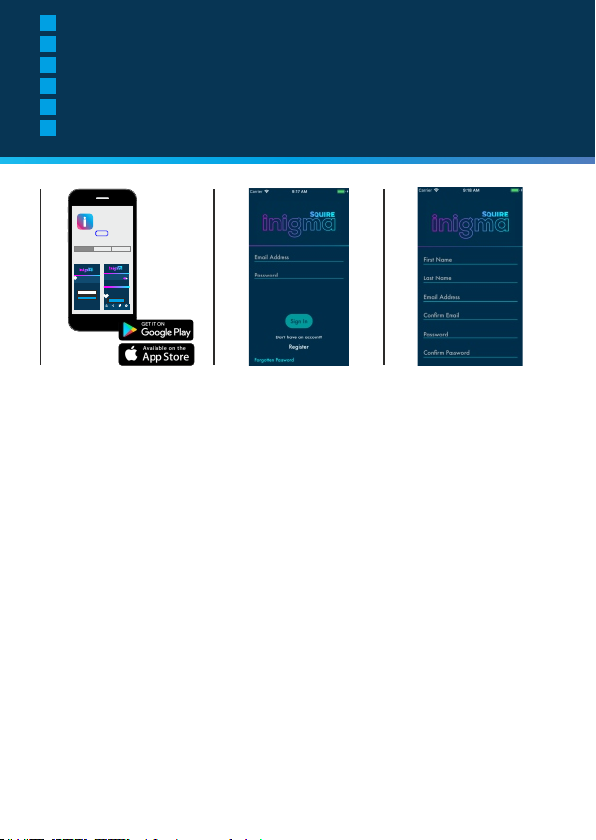
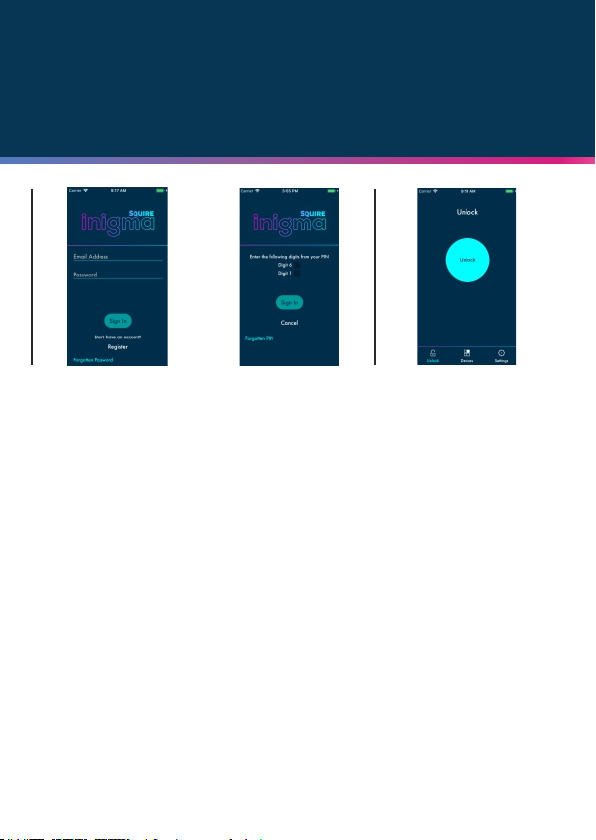
1. Go to the appstore or Googleplay and
search for Inigma lock. Download the app
2. On the first app screen click on
REGISTER
3. On the registration page you will
register using email, create password
and create a PIN code. You will then be
sent a confirmation email. Click on the
link in the email to complete
registration.
4. Return to the app.
Enter your email and password.
5. The first time you access the app you
will be asked to enter two digits from
your security code. This will only be
requested the first time that you use the
app.
6. You will be taken to the default app
screen. Click the DEVICES icon at the
bottom of the screen
Continued on
next page
3
2
ES DE
1. Abra la Appstore o Googleplay y
busque Inigma lock. Descargue la
aplicación.
2. En la primera pantalla de la aplicación,
pulse en REGISTER (registrar).
3. Tendrá que registrarse en la página
de registro utilizando su correo
electrónico; cree una contraseña y
código PIN. Recibirá un correo
electrónico de confirmación. Haga clic
en el enlace que contiene el correo
4. Vuelva a la aplicación. Introduzca
su correo electrónico y contraseña.
5. La primera vez que acceda a la
aplicación le solicitará que introduzca
dos cifras de su código de seguridad.
Solo se lo pedirá la primera vez que
utilice la aplicación.
6. Se abrirá la pantalla por defecto.
Pulse el icono de DEVICES
(dispositivos) en la parte inferior de la
pantalla.
Continua en la
página siguiente
1. Öffnen Sie den Appstore oder Googleplay
und suchen Sie nach Inigma Schloss. Laden
Sie die App herunter!
2. Klicken Sie auf dem Startbildschirm der
App auf ANMELDEN
3. Auf der Anmeldeseite können Sie
sich unter Angabe Ihrer E-Mail-Adresse
und Erstellung eines Passwort und
eines PIN-Codes registrieren.
Anschließend erhalten Sie eine
Bestätigungs-E-Mail. Klicken Sie auf
den in der E-Mail enthaltenen Link, um
den Anmeldungsprozess
abzuschließen.
4. Kehren Sie zur App zurück.
Geben Sie Ihre E-Mail-Adresse und
Passwort ein.
5. Wenn die App zum ersten Mal
benutzen, werden Sie aufgefordert, zwei
Zeichen Ihres Sicherheitscodes
einzugeben. Dies ist nur beim ersten
Zugriff auf die App erforderlich.
6. Sie werden auf die Standardanzeige
der App weitergeleitet. Klicken Sie auf
das GERÄTE Symbol im unteren
Bereich des Bildschirms.
Fortsetzung auf der
nächsten Seite
3
Page 5
First time use
4
FR NL
1. Allez dans l'appstore ou Googleplay et
cherchez Antivol Inigma. Téléchargez
l'application
2. Sur le premier écran de l'application,
cliquez sur ENREGISTRER.
3. Sur la page d'inscription, vous vous
inscrivez par courriel, créez un mot de
passe et créez un code PIN. Vous
recevrez ensuite un courriel de
confirmation. Cliquez sur le lien dans le
courriel pour compléter l'inscription.
4. Retournez à l'application. Entrez
votre courriel et votre mot de passe.
5. La première fois que vous accédez à
l'application, on vous demandera d'entrer
les deux chiffres de votre code de
sécurité. Ceci ne sera demandé que la
première fois que vous utilisez
l'application.
6. Vous serez dirigé vers l'écran de
l'application par défaut. Cliquez sur
l'icône APPAREILS au bas de l'écran.
1. Ga naar de Appstore of Googleplay en
zoek naar Inigma-slot Download de app
2. Op het eerste scherm op
REGISTREREN klikken
3. Op de registratiepagina zult u zich
met behulp van een e-mail registreren
en een wachtwoord en een PIN-code
creëren. U zal een e-mail met een
bevestiging ontvangen. Klik op de link
in de e-mail om de registratie te
voltooien.
4. Terug naar de app. Geef uw email en wachtwoord in.
5. De eerste maal dat u de app opent,
zal u worden gevraagd om twee cijfers
van uw beveiligingscode in te geven. Dit
zal slechts worden gevraagd bij de
eerste keer dat u de app gebruikt.
6. U zult naar het standaardscherm van
de app worden geleid. Klik op het
TOESTELLEN-icoon onderaan het
scherm
5
6
IT
1. Vai all'appstore o su Google Play e
cerca il lucchetto Inigma. Scarica l'app
2. Nella prima schermata dell'app
clicca su REGISTER (registrati)
3. Nella pagina di registrazione dovrai
inserire il tuo indirizzo e-mail, creare la
password e un codice PIN. Ti verrà
quindi inviata un'e-mail di conferma.
Clicca sul link che troverai nell'e-mail
per completare la registrazione.
4. Torna all'app. Inserisci il tuo
indirizzo e-mail e la password.
5. La prima volta che accedi all'app ti
verrà chiesto di inserire due cifre del tuo
codice di sicurezza. Questa richiesta
riguarda unicamente la prima volta che
usi l'app.
6. Verrai indirizzato alla schermata
predefinita dell'app. Clicca sull'icona
DEVICES (dispositivi) nella parte
inferiore dello schermo
Suite à la page
suivante
Vervolg op de
volgende pagina
Vai alla pagina
successiva
4
Page 6
GB
Using Inigma lock for the first time
ES
Usar el candado inigma por primera vez
DE
Wenn Sie das Inigma Schloss zum ersten Mal nutzen
FR
Première utilisation de l'antivol Inigma
NL
Het Inigma-slot voor de eerste keer gebruiken
IT
Utilizzo del lucchetto Inigma per la prima volta
7
8
GB ES DE
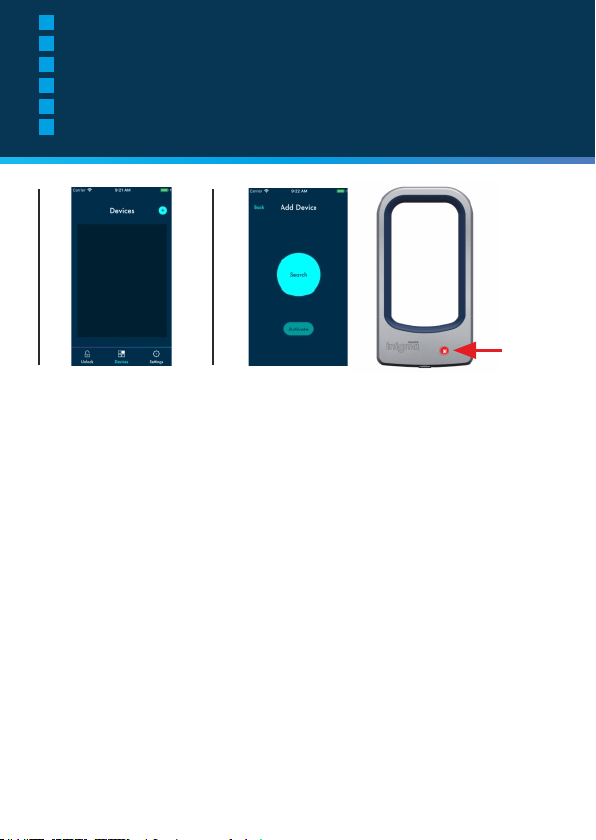
7. Click on the plus sign, top right of
the screen to add a device.
8. With the add device screen in view,
first click on the 'wake' button on the
inigma lock. When you see a red light
on the lock, click on SEARCH on the
app screen.
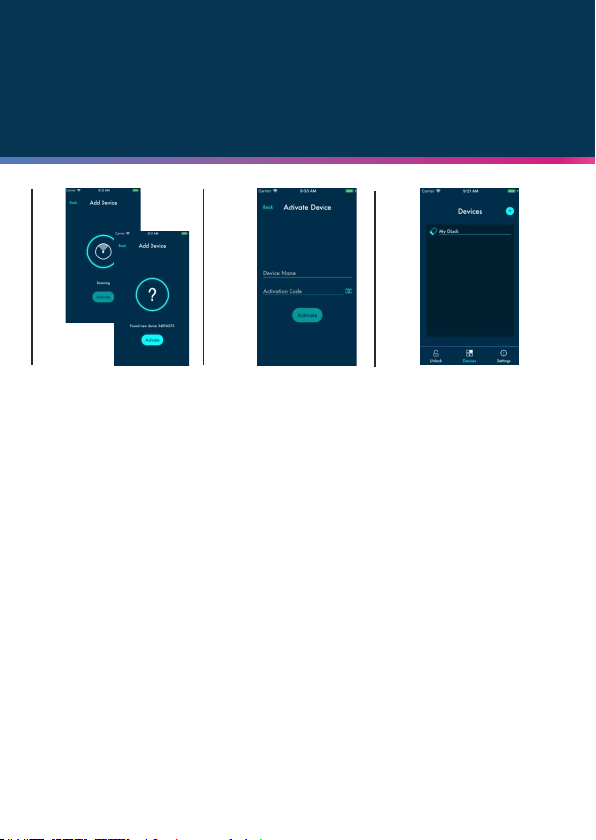
9. The app will scan to find your lock.
When the app has found your lock,
click on the ACTIVATE button.
10. To activate device, give your lock
a name. Click on the camera icon and
scan the QR activation code provided
in the in Then igma box packaging.
press activate
11. Once activated your app will show
the DEVICES screen where your lock
will be listed.
7. Pulse el símbolo de más (+), en la
parte superior derecha de la pantalla
para añadir un dispositivo.
8. Con la pantalla de añadir
dispositivo abierta, pulse el botón
«wake» del candado inigma. Cuando
vea una luz roja en el candado, pulse
SEARCH (buscar) en la pantalla de la
aplicación.
9. La aplicación realizará un escáner
para encontrar el candado. Cuando lo
haya encontrado, pulse el botón
ACTIVATE (activar).
10. Para activar el dispositivo, dele un
nombre al candado. Pulse en el icono
de la cámara y escanee el código de
activación QR que encontrará en la
caja del inigma. A continuación, pulse
activar.
11. Una vez que se haya activado, la
aplicación mostrará la pantalla de
DISPOSITIVOS donde aparecerá su
candado.
7. Klicken Sie zum Hinzuzufügen
eines Geräts auf das Plussymbol (+)
oben rechts am Bildschirm.
8. Sobald die Gerät hinzufügenAnzeige sichtbar ist, klicken Sie
zunächst auf den 'Einschalt'-Knopf
des Inigma-Schlosses. Sobald am
Schloss ein rotes Licht aufleuchtet,
klicken Sie am App-Bildschirm auf
SUCHEN.
9. Die App scannt ihre Umgebung, um
Ihr Schloss zu finden. Wenn die App
Ihr Schloss gefunden hat, klicken Sie
auf die Schaltfläche AKTIVIEREN.
10. Geben Sie einen Namen für Ihr
Schloss ein, um es zu aktivieren.
Klicken Sie auf das Kamerasymbol
und scannen Sie den QRAktivierungscode, der sich auf der
Inigma-Verpackung befindet ein.
Drücken Sie anschließend auf
aktivieren.
11. Sobald Ihr Schloss aktiviert wurde,
wird es in der GERÄTE Anzeige Ihrer
App angezeigt.
5
Page 7
First time use
9
FR NL
7. Cliquez sur le signe plus (+), en
haut à droite de l'écran pour ajouter
un appareil.
8. Une fois que l'écran d'ajout
d'appareil apparait, cliquez d'abord
sur le bouton 'réveil' sur l'antivol
inigma. Lorsque vous apercevez une
lumière rouge sur l'antivol, cliquez sur
RECHERCHER sur l'écran de
l'application.
9. L'application va scanner pour
trouver votre antivol. Lorsque
l'application a trouvé votre antivol,
cliquez sur le bouton ACTIVER.
10. Pour activer l'appareil, attribuez un
nom à votre antivol. Cliquez sur
l'icône en forme d'appareil photo et
scannez le code d'activation QR fourni
dans l'emballage de la boîte inigma.
Appuyez ensuite sur Activer
11. Une fois activée, votre application
affichera l'écran APPAREILS où votre
antivol sera listé.
7. Klik op het plusteken (+) bovenaan
rechts op het scherm om een toestel
toe te voegen.
8. Wanneer u het scherm om een
toestel toe te voegen ziet, eerst op de
”Wekken”-knop op het inigma-slot
drukken. Wanner u een rood licht op
het slot ziet, op het app-scherm op
ZOEKEN drukken.
9. De app zal scannen om uw slot te
vinden. Klik op de toets ACTIVEREN
wanneer de app uw slot heeft
gevonden.
10. Geef uw slot een naam om het
toestel te activeren. Klik op het
camera-icoon en scan de QRactiveringscode die in de verpakking
van de inigma wordt meegeleverd.
Druk vervolgens op activeren
11. Eens geactiveerd, zal de app het
TOESTELLEN-scherm tonen, waarop
uw slot zal vermeld zijn.
10
11
IT
7. Clicca sul segno più (+) in alto a
destra nella schermata per
aggiungere un dispositivo.
8. Tenendo aperta questa schermata,
premi il pulsante "Wake" (sveglia) sul
lucchetto Inigma. Non appena appare
una luce rossa sul lucchetto, clicca su
SEARCH (cerca) nella schermata
dell'app.
9. L'app eseguirà una scansione per
trovare il lucchetto. Quando l'app avrà
trovato il lucchetto, clicca sul pulsante
ACTIVATE (attiva).
10. Per attivare il dispositivo, dai un
nome al lucchetto. Clicca sull'icona
della fotocamera e scansiona il codice
di attivazione QR fornito nella
confezione del prodotto Inigma.
Quindi premi ACTIVATE (attiva).
11. Una volta attivata, l'app mostrerà
la schermata DEVICES
(DISPOSITIVI) in cui comparirà il
lucchetto.
6
Page 8
GB
Important - Active mode
ES
Importante - Modo Activo
DE
Wichtig - Aktivmodus
FR
Important - Mode actif
NL
Belangrijk - Actieve modus
IT
Importante - Modalità attiva
Important!
Active mode
GB
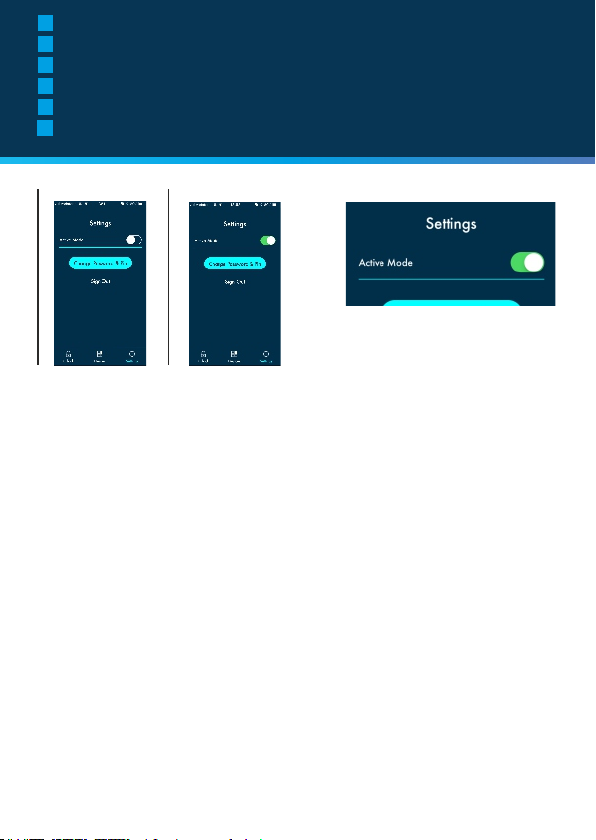
In settings, you can choose to set 'active mode' to
on or off.
If active mode is turned on, your phone will be
constantly scanning for your inigma lock making the
unlock procedure slightly quicker.
If active mode is turned off, you will preserve your
phones battery power but opening your inigma lock
requires a slightly different procedure.
The open procedure for 'active on' and 'active off'
are described on the next two pages.
IMPORTANT: If you lock your bicycle but keep
your phone within 10m of the lock ALWAYS turn
'active mode' off to prevent unauthorised access
to your lock.
ES
En configuración, podrá seleccionar activar o
desactivar el «modo activo».
Si el modo activo está activado, su teléfono
detectará de forma continua el candado inigma, lo
cual le permitirá realizar el procedimiento de
desbloqueo un poco más rápido.
Si el modo activo está desconectado, consumirá
menos batería del móvil, pero para desbloquear el
candado inigma será necesario un procedimiento
un poco diferente.
El procedimiento de desbloqueo para el «modo
activo activado» y el «modo activo desactivado» se
describe en las siguientes dos páginas.
IMPORTANTE: Si canda su bicicleta, pero el
teléfono se encuentra a menos de 10 m del
candado, desactive SIEMPRE el «modo activo»
para evitar un acceso no autorizado al candado.
7
DE
In den Einstellungen können Sie den 'Aktivmodus'
ein- oder ausstellen.
Wenn der Aktivmodus eingeschaltet ist, sucht Ihr
Telefon kontinuierlich nach Ihrem Inigma-Schloss,
was den Entsperrungsvorgang geringfügig
beschleunigt.
Wenn der Aktivmodus deaktiviert wurde,
verlängern Sie die Akkulaufzeit Ihres Telefons, das
Öffnen Ihres Inigma-Schlosses erfordert dann
jedoch eine leicht abweichende Vorgehensweise.
Die Vorgehensweise zur Öffnung im 'Aktiv ein' und
'Aktiv aus' Modus wird auf den nächsten beiden
Seiten beschrieben.
Wichtig: Wenn Sie Ihr Fahrrad absperren und
sind mit Ihrem Telefon in einem Umkreis von
10m vom Schloss, so schalten Sie den
Aktivmodus IMMER AUS, um das Schloss
vor unbefugtem Zugriff zu schützen.
FR
Dans les réglages, vous pouvez choisir d'activer
(on) ou de désactiver (off) le 'mode actif'.
Si le mode actif est activé, votre téléphone
recherche en permanence votre antivol inigma, ce
qui accélère légèrement la procédure de
déverrouillage.
Si le mode actif est désactivé, vous préserverez
l'alimentation de la batterie de votre téléphone,
mais l'ouverture de votre antivol inigma
nécessitera une procédure légèrement différente.
Les procédures ouvertes pour 'actif on' et 'actif off'
sont décrites dans les deux pages suivantes.
IMPORTANT : Si vous verrouillez votre vélo
mais que vous gardez votre téléphone à moins
de 10 m de l'antivol, désactivez TOUJOURS le
'mode actif' pour empêcher l'accès non
autorisé à votre antivol.
NL
In de instellingen kunt u ervoor kiezen om de
”actieve modus” op aan of uit te zetten.
Indien de actieve modus ingeschakeld is, zal uw
telefoon voortdurend naar uw inigma-slot zoeken
wat de ontgrendelingsprocedure iets sneller maakt.
Indien de actieve modus uitgeschakeld is, zal u uw
batterijen sparen, maar het openen van uw inigmaslot vereist een iets andere procedure.
De openingsprocedure bij ”actief aan” en ”actief
uit” wordt op de volgende twee pagina's
beschreven.
BELANGRIJK: Indien u uw fiets vergrendelt,
maar u houdt uw telefoon binnen 10 meter
afstand van het slot, moet u ALTIJD de ”actieve
modus” uitzetten om een ongeoorloofde
toegang tot uw slot te voorkomen.
IT
Nelle impostazioni, puoi scegliere di attivare o
disattivare 'active mode' (la modalità attiva).
Se è stata abilitata la modalità attiva, il telefono
eseguirà costantemente la scansione del lucchetto
Inigma, rendendo la procedura di sblocco
leggermente più veloce.
Se è stata disabilitata la modalità attiva,
proteggerai la carica della batteria del telefono, ma
l'apertura del lucchetto Inigma richiederà una
procedura leggermente diversa.
La procedura di apertura in caso di 'modalità attiva
abilitata' e 'modalità attiva disabilitata' è descritta
nelle prossime due pagine.
IMPORTANTE: se blocchi la bicicletta ma il
telefono resta a una distanza di 10 m dal
lucchetto, disabilita SEMPRE la "modalità
attiva" per impedire l'accesso non autorizzato
al lucchetto.
Page 9
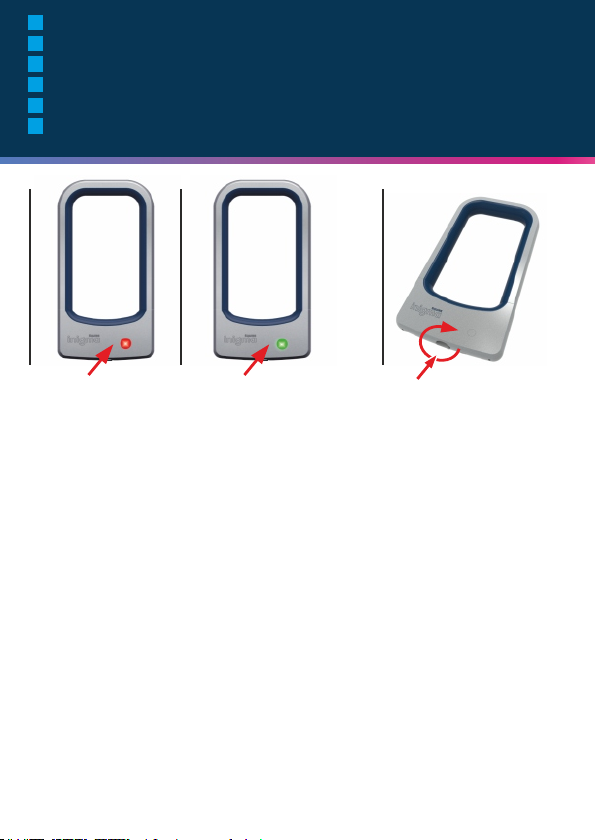
GB
To open - active ON
ES
Para abrir - «modo activo» ACTIVADO
DE
Öffnung - Aktiv EIN
FR
Pour ouvrir - actif ON
NL
Op te openen - actief AAN
IT
Apertura - Modalità attiva abilitata
To open
active ON
1
GB
1. Press the 'wake' button on your inigma lock. It
will turn red while it connects to your phone.
2. The 'wake' button will then turn green.
3. Turn the button on the bottom of your lock in a
clockwise direction. You can now free the top
section of the lock from the bottom section.
IMPORTANT: If you lock your bicycle but keep
your phone within 10m of the lock ALWAYS turn
'active mode' off to prevent unauthorised
access to your lock.
ES
1. Pulse el botón «wake» del candado inigma. Se
pondrá rojo mientras conecta con su teléfono.
2. Después, el botón «wake» se pondrá verde.
3. Gire el botón de la parte inferior del candado en
sentido horario. Ahora puede soltar la parte
superior del candado de la parte inferior.
IMPORTANTE: Si canda su bicicleta, pero el
teléfono se encuentra a menos de 10 m del
candado, desactive SIEMPRE el «modo activo»
para evitar un acceso no autorizado al candado.
2
DE NL
1. Drücken Sie den 'Einschalt'-Knopf auf Ihrem
Inigma-Schloss. Während des
Verbindungsvorgangs leuchtet es rot auf.
2. Anschließend leuchtet der 'Einschalt'-Knopf in
Grün.
3. Drehen Sie den Knopf auf dem Unterteil des
Schlosses im Uhrzeigersinn. Nun können Sie den
oberen Teil vom unteren Teil des Schlosses
abnehmen.
Wichtig: Wenn Sie Ihr Fahrrad absperren und
sind mit Ihrem Telefon in einem Umkreis von
10m vom Schloss, so schalten Sie den
Aktivmodus IMMER AUS, um das Schloss vor
unbefugtem Zugriff zu schützen.
FR
1. Appuyez sur le bouton 'réveil' de votre antivol
inigma. Il devient rouge lorsqu'il se connecte à
votre téléphone.
2. Le bouton 'réveil' deviendra alors vert.
3. Tournez le bouton au bas de votre antivol dans
le sens horaire. Vous pouvez désormais libérer la
partie supérieure de l'antivol à partir de la partie
inférieure.
IMPORTANT : Si vous verrouillez votre vélo
mais que vous gardez votre téléphone à moins
de 10 m de l'antivol, désactivez TOUJOURS le
'mode actif' pour empêcher l'accès non autorisé
à votre antivol.
3
1. Druk op de ”Wekken”-knop op uw inigma-slot.
Het zal rood worden terwijl het een verbinding
maakt met uw telefoon.
2. De ”Wekken”-knop zal groen worden.
3. Draai de knop aan de onderkant van uw slot in
wijzerzin. U kunt nu het bovenste gedeelte van u
slot losmaken van het onderste gedeelte.
BELANGRIJK: Indien u uw fiets vergrendelt,
maar u houdt uw telefoon binnen 10 meter
afstand van het slot, moet u ALTIJD de ”actieve
modus” uitzetten om een ongeoorloofde
toegang tot uw slot te voorkomen.
IT
1. Premi il pulsante "wake" (sveglia) sul lucchetto
Inigma. Diventerà rosso mentre si collega al
telefono.
2. Il pulsante "wake" diventerà quindi verde.
3. Ruota il pulsante nella parte inferiore del
lucchetto in senso antiorario. Ora puoi liberare la
parte superiore del lucchetto dalla parte inferiore.
IMPORTANTE: se blocchi la bicicletta ma il
telefono resta a una distanza di 10 m dal
lucchetto, disabilita SEMPRE la "modalità
attiva" per impedire l'accesso non autorizzato
al lucchetto.
8
Page 10
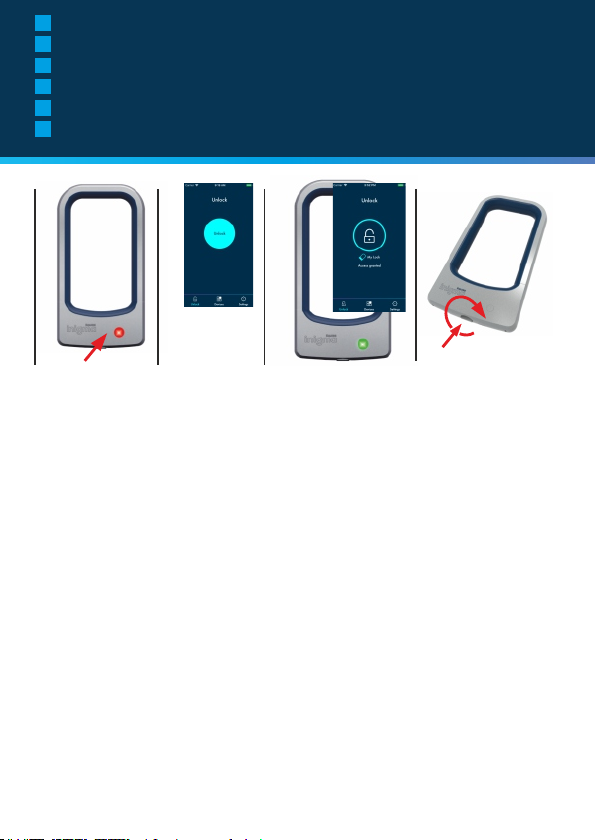
GB
To open - active OFF
ES
Para abrir - «modo activo» DESACTIVADO
DE
Öffnen - Aktiv AUS
FR
Pour ouvrir - actif OFF
NL
Om te openen - actief UIT
IT
Apertura - Modalità attiva disabilitata
To open
Active OFF
1
GB
1. Press the 'wake' button on your inigma lock. It
will turn red.
2. Click the unlock button on the app
3. Wait for the 'wake' button on your inigma lock
to turn green
4. Turn the button on the bottom of your lock in a
clockwise direction. You can now free the top
section of the lock from the bottom section.
IMPORTANT: If you lock your bicycle but keep
your phone within 10m of the lock ALWAYS
turn 'active mode' off to prevent unauthorised
access to your lock.
ES
1. Pulse el botón «wake» del candado inigma.
Se pondrá rojo.
2. Pulse el botón de desbloquear en la aplicación
3. Espere a que el botón «wake» del candado
inigma se ponga verde
4. Gire el botón de la parte inferior del candado
en sentido horario. Ahora puede soltar la parte
superior del candado de la parte inferior.
IMPORTANTE: Si canda su bicicleta, pero el
teléfonos se encuentra a menos de 10 m del
candado, desactive SIEMPRE el «modo
activo» para evitar un acceso no autorizado
al candado.
9
2
3
DE NL
1. Drücken Sie den 'Einschalt'-Knopf auf Ihrem
Inigma Schloss. Während des
Verbindungsvorgangs leuchtet dieser rot auf.
2. Klicken Sie in der App auf die Entsperren
Schaltfläche.
3. Warten Sie bis der 'Einschalt'-Knopf auf Ihrem
Inigma Schloss grün aufleuchtet.
4. Drehen Sie den Knopf auf dem Unterteil des
Schlosses im Uhrzeigersinn. Anschließend
können Sie den oberen Bereich des Schlosses
von unteren Bereich abnehmen.
Wichtig: Wenn Sie Ihr Fahrrad absperren und
sind mit Ihrem Telefon in einem Umkreis von
10m vom Schloss, so schalten Sie den
Aktivmodus IMMER AUS, um das Schloss vor
unbefugtem Zugriff zu schützen.
FR
1. Appuyez sur le bouton 'réveil' de votre antivol
inigma. Il deviendra rouge.
2. Cliquez sur le bouton de déverrouillage de
l'application.
3. Attendez que le bouton 'réveil' de votre antivol
inigma devienne vert.
4. Tournez le bouton au bas de votre antivol dans
le sens horaire. Vous pouvez désormais libérer la
partie supérieure de l'antivol à partir de la partie
inférieure.
IMPORTANT : Si vous verrouillez votre vélo
mais que vous gardez votre téléphone à
moins de 10 m de l'antivol, désactivez
TOUJOURS le 'mode actif' pour empêcher
l'accès non autorisé à votre antivol.
4
1. Druk op de ”Wekken”-knop op uw inigma-slot.
Hij zal rood worden.
2. Klik op de ontgrendelknop in de app
3. Wacht tot de ”Wekken”-knop op uw inigma-slot
groen wordt.
4. Draai de knop aan de onderkant van uw slot in
wijzerzin. U kunt nu het bovenste gedeelte van u
slot losmaken van het onderste gedeelte.
BELANGRIJK: Indien u uw fiets vergrendelt,
maar u houdt uw telefoon binnen 10 meter
afstand van het slot, moet u ALTIJD de
”actieve modus” uitzetten om een
ongeoorloofde toegang tot uw slot te
voorkomen.
IT
1. Premi il pulsante "wake" sul lucchetto Inigma.
Il pulsante diventerà rosso.
2. Clicac sul pulsante di sblocco sull'app
3. Attendi che il pulsante "wake" sul tuo lucchetto
Inigma diventi verde
4. Ruota il pulsante nella parte inferiore del
lucchetto in senso antiorario. Ora puoi liberare la
parte superiore del lucchetto dalla parte inferiore.
IMPORTANTE: se blocchi la bicicletta ma il
telefono resta a una distanza di 10 m dal
lucchetto, disabilita SEMPRE la "modalità
attiva" per impedire l'accesso non autorizzato
al lucchetto.
Page 11
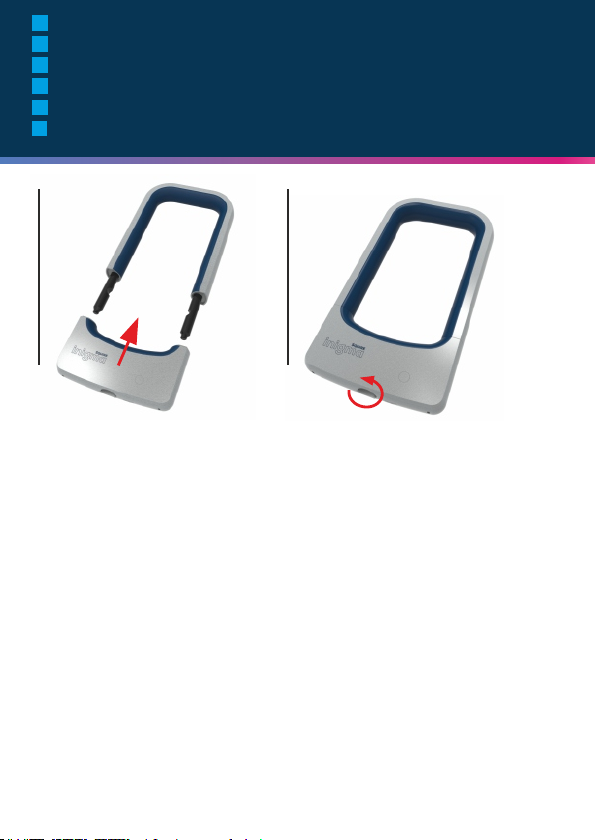
GB
Closing your inigma lock
ES
Cerrar el candado inigma
DE
Verschließen Ihres Inigma Schlosses
FR
Verrouillage de votre antivol inigma
NL
Uw inigma-slot sluiten
IT
Chiusura del lucchetto Inigma
To close
1
GB
1. Offer up the bottom part of the lock to the top
part and fix together
2. Turn the button on the bottom of the lock in an
anti-clockwise direction
Your inigma lock will lock automatically. You do
not need to use the app to lock it.
ES
1. Introduzca la parte inferior del candado en la
superior y sujétalas.
2. Gire el botón de la parte inferior del candado
en sentido antihorario.
El candado inigma se bloqueará
automáticamente. No tiene que utilizar la
aplicación para bloquearlo.
2
DE
1. Legen Sie den unteren Teil des Schlossen am
oberen Teil an und führen Sie beide Teile
zusammen.
2. Drehen Sie den Knopf an der Unterseite Ihres
Schlosses gegen den Uhrzeigersinn.
Ihr Inigma Schloss verriegelt sich automatisch.
Ein Versperren über die App ist nicht
erforderlich.
FR
1. Réunissez la partie inférieure de l'antivol et la
partie supérieure, puis fixez-les ensemble
2. Tournez le bouton en bas de l'antivol dans le
sens anti-horaire
Votre antivol inigma se verrouillera
automatiquement. Vous n'avez pas besoin
d'utiliser l'application pour le verrouiller.
NL
1. Plaats het onderste gedeelte van het slot op
het bovenste gedeelte en bevestig ze aan
elkaar.
2. Draai de knop aan de onderkant van uw slot
in tegenwijzerzin.
Uw inigma-slot zal automatisch vergrendelen U
hoeft de app niet te gebruiken om het te
vergrendelen.
IT
1. Avvicina la parte inferiore del lucchetto alla
parte superiore e agganciale
2. Ruota il pulsante sul fondo del lucchetto in
senso orario
Il tuo lucchetto Ingima si bloccherà
automaticamente. Non serve utilizzare l'app per
bloccarlo.
10
Page 12
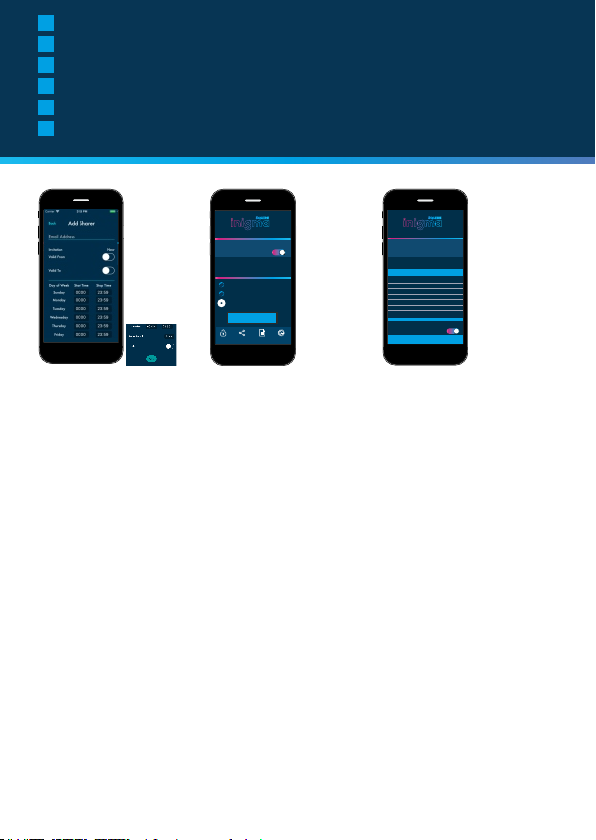
GB
Inigma lock features
ES
Características del candado inigma
DE
Funktionen des Inigma Schlosses
FR
Caractéristiques de l'antivol Inigma
NL
Inigma-slot kenmerken
IT
Caratteristiche del lucchetto Inigma
back
add sharer
your bike lock
send invite
settings
passive mode
available devices
your bike lock
your other bike lock - 2
your other bike lock - 2
remove
unlock sharing activities settings
GB GB GB
Share your lock
Simply send an invitation from your phone. The
other person registers on your Inigma web page
and can then use your lock.
ES
Compartir el candado
Envíe simplemente una invitación desde su
teléfono. La otra persona se registra en su
página de inigma y así podrá utilizar el candado.
DE
Teilen Sie Ihr Schloss
Senden Sie eine Einladung mit Ihrem Telefon.
Sobald Sie die eingeladene Person auf Ihrer
Imagina Webseite registriert hat, kann diese Ihr
Schloss verwenden.
FR
Partagez votre antivol
Envoyez simplement une invitation à partir de
votre téléphone. L'autre personne s'inscrit sur
votre page web Inigma et peut alors utiliser
votre antivol.
NL
U slot delen
Verstuur gewoon een uitnodiging via uw
telefoon. De andere persoon registreert zich
gewoon op uw inigma-webpagina en kan het
slot dan gebruiken.
IT
Condividere il lucchetto
Basta mandare un invito dal tuo telefono. L'altra
persona dovrà registrarsi sulla tua pagina Web
Inigma per poter utilizzare il tuo lucchetto.
Control multiple locks
Control multiple locks from
the same phone: ideal for parents wanting to
manage locks for young children
ES
Controlar varios candados
Controle varios candados desde un mismo
móvil; es perfecto para padres que desean
controlar los candados de sus hijos.
DE
Kontrollieren Sie
mehrere Schlösser
Kontrollieren Sie mehrere Schlösser mit
demselben Telefon: ideal für Eltern zur
Überwachung der Schlösser Ihrer Kinder
FR
Contrôlez les serrures
multiples
Contrôlez plusieurs antivols à partir du même
téléphone : idéal pour les parents qui veulent
gérer les antivols pour les jeunes enfants
NL
Meerdere sloten controleren
Meerder sloten vanaf dezelfde telefoon
controleren: ideaal voor ouders die de sloten van
hun jonge kinderen willen managen.
IT
Controllare più lucchetti
Controlla più lucchetti dallo stesso telefono:
ideale per i genitori che desiderano gestire i
lucchetti dei figli piccoli
11
Cancel
Done
sharing your bike lock
4.25 PM
June 01, 2017
Valid from
June 01, 2017
Valid to
4.25 PM
TO
DAY FROM
Sunday
12.00AM
11.59PM
Monday
12.00AM
11.59PM
Tuesday
12.00AM
11.59PM
Wednesday
12.00AM
11.59PM
Thursday
12.00AM
11.59PM
Friday
12.00AM
11.59PM
Saturday
12.00AM
11.59PM
Every Day
Renew Period
Notify when used
Invite awaiting acceptance
Give and revoke access
Give and revoke access when you need to
ES
Permitir y denegar el acceso
De permiso y deniéguelo cuando sea necesario
DE
Zugriff gewähren und
widerrufen
Gewährend und widerrufen Sie bei Bedarf den
Zugriff
FR
Donnez et révoquer l'accès
Donnez et révoquez l'accès lorsque vous le
juger nécessaire
NL
Dare e revocare l'accesso
Dai e revoca l'accesso al bisogno
Page 13
Cancel
Done
sharing your bike lock
4.25 PM
June 01, 2017
Valid from
June 01, 2017
Valid to
4.25 PM
TO
DAY FROM
Sunday
12.00AM
11.59PM
Monday
12.00AM
11.59PM
Tuesday
12.00AM
11.59PM
Wednesday
12.00AM
11.59PM
Thursday
12.00AM
11.59PM
Friday
12.00AM
11.59PM
Saturday
12.00AM
11.59PM
Every Day
Renew Period
Notify when used
Invite awaiting acceptance
GB
Audit trail
See when your lock is used and by whom
ES
Registro de control
Compruebe cuándo y quién utiliza su
candado
DE
Prüfprotokoll
Sehen Sie, wann Ihr Schloss benutzt wird
und von wem
FR
Piste de vérification
Vérifiez quand votre antivol est utilisé et
par qui
NL
Spoor volgen
Bekijk door wie en wanneer uw slot werd
gebruikt
IT
Registro di controllo
Vedi quando il tuo lucchetto viene usato e
da chi
Features
12
Page 14
GB
Charging information
ES
Información de carga
DE
Ladeinformationen
FR
Informations sur le rechargement
NL
Informatie wordt geladen
IT
Informazioni sulla ricarica
GB
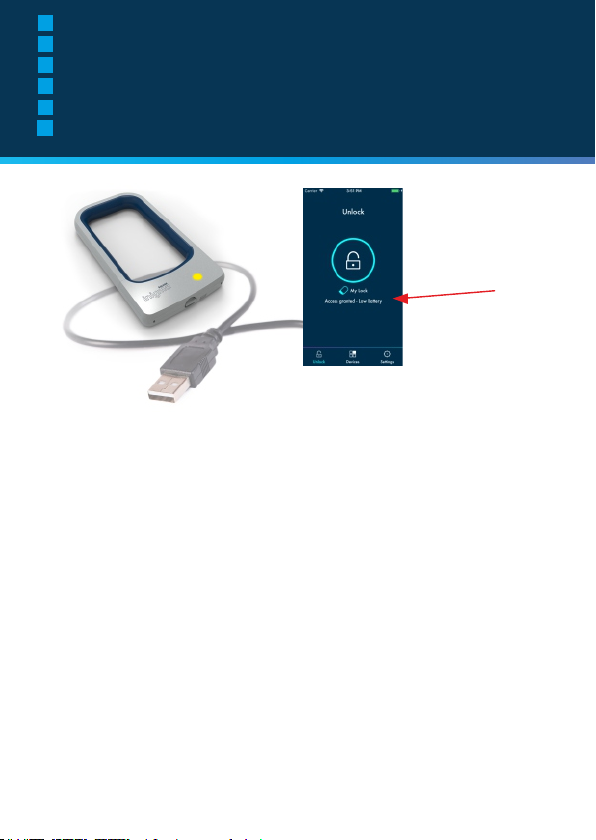
How to charge your lock
Your app will warn you when charge is
running low. Whilst unlocking, if the battery
is low, the app will read “Access Granted Low Battery”. The LED on the lock will
flashes yellow when it needs to be charged.
To charge, connect the device to any USB
power source. The LED will slowly flash
RED whilst charging is underway. When
charging is complete it will be steady red.
The device can be operated whilst charging
and can also be charged from portable USB
power sources. A full charge will take
around 2 hours to complete.
ES
Como cargar el candado
La aplicación le avisará cuando se esté
agotando la batería. Cuando esté
desbloqueado, si la batería está baja, en la
aplicación aparecerá «Acceso Permitido Batería baja». El LED del candado
parpadeará en amarillo cuando sea
necesario cargarlo.
Para cargarlo, conecte el dispositivo a una
fuente de alimentación USB. El LED
parpadeará lentamente en rojo mientras se
está cargando. Cuando se haya cargado
por completo, se pone en rojo fijo. Se
puede utilizar el dispositivo mientras se está
cargando y también se puede cargar con
fuentes de alimentación USB portátiles.
Tardará alrededor de 2 horas en cargarse
completamente.
13
DE
So laden Sie Ihr Schloss
Sie erhalten einen Warnhinweis von Ihrer App,
wenn der Akkuladestand niedrig ist. Wenn Sie
das Schloss bei niedrigen Akkustand
entsperren, zeigt die App “Zugriff gewährt Niedriger Batteriestand”. Das LED am Schloss
blinkt gelb, wenn es aufgeladen werden muss.
Verbinden Sie das Gerät mit jeder beliebigen
USB-Stromquelle. Das LED blinkt während des
Ladevorgangs langsam ROT. Sobald der
Ladevorgang abgeschlossen ist, blinkt es
durchgehend rot. Das Gerät kann während des
Ladevorgangs benutzt werden. Das Schloss
kann auch mit tragbaren USB-Ladegeräten
aufgeladen werden. Es dauert etwa 2 Stunden
bis der Aufladevorgang abgeschlossen ist.
FR
Comment recharger
votre antivol
Votre application vous avertira lorsque la
charge est faible. Lors du déverrouillage, si la
batterie est faible, l'application affichera
"Accès accordé - Batterie faible". La LED de
l'antivol clignote en jaune lorsqu'il faut le
recharger.
Pour recharger, connectez l'appareil à
n'importe quelle source d'alimentation USB. La
LED ROUGE clignote lentement pendant que
la charge est en cours. Lorsque la charge est
terminée, elle sera d'un rouge constant.
L'appareil peut être utilisé pendant la charge
et peut également être chargé à partir de
sources d'alimentation USB portables. Une
charge complète prendra environ 2 heures.
NL
Hoe uw slot opladen
Uw app zal uw waarschuwen wanneer de
batterij bijna leeg is. Indien de batterij bijna
leeg is, zal de app tijdens het ontgrendelen
”Toegang toegestaan - Batterij bijna leeg”
weergeven. De LED op het slot zal geel
knipperen wanneer het moet worden
opgeladen.
Verbindt het toestel met om het even welke
USB-energiebron om het op te laden. De LED
zal ROOD knipperen tijdens het opladen.
Wanneer het opladen voltooid is zal de LED
rood blijven branden. Het toestel kan tijdens
het opladen worden gebruikt en het kan ook
via een draagbare USB-energiebron worden
opgeladen. Het duurt ongeveer 2 uur om het
toestel volledig op te laden.
IT
Come ricaricare il
lucchetto
La tua app ti avviserà quando la carica sta per
esaurirsi. Durante la procedura di sblocco, se
la batteria è quasi scarica, l'app mostrerà il
messaggio "Access Granted - Low Battery"
(Accesso consentito - Batteria quasi scarica).
Il LED sul lucchetto lampeggerà di colore
giallo quando sarà necessario ricaricarlo.
Per ricaricare, collegare il dispositivo a una
fonte di alimentazione USB. Il LED
lampeggerà lentamente di colore ROSSO
mentre la ricarica è in corso. Quando la carica
sarà completa, il LED rimarrà di colore rosso
ma non lampeggerà più. Il dispositivo può
essere utilizzato durante la ricarica e può
essere ricaricato anche da fonti di
alimentazione USB portatili. Una ricarica
completa richiede circa 2 ore.
Page 15
How to charge
GB
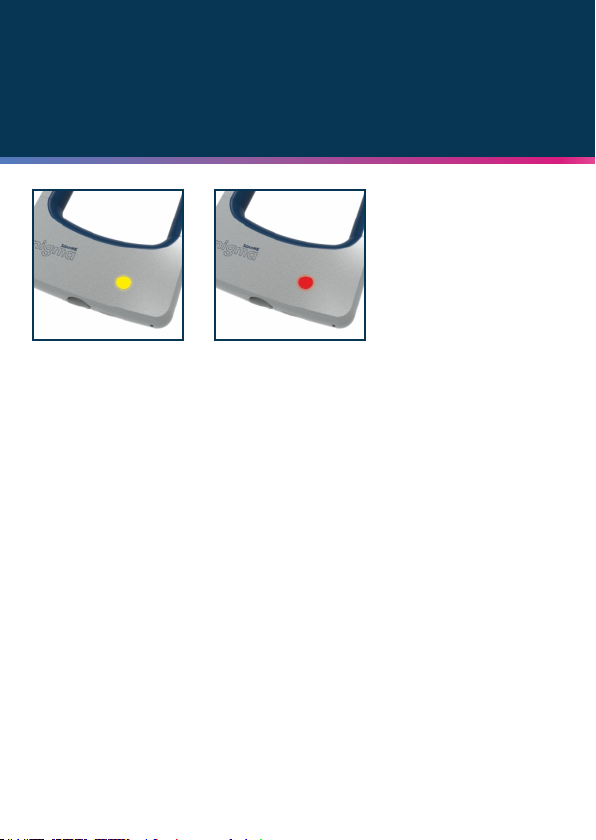
Yellow light = battery low
ES
Luz amarilla = batería baja
DE
Gelbes Licht = Batteriestand niedrig
FR
Voyant jaune = batterie faible
NL
Geel licht = batterij bijna leeg
IT
Luce gialla = batteria quasi scarica
GB
Red flashing light = charging
ES
Luz roja intermitente = cargando
DE
Rotes Blinklicht = Im Ladezustand
FR
Voyant rouge clignotant = en charge
NL
Rood knipperend licht = wordt geladen
IT
Luce rossa lampeggiante = ricarica in corso
GB
Battery life
Battery life approximately 4 to 5
months with normal usage.
ES
Duración de la batería
La batería tiene una duración
aproximada de 4 a 5 meses con
un uso normal.
DE
Akkulaufzeit
Die Akkulaufzeit beträgt bei
normaler Nutzung ca. 4 bis 5
Monate
FR
Durée de vie de
la batterie
Durée de vie de la batterie
d'environ 4 à 5 mois avec une
utilisation normale.
NL
Levensduur batterij
De levensduur van de batterij
bedraagt 4 tot 5 maanden bij
normaal gebruik.
IT
Durata della batteria
La durata della batteria è di circa
4 - 5 mesi in caso di utilizzo
normale.
GB
Charging time
Approximately 2 hours.
ES
Tiempo de carga
Aproximadamente 2 horas.
DE
Ladezeit
Ca. 2 Stunden.
FR
Temps de charge
Environ 2 heures.
NL
Laadtijd
Ongeveer 2 uur
IT
Tempo di ricarica
Circa 2 ore.
14
Page 16

GB
Frequently asked questions
ES
Preguntas frecuentes
DE
Häufig gestellte Fragen
FR
Foire aux questions
NL
Veel gestelde vragen
IT
Domande frequenti
faq
GB
What happens if you lose
your phone?
Use another device. Download the app to the new
or temporary device to gain access and then
change your password. This will prevent the lost
or stolen device from accessing the lock.
What happens if the lock
battery is completely flat
If you ignore the warning and allow your lock
battery to become completely flat, you can
operate it by plugging in an USB compatible
power source, including a portable power charger
device. It's not necessary to allow the lock to
completely charge - it can be operated from a
portable USB power pack immediately
What type of phones are
compatible with the
inigma system
Inigma is suitable for use with with iOS and
Android smart phones and Apple watches
ES
¿Qué sucede si pierde
el teléfono?
Utilice otro dispositivo. Descargue la aplicación en
el dispositivo nuevo o temporal y así podrá
cambiar la contraseña. De este modo se evita que
se puedan acceder al candado por medio de un
dispositivo perdido o robado.
¿Qué sucede si la batería
del candado se agota por
completo?
Si pasa por alto el aviso y deja que se agote la
batería por completo, podrá ponerlo en
funcionamiento conectándolo a una fuente de
alimentación USB compatible o incluso utilizando
un cargador portátil. No hace falta que espere a
que el candado se cargue por completo, se
puede utilizar inmediatamente después de
conectarlo a una fuente de alimentación USB.
¿Qué tipo de teléfonos
son compatibles con el
sistema inigma?
Se puede utilizar inigma con teléfonos móviles
con sistema iOS o Android y con los Apple
Watch.
15
DE
Was passiert, wenn Sie
Ihr Telefon verlieren?
Benutzen Sie ein anderes Gerät. Laden Sie die
App auf das neue oder temporäre Gerät herunter,
um auf das Schloss zugreifen zu können und
ändern Sie anschließend Ihr Passwort. Dadurch
wird ein Zugriff auf das Schloss mit dem
verlorenen oder gestohlenen Gerät verhindert.
Was passiert, wenn der
Akku des Schlosses
komplett leer ist?
Wenn Sie den Warnhinweis ignorieren und der
Akkus sich vollständig entleert hat, können Sie
es in Betrieb nehmen, indem Sie es an eine
USB-kompatible Stromquelle anschließen, wie
zum Beispiel ein portables Ladegerät. Das
Schloss muss nicht vollständig aufgeladen
werden - es kann unmittelbar nach Anschluss
einer tragbaren USB Power Bank in Betrieb
genommen werden.
Welche Telefone sind mit
dem Inigma System
kompatibel?
Inigma kann mit iOS und Android Smartphones,
sowie mit einer Apple Watch genutzt werden
FR
Que se passe-t-il si vous
perdez votre téléphone ?
Utilisez un autre appareil. Téléchargez
l'application sur le nouvel appareil ou l'appareil
temporaire pour y accéder, puis changez votre
mot de passe. Cela empêchera l'appareil perdu ou
volé d'accéder au cadenas.
Que se passe-t-il si la
batterie de l'antivol est
complètement déchargée ?
Si vous ignorez l'avertissement et laissez la
batterie de votre antivol se décharger
complètement, vous pouvez l'utiliser en
branchant une source d'alimentation compatible
USB, y compris un chargeur portable. Il n'est pas
nécessaire de permettre à l'antivol de se
recharger complètement - il peut être utilisé à
partir d'un bloc d'alimentation USB portable
immédiatement.
Quels types de téléphones
sont compatibles avec le
système inigma ?
Inigma peut être utilisé avec les téléphones
intelligents iOS et Android et les montres Apple.
NL
Wat gebeurt als u uw
telefoon verliest?
Gebruik een ander apparaat. Download de app
naar het nieuwe of tijdelijke apparaat om toegang
te krijgen en wijzig vervolgens uw wachtwoord. Dit
voorkomt dat het verloren of gestolen apparaat
toegang krijgt tot het slot.
Wat gebeurt als de batterij
van het slot volledig leeg is?
Indien u de waarschuwing negeert de batterij van
slot volledig leeg laat worden, kunt u het
gebruiken door in het in een andere USBcompatible energiebron te steken, inclusief een
draagbare lader. Het is niet nodig om het slot
volledig op te laden, het kan onmiddellijk via een
draagbare USB-powerbank worden gebruikt
Welk type telefoon is
compatibel met het
inigma-systeem?
Inigma is geschikt voor het gebruik met iOS en
Android smartphones en Apple watches
IT
Cosa succede se perdo il
telefono?
Usa un altro dispositivo. Vai alla tua pagina web
Inigma e registra il nuovo dispositivo, o quello
temporaneo, per poter accedere.
Cosa succede se la
batteria del lucchetto è
completamente scarica?
Se ignori l'avvertimento e la batteria del lucchetto
si scarica completamente, potrai collegare una
fonte di alimentazione compatibile con USB,
incluso un caricatore portatile. Non è necessario
ricaricare completamente il lucchetto: può essere
utilizzato immediatamente collegandolo a un
alimentatore USB portatile
Che tipo di telefoni sono
compatibili con il sistema
Inigma?
Inigma è compatibile con gli smartphone iOS e
Android e gli orologi Apple
Page 17
GB
Inigma bracket fitting instructions
ES
Instrucciones de instalación del soporte para inigma
DE
Anleitung für die Montage der Halterung
FR
Instructions de montage du support Inigma
NL
Instructies voor het aanbrengen van de beugel van Inigma
IT
Istruzioni per il montaggio della staffa Inigma
A
B
Inigma bracket
fitting instructions
C
E
E
GB
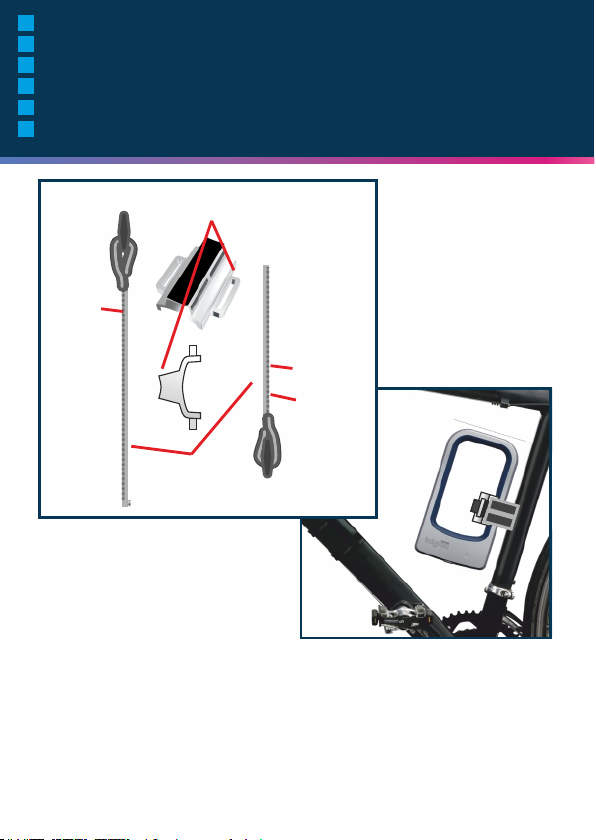
A - Bracket
B - Long strap
C - Short strap
D - Rubber side
E - Velcro side
Continued on
next page
FR
A - Support
B - Sangle longue
C - Courroie courte
D - Côté caoutchouc
E - Côté Velcro
Suite à la page
suivante
ES
A - Soporte
B - Cinta larga
C - Cinta corta
D - Lado de goma
E - Lado de velcro
Continua en la
siguiente página
NL
A - Beugel
B - Lange band
C - Korte band
D - Rubberen kant
E - Velcro kant
Vervolg op de
volgende pagina
D
DE
A - Halterung
B - Langes Band
C - Kurzes Band
D - Gummiseite
E - Klettverschlussseite
Fortsetzung auf der
nächsten Seite
IT
A - Staffa
B - Cinturino lungo
C - Cinturino corto
D - Lato in gomma
E - Lato con velcro
Vai alla pagina
successiva
16
Page 18
GB
Inigma bracket fitting instructions
ES
Instrucciones de instalación del soporte para inigma
DE
Anleitung für die Montage der Halterung
FR
Instructions de montage du support Inigma
NL
Instructies voor het aanbrengen van de beugel van Inigma
IT
Istruzioni per il montaggio della staffa Inigma
1 2 3
A
B
A
B
A
17
4
7
5
8
&
6
9
X
Page 19

Inigma bracket
fitting instructions
GB
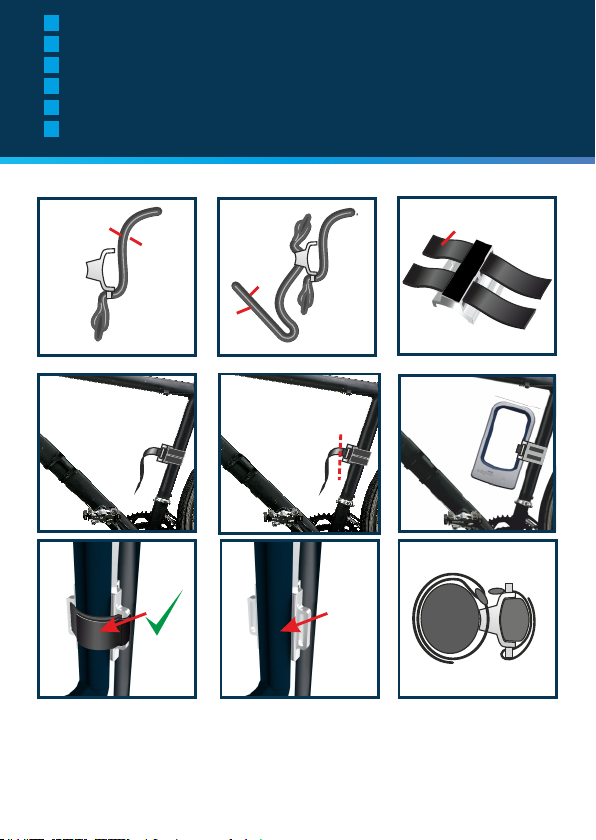
1. Thread short strap through slot
Note
A. Rubber side inwards
B. Velcro side outwards
2. Thread 2 long straps through slots
Note
A. Rubber side inwards
B. Velcro side outwards
3. 2 long straps
A. Rubber side
4. Fix bracket to bike frame with Velcro
strap
5. Trim excess strap if necessary
6. Mount lock to bracket as shown
7. Fix lock to bracket with Velcro strap
8. ALWAYS USE VELCRO STRAP
9. Strap diagram
FR
1. Enler la sangle courte à travers la
fente
Remarque
A. Côté caoutchouc vers l'intérieur
B. Côté Velcro vers l'extérieur
2. Enler 2 longues sangles à travers les
fentes.
Remarque
A. Côté caoutchouc vers l'intérieur
B. Côté Velcro vers l'extérieur
3. 2 longues sangles
A. Côté caoutchouc
4. Fixer le support au cadre du vélo à
l'aide d'une bande Velcro.
5. Couper l'excédent de sangle si
nécessaire.
6. Monter l'antivol sur le support comme
illustré.
7. Fixer l'antivol sur le support à l'aide
d'une bande Velcro
8. TOUJOURS UTILISER UNE SANGLE
VELCRO
9. Schéma des sangles
ES
1. Pase la cinta corta a través de la
ranura
Aviso
A. El lado de goma hacia el interior
B. El lado de velcro hacia el exterior
2. Pase 2 cintas largas a través de las
ranuras
Aviso
A. El lado de goma hacia el interior
B. El lado de velcro hacia el exterior
3. 2 cintas largas
A. Lado de goma
4. Asegure el soporte al cuadro de la
bicicleta con la cinta de velcro
5. Corte la cinta sobrante si fuera
necesario
6. Coloque el candado en el soporte
como se muestra
7. Asegure el candado al soporte con
la cinta de velcro
8. UTILIZE SIEMPRE LA CINTA DE
VELCRO
9. Esquema de sujeción
NL
1. Steek de korte band door de gleuf
Opmerking
A. Rubberen kant naar binnen
B. Velcro kant naar buiten
2. Steek de 2 lange banden door de
gleuven
Opmerking
A. Rubberen kant naar binnen
B. Velcro kant naar buiten
3. 2 lange banden
A. Rubberen kant
4. Maak de beugel met de Velcro band
aan het etskader vast
5. Knip indien nodig de overtollige band
af
6. Plaats het slot zoals weergegeven op
de beugel
7. Maak het slot aan de beugel vast
met de Velcro band
8. ALTIJD VELCRO BAND
GEBRUIKEN
9. Bandafbeelding
DE
1. Ziehen Sie das kurze Band durch die
Schnalle
Hinweis
A. Gummiseite innen
B. Klettverschlussseite außen
2. Ziehen Sie die 2 langen Bänder durch
die Schnallen
Hinweis
A. Gummiseite innen
B. Klettverschlussseite außen
3. 2 lange Bänder
A. Gummiseite
4. Befestigen Sie die Halterung mit dem
Klettband am Rahmen des Fahrrads
5. Kürzen Sie das überschüssige
Klettband falls erforderlich
6. Bringen Sie das Schloss wie
abgebildet in der Halterung an
7. Befestigen Sie das Schloss mit dem
Klettband an der Halterung
8. BENUTZEN SIE IMMER EIN
KLETTBAND
9. Darstellung der Bänder
NL
1. Inlare il cinturino corto attraverso la
fessura
Attenzione
A. Lato in gomma verso l'interno
B. Lato in velcro verso l'esterno
2. Inlare due cinturini lunghi attraverso
le fessure
Attenzione
A. Lato in gomma verso l'interno
B. Lato in velcro verso l'esterno
3. Due cinturini lunghi
A. Lato in gomma
4. Fissare la staffa al telaio della
bicicletta usando il cinturino con il
velcro
5. Se necessario, tagliare il cinturino in
eccesso
6. Montare il lucchetto sulla staffa come
mostrato
7. Fissare il lucchetto alla staffa usando
il cinturino con il velcro
8. UTILIZZARE SEMPRE IL
CINTURINO CON IL VELCRO
9. Schema di ssaggio
18
Page 20
The new digital security system from Squire
Squire has been at the forefront of lock-making since 1780.
As an eighth generation, independently owned British manufacturer,
we produce some of the most technologically advanced and
engineered security products in the world.
Our locks set award winning standards, offering something for
everyone, at home, at work, and on the move.
www.squireinigma.co.uk
Henry Squire & Sons Limited, Hilton Cross Business Park, Cannock Road,
Featherstone, Wolverhampton, WV10 7QZ
Tel: 01902 308050
Fax: 01902 308051
E-Mail: [email protected]
www.squirelocks.co.uk
 Loading...