

Page 1
Features:
Ring Light R8 with Wired Control
•
• Three Colors: Warm, Cold, Natural
• 10-Level Brightness
• LED Ring Light
• Durable and Adjustable Tripod Stand
• Compatible with Phones, Cameras & Webcams
• Upgraded Phone Clamp
• Holds Smartphone with Widths of 2.3'' to 4.5'' -in.
• USB Plug and Wire Control
• Electric Panoramic Head has a Remote Control Plate with a Button Battery
• Perfect for Video Recording, Zoom Meeting, YouTube, Tiktok, and more
What's in the Box:
8'' Ring Light
•
• Table Tripod
• Mobile Holder
• Hot Shoe Adapter
• USB Cable
• Electric Panorama Head with Phone Holder
Technical Specs:
Construction Material: ABS
•
• Power Supply Mode: USB Power Supply
• Voltage: 5V
• Power Supply: 14W
• Light Source: LED SMD
• Wire Length: 78.8'' -in.
• Inner Ring Size: 5.91'' -in.
• Outer Ring Size: 8'' -in.
• Mini Tripod Stand Length: 7.76'' -in.
• LED Bulbs: 72pcs
• Color Temperature: 3000K--4500k-6000K
• CRI (Color Rendering Index): 85RA
• USB Cable Length: 78.74'' -inches
• Battery Type: 3.7 V Lithium-ion
• Current: 65mA
• Max Battery Capacity: 750 mAh
www.squatz.com
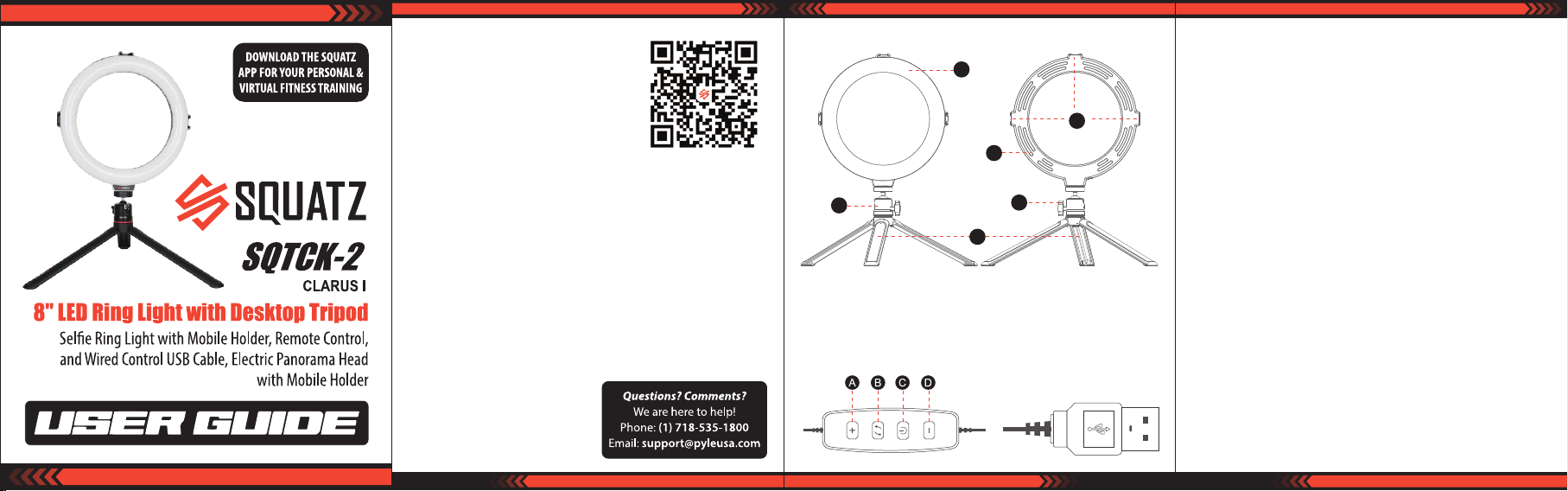
STRUCTURE
B
A. Diuser
B. Ballhead
C. Tripod
INSTALLATION
A
E
C
D. Hot shoe adapter Interface
E. Ventilation Hole
F. B all lock knob
Controller
A. Power ON ring light, short press the “+”, to increase 10% brightness until you
reach 100% brightness, press and hold to increase automatically.
B. While powered ON, short press the “exchange” button, to switch between warm
light, natural light and daylight in turn.
D
F
C. Connect the USB port to the power supply, power button lights on.
Short press the power button, power light turns o, the ring light works;
press the power button again, the ring light stops working.
D. While powered ON, shor t press the “”, decrease 10% brightness until you reach
10% brightness, press and hold to decrease automatically.
USB port
This USB standard voltage is DC 5V.
Attention: Please make sure the voltage connected is correct and stable, if higher
or lower than DC 5V, the ring light may work abnormally, stop working it may
damage the ring light.
NOTICE
1. Any unauthorized modication or adjustments made to this product is prohibited.
2. The device is not to be considered as a lighting equipment.
DO NOT continuously operate over six hours.
3. Wet handling is not allowed.
4. Keep the device away from children under 12 years of age.
Do not stare at the strong light for a long time.
5. Exposure to rain is prohibited.
6. Turning on/o the device frequently is not appropriate.
7. Before cleaning the device, pIease turn it o and use a dry or slightly dry for
cleaning. Any kind of chemicals or corrosives must not be used.
www.squatz.com
www.squatz.com
Page 2
Packing Accessories
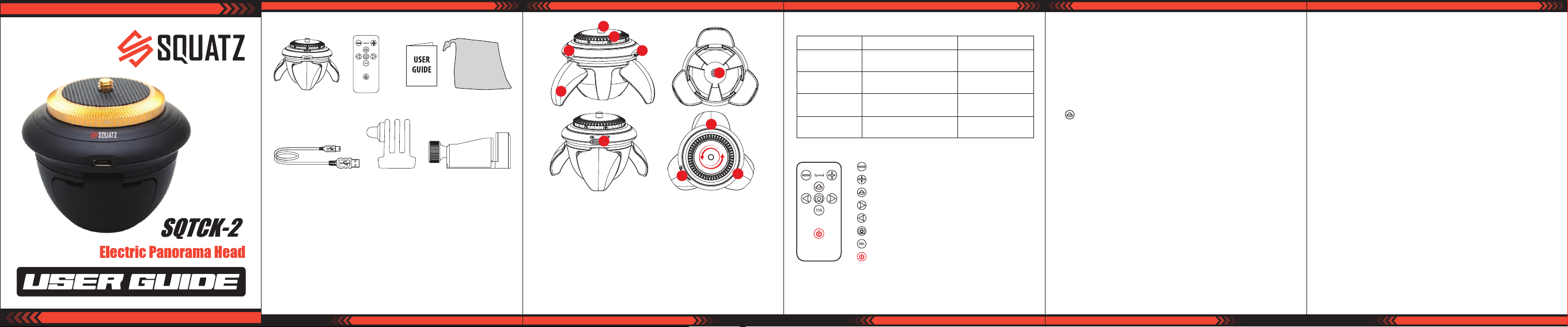
1. Panoramic Head
5. USB Charging Cable 6. GoPro Adapter 7. LC-12 Phone Clamp
2. Remote controller 3. User Manual 4. Storage Case
Electronic Panoramic Head Technical Specs:
•
Diameter* Height: 72 mm*70 mm
• Stand-by Time: Over 12H
• Rotational Speed: 2-5r/min
• Weight: 205g
• Continuous Working Time: Over 9H
• Nominal Voltage: 3.7 V
• Max No-load Current: 65mA Max
www.squatz.com
• Battery Capacity: 750 mAh
• Compatible Wireless BT system:
above Android 2.3.6, I0S4.0
• Pan Max. Load: Within 500g
• Tilt Max. Load: Within 200g
• Vertical Max. Load: Within 200g
• Inverted Max. Load: Within 300g
Prole
a
b
c
d
f
e
h
g
h
a. 1/4” Universal Screw
b. Rotator
c. Signal Receiver
a. 1/4” screw is easily adaptable to mobile phone, GoPro camera, pocket camera,
mini-SLR camera and other equipment.
b. 360 degree panoramic photography, more stable electronic rotation, more
convenient Wireless BT remote control.
d. Easy USB port charging by computer and normal mobile charger.
e. Perfect combination between supporting legs and head body, exquisite
workmanship, smart and innovative structural design to make sure the stability.
f. Perfect match with sele stick, tripods and other camera accessories.
d. USB Charging Port
e. Support Leg
f. 1/4” Screw Hole
g. Power On/O
h. Indicator Light
h
www.squatz.com
Indicator Light
Mode Indicator Function
Press any function
key once
Wireless BT light
Charging light
Low voltage light Green light ashes fast
Blue light ashes once Function switch
Green light slowly ashes
when BT stand-by
Red light keeps bright
when charging
Green light keeps bright
when BT is connected
Red light will be o
when fully charged
Please charge at
low battery
Remote Controller
Rotation Deceleration
Rotation Acceleration
Left-Right Rotation
Counter-clockwise Rotation
Clockwise Rotation
Mobile Phone Shutter Button
Time-lapse Photo
Power
Romote Controller Panel Instruction:
1. Remote Control Power button: Press the power button to stop the head
operation. Press the power button rst when it is needed to transfer from one
mode to the other mode.
www.squatz.com
2. Shutter button: Control the phone to take photos (When the BT between the
head and phone is connected successfully, it can take photos by shutter button)
3. Acceleration button: Press the acceleration button once, blue light will ash
once, which indicates that the motor is speeding up; When the blue light doesn’t
ash any more, the motor will reach the maximum speed.
4. Deceleration button: Press the deceleration button button once, blue light will
ash once, which indicates that the motor is speeding down; When the blue light
doesn’t ash any more, the motor will reach the minimum speed.
5. button: Control the head to 90° leftward and rightward cycle rotation.
(Leftward and rightward cycle rotation can also be workable under the rotation
speed of 2-5r/min)
6. Anti-clockwise button: Control the motor to rotate clockwise (Continuous
leftward rotation can be workable under the rotation speed of 2-5r/min)
7. Clockwise button: Control the motor to rotate anti-clockwise.
(Continuous rightward rotation can be workable under the rotation speed of
2-5r/min)
8.10S Time-lapse button: Control the head to rotate about 40°every 10 seconds.
9. Wireless BT connection: The BT indicator light is green. The green light ashing
means BT disconnected. When the green light keeps bright, it means BT
successfully connected. The BT name is SQUATZ.
Attention:
Power ON the head, if the BT is disconnected within 3 minutes, which will enter into
sleeping mode (green light will go out and the BT signal can not be searched.
Please press photo button again to wake up the BT.
www.squatz.com
Attention
Please use the head according to the diagram.
•
• Please charge the battery with the standard conguration USB data cable.
• Please do not use chemicals for wiping the head.
• Please do not spill or paint acidity medicament on the head.
• Please keep the head from high temperature or re place.
• Please do not strong press or bang the head.
• For the rst use, please take out the clear plastic insert under the bottom of the
remote controller, otherwise the remote won’t work.
• Please hold the rotation body by hand when you need to install or uninstall the
camera or the mobile holder, which will avoid the rotation during mounting or
removing process so as to damage the motor.
• Please don't turn the rotation body by hand, otherwise it may damage the motor.
Warning & Disclaimer
SQUATZ Electronic Panoramic Head is a wonderful head for video footage.
•
It’s lightweight and portable.
• DO NOT use for anything other than its intended purpose.
The user will be responsible for all behavior of purchase and use of the product.
• SQUATZ will not be responsible for any damage or liability caused by the use of
this product during calibration and operation (Including the loss directly,
indirectly or by the third party).
• SQUATZ will not be responsible for the product from unknown sources and usage
purpose.
• SQUATZ reserves the right to amend the user manual and the terms & conditions
of using the product at any time.
www.squatz.com
 Loading...