

Page 1
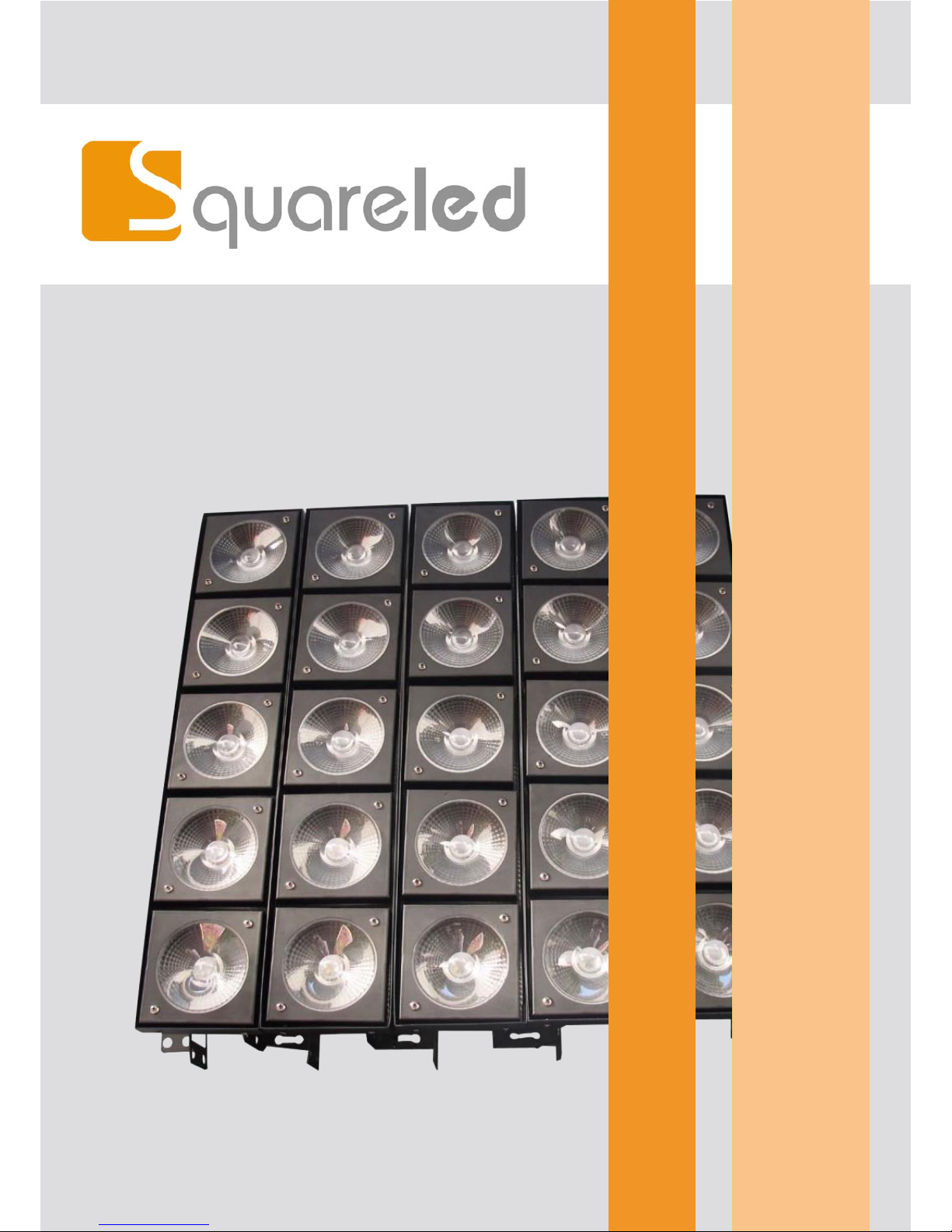
SquareLED UNIVERSAL LED BLINDER 5x10W RGBW 4in1 CREE
Page 2

Manual | SquareLED UNIVERSAL LED BLINDER 5x10W RGBW 4in1 CREE
1. Introduction
When you get this product, please take it from carton carefully to make sure whether all the accessories are in
and damaged or not. When you nd that there are any parts or wrong sign with the carton, or non-operation,
please inform us and to keep the carton and shipping bill completely.
Please check the manual book before you operate the light. The rating current of the light listed which shows
the average current-consume under the normal circumstances. All the lights must be oered shoot-through
circuit, it could not be connected dimmer circuit, although the dimmer channels are completely for 1-100%
switch.
Warning! Conrm the voltage to select switch which can be matched the circuit with the light. If it is
dierent from the supply power and light, it will damage the light! All the light must be connected the
earth, not all the lights have the switch to be selected. Please connect the correct voltage!
Packing List
LED Matrix Light
Power cable
User manual
2. Safety Instructions
Please read these instructions carefully, it includes important information about the light’s installation, usage and maintenance of this product.
Please conrm the same voltage to the light. The light could not be water-proof, it only allow to be used in
door. Don’t expand the light in wet or rain day, to avoid re or damaged light.
Please conrm there is no ammable material around the light.
The light must be set up the ventilating place. The distance is = 51 cm around approach material. To check the
air passage is OK at any time. The Maximum temperature is = 40 °C. (104 °F).
When the lights has problems, please stop to use to contact the supplier. Don’t repair it by yourself!
Don‘t connect by a dimmer. To conrm the power wire is straight and non-damaged. Don‘t pull it directly.
Don‘t look at the bulb when the light is working to avoid any hurt.
»
»
»
Page 3
Manual | SquareLED UNIVERSAL LED BLINDER 5x10W RGBW 4in1 CREE
3. Features
8 or 24 DMX channels.
RGBW LED light source (R5, G5, B5, W5)
life long is 50000-10000 hours.
Strobe: 0-16 Hz
Control mode: Auto, music, DMX512 mode
Beam angle: 30°
Cool: Fan cooling
4. DMX Channel
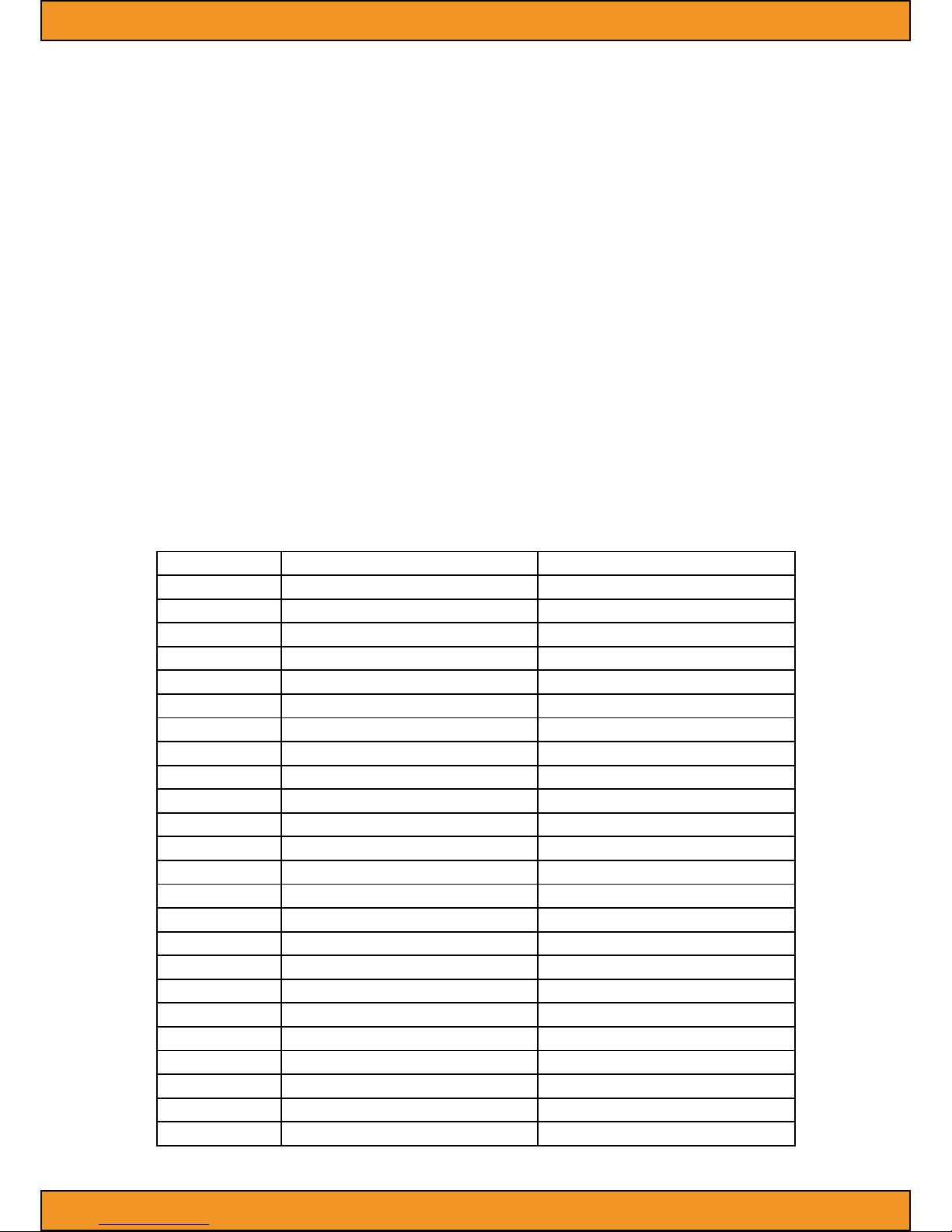
DMX Channel (24/8CH)
Channel 24CH 8CH
1 Dimmer Dimmer
2 Performance Function Performance Function
3 Red (the rst led) Red (all)
4 Green (the rst led) Green (all)
5 Blue (the rst led) Blue (all)
6 White (the rst led) White (all)
7 Red (the rst led)
8 Green (the rst led)
9 Blue (the rst led)
10 Green (the second led)
11 Blue (the second led)
12 White (the second led)
13 Red (the third led)
14 Green (the third led)
15 Blue (the third led)
16 White (the third led)
17 Red (the fourth led)
18 Green (the fourth led)
19 Blue (the fourth led)
20 White (the fourth led)
21 Red (the fth led)
22 Green (the fth led)
23 Blue (the fth led)
24 White (the fth led)
When the channel is opening, please conrm the channel 1st is phase-in.
»
»
»
»
»
»
»
Page 4
Manual | SquareLED UNIVERSAL LED BLINDER 5x10W RGBW 4in1 CREE
5. Setup
Fixture linking
When you control the light‘s master/slave or DMX 512 signal agreement, the lights can be connected by signal
wire which the distance is ≤ 500 m,The maximum connect lights are 32pcs more or less, and adapt DMX light
pair to segregate the signal zoom equipment, in order to protect the light’s signal won’t be interrupted by
other signal. Moreover, it won’t aect by the signal wire’s length
Data connect
Data cable is connected by DMX data wire, and XLR. Please use hi-quality data cable signal wire, it won’t be
interrupted by magnetic.
Characteristics of DMX data cable
2 conductors’ double tree lace and shield.
The maximum capacitance of the conductors-30 pF/ft.
The maximum capacitance of the conductor and shield -55 pF/ft.
The maximum resistance is 20 ohms/1000ft.
The nominal impedance 100-140 ohms.
DMX opt coupler segregate signal zoom equipment’s 3 pin(5 pin) XLR plug.
Cable wire‘s adapter:
The two sides of signal cable wire is consisted of 1 pair femal and male 3 XLR plug, which is correspond the
lights or DMX controller,
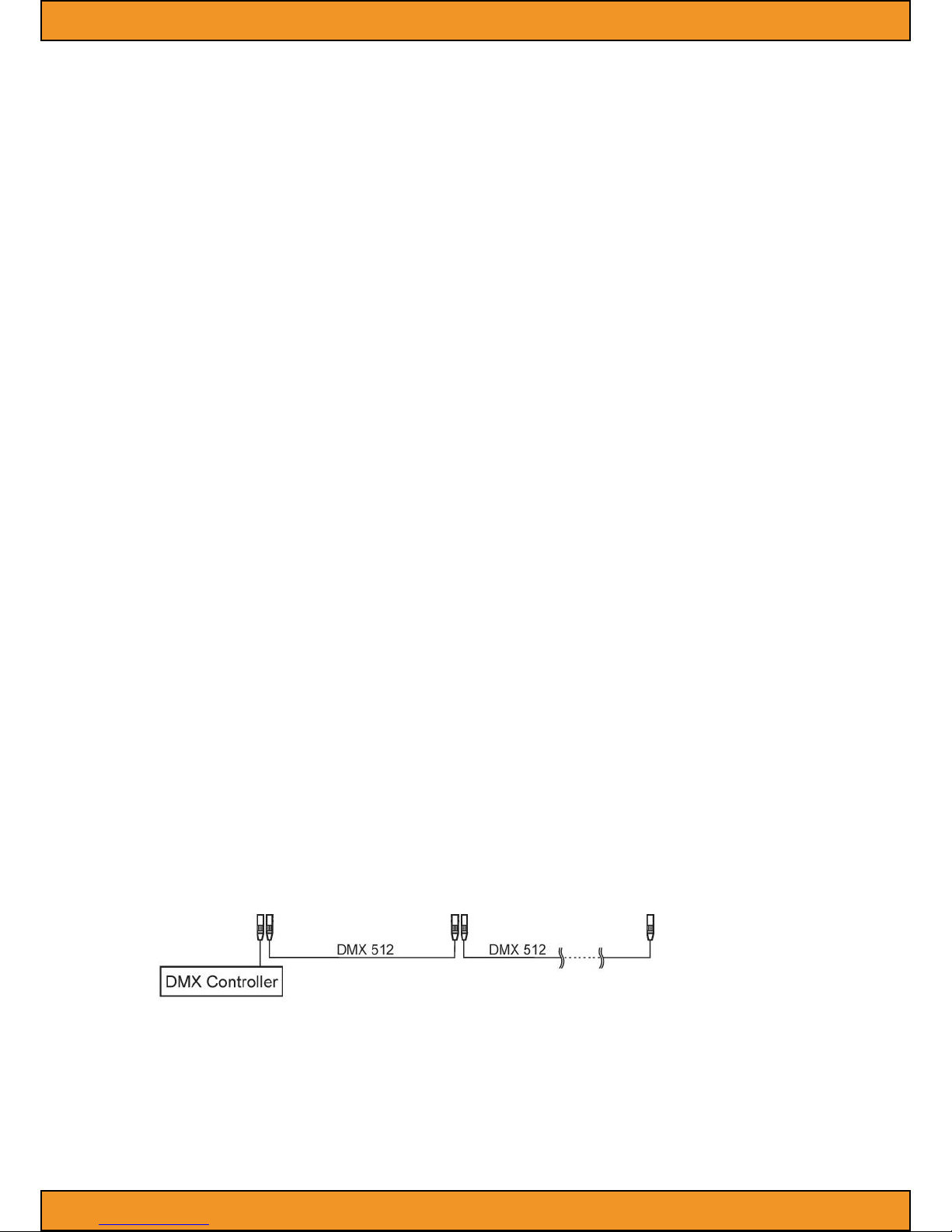
Setting up a DMX signal connect
As following pictures show, please connect the rst light to the signal cable which is with XLR by DMX
controller, then, connect light in series.
The light must be set up the ventilating place. To conrm there is nothing to hinder the heat dissipation place.
When the light is hanged, please choose a safety wire.
»
»
»
»
»
»
Page 5
Manual | SquareLED UNIVERSAL LED BLINDER 5x10W RGBW 4in1 CREE
6. Operating instructions
Menu congure
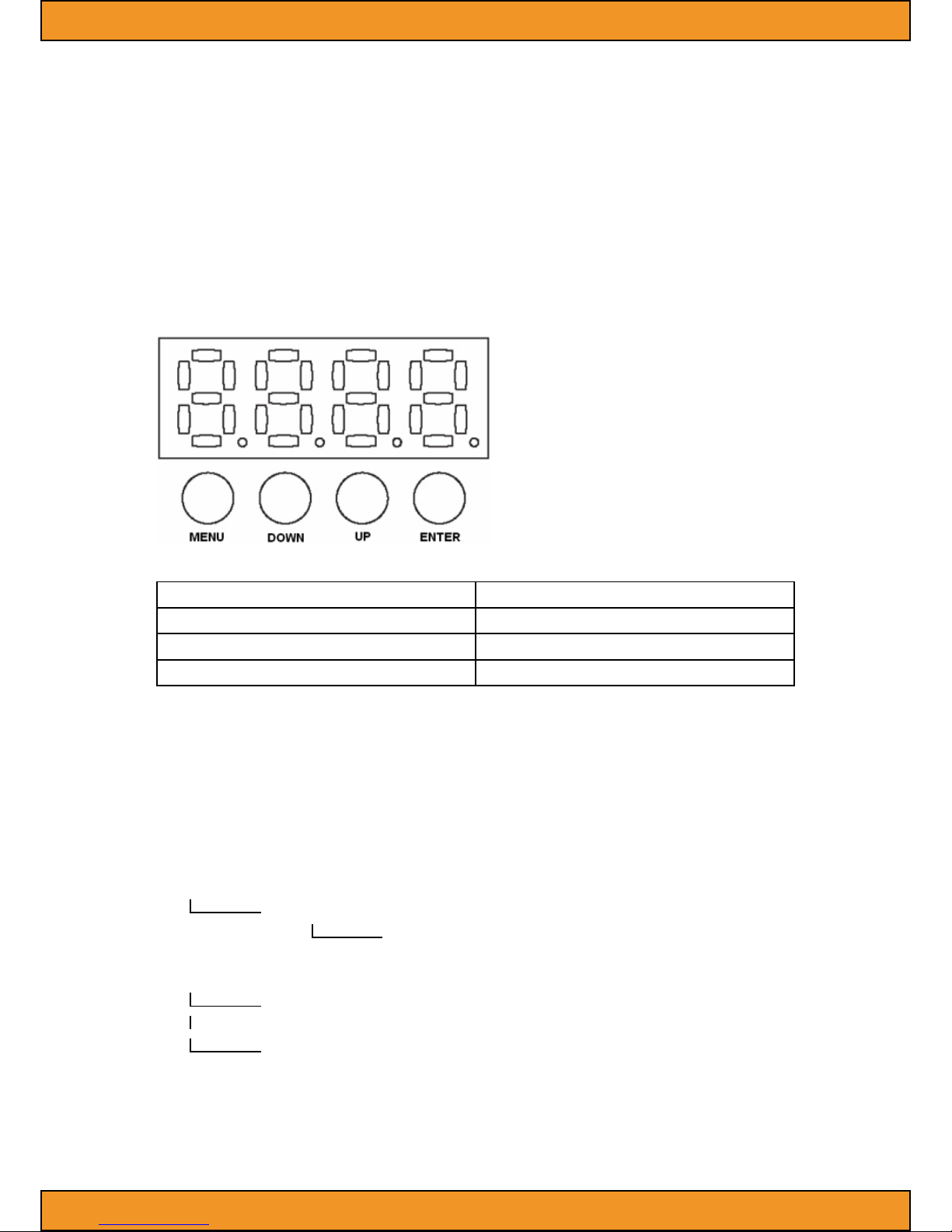
There are 4 buttons located in the bottom of the LED digital display when you check the menu congure of the
bottom of light. Show as follow:
Button Funktion
<Enter> Each operation to be conrmed
<Up>-<Down> Up-Down
<Menu> Menu option
Please choose ”ENTER” return to the main menu to save the address code or mode after you set up.
When the light is lighting, the display of the address code or mode is same as the last time when you
operated.
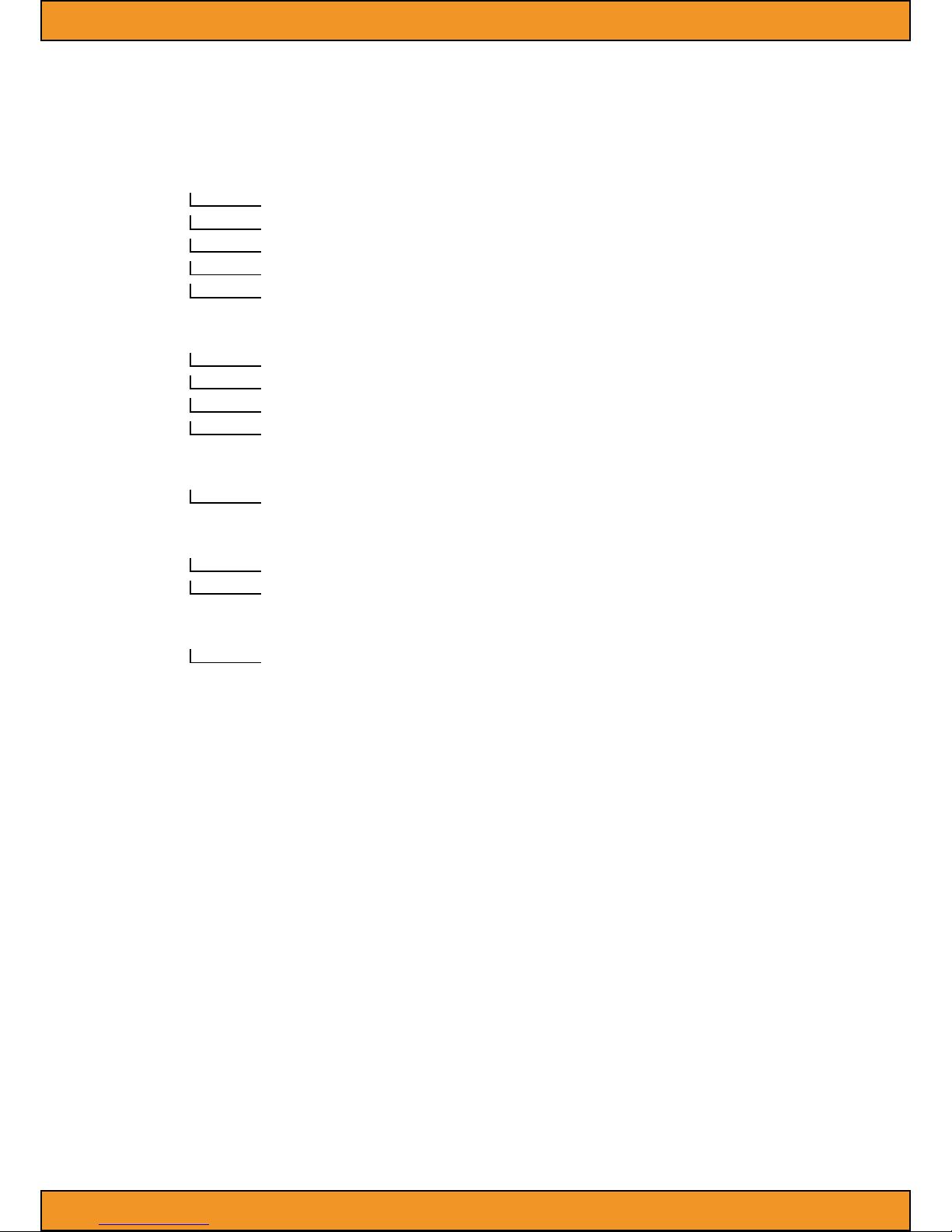
Menu function map
(Main menu)
(1st class option)
(2nd clas option)
Add (Address code setting)*
A.001
......
A.512
Page 6
Manual | SquareLED UNIVERSAL LED BLINDER 5x10W RGBW 4in1 CREE
FLAS (Strobe setting)
F0XX** (the total speed of strobe to be adjusted)
FrXX (To adjust red brightness seperately)
FgXX (To adjust green brightness seperately)
FbXX (To adjust blue brightness seperately)
FAXX (To adjust white brightness separately)
Lrgb (Adjust separately Led brightness)
LrXX (To adjust red brightness separately)
LgXX (to adjust green brightness separately)
LbXX (To adjust blue brightness separately)
LAXX (To adjust white brightness separately)
CHAS (built in program)
C001-C010 (fast to slow perform)
CHSE (channel setting)
CH24 (DMX512 CH 24)
CH08 (DMX512 CH 8)
FACT (Restore factory settings)
FA00-01 FA01 restore factory setting after pressing „ENTER“ (factory setting is DMX mode)
„Add“, of „.“ Which should show as icker, non-icker means no signal or wrong signal
***Shade: Red from bright to be o, then, green from bright to be o, then, blue from bright to be o, then
red from bright to be o, ...
****Change: Red bright, red be o, green bright, green be o, blue bright, blue be o, red bright...
XX“ Value: „01-10“.
User congurations
Set-up 1pcs light‘s menu mode (Auto-running)
Press the MENU, such as the grafic shows the menu function
Use the UP/DOWN buttons to choose the right one to confirm.
To set Master-slave mode
Press the MENU, same as the grafic showsthe menu function
Master: set any one of lights to auto sound or strobe control mode
Slave: Set them to DMX mode and their address code to 1.
»
»
»
»
»
Page 7
Manual | SquareLED UNIVERSAL LED BLINDER 5x10W RGBW 4in1 CREE
Each master-slave group can be one and only light in master, ensure lights under this group without connection with any DMX controller.
To set DMX mode
The light can connect to the DMX controller to receive its signal indication, which control by DMX controller.
DMX value is referenced by „DMX Channel Values“
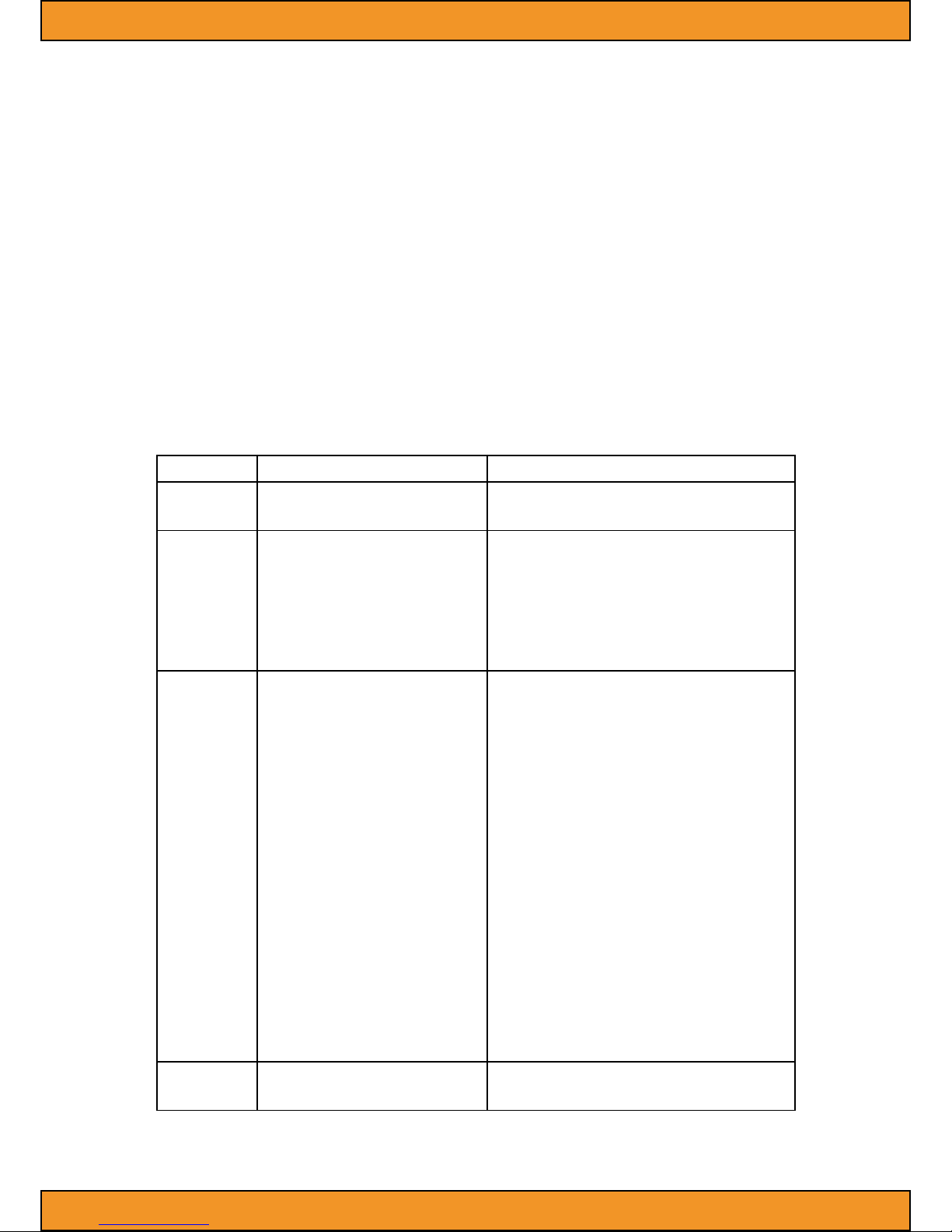
DMX channel values
DMX Channel (24CH)
Channel Value Function
1 0-255 Dimmer
0-100%
2
0-10
11-30
31-200
201-250
251-255
Strobe
Shut
Neutral
Strobe with increase speed
Random Strobe with increase speed
Neutral
3
0-15
16-31
32-47
48-63
64-79
80-95
96-111
112-127
128-143
144-159
160-175
176-191
192-207
208-223
224-239
240-255
Performance Function
Neutral
Red
Green
Blue
White
Red/Green
Red/Blue
Red/White
Green/Blue
Green/White
Blue/White
Red/Green/Blue
Red/Green/White
Green/Blue/White
Blue/Red/White
Red/Green/Blue/White
4
0-255
Performance Speed
From fast to slow
Page 8
Manual | SquareLED UNIVERSAL LED BLINDER 5x10W RGBW 4in1 CREE
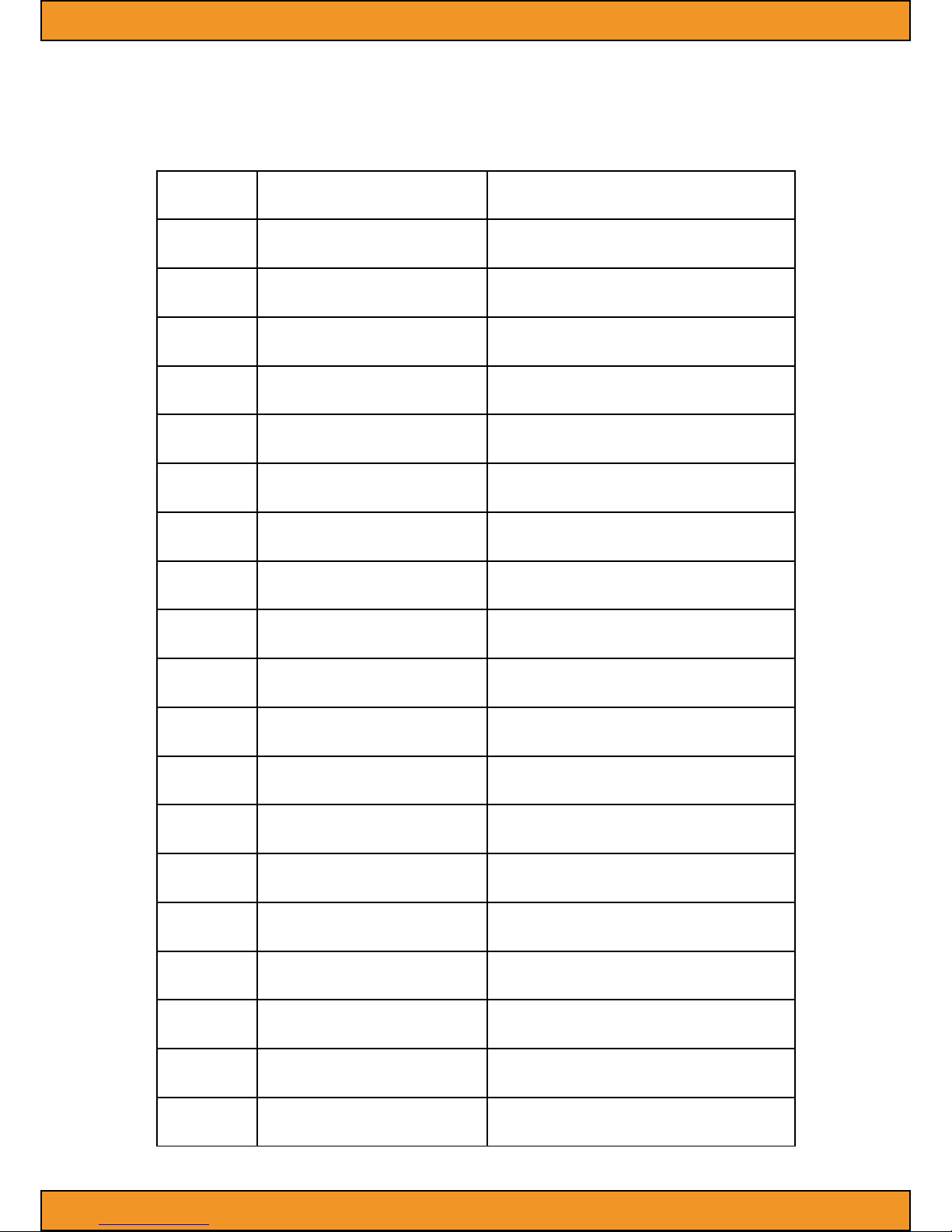
5
0-255
Red (the rst led)
0-100%
6
0-255
Green (the rst led)
0-100%
7
0-255
Blue (the rst led)
0-100%
8
0-255
White (the rst led)
0-100%
9
0-255
Red (the second led)
0-100%
10
0-255
Green (the second led)
0-100%
11
0-255
Blue (the second led)
0-100%
12
0-255
White (the second led)
0-100%
13
0-255
Red (the third led)
0-100%
14
0-255
Green (the third led)
0-100%
15
0-255
Blue (the third led)
0-100%
16
0-255
White (the third led)
0-100%
17
0-255
Red (the fourth led)
0-100%
18
0-255
Green (the fourth led)
0-100%
19
0-255
Blue (the fourth led)
0-100%
20
0-255
White (the fourth led)
0-100%
21
0-255
Red (the fth led)
0-100%
22
0-255
Green (the fth led)
0-100%
23
0-255
Blue (the fth led)
0-100%
24
0-255
White (the fth led)
0-100%
Page 9
Manual | SquareLED UNIVERSAL LED BLINDER 5x10W RGBW 4in1 CREE
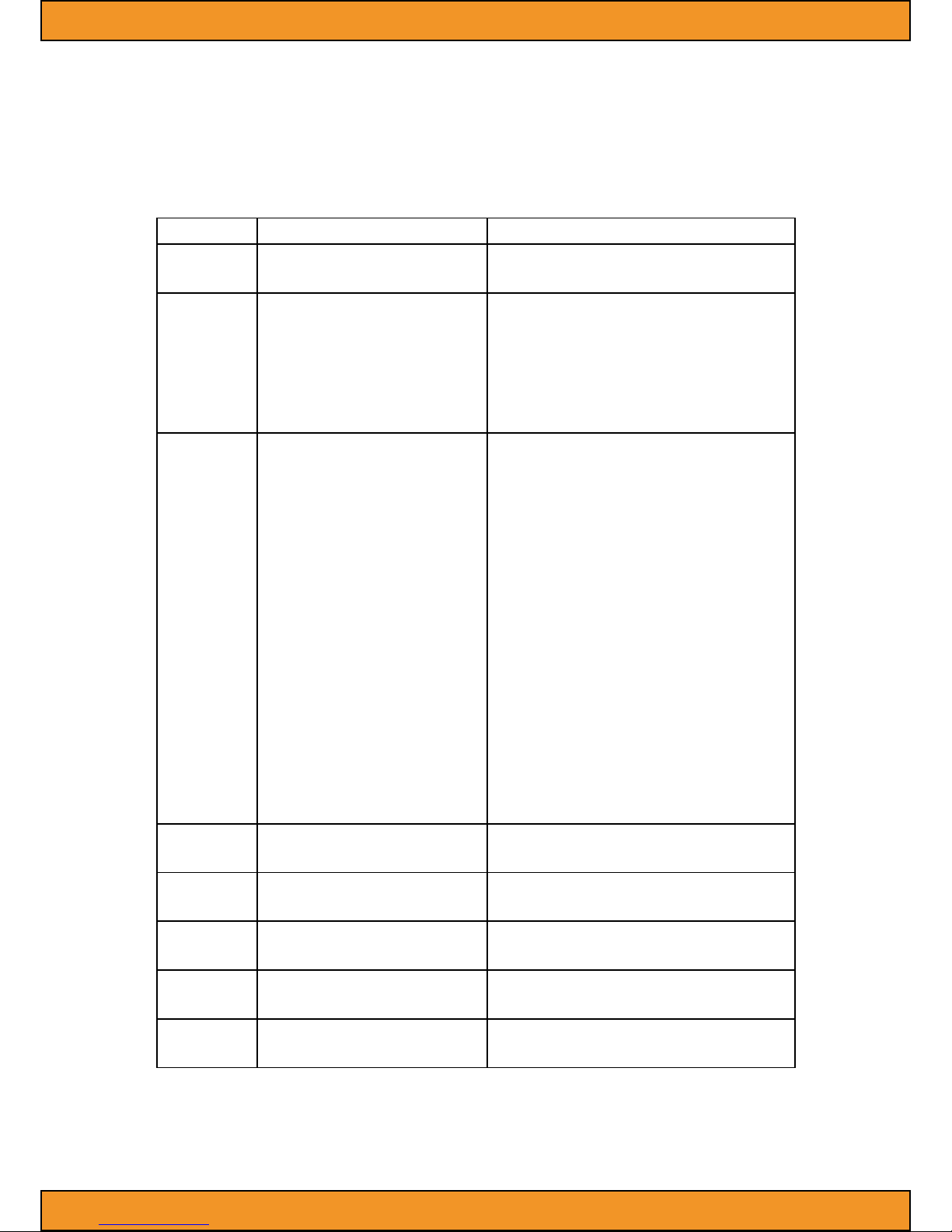
DMX Channel (8CH)
Channel Value Function
1 0-255 Dimmer
0-100%
2
0-10
11-30
31-200
201-250
251-255
Strobe
Shut
Neutral
Strobe with increase speed
Random Strobe with increase speed
Neutral
3
0-15
16-31
32-47
48-63
64-79
80-95
96-111
112-127
128-143
144-159
160-175
176-191
192-207
208-223
224-239
240-255
Performance Function
Neutral
Red
Green
Blue
White
Red/Green
Red/Blue
Red/White
Green/Blue
Green/White
Blue/White
Red/Green/Blue
Red/Green/White
Green/Blue/White
Blue/Red/White
Red/Green/Blue/White
4
0-255
Performance speed
Fast to slow
5
0-255
Red (all)
0-100%%
6
0-255
Green (all)
0-100%%
7
0-255
Blue (all)
0-100%%
8
0-255
White (all)
0-100%%
Page 10

Manual | SquareLED UNIVERSAL LED BLINDER 5x10W RGBW 4in1 CREE
5. Specications
Input Voltage: AC100V - 240V 50 Hz/60 Hz
Lamp resource: 5 pcs 10W RGBW 4in1 CREE LED
Control model: Auto, sound, DMX512 signal
Max temperature: 104°F (40°C)
Data input/output: 3pin XLR-connection, anode socket
Lens angle: 30°
Outside size: 360x385x190 mm
N.W: 3,65 kg
 Loading...