

Page 1
User Manual: Squareled Funky Bee 19x10W Battery + W-DMX
Page 2
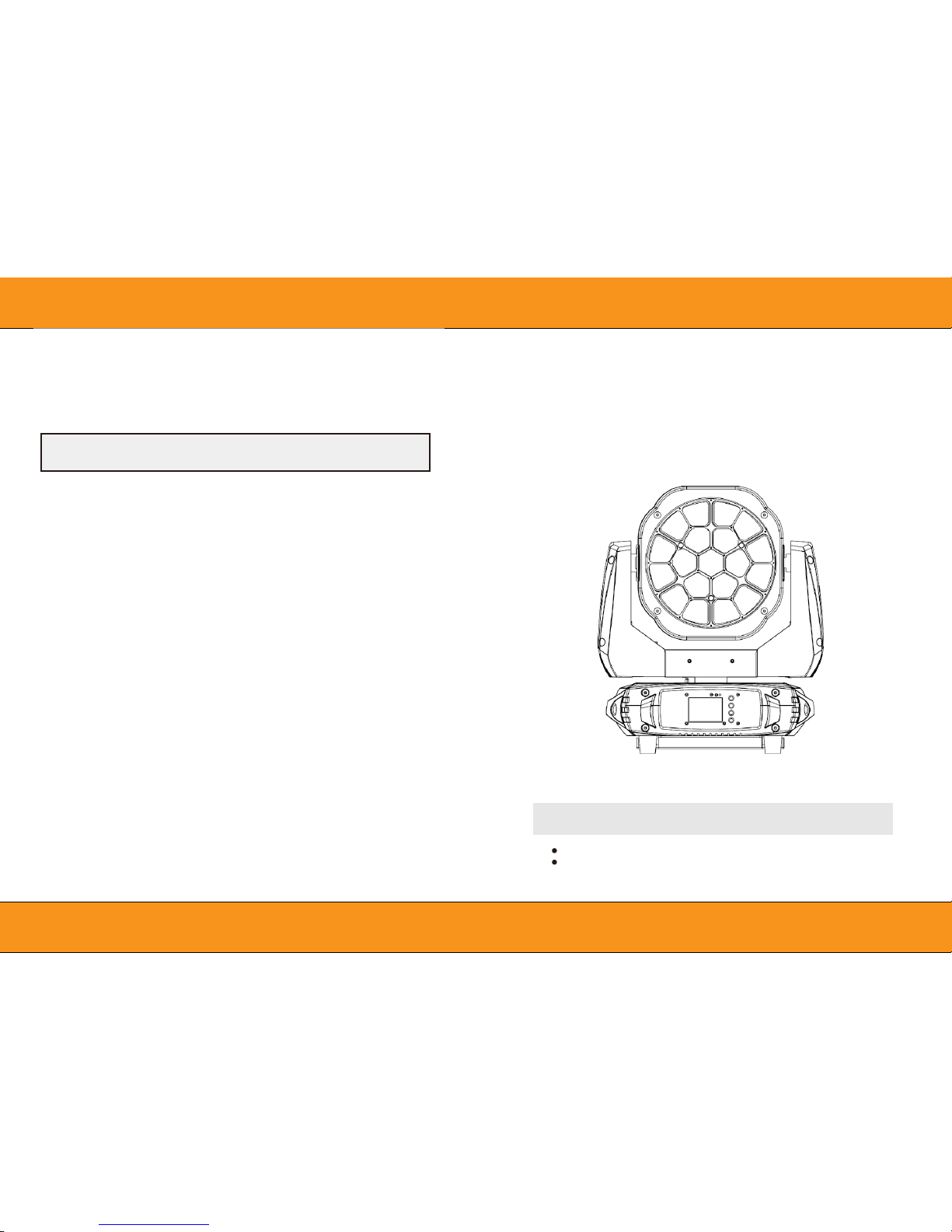
10. Maintenance and cleaning
It is absolutely essential that the fixture is kept clean and that dust, dirt and smoke-fluid residues must not
build up on or within the fixture. Otherwise, the f ixture‘ s li ght-output will be significantly reduced. Regular
cleaning will not only ensure the maximum light-output, but will also allow the fixture to function reliably
throughout its life. A soft lint-free cloth moistened with any good glass cleaning fluid is recommended,
under no circumstances should alcohol or solvents be used!
The front objective lens will require weekly cleaning as smoke-fluid tends to building up residues, reducing the lightoutput very quickly. The cooling-fans should be cleaned monthly.
The interior of the fixture should be cleaned at least annually using a vacuum-cleaner or an air-jet. Dichroic colour
filters, CMY lamellas, gobo and graphic wheels and the internal lenses should be cleaned
monthly. Remove dust and dirt from the fans and cooling vents using a soft brush and vacuum-cleaner.
Important! Check the air filters periodically and clean before they become clogged!
Clean two air filters placed in the fixture’s covers and two in the fixture base. Use a vacuum cleaner,
compressed air or you can wash them and put back dry.
After replacing the air filters, reset the elapsed time counter in the menu "Information" (Information--->Air Filters-->Elapsed Time).
Replacing the fuse. Before replacing the fuse, unplug mains lead.
1)
Remove the fuse holder on the rear panel of the base with a fitting screwdriver from the housing (anticlockwise).
2)
Remove the old fuse from the fuse holder.
3)
Install the new fuse in the fuse holder (only the same type and rating).
4)
Replace the fuse holder in the housing and fix it.
Squareled Funky Bee 19X10W
RGBW
Battery + W-DMX
Version 1.0
USER MANUAL
Be sure to read the USER MANUAL carefully before using this product. Be
sure to keep the USER MANUAL properly for future needs.
DANG ER !
Disconnect from the mains before starting any
maintenance work
Page 3
CAUTION ! EYE DAMAGES !
Avoid looking directly into the light source
(meant especially for epileptics) !
1.
Safety instructions
Thank you for choosing our Squareled Funky Bee. FOR YOUR OWN SAFETY, PLEASE READ THIS USER
MANUAL CAREFULLY
BEFORE YOU INITIAL START - UP!
This device has left our premises in absolutely perfect condition. In order to maintain this condition and to ensure a
safe operation, it is absolutely necessary for the user to follow the safety instructions and warning notes written in
this manual.
Important:
The manufacturer will not accept liability for any resulting damages caused by the non-observance of this manual
or any unauthorized modification to the device.
Please consider that damages caused by manual modifications to the device are not subject to warranty.
During the operation the housing becomes hot). Allow the fixture to cool approximately 20 minutes prior to
manipulate with it.
Make sure that the available voltage is not higher than stated on the rear panel.
WARNING! This unit does not contain an ON/OFF switch. Always disconnect power input cable to
completely remove power from unit when not in use or before cleaning or servicing the fixture.
Make sure that the power-cord is never crimped or damaged by sharp edges. Check the device and the power-
cord from time to time.
Always disconnect from the mains, when the device is not in use or before cleaning it. Only handle the power-
cord by the plug. Never pull out the plug by tugging the power cord.
This device falls under protection class I. Therefore it is essential to connect the yellow/green conductor to earth.
The electric connection, repairs and servicing must be carried out by a qualified employee. Do not
connect this device to a dimmer pack.
Do not switch the fixture on and off in short intervals as t his would reduce the lamp’s life.
During the initial start-up some smoke or smell may arise. This is a normal process and does not
necessarily mean that the device is defective.
Do not touch the device’s housing bare hands during its operation (housing becomes hot)! For
replacement use lamps and fuses of same type and rating only.
CAUTION!
Keep this device away from rain and
moisture! Unplug mains lead before
CAUTION!
Be careful with your operations.
With a high voltage you can sufer a dangerous electric shock when touching the
71 75
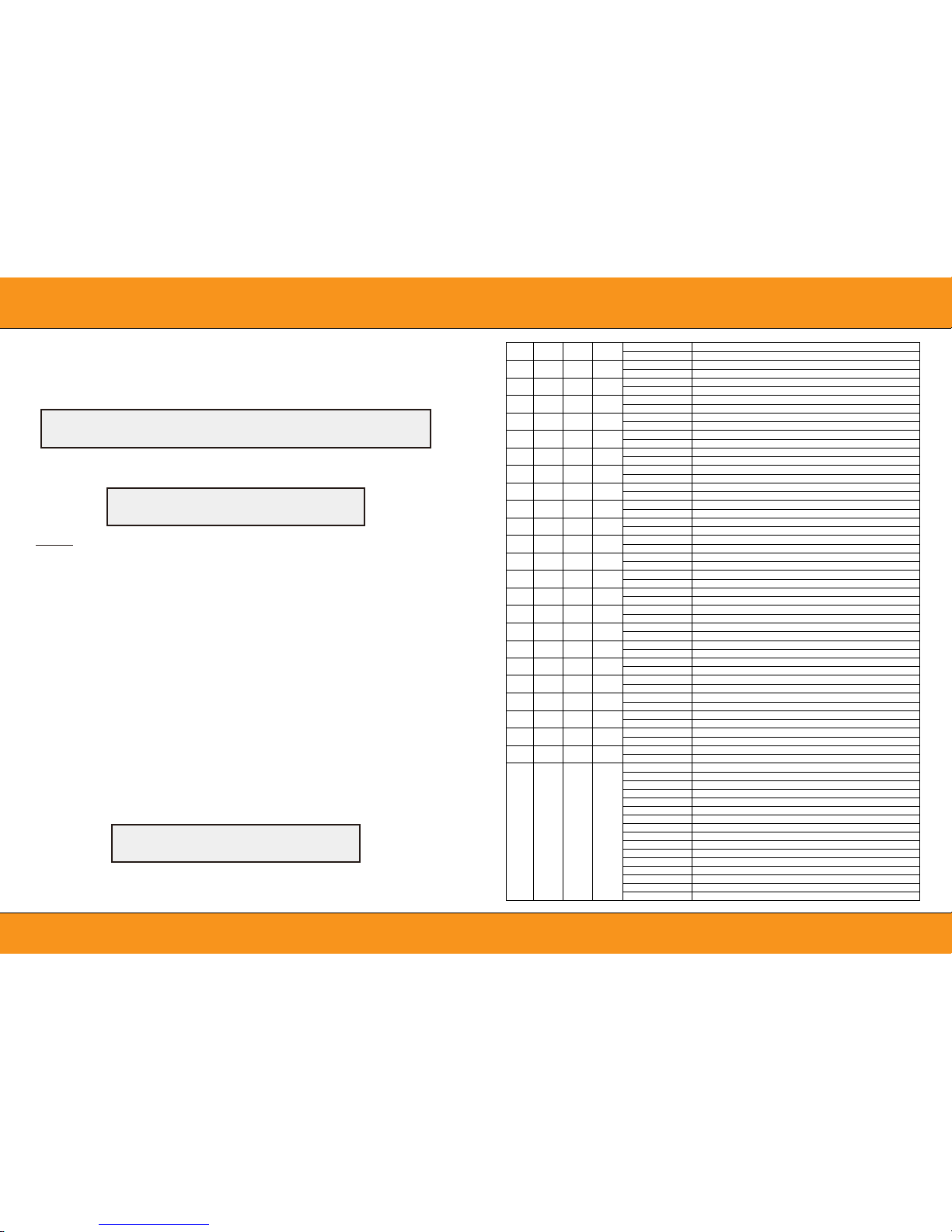
Red in Pixel 14
0..255
Red in pixel 14 saturation control (0-100%)
72 76
Green in pixel 14
0..255
Green in pixel 14 saturation control(0-100%)
73 77
Blue in pixel 14
0..255
Blue in pixel 14 saturation control(0-100%)
74 78
White in pixel 14
0..255
White in pixel 14 saturation control(0-100%)
75 79
Red in Pixel 15
0..255
White in pixel 15 saturation control (0-100%)
76 80
Green in pixel 15
0..255
Green in pixel 15 saturation control(0-100%)
77 81
Blue in pixel 15
0..255
Blue in pixel 15 saturation control(0-100%)
78 82
White in pixel 15
0..255
White in pixel 15 saturation control(0-100%)
79 83
Red in Pixel 16
0..255
White in pixel 16 saturation control (0-100%)
80 84
Green in pixel 16
0..255
Green in pixel 16 saturation control(0-100%)
81 85
Blue in pixel 16
0..255
Blue in pixel 16 saturation control(0-100%)
82 86
White in pixel 16
0..255
White in pixel 16 saturation control(0-100%)
83 87
Red in Pixel 17
0..255
White in pixel 17 saturation control (0-100%)
84 88
Green in pixel 17
0..255
Green in pixel 17 saturation control(0-100%)
85 89
Blue in pixel 17
0..255
Blue in pixel 17 saturation control(0-100%)
86 90
White in pixel 17
0..255
White in pixel 17 saturation control(0-100%)
87 91
Red in Pixel 18
0..255
Red in pixel 18 saturation control (0-100%)
88 92
Green in Pixel 18
0..255
Green in pixel 18 saturation control (0-100%)
89 93
Blue in Pixel 18
0..255
Blue in pixel 18 saturation control(0-100%)
90 94
White in pixel 18
0..255
White in pixel 18 saturation control(0-100%)
91 95
Red in pixel 19
0..255
Red in pixel 19 saturation control(0-100%)
92 96
Green in pixel 19
0..255
Green in pixel 19 saturation control(0-100%)
93 97
Blue in pixel 19
0..255
Blue in pixel 19 saturation control(0-100%)
94 98
White in pixel 19
0..255
White in pixel 19 saturation control(0-100%)
23
17
95
99
Special function
0..19
No function
20..29
No function
30..39
No function
40..79
No function
80..89
All Motor reset
90..94 SCAN Motor Reset
95..99 Focus Motor Reset
100..119 Internalprogram 1
120..139 Internalprogram 2
140..159 Internalprogram 3
160..179 Internalprogram 4
180..199 Internalprogram 5
200..219 Internalprogram 6
220..239 Internalprogram 7
240..255 InternalSound program 1
Page 4
2.
UNPACKING
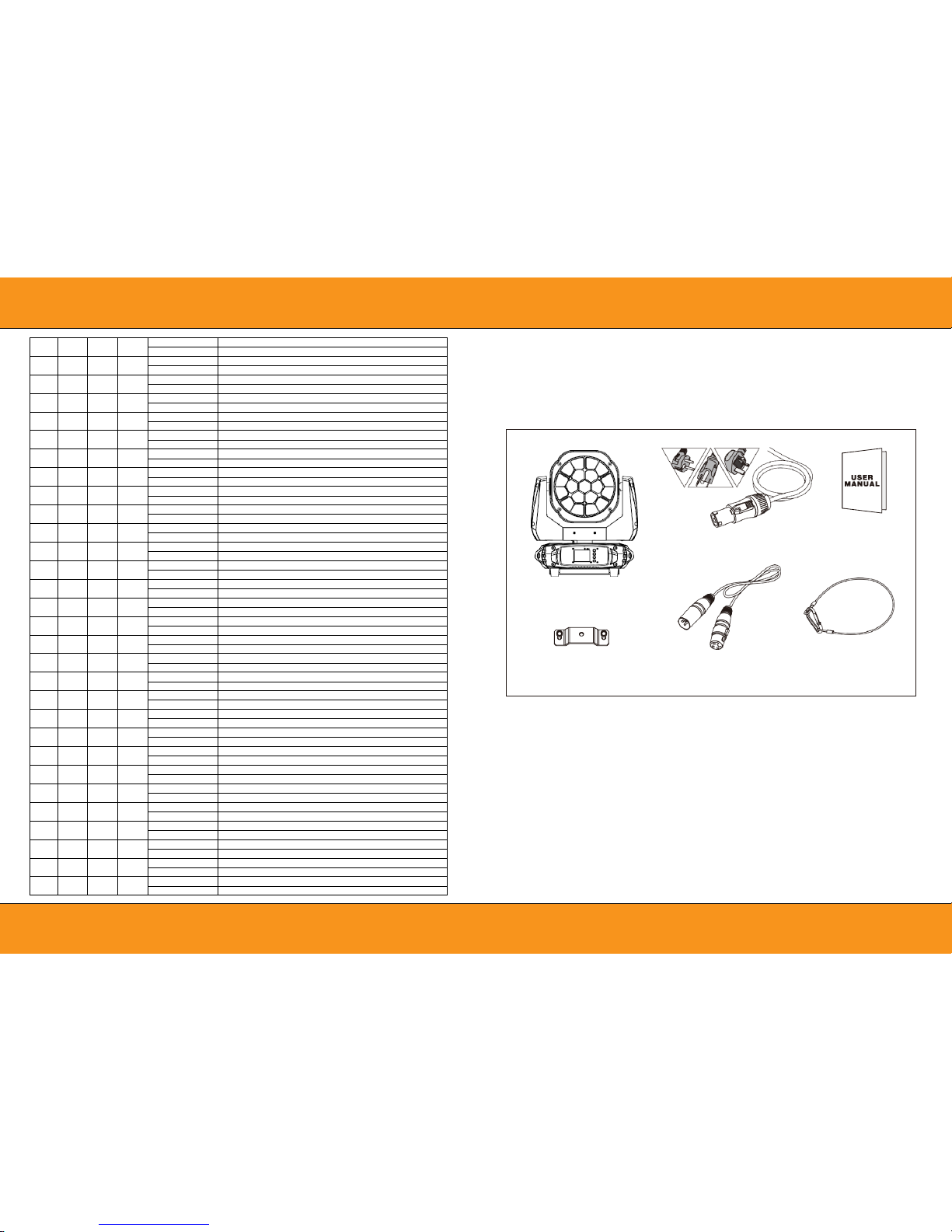
Squareled Funky Bee adopts a 10W white LED lamp which features high brightness and stability. Please
carefully unpack it when you receive the fixture and check whether it is damaged during the transportation. And
please check whether the following items are included inside the box:
Euro Standard UK Standard
▲ Moving Head *1
▲ Hanging Kit *2
USA Standard
▲ Power Cable*1
▲ Signal Cable *1
▲ User Manual*1
▲ Safety Cable*1
Squareled Funky Bee Is made of a new type of high temperature strength of engineering plastics and cast
aluminum casing with nice outlook. The fixture is designed and manufactured strictly following CE
standards, complying with international standard DMX512 protocol. It’s available independently controlled
and linkable with each other for operation. And it is applicable for large-scale live performances, theater,
studio, nightclubs and discos.
This manual covers the important information on installation and applications. Meanwhile, please keep this
manual well for future needs.
41 45
Blue in pixel 6
0..255
Blue in pixel 6 saturation control(0-100%)
42 46
White in pixel 6
0..255
White in pixel 6 saturation control(0-100%)
43 47
Red in Pixel 7
0..255
White in pixel 7 saturation control (0-100%)
44 48
Green in pixel 7
0..255
Green in pixel 7 saturation control(0-100%)
45 49
Blue in pixel 7
0..255
Blue in pixel 7 saturation control(0-100%)
46 50
White in pixel 7
0..255
White in pixel 7 saturation control(0-100%)
47 51
Red in Pixel 8
0..255
Red in pixel 8 saturation control (0-100%)
48 52
Green in Pixel 8
0..255
Green in pixel 8 saturation control (0-100%)
49 53
Blue in Pixel 8
0..255
Blue in pixel 8 saturation control(0-100%)
50 54
White in pixel 8
0..255
White in pixel 8 saturation control(0-100%)
51 55
Red in pixel 9
0..255
Red in pixel 9 saturation control(0-100%)
52 56
Green in pixel 9
0..255
Green in pixel 9 saturation control(0-100%)
53 57
Blue in pixel 9
0..255
Blue in pixel 9 saturation control(0-100%)
54 58
White in pixel 9
0..255
White in pixel 9 saturation control(0-100%)
55 59
Red in Pixel 10
0..255
Red in pixel 10 saturation control (0-100%)
56 60
Green in pixel 10
0..255
Green in pixel 10 saturation control(0-100%
57 61
Blue in pixel 10
0..255
Blue in pixel 10 saturation control(0-100%)
58 62
White in pixel 10
0..255
White in pixel 10 saturation control(0-100%)
59 63
Red in Pixel 11
0..255
Red in pixel 11 saturation control (0-100%)
60 64
Green in Pixel 11
0..255
Green in pixel 11 saturation control (0-100%)
61 65
Blue in Pixel 11
0..255
Blue in pixel 11 saturation control(0-100%)
62 66
White in pixel 11
0..255
White in pixel 11 saturation control(0-100%)
63 67
Red in pixel 12
0..255
Red in pixel 12 saturation control(0-100%)
64 68
Green in pixel 12
0..255
Green in pixel 12 saturation control(0-100%)
65 69
Blue in pixel 12
0..255
Blue in pixel 12 saturation control(0-100%)
66 70
White in pixel 12
0..255
White in pixel 12 saturation control(0-100%)
67 71
Red in Pixel 13
0..255
Red in pixel 13 saturation control (0-100%)
68 72
Green in pixel 13
0..255
Green in pixel 13 saturation control(0-100%
69 73
Blue in pixel 13
0..255
Blue in pixel 13 saturation control(0-100%)
70 74
White in pixel 13
0..255
White in pixel 13 saturation control(0-100%)
Page 5
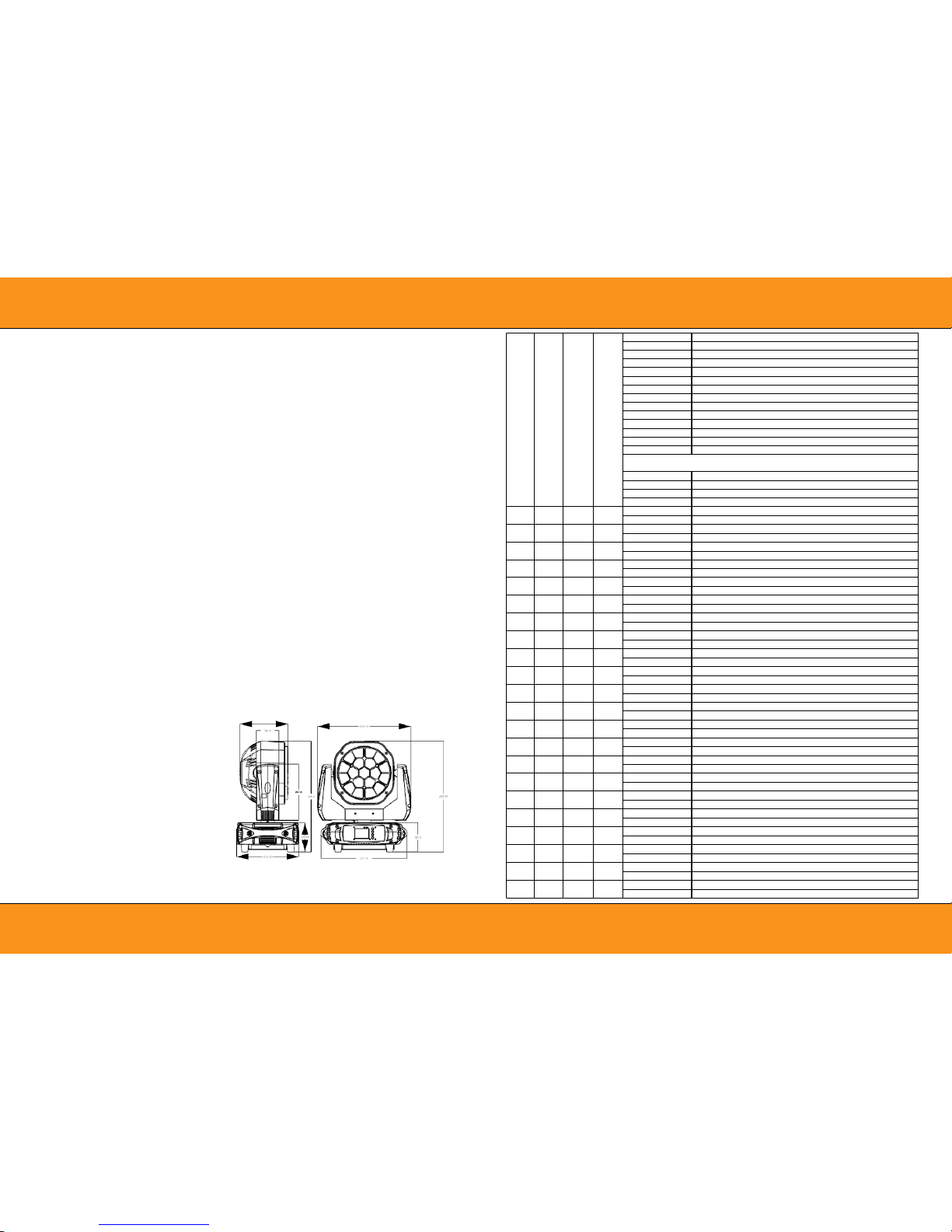
12
03
Light Source
3.
TECHNICAL INFORMATION
Construction & Weight
nLamp: 19pcs*10W 4-IN-1 RGBW LEDS
nLife span: 50000 hours
nColor: RGBW
Optics
nZoom angle: 6°-60°
nImproved optics and flat beam field
Power Supply
nPower supply:Battery or AC mains
nInput Voltage:AC90-260V 50/60Hz
nPower Consumption: State of charge 280W; non-
charged state: 215W
Battery
nBattery type:Lithium iron
nBattery charge time:0% to 100% charge 5.5 hours,
nMax-endurance:8 hours(Full power), 12
hours(built-in program)
nTemperature detection function :(-20 ℃ to 45 ℃ )
nBattery protection:Battery short circuit protection, over
current protection,overflow charging
nCharging mode:When connected to mains and
power is insufficient, battery will be charged
automatically.
nSupport battery extension.
Control
nControl Signal:DMX512, master-slave and sound
activated ,auto operation or wireless
nSound control with sensitivity adjustment
Control Channel:23/17/95/99 DMX channels USITT
DMX-512
nDMX recorder and function integrated
Movement
n630° /540° /360° PAN and 270°/180° /90° TILT
movement optional
nSmooth and precise resolution for PAN/TILT
movement
nScan position memory, auto preposition after
unexpected movement.
nPAN/TILT reversible advantage
nPAN/TILT calibration available
Working Environment
n-20°C-45°C max ambient temperature
nConstant temperature readout and management
function.
nProtection Rating : IP 20
nDimensions:41*27*48.6(cm) nPacking
Dimensions:50*34*60(cm) nNet Weight:
nGross Weight: 22 kgs
Features
nABS die-cast plastic cover with Aluminium structure
nEach pixel controllable individually
nColor temperature Liner up and down in 2700-8000K
n8/16 bit smooth and precise resolution for PAN/TILT
movement
nAuto preposition after unexpected movement
nFast,smooth and quiet motorized zoom with 6°-60°
range
nEven,soft edge and pure color mixing coverage
nPixel patterning macro effects
nPetal-like micro beam effect
nBuilt-in running programs
nBuilt-in colour and graphic programs
nFlicker free sources management
nAuto re-position after unexpected movement
n0-100% Linear LED dimmer
nVariable speed strobe effect with 1-28 flashes per
second
nPreset variable/random strobe and dimming pulse
effect
n2.4'' TFT LCD display (320*240pix) with 4 control
buttons
nLCD display switch off automatically after 1 second
nReversible for LCD display
nPOWERCON connector IN/OUT
n3-Pin XLR connectors IN/OUT
nConstant temperature readout and management
function
n2*1/4 turn fastening Omega Clamps(Adaptable
vertically and horizontally)
n1*Safety attachment point
22
18
22
174..179 static scene30
180..185 static scene31
186..191 static scene32
192..197 Multicolor static scene1
198..203 Multicolor static scene2
204..209 Multicolor static scene3
210..215 Multicolor static scene4
216..221 Multicolor static scene5
222..227 Multicolor static scene6
228..233 Multicolor static scene7
234..239 Multicolor static scene8
240..245 Multicolor static scene9
246..251 Multicolor static scene10
252..255 Multicolor static scene11
Dynamic Patterns
(If Patterns channel is in the interval 032 – 255)
000..023
No function
024..137
Forward speed from zero speed to fast speed
138..141 Stop movement
142..255
Reverse speed from zero speed to fast speed
19 23
Red in Pixel 1
0..255
Red in pixel 1 saturation control (0-100%)
20 24
Green in Pixel 1
0..255
Green in pixel 1 saturation control (0-100%)
21 25
Blue in Pixel 1
0..255
Blue in pixel 1 saturation control(0-100%)
22 26
White in pixel 1
0..255
White in pixel 1 saturation control(0-100%)
23 27
Red in pixel 2
0..255
Red in pixel 2 saturation control(0-100%)
24 28
Green in pixel 2
0..255
Green in pixel 2 saturation control(0-100%)
25 29
Blue in pixel 2
0..255
Blue in pixel 2 saturation control(0-100%)
26 30
White in pixel 2
0..255
White in pixel 2 saturation control(0-100%)
27 31
Red in Pixel 3
0..255
Red in pixel 3 saturation control (0-100%)
28 32
Green in pixel 3
0..255
Green in pixel 3 saturation control(0-100%
29 33
Blue in pixel 3
0..255
Blue in pixel 3 saturation control(0-100%)
30 34
White in pixel 3
0..255
White in pixel 3 saturation control(0-100%)
31 35
Red in Pixel 4
0..255
Red in pixel 4 saturation control (0-100%)
32 36
Green in pixel 4
0..255
Green in pixel 4 saturation control(0-100%)
33 37
Blue in pixel 4
0..255
Blue in pixel 4 saturation control(0-100%)
34 38
White in pixel 4
0..255
White in pixel 4 saturation control(0-100%)
35 39
Red in Pixel 5
0..255
White in pixel 5 saturation control (0-100%)
36 40
Green in pixel 5
0..255
Green in pixel 5 saturation control(0-100%)
37 41
Blue in pixel 5
0..255
Blue in pixel 5 saturation control(0-100%)
38 42
White in pixel 5
0..255
White in pixel 5 saturation control(0-100%)
39 43
Red in Pixel 6
0..255
White in pixel 6 saturation control (0-100%)
40 44
Green in pixel 6
0..255
Green in pixel 6 saturation control(0-100%)
Page 6
4.
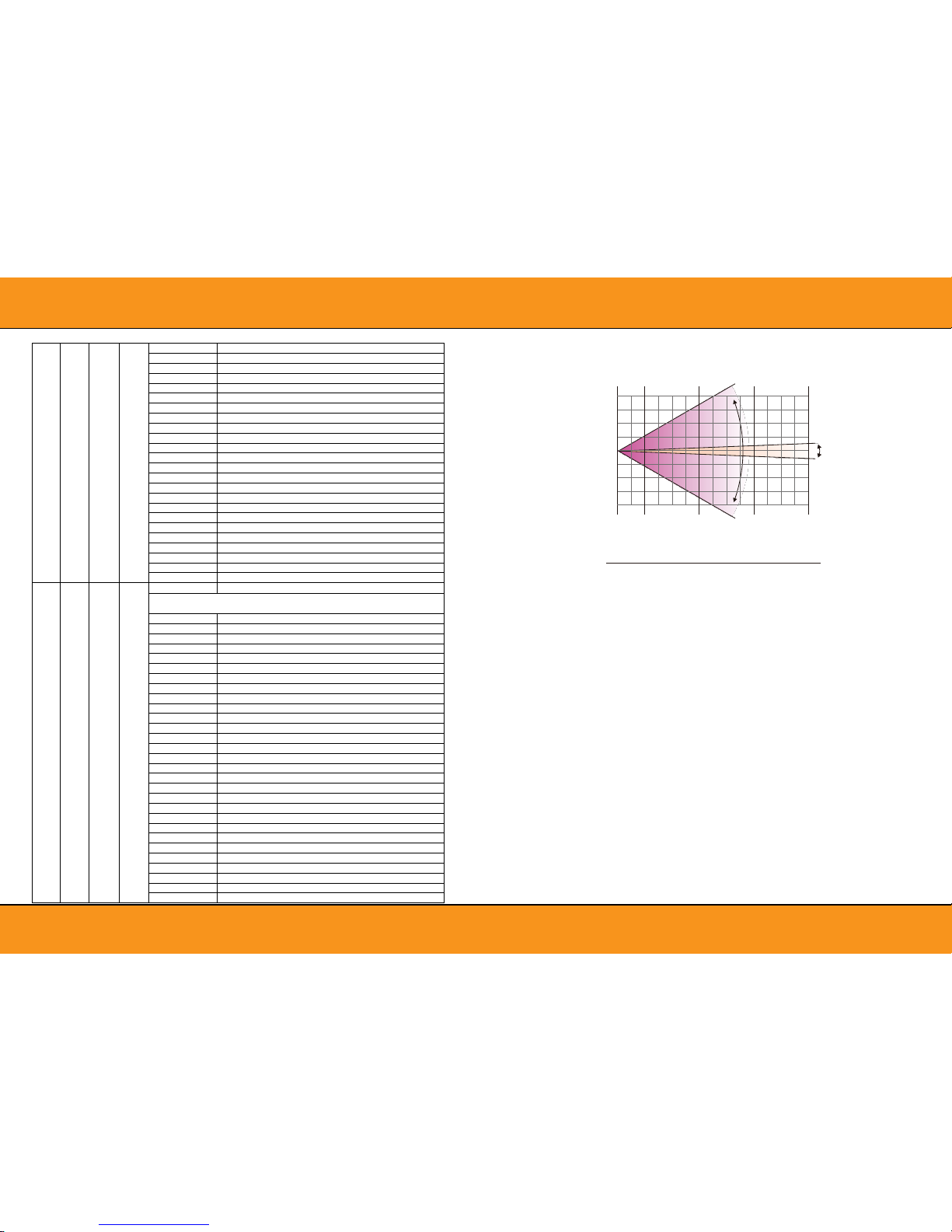
PHOTOMETRICS DIAGRAM
Distance
1m 3m 5m 7m
6°
6° (LUX)
60° (LUX)
R
G
B
W
RGBW
R
G
B
W
RGBW
7500
10000
12000
13000
47000
900
1100
1500
1700
4900
4600
5400
6500
7800
23000
126
160
200
240
850
1500
2100
2600
3100
8800
46
60
80
90
270
500
620
750
840
2100
5.
OPERATION INSTRUCTIONS
●
Squareled Funky Bee Product for beam effect for on-site decoration
purpose. Don ’t turn on the fixture if it’ s been through severe temperature difference like after
transportation because it might damage the light due to the environment changes. So make sure to
operate the fixture until it is in normal temperature.
●
This light should be keep away from strong shaking during any transportation or movement.
●
Don’t pull up the light by only the head, or it might cause damages to the mechanical parts.
●
Don’t expose the fixture in overheat, moisture or environment with too much dust when installing it. And
●
Don’t l ay any powe r cables on the floor. Or it might cause electronic shock to the people.
●
Make sure the installation place is in good safety condition before installing the fixture.
●
Make sure to put the safety chain and check whether the screws are screwed properly when installing
the fixture.
●
Make sure the lens are in good condition. It’ s recom mended to replace the units if there are any damages
or severe scratch.
●
Make sure the fixture is operated by qualified personnel who knows the fixture before using.
●
Keep the original packages if any second shipment is needed.
●
Don’t t ry to change the fixtures without any instruction by the manufacturer or the appointed repairing
agencies.
●
It is not in warranty range if there are any malfunctions from not following the user manual to operate or
any illegal operation, like shock short circuit, electronic shock , lamp broke, etc.
21
17
21
137..141 Dynamic Scene22
142..146 Dynamic Scene23
147..151 Dynamic Scene24
152..156 Dynamic Scene25
157..161 Dynamic Scene26
162..166 Dynamic Scene27
167..171 Dynamic Scene28
172..176 Dynamic Scene29
177..181 Dynamic Scene30
182..186 Dynamic Scene31
187..191 Dynamic Scene32
192..196 Multicolor Dynamic Scene1
197..201 Multicolor Dynamic Scene2
202..206 Multicolor Dynamic Scene3
207..211 Multicolor Dynamic Scene4
212..216 Multicolor Dynamic Scene5
217..221 Multicolor Dynamic Scene6
222..226 Multicolor Dynamic Scene7
227..231 Multicolor Dynamic Scene8
232..236 Multicolor Dynamic Scene9
237..241 Multicolor Dynamic Scene10
242..246 Multicolor Dynamic Scene11
247..251 Multicolor Dynamic Scene12
252..255 Multicolor Dynamic Scene13
22
18
22
Static patterns or patterns speed
Static Patterns
(If Patterns channel is in the interval 016 – 031)
000..005 static scene1
006..011 static scene2
012..017 static scene3
018..023 static scene4
024..029 static scene5
030..035 static scene6
036..041 static scene7
042..047 static scene8
048..053 static scene9
054..059 static scene10
060..065 static scene11
066..071 static scene12
072..075 static scene13
078..083 static scene14
084..089 static scene15
090..095 static scene16
096..101 static scene17
102..107 static scene18
108..113 static scene19
114..119 static scene20
120..125 static scene21
126..131 static scene22
132..137 static scene23
138..143 static scene24
144..149 static scene25
150..155 static scene26
156..161 static scene27
162..167 static scene28
168..173 static scene29
60°
Page 7
Cautions:
6.
INSTALLATIONS
For added protection mount the fixtures in areas outside
walking paths, seating areas, or in areas were the fixture
might be reached by unauthorized personnel.
Before mounting the fixture to any surface, make sure that
the installation area can hold a minimum point
load of 10 times the device’s weight.
Fixture installation must always be secured with a
secondary safety attachment, such as an appropriate
safety cable.
Never stand directly below the device when mounting,
removing, or servicing the fixture.
from a ceiling, or set on a flat level surface (see
illustration below). Be sure this fixture is kept at least
0.5m (1.5 f t) away from any flammable materials
(decoration etc.).
Always use and install the supplied safety cable as a
safety measure to prevent accidental damage and/or
injury in the event the clamp fails.
Mounting points:
Overhead mounting requires extensive experience,
including amongst others calculating working load limits, a
fine knowledge of the installation material being used, and
periodic safety inspection of all installation material and
the fixture. If you lack these qualifications, do not attempt
the installation yourself. Improper installation can result in
bodily injury.
Be sure to complete all rigging and installation procedures
before connecting the main power cord to the appropriate
wall outlet.
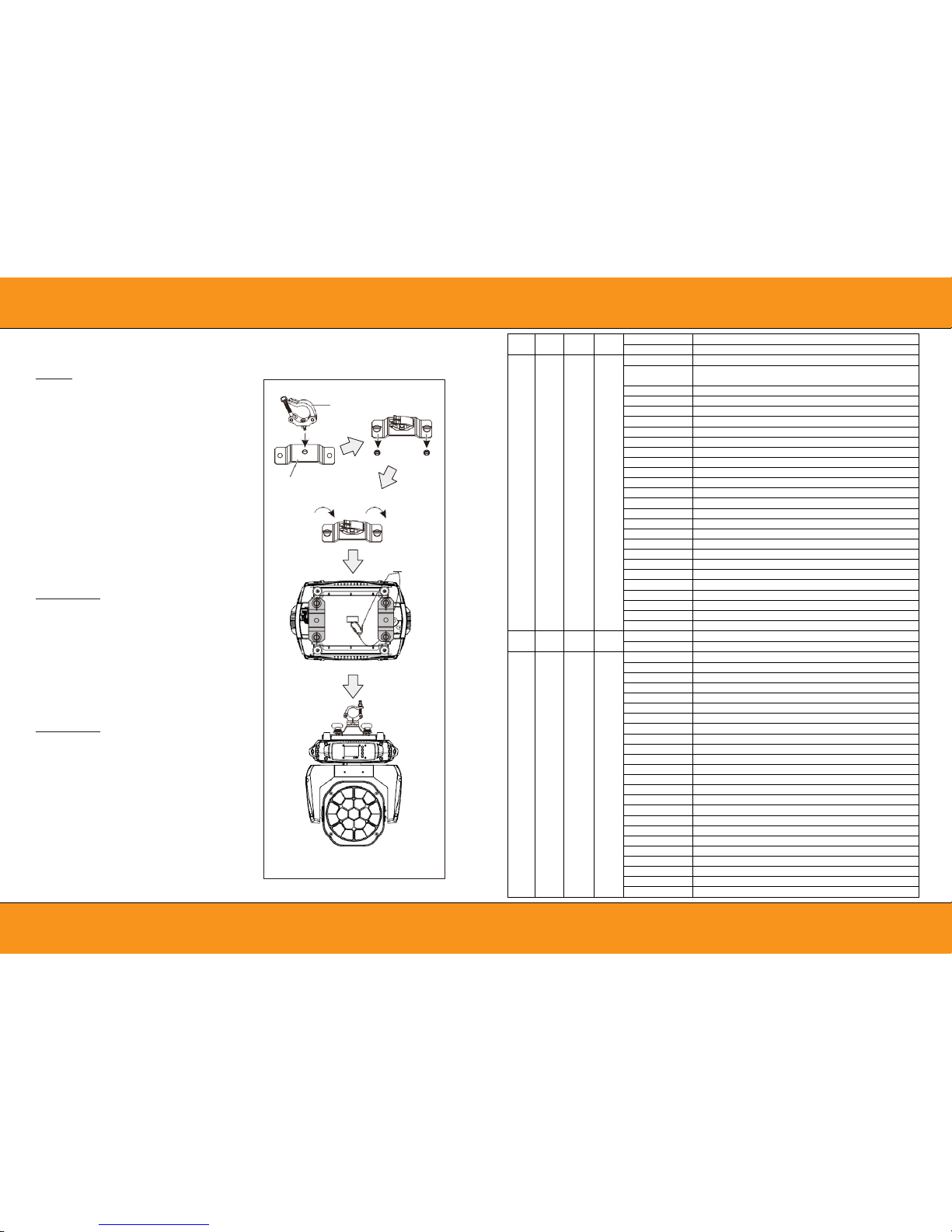
Clamp Mounting:
Squareled Funky Bee provides a unique mounting
bracket assembly that integrates the bottom of the
base, and the safety cable rigging point in one unit
(see the illustration below). When mounting this
fixture to truss be sure to secure an appropriately
rated clamp to the included omega bracket using a
M10 screw fitted through the center hole of the
“Han ging Kit”. As an added safety measure be sure to
attached at least one properly rated safety cable to the
fixture using on of the safety cable rigging point
integrated in the base assembly .
Satety Clamp
Hanging Kit
1/4 Turn
1/4 Turn
Safety Cable
INSTALLATION DIAGRAM
18
14 18
Foreground dimmer
000..255 Foreground dimmer 0 – 100%.
19
15
19
Background color for patterns
Choose Background color for Dynamic/Static
Scene,no function for Multicolor Scene
0..0
No Function
1..13
Red
14..27
Green
28..41
Blue
42..55
White
56..69
Red+White
70..83
Green+White
84..97
Blue+White
98..111 Green+Blue
112..125
Red+Blue
126..139 Red+Green
140..153 Green+Blue+White
154..167 Red+Blue+White
168..181 Red+Green+White
182..195 Red+Blue+Green+White
196..202
2700K
203..209
3200K
210..216
3500K
217..223
5000K
224..230
5500K
231..237
6000K
238..244
6500K
245..251
7000K
252..255
8000K
20
16 20
Background dimmer
000..255 Background dimmer 0 – 100%.
21
17
21
Patterns
000..015
No function
016..031 Static patterns
032..036 Dynamic Scene1
037..041 Dynamic Scene2
042..046 Dynamic Scene3
047..051 Dynamic Scene4
052..056 Dynamic Scene5
057..061 Dynamic Scene6
062..066 Dynamic Scene7
067..071 Dynamic Scene8
072..076 Dynamic Scene9
077..081 Dynamic Scene10
082..086 Dynamic Scene11
087..091 Dynamic Scene12
092..096 Dynamic Scene13
097..101 Dynamic Scene14
102.106 Dynamic Scene15
107..111 Dynamic Scene16
112..116 Dynamic Scene17
117..121 Dynamic Scene18
122..126 Dynamic Scene19
127..131 Dynamic Scene20
132..136 Dynamic Scene21
Page 8
06
09
7.
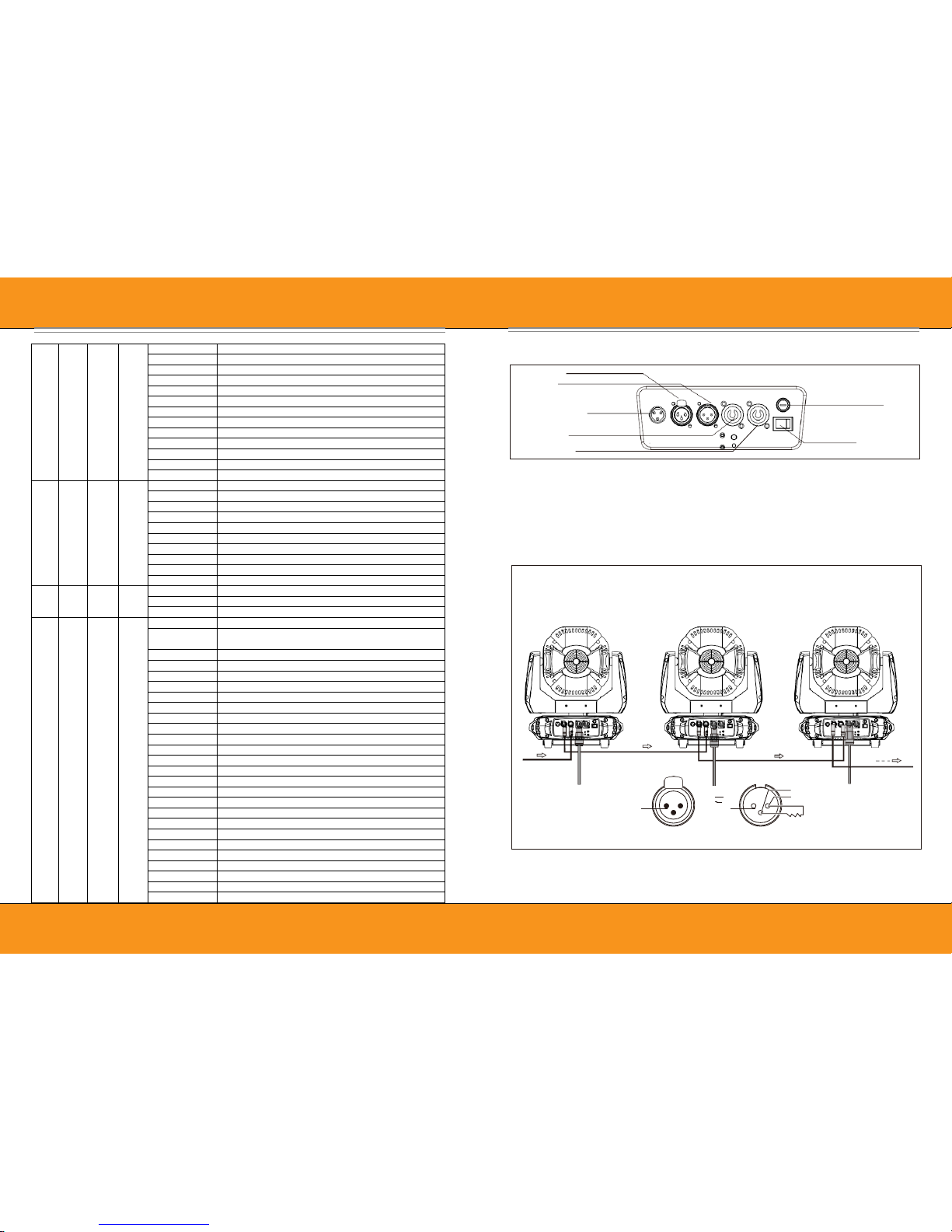
CONTROL CONNECTION
Connect the provided XLR cable to the female 3-pin XLR output of your controller and the other side to the male 3pin XLR input of the moving head. You can chain multiple Moving head together through serial linking. The cable
needed should be two core, screened cable with XLR input and output connectors.
Please refer to the diagram below. DMX-512 connection with DMX terminator.
For installations where the DMX cable has to run a long distance or is in an electrically noisy environment, such as in
a discotheque, it is recommended to use a DMX terminator. This helps in preventing corruption of the digital control
signal by electrical noise. The DMX terminator is simply an XLR plug with a3 resistor connected between pins 2 and
3,which is then plugged into the output XLR socket of the last fixture in the chain. Please see illustrations below.
DMX OUT
DMX IN
Expansion Port
Fuse
POWER IN
POWER OUT
Power Switch
DMX IN
POWER IN
Signal (-)
3
Signal (+)
2 1
Signal (-)
1 2
Signal (+)
Ground
3
120 Ω
DMX512 OUT DMX512 IN
14
14
10
14
140..153 Green+Blue+White
154..167 Red+Blue+White
168..181 Red+Green+White
182..195 Red+Blue+Green+White
196..202
2700K
203..209
3200K
210..216
3500K
217..223
5000K
224..230
5500K
231..237
6000K
238..244
6500K
245..251
7000K
252..255
8000K
15
15
11
15
Color Temp
0..15
No Function
16..45
Below 3200K
46..75 3200K - 3500K
76..105 3500K - 5000K
106..135 5000K - 5500K
136..165 5500K - 6000K
166..195 6000K - 6500K
196..225 6500K - 7000K
226..255 7000K - 8000K
16
16
12
16
Visual Tungsten Lamp
0..15
No Function
16..255
Tungsten lamp effect is gradually enhanced
17
13
17
Foreground color for patterns
Choose Foreground color for Dynamic/Static
Scene,no function for Multicolor Scene
0..0
No Function
1..13
Red
14..27
Green
28..41
Blue
42..55
White
56..69
Red+White
70..83
Green+White
84..97
Blue+White
98..111 Green+Blue
112..125
Red+Blue
126..139 Red+Green
140..153 Green+Blue+White
154..167 Red+Blue+White
168..181 Red+Green+White
182..195 Red+Blue+Green+White
196..202
2700K
203..209
3200K
210..216
3500K
217..223
5000K
224..230
5500K
231..237
6000K
238..244
6500K
245..251
7000K
252..255
8000K
Page 9
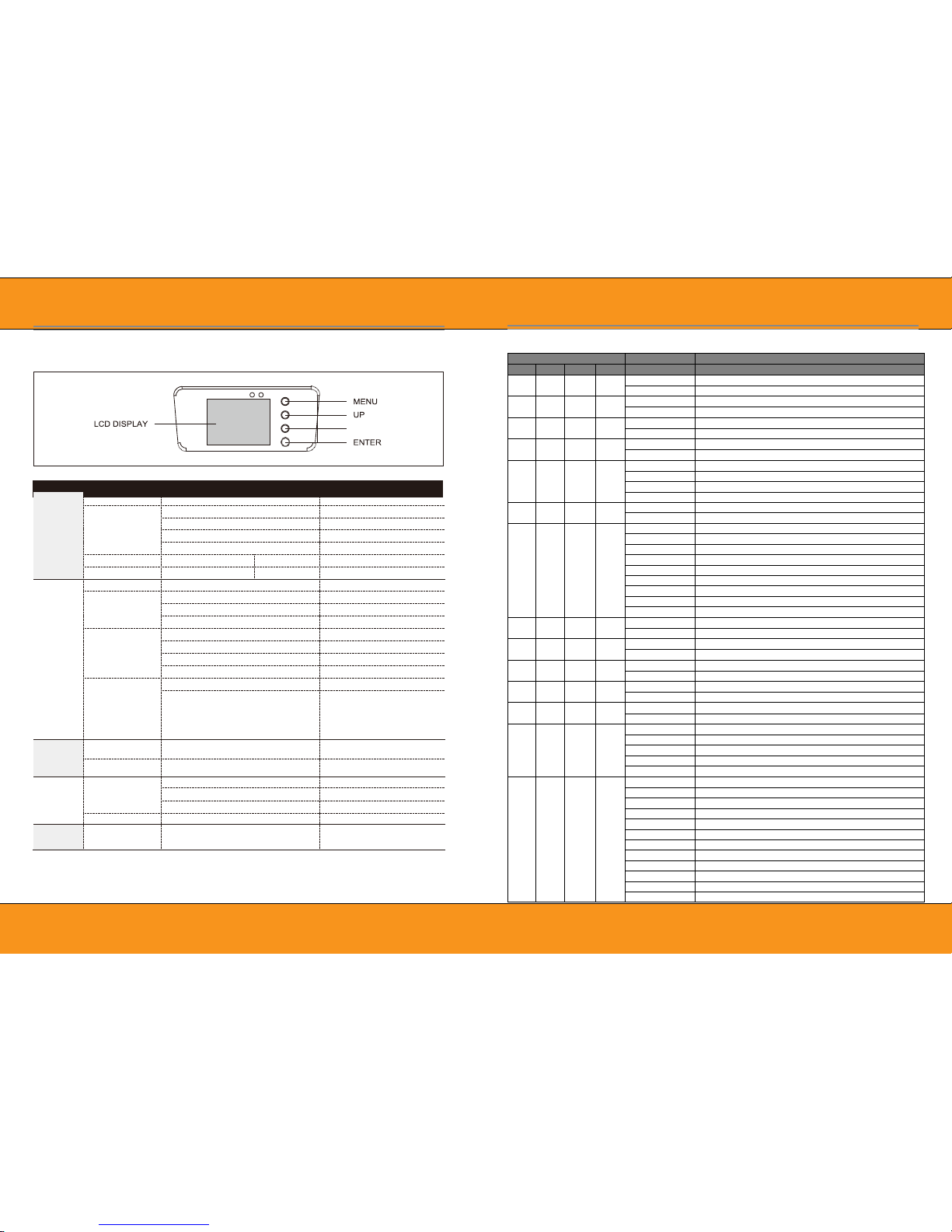
08
07
MENU
Description
9.DMX PROTOCOL
8.
MENU OPERATIONS
Function
Mode
Dmx Address
A001~AXXX
DMX address setting
Channel Mode
CH23 MODE
23 Channel Mode
CH17 MODE
17 Channel Mode
CH95 MODE
95 Channel Mode
CH99 MODE
99 Channel Mode
Auto Run
Internal Program1~8
Master/Alone
Auto run
Music Control
Internal Program1~8
Master/Alone
Sound Control
Option
Reset Default
Yes/No
Reset Default
Signal Set
Wire DMX
Wire DMX
Wireless DMX
Wireless DMX
Act WDMX & Out
Act WDMX & Out
Pan / Tilt
Reverse Pan (On/Off)
Reverse Pan
Reverse Tilt (On/Off)
Reverse Tilt
Select Pan 630°/540°/360°
Pan Degree,default is 540°
Select Tilt 270°/180°/90°
Tilt Degree,default is 270°
UI SET
Mic SEN 0~99%
Sensitivity Setting
OFF Signal Mode (On/Off)
OFF at original status and
ON at reset status when no
DMX signal
Information
Temperature
XXX°C/°F
Current Temperature
Software Version
V1.0~V9.9
Software Version
Manual
Control
Reset
Total Reset
Total Reset
Pan/Tilt Reset
Pan/Tilt Reset
Zoom Reset
Zoom Reset
Channel
PAN=XXX……
Manual Control Channel
Advanced
(Access Code 088)
Calibration
PAN=XXX……
Calibration(Code:088)
DOWN
Mode/Channel
Value
Function
23 17 95 99
1 1 1 1
Pan
0..255 PAN Movement
2 2 2 2
Pan -fine
0..255 Fine control of Pan movement
3 3 3 3
Tilt
0..255
Tilt Movement
4 4 4 4
Tile -fine
0..255 Fine control of Tilt movement
5
5
5
5
Speed pan/tile
0..225 max to min speed
226..235 blackout by movement
236..255
no function
6 6 6 6
Dimmer
0..255 Dimmer 0%...100%
7
7
7
7
Shutter
0..31
Shutter closed
32..63
shutter open
64..95 Strobe effect slow to fast
96..127 shutter open
128..159 Pulse-effect in sequences slow to fast
160..191 shutter open
192..223 Random strobe effect slow to fast
224..255 shutter open
8 8
8
Red
0..255 0-100% Red dimmer from dark to bright
9 9
9
Green
0..255
0-100% Green dimmer from dark to bright
10 10
10
Blue
0..255 0-100% Blue dimmer from dark to bright
11 11
11
White
0..255
0-100% White dimmer from dark to bright
12 12 8 12
Zoom
0..255 In(near)to out(far)
13
13
9
13
Zoom Rotation
0..3 Zoom rotation stop
4..127 Forwards rotation from fast to slow
128..131 Zoom rotation stop
132..255 Backwards rotation from slow to fast
14
14
10
14
Virtual color
0..0
No Function
1..13
Red
14..27
Green
28..41
Blue
42..55
White
56..69
Red+White
70..83
Green+White
84..97
Blue+White
98..111
Green+Blue
112..125
Red+Blue
126..139 Red+Green
Page 10
Das Lichttechnikhaus Vertriebs GmbH
Rudolf-Diesel-Str. 3, D-89312 Günzburg
Telefon +49 (0) 82 21 207 98-0
 Loading...