

Page 1
© 2013 and published by Deep Silver, a division of Koch Media GmbH, Gewerbegebiet 1, 6604 Höfen, Austria.
Developed by Deep Silver Volition, LLC. Deep Silver, Saints Row IV™, Deep Silver Volition, LLC. and their
respective logo are trademarks of Koch Media GmbH. All other trademarks, logos and copyrights are property
of their respective owners. All rights reserved. Uses Bink Video. Copyright © 1997-2013 by RAD Game Tools, Inc.
Portions of this software utilize SpeedTree®RT Technology (© 2004-2013 Interactive Data Visualization, Inc.).
SpeedTree® is a registered trademark of IDV, Inc. All rights reserved. Wwise © 2006-2013 Audiokinetic Inc. All
rights reserved. This product includes software developed by the Open SSL Project for use in the OpenSSL Toolkit
(http://www.openssl.org/).
1700111
INSTRUCTION
BOOKLET
00.00.00 • X360 Manual TEMPLATE US
Part Number: 1700111 File Name: _SR4x360MANeUS_rev2.indd
Client: Square Enix
Contact: A. Froilan
Proj Mgr: A. Lynch
Printer: Printer
Color: CYA N MAGENTA YELLOW BLACK
PMS 0000 PMS 0000 PMS 0000 PMS 0000
Special Treatment: None
Front: NA
Back: NA
PRODUCTIONESRB ICONS
AGI: 1042725_MIA
Pool ID: 19564194
Date: 07.26.13
Designer: N/A
Production: jf
Page 2
T
T
WARNING Before playing this game, read the Xbox 360® console, Xbox 360
Kinect® Sensor, and accessory manuals for important safety and health information.
www.xbox.com/support.
Important Health Warning: Photosensitive Seizures
A very small percentage of people may experience a seizure when exposed to
certain visual images, including flashing lights or patterns that may appear in video
games. Even people with no history of seizures or epilepsy may have an undiagnosed
condition that can cause “photosensitive epileptic seizures” while watching video
games. Symptoms can include light-headedness, altered vision, eye or face twitching,
jerking or shaking of arms or legs, disorientation, confusion, momentary loss of
awareness, and loss of consciousness or convulsions that can lead to injury from falling
down or striking nearby objects. Immediately stop playing and consult a doctor
if you experience any of these symptoms. Parents, watch for or ask children about
these symptoms—children and teenagers are more likely to experience these seizures.
The risk may be reduced by being farther from the screen; using a smaller screen;
playing in a well-lit room, and not playing when drowsy or fatigued. If you or any
relatives have a history of seizures or epilepsy, consult a doctor before playing.
GAME CONTROLS -
Xbox 360 CONTROLLER .....................................4
CONTROL SCHEMES ............................................5
MAIN MENU .............................................................8
HUB MENU ..............................................................9
PAUSE MENU ........................................................ 10
HEADS-UP DISPLAY (HUD) .................................11
INVENTORY ...........................................................12
LIMITED WARRANTY AND
CUSTOMER SUPPORT ........................................13
© 2013 and published by Deep Silver, a division of Koch Media GmbH, Gewerbegebiet 1, 6604 Höfen, Austria. Developed
by Deep Silver Volition, LLC. Deep Silver, Saints Row IV™, Deep Silver Volition, LLC. and their respective logo are trademarks of
Koch Media GmbH. All other trademarks, logos and copyrights are property of their respective owners. All rights reserved. Uses
Bink Video. Copyright © 1997-2013 by RAD Game Tools, Inc. Portions of this software utilize SpeedTree®RT Technology (© 2004-2013
Interactive Data Visualization, Inc.). SpeedTree® is a registered trademark of IDV, Inc. All rights reserved. Wwise © 2006-2013 Audiokinetic Inc.
All rights reserved. This product includes software developed by the Open SSL Project for use in the OpenSSL Toolkit (http://www.openssl.org/).
2 3
Page 3
] x
A CTS
X
x 3
0 T
T S
S
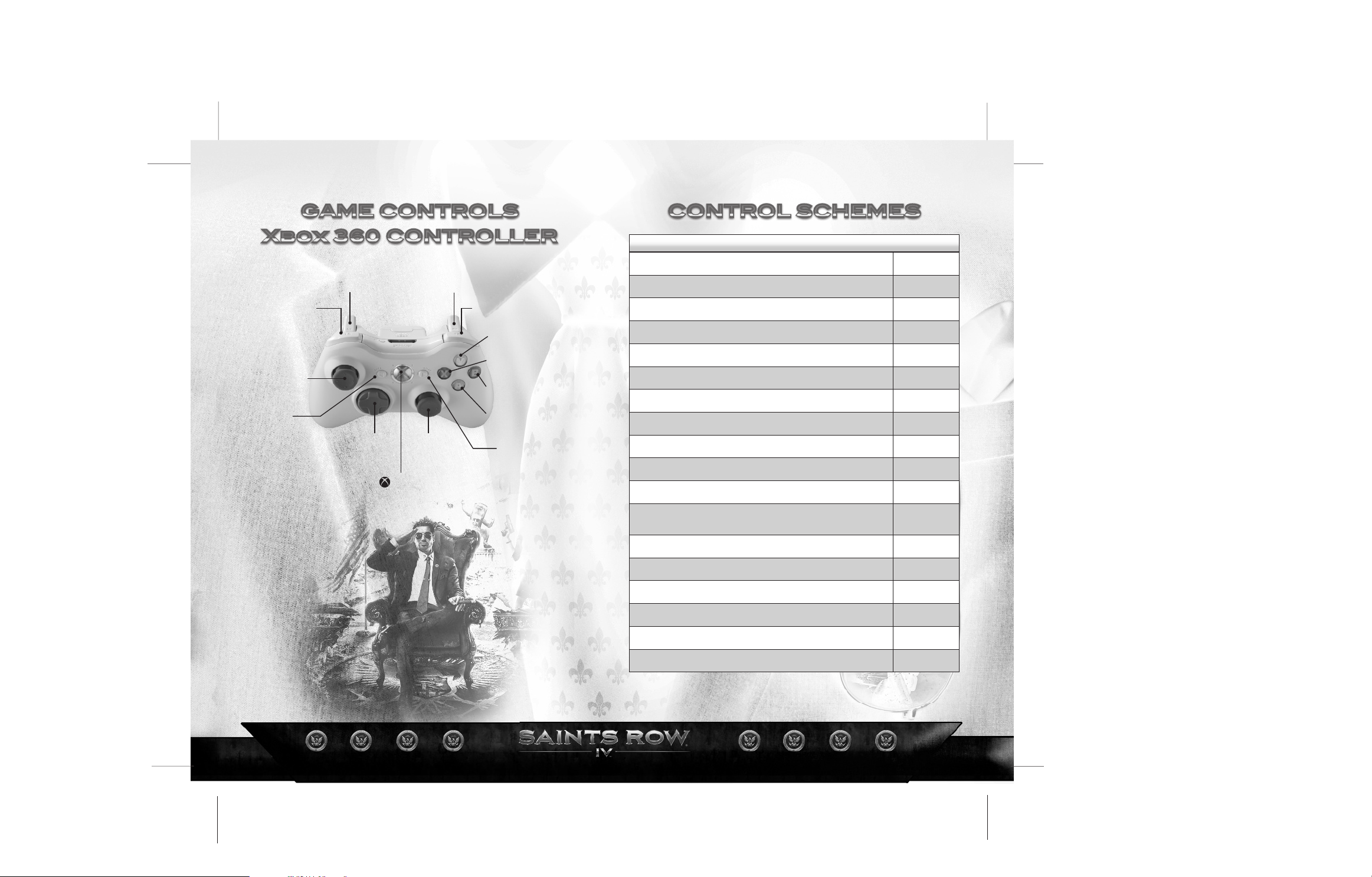
ON FOOT CONTROLS
MOVE / SELECT WEAPON
CROUCH
L
Q
<
_
L
l
C
Xbox Guide
`
Y
X
B
A
>
CAMERA
MELEE BASH
SPRINT
FINE AIM / SECONDARY ATTACK
USE SUPER POWER
PRIMARY ATTACK
JUMP / (HOLD) SUPER JUMP
INVENTORY
RELOAD / (HOLD) PICK UP WEAPON/OBJECT
ACTION/ENTER VEHICLE / HOLD HUMAN SHIELD /
THROW HUMAN SHIELD
SELECT TELEKINESIS / (HOLD) RECRUIT FOLLOWERS
SELECT BLAST / (HOLD) TAUNT
SELECT BUFF / (HOLD) DISMISS FOLLOWERS
SELECT STOMP / (HOLD) COMPLIMENT
HUB MENU
C
H
_
]
z
x
A
B
X
Y
7
1
3
5
<
PAUSE MENU
4 5
>
Page 4
DRIVING CONTROLS AIRCRAFT CONTROLS
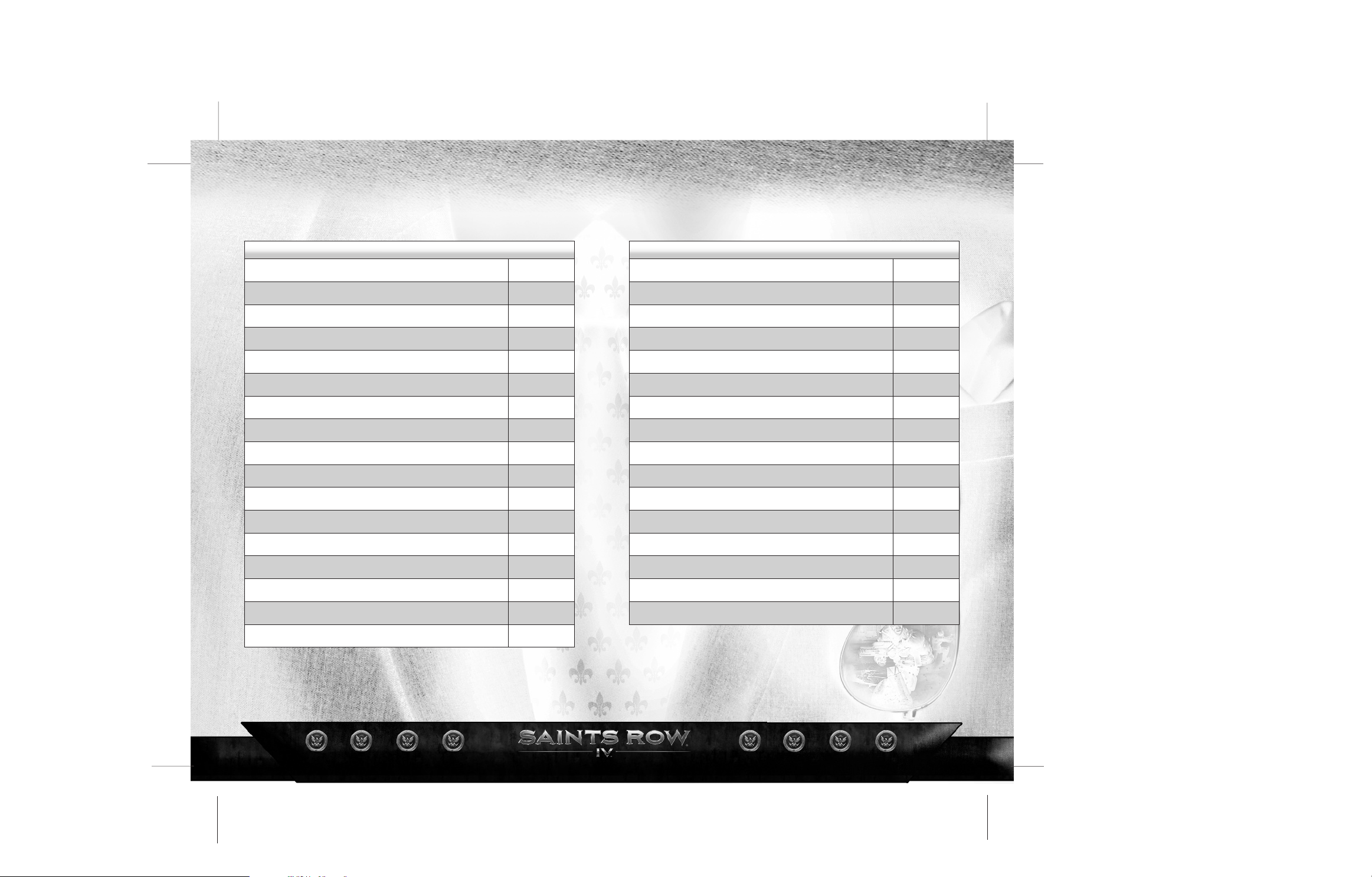
STEER / SELECT WEAPON
L
STEER
L
CAMERA
HORN
NITROUS
BRAKE / REVERSE
PRIMARY ATTACK
ACCELERATE
DRIFT
INVENTORY
LOOK BEHIND
ACTION / EXIT VEHICLE
RECRUIT FOLLOWERS
CHANGE RADIO
SCAN CURRENT VEHICLE
CHANGE RADIO
HUB MENU
C
H
_
]
z
x
A
B
X
Y
7
1
3
5
<
CAMERA
TURN LEFT
SECONDARY ATTACK
TURN RIGHT
PRIMARY ATTACK
(PLANE) ACCELERATE / (HELI) UP
(VTOL) SWITCH FLIGHT MODE
(PLANE) BRAKE/REVERSE / (HELI) DOWN
ACTION / EXIT VEHICLE
RECRUIT FOLLOWERS
CHANGE RADIO
SCAN CURRENT VEHICLE
CHANGE RADIO
HUB MENU
PAUSE MENU
C
_
]
z
x
A
B
X
Y
7
1
3
5
<
>
PAUSE MENU
>
6 7
Page 5
A
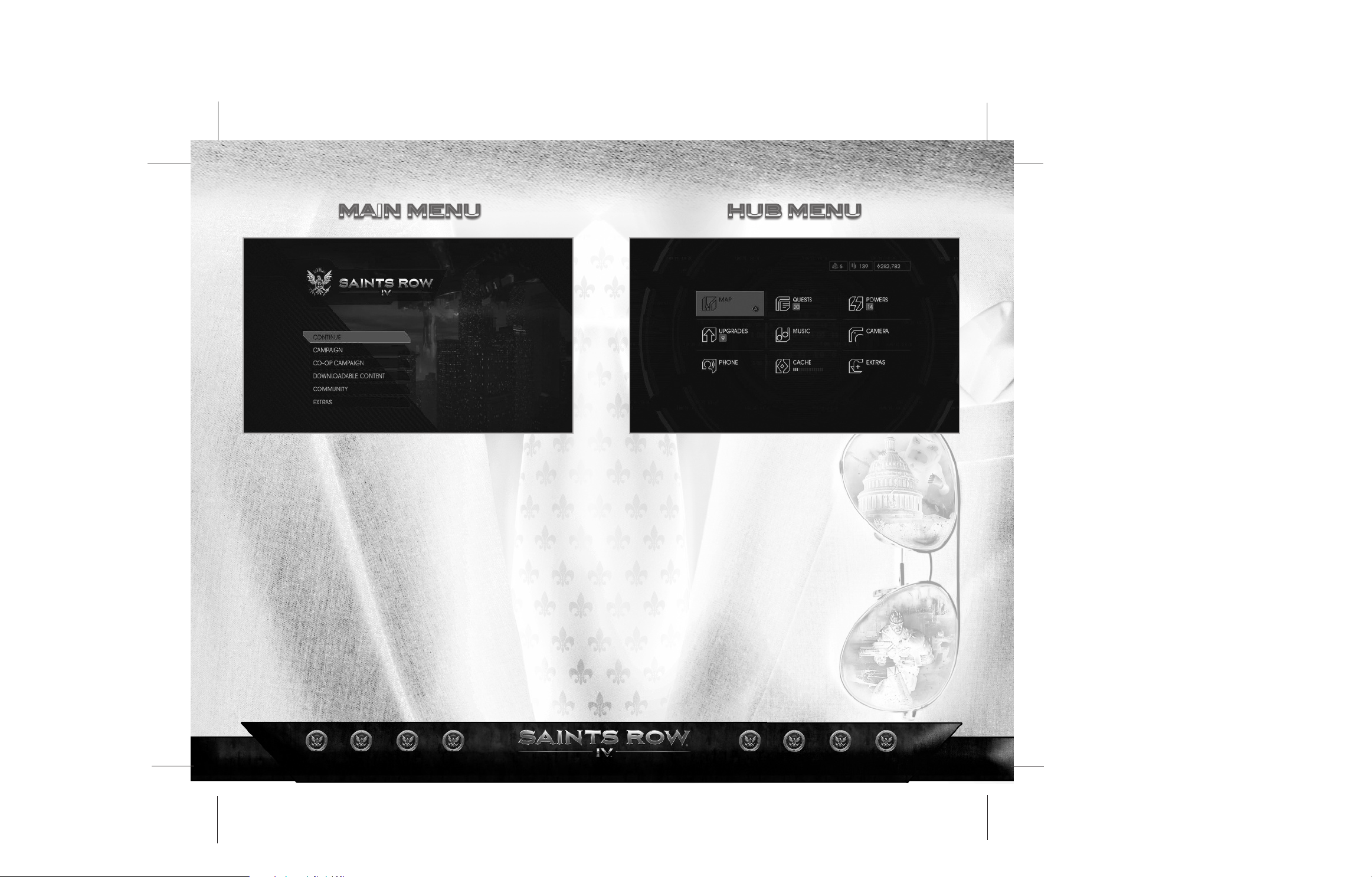
CAMPAIGN - Play the single player campaign.
CO-OP CAMPAIGN - Play the full single player campaign with a friend
via system link or Xbox LIVE. You can drop in or drop out at will, giving you ultimate control
over your campaign.
DOWNLOADABLE CONTENT - View and purchase
downloadable content for
COMMUNITY – Create a new ID or link your Steam Profile to an existing ID to
share screenshots, stats, and game progress on the community site. You can even upload
your characters to share them with others.
EXTRAS - View the credits, options menu, or the digital manual for
8 9
Saints Row IV.
Saints Row IV.
MAP – View a map of the Steelport Simulation, zoom in/out and filter activities,
targets, stores, and gateways.
UPGRADES – Buy upgrades with cache. New upgrades are unlocked when
you level up.
PHONE – Call a car or one of your homies.
QUESTS – Activate quests and check the status of challenges.
MUSIC – Select radio stations or create your own mixtape.
CACHE – Retrieve cache when the transfer meter is full.
POWERS – View your powers. select elements, and upgrade them with data
clusters.
CAMERA – Take screenshots and share them with the Saints Row community.
EXTRAS – Unlock cheats and view your stats.
Page 6
A
S A
S
-
SAY
5
5. FOLLOWERS
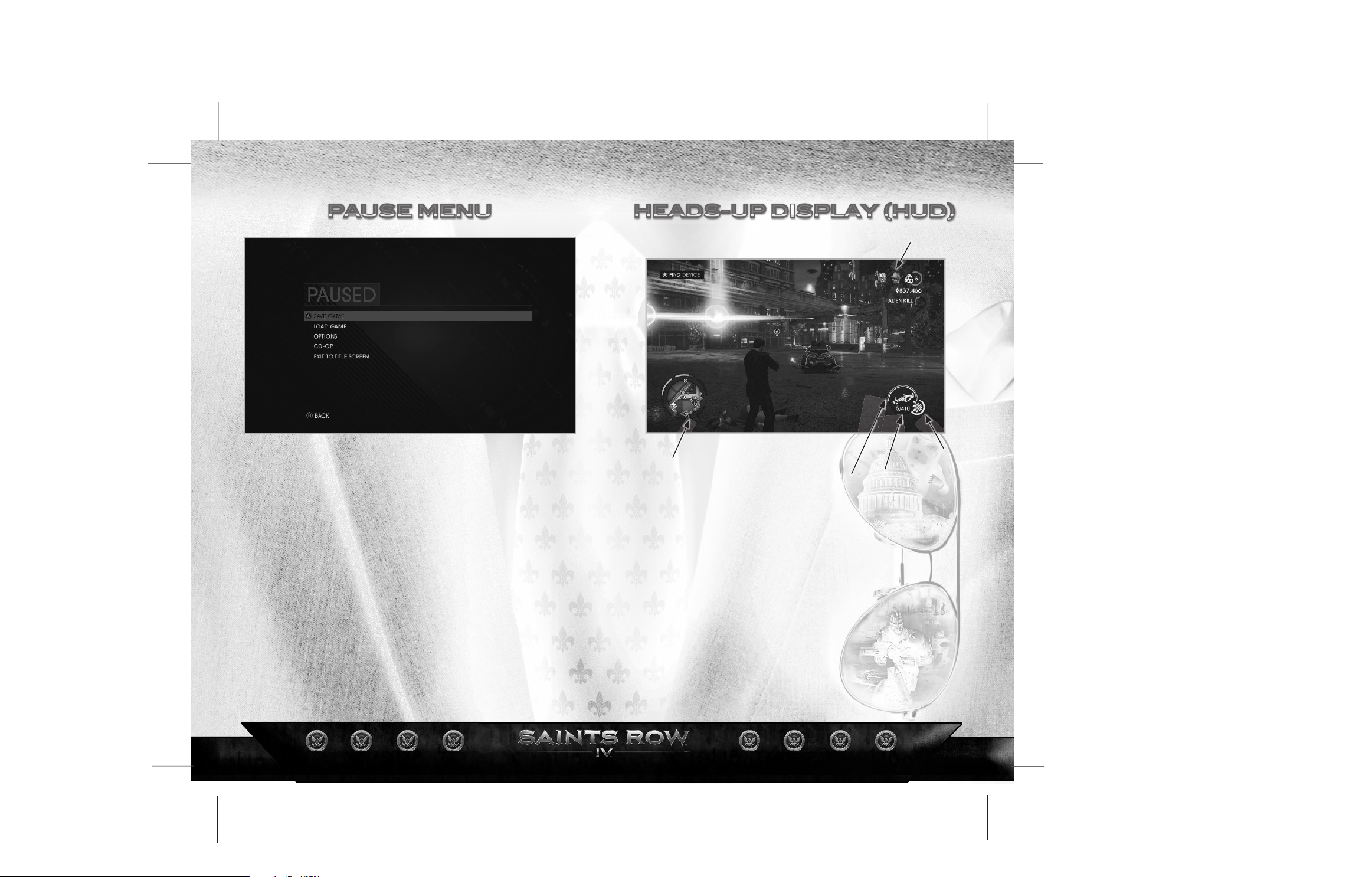
SAVE GAME – Save your current game.
LOAD GAME – Load a previously saved game.
OPTIONS – Adjust control options, view control schemes, change game
difficulty and display or audio settings.
CO-OP – Invite a friend to your game and change your co-op settings.
EXIT TO TITLE SCREEN – Quit the game and return to the main menu.
10 11
1.MINIMAP
1 . M IN I MA P –
reinforcements.
2. WEAPON PALETTE –
3. HEALTH –
4. SPRINT –
5. FOLLOWERS –
Shows GPS, nearby activities, targets, stores, gateways, enemies and
Shows your current health.
Shows your current stamina.
Shows your current followers.
4. SPRINT
Shows your current weapon and powers.
2. WEAPON PALETTE
3. HEALTH
Page 7
VTY
T WAATY A
S
T S
T
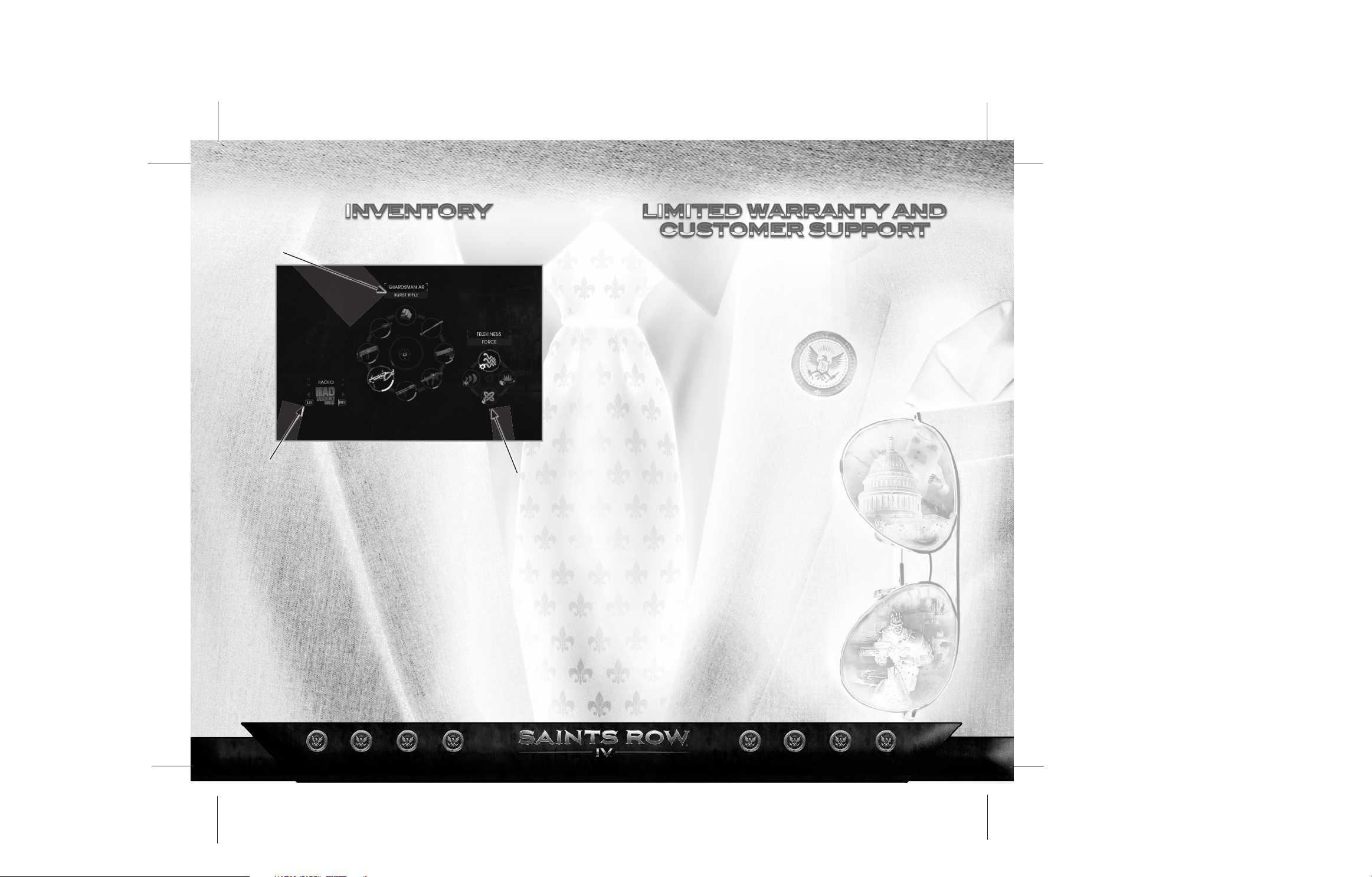
2.WEAPONS
1.RADIO
1. RADIO –
2. WEAPONS –
3. POWERS –
Change the radio station.
Select your weapon.
Select your powers.
3. POWERS
WARRANTY AND SERVICE INFORMATION
Deep Silver Inc. warrants to the original purchaser of its products for a period of ninety (90) days from the date of
purchase that the products will be free from defects in materials and workmanship. The product is sold “as is”,
without express or implied warranty of any kind, and Deep Silver is not responsible for any losses or damages of
any kind resulting from use of the product. Deep Silver will for a period of ninety (90) days either replace defective
product free of charge provided the defective product will be returned with dated proof of purchase to the store
from which the product was originally purchased or Deep Silver will at its option repair or replace the defective
product free of charge, when sent postage prepaid with a proof of purchase to our service center. This warranty
shall not be applicable to normal wear and tear, and shall be void if the defect has been arisen through abuse,
mistreatment, unreasonable use, or neglect.
WARRANTY LIMITATIONS
This limited warranty is in lieu of all other warranties, whether oral or written, and no other representations or
claims of any nature shall be binding on, or obligate Deep Silver. Any implied warranties applicable to Deep Silver
products, including warranties of merchantability and fitness for a particular purpose, are limited to the ninety
(90) day period described above. In no event will Deep Silver be liable for any special, incidental, or consequential
damages resulting from possession, use, or malfunction of this Deep Silver product. Some states do not allow
limitations as to how long an implied warranty lasts and/or exclusions or limitations of incidental or consequential
damages. So the above limitations and/or exclusions of liability may not apply to you. This warranty gives you
specific rights. You also have other rights that vary from state to state. Deep Silver cannot provide refunds or
otherwise process returns for credit of any kind other than an identical product replacement. As the individual
retail outlets set their own refund policy, product refund requests must occur at the place of purchase.
REPLACEMENTS
In various cases, a replacement is not the best solution. Therefore before sending the product to us, please
contact our Technical Support. Our Support Representatives will help you determine if a replacement is necessary
or available. You further will need to first acquire an RMA (Return Materials Authorization) number to process your
return or replacement. Without a valid RMA number we will not be able to process your replacement.
RETURNS
Please return the product (please media only) along with (a) a copy of the original sales receipt showing the date
of purchase,(b) a brief description of the difficulty you are experiencing, and (c) your name, address (please no
PO boxes) and phone number to the below address. This 90-day warranty is rendered void if the product was
damaged through misuse or accident (eg. scratches or cracks), or if you do not have a dated sales receipt. In
these cases you are free to return the product (please media only) along with a check or money order for the
amount of $5 (US Dollars) made payable to Deep Silver, a brief description of the difficulty you are experiencing,
including your name, address (please no PO boxes), RMA number (please see Replacements), and phone number
to the address below. We strongly recommend you use a traceable delivery method when sending products to
Deep Silver. Deep Silver is not responsible for products not in its possession. NOTICE Deep Silver reserves the
right to make improvements in its products at any time and without notice.
WARRANTY ADDRESS AND CONTACT INFORMATION:
We have put this product through rigorous tests and you shouldn‘t experience any problems. However, it‘s
impossible to test every configuration and should you experience any problems regarding this product, please go
to http://www.deepsilver.com support section. If you cannot find what you are looking for in the support section,
then please find contact details below:
Deep Silver, Inc.,
900 Larkspur Landing Circle, Suite 103
Larkspur, CA 94939
Customer Support: 1-888-883-1505
Email: [email protected]
12 13
 Loading...