

Page 1
User Guide version 1.10
SQUARE CONNECT
SQ BLASTER PLUS & SQ REMOTE (HD & LITE)
USER GUIDE
Page 2

CONTENTS
..............................................................................Note on Images! 3
..............................................Part 1: SQ Blaster Setup Guide! 4
........................................Connecting to your Home Wi-Fi network! 4
..........................................................................The Setup Wizard! 4
.........................................Part 2: Introduction to SQ Remote! 7
...........Differences between SQ Remote HD and SQ Remote Lite! 7
.................................................Getting around within SQ Remote! 7
..................................................................................The carousel! 7
...............................................................................The setup area! 8
.................................................Part 3: Setting up SQ Remote! 8
....................................................................................Introduction! 8
................................Selecting infrared code sets for your devices! 8
...........................................Adding control pads for your activities! 11
..............................................Adding controls to your control pads! 12
...................................................................................Setup FAQ’s! 15
.........................................................................Using SQ Designer! 16
.....................................Part 4: Learning IR Command Codes! 17
.................................Replace (record over) an existing command! 17
.............................................................Record a NEW command! 19
....................................Learning a Complete Command Code Set! 20
...............................................Add codes to a new "blank" device.! 20
...................................Add command codes to a template device.! 22
..........................Learning when assigning a command to a button! 23
....................................................Part 5: Editing Control Pads! 24
...................................................................Control Pad Edit Mode! 24
..............................................................................Adding Controls! 25
...........................................................................Deleting Controls! 25
.............................................................................Moving Controls! 26
............................................................Assigning (linking) Controls! 26
...................Naming the Slide Out Control Panels or iPad Buttons! 27
....................................................................................Hints & Tips! 28
..........................................................................Part 6: Macros! 30
.............................................................................Macro Structure! 30
.............................................................................Creating Macros! 31
....................................................................Adding IR Commands! 31
.................................................Linking Control Buttons to Macros! 32
......................................................................................Macro Tips! 32
................................................Part 7: Lists and List Controls! 33
..................................................Images (icons) in Command Lists! 34
..........................................Adding List Controls to Control Panels! 35
........................................................Additional Useful Information:! 35
.....................................................................Part 8: Web Views! 36
....................Part 9: Saving and Sharing your Configuration! 37
..............................................................Saving Your Configuration! 37
..................................................................Loading Configurations! 37
....................................................................................Hints & Tips! 38
..............................................................Things you should know...! 38
....................Part 10: Using SQ Remote with a MiOS system! 39
.....................Step 1: Connect SQ Remote to your MiOS systems! 39
.....................................Step 2: Add Control Pads to the Carousel! 40
...................Step 3: Add controls and link them to your equipment! 41
.........................................................................Part 11 Themes! 45
.......................Part 12: Blaster Plus - Setting the IR Channel! 47
User Guide version 1.10
Page 3

.............................................................................1. The Channels! 47
...........................................2. Emitters and External Blaster LEDs! 47
................................................3. Setting the channel for a device! 47
...............................Part 13: Additional Options and Settings! 48
.........................................................Part 13. Troubleshooting! 49
..................................................................SQ Blaster LED signals! 49
...........................................................SQ Blaster troubleshooting:! 49
...........................................................................SQ Blaster Reset! 50
.................................................................Support Contact Details! 50
Note on Images
The images used within this manual are predominantly from the
iPhone and not the iPad. However the setup areas and options that
are available within SQ Remote HD are presented in an almost
identical manner on both platforms. This was a conscious decision by
Square Connect to make migration from the iPhone application to the
universal application as simple and easy as possible. For this reason
we decided to keep a uniform look to the information within this user
manual as it is intended to cover both SQ Remote HD and SQ Remote
Lite.
We hope you find it helpful.
USER GUIDE - SQ BLASTER PLUS & SQ REMOTE
© 2011 Square Connect Inc. ! Version 1.0! Page 3
Page 4
Part 1: SQ Blaster Setup Guide
Connecting to your Home Wi-Fi network
The first thing that you will need to do with your blaster unit is to
connect it to your home network.
You will need:
๏
Your network name (SSID)
๏
Your network password or passphrase. It is strongly
recommended that you use WPA2 security on your wireless
network. The blaster will also connect to systems that use WPA
and WEP. (Note: Some instability has been seen on some
systems using WEP. If you have difficulties with the install or
operation of the blaster using WEP, please consider changing your
network security to WPA2).
๏
The correct USB drivers for your computer. These can be
downloaded from the same location as the setup application (see
below).
๏
The network setup application from Square Connect. This can be
downloaded from http://www.squareconnect.com/wizard.html
๏
The correct USB drivers for your computer. These can be
downloaded from the same location as the setup application (see
above).
The setup wizard is available for Windows and OSX. Instructions for
installation are available on the Square Connect website.
The Setup Wizard
Connect your SQ Blaster unit to your PC/Mac using the USB cable
before starting the downloaded wizard application.
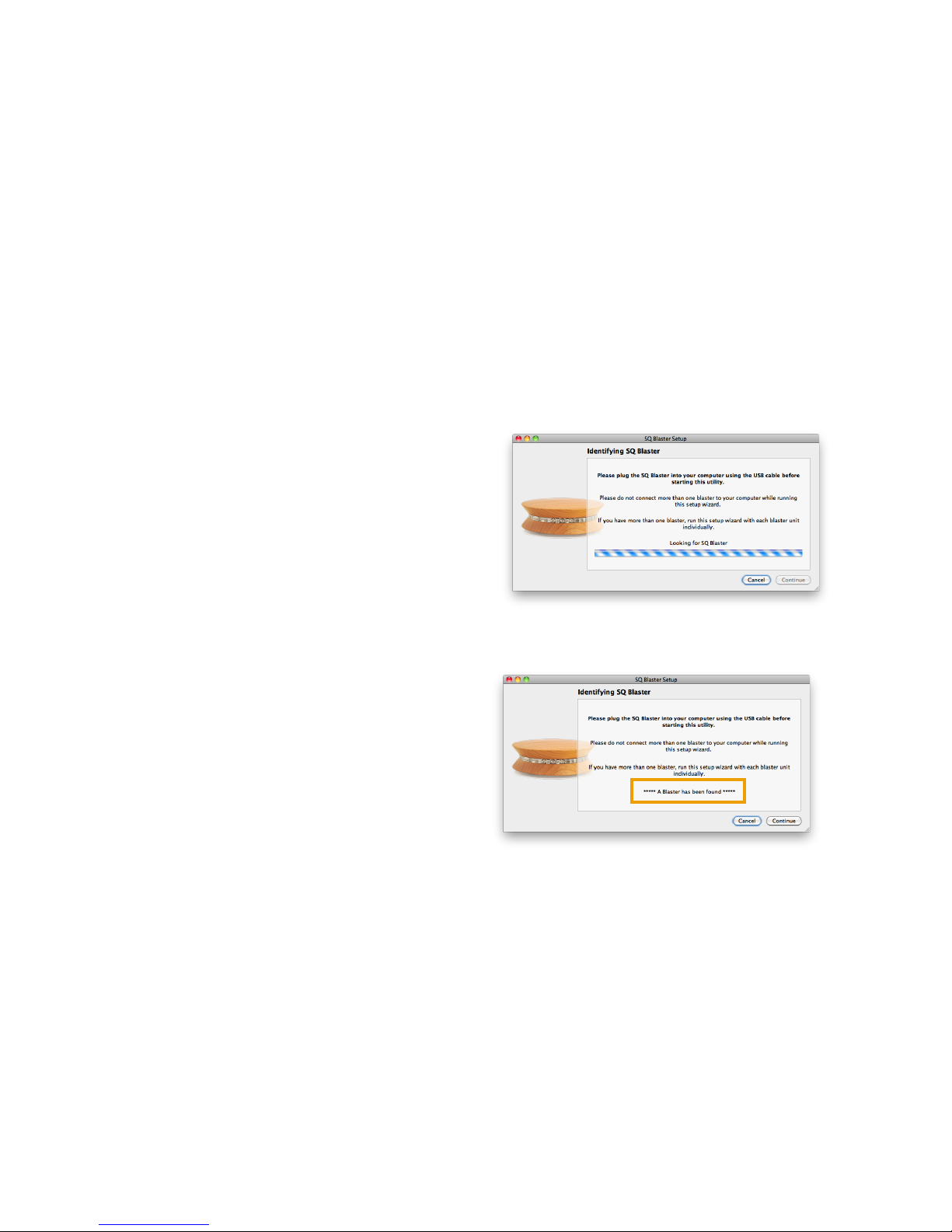
The Setup Wizard searches for your blaster unit.
The Setup Wizard will then find your blaster unit:
USER GUIDE - SQ BLASTER PLUS & SQ REMOTE
© 2011 Square Connect Inc. ! Version 1.0! Page 4
Page 5
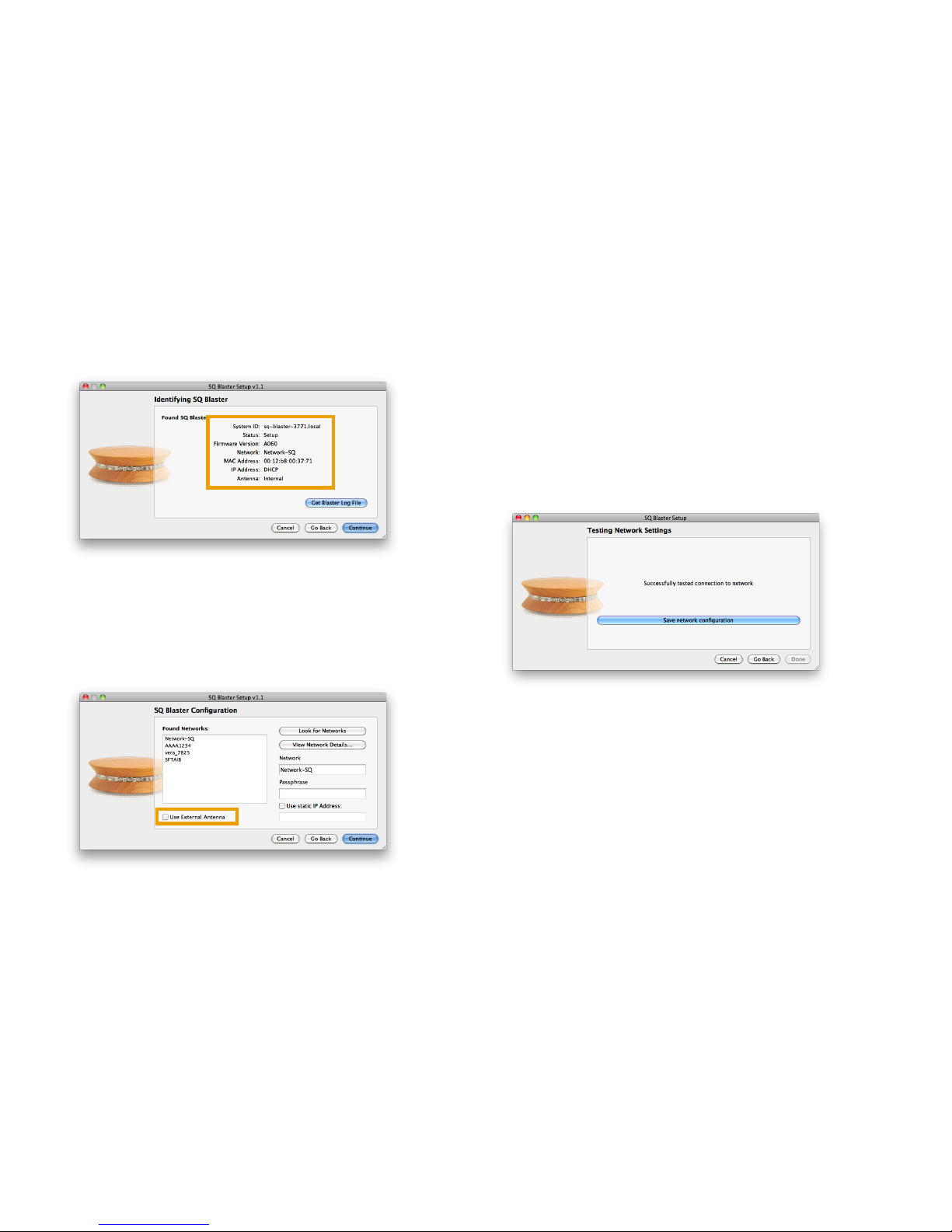
Press “Continue” to see the details of your blaster:
Press “Continue” to see the next screen and set your network details.
The blaster will show you a list of networks that it discovered when it
was powered on. You can select one of these networks or enter the
name of your network manually.
Setup Wizard shows you the available networks:
External Antenna Note: The generation one blasters had an internal
Antenna. If you have a Gen 2 blaster (Blaster Plus) then you should
leave this option set to external as this version does not have an
internal antenna.
Enter your network details and press “Continue”. Your blaster unit will
then attempt to join your network. If it is successful - then it will display
the “Success” message, and a “Save network configuration” button.
Press this button to save the network settings to your blaster unit, and
then press the “Done” button to complete the network setup of your SQ
Blaster.
Finally you must reboot the unit by unplugging the power / USB
cable from the unit and then replugging it back in. This will cause the
unit to restart with its new settings.
When the blaster unit restarts after you have set it to join your network
you can check that it has joined your network correctly by looking at
the red LED on the front of the unit:
When it restarts the status LED will light up. When the device has
connected to your network, the LED will switch off. If the unit has
USER GUIDE - SQ BLASTER PLUS & SQ REMOTE
© 2011 Square Connect Inc. ! Version 1.0! Page 5
Page 6

difficulty in connecting to the neytwork it will remain on and blink in a
slow on/off pattern.
Once you have set the network configuration of your unit, the setup of
your blaster unit is complete. All further setup is carried out in the SQ
Remote application on your iPhone, iPod touch or iPad device.
USER GUIDE - SQ BLASTER PLUS & SQ REMOTE
© 2011 Square Connect Inc. ! Version 1.0! Page 6
Page 7
Part 2: Introduction to SQ Remote
The SQ Remote application is designed to be your complete remote
control interface for both your entertainment and your home
automation equipment.
It has been created as flexible as possible to allow you get the controls
you want where you want them. You can easily add controls (buttons),
move them, link them to infrared commands, run macros to set up your
activities and even launch scenes from a MiOS home control system1.
If you find that you need that extra control, or if a control is not in the
right place, its easy to change things to get it just right for you, your
family, your systems and your home.
Differences between SQ Remote HD and SQ
Remote Lite
This user manual has been prepared for both versions of SQ Remote,
as their functionality is essentially the same for the most part. Where
this functionality differs, notes are included in the text or footnotes have
been included to highlight the differences between the two versions.
The term SQ Remote is used throughout within this manual to mean
both SQ Remote HD and SQ Remote Lite.
Getting around within SQ Remote
The application is quite complex and may seem confusing the first time
you use it. However its quite simple once you understand how it all fits
together. This section of this guide should help you get started.
The carousel
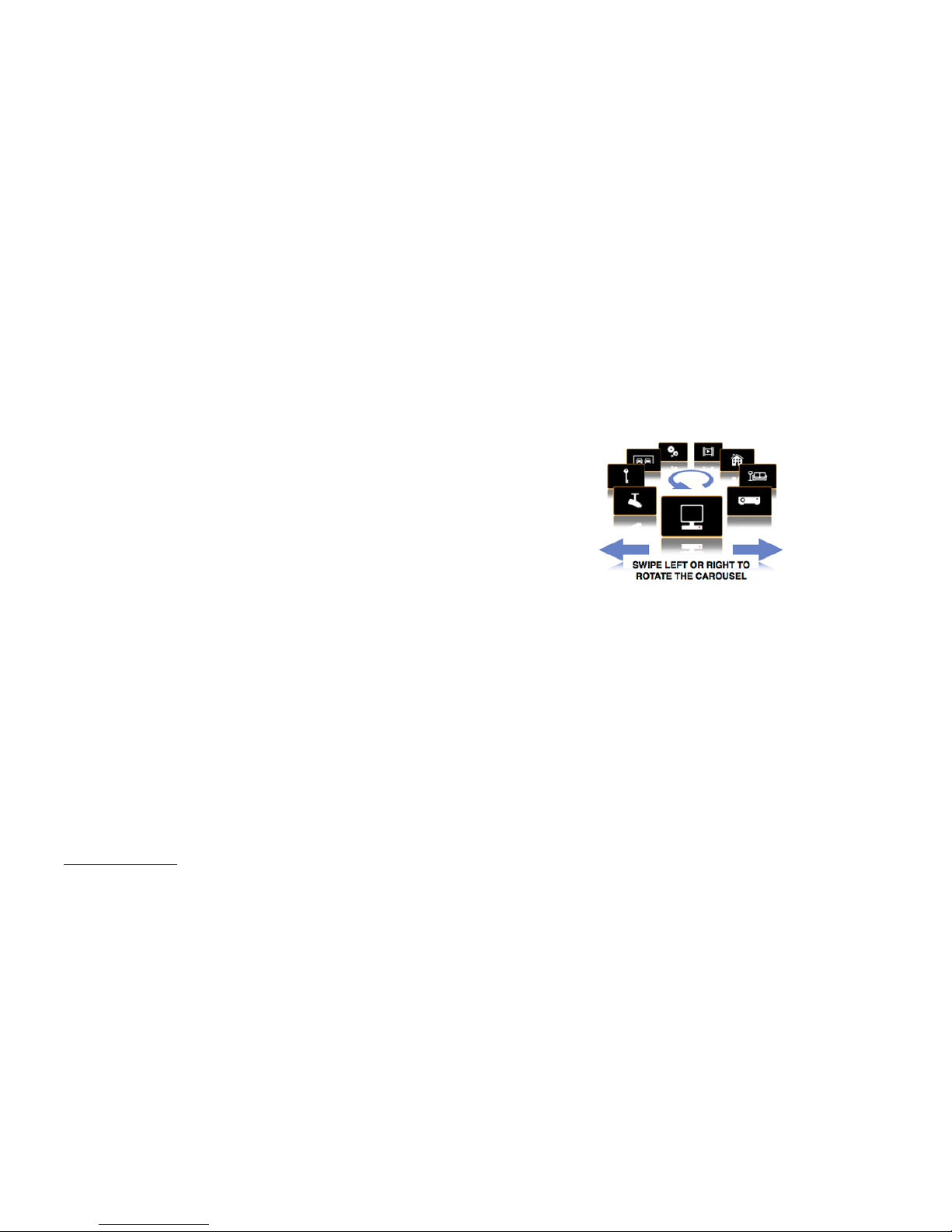
This is the screen where you move between control pads or enter the
setup area of the application swipe right or left across the touch screen
of your device to rotate the control pads one position at a time.
You can:
๏
Rotate the carousel - simply swipe left or right on the screen to
rotate the carousel one position at a time.
๏
Bring any control pad to the front - tap on any control pad to
have the carousel rearrange itself and bring the “tapped” control
pad to the front of the carousel
๏
Open a control pad - tap on the front control pad (or any other
part of the screen that is not “another” control pad) to flip the
carousel view and display the contents of the control pad.
Note: Initially the carousel will be empty except for the setup control
pad (see below). You will add control pads to the carousel as part of
the setup process for SQ Remote (See Part 3 of this manual).
USER GUIDE - SQ BLASTER PLUS & SQ REMOTE
© 2011 Square Connect Inc. ! Version 1.0! Page 7
1
Only SQ Remote HD has MiOS functionality
Page 8
The setup area
One control pad on the carousel is special: This
is the setup control pad. When you launch SQ
Remote for the first time this will be the only
control pad on the carousel.
To open the setup area of the application, rotate the carousel to bring
this image to the front and then tap this image. In the setup area you
have the following areas:
๏
Help - Links to online help pages to answer questions that you
might have about setup.
๏
Control Pads - Add or remove control pads to the carousel. You
can also change the names and images used.
๏
SQ Blasters and Devices - Manage your blaster units, and add
control codes (infrared commands) to your configuration.
๏
MiOS Systems2 - Manage your MiOS home control systems
๏
Macros - Define and edit macros to set up your activities
๏
Command Lists - Create, edit and manage lists of commands
such as channel lists, or lists of Macros
๏
Backup and Share Configurations - store your configurations and
share them with family members.
๏
Themes - Download themes into SQ Remote from box.net.
๏
About SQ Remote - version information.
Part 3: Setting up SQ Remote
Introduction
Setup of SQ Remote is a straight forward process:
๏
Select infrared code sets for your devices
๏
Add control pads to hold the controls for your activities
๏
Add controls (buttons) to your control pads
After you have completed this process you can customize your control
pads even more by adding new buttons, macros, text labels and more.
Note: Although you can set up SQ Remote without a blaster, you will
find it easier to do this once you have added your blaster unit to your
Wi-Fi network before setting up SQ Remote (unless you are using it
with a MiOS system).
Selecting infrared code sets for your devices
Each piece of equipment that you will control with your SQ Blaster
requires a set of IR (infra-red) command codes. To control your
equipment you must select (add) IR codes to your SQ Blaster.
In SQ Remote, selecting or adding a set of IR codes is called "adding a
device". This is simply identifying the correct set of IR codes for your
equipment from the built-in IR code database. SQ Remote then takes
a copy of these codes and stores them within your personal
configuration.
The process of "Adding a Device" is straightforward - just follow the
step by step guide below:
USER GUIDE - SQ BLASTER PLUS & SQ REMOTE
© 2011 Square Connect Inc. ! Version 1.0! Page 8
2
Only available in SQ Remote HD
Page 9
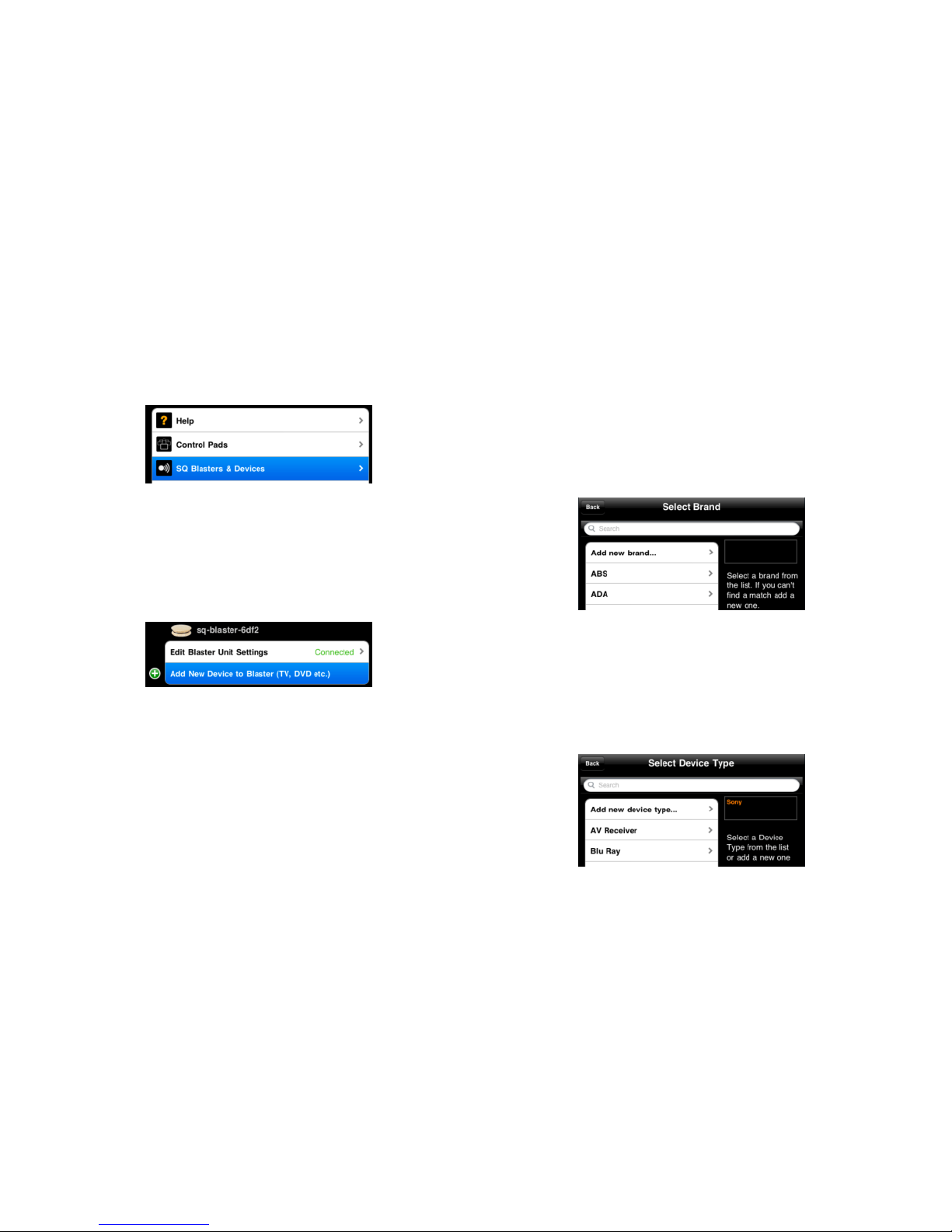
Step 1: SQ Blasters & Devices
Starting from the carousel enter the Setup area and tap "SQ Blasters
and Devices" in the main setup screen. (see image below)
Step 2: Select “Add New Device to Blaster”
In the “Blasters and Devices” screen, find your new blaster unit and tap
"Add New Device to Blaster". Each blaster unit on your network will be
listed in this screen. If you only have one blaster unit, then there will
only be one to choose from.
Tapping “Add New Device to Blaster” starts the selection process (a
kind of wizard) for adding a set of infrared codes for a single device.
You will need to repeat this process for each of the devices that you
want to control with your blaster.
If you don’t see your new blaster on this screen, it means that SQ
Remote was unable to detect it on your network. Make sure:
๏
The blaster unit is correctly set up and connected to your network.
You can use the setup wizard software to check the network
settings (see Part 1 of this guide).
๏
Your iPhone, iPod touch or iPad connected to the same Wi-Fi
network.
Step 3. Select the brand of your device
Search in the list of brand names for the brand of device that you want
to add. This list is a long one, so it is usually faster to use the search
bar at the top of the screen. (see image below).
When you have found your brand - simply select it by tapping on it.
If you don’t find your brand in this list you will need to learn the IR codes for
your device. See Part 4 for learning IR codes.
Step 4. Select the type of device
Select the type of device that you want to control from the list of
available types based on the brand that you selected.
USER GUIDE - SQ BLASTER PLUS & SQ REMOTE
© 2011 Square Connect Inc. ! Version 1.0! Page 9
Page 10
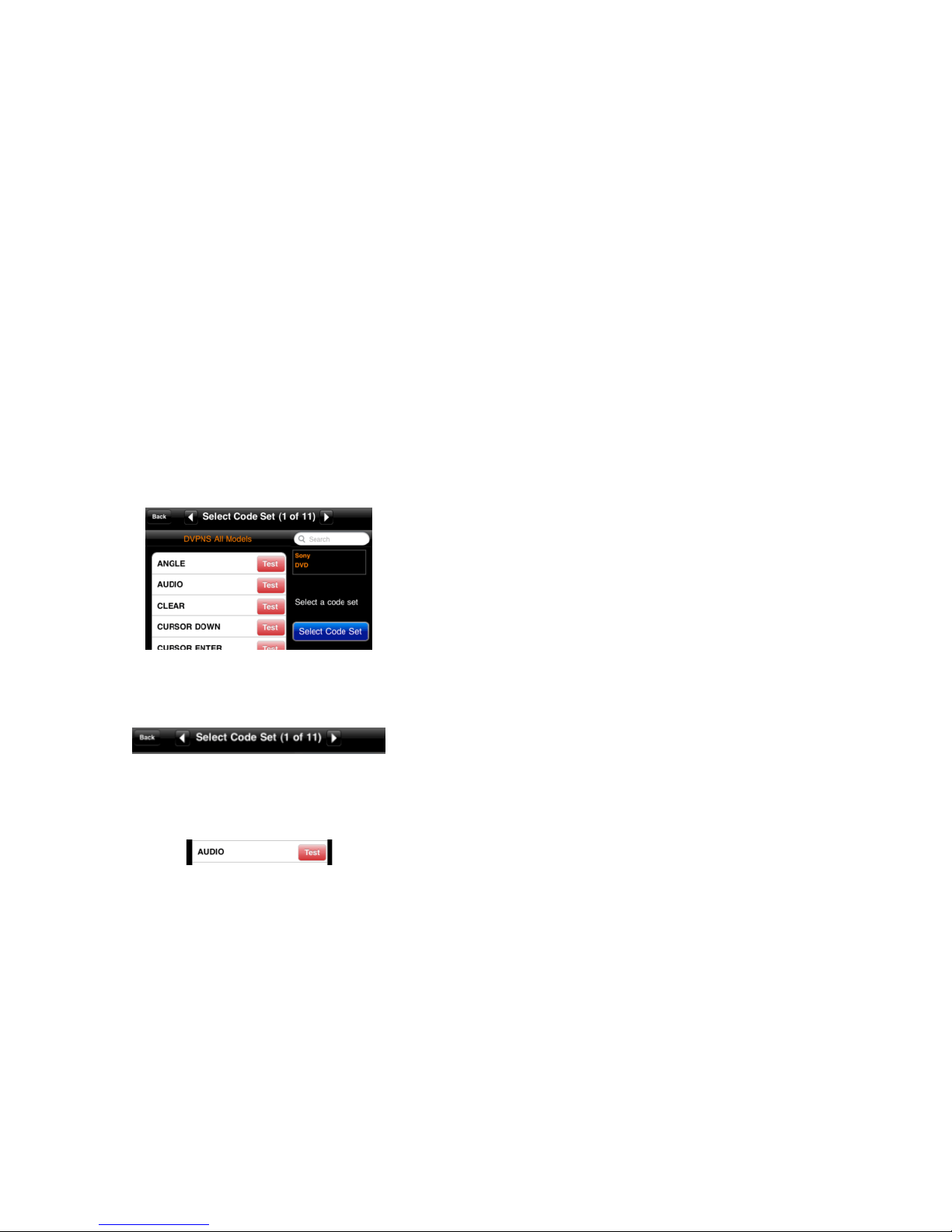
If you don’t find the exact match for your device type in this list you should try
selecting a similar type first to see if there is a code set that will give you the
codes you need. If you can’t find a code set that works (in the following steps)
will need to learn the IR codes for your device. See Part 4 of this manual for
learning IR codes.
Step 5. Test and select your IR code set
After selecting the brand and type of device you want to add, SQ
Remote will present you with one or more possible code sets for your
selection.
Move between the code sets by tapping on the arrow buttons at the
top of the screen:
Test the infrared codes by tapping on the red “Test” buttons that are
shown for each command within a code set. These buttons work like
those on your original remote - you should press (touch) and hold the
test to see if the selected code works for your device.
Note: A quick “tap” on the button might result in a code that is too
“short” or quick for you to see the effect on your equipment (depending
on the code that you select).
You can search for the individual commands that you want to try by
scrolling through the list, or you can search using the search bar.
Tip: The best way to test the codes is to place the blaster unit in a
position where is is powered on and facing the equipment that you
want it to control. Then you can test the code sets before selecting
them.
When you have found a match, press the blue "Select Code Set"
button to add the code set to your configuration as a "Device"
You might find that even with the best code set not all of the codes will
work. Don't worry if this is the case, as you can quickly and easily learn
the missing codes from your existing remote. (See Part 4 of this
manual to learn how to learn infrared codes from your existing
remotes.)
Tip: Add code sets for all your devices before adding control pads or
controls. This will make the setup of your system much easier.
Why don't we use model numbers to find code sets? Device modelnumber searches in IR databases often result in no hits, or you will be
asked to select a similar model number (thats closest to yours) which
causes frustration and mistrust in the database. However the
"Standard" code sets for a given manufacturer and device type most
often hold the correct codes. We decided on an approach that allows
the user to immediately test the codes as part of the selection process
to remove this frustration.
USER GUIDE - SQ BLASTER PLUS & SQ REMOTE
© 2011 Square Connect Inc. ! Version 1.0! Page 10
Page 11
Adding control pads for your activities
Control pads are the containers for your controls and are where you
put the actual control buttons (e.g. power on/off, volume up/down,
channel up/down etc.) to control your equipment. You need to add a
new control pad to the carousel before you can add control buttons for
your equipment.
You can add as many control pads as you like to the carousel in SQ
Remote. See Part 2 of this manual for information on how to navigate
on the carousel.
Adding new control pads is simple - simply follow the step by step
guide below:
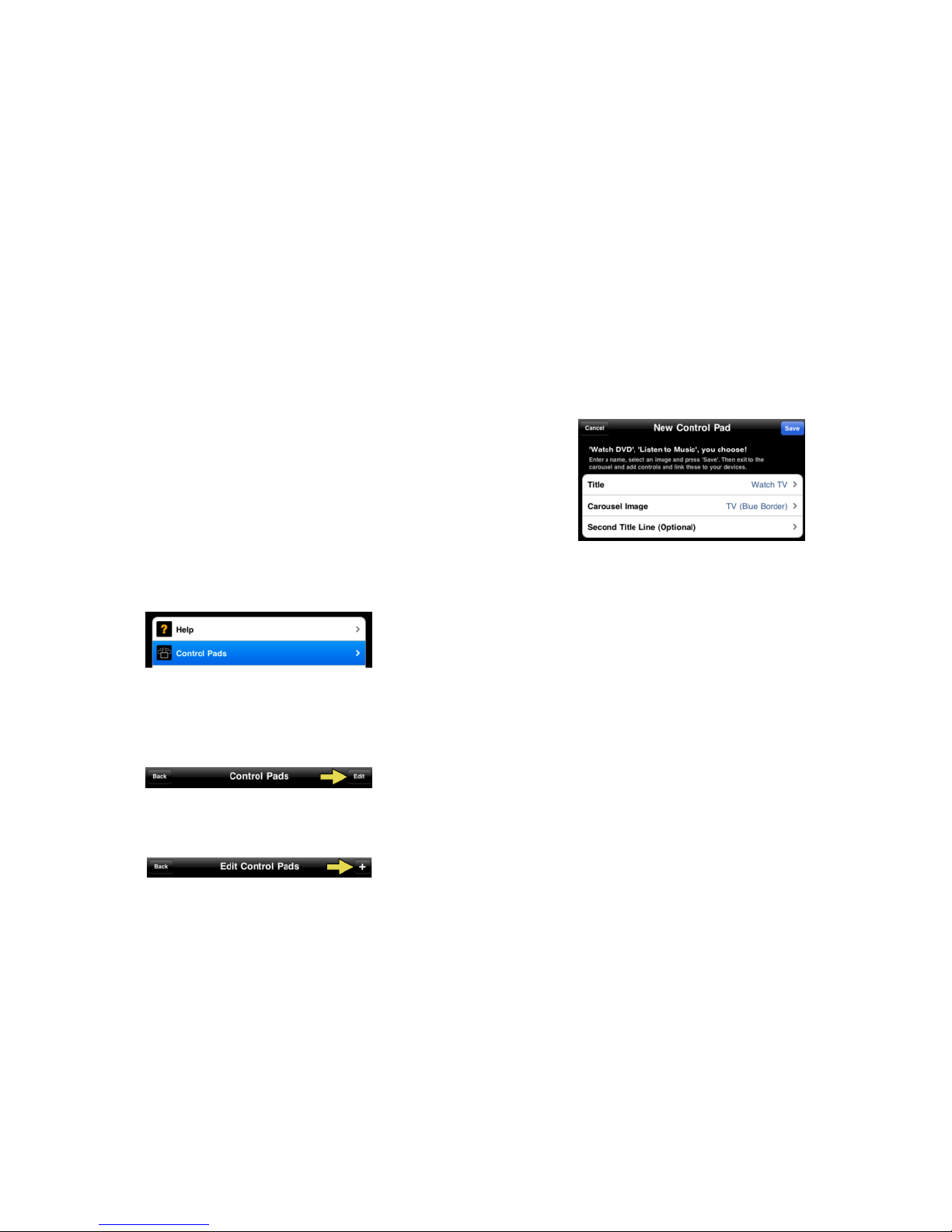
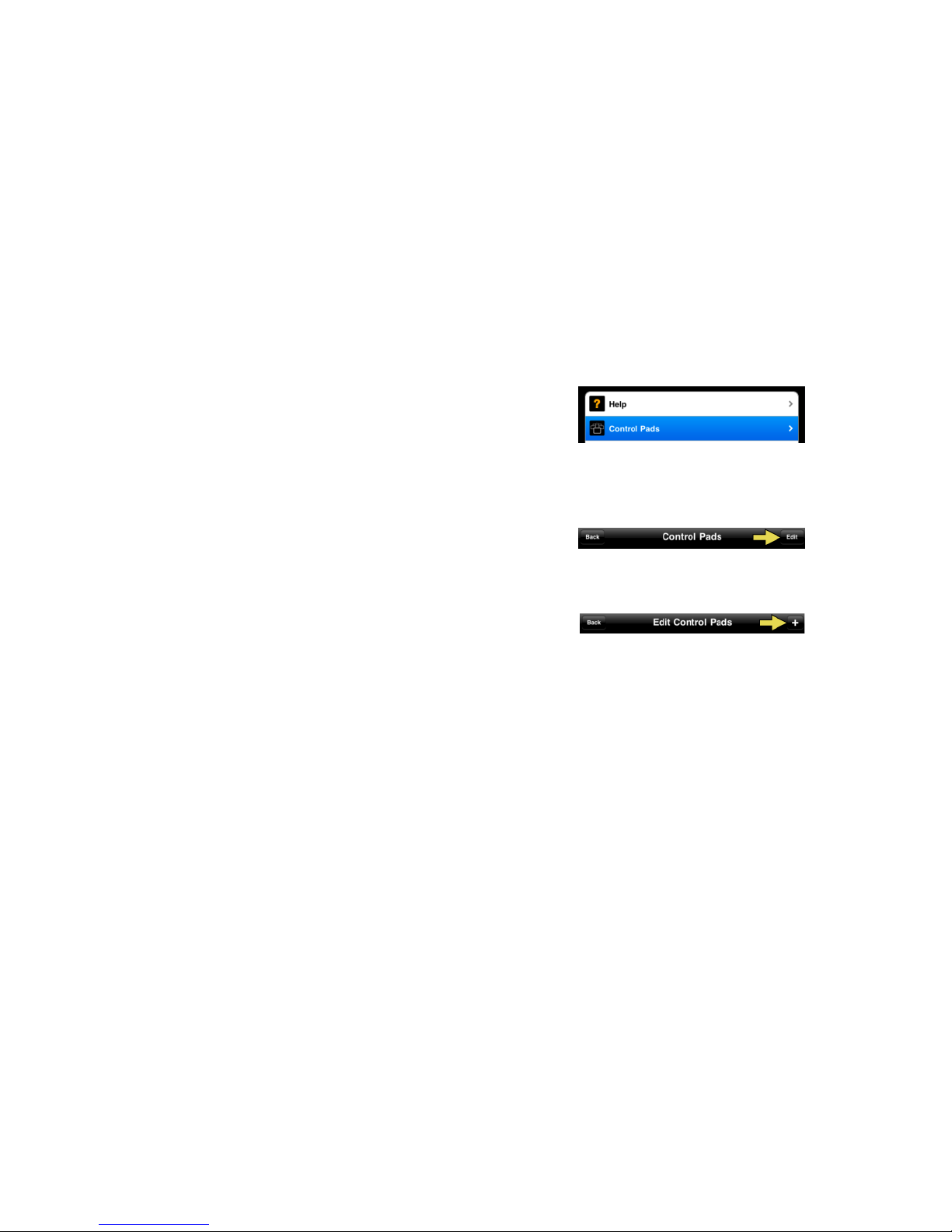
Step 1. Go to "Control Pads" in Setup"
Starting from the carousel enter the Setup area and tap "Control
Pads".
Step 2. Tap "Edit" then the "+" button"
Tap the Edit button in the top right hand corner of the screen...
then tap the "+" button to enter the "New Control Pad" screen.
Step 3. Enter a name and select an image"
In the "New Control Pad screen, enter a name and an image that
makes the activity easy to identify. Then tap the blue "Save" button to
save your new control pad.
If you want to you can add a second descriptive line of text to your
control pad. You might want to use this to describe the control pad, or
set a location for the activity.
Don’t forget to “save” the control pad when you have finished or your
changes will be lost.
Tip: You can either add several control pads before going back to the
carousel to start adding controls. You can always edit their names and
images later if you want.
4. Exit to the carousel
After saving your new control pad(s), exit the setup area and return to
the carousel where you will find your new control pad(s). You might
have to tap the “back” button twice before you see the “close” button to
get back to the carousel.
If you now tap on the front control pad it will open, ready for you to add
controls.
USER GUIDE - SQ BLASTER PLUS & SQ REMOTE
© 2011 Square Connect Inc. ! Version 1.0! Page 11
Page 12
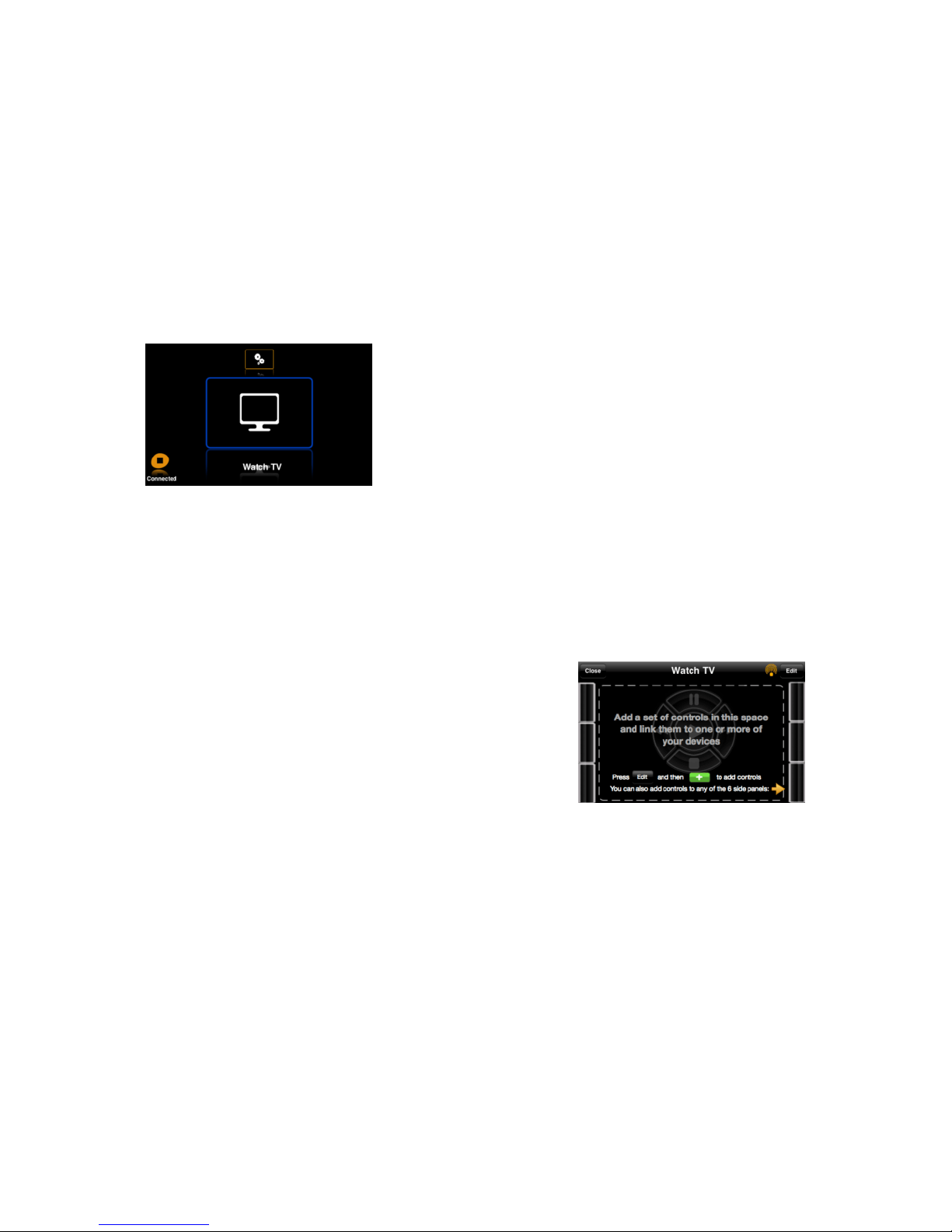
You can add as many control pads to the carousel as you wish. Add
one for each of your activities or whatever makes the best sense for
you.
Tip: As you add more control pads, the carousel will have more
images to display, and navigating between activities can become less
efficient if you use the “swipe” method to rotate the carousel one
control pad at a time. A more efficient way of moving to a new control
pad is to tap the image of the desired control pad to bring it
immediately to the front of the carousel. You can then open your
selected control pad with a quick second tap.
Adding controls to your control pads
Adding controls to your control pads is quite easy, and once you
understand the approach to editing control pads you will soon be
creating your own layouts and designs.
The easiest and quickest way to get controls setup in your control
panels is to add preset control panels. These are “templates” that add
multiple controls in predefined groups - such as you might find on a
more traditional universal remote control.
If after adding predefined control panels you find that the layout or
controls aren't exactly what you want you can easily modify them later.
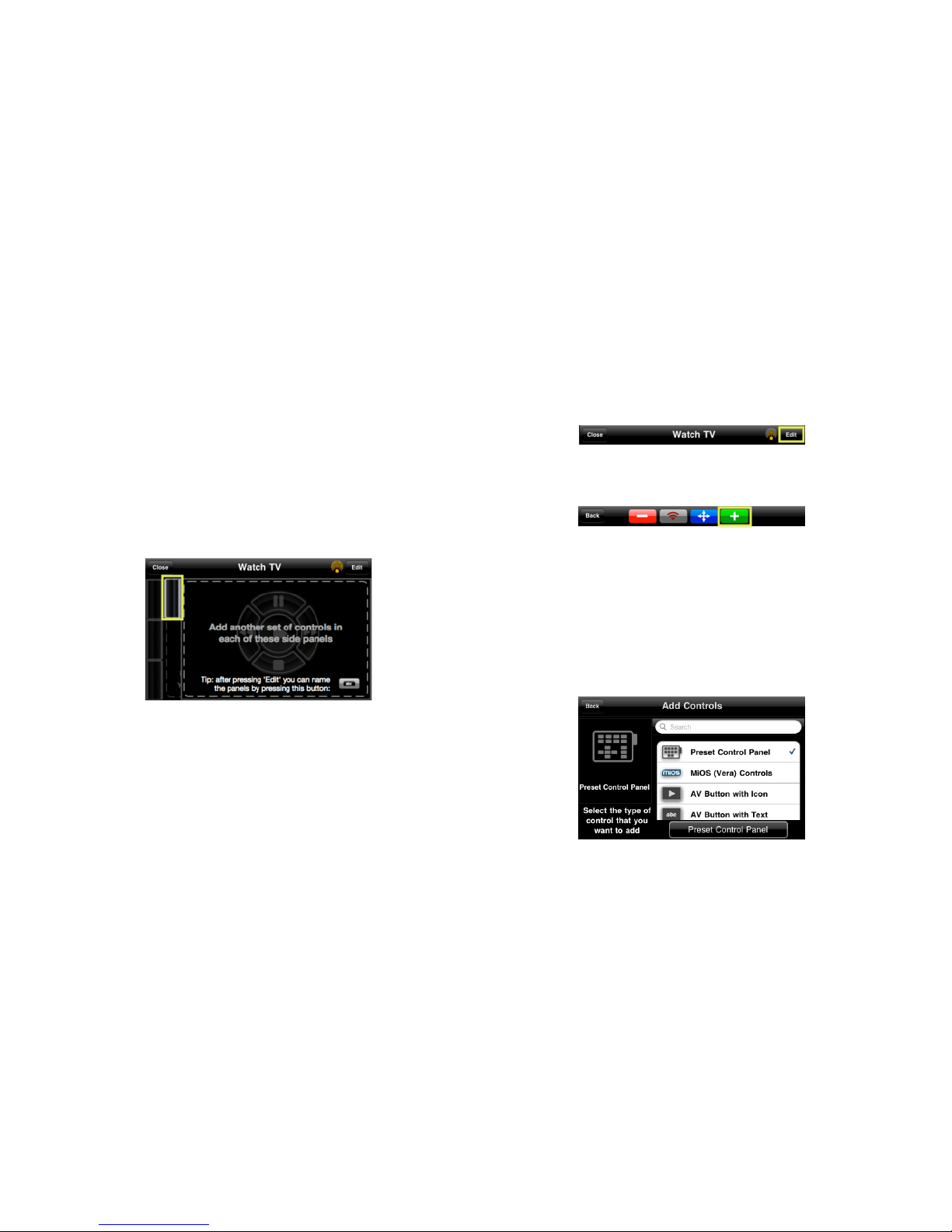
Step 1. Open the control pad that you want to edit
Make sure it's at the front of the carousel and then tap the screen to
open it. When you open a control pad you will see that each control
pad has a helpful background that gives you hints on how to start.
These background images will be automatically removed as soon as
you add the first control.
(SQ Remote HD & SQ Remote Lite on iPhone)
USER GUIDE - SQ BLASTER PLUS & SQ REMOTE
© 2011 Square Connect Inc. ! Version 1.0! Page 12
Page 13
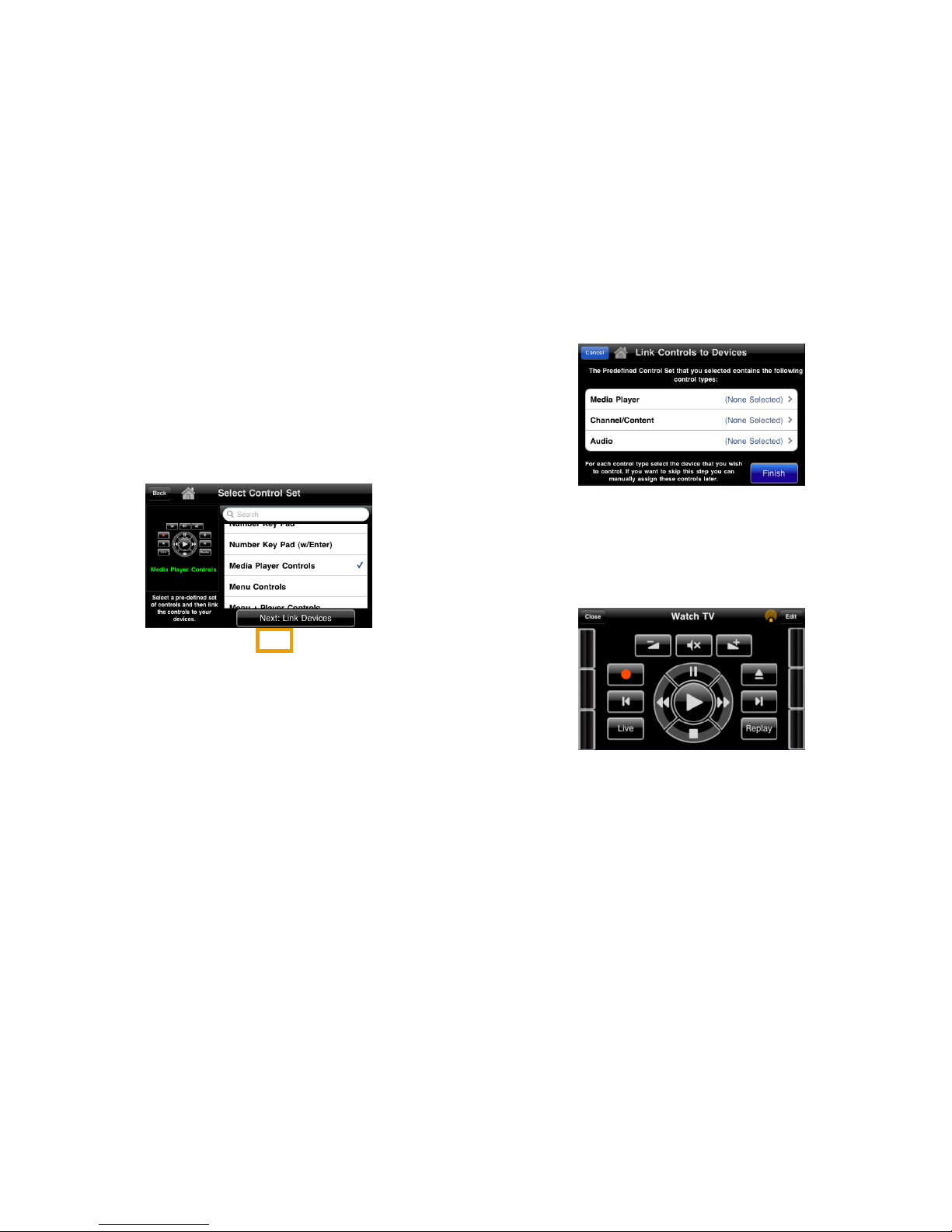
Step 2. Select the control panel
Select the control panel where you want to add your new set of
controls. There are seven panels - the main area and the six side
panels. You can open these by tapping on the tabs and they slide out.
Tip: The first time you add controls, its probably best to start by adding
controls to the center or main control panel.
On the iPad, control panels are accessed through the buttons at the
bottom of the screen
Step 3. Open the ADD Controls screen
Tap the "Edit" button in the top right hand corner of the screen...
then tap the big green "+" button at the top of the screen.
Tip: If you can’t see the “Edit” button in the top right hand corner of the
screen, then you will need to enable control pad editing. See Part 10:
Additional Options and Settings.
4. Select "Preset Control Panels"
The “Add Control Picker” allows you to choose many different kinds of
controls, but when you are setting up for the first time, its best to start
with a preset template. (You can learn about the other controls in Part
5 of this user manual.)
Tap the button under the list to confirm your selection of control type
and to move to the next step in adding a control.
USER GUIDE - SQ BLASTER PLUS & SQ REMOTE
© 2011 Square Connect Inc. ! Version 1.0! Page 13
Page 14
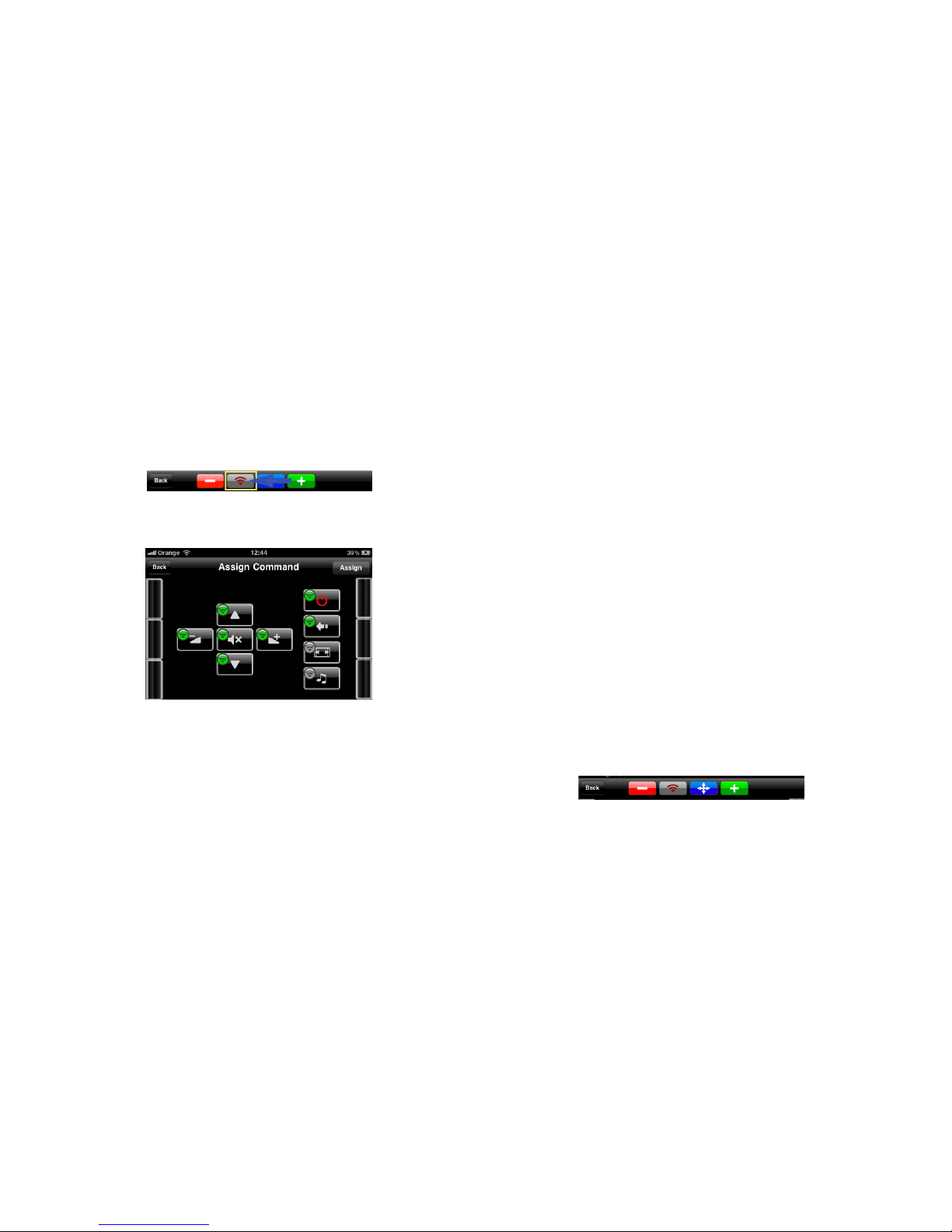
Step 5. Select the controls that you want to add
There are several types of pre-grouped controls to choose from,
including the typical layouts you will find on classic remote control
units.
You will be able to customize the controls later, so select the one that
best fits your needs and tap the next button. The image to the left of
the picker will show you the layout of the template that you are
selecting.
Tap the button under the list to confirm your selection of control set and
to move to the next step in adding a preset control panel.
Step 6. Link the controls to your equipment (code sets)
Unless you are setting up a control panel for a single piece of
equipment, your controls for any given activity will be made up of
controls for two or more pieces of equipment, for example your TV set
and your cable box. In the “Link Controls to Devices” screen you can
select which equipment should be controlled by which control type. For
example you might be watching a DVD but you might want to control
volume through your TV or your sound system.
When you have selected the devices that you want to control, tap the
blue “Finish button. You will then be returned to the control pad with all
the new controls added to the screen.
Note: You are still in edit mode at this point, and you must exit this
mode by pressing the “Back” button before you can use your new
buttons.
The screen shot above shows the newly added control pad ready to
use.
Your controls are ready to control your equipment
You can now add more controls to the other panels to get all the
controls for your activity together in one control pad.
USER GUIDE - SQ BLASTER PLUS & SQ REMOTE
© 2011 Square Connect Inc. ! Version 1.0! Page 14
Page 15
Setup FAQ’s
Not all buttons work! - When you associate the controls on a preset
control panel with a device, the codes for the controls may not exist in
the code set that you have selected, or they may be named with nonstandard names. If this occurs, the buttons will remain “unassigned” or
“unlinked to a code”. To check which controls are “assigned” tap the
“Edit button and then tap the gray “Assign” icon.
The “Assign” status of all the buttons on the control pad will be shown.
See the example below:
๏
A green assign icon (circle) on a button shows that the button is
assigned (linked) to an infrared command code.
๏
A gray icon (circle) on a button shows that the button is
unassigned.
If a button is “unassigned” you can link now select it and link it to any
command in the code sets that you have added. To assign a button,
select it (its assign icon will turn red) and then tap the “Assign” button
in the top right hand corner of the screen. Then simply follow the
wizard steps to assign a command code to the button. See Part 5 of
this manual for more detailed information on how to assign individual
buttons.
If the command code that you want is missing, you will need to learn it.
See Part 4 of this manual for learning codes.
If a button is assigned but the code does not work or sends a different
code than the one you want or expected, then you can reassign the
button to any other command code in the code sets that you have
added during setup, or learn new codes.
Tip: Stepping into edit mode and tapping the Assign Icon, is a great
way of checking which controls are assigned and which aren't.
I want to switch my devices on and off with one button. - When
you are ready you can also add macros to switch on and setup your
activities with one button press. Macros are sets of pre-programmed
commands that are carried out one after the other to allow you to set
up your activities at a press of a button. See Part 4 of this manual to
learn about macros.
Not all the buttons I need are there. - If you want to add additional
buttons, you can add them very easily. There are many different sizes,
and you can select to add buttons with icons or with text. See Part 5 of
this guide for adding single buttons.
I want to move some buttons around. - Moving buttons is easy. In
the control pad editing mode, tap the blue “Move” icon at the top of the
screen.
Then just drag the buttons around into the positions that you want, and
then tap the “Back” button twice to exit the editing mode. You can see
more information about moving buttons in Part 5 of this manual.
USER GUIDE - SQ BLASTER PLUS & SQ REMOTE
© 2011 Square Connect Inc. ! Version 1.0! Page 15
Page 16
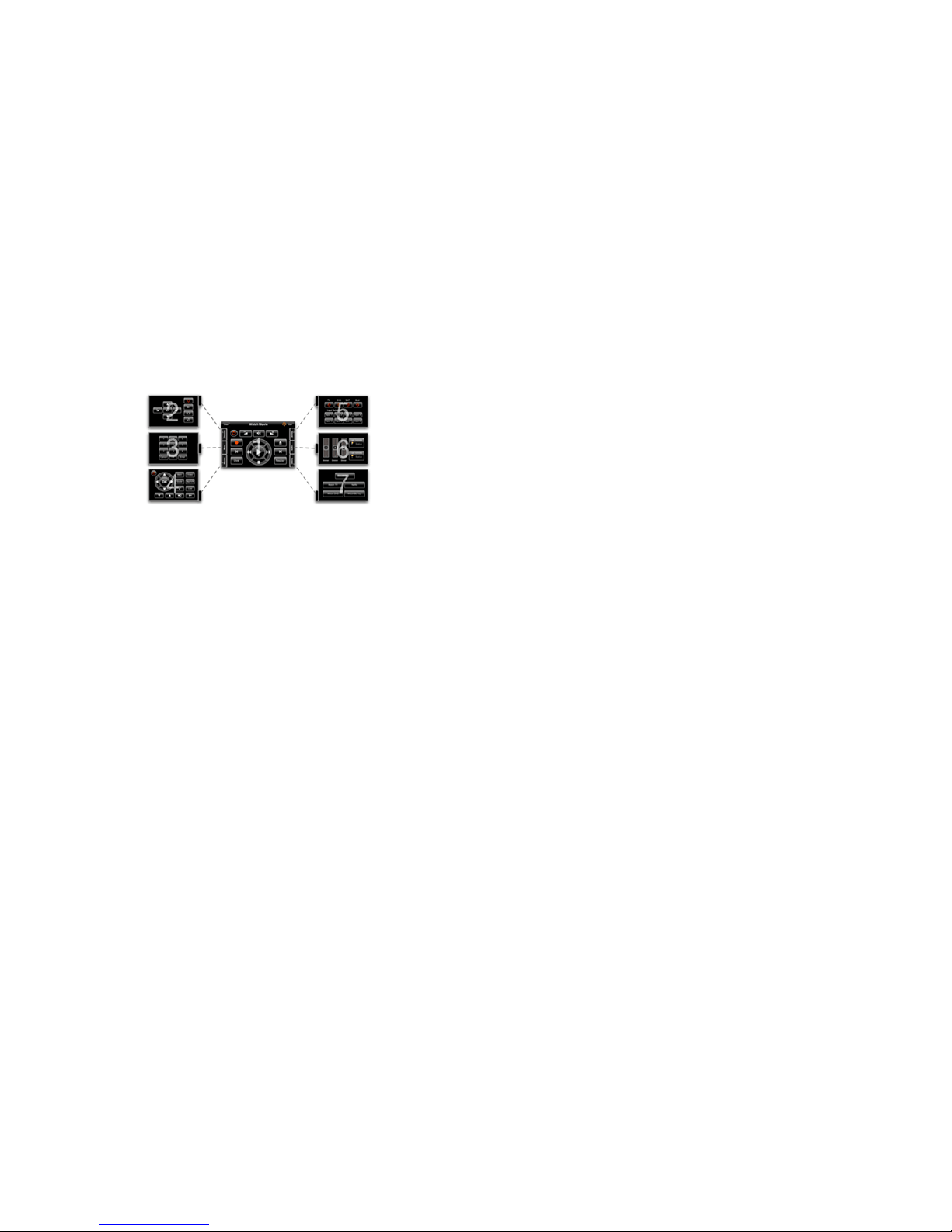
Tip: Each control pad that you create has 7 areas called “control
panels”:
You can add controls to any of these areas, and name the side tabs so
that your groups of controls are easy to find. For example a control pad
for watching TV might have the main channel and volume controls in
the center area, and side panels for additional controls such as “Setup”
“Audio”, “Keypad” etc.
Tip: You can simplify your control panels by creating adding only those
controls that you use most often, and putting controls that you use
“less often” in the side panels. Using macros can also help simplify
your configuration. See Part 5 of this manual for information on editing
control panels and Part 6 for more information on macros.
Using SQ Designer
Square Connect have developed a desktop application that can be
used to create and customize your layouts on your home computer
(both PC and Mac OS X). The designer application allows you to get
the most our of SQ Remote and makes the design and layout of your
user interface quick and simple.
SQ Designer is also the key for creating and customizing your own
look and feel for SQ Remote. More and more pre-made themes will
come available as users make and share their own. Why not share
yours?
USER GUIDE - SQ BLASTER PLUS & SQ REMOTE
© 2011 Square Connect Inc. ! Version 1.0! Page 16
Page 17
Part 4: Learning IR Command Codes
If there is a button missing in your setup, and you can't find the code,
or if you can't find your device in the library of codes, you can learn
infrared command codes from your original remote.
Tip: To make learning and testing of your new commands as simple as
possible, place the blaster on a table facing the device that you want to
record a control for.
Replace (record over) an existing command
If you need to add a single new infrared command, follow these steps.
Important: When you learn a new IR command code it is added to the
command code set for one of your devices. You will need to add at
least one device before you can begin learning IR codes. If you have
not yet done this you should read Part 3 of this manual.
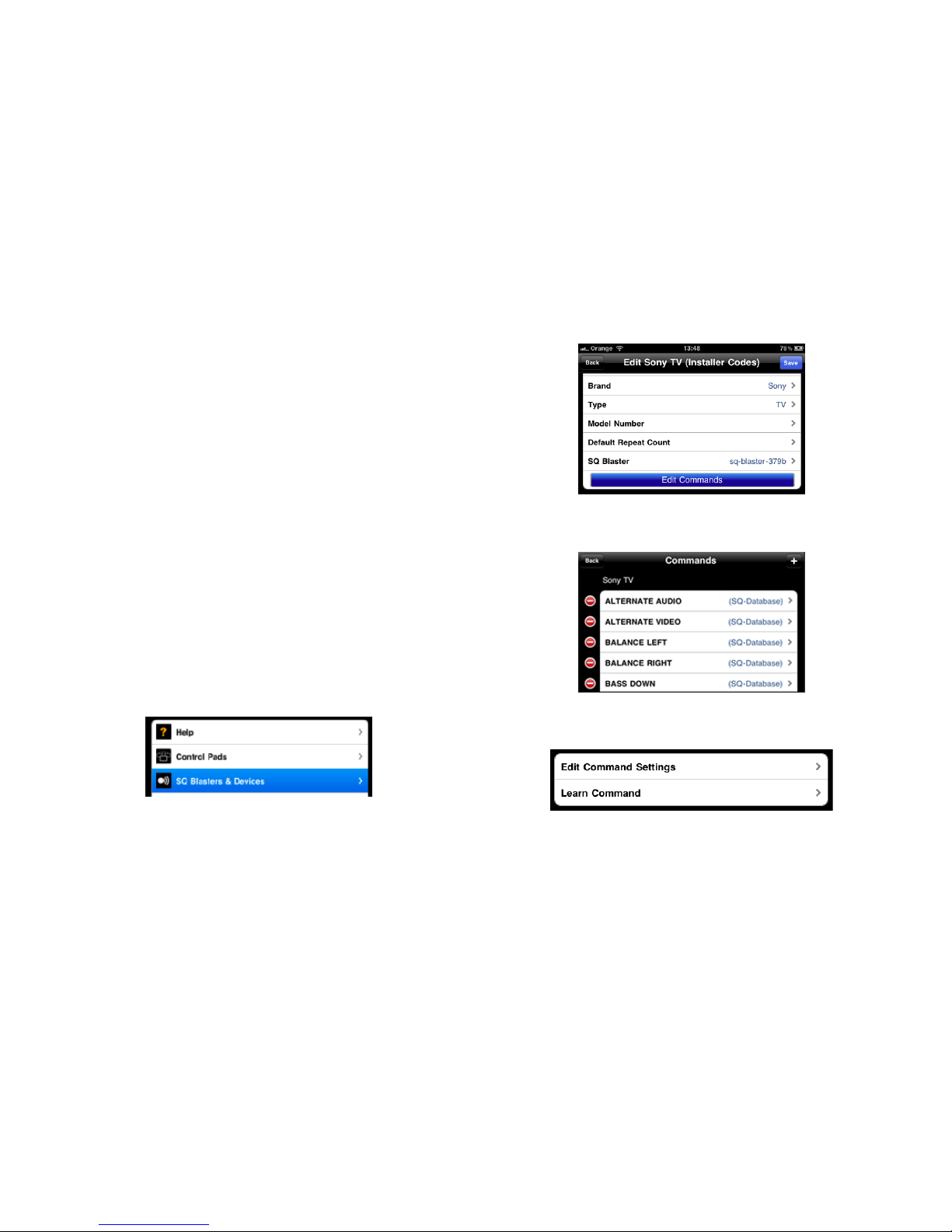
Step 1: Open the "Command Area" for the Device to which you
want to add a command
Open the "Setup Area" by rotating the carousel until the setup control
pad is at the front of the screen and then tap anywhere to open it.
Select "SQ Blasters and Devices".
Select the "Device" that you want to add a new control to. Devices are
listed under the blaster that they are associated with.
Tap the big blue "Edit Commands" button at the bottom of the screen.
You will then see a list of all the commands that are currently in the
code set for the chosen device.
Select the command you want to replace. You will then be presented
with the option to “edit” or “learn” the command. Select “Learn”.
USER GUIDE - SQ BLASTER PLUS & SQ REMOTE
© 2011 Square Connect Inc. ! Version 1.0! Page 17
Page 18
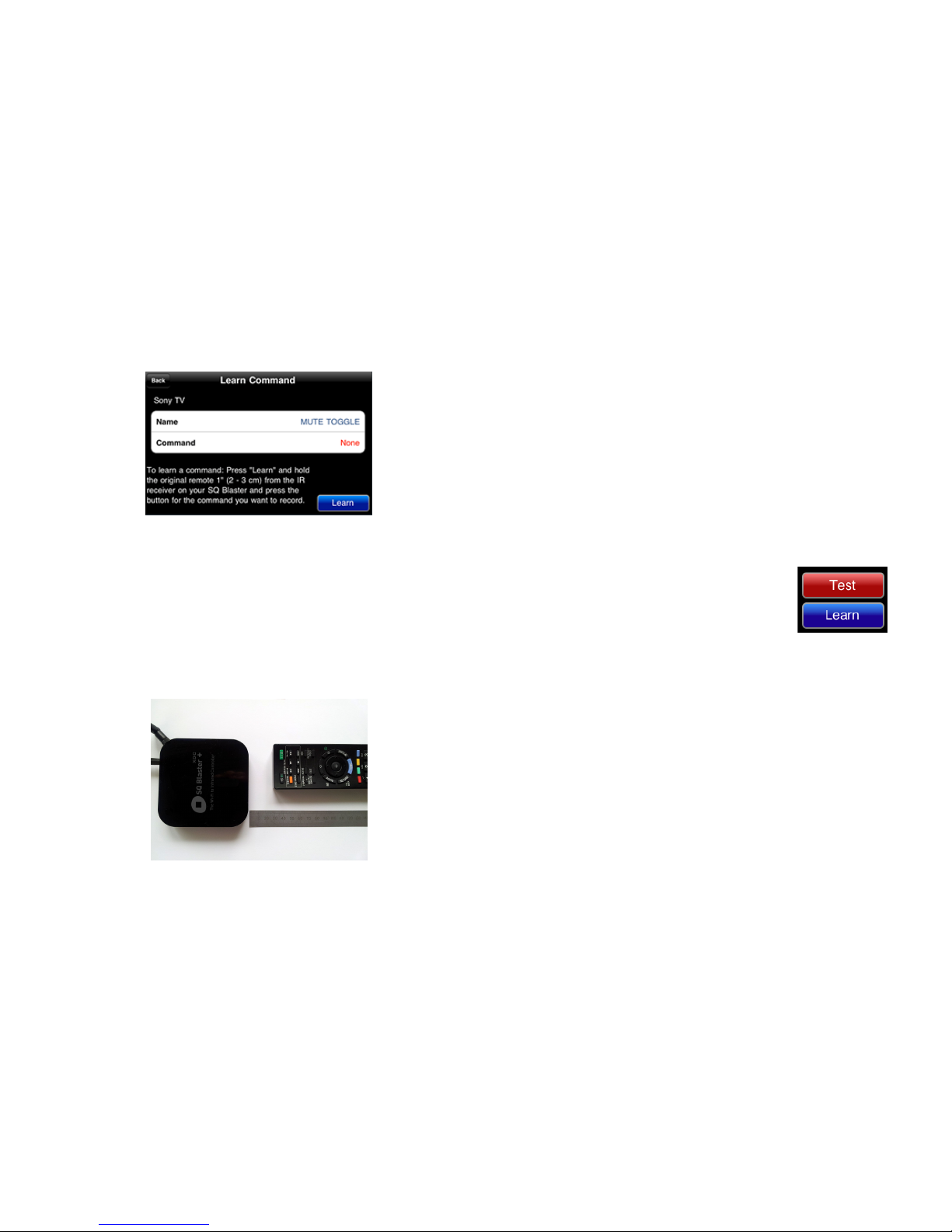
This will bring up the learning screen:
The command line will show "None" if there is no learned code for this
device. This means that the code currently being used is a code from
the internal database. As you are recording over an existing command
in the code set, you do not need to rename the command or add a new
one.
Learn the command
Place your original remote approximately 3cm away from the IR
Receiver on the blaster (see below).
Tip:You will find the IR receiver positioned slightly to the right of center
on the front of the blaster. The position of the receiver is also shown
on the bottom of the unit. Follow the instructions on learning that are
shown on the iPhone/iPad/iPod touch screen. You will be asked to
learn each code twice.
When you press the key on your original remote to send the command
to be recorded, keep the button pressed until SQ Remote tells you it
has captured the command.
Important: Do not press any other keys on your original remote
between the first recording and second recording of the command you
are learning.
Test the new command
When you have successfully recorded a command,
SQ Remote will give you the opportunity to test this
immediately, so that you can make sure that it is
correct, and re-record it if you need to.
Save the command
After testing the command, tap the “Save” button in the top right hand
of the screen. Your new code will have replaced the original code in
the selected command code set, and any buttons using this command
in your control pads will have been updated.
USER GUIDE - SQ BLASTER PLUS & SQ REMOTE
© 2011 Square Connect Inc. ! Version 1.0! Page 18
Page 19
Record a NEW command
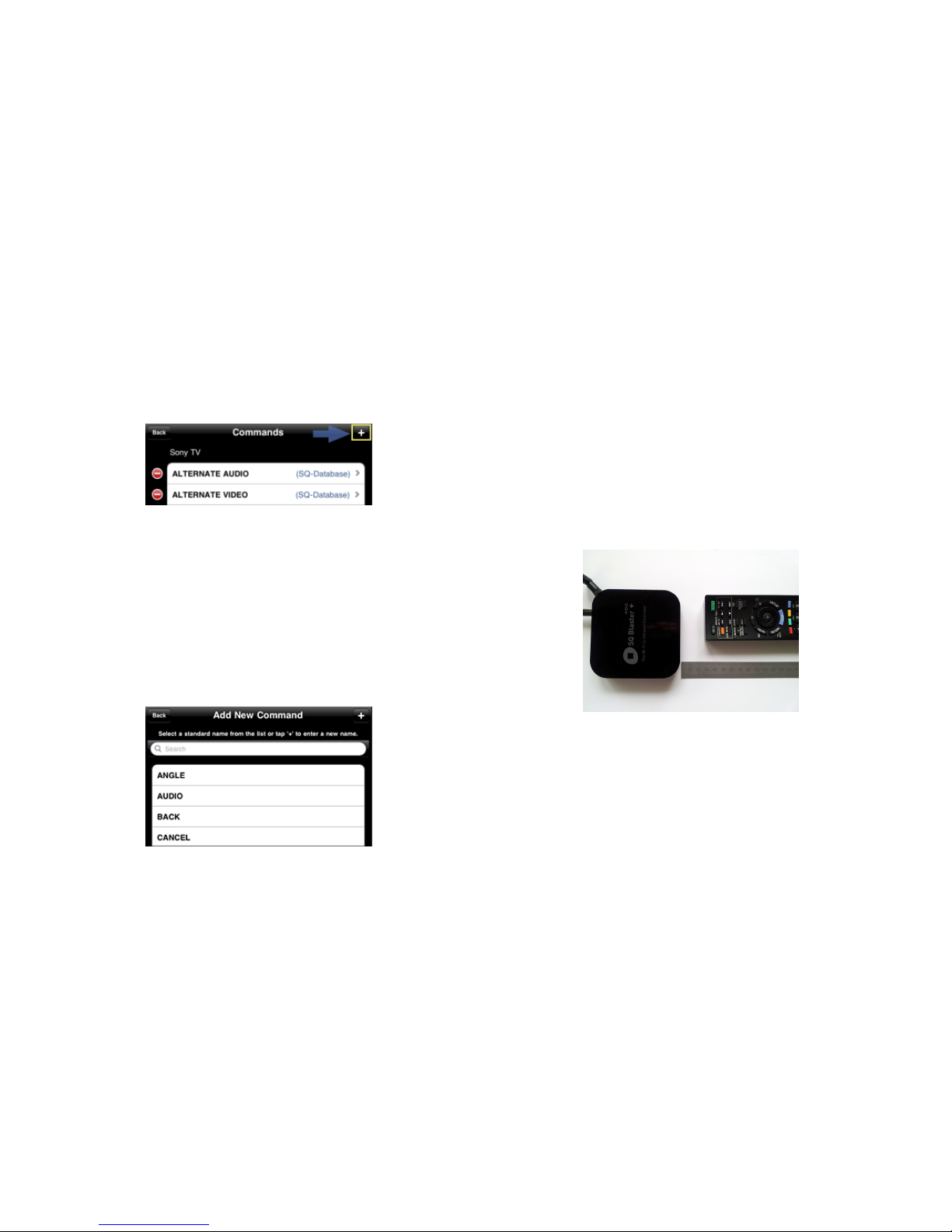
To record a new command follow the steps as detailed in the previous
section but instead of selecting an existing command, tap the "+"
button in the top right hand corner of the screen.
Rename the new command
Each new command will be automatically given a name such as "New
Command 1". You should change this to make it more memorable
when you come to assign it to a button.
Important: You must name your command before saving it as the
name cannot be changed afterwards.
Tap the name to change it, and you will be presented with a list of
standard command names to choose from (see below).
You can either select a standard name from this list or tap the "+"
button in the top left hand corner of the screen to enter a new name.
Standard Names: Command codes that are given standard names
allow SQ Remote to try and automatically assign your recorded codes
when you use preset control panels (templates) to add controls to your
control pads.
Learn the command
Place your original remote approximately 3cm away from the IR
Receiver on the blaster.
You will find the IR receiver positioned slightly to the right of center on
the front of the blaster.
Follow the instructions on learning that are shown on the iPhone/iPad/
iPod touch screen. You will be asked to learn each code twice.
Important: Do not press any other keys on your original remote
between the first recording and second recording of the command you
are learning.
USER GUIDE - SQ BLASTER PLUS & SQ REMOTE
© 2011 Square Connect Inc. ! Version 1.0! Page 19
Page 20
Test the new command
When you have successfully recorded a command,
SQ Remote will give you the opportunity to test this
immediately, so that you can re-record it if you need
to.
Save the command
After testing the command and making sure the command has the
correct name, tap the save button and your new code will have been
added to your set of command codes for the selected in the device.
Learning a Complete Command Code Set
If you can't find your equipment in the library of code sets, or if the
code sets that you do find don't work for you, then you can quickly and
easily learn the complete code set from your existing remote control
unit by following these simple instructions.
When learning a new code set for a device, you can ether start by
adding a new "blank" device, or you can use a similar device as a
template and simply record new codes over those that are taken from
the database. The second approach has the advantage that you will
end up with more codes using standard names that allow SQ Remote
to automatically link the commands to pre-configured control panels.
If the brand and type of your device are available (eg. brand:Sony,
type: TV), but none of the commands work, select one of the code sets
presented, and use this as a template.
Add codes to a new "blank" device.
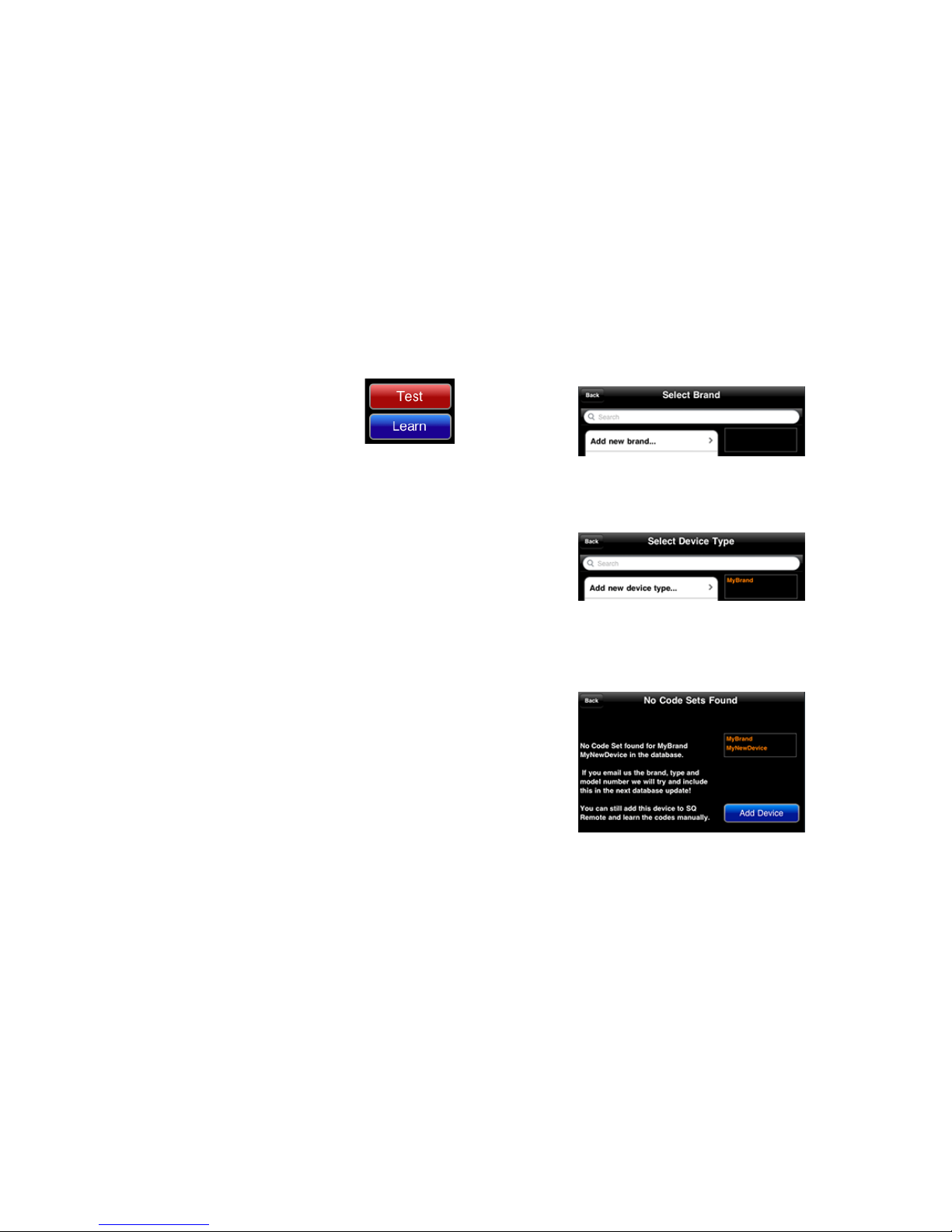
Go to the "SQ Blasters and Devices" screen and tap the "Add New
Device" option.
Select the brand of your device. If you cant find your brand in the list,
tap the "Add new brand" option at the top of the list of brands.
Select the device type. Or if you cant find yours in the list, tap the "Add
new device type" option at the top of the list of brands.
Add the device. If SQ Remote tells you that no code set exists for this
device you will be shown the screen below. Tap the blue button to add
an “empty” device to your blaster unit.
USER GUIDE - SQ BLASTER PLUS & SQ REMOTE
© 2011 Square Connect Inc. ! Version 1.0! Page 20
Page 21
Next find your newly added device in the "SQ Blasters and Devices"
screen and then select it. (SQ Remote takes you to this screen
automatically after you add the new device).
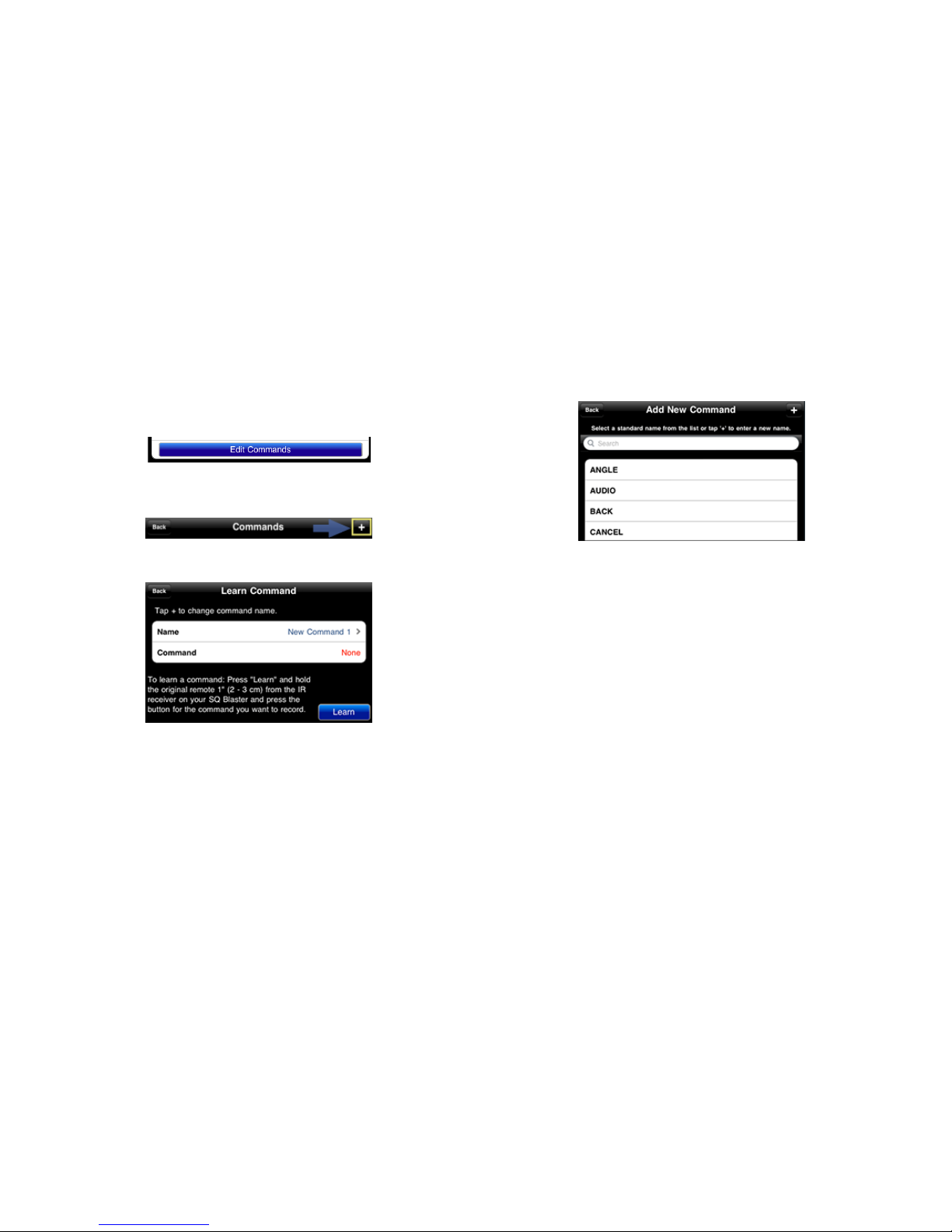
When the device details screen has loaded, tap the blue "Edit
Commands" button at the bottom of the screen.
Tap the "+" button in the top right hand corner of the Commands
screen to add a command code to the device.
This will bring up the learn command screen.
Select a command on the original remote control unit to learn - we
suggest that you simply start at the top of your original remote and
work through the commands across and down (as if you were
reading).
Tap the automatically assigned name "New Command x", to rename
the command to match the command you are about to record. You can
either select a standard name from the list or tap the "+" button to enter
a new name.
The screen showing the list of standard names is shown below. You
can either scroll through the list or use the search bar to look for a
name.
To add name to a command that is not in the standard list, tap the “+”
button in the top right hand corner.
Why use standard names? Command codes that are given standard
names allow SQ Remote to try and automatically assign your recorded
codes when you use preset control panels (templates) to add controls
to your control pads.
Learn the command
As described for adding single commands, learn the command - Place
your original remote approximately 3cm away from the IR Receiver on
the blaster.
USER GUIDE - SQ BLASTER PLUS & SQ REMOTE
© 2011 Square Connect Inc. ! Version 1.0! Page 21
Page 22
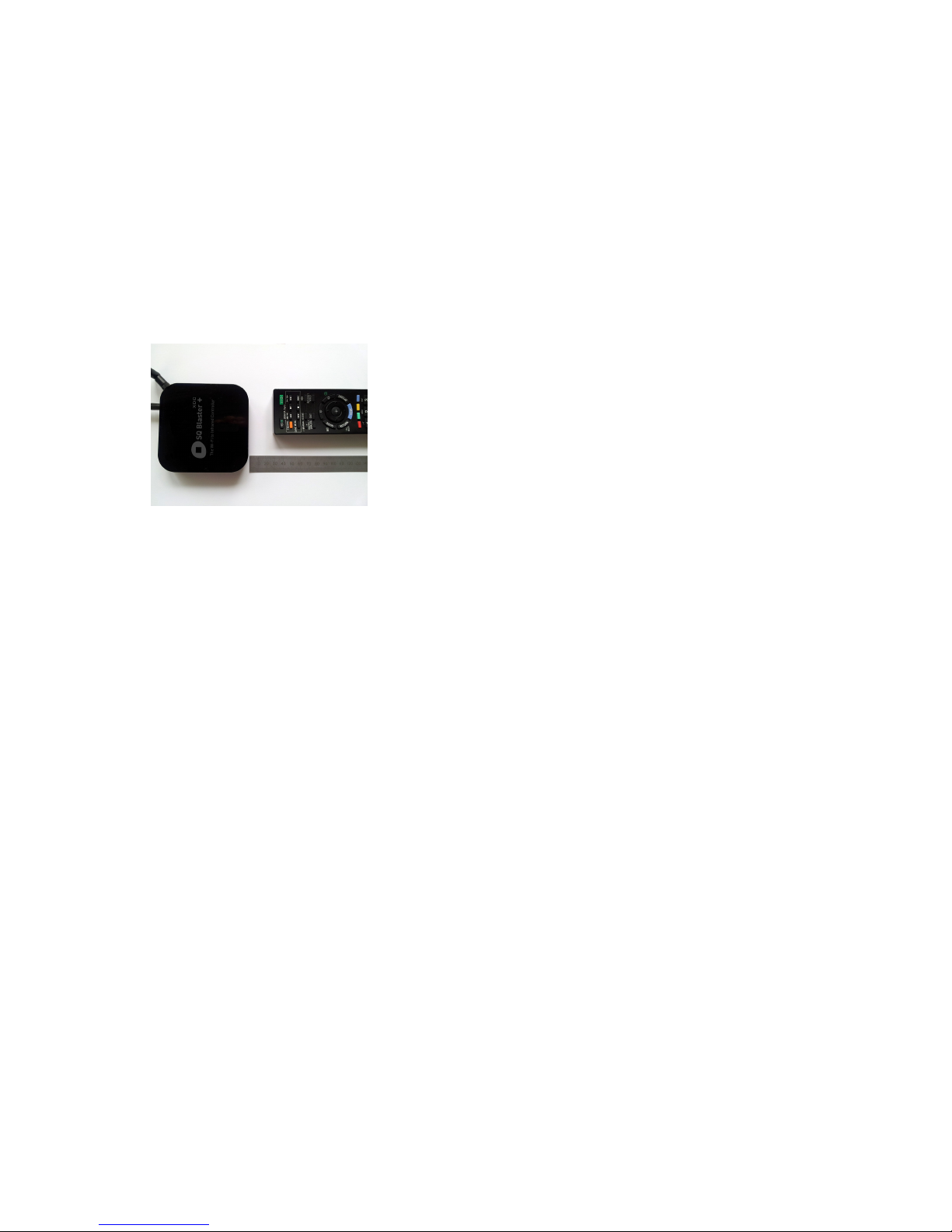
You will find the IR receiver positioned slightly to the right of center on
the front of the blaster.
Follow the instructions on learning that are shown on the iPhone/iPad/
iPod touch screen. You will be asked to learn each code twice.
Important: Do not press any other keys on your original remote
between the first recording and second recording of the command you
are learning.
Test the new command
When you have successfully recorded a command, SQ Remote will
give you the opportunity to test this immediately, so that you can rerecord it if you need to.
Save the command
After testing the command and making sure the command has the
correct name, tap the save button and your new code will have
replaced the original code in the device code set.
Important: You must name your command before saving it as the name
cannot be changed afterwards.
Repeat for all codes that you want to learn
Repeat the steps for adding and learning commands until you have
recorded each command on the remote. You can miss out the
commands that you never use... you can always add them later if you
find that you do need them.
Add command codes to a template device.
Adding codes to a template device is essentially the same as adding
codes to an empty device except that you are using a device as a
template and you record over the existing commands.
Start by adding a new device to your blaster of the same type. You can
select any brand, as you can edit this afterwards. The key is to get a
set of controls that are typical for the device that you want to record
commands for.
When you have added your “template” device, find it in the SQ
Blasters and Devices” screen and select it.
Edit the brand and name of the device
Select the field for the device name of your template device and name
it so that you can easily identify it. If you selected a different brand than
the one that you actually have you may want to edit this as well.
Select the “Edit Commands” button
At the bottom of the screen with the details of your template device tap
the blue “Edit Commands” button. You will be presented with a list of
commands which you will now edit to set up your new command code
set.
USER GUIDE - SQ BLASTER PLUS & SQ REMOTE
© 2011 Square Connect Inc. ! Version 1.0! Page 22
Page 23
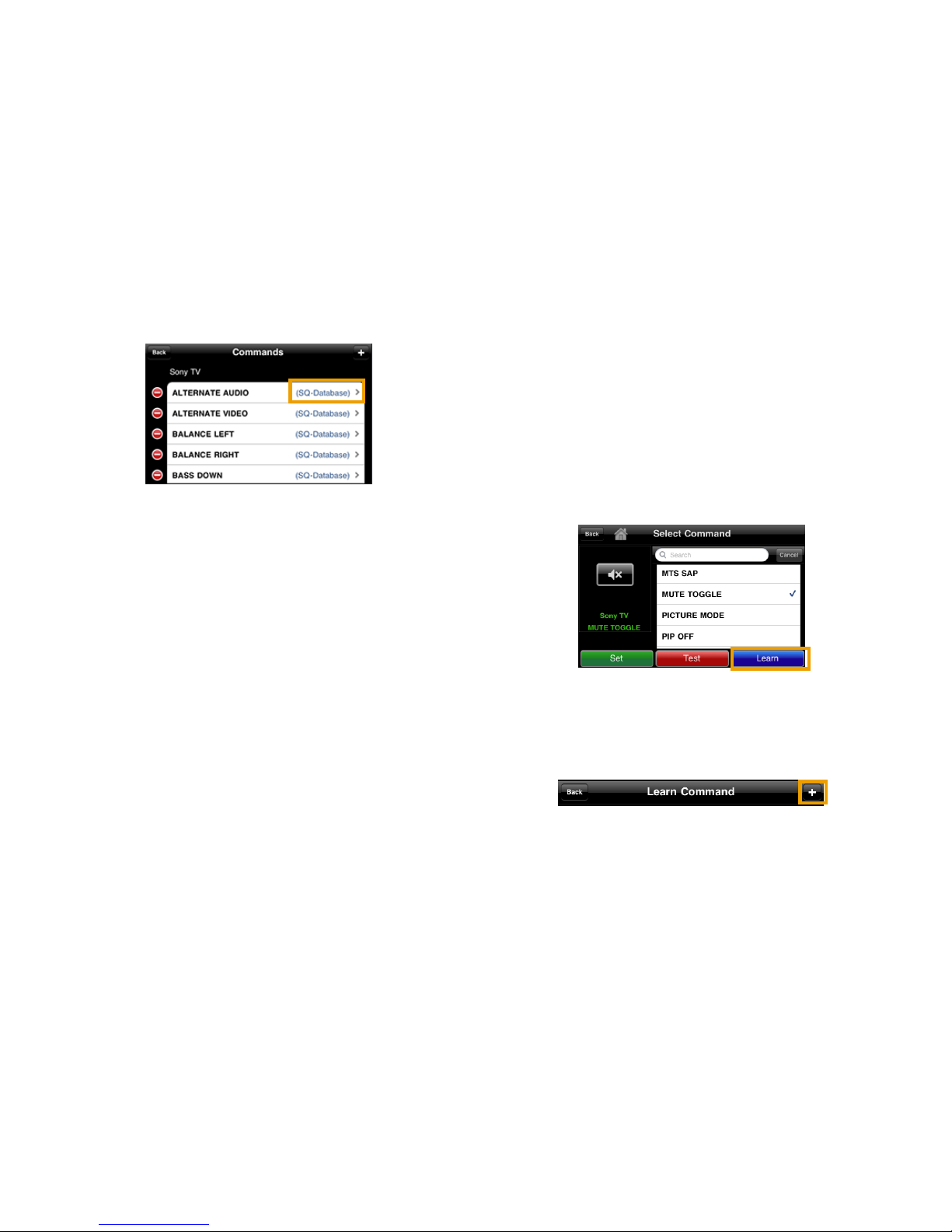
Remove unwanted commands
Its a good idea at this stage to go through the list and delete those
controls that are in the list that are not on your original remote. Note
that some controls may be named slightly differently to those on your
remote. If you do this, then you can follow your progress of recording
over the remaining codes as the subtitle on each command line will
change from (SQ-Database) to (Learned) as you learn and overwrite
the command codes.
Record the each of the codes in the command list.
Work though the commands, recording the command from your
original remote (as described in the previous sections). If there are any
missing commands (that exist on your remote and not in the edited list
of commands, you can add these as you go.
We recommend that you work through the keys on your remote unit
from left to right and top to bottom, as this helps you remember where
you are in the process of capturing all the codes.
if there are codes on the remote that you never use, you can miss
them out, and record them later, if you ever need them.
Learning when assigning a command to a button
SQ Remote also allows you to learn a command during the assign
(command linking) process.
If you are assigning a command to a button, and you find that the
command that you are looking for is missing or does not work from the
command set, you can learn the command immediately without leaving
the assign process.
Here's how: In the Select Command screen of the assign process find
the code that you want to replace, or if you want to add a new
command select "No Command", then tap "Learn".
The Learn Command screen is then presented. SQ Remote is now
ready to learn a new command code for the selected code.
Important: If you need to create a new command name, enter this by
tapping the "+" button:
The select a standard command name or enter a new one (tap "+" to
add a new one)
USER GUIDE - SQ BLASTER PLUS & SQ REMOTE
© 2011 Square Connect Inc. ! Version 1.0! Page 23
Page 24
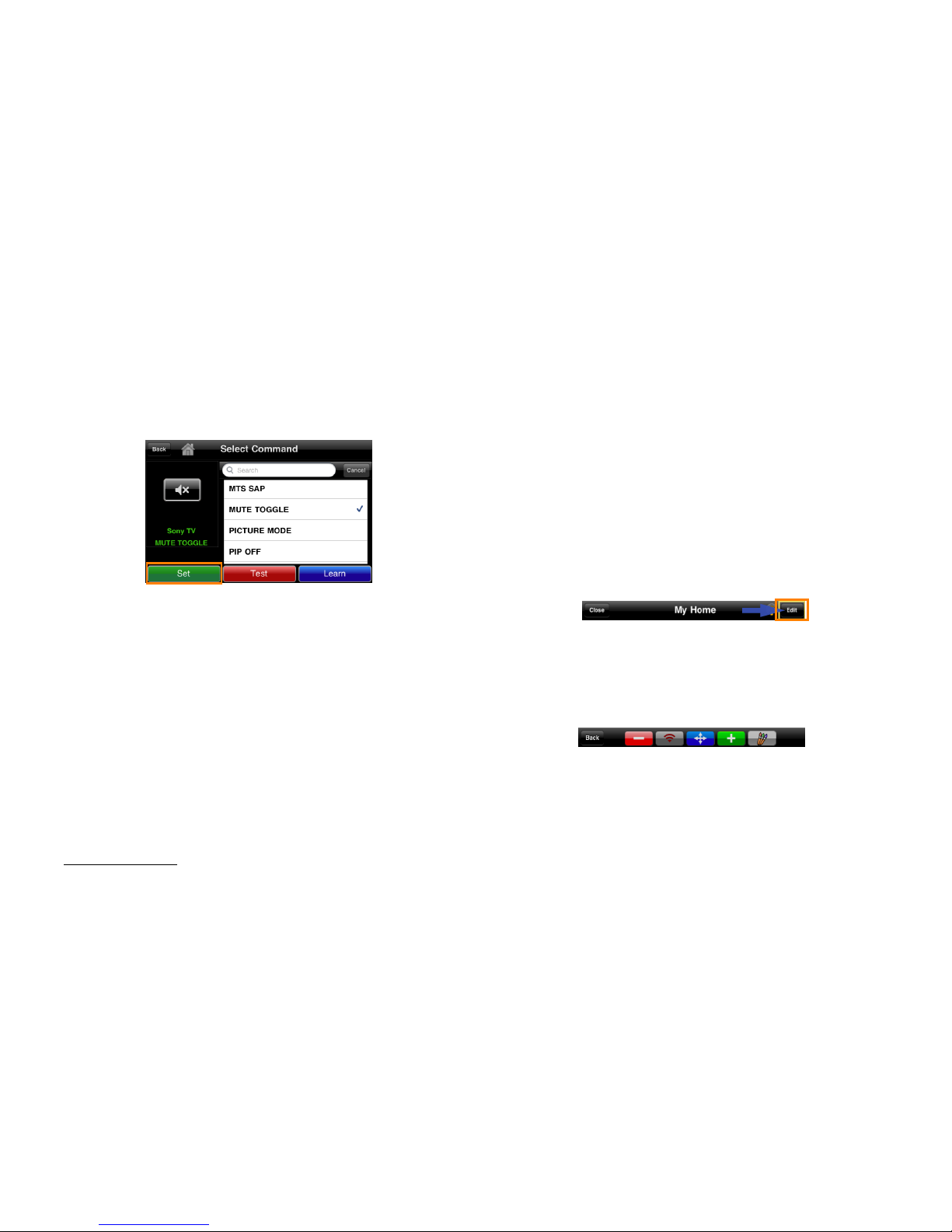
Learn the command
Learn the command as described in the previous sections.
When you have completed the learning and testing procedure, save
the newly recorded command and then select the green “Set” button to
assign the newly recorded command to your control button.
Part 5: Editing Control Pads
This section of the manual provides a short guide to the editing
possibilities and some suggestions on how to get some good looking
control panels.
This guide assumes that you have at least one control pad on the
carousel (as well as the setup control pad). If you do not, you should
review the getting started guides for SQ Remote with SQ Blaster or
MiOS / Vera3 systems.
Control Pad Edit Mode
To edit a control panel within a control pad you need to put it into edit
mode. To put a control panel into Edit Mode, start by opening the panel
you want to edit, and then tapping the "Edit" button in the top right
hand corner of the screen.
If you do not see this button you will have to enable control pad editing
in SQ Remote in the Apps Settings area of your iPhone (see Part 10 of
this manual)
When you are in "Edit Mode" the editing icons will appear along the top
of the screen:
In the Edit Mode, you can:
๏
Add controls,
๏
Delete controls,
๏
Move move controls,
USER GUIDE - SQ BLASTER PLUS & SQ REMOTE
© 2011 Square Connect Inc. ! Version 1.0! Page 24
3
Only SQ Remote HD interacts with MiOS systems such as Vera from Mi Casa Verde
Page 25
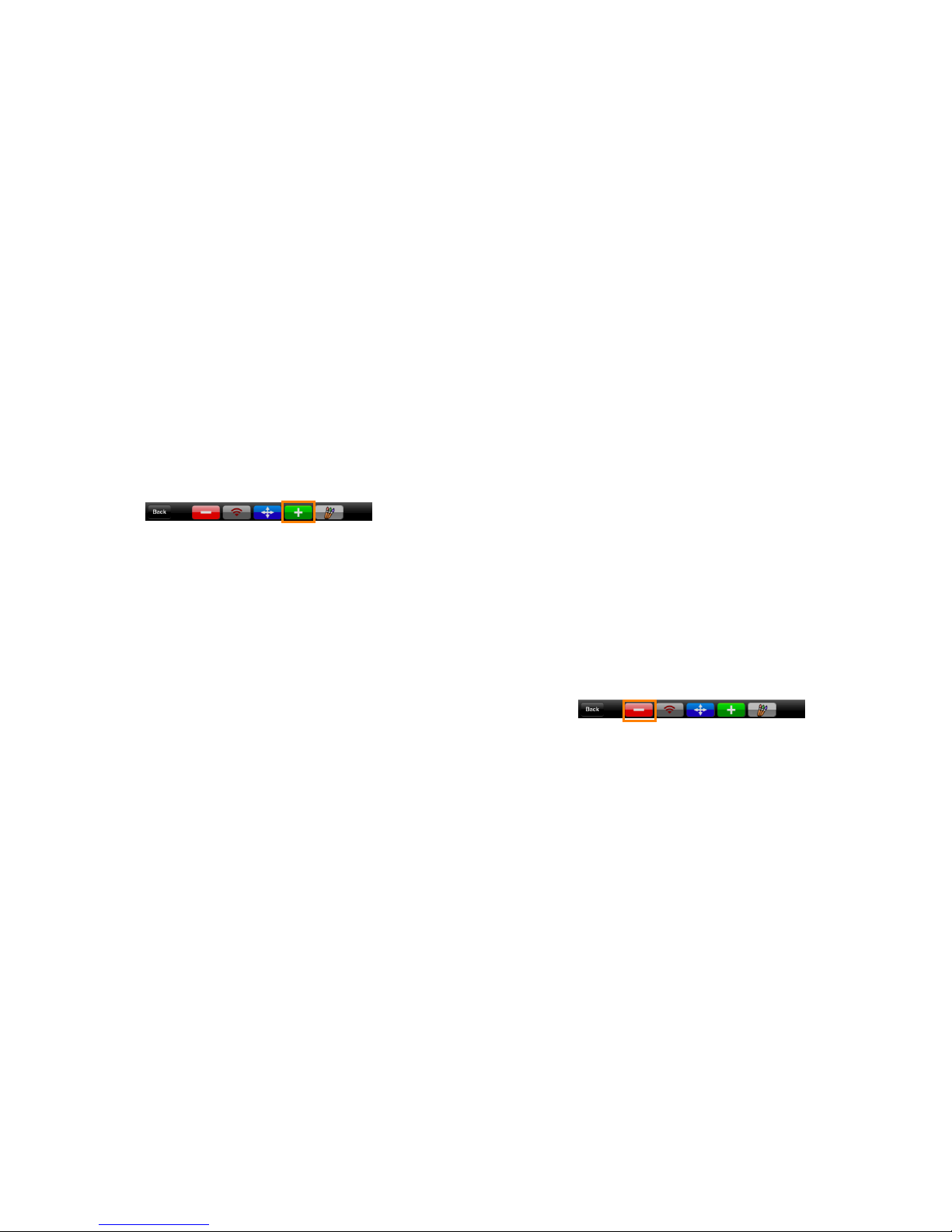
๏
Assign (link) controls
๏
Name control panels
๏
Select Themes
These actions are all described in the sections below.
Adding Controls
To add a control enter the Edit Mode and tap the green "+" icon.
Then follow the add control process to select the control you want to
add.
The types that you can add are:
๏
Preset Control Panels - Pre-defined control panels (presets)
ready for linking to your TV, DVD, Blu-ray player etc.
๏
MiOS (Vera) Controls - Controls with status for your lights,
appliances, scenes, window covers and doors. These controls will
only work with a MiOS home control system.
๏
AV Buttons with Icon - Individual buttons with over 80 different
icons that can be assigned to infrared command codes and
macros.
๏
AV Button with Text - Individual buttons with user definable text
that can be assigned to infrared command codes and macros.
๏
List Controls - Allow you to create lists of controls or list of your
favorite channels.
๏
Web Views - Allow you to embed a screen showing content from
the web.
๏
Text Labels - Text labels that you can add to your control panels.
๏
AV Grouped Controls - Grouped circle controls for AV equipment
that can be assigned to infrared command codes and macros.
๏
Guide / Alignment Elements - These are lines or grids that you
can temporarily add to the control panels to help you line up
controls.
When you have selected your control type you will be asked to tap the
screen to add the control. The new control will be added at the position
of your tap. For some control types you will have the ability to add
multiple controls by tapping more than once. Typically when you are
adding controls for your infrared controlled devices you will be adding
only one button at a time. When you have added your control(s) tap
the "Back" button to go back to the Editing Mode.
Note: that some controls fill the whole control panel and these will
position themselves automatically regardless of where you tap in the
control panel.
Deleting Controls
Deleting controls from control panels is quite simple. Make sure that
you are in the Edit Mode then follow these steps:
Tap the red delete icon in the navigation bar at the to of the screen.
All of the controls on the screen will then show a gray "select" icon. Tap
the control you want to delete and its icon will turn red showing that it
has been selected for deletion:
USER GUIDE - SQ BLASTER PLUS & SQ REMOTE
© 2011 Square Connect Inc. ! Version 1.0! Page 25
Page 26
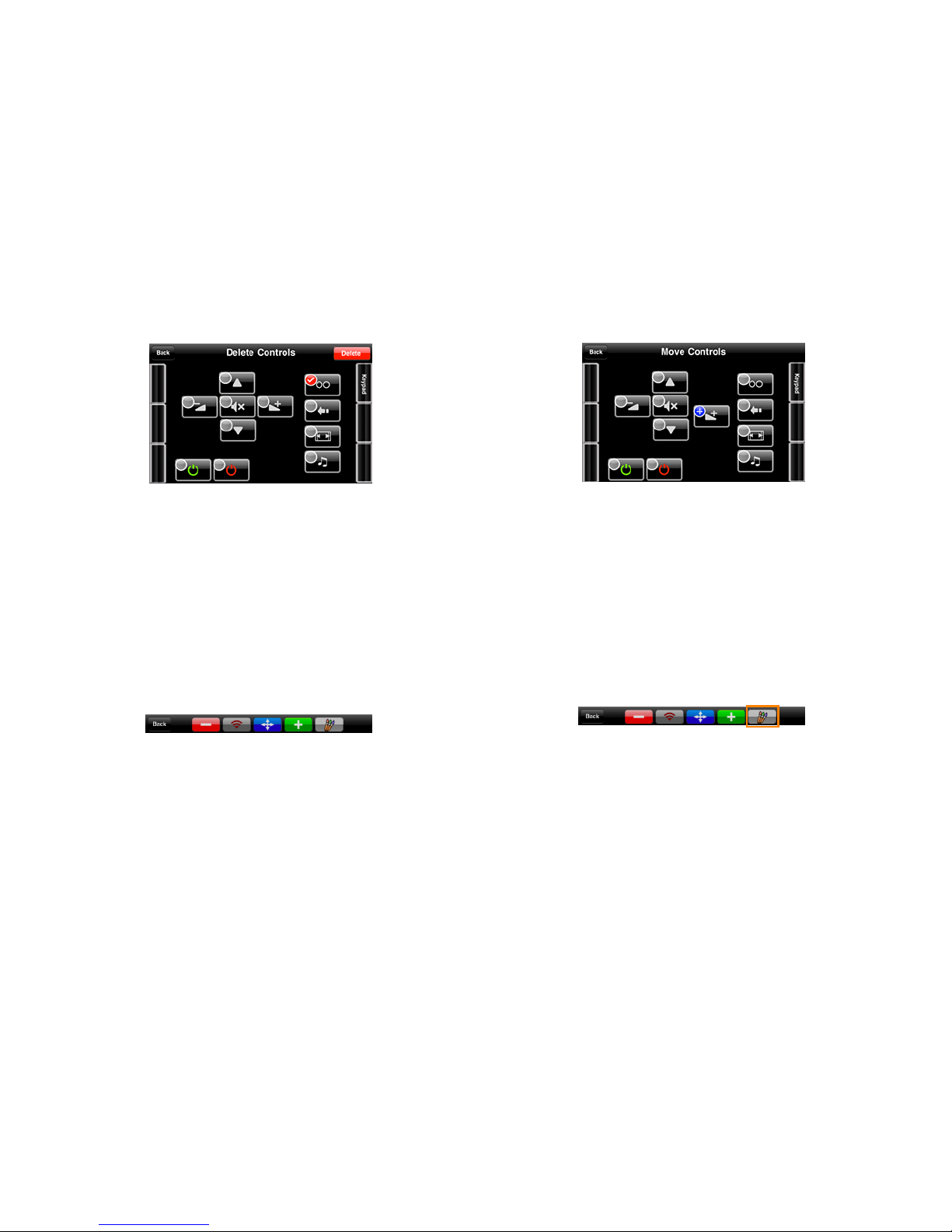
Then tap the red "Delete" button in the top right hand corner of the
screen to remove this control.
Note: make sure that you are deleting the correct control, as you
"cannot" undo a deletion.
However if you do delete a control by mistake, its quite easy to recreate the control.
Moving Controls
If your controls are not quite in the right position, go into Edit Mode and
you can just drag them with your finger.
Tap the blue "move" icon in the navigation bar at the top of the screen.
All of the controls in the control panel that you are editing will then
show a selection icon. "Touch and hold" on the control that you want to
move and drag it into its new position.
When you have positioned your controls how you want them, tap the
"back" button to exit the "Move Mode" and return to "Edit Mode".
Note: Within the MiOS Controls, there are guidelines and layout grids
that can be used to help you position your controls. These lines and
grids should be removed before leaving the "Edit Mode" as they may
prevent your controls from working correctly.
Assigning (linking) Controls
After adding controls you will need to link or assign them to the
equipment that you want to control.
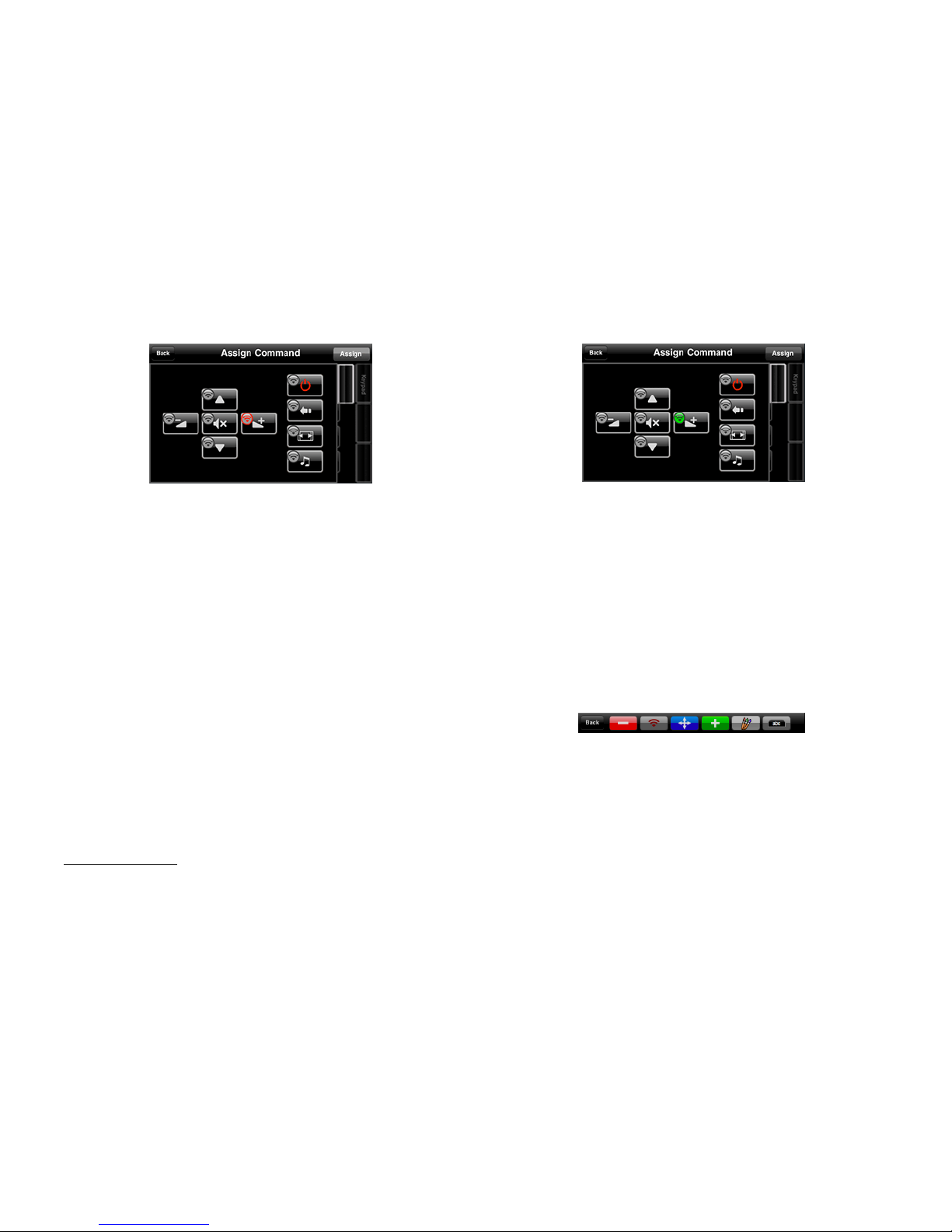
In Edit Mode, tap the gray "Assign" icon in the navigation bar
All of the controls in the control panel that you are editing will then
show a gray assign icon. Tap the control that you want to link to a
device and its selection icon will turn red. Then tap the "Assign" button
in the top right hand corner of the screen to enter the assign process.
USER GUIDE - SQ BLASTER PLUS & SQ REMOTE
© 2011 Square Connect Inc. ! Version 1.0! Page 26
Page 27
Depending on the kind of control you have selected, you will be
presented with different screens to assign the control
๏
AV Controls - You will have the option of assigning a Macro or an
IR Command. Macros will only be available if you have created
any. To assign IR commands you will need to select the device
and then the command (you can test the command before
assigning to make sure its the correct one). Note that you must
add devices before you can assign IR commands to controls.
๏
List Controls - You will be asked which device the list control
should point to for channel changing, and then to select the list
that you want to assign to your list-control. Lists are created within
the Setup area. You can learn more about list controls in Part 7 of
this manual.
๏
MiOS (Vera) Controls - You will be presented with a list of
devices that are controlled by your MiOS (Vera) system(s).
๏
MiOS (Vera) Scenes - You will be presented with a list of scenes
that are present on your MiOS (Vera) system(s).
When the assign process is complete, the assign icon will be green
(see below).
Note: stepping into edit mode and tapping the Assign Icon, is a great
way of checking which controls are assigned and which aren't.
Naming the Slide Out Control Panels or iPad Buttons
4
You can put names on the tabs for the side panels or, in SQ Remote
HD - you can put names on the panel buttons, so you know "what is
where".
To add or edit the name shown on a tab/button, open the control panel
that you want to name, and enter "Edit Mode".
A new "abc" icon will be shown on the navigation bar.
Tap this icon and you will be asked to enter or edit the name on the
"Tab" for the panel that you have selected.
Note: try and keep the name 'short' or you will see the name overflow
the available space and become truncated.
USER GUIDE - SQ BLASTER PLUS & SQ REMOTE
© 2011 Square Connect Inc. ! Version 1.0! Page 27
4
iPad panel buttons are only present in SQ Remote HD. In SQ Remote Lite, the application runs in 2x mode, and the screen layout is the same as on the iPhone.
Page 28
Hints & Tips
A few tips to help you get more out of your control panels...
Add Layout grids and Lines to your control panels when editing.
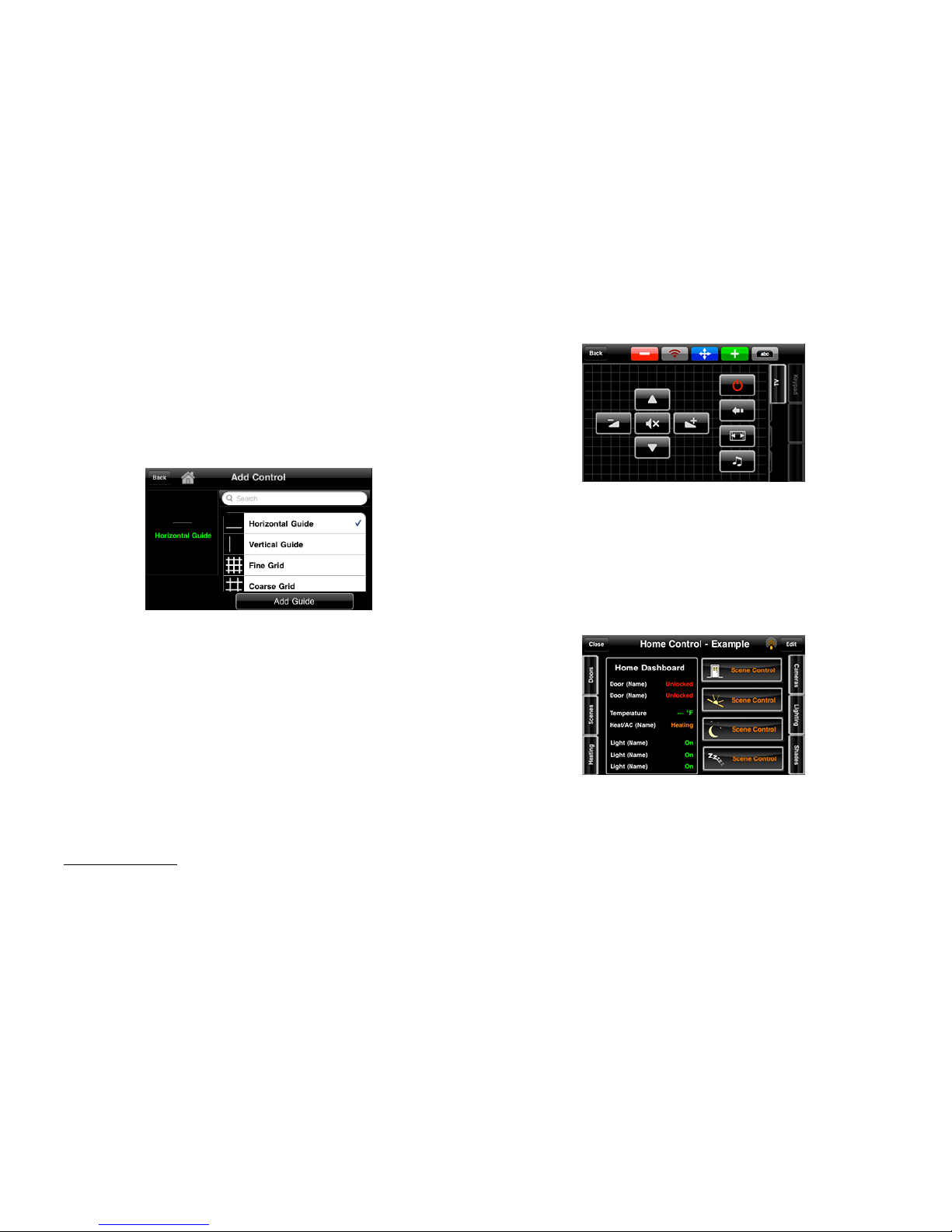
These can be helpful as layout guides:
Enter "Edit Mode" then select Add > Guide Alignment:
These "help" lines will be added "behind" your controls.
They can be selected and moved, so one vertical and one horizontal
line for lining things up is probably all you need.
You must delete these when you are finished as they will interfere with
normal control operation.
"
Status Labels and Frames (for MiOS systems)5.
You can add status labels to create dashboards for your home, so that
you have "status" at a glance.
When you create your dashboards, you may have to move any frames
out of the way until you have set everything up how you want and then
move them back.
USER GUIDE - SQ BLASTER PLUS & SQ REMOTE
© 2011 Square Connect Inc. ! Version 1.0! Page 28
5
MiOS controls are only available in SQ Remote HD
Page 29
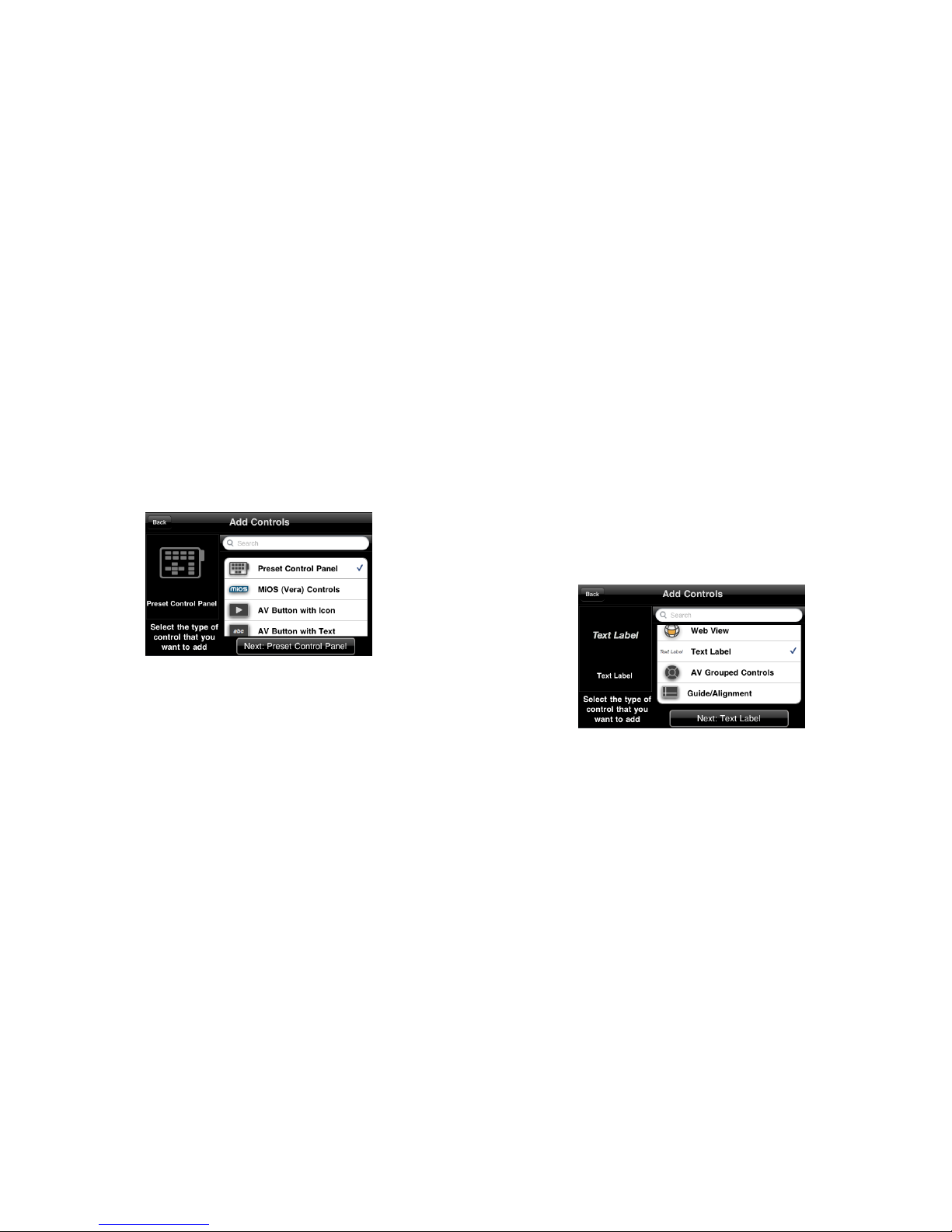
Frames and status labels can be added as follows: Enter "Edit" mode
then select Add > MiOS Controls > Status Labels
Preset Control Panels
You can set up control panels quickly and easily for your entertainment
equipment by using the preset control panels (templates).
These allow you to assign controls to IR commands in one process
rather than assigning individual controls.
Select the control panel type that you want, then select which gear
should be linked to which type of control:
Control types are:
๏
Channel/Content
๏
Power
๏
Audio
๏
Display
๏
Media Player
๏
Menu Controls
๏
Source/Input
The control types for each preset control panel will differ based on the
type of control panel that you select, and you can link the different
controls to different devices.
When you have added these control panels, you can always fine tune
the control links on a button by button basis.
Note: As with all IR controlled equipment you must add your devices
first before you add controls as you will be unable to assign any
controls until you do.
Text Labels
Text Labels allow you to personalize your control panels even further:
Add titles to your status panels, or groups of controls.
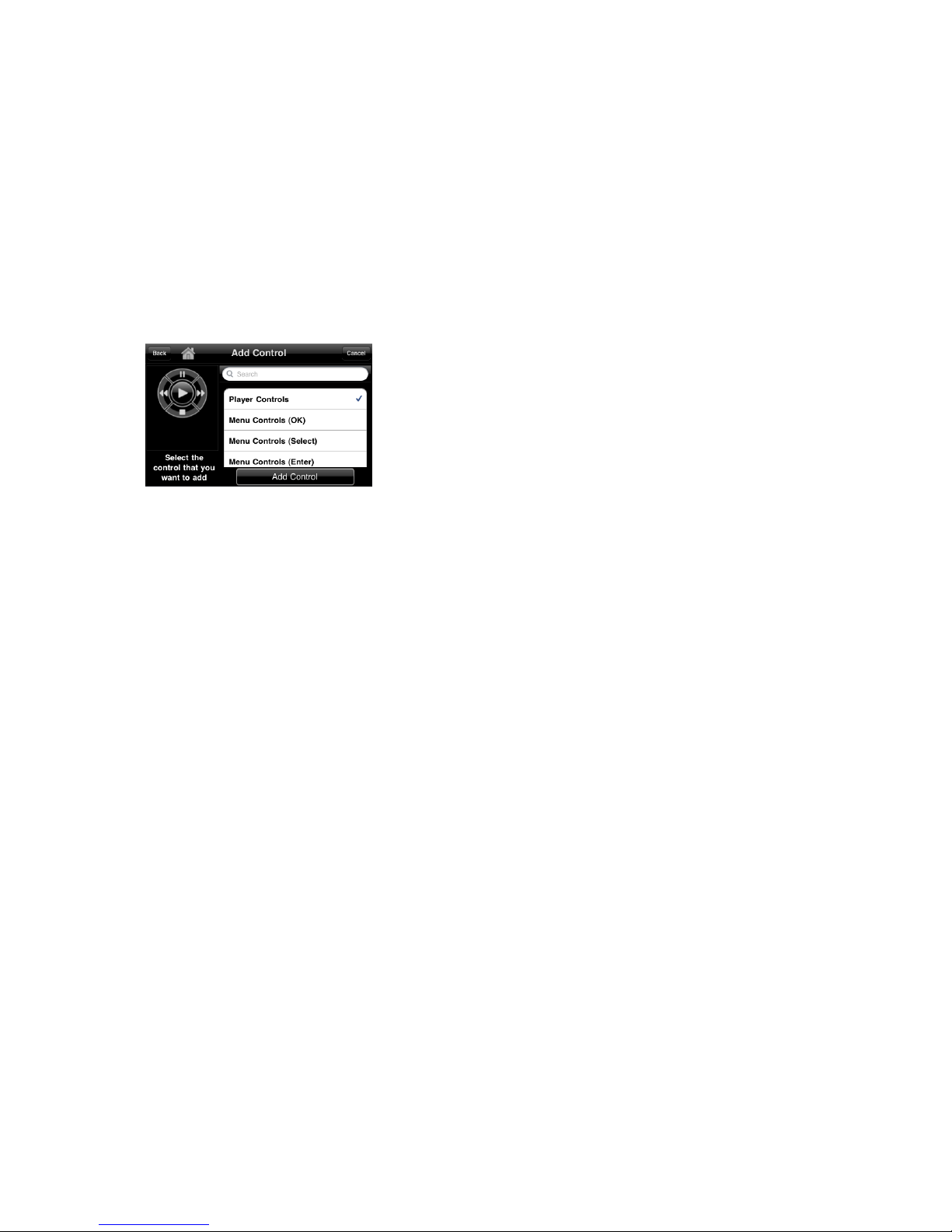
Grouped Controls
Grouped controls allow you to add the preconfigured "media player"
and "menu navigation" type controls quickly and easily.
These are added from the "Add Control" picker:
USER GUIDE - SQ BLASTER PLUS & SQ REMOTE
© 2011 Square Connect Inc. ! Version 1.0! Page 29
Page 30
Note: As these are individual controls, they need to be moved
individually after adding them to your control pad. They do not move as
a group.
Part 6: Macros
Macros are a powerful way of setting up and sending multiple
commands with one button press.
Macros can be setup to send commands to your entertainment
equipment, and to start MiOS / Vera scenes, so you can use macros to
set up a complete activity, including your lights, window settings and
others.
Macro Structure
A macro is a series of commands that alternate with delays.
Example of the structure of a macro.
-
Command 1
-
Delay1
-
Command2
-
Delay2
-
Command3
-
…….
-
Final Step
When the button to start a macro is pressed, each step in the macro is
carried out sequentially.
The “Final Step” is optional and will cause SQ Remote to jump to the
control pad and control panel of your choice. This allows you to create
macros that will start an activity and “take you” to the controls for that
activity. You can use this feature to create your own navigation buttons
around SQ Remote.
USER GUIDE - SQ BLASTER PLUS & SQ REMOTE
© 2011 Square Connect Inc. ! Version 1.0! Page 30
Page 31
The delays between the commands are important as they allow your
equipment to finish reacting to any previous command, such as the
"Power ON" command or a previously sent channel number.
What delays should I use?
As different equipment will require different delays, you will have to
experiment to get the delays just right for your equipment:
Here are some basic guidelines for delays in your macros:
"Power On" commands for TV's,DVD player's etc... 1000 - 4000 ms or
even longer depending on your equipment. This gives the equipment
time to go through its start-up process and be ready for the next IR
command. For some projectors this might be as long as 30 seconds
(30,000 ms).
Other IR Commands (targeted at the same device): 500ms
IR Commands targeted at a different device: 300ms
These are guidelines only and will vary from device to device.
Creating Macros
Macros are created in the setup area of SQ Remote, and are then
available for assigning to any normal AV button.
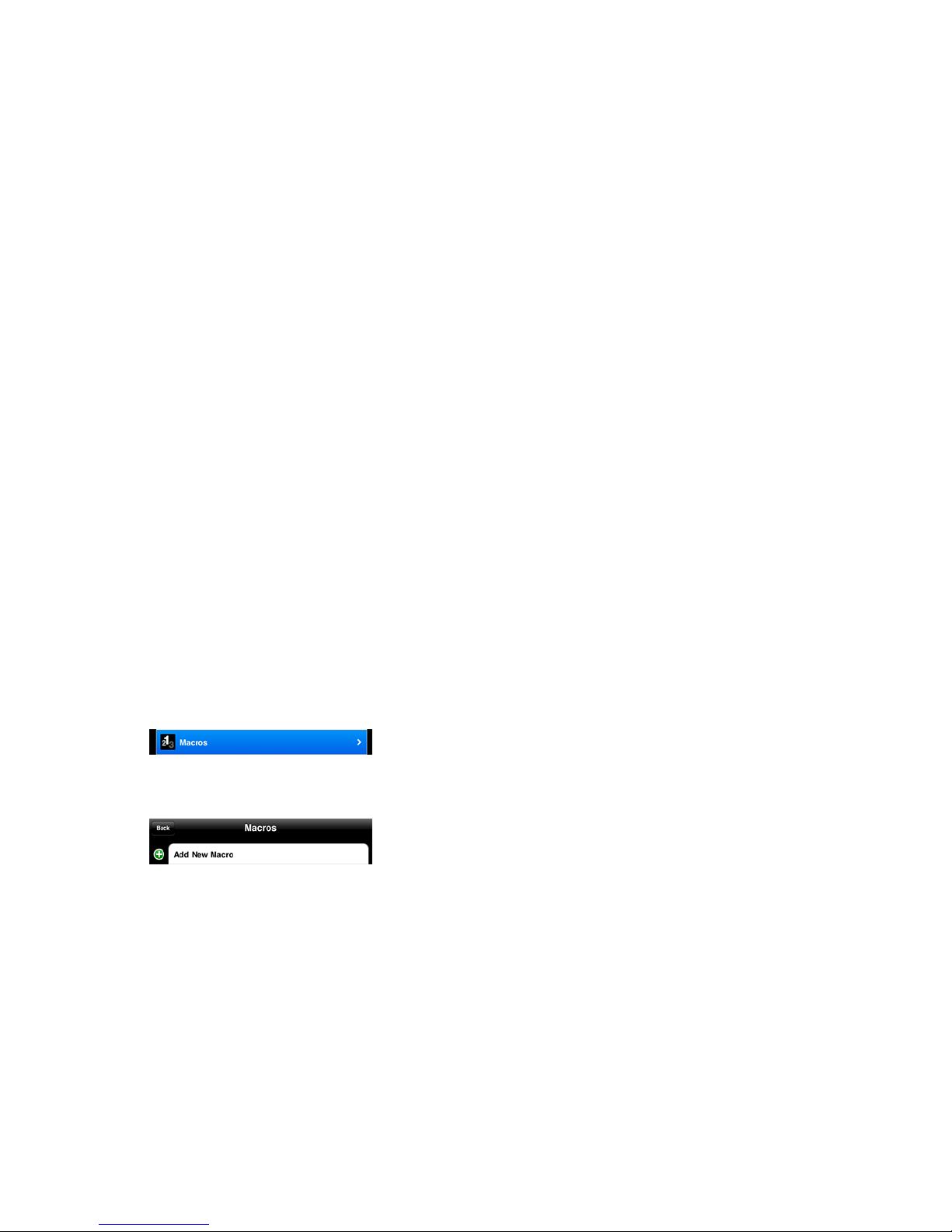
To create a new macro, go to the "Setup" area of SQ Remote and
select "Macros"
then tap the "Add New Macro" entry.
Then follow these steps:
1. Give the macro a name
2. Add a New Command - IR Command or MiOS scene
3. Add a Delay - in milliseconds (ms)
Repeat steps2 & 3 until you have included all the commands that you
want to include.
Then tap the "Save" button. You can then test your macro to see if it
works as expected. If your devices don’t react as you expect, try
increasing the delays or even the order of commands. You can also
change the number of repeats of each code (see next section).
Adding IR Commands
IR commands that are sent by macro require slightly more information
than normal.
So when you add a new IR command you will be asked to specify the
"Repeat Count".
Many devices require the remote control to repeat the IR code several
times before they react to the command. In SQ Remote with normal IR
buttons this is not an issue as they are repeated automatically as long
as you touch the screen (in exactly the same way your remote does).
In a macro, no-one is pressing the button, so SQ Remote needs to
know how many times to repeat the code. If you find that your codes
are not working, its probably because this repeat value is too low.
Simply adjust this value until you find the level that works for your
equipment.
Important: Increasing the number of repeats increases the time that a
command needs to be sent, and hence the delay that is required
before the next command in the macro is sent. If you increase the
repeat count to get the codes working, but some commands seem to
be dropped when your macro runs, it means that you need to increase
USER GUIDE - SQ BLASTER PLUS & SQ REMOTE
© 2011 Square Connect Inc. ! Version 1.0! Page 31
Page 32

the delays between commands to compensate for the time to send the
extra repeats.
What is "Show Progress When Executing"
This feature allows you to see the progress of a macro when it is
launched. It only works only from a control pad - not in the macro
editing area.
If this is set to ON, each step of the macro is displayed as part of a list
view during execution, with a repeat button for each command.
This gives you the possibility to re-send a command that did not reach
the equipment correctly (because someone stood in-front of the
blaster). This feature allows you to correct any problems quickly and
easily - as all the commands you need are right at your finger tips.
Linking Control Buttons to Macros
You link macros to your control buttons (AV buttons) in the same way
that you link them to commands for your devices.
In Control Pad Edit Mode, tap the assign icon and then select the
button that should trigger the macro followed by the assign button.
The picker for devices will include macros if any have been defined.
Simply pick the macro you want to add. Exit the editing mode and your
macro button is ready.
Macro Tips
Setting up macros to work as expected can sometimes be a struggle
as automated commands often produce unexpected results as
equipment starting up or closing down can result in automatic behavior
in the equipment that is physically attached to it.
๏
When starting equipment leave a longer delay than usual before
starting the next piece of equipment. Delays of up to 3000ms (3
sec) are sometimes required, though 500ms to 1000ms may well
be enough.
๏
Experiment with the order of switching equipment ON or OFF to
find the best solution for your system
๏
Delays between commands to different devices (when they are
ON) can be shorter than a standard delay on one device but there
should always be a delay. Example: the delay between channel
numbers on your TV might be 300ms, but the delay between the
last command on your TV and the next command that is sent to
your Sat Box might be 200ms.
๏
In the end there are no hard fast rules to getting macros to work
perfectly. Trial and error and perseverance are the key. You might
want to visit the forums on the Square Connect website to share
hands on experience from and with others.
USER GUIDE - SQ BLASTER PLUS & SQ REMOTE
© 2011 Square Connect Inc. ! Version 1.0! Page 32
Page 33
Part 7: Lists and List Controls
In order to use list controls you must create some lists.
Lists can be a mixture of the following type of commands:
๏
Channels (Channel Name and channel number)
๏
Macros
๏
MiOS Scenes
6
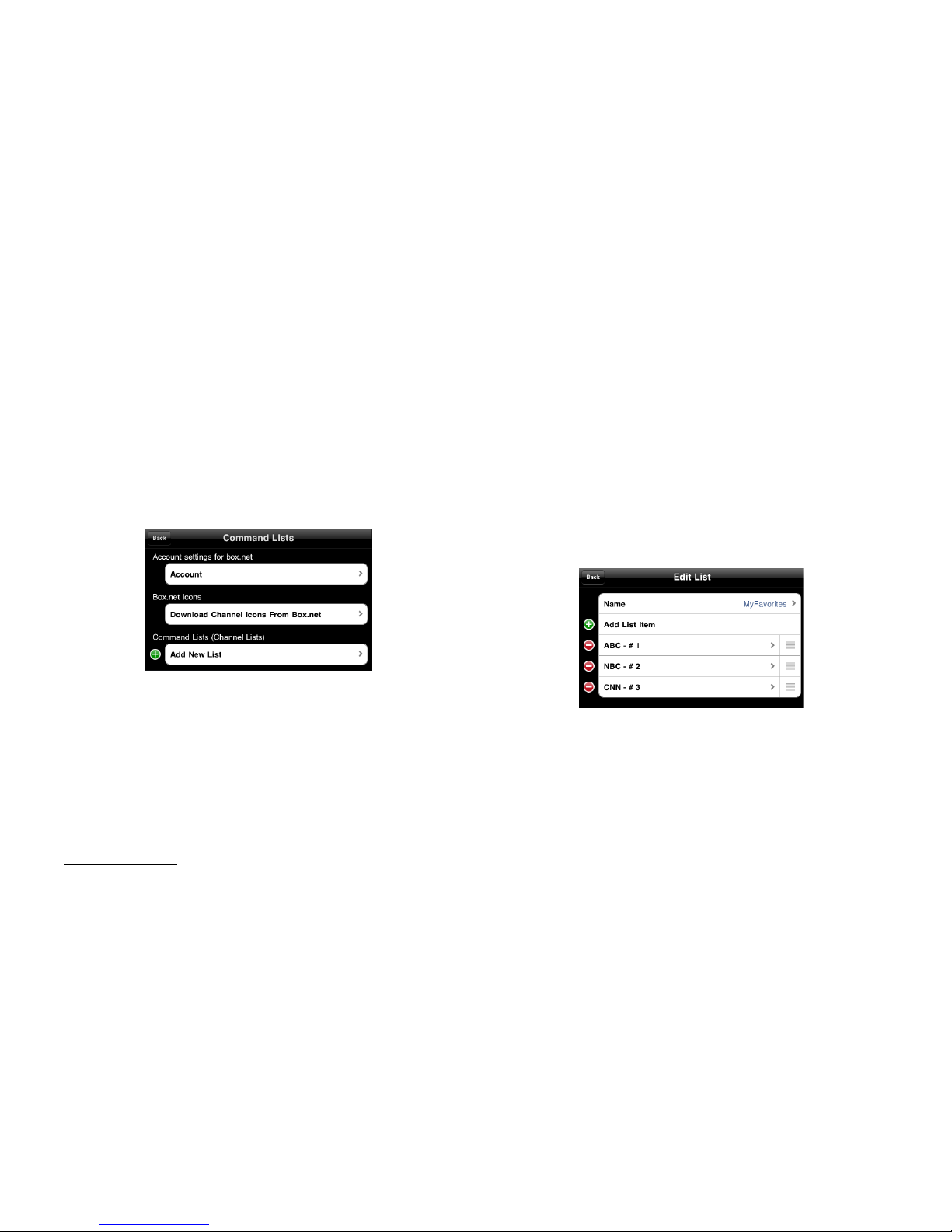
To create a list - enter Setup > Command Lists
Then tap the item “Add New List”
You can then change the name of the list to something that you will
recognize when you are assigning a control to the list. eg: My Favorite
Channels or “MiOS Scenes” etc…
Initially you will only have one option: “Add List Item.
Once you have added at least one list, you will also be able to import
items from other lists. So you might make a list of all your favorite
channels and then create sublists from that.
When you tap Add List Item, you will be asked to select “Channel,
Macro or Scene… select the one you want to add. If you select Scene
or Macro, you will only get a selection to select from if you have
scenes on a MiOS system that SQ Remote knows about, and Macros
if you have defined them. The name of the selected Macro or the
Scene will be displayed in the list control.
When adding a channel, you will be asked for a “Name” and a
“Channel Number”. The name will be displayed in the list control. The
channel number will not (unless you include it in the name). The
channel numbers must be the number that you would enter on your
original remote control unit to select the channel you are entering,
You can re-order your list (in the setup area) by dragging items up and
down.
When you have added a list you can now add list controls to your
control pads.
USER GUIDE - SQ BLASTER PLUS & SQ REMOTE
© 2011 Square Connect Inc. ! Version 1.0! Page 33
6
Initiating Scenes on a MiOS device is only available within SQ Remote HD.
Page 34
Images (icons) in Command Lists
Both SQ Remote HD and SQ Remote Lite have the ability to show
icons in the list control. Icon Images are added to SQ Remote by
downloading them from your box.net account.
In order to user this functionality you will first need to upload icon files
to your box.net account.
First create a folder in your box.net account called
“SQImages” (without quotation marks). This folder should be in the
“root” folder of your account - next to your “SQControlPads” folder.
Next, simply zip up the images that you want to add into a .zip file, and
upload this to the SQImages folder.
The icon images that you add should be approximately 50px wide x
40px height and can be png, gif, or jpg files. If they are sized differently
SQ Remote will resize them, and they may become distorted.
To get the images into SQ Remote follow the steps outlined below:
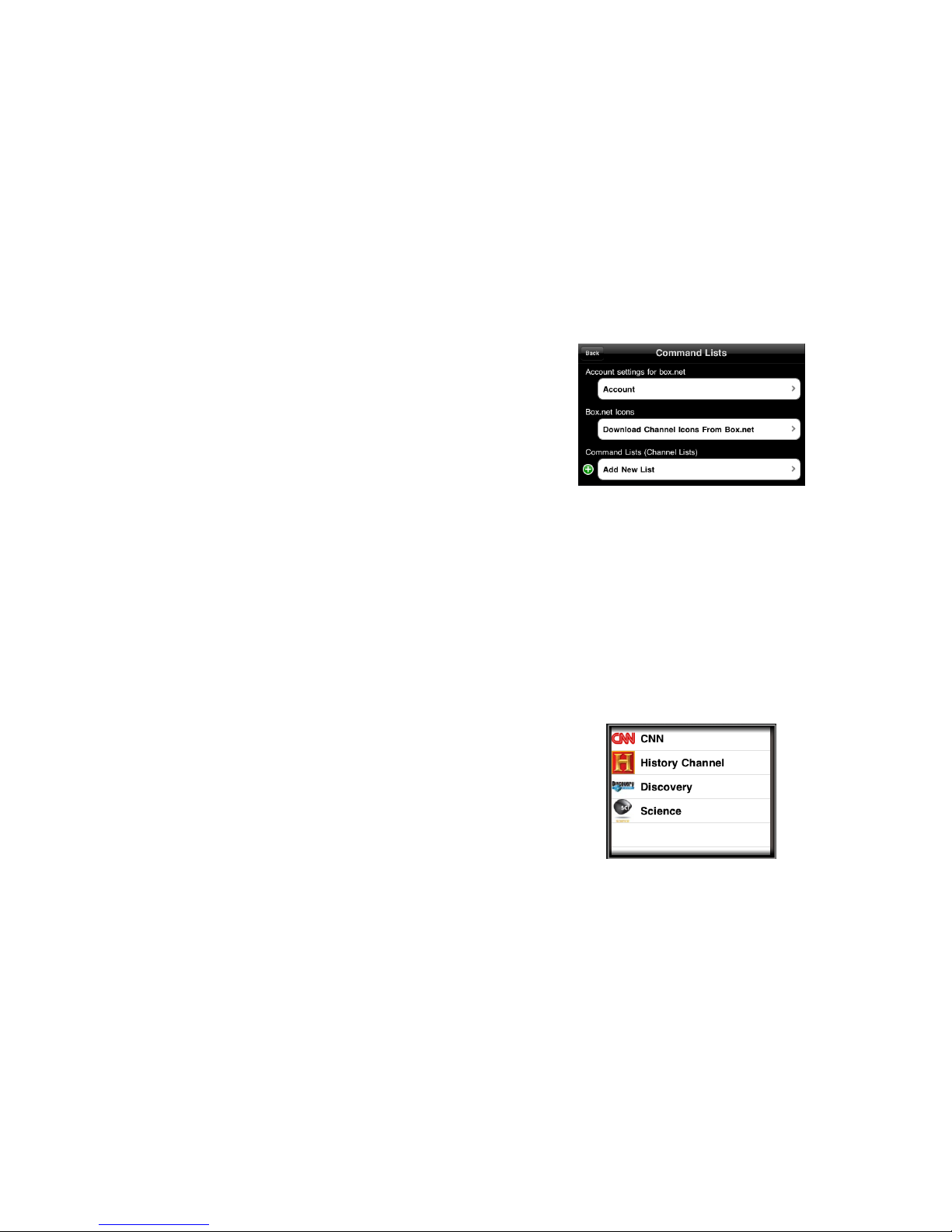
In the first screen for Command Lists you will see two options:
1) Account Settings for box.net
2) Box.net Icons
Tap “Account” and enter your box.net account user name and
password. (Note that there are 3 areas within the application where
you can do this. Once you have logged into your box.net account you
should not need to re-authenticate.)
Next select Download Channel Icons from Box.net. This will show you
the list of .zip files that you have put into the SQImages folder.
Select the file that you want, and SQ Remote will download these into
the application.
Note that when you download images, if any of the images have the
same name as images that have already been downloaded, then the
previously downloaded image will be overwritten.
Once you have images downloaded into SQ Remote you can add the
images to the individual list items when you create the list item, or you
can go back and edit existing list items.
USER GUIDE - SQ BLASTER PLUS & SQ REMOTE
© 2011 Square Connect Inc. ! Version 1.0! Page 34
Page 35
Adding List Controls to Control Panels
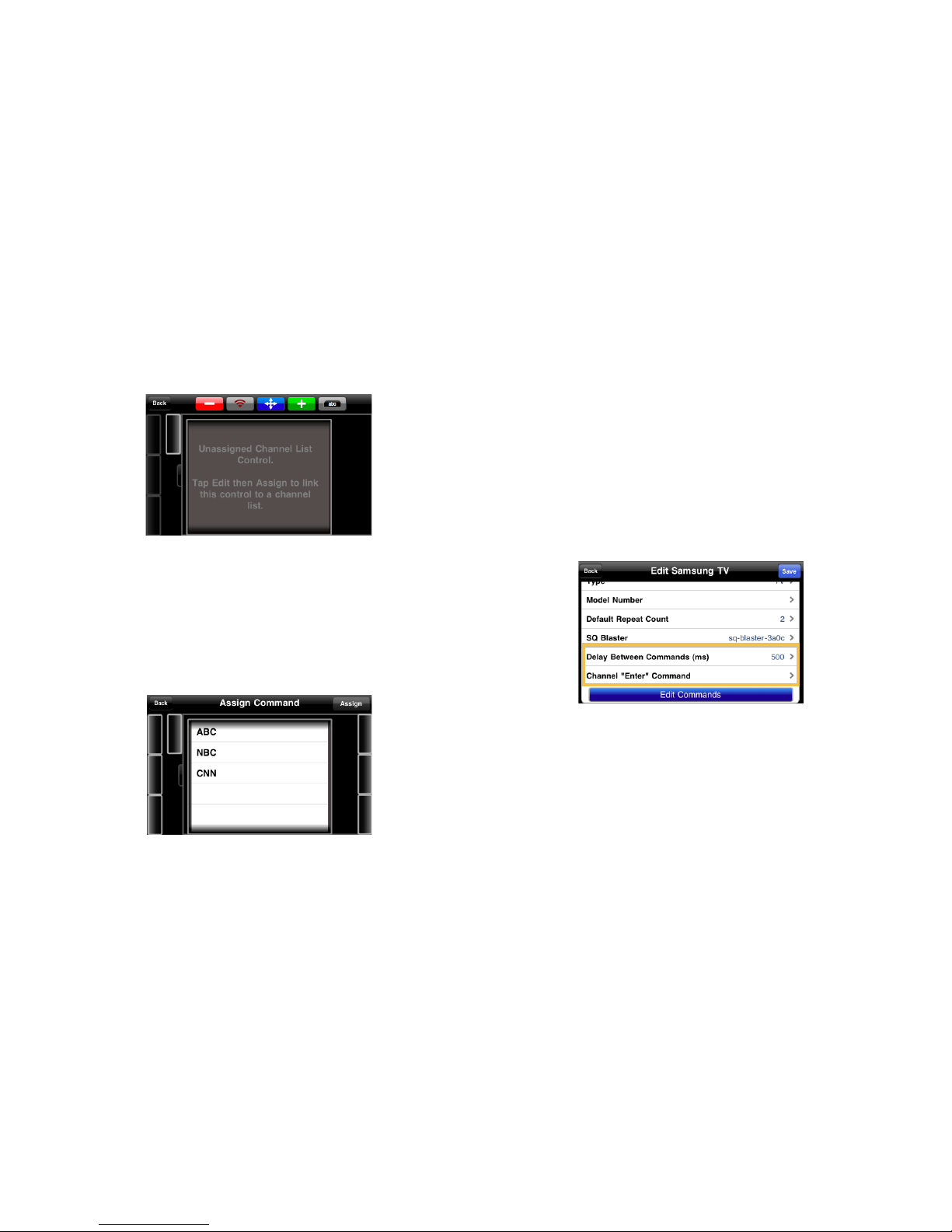
When you first add a list control it will look like this:
When you assign a list control - you will be asked to select the device
that it should control. This is the device that you would use to select
the channels that you have defined in your list. If you do not have any
channels selected, the selection will have no effect, but you will still
have to nominate a device.
Then you select the list that you want to add to your newly added
control, and the process is complete:
Don’t forget to exit the edit mode before trying to use your new list
control.
Additional Useful Information:
Delay between channel numbers. If you find that the channel numbers
are sent ‘too slowly’ or too quickly for the device to correctly receive
the channel numbers that you are sending, you can adjust the time
between delays by changing the “Delay Between Commands” setting
for the device that controls the channels. You will find this in the
settings screen for that device. (Setup > SQ Blasters and Devices >
Your Selected Device)
Example: (Samsung TV)
The standard delay is set at 500 milliseconds (0.5 seconds).
Also if your device requires a specific command to be sent after the
channel numbers - such as the “Enter” command, you can define this
within the device settings area.
USER GUIDE - SQ BLASTER PLUS & SQ REMOTE
© 2011 Square Connect Inc. ! Version 1.0! Page 35
Page 36
Part 8: Web Views
Web Views are screens that fill a control panel that can be pointed at
favorite web pages on the internet, or at local devices that have a web
page - such as an IP camera.
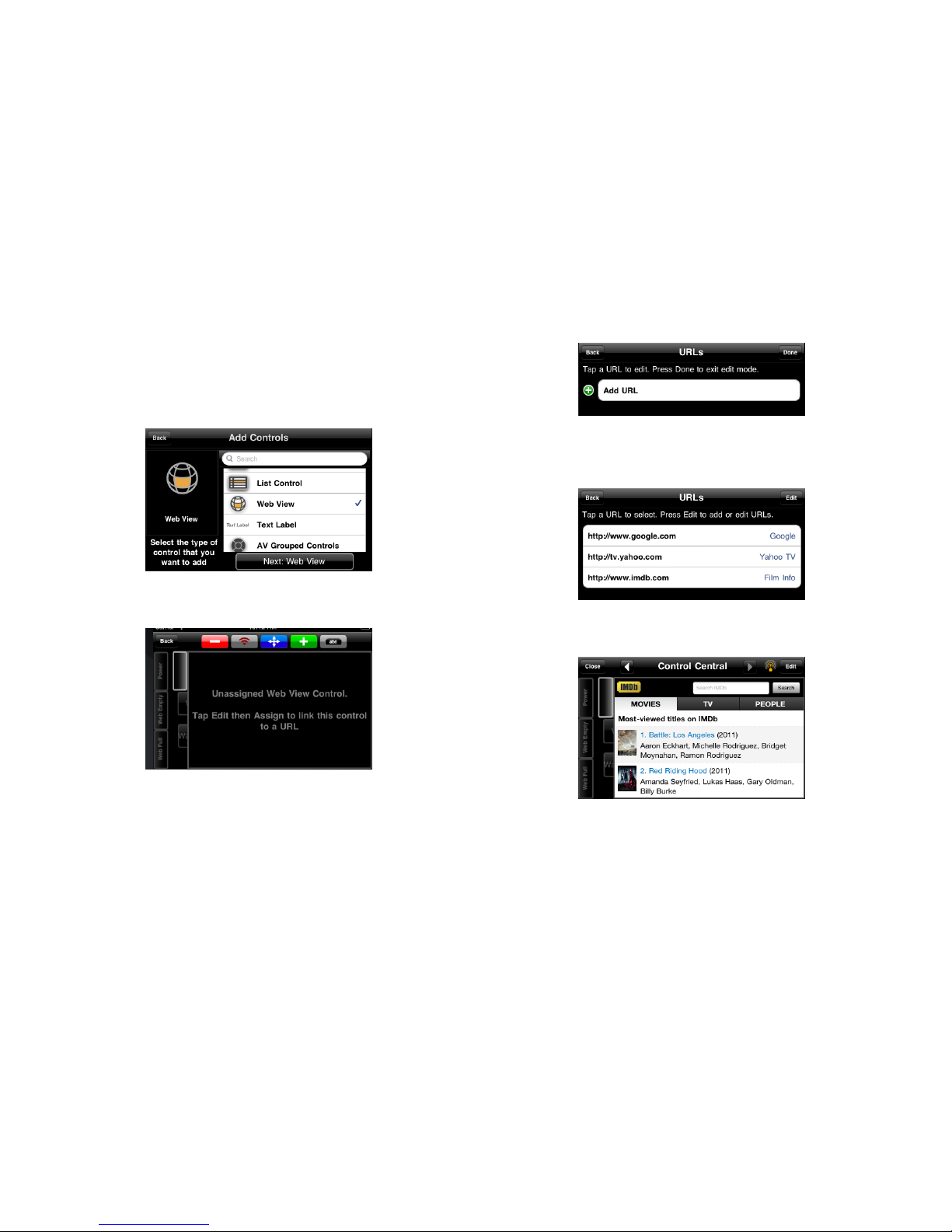
The first step in using a web view is to add a Web View component to
a control pad.
Once that this has been done, the the web view must be assigned a
URL. You assign a URL to a web control in the same way that you
assign other controls. In this case however, as the control is not being
assigned to a device, you are asked to select a URL from a list that
you create. The first time that you use this control the list of URL’s will
of course be empty and you will be asked to create one.
Simply tap “Add URL” and enter the URL and a name. You can test
the URL immediately to see if it is working correctly. When you have
entered your URL, tap the ‘Done” button to exit the URL editing mode:
Now to assign one of the URL’s to the web view… select it from the
list . Your new control panel will now load its web page!
USER GUIDE - SQ BLASTER PLUS & SQ REMOTE
© 2011 Square Connect Inc. ! Version 1.0! Page 36
Page 37
Part 9: Saving and Sharing your
Configuration
Once you have set up your configuration you can save it and share it
with others
Saving and sharing requires that you set up a free (personal) account
on Box.net (www.box.net/signup)
Important: Both SQ Remote HD and SQ Remote Lite have the ability
to save configurations to box.net. With earlier versions the ability to
save and share your configuration was not available within SQ Remote
unless you were using an SQ Blaster or have purchased the "MiOS
extended feature set". This restriction has now been removed.
Saving Your Configuration
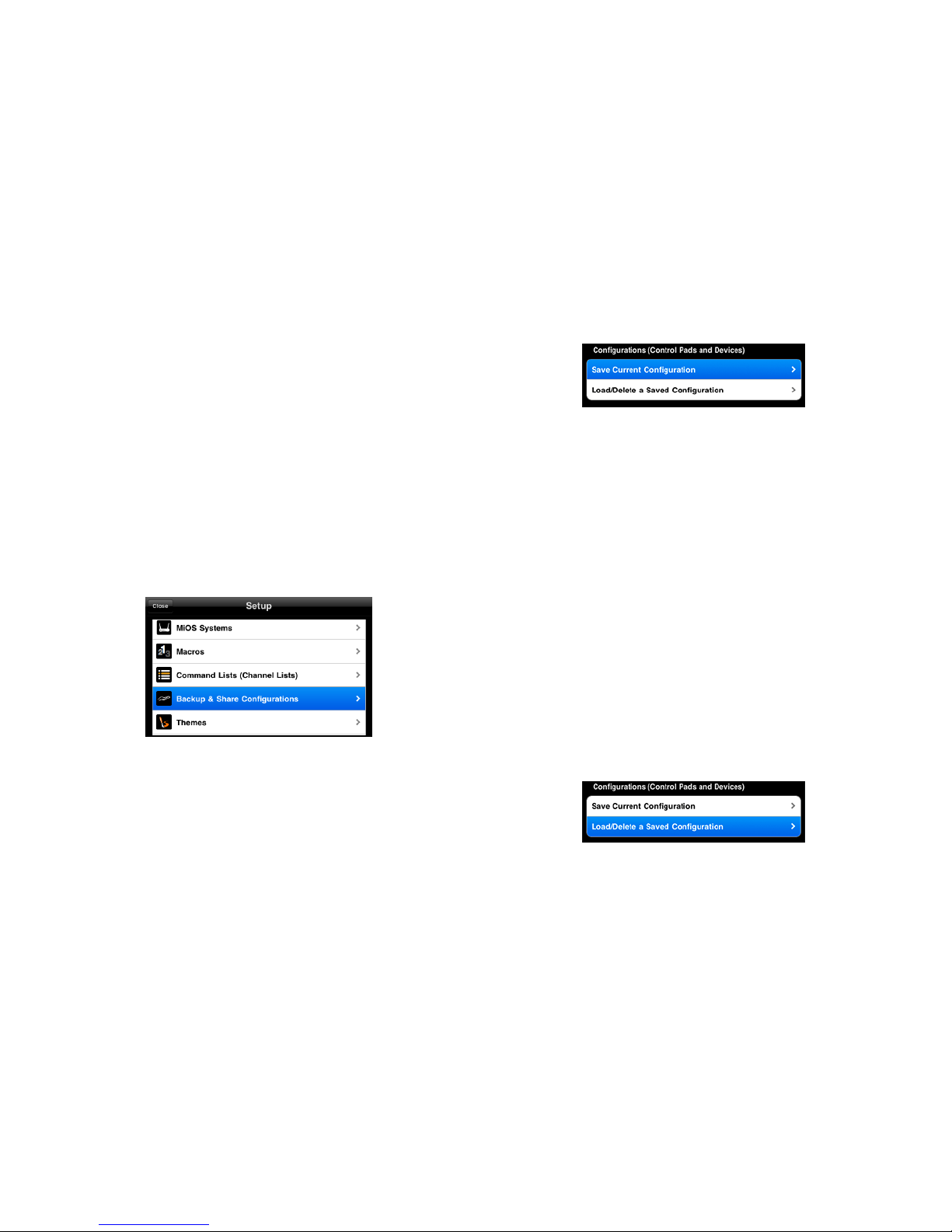
To save a configuration, enter the "Setup" area within SQ Remote and
select "Backup & Share.
Enter your Box.net username and password and tap then
"Authenticate" button. You will only need to do this once unless you
want to access a different account at Box.net, or if you delete and then
restore the application.
Then tap the "Save Configuration option:
SQ Remote will create an automatic name for the backup, but you can
override this and give the saved configuration different name.
Tap the "Save or "Done" button and your configuration will be saved to
your Box.net account.
Saving a configuration makes a backup of:
๏
all control pad settings, all controls and links
๏
all SQ Blaster configurations
๏
all MiOS (Vera) system configurations (except password)
๏
all infrared-code set information (including learned codes)
๏
all macros
Loading Configurations
Load a configuration from Box.net to your device.
As with saving you need to enter the "Setup" area of SQ Remote, but
this time tap the "Load" option.
Note that you will need to have set up the box.net username and
password if you are installing a saved configuration onto a second
device.
SQ Remote will display a list of saved configurations. Simply select
one and tap the “Load” button.
USER GUIDE - SQ BLASTER PLUS & SQ REMOTE
© 2011 Square Connect Inc. ! Version 1.0! Page 37
Page 38

Once it has loaded, the new configuration will be live. Simply exit to the
carousel to start using your newly loaded configuration.
Hints & Tips
A few tips to help you get more out of saving and sharing...
Keep backups safe
If others are using your Box.net account - it's a good idea to take a
copy of your favorite configurations in case they get accidentally
deleted!
Name your configurations well
It helps if you give your configurations meaningful names. If you have
many saved configurations then finding the one that you want can
become tedious!
Don't edit your backups manually
By all means look into the back-up files to see what is there, but don't
edit the files unless you know what you are doing!
A configuration file that is incorrect will very probably cause SQ
Remote to crash, and you might have to delete the application to make
a fresh start.
Square Connect does not support user edited configurations, so if you
start to play with the configuration files, you are on your own!
"
Things you should know...
Things to remember when loading a saved configuration…
Loading a configuration will cause any and all existing setup
information to be erased and replaced. In earlier versions of SQ
Remote this was not the case, however with the release of SQ
Designer, and the ability to edit the complete configuration outside of
SQ Remote, it becomes confusing if deleted items (deleted within SQ
Designer) suddenly seem to reappear on the iPhone or iPad. For this
reason we have changed the configuration loading process.
USER GUIDE - SQ BLASTER PLUS & SQ REMOTE
© 2011 Square Connect Inc. ! Version 1.0! Page 38
Page 39
Part 10: Using SQ Remote with a MiOS
system7
The setup of SQ Remote with a MiOS system such as Vera from
MiCasaVerde is a 3 step process.
๏
Connect SQ Remote to your MiOS / Vera system
๏
Add Control Pads to the carousel to hold your controls
๏
Add controls to your control pads and link them to your equipment
Why isn't the setup of the control pads automated?
Everyone has different tastes and different amounts and kinds of
equipment. We set out to create a control system that allows you to put
your controls together how you want. And as everyone has different
ideas about what should go where, we wanted to give you the flexibility
to create control surfaces that are set up the way you want them, in a
graphically pleasing way. We were also quite fed up with lists!
We feel that if something is worth having, then its worth the extra effort.
And when you have everything setup you can share it with others - so
you only have to go through the whole setup process once.
Step 1: Connect SQ Remote to your MiOS systems
SQ Remote will automatically discover your MiOS systems, even those
that are in another location as long as they have been registered with
your myMiOS account, or are connected to the findVera service.
Discovering and installing MiOS systems on the local network
Simply start SQ Remote and it will automatically discover any MiOS
devices that are on the same local network. It will obtain a list of your
devices and scenes as well as information about media devices that
you control with your MiOS system.
How do I tell that SQ Remote has discovered my system(s)?
If you are setting up SQ Remote for the first time, you can immediately
tell if SQ Remote has discovered your MiOS system by looking at the
connection message on the bottom left of the carousel screen. This will
tell you if it has found any systems and whether it has connected to
them all.
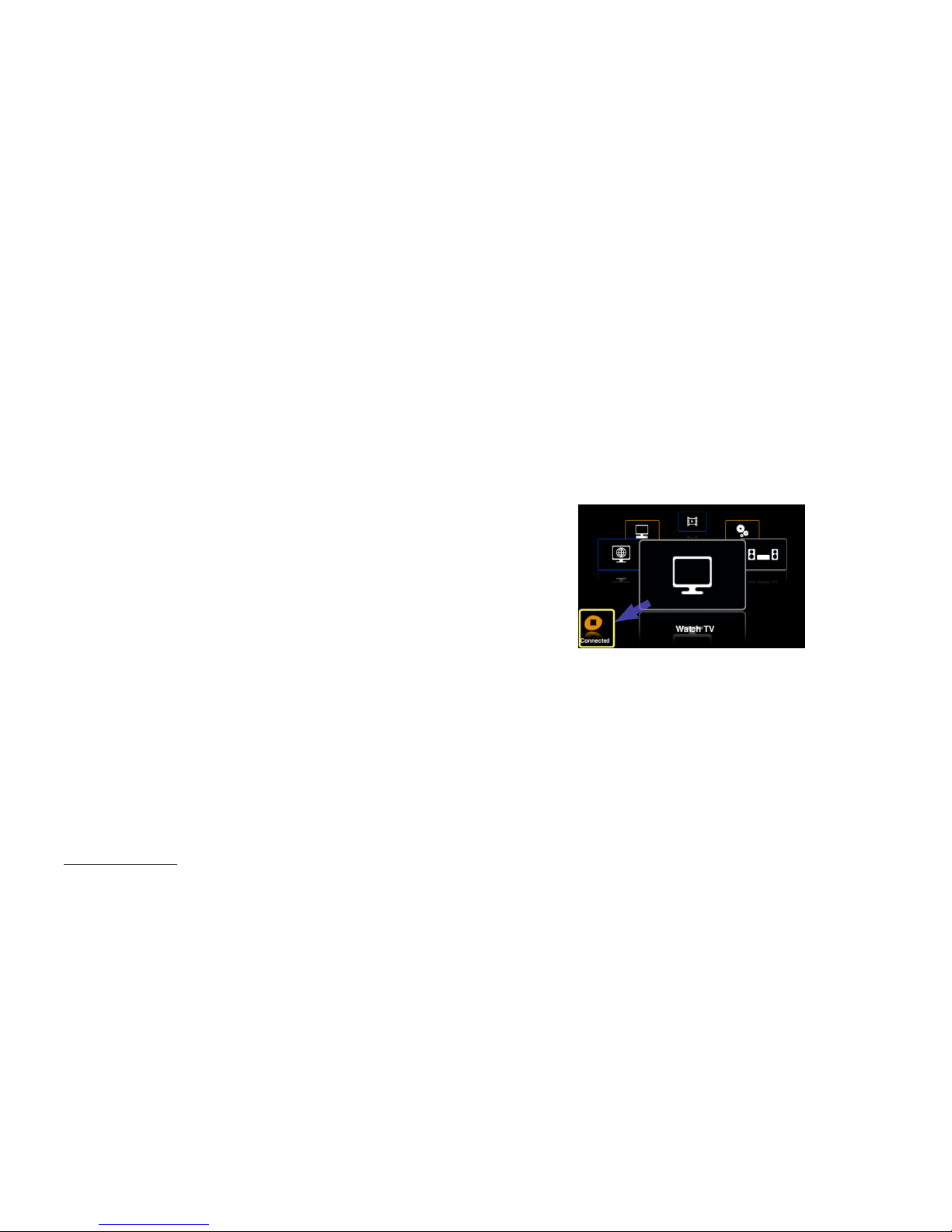
The connection message below the Square Connect logo shows you
whether SQ Remote is connected to all known systems: "Connected"
or whether it has only been able to connect to some: :"Connected [x/y]"
where x is the number of systems connected and y is the total number
of systems that SQ Blaster is configured for.
You can also go into Setup area of the app and enter the "MiOS
Systems" area. You will see any devices that have been discovered
listed here.
USER GUIDE - SQ BLASTER PLUS & SQ REMOTE
© 2011 Square Connect Inc. ! Version 1.0! Page 39
7
This section applies to SQ Remote HD only
Page 40
SQ Remote does not discover my local system(s) what shall I do?
If your MiOS or Vera system is not being discovered it will most
probably be one of the following reasons:
๏
Your MiOS/Vera unit does not have internet access - for example
if you have a firewall preventing its connection to the internet, and
thus its registration with the findVera or myMiOS services.
๏
Your iPhone/iPod touch/iPad is not on the same local Wi-Fi
network as your MiOS/Vera system.
๏
Your Vera system is running a incompatible (old) version of
firmware. You will need to update your firmware to be able to
connect with SQ Remote.
I still can't connect - what do I do?
You can try connecting manually. To do this you need to add a MiOS
system by pressing the "+" button in the top right hand corner of the
"MiOS Systems" screen.
Enter a name for the system, and the local IP address or your MiOS/
Vera device - then tap save. SQ Remote should then connect to the
system provided it is on the same network. If you are still having
trouble connecting please contact us through our online support
service (www.squareconnect.com/support.html).
Step 2: Add Control Pads to the Carousel
As with controls for your equipment controlled with your an SQ Blaster,
Control pads are where you put the actual controls (e.g. power on/off,
volume up/down, channel up/down etc.) to control your equipment.
Adding new control pads is simple - simply follow the step by step
guide below:
1. Go to "Control Pads" in Setup"
Starting from the carousel enter the Setup area and tap "Control
Pads".
2. Tap "Edit" then the "+" button"
Tap the Edit button in the top right hand corner of the screen...
...then tap the "+" button:
3. Enter a name and select an image"
In the "New Control Pad screen, enter a name and an image that
makes the activity easy to identify. Then tap the blue "Save" button to
save your new control pad.
USER GUIDE - SQ BLASTER PLUS & SQ REMOTE
© 2011 Square Connect Inc. ! Version 1.0! Page 40
Page 41
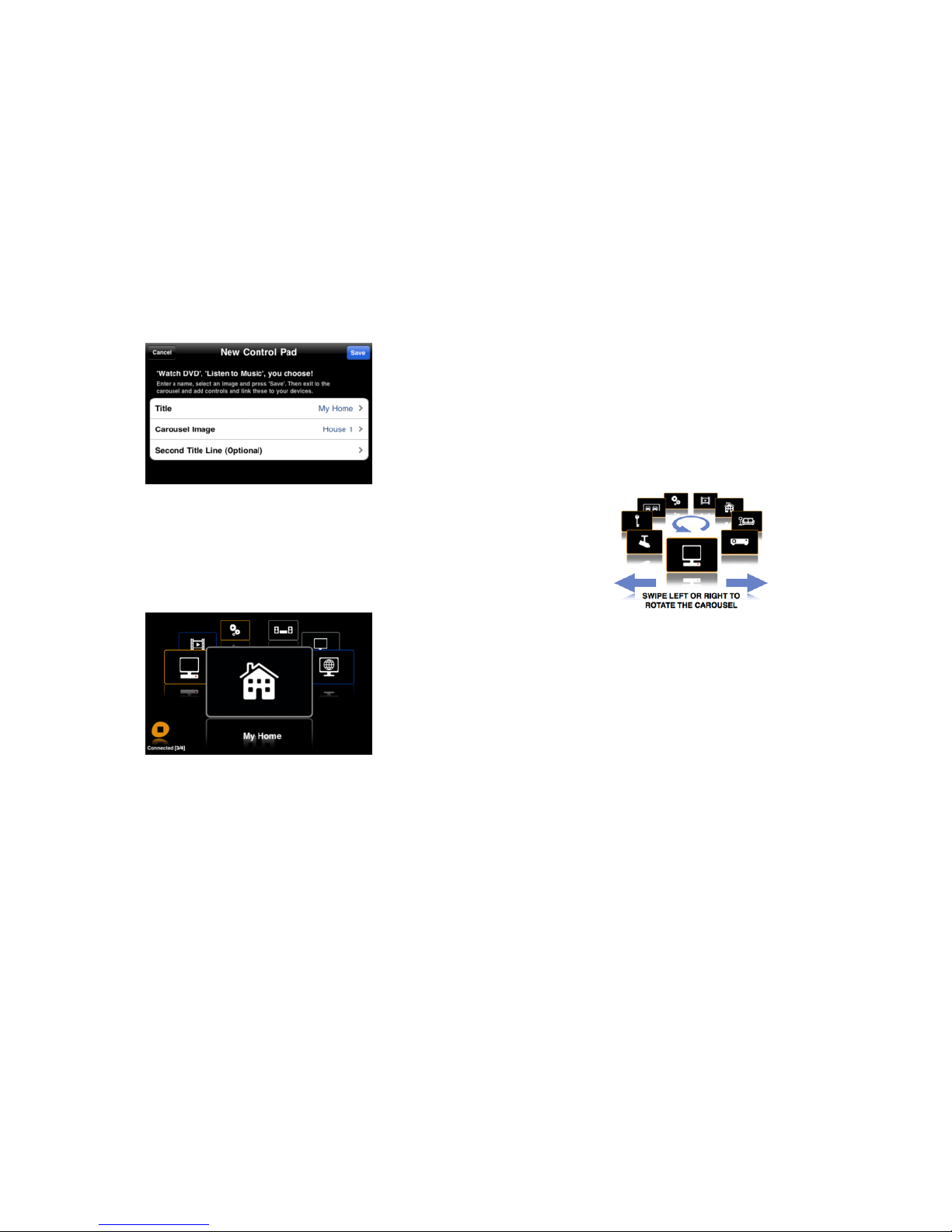
4. Exit to the carousel"
After saving your new control pad, exit the settings area and return to
the carousel where you will find your new control pad. If you now tap
anywhere on the screen the new control pad will open, ready for you to
add controls.
You can add as many control pads to the carousel as you wish. Add
one for each of your activities or whatever makes the best sense for
you.
Step 3: Add controls and link them to your equipment
After you have added one or more control pads to the carousel, you
can begin adding controls and linking them to your devices. Just follow
the steps described below:
1. Open the control pad that you want to use
Swipe left or right on the carousel to bring the control pad you want to
the front...
...then tap the front control pad image on the carousel to open it.
2. Open the control panel where you want to put the controls
If you want to add controls to the main area, then you are set to go. If
you want to add controls to a side panel, tap the tab to open the panel
you want.
USER GUIDE - SQ BLASTER PLUS & SQ REMOTE
© 2011 Square Connect Inc. ! Version 1.0! Page 41
Page 42
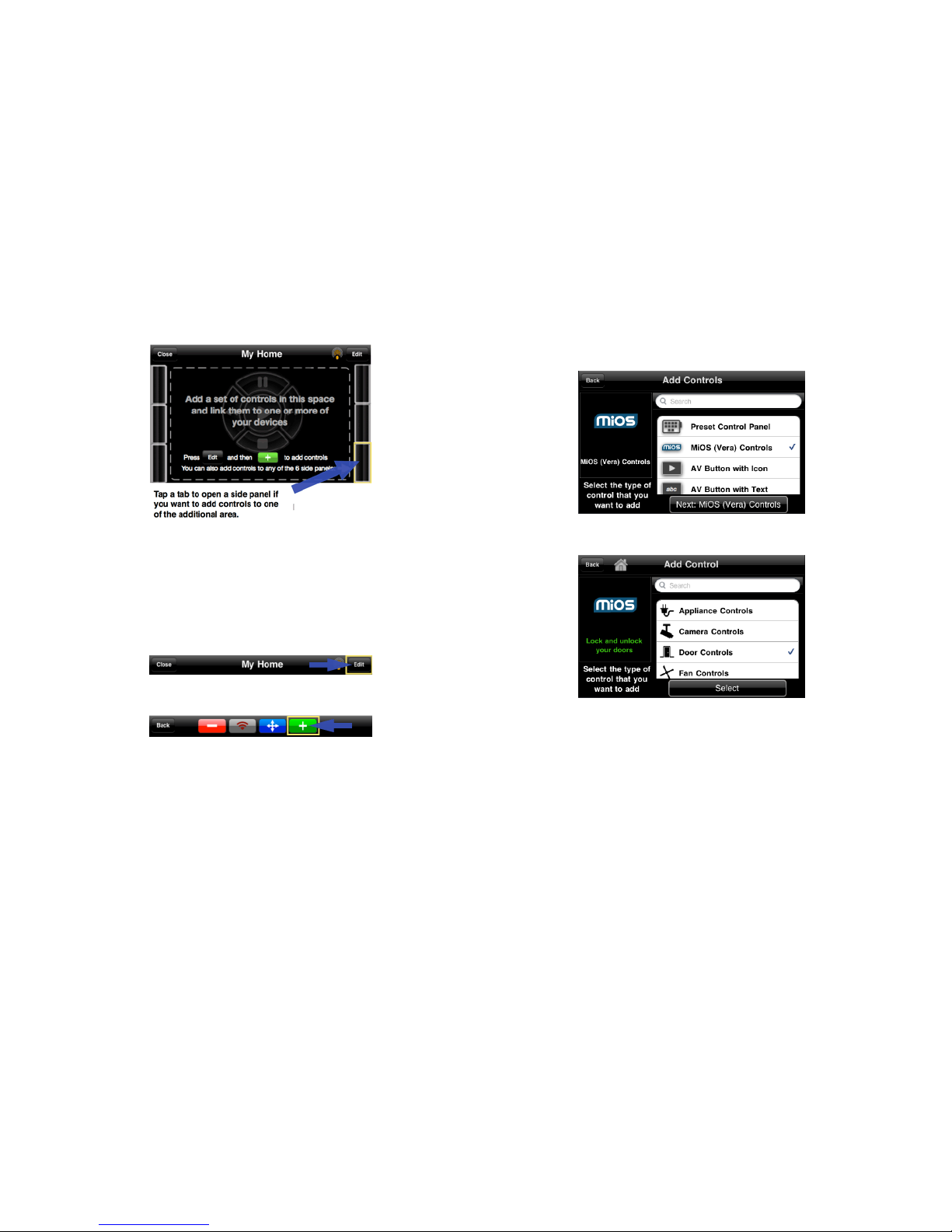
3. Enter Control Panel Edit Mode and select the "Add Control"
button
Enter "Edit mode" by tapping the "Edit" button in the top right corner of
the screen.
Then tap the green "+" button to add a new control.
If you don’t see the “Edit” button you will have to enable control pad
editing. See Part 10 of this manual.
4. Select MiOS Controls
5. Select the Control Type
The MiOS controls are grouped by type. Select the kind of control you
want and then tap next:
The types that are available are as follows:
๏
Appliance On/Off Controls
๏
Camera Controls - link to your cameras
๏
Door Controls
๏
Fan Controls
USER GUIDE - SQ BLASTER PLUS & SQ REMOTE
© 2011 Square Connect Inc. ! Version 1.0! Page 42
Page 43
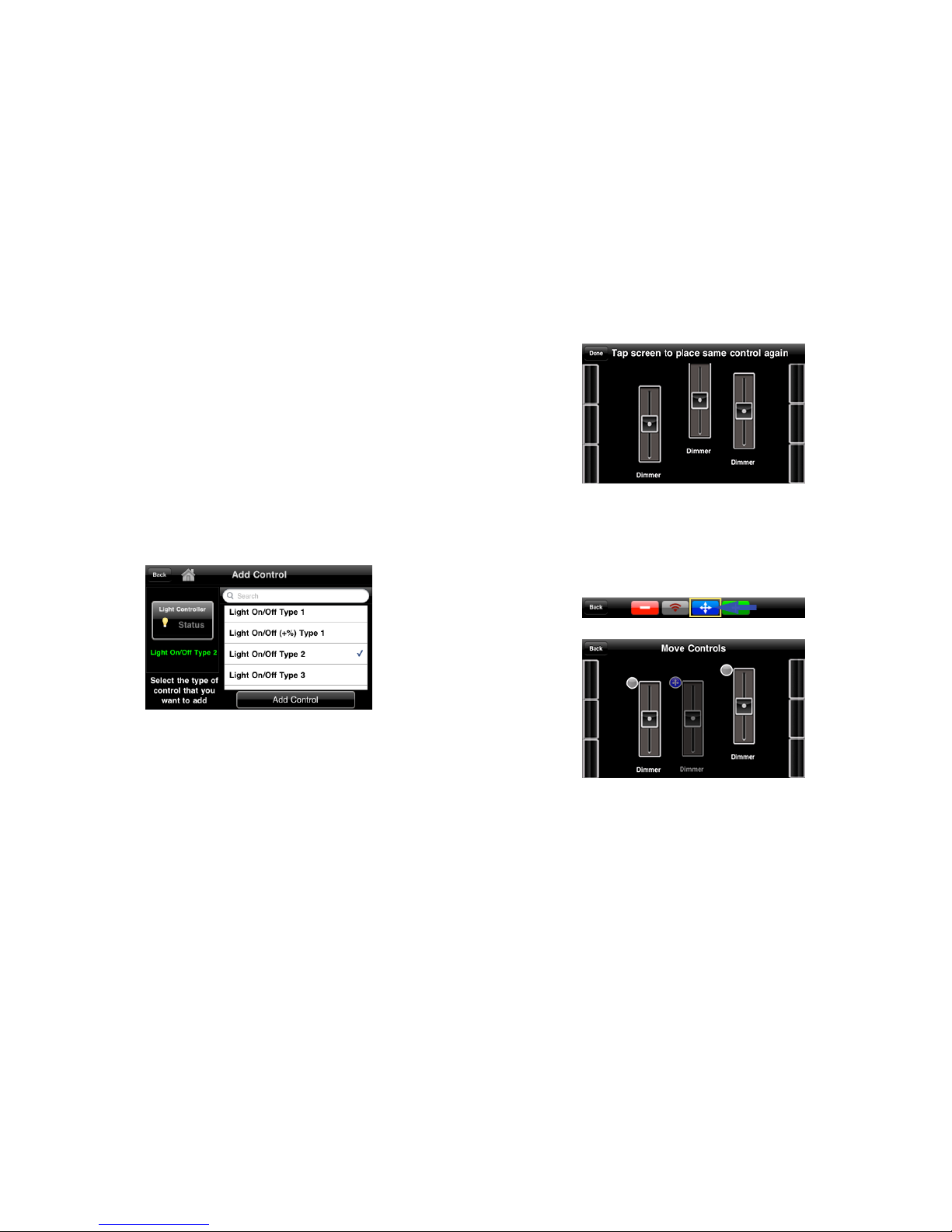
๏
Lighting Controls
๏
Scene Controls
๏
Status Labels - for your light, motion, power, door, window, lock
and temperature detectors and more. Group your sensor labels
and build status panels for your home
๏
Thermostat Controls
๏
Window Cover Controls
5. Select the Control and add it to the control panel
Choose the control that you want to in the list and then tap the "Add
Control" button.
Then tap the screen one or more times in the control panel to add one
or multiple controls.
And then tap the done button when you are finished.
6. Rearrange the controls
If the positioning of the controls is not quite right, tap the blue "Move"
button at the top of the screen, then touch and drag the controls to
where you want them.
When you are finished and you have the controls where you want
them, tap the "Done" button.
USER GUIDE - SQ BLASTER PLUS & SQ REMOTE
© 2011 Square Connect Inc. ! Version 1.0! Page 43
Page 44
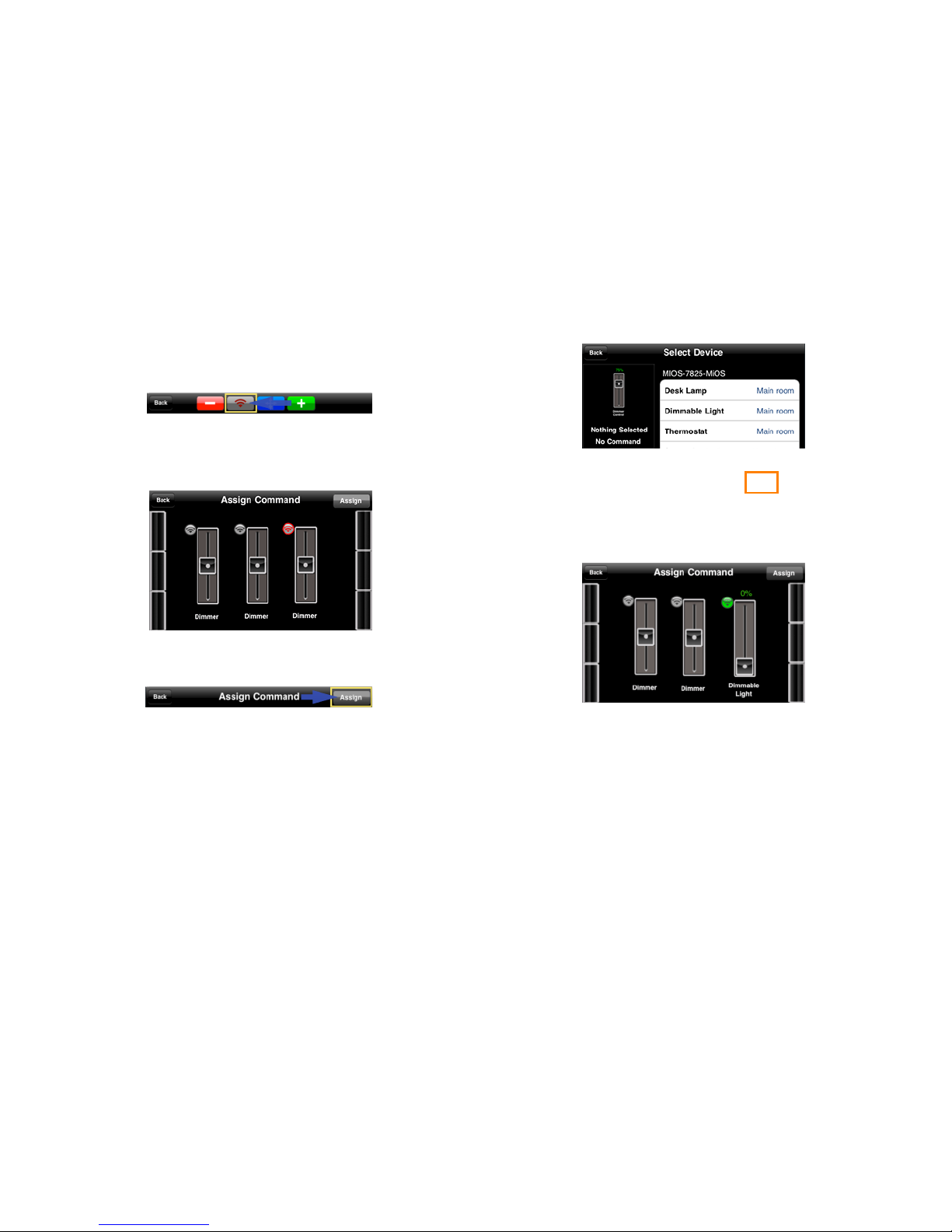
7. Link your new control(s) to device(s)
Tap the assign (link) button to begin assigning controls to devices.
Select one of the newly added controls (its gray assign icon will turn
red).
and then tap the "Assign" button in the top right hand corner of the
screen
This will bring up the Select Device selector or the Select Scene picker
(depending on the type of control that you have added).
Note if you have connected to more than one MiOS system, you will
see devices and scenes listed from multiple devices.
Make your selection and you will be returned to the control panel with
your controls.
You will now see that the assign icon has turn green - showing that the
control is assigned.
Repeat this process to assign any other unassigned controls, and then
tap the "Back" button twice to exit the Control Panel Edit Mode.
Your controls should now be live and show the current status of the
devices that you assigned them to.
USER GUIDE - SQ BLASTER PLUS & SQ REMOTE
© 2011 Square Connect Inc. ! Version 1.0! Page 44
Page 45
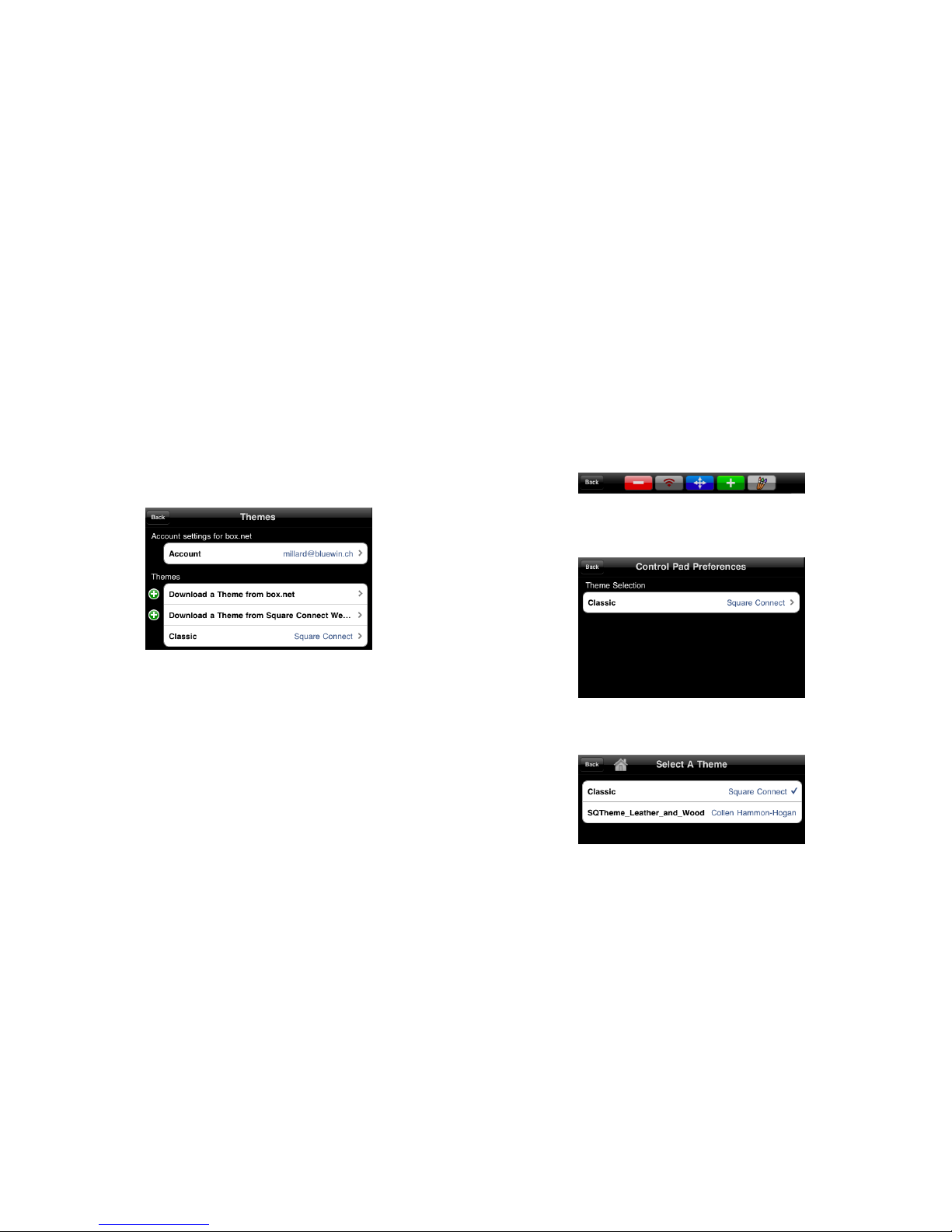
Part 11 Themes
Both SQ Remote HD and SQ Remote Lite have the ability to be
skinned or “Themed”.
You can either download and install existing themes, or you can create
your own. Creating themes is easiest with SQ Designer.
To use a theme you first need to download it into SQ Remote. To do
this select Themes within the Setup area of SQ Remote.
In this screen you can see the option to enter your box.net credentials
(as for configuration backups as well as for list icons)
You also have the options to download from box.net or from the
Square Connect website. Below these options you will see a list of
loaded themes. When you first get SQ Remote you will only have the
“Classic” theme.
Square Connect will be publishing themes that you can download
directly (using the Square Connect Website option) as they become
available. You can also upload themes to your box.net account into a
folder called “SQThemes”. You will have to create this folder in the root
folder of box.net… next to the “SQControlPads” folder.
As themes are submitted by users to SQuare Connect, or made
available through direct sharing you will be able to upload them to this
folder and then download them within SQ Remote using the
“Download from Box.net” option.
Once you have loaded a theme, you can then select it. To select a
theme you must exit to your control pads. open any control pad, and
press the “edit button” to enter edit mode. Then press the theme icon
at the top of the screen.
This will open a screen that shows you your current theme selection:
Tap the Selection Row, and this will show you the available themes
within your SQ Remote:
Select the theme that you want to use, then exit the setup area.
USER GUIDE - SQ BLASTER PLUS & SQ REMOTE
© 2011 Square Connect Inc. ! Version 1.0! Page 45
Page 46
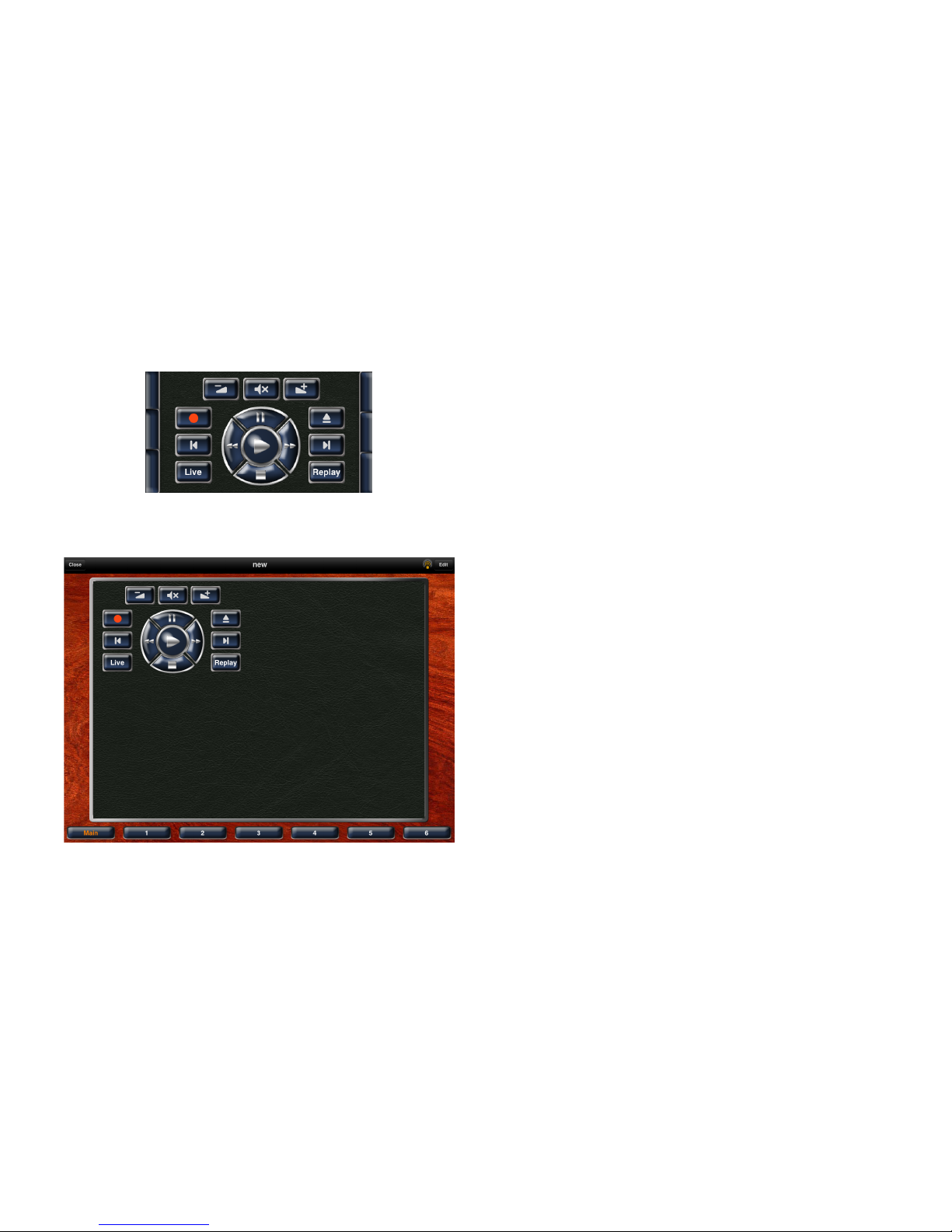
The selected theme will now be in use:
Themes will look slightly different depending whether you are using SQ
Remote HD or Lite, and whether you are using an iPhone sized device
or an iPad.
On an iPhone sized device, the border images will not be shown and
only the central background image will be displayed.
Note: Some changes in the graphics may require a restart of the
application. if you do not see the tabs for sliding panels change (if the
theme includes new images for these), then close the app (do not
simply send the app to the background, but close it completely). Then
restart and you will find that the images have been updated.
You can also download themes from the Square Connect website for
you to edit with SQ Designer (where editing becomes a simple drag
and drop exercise).
If you are interested in creating new themes or editing existing ones, a
good start is to review the guide to making themes available from the
theme page on the Square Connect site.
http://www.squareconnect.com/themes.html
USER GUIDE - SQ BLASTER PLUS & SQ REMOTE
© 2011 Square Connect Inc. ! Version 1.0! Page 46
Page 47
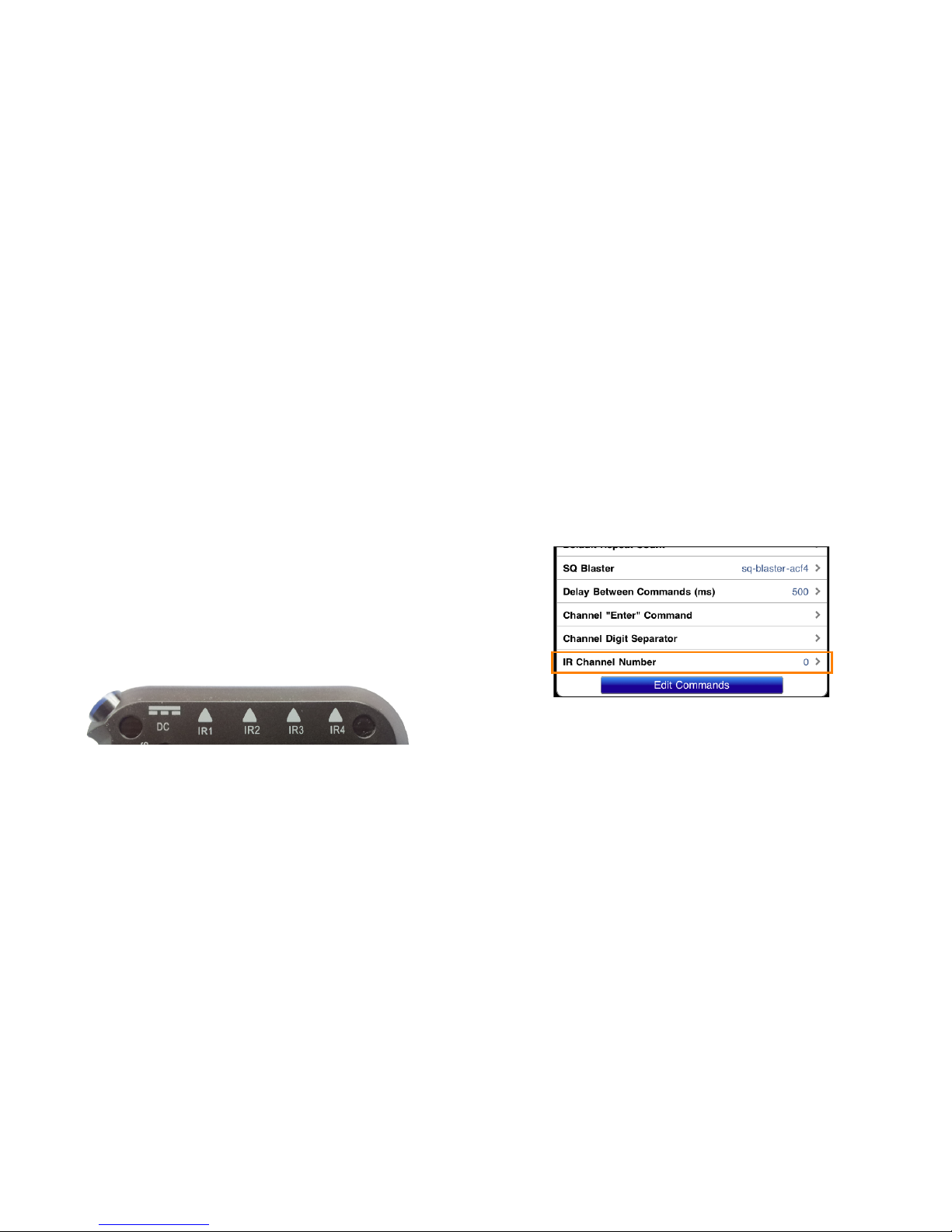
Part 12: Blaster Plus - Setting the IR Channel
With the release of the SQ Blaster Plus, users now have the option of
setting the IR channel that a device uses. By selecting a specific
channel you can be sure that the commands that you are sending to a
specific device actually reach that device and not others that might use
the same code set. This can be very useful if you have a centralized
AV installation than has multiple instances of the same device.
1. The Channels
The SQ Blaster Plus has 5 addressable channels. These are as
follows:
Channel 0: Internal blasters
Channels 1 - 4: External IR connectors.
The number of the individual channels is shown on the bottom of the
blaster unit.
2. Emitters and External Blaster LEDs
To use the external IR channels you will need to use either IR emitters
or external high intensity blaster LED’s. Both IR emitters and blaster
LED’s are available separately from Square Connect.
Each external IR channel can power up to 6 IR emitters or 2 Blaster
LED’s. The IR emitters supplied by Square Connect each have 3
heads. It is not recommended to use single head IR emitters on the
external channels as the power levels employed by the blaster could
reduce their effective life-time considerably.
3. Setting the channel for a device
The IR channel that is used for a device is set within the device
settings after adding it to you blaster. (See Part 3 of this user manual).
To set the channel, go to Setup > SQ Blasters and Devices and then
select the device that you wish to set the channel for. In the settings
screen you will see the option to set the channel. Simply select this
option and set the required channel.
Note: The channel Number setting will only appear if the device is
added to a Generation II blaster - the Blaster Plus. This option is not
available for Gen I blaster units.
USER GUIDE - SQ BLASTER PLUS & SQ REMOTE
© 2011 Square Connect Inc. ! Version 1.0! Page 47
Page 48
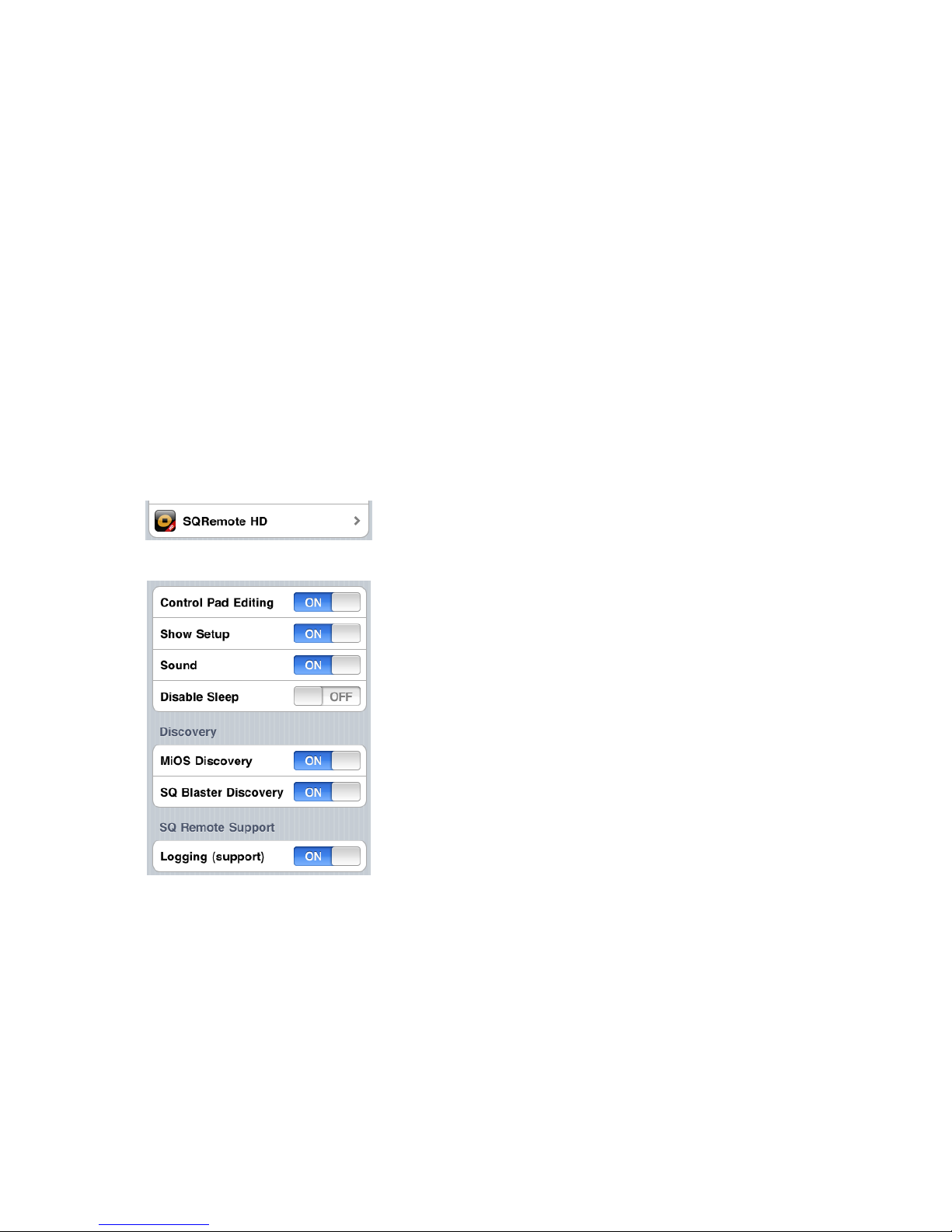
Part 13: Additional Options and Settings
SQ Remote has several options that are set outside the application.
You can find these options in the main Settings application on your
iPhone, iPod touch or iPad.
Launch “Settings” and scroll down to the application settings area. You
will find an entry for SQ Remote HD (or Lite) (see below)
This will bring up the SQ Remote application settings:
The application settings are as follows:
๏
Control Pad Editing - Show or hide the “edit button in your
control pads. Disabling this helps protect your configuration from
unwanted changes. You should not rely on this to protect your
configuration though. Its always a good idea to back up your
configuration to box.net.
๏
Show Setup - Enable or disable the presence of the Setup
Control Pad on the SQ Remote carousel screen. If you don’t want
others making changes to your settings you can use this option to
‘hide’ this area of the application.
USER GUIDE - SQ BLASTER PLUS & SQ REMOTE
© 2011 Square Connect Inc. ! Version 1.0! Page 48
Page 49

๏
Sound - Enable or disable the button clicking sounds and
carousel swish sounds.
๏
Disable Sleep - When this is set to ON, your iPhone, iPod touch
or iPad will remain on and will not “go to sleep”. This allows you to
have your controls available at all times instantly.
๏
MiOS Discovery8 - Enable or disable the discovery process for
MiOS systems. You can switch this off if you are not adding any
new devices to your MiOS system. This will help speed up startup
times for the application. Do not forget to switch this back on when
you add something new to your MiOS system. Also remember in
iOS4+ you will need to fully close the application before restarting
if you want to refresh the contents of your MiOS systems.
๏
SQ Blaster Discovery - Disable this to speed up startup and
prevent background searching for new SQ Blaster units.
๏
Logging (support) - In the event that you have difficulties with SQ
remote, switching this on will allow our support team to work with
you to capture more information about what is going wrong and
help us find a solution.
Part 13. Troubleshooting
SQ Blaster LED signals
The blaster unit has a visible red LED on the front of the unit.
Depending on the operational state of the blaster unit this LED will
show different patterns:
๏
Sold (red): Connecting to Network
๏
Off: Connected to Network
๏
Rapid Flicker: Sending an IR Command
๏
Slow Flashing: Searching for last known network.
๏
Rapid Flashing (green): Add-hoc network mode. The blaster has
created its own Wi-Fi network for setup purposes. Press and hold
the Reset Button B (on the base of the unit) for longer than 5
seconds to put the blaster in this mode. Press the reset button
once quickly to return the blaster to cancel this state.
๏
Rapid Flashing (red): Scanning for Wi-Fi networks
๏
Slow Flashing (red & green): WPS Mode (future)
๏
Rapid Flicker (green): unit is sending an IR command
SQ Blaster troubleshooting:
- Is the blaster connected to the network? Is this lit continuously?
- Does the blaster show as connected within SQ Remote. (Tip: Enter
the Blaster settings screen and then press “Save”. This will refresh
the connection indicator.
- Is the blaster powered on - is the ISB cable connected correctly.
- Does the blaster work with some codes but not with others? - try rerecording one or more codes?
- Blaster is on but unresponsive - try cycling the power and adjusting
its position slightly. Wi-Fi / radio interference may affect operation of
the Blaster and moving the unit a few centimeters may help the
reception. If the blaster unit is positioned in a poor reception area, its
operation may be improved by relocating the Wi-Fi router or adding a
Wi-Fi extender to the network.
- Blaster is sending IR signals but AV equipment does not respond check that there are no obstructions in the path of the IR signal.
Check that the codes being sent are the correct ones.
- Is the IR channel set correctly, and is an external emitter connected
to the selected channel if using channels 1 through 4.
USER GUIDE - SQ BLASTER PLUS & SQ REMOTE
© 2011 Square Connect Inc. ! Version 1.0! Page 49
8
Only in SQ Remote HD
Page 50

SQ Blaster Reset
The blaster Plus has a reset button that is accessible via a pin hole
opening on the side of the device.
- Press the reset button once quickly to force the blaster to restart the
internal software and re-join the last known network.
Support Contact Details
If your blaster or SQ Remote is not working as you are expecting,
please do not hesitate to contact us at:
http://www.squareconnect.com/ticket/index.php
USER GUIDE - SQ BLASTER PLUS & SQ REMOTE
© 2011 Square Connect Inc. ! Version 1.0! Page 50
 Loading...