

Page 1

E- LO AD ER
INSTRUCTION MANUAL
FOR THE 9v LED, 1 8v LCD & 18v LED S PYDE R FASTA E-LOADER S
WARNING [N OT A TOY]
This is not a toy . This product is for paintball use only. Mis use of this product may ca use serious inju ry or death. All pers ons using
this produ ct, or within range while this product i s being use d, must wear eye and face protecti on specifically designed for paintball.
Recommend at least 18 years of age to purcha se this product. Please read instruction manu al and air syste m warning before us ing.
Never sh oot or point your marker at a perso n that is not in a designated pa intb all facil ity and wit hout the proper paintball pro tection.
Always keep th paintball marker an d loader in the off mode until read y to operate.
Due to the one-wa y ball travel of your Fasta E-Loader, balls below the sensor cannot be empti ed from your marker by turning the
marker upside d own. Betwee n 4 and 7 balls will rema in above the breach wh en balls are emptied from the Loader through the lid.
BATT ERY
Remove batter y door by slidin g toward the back of the loader.
LCD LOW BATTE RY: The displ ay screen will flash low battery on and o ff for 5 secon ds indicati ng your battery is low. Once t he low
battery indicator begins flashing you have approximately 1,500 sho ts remain ing. Once your batter ies are d rained please replace with
two 9 volt batteries.
LCD B ATT ERY SAVER : Loader will automatical ly shut off afte r 20 minute s with no use.
LE D LO W BATT ERY: The LED Li ght will change from green to red. O nce your batteries a re drai ned please rep lace with two 9 volt
batteries for the 18 volt vers ion and one 9 volt battery for the 9 vo lt versio n
POWER
LCD: Push t he power button to turn the Fasta E-Loader ON or OFF. Wh en powering ON, the Fas ta E-Loader will pe rform a self-
diagnostic of the electron ics. It w ill agitate once, beep, and flash a series of “8”s, when read y.
LE D: One butt on operation t urns the Fasta E-Loader ON or OFF. LED will be a sol id green with a fresh b attery and will alternate
between green and re d as the battery drains. Solid red mea ns battery is lo w.
LCD RES ET BUTTO N
The reset button performs the fol lowing functions :
a. START game tim er
b. RESET game time r
LCD GAM E TIMER
To adjust the minut es, push the MIN UTES button . To adjust the seconds, push t he SECONDS button. To start the timer, push the RES ET
button. Ti me will reset to the last time entered. If y ou push and hold both the MINUTE S and the SECONDS but tons you will be able to
change the game t imer more rapidly.
SO UND AL ERT S: Short beep every 5 m inutes
Fast bee p series at 1 minute remaining
Fast bee p series at 30 secon ds remaining
long beep at 0 se cond s remaini ng, game over.
SI LENT M ODE : To turn the sound a lerts OFF, push the SECO NDS button after the RESET butto n is pushed to start the ti mer.
You wil l hear one short beep when you press the SECONDS but ton to turn the beeper OFF, and two short beeps to t urn it back ON.
The LCD display will show a speaker whe n thye beep er is ON. The sp eaker will disappear when the sound alerts are turned O FF.
LCD EME RGENCY AGITATI ON
After you have pressed the RESET b utton to start t he game timer, the M INUTE button wil l spin the motor when pre ssed.
WARRANTY
Kingman Group warrants this product t o be free from defects in materi al and workmansh ip to the o riginal purchaser for a period of on e
year from the original p urchase d ate. Our responsibility with rega rd t o this limited w arranty shall be limited solely t o repair or replacement,
at its option, of any prod uct which fails during normal consumer use. This warranty doe s not extend to damag e or fail ure which res ults from
misuse, neglect , accident, alteration, abuse, improper installa tion or maintenance. To obtain a replacement during the time of this warranty
pleas e return the defective item with proof of purch ase to:
KI NGMAN GRO UP
14010 Li ve Oak Ave
Baldwin Park CA 91706 USA
TEL: 626.430.2 300
www.s pyder.tv
Page 2
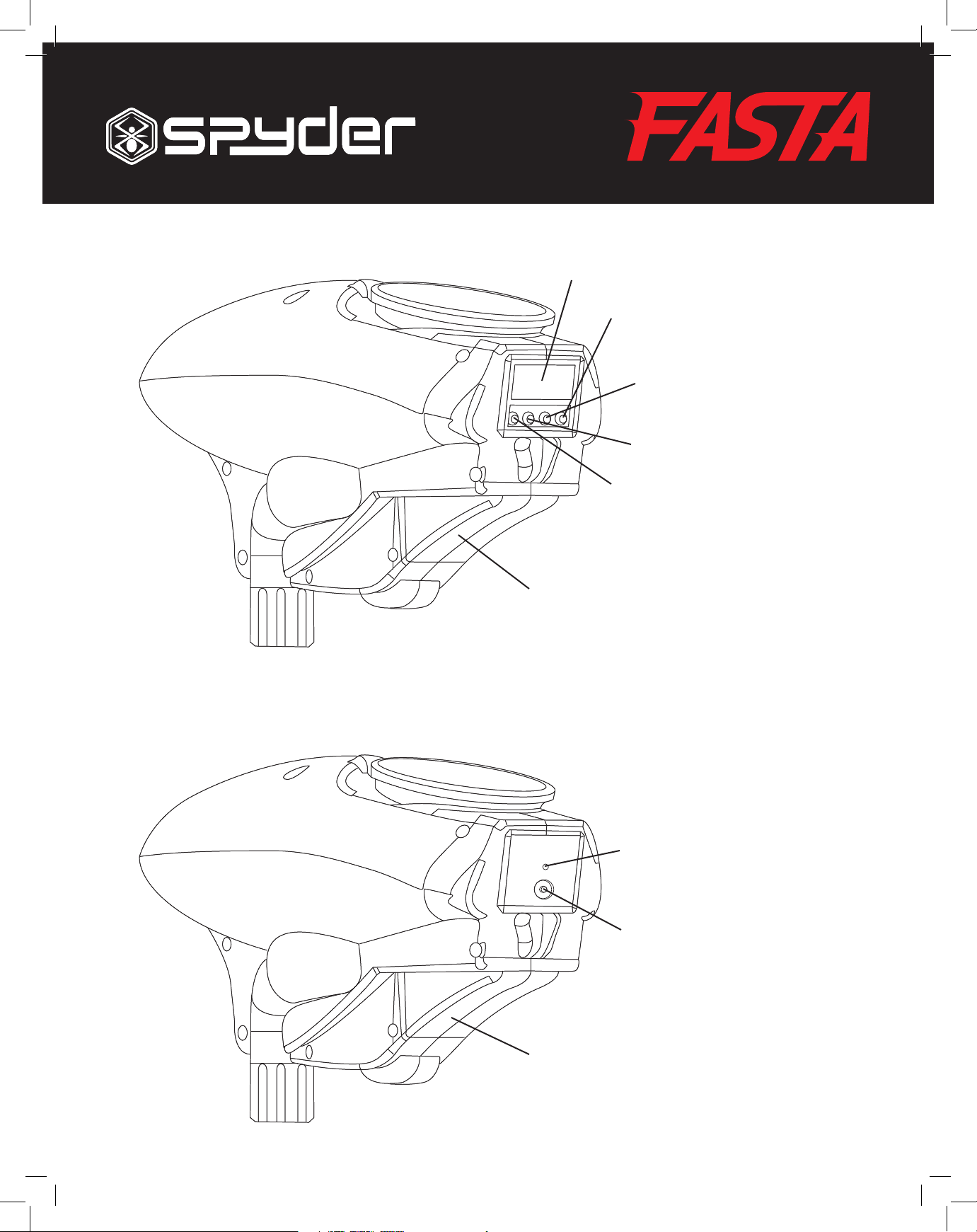
1. Battery Compartment
2. Power Button
3. Reset Button
4. Minutes Button
Emergency Agitation
5. Seconds Button
Mute Button
6. LCD Screen
* Game Timer
* Low Battery
* Mute Status
7. LED Light
8. Audio Alerts
* Every 5 minutes
* One minute remaining
* 30 seconds remaining
* Game over
LCD SCHEMATICS
LED SCHEMATICS
1
1
2
3
4
5
6
2
7
E- LO AD ER
 Loading...