

Page 1

Page 2

2
www.versaudio.com
3
Questions? – contact us at [email protected]
CAUTION
TO REDUCE THE RISK OF ELECTRIC SHOCK, DO NOT REMOVE COVER OR
BACK. THERE ARE NO USER-SERVICEABLE PARTS INSIDE. REFER SERVICING
TO QUALIFIED SERVICE PERSONNEL.
TO REDUCE THE RISK OF FIRE OR ELECTRIC SHOCK, DO NOT EXPOSE THIS
UNIT TO RAIN OR MOISTURE.
The lightning fl ash with arrow-head symbol within an equilateral triangle
is intended to alert the user to the presence of uninsulated “dangerous
voltage” within the unit’s enclosure that may be of suffi cient magnitude to
constitute a risk of electric shock.
The exclamation point within an equilateral triangle is intended to alert the
user to the presence of important operating and maintenance (servicing)
instructions in the literature accompanying the unit.
IMPORTANT SAFETY INSTRUCTIONS
Read these instructions.•
Keep these instructions.•
Heed all warnings.•
Follow all instructions.•
Do not use this apparatus near water.•
Clean only with dry cloth.•
Do not block any ventilation openings, Install in accordance with the•
manufacturer’s instructions.
Do not install near any heat sources such as radiators, heat registers, •
stoves, or other apparatus (including amplifi ers) that produce heat.
Do not defeat the safety purpose of the polarized or grounding-type plug. A •
polarized plug has two blades with one wider than the other. A grounding type
plug has two blades and a third grounding prong. The wide blade or the third
prong are provided for your safety. If the provided plug does not fi t into your
outlet, consult an electrician for replacement of the obsolete outlet.
Page 3

4
www.versaudio.com
5
Questions? – contact us at [email protected]
Protect the power cord from being walked on or pinched particularly •
at plugs, convenience receptacles, and the point where they exit from the
apparatus.
Only use attachments/accessories specifi ed by the manufacturer.•
Use only with the cart, stand, tripod, bracket, or table specifi ed by the •
manufacturer, or sold with the apparatus. When a cart is used, use caution when
moving the cart/apparatus combination to avoid injury from tip-over.
Unplug this apparatus during lightning storms or when unused for long •
periods of time.
Refer all servicing to qualifi ed service personnel. Servicing is required •
when the apparatus has been damaged in any way, such as power-supply
cord or plug is damaged, liquid has been spilled or objects have fallen into
the apparatus, the apparatus has been exposed to rain or moisture, does not
operate normally, or has been dropped.
Do not expose the AC/DC Adapter to rain or moisture.•
Rating label is located on the bottom enclosure.•
Disconnect the main plug to shut off the power off completely.•
Place on a level surface. Maintain an adequate air path for•
ventilation by placing on a stand with a height of at least 2 inches.
FOR USA-CALIFORNIA ONLY
This product contains a CR Coin Cell Lithium Battery which contains Perchlorate
Material – special handling may apply.
See www.dtsc.ca.gov/hazardouswaste/perchlorate
Page 4

6
www.versaudio.com
7
Questions? – contact us at [email protected]
DANGER
To reduce the risk of electric shock, burns, fi re or injury:
Always unplug the unit from the electrical outlet immediately after using.•
Do not use while bathing or in a shower.•
Do not place or store unit where it can fall or be pulled into a tub or sink.•
Do not place in or drop into water or other liquid.•
Do not reach for unit that has fallen into water. Unplug it immediately.•
Care should be taken so that objects do not fall and liquids are not spilled •
onto the unit.
ADDITIONAL SAFETY INSTRUCTION
The apparatus shall not be exposed to dripping or splashing and that no objects 1
fi lled with liquids, such as vases, shall be placed on apparatus
The batteries shall not be exposed to excessive heat such as sunshine, fi re or 2
the like.
The AC/DC adapter is used as the disconnect device, the disconnect device shall 3
remain readily operable
Page 5

8
www.versaudio.com
9
Questions? – contact us at [email protected]
BATTERY PRECAUTIONS
Dispose of the old batteries properly. Do not dispose of the old batteries in a fi re.
Do not leave the batteries where a child or pet could play with or swallow it. If the
battery is swallowed, contact a physician immediately.
The battery may explode if mistreated. Do not attempt to recharge or disassemble
the batteries.
Use only a fresh battery of the required size and type (refer to REPLACING THE
REMOTE CONTROL BATTERY on page 34).
This marking indicates that this product should not be disposed with other 4
household wastes throughout the EU. To prevent possible harm to the
environment or human health from uncontrolled waste disposal, recycle it
responsibly to promote the sustainable reuse of material resources. To return your
used device, please use the return and collection systems or contact the retailer
where the product was purchased. They can take this product for environmental
safe recycling
Page 6

10
www.versaudio.com
11
Questions? – contact us at [email protected]
FCC INFORMATION
This equipment has been tested and found to comply with the limits for Class
B digital devices, pursuant to part 15 of FCC Rules. These limits are designed
to provide reasonable protection against harmful interference installation. This
equipment generates, uses and can radiate radio frequency energy and, if not
installed and used in accordance with the institutions, may cause harmful interference
to radio communications. However, there is no guarantee that interference will not
occur in a particular installation. If this equipment does cause harmful interference
to radio or television reception, which can be determined by turning the equipment
off and on, the user is encouraged to try to correct the interference by one or more of
the following measures:
Reorient or relocate the receiving antenna.
Increase the separation between the equipment and receiver.
Connect the equipment into an outlet on a circuit different from that to which the
receiver is connected.
Consult the dealer or an experienced radio/TV technician for help.
This equipment complies with Part 15 of the FCC Rules. Operation is subject to the
following two conditions:
This equipment may not cause harmful interference.
This equipment must accept any interference received, including interference that my
cause undesired operation.
Note: The manufacturer is not responsible for any malfunctions caused by
unauthorized modifi cations to this unit. Such modifi cations could void the user’s
authority to operate this unit.
Save these instructions.
Page 7
12
www.versaudio.com
13
Questions? – contact us at [email protected]
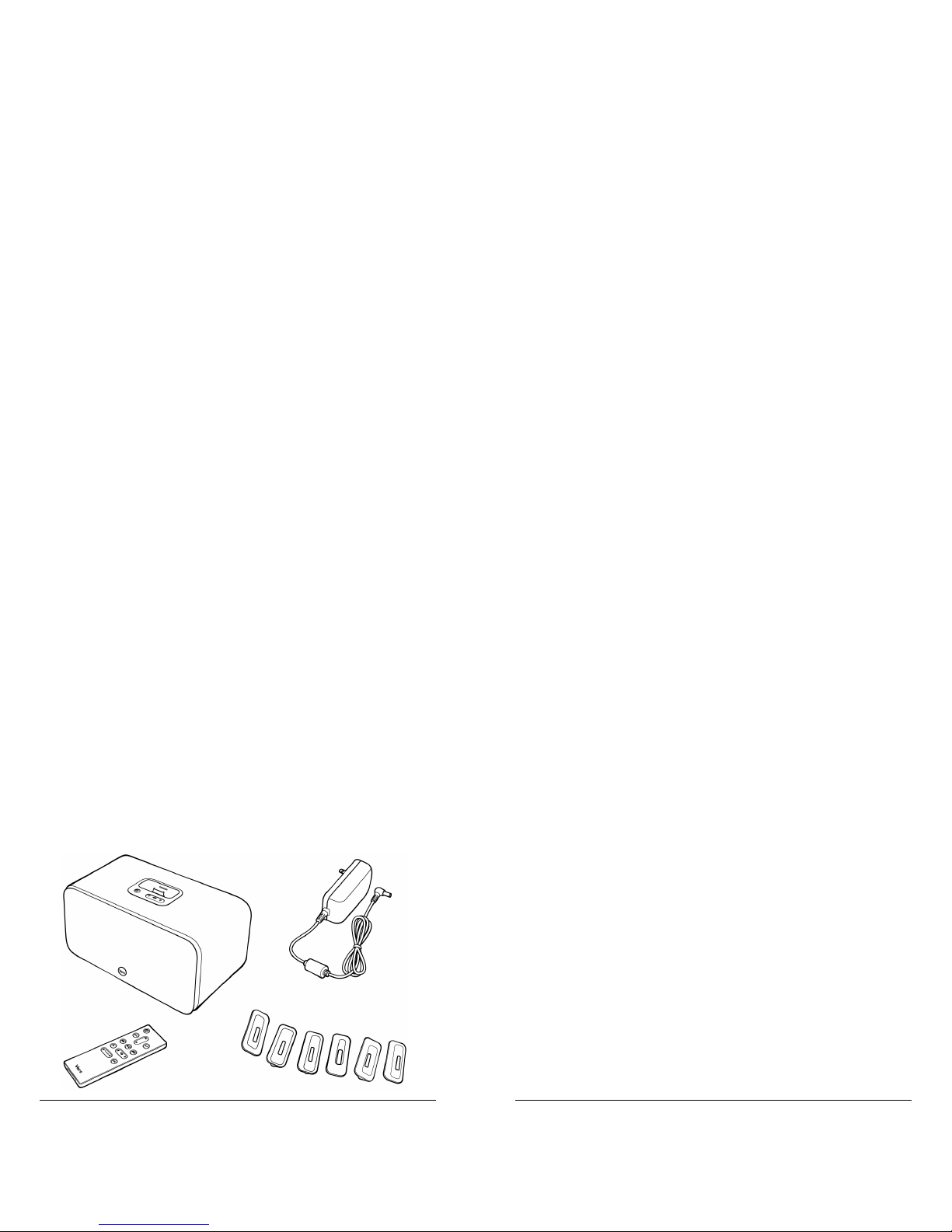
CONTENTS
Main Unit1
Remote Control2
iPod Adaptors 3
24V (1.5A) AC/DC adapter4
1
2
3
4
Page 8
14
www.versaudio.com
15
Questions? – contact us at [email protected]
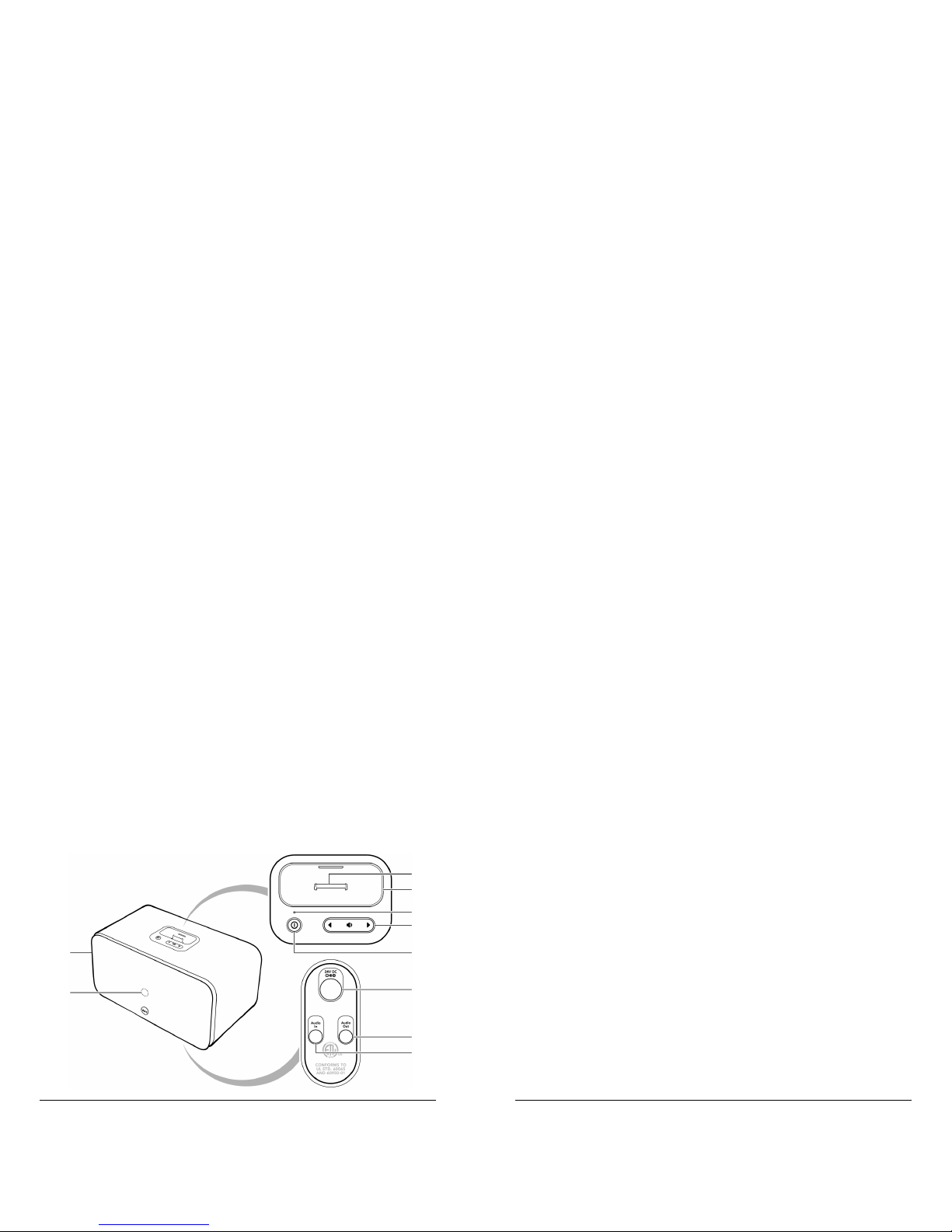
MAIN UNIT
Detachable Speaker Grill1
Remote Control Sensor2
iPod connector 3
iPod Adaptor well4
Power indicator5
Volume Control6
Power button7
24V DC Jack8
3.5mm Audio Out jack9
3.5mm Audio In jack10
1
3
4
5
6
7
8
9
10
2
Page 9
16
www.versaudio.com
17
Questions? – contact us at [email protected]
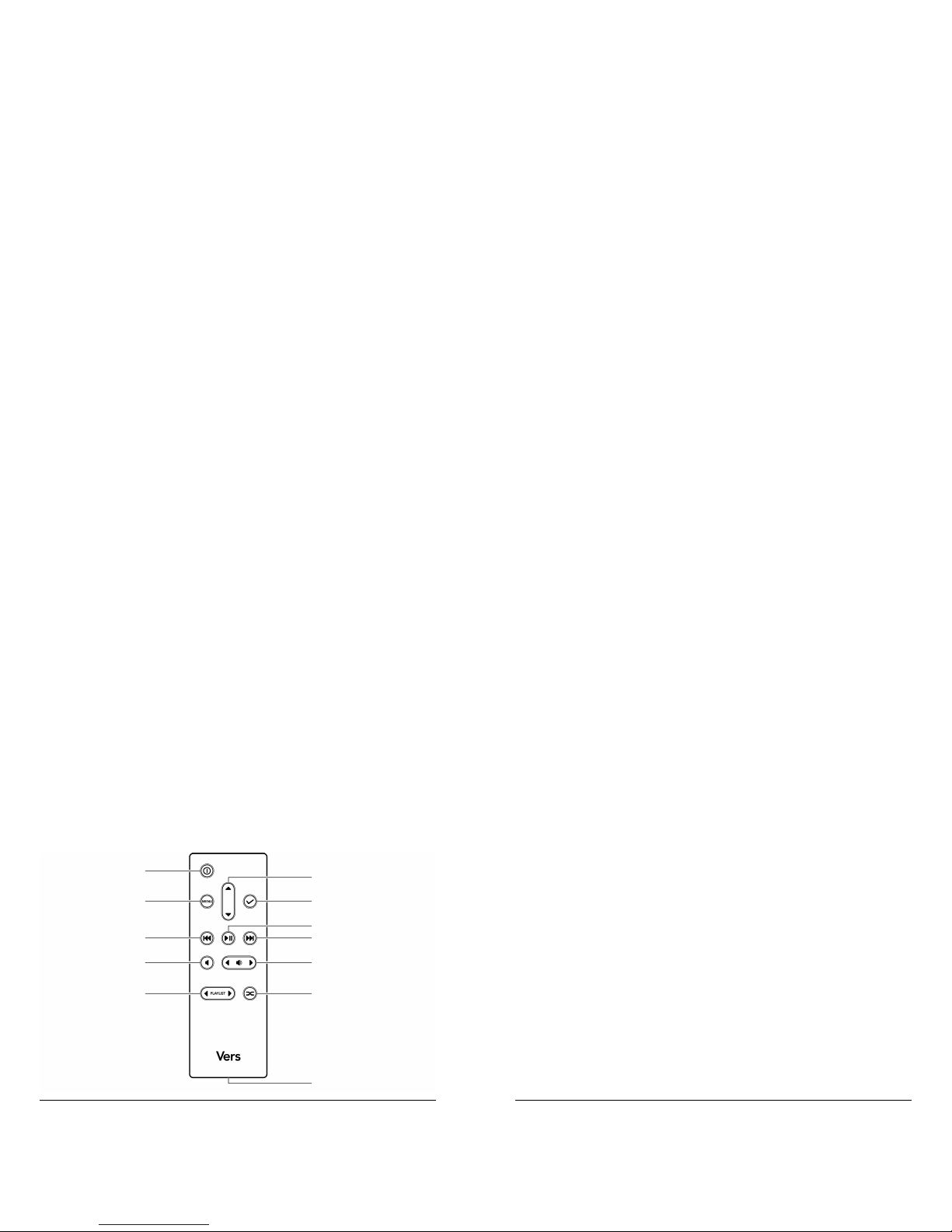
REMOTE CONTROL
Power1
Menu2
Menu Up/Down3
Menu Select4
Backward 5
Play/Pause 6
Forward7
Mute8
Volume9
Previous/Next Playlist10
Shuffl e11
Battery Compartment (Back)12
1
2
5
8
10
3
4
6
7
9
11
12
Page 10

18
www.versaudio.com
19
Questions? – contact us at [email protected]
IPOD ADAPTORS
Select the appropriate adaptor for your iPod (number on bottom). If
the adaptor for your iPod is not among those supplied, use either the
adaptor that came with your iPod or visit versaudio.com.
Adaptor iPod
8 ...........................................iPod nano (1st Gen)
9 ...........................................iPod Video 30GB/iPod Classic 80GB
10 ...........................................iPod Video 60, 80GB/iPod Classic 160GB
11 ...........................................iPod nano (2nd Gen)
13 ...........................................iPod Nano (3rd Gen)
14 ...........................................iPod Touch
11
13
14
10
8
9
iPod nano (1st Gen)
iPod nano (2nd Gen)
iPod Video 30GB
iPod Classic 80GB
iPod Nano (3rd Gen)
iPod Video 60, 80GB
iPod Classic 160GB
iPod Touch
Page 11
20
www.versaudio.com
21
Questions? – contact us at [email protected]
OPERATING YOUR VERS IPOD SOUND SYSTEM
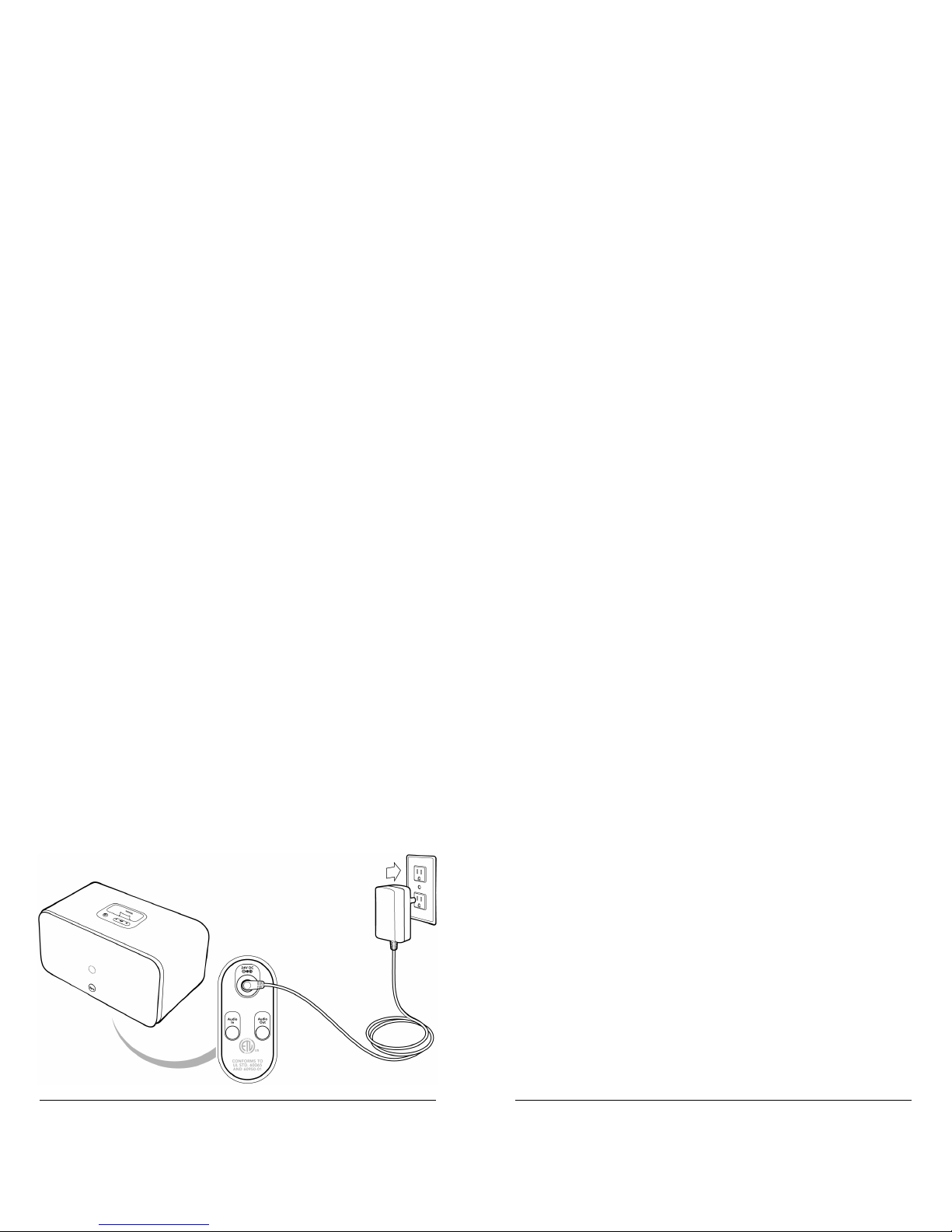
Connecting AC Power
Insert one end of the AC/DC Adapter into 24V DC jack (1) on the
bottom of the unit. Insert the other end into an electrical outlet (2).
1
2
Page 12
22
www.versaudio.com
23
Questions? – contact us at [email protected]
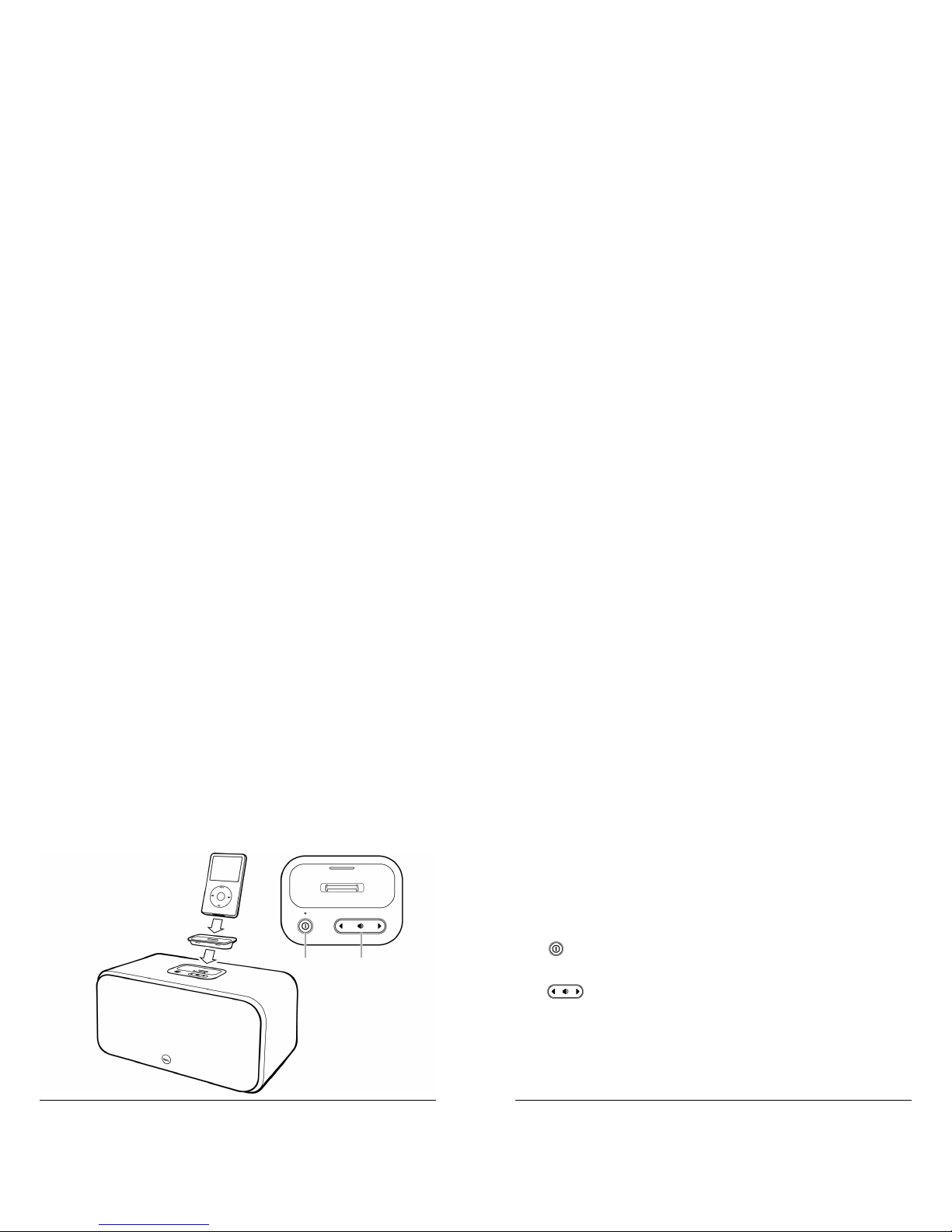
Connecting Your iPod
Select the appropriate iPod Adapter and place it in the iPod dock (1).
(Refer to IPOD ADAPTERS on page 19.)
Place your iPod in the iPod dock (2).
Press to turn the unit on (3). The power indicator will illuminate and
your iPod will turn on automatically.
Press to adjust the volume to your desired listening level (4).
2
1
3
4
Page 13

24
www.versaudio.com
25
Questions? – contact us at [email protected]
Your iPod’s volume control is suspended when connected to Note:
the unit.
You can fi ne tune change the Equalizer, Bass or Treble settings through
your iPod’s menu controls.
Press to turn the unit off. Your iPod will turn off automatically
and go into charging mode.
USING THE REMOTE CONTROL
The fi rst time you use the remote, remove the plastic battery tab on
the back to energize the remote. To use the remote control, point it at
the remote control sensor on the main unit (middle front). Ensure there
are no obstructions between your remote control and the unit.
Playing and Pausing Your Music
Press to pause playback. Press again to resume playback.
Fastforwarding or Rewinding a Song
Press and hold to fast-forward a song.
Press and hold to rewind a song.
Page 14

26
www.versaudio.com
27
Questions? – contact us at [email protected]
Skipping or Recalling a Song
Press incrementally to skip to a song.
Press incrementally to recall a song.
Adjusting the Volume
Press to adjust the volume to your desired listening level.
The volume control of your iPod is suspended when it is
Note:
connected to the unit.
Muting the Sound
Press mute to suspend the sound. Press mute again to resume
sound playback.
Using the Menu Feature
Press Menu to enter the iPod menu.
Press Menu up or Menu down to scroll through the iPod menu
options.
Press Select to choose desired menu function.
Page 15

28
www.versaudio.com
29
Questions? – contact us at [email protected]
Choosing a Playlist
You can create and organize your own music playlists through Apple
iTunes, which can be downloaded from www.apple.com/itunes/
Press to skip to previous playlist.
Press to skip to next playlist.
Using the Shuffl e Feature
Press Shuffl e to randomly playback songs in your iPod’s library.
Press Shuffl e again to terminate this function.
Page 16
30
www.versaudio.com
31
Questions? – contact us at [email protected]
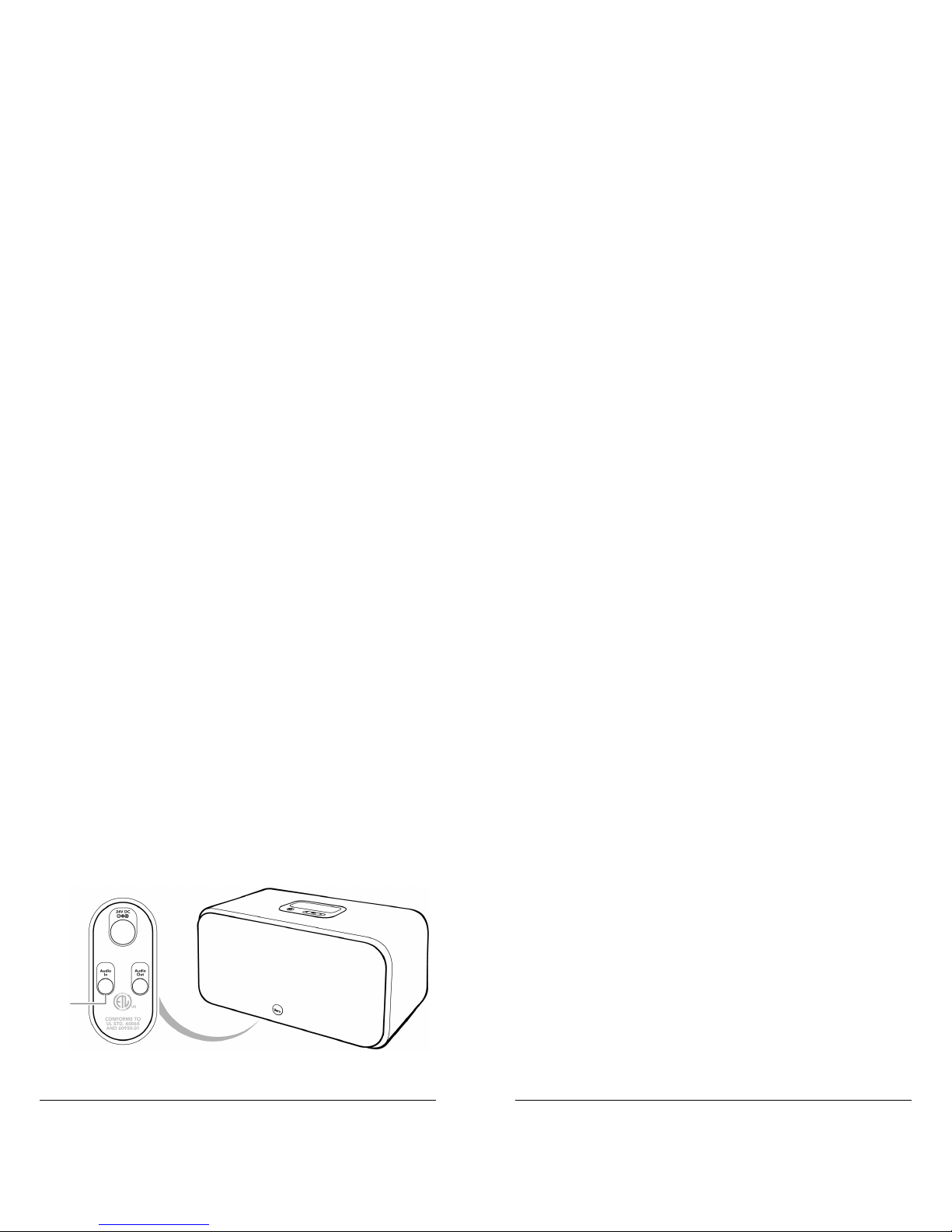
USING OTHER AUDIO DEVICES WITH VERS
To use Vers with an external audio source, such as a CD player or
an MP3 Player, insert one end of a 3.5mm cable into the Audio In
connector (1) on the bottom of the unit.
Since clearance from the connector to the table surface
Note:
is minimal, it is suggested that you use a cable with a right angle
connector. If you do not have a right angle connector, one may be
purchased on versaudio.com.
External device controls can only be operated by the device
Note:
itself.
1
Page 17
32
www.versaudio.com
33
Questions? – contact us at [email protected]
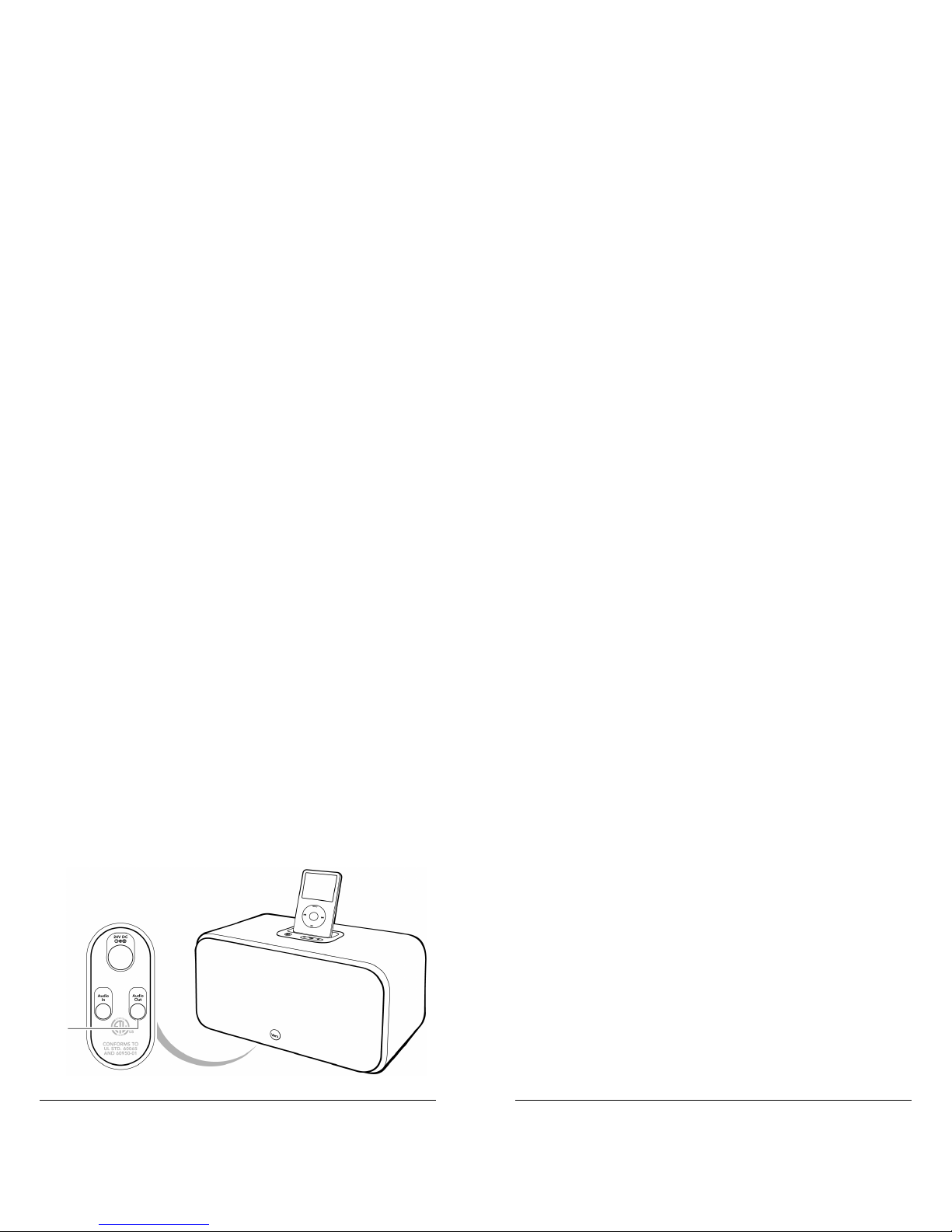
CONNECTING TO OTHER AUDIO DEVICES
You can play music from the Main unit through auxiliary devices with
dedicated audio inputs such as a home audio system or a transmitter
for wireless speakers.
Insert one end of a standard 3.5mm to Red/White audio cable (not
included) into the Audio Out jack (1) at the bottom of the main unit
and the other end into the dedicated Aux In jack of your other system.
To change volume levels, use controls on the auxiliary device.
Note:
Music will continue to play from the Vers main unit unless you press
the mute button on the remote to suspend music.
1
Page 18

34
www.versaudio.com
35
Questions? – contact us at [email protected]
REPLACING THE REMOTE CONTROL BATTERY
Remove the Battery Compartment Cover.
Remove the old battery and insert a new CR2032
button cell battery (not included) according to
polarity indicator inside the compartment.
Replace the Battery Compartment Cover.
CARE AND MAINTENANCE
Vers is made from real wood. Real wood may change color based on
its inherent properties. To maintain a natural fi nish, keep out of direct
sunlight and wipe with a soft, dry cloth. Do not use abrasive cleaning
agents.
VERS TECHNICAL SPECIFICATIONS
Power On/Off .......................................................................................... Yes
Digital Volume Control ........................................................................... Yes
Speakers ..................................................................... Two 3-inch Speakers
Speaker impedance ......................................................................... 4 Ohm
Peak Wattage per Channel ........................................................... 20 Watts
Nominal Wattage per Channel..................................................... 15 Watts
Frequency Response ............................................................60 Hz ~20 kHz
MP3 Audio Input .........................................................Variable (1 x 3.5mm)
Audio Output .................................................................. Fixed (1 x 3.5mm)
Page 19

36
www.versaudio.com
37
Questions? – contact us at [email protected]
Power Supply
Main Unit .......................................................... 24V 1.5A (AC/DC adapter)
Remote Control ......................................................................CR2032 (1pc)
General
Dimensions ...................................... 210mm(L) x 175mm (W) x 144mm (H)
iPod Compatibility ............All docking iPods (except Generation 3 iPod)
SPROUT CREATION LIMITED ONE-YEAR WARRANTY
Warranty
Vers, a division of Sprout Creation LLC (“Sprout Creation”), warrants this product to be
free from defects in workmanship and materials, under normal use and conditions, for
a period of one (1) year from the date of original purchase (“Warranty Period”). THE
WARRANTY DESCRIBED IN THIS PARAGRAPH SHALL BE IN LIEU OF ANY OTHER
WARRANTY, EXPRESS OR IMPLIED, INCLUDING BUT NOT LIMITED TO, ANY IMPLIED
WARRANTY OF MERCHANTABILITY OR FITNESS FOR A PARTICULAR PURPOSE.
This Warranty does not apply to damage or defects caused by failure to follow the
enclosed instructions, accident, abuse, misuse, misapplication, product modifi cation,
faulty ancillary equipment, improper voltage or current, lightning or other acts of God,
commercial non-home use, normal wear and tear, shipping damage or loss, damage
to digital media players, cracked or split cabinets based on temperature or humidity
changes, products sold on an as-is or fi nal sale basis, use of your Sprout Creation Product
with any equipment for which they were not intended or damage caused by service
performed by anyone other than Sprout Creation.
Page 20

38
www.versaudio.com
39
Questions? – contact us at [email protected]
Sprout Creation will, at is option, repair or replace any product covered by this warranty
that proves to be defective in workmanship or materials. If your product is no longer
being manufactured or is out of stock, at its option, Sprout Creation may replace your
product with a similar or better product. Sprout Creation’s liability is limited to the repair
or replacement, at our option, of any defective product under warranty and shall not
include any incidental or consequential damages. This warranty is valid only in the United
States of America, is not transferable and does not extend to users other than the original
purchaser.
Return Policy / Warranty Service
Proof of Purchase as evidence the unit was purchased from an authorized dealer within the
Warranty Period is required for warranty service. If service is required, do not return the
product without fi rst contacting your dealer or Sprout Creation.
To get this product repaired or replaced, you must contact Sprout Creation during the
Warranty Period by email ([email protected]) or by mail via the address below.
You must include your email address, name, address, telephone number, date and
place of purchase, alternative contact and a detailed description of the problem you
are experiencing. If the problem appears to be based on a defect in workmanship or
materials, Sprout Creation will provide a Return Authorization number and instructions for
return shipment. Return shipments are at the customer’s expense, and the return MUST be
accompanied by the original proof of purchase. Sprout Creation is not responsible for lost
or damaged product during shipment. Any product returned without the original proof of
purchase will be returned at the customer’s expense.
To avoid any charges, all returns and exchanges must include the original packing
materials, product box, all included accessories which may include, without limitation,
power adapter or power cord, connecting cables, remote control, adapters, inserts cards
and instruction manuals. Any replacement units or parts may be new or rebuilt. Sprout
Creation will not be liable for inconvenience, loss of time, loss of use of the product, lost
profi ts or exemplary or consequential damages caused by or relating to this product.
This warranty gives you specifi c legal rights. You may also have other rights that vary
from state to state. Some states do not allow the exclusion or limitations of incidental or
consequential damages or limitations on how long an implied warranty lasts, so the above
may not apply to you.
Purchase or use of the Vers or Sprout Creation product constitutes your acknowledgement
of, and agreement to completely abide by, the forgoing warranty and disclaimers.
Page 21

“Made for iPod” means that an electronic accessory has been designed to
connect specifi cally to iPod and has been certifi ed by the developer to meet Apple
performance standards.
Apple is not responsible for the operation of this device or its compliance with safety
and regulatory standards.
 Loading...