

Page 1
Page 2
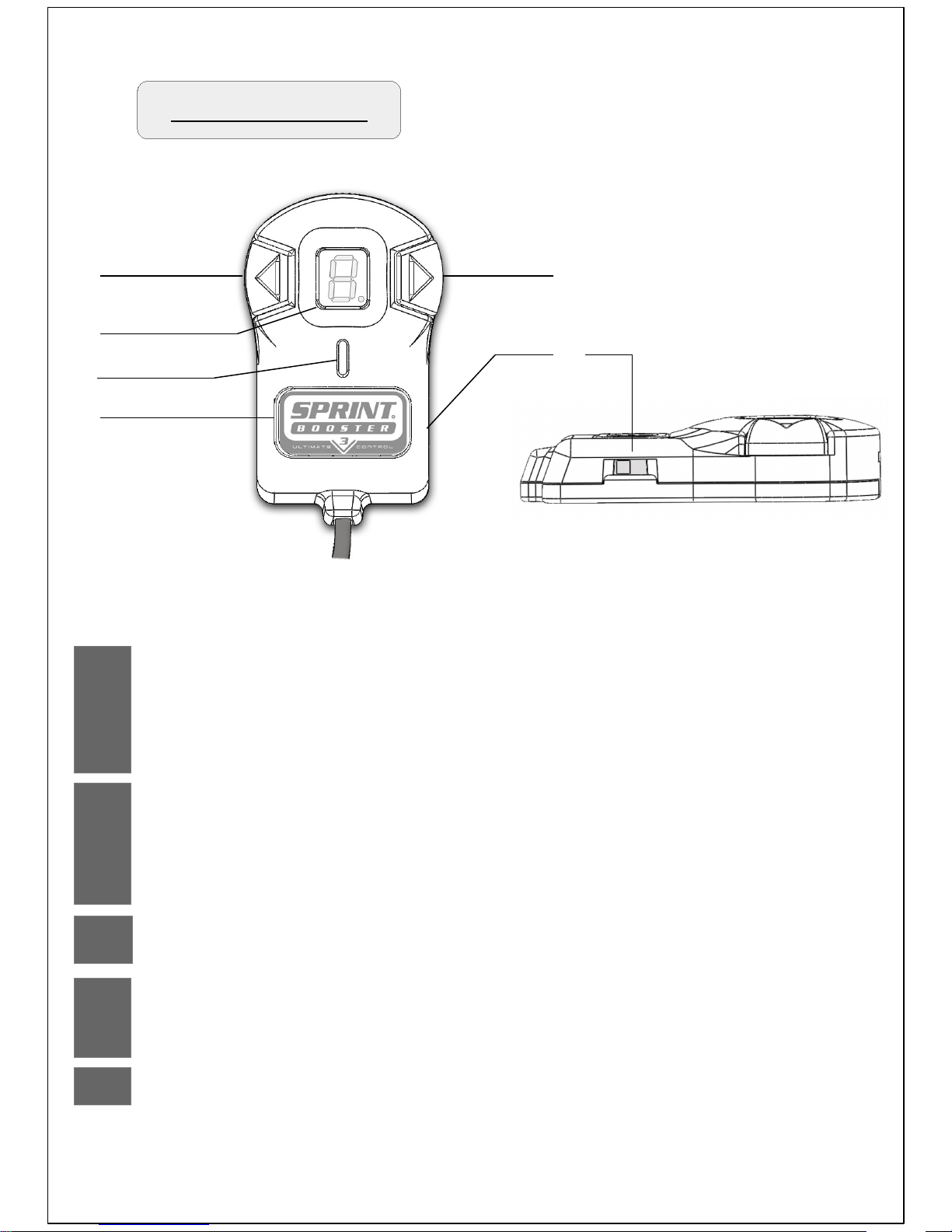
Selector Switch
1 & 2
3
Arrow buttons
7 Segment LED display
Navigate through the Acceleration programs.............................. 5-6
Enter PEDAL LOCK mode / VALET Mode Menu ....................... 10-11
Navigate through the PEDAL LOCK mode / PIN selection.......... 12,14
Navigate through the VALET mode / Level - PIN selection......... 16-18,20
Display of the selected Acceleration program............................. 5,7
PEDAL LOCK mode / VALET Mode Menu display...................... 9-11
PEDAL LOCK mode PIN selection display................................. 12-14
VALET mode Level-PIN selection display …............................... 16-18
4
LED indicator
Indicate the selected Acceleration mode …............................... 3
5
Main selection button / Set button
Acceleration mode -SELECT....................................................... 4
PEDAL LOCK mode / VALET Mode – SET …............................. 11
6
Type of transmission selection............................................ 2
1
3
4
5
2
6
Page 3
AUTO
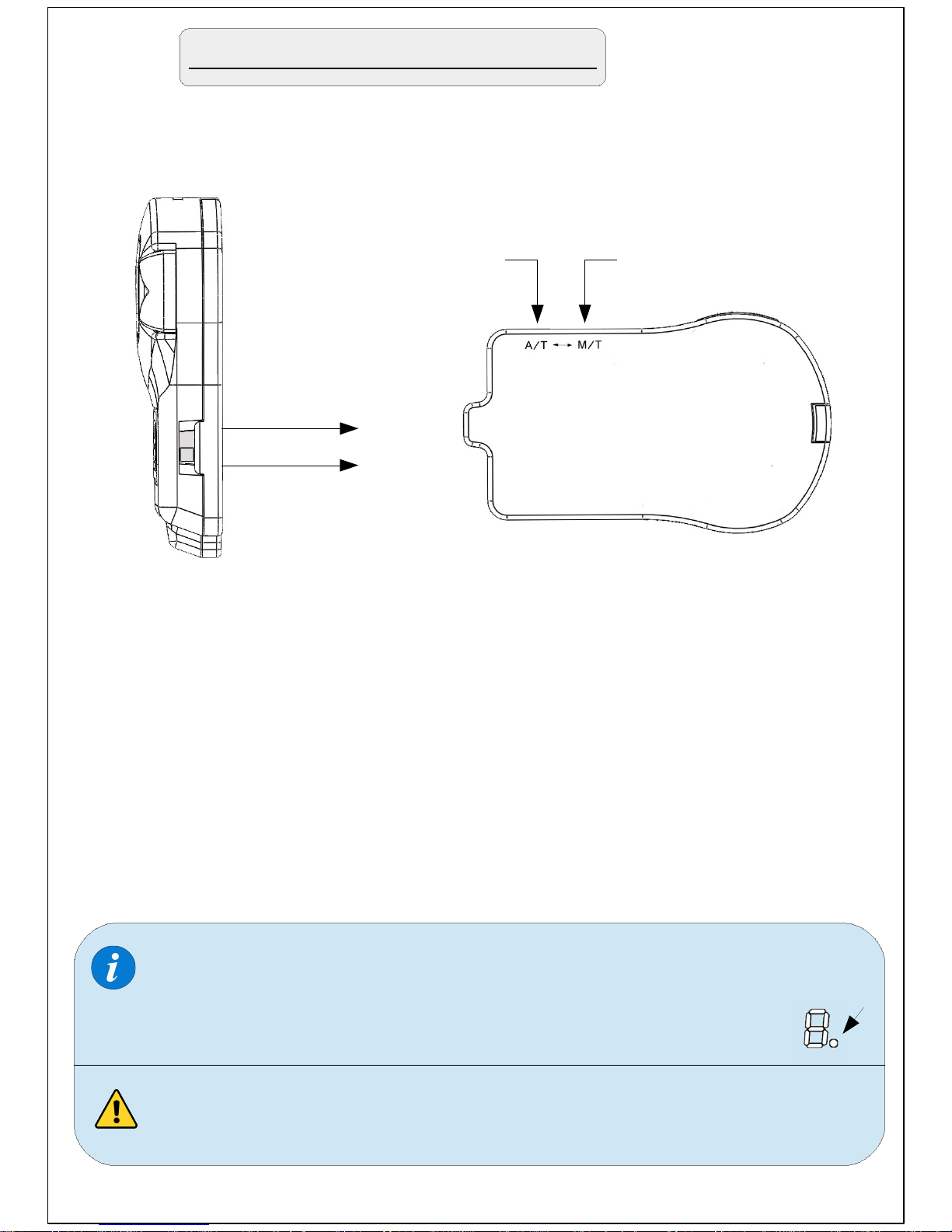
On the right side of the selector , there is a slide switch.
Using a pointed object (pen/pin/paper clip..etc) move the
switch to one of the 2 positions depending on the type
of your vehicle's transmission.
Move to 'M/T' position for vehicles equipped with manual
transmission or to 'A/T' position for vehicles equipped with
automatic transmission.
For 'semi-automatic' transmissions (DCT, S tronic, DSG, PDK,
SMG, ..etc) move to 'A/T' position
A/T
M/T
Choose the type of transmission
When the slide switch is in the 'M/T' position (manual) a red
dot will appear on the LED display indicating the selection of
manual transmission once you operate the device.
Never change this selection while driving.
MANUAL
Page 4
Acceleration modes
Default settings
Once you start your engine for the first time after you install the Sprint
Booster , the device will be in Race mode on program 5 (Acceleration
programs 5-6).
Sprint Booster comes with 3 Acceleration modes/presets (SPORT /
RACE / OFF):
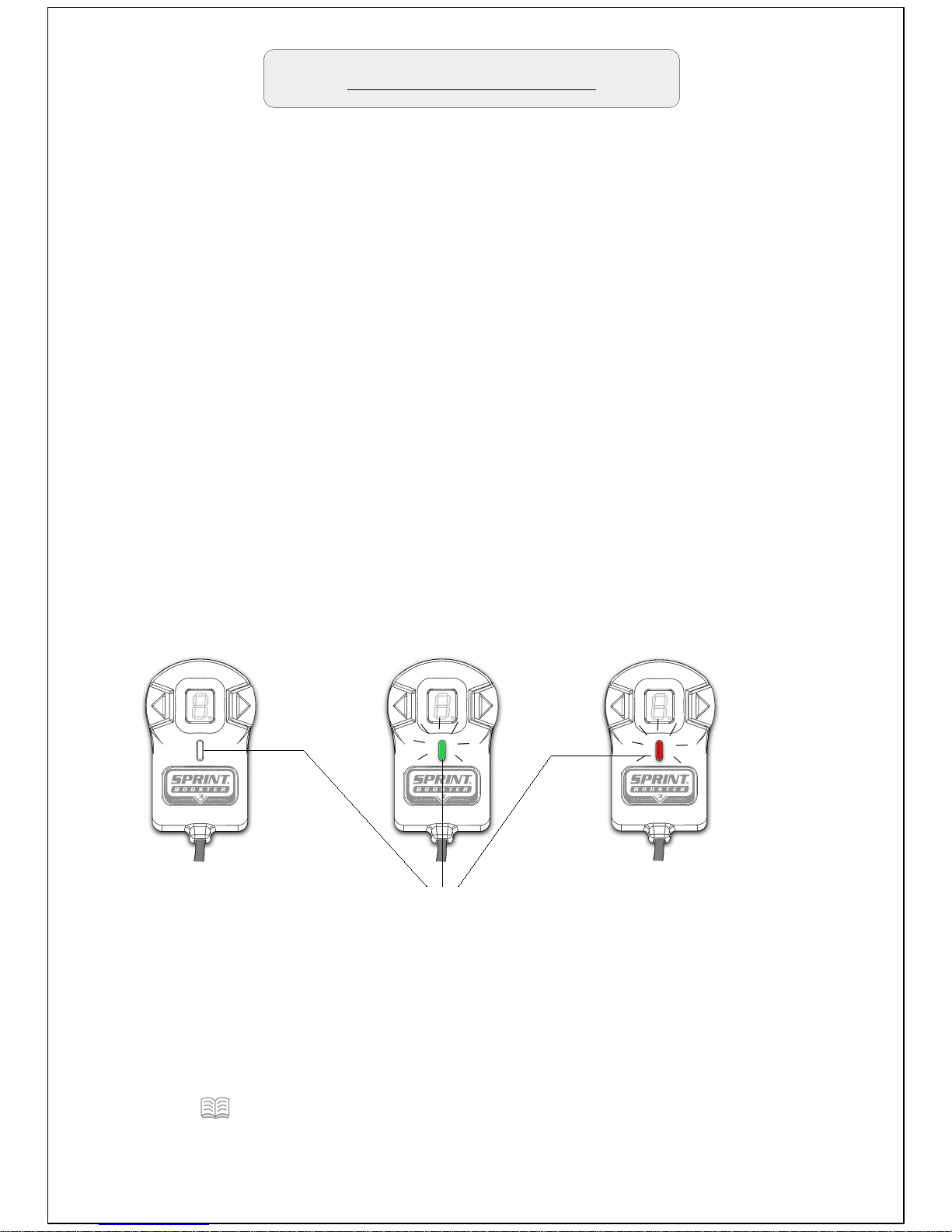
Off mode – Sprint Booster is deactivated. The response of the car
has the factory settings.The LED of the Selector switch is OFF.
SPORT mode- Sprint Booster provides improved response up to
30%. The LED of the selector switch in Sport mode is Green.
RACE mode – Sprint Booster provides improved response up to
60%. The LED of the selector switch in Race mode is Red.
OFF
(No light)
SPORT
(Green light)
LED Indicator
RACE
(Red light)
Page 5
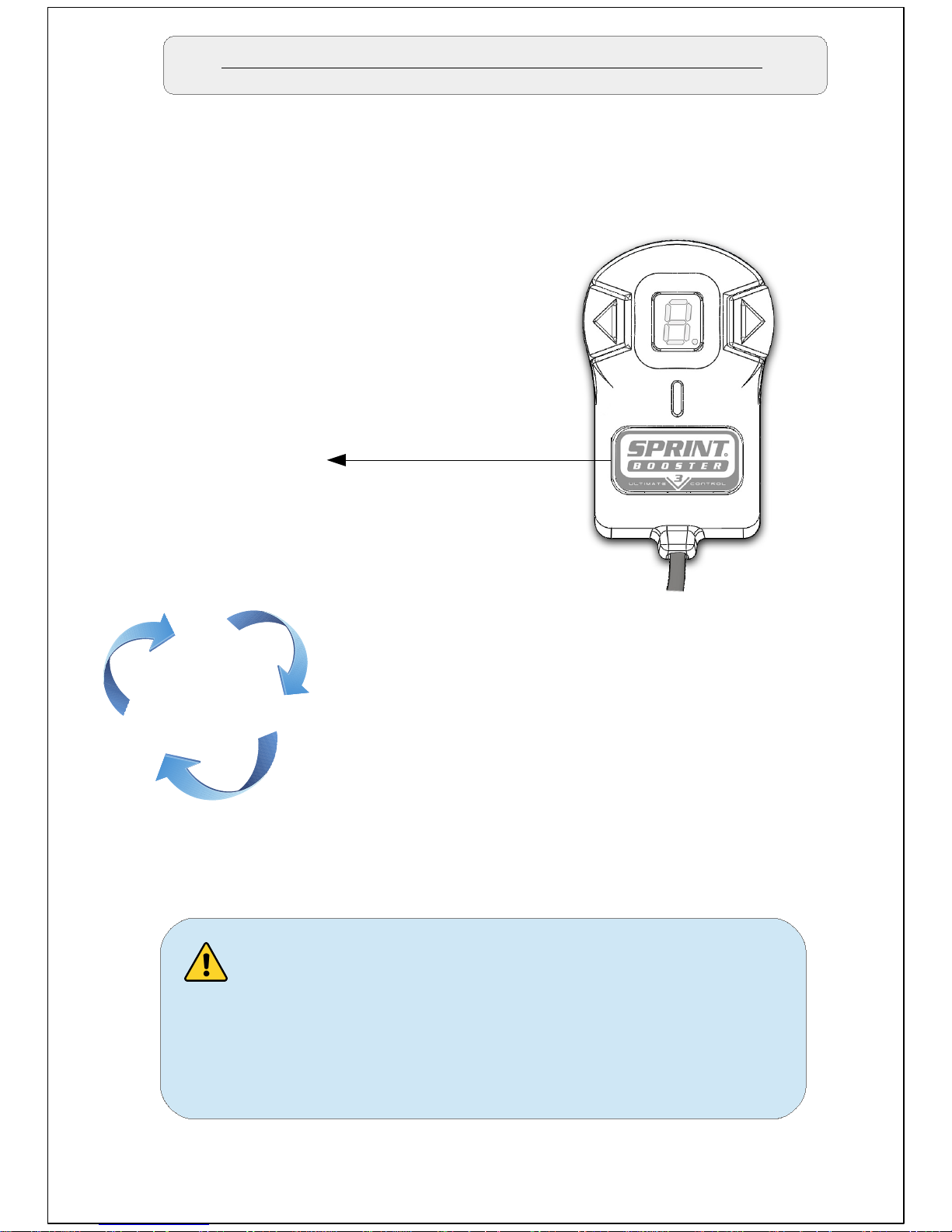
Switching between the Acceleration modes
In Order to switch between the different acceleration modes/presets
you need to press the main button on the selector Switch (button with
Sprint Booster logo).
Sport
Main button
Race
Off
The main button will cycle through the 3
acceleration modes (Off – Sport – Race
-Off – Sport ...etc)
The navigation through different modes
should be done when the accelerator
pedal is not pressed. Never change
modes while pressing the accelerator
pedal.
Page 6
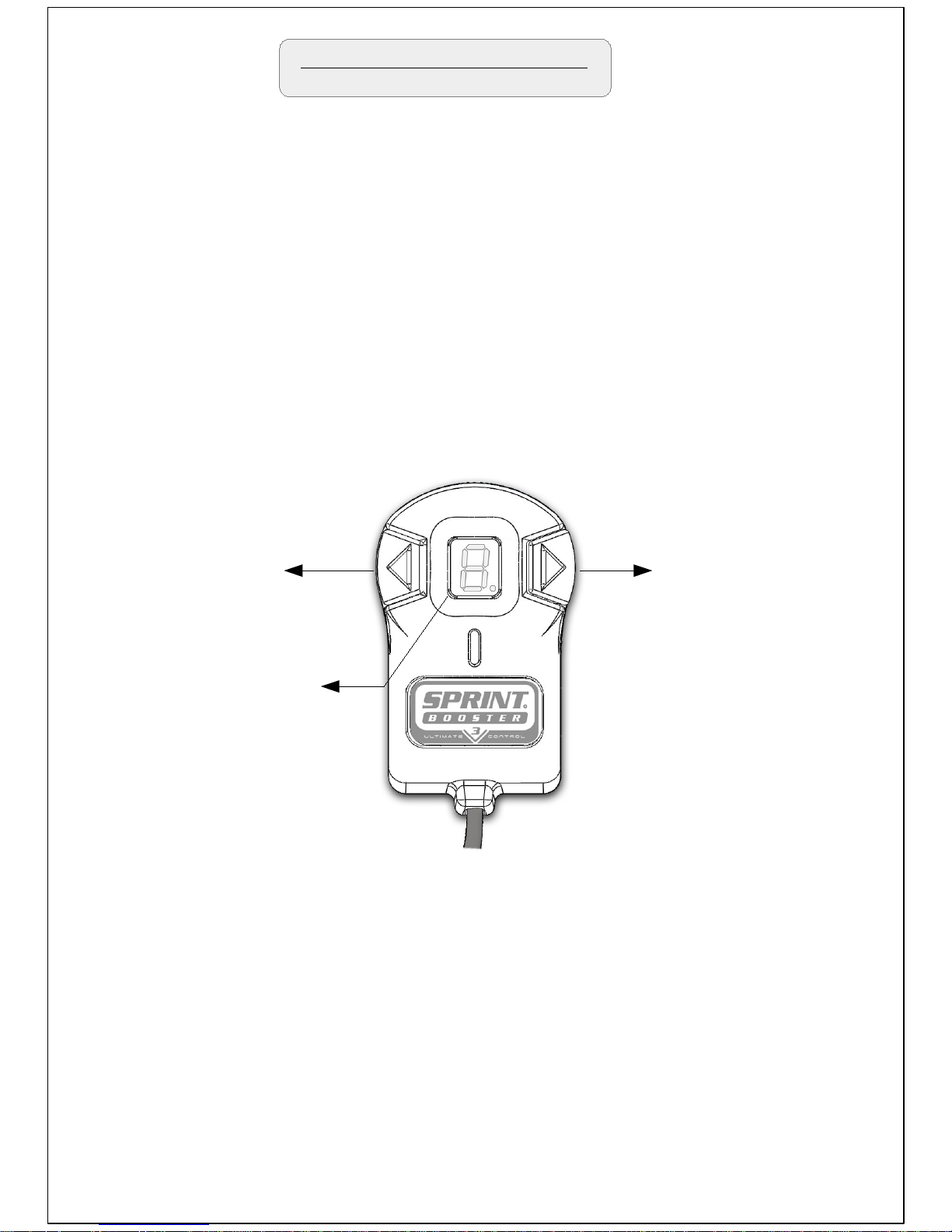
Acceleration Programs
Each mode (SPORT – RACE) comes with 9 steps-programs so the
driver can choose the one that suits his driving style (18 programs in
total).
This allows the driver to fine-tune each mode (SPORT – RACE)
according his needs by selecting one of the nine different programs on
each mode.
You can select 1-9 in SPORT mode (Green light) and 1-9 in RACE
mode (Red light) with '1' being the least aggressive program and '9'
the most aggressive one.
Left arrow button
Select to decrease
(9->1)
Right arrow button
Select to increase
(1->9)
In order to navigate through the different programs-steps on each
mode you need to press one of the arrow buttons (left -right) as shown
above .
Press left arrow button to decrease (9->1) or right button to increase
(1->9).
The programs are only available in the SPORT and RACE mode.
The selected program
is shown on the LED
Display
The selected program is shown on the LED Display.
Page 7
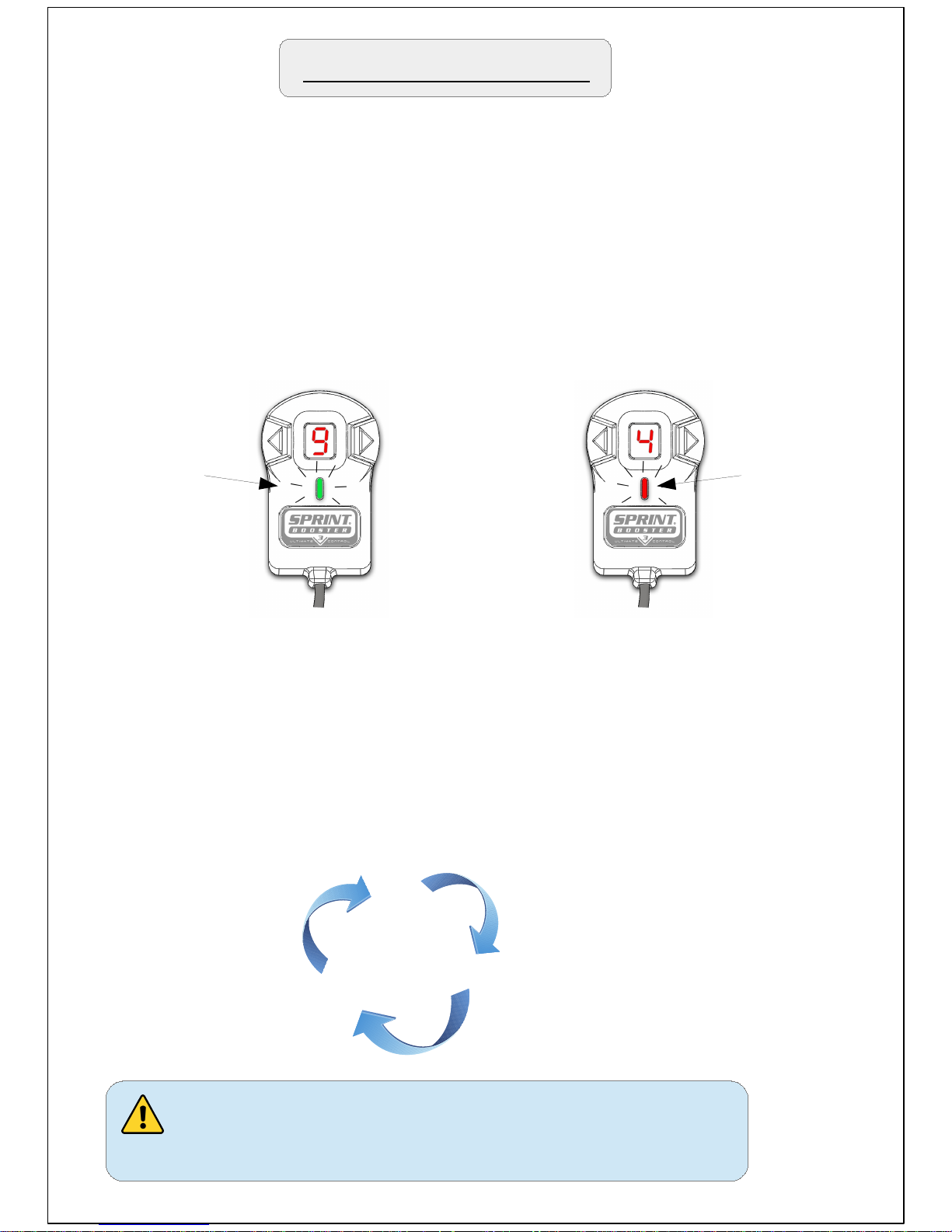
Acceleration Programs
The default programs on the Selector switch are SPORT- 5 &
RACE- 5.
With the main selection button move to SPORT or RACE mode and
with the arrow buttons select 1-9 to choose acceleration program.
Go to SPORT mode (green light) and press the right arrow until
you reach 9. Then press the main button to switch to RACE (red
light) and press the left arrow button to go to 4.
The 2 modes now are set as SPORT-9 & RACE-4.
After that , by pressing the main button you will have :
Sport-9
Race-4
Off
Never change programs while pressing
the accelerator pedal.
SPORT-9
(Green)
RACE-4
(RED)
Example : Selecting the program SPORT-9 and RACE-4.
Page 8
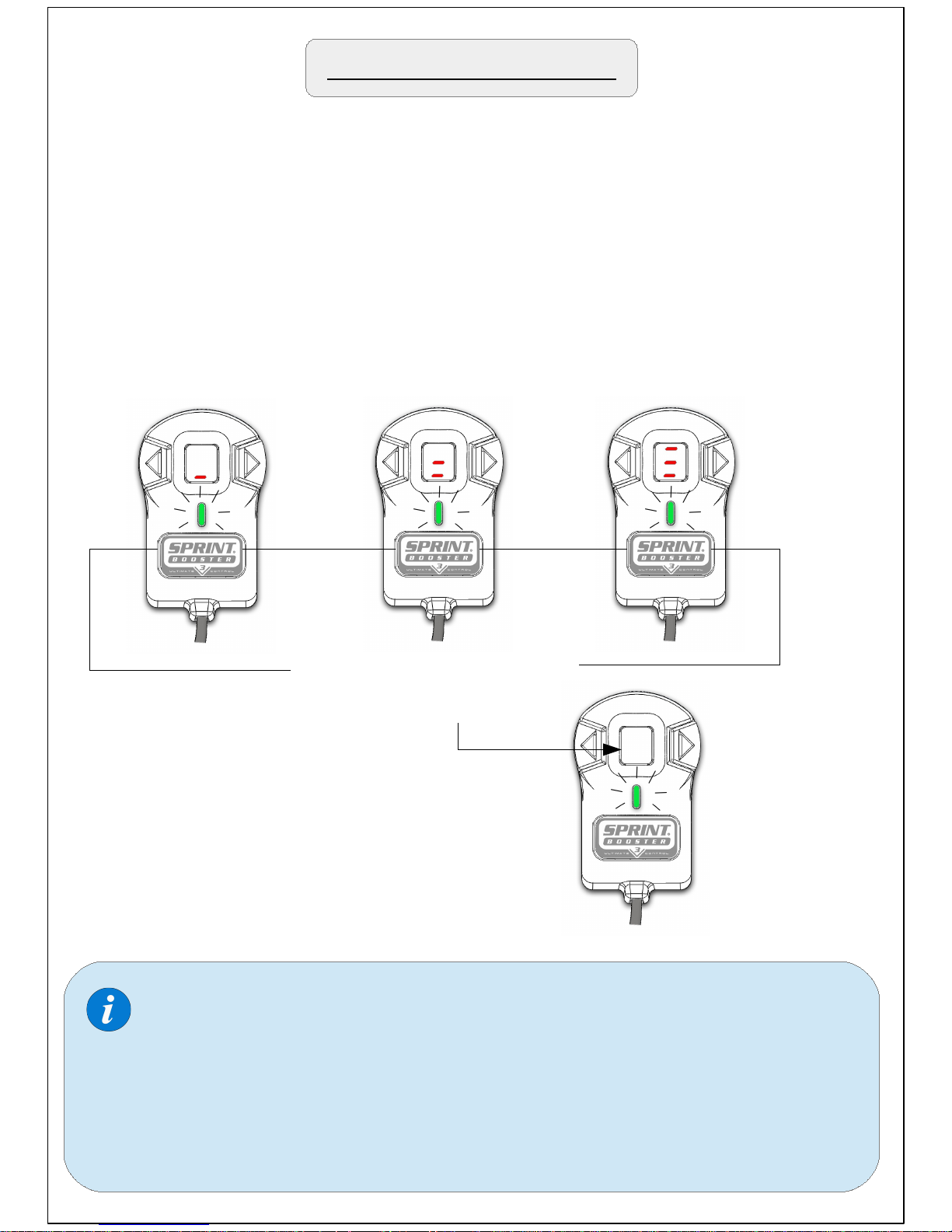
Switch Off LED display
Anytime, you have the option to switch Off the 7 segment LED display
( in SPORT & RACE mode).
To do so , just keep the main selection button pressed for 3 seconds.
During the time you have the button pressed, 3 dashes will appear to
indicate 3 seconds. When the third dash appears the LED Display will
go Off.
1 ''
Keep button pressed for 3
seconds to turn Off LED
display
2 ''
3 ''
Repeat the same procedure to
turn the LED Display On.
When you turn Off the LED display , the arrow buttons are
deactivated and the programs (1-9) cannot be changed. The
programs you had selected are stored in the memory.
After you switch Off the LED display you will only have the
LED light On (SPORT & RACE) that indicates the mode you
are in.
Page 9
In case you disconnect the Selector switch from
the Sprint Booster, the device will keep the last
settings in memory. (e.g if you disconnect the
device while you are in SPORT-5 the device will
work as SPORT-5).
As soon as you turn off your car's engine the
switch (led indicator and led display) will remain
active for a few minutes and will go Off as soon
as the CAN bus system cuts off the electric
power supply. This is a normal procedure and
will not drain your battery.
Page 10
Pedal Lock / Valet mode
The Sprint Booster comes with 2 new important Features :
-Pedal Lock mode
-Valet mode
Pedal Lock mode
The Pedal Lock mode provides extra protection against unauthorized
vehicle use. The driver can deactivate the acceleration ability of the
vehicle through a 3 digit PIN.
Valet mode
The Valet mode limits the acceleration of the vehicle by 55 % - 65% 75% (comes in 3 selectable levels) .It is activated/deactivated through
a 3 digit PIN.
The Pedal Lock mode is not an antitheft feature. It will only
act as an extra protection against unauthorized vehicle use.
In case Sprint Booster is removed from the vehicle, the vehicle
will be able to accelerate .
Page 11
Pedal Lock / Valet mode MENU
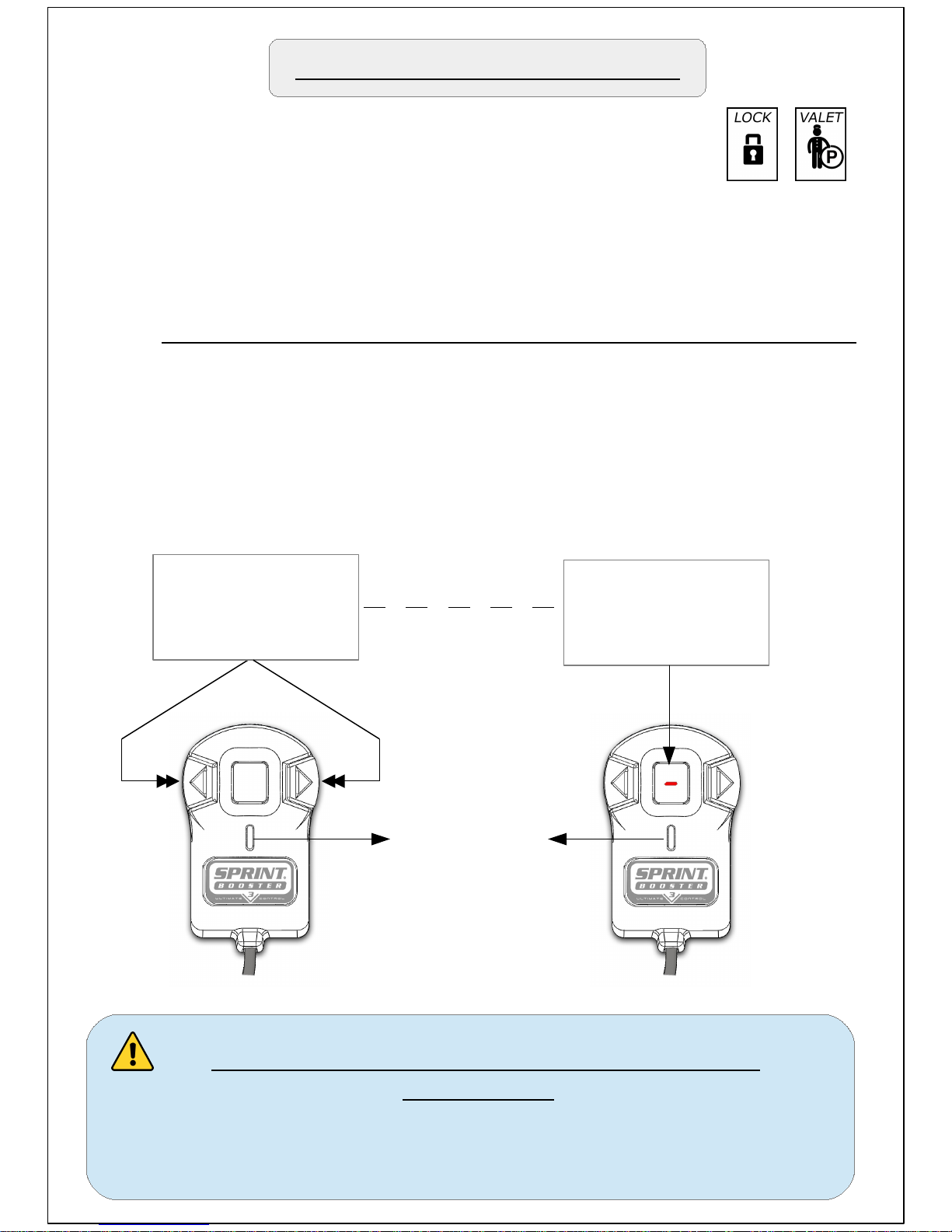
In order to activate the Pedal Lock/Valet mode MENU,
follow the procedure below:
1. Make sure the car is stationary and the pedal is not pressed.
2. Go to Off mode (LED Off).
3.Press the 2 Arrow buttons simultaneously for 3 seconds.
4. When a dash appears in the LED display, that means you
have entered the MENU.
Press 2 arrow buttons
simultaneously for 3
seconds
3 ''
Off mode
LED Off
When dash
appears you are in
Pedal Lock/ Valet
mode MENU
Never enter the Pedal Lock/ Valet mode MENU
while driving.
The Pedal Lock/Valet mode MENU should only be
accessed when vehicle is parked/stationary.
Page 12
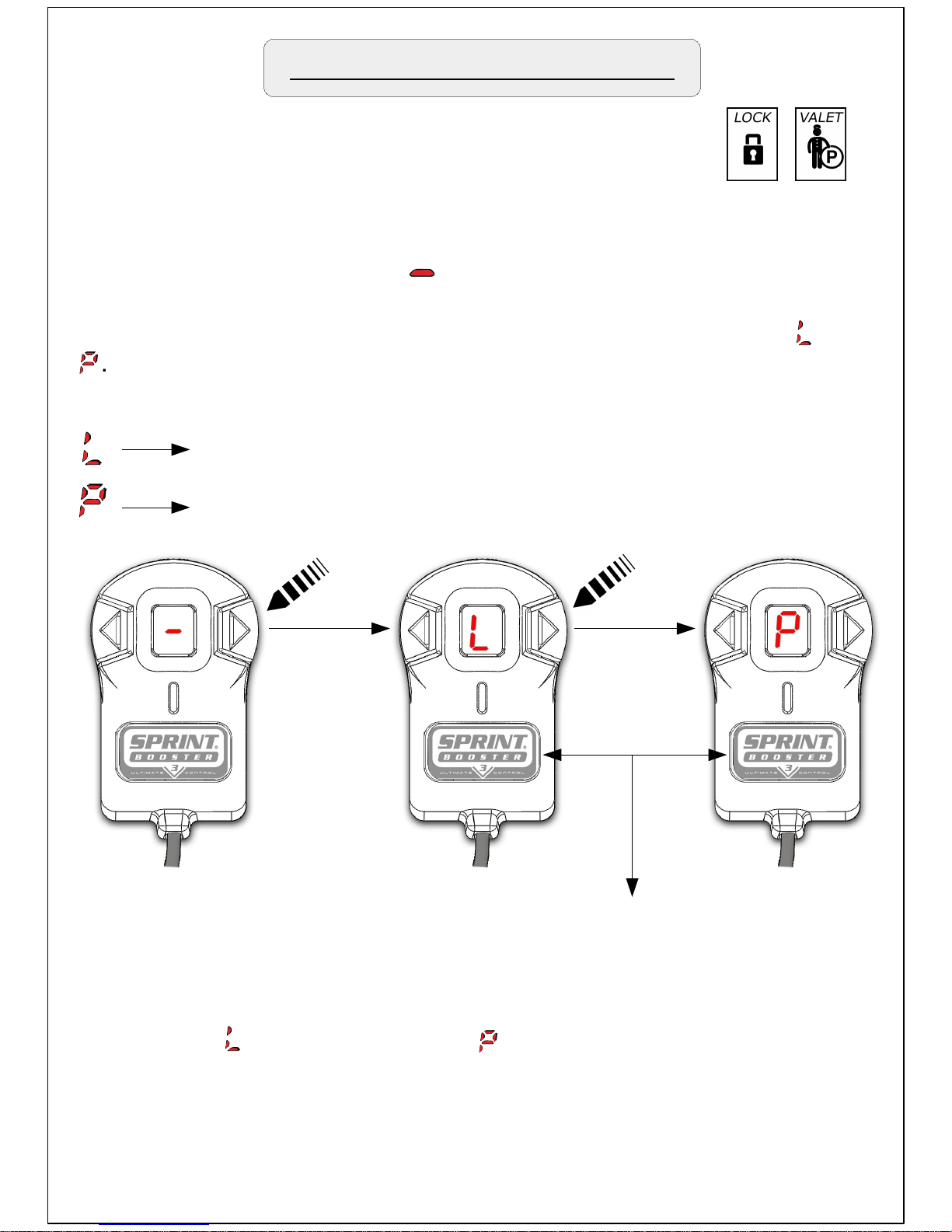
Once you enter the MENU ( ) press the Left or Right arrow button
to choose one of the 2 available modes (Pedal lock / Valet mode).
By pressing arrow buttons the LED display will cycle between and
.
Pedal Lock / Valet mode MENU
Pedal Lock mode
Valet mode
In the Pedal Lock/ Valet mode menu, the main selection button is
used for SELECT & SET.
In order to select and enter each mode , press the main selection
button when (for Pedal lock ) or (for Valet mode) appears on
the LED display
Page 13

Pedal Lock mode
Press arrow to choose
1st digit of PIN (0-9)
SELECT/ SET
button
1st dash is blinking
to enter 1st digit of PIN
Press SET to store
1st digit of PIN.
1
st
PIN digit
In order to activate the Pedal Lock mode you need to press
the main selection button when is displayed on the LED display.
Once you enter the Pedal lock mode the lower dash on the
LED display will start blinking.
This indicates the first digit of the 3 digit PIN code.
Move up or down with the arrow buttons to choose the desired number
as the first of the 3 digits of your Pin.
Once you find the number you need press SET (main selection button)
to store the 1st digit of your PIN.
The 1st digit of your PIN is now stored. Repeat the same procedure to
store the 2nd and 3rd digit of your PIN. In second digit the blinking dash
will be the middle one and on the third digit , the upper one.
Page 14
Pedal Lock mode
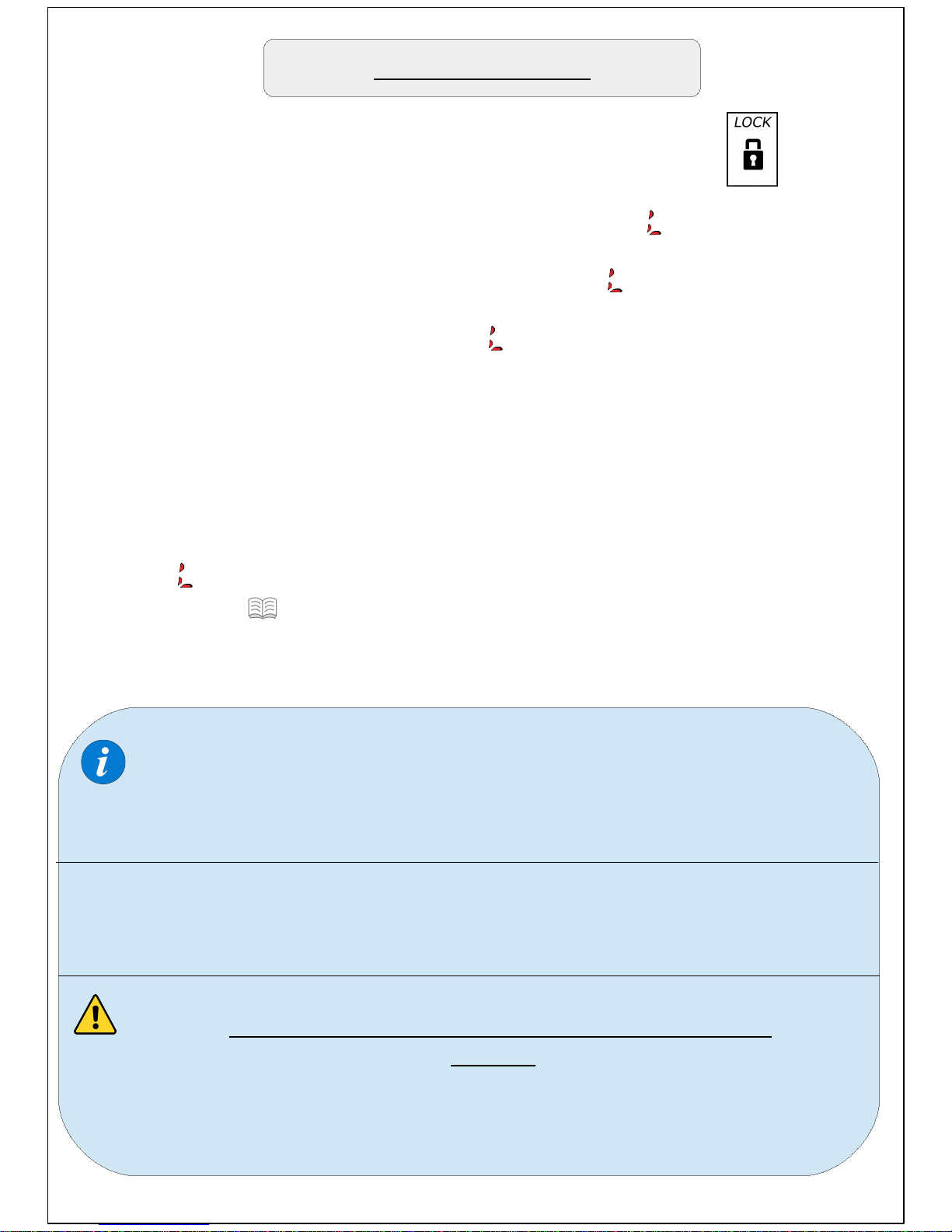
As soon as you store the third digit of your pin the will blink on the
LED display for 10 seconds. After this time the will stop blinking and
will remain ON. During the time the is blinking you have the option
To cancel the lock by pressing any of the 3 buttons on the
Selector switch. If you press any button during the time it's blinking,
the lock will be canceled and the LED display will exit the MENU.
Once the stops blinking , the acceleration can only be enabled with
the 3 digit PIN ( 14 ) .
While navigating through the MENU if none of the buttons are
pressed within 10'' the device will cancel the procedure and
EXIT the MENU.
Don't press the pedal while activating the Pedal Lock mode.
If the accelerator pedal is pressed while entering the PIN, the
device will cancel the procedure and EXIT the MENU.
Never enter the Pedal Lock mode MENU while
driving.
Pedal Lock mode should only be accessed when
vehicle is parked/stationary.
Page 15
Pedal Lock modePedal Lock mode
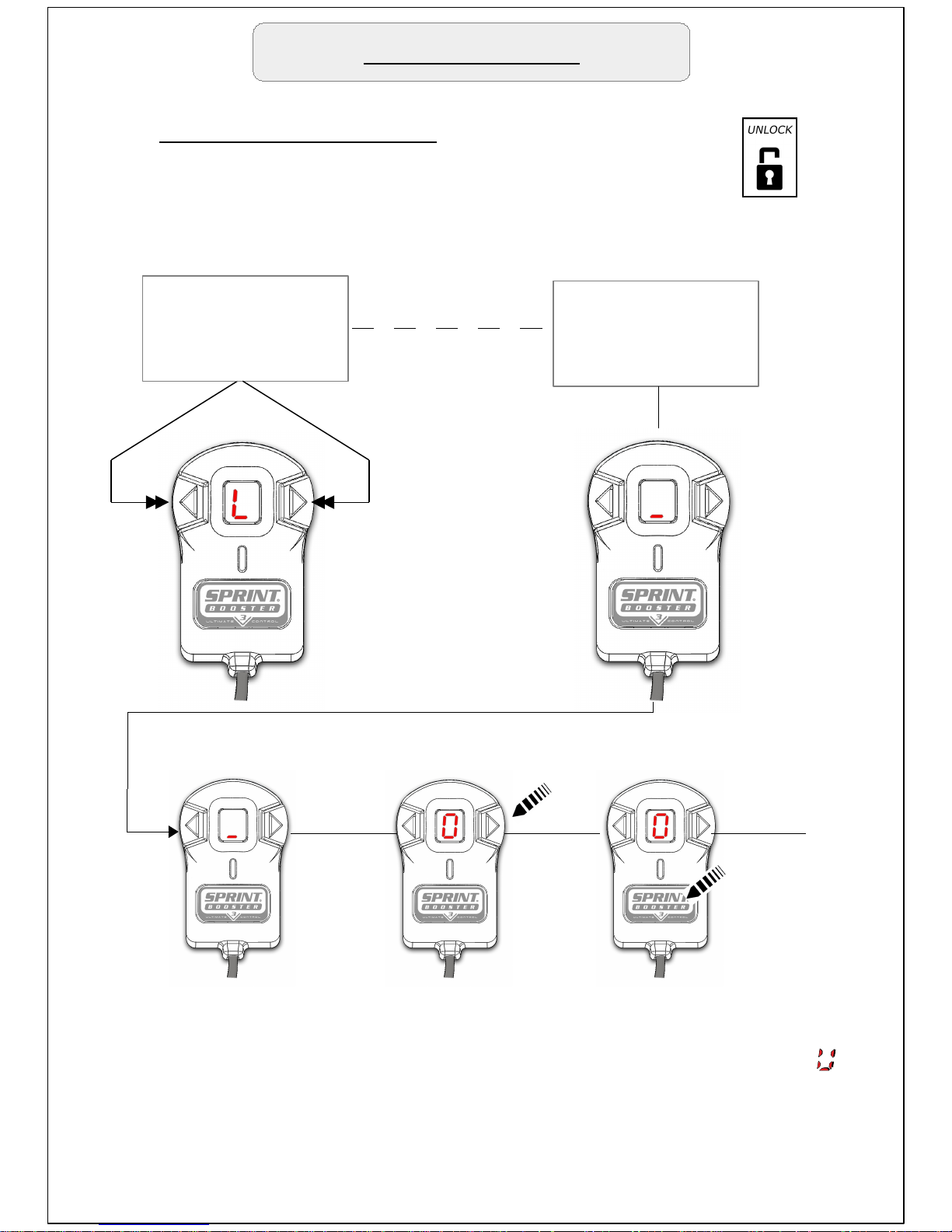
Deactivate Pedal Lock
In order to deactivate the Pedal Lock :
Press the 2 Arrow buttons simultaneously for 3 seconds.
Press 2 arrow buttons
simultaneously for 3
seconds
3 ''
The lower dash
will start blinking
to enter PIN.
The 1st digit of your PIN is now stored. Repeat the same procedure to
store the 2nd and 3rd digit of your PIN. After you enter succesfully the
3rd digit of your pin, the Pedal lock mode will be deactivated and
will blink twice . Then the device will exit the MENU and will go back to
Off mode.
In case you enter a wrong PIN the 1st dash will start blinking to enter
The PIN again.
Press arrow to choose
1st digit of PIN (0-9)
1st dash is blinking
to enter 1st digit of PIN
Press SET to store
1st digit of PIN.
1
st
PIN digit
Page 16
Pedal Lock mode
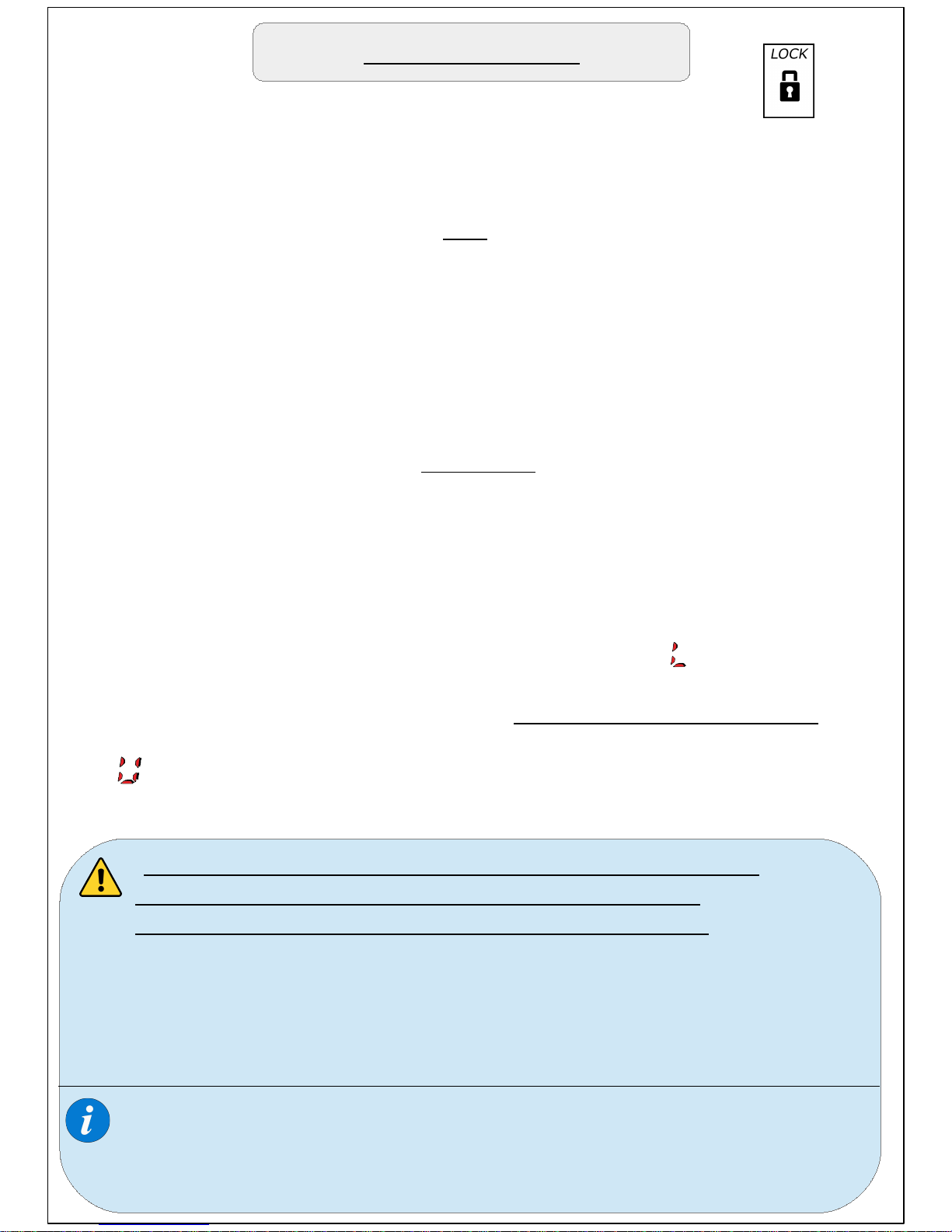
Once you enable the Pedal Lock mode the car will not be
able to accelerate when you press the accelerator pedal and will stay
on idle.
PIN
The PIN should be entered every time you need to activate-deactivate
the Pedal Lock mode. You have the option to use different PIN
Every time (not recommended). The 3 digit PIN you use to activate the
Pedal Lock mode is the one you need to use to deactivate it every time.
Make sure you have memorized the PIN before activating the Pedal
Lock mode.
In case you forgot your PIN, you need to follow the procedure to reset
the PIN stored.
Sprint Booster has a PIN reset option through a time delay process:
1. Turn On the engine to activate the power on the device.
2. When the device is in Lock mode there will be an on the LED
Display.
3. Wait for 35 minutes (with power On) without pressing the pedal.
4. After the time delay limit (35') the device will reset the password, the
digit will blink for a few seconds on the LED display and Pedal Lock
mode will be deactivated (Will go back to Off mode).
PIN reset
-During the 35' reset process the pedal should not be
pressed.If the pedal is pressed during this time ,
the time delay limit will be renewed to another 35'.
-Always make sure you have memorized the PIN before
activating the Pedal Lock mode in order to avoid the time
delay process to reset the PIN. In case you have forgot your
PIN and have no time to follow this procedure , you will need
to completely uninstall the device from the Pedal.
In case you activate the Pedal Lock mode and disconnect the
selector switch from the device, the 35' reset option does not
apply. In order to be able to reset the PIN you need to have
the selector switch connected to the device.
Page 17
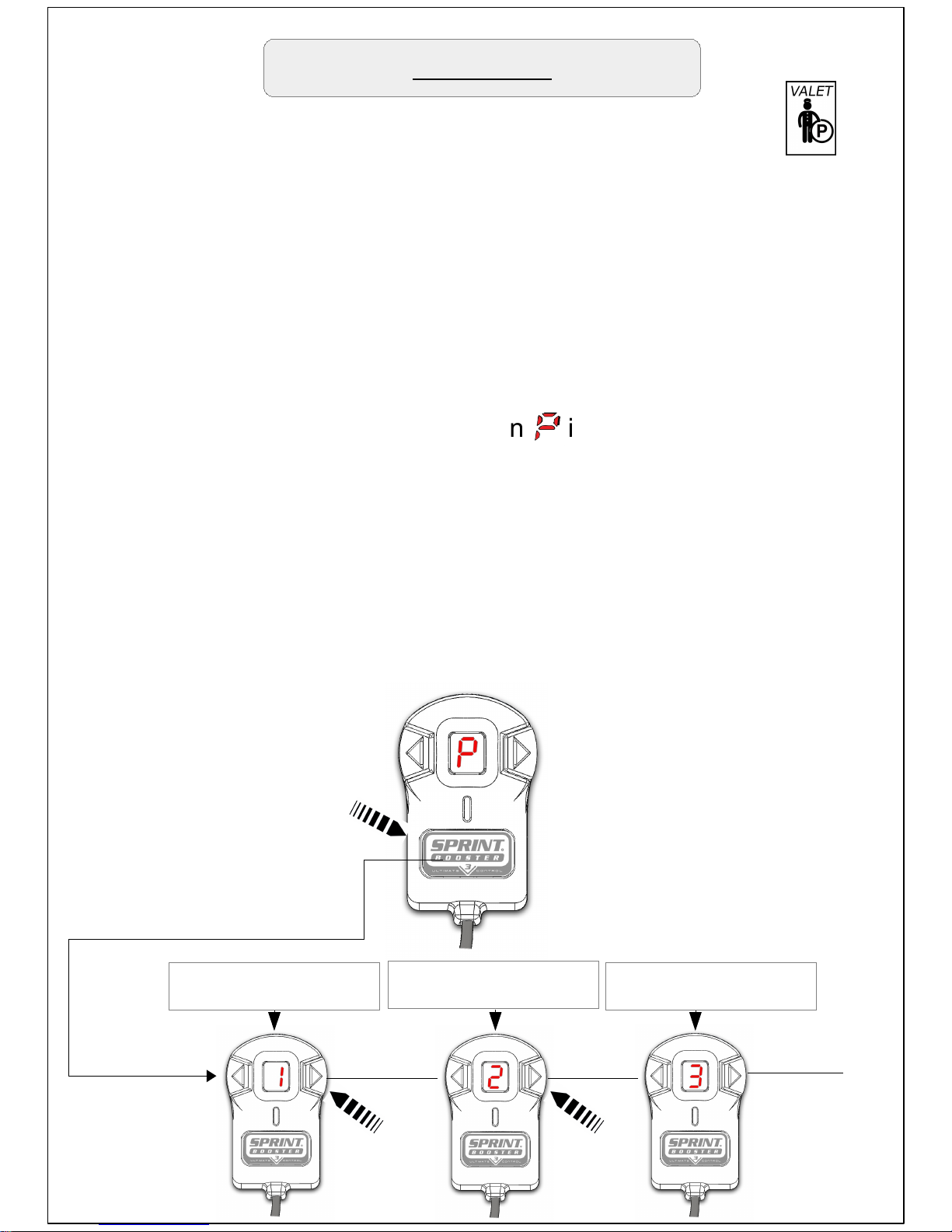
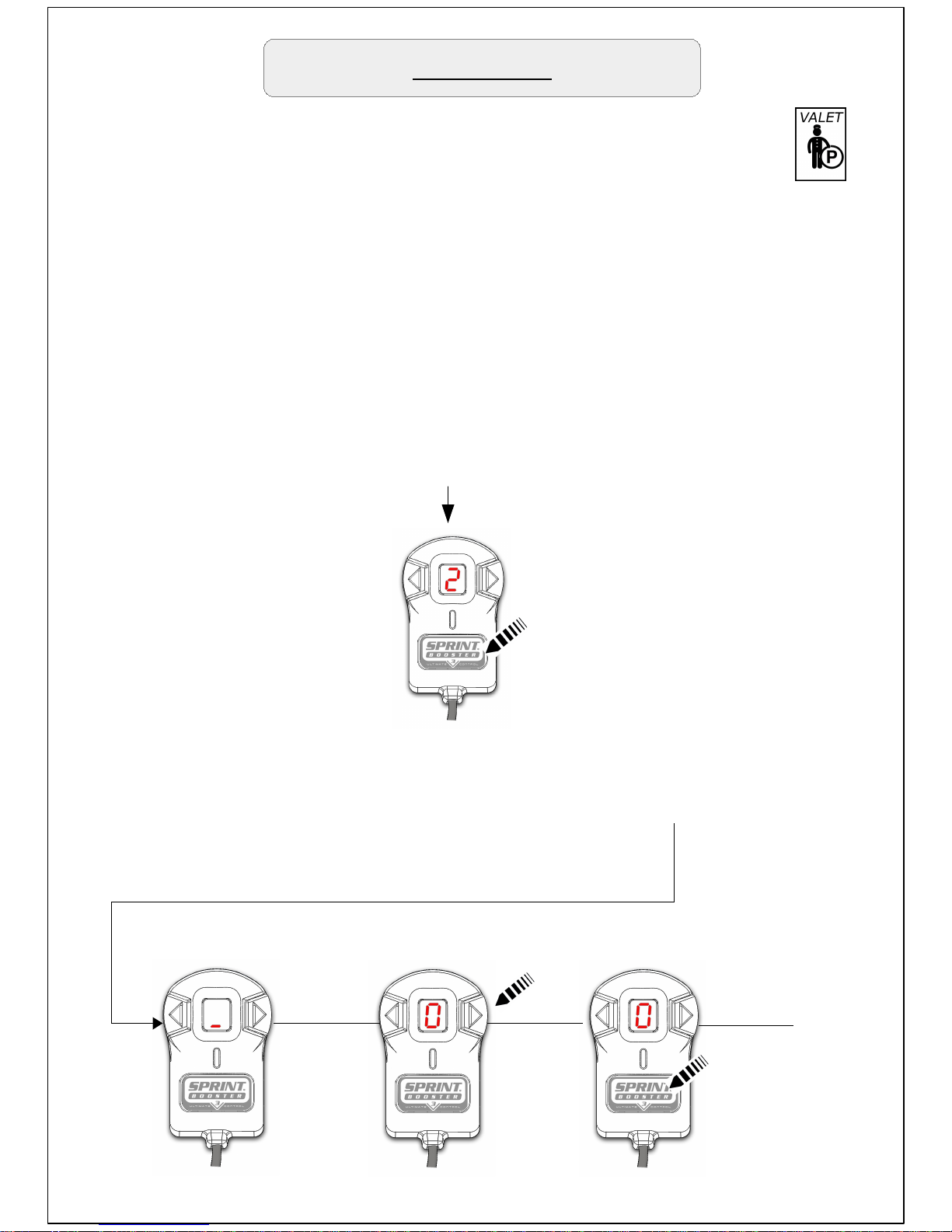
In order to activate the Valet mode you need to follow the procedure
Below:
-Press the main selection button when is displayed on the screen.
After that , the number '1' will appear on the screen.This indicates the
first of the 3 Valet mode levels.
-You will now need to choose the desired level.With the arrow buttons
you can navigate through the 3 different levels :
Level 1. The acceleration Is limited by 55%
Level 2. The acceleration is limited by 65%
Level 3. The acceleration is limited by 75%
Valet mode
Valet mode limits the acceleration of the vehicle by 55 % - 65% - 75%
(comes in 3 selectable levels) .It is activated/deactivated through a 3
digit PIN.
Level 2 – Limit
Acceleration by 65%
SELECT/ SET
button
Level 1 – Limit
Acceleration by 55%
Level 3 – Limit
Acceleration by 75%
By limiting the acceleration there will be a significant reduce in
vehicle's performance (Power and Torque).
Enter sub menu
Page 18
Valet mode
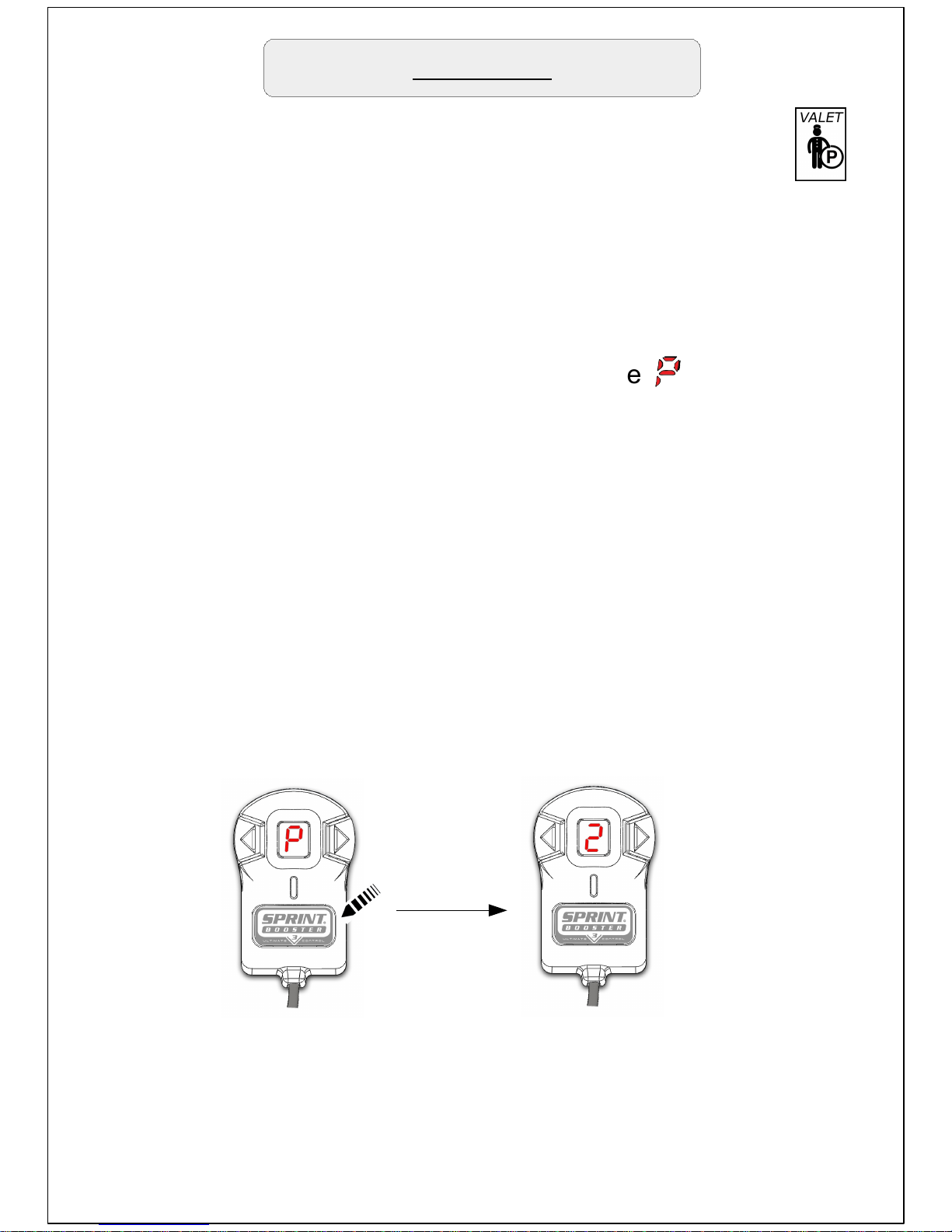
In order to select the Valet mode level press the main selection button
when the desired level is displayed on the LED display .
For example , in order to choose the 2nd level of Valet mode (limit
acceleration by 65%) , choose the number 2 with the arrow buttons
and press the main selection button to select.
Once you have selected the desired Valet mode level, you will be
requested to enter your PIN in order to Store the Valet mode.
Press arrow to choose
1st digit of PIN (0-9)
1st dash is blinking
to enter 1st digit of PIN
Press SET to store
1st digit of PIN.
1
st
PIN digit
Page 19
The 1st digit of your PIN is now stored. Repeat the same procedure to
store the 2nd and 3rd digit of your PIN. In second digit the blinking dash
will be the middle one and on the third digit , the upper one.
Valet mode
As soon as you store the third digit of your pin the will blink once
and then will remain on the display.
The Valet mode is now stored. The vehicle will run with limited
acceleration.
After you have set the Valet mode On you can see which level has
been selected by pressing the main selection Button. As soon as you
press the button the number of the selected level will appear on the
Led display.
Page 20
Valet mode
On vehicles with low hp use only the 1st level as in 2
nd
and 3rd level the
acceleration will dramatically decrease. Use the 3rd level only in
vehicles with high hp (300+) :
-When you activate Valet mode, you should always inform the
person who is driving the vehicle that the car has Valet mode
enabled and the acceleration is reduced.
-For steep roads or steep parking garages
use only the 1st level of valet mode .
-Do not enable the Valet mode when driving on Highways.
-The pin reset options in Pedal lock mode through time delay
process apply to Valet mode as well ( 15).
- When Valet mode is activated , Pedal lock mode cannot
be enabled.
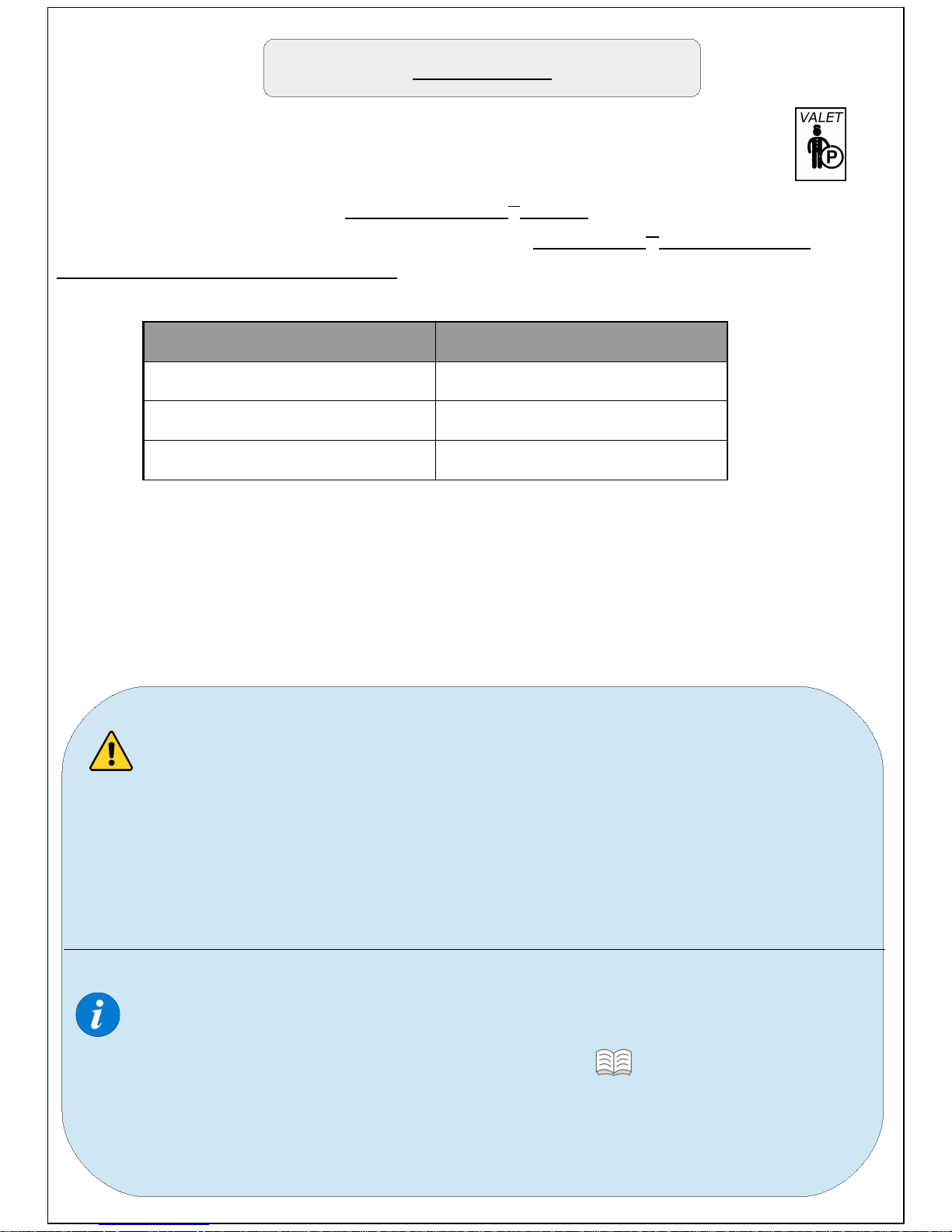
Vehicle's HP suitable levels
Up to 150 hp 1
150-300 1,2
300 and up 1,2,3
We suggest testing the levels in an open area without traffic so you can
choose the right one for your vehicle depending the power/torque of
your vehicle as well as the limit you need to set (according the above
chart) .
Page 21
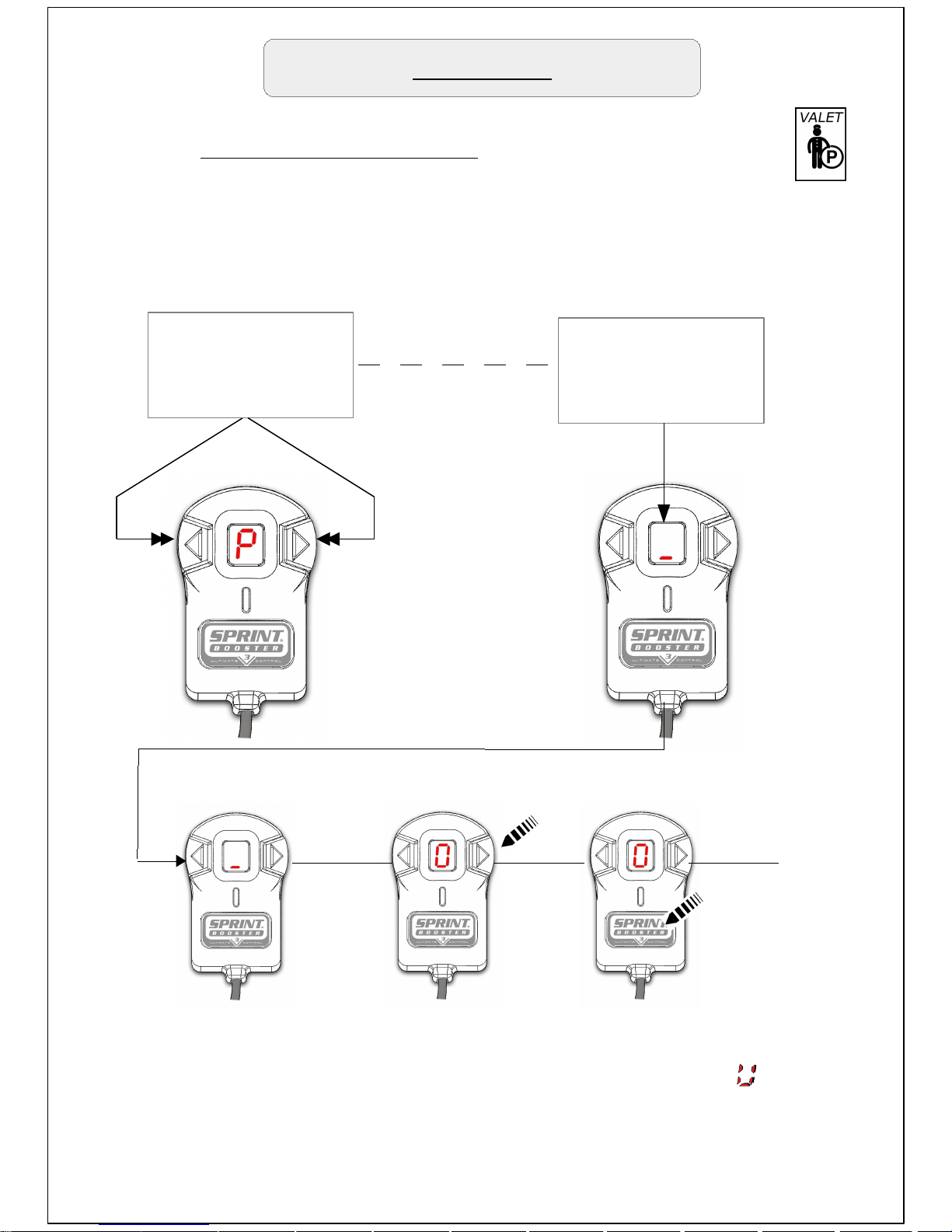
Press 2 arrow buttons
simultaneously for 3
seconds
3 ''
The lower dash
will start blinking
to enter PIN.
The 1st digit of your PIN is now stored. Repeat the same procedure to
store the 2nd and 3rd digit of your PIN. After you enter successfully the
3rd digit of your pin the Valet mode will be deactivated and will blink
twice . Then the device will exit the MENU and will go back to Off mode.
In case you enter a wrong PIN the 1st dash will start blinking to enter the
PIN again.
Deactivate Valet mode
Valet mode
In order to deactivate the Valet mode :
Press the 2 Arrow buttons simultaneously for 3 seconds.
Press arrow to choose
1st digit of PIN (0-9)
1st dash is blinking
To enter 1st digit of PIN
Press SET to store
1st digit of PIN.
1
st
PIN digit
Page 22
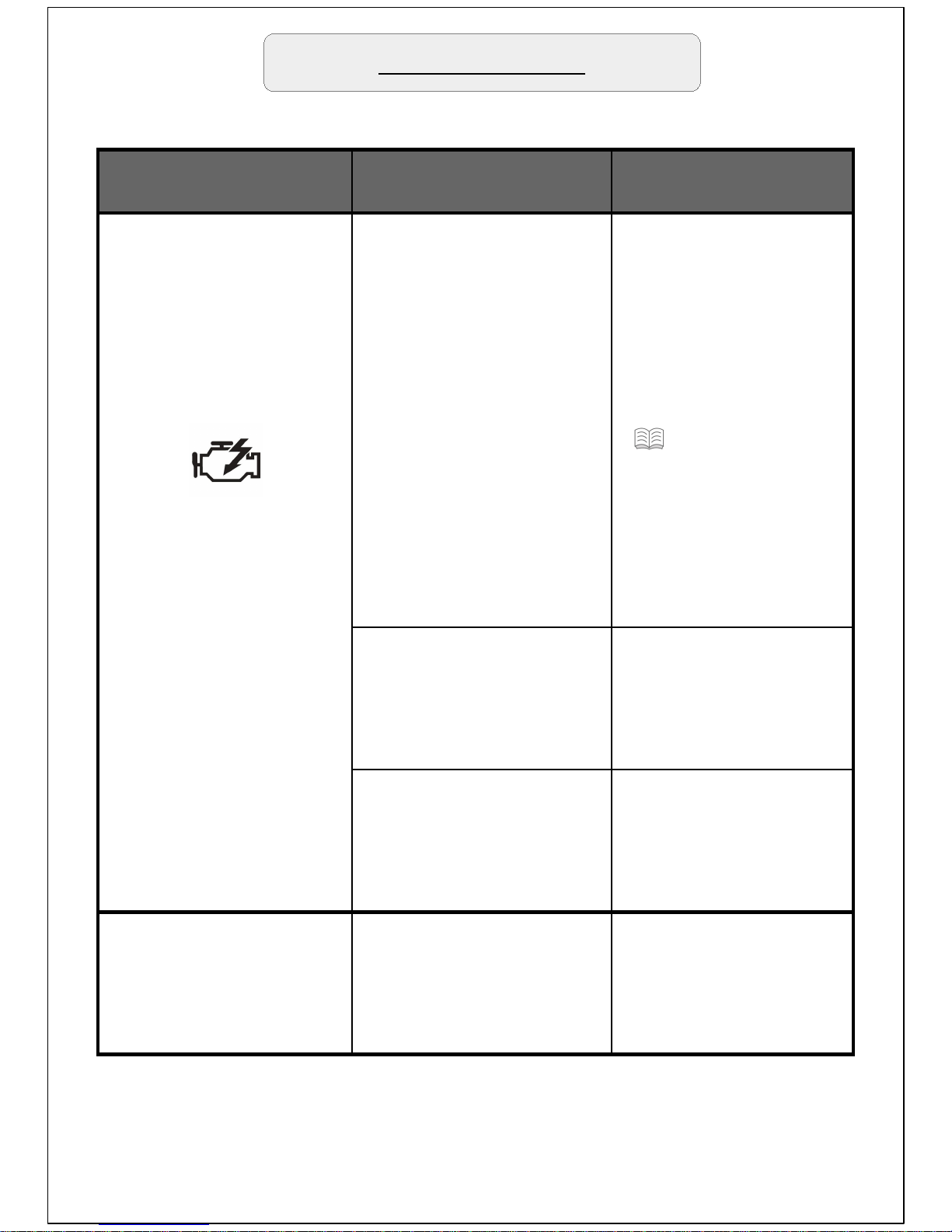
SYMPTOMS POSSIBLE CAUSE
SUGGESTED
ACTION
Check engine light
appears right after
installation.
1. Device installed
while Can bus system
was active.
1a. Switch On – Off
the engine several
times (If the check
engine light is still
On go to step 1b).
1b. Remove the
device, reset the
check engine light
( 22 'Reset check
engine light') and
reinstall waiting for
15 minutes with the
engine Off and the
keys removed before
install the device.
2. Device has not been
connected properly.
2. Repeat the
installation procedure
making sure that all
connections are firmly
in place.
3. Non compatible
device.
3. Contact a Sprint
Booster dealer in
order to get the
correct device for your
vehicle.
Selector Switch does
not light up.
The selector switch has
not been connected
properly.
Remove and re-install
the Selector switch.
Never pull the
connectors from the
wires
Troubleshooting
Page 23
Troubleshooting
In case the vehicle's check engine light goes On you can
follow the steps below to reset the light:
1. Switch On and Off your car's engine several times. Most
vehicles will reset any sporadic error during this process.
2.Consult a technician or your local dealer so the error can
be erased through a diagnostic tool.
On our website you can discover more about Power Converters.
 Loading...