

Page 1

VM4050
(CDM9950SP)
Start Here Guide
English
DRAFT
Nov.4, 2003
Page 2

Page 3

PCS Service
www.sprintpcs.com
Copyright © 2003 Sprint Spectrum L.P. All rights reserved. No reproduction in whole or
in part without prior written approval. Sprint and the diamond logo design are trademarks
of Sprint Communications Company L.P. All other trademarks are the property of their
respective owners.
Printed in Japan
Page 4

Table of Contents
How to Use This Guide . . . . . . . . . . . . . . . . . . . . . . . . . . . . . . . . . . . . . . . . . . .i
Getting Advanced Phone and Service Information . . . . . . . . . . . . .ii
Getting Started . . . . . . . . . . . . . . . . . . . . . . . . . . . . . . . . . . . . . . . . . . . . . . . . . . .1
Basics of Your PCS Phone . . . . . . . . . . . . . . . . . . . . . . . . . . . . . . . . . . . . . .15
Your New PCS Phone . . . . . . . . . . . . . . . . . . . . . . . . . . . . . . . . . . . . . . . .16
Your Phone’s Features . . . . . . . . . . . . . . . . . . . . . . . . . . . . . . . . . . . .16
Turning Your Phone On and Off . . . . . . . . . . . . . . . . . . . . . . . . . . . . . . .18
Turning Your Phone On . . . . . . . . . . . . . . . . . . . . . . . . . . . . . . . . . .18
Turning Your Phone Off . . . . . . . . . . . . . . . . . . . . . . . . . . . . . . . . . .18
Changing the Language . . . . . . . . . . . . . . . . . . . . . . . . . . . . . . . . . .18
Using the Battery and Charger . . . . . . . . . . . . . . . . . . . . . . . . . . . . . . .19
Installing and Removing the Battery . . . . . . . . . . . . . . . . . . . . . . .19
Charging the Battery . . . . . . . . . . . . . . . . . . . . . . . . . . . . . . . . . . . . .20
Making and Answering Calls . . . . . . . . . . . . . . . . . . . . . . . . . . . . . . . .21
Making Calls . . . . . . . . . . . . . . . . . . . . . . . . . . . . . . . . . . . . . . . . . . . . .21
Answering Calls . . . . . . . . . . . . . . . . . . . . . . . . . . . . . . . . . . . . . . . . . .21
Signal Strength . . . . . . . . . . . . . . . . . . . . . . . . . . . . . . . . . . . . . . . . . . .21
Controlling Your Roaming Experience . . . . . . . . . . . . . . . . . . . . . .22
Setting Your Phone’s Roam Mode . . . . . . . . . . . . . . . . . . . . . . . . . .22
Call Guard . . . . . . . . . . . . . . . . . . . . . . . . . . . . . . . . . . . . . . . . . . . . . . .23
Feature Availability . . . . . . . . . . . . . . . . . . . . . . . . . . . . . . . . . . . . . . .23
Internal Phone Book . . . . . . . . . . . . . . . . . . . . . . . . . . . . . . . . . . . . . . . . .24
Saving Phone Numbers . . . . . . . . . . . . . . . . . . . . . . . . . . . . . . . . . . .24
Finding Phone Numbers . . . . . . . . . . . . . . . . . . . . . . . . . . . . . . . . . .24
Making a Call From Your Internal Phone Book . . . . . . . . . . . . . .24
Changing Your Phone’s Settings . . . . . . . . . . . . . . . . . . . . . . . . . . . . .25
Changing the Greeting . . . . . . . . . . . . . . . . . . . . . . . . . . . . . . . . . . .25
Adjusting the Ringer, Key Beep and Earpiece Volume . . . . . . .25
Adjusting Volume During a Conversation . . . . . . . . . . . . . . . . . .26
TTY Use With PCS Service From Sprint . . . . . . . . . . . . . . . . . . . .26
Page 5

Sending and Receiving Messages . . . . . . . . . . . . . . . . . . . . . . . . . .28
Setting Up Your Voicemail . . . . . . . . . . . . . . . . . . . . . . . . . . . . . . . .28
Retrieving Your Voicemail Messages . . . . . . . . . . . . . . . . . . . . . . .28
Accessing Your Voicemail From Another Phone . . . . . . . . . . . .28
Sending and Receiving Text Messages . . . . . . . . . . . . . . . . . . . . .28
PCS Service Features . . . . . . . . . . . . . . . . . . . . . . . . . . . . . . . . . . . . . . . .30
Call Waiting . . . . . . . . . . . . . . . . . . . . . . . . . . . . . . . . . . . . . . . . . . . . . .30
Call Forwarding . . . . . . . . . . . . . . . . . . . . . . . . . . . . . . . . . . . . . . . . . .30
Three-Way Calling . . . . . . . . . . . . . . . . . . . . . . . . . . . . . . . . . . . . . . . .31
PCS Voice CommandSM . . . . . . . . . . . . . . . . . . . . . . . . . . . . . . . . . . . .32
PCS VisionSM . . . . . . . . . . . . . . . . . . . . . . . . . . . . . . . . . . . . . . . . . . . . . . . . . .33
Getting Started With PCS Vision . . . . . . . . . . . . . . . . . . . . . . . . . . .33
PCS Vision Features . . . . . . . . . . . . . . . . . . . . . . . . . . . . . . . . . . . . . .34
Accessing PCS Vision Features . . . . . . . . . . . . . . . . . . . . . . . . . . . .35
PCS Vision Symbols on Your Screen . . . . . . . . . . . . . . . . . . . . . . . .36
PCS Vision Billing Information . . . . . . . . . . . . . . . . . . . . . . . . . . . .36
Your Phone’s Special Features . . . . . . . . . . . . . . . . . . . . . . . . . . . . . .37
Built-in Camera with Camcorder . . . . . . . . . . . . . . . . . . . . . . . . . .37
Additional Features . . . . . . . . . . . . . . . . . . . . . . . . . . . . . . . . . . . . . . .43
Accessories for Your Phone . . . . . . . . . . . . . . . . . . . . . . . . . . . . . . . . .44
How to Order . . . . . . . . . . . . . . . . . . . . . . . . . . . . . . . . . . . . . . . . . . . .45
Performance and Safety . . . . . . . . . . . . . . . . . . . . . . . . . . . . . . . . . . . . .46
Important Information About Your Phone and Service . . . . . .46
Maintaining Safe Use of and Access to Your Phone . . . . . . . . . .47
Caring for Your Battery . . . . . . . . . . . . . . . . . . . . . . . . . . . . . . . . . . .52
Maintaining Safe Use of the Travel Charger . . . . . . . . . . . . . . . . .53
Acknowledging Special Precautions and the FCC Notice . . . .55
Terms and Conditions & Warranty Information . . . . . . . . . . . . . .56
Terms and Conditions of Services . . . . . . . . . . . . . . . . . . . . . . . . .56
Terms of PCS Picture Mail Service . . . . . . . . . . . . . . . . . . . . . . . . .74
Manufacturer’s Warranty . . . . . . . . . . . . . . . . . . . . . . . . . . . . . . . . .86
Page 6

Page 7

i
How to Use This Guide
Welcome – you’ve made the right choice
The advantages of Sprint are as clear as each wireless call you
make. With PCS Service, we give you what you really want
from a wireless service provider – clear calls, easy-tounderstand service plans, and self-servicing options for
managing your account. All this is designed to make your life
easier and worry free.
We know you’re eager to start using your phone right away,
and the two sections of this guide are designed to help you
do just that.
The first section will guide you through the steps
required to set up your PCS Service. Blank spaces are
provided so you can write down important information that
you’ll want to remember. Things like your new PCS Phone
Number, information about your service plan, and your
first invoice.
The second section will guide you through the basics
of your phone and service with quick, easy-to-follow
instructions.
2
1
Page 8

ii
Getting Advanced Phone and
Service Information
This guide covers your phone’s basic features and services.
To learn how to use all the advanced features of your phone
and service, visit
www.sprintpcs.com and sign on to your
account management page with your PCS Phone Number
and password. There, under the “My Phone” section, you'll
have access to your complete phone User’s Guide.
Your online phone User’s Guide provides information on
basic and advanced features and services, such as:
Learning Advanced Dialing Options
Managing Your Call History
Using Advanced Messaging
Using Advanced Internal Phone Book Options
Using Your Phone’s Advanced Settings
Setting Your Phone’s Security
Using Your Personal Organizer
Using Advanced Features of PCS Vision
SM
Understanding Your Phone’s Internal Menu
And more
Page 9

1
Getting Started
Activating and Using PCS Service
Page 10

2
Getting Started
11
Have these things ready before you
call to activate
•Your PCS Phone (Make sure it’s fully charged)
•Your Social Security number
•Your driver’s license number
•Your Electronic Serial Number (also known as ESN;
refer to step 5 on page 4 to locate the number)
•The city and state where your phone will primarily
be used
•A pen
22
Setting up your service — You choose
the way
•From your PCS Phone, press .
– or –
•Use a phone other than your PCS Phone – dial
1-888-715-4588.
TALK
2
Page 11

3
Getting Started
33
PCS Service Areas
Are you interested in where you can use your new phone?
Check out the most up-to-date coverage maps at
www.sprintpcs.com.
44
Your PCS Account Password
My Account Password is:_________________________
You’ll use this password when managing your account
on
www.sprintpcs.com and with PCS Customer Solutions.
Your default password is the last four digits of your Social
Security number.
Page 12
4
Getting Started
55
Finding Your Phone’s ESN
If you set up service using your PCS Phone, the network
automatically communicates the ESN to us. You’ll only
need this number when you’re setting up service by
calling us from a phone other than your new PCS Phone.
The ESN, or Electronic Serial Number, is an 11-digit
number written on the barcode sticker attached to the
phone. To find it, remove the phone’s battery. (For more
information about removing and replacing your battery,
see “Installing and Removing the Battery” on page 19.)
ESN: _________________________________________
After writing down the ESN, replace the battery and
turn on your phone by holding down the key for a
few seconds.
END
Page 13
5
Getting Started
66
PCS Clear PaySMProgram
Check this box if you are on the PCS Clear Pay
SM
Program. If you are not on the PCS Clear Pay Program,
skip ahead to step 7 on page 7.
Follow these easy steps to continue enjoying your new
PCS Service:
•Keep track of your minutes
Dial from your PCS Phone (normal
airtime usage will apply) or sign on to
www.sprintpcs.com
to find out how many minutes you have currently used
within your service plan.
•Make payments
If you have exceeded the minutes in your plan or you
have a past due balance, you should make a payment to
keep your service turned on. There are two easy
payment options:
Make a payment at any Western Union®location
using the Swiftpay
®
form. To find the nearest
location, dial from your
PCS Phone. (Transaction fee applies; payment is
credited to your account within 12 hours.)
– or –
Dial from your PCS Phone (posting
time is 12 hours).
TALK
3
TALK
6
8
9
#
TALK
4
Page 14

6
Getting Started
How we will help you keep your service turned on:
•In the event that your service has been turned off, you
will receive a text message stating: “Your PCS Service
has been turned off. Press to make a payment
and turn service on.”
•The first time your service has been turned off you will
be connected to a live PCS Clear Pay Program Specialist
who will explain why your service has been turned off.
You will be asked to pay your balance to get your service
turned back on (payment will be credited and service
turned back on within 12 hours).
•For any additional times that your service has been
turned off, you will be connected to our automated
payment process. You will have to pay your balance to
have your service turned back on (payment will be
credited and service turned back on within 12 hours).
3
Page 15

7
Getting Started
77
Understanding Your PCS Service Plan
Use the following forms to record your PCS Service Plan
and to familiarize yourself with its features and options.
PCS Free & Clear Plans With Vision
Monthly Service Charge . . . . . . . . . . . . . . . . . . . . $_________
Anytime Minutes . . . . . . . . . . . . . . . . . . . . . . . _________
Unlimited Night & Weekend Minutes
(Mon.-Thur. 9pm-7am, Fri. 9pm-Mon. 7am)
. . . . . Yes
No
Each additional voice minute (overage). . . . . ________¢
Nationwide Long Distance Included . . . . Yes
No
Unlimited PCS Vision
SM
. . . . . . . . . . . . . . . . . Yes
No
Options (monthly charges)
Unlimited Night & Weekend Minutes
(if not included with plan) . . . . . . . . . . . . $_________
Unlimited PCS to PCS Calling
SM
. . . . . . . . . $_________
PCS Voice Command
SM
. . . . . . . . . . . . . . . . $_________
PCS Business Connection
SM
. . . . . . . . . . . . $_________
PCS Add-a-Phone
SM
. . . . . . . . . . . . . . . . . . . . $_________
Off-Network Minutes. . . . . . . . . . . . . . . . . $_________
PCS Equipment Replacement . . . . . . . . . $_________
Roadside Rescue. . . . . . . . . . . . . . . . . . . . . $_________
Other . . . . . . . . . . . . . . . . . . . . . . . . . . . . . . . $_________
Page 16

8
Getting Started
PCS Free & Clear Plans
Monthly Service Charge . . . . . . . . . . . . . . . . . . . . $_________
Anytime Minutes . . . . . . . . . . . . . . . . . . . . . . . _________
Unlimited Night & Weekend Minutes
(Mon.-Thur. 9pm-7am, Fri. 9pm-Mon. 7am)
. . . . . Yes
No
Each additional voice minute (overage). . . . . ________¢
Nationwide Long Distance Included . . . . Yes
No
Options (monthly charges)
Unlimited Night & Weekend Minutes
(if not included with plan) . . . . . . . . . . . . $_________
Unlimited PCS to PCS Calling
SM
. . . . . . . . . $_________
PCS Voice Command
SM
. . . . . . . . . . . . . . . . $_________
PCS Business Connection
SM
. . . . . . . . . . . . $_________
PCS Add-a-Phone
SM
. . . . . . . . . . . . . . . . . . . . $_________
Off-Network Minutes. . . . . . . . . . . . . . . . . $_________
PCS Equipment Replacement . . . . . . . . . $_________
Roadside Rescue. . . . . . . . . . . . . . . . . . . . . $_________
Other . . . . . . . . . . . . . . . . . . . . . . . . . . . . . . . $_________
Page 17

9
Getting Started
PCS Advantage AgreementSM:
I have agreed to a PCS Advantage Agreement.
___ 1 - year agreement
___ 2 - year agreement
I have opted not to sign a PCS Advantage Agreement.
$______ Monthly fee
Note: Your agreement for wireless service with Sprint is made up of
the Service Plan you choose and the Terms and Conditions of
Service which can be found on page 56 of this guide.
Page 18
10
Getting Started
88
Your New PCS Phone Number and
User Name
PCS Phone Number
_____________________________________________
PCS User Name
_____________________________________________
Your user name is automatically assigned to you.
Your user name, which resembles an email address
(for example,
[email protected]), is used with PCS Mail
and text messaging services.
Page 19

11
Getting Started
99
Understanding Your PCS Invoice
Your first invoice will arrive within a few days and will
reflect the following charges:
•Your first full month of service, which is your monthly
service charge of $______
•Additional charges such as taxes, roaming,
or overages
•Charges for additional options you opt to
subscribe to: $______
•Your one-time non-refundable activation
fee of $______
The approximate total of your first invoice will
be $______.
Page 20

12
Getting Started
1100
Quick, easy options to manage
your account
With PCS Customer Solutions, there are two convenient
options for managing your account.
• Manage it online – visit www
.sprintpcs.com
Once you sign on, you can
View the details of your PCS Service Plan
Find out how many minutes you have used and how
many minutes are remaining in your plan
View your current and previous three months
invoices, including the call detail
Make a payment
Find out about PCS Products and Services
Learn how to set up your voicemail and more
Page 21
13
Getting Started
• Use your PCS Phone – press
Once connected, you can
Access a summary of your rate plan
Find out the number of minutes remaining in your
plan for the current invoice cycle
Access information about your most recent invoice
Find out when your last payment was received
Make a payment
Note: Normal airtime charges will apply when calling
..
Welcome and thank you for choosing Sprint.
4
TALK
4
Page 22

Page 23

15
Basics of Your PCS Phone
Page 24
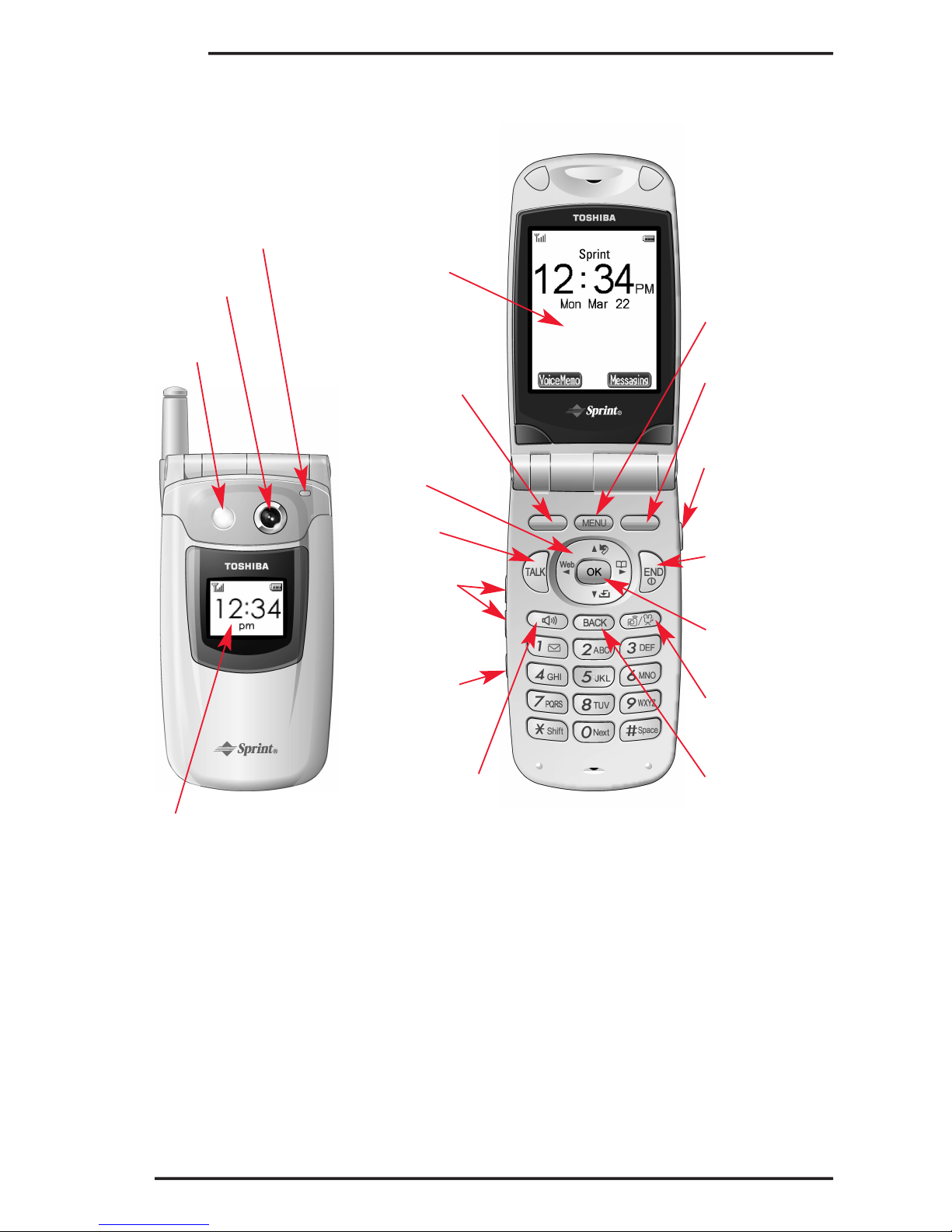
16
Basics
Your New PCS Phone
Your Phone’s Features
1. LED (green/red) blinks green for incoming calls; blinks
red for notifications (messages, voicemail, and alerts).
2. Camera Lens lets you take pictures with auto focus
function.
3. Flash improves picture quality in low-light conditions.
1. LED (green/red)
11. Speakerphone Key
4. Sub Display
2. Camera
Lens
5. Main
Display
12. MENU
6. Left
Softkey
7. Navigation
Key
8. TALK
9. Volume
Keys
14. Headset
Jack
13. Right
Softkey
16. OK
15. END
(Power)
17. Camera /
Video Key
18. BACK
3. Flash
10. Side
Camera
Key
Page 25

4. Sub Display (LCD) lets you monitor the phone’s status.
5. Main Display (LCD) shows the phone’s menus and
various features.
6. Left Softkey allows you to select an action or item at the
bottom left of the main display.
7. Navigation Key scrolls through menus and displays the
next or previous menu option. Also acts as a shortcut
key for Web (
), Find Name in Phone Book ( ), My
Menu (
), and Downloads ( ).
8. TALK allows you to place or to answer a call.
9. Volume Keys adjust the volume during a call or mute the
ringer of an incoming call.
10. Side Camera Key activates Camera mode and takes a
picture.
11. Speakerphone Key activates Speakerphone mode.
12. MENU accesses the phone’s main menu.
13. Right Softkey allows you to select an action or item at
the bottom right of the main display.
14. Headset Jack allows you to plug in an optional headset
for hands-free use.
15. END (Power) allows you to power the phone on or off, to
end calls, or to return to standby mode from any screen.
16. OK allows you to select highlighted menu items and to
confirm actions.
17. Camera / Video Key accesses Pictures/Video menu.
18. BACK allows you to clear an entry or to back up within
a menu.
17
Basics
Page 26

18
Basics
Turning Your Phone On and Off
Turning Your Phone On
1. Fully extend the antenna to receive the best reception.
2. Press for two seconds. (The phone will display
“Looking for Service” until it locates a signal, then it
will automatically enter standby mode – the phone’s
idle state. At this point, you’re ready to begin making
and receiving calls.)
Turning Your Phone Off
Press for two seconds until you see the powering
down animation on the display screen.
Changing the Language
Your PCS Phone can display menu options in both English
and Spanish. The default menu language is English.
To select English or Spanish for your phone's display:
1. Press to access the main menu.
2. Highlight Settings (Configuración) and press .
3. Highlight Others (Otros) and press .
4. Highlight Language (Idioma) and press .
5. Highlight English or Español and press .
OK
OK
OK
OK
MENU
END
END
Page 27
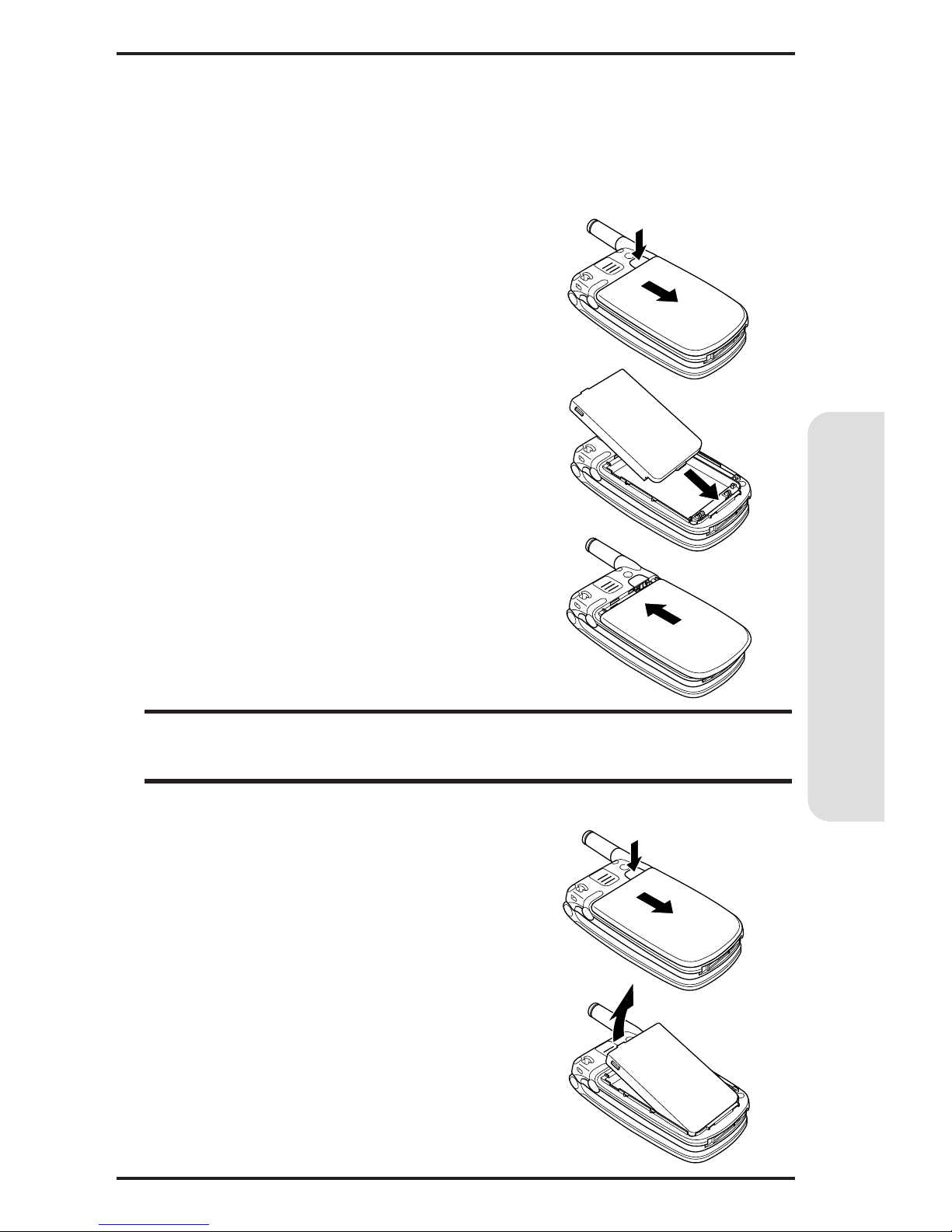
Using the Battery and Charger
Installing and Removing the Battery
To Install the Battery:
1. Press and hold the latch on the
phone and slide the battery cover
to remove it.
2. Insert the bottom of the battery
pack into the phone and place
it down.
3. Place the battery cover on the
phone and slide it until the latch
snaps into place.
Note: Make sure the cover is securely attached to the phone. The battery
pack may separate from the phone if the cover is not properly attached.
To Remove the Battery:
1. Make sure the power is off. Press
and hold the latch on the phone
and slide the battery cover to
remove it.
2. To remove the battery pack, lift
up using the tab at the top of the
battery.
19
Basics
Page 28
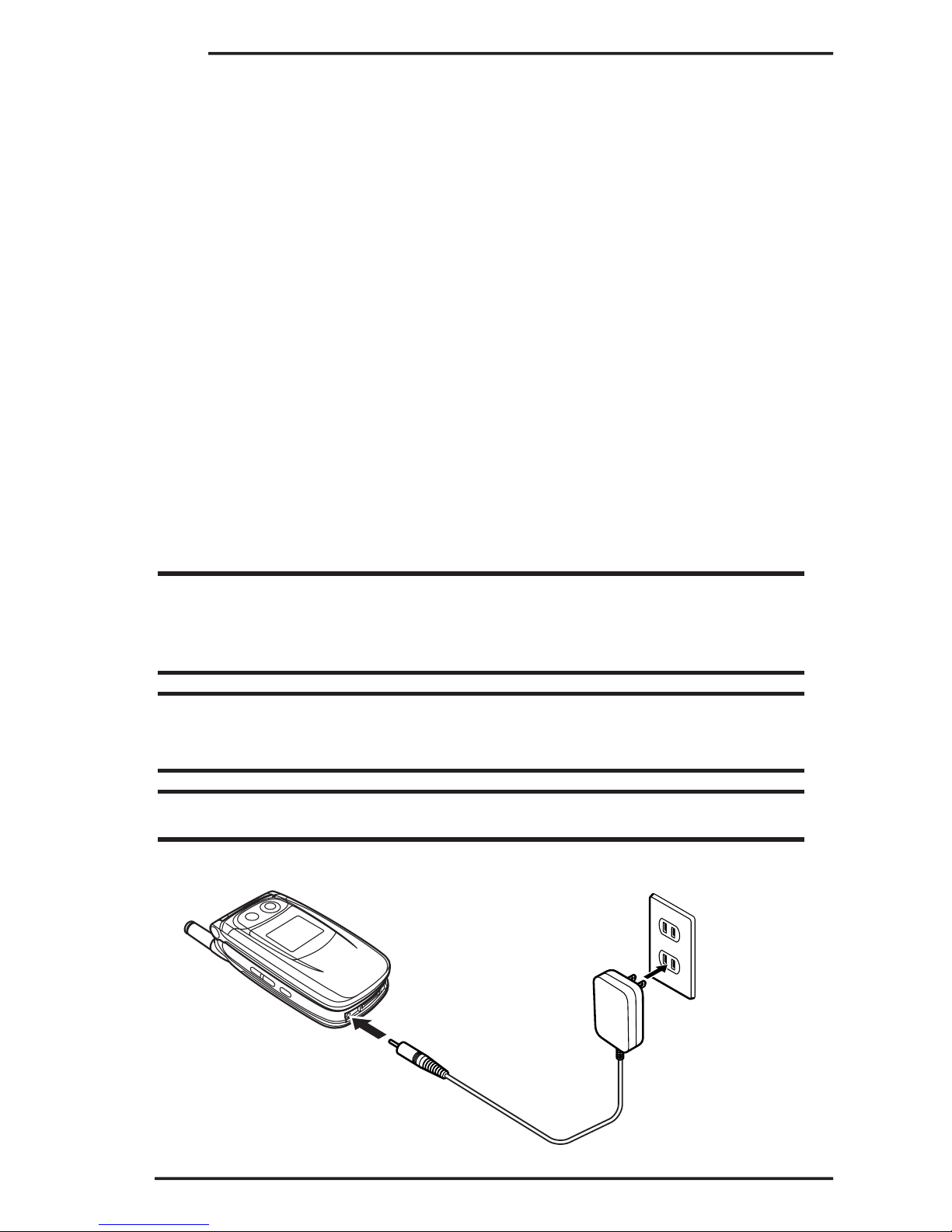
20
Basics
Charging the Battery
To use the travel charger provided with your phone:
1. Plug the round end of the travel charger into the
bottom of the phone with battery installed.
2. Plug the travel charger into the electrical outlet
(AC120V).
The LED indicator lights red while the battery is
charging.
The LED indicator turns off when charging is
complete.
It takes about 2.5 hours for the standard battery and
about 3.5 hours for the extended battery to fully recharge
when completely drained.
Important Note: It is vital that you use only Sprint-approved travel
chargers. Use of unauthorized accessories could damage your
phone and invalidate your warranty.
Note: For complete charging, it is recommended that the phone be
kept off during charging.
Note: It is normal for the battery to become warmer during charging.
Travel Charger
AC120V
Page 29
Making and Answering Calls
Making Calls
1. Make sure your phone is on.
2. Enter a phone number. If you make a mistake while
dialing, press to erase one digit at a time or press
and hold to erase the entire number.
3. Press .
4. When you’re finished, press .
Answering Calls
1. Make sure your phone is on. If your phone is off,
incoming calls go to your voicemail.
2. When your phone rings or vibrates, answer the call by
pressing .
3. To end the call, press .
Signal Strength
You can see the strength of your signal by the signal
indicator ( ) on your phone’s display screen. Call
quality and signal strength are always best when the
antenna is fully raised. If you’re inside a building, being
near a window may give you better reception.
END
TALK
END
TALK
BACK
BACK
21
Basics
Page 30

22
Basics
Controlling Your Roaming Experience
Your phone is dual band/tri mode, which means you can
make and receive calls while on the enhanced Sprint
Nationwide PCS Network and you can also roam on other
networks where we’ve implemented roaming agreements
with other carriers and in limited areas where 1900 MHz
digital networks are available. To learn more about
roaming, visit
www.sprintpcs.com.
Your phone has several features that let you control your
roaming experience.
Setting Your Phone’s Roam Mode
1. Press to access the main menu.
2. Highlight Settings and press .
3. Highlight Roaming and press .
4. Highlight Set Mode and press .
5. To select an option, highlight it and press .
Sprint: Lets you make and receive calls only on the
enhanced Sprint Nationwide PCS Network and
prevents roaming.
Automatic: Searches for alternate wireless networks
when PCS Service is not available.
Analog: This setting forces the phone to seek an
analog roaming system. The previous setting (Sprint
or Automatic) is restored the next time the phone is
turned on.
OK
OK
OK
OK
MENU
Page 31

Call Guard
Call Guard reminds you when you are making or receiving
a roaming call and requires you to take additional steps
before placing or answering roaming calls. These
additional steps are not required when you make or
receive calls while on the enhanced Sprint Nationwide
PCS Network.
To Turn Call Guard On:
1. Press to access the main menu.
2. Highlight Settings and press .
3. Highlight Roaming and press .
4. Highlight Call Guard and press .
5. Highlight On or Off and press .
To Place Roaming Calls With Call Guard On:
1. From standby mode, dial 1 + area code + seven-digit
number and press .
2. When the prompt appears, press to proceed.
To Answer Incoming Calls With Call Guard On:
1. Press .
2. When the prompt appears, press to proceed.
Feature Availability
You can make and receive calls while roaming.
You will have access to voicemail while roaming.
Other features which are standard on the enhanced
Sprint Nationwide PCS Network, such as Call Waiting,
PCS Voice Command, and PCS Vision, are unavailable
while roaming.
1
TALK
1
TALK
OK
OK
OK
OK
MENU
23
Basics
Page 32

24
Basics
Internal Phone Book
Saving Phone Numbers
1. Enter a phone number from standby mode.
2. Press .
3. Highlight New Entry and press .
4. Select an icon for the number (for example, Home,
Work, Mobile, etc.) and press .
5. Highlight the icon to enter a name and press .
6. Enter a name for the entry and press .
7. Select Save (left softkey) to save the entry.
Finding Phone Numbers
1. Press to access the main menu.
2. Highlight Phone Book and press .
3. Highlight Find Name and press to list entries.
4. Press the navigation key left or right to scroll pages or
enter the first letters of a name to find the entry.
5. Highlight the entry and press to display phone
numbers.
Making a Call From Your Internal Phone Book
1. From the internal Phone Book list (see steps 1-3 above),
highlight the entry you want to call and press .
2. Highlight the number you want to call and press .
TALK
OK
OK
OK
OK
MENU
OK
OK
OK
OK
OK
Page 33

Changing Your Phone’s Settings
You can customize many of your phone’s functions, from
display and sounds to messaging and security, through the
Settings menu. Below are just a few examples of how to
navigate and use the Settings menu.
Changing the Greeting
1. Press to access the main menu.
2. Highlight Settings and press .
3. Highlight Display and press .
4. Highlight Greeting and press .
5. Press and hold to erase the current greeting.
6. Enter a new greeting and press .
Adjusting the Ringer, Key Beep and Earpiece Volume
1. Press to access the main menu.
2. Highlight Settings and press .
3. Highlight Sounds and press .
4. Highlight Volume and press .
5. Highlight Ringer Volume, Key Volume, or Earpiece Volume
and press .
6. Use your navigation key to select a volume setting and
press .
OK
OK
OK
OK
OK
MENU
OK
BACK
OK
OK
OK
MENU
25
Basics
Page 34
26
Basics
Adjusting Volume During a Conversation
Press the volume keys on the side of your phone during
the call.
TTY Use With PCS Service From Sprint
A TTY (also known as a TDD or Text Telephone), is a
telecommunications device that allows people who are
deaf or hard of hearing, or who have speech or language
disabilities, to communicate by telephone.
Your phone is compatible with select TTY devices. Please
check with the manufacturer of your TTY device for
connectivity information and to ensure that the TTY
device supports digital wireless transmission.
When establishing your PCS Service, please call
PCS Customer Solutions via the state Telecommunications
Relay Service (TRS) by first dialing .
Then provide the state TRS with this number: 866-727-4889.
To turn TTY mode on or off:
1. Press to access the main menu.
2. Highlight Settings and press .
3. Highlight Others and press .
4. Highlight TTY and press .
Shortcut: From standby mode, press
and .
5. When a prompt appears, press .
6. Highlight Enable or Disable and press .
OK
OK
OK
9
88
##
OK
OK
OK
MENU
TALK
11
7
Page 35

Note: Before connecting or disconnecting a cable of the TTY device
to or from the phone, make sure that the power of the TTY device is
turned off. Otherwise, the phone may malfunction.
IMPORTANT NOTICE:Sprint recommends that TTY users make
emergency calls by other means including Telecommunications
Relay Services (TRS), analog cellular, and landline communications.
Wireless TTY calls to 911 may be corrupted when received by public
safety answering points (PSAPs) rendering some communications
unintelligible.
For additional information and instructions regarding
TTY use, please see your phone’s online User’s Guide at
www.sprintpcs.com.
27
Basics
Page 36

28
Basics
Sending and Receiving Messages
Setting Up Your Voicemail
1. Press and hold .
2. Follow the system prompts to create your pass code
and record your greeting.
Retrieving Your Voicemail Messages
Press and hold . Follow the system prompts.
Accessing Your Voicemail From Another Phone
1. Dial your PCS Phone Number.
2. Press when your voicemail answers.
3. Enter your pass code.
Sending and Receiving Text Messages
Your phone supports two-way text messaging (SMS) that
allows you to send and receive text messages through
your phone. Please visit
www.sprintpcs.com for the
availability of these services.
Below are some basic instructions to get you started with
text messages. For complete information, see the online
User’s Guide at
www.sprintpcs.com.
Sending a Text Message
1. Press to access the main menu.
2. Highlight Messaging and press .
3. Highlight Text Msg. and press .
4. Highlight Send message and press .
OK
OK
OK
MENU
1
1
Page 37

5. Highlight Phone Book and press . Select a
recipient using your navigation key and press .
(This will check the box next to the recipient’s name.)
Select Next (right softkey) to display the Recipient List.
(You may also enter a new recipient’s mobile phone
number or email address.)
6. Select Next (left softkey) when you are finished
selecting/entering recipients (you may include up to
10 recipients).
7. Enter your message and press .
8. To send the message, select Send (left softkey).
Checking Incoming Text Messages
1. Press to access the main menu.
2. Highlight Messaging and press .
3. Highlight Text Msg. and press .
4. Highlight Inbox and press .
5. Highlight the message you want to display and
press .
OK
OK
OK
OK
MENU
OK
OK
OK
29
Basics
Page 38

30
Basics
PCS Service Features
Call Waiting
To respond to an incoming call while you’re on a call:
To put your first call on hold and answer the
second call, press . (To switch between calls,
press again.)
– or –
To end your first call and to answer the incoming call,
press , followed by .
Call Forwarding
Call Forwarding lets you forward your calls to another
number. You can still make calls from your phone while
this is activated. There is a per-call charge for this service.
To activate:
1. Press .
2. Enter the area code and phone number to which your
calls should be forwarded.
3. Press . (You will hear a tone confirming the
activation of Call Forwarding.)
To deactivate:
1. Press .
2. Press . (You will hear a tone confirming the
deactivation.)
TALK
0
2
7
TALK
2
7
TALKEND
TALK
TALK
Page 39

Three-Way Calling
Talking with two different people at the same time is made
easy with Three-Way Calling.
1. Enter a number you wish to call and press .
2. Once you have established the connection, press
to put the first caller on hold.
3. Enter the second number you wish to call and press .
4. When you’re connected to the second party, press
once more to begin your three-way call.
If one of the people you called hangs up, you and the
remaining caller stay connected. If you initiated the
call and are the first to hang up, all three callers will be
disconnected.
Note: When using Three-Way Calling, normal airtime rates will be
charged for each of the two calls.
TALK
TALK
TALK
TALK
31
Basics
Page 40

32
Basics
PCS Voice Command
SM
With PCS Voice Command, you can call a number just by
saying a name.
Get started by setting up your Personal Address Book
1. Press . Follow the system prompts. (You’ll
hear a tone followed by the prompt “Ready.”)
2. Say “Add Name” to begin setting up your Personal
Address Book.
Making a call with PCS Voice Command
1. Press . (You’ll hear a tone followed by the
prompt “Ready.”)
2. After the prompt, say “Call” and the name of the
person or the number you want to call. (Your request
will be repeated and you will be asked to verify.)
3. Say “Yes” to call the number or person. Say “No”
to cancel.
Note: There is a monthly charge for PCS Voice Command.
TALK
TALK
Page 41

PCS Vision
SM
Getting Started With PCS Vision
To sign up for PCS Vision services or to access complete
instructions, visit
www.sprintpcs.com/manage where you
may download your phone’s complete User’s Guide.
Launching PCS Vision
1. Press to access the main menu.
2. Highlight Web and press .
Shortcut: From standby mode, press the navigation key left (Web).
3. Choose Connect or Always Auto-Connect and select OK
(left softkey) to launch a PCS Vision connection (your
phone will go to the PCS Vision Home page or to the
last page visited); select Cancel (right softkey) to cancel
the connection.
Tip: Selecting Always Auto-Connect configures your phone to
bypass the selection screen in the future.
Note: For information on charges associated with features that use
a PCS Vision connection, refer to your PCS Service Plan.
4. Using your navigation key, scroll around and select
from a variety of online services.
5. End or exit browser session by pressing .
END
OK
MENU
33
Basics
Page 42

34
Basics
PCS Vision Features
With PCS Vision services, you will have access to additional
features, better performance, faster Web connections, and
a wider variety of online services. Features such as Web
access, graphically-enriched games, and sending/receiving
digital images will be available on select phones through
the enhanced Sprint Nationwide PCS Network.
Picture Mail
SM
Take digital pictures with a built-in camera and
send them to email addresses or to other
PCS Vision Phones.
Messaging
Send and receive emails and text messages, or chat.
Games
Play exciting games with full-color graphics,
sound, and vibration.
Ringers
Personalize your PCS Phone by downloading and
assigning different ringers to numbers in your
address book.
Screen Savers
Download unique images to use as screen savers or
make it easy to tell who’s calling by assigning
specific images to numbers in your address book.
Page 43
Web
Experience full-color graphic versions of popular
Websites.
PCS Business Connection
SM
Secure, real-time access to your Microsoft
®
Outlook®or Lotus Notes®company email, calendar,
business directory, and personal contacts.
Accessing PCS Vision Features
User Name
Your user name is automatically assigned to you. Your
user name, which resembles an email address (for
example,
[email protected]), is used with PCS Mail
and text messaging services.
To find your user name:
1. Press to access the main menu.
2. Highlight Settings and press .
3. Highlight Information and press .
4. Highlight Phone Info and press to find your user
name and options.
Once your phone is activated, you are signed in and ready
to connect to PCS Vision services at any time. You will
only be charged for services when you use them.
OK
OK
OK
MENU
35
Basics
Page 44

36
Basics
PCS Vision Symbols on Your Screen
Phone is not currently able to access PCS Vision
service features.
Connection is active (data is being transferred).
Outgoing calls can be made, but incoming calls go
directly to your voicemail.
Connected, and voice calls can be sent and received.
PCS Vision Billing Information
See your service plan for details on PCS Vision billing.
Page 45
Your Phone’s Special Features
Built-in Camera with Camcorder
Your phone comes with an easy-to-use built-in camera
with camcorder, which allows you to instantly take, view,
and share pictures and video with your friends and family.
Please visit
www.sprintpcs.com for the availability of these
services.
Below are some basic instructions to get you started with
your camera/camcorder. For complete information on
how to use your phone’s camera/camcorder and all its
options, see the online User’s Guide at
www.sprintpcs.com.
Taking a Picture
1. With the clamshell open, press and hold to
activate Camera mode (see diagram on page 16).
(The camera is now ready to take a picture.)
2. Using the phone’s main LCD as a viewfinder, aim the
camera lens at your subject.
3. Press to take the picture. (Your picture will
automatically be saved.)
4. Select Next (right softkey) to display options (including
Send Picture, Go to Camera, Upload, and more).
37
Basics
Page 46

38
Basics
Taking Video
1. With the clamshell open, press and hold to
activate Camera mode.
2. From Camera mode, press and hold to enter
Camcorder mode.
3. Using the phone’s main LCD as a viewfinder, aim the
camera lens at your subject.
4. Select Record (left softkey) to start recording with the
camcorder (up to 15 seconds).
5. To end recording, select Done (left softkey). (Your
video will automatically be saved.)
6. Select Next (right softkey) to display options
(including Send Video, Go to Camcorder, Upload, and
more).
Sharing Picture Mail
SM
1. With the clamshell open, press to enter the
Pictures/Video menu.
2. Highlight My Pictures and press .
3. Highlight In Camera and press .
4. Select a picture and select Send (left softkey).
5. Highlight Phone Book and press . Select a recipient
using your navigation key and press . (This will
check the box next to the recipient’s name.) Select
Next (right softkey) to display the Recipient List.
(You may also enter a new recipient’s email address or
PCS Vision Phone number.)
6. Select Next (right softkey) when you are finished
selecting/entering recipients (you may include up
to 10 recipients).
OK
OK
OK
OK
Page 47
7. If you wish to record and include a Voice Memo
with the picture you are sending, select Start (left
softkey), and start recording after the beep.
(Maximum recording time is 10 seconds). If you do
not wish to attach a voice memo to the message, select
Skip (right softkey).
8. Use your keypad to enter a text message and select
Next (right softkey). You may also choose to leave the
message area blank; just select Skip (right softkey)
to continue.
9. Select Send (left softkey) to send the picture.
Note: The first time you share Picture Mail, you will be prompted to
establish a Picture Mail Website account and password. Enter a
four- to eight-digit, alpha-numeric password and press .
Once you receive confirmation, you may continue to upload and
share pictures.
Tip: Once your account is established, you may also view and
manage your pictures online at www
.picturemail.sprintpcs.com, or
on your phone by pressing and selecting Online Albums.
Sharing Video
1. With the clamshell open, press to enter the
Pictures/Video menu.
2. Highlight My Video and press .
3. Highlight In Camcorder and press .
4. Select your video and select Send (left softkey).
OK
OK
OK
39
Basics
Page 48

40
Basics
5. Highlight Phone Book and press . Select a recipient
using your navigation key and press . Select Next
(right softkey) to display the Recipient List.
(You may also enter a new recipient’s email address or
PCS Vision Phone number.)
6. Select Next (right softkey) when you are finished
selecting/entering recipients (you may include up to
10 recipients).
7. If you wish to record and include a Voice Memo
with the video you are sending, select Start (left
softkey), and start recording after the beep.
(Maximum recording time is 10 seconds). If you do
not wish to attach a voice memo to the message, select
Skip (right softkey).
8. Use your keypad to enter a text message and select
Next (right softkey). You may also choose to leave the
message area blank; just select Skip (right softkey) to
continue.
9. Select Send (left softkey) to send the video.
Viewing Incoming Picture/Video Messages
1. Press to access the main menu.
2. Highlight Messaging and press .
3. Highlight Picture Mail and press .
4. Highlight Inbox and press .
5. Highlight the message you want to display and press .
6. To display the picture or video, select Go (left softkey).
OK
OK
OK
OK
MENU
OK
OK
Page 49

Viewing Pictures
1. With the clamshell open, press to enter the
Pictures/Video menu.
2. Highlight My Pictures and press .
3. Highlight In Camera and press .
4. Use your navigation key to scroll through and view
saved pictures.
5. To expand the highlighted thumbnail, press .
Viewing Video
1. With the clamshell open, press to enter the
Pictures/Video menu.
2. Highlight My Video and press .
3. Highlight In Camcorder and press .
4. Highlight a video icon and press . (The first frame
from the selected video is displayed.)
5. To play the video, select Play (right softkey).
Deleting Pictures / Video
1. Display pictures or video in thumbnail. (See “Viewing
Pictures” or “Viewing Video” above.)
2. Select Options (right softkey).
3. Highlight Erase and press .
4. Select Erase this and press . (You may also
choose Erase all to delete all pictures or all videos saved
in the folder.)
5. To confirm the deletion, highlight Yes and press .
OK
OK
OK
OK
OK
OK
OK
OK
OK
41
Basics
Page 50

42
Basics
Assigning Pictures to Phone Tasks
1. With the clamshell open, press to enter the
Pictures/Video menu.
2. Highlight My Pictures and press .
3. Highlight In Camera and press .
4. Using your navigation key, select a desired picture.
5. To expand the selected picture, press .
6. Select Options (right softkey).
7. Highlight Assign and press .
8. To assign your picture, highlight one of the following
options and press :
Screen Saver to display the picture as a screen saver.
Phone Book to display the picture for incoming calls
from a specific internal Phone Book entry.
(There are more options including Scheduler, Sub LCD,
Main Menu, and My Menu.)
9. Select additional options as prompted and press
to assign the picture.
Tip: Have fun getting to know your camera and its features before
using it to capture important special events such as weddings,
birthdays, or graduations. For complete details, see your online
User’s Guide at www.sprintpcs.com.
OK
OK
OK
OK
OK
OK
Page 51

Additional Features
Calendar
The built-in Calendar offers several personal information
management features to help you manage your busy lifestyle.
Location
Your PCS Phone is equipped with a Location feature for
use in connection with location-based services which may
be available in the future.
External Display
Your phone’s sub LCD allows you to monitor the phone’s
status and to see who’s calling without opening the phone.
43
Basics
Page 52

44
Basics
Accessories for Your Phone
Standard Battery
Provides up to 3.3 hours of continuous talk time or up to
360 hours of continuous standby time in digital mode.
Extended Battery
Provides up to 5.4 hours of continuous talk time or up to
580 hours of continuous standby time in digital mode.
Vehicle Power Adapter
Charges your phone in your vehicle using the cigarette
lighter adapter.
Desktop Charger
Charges your phone when placed in the charger’s
phone slot. Desktop charger is a combination of the travel
charger and desktop holder.
Travel Charger
Provides a convenient, compact, and lightweight solution
to charging your phone while traveling.
Desktop Holder
Provides a convenient place to store your phone when at
home or work. The desktop holder does not charge the
phone.
Belt Clip
Attaches to the back of your phone and provides a safe and
convenient way to carry your phone.
Leather Carrying Case with Belt Clip
Protect your phone with this genuine leather pouch-style
carrying case. The belt clip swivels 180 degrees to allow
for easy attachment to a belt or pocket and the top snap
closure keeps your phone securely in place.
Page 53

How to Order
These and other accessories are available for purchase at
your local Sprint Store. You can also call the PCS Accessory
Hotline (1-800-974-2221) or visit
www.sprintpcs.com.
Next day delivery is offered in select areas.
45
Basics
Page 54

46
Basics
Performance and Safety
Important Information About Your Phone and Service
Keeping Tabs on Signal Strength
The quality of each call you make or receive depends on the signal
strength in your area. Your phone informs you of the current signal
strength by displaying a number of bars next to the signal strength
icon. The more bars displayed, the stronger the signal. If you’re inside
a building, being near a window may give you better reception.
Understanding the Power Save Feature
If your phone is unable to find a signal after 15 minutes of searching, a
Power Save feature is automatically activated. If your phone is active,
it periodically rechecks service availability or you can check it yourself
by pressing any key. Anytime the Power Save feature is activated, a
message displays on the screen. When a signal is found, your phone
returns to standby mode.
Understanding How Your Phone Operates
Your phone is basically a radio transmitter and receiver. When it's
turned on, it receives and transmits radio frequency (RF) signals.
When you use your phone, the system handling your call controls the
power level. This power can range from 0.006 watts to 0.2 watts in
digital mode.
Knowing Radio Frequency Safety
The design of your phone complies with updated NCRP standards
described below. To further limit RF exposure, you can limit the
duration of your calls and operate your phone in the most powerefficient manner. In 1991-92, the Institute of Electrical and Electronics
Engineers (IEEE) and the American National Standards Institute
(ANSI) joined in updating ANSI's 1982 standard for safety levels with
respect to human exposure to RF signals. More than 120 scientists,
engineers and physicians from universities, government health
agencies and industries developed this updated standard after
reviewing the available body of research. In 1993, the Federal
Communications Commission (FCC) adopted this updated standard
in a regulation. In August 1996, the FCC adopted a hybrid standard
Page 55

consisting of the existing ANSI/IEEE standard and the guidelines
published by the National Council of Radiation Protections and
Measurements (NCRP).
Maintaining Your Phone’s Peak Performance
There are several simple guidelines to operating your phone properly
and maintaining safe, satisfactory service.
Hold the phone with the antenna raised, fully-extended and over
your shoulder.
Try not to hold, bend, or twist the phone’s antenna.
Don’t use the phone if the antenna is damaged.
Speak directly into the mouthpiece.
Avoid exposing your phone and accessories to rain or liquid spills.
If your phone does get wet, immediately turn the power off and
remove the battery. If it’s inoperable, return it to a Sprint Store or
call PCS Customer Solutions for service.
Note: For the best care of your phone, only Sprint Authorized Personnel should
service your phone and accessories. Faulty service may void the warranty.
Maintaining Safe Use of and Access to Your Phone
FAILURE TO FOLLOW THE INSTRUCTIONS OUTLINED MAY LEAD TO
SERIOUS PERSONAL INJURY AND POSSIBLE PROPERTY DAMAGE.
Using Your Phone While Driving
Talking on your phone while driving (or operating the phone without
a hands-free device) is prohibited in some jurisdictions. Laws vary as
to specific restrictions. Remember that safety always comes first.
When using your phone in the car:
Get to know your phone and its features, such as speed dial
and redial.
When available, use a hands-free device.
Position your phone within easy reach.
Let the person you are speaking to know you are driving; if
necessary, suspend the call in heavy traffic or hazardous weather
conditions.
47
Basics
Page 56

48
Basics
Do not take notes or look up phone numbers while driving.
Dial sensibly and assess the traffic; if possible, place calls when
stationary or before pulling into traffic.
Do not engage in stressful or emotional conversations that may
divert your attention from the road.
Dial 911 to report serious emergencies. It’s free from your
wireless phone.
Use your phone to help others in emergencies.
Call roadside assistance or a special non-emergency wireless
number when necessary.
Tip: Purchase an optional Hands-Free Car Kit.
Following Safety Guidelines
To operate your phone safely and efficiently, always follow any special
regulations in a given area. Turn your phone off in areas where use is
forbidden or when it may cause interference or danger.
Using Your Phone Near Other Electronic Devices
Most modern electronic equipment is shielded from radiofrequency
(RF) signals. However, RF signals from wireless phones may affect
inadequately shielded electronic equipment.
RF signals may affect improperly installed or inadequately shielded
electronic operating systems and/or entertainment systems in motor
vehicles. Check with the manufacturer or their representative to
determine if these systems are adequately shielded from external RF
signals. Also check with the manufacturer regarding any equipment
that has been added to your vehicle.
Consult the manufacturer of any personal medical devices, such as
pacemakers and hearing aids, to determine if they are adequately
shielded from external RF signals.
Note: Always turn off the phone in health care facilities and request permission
before using the phone near medical equipment.
Page 57

Pacemakers
The Health Industry Manufacturers Association recommends that a
minimum separation of six (6”) inches be maintained between a
handheld wireless phone and a pacemaker to avoid potential
interference with the pacemaker. These recommendations are
consistent with the independent research by and recommendations
of Wireless Technology Research.
Persons with Pacemakers:
Should ALWAYS keep the phone more than six (6”) inches from
their pacemaker when the phone is turned ON.
Should not carry the phone in a breast pocket.
Should use the ear opposite the pacemaker to minimize the
potential for interference.
If you have any reason to suspect that interference is taking place,
turn your phone OFF immediately.
Turning Off Your Phone Before Flying
Turn off your phone before boarding any aircraft. To prevent possible
interference with aircraft systems, the U.S. Federal Aviation
Administration (FAA) regulations require you to have permission from
a crew member to use your phone while the plane is on the ground.
To prevent any risk of interference, FCC regulations prohibit using
your phone while the plane is in the air.
49
Basics
Page 58

50
Basics
Turning Off Your Phone in Dangerous Areas
To avoid interfering with blasting operations, turn your phone off
when in a blasting area or in other areas with signs indicating
two-way radios should be turned off. Construction crews often use
remote-control RF devices to set off explosives.
Turn your phone off when you're in any area that has a potentially
explosive atmosphere. Although it's rare, your phone and accessories
could generate sparks. Sparks can cause an explosion or fire, resulting
in bodily injury or even death. These areas are often, but not always,
clearly marked. They include:
Fueling areas such as gas stations.
Below deck on boats.
Fuel or chemical transfer or storage facilities.
Areas where the air contains chemicals or particles such as grain,
dust, or metal powders.
Any other area where you would normally be advised to turn off
your vehicle’s engine.
Note: Never transport or store flammable gas, liquid, or explosives in the
compartment of your vehicle that contains your phone or accessories.
For Vehicles Equipped with an Air Bag
An air bag inflates with great force. DO NOT place objects, including
either installed or portable wireless equipment, in the area over the air
bag or in the air bag deployment area. If in-vehicle wireless equipment
is improperly installed and the air bag inflates, serious injury could
result.
Restricting Children’s Access to Your Phone
Your phone is not a toy. Do not allow children to play with it as they
could hurt themselves and others, damage the phone, or make calls
that increase your phone bill.
Caring for Your Phone
Never attempt to disassemble the phone or any of its accessories.
If service or repair is required, return the unit to a Sprint
authorized service center. If the unit should be disassembled, a
risk of electric shock or fire may result.
Page 59

Always use Sprint-approved accessories and optional devices
when operating this cellular phone, as the use of incompatible
auxiliary equipment could result in fire, electric shock, or other
bodily injury. The use of unauthorized accessories will also void
your Warranty.
When the phone is used for extended periods of time in high
temperature conditions the phone surface could become hot. Please
use caution when touching the phone under such conditions.
Use in Vehicles - Always secure the phone in its holder when it is
not in use. Never place the phone on the passenger seat or
anyplace else in the car where it can become a projectile during a
collision or sudden stop.
Never expose this phone to high temperatures, such as those found
near a heater or in a closed car parked in the sun. This can cause
heat-damage to the plastic parts, the electronic components, and
the battery.
Never drop this phone or subject it to violent impact or shock.
This can cause mechanical damage.
Never store this phone in cold areas. When the phone warms up
(to its normal operating temperature), moisture can form inside the
phone, which may damage the phone’s electronic circuit board.
Never use harsh chemicals, cleaning solvents, or strong detergents
to clean this phone. Always clean it with a soft cloth that has been
slightly dampened in a mild soap-and-water solution.
Never paint this phone. This can clog the moving parts.
If you at anytime notice an allergic skin reaction from use of
this product, immediately discontinue use and consult with
your physician.
Do not aim your camera at the sun. The sunlight passing through
the camera lens may cause damage to the camera.
Do not use your camera's flash close to a person's eyes. This may
cause the person to lose eyesight temporarily and result in
an accident.
51
Basics
Page 60

52
Basics
Caring for Your Battery
Protecting Your Battery
The guidelines listed below help you get the most out of your battery’s
performance.
Use only Sprint-approved batteries and desktop chargers. These
chargers are designed to maximize battery life. Using other
batteries or chargers voids your warranty and may cause damage.
In order to avoid damage, charge the battery only in temperatures
that range from 32º F to 113º F (0º C to 45º C).
Don’t use the battery charger in direct sunlight or in high humidity
areas, such as the bathroom.
Never dispose of the battery by incineration.
Keep the metal contacts on top of the battery clean.
Don’t attempt to disassemble or short-circuit the battery.
The battery may need recharging if it has not been used for a long
period of time.
It’s best to replace the battery when it no longer provides
acceptable performance. It can be recharged hundreds of times
before it needs replacing.
Don’t store the battery in high temperature areas for long periods
of time. It’s best to follow these storage rules:
Less than one month:
-4º F to 140º F (-20º C to 60º C)
More than one month:
-4º F to 113º F (-20º C to 45º C)
Never expose the terminals of the battery pack to any other metal
object. Always wrap it or place it in a plastic bag whenever
transporting it.
Never heat and never attempt to disassemble the battery pack, as
that could cause leakage of the caustic electrolyte. If the battery is
accidentally broken, avoid skin contact with the contents. In the
event of skin contact, wash the affected area immediately and
obtain prompt medical attention.
Always turn your phone OFF before removing the battery pack,
and always use the battery pack for its intended purpose only.
Page 61

Disposal of Lithium Ion (LiIon) Batteries
For safe disposal options of your LiIon batteries, contact your nearest
Sprint authorized service center.
Special Note: Be sure to dispose of your battery properly. In some
areas, the disposal of batteries in household or business trash may
be prohibited.
Note: For safety, do not handle a damaged or leaking LiIon battery.
Maintaining Safe Use of the Travel Charger
The travel charger and the desktop charger that were designed for this
unit both require the use of a standard 120 V AC power source for
their operation.
Never attempt to disassemble or repair a travel charger or desktop
charger, as exposure to electric shock hazards may result. Always
contact a Sprint authorized service center if repair or replacement
is required.
Never alter the AC cord or plug on your travel charger or desktop
charger. If the plug will not fit into the available outlet, have a
proper outlet installed by a qualified electrician. Improper
connection can result in the risk of electric shock.
Never allow any liquids or water to spill on the travel charger or
desktop charger when it is connected to an AC power source.
There is a risk of fire or electric shock.
Always use the Sprint-approved travel charger or desktop charger
to avoid any risk of fire or damage to your cellular phone or
battery. Bodily injury or property damage may occur as a result of
the use of an unauthorized and incompatible travel charger or
desktop charger.
Never use a travel charger or desktop charger if it has a damaged
or worn power cord or plug. The use of damaged or worn power
cords or plugs could result in electric shock, burns, or fire.
Contact a Sprint authorized service center immediately to obtain
a suitable replacement.
53
Basics
Page 62

54
Basics
Always unplug the travel charger or desktop charger from the
power source before attempting any cleaning in order to avoid the
risk of electric shock. Always use a soft cloth dampened with
water to clean the equipment, after it has been unplugged.
Never attempt to use an unauthorized travel charger or desktop
charger with your phone in order to avoid any risk of bodily injury
or property damage. Since unauthorized accessories have different
specifications, they may be incompatible with your phone.
Always confirm that the power cord for any accessory is located so
that it will not be stepped on, tripped over, or otherwise subjected
to damage or stress.
Never place heavy objects on a power cord, as this could result in
damage to the cord.
Never bend or twist a power cord, and never pull on a power
cord in an attempt to remove a travel charger or accessory plug
from a socket. Always grasp the travel charger or the accessory
plug directly when unplugging the device in order to avoid
damaging the cord.
Always disconnect the travel charger or desktop charger from the
power source when it is not in use.
WARNING: Handling the cord on this product or cords associated with
accessories sold with this product, will expose you to lead, a chemical
known to the State of California to cause birth defects or other
reproductive harm.
Wash hands after handling
.
Page 63

Acknowledging Special Precautions and
the FCC Notice
FCC Notice
This phone may cause TV or radio interference if used in close
proximity to receiving equipment. The FCC can require you to
stop using the phone if such interference cannot be eliminated.
Vehicles using liquefied petroleum gas (propane or butane) must
comply with the National Fire Protection Standard (NFPA-58).
For a copy of this standard, contact the National Fire Protections
Association, One Batterymarch Park, Quincy, MA 02269,
Attn.: Publication Sales Division.
Cautions
Any changes or modifications to your phone not expressly approved
in this document could void your warranty for this equipment and
void your authority to operate this equipment. Only use approved
batteries, antennas, and chargers. Although your phone is quite
sturdy, it is a complex piece of equipment and can be broken. Avoid
dropping, hitting, bending, or sitting on it.
Body-Worn Operation
To maintain compliance with FCC RF exposure guidelines, if you wear
a handset on your body, use the Sprint approved carrying case,
holster, or other accessory. If you do not use a body-worn accessory,
ensure the antenna is at least 0.6 inch (1.5 centimeters) from your
body when transmitting. Use of non-Sprint approved accessories may
violate FCC RF exposure guidelines. For more information about
RF exposure, visit the FCC Website at www
.fcc.gov.
FCC Radiofrequency Emission
This phone meets the FCC Radiofrequency Exposure Guidelines.
FCC ID number: CJ6DCFC009001. More information on the phone's
SAR can be found from the following FCC Website:
http://www
.fcc.gov/oet/fccid.
55
Basics
Page 64

56
Basics
Terms and Conditions
& Warranty Information
Terms and Conditions of Services
Effective as of June 1, 2003 until replaced
Thanks for choosing Sprint. These terms and conditions are part of
your agreement with Sprint for PCS Services.
The terms and conditions included with your PCS Phone may not be
the most current version. For the most current version of the terms
and conditions, please visit our Website at www
.sprintpcs.com or call
PCS Customer Service Solutions at 1-888-211-4PCS. If you activated
PCS Services before the effective date of these terms and conditions,
these terms and conditions replace and supersede any previous terms
and conditions.
If you have questions about your PCS Services, please visit our Website
at www
.sprintpcs.com or call PCS Customer Service Solutions at
1-888-211-4PCS (4727).
Para solicitar esta literatura en español, por favor contactar a
1-888-211-4PCS(4727).
Agreement. Your agreement (“Agreement”) with Sprint Spectrum L.P.
and any of its affiliates doing business as Sprint providing PCS Services
(“Services”) to you is made up of these Terms and Conditions of
Service (“Terms”) and the Service Plan that we agree to provide you.
Your “Service Plan” is described in our marketing materials, and
includes the terms, rates and features we set for that Service Plan. In
the agreement, we use the words “we,” “us,” “our” or “Sprint” to refer
to Sprint Spectrum L.P. and its affiliates doing business as Sprint. You
accept the agreement when you activate PCS Services or make any
attempt to use our PCS Services (for example, attempting to place any
call while on or roaming off the Sprint Nationwide PCS Network,
using data services, etc.). We may change the Agreement at any time
by giving you prior notice. Any changes to the Agreement are effective
when we publish them. If you use our Services or make any payment to
us on or after the effective date of the changes, you accept the changes.
Page 65

If we change a material term of the Agreement and that change has a
material adverse effect on you, you may terminate the Agreement
without an early termination fee by calling 1-888-211-4727 within 30
days after the invoice date of the first invoice your receive after the
changes go into effect. You understand and agree that taxes, Universal
Service fees and other charges imposed by the government or based
on government calculations may increase or decrease on a monthly
basis, and that this paragraph does not apply to any increases in such
taxes, Universal Service fees and other charges.
Provision of Service. Your purchase of a PCS Phone or other
equipment does not mean that we must provide Services to you.
We may decide not to provide Services to you for any lawful reason.
We may request that you provide us with any information we
reasonably require to determine whether you qualify for Services.
Services in some areas are managed and provided under contract with
Sprint by independent affiliates with access to the Sprint Nationwide
PCS Network. Some Services may not be available or may operate
differently in certain affiliate markets or other areas.
Credit Verification. You must have and maintain satisfactory credit
to receive and continue to receive Services. We will verify your credit
before agreeing to provide Services to you and we may verify your
credit at any time while we provide Services to you. Credit verification
may include a review of credit reports that we receive from credit
bureaus. If at any time we determine, in our sole discretion, that
payment for Services may not be made when due, we may suspend
Services and require that you provide payment on account or a
guarantee of payment before we resume Services.
Service Plan. You may be eligible for a fixed length PCS Service Plan
(“Term Service Plan”) or for a month-to-month Service Plan
(“Non-Term Service Plan”). We determine the Service Plan for which
you qualify. Except as permitted by the Agreement, you must maintain
service with us on your Term Service Plan for the minimum term
associated with that Term Service Plan. We may offer non-identical
Service Plans to different individuals or entities. Services and coverage
under some Service Plans may be more limited than available under
other Service Plans. Your Service Plan sets out the charges for Services
and is your Service Plan until that Service Plan is changed, you switch
57
Basics
Page 66

58
Basics
to a different Service Plan, or your Services terminate. Based on your
credit rating or other factors, we may require that you make a deposit,
prepayment, or a series of deposits or prepayments, or be subject to an
account spending limit, before Services are activated or maintained.
Changing Service Plans. If you are on a Non-Term Service Plan, you
may change to a different Service Plan for which you qualify. Any
change is effective at the start of your next full invoicing cycle unless
otherwise specified by us at the time that you place your change
order. If you change or add a different Service Plan or service feature
and the change is effective prior to the start of your next full invoicing
cycle, you will be invoiced a prorated amount. We may require a
service charge for implementing any change directed by you in
addition to the charges associated with the Service Plan or optional
service features you select. If you are on a Term Service Plan and you
want to change your service plan, you may be required to accept a
new Term Service Plan and we may require you to pay the early
termination fee set out in your Service Plan or other fee.
Termination. Non-Term Service Plan. If you are on a Non-Term
Service Plan, you may terminate Services at any time by giving us
notice. Subject to the terms of this Agreement, we may terminate
Services at any time, with or without notice. If your Service has been
suspended due to non-payment, you may be charged a reactivation
fee. We may deactivate any Number before you receive notice of
termination without liability to you. Termination by either of us may
be with or without cause.
Termination. Term Service Plan. EXCEPT AS PERMITTED BY THE
AGREEMENT, IF YOU TERMINATE YOUR TERM SERVICE PLAN
BEFORE THE END OF THE TERM, OR IF WE TERMINATE SERVICES
FOR CAUSE BEFORE THE END OF THE TERM, YOU WILL BE
REQUIRED TO PAY THE EARLY TERMINATION FEE ASSOCIATED
WITH YOUR TERM SERVICE PLAN. No early termination fee is charged
if you terminate a Term Service Plan in accordance with the return
policy associated with your Term Service Plan. After the expiration of
the term, the Terms relating to Non-Term Service Plans apply.
Page 67

Termination. General. Regardless of whether you have a Non-Term
or a Term Service Plan, we may terminate or suspend Services to you
without liability if: (1) you breach any provision of this Agreement
(including if you fail to pay any charges for Services); or (2) you fail to
pay any charges due us for equipment or otherwise. If Services are
terminated before the end of your current invoicing cycle, we will not
prorate the monthly recurring charge to the date of termination, and
you will not receive a credit or refund for any unused minutes in your
Service Plan.
Use of Services and Equipment; Availability. You must be at least
18 years old to subscribe to our Services. We may require you to
provide proof of your age and identity. If you are under 18 years old
you may be eligible for certain Services that have Account Spending
Limits if a person 18 years or older is also named as a subscriber on the
Account. Your PCS Phone will not accept the services of any wireless
provider other than Sprint (but see Roaming). Services and
equipment may not be used for any unlawful, fraudulent or abusive
purpose. By requesting Services, you agree that you will not use
Services and equipment in any unlawful, fraudulent or abusive
manner. You may not resell or lease Services or equipment to anyone.
Coverage. Most services are only available within the operating range
of the Sprint Nationwide PCS Network(also see Roaming). Coverage is
not available everywhere. Coverage and quality of Services may be
affected by conditions within or beyond our control, including
network problems, signal strength, your equipment, and
atmospheric, geographic, or topographic conditions. We do not
guarantee service availability or that there will be no interruptions or
delays in Services (e.g., dropped calls, blocked calls, etc.).
Number. We assign a phone number (“Number”) to the phone or
other equipment used by you on the Sprint Nationwide PCS Network.
We may change the Number without compensation by giving you
prior notice. You do not own the Number. You may not modify the
Number we program into any phone or other equipment, transfer or
duplicate the Number to any phone or other equipment other than
that authorized by us, or transfer the Number to any other individual
or entity.
59
Basics
Page 68

60
Basics
Phone Activation Fee. You may be required to pay a non-refundable
phone activation fee when you activate a new Number, have us switch
a Number to a different phone, have your current Number changed,
we activate a different phone on your existing account or your Service
Plan says so.
Charges. For most forms of wireless Service, your usage will be
charged from the time you first initiate contact between your phone
or other wireless device and the network until the network
connection is broken, whether or not you are successful in
connecting with the service with which you seek to connect, even if
the connection is later broken or dropped. An exception is that you
are not charged for voice calls that are not completed. You are charged
for completed calls to your Number from the time shortly before the
phone starts ringing until the call is terminated. You will be charged
peak rates for the entire duration of calls initiated during the peak time
periods applicable to your Service. You will be charged off-peak rates
for the entire duration of calls initiated during the off-peak time
periods applicable to your Service. In addition to these usage charges,
you may be charged for recurring monthly service charges, applicable
local and long-distance toll charges, other usage charges, (including
voicemail access, call waiting, call forwarding, etc.), connection fees,
roaming charges, directory assistance, call completion charges,
account review and management charges, optional features you select
at an extra cost, surcharges related to government programs, and
taxes. Charges for most Services are incurred in one-minute
increments, with partial minutes of use rounded up to the next
highest minute. You must pay, by each invoice due date, all charges for
Services provided to the Number for each phone or other equipment
that our records show you activated, no matter who actually uses or
has possession of the phone or other equipment at the time Services
are provided.
PCS Vision (Third Generation) Wireless Charges. For PCS Vision
wireless services, you will be charged, on a per kilobyte basis, for data
used, whether sent or received by your PCS Phone or other wireless
device, rather than for airtime used, even for certain third generation
voice services. As long as your PCS Phone or other wireless device is
Page 69

connected to the enhanced Third Generation Sprint Nationwide PCS
Network (“PCS Vision network”), you will be incurring data usage
charges. You cannot receive incoming calls while using third
generation services. Data usage will be measured in kilobytes and will
be rounded up to the next whole kilobyte. Kilobyte usage will be
rounded up to the next full cent. Rounding up will occur at the end of
each separate session or each clock hour (at the top of each hour), if
the session spans more than 1 clock hour. When traveling on our
PCS Vision network, a session may be ended and new session
initiated, although no interruption to the actual data session will
occur. The amount of data used and charged to you will vary widely,
depending upon the specific PCS Vision wireless application or other
service you use, the amount of data used in the specific application or
service, and network congestion. You will be charged for data
exchanges initiated by other Internet users as well as those you
initiate. Estimates of data usage, for example, the size of
downloadable files, will vary from what you actually use. You will be
charged for additional data used in transporting and routing on the
network. If you use a Premium Service (including services provided
by third parties but for which you are billed on your PCS Invoice), you
will be charged for data used in transport and routing in addition to
the charge for the Premium Service. You will be charged for partial
and interrupted data downloads or other use, including re-sent data,
and for unsuccessful attempts to reach Websites and use other
applications and services, including those resulting from dropped
network connections. Your invoice will not separately identify the
number of kilobytes attributable to your use of specific sites, sessions
or services used.
PCS Vision Premium Services. Your PCS Vision wireless services
may allow you to access or download premium content for an
additional charge. Certain PCS Vision services (e.g., games, ringers
and screen savers) primarily contain premium services content.
Access to and downloading of premium content is not included with
PCS Vision services. The additional charges for this premium content
will be billed to you on your PCS Invoice. You will be charged for this
content (at rates and charges specified at the time of access or
download) that will be in addition to data usage charges you will incur
61
Basics
Page 70

62
Basics
while connected to the enhanced PCS Vision network. We provide no
warranties and make no representations or claims with regard to thirdparty Premium Services. In certain instances, subject to the terms of
the content purchased, we may delete premium and non-premium
items downloaded to available storage areas (e.g., your vault),
including any pictures, games and other content. We may limit the
amount of Premium Services you may purchase in a specific
timeframe (month, week, day, or other time period). We may suspend
your use of Premium Services without prior consent or notice if we
have reason to suspect fraudulent or unauthorized use of your
Premium Services account, but we make no assurances that we will
suspend your account.
Other Terms Applicable to PCS Vision Wireless Usage. Use of
PCS Vision wireless services requires the purchase of a separate third
generation wireless compatible phone or other device and is subject
to any software, memory, storage or other limitation in the phone or
other equipment. Not all applications and services work, or work the
same, on all third generation wireless phones and devices. Check the
materials accompanying your phone or device to determine which
applications and services it will support. PCS Vision wireless services
are not available while off the PCS Vision network.
Sprint is not responsible for any opinions, advice, statements, services
applications or other information provided by third parties and
accessible through PCS Vision wireless services. Neither Sprint nor its
vendors or licensors guarantees the accuracy, completeness or
usefulness of information that is obtained through the PCS Vision
wireless services. You are responsible for evaluating such content.
Use of certain PCS Vision wireless services, including some messaging
services, may result in the disclosure to others of your email address
and other information about you in connection with your internet
usage. Your accessing of, or use of, third party sites or services
accessible PCS Vision wireless services may require the disclosure of
information about you, subject to the policies of those sites and
services. You consent to receiving advertising, warnings, alerts and
other messages, including broadcast messages. Your access to
PCS Vision wireless services is controlled by a password.
Page 71

Voice Command. PCS Voice Command is an optional service that
allows you to place calls by using speech recognition technology.
Calls to 911 or similar emergency numbers cannot be placed through
the Voice Command feature. Airtime and applicable long distance
charges for a call completed from your Number using the Voice
Command feature begin when you press or activate the TALK or
similar key(s) and end when your call is terminated by hitting the
END key or by returning to the Voice Command platform. If you
initiate and complete another call without leaving the Voice
Command platform, a separate charge for that call will begin from the
time the previous call was terminated. Airtime and applicable long
distance charges will be applied to the entire length of a completed
call initiated from Voice Command. Using Directory Assistance to
input names into your Voice Command address book will incur
additional charges.
Invoicing. Invoicing cycles are approximately 30 days in length.
Invoicing cycles and dates may change from time to time. Except as
otherwise provided in your Service Plan, monthly recurring charges
(MRCs) are invoiced one invoicing cycle in advance. Charges for
Services are usually invoiced as soon as possible after the charges
accrue. We may, however, invoice you for usage and charges
occurring before the invoicing cycle being invoiced, if they were not
previously invoiced. If you are invoiced for usage incurred during a
prior invoicing cycle, those minutes will be applied to your Service
Plan minutes for the current invoicing cycle. However, if you change
your PCS Service Plan between the time the usage was incurred and
the beginning of the current invoicing cycle, those minutes from the
prior invoicing cycle will be charged at the rate per minute for usage
over included minutes provided in the Service Plan in effect at the
time the usage was incurred.
Payment. If you have authorized payment for Services or equipment
by credit card or by debiting a bank account, no additional notice or
consent is required before we invoice the credit card or debit the bank
account for all amounts due to us or billed by us on behalf of a third
party. You must promptly notify us of any change in your invoicing
address or of the credit card or bank account used for payment. We
reserve the right to require payment by money order, cashier’s check
63
Basics
Page 72

64
Basics
or other secured form of payment. If we take action to receive
payment beyond invoicing you for charges for Services or equipment,
you must pay our costs and expenses of collection, including
attorneys’ fees and expenses, the fees of any collection agency and
court costs. If we act as an invoicing agent for a third-party service
provider, payments received are first applied to amounts due and
owing to us and any remaining amounts are applied to sums due and
owing to the third-party service provider. We may immediately charge
an additional fee for any check or other negotiable instrument
endorsed by you and returned unpaid by a financial institution for any
reason. You may be charged fees for certain methods of payment.
Late Payment Charges. Payment is past due if we do not receive it by
the due date shown on your invoice. Any payment for Services and
equipment not made when due accrues late charges until paid at the
rate of 5% per month or at the highest rate allowed by law. Acceptance
of late or partial payments (even if marked “paid in full”) does not
waive our right to collect all amounts that you owe us. If your Service
has been suspended due to non-payment, you may be charged a
reactivation fee.
Disputed Charges. You must raise any dispute that you have about
any charges invoiced to you within 15 days of the date of the invoice
or you have accepted the invoice. You may notify us of any dispute by
notifying PCS Customer Service Solutions. Calls to our sales or general
business offices are not notice of a dispute. If disputed invoice
procedures are described on the invoice, you must follow them.
Account Spending Limit. If we agree to provide Services to you on
an Account Spending Limit basis, we will tell you your Account
Spending Limit before we start Services to your Number, or as
reasonably practicable after the limit is imposed. If we require a
deposit for you to establish or keep Services on an Account Spending
Limit basis, we will hold the deposit as partial guarantee of payment
for Services (see Deposits). Charges for Services accrue against your
Account Spending Limit as they are incurred. We may charge an initial
ASL start up fee. We may charge a monthly ASL service fee, in addition
to your recurring monthly service charge. We may suspend Services
to your Number without prior notice to you when your account
balance reaches your Account Spending Limit. Services are restored
Page 73

when you have paid any past due balance and pay a specified
minimum amount to reduce your account balance below your
Account Spending Limit. We may change this minimum amount at any
time upon notice to you. You may pay any past due balance and the
minimum amount by any method authorized by Sprint. Contact PCS
Customer Service Solutions for information about authorized
methods of making these payments. We may charge you a fee for calls
that involve our live customer care services. If we provide Services to
you on an Account Spending Limit basis, Services and coverage may
be limited in certain ways. You must pay all charges for Services even
if they exceed the amount of your Account Spending Limit.
Clear Pay. If we agree to provide Services to you as a Clear Pay
customer, we may suspend Services to your Number without prior
notice to you immediately when your bill becomes past due. Even if
your bill is not past due, we may suspend services if your unpaid usage
exceeds $125 or another amount to be determined by your past credit
or usage history. If we require a deposit for you to establish or keep
Services as a Clear Pay customer, we will hold the deposit as partial
guarantee of payment for Services (see Deposits, below). Contact PCS
Customer Service Solutions for information about authorized
methods of making these payments. We may charge you a fee for calls
that involve our live customer care services. If we provide Services to
you on as a Clear Pay basis, Services and coverage may be limited in
certain ways. You must pay all charges for Services whether or not
your Services are suspended or terminated.
Deposits. If we require a deposit for you to establish or keep
Services, we will hold the deposit as partial guarantee of payment for
Services. We may change the deposit amount at any time to reflect
revised estimated monthly charges based upon your usage. A deposit
may not be used to pay any invoice (unless it is used to pay a final
invoice) or delay payment. The deposit amount, the length of time
we hold the deposit and changes to the deposit amount are
determined based on your credit and payment history. The rate of
interest, if any, on the deposit is subject to change. We may mix
deposits with our other funds. If Services are terminated for any
reason, we may, without notice to you, apply your deposit toward
payment of outstanding charges and return any excess to you at your
65
Basics
Page 74

66
Basics
last known address within 75 days after termination of Services. If the
U.S. Postal Service cannot deliver the money to you and returns it to
us, we will hold it for you for one year from the date of return and,
during that period, we may charge a servicing fee against the deposit
balance. Any money held during this one-year period will not accrue
interest for your benefit. You forfeit any portion of the money left
after the one-year period.
Wireless Web and Voice Portal Services. Wireless Web Services
are part of the Services that can be obtained through Sprint. Wireless
Web Services are not available in all markets or while roaming off the
Sprint Nationwide PCS Network. Use of Wireless Web Services
requires an Internet-ready PCS Phone or certain other equipment (or
both) and is subject to any memory, storage or other limitation in the
phone or other equipment. Wireless Web Services are not available on
PCS Vision phones or devices. The Caller ID blocking feature is not
available when using Wireless Web Services. Any use of Wireless Web
Services deducts from your Service Plan minutes. For data calls
(including Wireless Web and Voice Portal calls) that are attempted,
but not completed, you are charged for the time during which the
network attempts to connect the call. You are charged for time spent
connected to the Wireless Web or Voice Portal, including time spent
browsing on the Internet or Voice Portal and reviewing or scrolling
through Internet information on-line while still connected to the
Sprint Nationwide PCS Network. Not all Internet sites can be accessed
and you may receive an error message if you attempt to access a site
that cannot be accessed through Wireless Web Services. You are also
charged for Wireless Web connections to review your PCS account
information. Wireless Web Services are not available with all Service
Plans. Sprint is not responsible for any opinions, advice, statements,
services or other information provided by third-parties and accessible
through Wireless Web Services or Voice Portal Services. Neither
Sprint nor its vendors or licensors guarantees the accuracy,
completeness or usefulness of information that is obtained through
the Wireless Web Services or Voice Portal Services. You are
responsible for evaluating such content.
Page 75

Taxes and Surcharges. We invoice you for taxes, fees and other
charges levied by or remitted directly to federal, state or local
authorities, or foreign government on Services including, without
limitation, sales, gross receipts, use, and excise taxes. If you claim
any tax exemption, you must provide us with a valid tax-exempt
document. Any tax exemption applies only from the date we receive
a valid tax-exempt document.
We also invoice you for fees that we collect and remit to the
government such as Universal Service, and for surcharges that we
collect and keep to pay for the costs of complying with government
mandates such as number pooling and portability, and Enhanced
911 service. These charges are neither taxes nor government
imposed assessments.
Roaming. Calls made while off the Sprint Nationwide PCS Network
are “roaming” calls. Your PCS Phone is specifically designed and
engineered to work only on the Sprint Nationwide PCS Network. It
works on another CDMA PCS provider’s system only when a roaming
agreement is in place between Sprint and the other providers. If your
PCS Phone is a dual-mode phone, it works on both a CDMA PCS
provider’s system (in addition to the Sprint Nationwide PCS Network)
and a wireless analog telecommunications provider’s system only
when roaming agreements are in place between Sprint and the other
providers. If we do not have a roaming agreement in place, you may
be able to place roaming calls “manually” by using a valid credit card.
If there is a gap or other interruption of coverage within a PCS
coverage area that prevents connection with the Sprint Nationwide
PCS Network and your dual-band phone is set to roam automatically
when outside PCS coverage, you may incur roaming fees within a PCS
coverage area. Certain features and services may not be available
when roaming (including PCS Vision, voicemail, call waiting, call
forwarding, etc.).
67
Basics
Page 76

68
Basics
Phones and Other Equipment. Phones and other equipment may be
purchased and returned as provided in the purchase documents. We
are not the manufacturer of the phones or other equipment. The only
warranties on the phones or other equipment are any limited
warranties extended by the manufacturers. We have no liability in
connection with the phones and other equipment or for the
manufacturers’ acts or omissions.
Lost or Stolen Equipment. If your phone or other equipment is lost or
stolen, you must notify us by calling PCS Customer Service Solutions.
You are responsible for all charges for Services provided to the
Number for the lost or stolen equipment before you notify us of the
loss or theft. We will deactivate Services to the Number upon
notification to us of any loss or theft. You may be required to provide
evidence of the loss or theft (for example, a police report or sworn
statement). If the equipment is later found, we may require that you
exchange it for another phone or other equipment before we
reactivate Services (if we do reactivate Services), as well as require
you to pay a reactivation fee. We will deactivate Services to any
Number without prior notice to you if we suspect any unlawful or
fraudulent use of the Number. You agree to cooperate reasonably with
us in investigating suspected unlawful or fraudulent use.
Messages. You will incur airtime usage charges when accessing your
voicemail from your PCS Phone. You may also incur charges in
accessing text messages from your PCS Phone. You may access your
voicemail without incurring airtime usage charges by checking your
voicemail from a wireline phone. We may impose limits on the
number of voicemail or text message that can be retained through
your PCS account. Audible or visual indicators of text or voicemail
messages, including mailbox icons on your PCS Phone, may not
always provide an up to date indication of new messages. In certain
instances, you may be required to manually reset or clear your
mailbox indicator.
Page 77

Caller ID. If you do not want people you call to receive the Number
assigned to your phone, you must call PCS Customer Service Solutions
for information about automatic Caller ID blocking. The Number
assigned to your phone can be blocked on a per-call basis by dialing
*67 + Destination Number + TALK (or similar key), but Caller ID
delivery resumes on the next call you make. Caller ID display on
incoming calls to your Number depends on receiving the information
from the calling party.
TTY Access. A TTY (also known as TDD or Text Telephone) is a
telecommunications device that allows people who are deaf or hard
of hearing, or who have speech or language disabilities, to
communicate by telephone. TTY doesn’t work with all PCS Phones. If
you have a PCS TTY-capable phone, it may not function effectively, or
at all, when attempting 911 calls due to the equipment or software of
the answering agency. Therefore, a TTY device should not be relied
on for 911 calls.
Pay-Per-Call Service. We will not complete calls from your Number
to 900, 976 and similar numbers for pay-per-call services.
International Calling. You may be limited in the international
destinations that you can call with Services. You should contact
PCS Customer Service Solutions for information about international
destinations that you cannot call.
Limitation of Liability. Except as otherwise provided in this section,
our sole liability to you for any loss or damage arising out of providing
or failing to provide Services (including mistakes, omissions,
interruptions, delays, errors, or defects) does not exceed (1) in cases
related to a specific piece of equipment, the prorated MRC for
Services to the piece of equipment during the affected period, or (2)
in cases not related to a specific piece of equipment, the prorated
MRCs for Services to you during the affected period. Neither we nor
our vendors, suppliers or licensors are liable for any damage arising
out of or in connection with:
a) any act or omission of any telecommunications service or other
service provider other than us;
b) any directory listing;
69
Basics
Page 78

70
Basics
c) any dropped calls or inability to place or receive calls;
d) any interruption of Services, including interruptions caused by
equipment or facilities failure or shortages, transmission limitations or
system capacity limitations;
e) traffic or other accidents, or any health-related claims allegedly
arising from the use of Services, phones, equipment or accessories
used in connection with the Services;
f) the use of Wireless Web Services and PCS Vision applications and
services, including the accuracy or reliability of any information
obtained from the Internet using Wireless Web Services or from Voice
Portal Services, PCS Vision wireless services or Internet services,
content or applications not supported by Sprint PCS;
g) any late or failed message delivery;
h) any interruption or failure of 911 or E911 emergency services or
identification of the Number, address or name associated with any
person accessing or attempting to access emergency services from
your phone;
i) the installation or repair of any products or equipment by parties
who are not our authorized employees or agents;
j) events due to factors beyond our control, including acts of God
(including, without limitation, weather-related phenomena, fire or
earthquake), war, riot, strike, or orders of governmental authority;
k) any act or omission of any third party or independent contractor
that offers products or services in conjunction with or through the
Services; or
l) your negligent or intentional act or omission.
NO CONSEQUENTIAL OR OTHER DAMAGES. UNDER NO
CIRCUMSTANCES ARE WE LIABLE FOR ANY INCIDENTAL,
CONSEQUENTIAL, PUNITIVE OR SPECIAL DAMAGES OF ANY
NATURE WHATSOEVER ARISING OUT OF OR IN CONNECTION
WITH PROVIDING OR FAILING TO PROVIDE SERVICES, PHONES OR
OTHER EQUIPMENT USED IN CONNECTION WITH THE SERVICES,
INCLUDING, WITHOUT LIMITATION, LOST PROFITS, LOSS OF
BUSINESS, OR COST OF REPLACEMENT PRODUCTS AND SERVICES.
THIS SECTION SURVIVES TERMINATION OF THIS AGREEMENT.
Page 79

Indemnification. You indemnify and defend us, our partners,
directors, officers, employees and agents from and against any claim,
action, damage, liability and expense arising out of or in connection
with: (1) your acts or omissions that occur in connection with your
use of the Services or equipment used in connection with the
Services, and (2) any communications you make or receive using the
Services. This indemnification extends to and includes any attorney’s
fees and costs incurred by us arising from any actions or claims to
which this indemnification applies, or from the contesting of the
applicability of this provision. This section survives termination of
this Agreement.
MANDATORY ARBITRATION OF DISPUTES. ANY CLAIM,
CONTROVERSY OR DISPUTE OF ANY KIND BETWEEN THE
CUSTOMER AND THE COMPANY AND/OR ANY OF ITS EMPLOYEES,
AGENTS, AFFILIATES OR OTHER REPRESENTATIVES, WHETHER
SOUNDING IN CONTRACT, STATUTE, OR TORT, INCLUDING
FRAUD, MISREPRESENTATION, FRAUDULENT INDUCEMENT, OR
ANY OTHER LEGAL OR EQUITABLE THEORY AND REGARDLESS OF
THE DATE OF ACCRUAL OF SUCH CLAIM, CONTROVERSY OR
DISPUTE SHALL BE RESOLVED BY FINAL AND BINDING
ARBITRATION AS PRESCRIBED IN THIS SECTION. THE FEDERAL
ARBITRATION ACT, NOT STATE LAW, GOVERNS THE QUESTION OF
WHETHER A CLAIM IS SUBJECT TO ARBITRATION. HOWEVER,
NOTHING CONTAINED IN THIS ARBITRATION PROVISION SHALL
PRECLUDE THE CUSTOMER FROM RESOLVING ANY CLAIM,
CONTROVERSY OR DISPUTE IN SMALL CLAIMS COURT HE OR SHE
OTHERWISE WOULD HAVE THE RIGHT TO PURSUE.
A single arbitrator engaged in the practice of law will conduct the
arbitration. The arbitrator will be selected according to the rules of
CPR or, alternatively, may be selected by agreement of the parties,
who shall cooperate in good faith to select the arbitrator. The
arbitration will be conducted by, and under the then-applicable rules
of the CPR Institute for Dispute Resolution. All expedited procedures
prescribed by the applicable rules will apply. Any required hearing
fees and costs shall be paid by the parties as required by the applicable
rules or as required by applicable law, but the arbitrator shall have the
power to apportion such costs as the arbitrator deems appropriate.
71
Basics
Page 80

72
Basics
The arbitrator's decision and award will be final and binding (subject
to the appeal clause below), and judgment on the award rendered by
the arbitrator may be entered in any court with jurisdiction.
An appeal may be taken under the CPR Arbitration Appeal Procedure
from any final award of any arbitral panel in any arbitration arising out
of or related to this agreement that is conducted in accordance with
the requirements of such Appeal Procedure. Unless otherwise agreed
by the parties and the appeal tribunal, the appeal shall be conducted
at the place of the original arbitration.
If any party files a judicial or administrative action asserting a claim
that is subject to arbitration and another party successfully stays such
action or compels arbitration, the party filing that action must pay the
other party's costs and expenses incurred in seeking such stay or
compelling arbitration, including attorney’s fees.
Notices. You may get our current address for written notice by
calling PCS Customer Service Solutions. Written notice to you is sent
to your last known address in our invoicing records. Written notice is
effective three days after deposit in the U.S. mail, postage prepaid,
and properly addressed. Unless required by this Agreement or
Applicable Laws, (1) you may notify us by calling PCS Customer
Service Solutions, and (2) we may notify you by leaving a message for
you on your PCS Phone, answering machine or with your answering
service. Notice addresses may be changed by giving notice as
provided in this section.
Choice of Law; Jurisdiction. This Agreement is governed by and
must be construed under federal law and the laws of the State of
Kansas, without regard to choice of law principles.
General. If either of us does not enforce any right or remedy available
under this Agreement, that failure is not a waiver of the right or
remedy for any other breach or failure by the other party. Our waiver
of any requirement in any one instance is not a general waiver of that
requirement and does not amend this Agreement. This Agreement is
subject to any applicable federal and state law (collectively,
“Applicable Laws”). If any part of this Agreement is held invalid or
unenforceable, that part is interpreted consistent with Applicable
Laws as nearly as possible to reflect the original intentions of the
Page 81

parties and the rest of this Agreement remains in full force and effect.
Section headings are for descriptive purposes only and are not used to
interpret this Agreement. You may not assign this Agreement to any
other person or entity without our prior written approval. This
Agreement (including any referenced documents and attachments)
makes up the entire agreement between you and us and replaces all
prior written or spoken agreements, representations, promises or
understandings between you and us. The provisions of this
Agreement that are contemplated to be enforceable after the
termination of this Agreement survive termination of this Agreement.
If there is a conflict, the Service Plan (including any Term Service
Plan) controls over the Terms.
73
Basics
Page 82

74
Basics
Terms of PCS Picture Mail Service
The Pictures or Picture Mail service (“Service”) – including access to
and use of the services at www
.picturemail.sprintpcs.com – is provided
to you by Sprint under the following terms and conditions and
incorporate the Terms and Conditions set forth at www
.sprintpcs.com
which include the Terms and Conditions of Service provided with
your PCS Phone User Guide, terms regarding copyright and trademark
matters, and other terms relating to the use of our services. Your use
of the Service indicates your acceptance of all of these terms
(collectively “Terms”). Sprint may change these Terms from time to
time at our discretion with or without notice to you. Any changes will
be posted on the Service.
1. Eligibility
The Service is provided to individuals who are at least 18 years old and
to minors who have parental permission. We encourage parents and
guardians to take an active role in protecting the privacy and security
of their children. If you as a parent have any concerns regarding this
issue, please feel free to contact us at [email protected]
.
2. Membership Fees
PCS Picture Mail is available at an additional monthly charge (in
addition to any charges you may pay for PCS Vision services) through
Sprint and provides you basic services, such as the ability to store and
share pictures taken on select Vision-enabled PCS Phones or devices.
Additional features or services (beyond basic services) may also be
available from time to time for an additional charge. If you have
previously not signed up for the Service with activation of your
PCS Service Plan, you may add this Service to your account for an
additional monthly charge through select Vision-capable PCS Phones.
3. Picture Mail Password
We will have access to your Picture Mail password and User Name.
We may remind you of your password, at your request, by sending an
email to the address you used when creating your account. We will
not disclose your Picture Mail password to third parties, but we may
access your account if necessary to maintain the Service, to comply
with lawful requests from governmental authorities, or in response to
court orders, subpoenas, complaints.
Page 83

4. Photo Loss
Sprint does not warrant that pictures or albums stored will not be
deleted, modified or damaged. If pictures or images are particularly
valuable, have sentimental or other intangible value or are otherwise
unique or irreplaceable, reliable storage alternatives should be used,
including hard copy duplication and electronic back up and storage.
5. Use of Related Software
Any software that is provided for download and installation on your
personal computer or electronic device in connection with the
Service is licensed under the terms and conditions of a separate
software license agreement. These license agreements are available
for your review upon download, installation and/or use of that
software.
6. Use of Pictures
Solely for the purposes of displaying your pictures to selected persons
and fulfilling your print orders, you grant us permission to use,
download, upload, copy, print, display, reproduce, modify, publish,
post, transmit and distribute any material included in your albums.
7. Member Conduct
(a) In consideration for use of the Service, you agree to provide true,
accurate, current and complete information about you as prompted
during the registration process, and to maintain and update this
information to keep it true, accurate, current and complete.
(b) You are responsible for maintaining the confidentiality of your
Picture Mail password and account, and you agree to be fully
responsible for all activities which occur through anyone's use of your
Picture Mail password or account, whether or not authorized by you.
You agree to notify Sprint immediately of any unauthorized use of
your password or account or any other breach of security.
(c) You must provide at your own expense all equipment and software
required to use the Service, including computer and photography
equipment, application software, modems, and access to the Internet.
We are not responsible for delays resulting from incompatibility of
such equipment and software, or from improper configuration or
maintenance of such equipment and software.
75
Basics
Page 84

76
Basics
(d) While we do not control the content of any member submissions
to the Service and do not have any obligation to monitor such content,
if we have any reason to believe that any language, content, graphics
or other materials contained within your content is inappropriate, we
may, in our sole discretion, refuse to process any print orders, remove
your pictures from our servers, suspend your account, restrict access
to it, remove content from it, or terminate it.
(e) You agree (1) not to use the Service for illegal purposes; (2) not to
interfere with or disrupt the Service or servers or networks or software
or data connected to the Service; (3) to comply with all requirements,
procedures, policies and regulations of networks connected to the
Service; and (4) to comply with all applicable laws regarding the
transmission of technical data exported from the United States. You
agree to abide by all applicable local, state, national, and international
laws and regulations in your use of the Service and in your use of any
software downloaded from the Service, including, without limitation,
copyright, trademark, obscenity and defamation laws.
(f) You agree not to interfere with the use and enjoyment of the
Service by other users of the Service. You agree not to attempt to gain
unauthorized access to other computer systems or networks
connected to the Service.
(g) You agree not to transmit through the Service, or upload to it
(1) any pictures or other content in violation of the copyrights,
privacy rights or other rights of any other person; (2) any unlawful,
harassing, libelous, privacy invading, abusive, hateful, threatening,
harmful, vulgar, defamatory, obscene or otherwise objectionable
material of any kind; (3) any material that violates the rights of
another, including, but not limited to, the intellectual property rights
of another; (4) any material that harms minors; (5) any material that
violates any applicable local, state, national, or international law or
regulation; or (6) “junk mail,” “spam,” “chain letters,” or unsolicited
mass distribution of email.
8. Privacy Statement
In order to register you as a member of the Service, we ask you to
supply us with some basic information (email address, user selected
Picture Mail password, name) during the registration process and,
Page 85

occasionally, at other times while using the Service. All uses of your
information will be in accordance with our privacy policy, as set forth
in the following Privacy Policy. As this policy may be updated from
time to time, a current version can be found at www
.sprintpcs.com.
PRIVACY POLICY
(a) Sprint respects the privacy of its customers, and other individuals
and businesses using the Websites owned and operated by Sprint and
its Affiliates (“Sprint Websites”). This updated Privacy Policy effective
October 22, 2001, is to keep you informed about the types of
information collected on Sprint Websites and how the information is
used and protected. The revised Privacy Policy includes information
about advertisements on Sprint Websites and access to your account
information.
Sprint protects the privacy of its local, long distance and wireless
customers consistent with the Federal Telecommunications Act and
rules and regulations issued by the Federal Communications
Commission.
Sprint's Privacy Policy for its high speed Internet services can be
accessed at: www
.sprint.com/privacypolicy/broadbandservices.
There are two types of information that may be exchanged between
the Sprint site and the user during each visit to a Sprint site. They are:
1. General technical data transmitted between your computer and
the Sprint site that does not identify you personally.
2. Personally identifiable information that you voluntarily share. The
types of personally identifiable information that you might share
include your name, address, phone number, email address and credit
card number.
(b) Anonymous Information
In order to provide you with the information and services that you
look for from the Sprint Websites, Sprint gathers certain types of
information from you that are not personally identifiable. This is
called anonymous information and includes:
1. The type of Internet browser you use when you visit
2. The types of computer operating system you use
77
Basics
Page 86

78
Basics
3. The search engine you use to access the Sprint Websites (such as
“AOL.com,” “Yahoo.com” or “Go.com”)
4. The specific Sprint Website that you visit (sprint.com
,
sprintpcs.com
, etc.).
The anonymous information collected is not associated with you
personally or your business. Sprint uses this anonymous information
in the aggregate to improve Sprint Websites and the services we
provide through those sites.
(c) Use Of Cookies
Sprint Websites may use “cookies” to collect the anonymous
information described in this Privacy Policy. Cookies are bits of
encrypted data that are loaded by a Sprint server onto your computer
or other device when you visit a Sprint Website. The server can retrieve
the cookies the next time you visit a site and use them to identify the
computer as a return visitor. Sprint uses cookies to collect nonpersonally identifiable information and generically track usage patterns
on the Sprint Websites in order to monitor activity and administer the
sites. Sprint also uses information obtained from cookies to improve
Sprint Websites, and make decisions concerning advertising, product
offerings and services. Most users can disable cookies from their
Internet browsers, receive a warning before a cookie is placed on their
computer, and erase all cookies from their computer hard drives by
following the instructions provided by the browser.
(d) Advertisements On Sprint Websites
Advertising companies deliver ads on some Sprint Websites. You
should be aware that when you click on these ads, the advertising
companies may also deploy cookies to receive anonymous
information about ad viewing by Internet users on Sprint Websites
and other Websites. This information is associated with your Web
browser, but cannot be associated with your name or email address
without your permission. Therefore, advertising companies may
know where your computer goes on the Web, but they do not know
who you are unless you tell them. Sprint does not provide personally
identifiable information about its customers or Sprint Website visitors
to these advertising companies.
Page 87

(e) Personally Identifiable Information
Sprint may ask you to provide what is often referred to as “personally
identifiable information” such as your name, address, telephone
number and email address when you use Sprint Websites to: purchase
a service or product online, enter a contest or sweepstakes, ask to
receive information, respond to a survey, register with a Sprint Website,
access your account, ask for a personalized service, request customer
service online, or apply for a job. You always have the alternative of
mailing or calling Sprint with the information requested if you do not
wish to provide it online. Personally identifiable information provided
at a Sprint Website to order Sprint services other than Internet
services will be protected in the same manner as when the
information is provided by other means such as over the telephone or
by mail. We protect customer information obtained from the local,
long distance and wireless service customers of Sprint consistent with
federal laws governing telecommunications services and with
regulations issued by the Federal Communications Commission.
Sprint's Privacy Policy for its Internet services can be accessed at:
www
.sprint.com/privacypolicy/broadbandservices.
We use personally identifiable information provided at a Sprint Website
in the following ways unless otherwise specified:
1. For its intended purpose (such as to complete an online order
for service).
2. To provide you with information about new PCS Products and
Services or products and services offered in conjunction with Sprint
business partners.
(f) Disclosure To Third Parties
Sprint will not sell or disclose to outside parties any personally
identifiable information obtained from a Sprint online service or the
registration at a Sprint Website without your consent except under
the following circumstances:
1. When required by law,
2. When disclosure is necessary to protect the safety of a customer,
third party or Sprint's property,
79
Basics
Page 88

80
Basics
3. If it is required in connection with any sale or transfer of all or a
portion of Sprint's assets.
When Sprint uses agents, contractors or other companies to perform
services on its behalf, Sprint will require that they protect your
personally identifiable information consistent with this Privacy Policy.
Sprint may share the anonymous information described in this Privacy
Policy with third parties from time-to-time.
(g) Email Communications
Email is an increasingly popular communication tool through which
you and your business may communicate with Sprint. Likewise, Sprint
may use email to communicate with you, respond to your email, and
to tell you about new products and services. If you do not wish to
receive email promotions and new products and service
announcements from Sprint, please follow the instructions that
appear at the end of the email communication that you receive from
Sprint to have your name removed from the list.
(h) Security
Sprint utilizes several encryption methods to ensure that the data you
submit on any of the Sprint Websites is secure. Through this “secure
session,” information that you input into a Sprint online order form
will be sent and will arrive privately and unaltered at a Sprint server.
This security prohibits access to your information by other companies
and Web users.
(i) Children
Sprint does not intend to collect personally identifiable information
from individuals under 18 years of age. If Sprint becomes aware that a
user who is under 18 is using a Sprint Website, Sprint will specifically
instruct that individual that they are not to submit information on
Sprint Websites without a parent or guardian's consent. If a child has
provided Sprint with personally identifiable information without the
knowledge of Sprint, a parent or guardian of the child may contact
Sprint at [email protected]
and Sprint will delete the child's
information from our existing files.
(j) Links
Some Sprint Websites contain links to other Websites that are owned
and operated by parties other than Sprint. Please be aware that this
Page 89

Privacy Policy does not extend to any Websites other than those
owned and controlled by Sprint.
(k) Account Information
You may always contact us at [email protected] or by telephone
or mail to verify your name, address, email address, telephone number
and/or billing information. Sprint will correct any information that is
inaccurate.
(l) Questions
If you have questions or comments regarding this Privacy Policy, you
may contact us at [email protected]
. If you have submitted
personally identifiable information, and would like that information
deleted from our records, please contact us at our email address,
. We will use reasonable efforts to delete that
information from our files.
(m) Updates
Sprint may amend this Privacy Policy from time-to- time. These
changes will be posted online.
9. Usage and Storage
We and our suppliers assume no responsibility for: (1) any full or
partial loss, deletion or failure to store your pictures or any other data;
(2) any notice or lack of notice of such loss, deletion or failure to store
your data; or (3) any correct or erroneous informing of or failure to
inform user of such loss, deletion or failure to store your data. From
time to time we may establish an upper limit on the size of data storage
that you are permitted to use on the Service and/or an upper limit on
the frequency or amount of usage that you are permitted on the
Service or related software. We may establish a reasonable period of
time (for example, three months) such that if you do not use the
Service at least once during such period, we may terminate the
Service to you for non-use, and delete pictures and other data that you
may have stored through the Service.
10. No Resale of Service or Software
Your membership account is intended only for personal,
noncommercial use. You agree not to reproduce, duplicate, copy, sell,
resell or exploit for any commercial purposes, any portion of the
Service, use of the Service, access to the Service, or related software.
81
Basics
Page 90

82
Basics
11. Proprietary Rights
You agree that content, including but not limited to software, text,
pictures, graphics, video, music, sound, or other materials or
information, contained in the Service or contained in sponsor
advertisements or presented to you through the Service or advertisers
is protected by copyrights, trademarks, service marks, patents, or
other proprietary rights, laws, and/or treaties. You agree that you are
permitted to use such materials and information only as expressly
authorized by us or the true owner of the right in question and you
may not copy, reproduce, transmit, distribute, or create derivative
works of such materials or information without proper express,
written authorization from us or the true owner of the right in
question.
12. Changes to the Service and Termination of the Service
(a) We may change these Terms from time to time without notice to
you. Should you object to any of these Terms or any changes to them,
or should you become dissatisfied with the Service in any way, your
only recourse is to immediately: (1) discontinue use of the Service;
and (2) terminate the Service and notify us of the termination.
Termination of the Service may, in some instances, require you to
change your PCS Service Plan.
(b) We may discontinue the Service or any feature or portion of the
Service at any time, with or without notice. You agree that upon
modification or discontinuance of the Service, we may delete the data
you have stored on the Service.
(c) You agree that we may terminate your membership in the Service
and delete any and all information, posting, communications, albums
and pictures at any time, without notice, if we believe: (1) that you
have failed to use the Service at least once during a reasonable span of
time as determined by us; (2) that you have violated or acted
inconsistently with the letter or spirit of these Terms; (3) that you
have violated our rights or the rights of other users or parties; or (4)
that you have abused or misused the Service in any way, including but
not limited to exceeding any limits that we may place on the amount
of data that any individual may store on the Service.
(d) We reserve the right at all times to disclose any information posted
Page 91

by you or any other user as necessary to satisfy any law, regulation or
governmental request, or to edit, remove, or refuse to post any
information or materials, in whole or in part, that in our sole
discretion are objectionable or in violation of these terms and
conditions.
(e) Except as otherwise set forth in this provision, in the event your
Service is terminated we will make reasonable efforts to provide 30
days prior notice before may delete any data from the Service.
13. Disclaimers
(a) We hereby disclaim any and all responsibility or liability for the
accuracy, content, completeness, legality, reliability, operability or
availability of information or material in this Service. We further
disclaim any responsibility for the deletion, misdelivery, failure to
store or untimely delivery of any information or material. We disclaim
any responsibility for any harm resulting from downloading or
accessing any information or material through the Service. You agree
that you, the member, will bear all risk associated with any content
that you access.
(b) All processing of film, prints, slides, negatives or digital images is
subject to our Terms. You agree that your sole remedy for any damage
or loss of any materials that you submit to us for processing, printing,
storage, transmission or other handling, even if caused by negligence
or other fault, will only entitle you to replacement with a like amount
of unexposed film and processing. EXCEPT FOR THE EXCLUSIVE
REMEDY OF REPLACEMENT, THE HANDLING OF ANY FILM, PRINT,
SLIDE, NEGATIVE OR DIGITAL IMAGE IS WITHOUT WARRANTY OR
LIABILITY AND RECOVERY FOR ANY INCIDENTAL OR
CONSEQUENTIAL DAMAGES IS EXCLUDED.
(c) THIS SITE AND ALL PRODUCTS, SERVICES AND CONTENT
PROVIDED THROUGH IT ARE PROVIDED “AS IS” AND “AS
AVAILABLE” AND WITH NO WARRANTIES WHATSOEVER. TO THE
FULLEST EXTENT PERMITTED BY APPLICABLE LAW, WE EXPRESSLY
DISCLAIM ALL WARRANTIES OF ANY KIND, WHETHER EXPRESS OR
IMPLIED, INCLUDING, BUT NOT LIMITED TO, IMPLIED
WARRANTIES OF MERCHANTABILITY, FITNESS FOR A PARTICULAR
PURPOSE, TITLE AND NON-INFRINGEMENT. WE DISCLAIM ANY
WARRANTIES FOR THE SECURITY, RELIABILITY, TIMELINESS, AND
83
Basics
Page 92

84
Basics
PERFORMANCE OF THIS SERVICE, OR THAT THIS SITE OR OUR
SERVER IS FREE OF VIRUSES OR OTTHER HARMFUL COMPONENTS.
WE DISCLAIM, TO THE FULLEST EXTENT PERMITTED BY LAW, ANY
WARRANTIES FOR OTHER SERVICES OR GOODS RECEIVED
THROUGH OR ADVERTISED ON THIS SERVICE OR RECEIVED
THROUGH ANY LINKS PROVIDED IN THE SERVICE, AS WELL AS FOR
ANY INFORMATION OR ADVICE RECEIVED THROUGH THE
SERVICE OR THROUGH ANY LINKS PROVIDED IN THE SERVICE.
(d) YOU EXPRESSLY AGREE THAT, TO THE MAXIMUM EXTENT
PERMITTED BY APPLICABLE LAW, UNDER NO CIRCUMSTANCES
SHALL SPRINT BE LIABLE TO ANY USER ON ACCOUNT OF THAT
USER'S USE OR MISUSE OF AND RELIANCE ON THE SITE OR ITS
ASSOCIATED PRODUCTS AND SERVICES. SUCH LIMITATION OF
LIABILITY SHALL APPLY TO PREVENT RECOVERY OF DIRECT,
INDIRECT, INCIDENTAL, CONSEQUENTIAL, SPECIAL, EXEMPLARY,
AND PUNITIVE DAMAGES (EVEN IF WE HAVE BEEN ADVISED OF
THE POSSIBILITY OF SUCH DAMAGES). SUCH LIMITATION OF
LIABILITY SHALL APPLY WHETHER THE DAMAGES ARISE FROM USE
OR MISUSE OF AND RELIANCE ON THE SITE, PRODUCTS OR
SERVICES, FROM INABILITY TO USE THE SITE OR FROM THE
INTERRUPTION, SUSPENSION, OR TERMINATION OF THE SITE OR
DAMAGES INCURRED BY REASON OF OTHER SERVICES OR GOODS
RECEIVED THROUGH OR ADVERTISED ON THIS SERVICE OR
RECEIVED THROUGH ANY LINKS PROVIDED ON THIS SITE, AS
WELL AS BY REASON OF ANY INFORMATION OR ADVICE
RECEIVED THROUGH OR ADVERTISED ON THE SERVICES OR
RECEIVED THROUGH ANY LINKS PROVIDED IN THE PRODUCTS
AND SERVICES.
(e) BECAUSE SOME JURISDICTIONS PROHIBIT THE EXCLUSION OF
CERTAIN WARRANTIES OR THE EXCLUSION OR LIMITATION OF
LIABILITY FOR CONSEQUENTIAL OR INCIDENTAL DAMAGES, THE
ABOVE LIMITATION MAY NOT APPLY TO YOU. OUR OWN AND OUR
SUPPLIERS' TOTAL LIABILITY FOR DAMAGES, LOSSES, AND CAUSES
OF ACTION, REGARDLESS OF LEGAL THEORY, WILL IN NO EVENT
EXCEED THE AGGREGATE DOLLAR AMOUNT YOU HAVE PAID TO US
UNDER THESE TERMS, OR US $25.00, WHICHEVER IS GREATER.
Page 93

14. Indemnity
You agree to indemnify and hold Sprint and its parents, suppliers,
licensors, subsidiaries, affiliates, officers, and employees harmless
from any claim or demand, including reasonable attorneys' fees, made
by any third party due to or arising out of: (1) use of the Service by you
or by anyone using your account; (2) violation of these Terms by you
or by anyone using your account; or (3) violation or infringement by
you, or by anyone using your account, of intellectual property rights
or any other rights of any other person.
15. General Provisions
We may assign our rights and duties under these Terms to any third
party at any time without notice to you. These Terms and the
relationship between you and Sprint shall be governed by the laws of
the State of California without regard to its conflict of law provisions.
You and Sprint agree to submit to the personal and exclusive
jurisdiction of the courts located within the State of California. You
agree that regardless of any statute or law to the contrary, any claim or
cause of action arising out of or related to use of the Service must be
filed within one (1) year after such claim or cause of action arose or be
forever barred. The failure of Sprint to exercise or enforce any right or
provision of these Terms shall not constitute a waiver of such right or
provision.
If any provision of these Terms is found by a court of competent
jurisdiction to be invalid, the parties nevertheless agree that the court
should endeavor to give effect to the parties' intentions as reflected in
the provision, and that the other provisions of the Terms shall be valid
and remain in full force and effect.
85
Basics
Page 94

86
Basics
Manufacturer’s Warranty
12 MONTH LIMITED WARRANTY
Audiovox Communications Corp. (the Company) warrants to
the original retail purchaser of this Audiovox handheld
portable cellular telephone, that should this product or any
part thereof during normal consumer usage and conditions,
be proven defective in material or workmanship that results
in product failure within the first twelve (12) month period
from the date of purchase, such defect(s) will be repaired or
replaced (with new or rebuilt parts) at the Company’s option,
without charge for parts or labor directly related to the
defect(s).
The antenna, keypad, display, rechargeable battery and
battery charger, if included, are similarly warranted for twelve
(12) months from date of purchase.
This Warranty extends only to consumers who purchase the
product in the United States or Canada and it is not
transferable or assignable.
This Warranty does not apply to:
(a) Product subjected to abnormal use or conditions,
accident, mishandling, neglect, unauthorized alteration,
misuse, improper installation or repair or improper
storage;
(b) Product whose mechanical serial number or electronic
serial number has been removed, altered or defaced.
(c) Damage from exposure to moisture, humidity, excessive
temperatures or extreme environmental conditions;
(d) Damage resulting from connection to, or use of any
accessory or other product not approved or authorized by
the Company;
Page 95

(e) Defects in appearance, cosmetic, decorative or structural
items such as framing and non-operative parts;
(f) Product damaged from external causes such as fire,
flooding, dirt, sand, weather conditions, battery leakage,
blown fuse, theft or improper usage of any electrical
source.
The Company disclaims liability for removal or reinstallation
of the product, for geographic coverage, for inadequate signal
reception by the antenna or for communications range or
operation of the cellular system as a whole.
To obtain repairs or replacement within the terms of this
Warranty, the product should be delivered with proof of
Warranty coverage (e.g. dated bill of sale), the consumer’s
return address, daytime phone number and/or fax number
and complete description of the problem, transportation
prepaid, to the Company at the address shown below or to
the place of purchase for repair or replacement processing.
In addition, for reference to an authorized Warranty station in
your area, you may telephone in the United States (800) 2291235, and in Canada (800) 465-9672 (in Ontario call 905-712-
9299).
THE EXTENT OF THE COMPANY’S LIABILITY UNDER THIS
WARRANTY IS LIMITED TO THE REPAIR OR REPLACEMENT
PROVIDED ABOVE AND, IN NO EVENT, SHALL THE
COMPANY’S LIABILITY EXCEED THE PURCHASE PRICE
PAID BY PURCHASER FOR THE PRODUCT.
ANY IMPLIED WARRANTIES, INCLUDING ANY IMPLIED
WARRANTY OF MERCHANTABILITY OR FITNESS FOR A
PARTICULAR PURPOSE SHALL BE LIMITED TO THE
DURATION OF THIS WRITTEN WARRANTY. ANY ACTION
FOR BREACH OF ANY WARRANTY MUST BE BROUGHT
WITHIN A PERIOD OF 18 MONTHS FROM DATE OF
ORIGINAL PURCHASE. IN NO CASE SHALL THE COMPANY
87
Basics
Page 96

88
Basics
BE LIABLE FOR ANY SPECIAL CONSEQUENTIAL OR
INCIDENTAL DAMAGES FOR BREACH OF THIS OR ANY
OTHER WARRANTY, EXPRESS OR IMPLIED, WHATSOEVER.
THE COMPANY SHALL NOT BE LIABLE FOR THE DELAY IN
RENDERING SERVICE UNDER THIS WARRANTY OR LOSS OF
USE DURING THE TIME THE PRODUCT IS BEING REPAIRED
OR REPLACED.
No person or representative is authorized to assume for the
Company any liability other than expressed herein in
connection with the sale of this product.
Some states or provinces do not allow limitations on how
long an implied warranty lasts or the exclusion or limitation of
incidental or consequential damage so the above limitation or
exclusions may not apply to you. This Warranty gives you
specific legal rights, and you may also have other rights which
vary from state to state or province to province.
IN USA: AUDIOVOX COMMUNICATIONS CORP.
555 Wireless Blvd.
Hauppauge, NY 11788
(800) 229-1235
IN CANADA: AUDIOVOX COMMUNICATIONS CANADA CO.
5155 Spectrum Way, Unit #5
Mississauga, Ontario L4W 5A1
(800) 465-9672
Page 97

Powered by JBlend®, ©1997-2003 Aplix Corporation. All rights reserved. Java and all Javabased trademarks and logos are trademarks or registered trademarks of Sun Microsystems,
Inc. in the U.S. and other countries. JBlend and all JBlend-based trademarks and logos are
trademarks or registered trademarks of Aplix Corporation in Japan and other countries.
89
Basics
 Loading...