

Page 1
Quick guide spo-book BOX N2360
Please check before you start the device:
• If the device temperature conforms to the recommended operating temperature.
• If the power source is correctly connected.
• If all adaptors and connectors are properly connected.
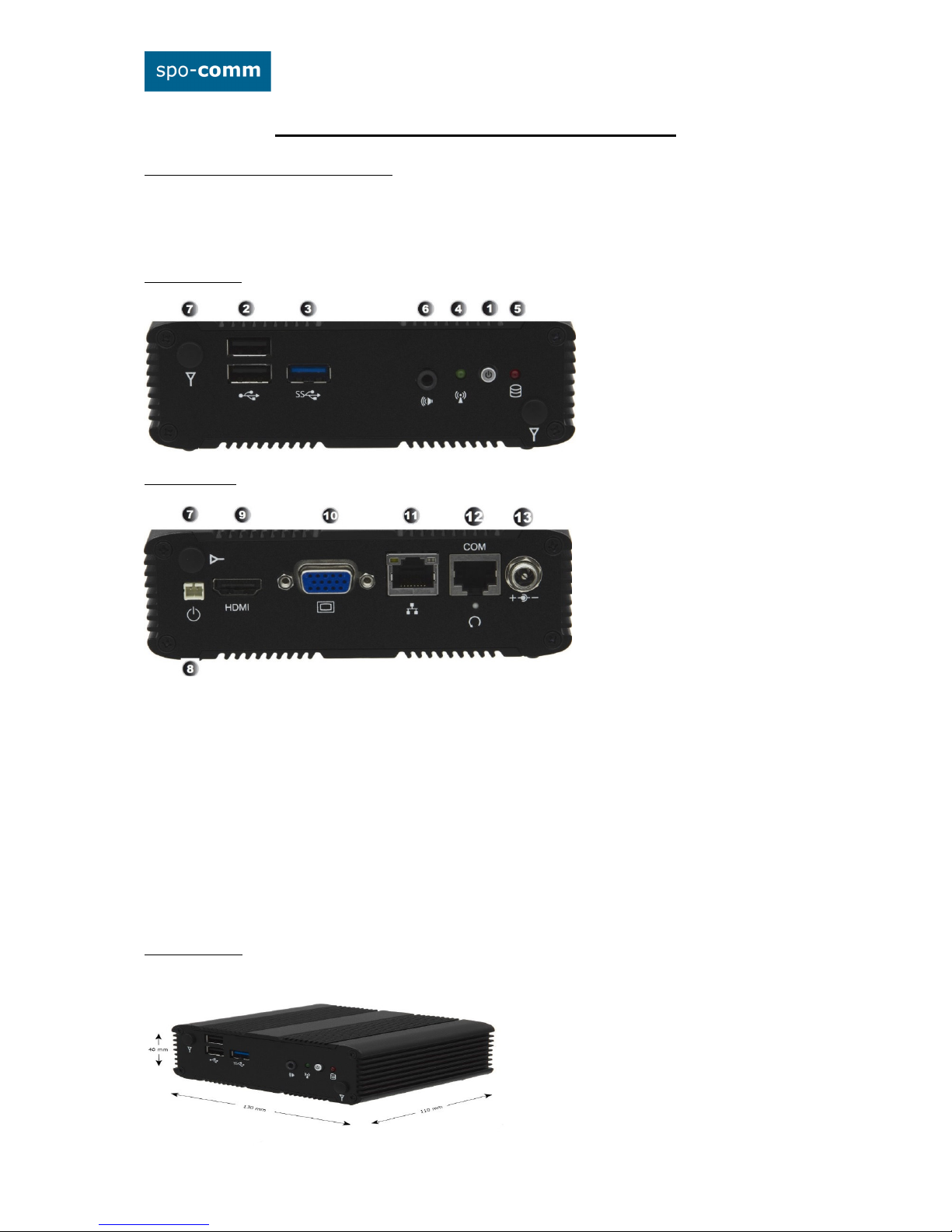
1. Front Panel:
2. Rear Panel:
1. Power Button
2. USB 2.0 Port
3. USB 3.0 Port
4. Audio Line-Out
5. HDD LED
6. Power LED
7. WLAN-Antenna (optional)
8. External Power Button connector
9. HDMI-port
10. VGA-port
11. RJ45-GbE-LAN
12. External RS-232 Serial Port
13. 19V DC connector
3. Dimensions:
Page 2

4. Assembling: (the VESA-mount is optional)
5. BIOS:
Power on the computer and the system will start POST process. When the message below appears on the
screen, press „DEL“ to enter Setup.
To save the BIOS settings press „F10“.
Short description of some BIOS settings:
5.1. Wake On RTC: That allow a computer to 'wake up' after shut down to execute tasks every day or on a
certain day. -> Advanced-> Power Management Configuration -> Resume By RTC Alarm
5.2 Restore on AC Power Loss: This setting specifies whether your system will reboot after a power failure or
interrupt occurs. -> Advanced-> Power Management Configuration -> Restore on AC Power Loss
[Power Off] Leaves the computer in the power off state.
[Power ON] Leaves the computer in the power on state.
[Last State] Restores the system to the previous status before power failure or interrupt occurred.
5.3. pxe-Boot: boot an OS via LAN and DHCP -> Boot -> Boot Configuration -> Network Device BBS Priorities
5.4. Wake On LAN: Wake-on-LAN (WoL) is a particular function that allows the computer to be powered up
from a low-power state by a message from another part of a local area network.
-> Advanced -> Power Management Configuration -> Resume By Ring Device
5.5 Modi Serial-Port COM 1:
Advanced -> Super IO Configuration -> Serial Port 1 Configuration
6. Drivers: The drivers for the spo-book BOX N2930 can be found in our product catalog on the product page
under the tab "Product Details and Downloads" and on the supplied driver stick.
Direct Link: http://www.spo-comm.de/products/en/mini-pcs/box-n2930-fanless.html
Secure the VESA
mounting kit to
your monitor with
four screws.
Place the computer
onto the monitor and
secure it with the heat
dissipating fins properly
on VESA mount kit.
 Loading...