

Page 1
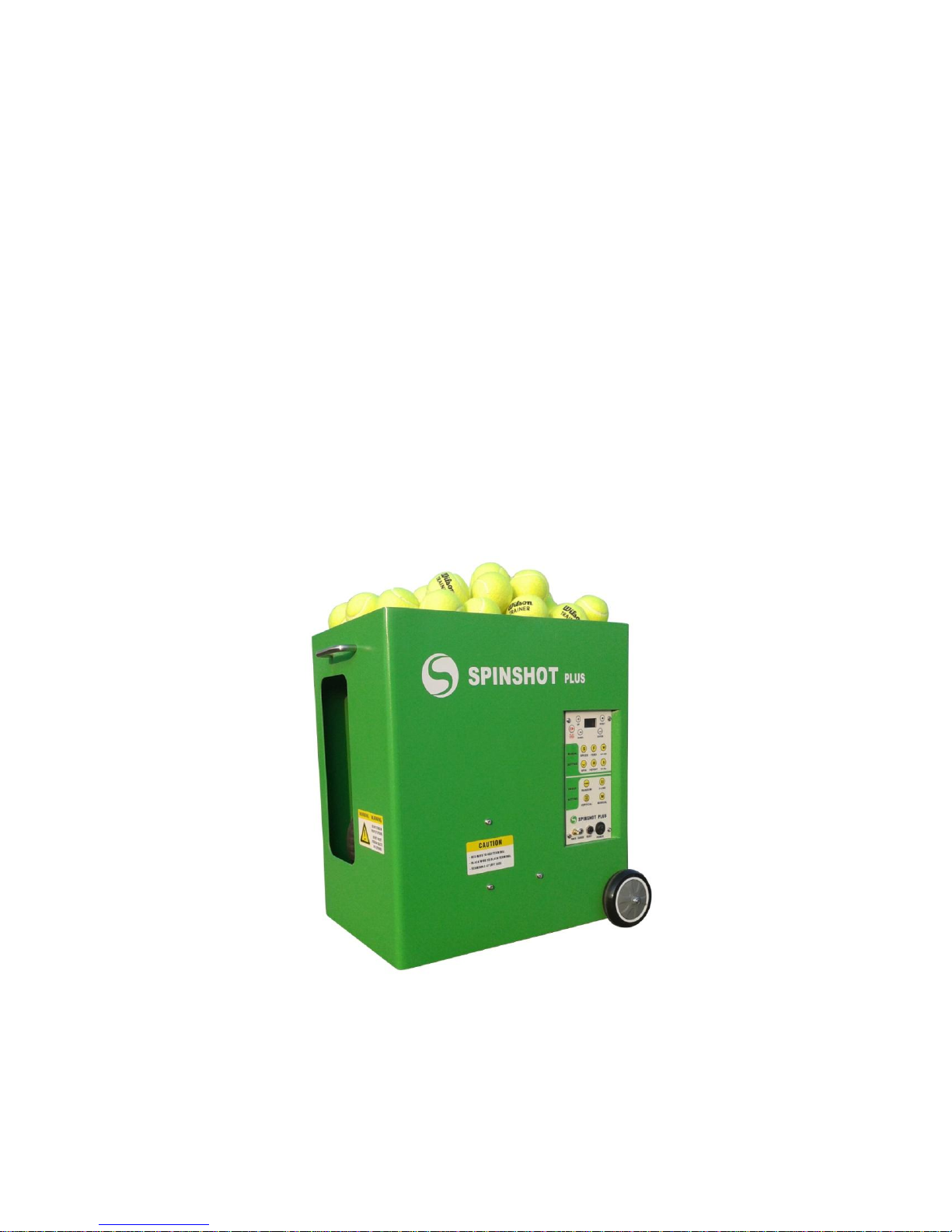
SPINSHOT plus-2
USER MANUAL
Page 2

Page 3

Section-1: Before Using Machine
Introduction
Thank you for purchasing a SPINSHOT Plus-2 tennis ball machine.
This manual contains important information concerning the proper
use and care of your ball machine. Please read owner’s manual
completely before operating your machine.
Plus-2 model combines all features for original Plus model with
all advanced features for Player model.
Tennis Balls To Be Used
Please take note that brand new tennis balls are not recommended to
be used especially during first ten hours of break-in period. The ink
and waxy coating on brand new tennis balls can leave a slick coating
on the new ball throwing wheels, resulting in inconsistent ball throws.
It is best to use balls that are slightly used to reduce the potential for
developing the slick coating on the wheels.
The consistency of ball throws will depend on the consistency of the
tennis balls being used. A mixture of new and old balls will produce
inconsistent throws. Inconsistent ball throws may also be caused by
excess dirt and ink build up on throwing wheels. Cleaning the ball
throwing wheels as described in the section “Maintenance and
Cleaning” will restore consistent performance.
Important Warnings
WARNING: Do not reach or look into the ball exit hole without turning
the main power off and only after both wheels come to a complete
stop.
WARNING: Do not stand closer than 10 meters in front of the ball
machine when the power is on.
WARNING: Do not place balls or foreign objects into the ball hopper
while the power is on. It could cause jam and damage the feeder
motor.
Page 4

WARNING: The overloading of balls into the ball hopper may result in
a jam of the feeder. It is suggested that no more than 120 balls be put
inside the ball hopper.
WARNING: Do not use machine while it is raining or in water. Do not
use wet tennis balls.
Page 5
Section-2: Operating Machine
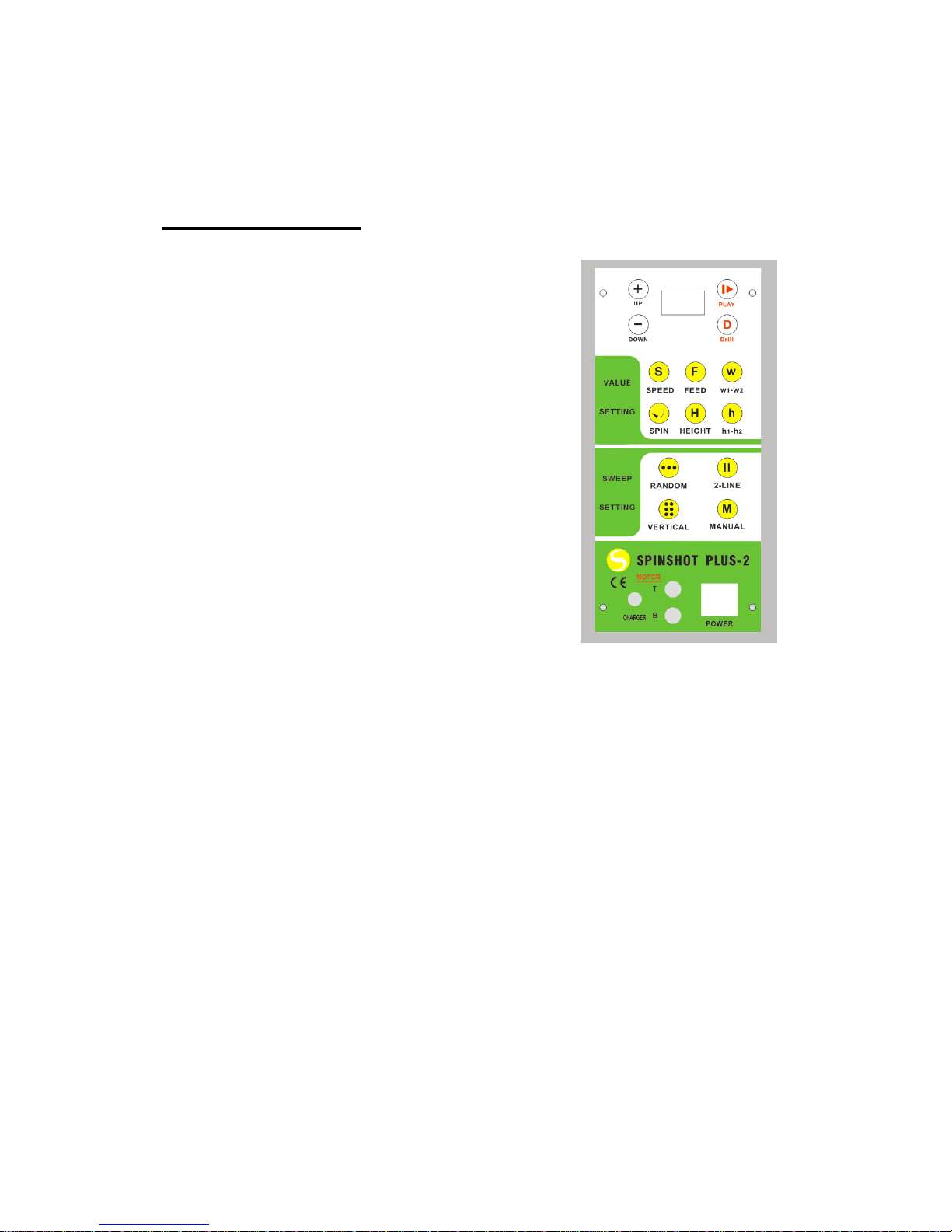
Control Panel
POWER: The power switch is used to turn
the machine on or off. When you turn on the
power, the machine will show its battery
voltage on the LCD. Both horizontal and
vertical motors will perform a functional
initialization for proper function of the
machine. The user then must put the
machine at the centre of the baseline and in
proper direction, which will make machine
sweep the balls evenly across the court.
Powering on the machine will not make
machine start to propel balls. The user
needs to select the settings and then push
the “PLAY” button to start the shots. After
switching the power on, the machine will be
default to work on the last mode. By
pressing again the PLAY button, the machine will be stopped.
If anytime the machine functions improperly, the user can turn
off the power button to reset machine’s control logic. Most of the
time, the improper working of the machine is caused by low
battery voltage.
MOTOR: The MOTOR switch protects the electronics and motors.
When activated, the switch pops out approximately 6 mm. In the
event the switch is activated, turn off the central power, push the
switch back in, check any balls jammed inside machine and then turn
on the main power to normal operation status. The automatic
activation can be caused by excessively dirty or slick ball-throwing
wheels, which can prevent the wheels from properly gripping the
balls. Cleaning the ball-throwing wheels as described in the section
“Maintenance and Cleaning” will restore proper performance.
CHARGER JACK: Plug the charger into the jack and the other end
into a power outlet to start the charging of your machine.
Page 6

Manual Setting Buttons
PLAY: The button will trigger the machine to start or stop. Every time
you press this button to start the machine, the machine will hold for 10
seconds before it propels the balls. Machine will not take any setting
changes during this time. The 10 seconds hold was designed to give
the player time to walk to the opposite side of the court.
UP(+)/DOWN(-): The UP(+)/DOWN(-) buttons are used to adjust the
manual setting parameters. Before clicking either button, the user
must choose the types of settings to be adjusted. The types of
settings include ball SPEED, ball HEIGHT, FEED frequency, SPIN
level, h1-h2 and w1-w2. Please find sections below for more details
about various setting types.
DRILL: The DRILL button is used to start the preprogrammed drills
that are saved in the machine. Programming drills can only be done
from the phone remote. Please refer to section "Phone Remote
Control" for how to use the phone remote app. After pressing the Drill
button, the user can press + or – to choose the drill number to play.
SPEED: The SPEED button must be pressed first when the user
adjusts the ball speed. Then the user can press the UP or DOWN
buttons to adjust the speed level. Its value can be shown on LCD with
maximum level at 20 and minimum level at 1. The SPEED value can
be adjusted when the machine is in running mode and will take effect
immediately. In all vertical oscillation modes, clicking the SPEED
button a second time will set the speed level for the second height
level (h2 level).
FEED: The FEED button must be pressed before the user adjusts the
ball feed interval. Then the user can press the UP or DOWN buttons
to adjust the feed rate. Its level is shown on LCD with 10 being fastest
(approximately 1 ball per second at the manual setting mode).
SPIN: The SPIN button must be pressed first when the user adjusts
the ball SPIN level. Then the user can press the UP or DOWN button
to adjust the amount of spin. It can set topspin or slice levels. When
SPIN is set at 0, it will be flat balls. +9 represents the highest level of
topspin and -9 represents the highest level of slice. The SPIN level
can be adjusted when the machine is in the running mode and will be
Page 7

effective immediately.
HEIGHT: The HEIGHT button must be pressed first when the user
adjusts the ball height level. Then the user can press the UP or
DOWN buttons to adjust the height value. It will control the ball height
when the machine is not running in the vertical oscillation mode. The
height level can be shown on the LCD with highest level at 50 and
lowest level at 1.
In the vertical oscillation modes, the user must use h1-h2 button to
adjust the height oscillation range. Please see below section for h1-h2
setting.
h1-h2: This button is used only in the vertical oscillation modes. In the
vertical oscillation modes, the machine is shooting balls at 2 height
levels defined by h1 and h2. By pressing once the h1-h2 button will
give access to set the h1 level. Pressing again the h1-h2 button will
give access to set the h2 level. This setting is only effective when the
machine is set on the vertical oscillation mode (horizontal vertical
oscillation mode, 2-line vertical oscillation mode or vertical oscillation
mode).
w1-w2: This button is used for horizontal 2-line oscillation modes,
which includes 2-line oscillation and 2-line vertical oscillation. In such
modes, the machine is shooting balls to a defined width. W1 stands
for the horizontal position for ball-1, and W2 stand for horizontal
position for ball-2. Pressing once on the w1-w2 button will allow the
user to set the W1 level with a minimum level of 1 and a maxim level
of 20. Pressing again on the w1-w2 button will allow the user to set
the W2 level with a minimum level of 1 and a maxim level of 20. This
setting is only effective when the machine is set on the 2-Line
oscillation mode (2-line oscillation or 2-line vertical oscillation).
Oscillation Mode Setting and Buttons
SPINSHOT Plus-2 model can support various oscillation modes, or a
combination of oscillation modes. Overall, it can support 5 types of
oscillation:
➢ Type-1: RANDOM HORIZONTAL OSCILLATION;
Page 8

➢ Type-2: 2-LINE HORIZONTAL OSCILLATION;
➢ Type-3: VERTICAL OSCILLATION;
➢ Type-4: RANDOM HORIZONTAL AND VERTICAL OSCILLATION;
➢ Type-5: 2-LINE HORIZONTAL AND VERTICAL OSCILLATION;
RANDOM: Pressing this button will set machine to horizontal
oscillation mode. In this mode, the machine will randomly shoot balls
horizontally. Ball speed, height, spin and feed rate can be adjusted for
the random oscillation mode.
2-LINE: Pressing this button will set the machine to the 2-line
horizontal oscillation mode. The two-line oscillation automatically
shoots to two preset locations allowing a user to practice alternating
forehand and backhand shots. 2-line width can be defined by w1-w2
setting as described in section of “w1-w2”.
After the machine has been set to the 2-line oscillation mode, the user
can still press vertical oscillation to make the machine set to a 2-LINE
HORIZONTAL AND VERTICAL OSCILLATION.
VERTICAL: Pressing the VERTICAL button will set the machine to a
vertical oscillation mode. The vertical oscillation mode will allow a
combination of high balls and low balls. The machine will shoot balls
at 2 height levels defined by h1 and h2.
If machine has been in the random horizontal oscillation mode,
pressing this button will set the machine to RANDOM HORIZONTAL
AND VERTICAL OSCILLATION mode. If the machine has been in 2line oscillation mode, pressing this button will set the machine to a 2LINE HORIZONTAL AND VERTICAL OSCILLATION mode.
MANUAL: Pressing the MANUAL button will set machine back to
manual mode without oscillations.
Page 9

Battery Charging (for Battery Model)
Connect the battery charger to a live electrical outlet and then insert
battery charger into the socket labeled “CHARGER” on the control
panel.
The battery will be fully charged in 8 to 15 hours. The LED light on the
charger pack will be green when the machine is fully charged. If LED
stays red, the charging process is still continuing. A fully charged
battery will provide approximately 2-3 hours of practice time. Higher
ball speed requires more power and therefore will drain the battery
faster.
It is very important to CHARGE THE BATTERY IMMEDIATELY
AFTER EACH USE.
Battery Cage
The battery cage enables the user to
easily install and replace the battery
or an AC module. Disassemble the
wheel first before opening the battery
cage door. If wheel was installed too
tightly, screw it down. After opening
the cage, you will find 2 wires which
should be connected to the battery
terminals. The red wire should be
connected to the red terminal and black wire to the black terminal.
Care must be taken to ensure you put the battery terminals to the top
left side when you insert the battery into the cage.
Static Electricity
It is possible that the action of the tennis balls rubbing against the
throwing wheels will cause a small static electric shock when you
touch the control panel. To eliminate this connect a wire from the
control panel to the court surface.
Transporting and Storage
Remove all balls and close the ball hopper before transporting your
Page 10

SPINSHOT ball machine. Store the machine in a clean, dry location.
Never store the machine in a closed trunk where temperatures can be
very high. Extreme temperatures and conditions can affect the
machine’s electronic board and battery. Never store the machine
outside. Exposure to rain and snow will shorten the life of the
machine.
Maintenance and Cleaning
It is suggested that you clean the ball throwing wheels every year or
after 150 hours of use especially when the machine is not throwing
the balls consistently. Clean the ball throwing wheels only when the
machine is off. Firmly rub coarse sandpaper across the throwing
wheels through the ball ejection opening to remove the dirt and ink
build-up. Sand the entire circumference of each wheel and use
enough pressure to rough-up the rubber surface of the wheels.
To clean the case, use a slightly damp cloth. Do not use chemicals or
abrasive cleansers. Use a vacuum cleaner to clean dirt from the
inside of the machine. The use of compressed air for cleaning is not
recommended.
Page 11

Section-3: Phone Remote Control
The Plus-2 model features a phone remote control. Using the phone
remote, the Plus-2 model can work like a Player model.
Turn on the phone app after powering up the ball machine. The
phone can then connect with your machine via WIFI. The android
phone may connect automatically, and the Apple iPhone user must
select USR- xxx in WIFI setting before starting the remote app.
For Android users, please download your Drill Maker app from
Google Play or go to the following website for your installation code:
http://www.spinshotsports.com/Remote-Player.html. Plus-2 Model
uses the same APP as Player model.
Apple iPhone users can find "Drill Maker" in the apple store. Please
choose the model number as Plus-2 or Player before use the App.
Please review the control menu for your phone remote below. The top
left corner shows the connection status, and the top right corner
shows the drill mode or manual mode. The right bottom corner shows
the machine’s power supply voltage. For normal working conditions,
this voltage should be over 11 V. The phone remote can ONLY work
to control the machine AFTER the machine has finished the startup
calibration and the user has pressed the PLAY button. If the remote
doesn't show CONNECTED status, click DRILL MAKER logo or go to
WIFI setting to make the connection.
Page 12

The list below will explain each button’s function.
Drill
Maker
If the Phone Remote can’t be connected, press the logo at
the top left corner and this will set up the WIFI connection
with the ball machine. Not required to reset the machine or
APP.
Press it to start the machine to feed the balls. Press again to
stop the feeding of the balls. It is not required to press this for
switching between different drill modes.
Pressing different D buttons will allow the machine to provide various
drill modes. Long pressing will enter settings page where user can
edit all parameters for each shot. In the setting page, the drill setting
can be downloaded to the machine by clicking the save button. See
section “Drill Setting” for more details.
This button is effective in manual mode. Press this button
first before adjusting spin level.
Page 13

This button is effective in manual mode. Press this button
first before adjusting height level.
This button is effective in manual mode. Press this button
first before adjusting speed level.
This button is effective in manual mode. Press this button
first before adjusting feed rate.
This button is effective in manual mode. Press this button
after selecting the values to be changed.
This button is effective in manual mode. Press this button
after selecting the values to be changed.
Press this button if you want to manually control the speed,
spin, feed rate or position of the balls
Press this button will show the version of the machine and
also provide button introductions
HORZ is used to set the ball’s horizontal angel from a value from 1 to
20, 1 being a far right forehand and a 20 being a far left backhand for
a right handed player. When you set HORZ value to 0 (R), the
machine will shoot balls in a random horizontal direction.
RATE is for setting the ball speed from a value from 1 to 20 with a 20
be the maxim ball speed.
SPIN is for setting the ball spin with 0 for flat shots, to a maximum
topspin of + 9 and maximum backspin of - 9.
FEED is for changing the ball feed intervals from 10 for no interval,
down to 1 with a 9-second interval.10 is the fastest feed speed and 1
Page 14

is the slowest feed speed.
HGHT is for adjusting the ball height from the lowest position of 1 to
the highest position of 50. If you set HGHT value to “R”, the
machine will shoot balls in a random vertical angle and also
random speed. FEED rate will freeze at 6.
After you program the desired values, press the SAVE button on the
top right corner of the display. The machine will save the setting on
the phone and also download settings to your machine. The machine
will switch directly to the programmed drill modes after the user has
saved the settings.
The user needs to understand that the serving wheels can speed up
faster than they can slow down. If the user wants to set quick shots
followed by slow shots, it is required to set long feed intervals, to give
the machine more time to slow down, or input more speed changes.
For example, when #1 shot set at level 19, and the user wants to
configure #2 shot at level 12. The user can set feed rate to a lower
level such as 4 which will then take 6 seconds for the machine to slow
down, or the user can set the #2 shot with a speed level of 1, which
will then make the ball machine slow down more quickly.
Page 15

Section-4: Warranty
Warranty Period
The warranty service is free for materials and workmanship for a
period of 2 years from date of original purchase, except for the
battery, which is with warranty for three months.
Scope of Warranty
This warranty covers all defects in material and workmanship. The
following are not covered by the warranty:
◇ Units damaged by accident, misuse, abuse, neglect
◇ Units modified by unauthorized personnel
◇ Units damaged during shipment
◇ Battery damage
Notes:
1. Each time the user presses the oscillation button to enter a
different oscillation mode, there will be a default setting shown in
the LCD. Such a setting is the Last Saved value for the
corresponding oscillation mode.
2. Keep pressing the “+” or “-“ button to continuously increase or
decrease the selected values.
3. By properly positioning the machine, the user can make the
machine shoot balls evenly across the court during horizontal
oscillation modes.
4. The serving wheels cannot slow down quickly. So in vertical
oscillation mode, the feed rate can be set in low value to give
more time for serving wheels to slow down.
5. The high top spin setting will slow down the balls. Therefore, when
machine works with high spin setting, it is suggested that the
machine be set to a high speed level of over 17. Default speed
setting will be 20 for spin level higher than 7.
 Loading...